 Скачать презентацию Automated Copyright Notice System ACNS September 2003 UNIVERSAL
5a2912e86a840600aff0c56a903615a5.ppt
- Количество слайдов: 20



Automated Copyright Notice System (ACNS) September 2003 UNIVERSAL MUSIC GROUP UNIVERSAL STUDIOS 1
ACNS Proposal • Contact Information: – Aaron Markham Universal Studios 818 -777 -3111 aaron. markham@unistudios. com – Christopher Bell Universal Music Group 310 -865 -8495 acns@umusic. com 2
ACNS Proposal • Background: – Universal has submitted the ACNS proposal to the RFI from the Technology Task Force of the “Colleges Joint Committee of the Higher Education and Entertainment Communities”. – Universal is arranging tests and pilots with technology vendors and interested parties. – Universal has incorporated XML into our Infringement notices since summer 2003 3
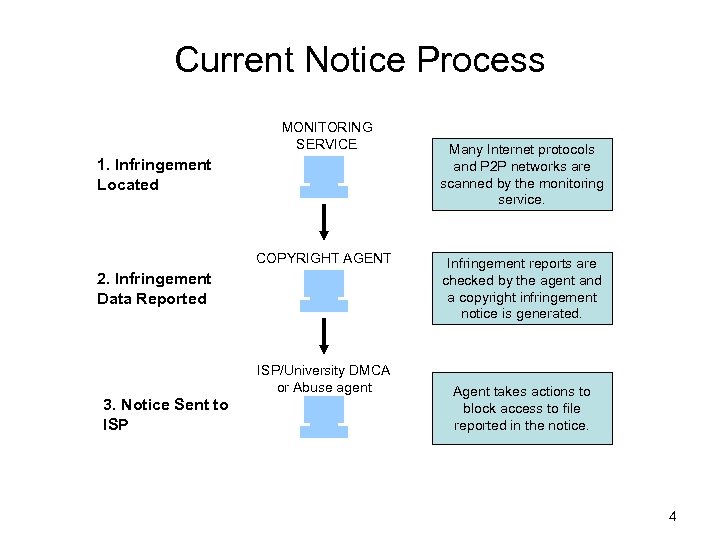
Current Notice Process MONITORING SERVICE 1. Infringement Located COPYRIGHT AGENT 2. Infringement Data Reported ISP/University DMCA or Abuse agent 3. Notice Sent to ISP Many Internet protocols and P 2 P networks are scanned by the monitoring service. Infringement reports are checked by the agent and a copyright infringement notice is generated. Agent takes actions to block access to file reported in the notice. 4
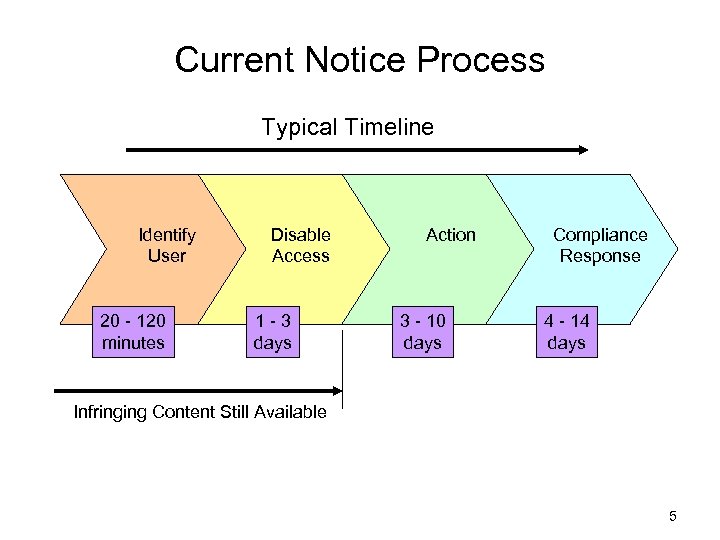
Current Notice Process Typical Timeline Identify User 20 - 120 minutes Disable Access 1 -3 days Action 3 - 10 days Compliance Response 4 - 14 days Infringing Content Still Available 5
ACNS Architecture • Design Goals: – Capable of rapid development and deployment: take advantage of the popularity of traffic management devices – Use established concept of copyright notice. – Resistant to P 2 P evolutionary measures like encryption 6
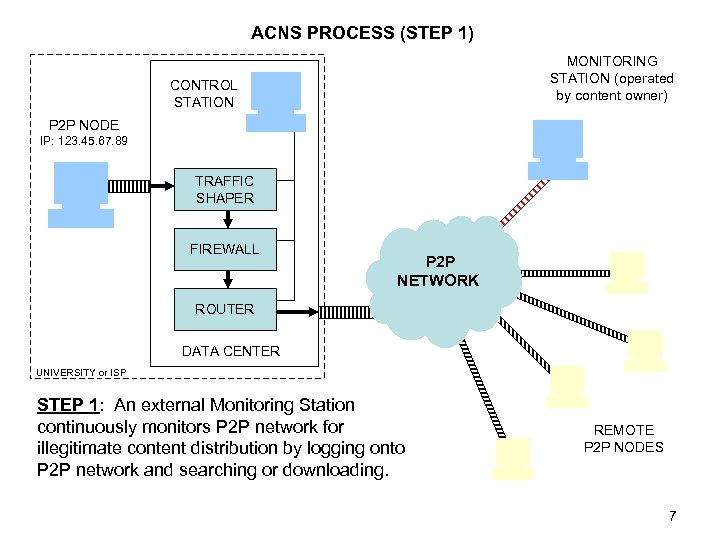
ACNS PROCESS (STEP 1) MONITORING STATION (operated by content owner) CONTROL STATION P 2 P NODE IP: 123. 45. 67. 89 TRAFFIC SHAPER FIREWALL P 2 P NETWORK ROUTER DATA CENTER UNIVERSITY or ISP STEP 1: An external Monitoring Station continuously monitors P 2 P network for illegitimate content distribution by logging onto P 2 P network and searching or downloading. REMOTE P 2 P NODES 7
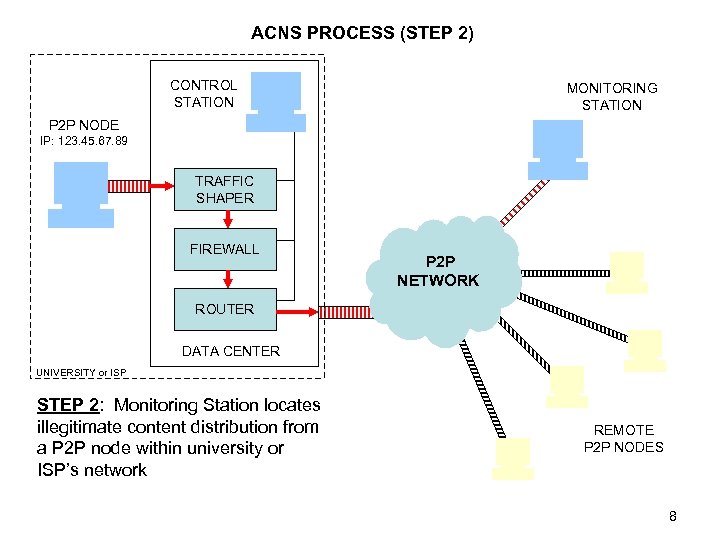
ACNS PROCESS (STEP 2) CONTROL STATION MONITORING STATION P 2 P NODE IP: 123. 45. 67. 89 TRAFFIC SHAPER FIREWALL P 2 P NETWORK ROUTER DATA CENTER UNIVERSITY or ISP STEP 2: Monitoring Station locates illegitimate content distribution from a P 2 P node within university or ISP’s network REMOTE P 2 P NODES 8
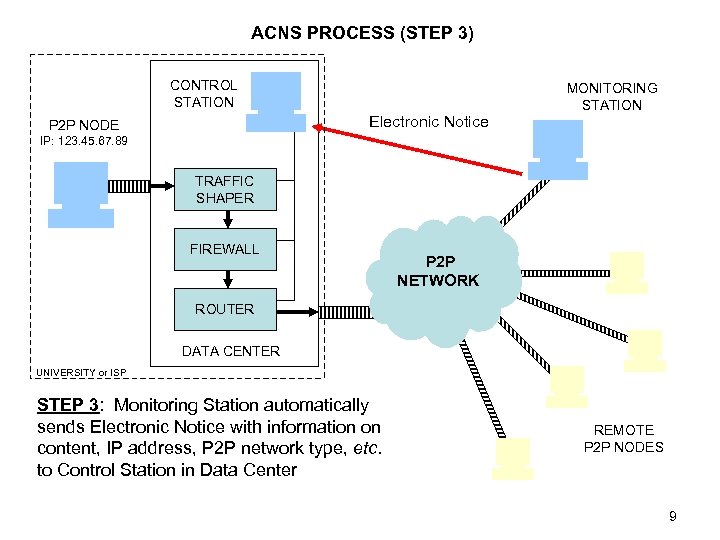
ACNS PROCESS (STEP 3) CONTROL STATION MONITORING STATION Electronic Notice P 2 P NODE IP: 123. 45. 67. 89 TRAFFIC SHAPER FIREWALL P 2 P NETWORK ROUTER DATA CENTER UNIVERSITY or ISP STEP 3: Monitoring Station automatically sends Electronic Notice with information on content, IP address, P 2 P network type, etc. to Control Station in Data Center REMOTE P 2 P NODES 9
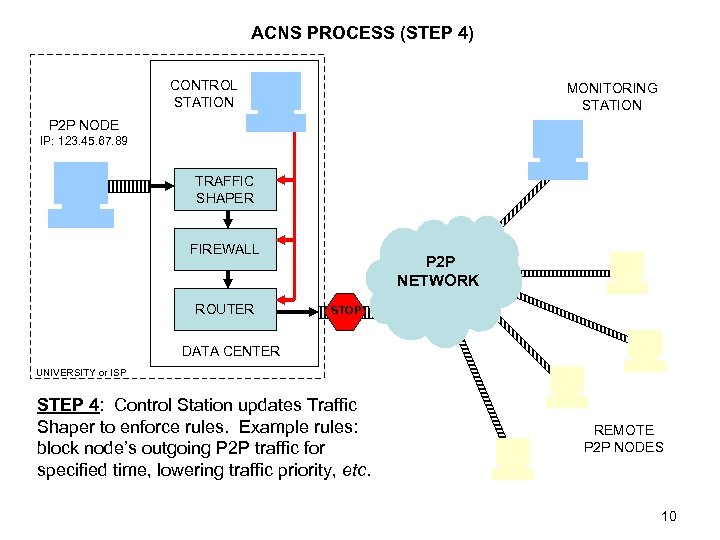
ACNS PROCESS (STEP 4) CONTROL STATION MONITORING STATION P 2 P NODE IP: 123. 45. 67. 89 TRAFFIC SHAPER FIREWALL ROUTER P 2 P NETWORK STOP DATA CENTER UNIVERSITY or ISP STEP 4: Control Station updates Traffic Shaper to enforce rules. Example rules: block node’s outgoing P 2 P traffic for specified time, lowering traffic priority, etc. REMOTE P 2 P NODES 10
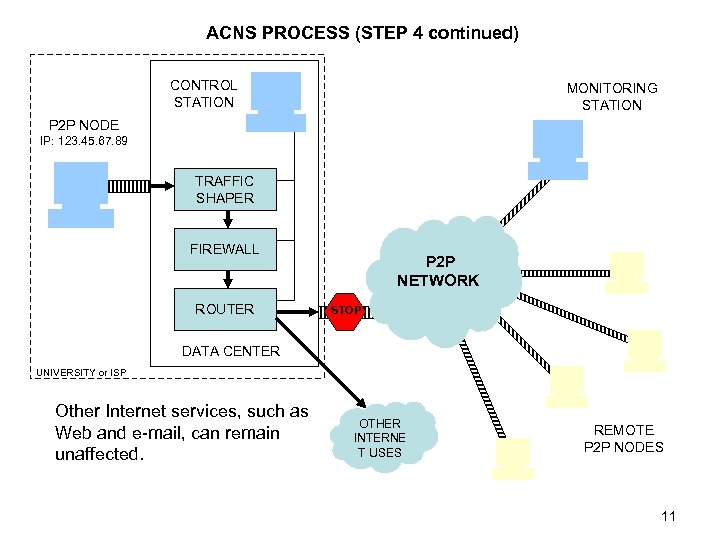
ACNS PROCESS (STEP 4 continued) CONTROL STATION MONITORING STATION P 2 P NODE IP: 123. 45. 67. 89 TRAFFIC SHAPER FIREWALL ROUTER P 2 P NETWORK STOP DATA CENTER UNIVERSITY or ISP Other Internet services, such as Web and e-mail, can remain unaffected. OTHER INTERNE T USES REMOTE P 2 P NODES 11
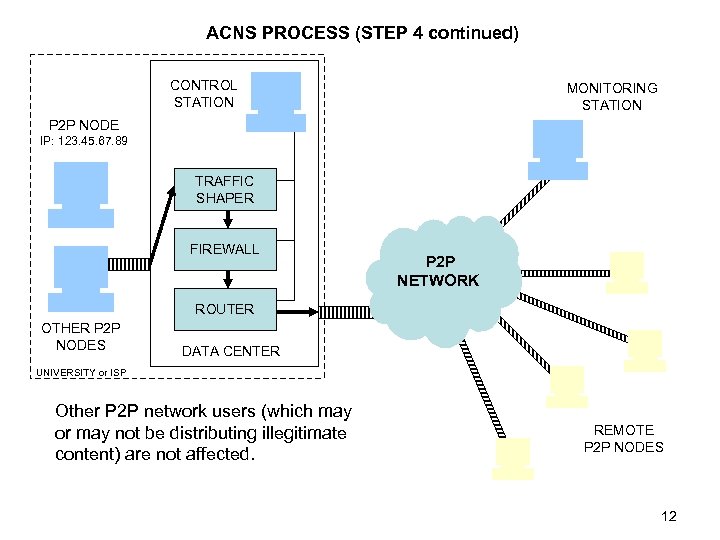
ACNS PROCESS (STEP 4 continued) CONTROL STATION MONITORING STATION P 2 P NODE IP: 123. 45. 67. 89 TRAFFIC SHAPER FIREWALL P 2 P NETWORK ROUTER OTHER P 2 P NODES DATA CENTER UNIVERSITY or ISP Other P 2 P network users (which may or may not be distributing illegitimate content) are not affected. REMOTE P 2 P NODES 12
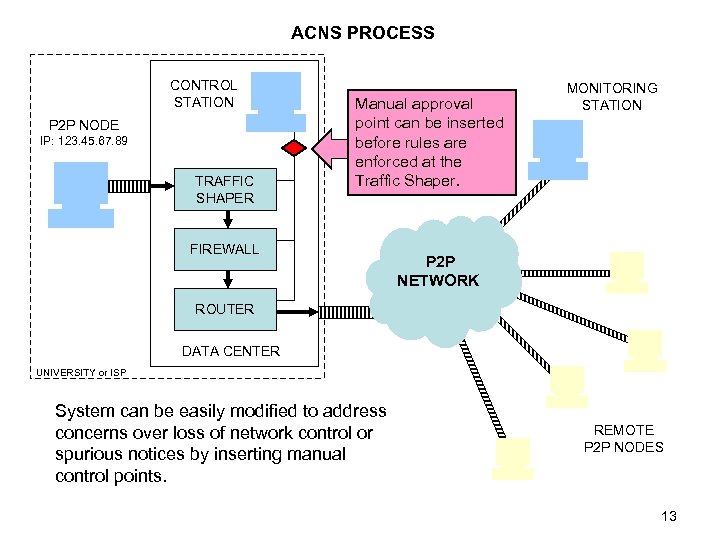
ACNS PROCESS CONTROL STATION P 2 P NODE IP: 123. 45. 67. 89 TRAFFIC SHAPER Manual approval point can be inserted before rules are enforced at the Traffic Shaper. FIREWALL MONITORING STATION P 2 P NETWORK ROUTER DATA CENTER UNIVERSITY or ISP System can be easily modified to address concerns over loss of network control or spurious notices by inserting manual control points. REMOTE P 2 P NODES 13
ACNS Architecture • System Elements: – Monitoring Station: Identify illegitimate content distribution by joining the P 2 P network and searching for specific content. – Traffic Shaper: Identify network traffic based on packets and enforce “penalty box” rules such as blocking traffic, bandwidth limits, or lower priorities. • Example Vendors: Ellacoya, P-Cube, Cisco, Akonix • Devices already deployed at many universities (800+) for cost savings. • Moving into ISP market -- cable ISPs use “penalty box” to control bandwidth hogs. 14
ACNS Architecture • System Elements: – “Penalty-Box”: Traffic-shapers already support very flexible rules such as: (i) block infringer’s P 2 P traffic for X hours; (ii) block outgoing P 2 P traffic; (iii) assign lower priority and bandwidth limit to infringer; etc. – Resistant to Encryption: Only need to identify the type of traffic, not the content. • For example, existing traffic shapers are able to identify encrypted Freenet traffic. – Applicable to other distribution methods: FTP, IRC, HTTP, etc. 15
Standardized Notice Format • Standardized Notice Format: – Service providers complain about the lack of a standardized copyright notice across movie, music, and software industries. – Universal has developed a standard XML format to append to copyright notices. – Schema has been finalized incorporating RIAA, MPAA, and IFPI feedback. In process of broadening to vendors (Bay. TSP, Media. Sentry, Ranger, etc. ) and other industries (BSA, etc. ). – Universal Studios and other studios are now using the XML in their notices. – Many other copyright holders such as software and music companies are in the process of implementing the standard XML notice. 16
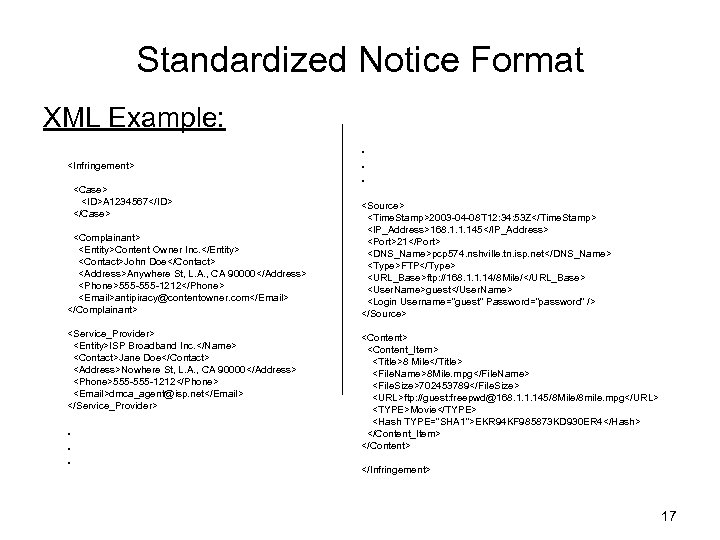
Standardized Notice Format XML Example: <Infringement> <Case> <ID>A 1234567</ID> </Case> <Complainant> <Entity>Content Owner Inc. </Entity> <Contact>John Doe</Contact> <Address>Anywhere St, L. A. , CA 90000</Address> <Phone>555 -1212</Phone> <Email>antipiracy@contentowner. com</Email> </Complainant> <Service_Provider> <Entity>ISP Broadband Inc. </Name> <Contact>Jane Doe</Contact> <Address>Nowhere St, L. A. , CA 90000</Address> <Phone>555 -1212</Phone> <Email>dmca_agent@isp. net</Email> </Service_Provider> . . . <Source> <Time. Stamp>2003 -04 -08 T 12: 34: 53 Z</Time. Stamp> <IP_Address>168. 1. 1. 145</IP_Address> <Port>21</Port> <DNS_Name>pcp 574. nshville. tn. isp. net</DNS_Name> <Type>FTP</Type> <URL_Base>ftp: //168. 1. 1. 14/8 Mile/</URL_Base> <User. Name>guest</User. Name> <Login Username="guest" Password=“password" /> </Source> <Content_Item> <Title>8 Mile</Title> <File. Name>8 Mile. mpg</File. Name> <File. Size>702453789</File. Size> <URL>ftp: //guest: freepwd@168. 1. 1. 145/8 Mile/8 mile. mpg</URL> <TYPE>Movie</TYPE> <Hash TYPE="SHA 1">EKR 94 KF 985873 KD 930 ER 4</Hash> </Content_Item> </Content> </Infringement> 17
Advantages of ACNS • Advantages: – Required staff resources for responding to copyright notices are greatly reduced. – Copyright notices are more efficiently handled and compliance tracking is improved, thus reducing potential liability. – Service provider’s own network policies are efficiently enforced. – Flexible, limited response via “penalty-box”. 18
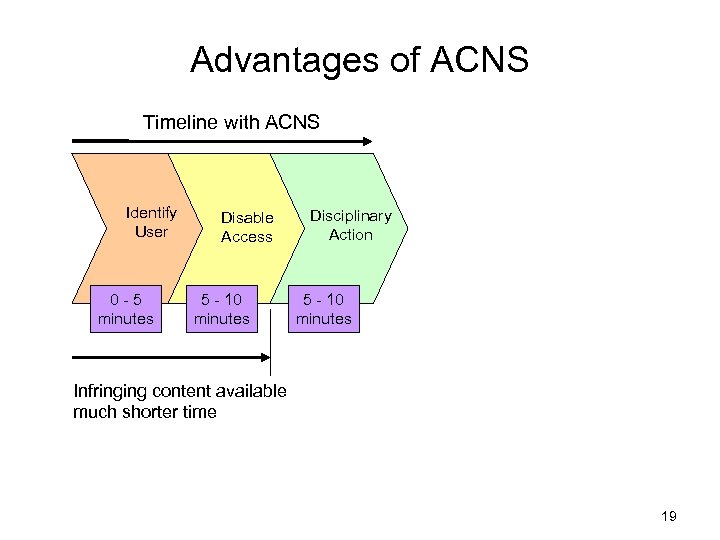
Advantages of ACNS Timeline with ACNS Identify User 0 -5 minutes Disable Access 5 - 10 minutes Disciplinary Action 5 - 10 minutes Infringing content available much shorter time 19
Advantages of ACNS • Advantages for content owners: – Reduces time required to get infringing content off the network, and avoid waiting until “business hours” for removal. – Containment: faster response means viral replication of content is limited. 20
Скачать презентацию Automated Copyright Notice System ACNS September 2003 UNIVERSAL
5a2912e86a840600aff0c56a903615a5.ppt