


 Скачать презентацию Author Jon Kleppe NTNU Assistant producer Torunn Lilleeng
48ad6bb9927449fc798e2b7acb6bcc50.ppt
- Количество слайдов: 40
 Author: Jon Kleppe, NTNU Assistant producer: Torunn Lilleeng Introduction to Applied Computing in Geoscience and Petroleum, TPG 4155
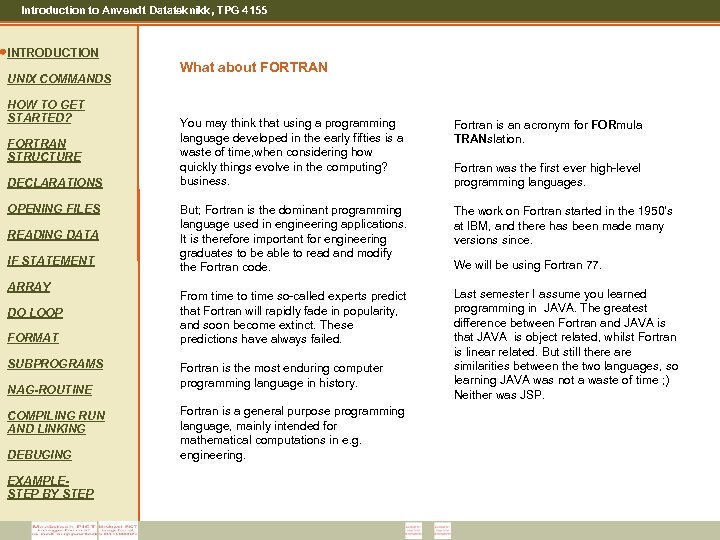 Introduction to Anvendt Datateknikk, TPG 4155 INTRODUCTION UNIX COMMANDS HOW TO GET STARTED? FORTRAN STRUCTURE DECLARATIONS OPENING FILES READING DATA IF STATEMENT ARRAY DO LOOP FORMAT SUBPROGRAMS NAG-ROUTINE COMPILING RUN AND LINKING DEBUGING EXAMPLESTEP BY STEP What about FORTRAN You may think that using a programming language developed in the early fifties is a waste of time, when considering how quickly things evolve in the computing? business. Fortran is an acronym for FORmula TRANslation. But; Fortran is the dominant programming language used in engineering applications. It is therefore important for engineering graduates to be able to read and modify the Fortran code. The work on Fortran started in the 1950's at IBM, and there has been made many versions since. From time to time so-called experts predict that Fortran will rapidly fade in popularity, and soon become extinct. These predictions have always failed. Last semester I assume you learned programming in JAVA. The greatest difference between Fortran and JAVA is that JAVA is object related, whilst Fortran is linear related. But still there are similarities between the two languages, so learning JAVA was not a waste of time ; ) Neither was JSP. Fortran is the most enduring computer programming language in history. Fortran is a general purpose programming language, mainly intended for mathematical computations in e. g. engineering. Fortran was the first ever high-level programming languages. We will be using Fortran 77.
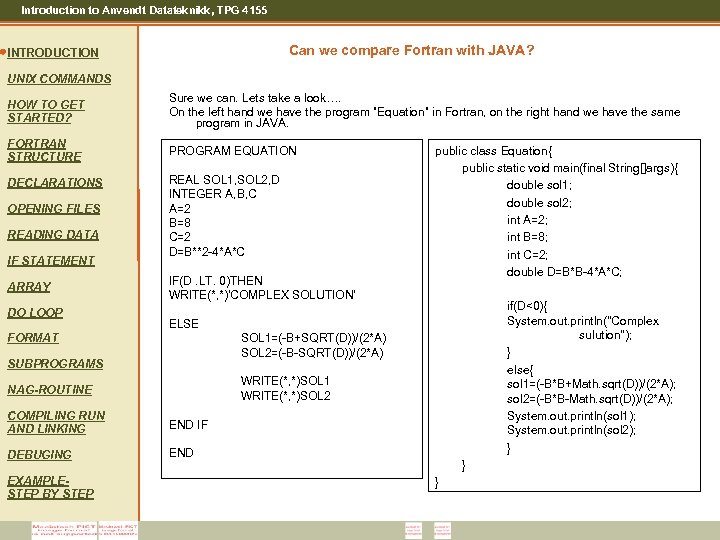 Introduction to Anvendt Datateknikk, TPG 4155 Can we compare Fortran with JAVA? INTRODUCTION UNIX COMMANDS HOW TO GET STARTED? Sure we can. Lets take a look…. On the left hand we have the program ”Equation” in Fortran, on the right hand we have the same program in JAVA. FORTRAN STRUCTURE PROGRAM EQUATION DECLARATIONS OPENING FILES READING DATA IF STATEMENT ARRAY DO LOOP REAL SOL 1, SOL 2, D INTEGER A, B, C A=2 B=8 C=2 D=B**2 -4*A*C IF(D. LT. 0)THEN WRITE(*, *)'COMPLEX SOLUTION‘ public class Equation{ public static void main(final String[]args){ double sol 1; double sol 2; int A=2; int B=8; int C=2; double D=B*B-4*A*C; if(D<0){ System. out. println("Complex sulution"); } else{ sol 1=(-B*B+Math. sqrt(D))/(2*A); sol 2=(-B*B-Math. sqrt(D))/(2*A); System. out. println(sol 1); System. out. println(sol 2); } ELSE SOL 1=(-B+SQRT(D))/(2*A) SOL 2=(-B-SQRT(D))/(2*A) FORMAT SUBPROGRAMS WRITE(*, *)SOL 1 WRITE(*, *)SOL 2 NAG-ROUTINE COMPILING RUN AND LINKING END IF DEBUGING END EXAMPLESTEP BY STEP } }
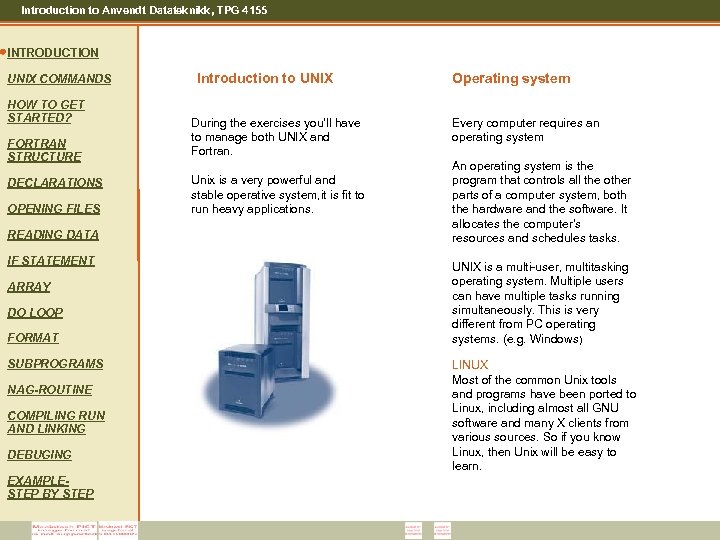 Introduction to Anvendt Datateknikk, TPG 4155 INTRODUCTION UNIX COMMANDS HOW TO GET STARTED? FORTRAN STRUCTURE DECLARATIONS OPENING FILES READING DATA IF STATEMENT ARRAY DO LOOP FORMAT SUBPROGRAMS NAG-ROUTINE COMPILING RUN AND LINKING DEBUGING EXAMPLESTEP BY STEP Introduction to UNIX During the exercises you’ll have to manage both UNIX and Fortran. Unix is a very powerful and stable operative system, it is fit to run heavy applications. Operating system Every computer requires an operating system An operating system is the program that controls all the other parts of a computer system, both the hardware and the software. It allocates the computer's resources and schedules tasks. UNIX is a multi-user, multitasking operating system. Multiple users can have multiple tasks running simultaneously. This is very different from PC operating systems. (e. g. Windows) LINUX Most of the common Unix tools and programs have been ported to Linux, including almost all GNU software and many X clients from various sources. So if you know Linux, then Unix will be easy to learn.
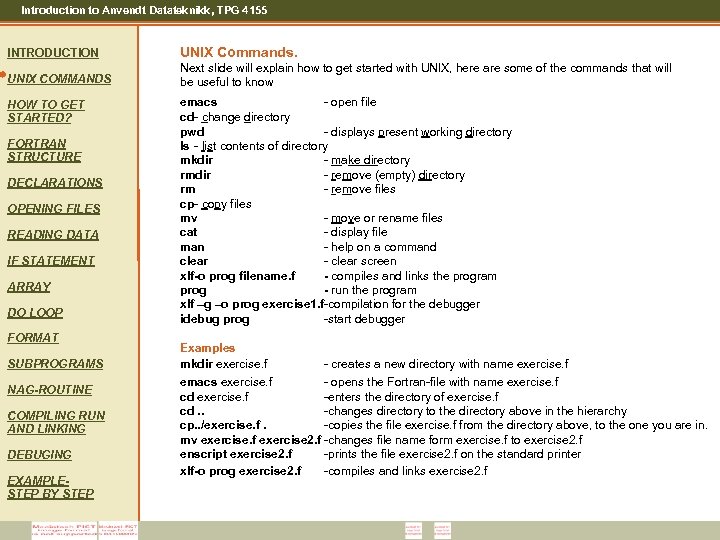 Introduction to Anvendt Datateknikk, TPG 4155 INTRODUCTION UNIX Commands. UNIX COMMANDS Next slide will explain how to get started with UNIX, here are some of the commands that will be useful to know HOW TO GET STARTED? FORTRAN STRUCTURE DECLARATIONS OPENING FILES READING DATA IF STATEMENT ARRAY DO LOOP FORMAT SUBPROGRAMS NAG-ROUTINE COMPILING RUN AND LINKING DEBUGING EXAMPLESTEP BY STEP emacs - open file cd- change directory pwd - displays present working directory ls - list contents of directory mkdir - make directory rmdir - remove (empty) directory rm - remove files cp- copy files mv - move or rename files cat - display file man - help on a command clear - clear screen xlf-o prog filename. f - compiles and links the program prog - run the program xlf –g –o prog exercise 1. f-compilation for the debugger idebug prog -start debugger Examples mkdir exercise. f - creates a new directory with name exercise. f emacs exercise. f - opens the Fortran-file with name exercise. f cd exercise. f -enters the directory of exercise. f cd. . -changes directory to the directory above in the hierarchy cp. . /exercise. f. -copies the file exercise. f from the directory above, to the one you are in. mv exercise. f exercise 2. f -changes file name form exercise. f to exercise 2. f enscript exercise 2. f -prints the file exercise 2. f on the standard printer xlf-o prog exercise 2. f -compiles and links exercise 2. f
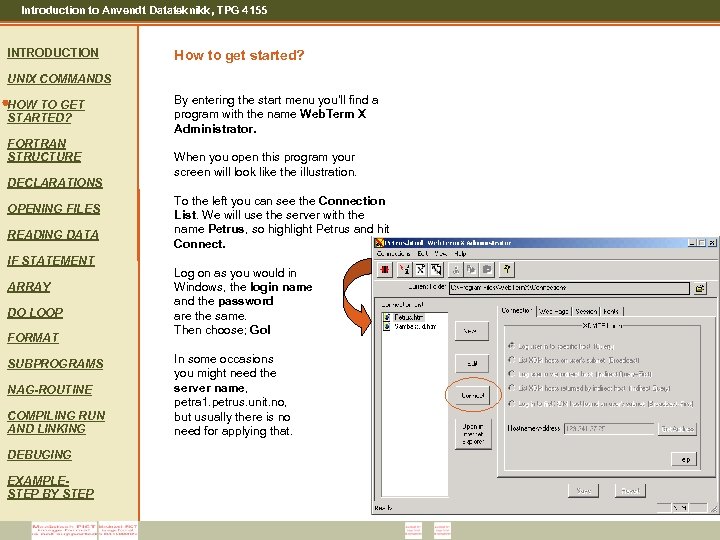 Introduction to Anvendt Datateknikk, TPG 4155 INTRODUCTION How to get started? UNIX COMMANDS HOW TO GET STARTED? FORTRAN STRUCTURE DECLARATIONS OPENING FILES READING DATA IF STATEMENT ARRAY DO LOOP FORMAT SUBPROGRAMS NAG-ROUTINE COMPILING RUN AND LINKING DEBUGING EXAMPLESTEP BY STEP By entering the start menu you’ll find a program with the name Web. Term X Administrator. When you open this program your screen will look like the illustration. To the left you can see the Connection List. We will use the server with the name Petrus, so highlight Petrus and hit Connect. Log on as you would in Windows, the login name and the password are the same. Then choose; Go! In some occasions you might need the server name, petra 1. petrus. unit. no, but usually there is no need for applying that.
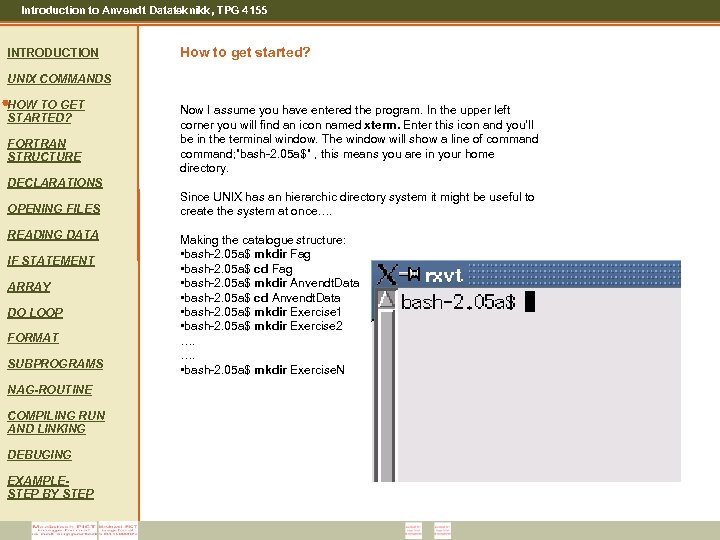 Introduction to Anvendt Datateknikk, TPG 4155 INTRODUCTION How to get started? UNIX COMMANDS HOW TO GET STARTED? FORTRAN STRUCTURE Now I assume you have entered the program. In the upper left corner you will find an icon named xterm. Enter this icon and you’ll be in the terminal window. The window will show a line of command; ”bash-2. 05 a$” , this means you are in your home directory. DECLARATIONS OPENING FILES READING DATA IF STATEMENT ARRAY DO LOOP FORMAT SUBPROGRAMS NAG-ROUTINE COMPILING RUN AND LINKING DEBUGING EXAMPLESTEP BY STEP Since UNIX has an hierarchic directory system it might be useful to create the system at once…. Making the catalogue structure: • bash-2. 05 a$ mkdir Fag • bash-2. 05 a$ cd Fag • bash-2. 05 a$ mkdir Anvendt. Data • bash-2. 05 a$ cd Anvendt. Data • bash-2. 05 a$ mkdir Exercise 1 • bash-2. 05 a$ mkdir Exercise 2 …. …. • bash-2. 05 a$ mkdir Exercise. N
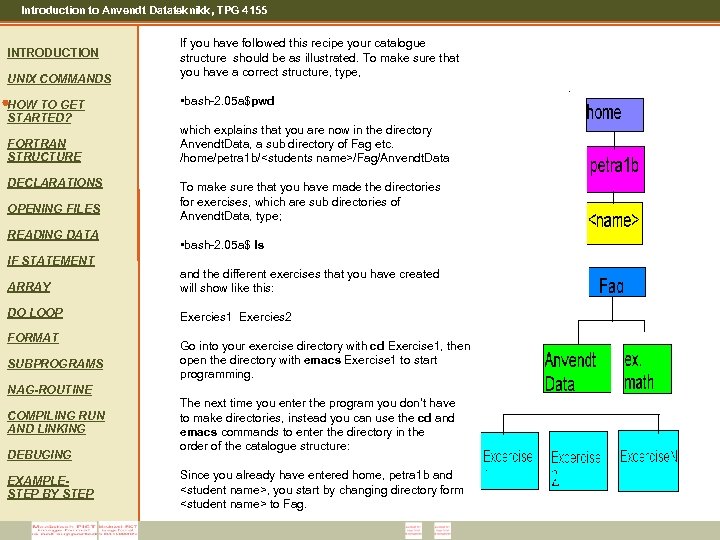 Introduction to Anvendt Datateknikk, TPG 4155 INTRODUCTION UNIX COMMANDS HOW TO GET STARTED? FORTRAN STRUCTURE DECLARATIONS OPENING FILES READING DATA IF STATEMENT If you have followed this recipe your catalogue structure should be as illustrated. To make sure that you have a correct structure, type, • bash-2. 05 a$pwd which explains that you are now in the directory Anvendt. Data, a sub directory of Fag etc. /home/petra 1 b/
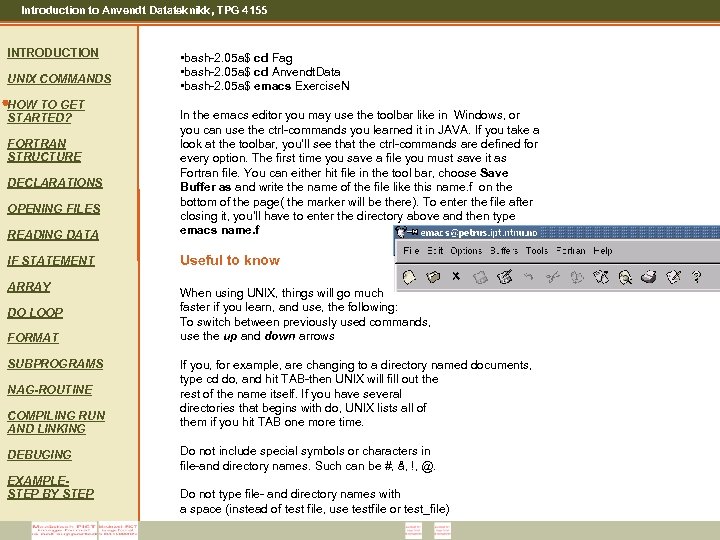 Introduction to Anvendt Datateknikk, TPG 4155 INTRODUCTION UNIX COMMANDS HOW TO GET STARTED? • bash-2. 05 a$ cd Fag • bash-2. 05 a$ cd Anvendt. Data • bash-2. 05 a$ emacs Exercise. N READING DATA In the emacs editor you may use the toolbar like in Windows, or you can use the ctrl-commands you learned it in JAVA. If you take a look at the toolbar, you’ll see that the ctrl-commands are defined for every option. The first time you save a file you must save it as Fortran file. You can either hit file in the tool bar, choose Save Buffer as and write the name of the file like this name. f on the bottom of the page( the marker will be there). To enter the file after closing it, you’ll have to enter the directory above and then type emacs name. f IF STATEMENT Useful to know FORTRAN STRUCTURE DECLARATIONS OPENING FILES ARRAY DO LOOP FORMAT SUBPROGRAMS NAG-ROUTINE COMPILING RUN AND LINKING DEBUGING EXAMPLESTEP BY STEP When using UNIX, things will go much faster if you learn, and use, the following: To switch between previously used commands, use the up and down arrows If you, for example, are changing to a directory named documents, type cd do, and hit TAB-then UNIX will fill out the rest of the name itself. If you have several directories that begins with do, UNIX lists all of them if you hit TAB one more time. Do not include special symbols or characters in file-and directory names. Such can be #, å, !, @. Do not type file- and directory names with a space (instead of test file, use testfile or test_file)
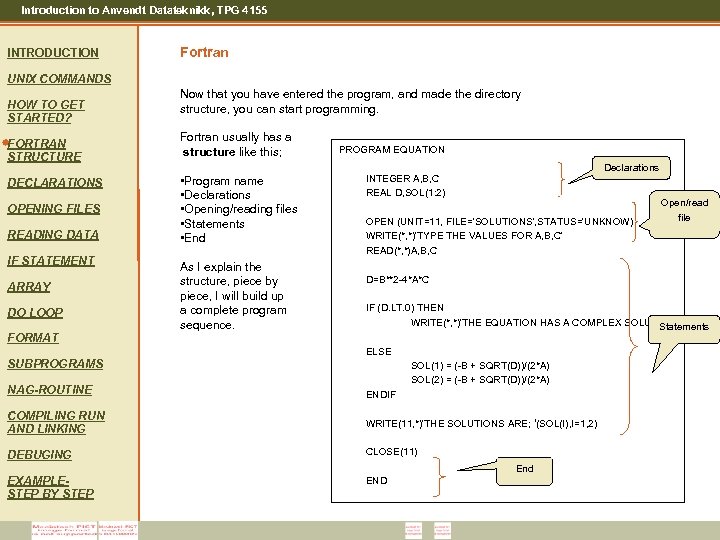 Introduction to Anvendt Datateknikk, TPG 4155 INTRODUCTION Fortran UNIX COMMANDS HOW TO GET STARTED? FORTRAN STRUCTURE DECLARATIONS OPENING FILES READING DATA IF STATEMENT ARRAY DO LOOP FORMAT Now that you have entered the program, and made the directory structure, you can start programming. Fortran usually has a structure like this; • Program name • Declarations • Opening/reading files • Statements • End As I explain the structure, piece by piece, I will build up a complete program sequence. PROGRAM EQUATION Declarations INTEGER A, B, C REAL D, SOL(1: 2) OPEN (UNIT=11, FILE='SOLUTIONS', STATUS='UNKNOW) WRITE(*, *)'TYPE THE VALUES FOR A, B, C' READ(*, *)A, B, C D=B**2 -4*A*C IF (D. LT. 0) THEN WRITE(*, *)'THE EQUATION HAS A COMPLEX SOLUTION' Statements ELSE SUBPROGRAMS SOL(1) = (-B + SQRT(D))/(2*A) SOL(2) = (-B + SQRT(D))/(2*A) NAG-ROUTINE ENDIF COMPILING RUN AND LINKING WRITE(11, *)'THE SOLUTIONS ARE; ‘(SOL(I), I=1, 2) DEBUGING CLOSE(11) End EXAMPLESTEP BY STEP Open/read file END
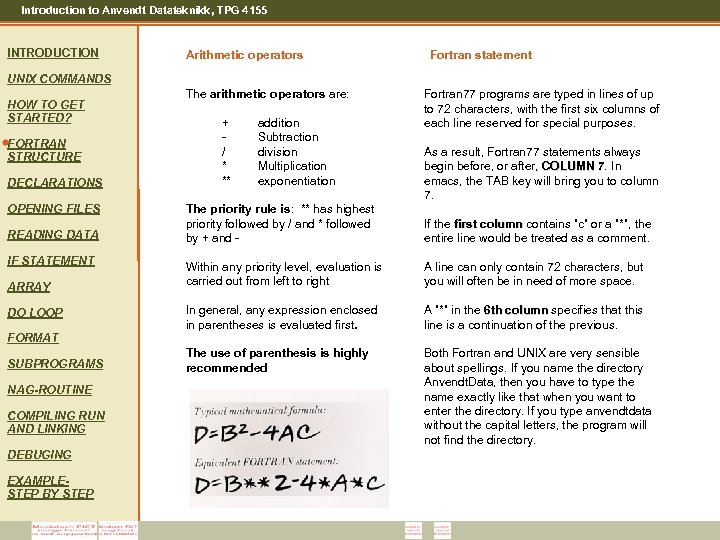 Introduction to Anvendt Datateknikk, TPG 4155 INTRODUCTION Arithmetic operators Fortran statement UNIX COMMANDS HOW TO GET STARTED? FORTRAN STRUCTURE DECLARATIONS OPENING FILES READING DATA IF STATEMENT ARRAY DO LOOP The arithmetic operators are: + / * ** addition Subtraction division Multiplication exponentiation Fortran 77 programs are typed in lines of up to 72 characters, with the first six columns of each line reserved for special purposes. As a result, Fortran 77 statements always begin before, or after, COLUMN 7. In , 7. emacs, the TAB key will bring you to column 7. The priority rule is: ** has highest priority followed by / and * followed by + and - If the first column contains ”c” or a ”*”, the entire line would be treated as a comment. Within any priority level, evaluation is carried out from left to right A line can only contain 72 characters, but you will often be in need of more space. In general, any expression enclosed in parentheses is evaluated first. A ”*” in the 6 th column specifies that this line is a continuation of the previous. The use of parenthesis is highly recommended Both Fortran and UNIX are very sensible about spellings. If you name the directory Anvendt. Data, then you have to type the name exactly like that when you want to enter the directory. If you type anvendtdata without the capital letters, the program will not find the directory. FORMAT SUBPROGRAMS NAG-ROUTINE COMPILING RUN AND LINKING DEBUGING EXAMPLESTEP BY STEP
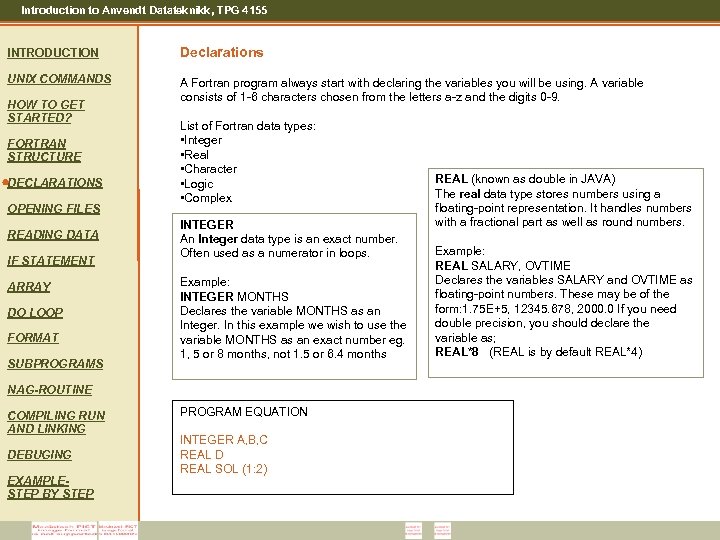 Introduction to Anvendt Datateknikk, TPG 4155 INTRODUCTION Declarations UNIX COMMANDS A Fortran program always start with declaring the variables you will be using. A variable consists of 1 -6 characters chosen from the letters a-z and the digits 0 -9. HOW TO GET STARTED? FORTRAN STRUCTURE DECLARATIONS OPENING FILES READING DATA IF STATEMENT ARRAY DO LOOP FORMAT SUBPROGRAMS List of Fortran data types: • Integer • Real • Character • Logic • Complex INTEGER An Integer data type is an exact number. Often used as a numerator in loops. Example: INTEGER MONTHS Declares the variable MONTHS as an Integer. In this example we wish to use the variable MONTHS as an exact number eg. 1, 5 or 8 months, not 1. 5 or 6. 4 months NAG-ROUTINE COMPILING RUN AND LINKING DEBUGING EXAMPLESTEP BY STEP PROGRAM EQUATION INTEGER A, B, C REAL D REAL SOL (1: 2) REAL (known as double in JAVA) The real data type stores numbers using a floating-point representation. It handles numbers with a fractional part as well as round numbers. Example: REAL SALARY, OVTIME Declares the variables SALARY and OVTIME as floating-point numbers. These may be of the form: 1. 75 E+5, 12345. 678, 2000. 0 If you need double precision, you should declare the variable as; REAL*8 (REAL is by default REAL*4)
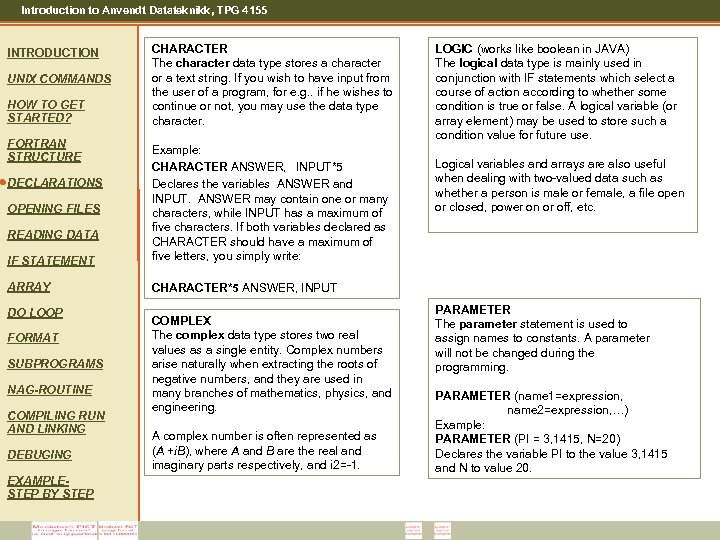 Introduction to Anvendt Datateknikk, TPG 4155 INTRODUCTION UNIX COMMANDS HOW TO GET STARTED? FORTRAN STRUCTURE CHARACTER The character data type stores a character or a text string. If you wish to have input from the user of a program, for e. g. . if he wishes to continue or not, you may use the data type character. IF STATEMENT Example: CHARACTER ANSWER, INPUT*5 Declares the variables ANSWER and INPUT. ANSWER may contain one or many characters, while INPUT has a maximum of five characters. If both variables declared as CHARACTER should have a maximum of five letters, you simply write: ARRAY LOGIC (works like boolean in JAVA) The logical data type is mainly used in conjunction with IF statements which select a course of action according to whether some condition is true or false. A logical variable (or array element) may be used to store such a condition value for future use. CHARACTER*5 ANSWER, INPUT DECLARATIONS OPENING FILES READING DATA DO LOOP FORMAT SUBPROGRAMS NAG-ROUTINE COMPILING RUN AND LINKING DEBUGING EXAMPLESTEP BY STEP COMPLEX The complex data type stores two real values as a single entity. Complex numbers arise naturally when extracting the roots of negative numbers, and they are used in many branches of mathematics, physics, and engineering. A complex number is often represented as (A +i. B), where A and B are the real and imaginary parts respectively, and i 2=-1. Logical variables and arrays are also useful when dealing with two-valued data such as whether a person is male or female, a file open or closed, power on or off, etc. PARAMETER The parameter statement is used to assign names to constants. A parameter will not be changed during the programming. PARAMETER (name 1=expression, name 2=expression, …) Example: PARAMETER (PI = 3, 1415, N=20) Declares the variable PI to the value 3, 1415 and N to value 20.
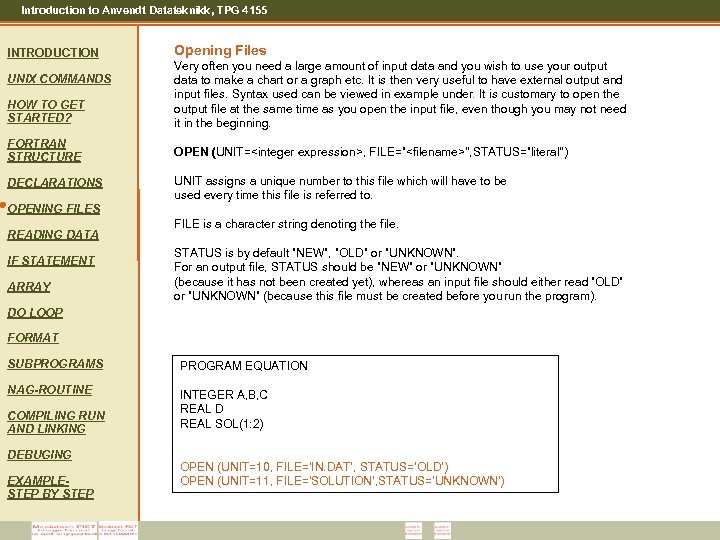 Introduction to Anvendt Datateknikk, TPG 4155 INTRODUCTION Opening Files HOW TO GET STARTED? Very often you need a large amount of input data and you wish to use your output data to make a chart or a graph etc. It is then very useful to have external output and input files. Syntax used can be viewed in example under. It is customary to open the output file at the same time as you open the input file, even though you may not need it in the beginning. FORTRAN STRUCTURE OPEN (UNIT=
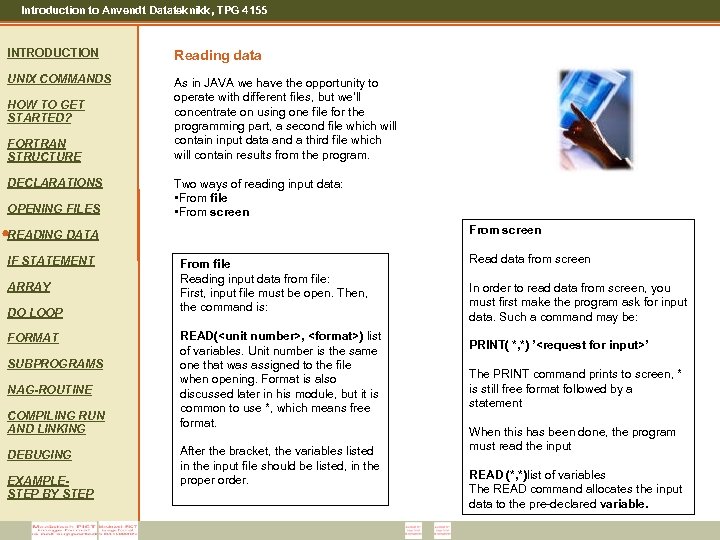 Introduction to Anvendt Datateknikk, TPG 4155 INTRODUCTION Reading data UNIX COMMANDS As in JAVA we have the opportunity to operate with different files, but we’ll concentrate on using one file for the programming part, a second file which will contain input data and a third file which will contain results from the program. HOW TO GET STARTED? FORTRAN STRUCTURE DECLARATIONS OPENING FILES Two ways of reading input data: • From file • From screen READING DATA IF STATEMENT ARRAY DO LOOP FORMAT SUBPROGRAMS NAG-ROUTINE COMPILING RUN AND LINKING DEBUGING EXAMPLESTEP BY STEP From file Reading input data from file: First, input file must be open. Then, the command is: READ(
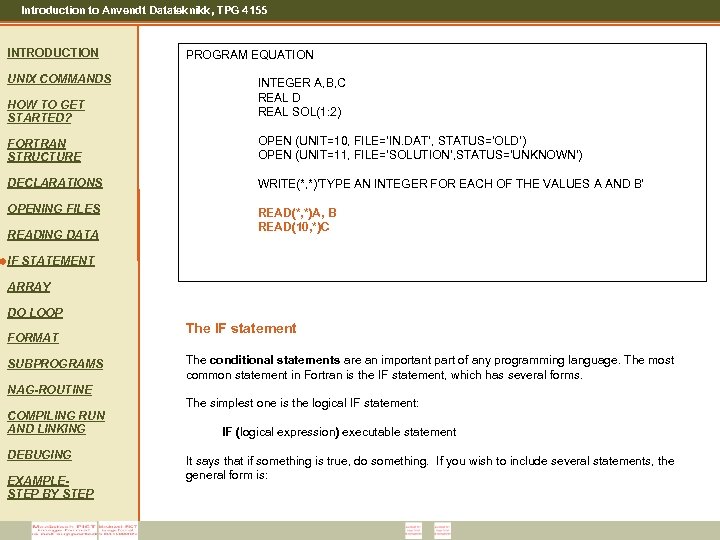 Introduction to Anvendt Datateknikk, TPG 4155 INTRODUCTION UNIX COMMANDS HOW TO GET STARTED? PROGRAM EQUATION INTEGER A, B, C REAL D REAL SOL(1: 2) FORTRAN STRUCTURE OPEN (UNIT=10, FILE=‘IN. DAT’, STATUS=‘OLD’) OPEN (UNIT=11, FILE='SOLUTION’, STATUS='UNKNOWN') DECLARATIONS WRITE(*, *)'TYPE AN INTEGER FOR EACH OF THE VALUES A AND B' OPENING FILES READ(*, *)A, B READ(10, *)C READING DATA IF STATEMENT ARRAY DO LOOP FORMAT SUBPROGRAMS NAG-ROUTINE COMPILING RUN AND LINKING DEBUGING EXAMPLESTEP BY STEP The IF statement The conditional statements are an important part of any programming language. The most common statement in Fortran is the IF statement, which has several forms. The simplest one is the logical IF statement: IF (logical expression) executable statement It says that if something is true, do something. If you wish to include several statements, the general form is:
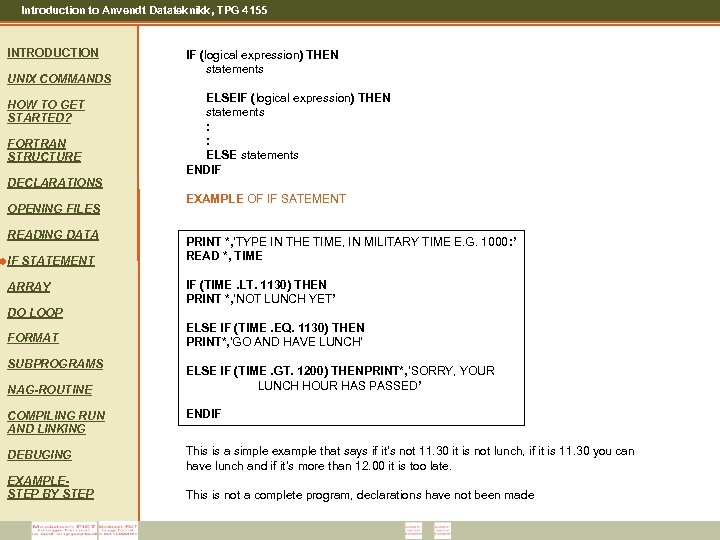 Introduction to Anvendt Datateknikk, TPG 4155 INTRODUCTION UNIX COMMANDS HOW TO GET STARTED? FORTRAN STRUCTURE DECLARATIONS OPENING FILES READING DATA IF STATEMENT ARRAY IF (logical expression) THEN statements ELSEIF (logical expression) THEN statements : : ELSE statements ENDIF EXAMPLE OF IF SATEMENT PRINT *, ’TYPE IN THE TIME, IN MILITARY TIME E. G. 1000: ’ READ *, TIME IF (TIME. LT. 1130) THEN PRINT *, ’NOT LUNCH YET’ DO LOOP FORMAT SUBPROGRAMS NAG-ROUTINE ELSE IF (TIME. EQ. 1130) THEN PRINT*, ’GO AND HAVE LUNCH’ ELSE IF (TIME. GT. 1200) THENPRINT*, ’SORRY, YOUR LUNCH HOUR HAS PASSED’ COMPILING RUN AND LINKING ENDIF DEBUGING This is a simple example that says if it’s not 11. 30 it is not lunch, if it is 11. 30 you can have lunch and if it’s more than 12. 00 it is too late. EXAMPLESTEP BY STEP This is not a complete program, declarations have not been made
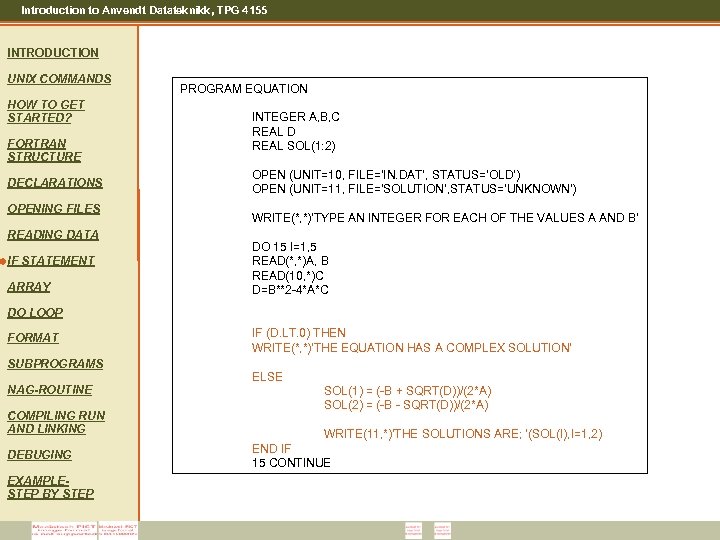 Introduction to Anvendt Datateknikk, TPG 4155 INTRODUCTION UNIX COMMANDS HOW TO GET STARTED? FORTRAN STRUCTURE DECLARATIONS OPENING FILES READING DATA IF STATEMENT ARRAY PROGRAM EQUATION INTEGER A, B, C REAL D REAL SOL(1: 2) OPEN (UNIT=10, FILE=‘IN. DAT’, STATUS=‘OLD’) OPEN (UNIT=11, FILE='SOLUTION’, STATUS='UNKNOWN') WRITE(*, *)'TYPE AN INTEGER FOR EACH OF THE VALUES A AND B' DO 15 I=1, 5 READ(*, *)A, B READ(10, *)C D=B**2 -4*A*C DO LOOP FORMAT SUBPROGRAMS NAG-ROUTINE COMPILING RUN AND LINKING DEBUGING EXAMPLESTEP BY STEP IF (D. LT. 0) THEN WRITE(*, *)'THE EQUATION HAS A COMPLEX SOLUTION‘ ELSE SOL(1) = (-B + SQRT(D))/(2*A) SOL(2) = (-B - SQRT(D))/(2*A) WRITE(11, *)'THE SOLUTIONS ARE; ‘(SOL(I), I=1, 2) END IF 15 CONTINUE
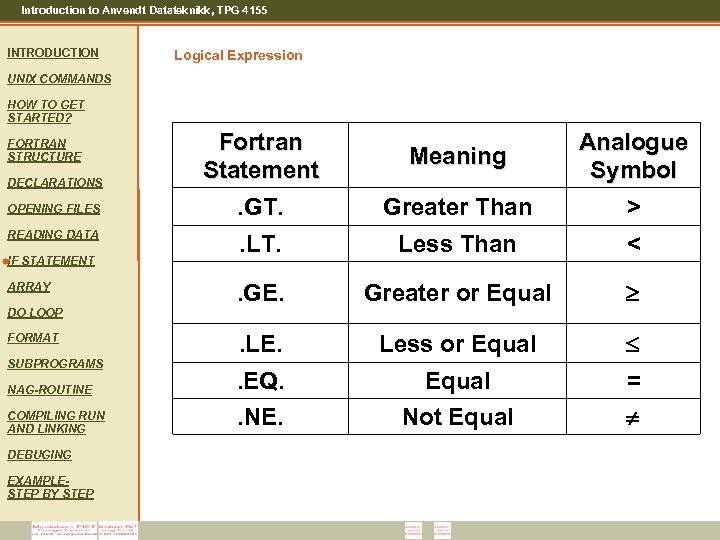 Introduction to Anvendt Datateknikk, TPG 4155 INTRODUCTION Logical Expression UNIX COMMANDS HOW TO GET STARTED? FORTRAN STRUCTURE DECLARATIONS OPENING FILES READING DATA IF STATEMENT ARRAY DO LOOP FORMAT SUBPROGRAMS NAG-ROUTINE COMPILING RUN AND LINKING DEBUGING EXAMPLESTEP BY STEP Fortran Statement. GT. Greater Than Analogue Symbol > . LT. Less Than < . GE. Greater or Equal . LE. Less or Equal . EQ. . NE. Equal Not Equal = Meaning
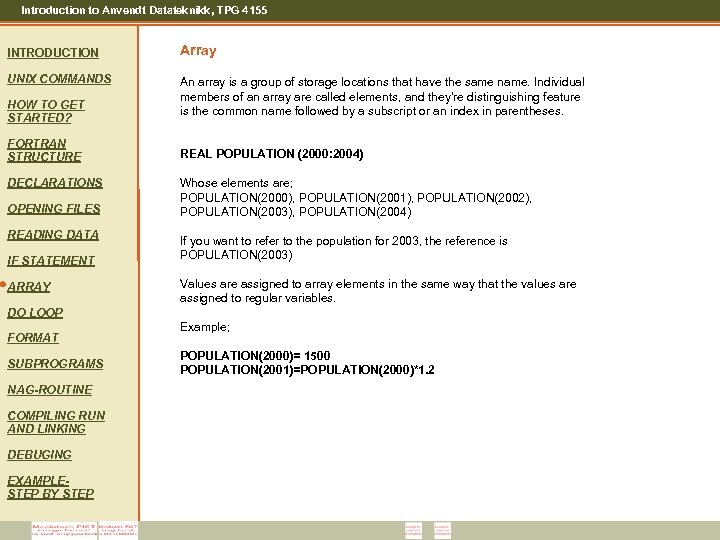 Introduction to Anvendt Datateknikk, TPG 4155 INTRODUCTION Array UNIX COMMANDS An array is a group of storage locations that have the same name. Individual members of an array are called elements, and they’re distinguishing feature is the common name followed by a subscript or an index in parentheses. HOW TO GET STARTED? FORTRAN STRUCTURE DECLARATIONS OPENING FILES READING DATA IF STATEMENT ARRAY REAL POPULATION (2000: 2004) Whose elements are; POPULATION(2000), POPULATION(2001), POPULATION(2002), POPULATION(2003), POPULATION(2004) If you want to refer to the population for 2003, the reference is POPULATION(2003) Values are assigned to array elements in the same way that the values are assigned to regular variables. DO LOOP FORMAT SUBPROGRAMS NAG-ROUTINE COMPILING RUN AND LINKING DEBUGING EXAMPLESTEP BY STEP Example; POPULATION(2000)= 1500 POPULATION(2001)=POPULATION(2000)*1. 2
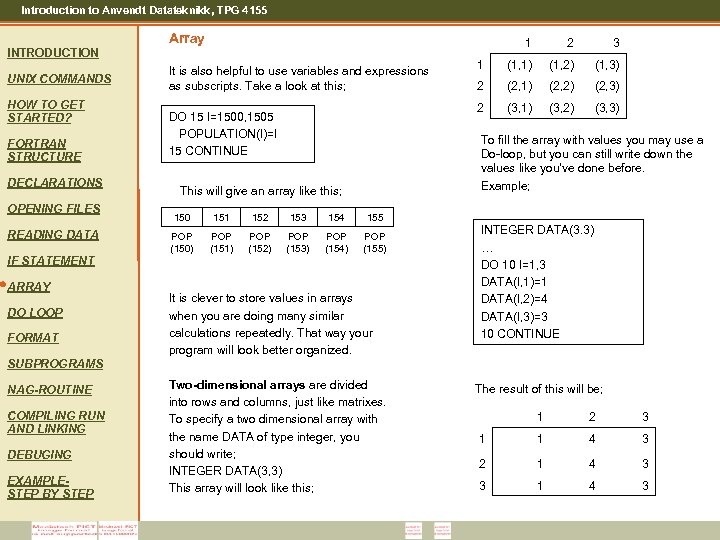 Introduction to Anvendt Datateknikk, TPG 4155 Array 1 UNIX COMMANDS HOW TO GET STARTED? FORTRAN STRUCTURE DECLARATIONS OPENING FILES READING DATA IF STATEMENT ARRAY DO LOOP FORMAT It is also helpful to use variables and expressions as subscripts. Take a look at this; DO 15 I=1500, 1505 POPULATION(I)=I 15 CONTINUE 2 3 1 (1, 1) (1, 2) (1, 3) 2 (2, 1) (2, 2) (2, 3) 2 INTRODUCTION (3, 1) (3, 2) (3, 3) To fill the array with values you may use a Do-loop, but you can still write down the values like you’ve done before. Example; This will give an array like this; 150 151 152 153 154 155 POP (150) POP (151) POP (152) POP (153) POP (154) POP (155) It is clever to store values in arrays when you are doing many similar calculations repeatedly. That way your program will look better organized. INTEGER DATA(3. 3) … DO 10 I=1, 3 DATA(I, 1)=1 DATA(I, 2)=4 DATA(I, 3)=3 10 CONTINUE SUBPROGRAMS NAG-ROUTINE COMPILING RUN AND LINKING DEBUGING EXAMPLESTEP BY STEP Two-dimensional arrays are divided into rows and columns, just like matrixes. To specify a two dimensional array with the name DATA of type integer, you should write; INTEGER DATA(3, 3) This array will look like this; The result of this will be; 1 2 3 1 1 4 3 2 1 4 3 3 1 4 3
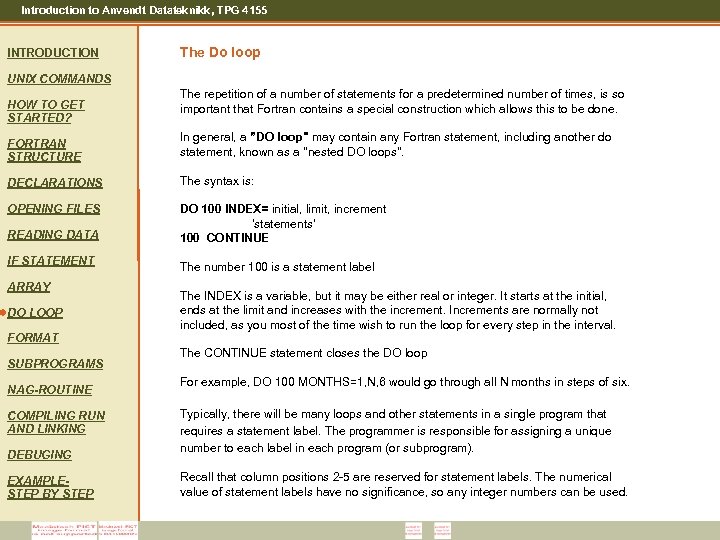 Introduction to Anvendt Datateknikk, TPG 4155 INTRODUCTION The Do loop UNIX COMMANDS HOW TO GET STARTED? The repetition of a number of statements for a predetermined number of times, is so important that Fortran contains a special construction which allows this to be done. FORTRAN STRUCTURE In general, a ”DO loop" may contain any Fortran statement, including another do statement, known as a "nested DO loops". DECLARATIONS The syntax is: OPENING FILES DO 100 INDEX= initial, limit, increment 'statements' 100 CONTINUE READING DATA IF STATEMENT ARRAY DO LOOP The number 100 is a statement label The INDEX is a variable, but it may be either real or integer. It starts at the initial, ends at the limit and increases with the increment. Increments are normally not included, as you most of the time wish to run the loop for every step in the interval. FORMAT SUBPROGRAMS NAG-ROUTINE COMPILING RUN AND LINKING DEBUGING EXAMPLESTEP BY STEP The CONTINUE statement closes the DO loop For example, DO 100 MONTHS=1, N, 6 would go through all N months in steps of six. Typically, there will be many loops and other statements in a single program that requires a statement label. The programmer is responsible for assigning a unique number to each label in each program (or subprogram). Recall that column positions 2 -5 are reserved for statement labels. The numerical value of statement labels have no significance, so any integer numbers can be used.
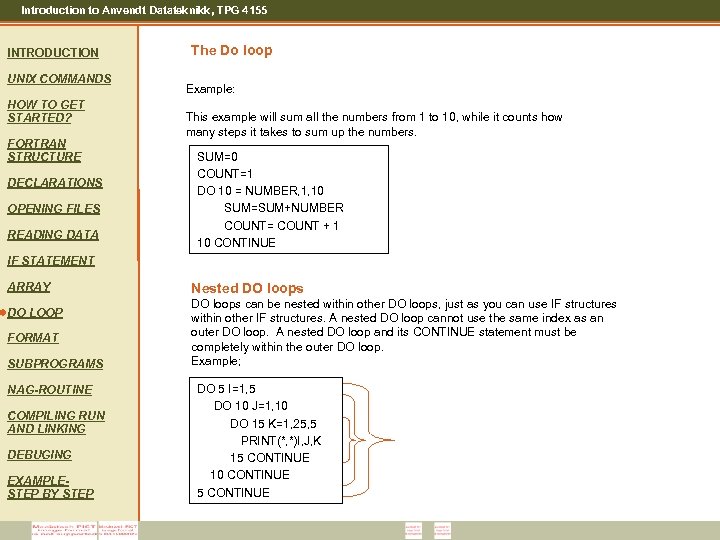 Introduction to Anvendt Datateknikk, TPG 4155 INTRODUCTION UNIX COMMANDS HOW TO GET STARTED? FORTRAN STRUCTURE DECLARATIONS OPENING FILES READING DATA The Do loop Example: This example will sum all the numbers from 1 to 10, while it counts how many steps it takes to sum up the numbers. SUM=0 COUNT=1 DO 10 = NUMBER, 1, 10 SUM=SUM+NUMBER COUNT= COUNT + 1 10 CONTINUE IF STATEMENT ARRAY DO LOOP FORMAT SUBPROGRAMS NAG-ROUTINE COMPILING RUN AND LINKING DEBUGING EXAMPLESTEP BY STEP Nested DO loops can be nested within other DO loops, just as you can use IF structures within other IF structures. A nested DO loop cannot use the same index as an outer DO loop. A nested DO loop and its CONTINUE statement must be completely within the outer DO loop. Example; DO 5 I=1, 5 DO 10 J=1, 10 DO 15 K=1, 25, 5 PRINT(*, *)I, J, K 15 CONTINUE 10 CONTINUE 5 CONTINUE
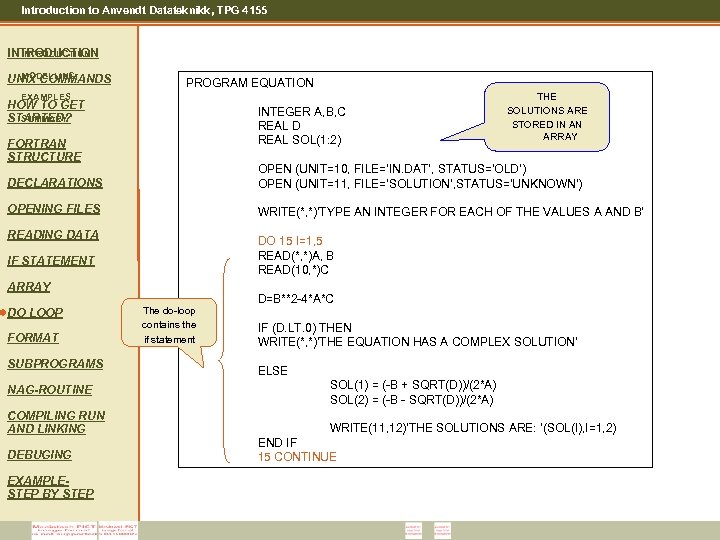 Introduction to Anvendt Datateknikk, TPG 4155 INTRODUCTION MODELLING UNIX COMMANDS PROGRAM EQUATION EXAMPLES HOW TO GET SUMMARY STARTED? INTEGER A, B, C REAL D REAL SOL(1: 2) FORTRAN STRUCTURE THE SOLUTIONS ARE STORED IN AN ARRAY DECLARATIONS OPEN (UNIT=10, FILE=‘IN. DAT’, STATUS=‘OLD’) OPEN (UNIT=11, FILE='SOLUTION’, STATUS='UNKNOWN') OPENING FILES WRITE(*, *)'TYPE AN INTEGER FOR EACH OF THE VALUES A AND B' READING DATA DO 15 I=1, 5 READ(*, *)A, B READ(10, *)C IF STATEMENT ARRAY DO LOOP FORMAT SUBPROGRAMS NAG-ROUTINE COMPILING RUN AND LINKING DEBUGING EXAMPLESTEP BY STEP The do-loop contains the if statement D=B**2 -4*A*C IF (D. LT. 0) THEN WRITE(*, *)'THE EQUATION HAS A COMPLEX SOLUTION‘ ELSE SOL(1) = (-B + SQRT(D))/(2*A) SOL(2) = (-B - SQRT(D))/(2*A) WRITE(11, 12)'THE SOLUTIONS ARE: ‘(SOL(I), I=1, 2) END IF 15 CONTINUE
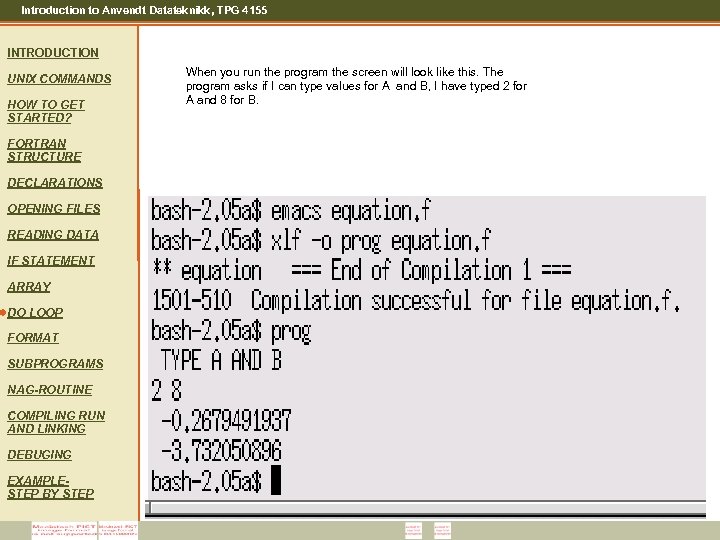 Introduction to Anvendt Datateknikk, TPG 4155 INTRODUCTION UNIX COMMANDS HOW TO GET STARTED? FORTRAN STRUCTURE DECLARATIONS OPENING FILES READING DATA IF STATEMENT ARRAY DO LOOP FORMAT SUBPROGRAMS NAG-ROUTINE COMPILING RUN AND LINKING DEBUGING EXAMPLESTEP BY STEP When you run the program the screen will look like this. The program asks if I can type values for A and B, I have typed 2 for A and 8 for B.
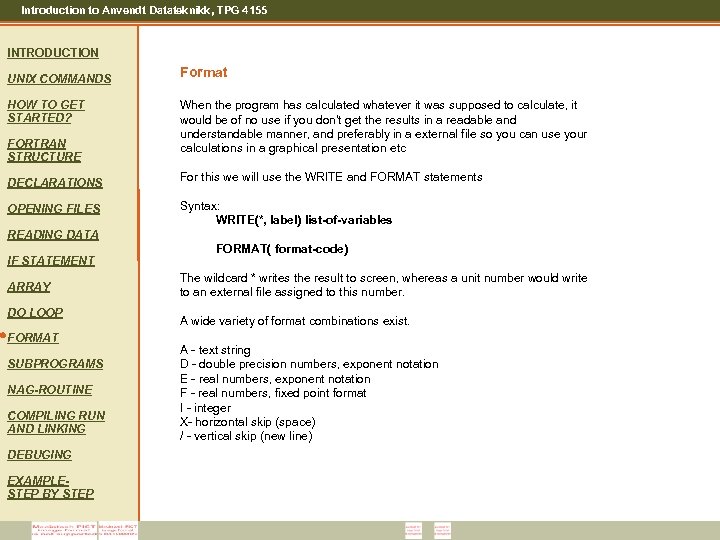 Introduction to Anvendt Datateknikk, TPG 4155 INTRODUCTION UNIX COMMANDS HOW TO GET STARTED? FORTRAN STRUCTURE Format When the program has calculated whatever it was supposed to calculate, it would be of no use if you don't get the results in a readable and understandable manner, and preferably in a external file so you can use your calculations in a graphical presentation etc DECLARATIONS For this we will use the WRITE and FORMAT statements OPENING FILES Syntax: WRITE(*, label) list-of-variables READING DATA IF STATEMENT ARRAY DO LOOP FORMAT SUBPROGRAMS NAG-ROUTINE COMPILING RUN AND LINKING DEBUGING EXAMPLESTEP BY STEP FORMAT( format-code) The wildcard * writes the result to screen, whereas a unit number would write to an external file assigned to this number. A wide variety of format combinations exist. A - text string D - double precision numbers, exponent notation E - real numbers, exponent notation F - real numbers, fixed point format I - integer X- horizontal skip (space) / - vertical skip (new line)
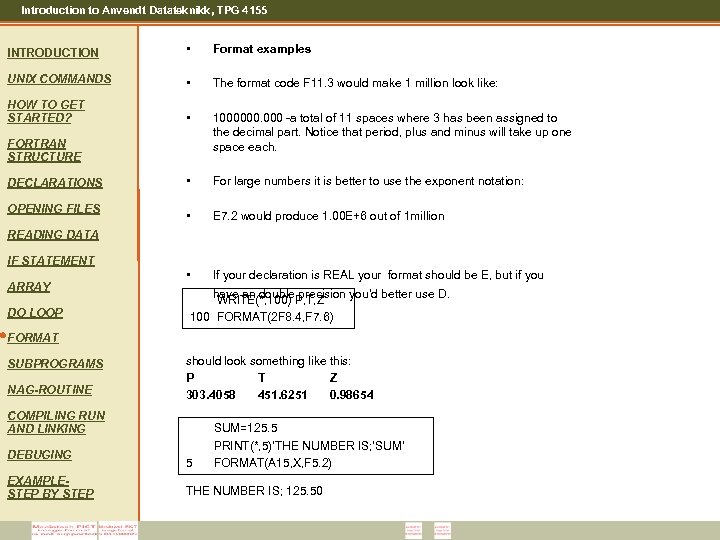 Introduction to Anvendt Datateknikk, TPG 4155 INTRODUCTION • Format examples UNIX COMMANDS • The format code F 11. 3 would make 1 million look like: HOW TO GET STARTED? • 1000000. 000 -a total of 11 spaces where 3 has been assigned to the decimal part. Notice that period, plus and minus will take up one space each. • For large numbers it is better to use the exponent notation: • E 7. 2 would produce 1. 00 E+6 out of 1 million • If your declaration is REAL your format should be E, but if you FORTRAN STRUCTURE DECLARATIONS OPENING FILES READING DATA IF STATEMENT ARRAY DO LOOP have an double precision you’d better use D. WRITE(*, 100) P, T, Z 100 FORMAT(2 F 8. 4, F 7. 6) FORMAT SUBPROGRAMS NAG-ROUTINE should look something like this: P T Z 303. 4058 451. 6251 0. 98654 COMPILING RUN AND LINKING DEBUGING EXAMPLESTEP BY STEP 5 SUM=125. 5 PRINT(*, 5)’THE NUMBER IS; ’SUM’ FORMAT(A 15, X, F 5. 2) THE NUMBER IS; 125. 50
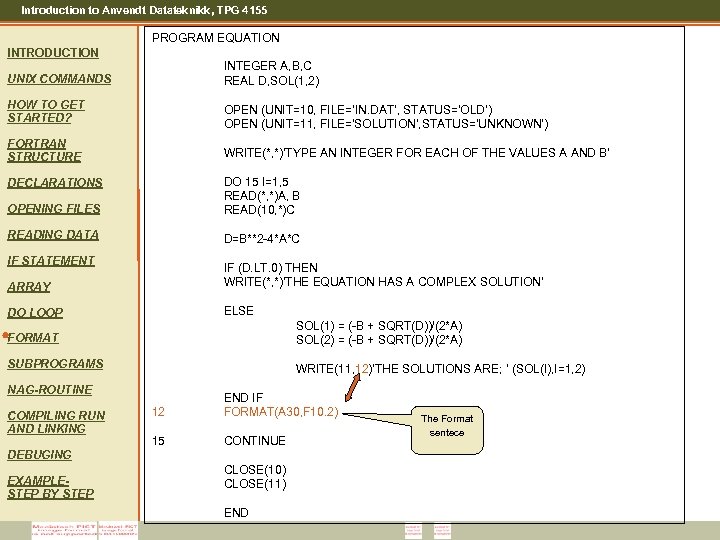 Introduction to Anvendt Datateknikk, TPG 4155 PROGRAM EQUATION INTRODUCTION UNIX COMMANDS INTEGER A, B, C REAL D, SOL(1, 2) HOW TO GET STARTED? OPEN (UNIT=10, FILE=‘IN. DAT’, STATUS=‘OLD’) OPEN (UNIT=11, FILE='SOLUTION’, STATUS='UNKNOWN') FORTRAN STRUCTURE WRITE(*, *)'TYPE AN INTEGER FOR EACH OF THE VALUES A AND B' OPENING FILES DO 15 I=1, 5 READ(*, *)A, B READ(10, *)C READING DATA D=B**2 -4*A*C DECLARATIONS IF STATEMENT ARRAY IF (D. LT. 0) THEN WRITE(*, *)'THE EQUATION HAS A COMPLEX SOLUTION‘ DO LOOP ELSE FORMAT SOL(1) = (-B + SQRT(D))/(2*A) SOL(2) = (-B + SQRT(D))/(2*A) SUBPROGRAMS WRITE(11, 12)'THE SOLUTIONS ARE; ‘ (SOL(I), I=1, 2) NAG-ROUTINE COMPILING RUN AND LINKING 12 END IF FORMAT(A 30, F 10. 2) 15 CONTINUE DEBUGING EXAMPLESTEP BY STEP CLOSE(10) CLOSE(11) END The Format sentece
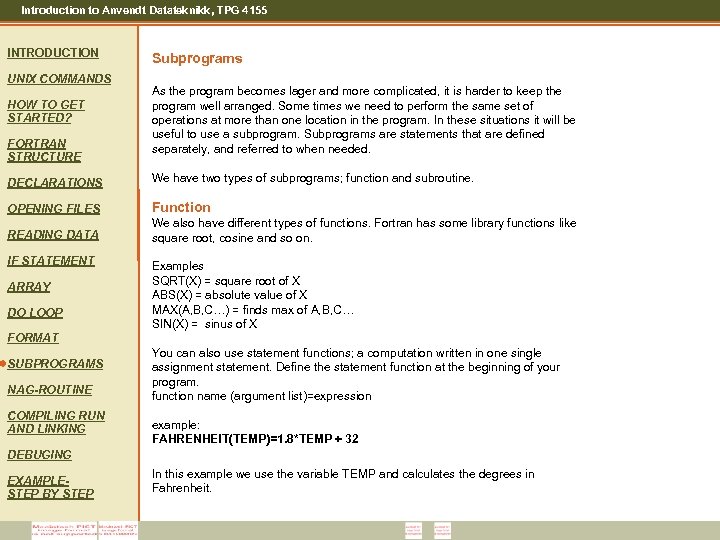 Introduction to Anvendt Datateknikk, TPG 4155 INTRODUCTION UNIX COMMANDS HOW TO GET STARTED? FORTRAN STRUCTURE Subprograms As the program becomes lager and more complicated, it is harder to keep the program well arranged. Some times we need to perform the same set of operations at more than one location in the program. In these situations it will be useful to use a subprogram. Subprograms are statements that are defined separately, and referred to when needed. DECLARATIONS We have two types of subprograms; function and subroutine. OPENING FILES Function READING DATA We also have different types of functions. Fortran has some library functions like square root, cosine and so on. IF STATEMENT ARRAY DO LOOP Examples SQRT(X) = square root of X ABS(X) = absolute value of X MAX(A, B, C…) = finds max of A, B, C… SIN(X) = sinus of X FORMAT SUBPROGRAMS NAG-ROUTINE COMPILING RUN AND LINKING You can also use statement functions; a computation written in one single assignment statement. Define the statement function at the beginning of your program. function name (argument list)=expression example: FAHRENHEIT(TEMP)=1. 8*TEMP + 32 DEBUGING EXAMPLESTEP BY STEP In this example we use the variable TEMP and calculates the degrees in Fahrenheit.
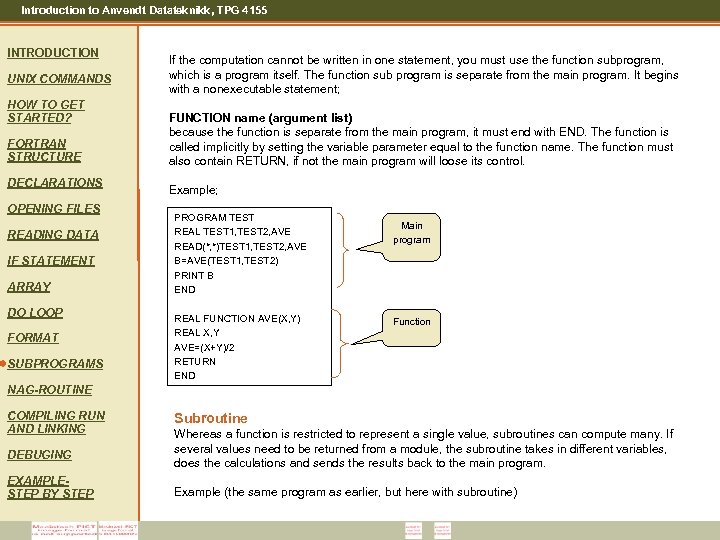 Introduction to Anvendt Datateknikk, TPG 4155 INTRODUCTION UNIX COMMANDS HOW TO GET STARTED? FORTRAN STRUCTURE DECLARATIONS OPENING FILES READING DATA IF STATEMENT ARRAY DO LOOP FORMAT SUBPROGRAMS If the computation cannot be written in one statement, you must use the function subprogram, which is a program itself. The function sub program is separate from the main program. It begins with a nonexecutable statement; FUNCTION name (argument list) because the function is separate from the main program, it must end with END. The function is called implicitly by setting the variable parameter equal to the function name. The function must also contain RETURN, if not the main program will loose its control. Example; PROGRAM TEST REAL TEST 1, TEST 2, AVE READ(*, *)TEST 1, TEST 2, AVE B=AVE(TEST 1, TEST 2) PRINT B END REAL FUNCTION AVE(X, Y) REAL X, Y AVE=(X+Y)/2 RETURN END Main program Function NAG-ROUTINE COMPILING RUN AND LINKING DEBUGING EXAMPLESTEP BY STEP Subroutine Whereas a function is restricted to represent a single value, subroutines can compute many. If several values need to be returned from a module, the subroutine takes in different variables, does the calculations and sends the results back to the main program. Example (the same program as earlier, but here with subroutine)
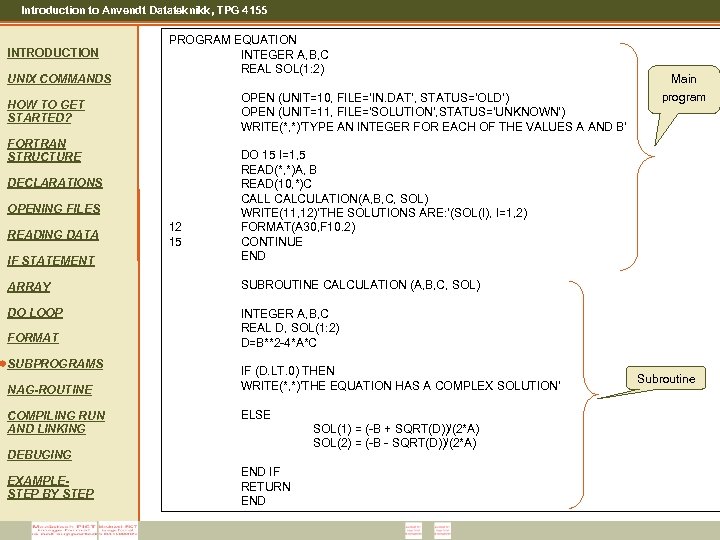 Introduction to Anvendt Datateknikk, TPG 4155 INTRODUCTION UNIX COMMANDS PROGRAM EQUATION INTEGER A, B, C REAL SOL(1: 2) OPEN (UNIT=10, FILE=‘IN. DAT’, STATUS=‘OLD’) OPEN (UNIT=11, FILE='SOLUTION’, STATUS='UNKNOWN') WRITE(*, *)'TYPE AN INTEGER FOR EACH OF THE VALUES A AND B' HOW TO GET STARTED? FORTRAN STRUCTURE IF STATEMENT DO 15 I=1, 5 READ(*, *)A, B READ(10, *)C CALL CALCULATION(A, B, C, SOL) WRITE(11, 12)'THE SOLUTIONS ARE: ‘(SOL(I), I=1, 2) FORMAT(A 30, F 10. 2) CONTINUE END ARRAY SUBROUTINE CALCULATION (A, B, C, SOL) DO LOOP Main program INTEGER A, B, C REAL D, SOL(1: 2) D=B**2 -4*A*C DECLARATIONS OPENING FILES READING DATA FORMAT SUBPROGRAMS NAG-ROUTINE COMPILING RUN AND LINKING 12 15 IF (D. LT. 0) THEN WRITE(*, *)'THE EQUATION HAS A COMPLEX SOLUTION‘ ELSE SOL(1) = (-B + SQRT(D))/(2*A) SOL(2) = (-B - SQRT(D))/(2*A) DEBUGING EXAMPLESTEP BY STEP END IF RETURN END Subroutine
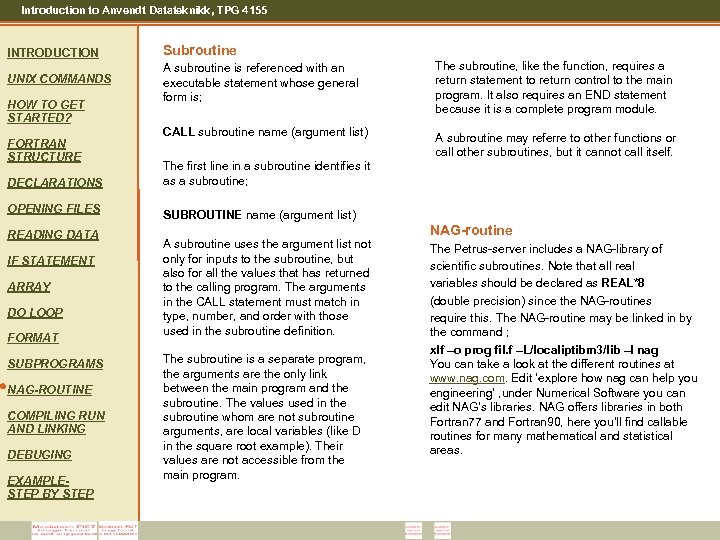 Introduction to Anvendt Datateknikk, TPG 4155 INTRODUCTION Subroutine UNIX COMMANDS A subroutine is referenced with an executable statement whose general form is; The subroutine, like the function, requires a return statement to return control to the main program. It also requires an END statement because it is a complete program module. CALL subroutine name (argument list) A subroutine may referre to other functions or call other subroutines, but it cannot call itself. HOW TO GET STARTED? FORTRAN STRUCTURE DECLARATIONS OPENING FILES READING DATA IF STATEMENT ARRAY DO LOOP FORMAT SUBPROGRAMS NAG-ROUTINE COMPILING RUN AND LINKING DEBUGING EXAMPLESTEP BY STEP The first line in a subroutine identifies it as a subroutine; SUBROUTINE name (argument list) A subroutine uses the argument list not only for inputs to the subroutine, but also for all the values that has returned to the calling program. The arguments in the CALL statement must match in type, number, and order with those used in the subroutine definition. The subroutine is a separate program, the arguments are the only link between the main program and the subroutine. The values used in the subroutine whom are not subroutine arguments, are local variables (like D in the square root example). Their values are not accessible from the main program. NAG-routine The Petrus-server includes a NAG-library of scientific subroutines. Note that all real variables should be declared as REAL*8 (double precision) since the NAG-routines require this. The NAG-routine may be linked in by the command ; xlf –o prog fil. f –L/localiptibm 3/lib –l nag You can take a look at the different routines at www. nag. com. Edit ‘explore how nag can help you engineering’ , under Numerical Software you can edit NAG’s libraries. NAG offers libraries in both Fortran 77 and Fortran 90, here you’ll find callable routines for many mathematical and statistical areas.
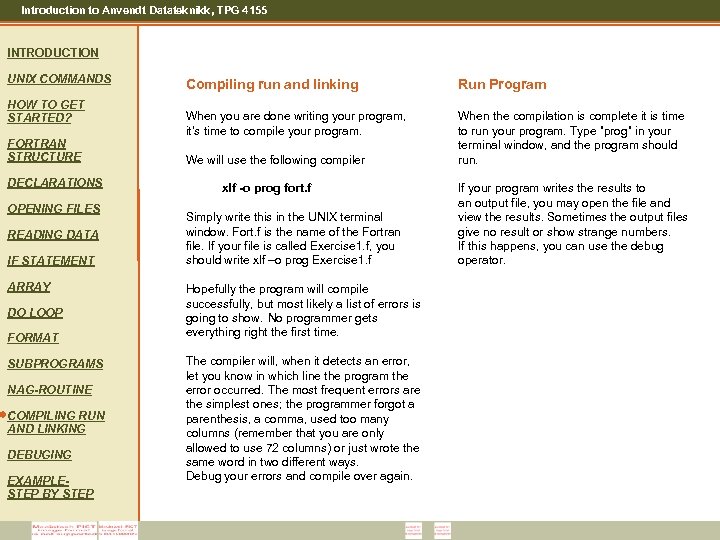 Introduction to Anvendt Datateknikk, TPG 4155 INTRODUCTION UNIX COMMANDS HOW TO GET STARTED? FORTRAN STRUCTURE DECLARATIONS OPENING FILES READING DATA IF STATEMENT ARRAY DO LOOP FORMAT SUBPROGRAMS NAG-ROUTINE COMPILING RUN AND LINKING DEBUGING EXAMPLESTEP BY STEP Compiling run and linking Run Program When you are done writing your program, it’s time to compile your program. When the compilation is complete it is time to run your program. Type ”prog” in your terminal window, and the program should run. We will use the following compiler xlf -o prog fort. f Simply write this in the UNIX terminal window. Fort. f is the name of the Fortran file. If your file is called Exercise 1. f, you should write xlf –o prog Exercise 1. f Hopefully the program will compile successfully, but most likely a list of errors is going to show. No programmer gets everything right the first time. The compiler will, when it detects an error, let you know in which line the program the error occurred. The most frequent errors are the simplest ones; the programmer forgot a parenthesis, a comma, used too many columns (remember that you are only allowed to use 72 columns) or just wrote the same word in two different ways. Debug your errors and compile over again. If your program writes the results to an output file, you may open the file and view the results. Sometimes the output files give no result or show strange numbers. If this happens, you can use the debug operator.
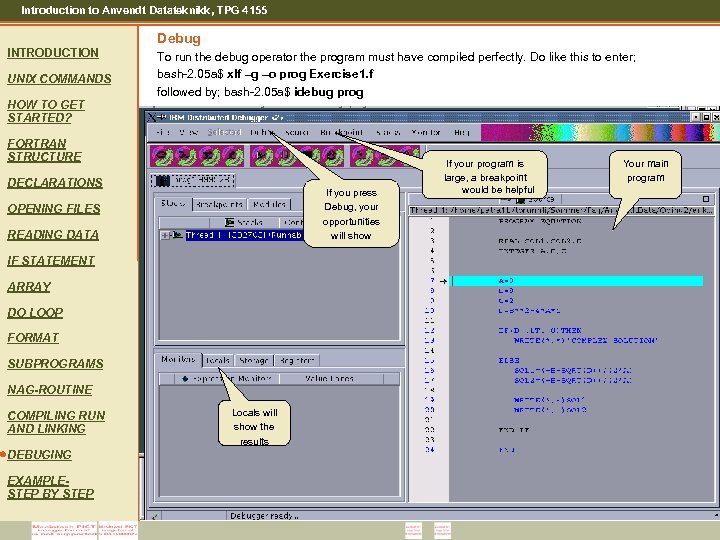 Introduction to Anvendt Datateknikk, TPG 4155 Debug INTRODUCTION UNIX COMMANDS To run the debug operator the program must have compiled perfectly. Do like this to enter; bash-2. 05 a$ xlf –g –o prog Exercise 1. f followed by; bash-2. 05 a$ idebug prog HOW TO GET STARTED? FORTRAN STRUCTURE DECLARATIONS If you press Debug, your opportunities will show OPENING FILES READING DATA IF STATEMENT ARRAY DO LOOP FORMAT SUBPROGRAMS NAG-ROUTINE COMPILING RUN AND LINKING DEBUGING EXAMPLESTEP BY STEP Locals will show the results If your program is large, a breakpoint would be helpful Your main program
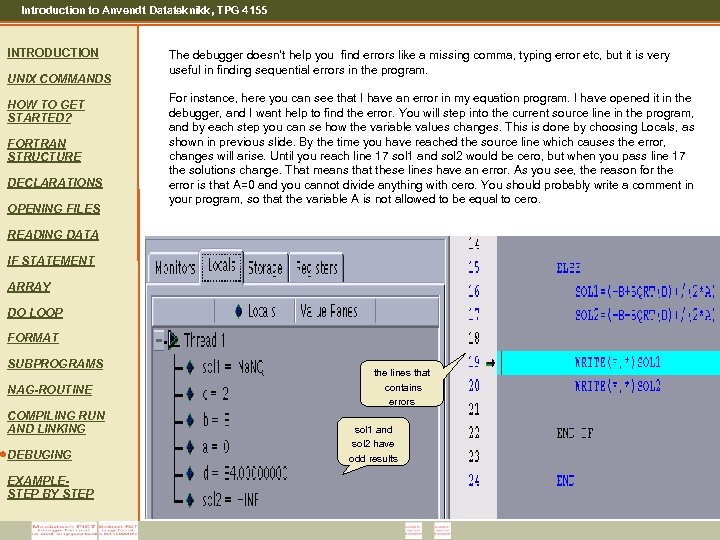 Introduction to Anvendt Datateknikk, TPG 4155 INTRODUCTION UNIX COMMANDS HOW TO GET STARTED? FORTRAN STRUCTURE DECLARATIONS OPENING FILES The debugger doesn’t help you find errors like a missing comma, typing error etc, but it is very useful in finding sequential errors in the program. For instance, here you can see that I have an error in my equation program. I have opened it in the debugger, and I want help to find the error. You will step into the current source line in the program, and by each step you can se how the variable values changes. This is done by choosing Locals, as shown in previous slide. By the time you have reached the source line which causes the error, changes will arise. Until you reach line 17 sol 1 and sol 2 would be cero, but when you pass line 17 the solutions change. That means that these lines have an error. As you see, the reason for the error is that A=0 and you cannot divide anything with cero. You should probably write a comment in your program, so that the variable A is not allowed to be equal to cero. READING DATA IF STATEMENT ARRAY DO LOOP FORMAT SUBPROGRAMS NAG-ROUTINE COMPILING RUN AND LINKING DEBUGING EXAMPLESTEP BY STEP the lines that contains errors sol 1 and sol 2 have odd results
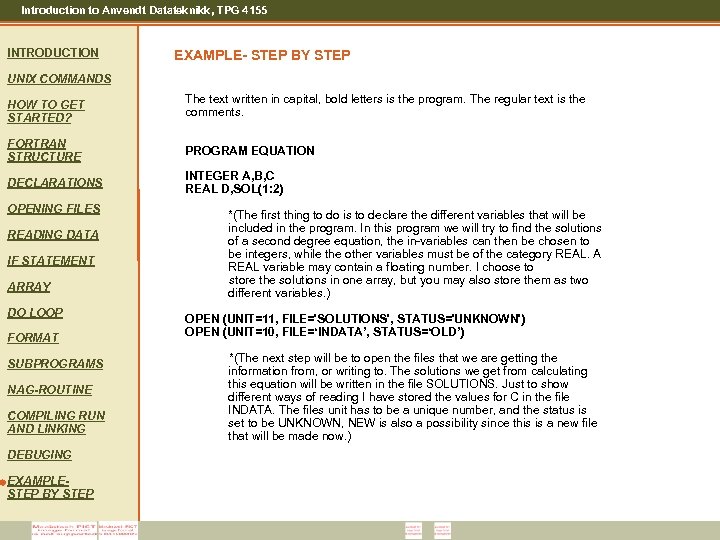 Introduction to Anvendt Datateknikk, TPG 4155 INTRODUCTION EXAMPLE- STEP BY STEP UNIX COMMANDS HOW TO GET STARTED? The text written in capital, bold letters is the program. The regular text is the comments. FORTRAN STRUCTURE PROGRAM EQUATION DECLARATIONS INTEGER A, B, C REAL D, SOL(1: 2) OPENING FILES READING DATA IF STATEMENT ARRAY DO LOOP FORMAT SUBPROGRAMS NAG-ROUTINE COMPILING RUN AND LINKING DEBUGING EXAMPLESTEP BY STEP *(The first thing to do is to declare the different variables that will be included in the program. In this program we will try to find the solutions of a second degree equation, the in-variables can then be chosen to be integers, while the other variables must be of the category REAL. A REAL variable may contain a floating number. I choose to store the solutions in one array, but you may also store them as two different variables. ) OPEN (UNIT=11, FILE='SOLUTIONS', STATUS='UNKNOWN') OPEN (UNIT=10, FILE=‘INDATA’, STATUS=‘OLD’) *(The next step will be to open the files that we are getting the information from, or writing to. The solutions we get from calculating this equation will be written in the file SOLUTIONS. Just to show different ways of reading I have stored the values for C in the file INDATA. The files unit has to be a unique number, and the status is set to be UNKNOWN, NEW is also a possibility since this is a new file that will be made now. )
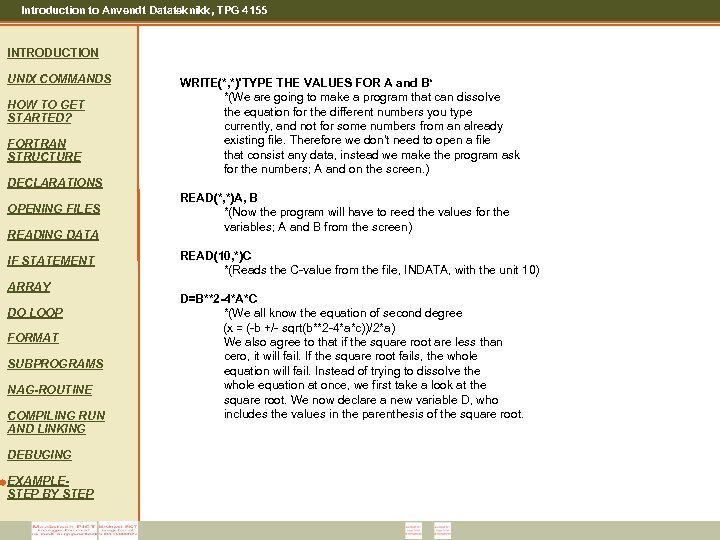 Introduction to Anvendt Datateknikk, TPG 4155 INTRODUCTION UNIX COMMANDS HOW TO GET STARTED? FORTRAN STRUCTURE WRITE(*, *)'TYPE THE VALUES FOR A and B‘ *(We are going to make a program that can dissolve the equation for the different numbers you type currently, and not for some numbers from an already existing file. Therefore we don't need to open a file that consist any data, instead we make the program ask for the numbers; A and on the screen. ) DECLARATIONS OPENING FILES READING DATA IF STATEMENT ARRAY DO LOOP FORMAT SUBPROGRAMS NAG-ROUTINE COMPILING RUN AND LINKING DEBUGING EXAMPLESTEP BY STEP READ(*, *)A, B *(Now the program will have to reed the values for the variables; A and B from the screen) READ(10, *)C *(Reads the C-value from the file, INDATA, with the unit 10) D=B**2 -4*A*C *(We all know the equation of second degree (x = (-b +/- sqrt(b**2 -4*a*c))/2*a) We also agree to that if the square root are less than cero, it will fail. If the square root fails, the whole equation will fail. Instead of trying to dissolve the whole equation at once, we first take a look at the square root. We now declare a new variable D, who includes the values in the parenthesis of the square root.
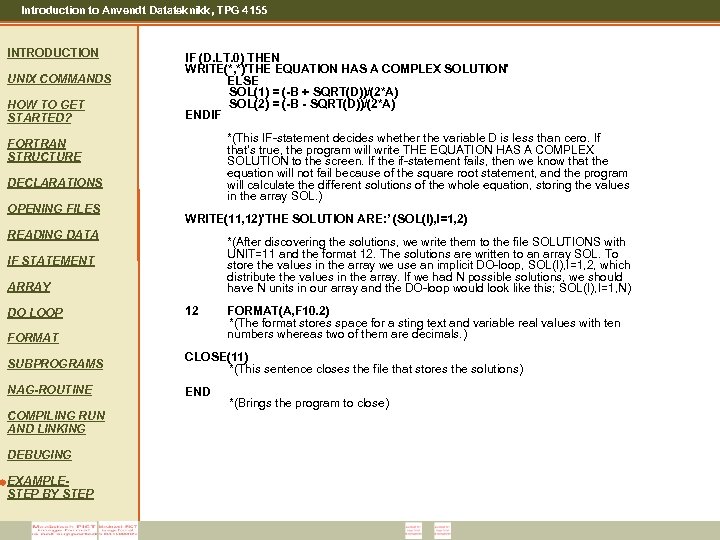 Introduction to Anvendt Datateknikk, TPG 4155 INTRODUCTION UNIX COMMANDS HOW TO GET STARTED? IF (D. LT. 0) THEN WRITE(*, *)'THE EQUATION HAS A COMPLEX SOLUTION' ELSE SOL(1) = (-B + SQRT(D))/(2*A) SOL(2) = (-B - SQRT(D))/(2*A) ENDIF *(This IF-statement decides whether the variable D is less than cero. If that's true, the program will write THE EQUATION HAS A COMPLEX SOLUTION to the screen. If the if-statement fails, then we know that the equation will not fail because of the square root statement, and the program will calculate the different solutions of the whole equation, storing the values in the array SOL. ) FORTRAN STRUCTURE DECLARATIONS OPENING FILES WRITE(11, 12)'THE SOLUTION ARE: ’ (SOL(I), I=1, 2) READING DATA *(After discovering the solutions, we write them to the file SOLUTIONS with UNIT=11 and the format 12. The solutions are written to an array SOL. To store the values in the array we use an implicit DO-loop, SOL(I), I=1, 2, which distribute the values in the array. If we had N possible solutions, we should have N units in our array and the DO-loop would look like this; SOL(I), I=1, N) IF STATEMENT ARRAY DO LOOP 12 FORMAT(A, F 10. 2) *(The format stores space for a sting text and variable real values with ten numbers whereas two of them are decimals. ) SUBPROGRAMS CLOSE(11) *(This sentence closes the file that stores the solutions) NAG-ROUTINE END COMPILING RUN AND LINKING DEBUGING EXAMPLESTEP BY STEP *(Brings the program to close)
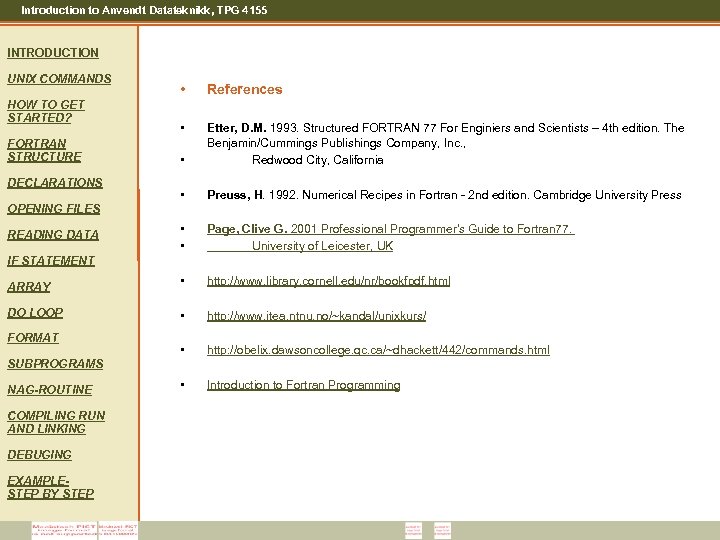 Introduction to Anvendt Datateknikk, TPG 4155 INTRODUCTION UNIX COMMANDS • References • • Etter, D. M. 1993. Structured FORTRAN 77 For Enginiers and Scientists – 4 th edition. The Benjamin/Cummings Publishings Company, Inc. , Redwood City, California • Preuss, H. 1992. Numerical Recipes in Fortran - 2 nd edition. Cambridge University Press • • Page, Clive G. 2001 Professional Programmer's Guide to Fortran 77. University of Leicester, UK ARRAY • http: //www. library. cornell. edu/nr/bookfpdf. html DO LOOP • http: //www. itea. ntnu. no/~kandal/unixkurs/ • http: //obelix. dawsoncollege. qc. ca/~dhackett/442/commands. html • Introduction to Fortran Programming HOW TO GET STARTED? FORTRAN STRUCTURE DECLARATIONS OPENING FILES READING DATA IF STATEMENT FORMAT SUBPROGRAMS NAG-ROUTINE COMPILING RUN AND LINKING DEBUGING EXAMPLESTEP BY STEP
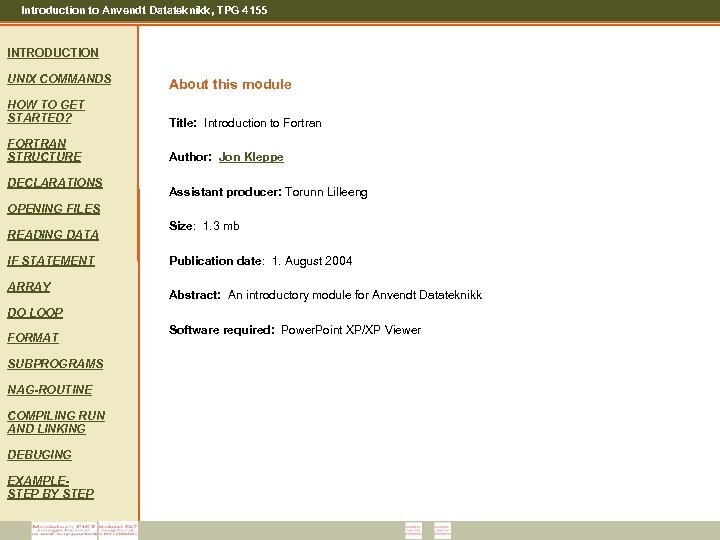 Introduction to Anvendt Datateknikk, TPG 4155 INTRODUCTION UNIX COMMANDS About this module HOW TO GET STARTED? Title: Introduction to Fortran FORTRAN STRUCTURE Author: Jon Kleppe DECLARATIONS Assistant producer: Torunn Lilleeng OPENING FILES READING DATA IF STATEMENT ARRAY Size: 1. 3 mb Publication date: 1. August 2004 Abstract: An introductory module for Anvendt Datateknikk DO LOOP FORMAT SUBPROGRAMS NAG-ROUTINE COMPILING RUN AND LINKING DEBUGING EXAMPLESTEP BY STEP Software required: Power. Point XP/XP Viewer