 Скачать презентацию ASSESSMENTS ACCOUNTABILITY Suspense Resolution and Reports Assessments
9703be0171fc30c874290c4dc0934863.ppt
- Количество слайдов: 109



ASSESSMENTS & ACCOUNTABILITY Suspense Resolution and Reports Assessments and Accountability v 3. 0

Rules Mute yourself *6 HOLD Silence cellphones 1 Address yourself when speaking 2 conversation at a time Assessments and Accountability v 3. 0
Who Should to Be Here Individuals assigned to CALPADS maintenance & Individuals responsible for Assessment and Accountability Data 3 Assessments and Accountability v 3. 0
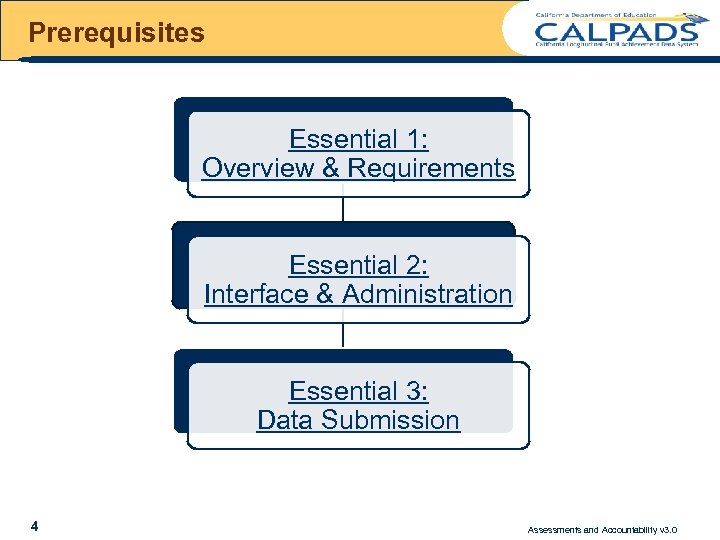
Prerequisites Essential 1: Overview & Requirements Essential 2: Interface & Administration Essential 3: Data Submission 4 Assessments and Accountability v 3. 0
Agenda Terminology Managing Suspense Verify Resolution 5 Overview Reports & Extracts Wrap-Up Assessments and Accountability v 3. 0
TERMINOLOGY 6 Assessments and Accountability v 3. 0
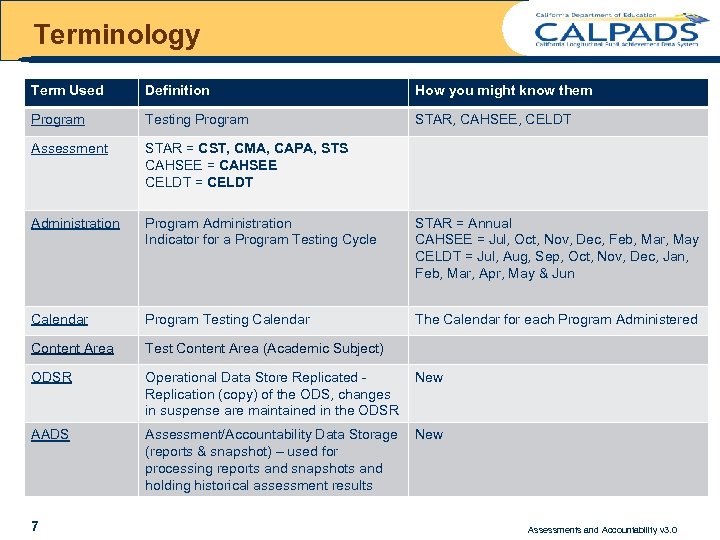
Terminology Term Used Definition How you might know them Program Testing Program STAR, CAHSEE, CELDT Assessment STAR = CST, CMA, CAPA, STS CAHSEE = CAHSEE CELDT = CELDT Administration Program Administration Indicator for a Program Testing Cycle STAR = Annual CAHSEE = Jul, Oct, Nov, Dec, Feb, Mar, May CELDT = Jul, Aug, Sep, Oct, Nov, Dec, Jan, Feb, Mar, Apr, May & Jun Calendar Program Testing Calendar The Calendar for each Program Administered Content Area Test Content Area (Academic Subject) ODSR Operational Data Store Replicated Replication (copy) of the ODS, changes in suspense are maintained in the ODSR New AADS Assessment/Accountability Data Storage (reports & snapshot) – used for processing reports and snapshots and holding historical assessment results New 7 Assessments and Accountability v 3. 0
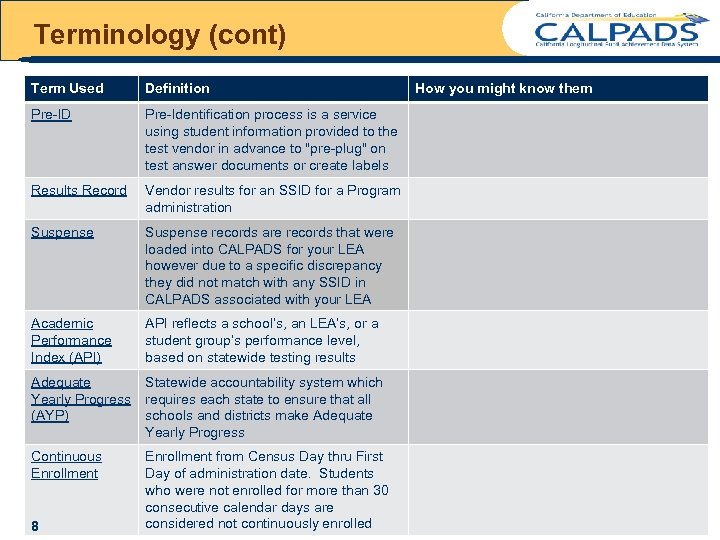
Terminology (cont) Term Used Definition Pre-ID Pre-Identification process is a service using student information provided to the test vendor in advance to "pre-plug" on test answer documents or create labels Results Record Vendor results for an SSID for a Program administration Suspense records are records that were loaded into CALPADS for your LEA however due to a specific discrepancy they did not match with any SSID in CALPADS associated with your LEA Academic Performance Index (API) API reflects a school’s, an LEA’s, or a student group’s performance level, based on statewide testing results Adequate Yearly Progress (AYP) Statewide accountability system which requires each state to ensure that all schools and districts make Adequate Yearly Progress Continuous Enrollment from Census Day thru First Day of administration date. Students who were not enrolled for more than 30 consecutive calendar days are considered not continuously enrolled 8 How you might know them Assessments and Accountability v 3. 0
Overview 9 Assessments and Accountability v 3. 0
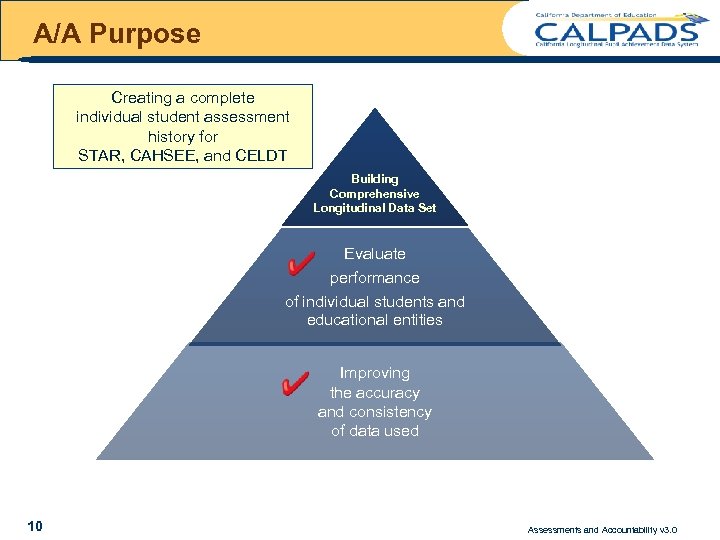
A/A Purpose Creating a complete individual student assessment history for STAR, CAHSEE, and CELDT Building Comprehensive Longitudinal Data Set Evaluate performance of individual students and educational entities Improving the accuracy and consistency of data used 10 Assessments and Accountability v 3. 0
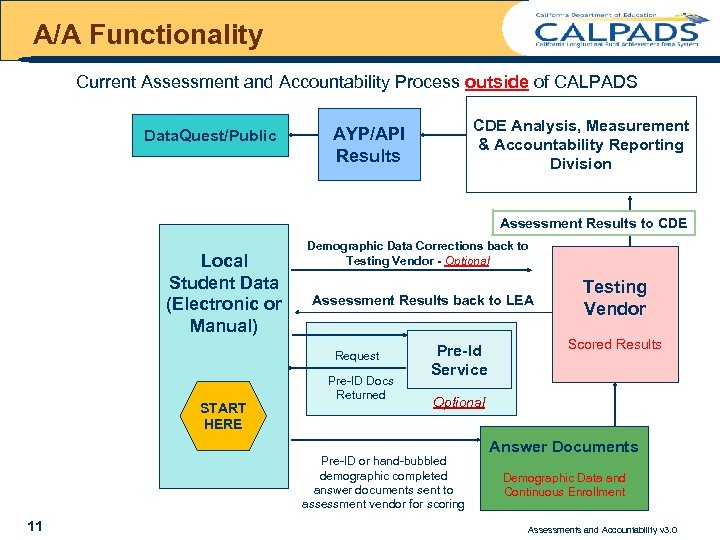
A/A Functionality Current Assessment and Accountability Process outside of CALPADS Data. Quest/Public CDE Analysis, Measurement & Accountability Reporting Division AYP/API Results Assessment Results to CDE Local Student Data (Electronic or Manual) Demographic Data Corrections back to Testing Vendor - Optional Assessment Results back to LEA Request START HERE Pre-ID Docs Returned Pre-Id Service Scored Results Optional Pre-ID or hand-bubbled demographic completed answer documents sent to assessment vendor for scoring 11 Testing Vendor Answer Documents Demographic Data and Continuous Enrollment Assessments and Accountability v 3. 0
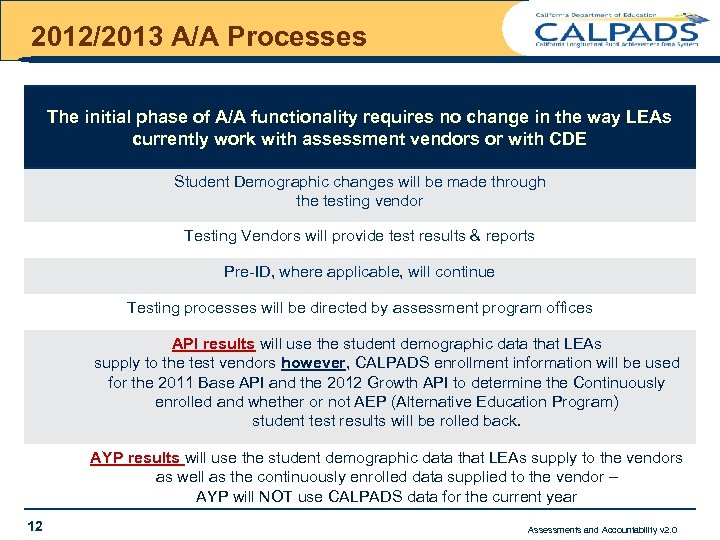
2012/2013 A/A Processes The initial phase of A/A functionality requires no change in the way LEAs currently work with assessment vendors or with CDE Student Demographic changes will be made through the testing vendor Testing Vendors will provide test results & reports Pre-ID, where applicable, will continue Testing processes will be directed by assessment program offices API results will use the student demographic data that LEAs supply to the test vendors however, CALPADS enrollment information will be used for the 2011 Base API and the 2012 Growth API to determine the Continuously enrolled and whether or not AEP (Alternative Education Program) student test results will be rolled back. AYP results will use the student demographic data that LEAs supply to the vendors as well as the continuously enrolled data supplied to the vendor – AYP will NOT use CALPADS data for the current year 12 Assessments and Accountability v 2. 0
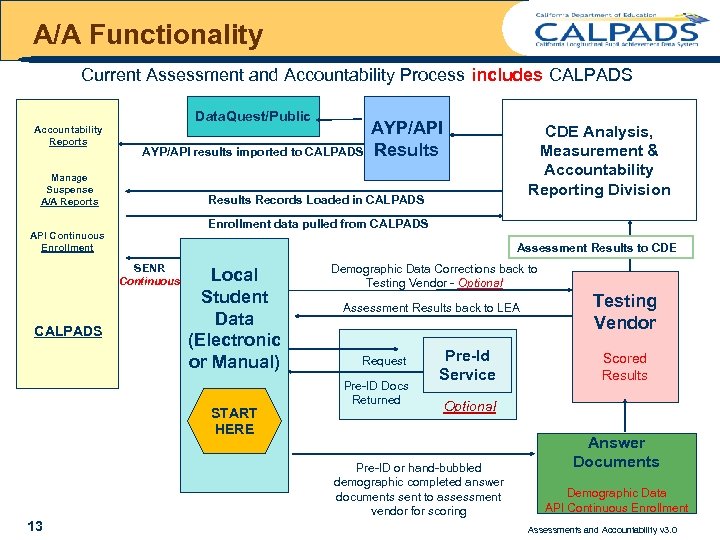
A/A Functionality Current Assessment and Accountability Process includes CALPADS Accountability Reports Data. Quest/Public AYP/API results imported to CALPADS Manage Suspense A/A Reports Enrollment data pulled from CALPADS Assessment Results to CDE SENR Continuous Local Student Data (Electronic or Manual) START HERE Demographic Data Corrections back to Testing Vendor - Optional Assessment Results back to LEA Request Pre-ID Docs Returned Pre-Id Service Testing Vendor Scored Results Optional Pre-ID or hand-bubbled demographic completed answer documents sent to assessment vendor for scoring 13 CDE Analysis, Measurement & Accountability Reporting Division Results Records Loaded in CALPADS API Continuous Enrollment CALPADS AYP/API Results Answer Documents Demographic Data API Continuous Enrollment Assessments and Accountability v 3. 0
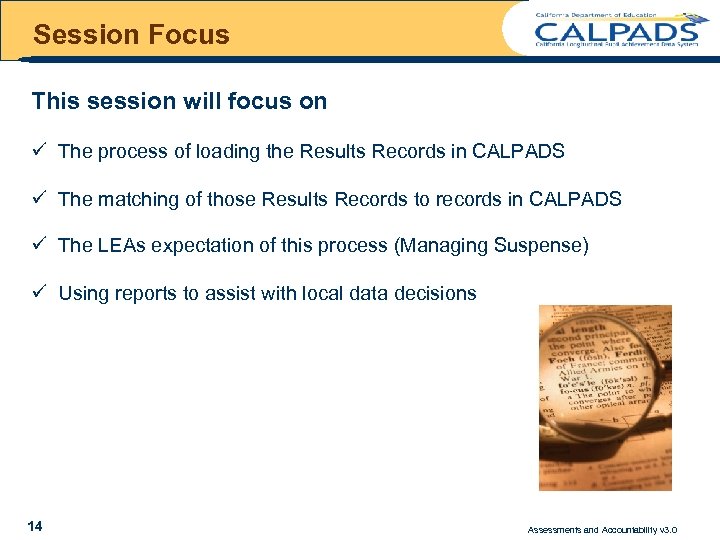
Session Focus This session will focus on ü The process of loading the Results Records in CALPADS ü The matching of those Results Records to records in CALPADS ü The LEAs expectation of this process (Managing Suspense) ü Using reports to assist with local data decisions 14 Assessments and Accountability v 3. 0
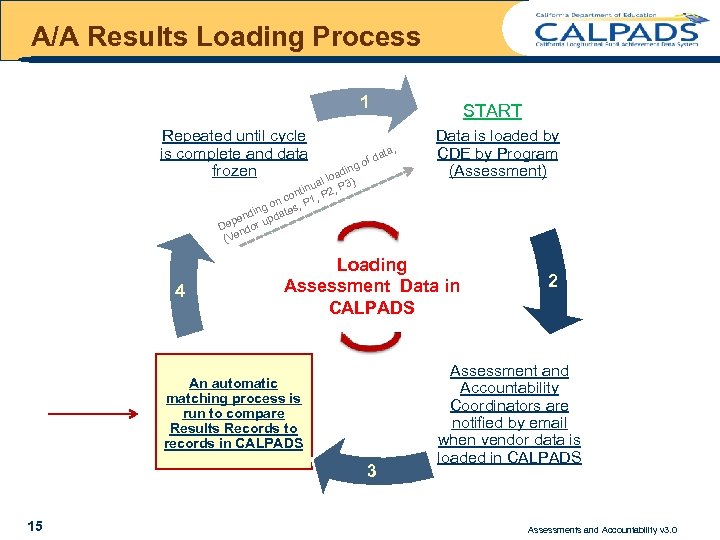
A/A Results Loading Process 1 Repeated until cycle is complete and data frozen g din loa ) al P 3 inu , ont 1, P 2 nc , P o ing tes end upda ep or D nd (Ve 4 , ata of d Data is loaded by CDE by Program (Assessment) Loading Assessment Data in CALPADS An automatic matching process is run to compare Results Records to records in CALPADS 3 15 START 2 Assessment and Accountability Coordinators are notified by email when vendor data is loaded in CALPADS Assessments and Accountability v 3. 0
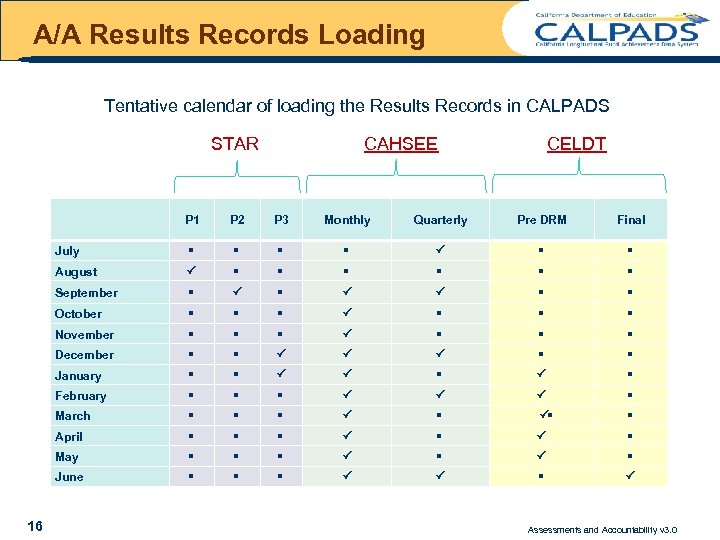
A/A Results Records Loading Tentative calendar of loading the Results Records in CALPADS STAR CAHSEE CELDT P 1 P 2 P 3 Monthly Quarterly Pre DRM Final July P August P September P P P October P November P December P P P January P P P February P P P March P P April P P May P P June P P P 16 Assessments and Accountability v 3. 0
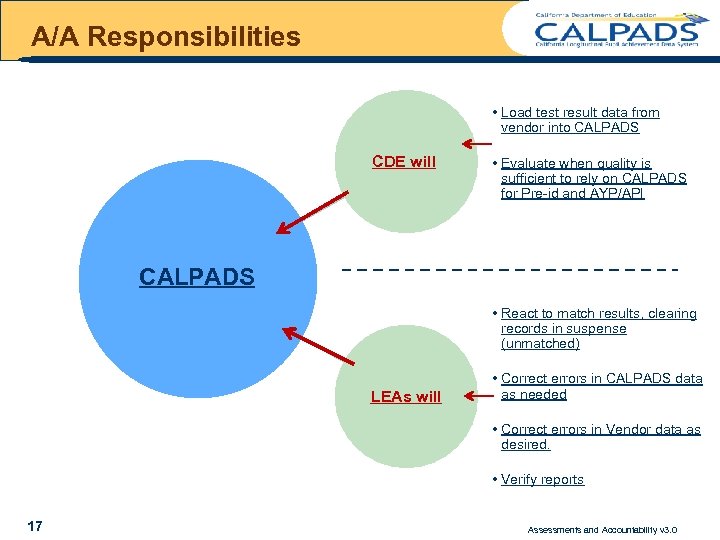
A/A Responsibilities • Load test result data from vendor into CALPADS CDE will • Evaluate when quality is sufficient to rely on CALPADS for Pre-id and AYP/API CALPADS • React to match results, clearing records in suspense (unmatched) LEAs will • Correct errors in CALPADS data as needed • Correct errors in Vendor data as desired. • Verify reports 17 Assessments and Accountability v 3. 0
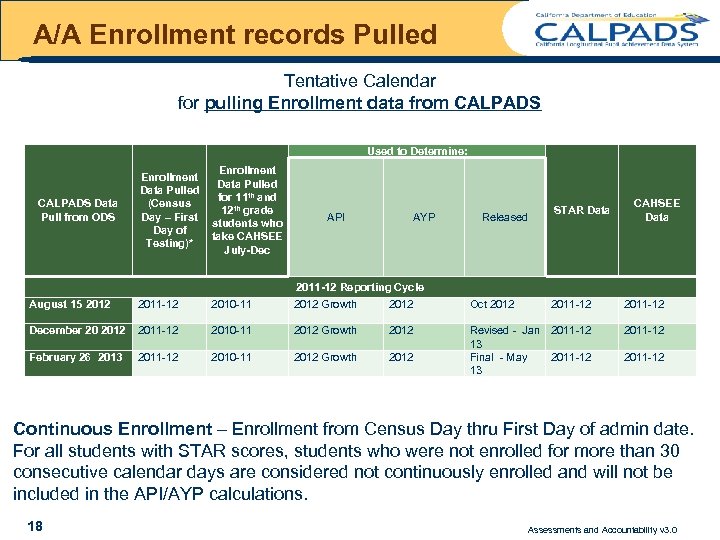
A/A Enrollment records Pulled Tentative Calendar for pulling Enrollment data from CALPADS Used to Determine: CALPADS Data Pull from ODS Enrollment Data Pulled for 11 th and (Census 12 th grade Day – First students who Day of take CAHSEE Testing)* July-Dec API AYP STAR Data Released CAHSEE Data 2011 -12 Reporting Cycle August 15 2012 2011 -12 2010 -11 2012 Growth 2012 Oct 2012 2011 -12 December 20 2012 2011 -12 2010 -11 2012 Growth 2012 2011 -12 February 26 2013 2011 -12 2010 -11 2012 Growth 2012 Revised - Jan 13 Final - May 13 2011 -12 Continuous Enrollment – Enrollment from Census Day thru First Day of admin date. For all students with STAR scores, students who were not enrolled for more than 30 consecutive calendar days are considered not continuously enrolled and will not be included in the API/AYP calculations. 18 Assessments and Accountability v 3. 0
MANAGING SUSPENSE DATA 19 Assessments and Accountability v 3. 0
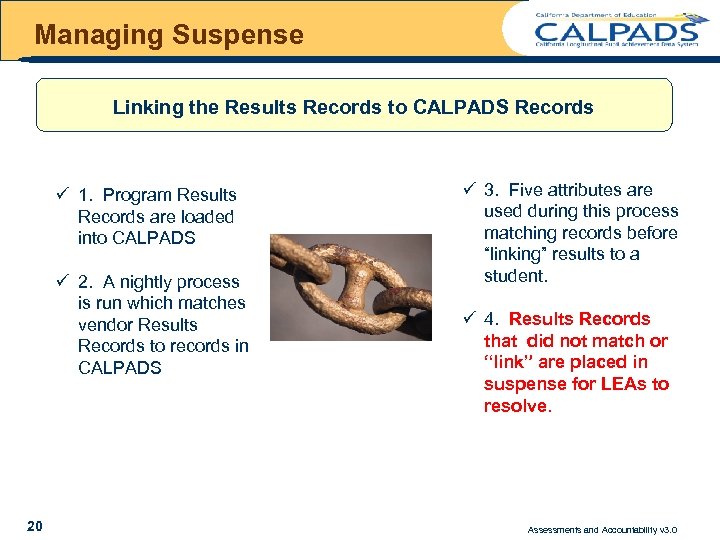
Managing Suspense Linking the Results Records to CALPADS Records ü 1. Program Results Records are loaded into CALPADS ü 2. A nightly process is run which matches vendor Results Records to records in CALPADS 20 ü 3. Five attributes are used during this process matching records before “linking” results to a student. ü 4. Results Records that did not match or “link” are placed in suspense for LEAs to resolve. Assessments and Accountability v 3. 0
Managing Suspense What are Suspense Records? Suspense records are Results Records that were loaded into CALPADS for your LEA however due to a specific discrepancy they did not match or link with any SSID in CALPADS associated with your LEA 21 Assessments and Accountability v 3. 0
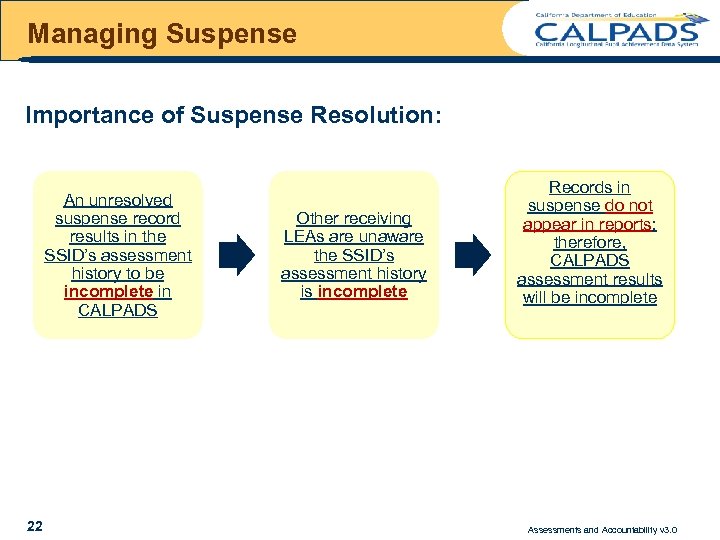
Managing Suspense Importance of Suspense Resolution: An unresolved suspense record results in the SSID’s assessment history to be incomplete in CALPADS 22 Other receiving LEAs are unaware the SSID’s assessment history is incomplete Records in suspense do not appear in reports; therefore, CALPADS assessment results will be incomplete Assessments and Accountability v 3. 0
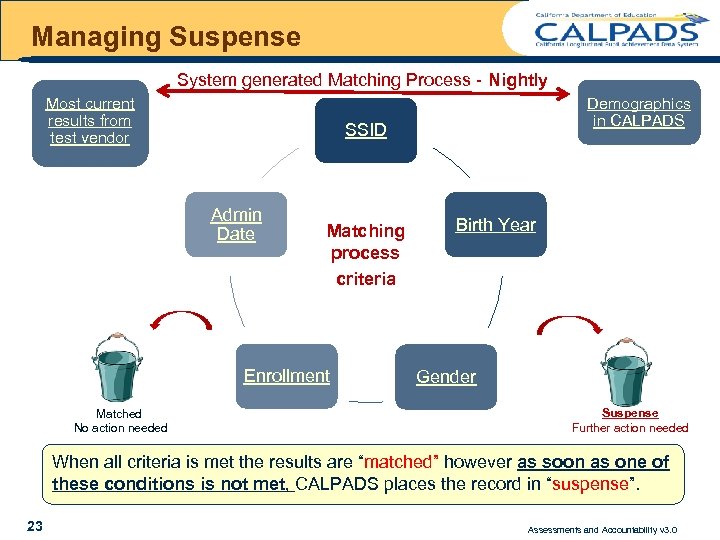
Managing Suspense System generated Matching Process - Nightly Most current results from test vendor SSID Admin Date Matching process criteria Enrollment Matched No action needed Demographics in CALPADS Birth Year Gender Suspense Further action needed When all criteria is met the results are “matched” however as soon as one of these conditions is not met, CALPADS places the record in “suspense”. 23 Assessments and Accountability v 3. 0
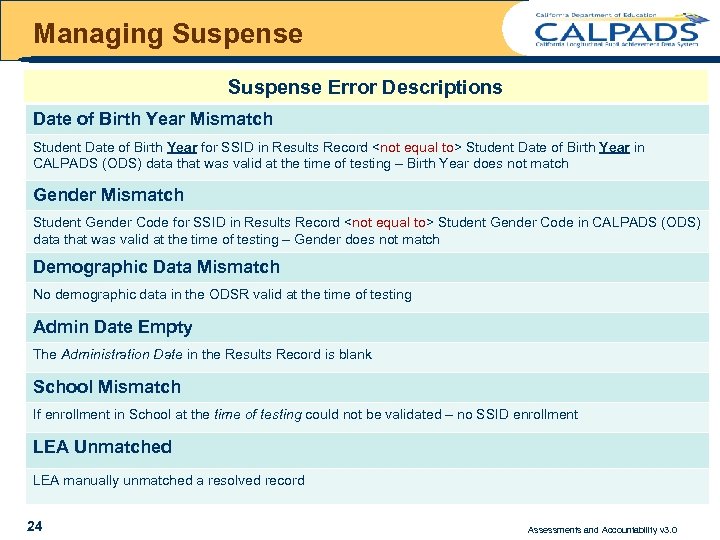
Managing Suspense Error Descriptions Date of Birth Year Mismatch Student Date of Birth Year for SSID in Results Record <not equal to> Student Date of Birth Year in CALPADS (ODS) data that was valid at the time of testing – Birth Year does not match Gender Mismatch Student Gender Code for SSID in Results Record <not equal to> Student Gender Code in CALPADS (ODS) data that was valid at the time of testing – Gender does not match Demographic Data Mismatch No demographic data in the ODSR valid at the time of testing Admin Date Empty The Administration Date in the Results Record is blank School Mismatch If enrollment in School at the time of testing could not be validated – no SSID enrollment LEA Unmatched LEA manually unmatched a resolved record 24 Assessments and Accountability v 3. 0
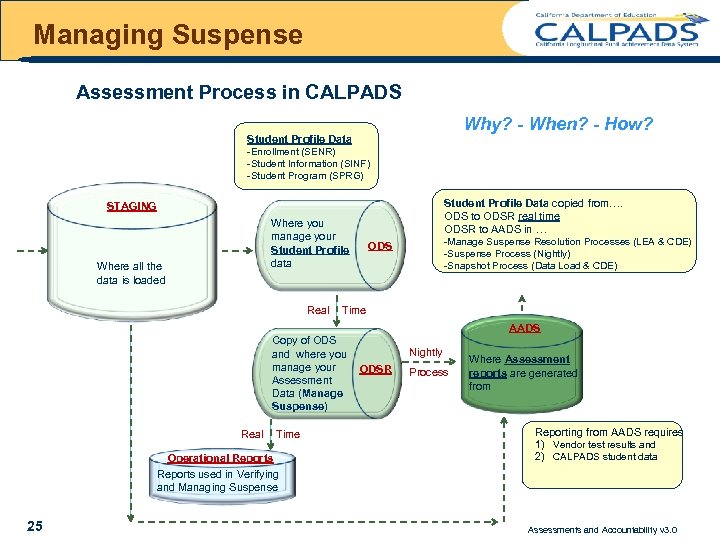
Managing Suspense Assessment Process in CALPADS Why? - When? - How? Student Profile Data -Enrollment (SENR) -Student Information (SINF) -Student Program (SPRG) Student Profile Data copied from…. ODS to ODSR real time ODSR to AADS in … STAGING Where you manage your Student Profile data Where all the data is loaded Real -Manage Suspense Resolution Processes (LEA & CDE) -Suspense Process (Nightly) -Snapshot Process (Data Load & CDE) ODS Time AADS Copy of ODS and where you manage your Assessment Data (Manage Suspense) Real Time Operational Reports Nightly ODSR Process Where Assessment reports are generated from Reporting from AADS requires 1) Vendor test results and 2) CALPADS student data Reports used in Verifying and Managing Suspense 25 Assessments and Accountability v 3. 0
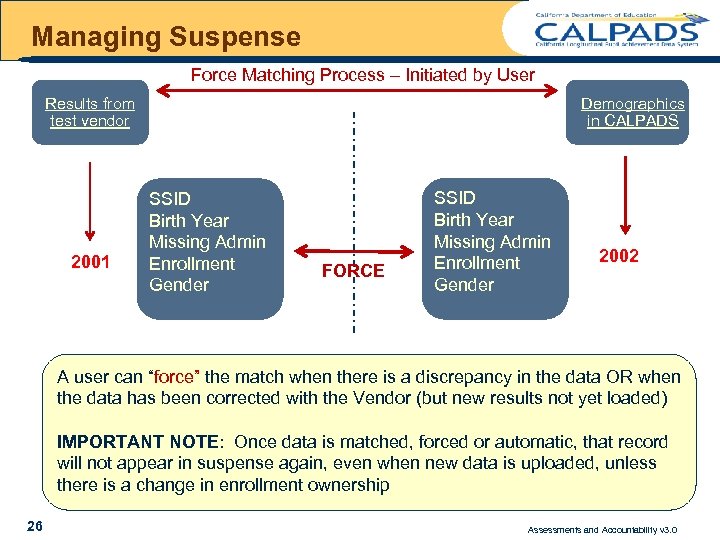
Managing Suspense Force Matching Process – Initiated by User Results from test vendor 2001 Demographics in CALPADS SSID Birth Year Missing Admin Enrollment Gender FORCE SSID Birth Year Missing Admin Enrollment Gender 2002 A user can “force” the match when there is a discrepancy in the data OR when the data has been corrected with the Vendor (but new results not yet loaded) IMPORTANT NOTE: Once data is matched, forced or automatic, that record will not appear in suspense again, even when new data is uploaded, unless there is a change in enrollment ownership 26 Assessments and Accountability v 3. 0
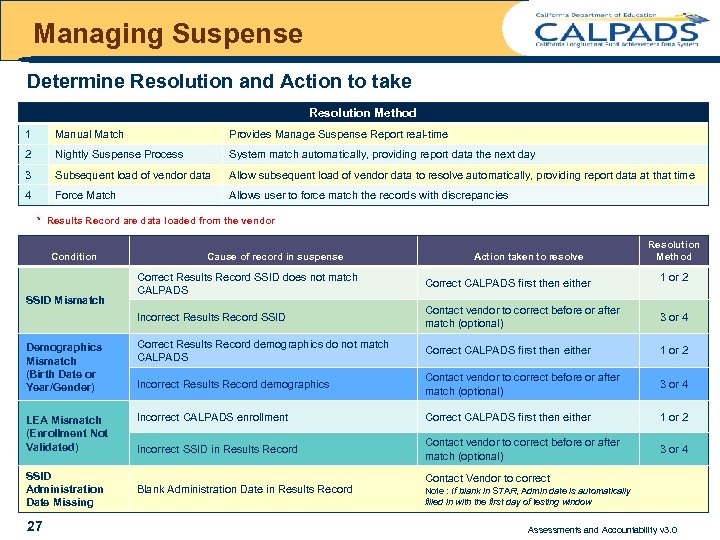
Managing Suspense Determine Resolution and Action to take Resolution Method 1 Manual Match Provides Manage Suspense Report real-time 2 Nightly Suspense Process System match automatically, providing report data the next day 3 Subsequent load of vendor data Allow subsequent load of vendor data to resolve automatically, providing report data at that time 4 Force Match Allows user to force match the records with discrepancies * Results Record are data loaded from the vendor Condition Cause of record in suspense Action taken to resolve Resolution Method 1 or 2 Correct Results Record SSID does not match CALPADS Correct CALPADS first then either Incorrect Results Record SSID Contact vendor to correct before or after match (optional) 3 or 4 Demographics Mismatch (Birth Date or Year/Gender) Correct Results Record demographics do not match CALPADS Correct CALPADS first then either 1 or 2 Incorrect Results Record demographics Contact vendor to correct before or after match (optional) 3 or 4 LEA Mismatch (Enrollment Not Validated) Incorrect CALPADS enrollment Correct CALPADS first then either 1 or 2 Incorrect SSID in Results Record Contact vendor to correct before or after match (optional) 3 or 4 SSID Mismatch SSID Administration Date Missing 27 Blank Administration Date in Results Record Contact Vendor to correct Note : If blank in STAR, Admin date is automatically filled in with the first day of testing window Assessments and Accountability v 3. 0
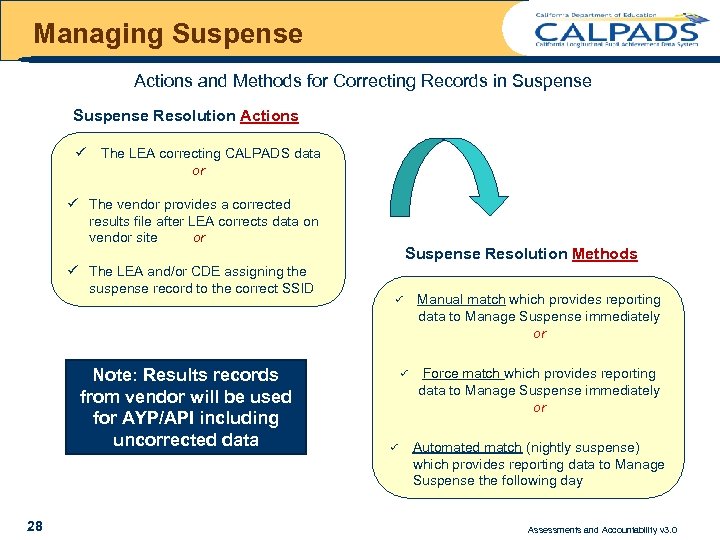
Managing Suspense Actions and Methods for Correcting Records in Suspense Resolution Actions ü The LEA correcting CALPADS data or ü The vendor provides a corrected results file after LEA corrects data on vendor site or ü The LEA and/or CDE assigning the suspense record to the correct SSID Note: Results records from vendor will be used for AYP/API including uncorrected data 28 Suspense Resolution Methods P P P Manual match which provides reporting data to Manage Suspense immediately or Force match which provides reporting data to Manage Suspense immediately or Automated match (nightly suspense) which provides reporting data to Manage Suspense the following day Assessments and Accountability v 3. 0
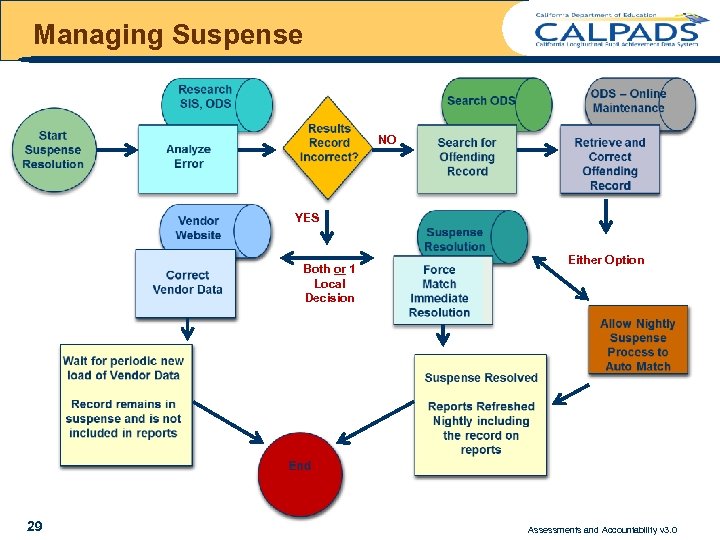
Managing Suspense NO YES Both or 1 Local Decision 29 Either Option Assessments and Accountability v 3. 0
Managing Suspense Remember…. If Results reports are in error, changes must be made through Vendor to be reflected in AYP and API calculations Calendar of vendor loads/updates Results Record = Vendor results that were uploaded into CALPADS 30 Assessments and Accountability v 3. 0
Managing Suspense Steps taken in CALPADS For clearing Suspense Records 31 Assessments and Accountability v 3. 0
CALPADS Roles Assessment and Accountability 1 CALPADS LEA STAR Coordinator 2 CALPADS LEA CAHSEE Coordinator 3 CALPADS LEA CELDT Coordinator 4 CALPADS LEA Accountability Coordinator 32 Assessments and Accountability v 3. 0
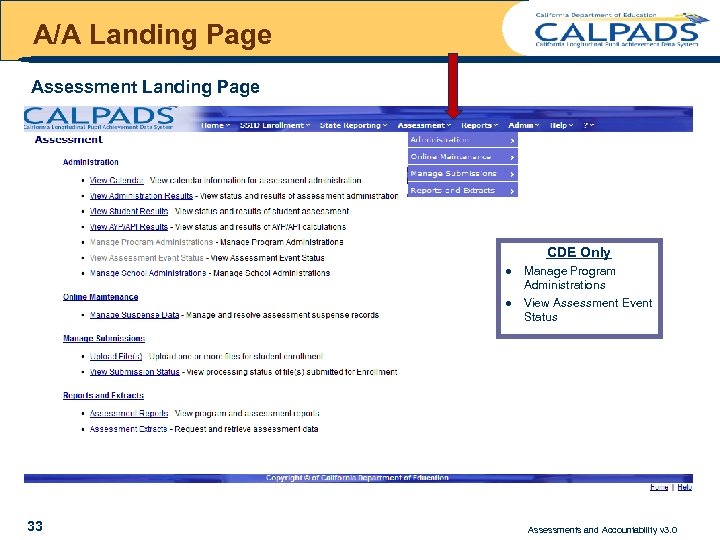
A/A Landing Page Assessment Landing Page CDE Only l l 33 Manage Program Administrations View Assessment Event Status Assessments and Accountability v 3. 0
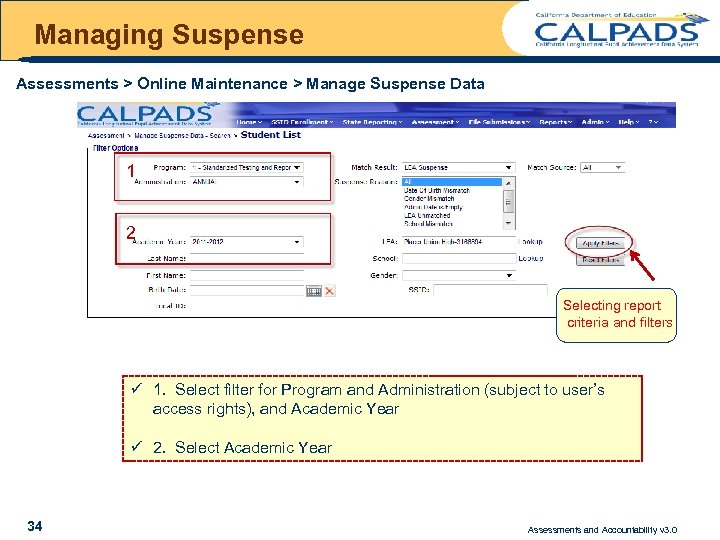
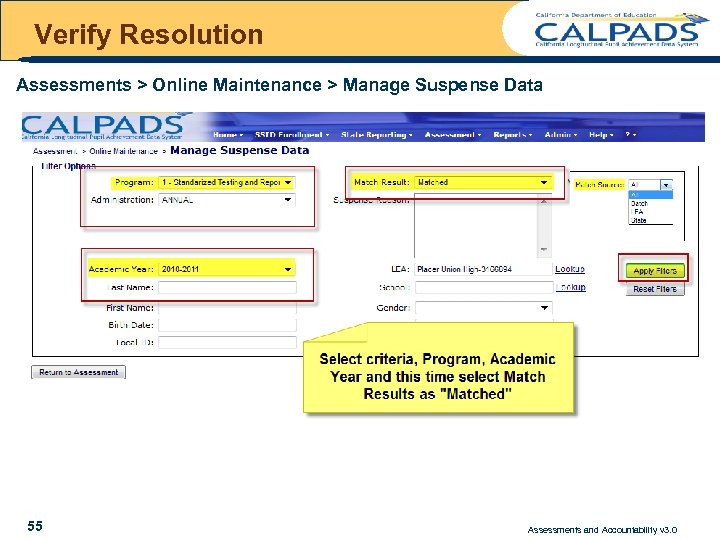
Managing Suspense Assessments > Online Maintenance > Manage Suspense Data 1 2 Selecting report criteria and filters ü 1. Select filter for Program and Administration (subject to user’s access rights), and Academic Year ü 2. Select Academic Year 34 Assessments and Accountability v 3. 0
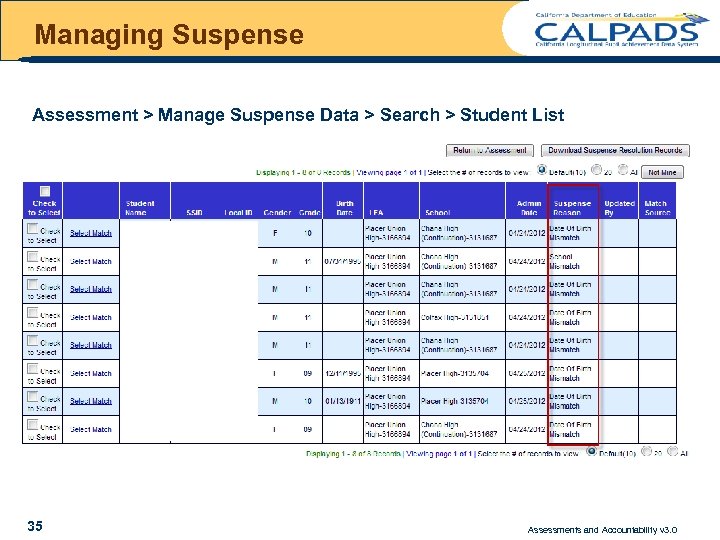
Managing Suspense Assessment > Manage Suspense Data > Search > Student List 35 Assessments and Accountability v 3. 0
Managing Suspense Error Analysis Example #1 Condition = Record in Suspense does not belong to your LEA Resolution = Pass on to the CDE as “not mine” 36 Assessments and Accountability v 3. 0
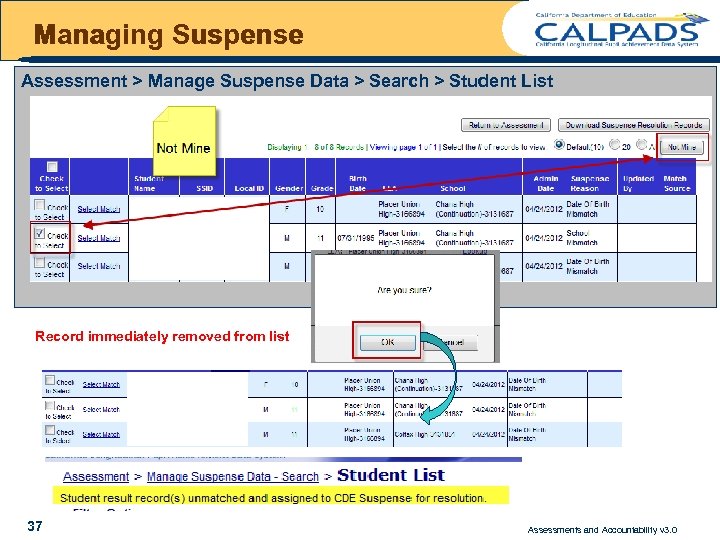
Managing Suspense Assessment > Manage Suspense Data > Search > Student List Record immediately removed from list 37 Assessments and Accountability v 3. 0
Managing Suspense Error Analysis Example #2 Condition = Results Record loaded (vendor data) is incorrect Resolution = Force the match to current record for your LEA in CALPADS Determine locally if vendor data will be corrected outside of CALPADS 38 Assessments and Accountability v 3. 0
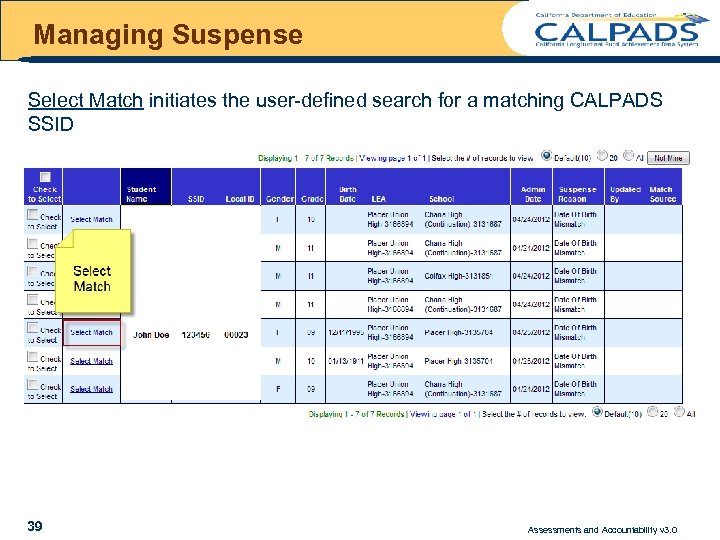
Managing Suspense Select Match initiates the user-defined search for a matching CALPADS SSID 39 Assessments and Accountability v 3. 0
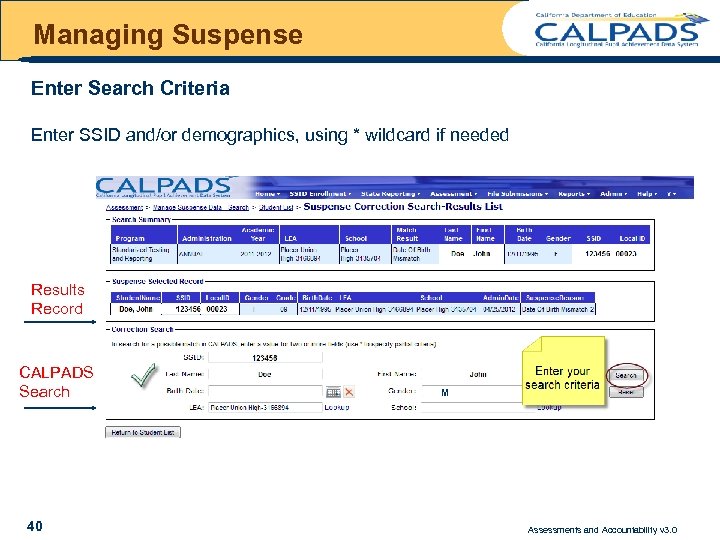
Managing Suspense Enter Search Criteria Enter SSID and/or demographics, using * wildcard if needed Results Record CALPADS Search 40 M Assessments and Accountability v 3. 0
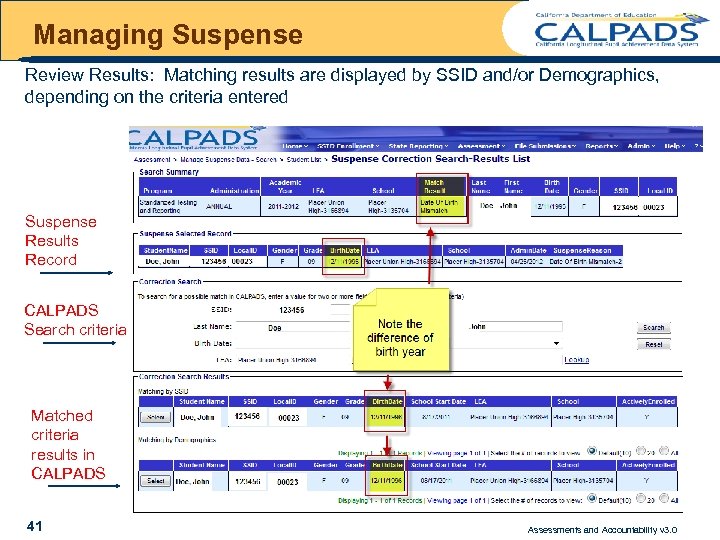
Managing Suspense Review Results: Matching results are displayed by SSID and/or Demographics, depending on the criteria entered Suspense Results Record CALPADS Search criteria Matched criteria results in CALPADS 41 Assessments and Accountability v 3. 0
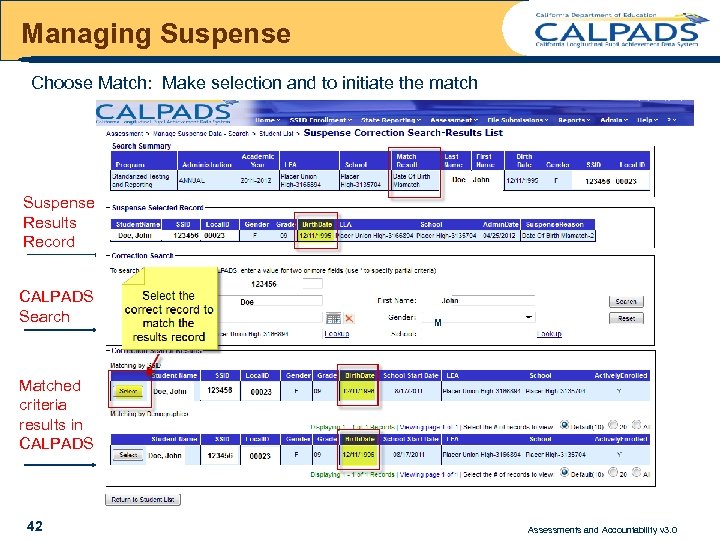
Managing Suspense Choose Match: Make selection and to initiate the match Suspense Results Record CALPADS Search M Matched criteria results in CALPADS 42 Assessments and Accountability v 3. 0
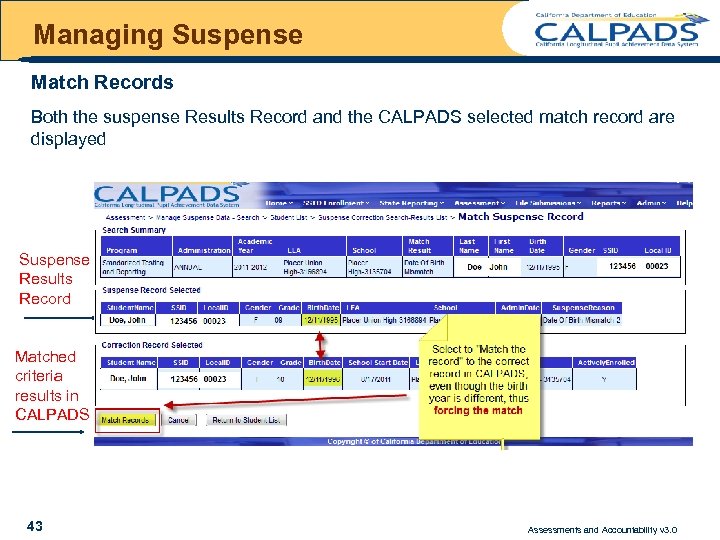
Managing Suspense Match Records Both the suspense Results Record and the CALPADS selected match record are displayed Suspense Results Record Matched criteria results in CALPADS 43 Assessments and Accountability v 3. 0
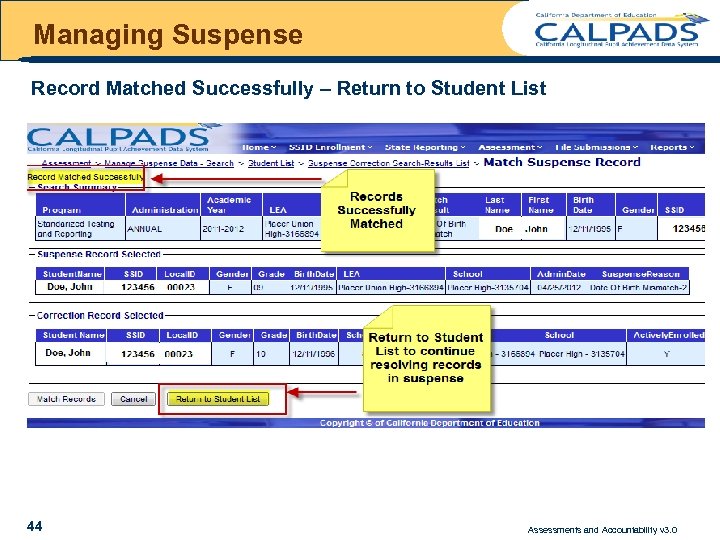
Managing Suspense Record Matched Successfully – Return to Student List 44 Assessments and Accountability v 3. 0
Managing Suspense ü Remember what data are used on reports ü The demographic data used on Reports is from the Results Record – Not the ODS ü When you force the match, ask yourself what data is incorrect? Is it the results data? ü Understand that you are forcing the two data sources to “link, ” however if the results data is incorrect, that incorrect data will be displayed on the reports. 45 Assessments and Accountability v 3. 0
Managing Suspense Error Analysis Example #3 Condition = Record in suspense due to Calpads Data being Incorrect Resolution = Correct data in CALPADS Option 1 force the match Option 2 let nightly process match records once corrected 46 Assessments and Accountability v 3. 0
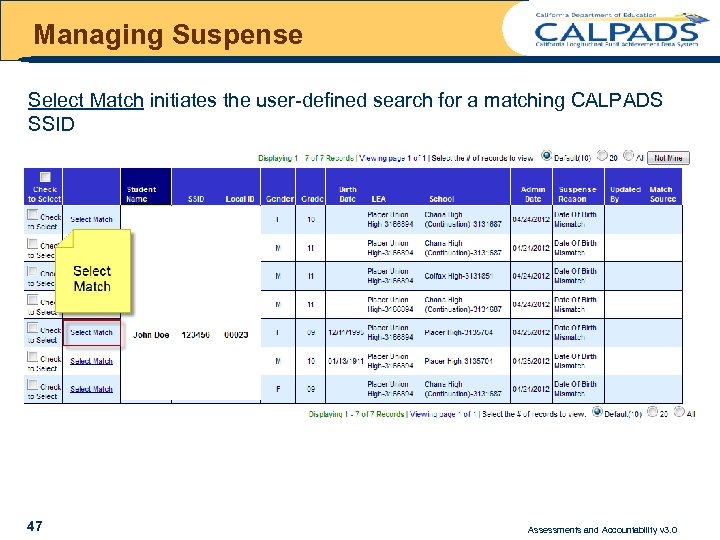
Managing Suspense Select Match initiates the user-defined search for a matching CALPADS SSID 47 Assessments and Accountability v 3. 0
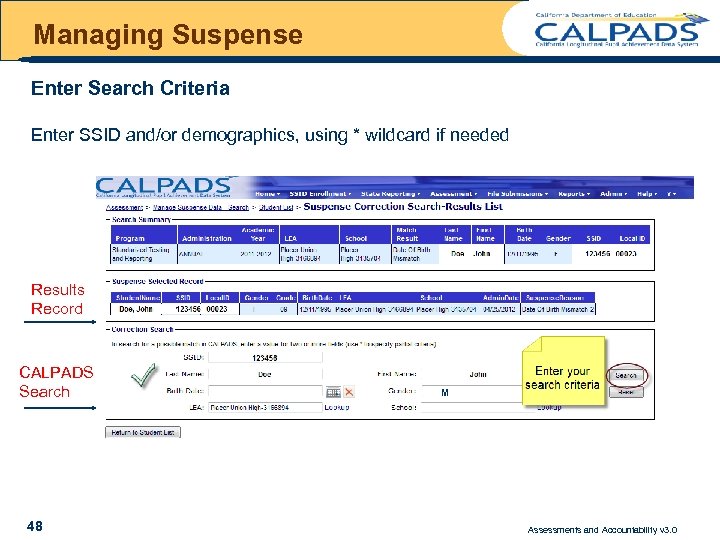
Managing Suspense Enter Search Criteria Enter SSID and/or demographics, using * wildcard if needed Results Record CALPADS Search 48 M Assessments and Accountability v 3. 0
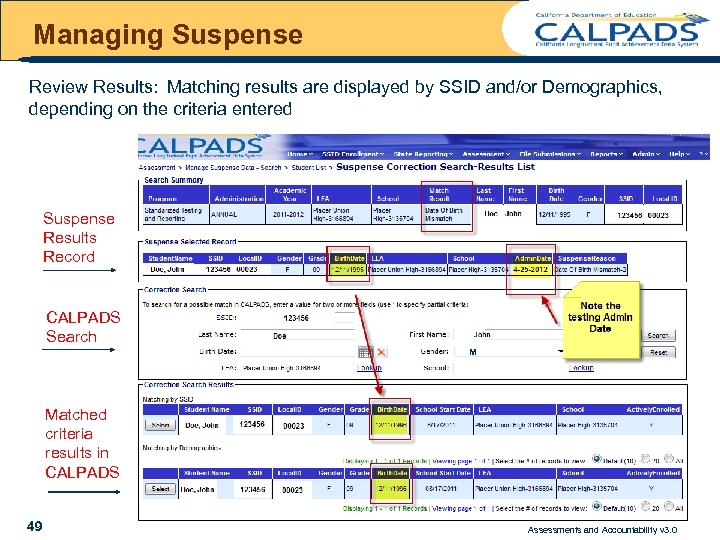
Managing Suspense Review Results: Matching results are displayed by SSID and/or Demographics, depending on the criteria entered Suspense Results Record CALPADS Search M Matched criteria results in CALPADS 49 Assessments and Accountability v 3. 0
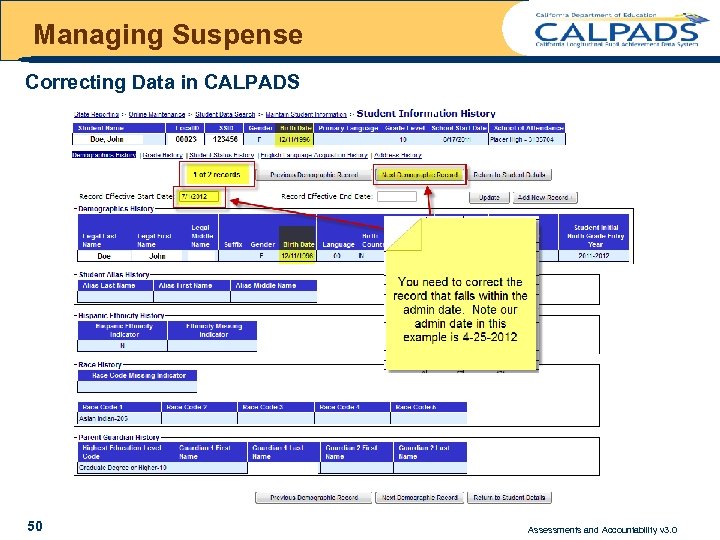
Managing Suspense Correcting Data in CALPADS 50 Assessments and Accountability v 3. 0
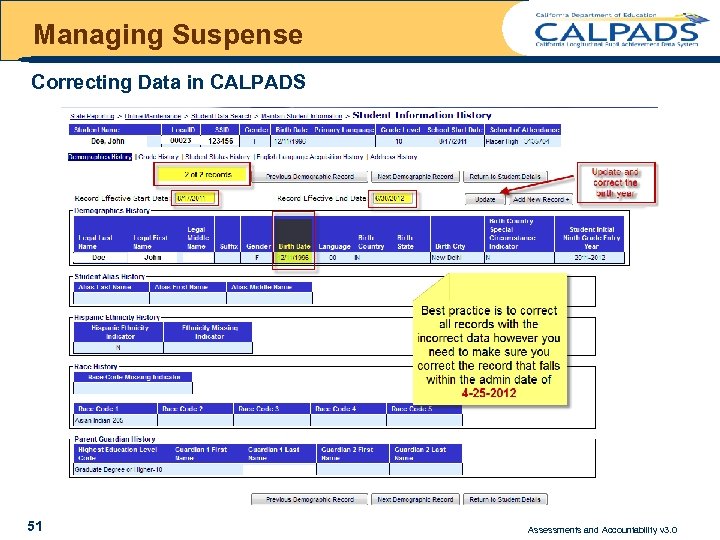
Managing Suspense Correcting Data in CALPADS 51 Assessments and Accountability v 3. 0
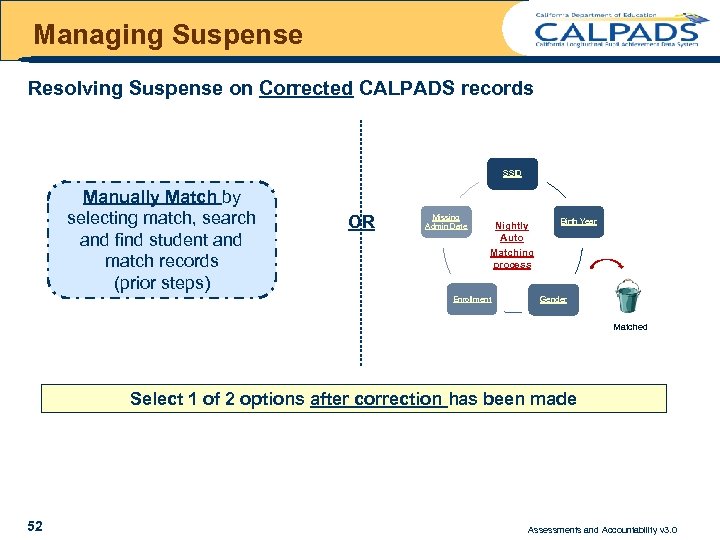
Managing Suspense Resolving Suspense on Corrected CALPADS records SSID Manually Match by selecting match, search and find student and match records (prior steps) OR Missing Admin Date Nightly Auto Matching process Enrollment Birth Year Gender Matched Select 1 of 2 options after correction has been made 52 Assessments and Accountability v 3. 0
Managing Suspense - Batch Managing Suspense via the Batch upload process The batch process is designed for LEAs with a large volume of records in Suspense ONLY options for batch are to force the match or send to CDE for matching For further information regarding Managing Suspense via the Batch process please submit a service request ticket 53 Assessments and Accountability v 3. 0
VERIFY RESOLUTION 54 Assessments and Accountability v 3. 0
Verify Resolution Assessments > Online Maintenance > Manage Suspense Data 55 Assessments and Accountability v 3. 0
Verify Resolution Confirm Matched Records 56 Assessments and Accountability v 3. 0
Verify Resolution Resolve Incorrect Match - Unmatch 57 Assessments and Accountability v 3. 0
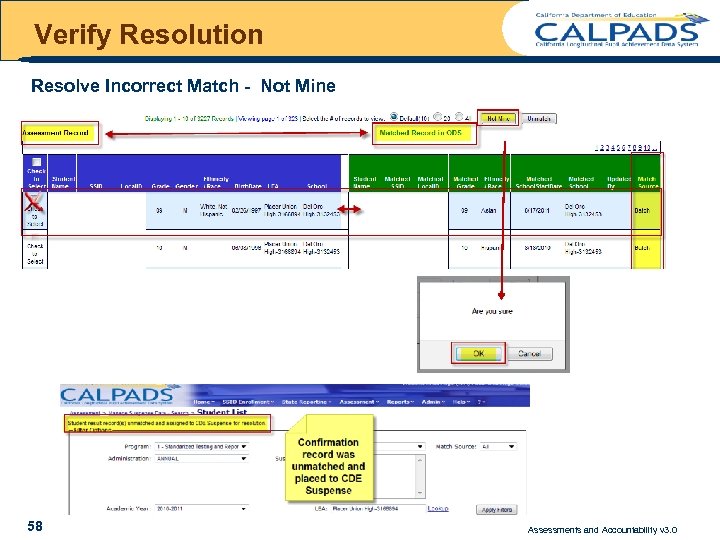
Verify Resolution Resolve Incorrect Match - Not Mine 58 Assessments and Accountability v 3. 0
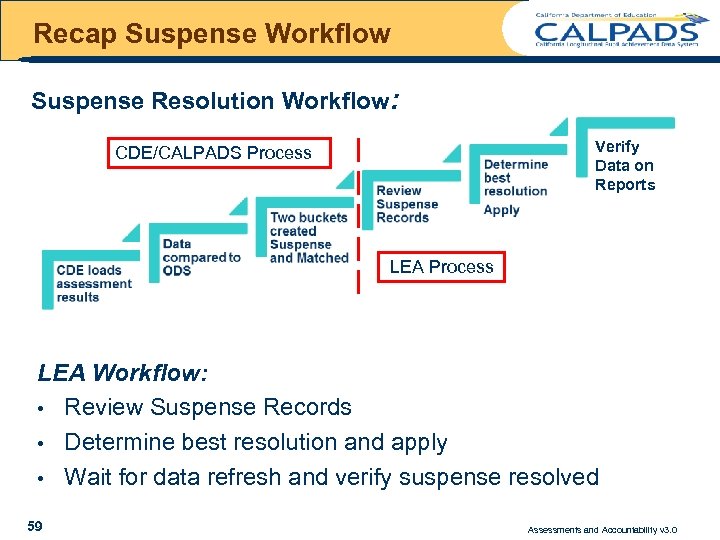
Recap Suspense Workflow Suspense Resolution Workflow: Verify Data on Reports CDE/CALPADS Process LEA Workflow: • Review Suspense Records • Determine best resolution and apply • Wait for data refresh and verify suspense resolved 59 Assessments and Accountability v 3. 0
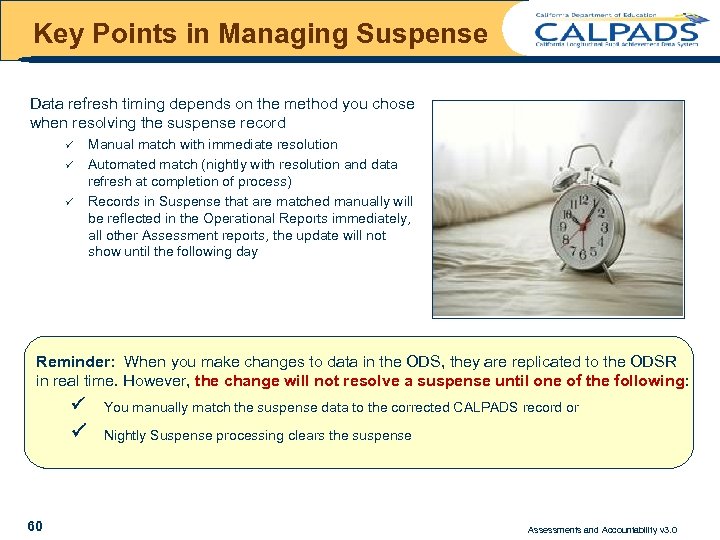
Key Points in Managing Suspense Data refresh timing depends on the method you chose when resolving the suspense record ü ü ü Manual match with immediate resolution Automated match (nightly with resolution and data refresh at completion of process) Records in Suspense that are matched manually will be reflected in the Operational Reports immediately, all other Assessment reports, the update will not show until the following day Reminder: When you make changes to data in the ODS, they are replicated to the ODSR in real time. However, the change will not resolve a suspense until one of the following: P P 60 You manually match the suspense data to the corrected CALPADS record or Nightly Suspense processing clears the suspense Assessments and Accountability v 3. 0
Questions 61 Break Assessments and Accountability v 3. 0
Assessments & Accountability Reports & Extracts 62 Assessments and Accountability v 3. 0
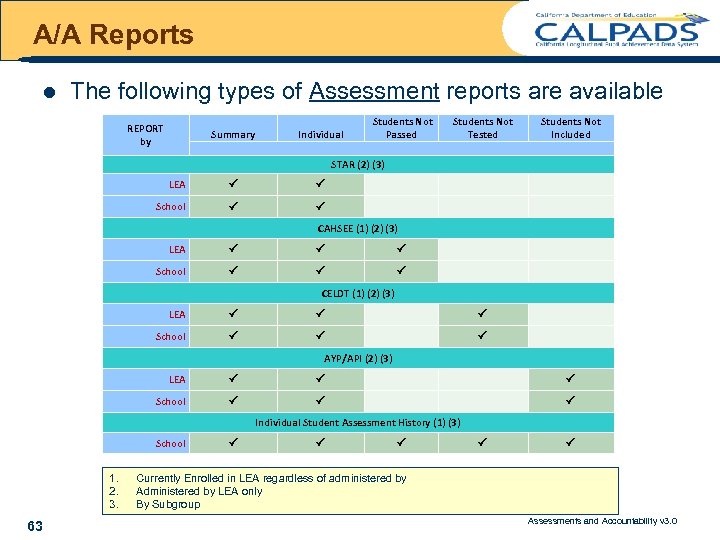
A/A Reports l The following types of Assessment reports are available REPORT by Summary Individual Students Not Passed Students Not Tested Students Not Included STAR (2) (3) LEA P P School P P CAHSEE (1) (2) (3) LEA P P P School P P P CELDT (1) (2) (3) LEA P P P School P P P AYP/API (2) (3) LEA P P P School P P P Individual Student Assessment History (1) (3) School 1. 2. 3. 63 P P P Currently Enrolled in LEA regardless of administered by Administered by LEA only By Subgroup Assessments and Accountability v 3. 0
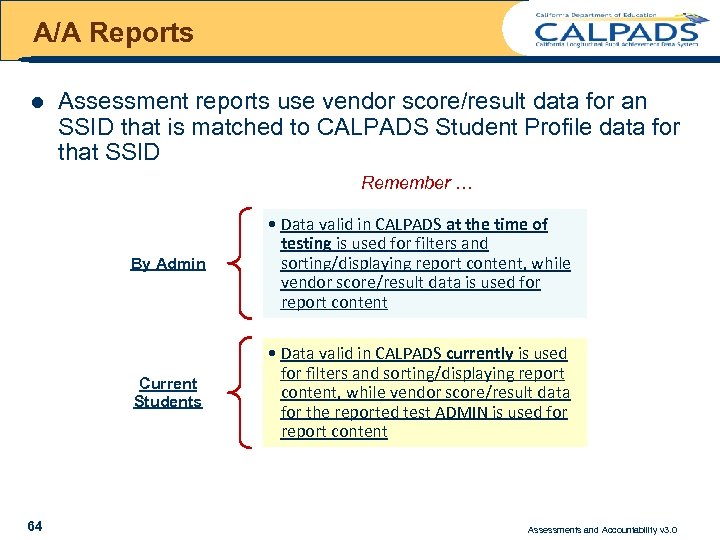
A/A Reports l Assessment reports use vendor score/result data for an SSID that is matched to CALPADS Student Profile data for that SSID Remember … By Admin Current Students 64 • Data valid in CALPADS at the time of testing is used for filters and sorting/displaying report content, while vendor score/result data is used for report content • Data valid in CALPADS currently is used for filters and sorting/displaying report content, while vendor score/result data for the reported test ADMIN is used for report content Assessments and Accountability v 3. 0
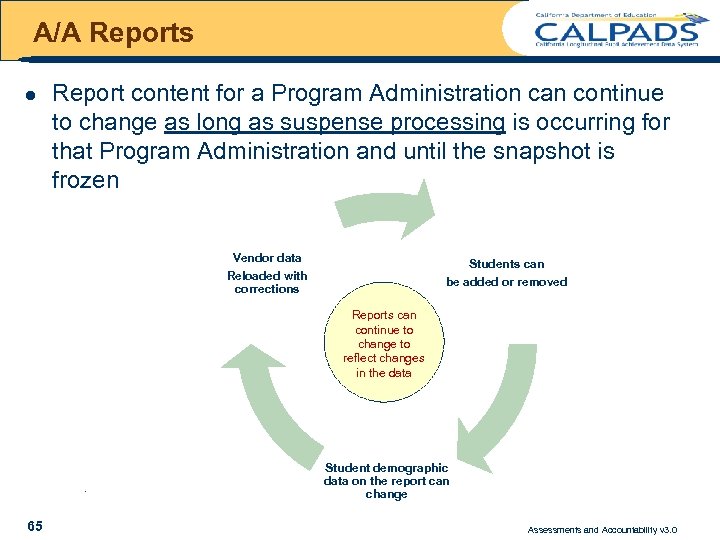
A/A Reports l Report content for a Program Administration can continue to change as long as suspense processing is occurring for that Program Administration and until the snapshot is frozen Vendor data Students can be added or removed Reloaded with corrections Reports can continue to change to reflect changes in the data . 65 Student demographic data on the report can change Assessments and Accountability v 3. 0
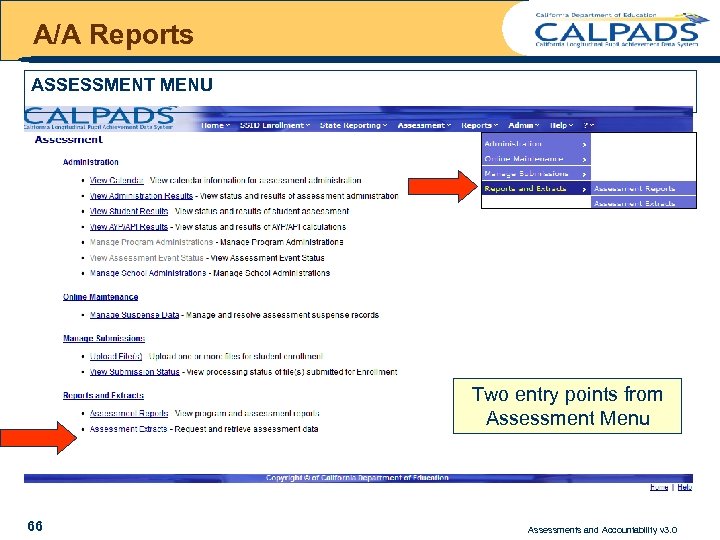
A/A Reports ASSESSMENT MENU Two entry points from Assessment Menu 66 Assessments and Accountability v 3. 0
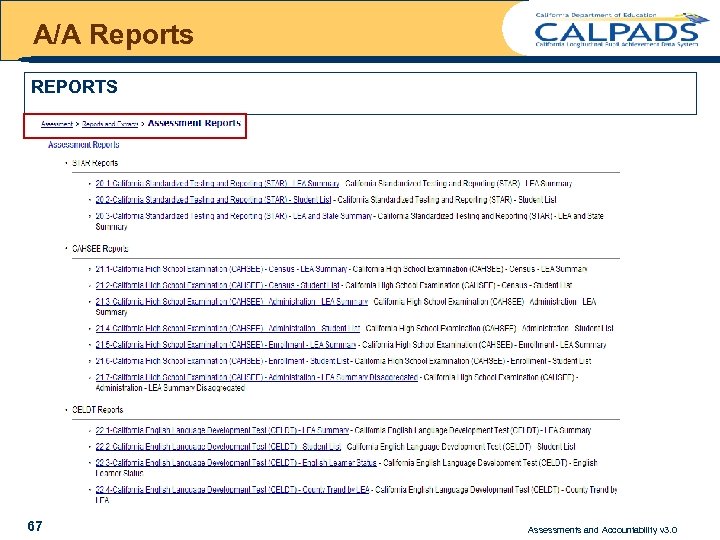
A/A Reports REPORTS l 67 xxxxx Assessments and Accountability v 3. 0
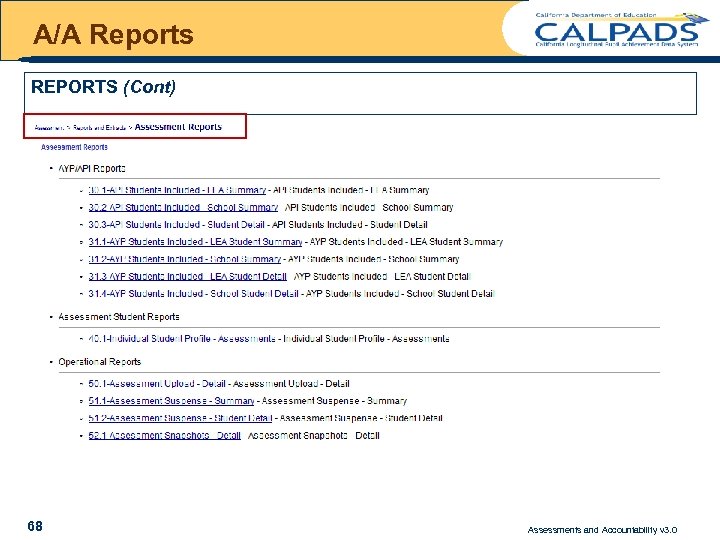
A/A Reports REPORTS (Cont) CDE Only 50. 1 Assessment Upload – Detail 52. 1 Assessment Snapshots - Detail 68 Assessments and Accountability v 3. 0
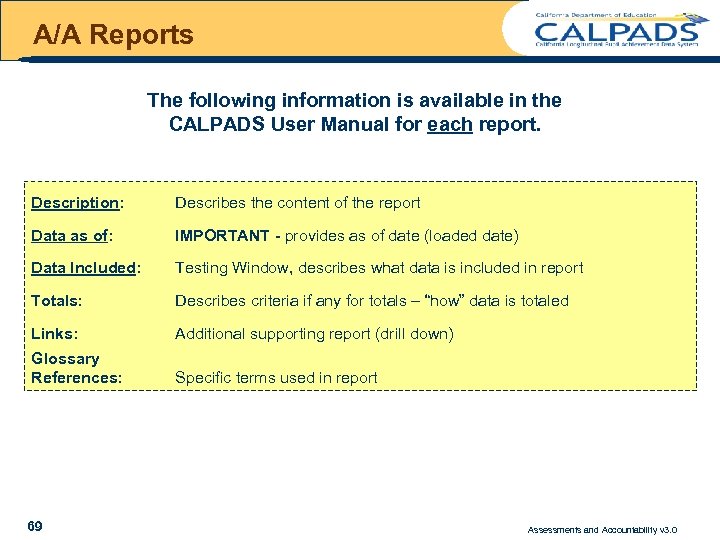
A/A Reports The following information is available in the CALPADS User Manual for each report. Description: Describes the content of the report Data as of: IMPORTANT - provides as of date (loaded date) Data Included: Testing Window, describes what data is included in report Totals: Describes criteria if any for totals – “how” data is totaled Links: Additional supporting report (drill down) Glossary References: Specific terms used in report 69 Assessments and Accountability v 3. 0
UNDERSTANDING STAR REPORTS 70 Assessments and Accountability v 3. 0
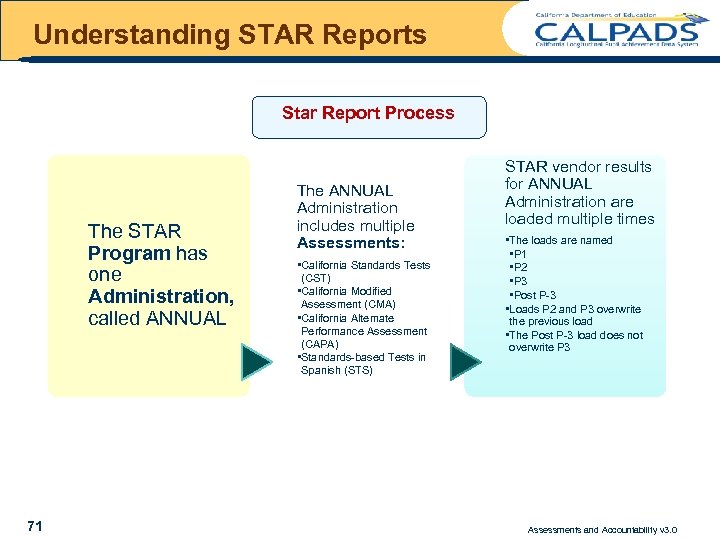
Understanding STAR Reports Star Report Process The STAR Program has one Administration, called ANNUAL 71 The ANNUAL Administration includes multiple Assessments: • California Standards Tests (CST) • California Modified Assessment (CMA) • California Alternate Performance Assessment (CAPA) • Standards-based Tests in Spanish (STS) STAR vendor results for ANNUAL Administration are loaded multiple times • The loads are named • P 1 • P 2 • P 3 • Post P-3 • Loads P 2 and P 3 overwrite the previous load • The Post P-3 load does not overwrite P 3 Assessments and Accountability v 3. 0
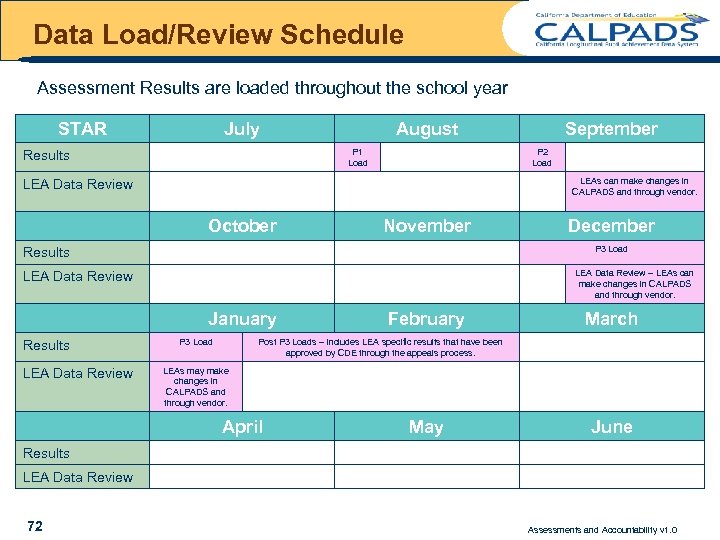
Data Load/Review Schedule Assessment Results are loaded throughout the school year STAR July August P 1 Load Results P 2 Load LEAs can make changes in CALPADS and through vendor. LEA Data Review October November LEA Data Review – LEAs can make changes in CALPADS and through vendor. LEA Data Review January LEA Data Review December P 3 Load Results September P 3 Load February March Post P 3 Loads – includes LEA specific results that have been approved by CDE through the appeals process. LEAs may make changes in CALPADS and through vendor. April May June Results LEA Data Review 72 Assessments and Accountability v 1. 0
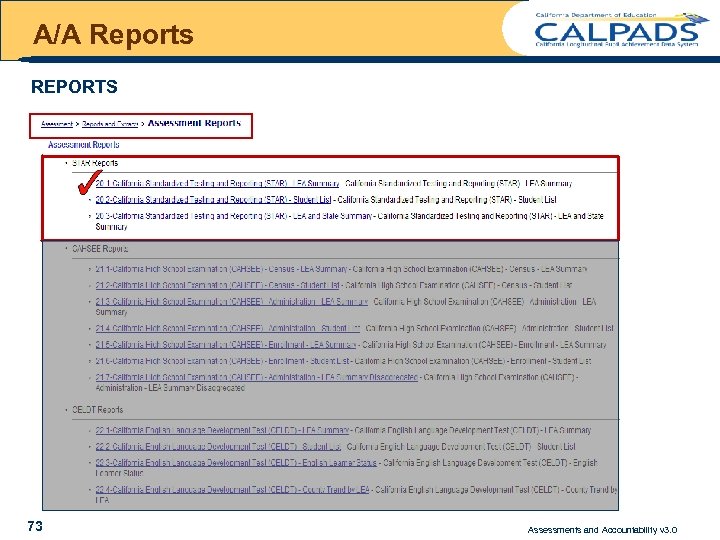
A/A Reports REPORTS l 73 xxxxx Assessments and Accountability v 3. 0
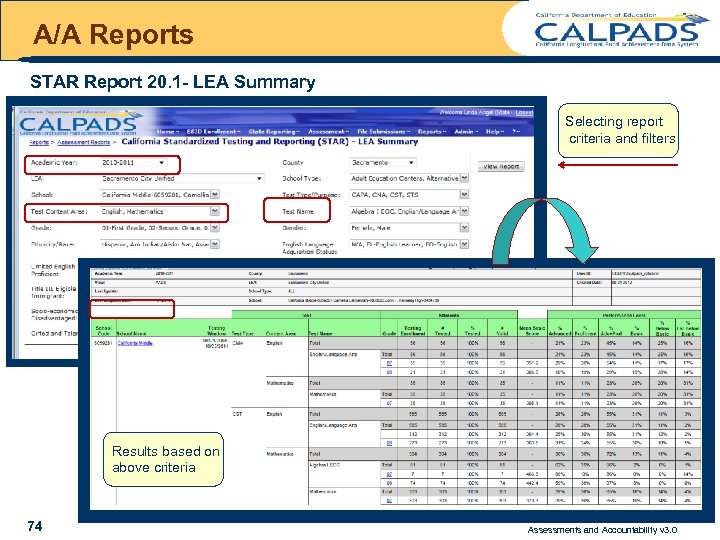
A/A Reports STAR Report 20. 1 - LEA Summary Selecting report criteria and filters Results based on above criteria 74 Assessments and Accountability v 3. 0
UNDERSTANDING CAHSEE REPORTS 75 Assessments and Accountability v 3. 0
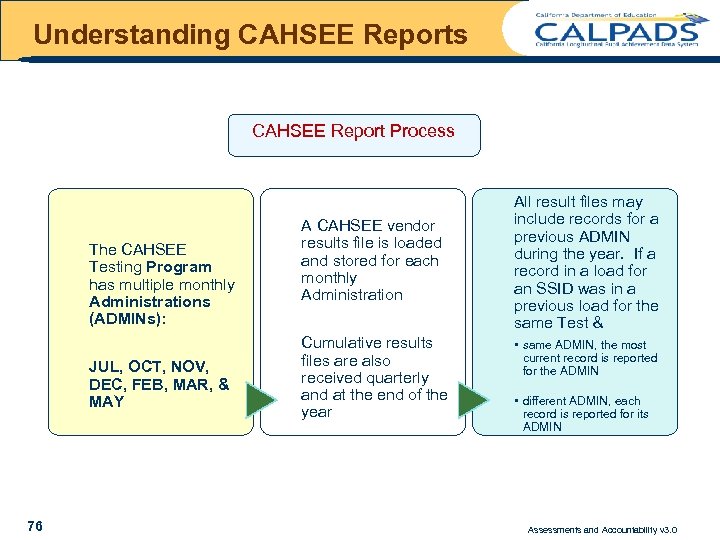
Understanding CAHSEE Reports CAHSEE Report Process The CAHSEE Testing Program has multiple monthly Administrations (ADMINs): JUL, OCT, NOV, DEC, FEB, MAR, & MAY 76 A CAHSEE vendor results file is loaded and stored for each monthly Administration Cumulative results files are also received quarterly and at the end of the year All result files may include records for a previous ADMIN during the year. If a record in a load for an SSID was in a previous load for the same Test & • same ADMIN, the most current record is reported for the ADMIN • different ADMIN, each record is reported for its ADMIN Assessments and Accountability v 3. 0
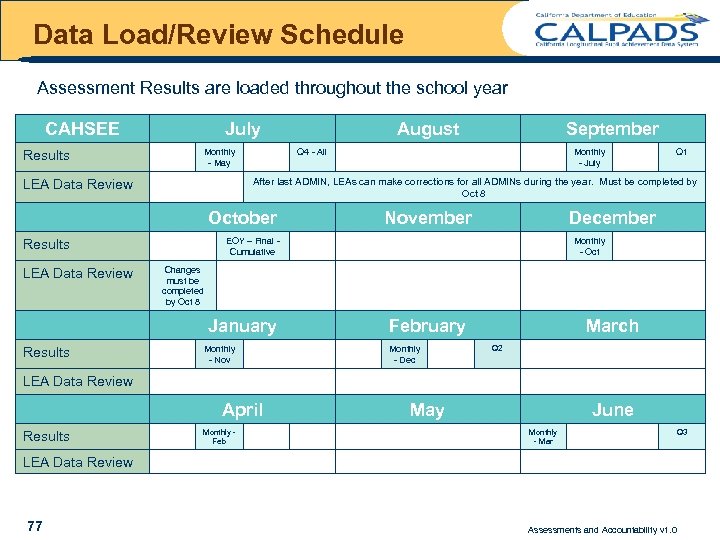
Data Load/Review Schedule Assessment Results are loaded throughout the school year CAHSEE July Monthly - May Results Q 4 - All October Monthly - July November Q 1 December EOY – Final Cumulative Results Monthly - Oct Changes must be completed by Oct 8 January Results September After last ADMIN, LEAs can make corrections for all ADMINs during the year. Must be completed by Oct 8 LEA Data Review August Monthly - Nov February Monthly - Dec March Q 2 LEA Data Review April Results Monthly Feb May June Monthly - Mar Q 3 LEA Data Review 77 Assessments and Accountability v 1. 0
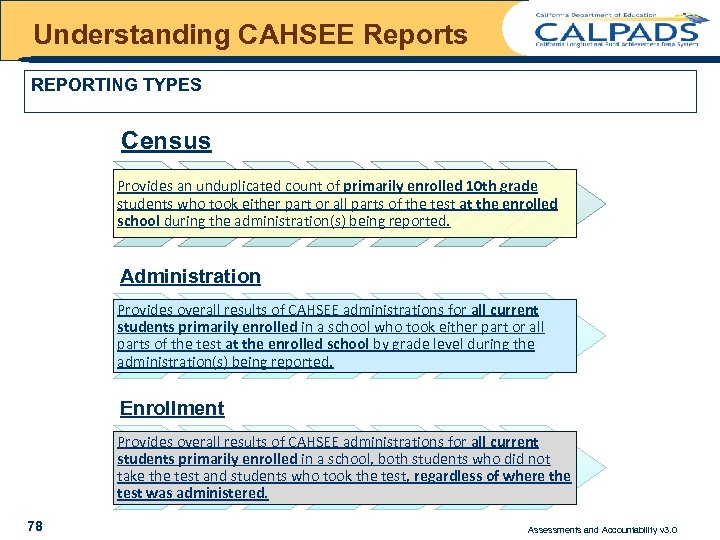
Understanding CAHSEE Reports REPORTING TYPES Census Provides an unduplicated count of primarily enrolled 10 th grade students who took either part or all parts of the test at the enrolled school during the administration(s) being reported. Administration Provides overall results of CAHSEE administrations for all current students primarily enrolled in a school who took either part or all parts of the test at the enrolled school by grade level during the administration(s) being reported. Enrollment Provides overall results of CAHSEE administrations for all current students primarily enrolled in a school, both students who did not take the test and students who took the test, regardless of where the test was administered. 78 Assessments and Accountability v 3. 0
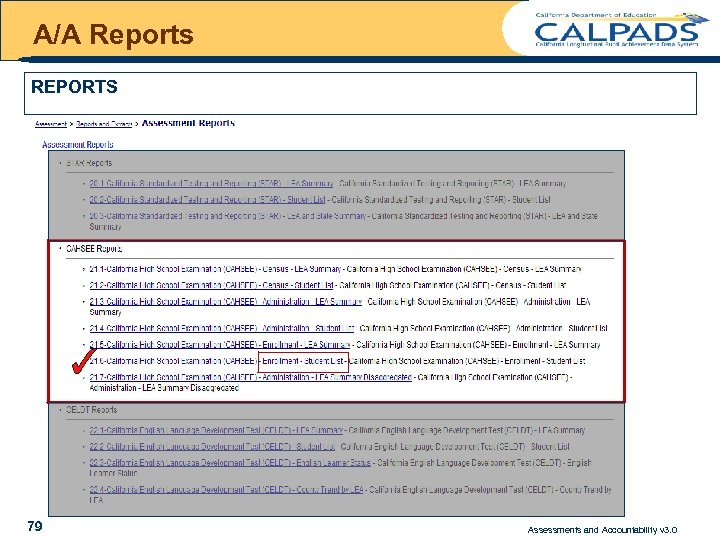
A/A Reports REPORTS l 79 xxxxx Assessments and Accountability v 3. 0
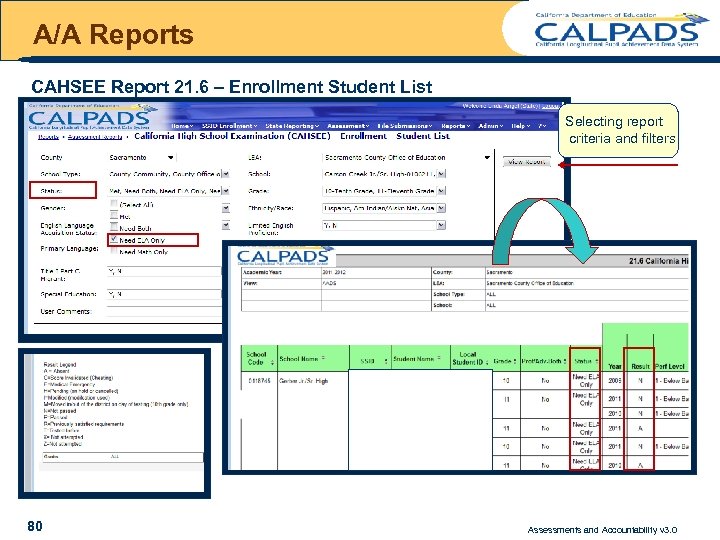
A/A Reports CAHSEE Report 21. 6 – Enrollment Student List Selecting report criteria and filters 80 Assessments and Accountability v 3. 0
UNDERSTANDING CELDT REPORTS 81 Assessments and Accountability v 3. 0
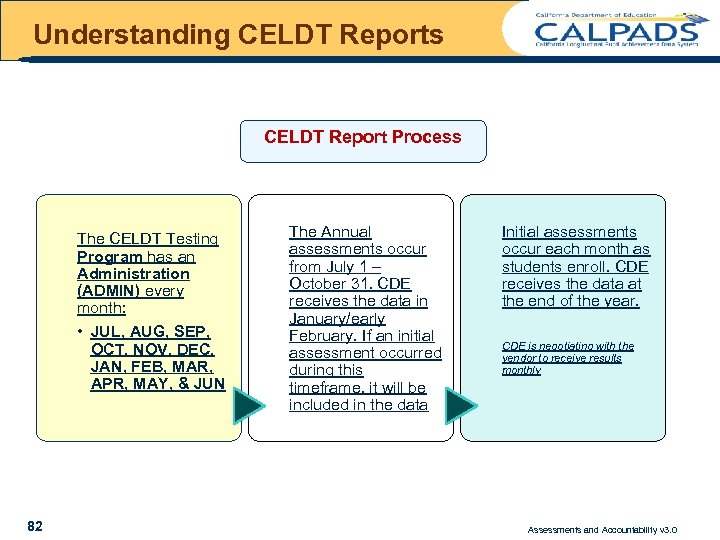
Understanding CELDT Reports CELDT Report Process The CELDT Testing Program has an Administration (ADMIN) every month: • JUL, AUG, SEP, OCT, NOV, DEC, JAN, FEB, MAR, APR, MAY, & JUN 82 The Annual assessments occur from July 1 – October 31. CDE receives the data in January/early February. If an initial assessment occurred during this timeframe, it will be included in the data Initial assessments occur each month as students enroll. CDE receives the data at the end of the year. CDE is negotiating with the vendor to receive results monthly Assessments and Accountability v 3. 0
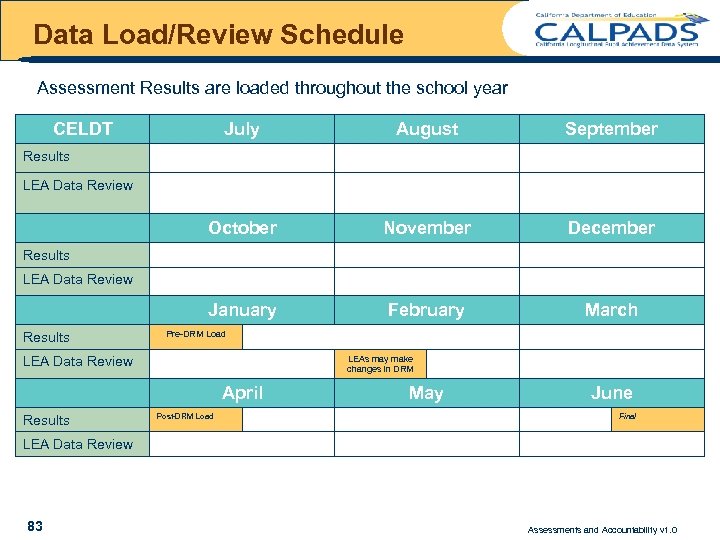
Data Load/Review Schedule Assessment Results are loaded throughout the school year CELDT July August September October November December January February March Results LEA Data Review Results Pre-DRM Load LEAs may make changes in DRM LEA Data Review April Results Post-DRM Load May June Final LEA Data Review 83 Assessments and Accountability v 1. 0
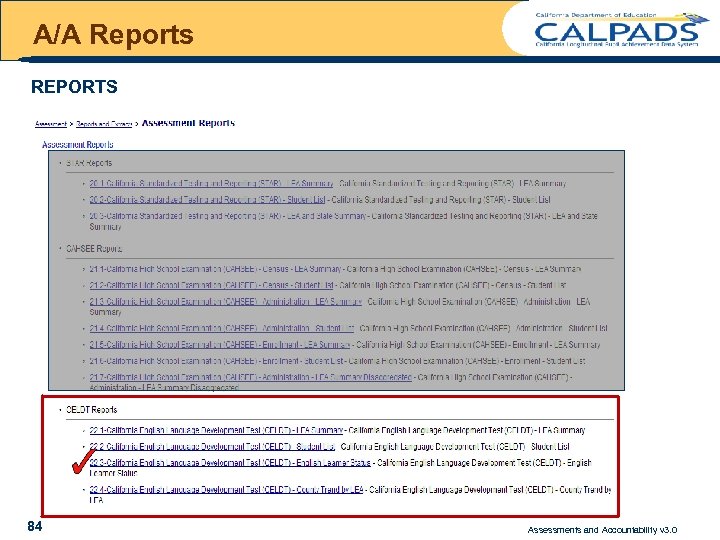
A/A Reports REPORTS l 84 xxxxx Assessments and Accountability v 3. 0
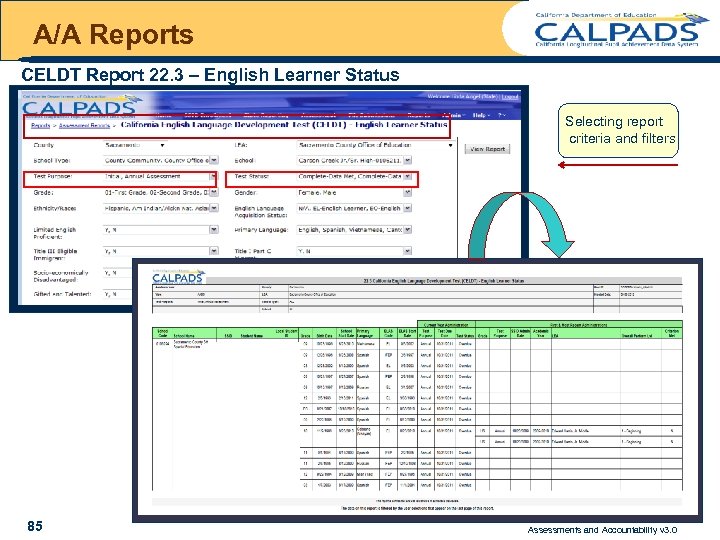
A/A Reports CELDT Report 22. 3 – English Learner Status Selecting report criteria and filters 85 Assessments and Accountability v 3. 0
UNDERSTANDING AYP/API REPORTS 86 Assessments and Accountability v 3. 0
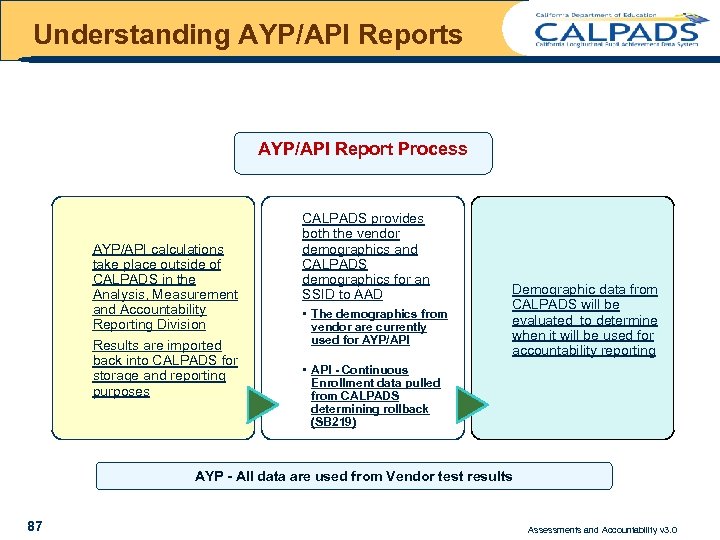
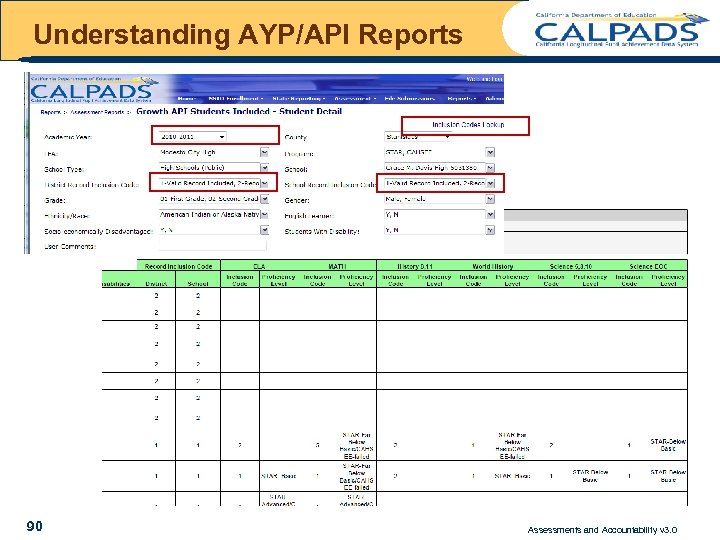
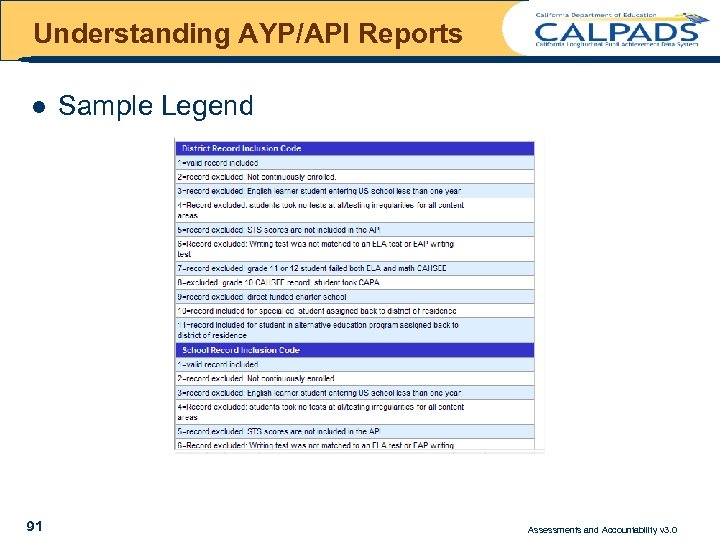
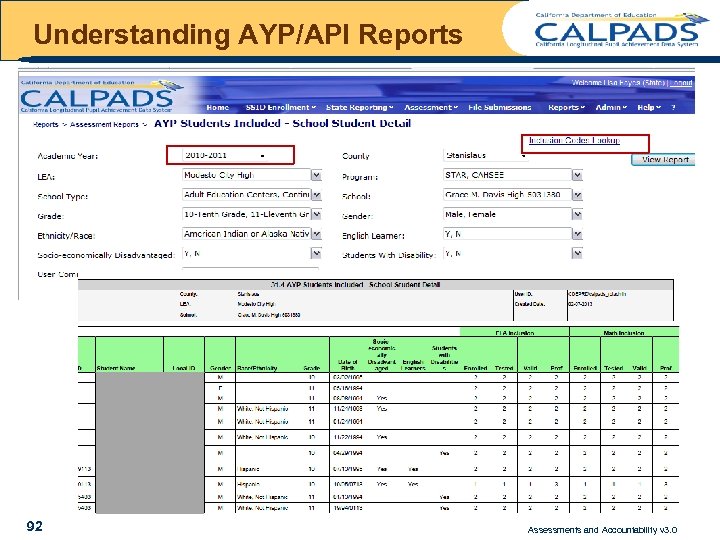
Understanding AYP/API Reports AYP/API Report Process AYP/API calculations take place outside of CALPADS in the Analysis, Measurement and Accountability Reporting Division Results are imported back into CALPADS for storage and reporting purposes CALPADS provides both the vendor demographics and CALPADS demographics for an SSID to AAD • The demographics from vendor are currently used for AYP/API Demographic data from CALPADS will be evaluated to determine when it will be used for accountability reporting • API - Continuous Enrollment data pulled from CALPADS determining rollback (SB 219) AYP - All data are used from Vendor test results 87 Assessments and Accountability v 3. 0
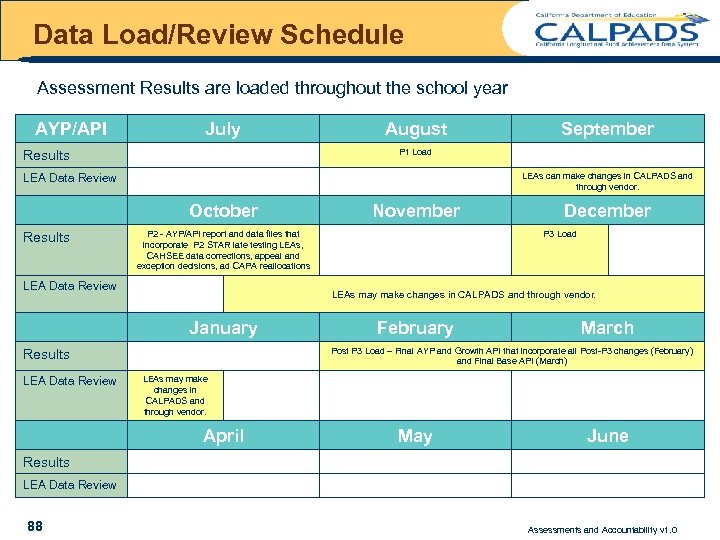
Data Load/Review Schedule Assessment Results are loaded throughout the school year AYP/API July August P 1 Load Results LEAs can make changes in CALPADS and through vendor. LEA Data Review October Results November P 2 - AYP/API report and data files that incorporate P 2 STAR late testing LEAs, CAHSEE data corrections, appeal and exception decisions, ad CAPA reallocations LEA Data Review December P 3 Load LEAs may make changes in CALPADS and through vendor. January February March Post P 3 Load – Final AYP and Growth API that incorporate all Post-P 3 changes (February) and Final Base API (March) Results LEA Data Review September LEAs may make changes in CALPADS and through vendor. April May June Results LEA Data Review 88 Assessments and Accountability v 1. 0
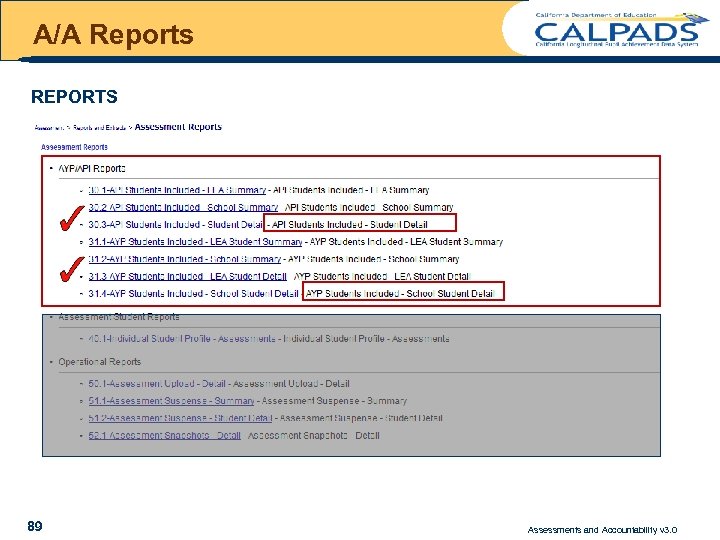
A/A Reports REPORTS CDE Only 50. 1 Assessment Upload – Detail 52. 1 Assessment Snapshots - Detail 89 Assessments and Accountability v 3. 0
Understanding AYP/API Reports 90 Assessments and Accountability v 3. 0
Understanding AYP/API Reports l 91 Sample Legend Assessments and Accountability v 3. 0
Understanding AYP/API Reports 92 Assessments and Accountability v 3. 0
UNDERSTANDING INDIVIDUAL STUDENT ASSESSMENT REPORTS 93 Assessments and Accountability v 3. 0
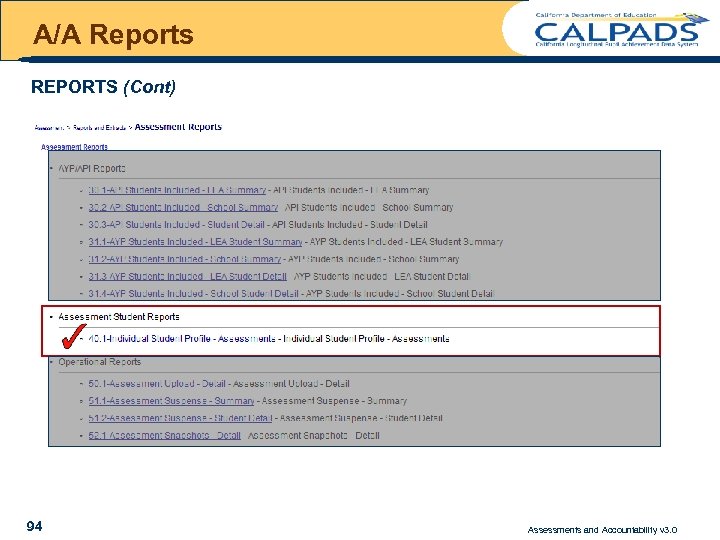
A/A Reports REPORTS (Cont) CDE Only 50. 1 Assessment Upload – Detail 52. 1 Assessment Snapshots - Detail 94 Assessments and Accountability v 3. 0
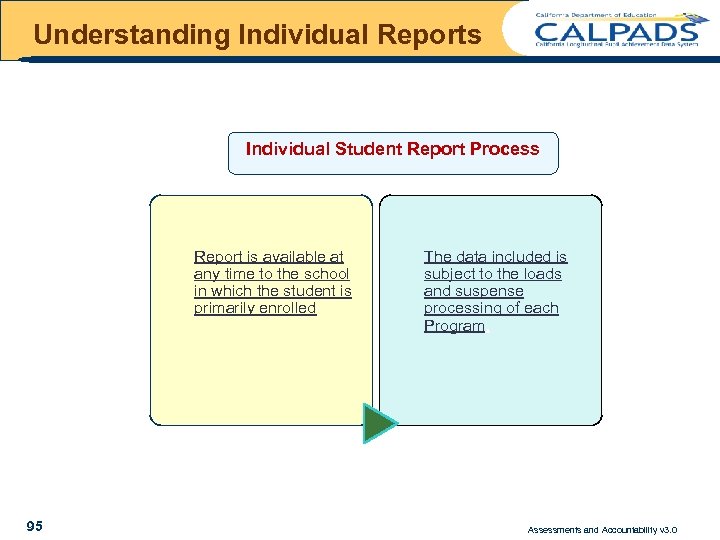
Understanding Individual Reports Individual Student Report Process Report is available at any time to the school in which the student is primarily enrolled 95 The data included is subject to the loads and suspense processing of each Program. Assessments and Accountability v 3. 0
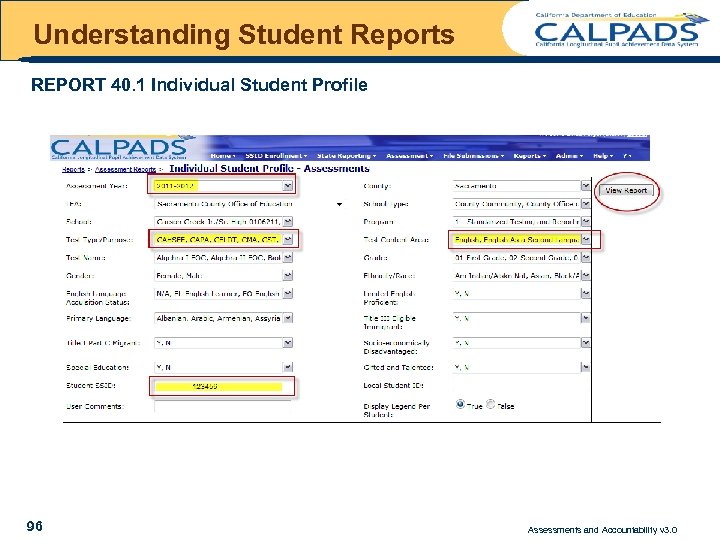
Understanding Student Reports REPORT 40. 1 Individual Student Profile 96 Assessments and Accountability v 3. 0
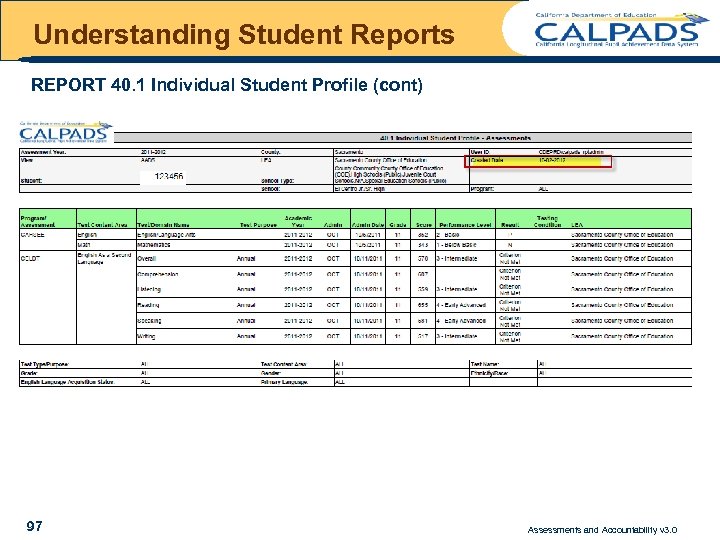
Understanding Student Reports REPORT 40. 1 Individual Student Profile (cont) 97 Assessments and Accountability v 3. 0
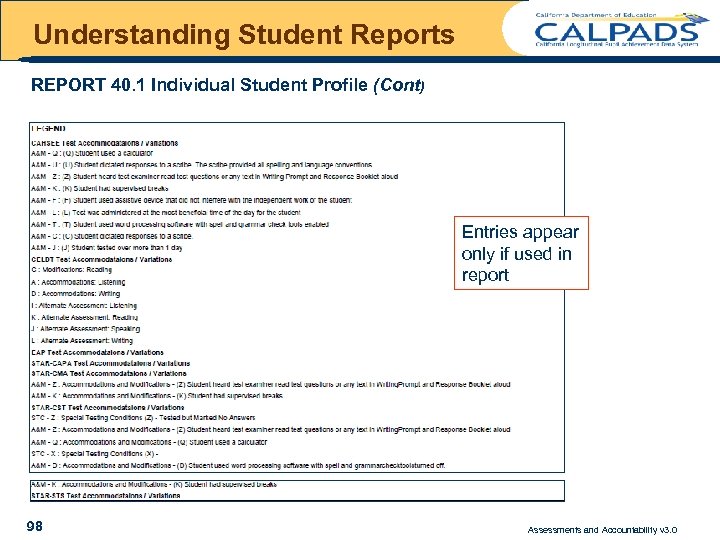
Understanding Student Reports REPORT 40. 1 Individual Student Profile (Cont) Entries appear only if used in report 98 Assessments and Accountability v 3. 0
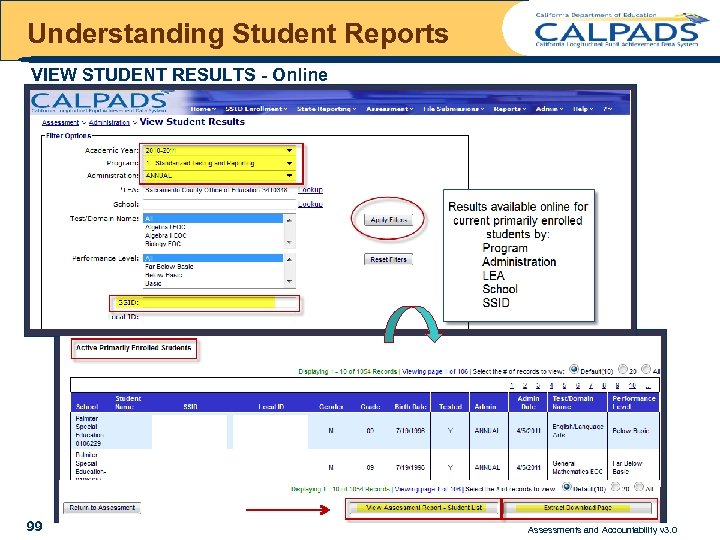
Understanding Student Reports VIEW STUDENT RESULTS - Online 99 Assessments and Accountability v 3. 0
UNDERSTANDING OPERATIONAL REPORTS 100 Assessments and Accountability v 3. 0
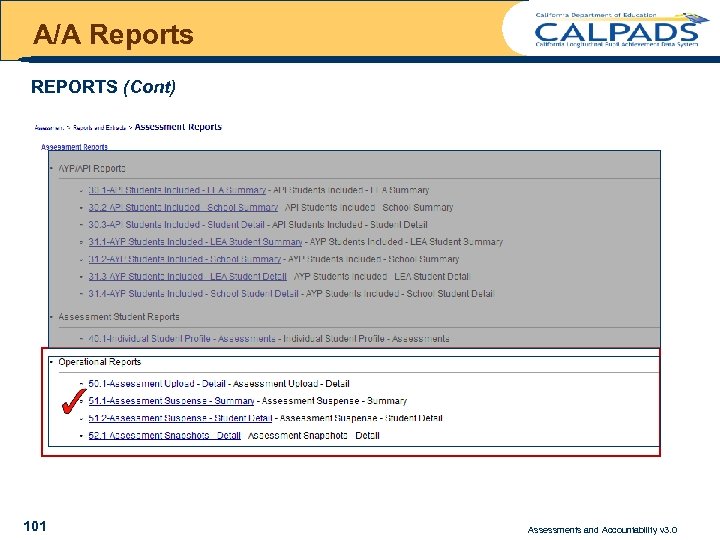
A/A Reports REPORTS (Cont) CDE Only 50. 1 Assessment Upload – Detail 52. 1 Assessment Snapshots - Detail 101 Assessments and Accountability v 3. 0
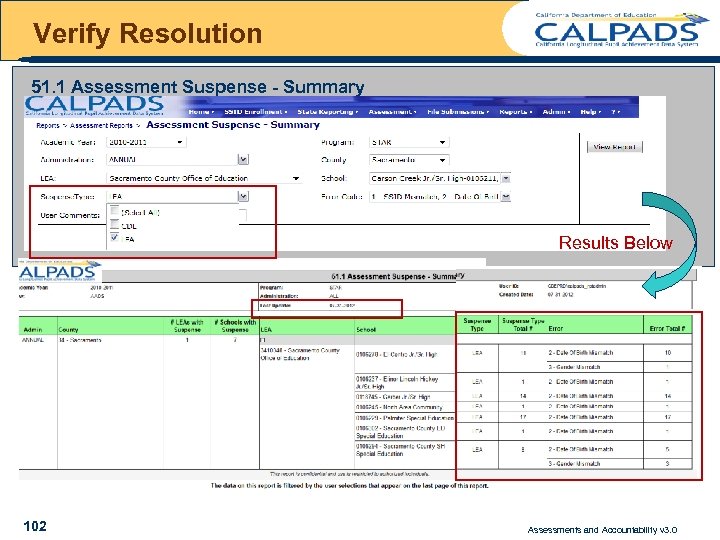
Verify Resolution 51. 1 Assessment Suspense - Summary Results Below 102 Assessments and Accountability v 3. 0
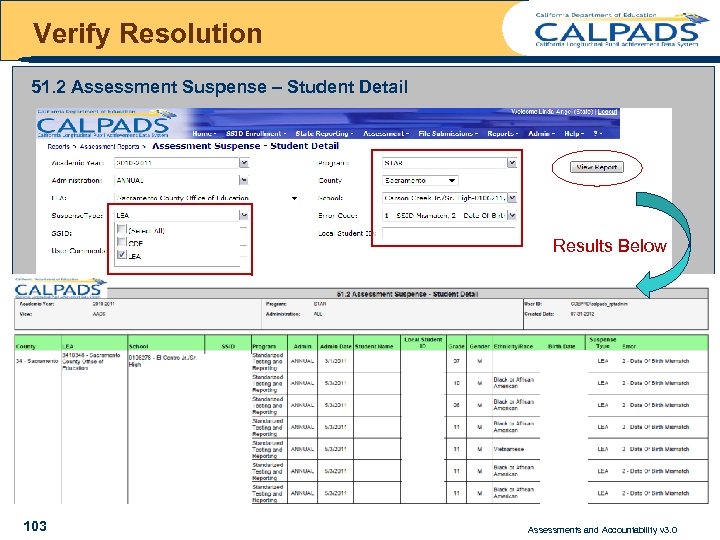
Verify Resolution 51. 2 Assessment Suspense – Student Detail Results Below 103 Assessments and Accountability v 3. 0
UNDERSTANDING EXTRACTS 104 Assessments and Accountability v 3. 0
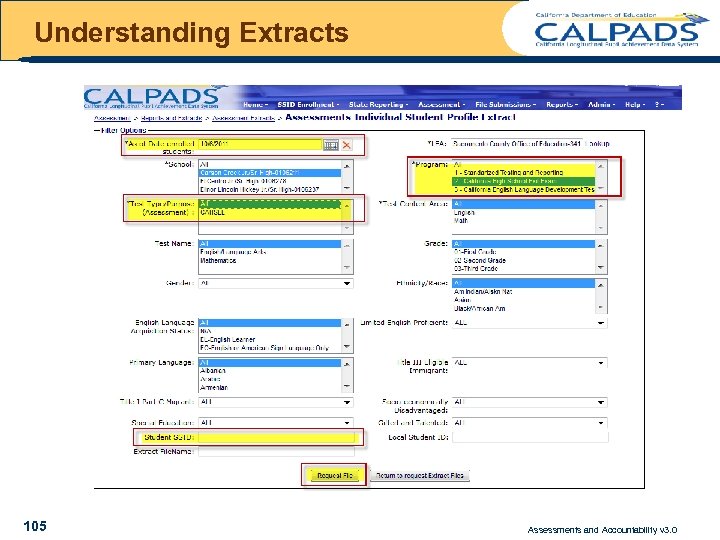
Understanding Extracts 105 Assessments and Accountability v 3. 0
WRAP-UP 106 Assessments and Accountability v 3. 0
Wrap-Up KEY POINTS l It is critical that the Admin Date is correct in the Calendar file – l l l The Admin Date is used for determining whether the student was enrolled during the testing window Independently Reporting Charters (IRCs) testing independently need to update with the test vendor IRC testing dependently (with the district) can submit a separate calendar entry for their IRC, otherwise the entry for the parent LEA will be used The actual testing date is not reported in the results data for STAR and CELDT, so CALPADS uses a window based on the first date of testing to validate enrollment Reports display results of most recent load +/- suspense resolutions until CDE notifies the field of the final snapshot, which will freeze the data (no certification takes place) l 107 . Assessments and Accountability v 3. 0
Wrap-Up KEY POINTS (cont) l The CDE Analysis, Measurement & Accountability Reporting Division uses results data provided by the test vendors and CALPADS enrollment and demographic data for calculating AYP/API results as follows: – API results will use l l – AYP results will use l l 108 Student demographic data that LEAs supply to the test vendors CALPADS enrollment information will be used for the 2011 Base API and the 2012 Growth API to determine the Continuously enrolled and whether or not AEP (Alternative Education Program) student test results will be rolled back. Student demographic data and continuously enrolled data supplied to the vendor – AYP will NOT use CALPADS data for the current year Assessments and Accountability v 3. 0
Wrap-UP Questions 109 Please Complete Our Survey Assessments and Accountability v 3. 0
Скачать презентацию ASSESSMENTS ACCOUNTABILITY Suspense Resolution and Reports Assessments
9703be0171fc30c874290c4dc0934863.ppt