


 Скачать презентацию ARM Exception Handling and Soft Ware Interrupts SWI
d00d5aac7a73389d053b74d668b67cc6.ppt
- Количество слайдов: 27
 ARM Exception Handling and Soft. Ware Interrupts (SWI) Lecture #4 Introduction to Embedded Systems
 Recommended Readings • Sections 5. 1 5. 4 (Exceptions) of the ARM Developer Guide • Chapter 12 (Implementing SWIs) of Jumpstart Programming Techniques • Chapters 17 ARM Demon Routines of Jumpstart Reference Manual Catch up on your readings! Introduction to Embedded Systems
 Thought for the Day I can accept failure. Everyone fails at something. But I cannot accept not trying. Michael Jordan Introduction to Embedded Systems
 Summary of Previous Lecture • • • The ARM Programmer’s Model Introduction to ARM Assembly Language Assembly Code from C Programs (7 Examples) Dealing With Structures Interfacing C Code with ARM Assembly ARM libraries and armsd Introduction to Embedded Systems
 Outline of This Lecture • Frame pointers and backtrace structures • Normal program flow vs. exceptions – Exceptions vs. interrupts • Software Interrupts – – – – What is an SWI? What happens on an SWI? Vectoring SWIs What happens on SWI completion? What do SWIs do? A Complete SWI Handler A C_SWI_Handler (written in C) • Loading the Software Interrupt Vector Table Introduction to Embedded Systems
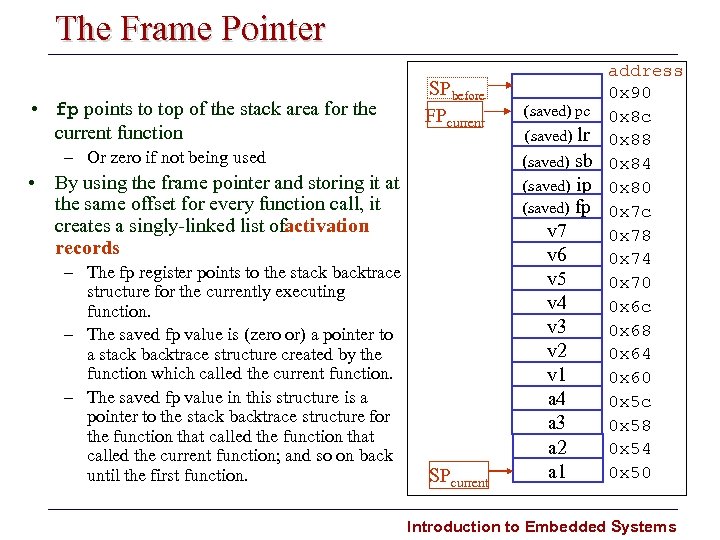 The Frame Pointer • fp points to top of the stack area for the current function SPbefore FPcurrent – Or zero if not being used • By using the frame pointer and storing it at the same offset for every function call, it creates a singly linked list ofactivation records – The fp register points to the stack backtrace structure for the currently executing function. – The saved fp value is (zero or) a pointer to a stack backtrace structure created by the function which called the current function. – The saved fp value in this structure is a pointer to the stack backtrace structure for the function that called the current function; and so on back until the first function. SPcurrent (saved) pc lr (saved) sb (saved) ip (saved) fp v 7 v 6 v 5 v 4 v 3 v 2 v 1 a 4 a 3 a 2 a 1 (saved) address 0 x 90 0 x 8 c 0 x 88 0 x 84 0 x 80 0 x 7 c 0 x 78 0 x 74 0 x 70 0 x 6 c 0 x 68 0 x 64 0 x 60 0 x 5 c 0 x 58 0 x 54 0 x 50 Introduction to Embedded Systems
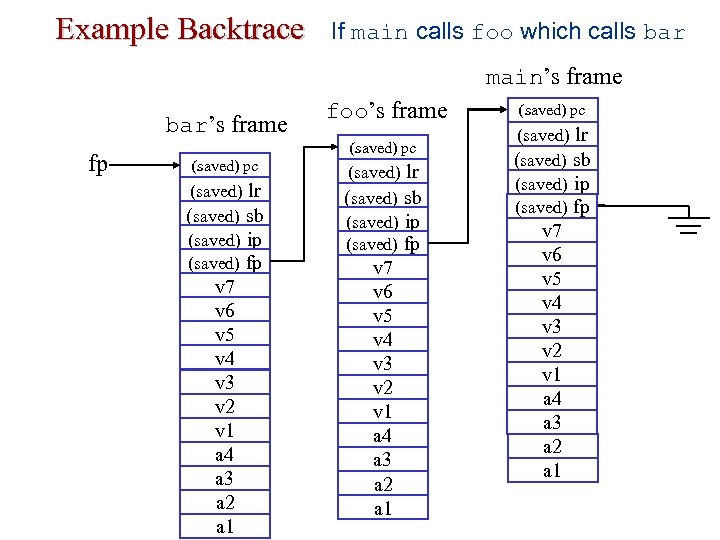 Example Backtrace If main calls foo which calls bar main’s frame bar’s frame fp (saved) pc (saved) lr (saved) sb (saved) ip (saved) fp v 7 v 6 v 5 v 4 v 3 v 2 v 1 a 4 a 3 a 2 a 1 foo’s frame (saved) pc (saved) lr (saved) sb (saved) ip (saved) fp v 7 v 6 v 5 v 4 v 3 v 2 v 1 a 4 a 3 a 2 a 1
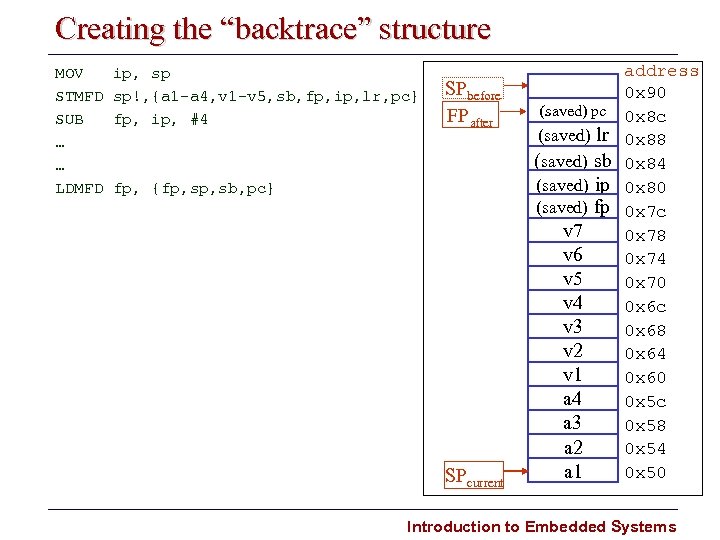 Creating the “backtrace” structure MOV STMFD SUB … … LDMFD ip, sp sp!, {a 1 a 4, v 1 v 5, sb, fp, ip, lr, pc} fp, ip, #4 SPbefore FPafter fp, {fp, sb, pc} SPcurrent (saved) pc (saved) lr (saved) sb (saved) ip (saved) fp v 7 v 6 v 5 v 4 v 3 v 2 v 1 a 4 a 3 a 2 a 1 address 0 x 90 0 x 8 c 0 x 88 0 x 84 0 x 80 0 x 7 c 0 x 78 0 x 74 0 x 70 0 x 6 c 0 x 68 0 x 64 0 x 60 0 x 5 c 0 x 58 0 x 54 0 x 50 Introduction to Embedded Systems
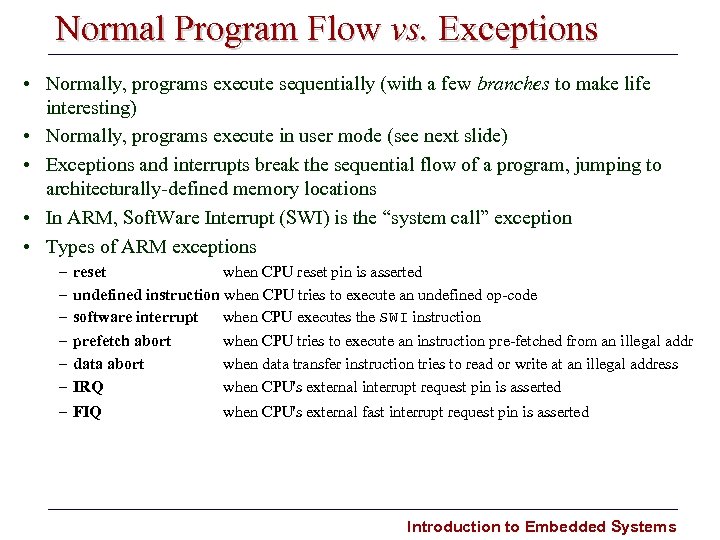 Normal Program Flow vs. Exceptions • Normally, programs execute sequentially (with a few branches to make life interesting) • Normally, programs execute in user mode (see next slide) • Exceptions and interrupts break the sequential flow of a program, jumping to architecturally defined memory locations • In ARM, Soft. Ware Interrupt (SWI) is the “system call” exception • Types of ARM exceptions – – – reset when CPU reset pin is asserted undefined instruction when CPU tries to execute an undefined op code software interrupt when CPU executes the SWI instruction prefetch abort data abort IRQ – FIQ when CPU tries to execute an instruction pre fetched from an illegal addr when data transfer instruction tries to read or write at an illegal address when CPU's external interrupt request pin is asserted when CPU's external fast interrupt request pin is asserted Introduction to Embedded Systems
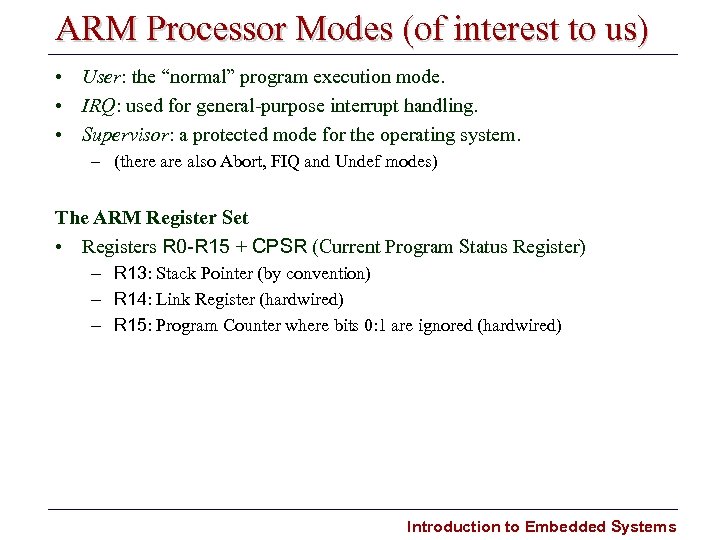 ARM Processor Modes (of interest to us) • User: the “normal” program execution mode. • IRQ: used for general purpose interrupt handling. • Supervisor: a protected mode for the operating system. – (there also Abort, FIQ and Undef modes) The ARM Register Set • Registers R 0 R 15 + CPSR (Current Program Status Register) – R 13: Stack Pointer (by convention) – R 14: Link Register (hardwired) – R 15: Program Counter where bits 0: 1 are ignored (hardwired) Introduction to Embedded Systems
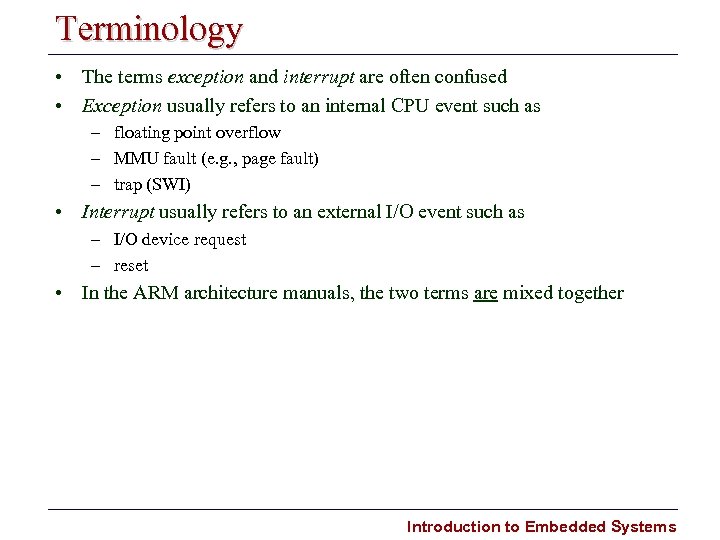 Terminology • The terms exception and interrupt are often confused • Exception usually refers to an internal CPU event such as – floating point overflow – MMU fault (e. g. , page fault) – trap (SWI) • Interrupt usually refers to an external I/O event such as – I/O device request – reset • In the ARM architecture manuals, the two terms are mixed together Introduction to Embedded Systems
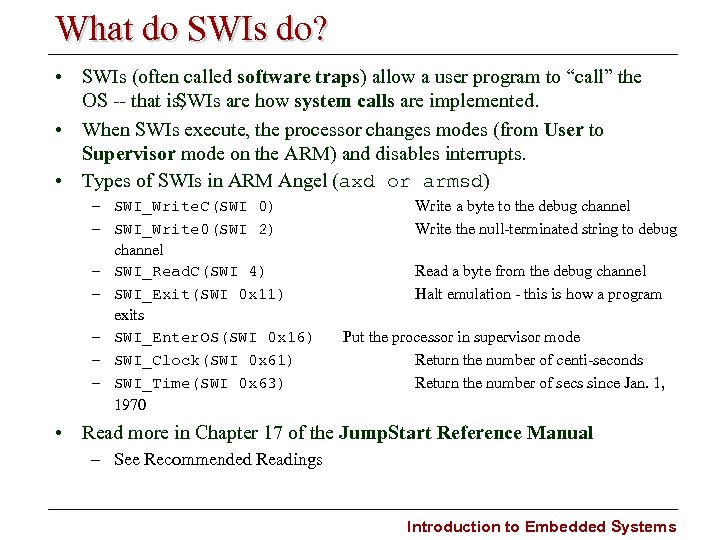 What do SWIs do? • SWIs (often called software traps) allow a user program to “call” the OS that is, SWIs are how system calls are implemented. • When SWIs execute, the processor changes modes (from User to Supervisor mode on the ARM) and disables interrupts. • Types of SWIs in ARM Angel (axd or armsd) – SWI_Write. C(SWI 0) – SWI_Write 0(SWI 2) channel – SWI_Read. C(SWI 4) – SWI_Exit(SWI 0 x 11) exits – SWI_Enter. OS(SWI 0 x 16) – SWI_Clock(SWI 0 x 61) – SWI_Time(SWI 0 x 63) 1970 Write a byte to the debug channel Write the null terminated string to debug Read a byte from the debug channel Halt emulation this is how a program Put the processor in supervisor mode Return the number of centi seconds Return the number of secs since Jan. 1, • Read more in Chapter 17 of the Jump. Start Reference Manual – See Recommended Readings Introduction to Embedded Systems
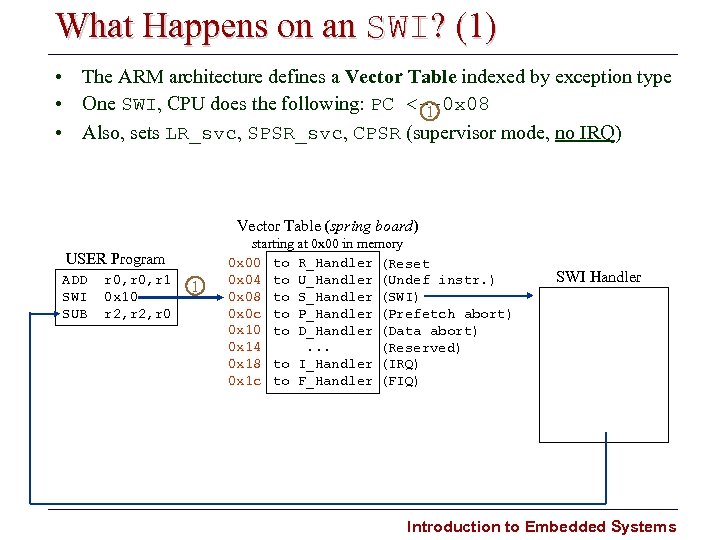 What Happens on an SWI? (1) • The ARM architecture defines a Vector Table indexed by exception type • One SWI, CPU does the following: PC < 0 x 08 1 • Also, sets LR_svc, SPSR_svc, CPSR (supervisor mode, no IRQ) Vector Table (spring board) USER Program ADD SWI SUB r 0, r 1 0 x 10 r 2, r 0 1 starting at 0 x 00 in memory 0 x 00 to R_Handler (Reset 0 x 04 to U_Handler (Undef instr. ) 0 x 08 to S_Handler (SWI) 0 x 0 c to P_Handler (Prefetch abort) 0 x 10 to D_Handler (Data abort) 0 x 14. . . (Reserved) 0 x 18 to I_Handler (IRQ) 0 x 1 c to F_Handler (FIQ) SWI Handler Introduction to Embedded Systems
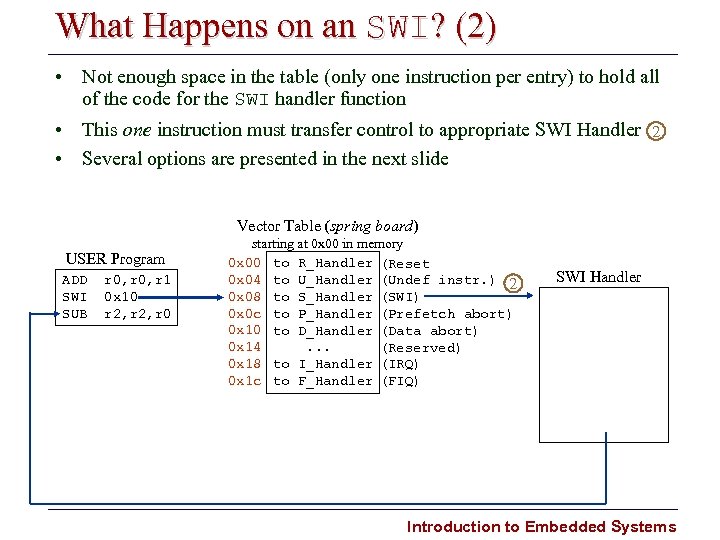 What Happens on an SWI? (2) • Not enough space in the table (only one instruction per entry) to hold all of the code for the SWI handler function • This one instruction must transfer control to appropriate SWI Handler 2 • Several options are presented in the next slide Vector Table (spring board) USER Program ADD SWI SUB r 0, r 1 0 x 10 r 2, r 0 starting at 0 x 00 in memory 0 x 00 to R_Handler (Reset 0 x 04 to U_Handler (Undef instr. ) 2 0 x 08 to S_Handler (SWI) 0 x 0 c to P_Handler (Prefetch abort) 0 x 10 to D_Handler (Data abort) 0 x 14. . . (Reserved) 0 x 18 to I_Handler (IRQ) 0 x 1 c to F_Handler (FIQ) SWI Handler Introduction to Embedded Systems
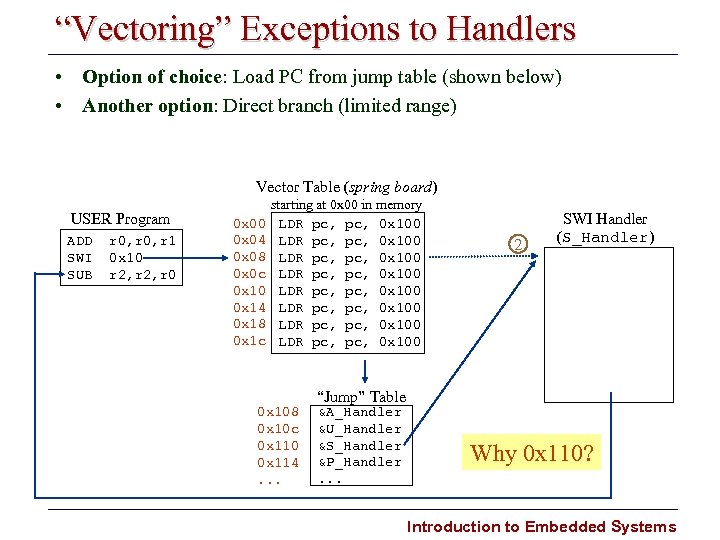 “Vectoring” Exceptions to Handlers • Option of choice: Load PC from jump table (shown below) • Another option: Direct branch (limited range) Vector Table (spring board) USER Program ADD SWI SUB r 0, r 1 0 x 10 r 2, r 0 0 x 04 0 x 08 0 x 0 c 0 x 10 0 x 14 0 x 18 0 x 1 c starting at 0 x 00 in memory LDR pc, pc, 0 x 100 LDR pc, pc, 0 x 100 0 x 108 0 x 10 c 0 x 110 0 x 114. . . 2 SWI Handler (S_Handler) “Jump” Table &A_Handler &U_Handler &S_Handler &P_Handler. . . Why 0 x 110? Introduction to Embedded Systems
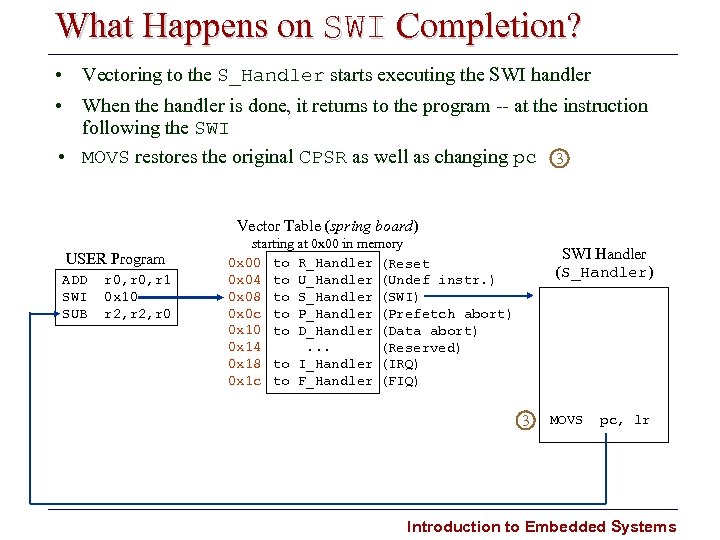 What Happens on SWI Completion? • Vectoring to the S_Handler starts executing the SWI handler • When the handler is done, it returns to the program at the instruction following the SWI • MOVS restores the original CPSR as well as changing pc 3 Vector Table (spring board) USER Program ADD SWI SUB r 0, r 1 0 x 10 r 2, r 0 starting at 0 x 00 in memory 0 x 00 to R_Handler (Reset 0 x 04 to U_Handler (Undef instr. ) 0 x 08 to S_Handler (SWI) 0 x 0 c to P_Handler (Prefetch abort) 0 x 10 to D_Handler (Data abort) 0 x 14. . . (Reserved) 0 x 18 to I_Handler (IRQ) 0 x 1 c to F_Handler (FIQ) SWI Handler (S_Handler) 3 MOVS pc, lr Introduction to Embedded Systems
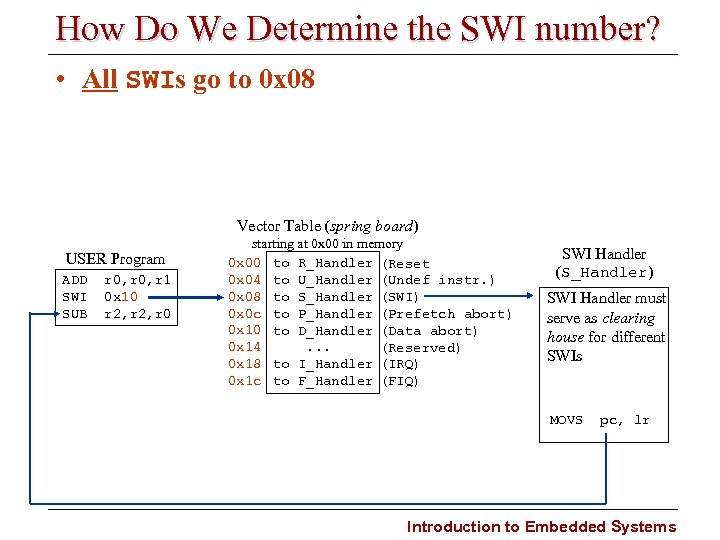 How Do We Determine the SWI number? • All SWIs go to 0 x 08 Vector Table (spring board) USER Program ADD SWI SUB r 0, r 1 0 x 10 r 2, r 0 starting at 0 x 00 in memory 0 x 00 to R_Handler (Reset 0 x 04 to U_Handler (Undef instr. ) 0 x 08 to S_Handler (SWI) 0 x 0 c to P_Handler (Prefetch abort) 0 x 10 to D_Handler (Data abort) 0 x 14. . . (Reserved) 0 x 18 to I_Handler (IRQ) 0 x 1 c to F_Handler (FIQ) SWI Handler (S_Handler) SWI Handler must serve as clearing house for different SWIs MOVS pc, lr Introduction to Embedded Systems
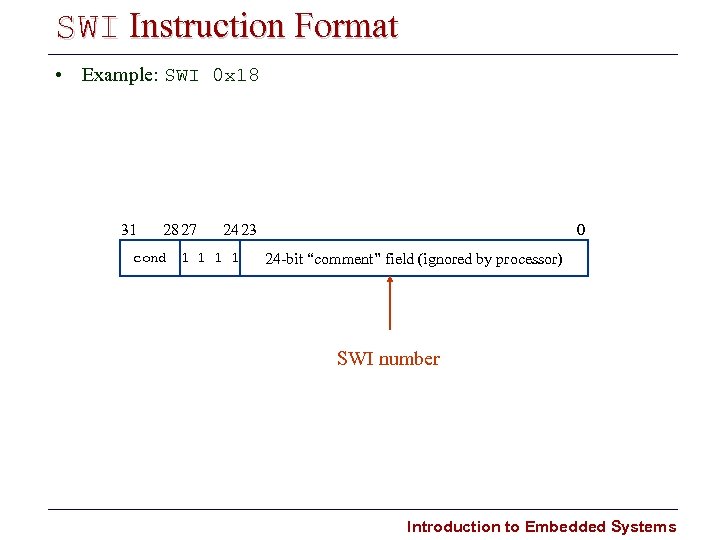 SWI Instruction Format • Example: SWI 0 x 18 31 28 27 24 23 cond 1 1 0 24 bit “comment” field (ignored by processor) SWI number Introduction to Embedded Systems
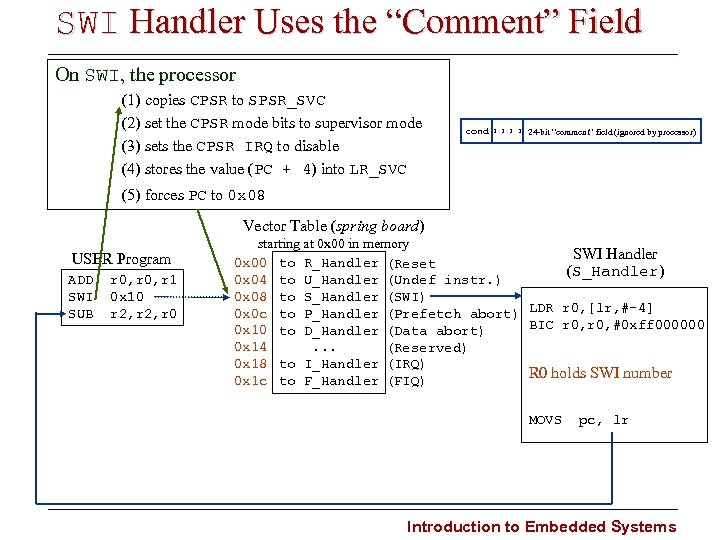 SWI Handler Uses the “Comment” Field On SWI, the processor (1) copies CPSR to SPSR_SVC (2) set the CPSR mode bits to supervisor mode (3) sets the CPSR IRQ to disable (4) stores the value (PC + 4) into LR_SVC cond 1 1 24 bit “comment” field (ignored by processor) (5) forces PC to 0 x 08 Vector Table (spring board) USER Program ADD SWI SUB r 0, r 1 0 x 10 r 2, r 0 starting at 0 x 00 in memory SWI Handler 0 x 00 to R_Handler (Reset (S_Handler) 0 x 04 to U_Handler (Undef instr. ) 0 x 08 to S_Handler (SWI) 0 x 0 c to P_Handler (Prefetch abort) LDR r 0, [lr, # 4] BIC r 0, #0 xff 000000 0 x 10 to D_Handler (Data abort) 0 x 14. . . (Reserved) 0 x 18 to I_Handler (IRQ) R 0 holds SWI number 0 x 1 c to F_Handler (FIQ) MOVS pc, lr Introduction to Embedded Systems
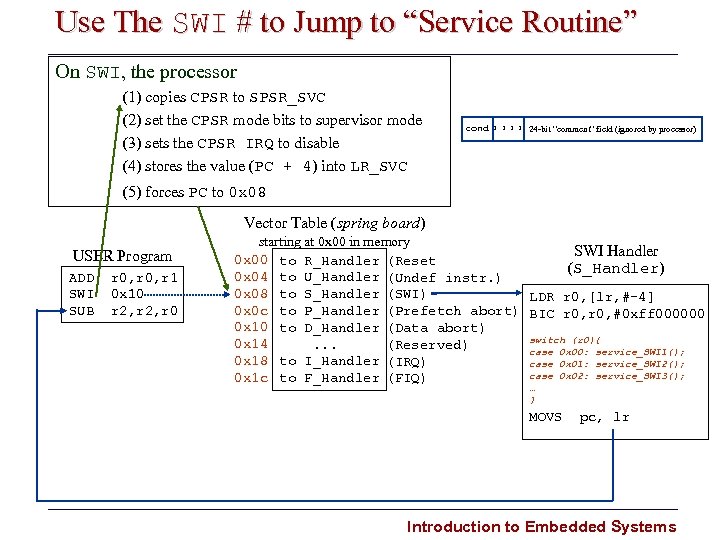 Use The SWI # to Jump to “Service Routine” On SWI, the processor (1) copies CPSR to SPSR_SVC (2) set the CPSR mode bits to supervisor mode (3) sets the CPSR IRQ to disable (4) stores the value (PC + 4) into LR_SVC cond 1 1 24 bit “comment” field (ignored by processor) (5) forces PC to 0 x 08 Vector Table (spring board) USER Program ADD SWI SUB r 0, r 1 0 x 10 r 2, r 0 starting at 0 x 00 in memory SWI Handler 0 x 00 to R_Handler (Reset (S_Handler) 0 x 04 to U_Handler (Undef instr. ) 0 x 08 to S_Handler (SWI) LDR r 0, [lr, # 4] 0 x 0 c to P_Handler (Prefetch abort) BIC r 0, #0 xff 000000 0 x 10 to D_Handler (Data abort) switch (r 0){ 0 x 14. . . (Reserved) case 0 x 00: service_SWI 1(); 0 x 18 to I_Handler (IRQ) case 0 x 01: service_SWI 2(); case 0 x 02: service_SWI 3(); 0 x 1 c to F_Handler (FIQ) … } MOVS pc, lr Introduction to Embedded Systems
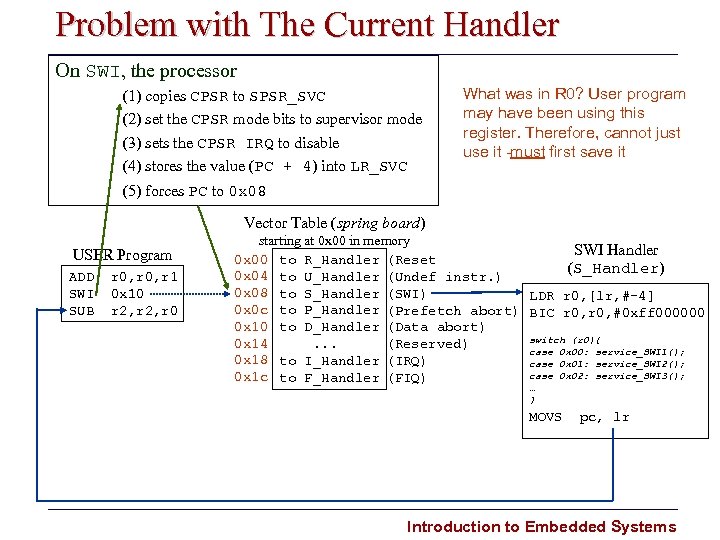 Problem with The Current Handler On SWI, the processor (1) copies CPSR to SPSR_SVC (2) set the CPSR mode bits to supervisor mode (3) sets the CPSR IRQ to disable (4) stores the value (PC + 4) into LR_SVC What was in R 0? User program may have been using this register. Therefore, cannot just use it must first save it (5) forces PC to 0 x 08 Vector Table (spring board) USER Program ADD SWI SUB r 0, r 1 0 x 10 r 2, r 0 starting at 0 x 00 in memory SWI Handler 0 x 00 to R_Handler (Reset (S_Handler) 0 x 04 to U_Handler (Undef instr. ) 0 x 08 to S_Handler (SWI) LDR r 0, [lr, # 4] 0 x 0 c to P_Handler (Prefetch abort) BIC r 0, #0 xff 000000 0 x 10 to D_Handler (Data abort) switch (r 0){ 0 x 14. . . (Reserved) case 0 x 00: service_SWI 1(); 0 x 18 to I_Handler (IRQ) case 0 x 01: service_SWI 2(); case 0 x 02: service_SWI 3(); 0 x 1 c to F_Handler (FIQ) … } MOVS pc, lr Introduction to Embedded Systems
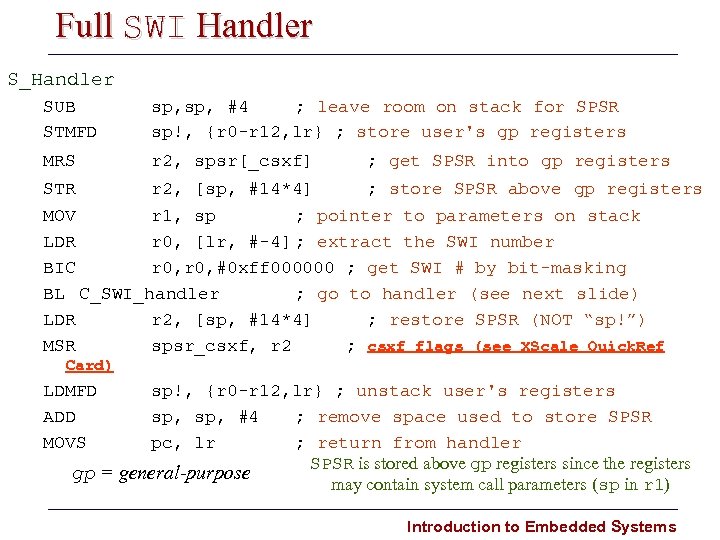 Full SWI Handler S_Handler SUB STMFD sp, #4 ; leave room on stack for SPSR sp!, {r 0 r 12, lr} ; store user's gp registers MRS r 2, spsr[_csxf] ; get SPSR into gp registers STR r 2, [sp, #14*4] ; store SPSR above gp registers MOV r 1, sp ; pointer to parameters on stack LDR r 0, [lr, # 4] ; extract the SWI number BIC r 0, #0 xff 000000 ; get SWI # by bit masking BL C_SWI_handler ; go to handler (see next slide) LDR r 2, [sp, #14*4] ; restore SPSR (NOT “sp!”) MSR spsr_csxf, r 2 ; csxf flags (see XScale Quick. Ref Card) LDMFD ADD MOVS sp!, {r 0 r 12, lr} ; unstack user's registers sp, #4 ; remove space used to store SPSR pc, lr ; return from handler SPSR is stored above gp registers since the registers gp = general-purpose may contain system call parameters (sp in r 1) Introduction to Embedded Systems
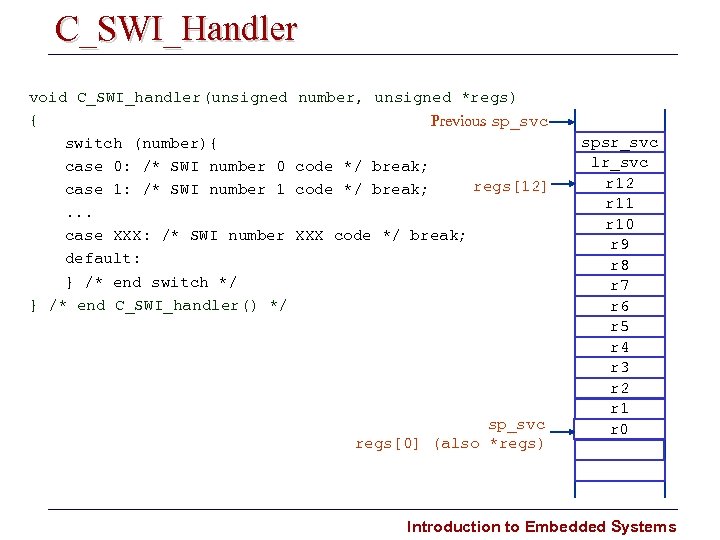 C_SWI_Handler void C_SWI_handler(unsigned { switch (number){ case 0: /* SWI number 0 case 1: /* SWI number 1. . . case XXX: /* SWI number default: } /* end switch */ } /* end C_SWI_handler() */ number, unsigned *regs) Previous sp_svc code */ break; regs[12] XXX code */ break; sp_svc regs[0] (also *regs) spsr_svc lr_svc r 12 r 11 r 10 r 9 r 8 r 7 r 6 r 5 r 4 r 3 r 2 r 1 r 0 Introduction to Embedded Systems
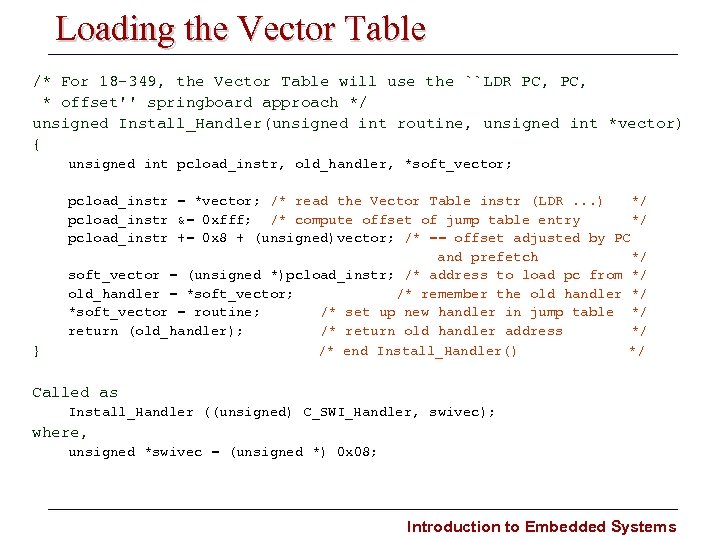 Loading the Vector Table /* For 18 349, the Vector Table will use the ``LDR PC, * offset'' springboard approach */ unsigned Install_Handler(unsigned int routine, unsigned int *vector) { unsigned int pcload_instr, old_handler, *soft_vector; } pcload_instr = *vector; /* read the Vector Table instr (LDR. . . ) */ pcload_instr &= 0 xfff; /* compute offset of jump table entry */ pcload_instr += 0 x 8 + (unsigned)vector; /* == offset adjusted by PC and prefetch */ soft_vector = (unsigned *)pcload_instr; /* address to load pc from */ old_handler = *soft_vector; /* remember the old handler */ *soft_vector = routine; /* set up new handler in jump table */ return (old_handler); /* return old handler address */ /* end Install_Handler() */ Called as Install_Handler ((unsigned) C_SWI_Handler, swivec); where, unsigned *swivec = (unsigned *) 0 x 08; Introduction to Embedded Systems
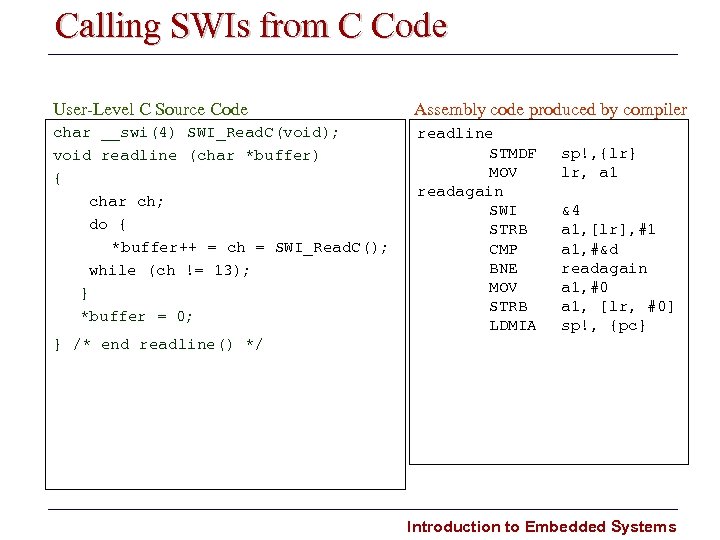 Calling SWIs from C Code User Level C Source Code Assembly code produced by compiler char __swi(4) SWI_Read. C(void); void readline (char *buffer) { char ch; do { *buffer++ = ch = SWI_Read. C(); while (ch != 13); } *buffer = 0; readline STMDF MOV readagain SWI STRB CMP BNE MOV STRB LDMIA sp!, {lr} lr, a 1 &4 a 1, [lr], #1 a 1, #&d readagain a 1, #0 a 1, [lr, #0] sp!, {pc} } /* end readline() */ Introduction to Embedded Systems
 Summary of Lecture • Software Interrupts (SWIs) – – – – What is an SWI? What happens on an SWI? Vectoring SWIs What happens on SWI completion? What do SWIs do? A Full SWI Handler A C_SWI_Handler (written in C) • Loading Software Interrrupt Vectors Introduction to Embedded Systems
 Looking Ahead • Program Monitor, Loading and Initialization Introduction to Embedded Systems