


 Скачать презентацию Architectural Support for Operating Systems Announcements
a8c26f24629b12a88f8f0fa35cc89057.ppt
- Количество слайдов: 57
 Architectural Support for Operating Systems
 Announcements • Most office hours are finalized • Assignments (if any) up every Tuesday – Due one week later – Main TA to contact about assignments: Nazrul Alam • Also contact Levent Kartaltepe • CS 4411 sections started yesterday – – Oliver Kennedy is instructor intro to the course and goals for the term Overview of project and details on the first part of the project C for Java programmers • syntax and similarities • common pitfalls • C software engineering • Optional architecture review session – Sometime later this week. Date, time, and location, TBD.
 Announcements • Make sure you are registered for CS 4410 and/or 4411 • First CS 4411 project is up – Initial design documents due next Monday, September 8 th – Project due following Wednesday, September 17 th • First CS 4410 homework will be available later tonight – Due next Tuesday, September 9 th • Everyone should have access to CMS (http: //cms. csuglab. cornell. edu) – Check and contact me (hweather@cs. cornell. edu) or Bill Hogan (whh@cs. cornell. edu) today if you do not have access to CMS • Also, everyone should have CSUGLab account – Contact Bill or I if you do not
 Review: History of OS • Why Study? – To understand how user needs and hardware constraints influenced (and will influence) operating systems • Several Distinct Phases: – Hardware Expensive, Humans Cheap • Eniac, … Multics – Hardware Cheaper, Humans Expensive • PCs, Workstations, Rise of GUIs – Hardware Really Cheap, Humans Really Expensive • Ubiquitous devices, Widespread networking • Rapid Change in Hardware Leads to changing OS – Batch Multiprogramming Timeshare Graphical UI Ubiquitous Devices Cyberspace/Metaverse/? ? – Gradual Migration of Features into Smaller Machines • Situation today is much like the late 60 s – Small OS: 100 K lines/Large: 10 M lines (5 M browser!) – 100 -1000 people-years
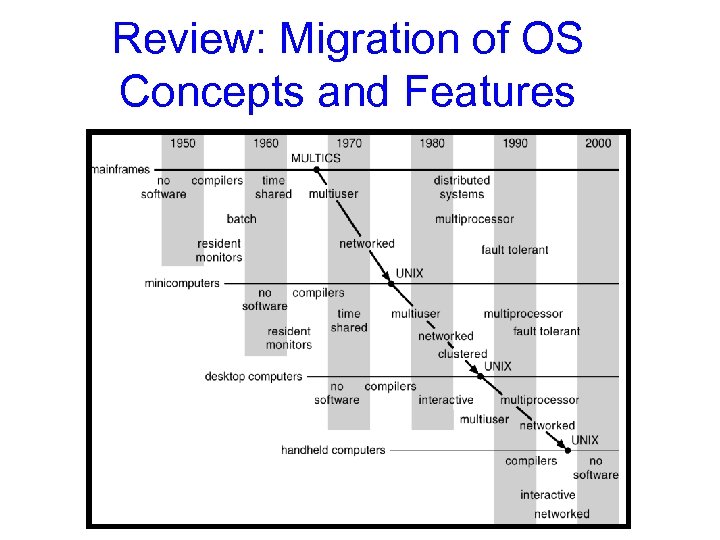 Review: Migration of OS Concepts and Features
 Review: Implementation Issues (How is the OS implemented? ) • Policy vs. Mechanism – Policy: What do you want to do? – Mechanism: How are you going to do it? – Should be separated, since policies change
 Goals for Today and Next Lecture • I/O subsystem and device drivers • Interrupts and traps • Protection, system calls and operating mode • OS structure • What happens when you boot a computer?
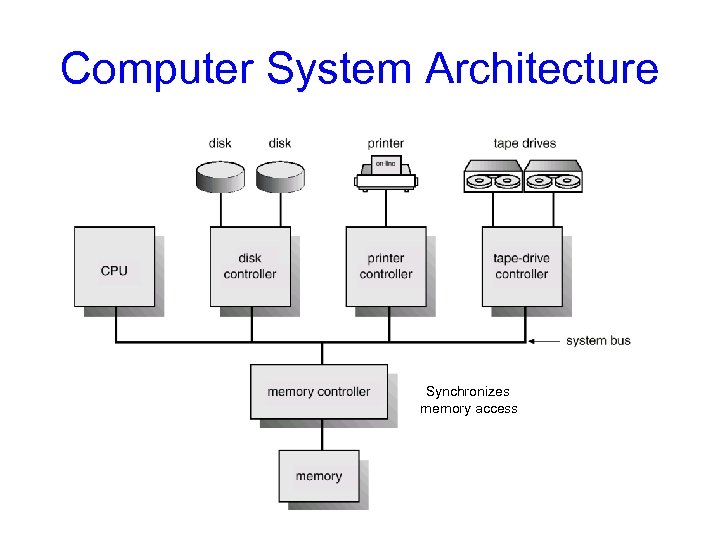 Computer System Architecture Synchronizes memory access
 I/O operations • I/O devices and the CPU can execute concurrently. • I/O is moving data between device & controller’s buffer – CPU moves data between controller’s buffer & main memory • Each device controller is in charge of certain device type. – May be more than one device per controller • SCSI can manage up to 7 devices – Each device controller has local buffer, special registers • A device driver for every device controller – Knows details of the controller – Presents a uniform interface to the rest of OS
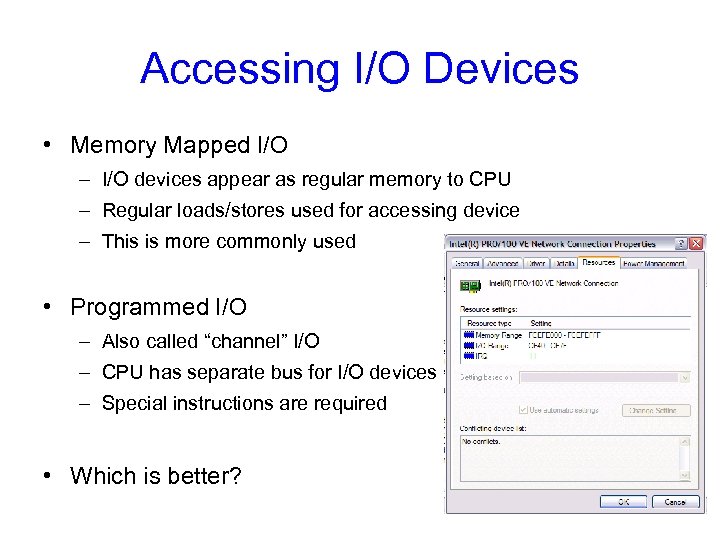 Accessing I/O Devices • Memory Mapped I/O – I/O devices appear as regular memory to CPU – Regular loads/stores used for accessing device – This is more commonly used • Programmed I/O – Also called “channel” I/O – CPU has separate bus for I/O devices – Special instructions are required • Which is better?
 Polling I/O • Each device controller typically has: – Data-in register (for host to receive input from device) – Data-out (for host to send output to device) – Status register (read by host to determine device state) – Control register (written by host to invoke command)
 Polling I/O handshaking: • To write data to a device: 1. Host repeatedly reads busy bit in status register until clear 2. Host sets write bit in command register and writes output in data-out register 3. Host sets command-ready bit in control register 4. Controller notices command-ready bit, sets busy bit in status register 5. Controller reads command register, notices write bit: reads data-out register and performs I/O (magic) 6. Controller clears command-ready bit, clears the error bit (to indicate success) and clears the busy bit (to indicate it’s finished)
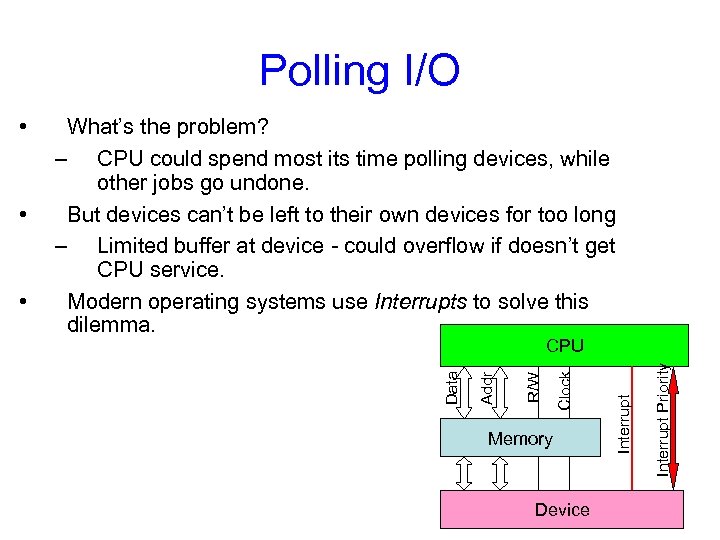 Polling I/O Device Interrupt Priority Memory Interrupt Clock CPU R/W • Addr • What’s the problem? – CPU could spend most its time polling devices, while other jobs go undone. But devices can’t be left to their own devices for too long – Limited buffer at device - could overflow if doesn’t get CPU service. Modern operating systems use Interrupts to solve this dilemma. Data •
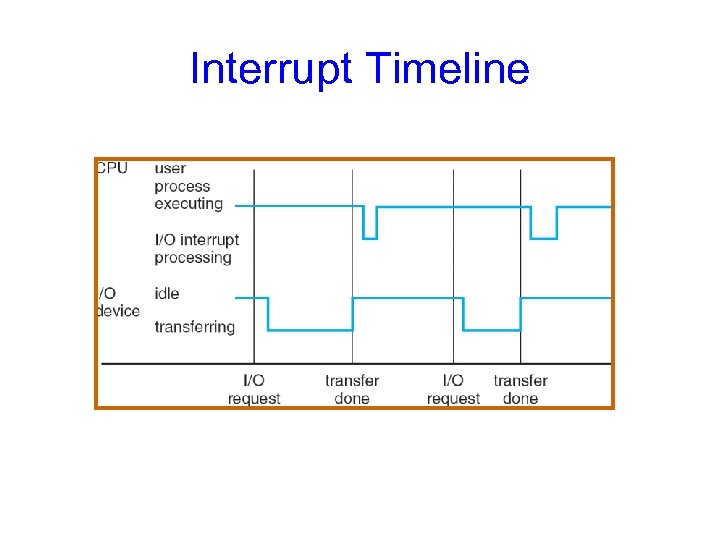
 Interrupts • CPU hardware has a interrupt-request line (a wire) it checks after processing each instruction. • On receiving signal save processing state – Save current context – Jump to interrupt handler routine at fixed address in memory – Interrupt handler: • • Determine cause of interrupt. Do required processing. Restore state. Execute return from interrupt instruction. • Device controller raises interrupt, CPU catches it, interrupt handler dispatches and clears it. • Most operating systems are interrupt-driven – Hardware: sends trigger on bus – Software: uses a system call
 Even interrupts are sometimes to slow: • Device driver loads controller registers appropriately • Controller examines registers, executes I/O • Controller signals I/O completion to device driver – Using interrupts • High overhead for moving bulk data (i. e. disk I/O): – One interrupt per byte. .
 Direct Memory Access (DMA) • Transfer data directly between device and memory – No CPU intervention • Device controller transfers blocks of data • Interrupts when block transfer completed – As compared to when byte is completed • Very useful for high-speed I/O devices
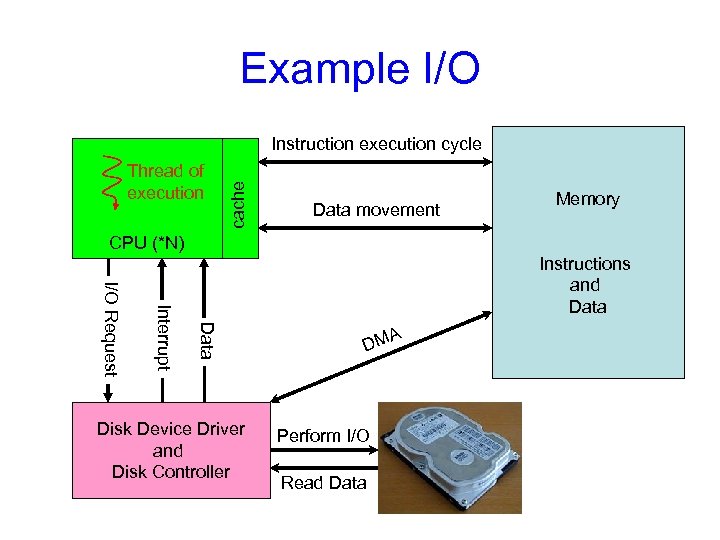 Example I/O Thread of execution cache Instruction execution cycle Data movement Memory CPU (*N) Data Interrupt I/O Request Instructions and Data A DM Keyboard Device Driver Perform I/O Disk Device Driver and Keyboard Controller Disk Controller Read Data
 Interrupt Timeline
 Modern interrupt handling • Modern OS needs more sophisticated mechanism: – Ability to defer interrupt – Efficient way to dispatch interrupt handler – Multilevel interrupts to distinguish between high and low priority • Higher priority interrupts can pre-empt processing of lower priority ones – Use a specialized Interrupt Controller • CPUs typically have two interrupt request lines: – Maskable interrupts: Can be turned off before critical processing – Nonmaskable interrupts: cannot be turned off • Signifies serious error (e. g. unrecoverable memory error) • Interrupts contain address pointing to interrupt vector – Interrupt vector contains addresses of interrupt handlers. – If more devices than elements in interrupt vector, then chain: • A list of interrupt handlers for a given address which must be traversed to determine the appropriate one.
 Traps and Exceptions • Software generated interrupt – Exception: user program acts silly • Caused by an error (div by 0, or memory access violation) • Just a performance optimization – Trap: user program requires OS service • Caused by system calls • Handled similar to hardware interrupts: – Stops executing the process – Calls handler subroutine – Restores state after servicing the trap
 Goals for Today and Next Lecture • I/O subsystem and device drivers • Interrupts and traps • Protection, system calls and operating mode • OS structure • What happens when you boot a computer?
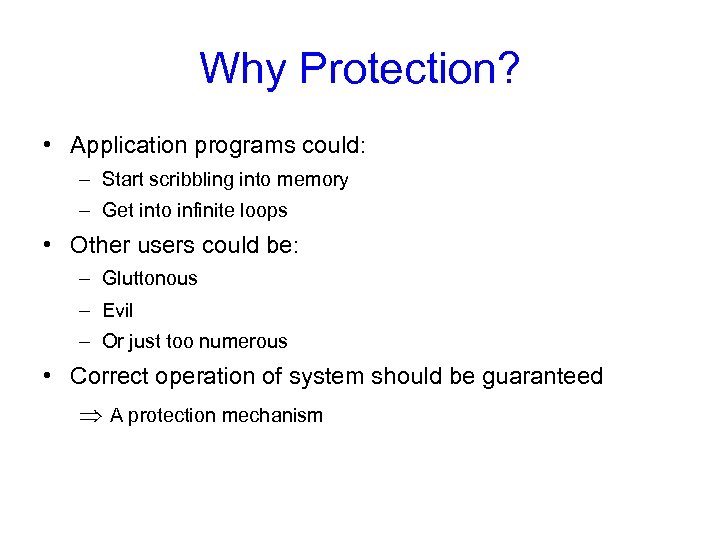 Why Protection? • Application programs could: – Start scribbling into memory – Get into infinite loops • Other users could be: – Gluttonous – Evil – Or just too numerous • Correct operation of system should be guaranteed A protection mechanism
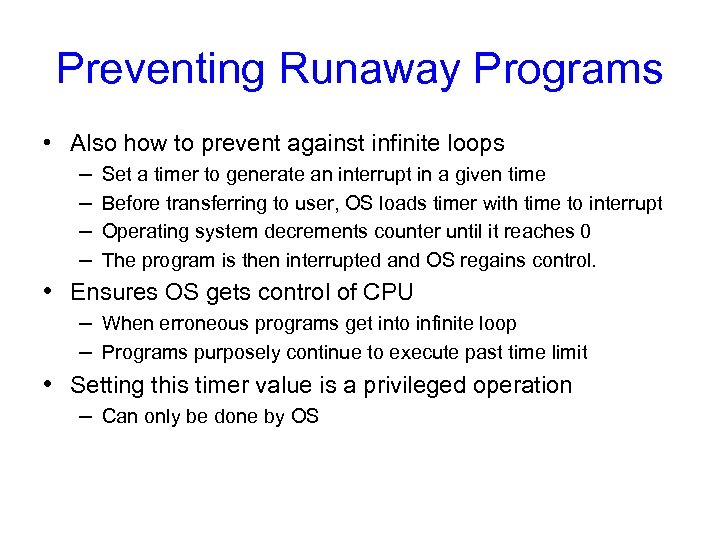 Preventing Runaway Programs • Also how to prevent against infinite loops – Set a timer to generate an interrupt in a given time – Before transferring to user, OS loads timer with time to interrupt – Operating system decrements counter until it reaches 0 – The program is then interrupted and OS regains control. • Ensures OS gets control of CPU – When erroneous programs get into infinite loop – Programs purposely continue to execute past time limit • Setting this timer value is a privileged operation – Can only be done by OS
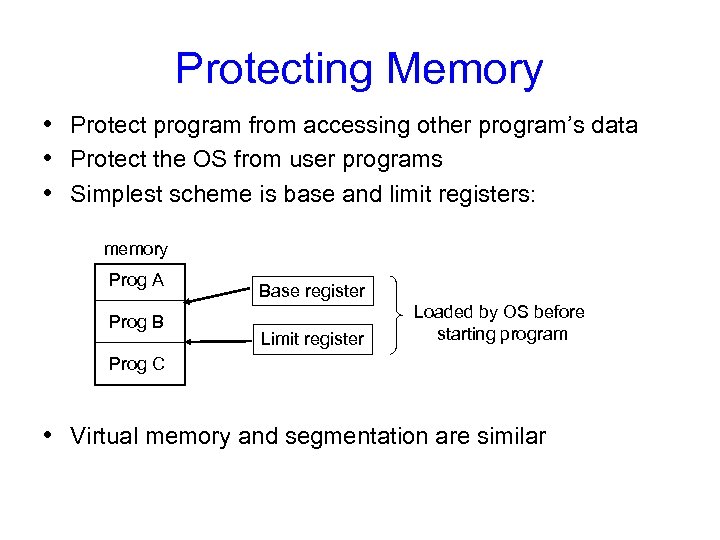 Protecting Memory • Protect program from accessing other program’s data • Protect the OS from user programs • Simplest scheme is base and limit registers: memory Prog A Prog B Base register Limit register Loaded by OS before starting program Prog C • Virtual memory and segmentation are similar
 Virtual Memory / Segmentation • Here we have a table of base and limit values • Application references some address x – CPU breaks this into a page number and an offset (or a segment number and offset) • (More common) Pages have fixed size, usually 512 bytes • (Now rare) Segments: variable size up to some maximum – Looks up the page table entry (PTE) for this reference – PTE tells the processor where to find the data in memory (by adding the offset to the base address in the PTE) – PTE can also specify other things such as protection status of page, which “end” it starts at if the page is only partially filled, etc.
 Protected Instructions Also called privileged instructions. Some examples: • Direct user access to some hardware resources – Direct access to I/O devices like disks, printers, etc. • Instructions that manipulate memory management state – page table pointers, translation look-aside buffer (TLB) load, etc. • Setting of special mode bits • Halt instruction Needed for: • Abstraction/ease of use and protection
 Dual-Mode Operation • Allows OS to protect itself and other system components – User mode and kernel mode • OS runs in kernel mode, user programs in user mode – OS is supreme being, the applications are peasants – Privileged instructions only executable in kernel mode • Mode bit provided by hardware – Can distinguish if system is running user code or kernel code – System call changes mode to kernel – Return from call using RTI resets it to user • How do user programs do something privileged?
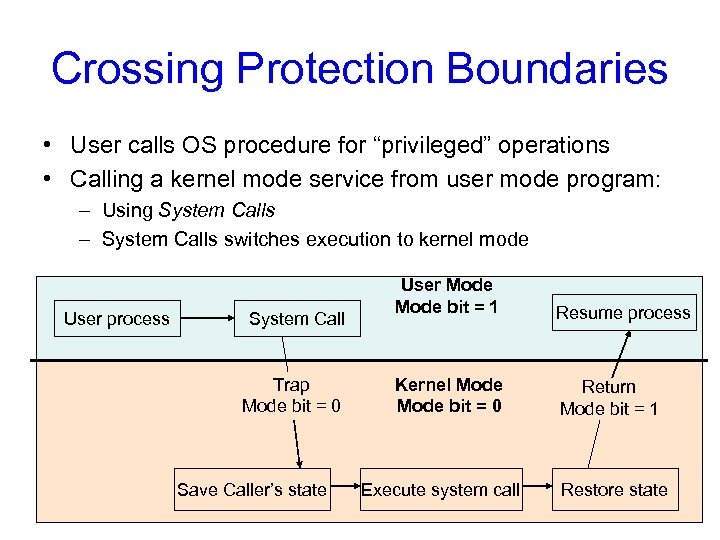 Crossing Protection Boundaries • User calls OS procedure for “privileged” operations • Calling a kernel mode service from user mode program: – Using System Calls – System Calls switches execution to kernel mode User process System Call Trap Mode bit = 0 Save Caller’s state User Mode bit = 1 Resume process Kernel Mode bit = 0 Return Mode bit = 1 Execute system call Restore state
 System Calls • Programming interface to services provided by the OS • Typically written in a high-level language (C or C++) • Mostly accessed by programs using APIs • Three most common APIs: – Win 32 API for Windows – POSIX API for POSIX-based systems (UNIX, Linux, Mac OS X) – Java API for the Java virtual machine (JVM) • Why use APIs rather than system calls? – Easier to use
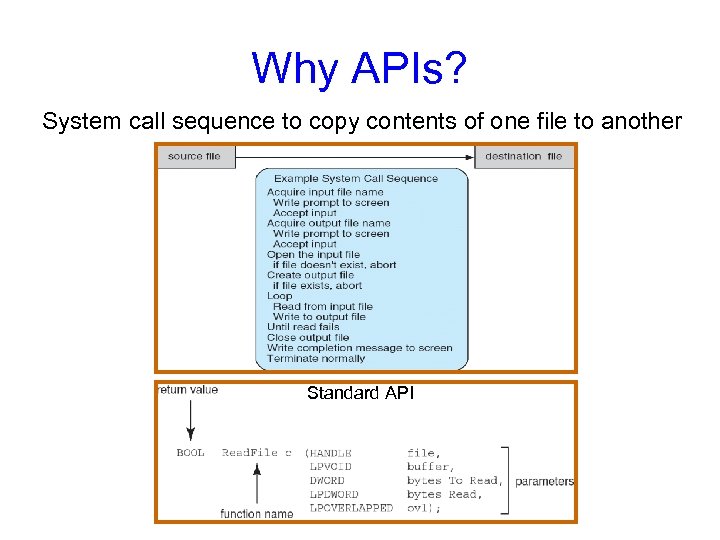 Why APIs? System call sequence to copy contents of one file to another Standard API
 Reducing System Call Overhead • Problem: The user-kernel mode distinction poses a performance barrier • Crossing this hardware barrier is costly. • System calls take 10 x-1000 x more time than a procedure call • Solution: Perform some system functionality in user mode • Libraries (DLLs) can reduce number of system calls, – by caching results (getpid) or – buffering ops (open/read/write vs. fopen/fread/ fwrite).
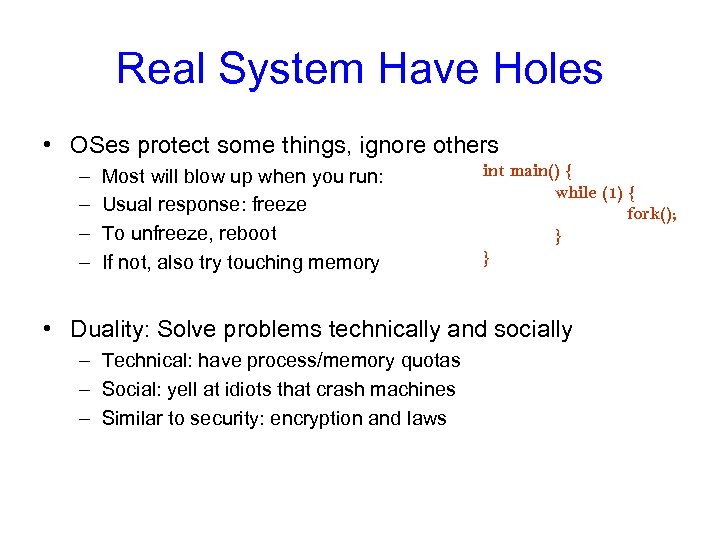 Real System Have Holes • OSes protect some things, ignore others – – Most will blow up when you run: Usual response: freeze To unfreeze, reboot If not, also try touching memory int main() { while (1) { fork(); } } • Duality: Solve problems technically and socially – Technical: have process/memory quotas – Social: yell at idiots that crash machines – Similar to security: encryption and laws
 Fixed Pie, Infinite Demands • How to make the pie go further? – Resource usage is bursty! So give to others when idle. – Eg. When waiting for a webpage! Give CPU to idle process. • 1000 years old idea: instead of one classroom per student, restaurant per customer, etc. • BUT, more utilization more complexity. – How to manage? (1 road per car vs. freeway) – Abstraction (different lanes), Synchronization (traffic lights), increase capacity (build more roads) • But more utilization more contention. – What to do when illusion breaks? – Refuse service (busy signal), give up (VM swapping), backoff and retry (Ethernet), break (freeway)
 Fixed Pie, Infinite Demand • How to divide pie? – User? Yeah, right. – Usually treat all apps same, then monitor and re-apportion • What’s the best piece to take away? – Oses are the last pure bastion of fascism – Use system feedback rather than blind fairness • How to handle pigs? – Quotas (leland), ejection (swapping), buy more stuff (microsoft products), break (ethernet, most real systems), laws (freeway) – A real problem: hard to distinguish responsible busy programs from selfish, stupid pigs.
 Summary: Protecting Processes from Each Other • Problem: Run multiple applications in such a way that they are protected from one another • Goal: – Keep User Programs from Crashing OS – Keep User Programs from Crashing each other – [Keep Parts of OS from crashing other parts? ] • (Some of the required) Mechanisms: – Dual Mode Operation – Address Translation (base/limit registers, page tables, etc) – Privileged instructions (set timer, I/O, etc) • Simple Policy: – Programs are not allowed to read/write memory of other
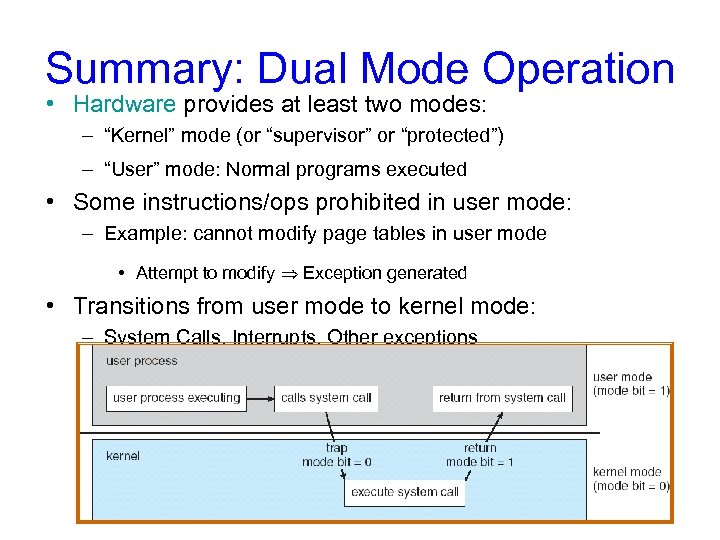 Summary: Dual Mode Operation • Hardware provides at least two modes: – “Kernel” mode (or “supervisor” or “protected”) – “User” mode: Normal programs executed • Some instructions/ops prohibited in user mode: – Example: cannot modify page tables in user mode • Attempt to modify Exception generated • Transitions from user mode to kernel mode: – System Calls, Interrupts, Other exceptions
 Today’s Lectures • I/O subsystem and device drivers • Interrupts and traps • Protection, system calls and operating mode • OS structure • What happens when you boot a computer?
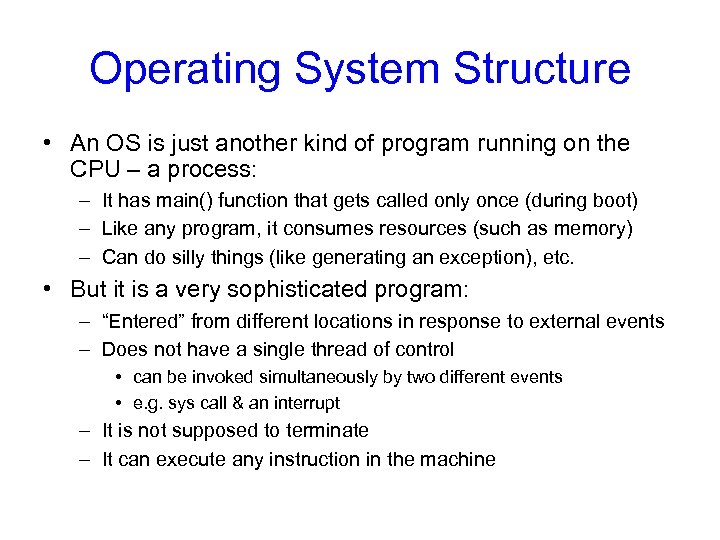 Operating System Structure • An OS is just another kind of program running on the CPU – a process: – It has main() function that gets called only once (during boot) – Like any program, it consumes resources (such as memory) – Can do silly things (like generating an exception), etc. • But it is a very sophisticated program: – “Entered” from different locations in response to external events – Does not have a single thread of control • can be invoked simultaneously by two different events • e. g. sys call & an interrupt – It is not supposed to terminate – It can execute any instruction in the machine
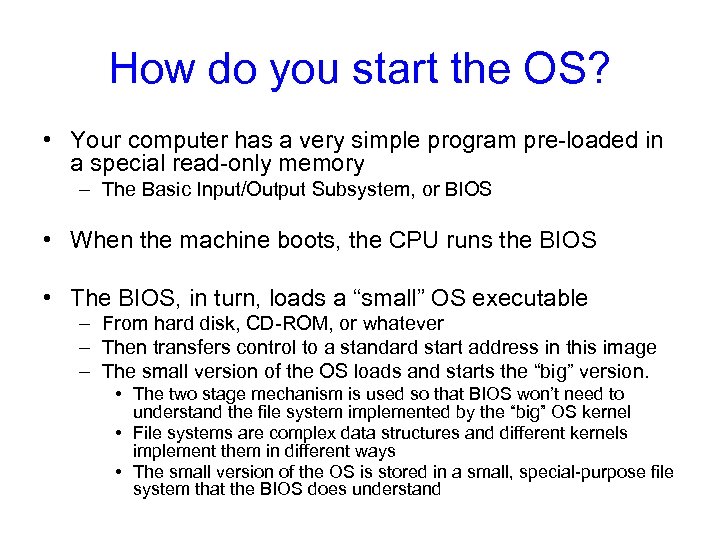 How do you start the OS? • Your computer has a very simple program pre-loaded in a special read-only memory – The Basic Input/Output Subsystem, or BIOS • When the machine boots, the CPU runs the BIOS • The BIOS, in turn, loads a “small” OS executable – From hard disk, CD-ROM, or whatever – Then transfers control to a standard start address in this image – The small version of the OS loads and starts the “big” version. • The two stage mechanism is used so that BIOS won’t need to understand the file system implemented by the “big” OS kernel • File systems are complex data structures and different kernels implement them in different ways • The small version of the OS is stored in a small, special-purpose file system that the BIOS does understand
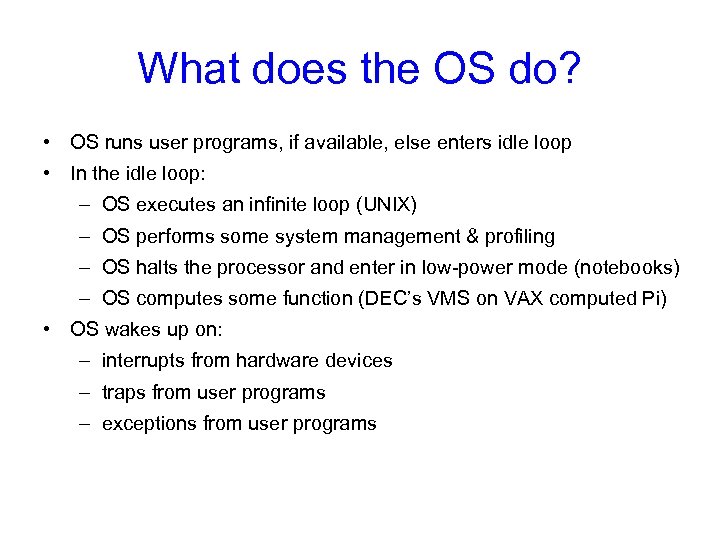 What does the OS do? • OS runs user programs, if available, else enters idle loop • In the idle loop: – OS executes an infinite loop (UNIX) – OS performs some system management & profiling – OS halts the processor and enter in low-power mode (notebooks) – OS computes some function (DEC’s VMS on VAX computed Pi) • OS wakes up on: – interrupts from hardware devices – traps from user programs – exceptions from user programs
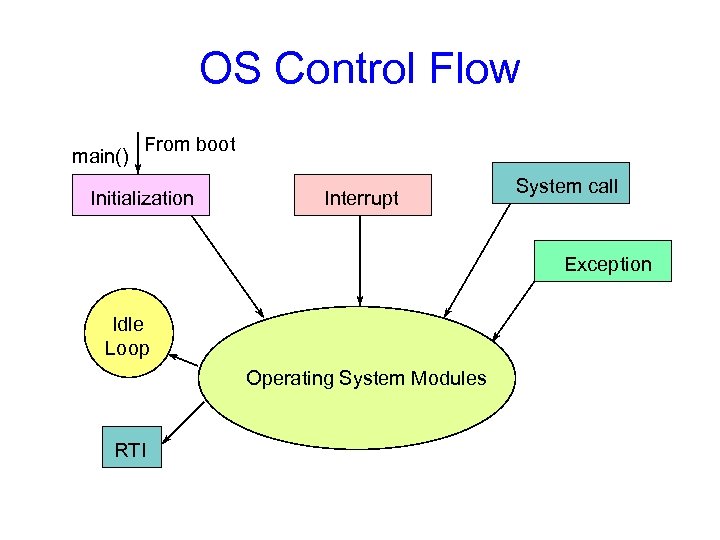 OS Control Flow main() From boot Initialization Interrupt System call Exception Idle Loop Operating System Modules RTI
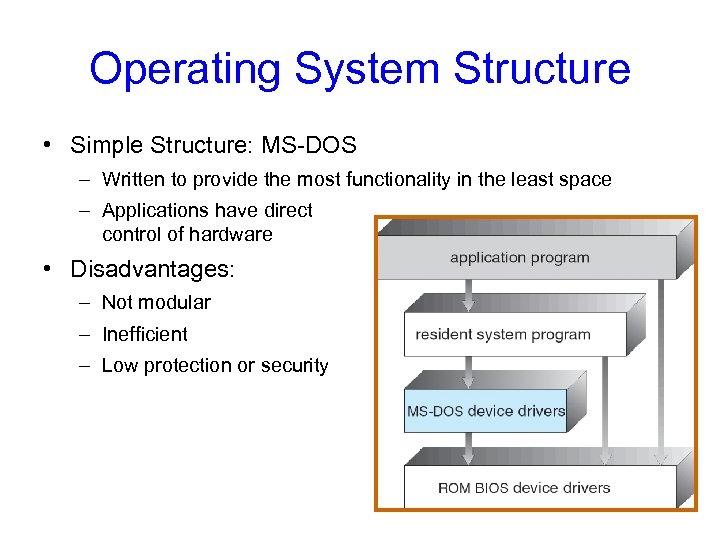 Operating System Structure • Simple Structure: MS-DOS – Written to provide the most functionality in the least space – Applications have direct control of hardware • Disadvantages: – Not modular – Inefficient – Low protection or security
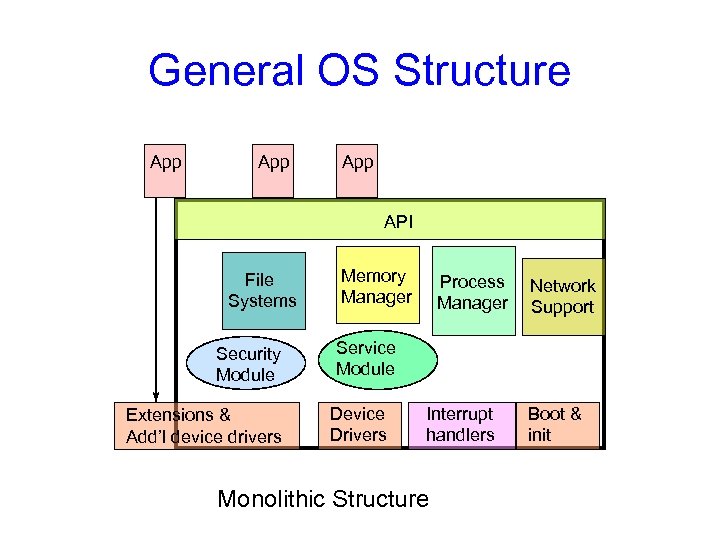 General OS Structure App App API File Systems Security Module Extensions & Add’l device drivers Memory Manager Process Manager Network Support Service Module Device Drivers Interrupt handlers Monolithic Structure Boot & init
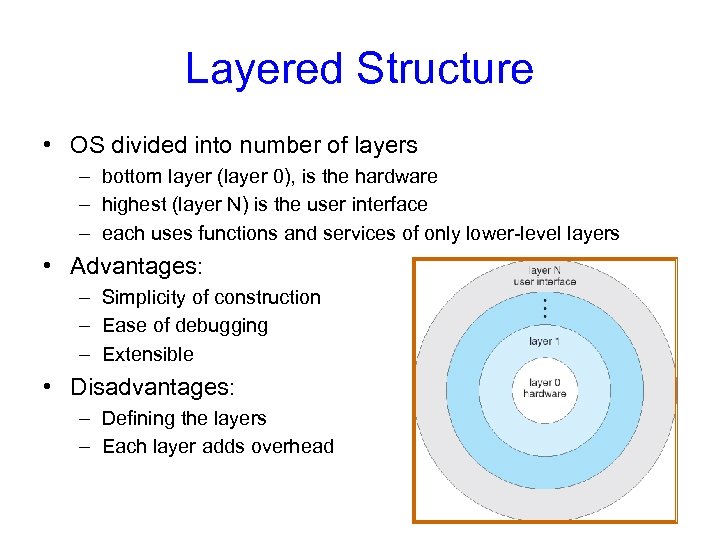 Layered Structure • OS divided into number of layers – bottom layer (layer 0), is the hardware – highest (layer N) is the user interface – each uses functions and services of only lower-level layers • Advantages: – Simplicity of construction – Ease of debugging – Extensible • Disadvantages: – Defining the layers – Each layer adds overhead
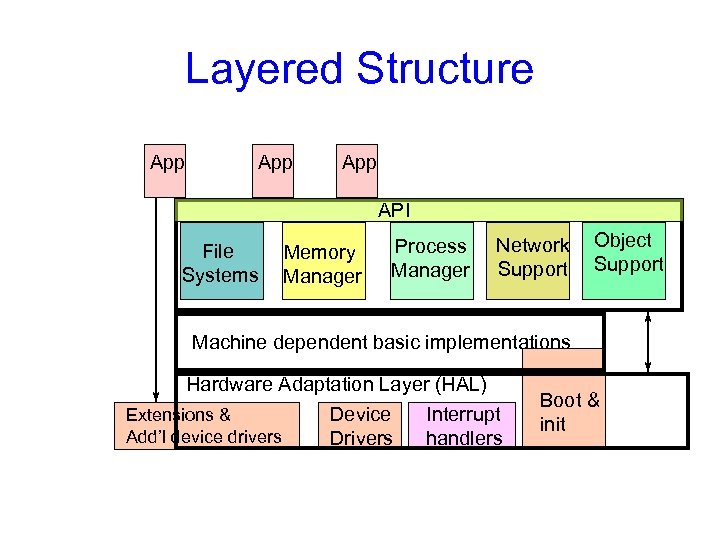 Layered Structure App App API File Systems Memory Manager Process Manager Network Support Object Support Machine dependent basic implementations Hardware Adaptation Layer (HAL) Extensions & Device Interrupt Add’l device drivers Drivers handlers Boot & init
 Microkernel Structure • Moves as much from kernel into “user” space • User modules communicate using message passing • Benefits: – Easier to extend a microkernel – Easier to port the operating system to new architectures – More reliable (less code is running in kernel mode) – More secure – Example: Mach, QNX • Detriments: – Performance overhead of user to kernel space communication – Example: Evolution of Windows NT to Windows XP
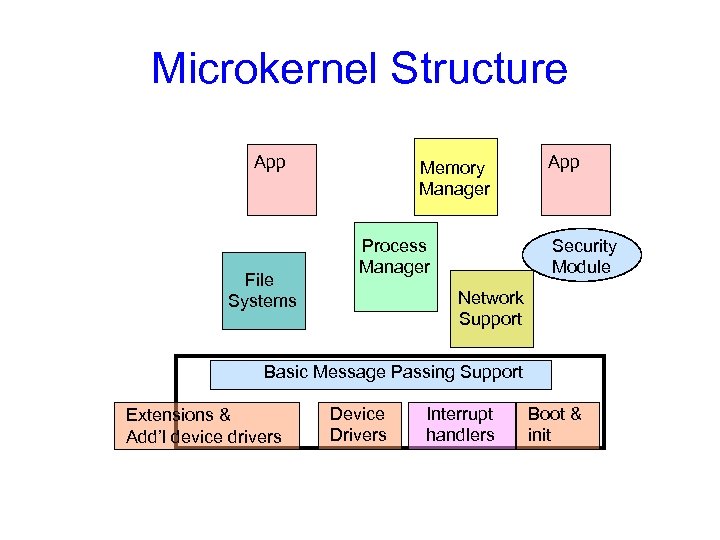 Microkernel Structure App File Systems Memory Manager Process Manager App Security Module Network Support Basic Message Passing Support Extensions & Add’l device drivers Device Drivers Interrupt handlers Boot & init
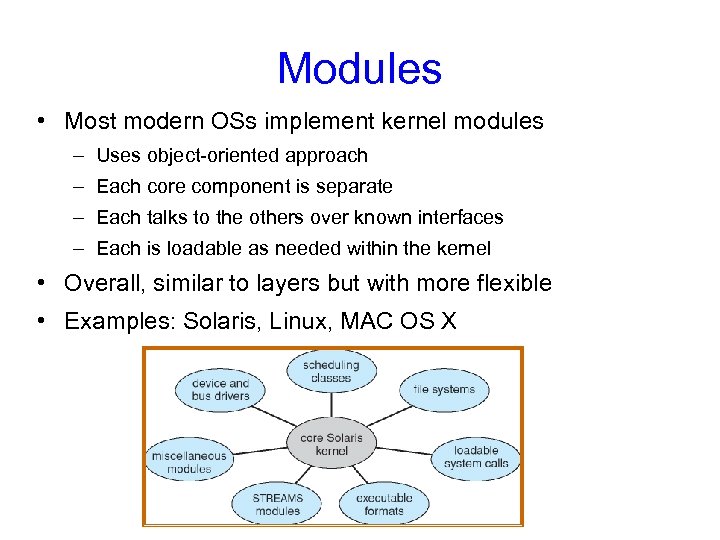 Modules • Most modern OSs implement kernel modules – Uses object-oriented approach – Each core component is separate – Each talks to the others over known interfaces – Each is loadable as needed within the kernel • Overall, similar to layers but with more flexible • Examples: Solaris, Linux, MAC OS X
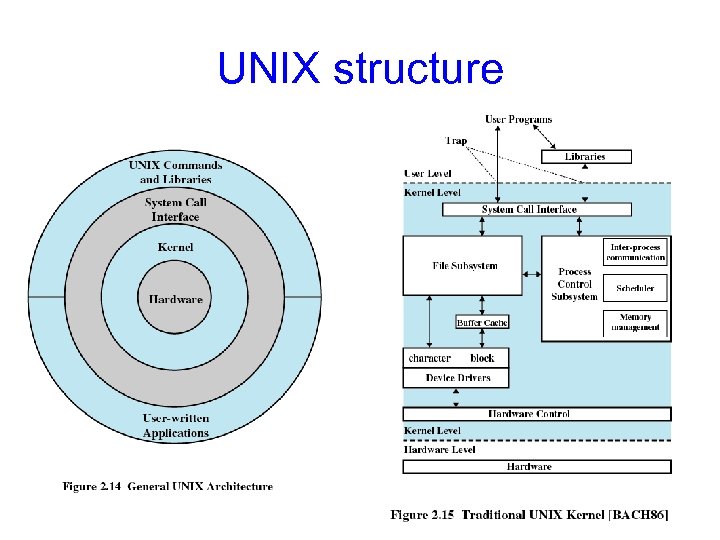 UNIX structure
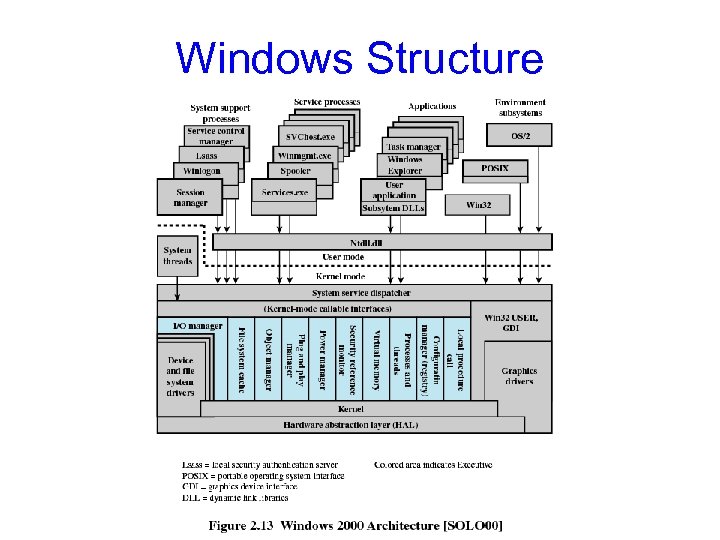 Windows Structure
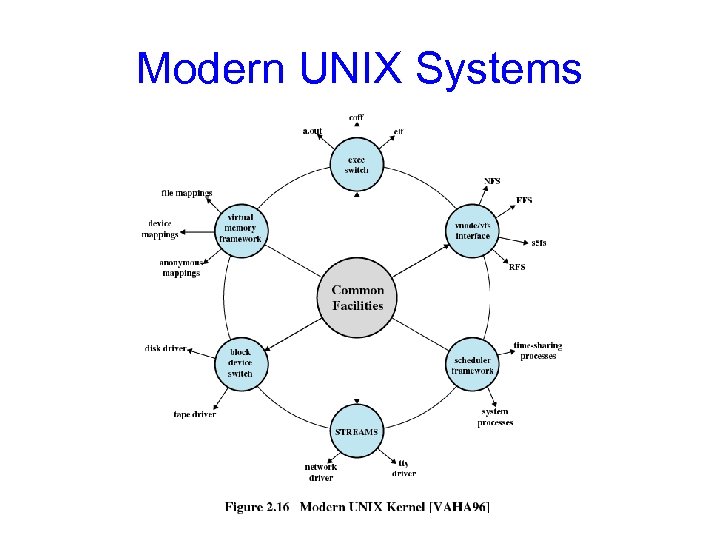 Modern UNIX Systems
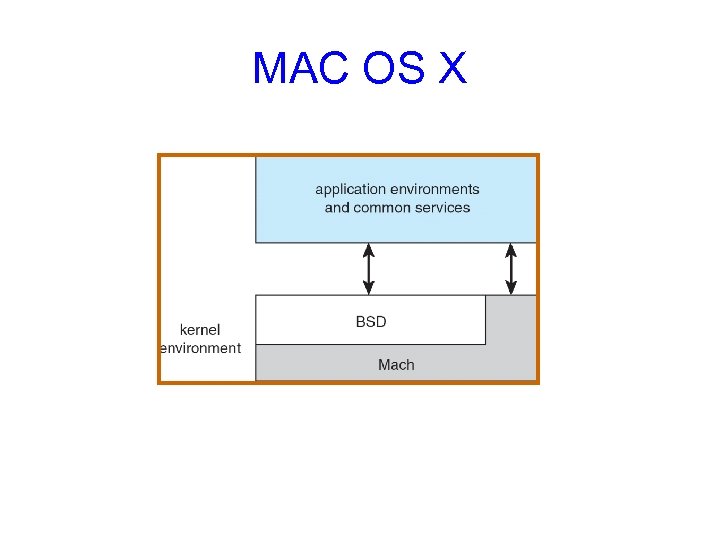 MAC OS X
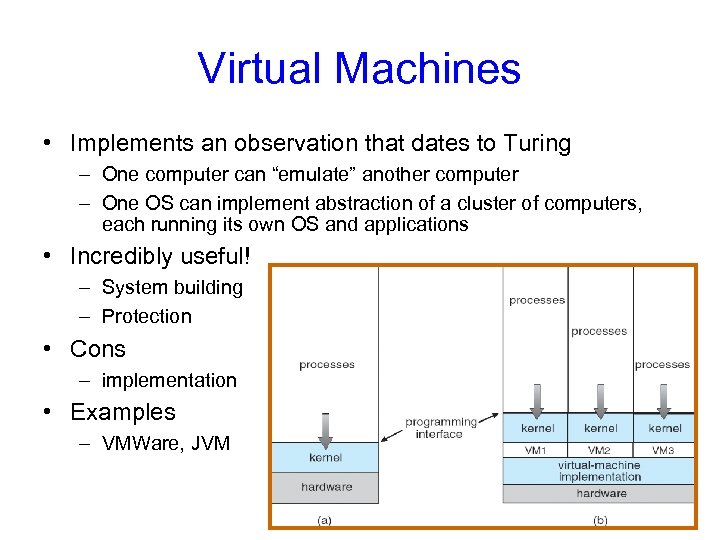 Virtual Machines • Implements an observation that dates to Turing – One computer can “emulate” another computer – One OS can implement abstraction of a cluster of computers, each running its own OS and applications • Incredibly useful! – System building – Protection • Cons – implementation • Examples – VMWare, JVM
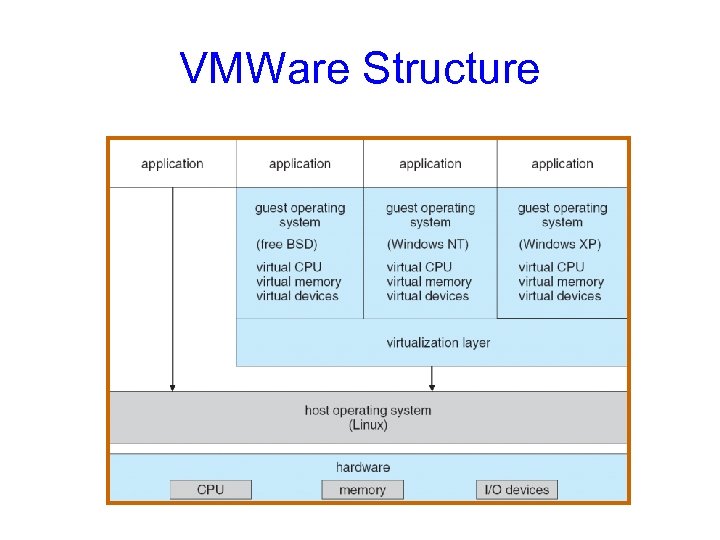 VMWare Structure
 But is it real? • Can the OS know whether this is a real computer as opposed to a virtual machine? – It can try to perform a protected operation… but a virtual machine monitor (VMM) could trap those requests and emulate them – It could measure timing very carefully… but modern hardware runs at variable speeds • Bottom line: you really can’t tell!
 Modern version of this question • Can the “spyware removal” program tell whether it is running on the real computer, or in a virtual machine environment created just for it? – Basically: no, it can’t! • Vendors are adding “Trusted Computing Base” (TCB) technologies to help – Hardware that can’t be virtualized – We’ll discuss it later in the course
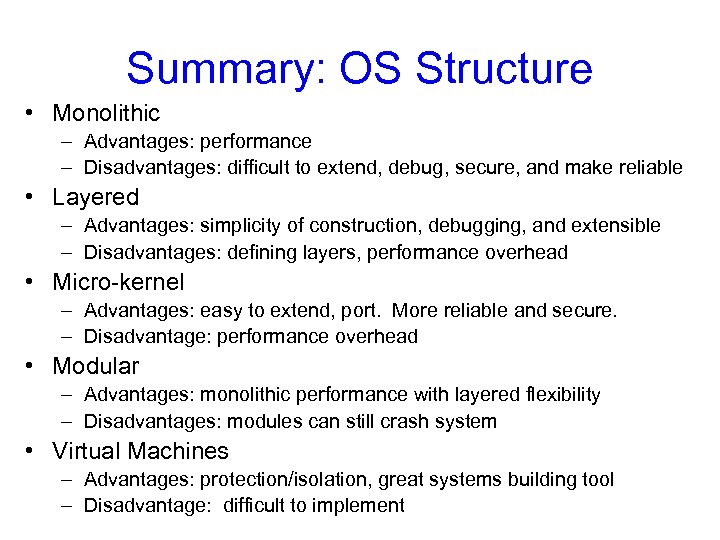 Summary: OS Structure • Monolithic – Advantages: performance – Disadvantages: difficult to extend, debug, secure, and make reliable • Layered – Advantages: simplicity of construction, debugging, and extensible – Disadvantages: defining layers, performance overhead • Micro-kernel – Advantages: easy to extend, port. More reliable and secure. – Disadvantage: performance overhead • Modular – Advantages: monolithic performance with layered flexibility – Disadvantages: modules can still crash system • Virtual Machines – Advantages: protection/isolation, great systems building tool – Disadvantage: difficult to implement