 Applications of Context Free Grammars CS 351 Introduction to XML
 Example 1: Parsing Programming Languages • Consider an arbitrary expression – Arbitrary nesting of operators – Parenthesis balancing – Requires CFG • YACC – Yet Another Compiler – Unix program often used to generate a parser for a compiler – Output is code that implements an automaton capable of parsing the defined grammar – Also mechanisms to perform error handling, recovery
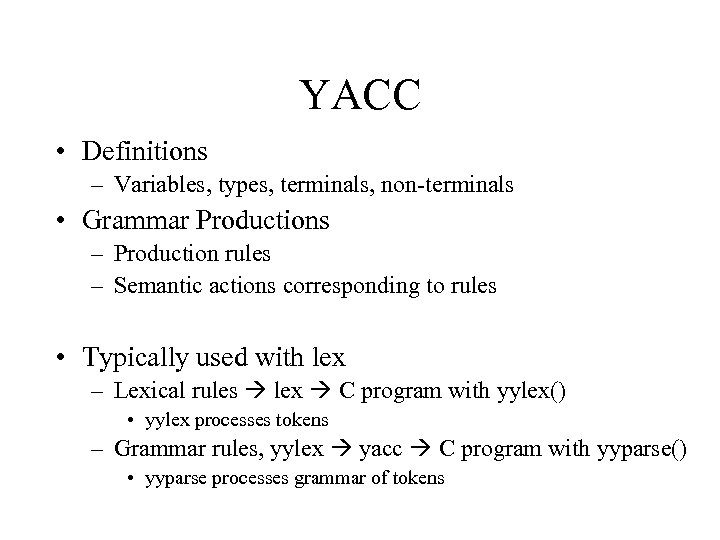 YACC • Definitions – Variables, types, terminals, non-terminals • Grammar Productions – Production rules – Semantic actions corresponding to rules • Typically used with lex – Lexical rules lex C program with yylex() • yylex processes tokens – Grammar rules, yylex yacc C program with yyparse() • yyparse processes grammar of tokens
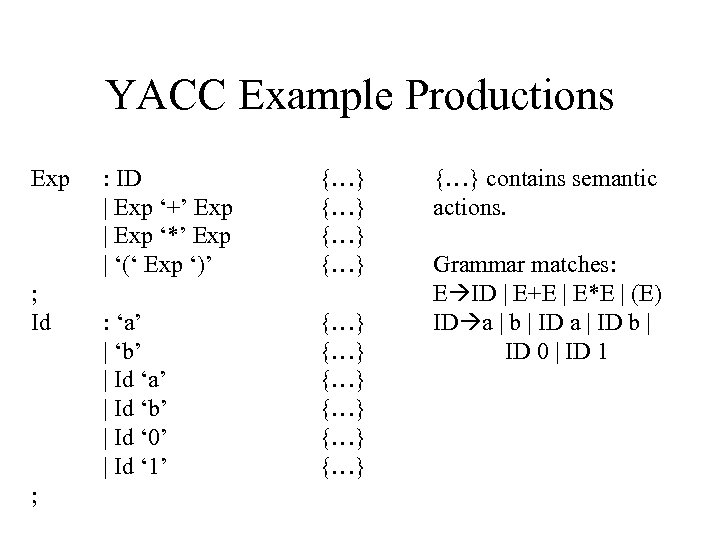 YACC Example Productions Exp ; Id ; : ID | Exp ‘+’ Exp | Exp ‘*’ Exp | ‘(‘ Exp ‘)’ {…} {…} : ‘a’ | ‘b’ | Id ‘a’ | Id ‘b’ | Id ‘ 0’ | Id ‘ 1’ {…} {…} contains semantic actions. Grammar matches: E ID | E+E | E*E | (E) ID a | b | ID a | ID b | ID 0 | ID 1
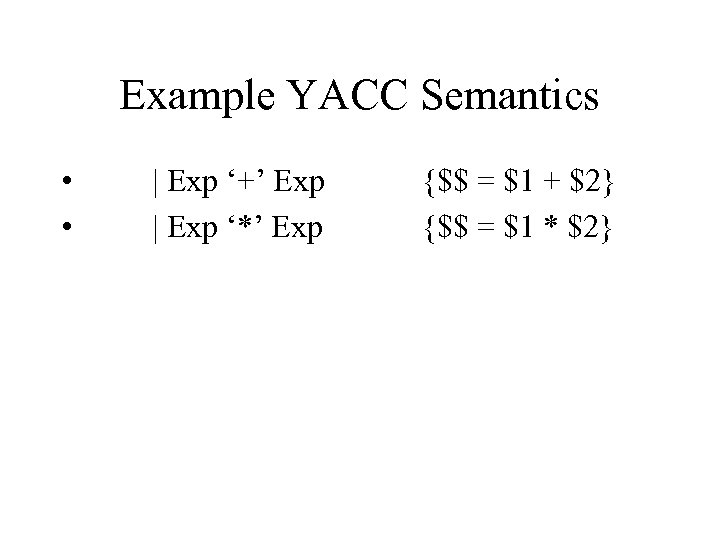 Example YACC Semantics • • | Exp ‘+’ Exp | Exp ‘*’ Exp {$$ = $1 + $2} {$$ = $1 * $2}
 Example 2: XML - What is it? • XML = e. Xtensible Markup Language • Relatively new technology for web applications - 1997 • World Wide Web Consortium (W 3 C) standard that lets you create your own tags. – Implications for business-to-business transactions on the web.
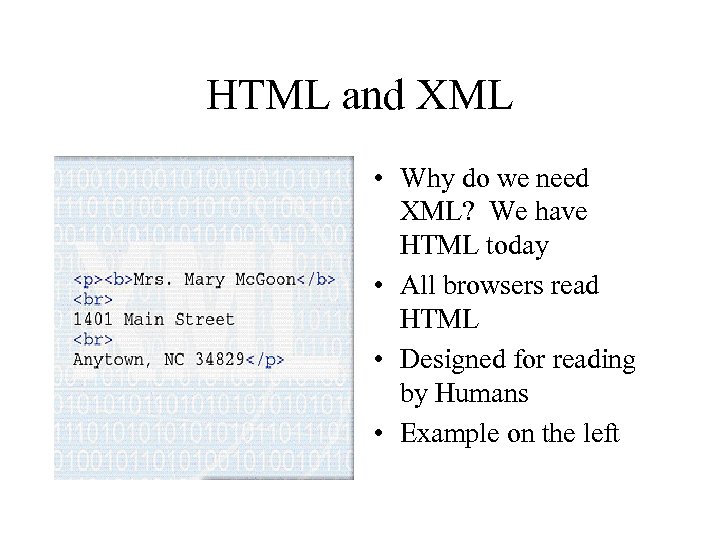 HTML and XML • Why do we need XML? We have HTML today • All browsers read HTML • Designed for reading by Humans • Example on the left
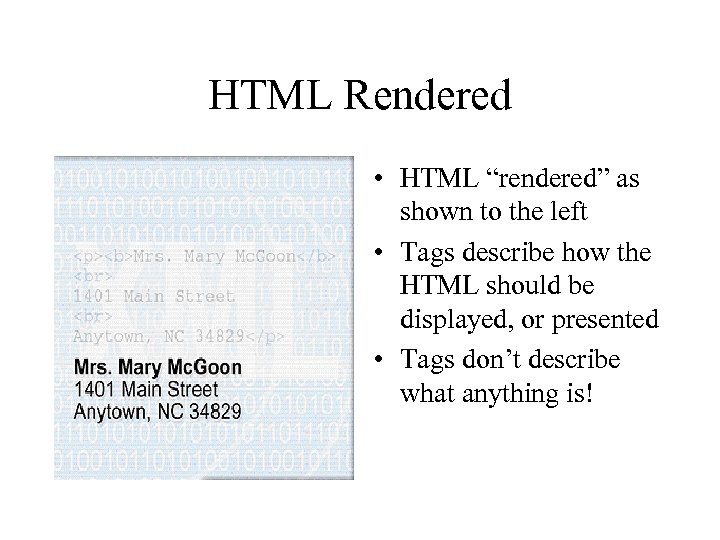 HTML Rendered • HTML “rendered” as shown to the left • Tags describe how the HTML should be displayed, or presented • Tags don’t describe what anything is!
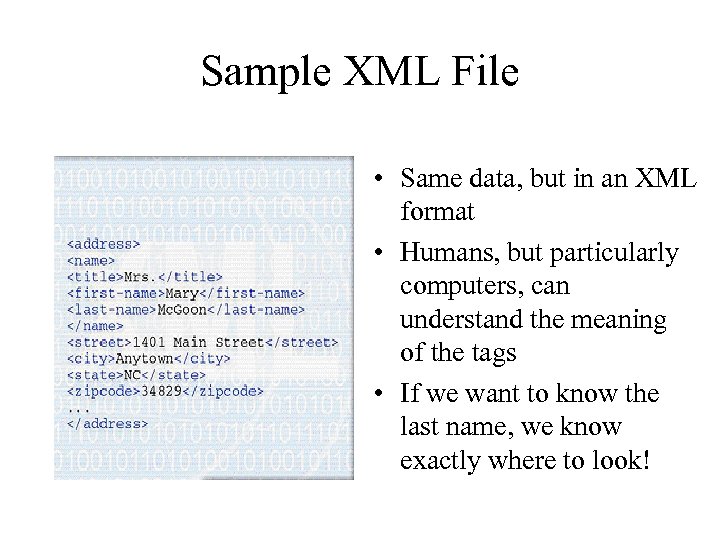 Sample XML File • Same data, but in an XML format • Humans, but particularly computers, can understand the meaning of the tags • If we want to know the last name, we know exactly where to look!
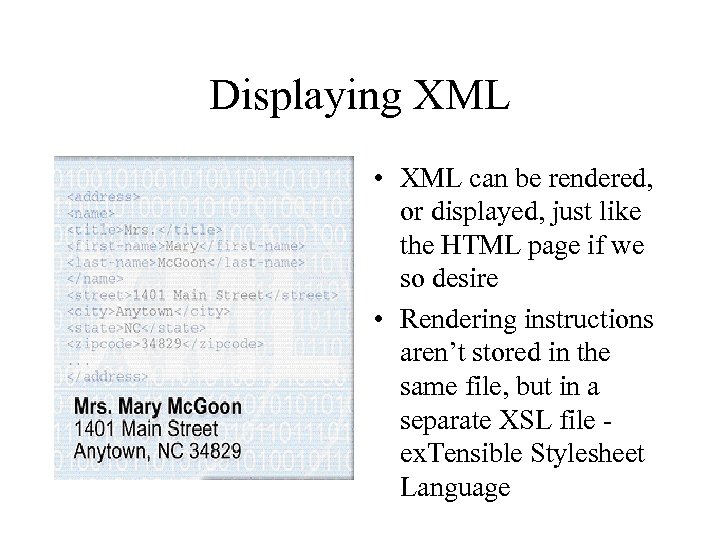 Displaying XML • XML can be rendered, or displayed, just like the HTML page if we so desire • Rendering instructions aren’t stored in the same file, but in a separate XSL file ex. Tensible Stylesheet Language
 Second Rendering • With a different style sheet, we can render the data in an entirely different way • Same content, just different presentation
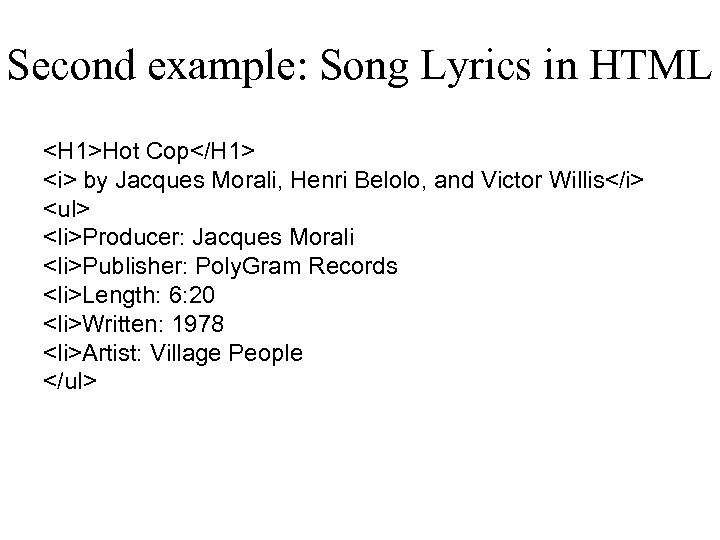 Second example: Song Lyrics in HTML Hot Cop by Jacques Morali, Henri Belolo, and Victor Willis
- Producer: Jacques Morali
- Publisher: Poly. Gram Records
- Length: 6: 20
- Written: 1978
- Artist: Village People
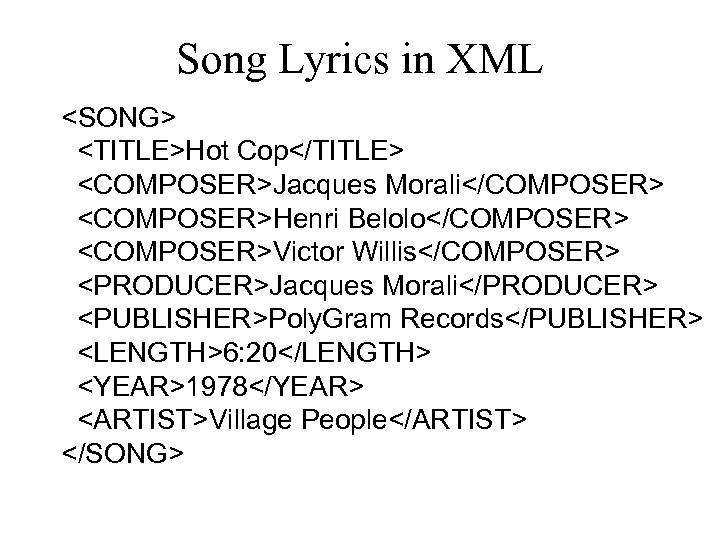 Song Lyrics in XML Hot Cop Jacques Morali Henri Belolo Victor Willis Jacques Morali Poly. Gram Records 6: 20 1978 Village People
 Song XSL Style Sheet for Formatting Song Style Sheets can be quite complex; most translate to HTML
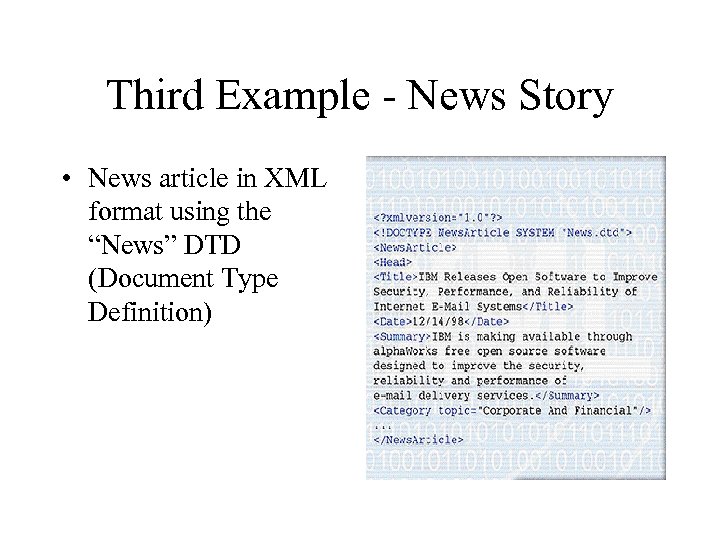 Third Example - News Story • News article in XML format using the “News” DTD (Document Type Definition)
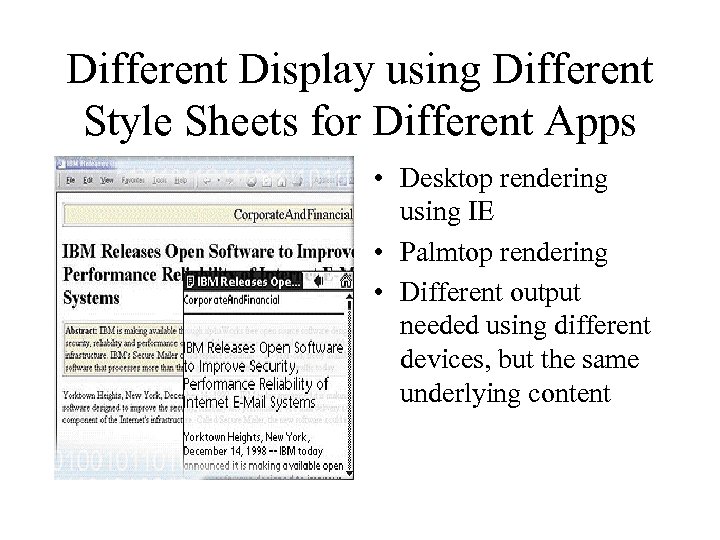 Different Display using Different Style Sheets for Different Apps • Desktop rendering using IE • Palmtop rendering • Different output needed using different devices, but the same underlying content
 Example Applications • Web Pages – XHTML is XML with an HTML DTD • • Mathematical Equations Music Notation Vector Graphics Metadata
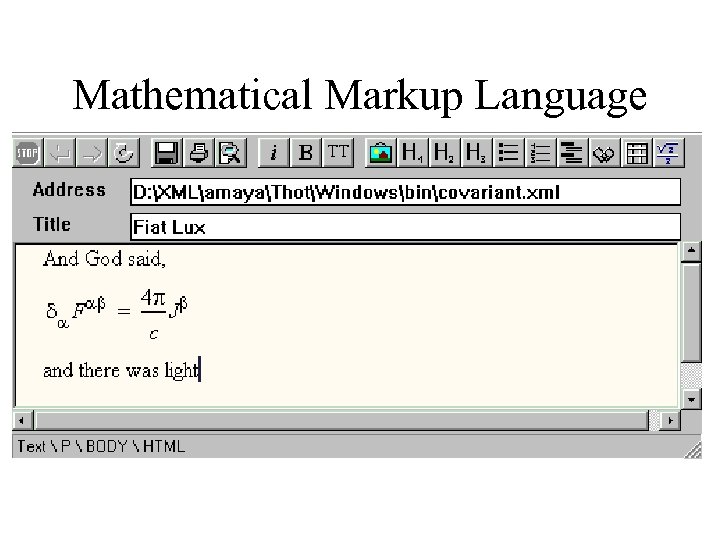 Mathematical Markup Language
 Vector Graphics • Vector Markup Language (VML) – Internet Explorer 5. 0 – Microsoft Office 2000 • Scalable Vector Graphics (SVG)
 File Formats, In-House, Other • Microsoft Office 2000 • Federal Express Web API • Netscape What’s Related
 Summary of XML Benefits • Can now send structured data across the web – Semantics and Syntax (Presentation), separated • Business to Business Transactions – Using a published XML format (DTD), we can specify orders, items, requests, and pretty much anything we want and display them using any XSL – Intelligent Agents can now understand what data means, instead of complex algorithms and heuristics to guess what the data means • e. g. Shopping Agents • Smart Searches using XML queries, not keywords
 Where do the XML Tags Come From? • You get to invent the tags! • Tags get defined in the DTD (Data Type Definition) • HTML has fixed tags and presentation meaning only • XML has user-defined tags and semantic meaning separated from presentation meaning
 HTML is a fixed standard. XML lets everyone define the data structures they need.
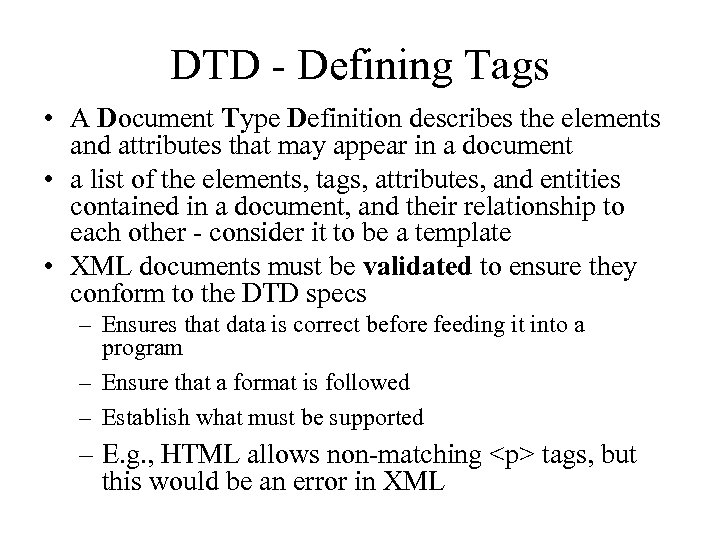 DTD - Defining Tags • A Document Type Definition describes the elements and attributes that may appear in a document • a list of the elements, tags, attributes, and entities contained in a document, and their relationship to each other - consider it to be a template • XML documents must be validated to ensure they conform to the DTD specs – Ensures that data is correct before feeding it into a program – Ensure that a format is followed – Establish what must be supported – E. g. , HTML allows non-matching
tags, but this would be an error in XML
 Sample DTD and XML greeting. xml Hello World! greeting. dtd
 Greeting XSL greeting. xsl
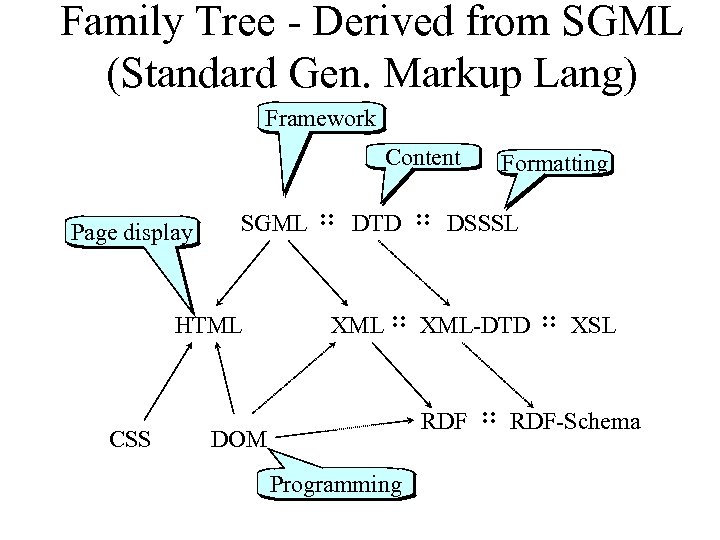 Family Tree - Derived from SGML (Standard Gen. Markup Lang) Framework Content Page display SGML : : DTD : : DSSSL HTML CSS Formatting XML : : XML-DTD : : XSL RDF : : RDF-Schema DOM Programming
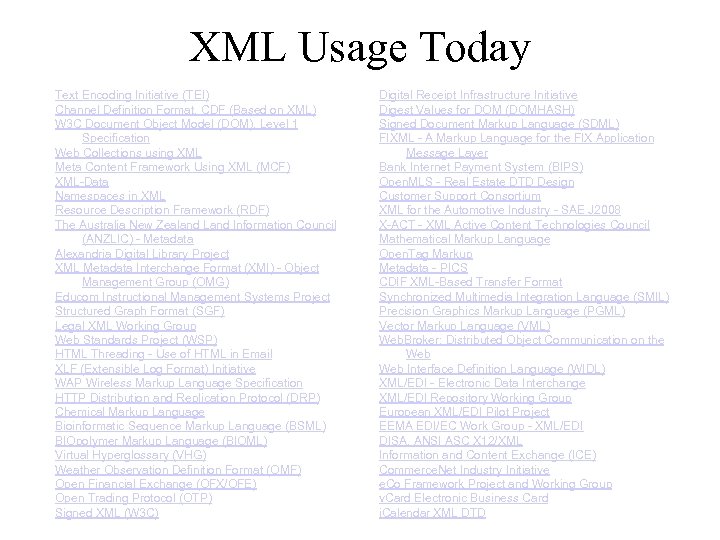 XML Usage Today Text Encoding Initiative (TEI) Channel Definition Format, CDF (Based on XML) W 3 C Document Object Model (DOM), Level 1 Specification Web Collections using XML Meta Content Framework Using XML (MCF) XML-Data Namespaces in XML Resource Description Framework (RDF) The Australia New Zealand Land Information Council (ANZLIC) - Metadata Alexandria Digital Library Project XML Metadata Interchange Format (XMI) - Object Management Group (OMG) Educom Instructional Management Systems Project Structured Graph Format (SGF) Legal XML Working Group Web Standards Project (WSP) HTML Threading - Use of HTML in Email XLF (Extensible Log Format) Initiative WAP Wireless Markup Language Specification HTTP Distribution and Replication Protocol (DRP) Chemical Markup Language Bioinformatic Sequence Markup Language (BSML) BIOpolymer Markup Language (BIOML) Virtual Hyperglossary (VHG) Weather Observation Definition Format (OMF) Open Financial Exchange (OFX/OFE) Open Trading Protocol (OTP) Signed XML (W 3 C) Digital Receipt Infrastructure Initiative Digest Values for DOM (DOMHASH) Signed Document Markup Language (SDML) FIXML - A Markup Language for the FIX Application Message Layer Bank Internet Payment System (BIPS) Open. MLS - Real Estate DTD Design Customer Support Consortium XML for the Automotive Industry - SAE J 2008 X-ACT - XML Active Content Technologies Council Mathematical Markup Language Open. Tag Markup Metadata - PICS CDIF XML-Based Transfer Format Synchronized Multimedia Integration Language (SMIL) Precision Graphics Markup Language (PGML) Vector Markup Language (VML) Web. Broker: Distributed Object Communication on the Web Interface Definition Language (WIDL) XML/EDI - Electronic Data Interchange XML/EDI Repository Working Group European XML/EDI Pilot Project EEMA EDI/EC Work Group - XML/EDI DISA, ANSI ASC X 12/XML Information and Content Exchange (ICE) Commerce. Net Industry Initiative e. Co Framework Project and Working Group v. Card Electronic Business Card i. Calendar XML DTD
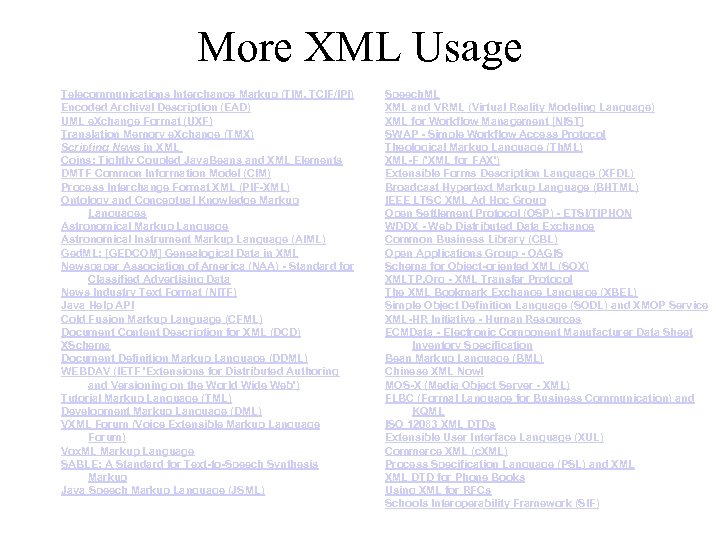 More XML Usage Telecommunications Interchange Markup (TIM, TCIF/IPI) Encoded Archival Description (EAD) UML e. Xchange Format (UXF) Translation Memory e. Xchange (TMX) Scripting News in XML Coins: Tightly Coupled Java. Beans and XML Elements DMTF Common Information Model (CIM) Process Interchange Format XML (PIF-XML) Ontology and Conceptual Knowledge Markup Languages Astronomical Markup Language Astronomical Instrument Markup Language (AIML) Ged. ML: [GEDCOM] Genealogical Data in XML Newspaper Association of America (NAA) - Standard for Classified Advertising Data News Industry Text Format (NITF) Java Help API Cold Fusion Markup Language (CFML) Document Content Description for XML (DCD) XSchema Document Definition Markup Language (DDML) WEBDAV (IETF 'Extensions for Distributed Authoring and Versioning on the World Wide Web') Tutorial Markup Language (TML) Development Markup Language (DML) VXML Forum (Voice Extensible Markup Language Forum) Vox. ML Markup Language SABLE: A Standard for Text-to-Speech Synthesis Markup Java Speech Markup Language (JSML) Speech. ML XML and VRML (Virtual Reality Modeling Language) XML for Workflow Management [NIST] SWAP - Simple Workflow Access Protocol Theological Markup Language (Th. ML) XML-F ('XML for FAX') Extensible Forms Description Language (XFDL) Broadcast Hypertext Markup Language (BHTML) IEEE LTSC XML Ad Hoc Group Open Settlement Protocol (OSP) - ETSI/TIPHON WDDX - Web Distributed Data Exchange Common Business Library (CBL) Open Applications Group - OAGIS Schema for Object-oriented XML (SOX) XMLTP. Org - XML Transfer Protocol The XML Bookmark Exchange Language (XBEL) Simple Object Definition Language (SODL) and XMOP Service XML-HR Initiative - Human Resources ECMData - Electronic Component Manufacturer Data Sheet Inventory Specification Bean Markup Language (BML) Chinese XML Now! MOS-X (Media Object Server - XML) FLBC (Formal Language for Business Communication) and KQML ISO 12083 XML DTDs Extensible User Interface Language (XUL) Commerce XML (c. XML) Process Specification Language (PSL) and XML DTD for Phone Books Using XML for RFCs Schools Interoperability Framework (SIF)
 Major Companies Backing XML • XML has support from many major players in the industry – Sun, Microsoft, IBM, Oracle – W 3 C
 Microsoft on XML • Office 2000 uses XML backend – Supports publishing to web, retain all formatting • Internet Explorer 5+ supports XML parser • Exchange 2000 supports XML – Supports both XML and HTML so that application developers can build on a set of core services to speed development of applications such as document management solutions • Core technology of. NET
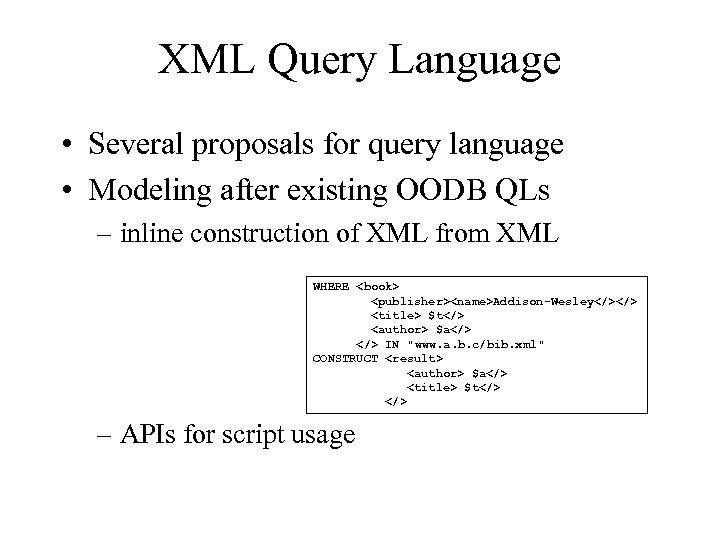 XML Query Language • Several proposals for query language • Modeling after existing OODB QLs – inline construction of XML from XML WHERE Addison-Wesley $t</> <author> $a</> IN "www. a. b. c/bib. xml" CONSTRUCT <result> <author> $a</> <title> $t</> – APIs for script usage </p>
</div>
<div style="width: auto;" class="description columns twelve"><p><img class="imgdescription" title="Programming XML • XML defines an object/attribute data model • DOM (Document Object Model)" src="https://present5.com/presentation/ad5adc9f27218cf6dc3ba6b02c2b0259/image-33.jpg" alt="Programming XML • XML defines an object/attribute data model • DOM (Document Object Model)" />
Programming XML • XML defines an object/attribute data model • DOM (Document Object Model) is the API for programs to act upon object/attribute data models – DHTML is DOM for HTML • interface for operating on the document as paragraphs, images, links, etc – DOM-XML is DOM for XML • interface for operating on the “document” as objects and parameters • Microsoft supports DHTML, exposes HTML objects as DOM </p>
</div>
<div style="width: auto;" class="description columns twelve"><p><img class="imgdescription" title="Style Sheets / DTD / XML • The actual XML, Style Sheets, and the" src="https://present5.com/presentation/ad5adc9f27218cf6dc3ba6b02c2b0259/image-34.jpg" alt="Style Sheets / DTD / XML • The actual XML, Style Sheets, and the" />
Style Sheets / DTD / XML • The actual XML, Style Sheets, and the DTD (Document Type Definition) could be made by hand, but more typically are created with the help of XML Tools – Many tools on the market – IBM alphaworks – Vervet’s XML Pro – Microfar Designer </p>
</div>
<div style="width: auto;" class="description columns twelve"><p><img class="imgdescription" title="Lots of people using it…but • Everyone is using it for their own individual" src="https://present5.com/presentation/ad5adc9f27218cf6dc3ba6b02c2b0259/image-35.jpg" alt="Lots of people using it…but • Everyone is using it for their own individual" />
Lots of people using it…but • Everyone is using it for their own individual purposes! Many sharing/inventing DTD’s with their partners/customers, not being adopted by others. • Downside: Web full of gobbledygook that only a select few understand • Even though your browser may parse XML, it may not understand what it really means • Effect: Everyone can invent their own language on the web – Tower of Babel on the web, or Balkanization </p>
</div>
<div style="width: auto;" class="description columns twelve"><p><img class="imgdescription" title="Quick Quiz • • What’s a DTD? Difference between XML and HTML? What’s a" src="https://present5.com/presentation/ad5adc9f27218cf6dc3ba6b02c2b0259/image-36.jpg" alt="Quick Quiz • • What’s a DTD? Difference between XML and HTML? What’s a" />
Quick Quiz • • What’s a DTD? Difference between XML and HTML? What’s a e. Xtended Style Sheet? How can XML make searching easier? </p>
</div>
<div style="width: auto;" class="description columns twelve"><p><img class="imgdescription" title="Summary • XML specifies semantics, not just presentation – Semantics separate from Presentation language" src="https://present5.com/presentation/ad5adc9f27218cf6dc3ba6b02c2b0259/image-37.jpg" alt="Summary • XML specifies semantics, not just presentation – Semantics separate from Presentation language" />
Summary • XML specifies semantics, not just presentation – Semantics separate from Presentation language – Users can define their own tags/languages • Greatly simplifies machine understanding of data – Agents easier to implement – Business to business transactions • International, standard format to share and exchange knowledge </p>
</div>
<div style="width: auto;" class="description columns twelve"><p><img class="imgdescription" title="Back to Context-Free Grammars… • HTML can be described by classes of text –" src="https://present5.com/presentation/ad5adc9f27218cf6dc3ba6b02c2b0259/image-38.jpg" alt="Back to Context-Free Grammars… • HTML can be described by classes of text –" />
Back to Context-Free Grammars… • HTML can be described by classes of text – Text is any string of characters literally interpreted (i. e. there are no tags, user-text) – Char is any single character legal in HTML tags – Element is • Text or • A pair of matching tags and the document between them, or • Unmatched tag followed by a document – Doc is sequences of elements – List. Item is the <LI> tag followed by a document – List is a sequence of zero or more list items </p>
</div>
<div style="width: auto;" class="description columns twelve"><p><img class="imgdescription" title="HTML Grammar • • Char a | A | … Text ε | Char" src="https://present5.com/presentation/ad5adc9f27218cf6dc3ba6b02c2b0259/image-39.jpg" alt="HTML Grammar • • Char a | A | … Text ε | Char" />
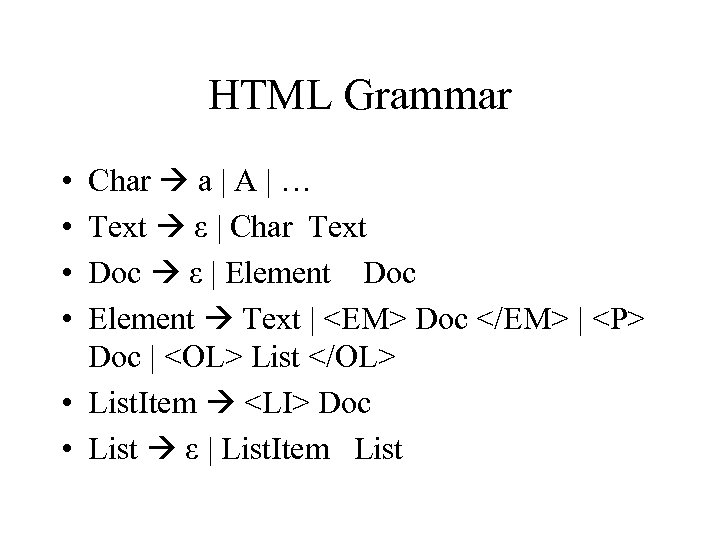
HTML Grammar • • Char a | A | … Text ε | Char Text Doc ε | Element Doc Element Text | <EM> Doc </EM> | <P> Doc | <OL> List </OL> • List. Item <LI> Doc • List ε | List. Item List </p>
</div>
<div style="width: auto;" class="description columns twelve"><p><img class="imgdescription" title="XML’s DTD • The DTD lets us define our own grammar • Context-free grammar" src="https://present5.com/presentation/ad5adc9f27218cf6dc3ba6b02c2b0259/image-40.jpg" alt="XML’s DTD • The DTD lets us define our own grammar • Context-free grammar" />
XML’s DTD • The DTD lets us define our own grammar • Context-free grammar notation, also using regular expressions • Form of DTD: <!DOCTYPE name-of-DTD [ list of element definitions ]> • Element definition: – <!ELEMENT element-name (description of element)> </p>
</div>
<div style="width: auto;" class="description columns twelve"><p><img class="imgdescription" title="Element Description • Element descriptions are regular expressions • Basis – Other element names" src="https://present5.com/presentation/ad5adc9f27218cf6dc3ba6b02c2b0259/image-41.jpg" alt="Element Description • Element descriptions are regular expressions • Basis – Other element names" />
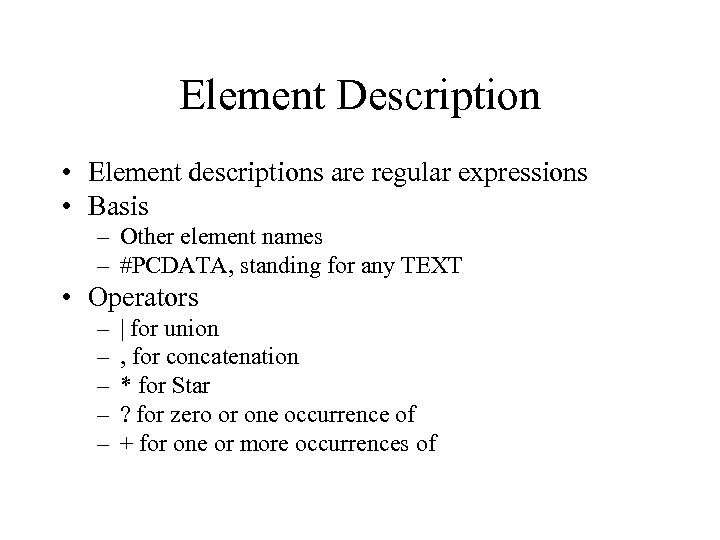
Element Description • Element descriptions are regular expressions • Basis – Other element names – #PCDATA, standing for any TEXT • Operators – – – | for union , for concatenation * for Star ? for zero or one occurrence of + for one or more occurrences of </p>
</div>
<div style="width: auto;" class="description columns twelve"><p><img class="imgdescription" title="PC Specs DTD <!DOCTYPE Pc. Specs [ <!ELEMENT PCS (PC*)> <!ELEMENT PC (MODEL, PRICE," src="https://present5.com/presentation/ad5adc9f27218cf6dc3ba6b02c2b0259/image-42.jpg" alt="PC Specs DTD <!DOCTYPE Pc. Specs [ <!ELEMENT PCS (PC*)> <!ELEMENT PC (MODEL, PRICE," />
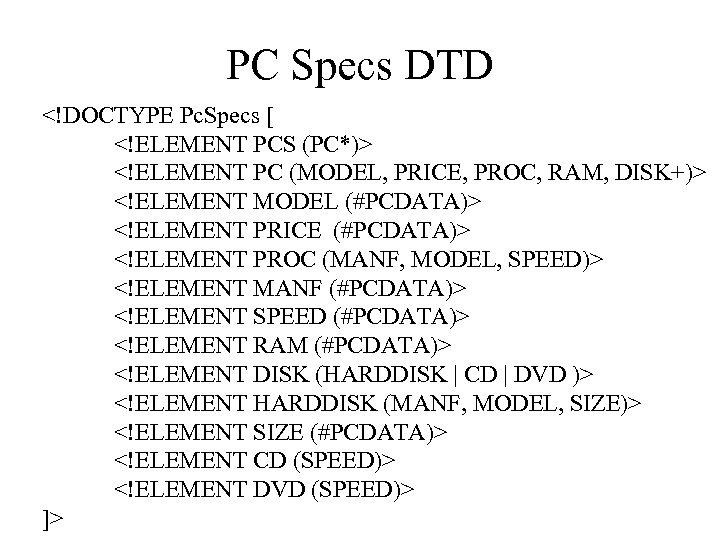
PC Specs DTD <!DOCTYPE Pc. Specs [ <!ELEMENT PCS (PC*)> <!ELEMENT PC (MODEL, PRICE, PROC, RAM, DISK+)> <!ELEMENT MODEL (#PCDATA)> <!ELEMENT PRICE (#PCDATA)> <!ELEMENT PROC (MANF, MODEL, SPEED)> <!ELEMENT MANF (#PCDATA)> <!ELEMENT SPEED (#PCDATA)> <!ELEMENT RAM (#PCDATA)> <!ELEMENT DISK (HARDDISK | CD | DVD )> <!ELEMENT HARDDISK (MANF, MODEL, SIZE)> <!ELEMENT SIZE (#PCDATA)> <!ELEMENT CD (SPEED)> <!ELEMENT DVD (SPEED)> ]> </p>
</div>
<div style="width: auto;" class="description columns twelve"><p><img class="imgdescription" title="Pc Specs XML Document <PCS> <PC> <MODEL>4560</MODEL> <PRICE>$2295</PRICE> <PROCESSOR> <MANF>Intel</MANF> <MODEL>Pentium</MODEL> <SPEED>1 Ghz</SPEED> </PROCESSOR>" src="https://present5.com/presentation/ad5adc9f27218cf6dc3ba6b02c2b0259/image-43.jpg" alt="Pc Specs XML Document <PCS> <PC> <MODEL>4560</MODEL> <PRICE>$2295</PRICE> <PROCESSOR> <MANF>Intel</MANF> <MODEL>Pentium</MODEL> <SPEED>1 Ghz</SPEED> </PROCESSOR>" />
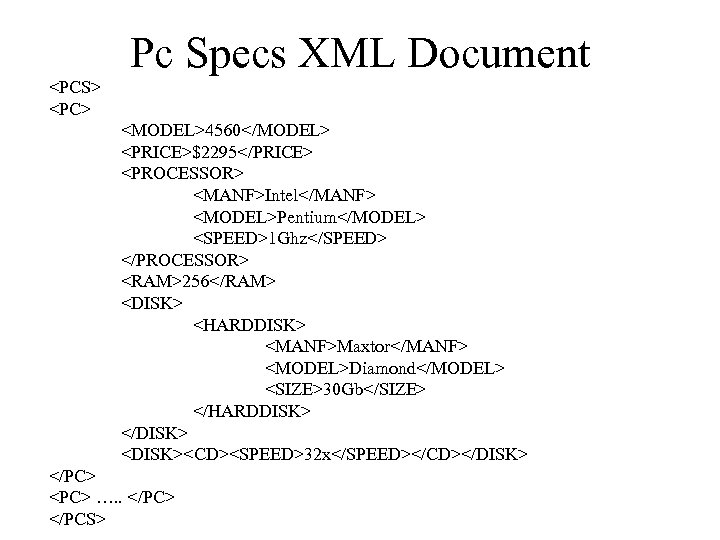
Pc Specs XML Document <PCS> <PC> <MODEL>4560</MODEL> <PRICE>$2295</PRICE> <PROCESSOR> <MANF>Intel</MANF> <MODEL>Pentium</MODEL> <SPEED>1 Ghz</SPEED> </PROCESSOR> <RAM>256</RAM> <DISK> <HARDDISK> <MANF>Maxtor</MANF> <MODEL>Diamond</MODEL> <SIZE>30 Gb</SIZE> </HARDDISK> </DISK> <DISK><CD><SPEED>32 x</SPEED></CD></DISK> </PC> <PC> …. . </PC> </PCS> </p>
</div>
<div style="width: auto;" class="description columns twelve"><p><img class="imgdescription" title="Examples with Style Sheet • Hello world with Greeting DTD • Product / Inventory" src="https://present5.com/presentation/ad5adc9f27218cf6dc3ba6b02c2b0259/image-44.jpg" alt="Examples with Style Sheet • Hello world with Greeting DTD • Product / Inventory" />
Examples with Style Sheet • Hello world with Greeting DTD • Product / Inventory List </p>
</div>
<div style="width: auto;" class="description columns twelve"><p><img class="imgdescription" title="Prod. XML <? xml version="1. 0"? ><!--prod. xml--> <? xml-stylesheet type="text/xsl" href="prodlst. xsl"? >" src="https://present5.com/presentation/ad5adc9f27218cf6dc3ba6b02c2b0259/image-45.jpg" alt="Prod. XML <? xml version="1. 0"? ><!--prod. xml--> <? xml-stylesheet type="text/xsl" href="prodlst. xsl"? >" />
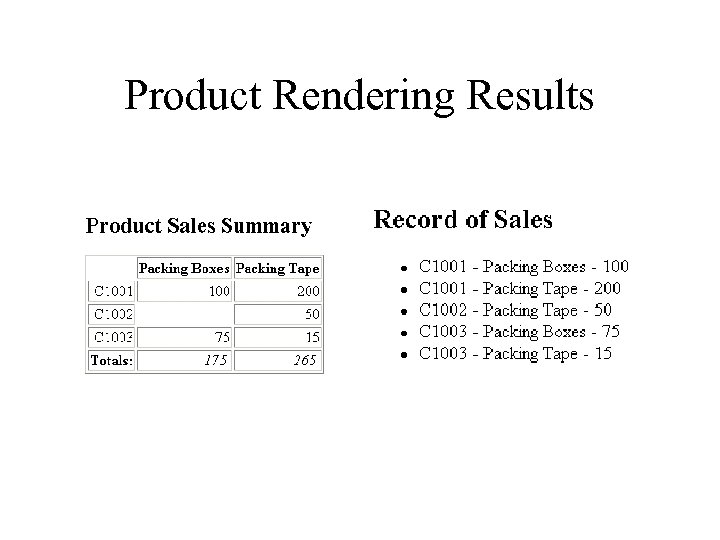
Prod. XML <? xml version="1. 0"? ><!--prod. xml--> <? xml-stylesheet type="text/xsl" href="prodlst. xsl"? > <!DOCTYPE sales [ <!ELEMENT sales ( products, record )> <!--sales information--> <!ELEMENT products ( product+ )> <!--product record--> <!ELEMENT product ( #PCDATA )> <!--product information--> <!ATTLIST product id ID #REQUIRED> <!ELEMENT record ( cust+ )> <!--sales record--> <!ELEMENT cust ( prodsale+ )> <!--customer sales record--> <!ATTLIST cust num CDATA #REQUIRED> <!--customer number--> <!ELEMENT prodsale ( #PCDATA )> <!--product sale record--> <!ATTLIST prodsale idref IDREF #REQUIRED> ]> <sales> <products><product id="p 1">Packing Boxes</product> <product id="p 2">Packing Tape</product></products> <record><cust num="C 1001"> <prodsale idref="p 1">100</prodsale> <prodsale idref="p 2">200</prodsale></cust> <cust num="C 1002"> <prodsale idref="p 2">50</prodsale></cust> <cust num="C 1003"> <prodsale idref="p 1">75</prodsale> <prodsale idref="p 2">15</prodsale></cust></record> </sales> </p>
</div>
<div style="width: auto;" class="description columns twelve"><p><img class="imgdescription" title="Prod. Lst. XSL <? xml version="1. 0"? ><!--prodlst. xsl--> <!--XSLT 1. 0 --> <xsl:" src="https://present5.com/presentation/ad5adc9f27218cf6dc3ba6b02c2b0259/image-46.jpg" alt="Prod. Lst. XSL <? xml version="1. 0"? ><!--prodlst. xsl--> <!--XSLT 1. 0 --> <xsl:" />
Prod. Lst. XSL <? xml version="1. 0"? ><!--prodlst. xsl--> <!--XSLT 1. 0 --> <xsl: stylesheet xmlns: xsl="http: //www. w 3. org/1999/XSL/Transform" version="1. 0"> <xsl: template match="/"> <!--root rule--> <html><head><title>Record of Sales Record of Sales
XML Query Language • Several proposals for query language • Modeling after existing OODB QLs – inline construction of XML from XML WHERE Addison-Wesley $t</> <author> $a</> IN "www. a. b. c/bib. xml" CONSTRUCT <result> <author> $a</> <title> $t</> – APIs for script usage </p>
</div>
<div style="width: auto;" class="description columns twelve"><p><img class="imgdescription" title="Programming XML • XML defines an object/attribute data model • DOM (Document Object Model)" src="https://present5.com/presentation/ad5adc9f27218cf6dc3ba6b02c2b0259/image-33.jpg" alt="Programming XML • XML defines an object/attribute data model • DOM (Document Object Model)" />
Programming XML • XML defines an object/attribute data model • DOM (Document Object Model) is the API for programs to act upon object/attribute data models – DHTML is DOM for HTML • interface for operating on the document as paragraphs, images, links, etc – DOM-XML is DOM for XML • interface for operating on the “document” as objects and parameters • Microsoft supports DHTML, exposes HTML objects as DOM </p>
</div>
<div style="width: auto;" class="description columns twelve"><p><img class="imgdescription" title="Style Sheets / DTD / XML • The actual XML, Style Sheets, and the" src="https://present5.com/presentation/ad5adc9f27218cf6dc3ba6b02c2b0259/image-34.jpg" alt="Style Sheets / DTD / XML • The actual XML, Style Sheets, and the" />
Style Sheets / DTD / XML • The actual XML, Style Sheets, and the DTD (Document Type Definition) could be made by hand, but more typically are created with the help of XML Tools – Many tools on the market – IBM alphaworks – Vervet’s XML Pro – Microfar Designer </p>
</div>
<div style="width: auto;" class="description columns twelve"><p><img class="imgdescription" title="Lots of people using it…but • Everyone is using it for their own individual" src="https://present5.com/presentation/ad5adc9f27218cf6dc3ba6b02c2b0259/image-35.jpg" alt="Lots of people using it…but • Everyone is using it for their own individual" />
Lots of people using it…but • Everyone is using it for their own individual purposes! Many sharing/inventing DTD’s with their partners/customers, not being adopted by others. • Downside: Web full of gobbledygook that only a select few understand • Even though your browser may parse XML, it may not understand what it really means • Effect: Everyone can invent their own language on the web – Tower of Babel on the web, or Balkanization </p>
</div>
<div style="width: auto;" class="description columns twelve"><p><img class="imgdescription" title="Quick Quiz • • What’s a DTD? Difference between XML and HTML? What’s a" src="https://present5.com/presentation/ad5adc9f27218cf6dc3ba6b02c2b0259/image-36.jpg" alt="Quick Quiz • • What’s a DTD? Difference between XML and HTML? What’s a" />
Quick Quiz • • What’s a DTD? Difference between XML and HTML? What’s a e. Xtended Style Sheet? How can XML make searching easier? </p>
</div>
<div style="width: auto;" class="description columns twelve"><p><img class="imgdescription" title="Summary • XML specifies semantics, not just presentation – Semantics separate from Presentation language" src="https://present5.com/presentation/ad5adc9f27218cf6dc3ba6b02c2b0259/image-37.jpg" alt="Summary • XML specifies semantics, not just presentation – Semantics separate from Presentation language" />
Summary • XML specifies semantics, not just presentation – Semantics separate from Presentation language – Users can define their own tags/languages • Greatly simplifies machine understanding of data – Agents easier to implement – Business to business transactions • International, standard format to share and exchange knowledge </p>
</div>
<div style="width: auto;" class="description columns twelve"><p><img class="imgdescription" title="Back to Context-Free Grammars… • HTML can be described by classes of text –" src="https://present5.com/presentation/ad5adc9f27218cf6dc3ba6b02c2b0259/image-38.jpg" alt="Back to Context-Free Grammars… • HTML can be described by classes of text –" />
Back to Context-Free Grammars… • HTML can be described by classes of text – Text is any string of characters literally interpreted (i. e. there are no tags, user-text) – Char is any single character legal in HTML tags – Element is • Text or • A pair of matching tags and the document between them, or • Unmatched tag followed by a document – Doc is sequences of elements – List. Item is the <LI> tag followed by a document – List is a sequence of zero or more list items </p>
</div>
<div style="width: auto;" class="description columns twelve"><p><img class="imgdescription" title="HTML Grammar • • Char a | A | … Text ε | Char" src="https://present5.com/presentation/ad5adc9f27218cf6dc3ba6b02c2b0259/image-39.jpg" alt="HTML Grammar • • Char a | A | … Text ε | Char" />
HTML Grammar • • Char a | A | … Text ε | Char Text Doc ε | Element Doc Element Text | <EM> Doc </EM> | <P> Doc | <OL> List </OL> • List. Item <LI> Doc • List ε | List. Item List </p>
</div>
<div style="width: auto;" class="description columns twelve"><p><img class="imgdescription" title="XML’s DTD • The DTD lets us define our own grammar • Context-free grammar" src="https://present5.com/presentation/ad5adc9f27218cf6dc3ba6b02c2b0259/image-40.jpg" alt="XML’s DTD • The DTD lets us define our own grammar • Context-free grammar" />
XML’s DTD • The DTD lets us define our own grammar • Context-free grammar notation, also using regular expressions • Form of DTD: <!DOCTYPE name-of-DTD [ list of element definitions ]> • Element definition: – <!ELEMENT element-name (description of element)> </p>
</div>
<div style="width: auto;" class="description columns twelve"><p><img class="imgdescription" title="Element Description • Element descriptions are regular expressions • Basis – Other element names" src="https://present5.com/presentation/ad5adc9f27218cf6dc3ba6b02c2b0259/image-41.jpg" alt="Element Description • Element descriptions are regular expressions • Basis – Other element names" />
Element Description • Element descriptions are regular expressions • Basis – Other element names – #PCDATA, standing for any TEXT • Operators – – – | for union , for concatenation * for Star ? for zero or one occurrence of + for one or more occurrences of </p>
</div>
<div style="width: auto;" class="description columns twelve"><p><img class="imgdescription" title="PC Specs DTD <!DOCTYPE Pc. Specs [ <!ELEMENT PCS (PC*)> <!ELEMENT PC (MODEL, PRICE," src="https://present5.com/presentation/ad5adc9f27218cf6dc3ba6b02c2b0259/image-42.jpg" alt="PC Specs DTD <!DOCTYPE Pc. Specs [ <!ELEMENT PCS (PC*)> <!ELEMENT PC (MODEL, PRICE," />
PC Specs DTD <!DOCTYPE Pc. Specs [ <!ELEMENT PCS (PC*)> <!ELEMENT PC (MODEL, PRICE, PROC, RAM, DISK+)> <!ELEMENT MODEL (#PCDATA)> <!ELEMENT PRICE (#PCDATA)> <!ELEMENT PROC (MANF, MODEL, SPEED)> <!ELEMENT MANF (#PCDATA)> <!ELEMENT SPEED (#PCDATA)> <!ELEMENT RAM (#PCDATA)> <!ELEMENT DISK (HARDDISK | CD | DVD )> <!ELEMENT HARDDISK (MANF, MODEL, SIZE)> <!ELEMENT SIZE (#PCDATA)> <!ELEMENT CD (SPEED)> <!ELEMENT DVD (SPEED)> ]> </p>
</div>
<div style="width: auto;" class="description columns twelve"><p><img class="imgdescription" title="Pc Specs XML Document <PCS> <PC> <MODEL>4560</MODEL> <PRICE>$2295</PRICE> <PROCESSOR> <MANF>Intel</MANF> <MODEL>Pentium</MODEL> <SPEED>1 Ghz</SPEED> </PROCESSOR>" src="https://present5.com/presentation/ad5adc9f27218cf6dc3ba6b02c2b0259/image-43.jpg" alt="Pc Specs XML Document <PCS> <PC> <MODEL>4560</MODEL> <PRICE>$2295</PRICE> <PROCESSOR> <MANF>Intel</MANF> <MODEL>Pentium</MODEL> <SPEED>1 Ghz</SPEED> </PROCESSOR>" />
Pc Specs XML Document <PCS> <PC> <MODEL>4560</MODEL> <PRICE>$2295</PRICE> <PROCESSOR> <MANF>Intel</MANF> <MODEL>Pentium</MODEL> <SPEED>1 Ghz</SPEED> </PROCESSOR> <RAM>256</RAM> <DISK> <HARDDISK> <MANF>Maxtor</MANF> <MODEL>Diamond</MODEL> <SIZE>30 Gb</SIZE> </HARDDISK> </DISK> <DISK><CD><SPEED>32 x</SPEED></CD></DISK> </PC> <PC> …. . </PC> </PCS> </p>
</div>
<div style="width: auto;" class="description columns twelve"><p><img class="imgdescription" title="Examples with Style Sheet • Hello world with Greeting DTD • Product / Inventory" src="https://present5.com/presentation/ad5adc9f27218cf6dc3ba6b02c2b0259/image-44.jpg" alt="Examples with Style Sheet • Hello world with Greeting DTD • Product / Inventory" />
Examples with Style Sheet • Hello world with Greeting DTD • Product / Inventory List </p>
</div>
<div style="width: auto;" class="description columns twelve"><p><img class="imgdescription" title="Prod. XML <? xml version="1. 0"? ><!--prod. xml--> <? xml-stylesheet type="text/xsl" href="prodlst. xsl"? >" src="https://present5.com/presentation/ad5adc9f27218cf6dc3ba6b02c2b0259/image-45.jpg" alt="Prod. XML <? xml version="1. 0"? ><!--prod. xml--> <? xml-stylesheet type="text/xsl" href="prodlst. xsl"? >" />
Prod. XML <? xml version="1. 0"? ><!--prod. xml--> <? xml-stylesheet type="text/xsl" href="prodlst. xsl"? > <!DOCTYPE sales [ <!ELEMENT sales ( products, record )> <!--sales information--> <!ELEMENT products ( product+ )> <!--product record--> <!ELEMENT product ( #PCDATA )> <!--product information--> <!ATTLIST product id ID #REQUIRED> <!ELEMENT record ( cust+ )> <!--sales record--> <!ELEMENT cust ( prodsale+ )> <!--customer sales record--> <!ATTLIST cust num CDATA #REQUIRED> <!--customer number--> <!ELEMENT prodsale ( #PCDATA )> <!--product sale record--> <!ATTLIST prodsale idref IDREF #REQUIRED> ]> <sales> <products><product id="p 1">Packing Boxes</product> <product id="p 2">Packing Tape</product></products> <record><cust num="C 1001"> <prodsale idref="p 1">100</prodsale> <prodsale idref="p 2">200</prodsale></cust> <cust num="C 1002"> <prodsale idref="p 2">50</prodsale></cust> <cust num="C 1003"> <prodsale idref="p 1">75</prodsale> <prodsale idref="p 2">15</prodsale></cust></record> </sales> </p>
</div>
<div style="width: auto;" class="description columns twelve"><p><img class="imgdescription" title="Prod. Lst. XSL <? xml version="1. 0"? ><!--prodlst. xsl--> <!--XSLT 1. 0 --> <xsl:" src="https://present5.com/presentation/ad5adc9f27218cf6dc3ba6b02c2b0259/image-46.jpg" alt="Prod. Lst. XSL <? xml version="1. 0"? ><!--prodlst. xsl--> <!--XSLT 1. 0 --> <xsl:" />
Prod. Lst. XSL <? xml version="1. 0"? ><!--prodlst. xsl--> <!--XSLT 1. 0 --> <xsl: stylesheet xmlns: xsl="http: //www. w 3. org/1999/XSL/Transform" version="1. 0"> <xsl: template match="/"> <!--root rule--> <html><head><title>Record of Sales Record of Sales



 Скачать презентацию Applications of Context Free Grammars CS 351 Introduction