


 Скачать презентацию APECS 2 0 APECS Atacama Pathfinder Experiment
f37136f0798d3632d408f5b18e46f9dd.ppt
- Количество слайдов: 40
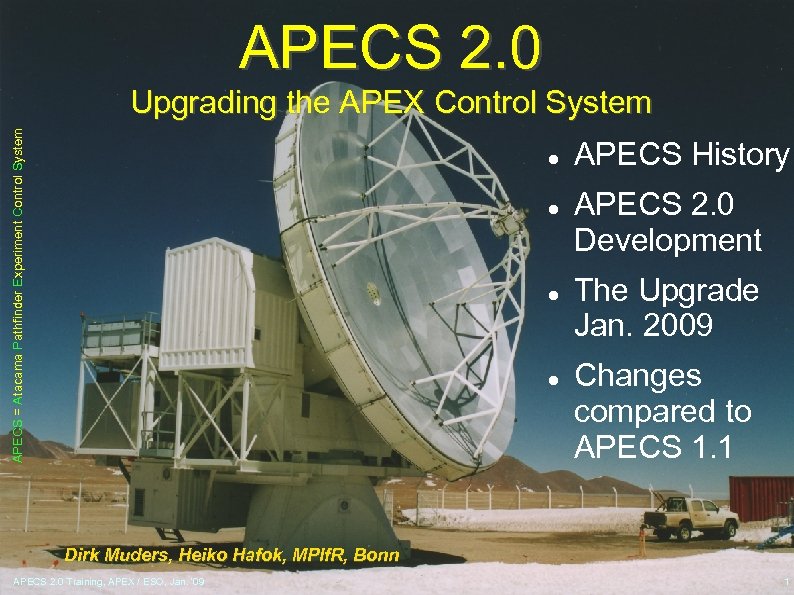 APECS 2. 0 APECS = Atacama Pathfinder Experiment Control System Upgrading the APEX Control System APECS History APECS 2. 0 Development The Upgrade Jan. 2009 Changes compared to APECS 1. 1 Dirk Muders, Heiko Hafok, MPIf. R, Bonn APECS 2. 0 Training, APEX / ESO, Jan. '09 1
 APECS Origins ALMA Test Interferometer Control Software (TICS) was immediately usable at APEX due to common hardware interface (CAN bus to Vertex ACU/PTC computers) Decided to re-use ALMA Common Software (ACS) and TICS and to benefit from large development team (a dozen people at the time in the year 2000) Hoped for astronomer interfaces, but things developed differently. . . APECS 2. 0 Training, APEX / ESO, Jan. '09 2
 TICS TICS provides CORBA access to the antenna via ACS components to set up observing patterns These components run under Vx. Works to fulfill the real-time CAN bus protocol Testing the ALMA prototypes was performed mainly via low-level Python scripts using those components directly A higher-level user interface was planned, but it was not implemented during the test activities APECS 2. 0 Training, APEX / ESO, Jan. '09 3
 What else was needed for APE(X)CS ? To use ACS and TICS at APEX all our devices (instruments, auxiliary hardware, etc. ) needed to be represented as CORBA components An astronomer-friendly user interface to set up typical sub-mm observing scans An online calibration pipeline was required to provide data products for astronomers APECS 2. 0 Training, APEX / ESO, Jan. '09 4
 APECS Component Interface In contrast to ALMA, APEX was always supposed to have many different instruments (receivers and spectrometers), facility and PI Thus we decided to define generic high-level instrument interfaces to be used by all devices of the same kind This facilitates the setup of observations enormously APECS 2. 0 Training, APEX / ESO, Jan. '09 5
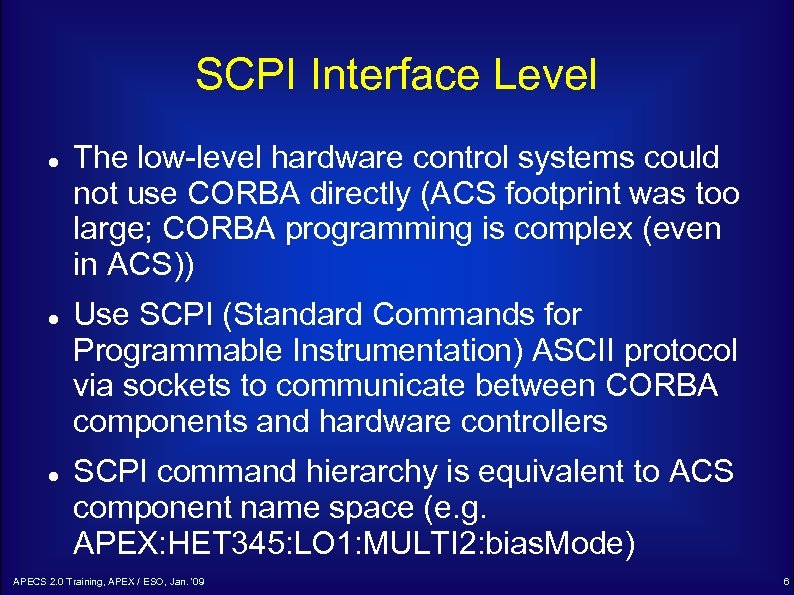 SCPI Interface Level The low-level hardware control systems could not use CORBA directly (ACS footprint was too large; CORBA programming is complex (even in ACS)) Use SCPI (Standard Commands for Programmable Instrumentation) ASCII protocol via sockets to communicate between CORBA components and hardware controllers SCPI command hierarchy is equivalent to ACS component name space (e. g. APEX: HET 345: LO 1: MULTI 2: bias. Mode) APECS 2. 0 Training, APEX / ESO, Jan. '09 6
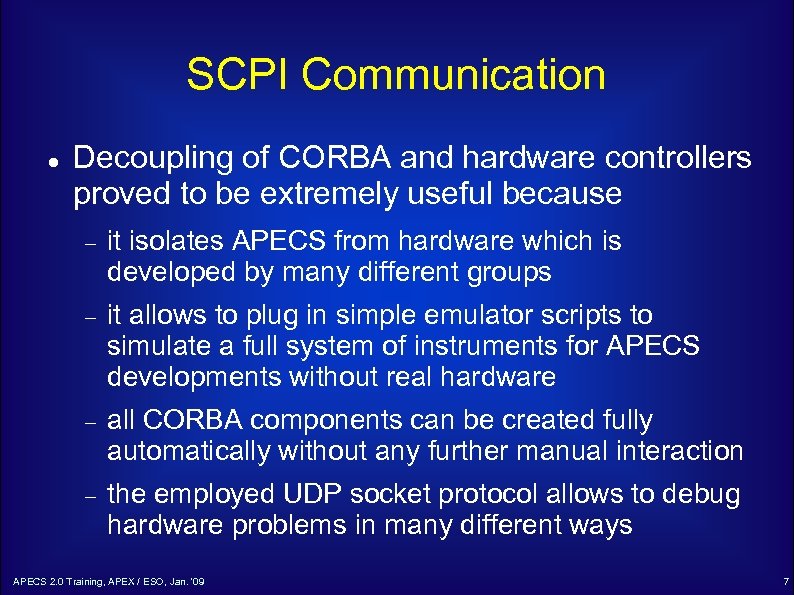 SCPI Communication Decoupling of CORBA and hardware controllers proved to be extremely useful because it isolates APECS from hardware which is developed by many different groups it allows to plug in simple emulator scripts to simulate a full system of instruments for APECS developments without real hardware all CORBA components can be created fully automatically without any further manual interaction the employed UDP socket protocol allows to debug hardware problems in many different ways APECS 2. 0 Training, APEX / ESO, Jan. '09 7
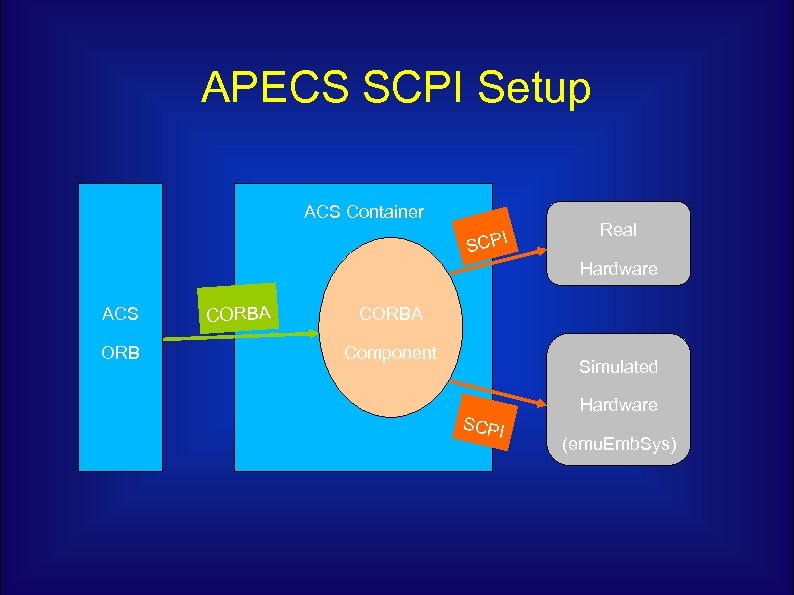 APECS SCPI Setup ACS Container I SCP Real Hardware ACS ORB CORBA Component Simulated SCPI Hardware (emu. Emb. Sys)
 Multi-Beam FITS (MBFITS) The lack of a good format to store array receiver data of single-dish radio telescopes led to the development of the MBFITS raw data format MBFITS stores the instrument and telescope data in a hierarchy of FITS files MBFITS is now being used at APEX, Effelsberg and the IRAM 30 m telescopes APECS 2. 0 Training, APEX / ESO, Jan. '09 9
 APECS Design APECS is designed as a pipeline system starting with a scan description (“scan object”) and eventually leading to data products The pipeline is coordinated by the central “Observing Engine” Most APECS applications are written in Python, but they use a lot of compiled libraries to speed up computations and transactions The astronomer interface is an IPython shell APECS 2. 0 Training, APEX / ESO, Jan. '09 10
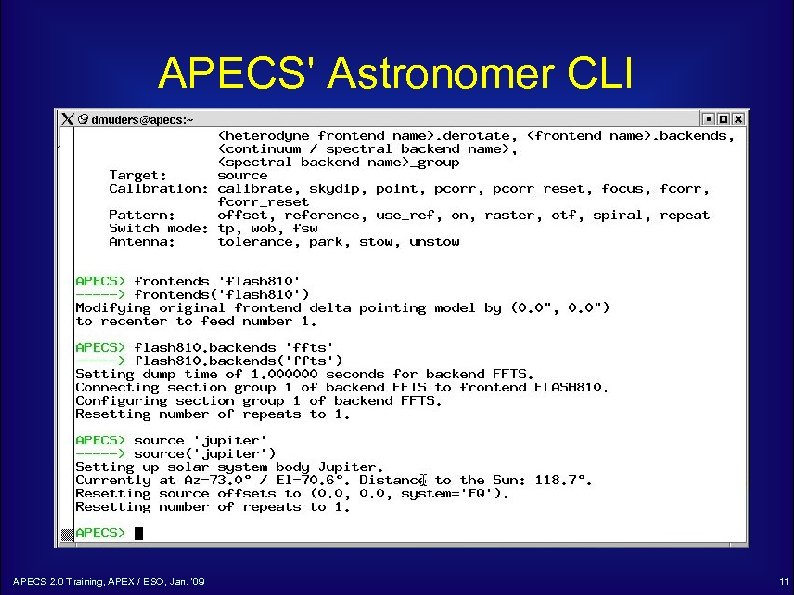 APECS' Astronomer CLI APECS 2. 0 Training, APEX / ESO, Jan. '09 11
 The APECS Pipeline For each scan the Observing Engine accepts a Scan Object from a user CLI and Sets up the receivers (tuning; amplifier calibration) Configures the backends Sets up auxiliary devices such as synthesizers, IF processors or the wobbler Tells the telescope to move in the requested pattern Starts and stops the data acquisition Asks the Calibrator to process the raw data to produce the final data product or result APECS 2. 0 Training, APEX / ESO, Jan. '09 12
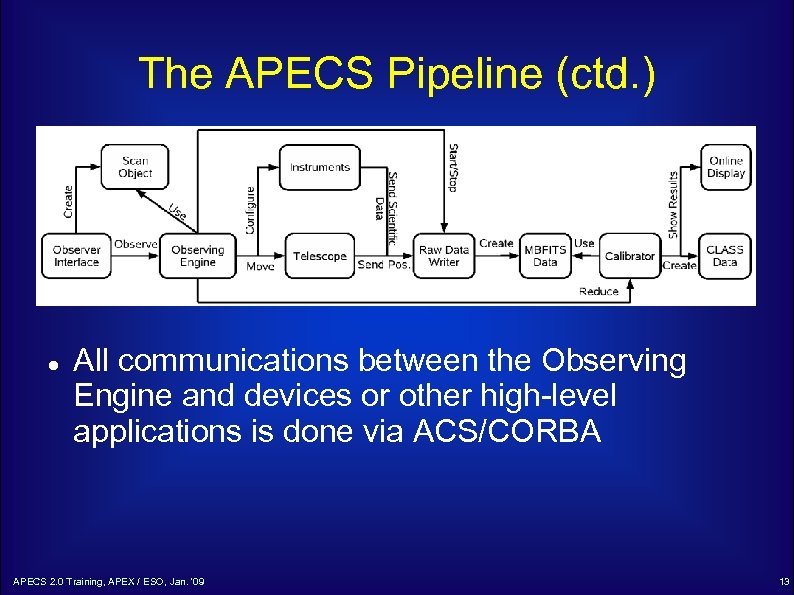 The APECS Pipeline (ctd. ) All communications between the Observing Engine and devices or other high-level applications is done via ACS/CORBA APECS 2. 0 Training, APEX / ESO, Jan. '09 13
 APECS 0. 1 The first version of APECS was installed in Chile in September 2003 Much of the time was spent on hardware installations (network, racks, servers) We had to fight initial problems with failing pressurized hard disk boxes and missing infrastructure APECS 2. 0 Training, APEX / ESO, Jan. '09 14
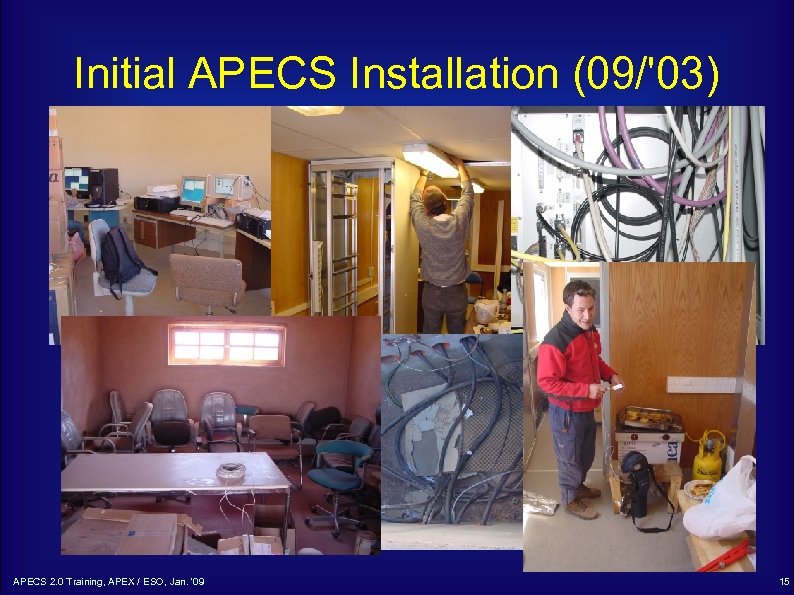 Initial APECS Installation (09/'03) APECS 2. 0 Training, APEX / ESO, Jan. '09 15
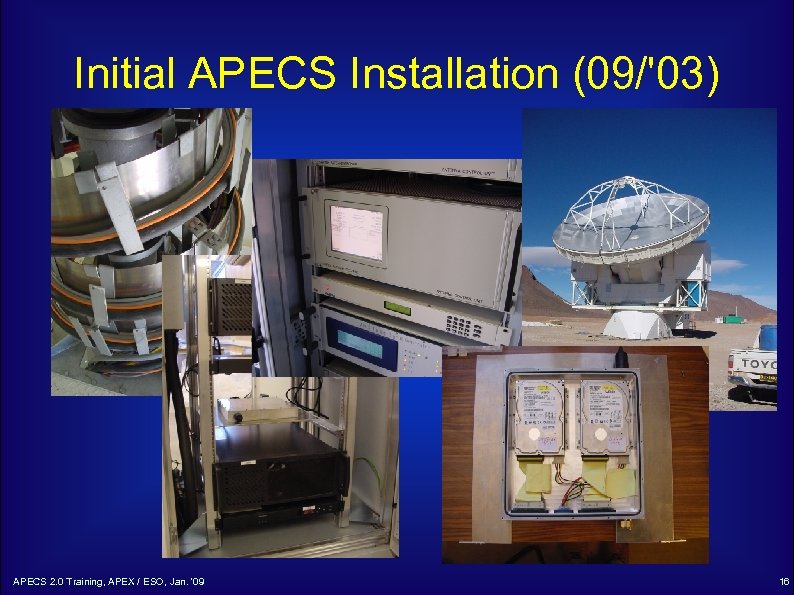 Initial APECS Installation (09/'03) APECS 2. 0 Training, APEX / ESO, Jan. '09 16
 APECS 0. 2 -1. 1 Following the initial phase, APECS was debugged and extended a lot during the antenna and early instrument commissioning We continued to deliver patches and new releases to provide control for more complex instruments and observing modes and to fix bugs APECS 1. 1 is still based on ACS 2. 0. 1 and runs on machines with Red. Hat Linux 7. 2 APECS 2. 0 Training, APEX / ESO, Jan. '09 17
 The APECS Upgrade Why upgrade at all ? Mainly the old Linux is making trouble Data rates ever increase and new servers are needed to handle them RH 7. 2 can no longer be installed on them In addition, ACS 2. 0. 1 has a number of known issues that have been cured in later versions Old Linux libraries limit the development of new APECS applications APECS 2. 0 Training, APEX / ESO, Jan. '09 18
 APECS 2. 0 Development The upgrade plan already came up in 2004 In an effort led by J. Ibsen, ALMA had ported TICS to ACS 3. 0/4. 0 The plan was to stay with Vx. Works since the ALMA RT Linux developments were still unstable The ongoing APEX commissioning delayed our APECS porting Only in 2007 we found the time to port the APECS and TICS codes to then ACS 5. 0 APECS 2. 0 Training, APEX / ESO, Jan. '09 19
 The Vx. Works Drama Unfortunately, we discovered bugs in the ACS property monitoring that required ACS 6. 0. 4 or higher to be used to avoid container crashes But that ACS version no longer worked with Vx. Works since the ACE/TAO libraries had become to big for the Power. PC architecture A joint effort of ESO, UTFSM, the Keck Observatory, Remedy IT in the Netherlands and many hours of Bogdan's time reanimated Vx. Works under then ACS 7. 0. 2 again in 2008 APECS 2. 0 Training, APEX / ESO, Jan. '09 20
 APECS 2. 0 Software APECS 2. 0 is based on ACS 8. 0 and Scientific Linux 5. 2 (this is ahead of ALMA who use SL 4. 4 !) Using an up-to-date ACS allows to benefit again from future ALMA developments and bug fixes Most of the TICS and APECS functionality was kept aligned to APECS 1. 1 Some areas are more advanced in APECS 2. 0 (e. g. Calibrator → Heiko’s presentation) APECS 2. 0 Training, APEX / ESO, Jan. '09 21
 APECS 2. 0 Software (ctd. ) Basic operator / observer interfaces unchanged Many improvements such as: New Qt GUI behavior (e. g. Calibrator Client) New Qt widgets available New Python (2. 5) Jlog with automatic filter loading New libraries (e. g. Sci. Py, Num. Py) New Gildas (12/2008) which fixes weighting errors when combining spectra APECS 2. 0 Training, APEX / ESO, Jan. '09 22
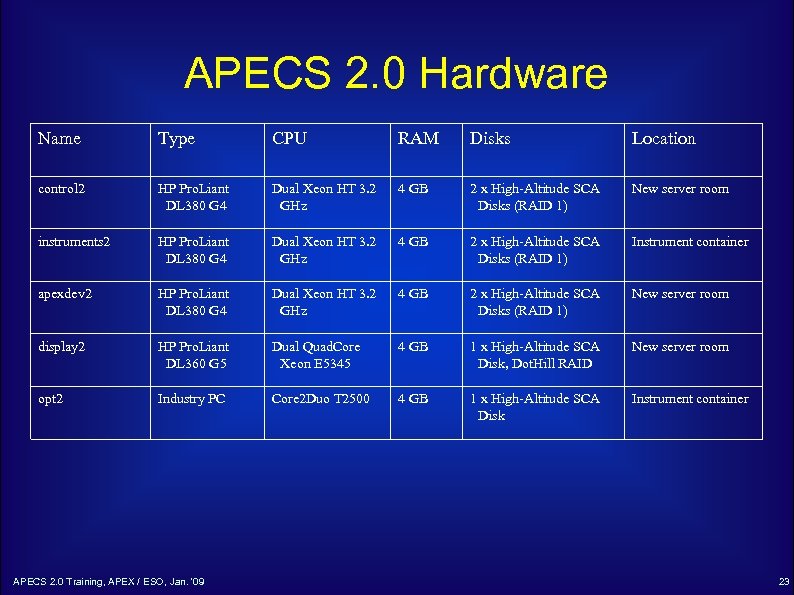 APECS 2. 0 Hardware Name Type CPU RAM Disks Location control 2 HP Pro. Liant DL 380 G 4 Dual Xeon HT 3. 2 GHz 4 GB 2 x High-Altitude SCA Disks (RAID 1) New server room instruments 2 HP Pro. Liant DL 380 G 4 Dual Xeon HT 3. 2 GHz 4 GB 2 x High-Altitude SCA Disks (RAID 1) Instrument container apexdev 2 HP Pro. Liant DL 380 G 4 Dual Xeon HT 3. 2 GHz 4 GB 2 x High-Altitude SCA Disks (RAID 1) New server room display 2 HP Pro. Liant DL 360 G 5 Dual Quad. Core Xeon E 5345 4 GB 1 x High-Altitude SCA Disk, Dot. Hill RAID New server room opt 2 Industry PC Core 2 Duo T 2500 4 GB 1 x High-Altitude SCA Disk Instrument container APECS 2. 0 Training, APEX / ESO, Jan. '09 23
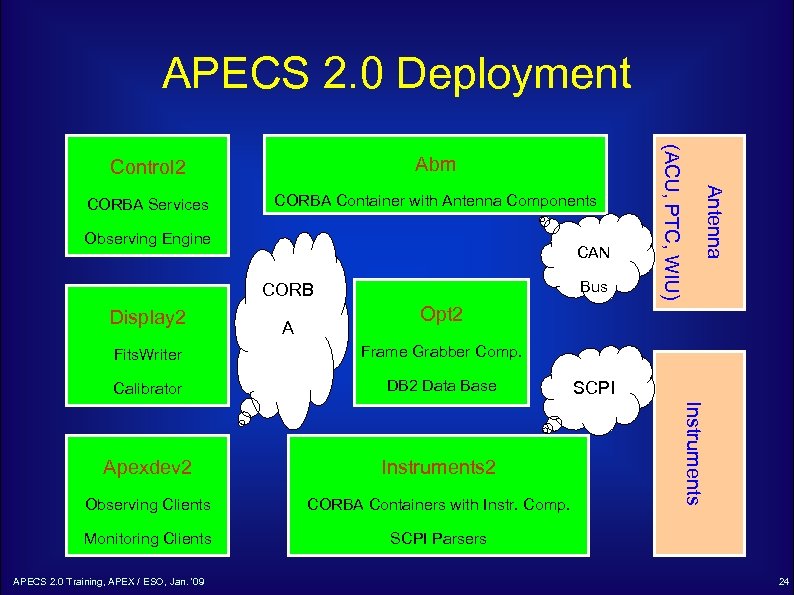 APECS 2. 0 Deployment CORBA Services CORBA Container with Antenna Components Observing Engine CAN Bus CORB Display 2 A Antenna Abm (ACU, PTC, WIU) Control 2 Opt 2 Frame Grabber Comp. Calibrator DB 2 Data Base Apexdev 2 Instruments 2 Observing Clients CORBA Containers with Instr. Comp. Monitoring Clients SCPI Parsers APECS 2. 0 Training, APEX / ESO, Jan. '09 SCPI Instruments Fits. Writer 24
![Software Changes [1] Names of some variables have changed: APEXCONFIG → APECSCONFIG APEXROOT →](https://present5.com/presentation/f37136f0798d3632d408f5b18e46f9dd/image-25.jpg "Software Changes [1] Names of some variables have changed: APEXCONFIG → APECSCONFIG APEXROOT →") Software Changes [1] Names of some variables have changed: APEXCONFIG → APECSCONFIG APEXROOT → APECSROOT APEXSYSLOGS → APECSSYSLOGS CORBA component name separator “/” instead of “: ”, e. g. “APEX/RADIOMETER/RESULTS” Component access (needs above syntax): apex. Obs. Utils. sc. get_device → apex. Obs. Utils. sc. get. Component. Non. Sticky APECS 2. 0 Training, APEX / ESO, Jan. '09 25
Software Changes [1] Names of some variables have changed: APEXCONFIG → APECSCONFIG APEXROOT → APECSROOT APEXSYSLOGS → APECSSYSLOGS CORBA component name separator “/” instead of “: ”, e. g. “APEX/RADIOMETER/RESULTS” Component access (needs above syntax): apex. Obs. Utils. sc. get_device → apex. Obs. Utils. sc. get. Component. Non. Sticky APECS 2. 0 Training, APEX / ESO, Jan. '09 25
![Software Changes [2] Property access compatible with APECS 1. 1: List of components: apex.](https://present5.com/presentation/f37136f0798d3632d408f5b18e46f9dd/image-26.jpg "Software Changes [2] Property access compatible with APECS 1. 1: List of components: apex.") Software Changes [2] Property access compatible with APECS 1. 1: List of components: apex. Obs. Utils. get. MCPoint with arbitrary separator chosen from “/”, “: ” and “. ”, e. g. apex. Obs. Utils. get. MCPoint(‘APEX: HET 345. state’) or apex. Obs. Utils. get. MCPoint(‘APEX. HET 345/state’) apex. Obs. Utils. sc. COBs_available → apex. Obs. Utils. sc. available. Components Enums in Monitor. Query are now strings instead of integers (e. g. SHUTTER_OPEN) APECS 2. 0 Training, APEX / ESO, Jan. '09 26
Software Changes [2] Property access compatible with APECS 1. 1: List of components: apex. Obs. Utils. get. MCPoint with arbitrary separator chosen from “/”, “: ” and “. ”, e. g. apex. Obs. Utils. get. MCPoint(‘APEX: HET 345. state’) or apex. Obs. Utils. get. MCPoint(‘APEX. HET 345/state’) apex. Obs. Utils. sc. COBs_available → apex. Obs. Utils. sc. available. Components Enums in Monitor. Query are now strings instead of integers (e. g. SHUTTER_OPEN) APECS 2. 0 Training, APEX / ESO, Jan. '09 26
![Software Changes [3] Web scripts now need to run on “opt 2” to fetch](https://present5.com/presentation/f37136f0798d3632d408f5b18e46f9dd/image-27.jpg "Software Changes [3] Web scripts now need to run on “opt 2” to fetch") Software Changes [3] Web scripts now need to run on “opt 2” to fetch data from the DB 2 (e. g. for the weather page) Python wrapper for Gnuplot has been removed from Sci. Py. Use Pylab / matplotlib instead. Observer account administration now on “apexdev 2” APECS 2. 0 Training, APEX / ESO, Jan. '09 27
Software Changes [3] Web scripts now need to run on “opt 2” to fetch data from the DB 2 (e. g. for the weather page) Python wrapper for Gnuplot has been removed from Sci. Py. Use Pylab / matplotlib instead. Observer account administration now on “apexdev 2” APECS 2. 0 Training, APEX / ESO, Jan. '09 27
![Operational Changes [1] Separate AMD maps to access /apexdata in Sequitor (lastarria: /apex_archive) and](https://present5.com/presentation/f37136f0798d3632d408f5b18e46f9dd/image-28.jpg "Operational Changes [1] Separate AMD maps to access /apexdata in Sequitor (lastarria: /apex_archive) and") Operational Changes [1] Separate AMD maps to access /apexdata in Sequitor (lastarria: /apex_archive) and Chajnantor (display 2: /apexdata) to minimize microwave link traffic. Initial reduction on “apexdev 2”. Later maybe also on “display 2”. System VNC: control 2: 1 Observing VNC(s): apexdev 2: 1 Other VNC(s) (Wobb. GUI, SHFI, etc. ): apexdev 2: 2/3/4 Observing accounts only on “apexdev 2” APECS 2. 0 Training, APEX / ESO, Jan. '09 28
Operational Changes [1] Separate AMD maps to access /apexdata in Sequitor (lastarria: /apex_archive) and Chajnantor (display 2: /apexdata) to minimize microwave link traffic. Initial reduction on “apexdev 2”. Later maybe also on “display 2”. System VNC: control 2: 1 Observing VNC(s): apexdev 2: 1 Other VNC(s) (Wobb. GUI, SHFI, etc. ): apexdev 2: 2/3/4 Observing accounts only on “apexdev 2” APECS 2. 0 Training, APEX / ESO, Jan. '09 28
![Operational Changes [2] Syslogs are now split per hour to reduce link traffic Syslogs](https://present5.com/presentation/f37136f0798d3632d408f5b18e46f9dd/image-29.jpg "Operational Changes [2] Syslogs are now split per hour to reduce link traffic Syslogs") Operational Changes [2] Syslogs are now split per hour to reduce link traffic Syslogs can be loaded into “jlog” for inspection (“jlog –u $APECSSYSLOGS/APECS-
Operational Changes [2] Syslogs are now split per hour to reduce link traffic Syslogs can be loaded into “jlog” for inspection (“jlog –u $APECSSYSLOGS/APECS-
![Operational Changes [3] Two new accounts: “apexops”: pointing & focus model, system source &](https://present5.com/presentation/f37136f0798d3632d408f5b18e46f9dd/image-30.jpg "Operational Changes [3] Two new accounts: “apexops”: pointing & focus model, system source &") Operational Changes [3] Two new accounts: “apexops”: pointing & focus model, system source & line catalog administration in $APECSCONFIG “apexdata”: raw & science data and obslog areas are owned by this account to avoid manipulations via the “apex” account whose password is not secret. The “apexdata” password must not be given to observers !! APECS 2. 0 Training, APEX / ESO, Jan. '09 30
Operational Changes [3] Two new accounts: “apexops”: pointing & focus model, system source & line catalog administration in $APECSCONFIG “apexdata”: raw & science data and obslog areas are owned by this account to avoid manipulations via the “apex” account whose password is not secret. The “apexdata” password must not be given to observers !! APECS 2. 0 Training, APEX / ESO, Jan. '09 30
![Operational Changes [4] As a consequence the data production programs have to run under](https://present5.com/presentation/f37136f0798d3632d408f5b18e46f9dd/image-31.jpg "Operational Changes [4] As a consequence the data production programs have to run under") Operational Changes [4] As a consequence the data production programs have to run under “apexdata” This is accomplished by special scripts that use corresponding “ssh” and “sudo” commands: fits. Writer start | stop | restart online. Calibrator start | stop | restart obs. Logger. Server start | stop | restart obs. Engine start | stop | restart (for convenience) Do not use the old restart scripts ! The overall system still runs under “apex” !! APECS 2. 0 Training, APEX / ESO, Jan. '09 31
Operational Changes [4] As a consequence the data production programs have to run under “apexdata” This is accomplished by special scripts that use corresponding “ssh” and “sudo” commands: fits. Writer start | stop | restart online. Calibrator start | stop | restart obs. Logger. Server start | stop | restart obs. Engine start | stop | restart (for convenience) Do not use the old restart scripts ! The overall system still runs under “apex” !! APECS 2. 0 Training, APEX / ESO, Jan. '09 31
![Operational Changes [5] tycho, apex. Opt. Run and Monitor. Query now to be run](https://present5.com/presentation/f37136f0798d3632d408f5b18e46f9dd/image-32.jpg "Operational Changes [5] tycho, apex. Opt. Run and Monitor. Query now to be run") Operational Changes [5] tycho, apex. Opt. Run and Monitor. Query now to be run on “opt 2” DB 2 entries now obey the complete naming hierarchy “stop. All. APECSClients” now stops observer processes too. Always use “restart. APECSServers” which includes stopping the clients. Restart takes only 6 min. now ! ABM console now via “minicom 1” on “opt 2” APECS 2. 0 Training, APEX / ESO, Jan. '09 32
Operational Changes [5] tycho, apex. Opt. Run and Monitor. Query now to be run on “opt 2” DB 2 entries now obey the complete naming hierarchy “stop. All. APECSClients” now stops observer processes too. Always use “restart. APECSServers” which includes stopping the clients. Restart takes only 6 min. now ! ABM console now via “minicom 1” on “opt 2” APECS 2. 0 Training, APEX / ESO, Jan. '09 32
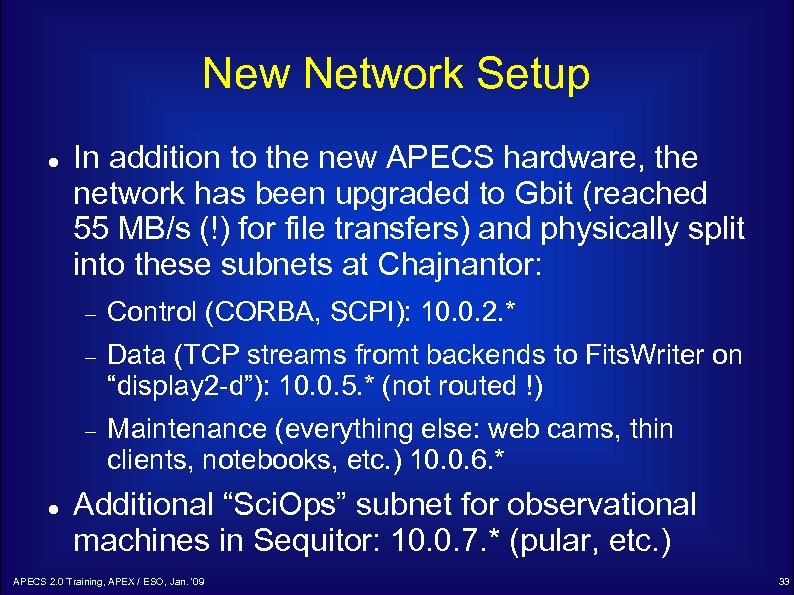 New Network Setup In addition to the new APECS hardware, the network has been upgraded to Gbit (reached 55 MB/s (!) for file transfers) and physically split into these subnets at Chajnantor: Data (TCP streams fromt backends to Fits. Writer on “display 2 -d”): 10. 0. 5. * (not routed !) Control (CORBA, SCPI): 10. 0. 2. * Maintenance (everything else: web cams, thin clients, notebooks, etc. ) 10. 0. 6. * Additional “Sci. Ops” subnet for observational machines in Sequitor: 10. 0. 7. * (pular, etc. ) APECS 2. 0 Training, APEX / ESO, Jan. '09 33
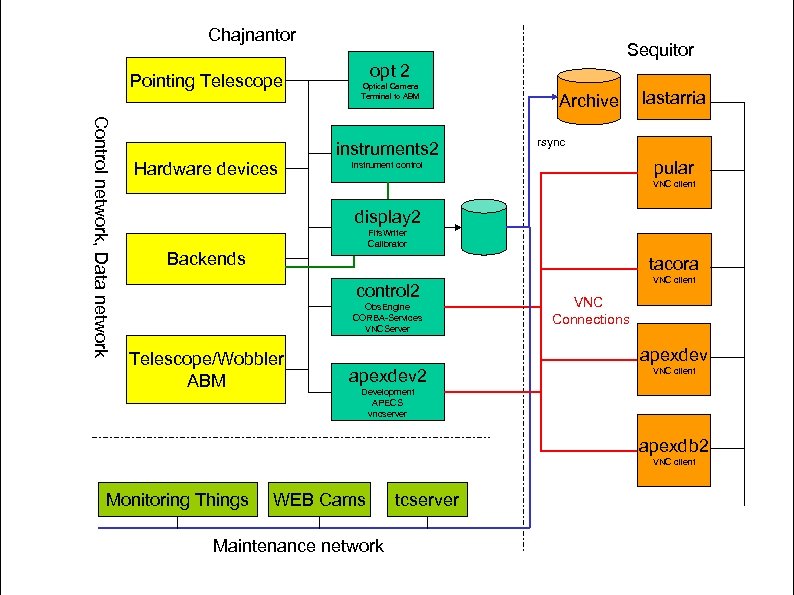 Chajnantor Pointing Telescope Control network, Data network Hardware devices Sequitor opt 2 Optical Camera Terminal to ABM instruments 2 Archive lastarria rsync pular instrument control VNC client display 2 Fits. Writer Calibrator Backends tacora control 2 Obs. Engine CORBA-Services VNCServer Telescope/Wobbler ABM VNC client VNC Connections apexdev 2 VNC client Development APECS vncserver apexdb 2 VNC client Monitoring Things WEB Cams Maintenance network tcserver
![APECS 2. 0 Testing [1] During the installation a number of tests have been](https://present5.com/presentation/f37136f0798d3632d408f5b18e46f9dd/image-35.jpg "APECS 2. 0 Testing [1] During the installation a number of tests have been") APECS 2. 0 Testing [1] During the installation a number of tests have been made to verify the performance: Initial drive tests: no strange motions / vibrations Tracking tests at different az/el: like in APECS 1. 1 Optical pointing runs: agree with previous results Radio scans with SHFI and SZ (calibration, pointing, focus, skydip, on, raster, otf (also holo mode), spiral raster) produced MBFITS and Class data as expected. APECS 2. 0 Training, APEX / ESO, Jan. '09 35
APECS 2. 0 Testing [1] During the installation a number of tests have been made to verify the performance: Initial drive tests: no strange motions / vibrations Tracking tests at different az/el: like in APECS 1. 1 Optical pointing runs: agree with previous results Radio scans with SHFI and SZ (calibration, pointing, focus, skydip, on, raster, otf (also holo mode), spiral raster) produced MBFITS and Class data as expected. APECS 2. 0 Training, APEX / ESO, Jan. '09 35
![APECS 2. 0 Testing [2] Throughput tests: AFFTS with 28 x 8192 channels @](https://present5.com/presentation/f37136f0798d3632d408f5b18e46f9dd/image-36.jpg "APECS 2. 0 Testing [2] Throughput tests: AFFTS with 28 x 8192 channels @") APECS 2. 0 Testing [2] Throughput tests: AFFTS with 28 x 8192 channels @ 10 Hz (8. 75 MB/s !) without delays or other problems SZ beam maps (which failed in Nov. 2008) with 141 subscans, OTF, continuous data (i. e. one 25 minute subscan !) without problems PBEs and SZ backend are already in the data network. Spectrometers will be changed by B. Klein during his next visit APECS 2. 0 Training, APEX / ESO, Jan. '09 36
APECS 2. 0 Testing [2] Throughput tests: AFFTS with 28 x 8192 channels @ 10 Hz (8. 75 MB/s !) without delays or other problems SZ beam maps (which failed in Nov. 2008) with 141 subscans, OTF, continuous data (i. e. one 25 minute subscan !) without problems PBEs and SZ backend are already in the data network. Spectrometers will be changed by B. Klein during his next visit APECS 2. 0 Training, APEX / ESO, Jan. '09 36
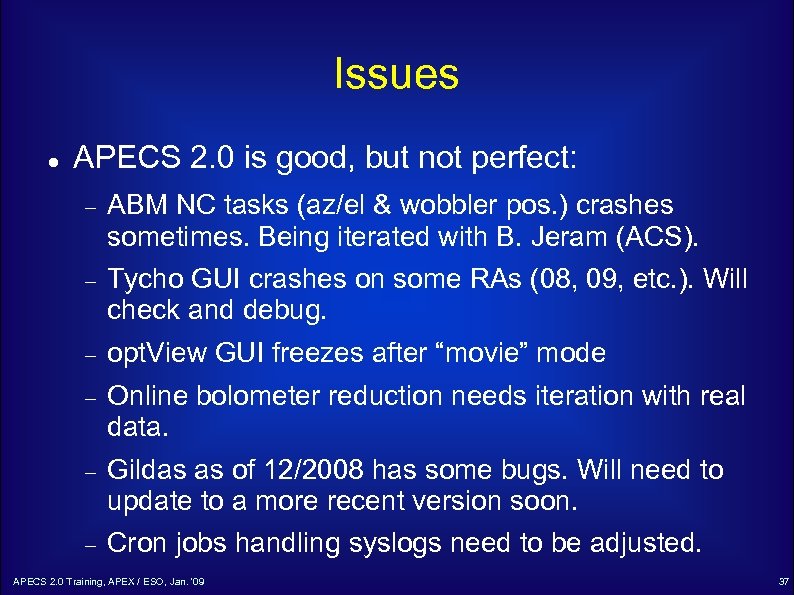 Issues APECS 2. 0 is good, but not perfect: ABM NC tasks (az/el & wobbler pos. ) crashes sometimes. Being iterated with B. Jeram (ACS). Tycho GUI crashes on some RAs (08, 09, etc. ). Will check and debug. opt. View GUI freezes after “movie” mode Online bolometer reduction needs iteration with real data. Gildas as of 12/2008 has some bugs. Will need to update to a more recent version soon. Cron jobs handling syslogs need to be adjusted. APECS 2. 0 Training, APEX / ESO, Jan. '09 37
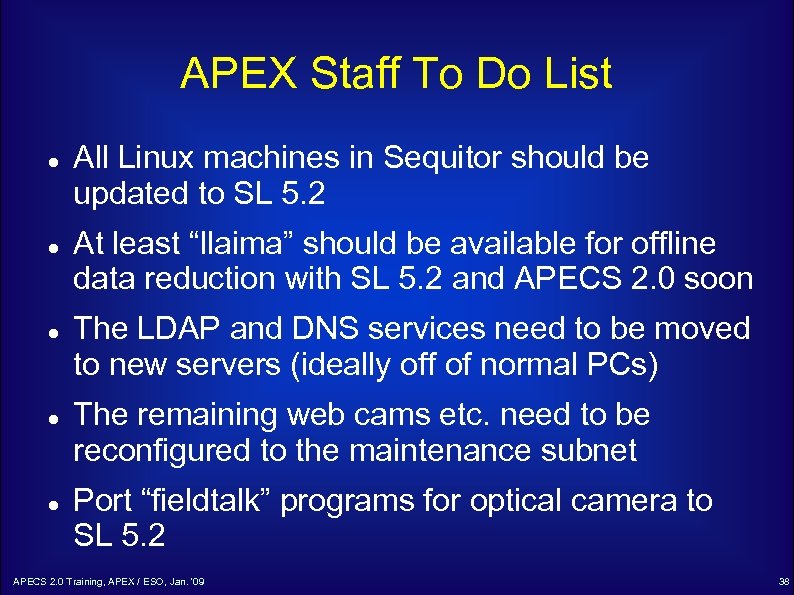 APEX Staff To Do List All Linux machines in Sequitor should be updated to SL 5. 2 At least “llaima” should be available for offline data reduction with SL 5. 2 and APECS 2. 0 soon The LDAP and DNS services need to be moved to new servers (ideally off of normal PCs) The remaining web cams etc. need to be reconfigured to the maintenance subnet Port “fieldtalk” programs for optical camera to SL 5. 2 APECS 2. 0 Training, APEX / ESO, Jan. '09 38
 Conclusions APECS 2. 0 with new network performs much better than the previous system We are no longer bound to very old hardware and can fulfill requirements of new instruments Observing modes that started failing last year are now possible again New observing modes with higher data rates can now be used Future developments facilitated by new Linux / libraries. APECS 2. 0 Training, APEX / ESO, Jan. '09 39
 We would like to thank the APEX staff for their support during the installation and tests of APECS 2. 0 ! APECS 2. 0 Training, APEX / ESO, Jan. '09 40