


 Скачать презентацию An Introduction to the Localisation of e Content
a1d41dbd834cb78911e1ccff94e7f0cb.ppt
- Количество слайдов: 58
 An Introduction to the Localisation of e. Content A course provided by the Localisation Research Centre (LRC) as part of the EU-Funded ELECT Project Instructor: Karl Kelly
 Course Outline • • Four 1½ hour sessions Session 1: – Introduction to Localisation – Language Selection • Session 2: – Localisation Vendor Selection – Preparing for Localisation • Session 3: – Translation Technology – Localisation Testing • Session 4 – Managing a Localisation project
 Session 1: Introduction • Localisation – – – • The relationship to internationalisation – – • Not simply another name for translation Adapting content both linguistically and culturally to a target market A prerequisite for successful participation in the global market place Internationalisation (I 18 n) makes content culturally neutral Localisation goes a step further creating material that looks as though it was created for a specific locale/market by natives of that locale Localisation Issues – – – Localisation does not only deal with translating languages - even English needs to be localised sometimes. UK Localise Vs US Localize. Content of text is important - Does it reflect local beliefs, cultural differences, differences in legal and administrative regulations between countries, VAT rates etc. . Little things like the format of phone numbers, dates, measurements, addresses
 Introduction • The Case for Localisation – – Our material is globally accessible (internationalised) WHY BOTHER LOCALISING? ? ? Although language isn’t always an issue, in many instances it will be • Although someone may speak your language, usually, they’d prefer if you spoke theirs – Make the customer comfortable, overcome fears/concerns about distance purchasing • We want the customer to think about the product and why they want/need it, not potential problems involved in its purchase eg. Warranty, exchange, reliability – Eliminate misunderstandings and protect yourself • Making all terms and conditions available in the customers language means that a customer cannot say they didn’t understand the terms of sale/contract etc. – A person is 3 times more likely to purchase from a site that is in their native language
 Localisation People • Vendor Side – – – • Project Manager Localisation Engineer QA Engineer Translator Linguist Proof Reader Graphic Designer Client Side – Project Manager – Engineering/Testing resource – Language Reviewer There must be involvement from the client side, you cannot simply hand off files and expect to have no involvement until the files return localised. Client participation is necessary, therefore the more you know about the process the easier it becomes.
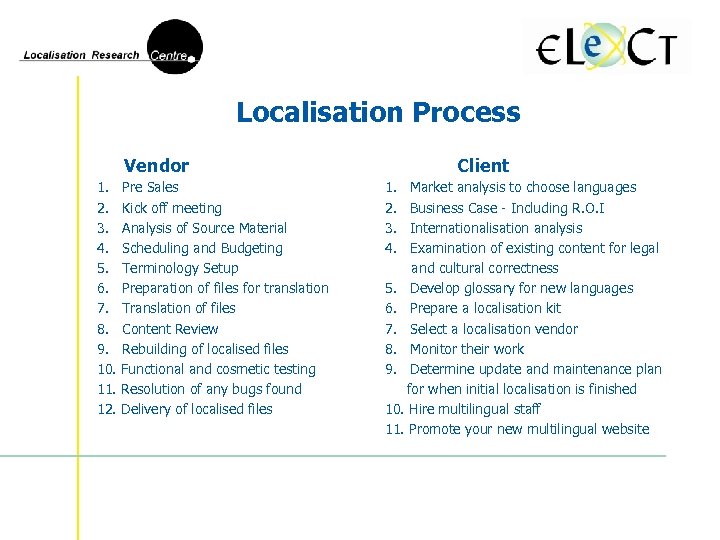 Localisation Process Vendor 1. 2. 3. 4. 5. 6. 7. 8. 9. 10. 11. 12. Pre Sales Kick off meeting Analysis of Source Material Scheduling and Budgeting Terminology Setup Preparation of files for translation Translation of files Content Review Rebuilding of localised files Functional and cosmetic testing Resolution of any bugs found Delivery of localised files Client 1. 2. 3. 4. Market analysis to choose languages Business Case - Including R. O. I Internationalisation analysis Examination of existing content for legal and cultural correctness 5. Develop glossary for new languages 6. Prepare a localisation kit 7. Select a localisation vendor 8. Monitor their work 9. Determine update and maintenance plan for when initial localisation is finished 10. Hire multilingual staff 11. Promote your new multilingual website
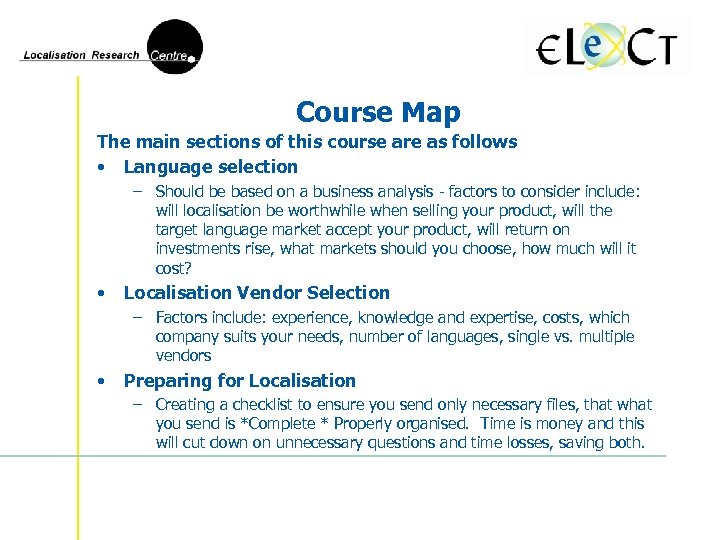 Course Map The main sections of this course are as follows • Language selection – Should be based on a business analysis - factors to consider include: will localisation be worthwhile when selling your product, will the target language market accept your product, will return on investments rise, what markets should you choose, how much will it cost? • Localisation Vendor Selection – Factors include: experience, knowledge and expertise, costs, which company suits your needs, number of languages, single vs. multiple vendors • Preparing for Localisation – Creating a checklist to ensure you send only necessary files, that what you send is *Complete * Properly organised. Time is money and this will cut down on unnecessary questions and time losses, saving both.
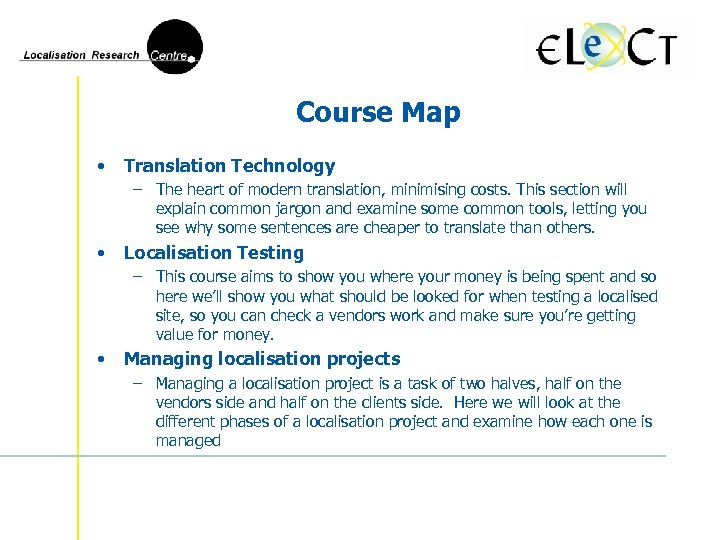 Course Map • Translation Technology – The heart of modern translation, minimising costs. This section will explain common jargon and examine some common tools, letting you see why some sentences are cheaper to translate than others. • Localisation Testing – This course aims to show you where your money is being spent and so here we’ll show you what should be looked for when testing a localised site, so you can check a vendors work and make sure you’re getting value for money. • Managing localisation projects – Managing a localisation project is a task of two halves, half on the vendors side and half on the clients side. Here we will look at the different phases of a localisation project and examine how each one is managed
 Exercise • List the changes that were made to the site that you internationalised yesterday. Can you think of any additional changes that we will need to make during localisation?
 Language Selection • Which languages should you localise your e. Content into? – One of the most important and critical decisions you will make but how do you decide. Should your decision be based on • Largest markets? US, France, Germany and Japan, then Spain, Italy, Brazil and Nordic Countries? • Traditionally targeted language groupings such as FIGS (French Italian, German, Spanish), Nordic Languages, CJKV(Chinese, Japanese, Korean Vietnamese)? FIGS are usually targeted first, while CJKV means added expense and technical challenges but also means more marketing opportunities • New emerging markets such as the Eastern European market? – You cannot target all language groups at once (first time out anyway) – This section should help you to • Choose the language(s) to localise your e. Content into • Assess if your company is ready for localisation • Select the best localisation strategy to allow your company to succeed
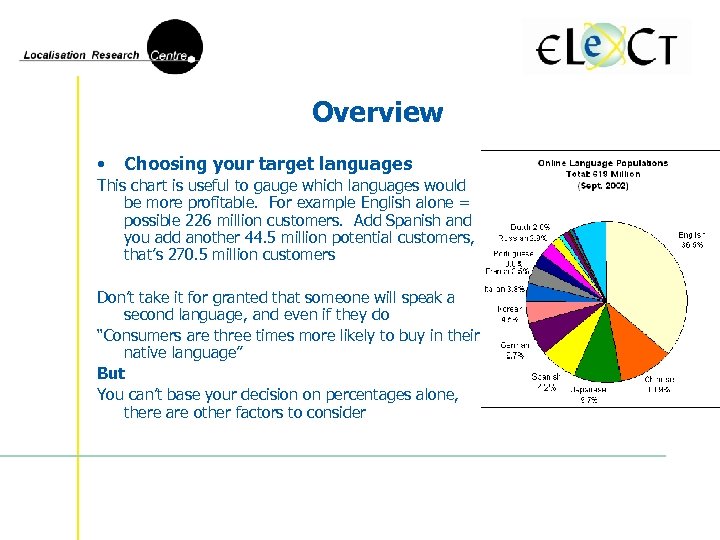 Overview • Choosing your target languages This chart is useful to gauge which languages would be more profitable. For example English alone = possible 226 million customers. Add Spanish and you add another 44. 5 million potential customers, that’s 270. 5 million customers Don’t take it for granted that someone will speak a second language, and even if they do “Consumers are three times more likely to buy in their native language” But You can’t base your decision on percentages alone, there are other factors to consider
 • Factors to consider: – Costs, some languages are more expensive than others – Ability to supply to this locale, demand for your product in the locale – Trade laws, restrictions, compatibility issues • You can’t target all language groups but if you wish to establish your e. Content in a truly international environment it would be wise to provide versions of your site in the following languages: - English - Japanese - German - Spanish - French Once you have decided on target markets you must decide which sections of your site need to be localised for each market. Localising the entire site may not be justified by the potential sales for a particular market
 Analysing Your Readiness It is important to determine whether your organisation is ready for localisation and whether the market is ready for your product(s). • Market Potential (Size and Growth) – – – • You must have a critical and unbiased view of your positioning and strategy when entering a new market. Do you have an overseas marketing plan? You should get advice from experts in both the sector in which you operate and your target market. Is there a market for your product? Depending on the product you may have to do individual market surveys as opposed to one global survey? How is your product better than those currently available People – – Can you commit people and resources to international business development? Does your company have access to necessary expertise for the venture? Senior management must support the allocation of qualified people and sufficient budget to the marketing effort as well as hiring new specialist staff.
 • Additional/Hidden Expenses – – • Legal – • Does your budget allow for at least 12 months of operations to get things up and running? Are you willing to modify or localise the product to meet local regulations or business processes? Once your e. Content is multilingual, you will start receiving multilingual queries, have you allocated funds to communicating with customers in their own language - hiring multilingual staff, subscribing to email translation services? Have you provided for hiring Internet marketers to publicise your website? Are your aware of local laws cultures and business practices? Laws vary depending on the country. For example laws regarding patents, contracts, agreements will all have to be researched. For legal concerns it would be wise to employ a local specialist. Cost of Translation – – This can vary depending on language and content. Different languages have different prices, double-byte languages are more expensive than single byte languages and technical translations are more expensive than literary translations. A rough guideline could be $. 25 per word (European) and $. 35 per word (Asian), with 250 -300 words per page this means a page costs approx. $50 -80 to translate.
 • Technical Considerations – The visibility of the original site must be expanded. You need to make sure that the site appears in searches conducted using the target language search engines. • Your vendor may submit your site for you but this should be discussed with them, don’t take for granted that they will do this. – – – Purchase a local domain name to host a local language version of the site. This can be a useful and cheap way of automatically giving your site a local feel. You can either ask your vendor to do this or do it yourself using a domain registration service such as www. internic. com Localise generic links, if for example your site links to www. yahoo. com, localise the link to www. yahoo. fr for France or www. yahoo. es for Spain and so forth. Use local access points. To truly localise your e. Content you need to provide your customers with local access points. This can be achieved by providing your customers with a local telephone number and the address of a local office. This of course means setting up a local branch of your business and this may beyond your budget for the moment. If this is the case simply provide an international phone number but do so in the target locales format, complete with necessary country and area code
 Strategies for Localisation • • Different Degrees of Localisation – It is not an all or nothing venture as we saw in the last slide, if you can’t provide local access, then provide your existing contact information and have a method for dealing with multilingual communication Not everything on your site must be localised – Global Information. • Identify common information for all versions of your site, this will all have to be translated, but if it has been internationalised that should be a simple task – Locale specific information. • If there is regional or national information on the original site this will not need to be on all versions of the site. You can choose to eliminate it or get a it from a local site • Localise a Minimum Amount of Content – If you’re not sure of the feasibility of localisation you can start by localising only the most important pages on your site and phasing in full localisation based on the response the translated pages generate
 • Integration – • You can look at the way in which the localised version of the site can be integrated easily into the over Exercise – Open the www. microsoft. com website. Take a few minutes to browse throught the site and then go to your own language version of the site. Analyse the level of integration between your language version and the main site. • Has your version of the site been designed specifically for your locale? • Is the information the same as that on the main site? • What are the main differences/similarities?
 Localisation Vendor Selection • Important Points to Remember • e. Content is not static and will need to be updated constantly, so you will have material to localise on a regular basis • Select your localisation vendor early in the content development cycle. The earlier you involve the vendor in the process the lower the cost of localisation. The vendor can offer you advice on areas such as » » » User Interface Design File Structure Writing for an international audience • If these elements are considered and dealt with from the start you will automatically lower the risk of problems occurring during internationalisation and localisation • Remember: Choosing a localisation vendor is like looking for any service provider and many of the same criteria apply, look around until you find one that suits your need and don’t be afraid to ask them questions.
 A “Good” localisation vendor • • Before you involve a vendor you need to know whether they have relevant experience, are competent and understand the nature of the project you are suggesting – e. Content localisation is not something every vendor specialises in Definition of a good vocalisation vendor – – A good vendor honours promises, has a stable background always supplies the specified quality at a fair and competitive price – they supply what you need at the right price A good vendor reacts quickly to your unforeseen needs A good vendor uses initiative to suggest better methods or services to you in order to complete the project within, or below budget A good vendor warns you in good time if, for whatever reason, the agreed delivery time or conditions cannot be met. These definitions should sound familiar because the vendor is a service provider Localisation is just a service and the vendor wants to keep you happy because repeat business is is the key to all industries As we said before e. Content is not static so when getting quotations from potential vendors make sure that your quote is not just for the initial project and find out how much updates are likely to cost you (a rough estimate)
 Preparatory Phase • Know what you need – • Involve your staff – • Before approaching a vendor you must be sure of what you require from them All staff likely to be affected by localisation should know what your are going to be doing –Marketing, Engineering Technical Communication/Documentation and management staff should be involved in the preparation In-house Analysis – If you already have e. Content files prepared, then one of your first tasks will be to analyse them. This way you • Make sure you can access your files (if your files were created by, or are hosted by a third party you may not be able to access them) • Can get an idea of how much work needs to be done – It also makes you aware of where the latest version of your e. Content is and who owns it? This is important as you need to know who will be responsible for your vendor receiving the latest version of your content?
 • Questions to ask yourself when preparing to select a vendor Where is the site located? – • • Do you know how to access the files? Do you know who created the e. Content originally? – • • • If so, how do you export/import the data? Is there any content management system (CMS) involved? – • Do you have their contact details? What tool(s) were used to create the e. Content? Were any specific tools used to prepare the graphics for your website? What tagging language was used to prepare your files? Were any scripting languages used to generate dynamic content? Do you have database driven content that needs to be localised? – • Is it hosted locally? Or at the site of a third-party hosting company? If so how is it integrated? What platform is the e. Content served on? If you can answer all these questions then you can proceed to the first stage of selecting a vendor, if you are unsure it would be wise to do a little more research before you begin.
 • Skills Required – What do you require from your vendor? – Experience in particular tools or technologies? • Multi-Vendor vs Single Vendor – Multiple languages = 2 Options • One Multiple Language Vendor does all language versions • Many single language vendors do a language each • Industry Sources – Locating vendors, various methods – LRC, ELECT, LISA • Vendor Survey – Vendor home web pages – indicator of skill and quality – Verify experience and skill through industry sources
 Investigation/Selection Vendor Quotes, describe project and check interest. If the vendor is interested send them the Localisation Kit and request a proposal. The proposal is an indicator of how they’d approach the project • Technical Competence – – • Make sure the vendors knowledge and skills are adequate Experience in the relevant technologies – Tools, Tagging, Platforms, Servers, Graphics Thoroughness – How thorough is the proposal. • Tough to spot the best but easy to spot the worst • Previous Experience – – Company background – Translation based, Dedicated Localisation or Consultancy that outsources (dangerous option) Get client and product list – watch for repeat business and multiple product versions • Client retention is always desirable
 • Process – Is their process Stable, repeatable, efficient and sensible. What QA procedures are used – Automated, Visual, Functional, Technical? – ? How does the company handle updates? – What translation model do they use? Do they translate themselves? Do they outsource to the target country? Will the same people work on your updates as on the original? Preferable • Personnel – • Infrastructure – • Facilities at vendors disposal, file storage information, backup methods, virus protection Test Translation – • Look for high staff retention –esp. management. Updates are easier with the same people involved. Approx 300 words, re integrated into site then check quality Additional Issues – – Does the vendor ask relevant and insightful questions? If not why not? Lack of knowledge? Do they make suggestions, or think of things you’ve overlooked
 Compare Proposals and Decide • Choosing the right vendor is vitally important – – • A quotation that appears cheap may not be so cheap in the end? First impressions last! A bad job could affect your reputation for years Things to consider when rating a proposal – – – – Standard vs personalised? Is there a detailed schedule Is there a proper explanation of each step? Sample test scripts? Pricing – Clear and sensible? Fixed rate vs Hourly rate? Hourly rate may be a false friend Missing files from localisation kit? It may not happen but if it is noticed it means they are paying attention
 • Developing a Shortlist If you are unsure about similar proposals develop a shortlist and grade each vendor on the following criteria – Background: -Reputation, -Economic Stability, - Client List, -Process used – Project Specifics: -Proposed time frame, - Price, -Quality, -Flexibility, Proactivity, - Specific knowledge Then meet them in their offices- View their organisation and workplace- and meet the people you would have to deal with • Placing the order Finalise negotiations with the vendor in terms of - Scope of the project - Time Frame - Price - Quality standards to be adhered to, (acceptable bugs etc) • Project kick off meeting – Meeting with all parties involved in the project (Vendor and Client)
 Preparing for Localisation • • • Ensuring that the vendor understands your project Elements of a localisation kit Preparing files for translation Creating a translation report What is a Localisation Kit? – – Invaluable from cost reduction standpoint Used to explain/demonstrate your e. Content to translators and engineers • Engineers prepare files for translators – sort translatable from untranslatable – What is a Localisation Kit? • • ü ü ü Instructions containing all information needed to Localise your e. Content Typically will contain Source files Translatable files Translation memory and analysis log Translation/Localisation Guidelines Style Sheet and Glossaries Project-Specific software
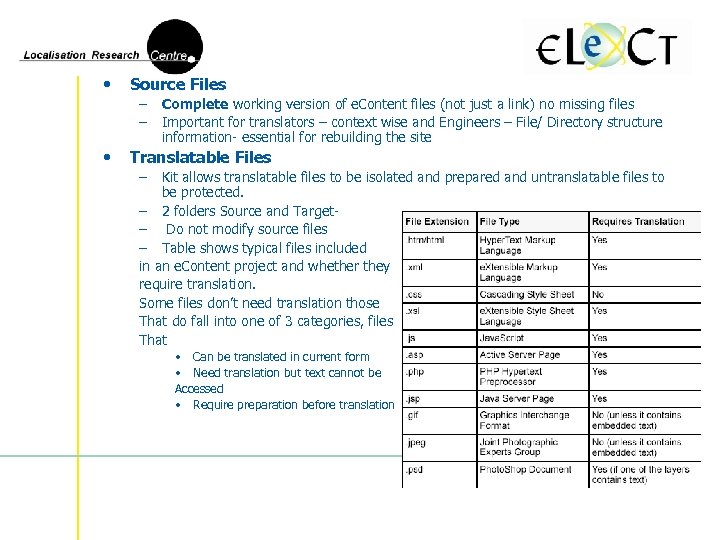 • Source Files – – • Complete working version of e. Content files (not just a link) no missing files Important for translators – context wise and Engineers – File/ Directory structure information- essential for rebuilding the site Translatable Files – Kit allows translatable files to be isolated and prepared and untranslatable files to be protected. – 2 folders Source and Target– Do not modify source files – Table shows typical files included in an e. Content project and whether they require translation. Some files don’t need translation those That do fall into one of 3 categories, files That • Can be translated in current form • Need translation but text cannot be Accessed • Require preparation before translation
 • Files that can be translated in their current form – • Files that need to be translated but text cannot be accessed – – • HTML XML translated using Translation memory/ web editor Embedded text, Layered graphics, Need layered source graphics to localise or else more expense Files that require preparation before translation – – Tagged files containing sections of script. Script needs to be protected or functionality of page will be lost Translation Memory – – – Translation Memory (TM) = Database for translated phrases and sentences. Translate text just once and reuse Typically one of the add on tools used within the T. M. will protect the tags in your content, so that translated files appear identical to the source files in every way except language Localisation quotations are based on word counts. TM generate these counts, not all words are counted, only translatable ones so analysis needs to be carried out
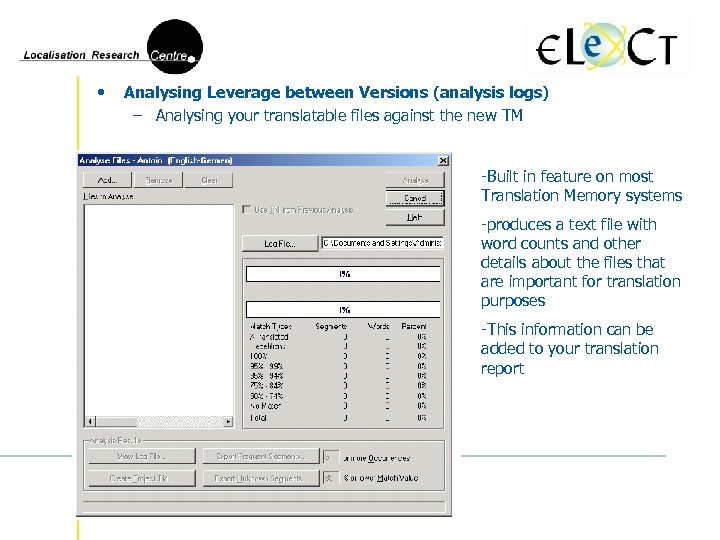 • Analysing Leverage between Versions (analysis logs) – Analysing your translatable files against the new TM -Built in feature on most Translation Memory systems -produces a text file with word counts and other details about the files that are important for translation purposes -This information can be added to your translation report
 • Localisation Guidelines – A localisation kit should include specific guidelines for all members of the localisation team, including • Conditions under which the project is to be managed • Guidelines on how the files are to be built and tested • Style Sheets and Glossaries – Style sheet ensures consistency– font types, styles, colours, language, grammar – Glossary- word/phrase definitions and explanations, aids in translation process, cuts down on ambiguity • Project Specific Software – Any specialist software that was used in the creation of your e. Content – Vendor will need access to this software to localise your content
 Translation Report • Summary of all details of the project. Typically will contain the following – Description of the project – Description of folder structure in Localisation Kit – List of files (translatable and untranslatable) – Trados analysis log, with translatable word count – Specific details of tools to be used during localisation – including version information – Details of deliverables and output formats to be returned after translation – Any special instructions you have for the vendor – If updating, prior versions of source and target language files – Previous Translation Memory *A separate Localisation Kit is needed for each language you are localising into.
 Exercise There is a folder on the C Drive of your machine called “Source Files” • • Copy this folder to your desktop and create two sub folders called “Translatable Files” and “New Build” Analyse the “Source Files” to see which ones need to be translated Move any files that do not need to be translated into the “New Build” folder. All other files should be placed in the “Translatable Files” folder. (Don’t make any changes to the “Source Files” Folder) Open Trados Translator’s Workbench (explained on pages 39 -41). Create a new TM Database. Analyse “sample 1. doc” and “sample 2. doc” from the “Source Files” directory in order to find the word count for each of the files.
 Translation Technology Over the years the focus of translation technology has moved from Machine Translation to Translation Memory, a fact mirrored by the localisation industry. Translation Memory applications improve consistency and reduce translation costs Vendors will discuss leverage, word counts, matches and repetitions In addition to Translation Memory, there are other tools used to automate many of the time consuming tasks in translation. Here we will cover the following categories • • Machine Translation Memory Terminology Management Web Localisation
 • MT vs TM Similar goals – automate translations, re use information • Machine Translation (MT) – – • Accepts text, breaks it down, analyses (grammar and syntax) then queries a dictionary to produce a translated version Good in theory but in reality poor results – must be checked by hand Can be refined by restricting the complexity of the text- using controlled languages. Many free services on the web- sometimes useful for gist translations. Translation Memory (TM) – Stores matching source and target segments (phrases, sentences, words) in a database for future reuse. – Database is searchable so a phrase (sentence) can be entered and checked against current contents of the database. – Doesn’t translate just searches for similar sentences that have occurred before – Results based on accuracy - 100% = Full match - Below 100% = Fuzzy Match Important: ownership of TM Database created during localisation of your content should be established by both you and your vendor from the outset and specified in your contract.
 • Features of TM Applications Segmentation – – • Used to break down blocks of text into sentences Programs use punctuation marks to identify sentence ends. . ? ! Etc. while rules allow for commas, semicolons etc. Statistics – Leverage = reusing sections of a previous translation – TM Word Count = more accurate – identifies new and unique words, omits tags note: some scripting languages may not be recognised as untranslatable • Matches – TMs give values to matches based on their similarity to stored sentences – Matches used to calculate the total cost of translation • If a translator only has to translate one word of a sentence you should not and do not have to pay for the translation of the sentence but • 100% matches are not guaranteed to be perfect so you will need to negotiate rates of payment for each type of match
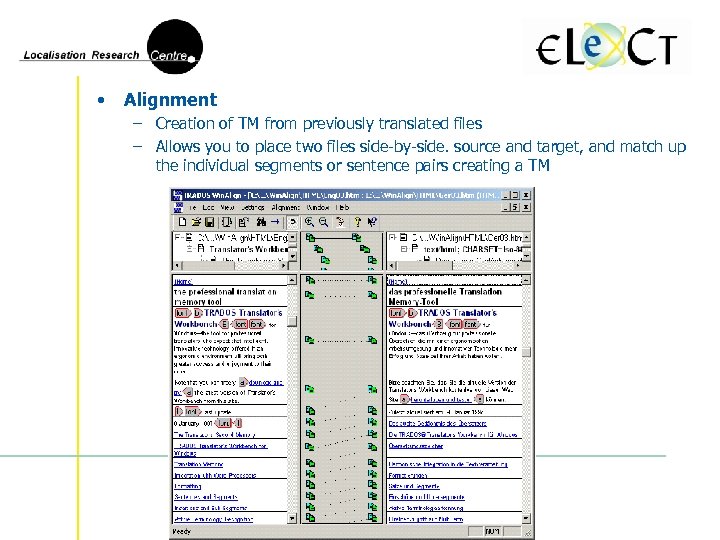 • Alignment – Creation of TM from previously translated files – Allows you to place two files side-by-side. source and target, and match up the individual segments or sentence pairs creating a TM
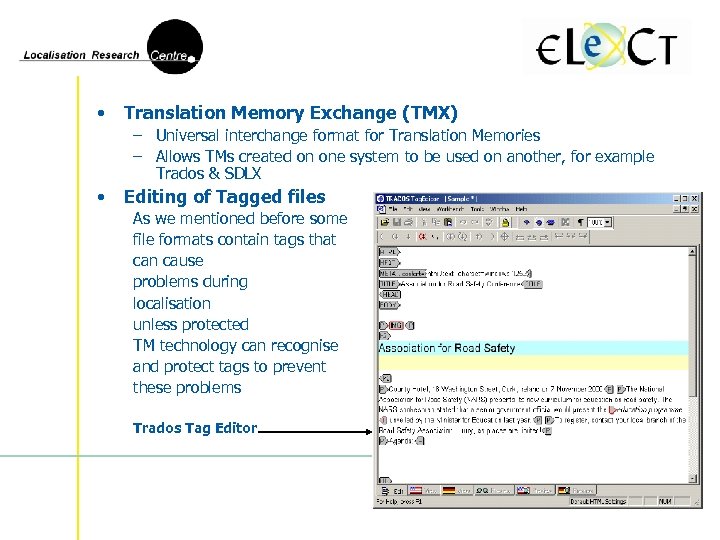 • Translation Memory Exchange (TMX) – Universal interchange format for Translation Memories – Allows TMs created on one system to be used on another, for example Trados & SDLX • Editing of Tagged files As we mentioned before some file formats contain tags that can cause problems during localisation unless protected TM technology can recognise and protect tags to prevent these problems Trados Tag Editor
 Examples of TM Applications There are various TM tools on the market and as a client you can request that the vendor uses a specific tool, however it may be best to allow your vendor to use the tool that they are most comfortable with. • TRADOS – – • SDLX – – • Dominant in the TM market Tool made up of six modules – Translators Workbench. Win. Align, Tag. Editor, Filters, T-Window and Multi. Term Dedicated TM application Similar functionality to that of Trados Benefits of MT and TM Technology – – – Speed Reduce time required to translate large volumes of text Cost Savings By reducing the need for human involvement these technologies can reduce overall translation costs from 5% to 50% Consistency By drawing on pre-translated dictionaries and databases respectively both technologies allow for a significant increase in translation consistency.
 Terminology Management Consistent terminology = uniform look and feel. Many TMs have terminology management systems allowing parties to maintain a detailed terminology database allowing entry of terms and information regarding context, gender, definition, synonyms etc. It is best to agree on tools for Terminology Management at the start of the project Examples of Terminology Management Tools • Trados Multi. Term – • Create, manage and view Terminology Databases - enter terms in multiple languages and enter information on usage, grammar and even images STAR Term. Star – – Similar tool – can be used on individual machines, enterprise database servers and with “Web. Term” over the internet. Allows compilation of Multilingual Dictionaries, importing from other dictionaries , databases and files, customisation of dictionaries and sorting, searching and filtering of dictionaries
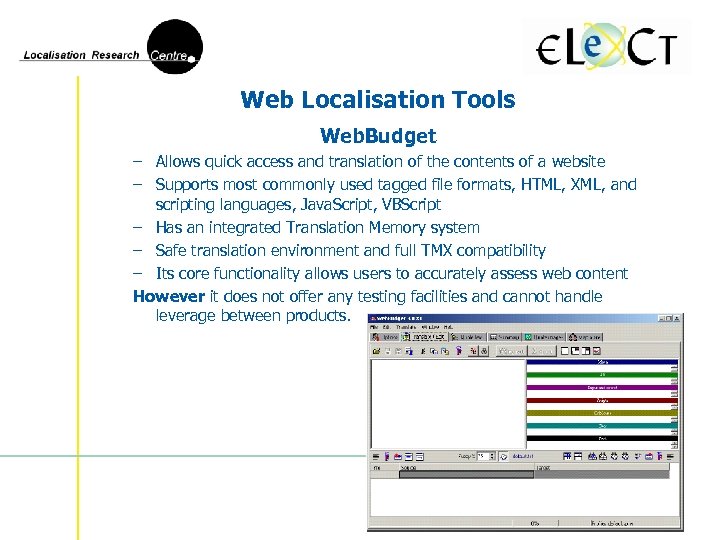 Web Localisation Tools Web. Budget – Allows quick access and translation of the contents of a website – Supports most commonly used tagged file formats, HTML, XML, and scripting languages, Java. Script, VBScript – Has an integrated Translation Memory system – Safe translation environment and full TMX compatibility – Its core functionality allows users to accurately assess web content However it does not offer any testing facilities and cannot handle leverage between products.
 • Since these tools will be utilised primarily by the localisation vendor it is not necessary for you to become an expert user. However getting a feel for some of the technology used will give you a greater understanding of what happens to your e. Content once you hand it over to be localised So…. • Using Trados Tag. Editor, translate the e. Content files that you created during the Internationalisation Course (Instructions on Page 53 of the Localisation Guide)
 Localisation Testing • Errors are inevitable – Usually small but sometimes large • Methods of testing - 2 main methods 1) Manually - checking each page, link and process by hand 2) Automated - Using various tools to check for errors • What we will cover in this section – Localisation testing process – various types of localisation testing – Commonly used tools Remember Testing is an essential part of the localisation process and should form part of any quotation you receive from potential vendors
 Localisation Testing Process Testing is not a once off action. It is continuous Carried out at various stages during localisation process Documents used during testing • Test Plan – Outlines What to test, How to test, and Who should test it. It explains • • Test Script – • What level of testing is needed Who is responsible for it How bugs will be reported If automated tools are available Who is responsible for resolving bugs How many test cycles are necessary The length of each test cycle Explains in great detail exactly what must be done during testing Bug Tracking Report – Records how many bugs found, where, when, how and gives their status
 Types of Localisation Testing • Localising/Internationalising = making changes • Character and language encoding • Translation of Text • Layout Changes can cause problems - 3 categories of problem so 3 testing categories • Functional • Linguistic • Cosmetic • Functional Testing – Objective= Making sure everything on site works as it is supposed to • • Problems with web forms (registration, ordering) No detection of locale specific formats Broken Hyperlinks Scripting Errors
 • Linguistic Testing – Objective = check language related aspects of the website • Ensure all text has been translated • Check correctness of translation both linguistically and culturally • Evaluate cultural meanings of translations (faux pas) Mistakes in this area can be costly - Remember first impressions last • Cosmetic Testing – Objective = check visual aspects of the localised site. • • • Localised and Original site should be virtually identical Make sure there is no clipped (truncated) text (check buttons and graphics) Check that everything displays ok and has the correct formatting Check that no code appears on the page Check that the correct formatting is used – Regression Testing • Term used to describe the process of going back over previously resolved bugs and ensuring that all of the reported problems have been solved
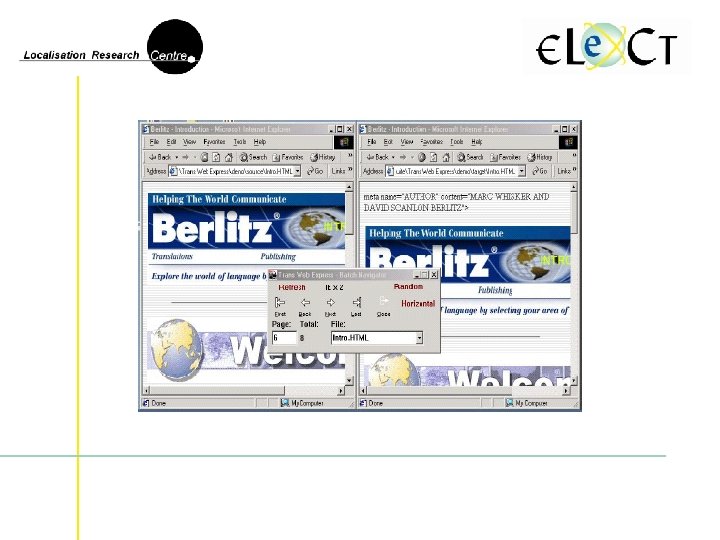
 Localisation Testing Technology • Trans Web Express Useful tool - Easy to use with following functionality – View the code behind the source and target language files side by side – Visually compare the localised file and original source file as they will appear on the web – Perform a statistical analysis of the files giving you a breakdown of the content and any errors found in the file – Navigator function that allows a quick check on the files after localisation – Allows you to edit the source and target files – Highlights all tagging in red - helps prevent mistaken deletions NOTE Trans Web Express is not a Translation Memory application and so should only be used to make minor changes or fix code errors
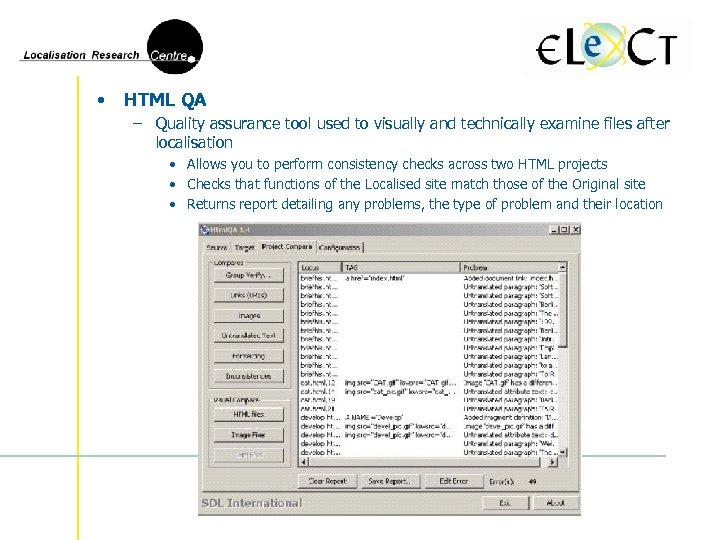 • HTML QA – Quality assurance tool used to visually and technically examine files after localisation • Allows you to perform consistency checks across two HTML projects • Checks that functions of the Localised site match those of the Original site • Returns report detailing any problems, the type of problem and their location
 Testing involves more than just checking the linguistic quality of the translation. The localised website should look and feel as though it was created for the target market Testing will/should be completed by your vendor before they return the files to you however you should always check the files yourself before you place them online Exercise: – Using Trans Web Express test the sample Berlitz files and take a note of any bugs that you find – Use HTMLQA to complete a test of the e. Content files that you translated in the last section. Note any bugs you find
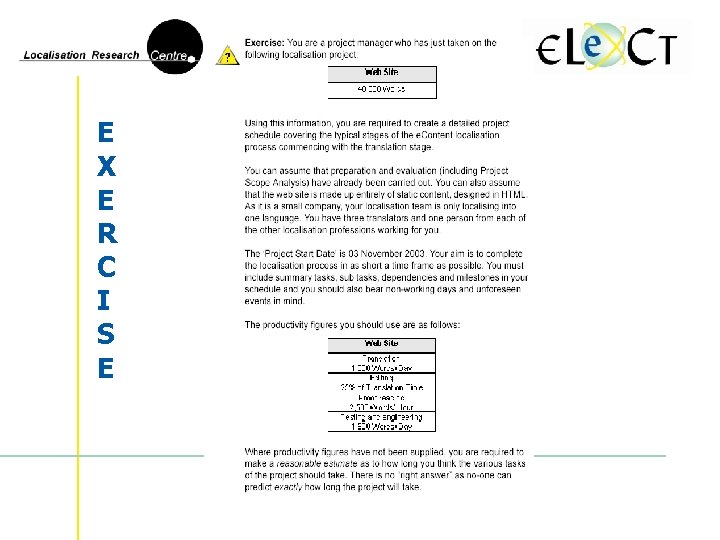
 Managing Localisation Projects • Similar to normal management but with some specific areas Jargon: It is crucial to be familiar with localisation terminology – TM, Fuzzy Match, Test Script, Regression Testing etc. A localisation project managers aim is to guide the project from start to finish on time and hopefully under budget often on tight schedule • 7% of final L 10 N bill is for project management, but you get value for money • The project manager often has to co-ordinate across countries and time zones • In this section we will look at Project Management in terms of - Planning Budgeting Scheduling Tools Reviews - Post Project Analysis - Planning for updates
 Planning • Vendor Side – Project Manager involved from Day 1 • preliminary plan, proposal and quotation – Planning is important • to allocate resources properly • Keep everything on time and within budget – Planning is not just Project Managers job • entire team must take responsibility for their specific section of the project • Project Manager co-ordinates, making sure all staff know exactly what to do • – Projects that run over budget, often caused by poor planning Client Side (Appointing a contact) – – – At planning stage appoint a contact to communicate your needs to the vendor Contact must be familiar with localisation process. They will identify everyone in client organisation likely to be involved and brief them at regular meetings All files, information and queries should go through the contact • limit miscommunication and keep a handle on the budget
 Budgeting Vendor proposal will contain an estimated quotation for the project – This is not a guaranteed price - keeping a project within budget can be a challenge Budgets depend on a number of factors such as: – – – Word count of your e. Content files File Formats and Scripting used (Advanced technology = Higher prices) Level of existing internationalisation in your content Number of languages, language types (Asian/DBCS = more expensive) Vendor resource costs - staff salaries, overheads etc. Budgets can be difficult to work out – No guarantee or return on investment (ROI) – will the risk be worth it? but if a careful analysis is carried out (as detailed earlier) you will be able to get a better idea of what type of budget is justified for the project. A budget cannot be completed until the project schedule has been finalised
 Scheduling 4 Main steps – – Step 1 - Identify the core activities to be carried out 2 - Put the tasks in sequential order 3 - Assign resources to each Task 4 - Specify start and finish dates for each task Backward and Forward scheduling – – Backward = Deadline (finish date) set at start, concrete time-frame Forward = Finish date dictated by the duration or each task - Preferable Milestones – Important steps in the project without set duration but which must be completed before project can move forward Client delays – Client can affect schedule - delay in file delivery, giving feedback etc. Contingency – – No schedule is perfect Assign a 10% contingency to allow for unforeseen events
 Project Management Tools • Microsoft Project - Generic management tool used in various industries – Allows for creation and updating of schedules and resources – Allows communication of project status/reporting of project information – Contains all fundamental project management features necessary to keep a project on track – Also has built in project management assistance (for beginners) • LTC organiser - Specialist tool for business processes of translation projects – User friendly – Local or web based integration of multilingual products – Essential steps automated – Various options and flexibility in setting up different project structures and workflows – Can be used on projects of any size
 • Reviews – Your localised e. Content files will be checked by your vendor but as we said previously it is a good idea to get your organisation to review the files as well. Appoint 2 people • 1 person to look at the files from a technical point of view • 1 person to review the quality of the translations • Post-Project Analysis – – A post-mortem or project review meeting All staff, client and vendor, that worked on the project should attend Everyone should feel free to contribute Aims to make sure the next project runs more smoothly As a final step – Request a final project archive from your vendor – Approve this and store it in a secure location
 Planning for updates Often overlooked by companies localising for the first time. Web content isn’t static so discuss the idea of updates with the vendor to get an idea of costs for future updates. Before – – – they can provide you with a quote you will need to inform them of The likely volume of potential updates Timing and frequency Nature of the updates • update of existing content? • adding new sections to the site? – The level of testing that will be required
 E X E R C I S E