


 Скачать презентацию An Introduction to Programming the 80 x 86
0b774351dcef0739fadcabbbeb18eac0.ppt
- Количество слайдов: 17
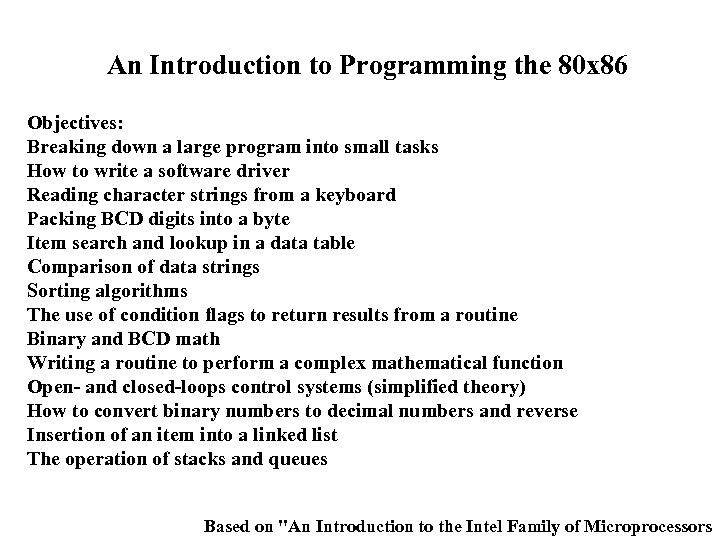 An Introduction to Programming the 80 x 86 Objectives: Breaking down a large program into small tasks How to write a software driver Reading character strings from a keyboard Packing BCD digits into a byte Item search and lookup in a data table Comparison of data strings Sorting algorithms The use of condition flags to return results from a routine Binary and BCD math Writing a routine to perform a complex mathematical function Open- and closed-loops control systems (simplified theory) How to convert binary numbers to decimal numbers and reverse Insertion of an item into a linked list The operation of stacks and queues Based on "An Introduction to the Intel Family of Microprocessors
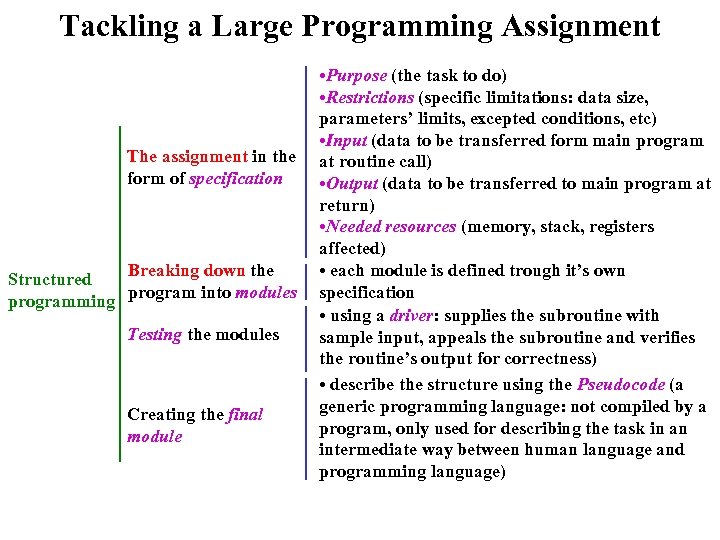 Tackling a Large Programming Assignment The assignment in the form of specification Breaking down the Structured programming program into modules Testing the modules Creating the final module • Purpose (the task to do) • Restrictions (specific limitations: data size, parameters’ limits, excepted conditions, etc) • Input (data to be transferred form main program at routine call) • Output (data to be transferred to main program at return) • Needed resources (memory, stack, registers affected) • each module is defined trough it’s own specification • using a driver: supplies the subroutine with sample input, appeals the subroutine and verifies the routine’s output for correctness) • describe the structure using the Pseudocode (a generic programming language: not compiled by a program, only used for describing the task in an intermediate way between human language and programming language)
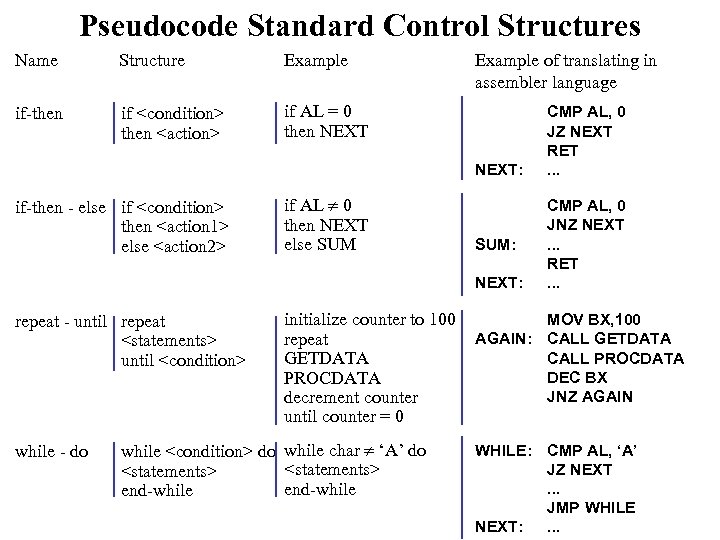 Pseudocode Standard Control Structures Name Structure Example if-then if
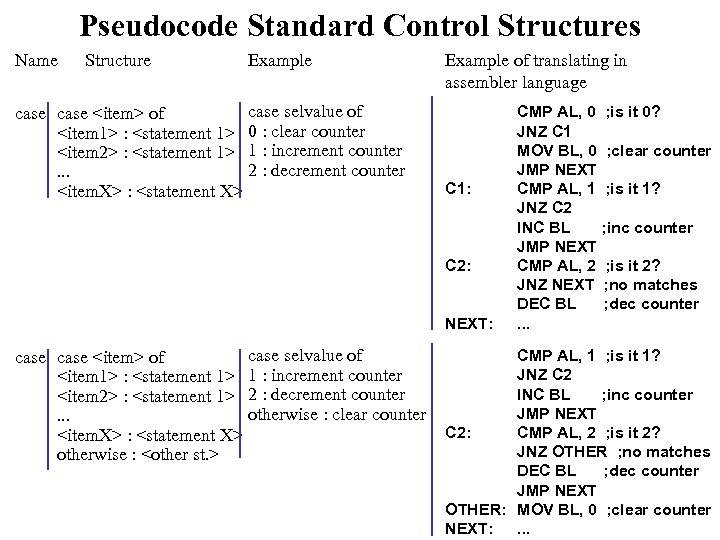 Pseudocode Standard Control Structures Name Structure case
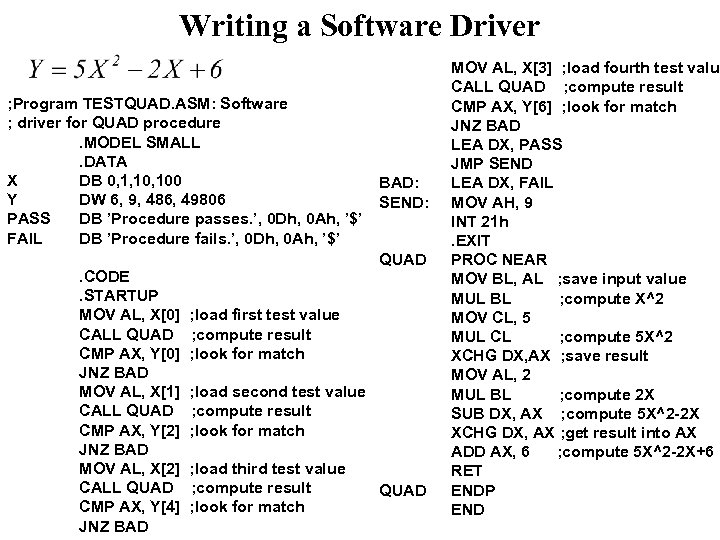 Writing a Software Driver ; Program TESTQUAD. ASM: Software ; driver for QUAD procedure. MODEL SMALL. DATA X DB 0, 1, 100 Y DW 6, 9, 486, 49806 PASS DB ’Procedure passes. ’, 0 Dh, 0 Ah, ’$’ FAIL DB ’Procedure fails. ’, 0 Dh, 0 Ah, ’$’. CODE. STARTUP MOV AL, X[0] CALL QUAD CMP AX, Y[0] JNZ BAD MOV AL, X[1] CALL QUAD CMP AX, Y[2] JNZ BAD MOV AL, X[2] CALL QUAD CMP AX, Y[4] JNZ BAD: SEND: QUAD ; load first test value ; compute result ; look for match ; load second test value ; compute result ; look for match ; load third test value ; compute result ; look for match QUAD MOV AL, X[3] ; load fourth test value CALL QUAD ; compute result CMP AX, Y[6] ; look for match JNZ BAD LEA DX, PASS JMP SEND LEA DX, FAIL MOV AH, 9 INT 21 h. EXIT PROC NEAR MOV BL, AL ; save input value MUL BL ; compute X^2 MOV CL, 5 MUL CL ; compute 5 X^2 XCHG DX, AX ; save result MOV AL, 2 MUL BL ; compute 2 X SUB DX, AX ; compute 5 X^2 -2 X XCHG DX, AX ; get result into AX ADD AX, 6 ; compute 5 X^2 -2 X+6 RET ENDP END
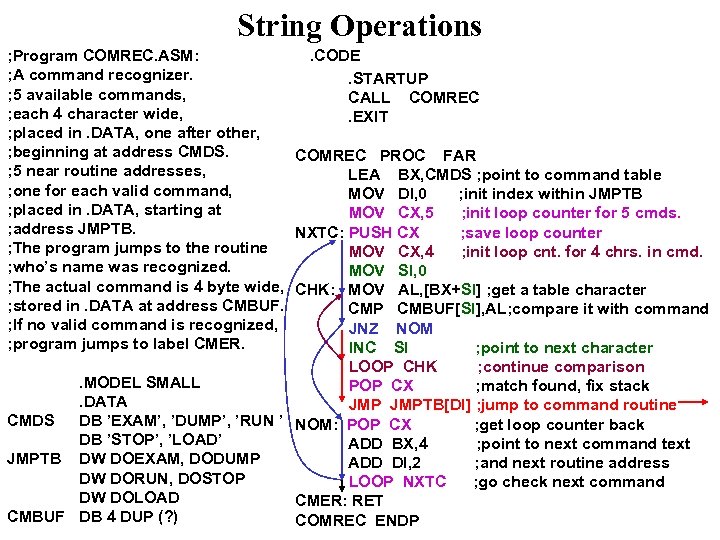 String Operations. CODE ; Program COMREC. ASM: ; A command recognizer. . STARTUP ; 5 available commands, CALL COMREC ; each 4 character wide, . EXIT ; placed in. DATA, one after other, ; beginning at address CMDS. COMREC PROC FAR ; 5 near routine addresses, LEA BX, CMDS ; point to command table ; one for each valid command, MOV DI, 0 ; init index within JMPTB ; placed in. DATA, starting at MOV CX, 5 ; init loop counter for 5 cmds. ; address JMPTB. NXTC: PUSH CX ; save loop counter ; The program jumps to the routine MOV CX, 4 ; init loop cnt. for 4 chrs. in cmd. ; who’s name was recognized. MOV SI, 0 ; The actual command is 4 byte wide, CHK: MOV AL, [BX+SI] ; get a table character ; stored in. DATA at address CMBUF. CMP CMBUF[SI], AL; compare it with command ; If no valid command is recognized, JNZ NOM ; program jumps to label CMER. INC SI ; point to next character LOOP CHK ; continue comparison. MODEL SMALL POP CX ; match found, fix stack. DATA JMPTB[DI] ; jump to command routine CMDS DB ’EXAM’, ’DUMP’, ’RUN ’ NOM: POP CX ; get loop counter back DB ’STOP’, ’LOAD’ ADD BX, 4 ; point to next command text JMPTB DW DOEXAM, DODUMP ADD DI, 2 ; and next routine address DW DORUN, DOSTOP LOOP NXTC ; go check next command DW DOLOAD CMER: RET CMBUF DB 4 DUP (? ) COMREC ENDP
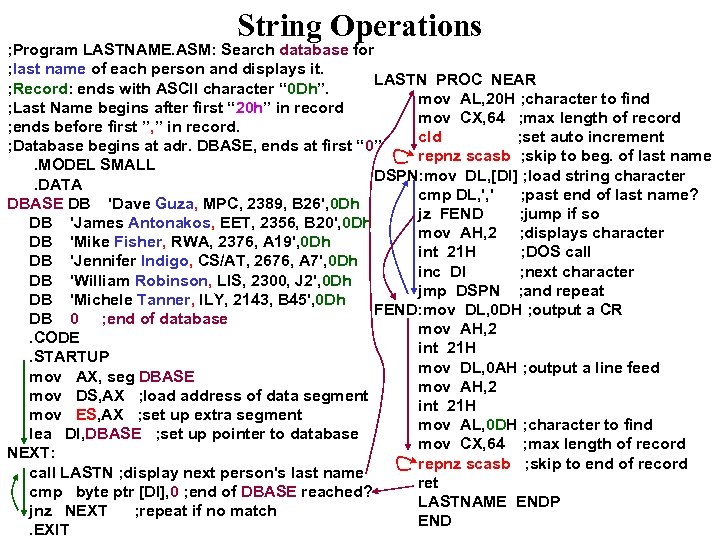 String Operations ; Program LASTNAME. ASM: Search database for ; last name of each person and displays it. LASTN PROC NEAR ; Record: ends with ASCII character “ 0 Dh”. mov AL, 20 H ; character to find ; Last Name begins after first “ 20 h” in record mov CX, 64 ; max length of record ; ends before first ”, ” in record. cld ; set auto increment ; Database begins at adr. DBASE, ends at first “ 0” repnz scasb ; skip to beg. of last name. MODEL SMALL DSPN: mov DL, [DI] ; load string character. DATA cmp DL, ', ' ; past end of last name? DBASE DB 'Dave Guza, MPC, 2389, B 26', 0 Dh jz FEND ; jump if so DB 'James Antonakos, EET, 2356, B 20', 0 Dh mov AH, 2 ; displays character DB 'Mike Fisher, RWA, 2376, A 19', 0 Dh int 21 H ; DOS call DB 'Jennifer Indigo, CS/AT, 2676, A 7', 0 Dh inc DI ; next character DB 'William Robinson, LIS, 2300, J 2', 0 Dh jmp DSPN ; and repeat DB 'Michele Tanner, ILY, 2143, B 45', 0 Dh FEND: mov DL, 0 DH ; output a CR DB 0 ; end of database mov AH, 2. CODE int 21 H. STARTUP mov DL, 0 AH ; output a line feed mov AX, seg DBASE mov AH, 2 mov DS, AX ; load address of data segment int 21 H mov ES, AX ; set up extra segment mov AL, 0 DH ; character to find lea DI, DBASE ; set up pointer to database mov CX, 64 ; max length of record NEXT: repnz scasb ; skip to end of record call LASTN ; display next person's last name ret cmp byte ptr [DI], 0 ; end of DBASE reached? LASTNAME ENDP jnz NEXT ; repeat if no match END. EXIT
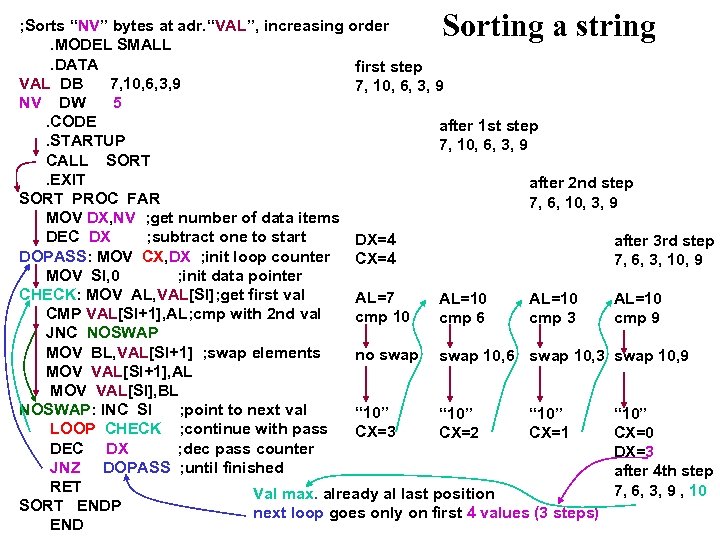 Sorting a string ; Sorts “NV” bytes at adr. “VAL”, increasing order. MODEL SMALL. DATA first step VAL DB 7, 10, 6, 3, 9 NV DW 5. CODE after 1 st step. STARTUP 7, 10, 6, 3, 9 CALL SORT. EXIT after 2 nd step SORT PROC FAR 7, 6, 10, 3, 9 MOV DX, NV ; get number of data items DEC DX ; subtract one to start DX=4 after 3 rd step DOPASS: MOV CX, DX ; init loop counter CX=4 7, 6, 3, 10, 9 MOV SI, 0 ; init data pointer CHECK: MOV AL, VAL[SI]; get first val AL=7 AL=10 CMP VAL[SI+1], AL; cmp with 2 nd val cmp 10 cmp 6 cmp 3 cmp 9 JNC NOSWAP MOV BL, VAL[SI+1] ; swap elements no swap 10, 6 swap 10, 3 swap 10, 9 MOV VAL[SI+1], AL MOV VAL[SI], BL NOSWAP: INC SI ; point to next val “ 10” LOOP CHECK ; continue with pass CX=3 CX=2 CX=1 CX=0 DEC DX ; dec pass counter DX=3 JNZ DOPASS ; until finished after 4 th step RET 7, 6, 3, 9 , 10 Val max. already al last position SORT ENDP next loop goes only on first 4 values (3 steps) END
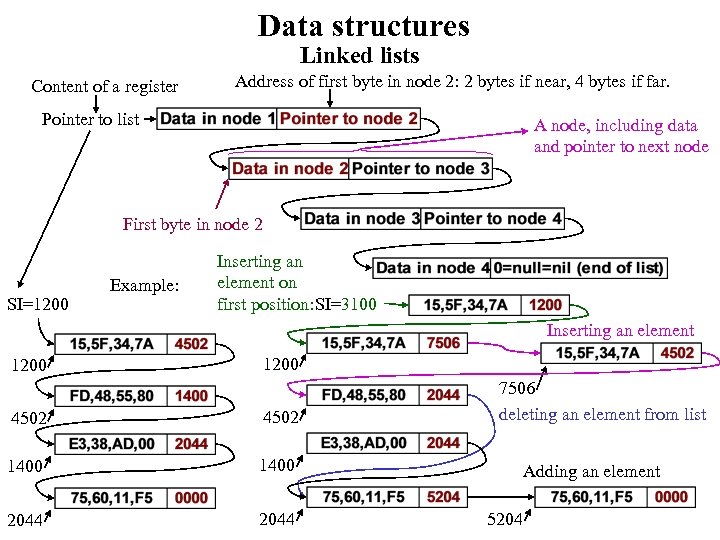 Data structures Linked lists Content of a register Address of first byte in node 2: 2 bytes if near, 4 bytes if far. Pointer to list A node, including data and pointer to next node First byte in node 2 SI=1200 Example: Inserting an element on first position: SI=3100 Inserting an element 1200 4502 1400 2044 7506 deleting an element from list Adding an element 5204
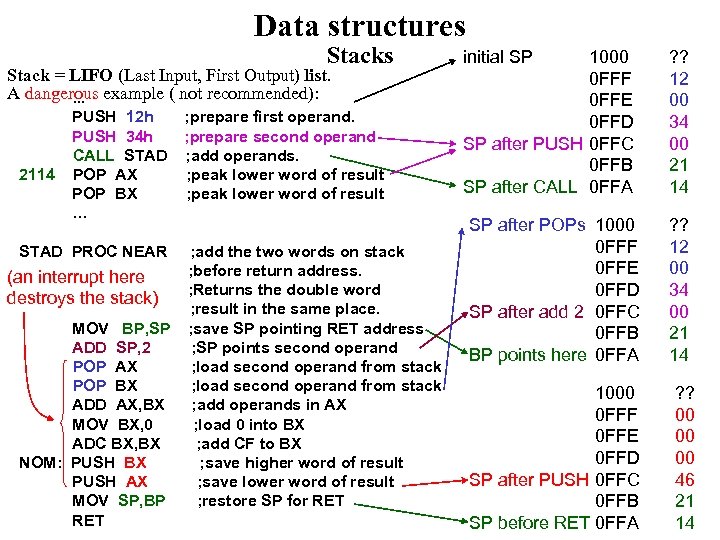 Data structures Stack = LIFO (Last Input, First Output) list. A dangerous example ( not recommended): . . . 2114 PUSH 12 h PUSH 34 h CALL STAD POP AX POP BX … STAD PROC NEAR (an interrupt here destroys the stack) MOV BP, SP ADD SP, 2 POP AX POP BX ADD AX, BX MOV BX, 0 ADC BX, BX NOM: PUSH BX PUSH AX MOV SP, BP RET ; prepare first operand. ; prepare second operand ; add operands. ; peak lower word of result ; add the two words on stack ; before return address. ; Returns the double word ; result in the same place. ; save SP pointing RET address ; SP points second operand ; load second operand from stack ; add operands in AX ; load 0 into BX ; add CF to BX ; save higher word of result ; save lower word of result ; restore SP for RET initial SP 1000 0 FFF 0 FFE 0 FFD SP after PUSH 0 FFC 0 FFB SP after CALL 0 FFA SP after POPs 1000 0 FFF 0 FFE 0 FFD SP after add 2 0 FFC 0 FFB BP points here 0 FFA 1000 0 FFF 0 FFE 0 FFD SP after PUSH 0 FFC 0 FFB SP before RET 0 FFA ? ? 12 00 34 00 21 14 ? ? 00 00 00 46 21 14
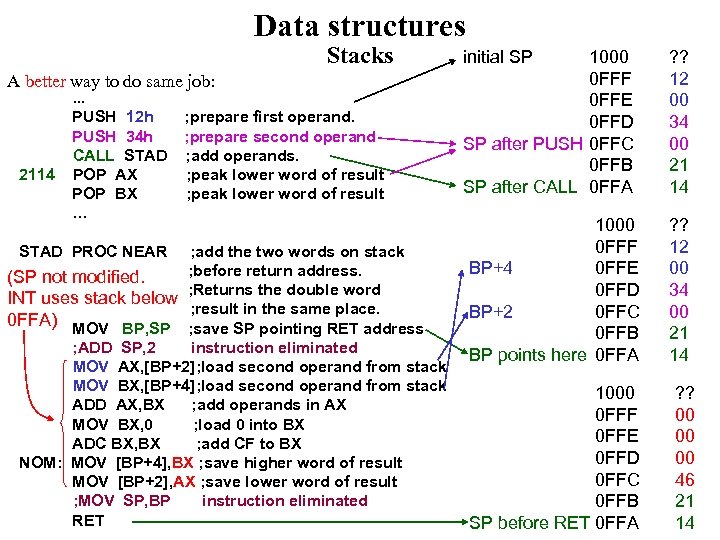 Data structures Stacks A better way to do same job: 2114 . . . PUSH 12 h PUSH 34 h CALL STAD POP AX POP BX … STAD PROC NEAR ; prepare first operand. ; prepare second operand ; add operands. ; peak lower word of result ; add the two words on stack ; before return address. (SP not modified. ; Returns the double word INT uses stack below ; result in the same place. 0 FFA) MOV BP, SP ; save SP pointing RET address ; ADD SP, 2 instruction eliminated MOV AX, [BP+2]; load second operand from stack MOV BX, [BP+4]; load second operand from stack ADD AX, BX ; add operands in AX MOV BX, 0 ; load 0 into BX ADC BX, BX ; add CF to BX NOM: MOV [BP+4], BX ; save higher word of result MOV [BP+2], AX ; save lower word of result ; MOV SP, BP instruction eliminated RET initial SP 1000 0 FFF 0 FFE 0 FFD SP after PUSH 0 FFC 0 FFB SP after CALL 0 FFA 1000 0 FFF BP+4 0 FFE 0 FFD BP+2 0 FFC 0 FFB BP points here 0 FFA 1000 0 FFF 0 FFE 0 FFD 0 FFC 0 FFB SP before RET 0 FFA ? ? 12 00 34 00 21 14 ? ? 00 00 00 46 21 14
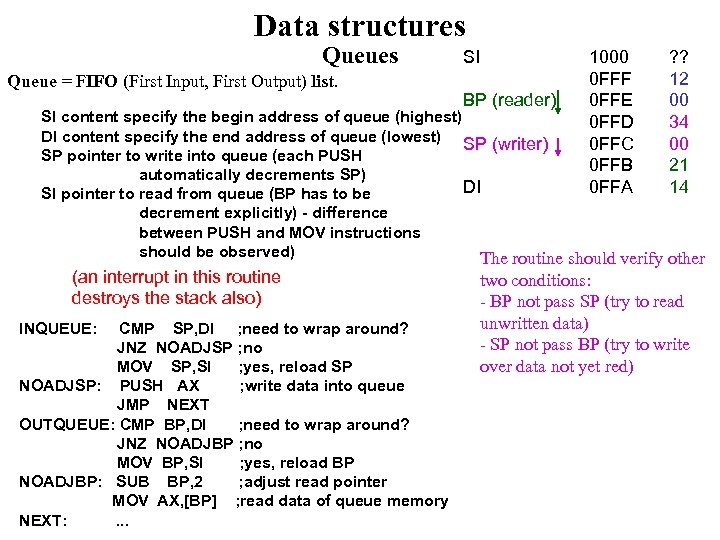 Data structures Queue = FIFO (First Input, First Output) list. SI BP (reader) 1000 0 FFF 0 FFE 0 FFD 0 FFC 0 FFB 0 FFA ? ? 12 00 34 00 21 14 SI content specify the begin address of queue (highest) DI content specify the end address of queue (lowest) SP (writer) SP pointer to write into queue (each PUSH automatically decrements SP) DI SI pointer to read from queue (BP has to be decrement explicitly) - difference between PUSH and MOV instructions should be observed) The routine should verify other (an interrupt in this routine destroys the stack also) INQUEUE: CMP SP, DI ; need to wrap around? JNZ NOADJSP ; no MOV SP, SI ; yes, reload SP NOADJSP: PUSH AX ; write data into queue JMP NEXT OUTQUEUE: CMP BP, DI ; need to wrap around? JNZ NOADJBP ; no MOV BP, SI ; yes, reload BP NOADJBP: SUB BP, 2 ; adjust read pointer MOV AX, [BP] ; read data of queue memory NEXT: . . . two conditions: - BP not pass SP (try to read unwritten data) - SP not pass BP (try to write over data not yet red)
 Microprocessor Systems Programming with DOS and BIOS Function Calls Objectives: The use of DOS and BIOS function call How to read the PC’s keyboard How to send text to the video display The operation of the PC’s speaker How to control the printer The structure of the command segment prefix How to use DOS’s command-line interface Based on "An Introduction to the Intel Family of Microprocessors
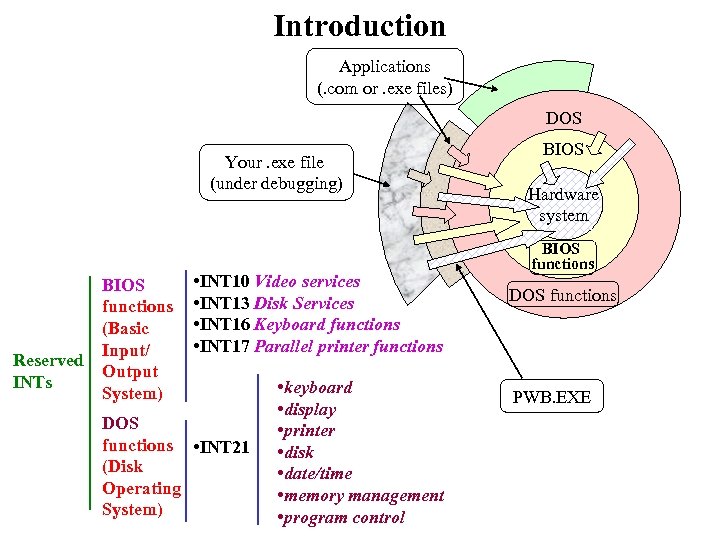 Introduction Applications (. com or. exe files) DOS Your. exe file (under debugging) Reserved INTs BIOS functions (Basic Input/ Output System) • INT 10 Video services • INT 13 Disk Services • INT 16 Keyboard functions • INT 17 Parallel printer functions DOS functions • INT 21 (Disk Operating System) • keyboard • display • printer • disk • date/time • memory management • program control BIOS Hardware system BIOS functions DOS functions PWB. EXE
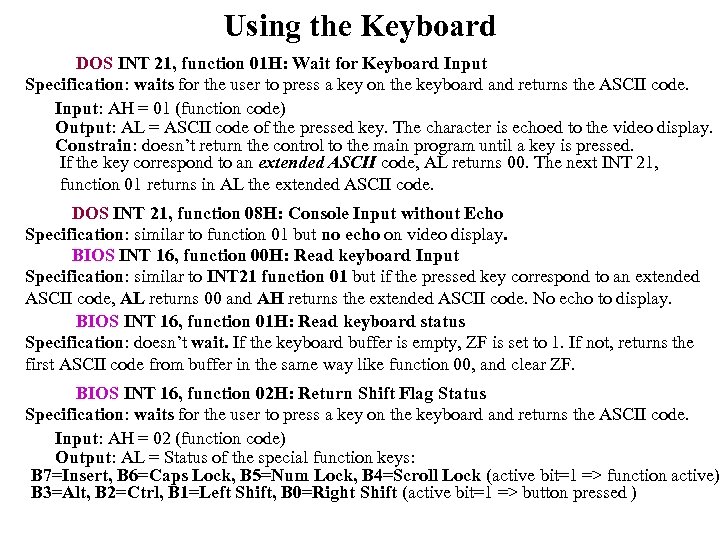 Using the Keyboard DOS INT 21, function 01 H: Wait for Keyboard Input Specification: waits for the user to press a key on the keyboard and returns the ASCII code. Input: AH = 01 (function code) Output: AL = ASCII code of the pressed key. The character is echoed to the video display. Constrain: doesn’t return the control to the main program until a key is pressed. If the key correspond to an extended ASCII code, AL returns 00. The next INT 21, function 01 returns in AL the extended ASCII code. DOS INT 21, function 08 H: Console Input without Echo Specification: similar to function 01 but no echo on video display. BIOS INT 16, function 00 H: Read keyboard Input Specification: similar to INT 21 function 01 but if the pressed key correspond to an extended ASCII code, AL returns 00 and AH returns the extended ASCII code. No echo to display. BIOS INT 16, function 01 H: Read keyboard status Specification: doesn’t wait. If the keyboard buffer is empty, ZF is set to 1. If not, returns the first ASCII code from buffer in the same way like function 00, and clear ZF. BIOS INT 16, function 02 H: Return Shift Flag Status Specification: waits for the user to press a key on the keyboard and returns the ASCII code. Input: AH = 02 (function code) Output: AL = Status of the special function keys: B 7=Insert, B 6=Caps Lock, B 5=Num Lock, B 4=Scroll Lock (active bit=1 => function active) B 3=Alt, B 2=Ctrl, B 1=Left Shift, B 0=Right Shift (active bit=1 => button pressed )
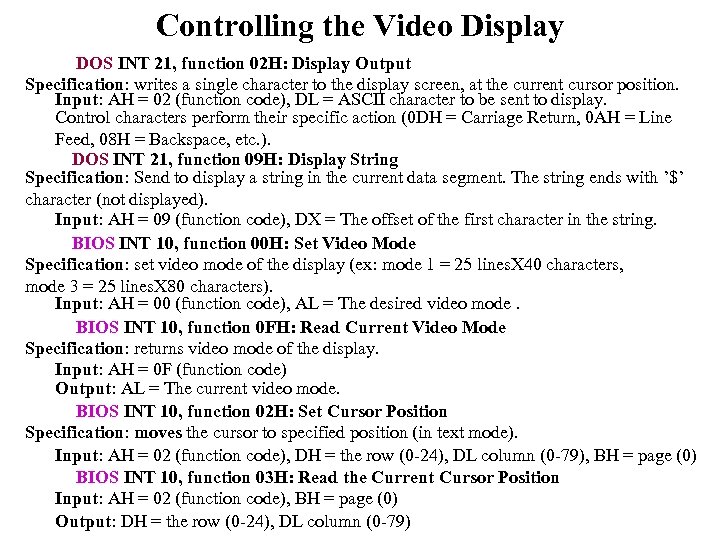 Controlling the Video Display DOS INT 21, function 02 H: Display Output Specification: writes a single character to the display screen, at the current cursor position. Input: AH = 02 (function code), DL = ASCII character to be sent to display. Control characters perform their specific action (0 DH = Carriage Return, 0 AH = Line Feed, 08 H = Backspace, etc. ). DOS INT 21, function 09 H: Display String Specification: Send to display a string in the current data segment. The string ends with ’$’ character (not displayed). Input: AH = 09 (function code), DX = The offset of the first character in the string. BIOS INT 10, function 00 H: Set Video Mode Specification: set video mode of the display (ex: mode 1 = 25 lines. X 40 characters, mode 3 = 25 lines. X 80 characters). Input: AH = 00 (function code), AL = The desired video mode. BIOS INT 10, function 0 FH: Read Current Video Mode Specification: returns video mode of the display. Input: AH = 0 F (function code) Output: AL = The current video mode. BIOS INT 10, function 02 H: Set Cursor Position Specification: moves the cursor to specified position (in text mode). Input: AH = 02 (function code), DH = the row (0 -24), DL column (0 -79), BH = page (0) BIOS INT 10, function 03 H: Read the Current Cursor Position Input: AH = 02 (function code), BH = page (0) Output: DH = the row (0 -24), DL column (0 -79)
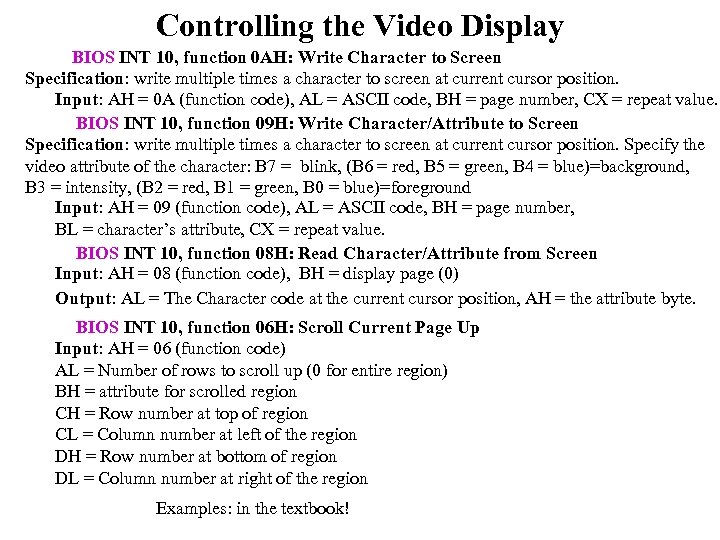 Controlling the Video Display BIOS INT 10, function 0 AH: Write Character to Screen Specification: write multiple times a character to screen at current cursor position. Input: AH = 0 A (function code), AL = ASCII code, BH = page number, CX = repeat value. BIOS INT 10, function 09 H: Write Character/Attribute to Screen Specification: write multiple times a character to screen at current cursor position. Specify the video attribute of the character: B 7 = blink, (B 6 = red, B 5 = green, B 4 = blue)=background, B 3 = intensity, (B 2 = red, B 1 = green, B 0 = blue)=foreground Input: AH = 09 (function code), AL = ASCII code, BH = page number, BL = character’s attribute, CX = repeat value. BIOS INT 10, function 08 H: Read Character/Attribute from Screen Input: AH = 08 (function code), BH = display page (0) Output: AL = The Character code at the current cursor position, AH = the attribute byte. BIOS INT 10, function 06 H: Scroll Current Page Up Input: AH = 06 (function code) AL = Number of rows to scroll up (0 for entire region) BH = attribute for scrolled region CH = Row number at top of region CL = Column number at left of the region DH = Row number at bottom of region DL = Column number at right of the region Examples: in the textbook!