


 Скачать презентацию An Introduction to Options Dr Rana Singh Associate
88d56c5a92f25721c28359ded800bbca.ppt
- Количество слайдов: 65
 An Introduction to Options Dr. Rana Singh Associate Professor www. ranasingh. org
 • Forward Contract: It is a simple derivative that involves an agreement to buy/sell an asset on a certain future date at an agreed price. • Future Contract: It is a standardized contract between two parties who do not necessarily know each other and it is for performance by a clearing corporation or clearing house. • Options Contract: It is a legal contract which gives the holder the right to buy or sell a specified amount of underlying asset at a fixed price within a specified period of time. The holder is not obliged to buy or sell the underlying asset. • (A) CALL &(B)PUT
 Options • Options are of two types –Calls and Puts • Call options give the buyer the right but not the obligation to buy a given quantity of the underlying asset , at a given price on or before a given future date. • Put options give the buyer the right , but not the obligation to sell a given quantity of the underlying asset at a given price on or before a given date. • Long=Buy= Holder • Short=Sell=Writer • C= Current Price of the Call • E=Exercise Price=Strike Price • So=The current price of the share • S 1=The stock price at the expiration date of the call.
 Terminology • Spot Price: The price at which an asset trades in the spot market. • Future Price: The price at which the futures contract trades in the futures market. • Option Price: Option price is the price which the option buyer pays to the option seller. • Exercise Price: The price specified in the options contract is known as the strike price or the exercise price. • Basis: Basis is usually defined as the spot price minus the future price.
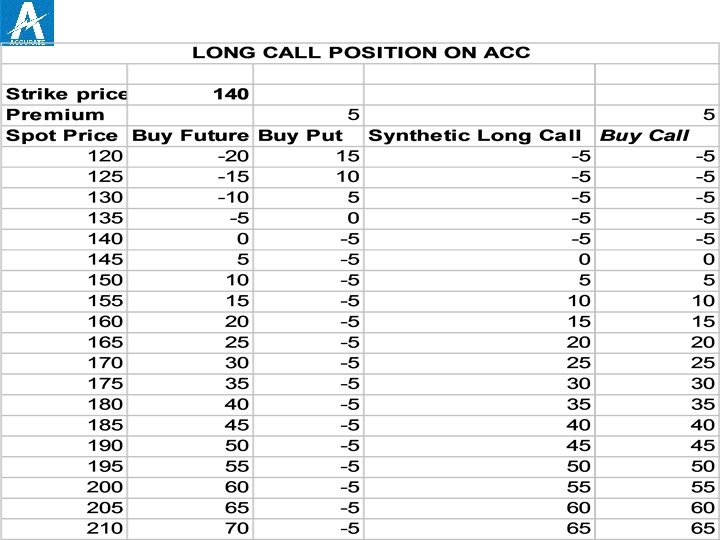
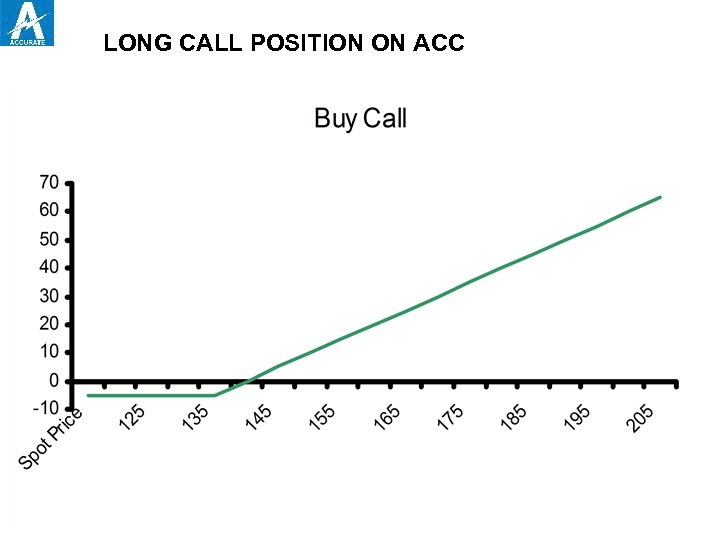 LONG CALL POSITION ON ACC
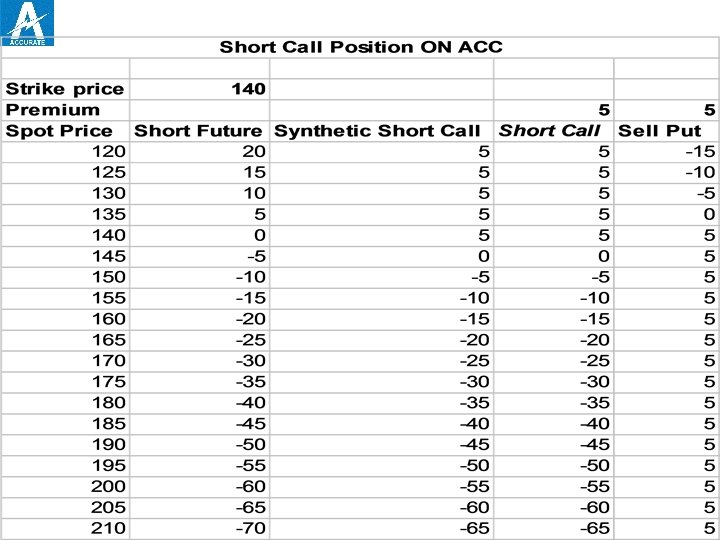
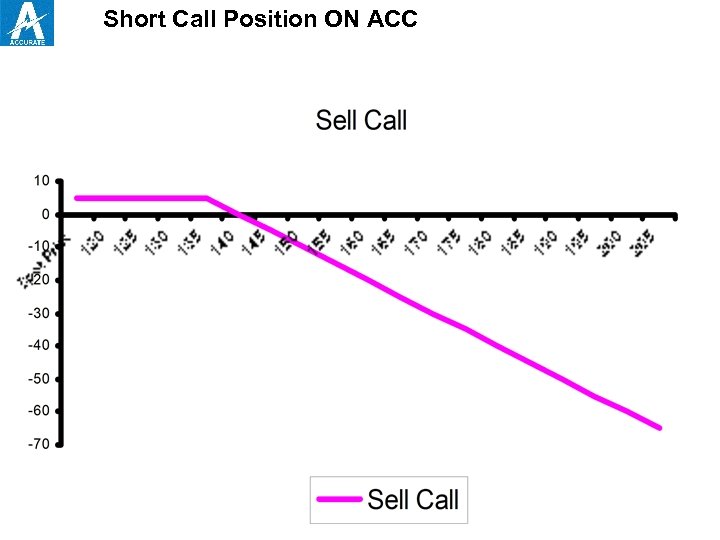 Short Call Position ON ACC
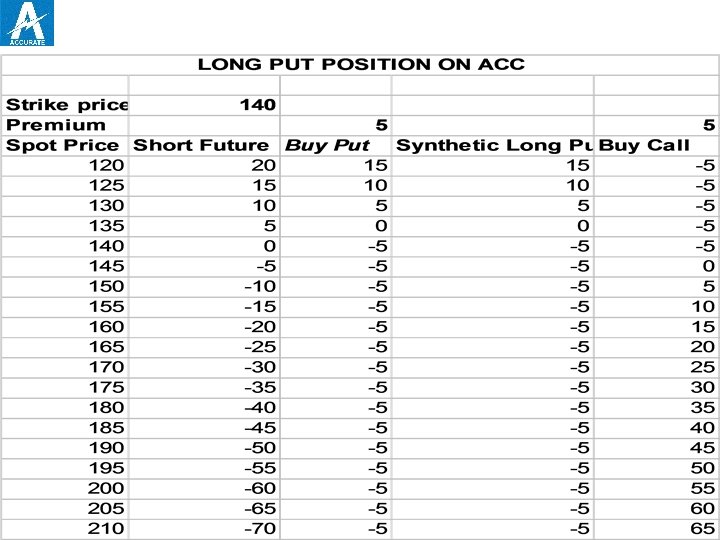
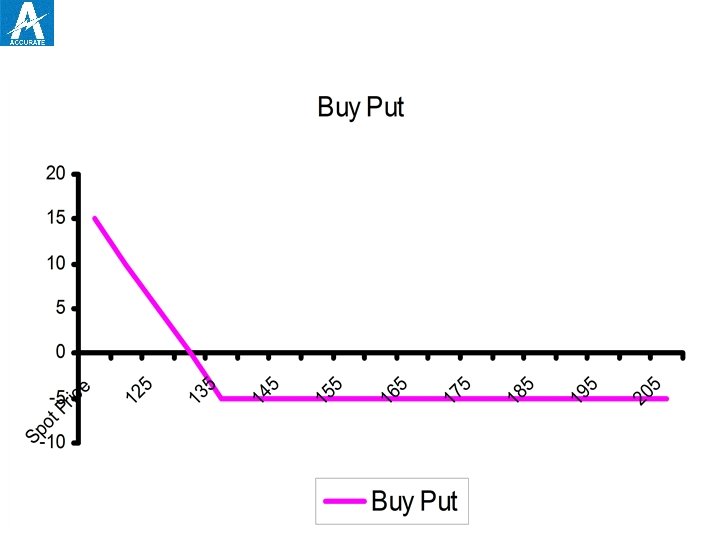
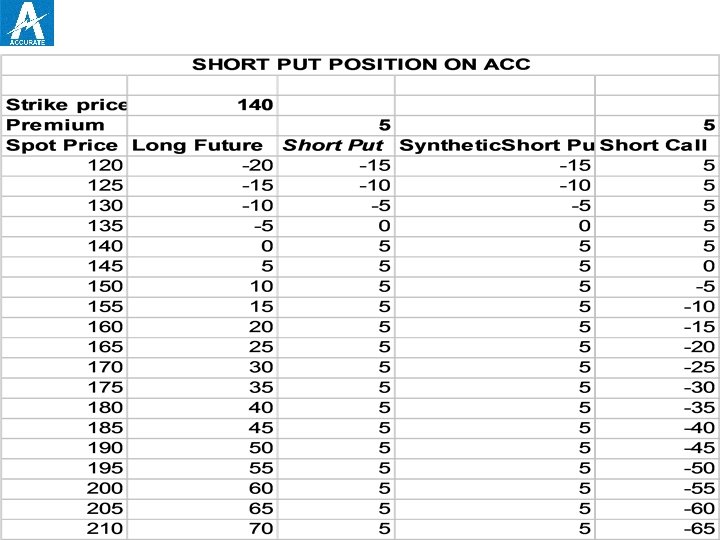
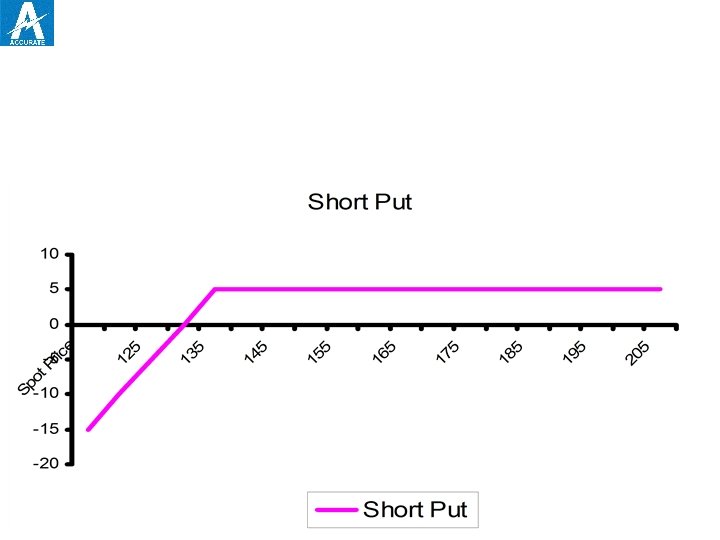
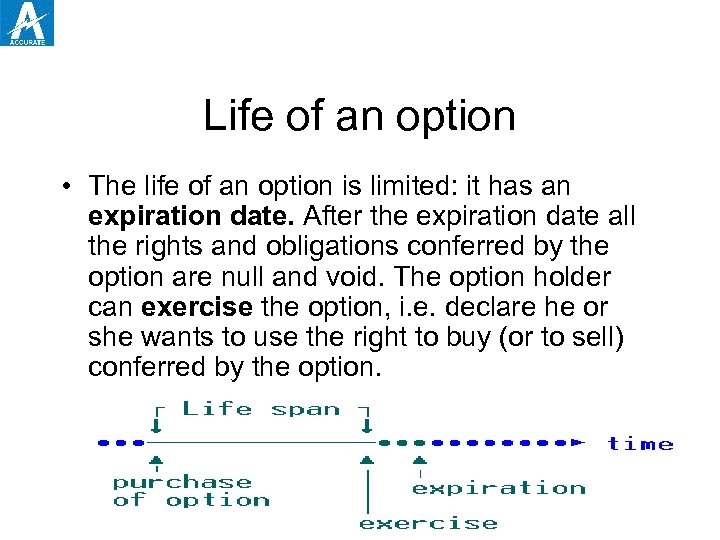 Life of an option • The life of an option is limited: it has an expiration date. After the expiration date all the rights and obligations conferred by the option are null and void. The option holder can exercise the option, i. e. declare he or she wants to use the right to buy (or to sell) conferred by the option.
 American-Style option • American-Style option An option contract that may be exercised at any time between the date of purchase and the expiration date. Most exchange-traded options are American -style. In India options on stocks are American option.
 European-style options • European-style options An option contract that may be exercised only during a specified period of time just prior to its expiration. In India Index options are European-style options.
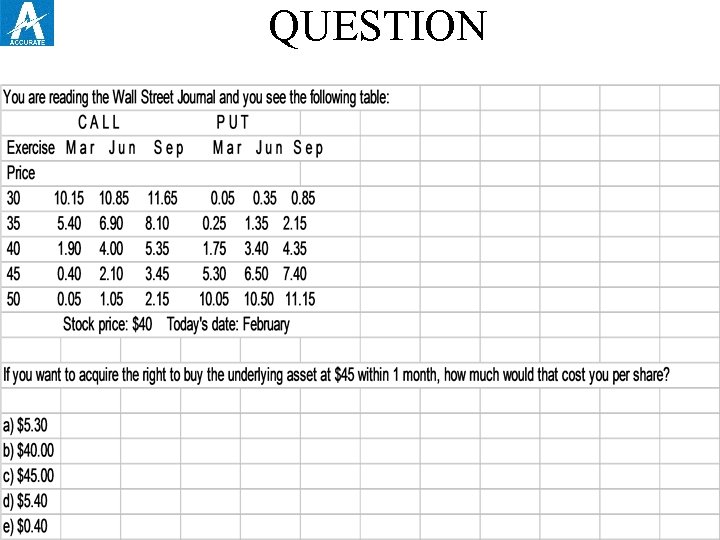 QUESTION
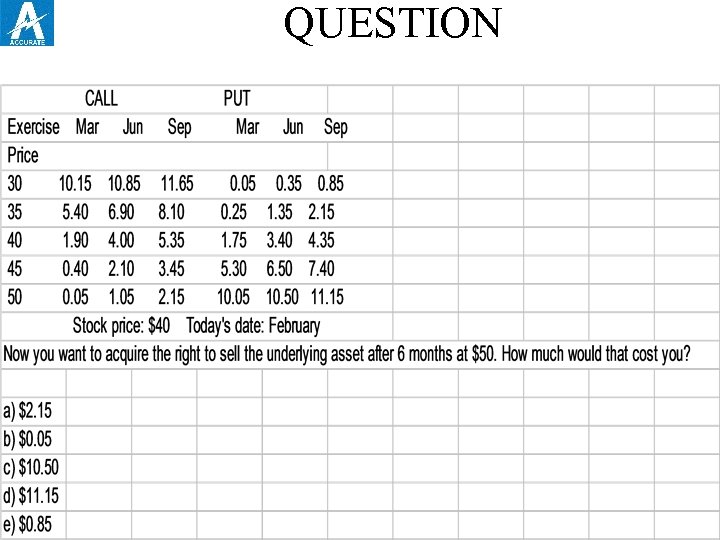 QUESTION
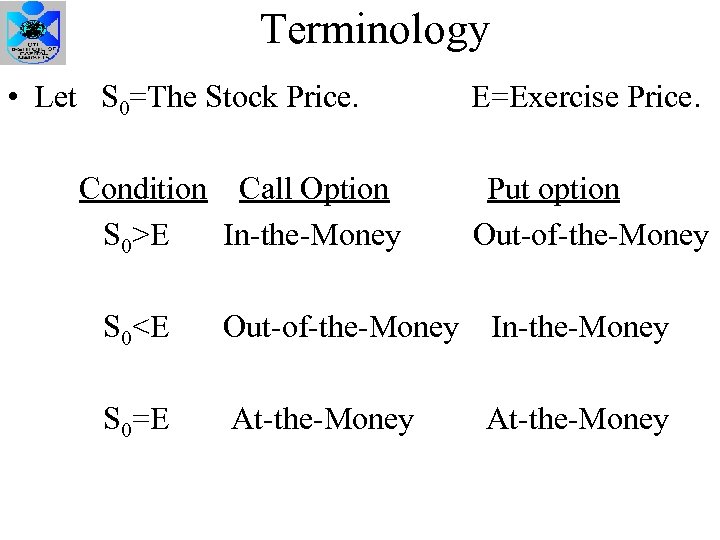 Terminology • Let S 0=The Stock Price. Condition Call Option S 0>E In-the-Money E=Exercise Price. Put option Out-of-the-Money S 0
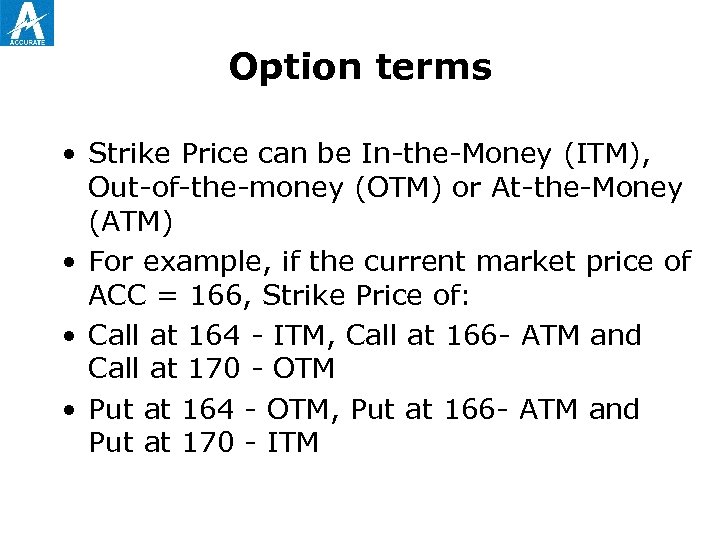 Option terms • Strike Price can be In-the-Money (ITM), Out-of-the-money (OTM) or At-the-Money (ATM) • For example, if the current market price of ACC = 166, Strike Price of: • Call at 164 - ITM, Call at 166 - ATM and Call at 170 - OTM • Put at 164 - OTM, Put at 166 - ATM and Put at 170 - ITM
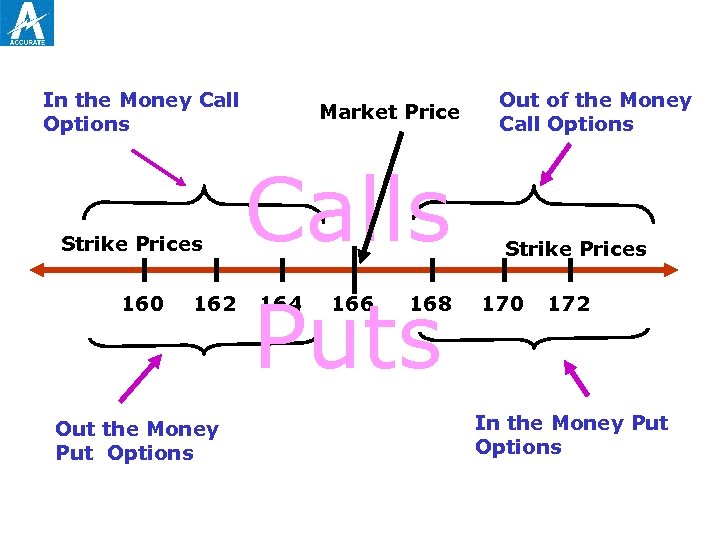 In the Money Call Options Strike Prices 160 162 Out the Money Put Options Market Price Calls Puts 164 166 168 Out of the Money Call Options Strike Prices 170 172 In the Money Put Options
 Intrinsic & Time Value • Option premiums can be divided into two parts. • Intrinsic value: Is the amount the option is ITM. Its zero for ATM and OTM. • Time value is the difference between its premium and its intrinsic value. • Usually Time Value is maximum when the call/Put is ATM.
 IN, AT , OUTOF-THE-MONEY • To identify whether an option is IN-, AT- or OUT-OFTHE-MONEY, one need only compare the EXERCISE PRICE of the option to the STOCK PRICE of the underlying asset. • KEEP IN MIND THAT. . . • In-the-Money Options have INTRINSIC VALUE • At-the-Money Options have INTRINSIC VALUE EQUAL TO ZERO
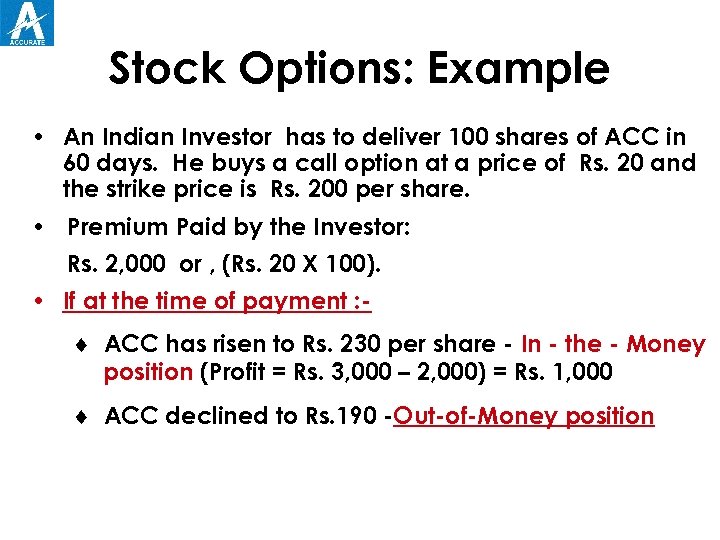 Stock Options: Example • An Indian Investor has to deliver 100 shares of ACC in 60 days. He buys a call option at a price of Rs. 20 and the strike price is Rs. 200 per share. • Premium Paid by the Investor: Rs. 2, 000 or , (Rs. 20 X 100). • If at the time of payment : ¨ ACC has risen to Rs. 230 per share - In - the - Money position (Profit = Rs. 3, 000 – 2, 000) = Rs. 1, 000 ¨ ACC declined to Rs. 190 -Out-of-Money position
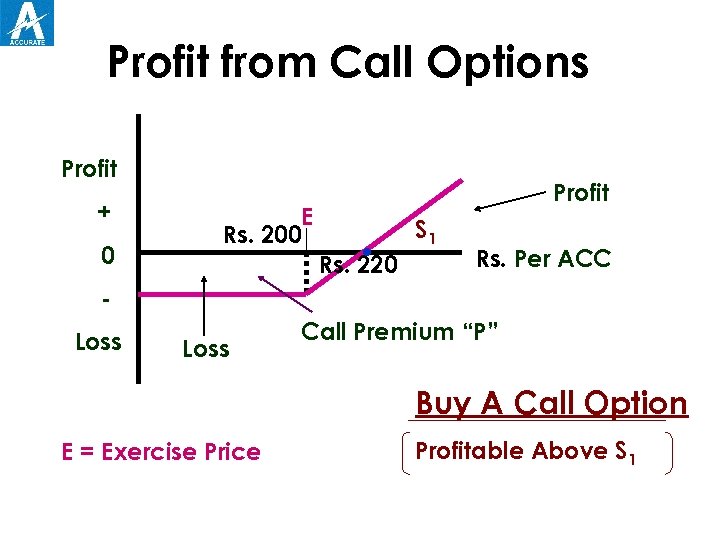 Profit from Call Options Profit + 0 E Rs. 200 Profit . Rs. 220 S 1 Rs. Per ACC Loss Call Premium “P” Buy A Call Option E = Exercise Price Profitable Above S 1
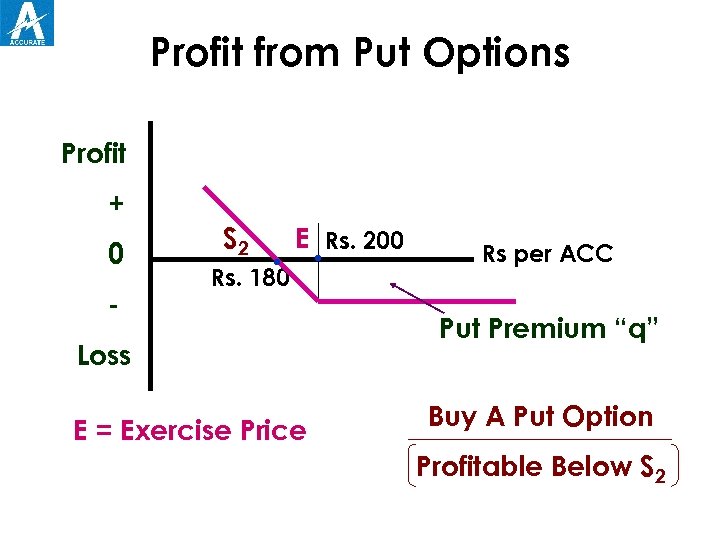 Profit from Put Options Profit + 0 - S 2 . Rs. 180 E. Rs. 200 Loss E = Exercise Price Rs per ACC Put Premium “q” Buy A Put Option Profitable Below S 2
 Options: Strategy • An investor who expects a bull market should buy a call option. • An investor who expects a bear market should buy a put option. • The seller receives the premium but his risk is unlimited. • For this reason, the selling of options should be considered only by experienced traders.
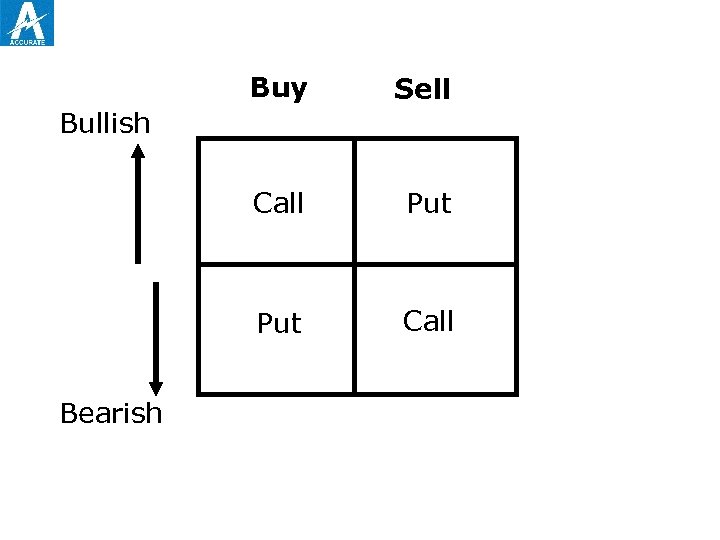 Buy Sell Call Put Call Bullish Bearish
 FACTORS AFFECTING PREMIA • There are five major factors affecting the Option premium: · Price of Underlying · Exercise Price Time to Maturity · Volatility of the Underlying • And two less important factors: · Short-Term Interest Rates · Dividends
 Entities in the trading system Trading Members Clearing Members Participants
 TRADING
 Entities in the trading system Trading Members Trading members are members of NSE. They can trade either on their own account or on behalf of their clients including participants. The exchange assign a trading member ID to each trading member. Each trading member can have more than one user. The number of user for each trading member is notified by the exchange from time to time. Each user of a trading member must be registered with the exchange and is assigned an unique user ID.
 Entities in the trading system Trading Members (contd. . ) The Unique trading member ID functions as a reference for all orders/trades of different users. This ID is common for all users of a particular trading member. It is the responsibility of the trading member to maintain adequate control over persons having access to the firm’s User IDs.
 Entities in the trading system Clearing Members Clearing members are members of NSCCL. They carry out risk management activities and confirmation/inquiry of trades through the trading system.
 Entities in the trading system Participants A participant is a client of trading members like financial institutions. These clients may trade through multiple trading members but settle through a single clearing member.
 Order types and conditions Time conditions Price conditions Other conditions
 Order types and conditions Time conditions - Day Order: A day order, as name suggest is an order which is valid for the day on which it is entered. If the order is not executed during the day, the system cancels the order automatically at the end of the day
 Order types and conditions Time conditions (contd…) - Good till canceled(GTC): A GTC order remains in the system until the user cancels it. Consequently, it spans trading days, if not traded on the day the order is entered. The maximum number of days an order can remain in the system is notified by the exchange from time to time after which the order is automatically cancelled by the system.
 Order types and conditions Time conditions (contd…) - Good till canceled(GTC): (contd…) Each day counted is a calendar day inclusive of holidays. The days counted are inclusive of the days on which the order is placed and the order is cancelled from the system at the end of the day of the expiry period
 Order types and conditions Time conditions (contd…) - Good till days/date (GTD): A GTD order should stay in the system if not executed. The maximum days allowed by the system are the same as in GTC order. At the end of this day/date, the order is cancelled from the system. Each day/date counted are inclusive of the day/date on which the order is placed and the order is cancelled from the system at the end of the day/date of the expiry period
 Order types and conditions Time conditions (contd…) - Immediate or Cancel (IOC): An IOC order allows the user to buy or sell a contract as soon as the order is released into the system, failing which the order is cancelled from the system. Partial match is possible for the order, and the unmatched portion of the order is cancelled immediately.
 Order types and conditions Price conditions - Stop – loss: This facility allows the users to release an order into the system, after the market price of the security reaches or crosses at threshold price. E. g. if for stop-loss buy order, the trigger is 1024. 00, the limit price is 1030. 00 and the market (last traded) price is 1023. 00 then this order is released into the system once the market price reaches or exceeds 1024. 00. This order is added to the regular lot of books with time of triggering as the time stamp, as a limit order of 1030. 00. For the stop-loss sell order, the trigger price has to be greater than the limit price
 Order types and conditions Other conditions (contd…) - Market Price: Market orders are for which no price is specified at the time the order is entered (i. e. price is market price). For such order, the system determines the price. - An opening price(ATO): ATO price is the price arrived at by the system after the pre-open phase is over
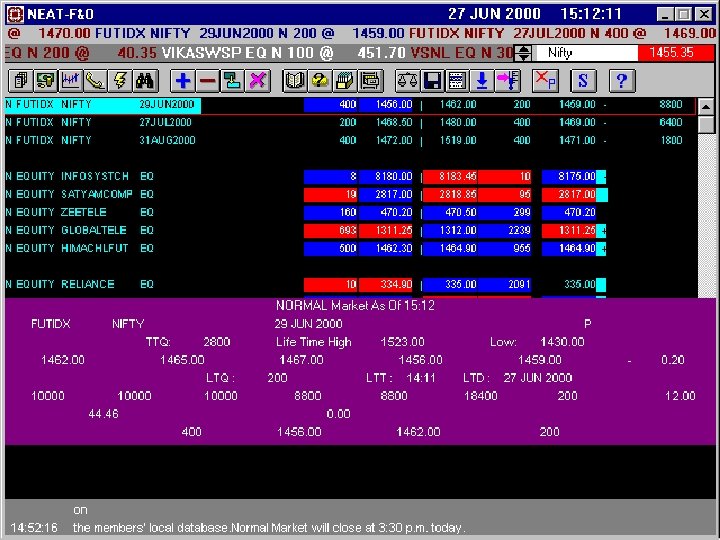
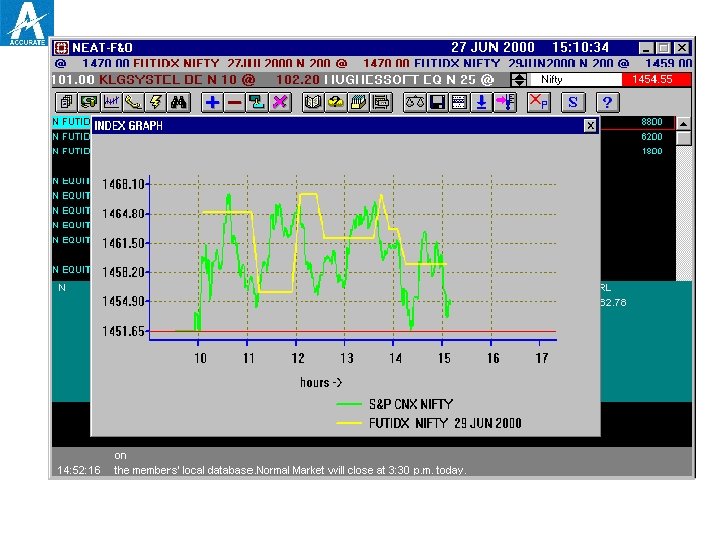
 The market watch window Ø Ø Ø Ø Ø The following windows are displayed on the trader workstation screen. Title bar Ticker window of futures and option market Ticker window of underlying(capital) market Tool bar Market watch window Inquiry window Snap quote Order/trade window System message window
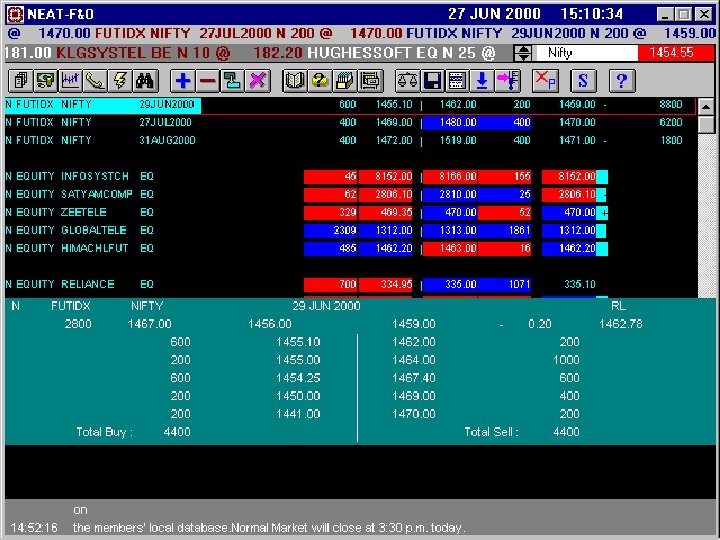
 Inquiry window Market by order (MBO) The purpose of the MBO is to enable the user to view passive orders in the trading books in the order of price/time priority for a selected security. The F 5 key invokes the selection window for MBO. If a particular contract or security is selected, the details of the selected contract or security defaults in the selection screen or else the current position in market watch defaults.
 Inquiry window Market by order (MBO) (contd…) Details of contract or security from the contract list or from the last operation. The field that are available on the selection screen are instrument, symbol, expiry and book type. The instrument type, symbol, expiry and book type fields are compulsory.
 Inquiry window Market by price (MBP) The purpose of MBP is to enable the user to view passive orders in the market aggregated at each price and are displayed in order of best prices. The window can be involved by pressing the (F 6) key. If a particular contract or security is selected the details of the selected contract or security can be seen on this screen.
 Inquiry window Market Inquiry (MI) contd…. The market inquiry screen can be involved by using the (F 11) key. If a particular contract or security is selected, the details of the selected contract or selected security defaults in the selection screen or else the current position in the market watch defaults. Fig. 8. 2 shows the detailed market inquiry output screen. The first line of the screen gives the instrument type, symbol, expiry, contract status, total traded quantity, life time high and life time low.
 Inquiry window Market Inquiry (MI) The second line displays the closing price, open price, high price, low price, last traded price and indicator for net change from closing price. The third line displays the last traded quantity, last traded time and last traded date. The fourth line displays the closing open interest, the opening open interest, day high open interest, day low open interest, current open interest, life time high open interest, life time low open interest and net change from closing open interest.
 Inquiry window Market Inquiry (MI) The fifth line display very important information, namely the carrying cost in percentage terms. It also displays the present value of dividends, best buy price, best buy quantity, best sell quantity and best sell price
 Placing orders on the trading system For both the futures and the options market, while entering orders on the trading system, members are required to identify orders as being proprietary or client orders. Proprietary orders should be identified as “Pro” and those of clients should be identified as “Cli”. Apart from this, in the case of “Cli” trades, the client account number should also be provided. Client orders should be marked as either: Buy “Open” Sell “Open” Buy “Close” Sell “Close”
 Placing orders on the trading system Buy “Open” client orders are those wherein the client has first opened a buy position before sell. At the time the client wishes to close out this open positions, the respective sell order should be identified as Sell “Close” and when the same Sell “Open” position is to be closed out the respective buy order should be marked as “Buy “Close” order. The futures market is a zero sum game I. e. the total number of long in any contract always equals the total number of short in any market.
 Placing orders on the trading system The total number of long in any contract (long/ short) in any point of time is called the “open interest”. This Open interest figures is a good indicator of the liquidity in every contract. Based on studies carried out in international exchanges, it is found that open interest is maximum in near mouth expiry contracts.
 Options market instruments Index based option Individual stock option
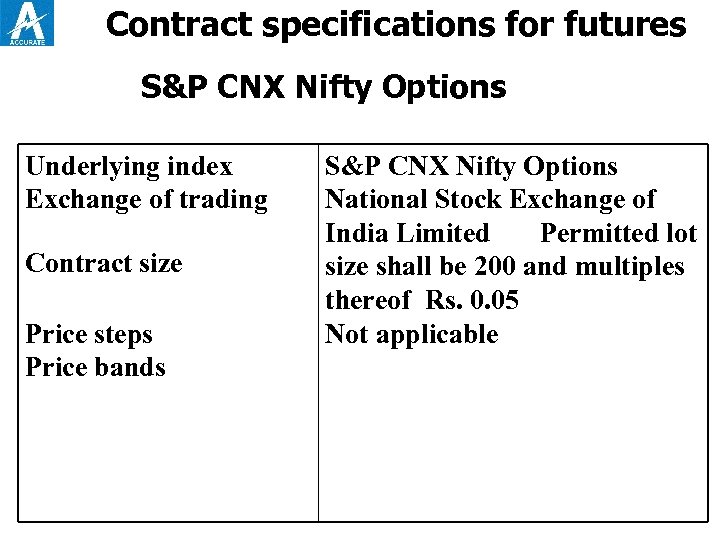 Contract specifications for futures S&P CNX Nifty Options Underlying index Exchange of trading Contract size Price steps Price bands S&P CNX Nifty Options National Stock Exchange of India Limited Permitted lot size shall be 200 and multiples thereof Rs. 0. 05 Not applicable
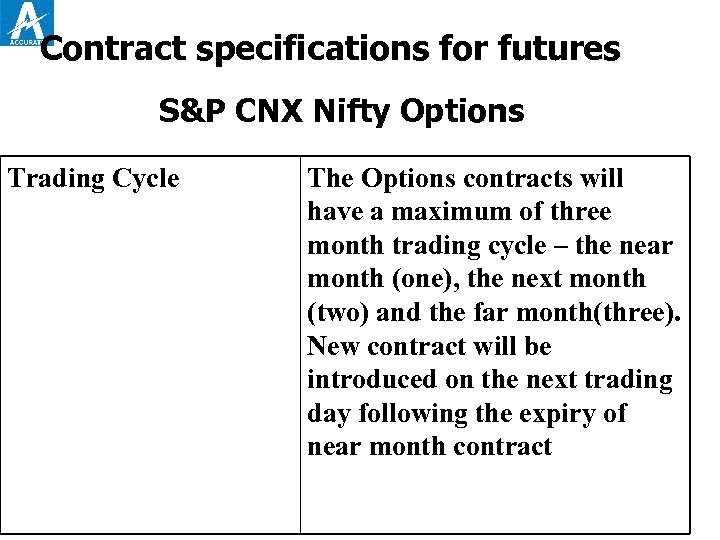 Contract specifications for futures S&P CNX Nifty Options Trading Cycle The Options contracts will have a maximum of three month trading cycle – the near month (one), the next month (two) and the far month(three). New contract will be introduced on the next trading day following the expiry of near month contract
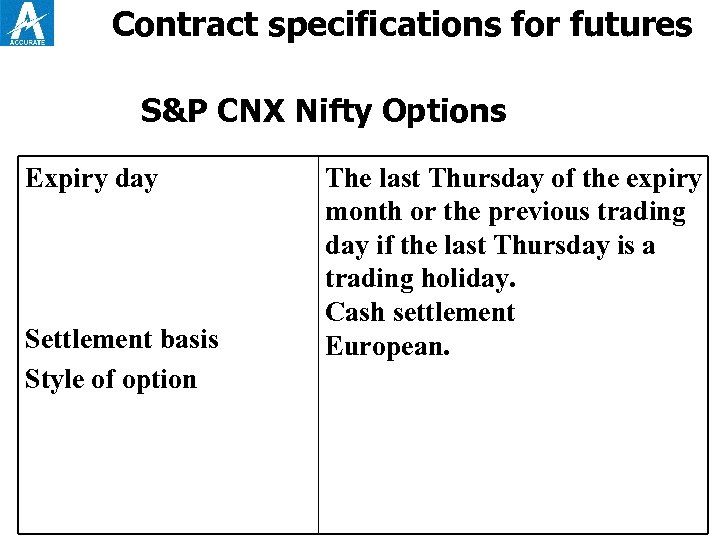 Contract specifications for futures S&P CNX Nifty Options Expiry day Settlement basis Style of option The last Thursday of the expiry month or the previous trading day if the last Thursday is a trading holiday. Cash settlement European.
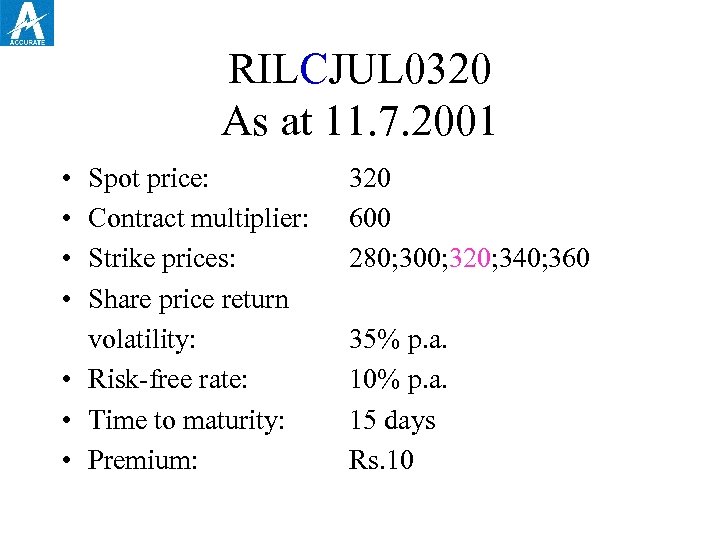 RILCJUL 0320 As at 11. 7. 2001 • • Spot price: Contract multiplier: Strike prices: Share price return volatility: • Risk-free rate: • Time to maturity: • Premium: 320 600 280; 300; 320; 340; 360 35% p. a. 10% p. a. 15 days Rs. 10
 Charges The maximum brokerage chargeable by a trading member in relation to trades effected in contract admitted to dealing on the derivatives segment of the exchange is fixed at 2. 5% of the contract value, exclusive of statutory levies. The transaction charges payable by each trading member for the trades executed by him on the derivatives segment are fixed at Rs. 2 per lakh of turnover(0. 002%) (each side) or Rs. 1 lakh annually, whichever is higher
 Charges The trading members contribute to Investor Protection Fund of derivatives segment at the rate of Rs. 10 per crore of turnover (0. 0001%) (each side)
 REFERENCES • Black-Scholes and Beyond: Option Pricing Models: By Neil A. Chriss • Applied Maths for Derivatives: By John S. Martin. • Derivative: By Paul Wilmott • An Introduction to Derivative: -By Don M. Chance • Advanced Modelling in Finance using Excell and VBA: By Marry Jackson and Mike Staunton
 Thank you
 TOPIC FOR PRESENTATIONS • The Fall of Barings. • Is Future with stock lending a Synthetic Badla? • The Function of CBOE and lessons for Indian Stock Exchanges. • The best Derivative product. • Can US-64 survive with the help of Derivatives? • Market Integration & Derivatives. • Development of World Derivatives’ market and lessons for India.