 Скачать презентацию Ambient Intelligence for the networked home environment Palantir
fbd276296fecac250d1dba332ef1cab8.ppt
- Количество слайдов: 20



Ambient Intelligence for the networked home environment Palantir demo, tutorial and Crash Course Thibaud Flury & Anne Gerodolle (France Telecom)
Palantir, Demo, tutorial and crash course • Step 1, theory … – Palantir reminder – The architecture – Palantir bundles and deployment issues • Step 2, … the practice – Requirements – Configuration issues – Starting and playing the palantir • Step 3, the questions – Advanced palantir use cases – Open discussion 2
Step 1 Palantir, theory… 3
Step 1 Palantir, the Theory … • The vision (mid-2006) • Main roles of the Palantir – A service to calculate the presence for ambient applications – An ambient-application for presence management for the user 4
Step 1 Palantir, the Theory … • How to "calculate" a presence status for a user ? – For the Ambient Application (using specific presence model) – From context information (using ANS, CMS and UMPS) – From user explicit input (using distributed interaction devices) • What to do with this presence status ? – Communicate it to other users (my buddies) – Inform the Ambient Application (to engage communcation) • What is the presence status ? – The Presence dimension – ability to communicate • Can I send information, receive information, communicate? – The Awareness dimension – willingness to communicate • Does I want to communicate, am I ready to communicate, are the communication means convenient for me ? – This information is partially defined in the presence models • Provided by ambient applications 5
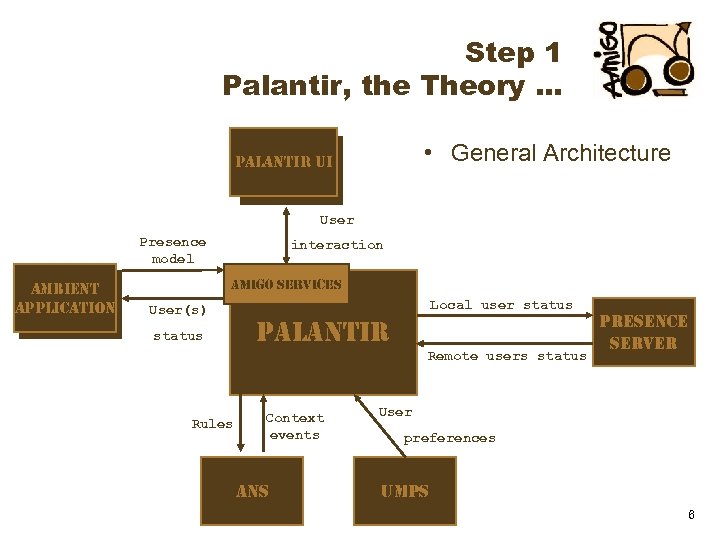
Step 1 Palantir, the Theory … • General Architecture palantir ui Control UI User Presence model ambient Ambiant application Application interaction amigo services User(s) status Rules Local user status palantir Context events ans Remote users status presence server User preferences umps 6

Step 1 Palantir, the Theory … • The Palantir Modules palantir ui Control UI Presence Event Listener ambient Ambiant application Presence Event Listener Application Presence Model. Loader Presence Interaction Service presence interaction module palantir administration module presence aggregation module presence gateway module XMPP presence server To be defined ans umps 7
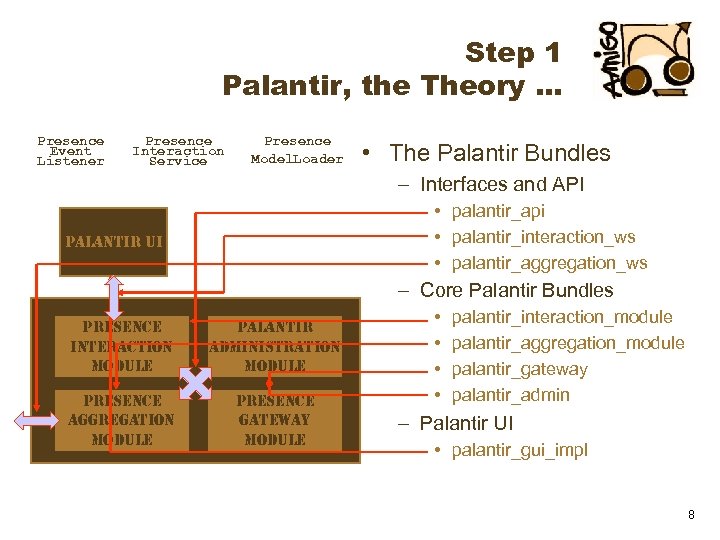
Step 1 Palantir, the Theory … Presence Event Listener Presence Interaction Service Presence Model. Loader • The Palantir Bundles – Interfaces and API • palantir_api • palantir_interaction_ws • palantir_aggregation_ws palantir ui – Core Palantir Bundles presence interaction module palantir administration module presence aggregation module presence gateway module • • palantir_interaction_module palantir_aggregation_module palantir_gateway palantir_admin – Palantir UI • palantir_gui_impl 8
Step 1 Palantir, the Theory … • Deployment for project demonstrations – In each house – deploy the Palantir Service on a single OSGi platform • api / interaction_ws / aggregation_ws • interaction_module / aggregation_module / gateway / admin • The palantir_admin will start a palantir instance for each user of the home – Associated to each human interaction device – deploy the UI • interaction_ws • Palantir_gui_impl (for example with a gui) – Associated to each ambient application – deploy the application • aggregation_ws / interaction_ws • Specific application bundles or services – Associated to each house – The composition service 9
Step 1 Palantir, the Theory … • Deployment for project demonstrations – – In each house – deploy the Palantir Service on a single OSGi platform Associated to each human interaction device – deploy the UI Associated to each ambient application – deploy the application Associated to each house – The composition service • Deployment for this demo – on a single OSGi platform – The Palantir Service will start a single palantir instance • api / interaction_ws / aggregation_ws • interaction_module / aggregation_module / gateway / admin – The Palantir GUI • Palantir_gui_impl – Special bundles to dynamically compose the palantir with the GUI • Palantir_standalone_composer • Palantir_gui_composer 10
Step 2 Palantir, … the practice 11
Step 2 … Palantir, The Practice • Requirements for the demo / Tutorial – A PC with Wifi Access • Network SSID : WANADOO_C 43 D – A Java runtime environment • JRE 1. 5 + or 1. 6 – The preconfigured OSCAR platform • Get it from an USB key • Or using the network http: //g-nc 4000 -3/palantir. Tutorial. zip 12
Step 2 … Palantir, The Practice • Check the XMPP configuration – Verify your connection properties. /oscar_Palantir/config/XXX/palantir. properties • XXX being your user name in lower-case letters – It should match the properties written on the paper • Configure the Palantir Instance(s) to start – Specify your user name. /oscar_Palantir/config/prefs. properties - line 2 palantir. user. Ids = XXX • XXX being your user name in lower-case letters 13
Step 2 … Palantir, The Practice • Configure the GUI – Edit properties published by the GUI (to be found as a WS). /oscar_Palantir/palantir-gui. properties palantir. location = standalone. XXX palantir. user = XXX • Replace XXX with your user name in lower-case letters – Have a look to the. /oscar_Palantir/init. Gui. properties • Configure the Oscar bundles. properties – Edit. /oscar_Palantir/palantir. properties palantir. user = XXX (line 14) • Replace XXX with your user name in lower-case letters • Those properties on line 12, 13 and 14 are the research properties for the standalone composer (upon property name and value) – Pay attention to the property line 9 • This URL defines the place where the palantir admin must look for the configuration of palantir instances 14
Step 2 … Palantir, The Practice • Starting the Palantir – Those bundles have to be installed • jaxb • palantir_api • palantir_interaction_ws • palantir_aggregation_ws – Those bundles have to be started (order doesn't matter) • palantir_interaction_module • palantir_aggregation_module • palantir_gateway – To start the palantir instance (must be started in last) • palantir_admin – Watch out the log trace (default is set to warn level) 15
Step 2 … Palantir, The Practice • Starting the Palantir GUI – This bundle have to be installed • palantir_interaction_ws – To start the palantir gui • palantir_gui_impl – Watch out the log trace (default is set to warn level) • Starting the standalone composer – This bundle will bind the instance with the gui • palantir_standalone_composer • Just play with your Palantir !!! 16
Step 2 … Palantir, The Practice • Experiment the dynamic composition – Start the gui composer • palantir_gui_composer • This bundle allow you to lookup for particular instance or gui – Try starting to configure and start another gui • in another oscar platform – just copy your oscar directory – modify. /oscar_Palantir/palantir-gui. properties – Try "borrowing" the gui of somenone else 17
Step 5 Palantir, the questions 18
Where to find further informations – This presentation, an html tutorial and an archive of the preconfigured oscar available at : http: //amigo. gforge. inria. fr/obr/palantir/ 19

20
Скачать презентацию Ambient Intelligence for the networked home environment Palantir
fbd276296fecac250d1dba332ef1cab8.ppt