 Скачать презентацию Ali En Tutorial ALICE workshop Sibiu 20 th
81cf578718839cdd3dc679170f814474.ppt
- Количество слайдов: 45



Ali. En Tutorial ALICE workshop Sibiu 20 th August, 2008 Pablo Saiz
Outline I Installation of the Ali. En software. Ali. En and the GRID Authentication – Possible problems. General description of the shell: Working with the file catalogue: Submitting jobs References 20 August 2008 Pablo. Saiz@cern. ch 2
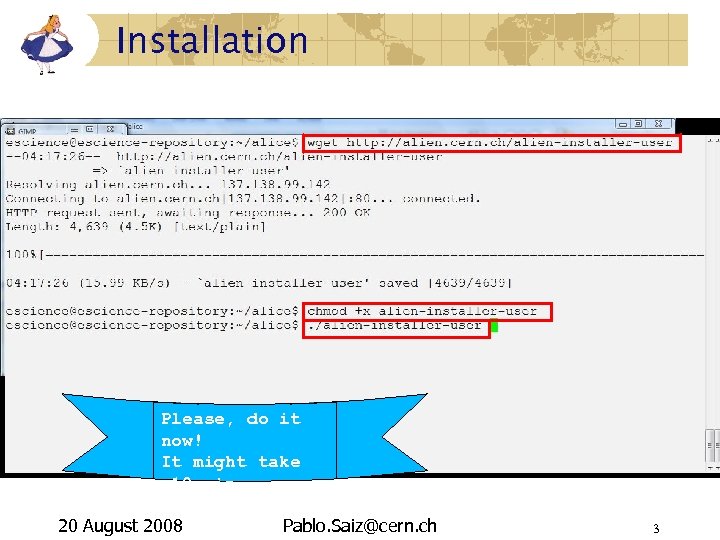
Installation Please, do it now! It might take ~10 min. . . 20 August 2008 Pablo. Saiz@cern. ch 3
Ali. En, Ali. En 2 ALICE ENvironment on the GRID middleware Developed as single entry point to the GRID for ALICE Used also by other VOs All the components necessary to build a GRID and interact with other GRIDs File System with metadata Authorization, authentication, job optimization and execution, storage management Audit, quotas, monitoring Interfaces to various GRID implementations Used since: 2002 for centrally managed productions 2006 for user analysis http: //alien. cern. ch 20 August 2008 Pablo. Saiz@cern. ch 4
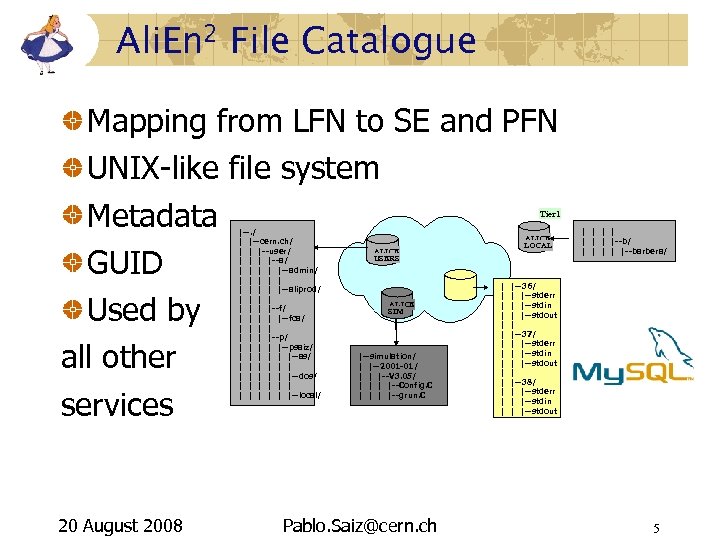
Ali. En 2 File Catalogue Mapping from LFN to SE and PFN UNIX-like file system Metadata GUID Used by all other services Tier 1 |--. / | |--cern. ch/ | | |--user/ | |--a/ | | |--admin/ | | | | |--aliprod/ | | | |--f/ | | |--fca/ | | | |--p/ | | |--psaiz/ | | |--as/ | | |--dos/ | | |--local/ 20 August 2008 ALICE LOCAL ALICE USERS ALICE SIM |--simulation/ | |--2001 -01/ | | |--V 3. 05/ | |--Config. C | |--grun. C Pablo. Saiz@cern. ch | | | | | |--b/ | | |--barbera/ |--36/ | |--stderr | |--stdin | |--stdout | |--37/ | |--stderr | |--stdin | |--stdout | |--38/ | |--stderr | |--stdin | |--stdout 5
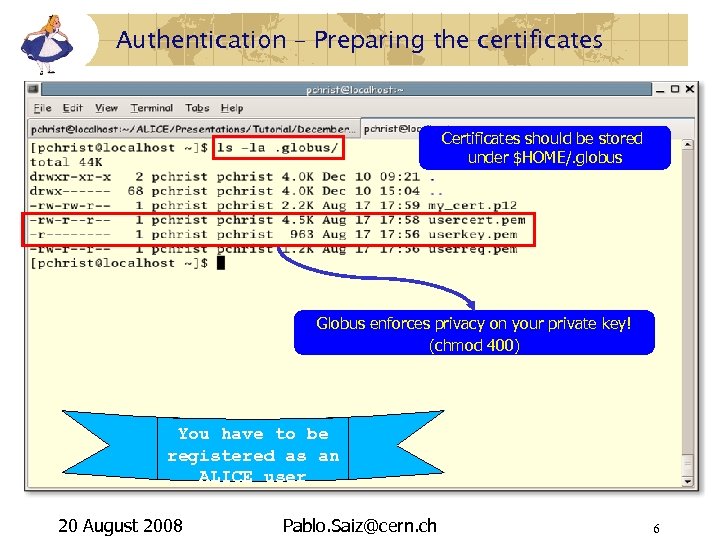
Authentication – Preparing the certificates Certificates should be stored under $HOME/. globus Globus enforces privacy on your private key! (chmod 400) You have to be registered as an ALICE user 20 August 2008 Pablo. Saiz@cern. ch 6
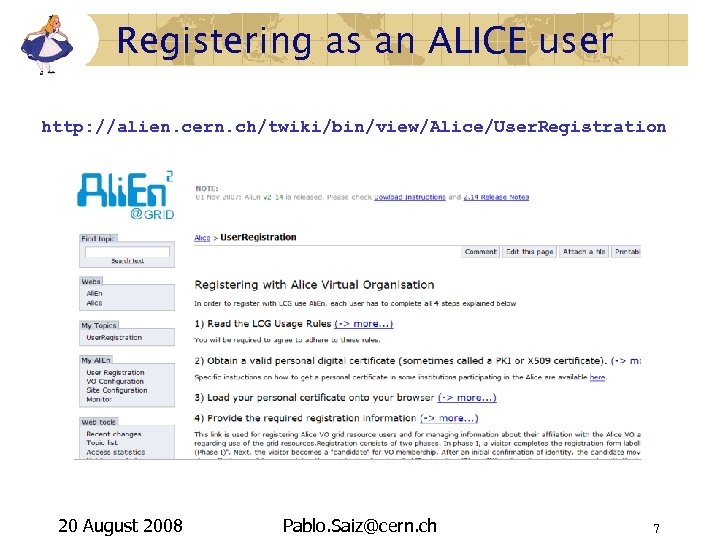
Registering as an ALICE user http: //alien. cern. ch/twiki/bin/view/Alice/User. Registration 20 August 2008 Pablo. Saiz@cern. ch 7
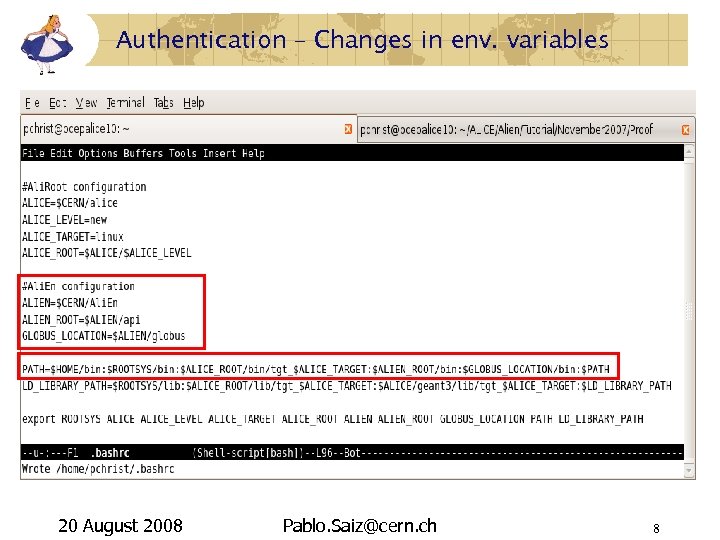
Authentication – Changes in env. variables 20 August 2008 Pablo. Saiz@cern. ch 8
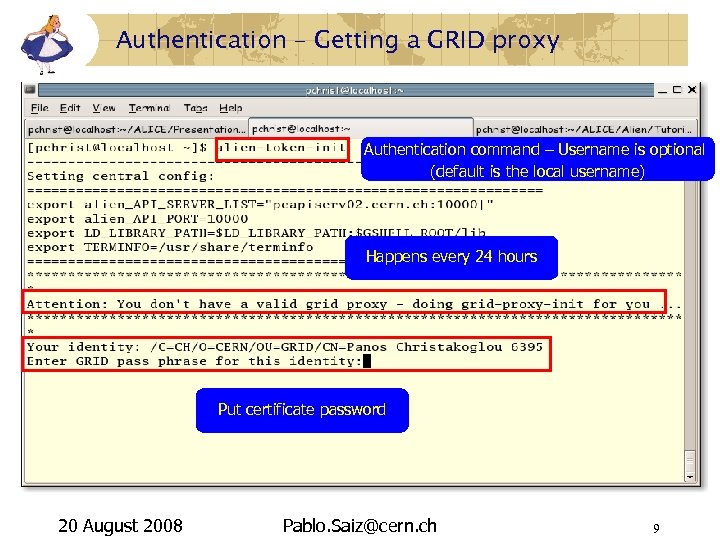
Authentication – Getting a GRID proxy Authentication command – Username is optional (default is the local username) Happens every 24 hours Put certificate password 20 August 2008 Pablo. Saiz@cern. ch 9
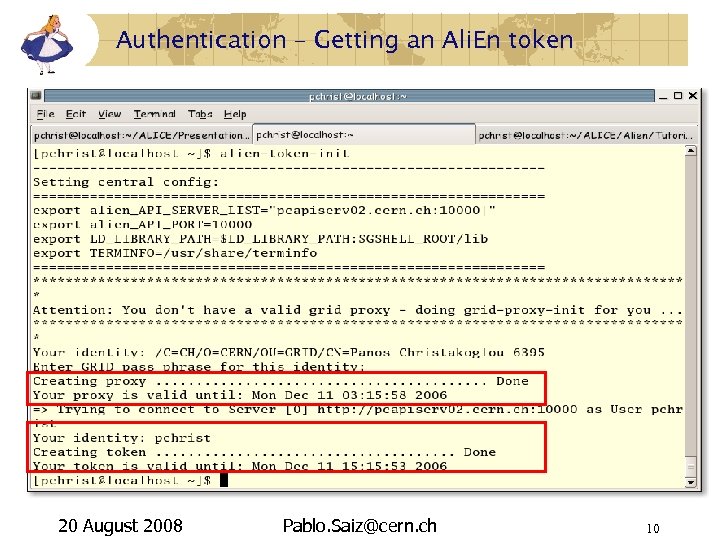
Authentication – Getting an Ali. En token 20 August 2008 Pablo. Saiz@cern. ch 10
Authentication – Authentication problems I Globus related: Permissions on $HOME/. globus/userkey. pem are not private to the user – chmod 400 userkey. pem Your certificate authority is exotic and not known to the server. Your certificate has expired. Clock skew: • • Your local computer time is in the future with respect to the server's time. Your local computer time is more in the past than the certificate life time. 20 August 2008 Pablo. Saiz@cern. ch 11
Authentication – Authentication problems II alien-token-init related: You have not gone through all 5 steps of the Ali. En user registration. You have not given the Ali. En user name as an argument to the token-init command your local user name is not identical to the Ali. En user name. The script wants to bootstrap the installation but you don't have write permissions on the installation path – Avoid bootstrapping by setting the GSHELL_ROOT environment variable. 20 August 2008 Pablo. Saiz@cern. ch 12
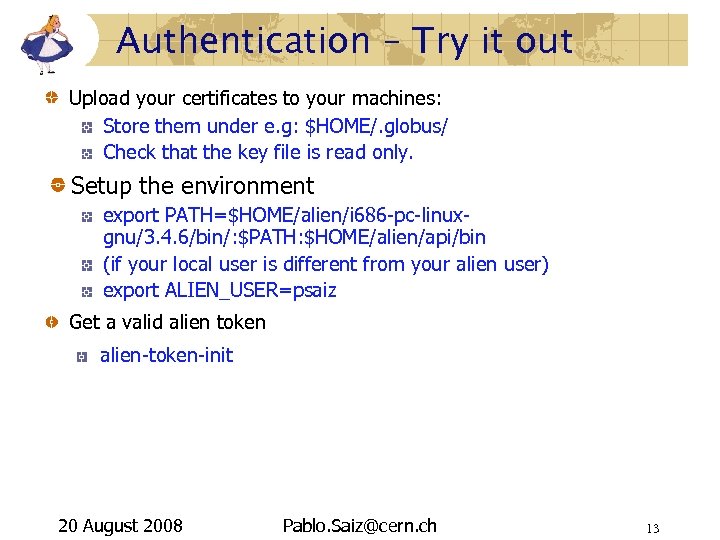
Authentication – Try it out Upload your certificates to your machines: Store them under e. g: $HOME/. globus/ Check that the key file is read only. Setup the environment export PATH=$HOME/alien/i 686 -pc-linuxgnu/3. 4. 6/bin/: $PATH: $HOME/alien/api/bin (if your local user is different from your alien user) export ALIEN_USER=psaiz Get a valid alien token alien-token-init 20 August 2008 Pablo. Saiz@cern. ch 13
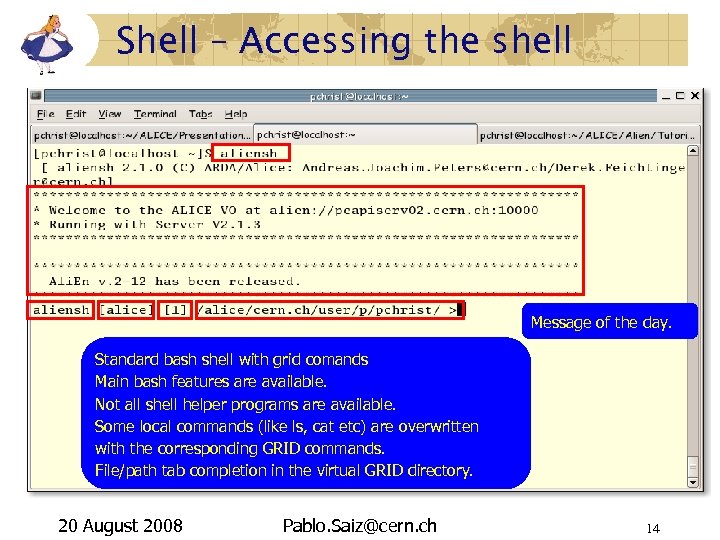
Shell – Accessing the shell Message of the day. Standard bash shell with grid comands Main bash features are available. Not all shell helper programs are available. Some local commands (like ls, cat etc) are overwritten with the corresponding GRID commands. File/path tab completion in the virtual GRID directory. 20 August 2008 Pablo. Saiz@cern. ch 14
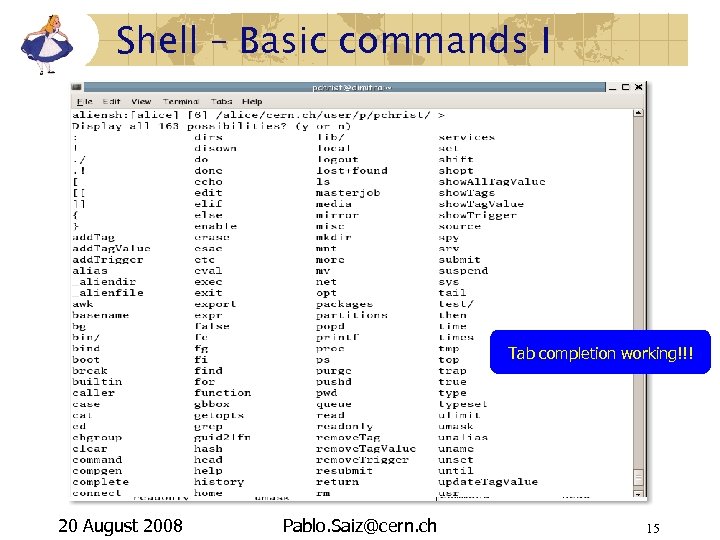
Shell – Basic commands I Tab completion working!!! 20 August 2008 Pablo. Saiz@cern. ch 15
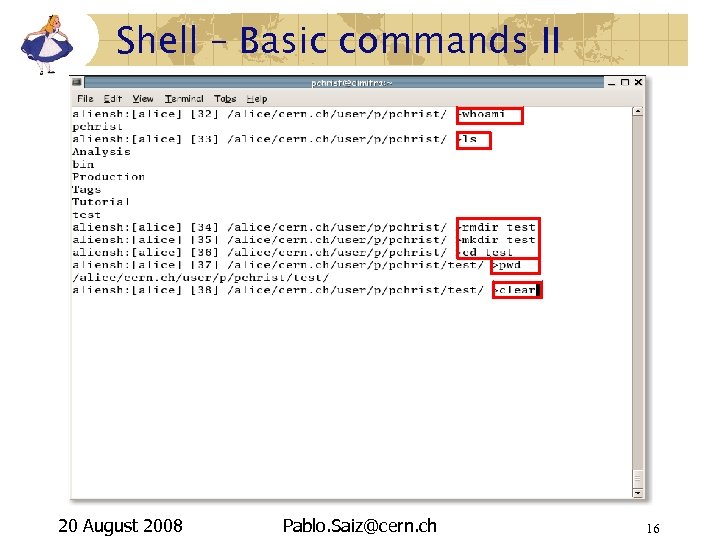
Shell – Basic commands II 20 August 2008 Pablo. Saiz@cern. ch 16
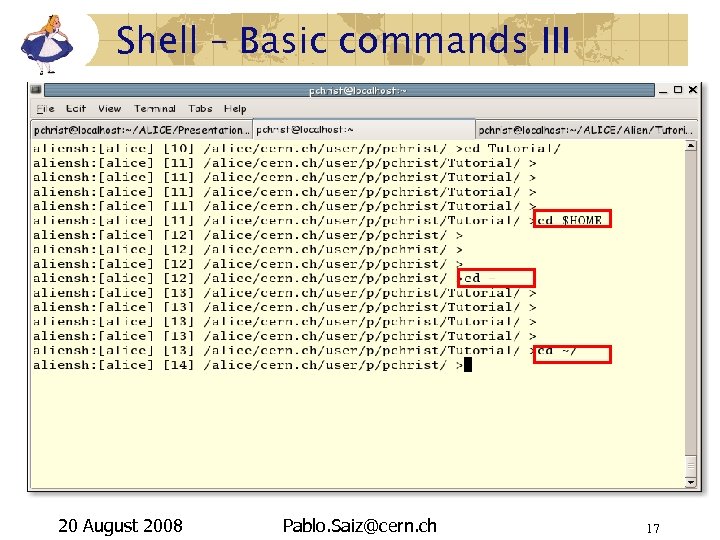
Shell – Basic commands III 20 August 2008 Pablo. Saiz@cern. ch 17
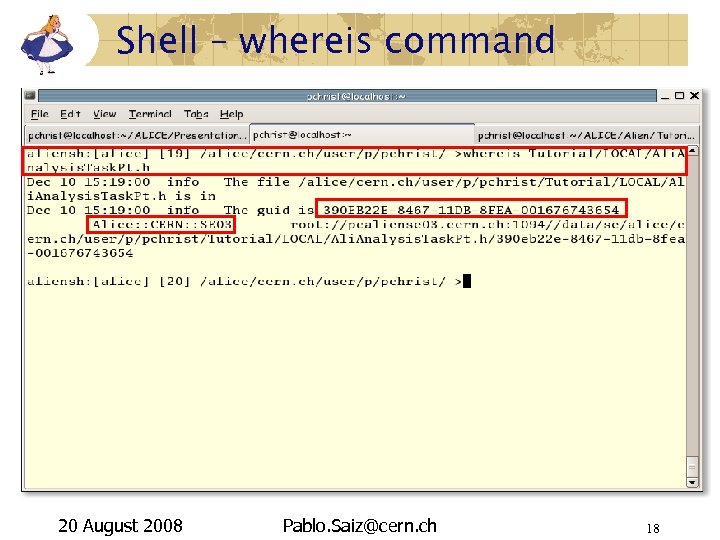
Shell – whereis command 20 August 2008 Pablo. Saiz@cern. ch 18
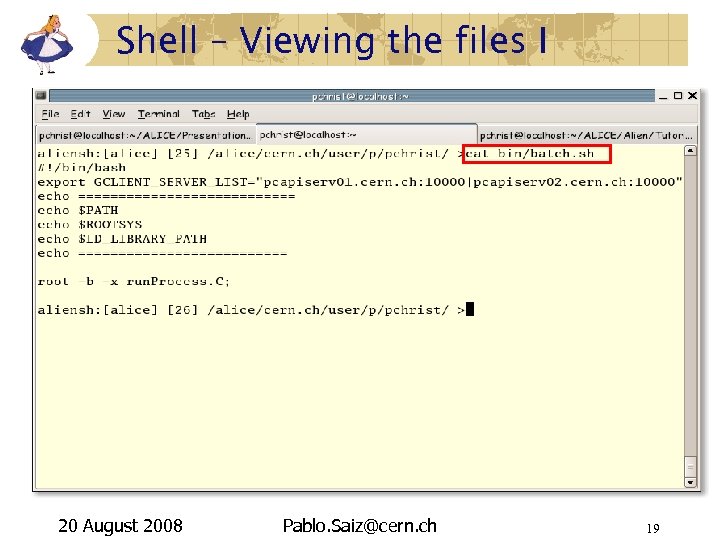
Shell – Viewing the files I 20 August 2008 Pablo. Saiz@cern. ch 19
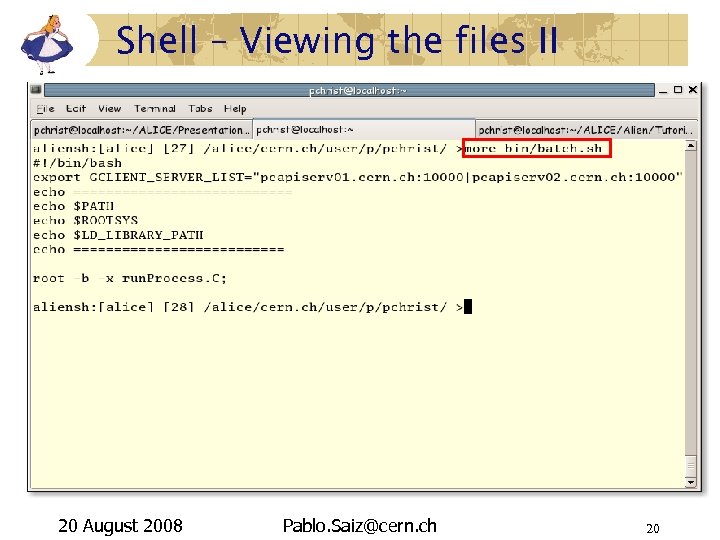
Shell – Viewing the files II 20 August 2008 Pablo. Saiz@cern. ch 20
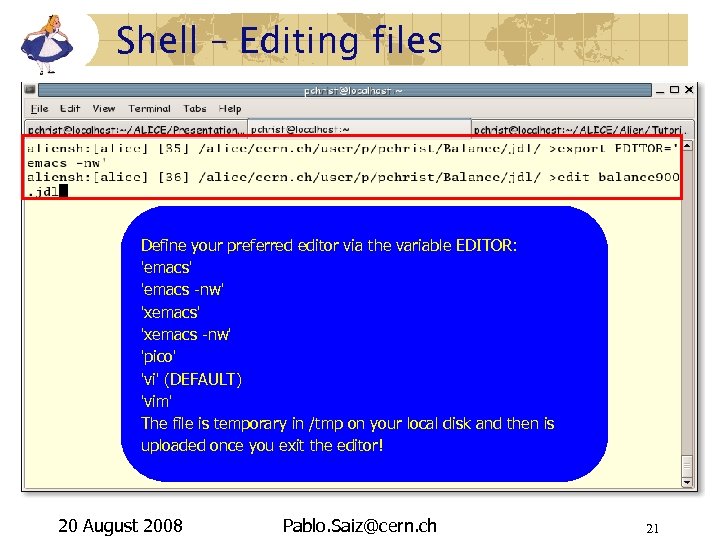
Shell – Editing files Define your preferred editor via the variable EDITOR: 'emacs' 'emacs -nw' 'xemacs -nw' 'pico' 'vi' (DEFAULT) 'vim' The file is temporary in /tmp on your local disk and then is uploaded once you exit the editor! 20 August 2008 Pablo. Saiz@cern. ch 21
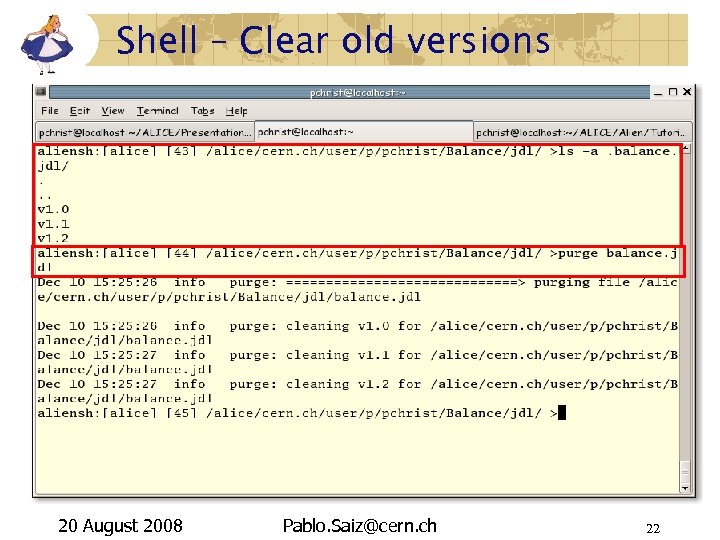
Shell – Clear old versions 20 August 2008 Pablo. Saiz@cern. ch 22
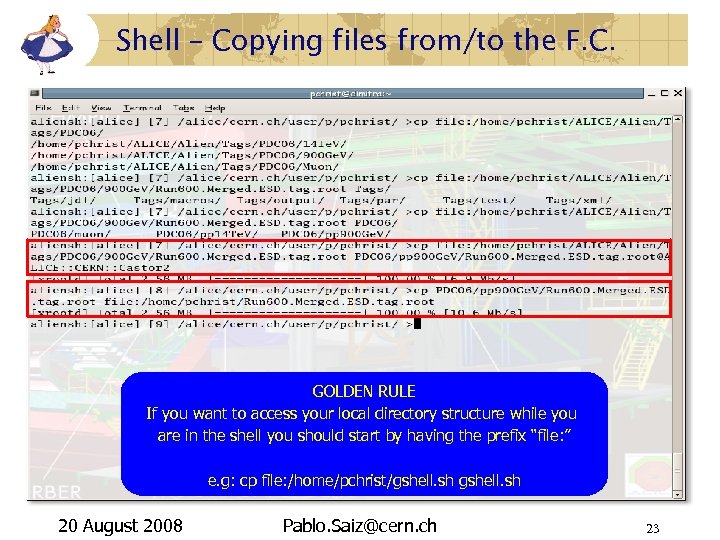
Shell – Copying files from/to the F. C. GOLDEN RULE If you want to access your local directory structure while you are in the shell you should start by having the prefix “file: ” e. g: cp file: /home/pchrist/gshell. sh 20 August 2008 Pablo. Saiz@cern. ch 23
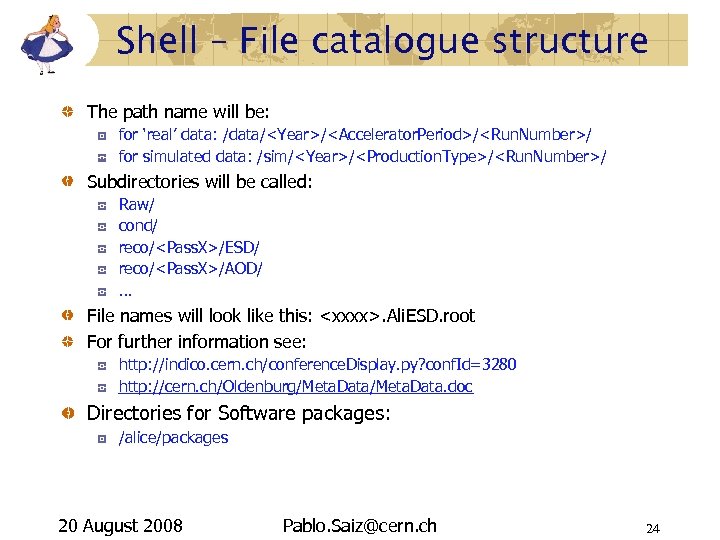
Shell – File catalogue structure The path name will be: for ‘real’ data: /data/<Year>/<Accelerator. Period>/<Run. Number>/ for simulated data: /sim/<Year>/<Production. Type>/<Run. Number>/ Subdirectories will be called: Raw/ cond/ reco/<Pass. X>/ESD/ reco/<Pass. X>/AOD/ … File names will look like this: <xxxx>. Ali. ESD. root For further information see: http: //indico. cern. ch/conference. Display. py? conf. Id=3280 http: //cern. ch/Oldenburg/Meta. Data. doc Directories for Software packages: /alice/packages 20 August 2008 Pablo. Saiz@cern. ch 24
![Shell – Querying the F. C. I aliensh: [alice] [1] find -x pp /alice/cern.](https://present5.com/presentation/81cf578718839cdd3dc679170f814474/image-25.jpg "Shell – Querying the F. C. I aliensh: [alice] [1] find -x pp /alice/cern.")
Shell – Querying the F. C. I aliensh: [alice] [1] find -x pp /alice/cern. ch/user/p/pchrist/Tutorial/PDC 06/* *Merged*tag. root > pp. xml Redirect the output to the xml collection. 20 August 2008 Pablo. Saiz@cern. ch 25
![Shell – Querying the F. C. II aliensh: [alice] [1] find -x pp /alice/data/2008/LHC](https://present5.com/presentation/81cf578718839cdd3dc679170f814474/image-26.jpg "Shell – Querying the F. C. II aliensh: [alice] [1] find -x pp /alice/data/2008/LHC")
Shell – Querying the F. C. II aliensh: [alice] [1] find -x pp /alice/data/2008/LHC 08 a/*/reco/Pass 3/* *Merged*tag. root Run: collision_system=”pp” and Run: stop<"2008 -03 -20 10: 20: 33" and Run: start>"2008 -03 -19" > pp. xml 20 August 2008 Pablo. Saiz@cern. ch 26
Shell – Try it out I Access the alien shell. aliensh Check your user name: whoami List the contents of your home directory ls Print the working directory pwd Create the following directory structure in your Ali. En space: $HOME/bin (if it is not there) $HOME/macros and $HOME/jdl Get the information of the file: whereis /alice/bin/aliroot 20 August 2008 Pablo. Saiz@cern. ch 27
Shell – Try it out II See the file /alice/bin/aliroot cat /alice/bin/aliroot Copy the file to your local machine cp /alice/bin/aliroot file: /tmp/aliroot Exit the shell and check the file Access the shell again and query the f. c. and get all the tag files (*. tag. root) under: /alice/sim/PDC_08/LHC 08 b 1/3000001/* Get the output on your terminal (find /alice/…) Get the output on your terminal in a xml format (find -x tag /alice/…) Redirect the results to the tag. xml collection: the output will not be stored in your Ali. En working directory but rather in your local working directory. Repeat the previous exercise limiting the number of output files to 5 (find -l 5. . . ). 20 August 2008 Pablo. Saiz@cern. ch 28
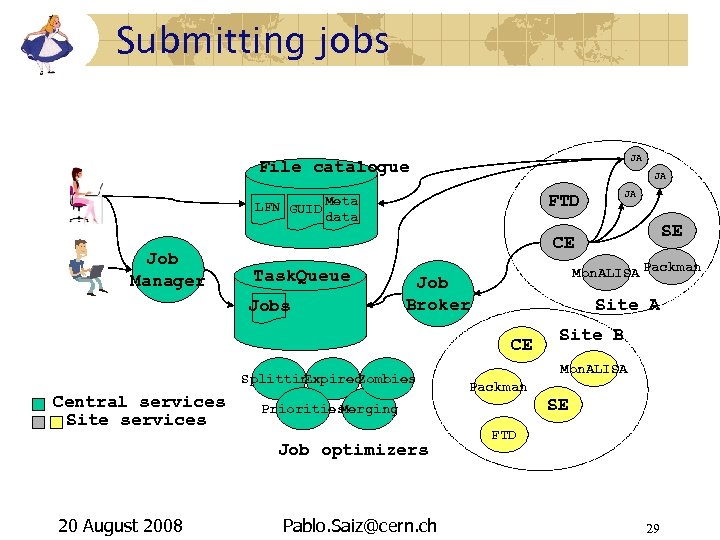
Submitting jobs JA File catalogue JA FTD LFN GUID Meta data Job Manager Task. Queue Mon. ALISA Packman Job Broker Site A CE Splitting Expired Zombies Pablo. Saiz@cern. ch Site B Mon. ALISA Packman Priorities Merging Job optimizers 20 August 2008 SE CE Jobs Central services Site services JA SE FTD 29
JDL fields I Executable: Compulsory field where we give the lfn of the executable that should be stored in /bin or $V 0/bin or $HOME/bin. Arguments: They will be passed to the executable. Packages: Type packages in the shell to see what kind of packages are installed. Input. File: The files that will be transported to the node where the job will run. Input. Data: It will require that the job will be executed in a site close to the files specified here. Input. Data. List: The filename in which the Job Agent will write the Input. Data list. Input. Data. List. Format: The format of the Input. Data list. 20 August 2008 Pablo. Saiz@cern. ch 30
JDL fields II Output. File: The files that will be registered in the catalog once the job finishes. Output. Archive: What files will be archived in a zip file. Validationcommand: Specifies the script to be used as a validation script. Email: Receive a mail when the job finishes. TTL: The maximum run time of your job. Split: Split the jobs in several sub jobs. 20 August 2008 Pablo. Saiz@cern. ch 31
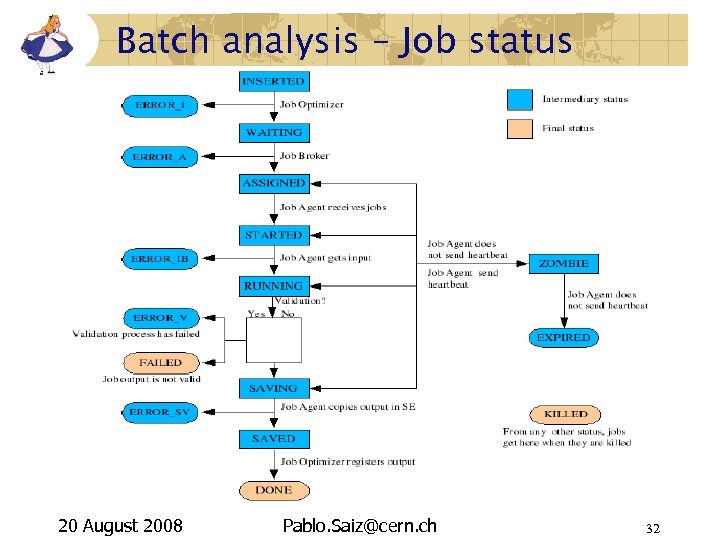
Batch analysis – Job status 20 August 2008 Pablo. Saiz@cern. ch 32
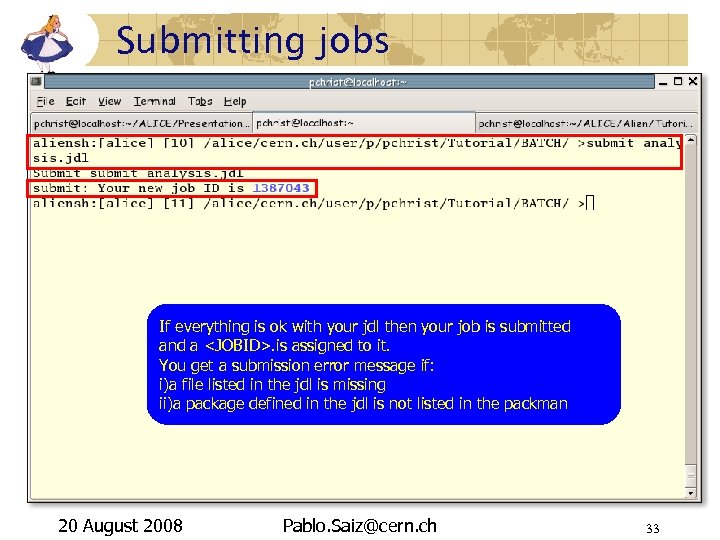
Submitting jobs If everything is ok with your jdl then your job is submitted and a <JOBID>. is assigned to it. You get a submission error message if: i)a file listed in the jdl is missing ii)a package defined in the jdl is not listed in the packman 20 August 2008 Pablo. Saiz@cern. ch 33
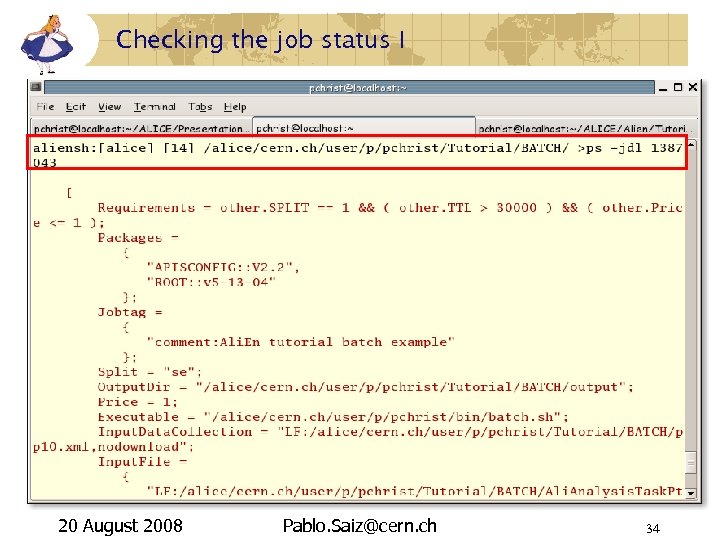
Checking the job status I 20 August 2008 Pablo. Saiz@cern. ch 34
Checking the job status II 20 August 2008 Pablo. Saiz@cern. ch 35
Checking the priority 20 August 2008 Pablo. Saiz@cern. ch 36
Checking the job output I 20 August 2008 Pablo. Saiz@cern. ch 37
Checking the job output II 20 August 2008 Pablo. Saiz@cern. ch 38
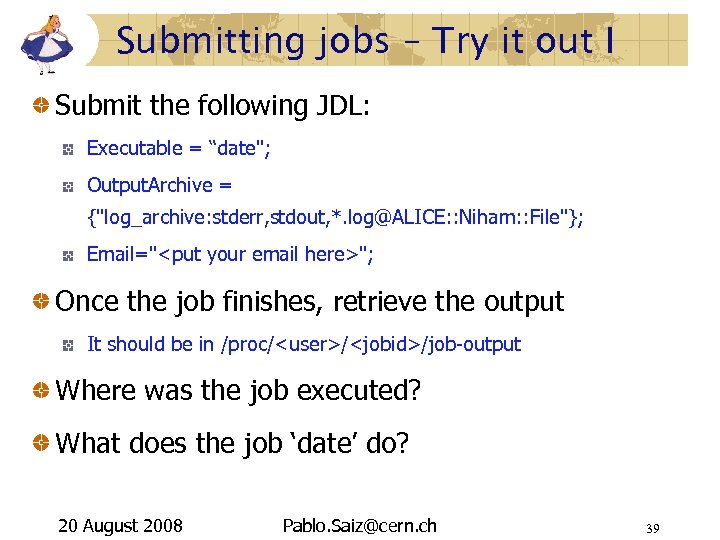
Submitting jobs – Try it out I Submit the following JDL: Executable = “date"; Output. Archive = {"log_archive: stderr, stdout, *. log@ALICE: : Niham: : File"}; Email="<put your email here>"; Once the job finishes, retrieve the output It should be in /proc/<user>/<jobid>/job-output Where was the job executed? What does the job ‘date’ do? 20 August 2008 Pablo. Saiz@cern. ch 39
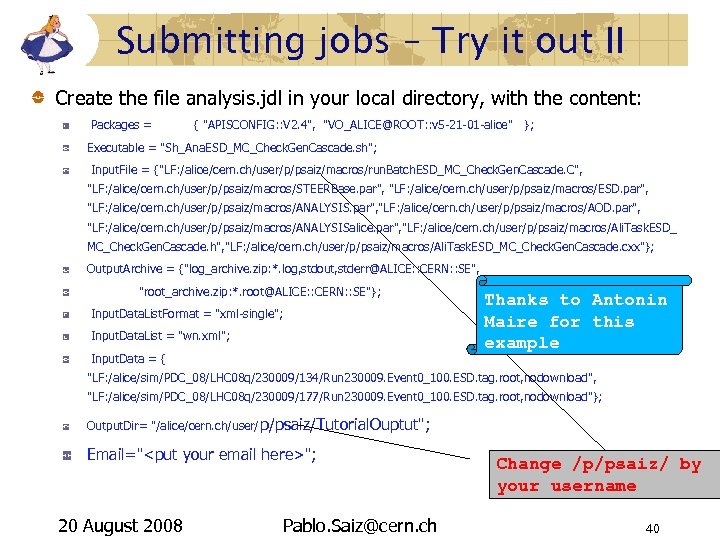
Submitting jobs – Try it out II Create the file analysis. jdl in your local directory, with the content: Packages = { "APISCONFIG: : V 2. 4", "VO_ALICE@ROOT: : v 5 -21 -01 -alice" }; Executable = "Sh_Ana. ESD_MC_Check. Gen. Cascade. sh"; Input. File = {"LF: /alice/cern. ch/user/p/psaiz/macros/run. Batch. ESD_MC_Check. Gen. Cascade. C", "LF: /alice/cern. ch/user/p/psaiz/macros/STEERBase. par", "LF: /alice/cern. ch/user/p/psaiz/macros/ESD. par", "LF: /alice/cern. ch/user/p/psaiz/macros/ANALYSIS. par", "LF: /alice/cern. ch/user/p/psaiz/macros/AOD. par", "LF: /alice/cern. ch/user/p/psaiz/macros/ANALYSISalice. par", "LF: /alice/cern. ch/user/p/psaiz/macros/Ali. Task. ESD_ MC_Check. Gen. Cascade. h", "LF: /alice/cern. ch/user/p/psaiz/macros/Ali. Task. ESD_MC_Check. Gen. Cascade. cxx"}; Output. Archive = {"log_archive. zip: *. log, stdout, stderr@ALICE: : CERN: : SE", "root_archive. zip: *. root@ALICE: : CERN: : SE"}; Input. Data. List. Format = "xml-single"; Input. Data. List = "wn. xml"; Input. Data = { Thanks to Antonin Maire for this example "LF: /alice/sim/PDC_08/LHC 08 q/230009/134/Run 230009. Event 0_100. ESD. tag. root, nodownload", "LF: /alice/sim/PDC_08/LHC 08 q/230009/177/Run 230009. Event 0_100. ESD. tag. root, nodownload"}; Output. Dir= "/alice/cern. ch/user/ p/psaiz/Tutorial. Ouptut"; Email="<put your email here>"; 20 August 2008 Pablo. Saiz@cern. ch Change /p/psaiz/ by your username 40
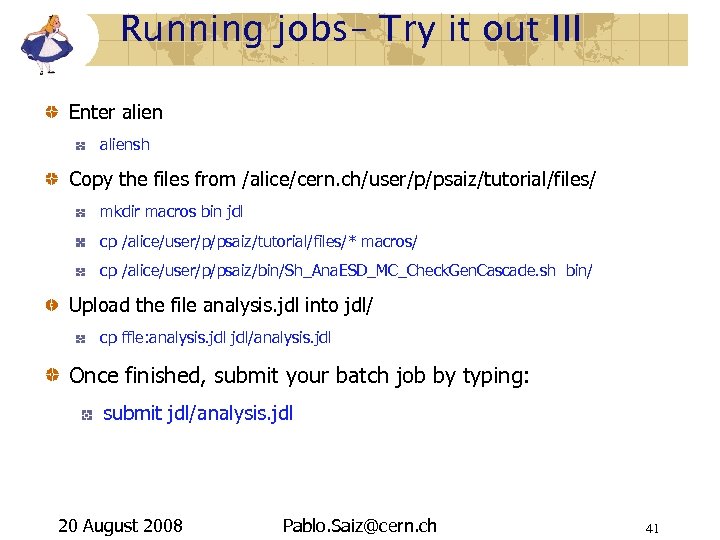
Running jobs– Try it out III Enter aliensh Copy the files from /alice/cern. ch/user/p/psaiz/tutorial/files/ mkdir macros bin jdl cp /alice/user/p/psaiz/tutorial/files/* macros/ cp /alice/user/p/psaiz/bin/Sh_Ana. ESD_MC_Check. Gen. Cascade. sh bin/ Upload the file analysis. jdl into jdl/ cp ffle: analysis. jdl/analysis. jdl Once finished, submit your batch job by typing: submit jdl/analysis. jdl 20 August 2008 Pablo. Saiz@cern. ch 41
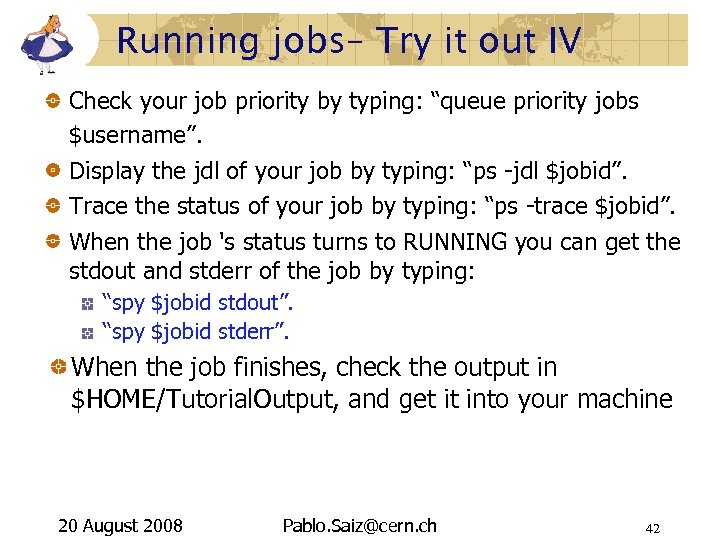
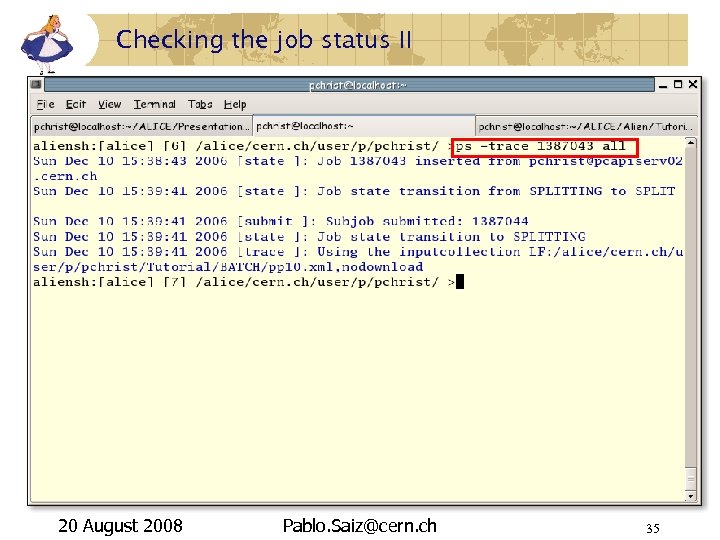
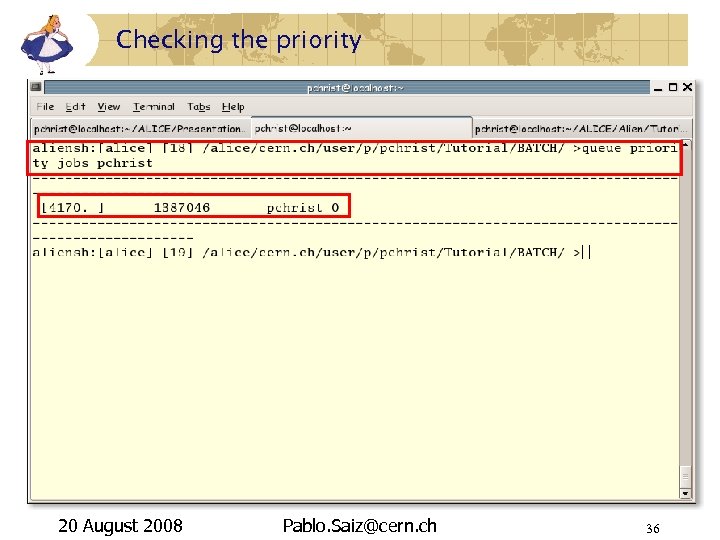
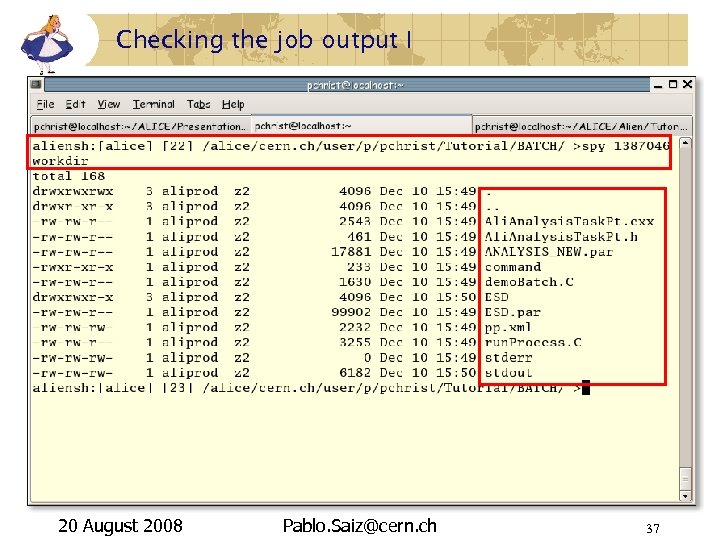
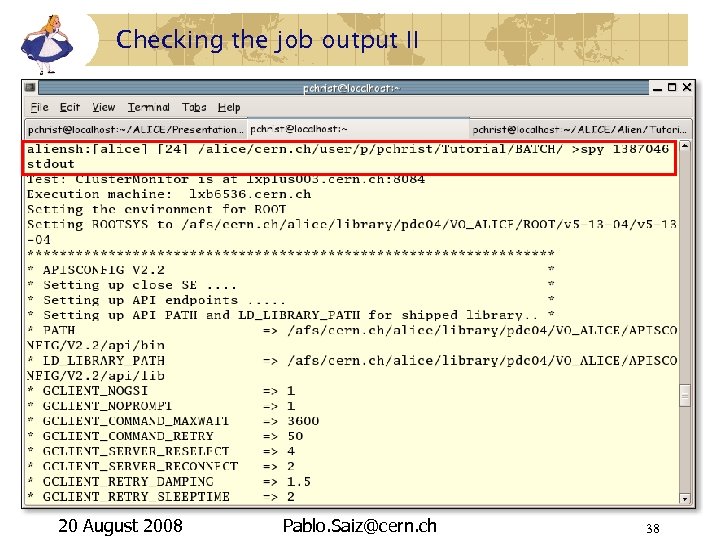
Running jobs– Try it out IV Check your job priority by typing: “queue priority jobs $username”. Display the jdl of your job by typing: “ps -jdl $jobid”. Trace the status of your job by typing: “ps -trace $jobid”. When the job 's status turns to RUNNING you can get the stdout and stderr of the job by typing: “spy $jobid stdout”. “spy $jobid stderr”. When the job finishes, check the output in $HOME/Tutorial. Output, and get it into your machine 20 August 2008 Pablo. Saiz@cern. ch 42
Conclusion Ali. En Interface to the GRID Developed by ALICE Usable by any VO In production since 2002 File Catalogue File and Metadata Job submission model Data movement and replication 20 August 2008 Pablo. Saiz@cern. ch 43
References Registration – Certificates: http: //alien. cern. ch/twiki/bin/view/Alice/User. Registration https: //ca. cern. ch/ca/ Ali. En: http: //alien. cern. ch/twiki/bin/view/Ali. En/GAPI User's guide: http: //aliceinfo. cern. ch/export/download/Offline. Download/Offline. Bible. pdf Previous tutorials: http: //aliceinfo. cern. ch/Offline/Ali. Root/Manual. html 20 August 2008 Pablo. Saiz@cern. ch 44
http: //alien. cern. ch Thank you very much!! Any questions? 20 August 2008 Pablo. Saiz@cern. ch 45
Скачать презентацию Ali En Tutorial ALICE workshop Sibiu 20 th
81cf578718839cdd3dc679170f814474.ppt