 Скачать презентацию Alarm Notification June 25 2010 Created by
2aac95e22c017c236893e65874f3cd23.ppt
- Количество слайдов: 54



Alarm / Notification June 25, 2010 Created by Jason-Su / Andy Chen
Alarm Notification • • • Guideline Introduction Hotline Alert SMS Server Email Alert Event Types Advance Section – Demo Summary FAQ
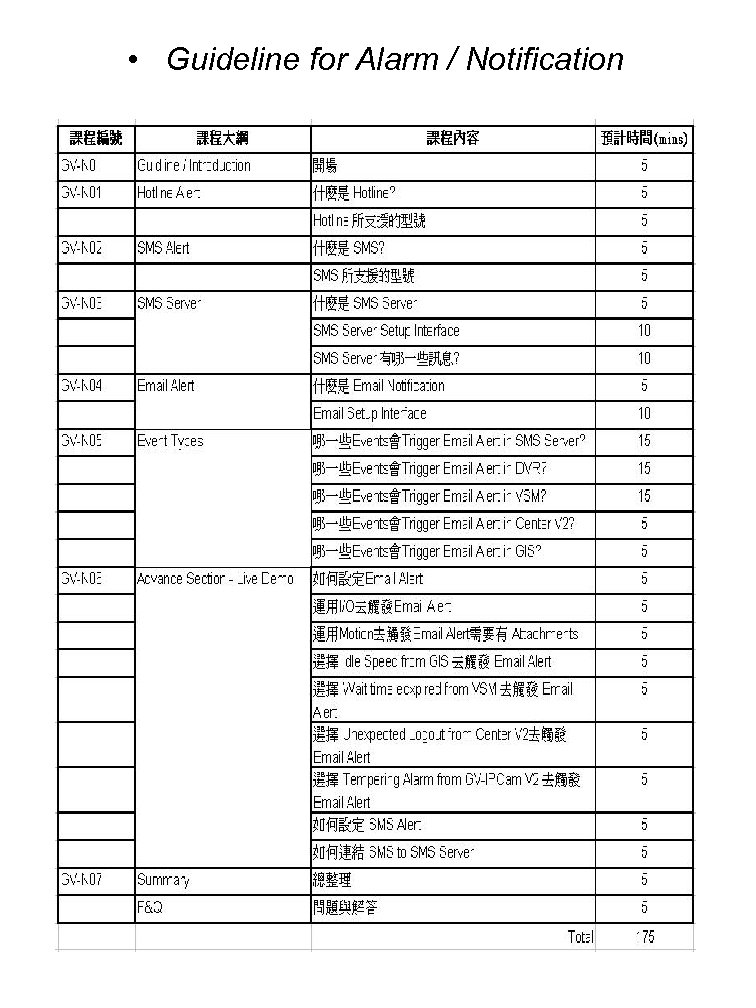
• Guideline for Alarm / Notification

Alarm Notification Introduction GV-N 0.
Introduction • Notification is a mean to inform users that any abnormal activities happened and needed their attention immediately – Car Alarm – House Alarm • Take DVR’s motion alert as an example. If you enable Invoke to sent alert, alert message will be sent when there is a motion – High = 0. 5 seconds – Normal = 1 seconds – Low = 1. 5 seconds
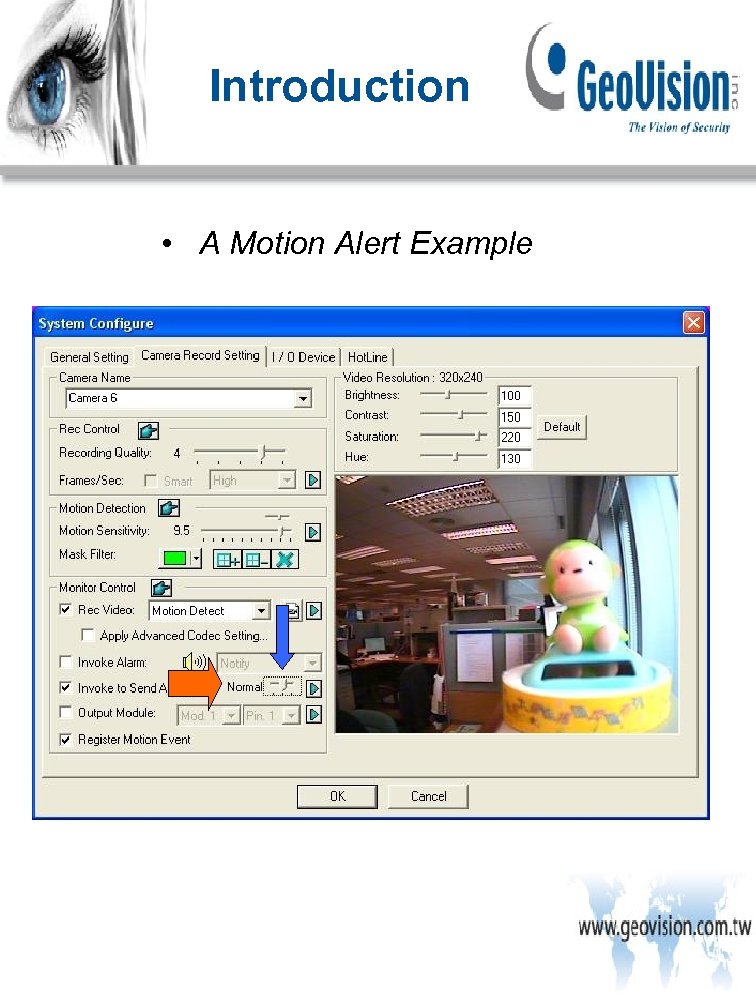
Introduction • A Motion Alert Example
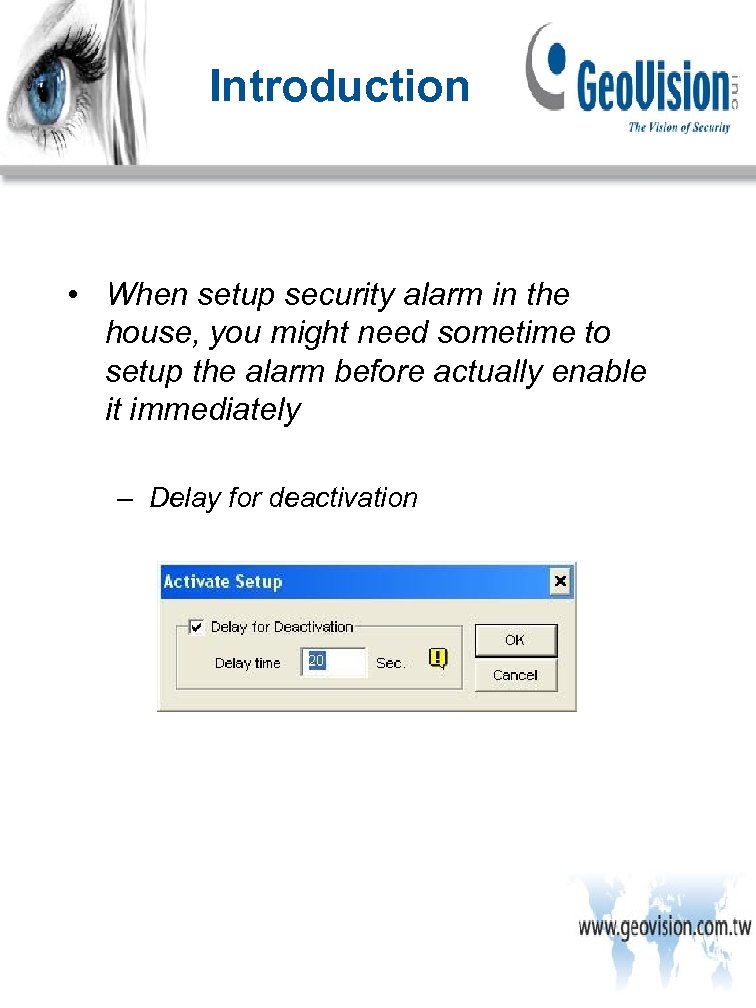
Introduction • When setup security alarm in the house, you might need sometime to setup the alarm before actually enable it immediately – Delay for deactivation
Alarm Notification Hotline Alert GV-N 01
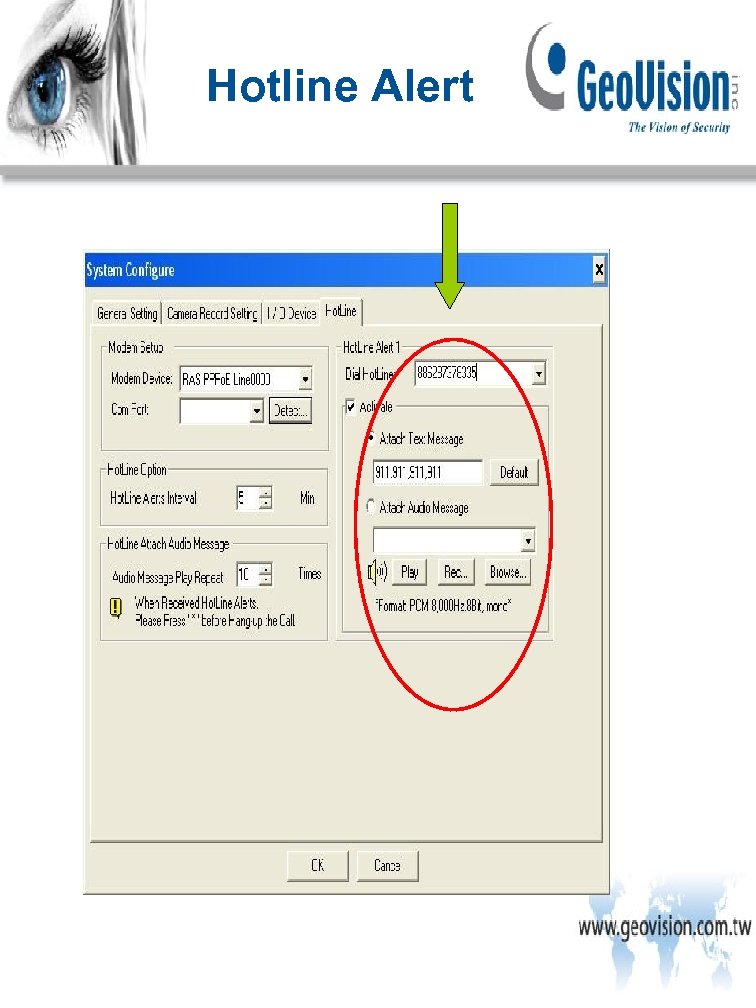
Hotline Alert
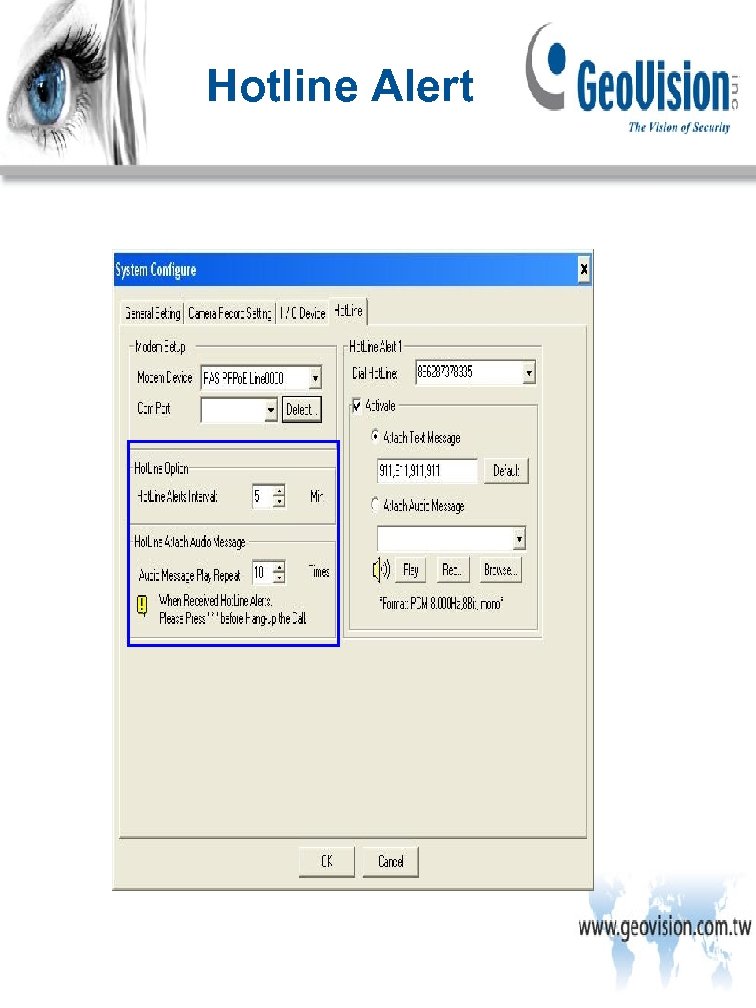
Hotline Alert
Hotline Alert • Hotline – Here are our supported modem model. Note that internal modems PCI or LSA are not recommended • Zy. XEL Omni 56 K COM Plus • Zy. XEL Omni 56 K Smart • Actiontec EX 560 LKC 56 K Data/Fax/Voice External • Askey 1456 VQE-T External • Paradise Wave. Com 56 Kbps External PRO • Zoom 2949 L 56 Kx Data/Fax/Voice External
Alarm Notification SMS Alert GV-N 02
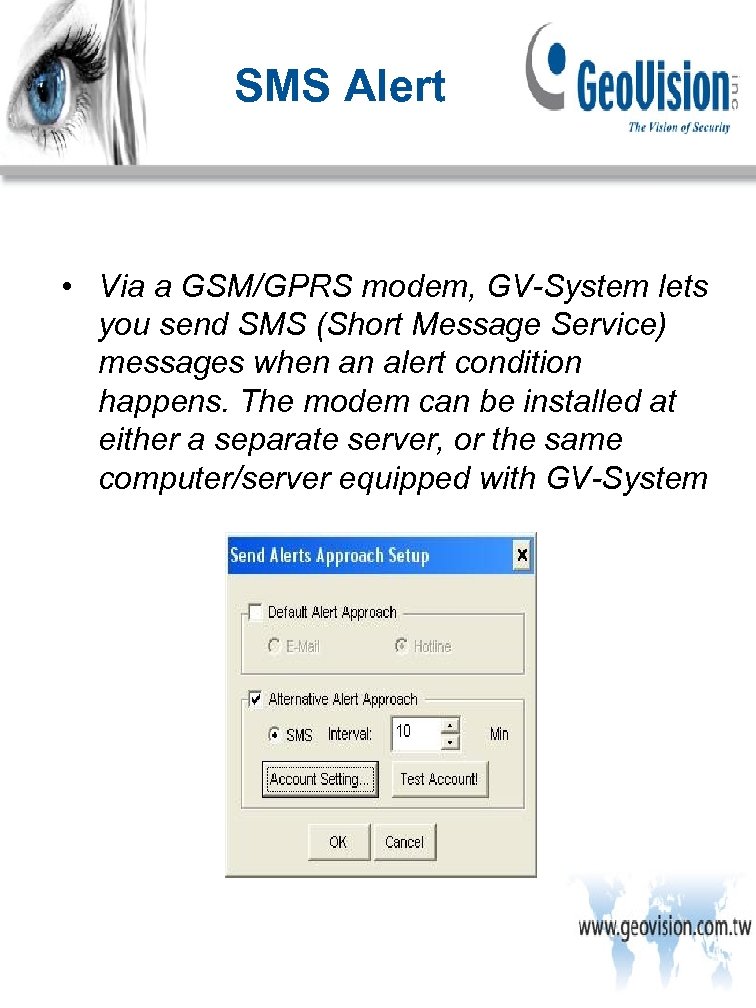
SMS Alert • Via a GSM/GPRS modem, GV-System lets you send SMS (Short Message Service) messages when an alert condition happens. The modem can be installed at either a separate server, or the same computer/server equipped with GV-System
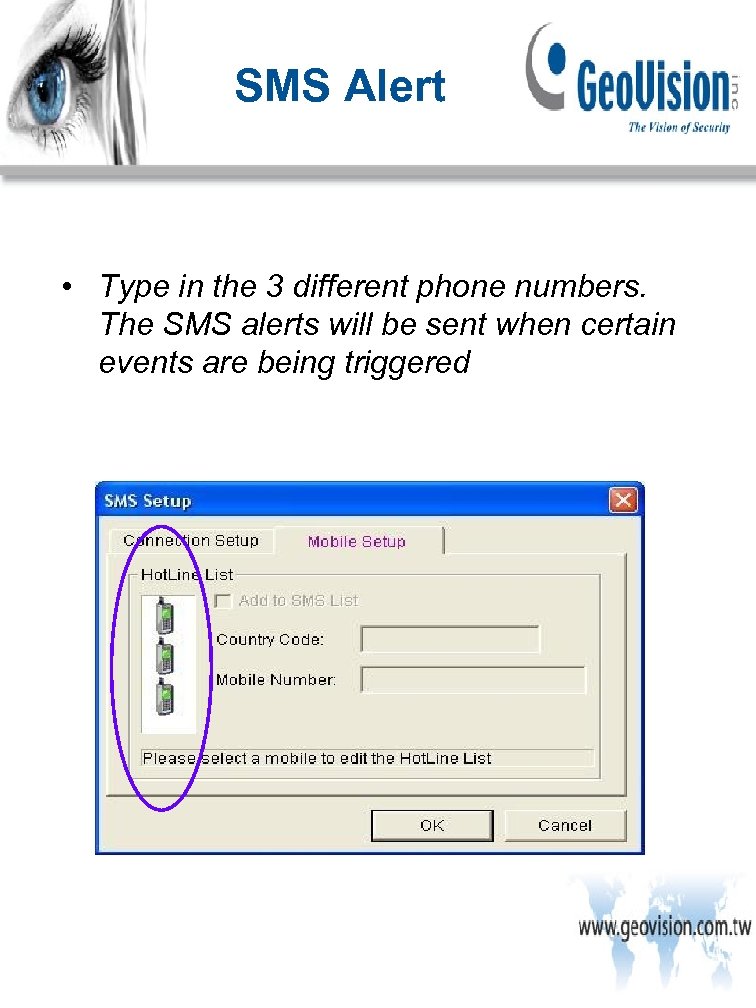
SMS Alert • Type in the 3 different phone numbers. The SMS alerts will be sent when certain events are being triggered

SMS Alert • SMS – Here are the supported SMS Modem • Round Solutions TER-GX 101 GSM/GPRS Modem • Round Solutions TER-GX 102 GSM/GPRS Modem • Round Solutions TER-GX 104 GSM/GPRS Modem • WAVECOM Multiband 900 E 1800 GSM Modem ( v 8. 3 or higher)
Alarm Notification SMS Server GV-N 03
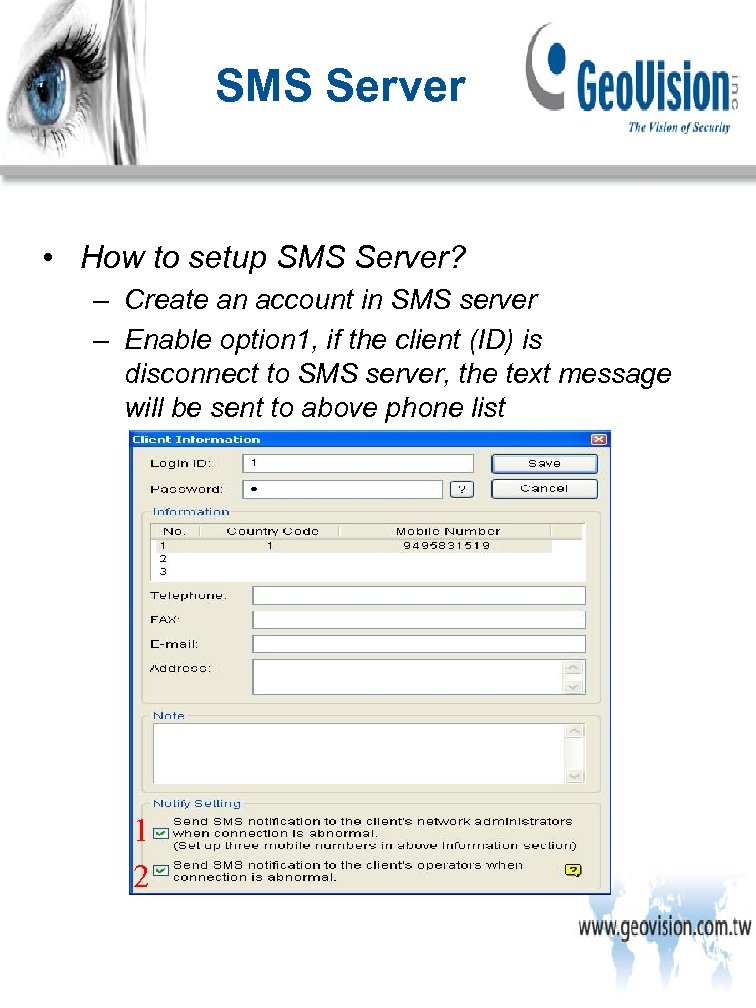
SMS Server • How to setup SMS Server? – Create an account in SMS server – Enable option 1, if the client (ID) is disconnect to SMS server, the text message will be sent to above phone list 1 2
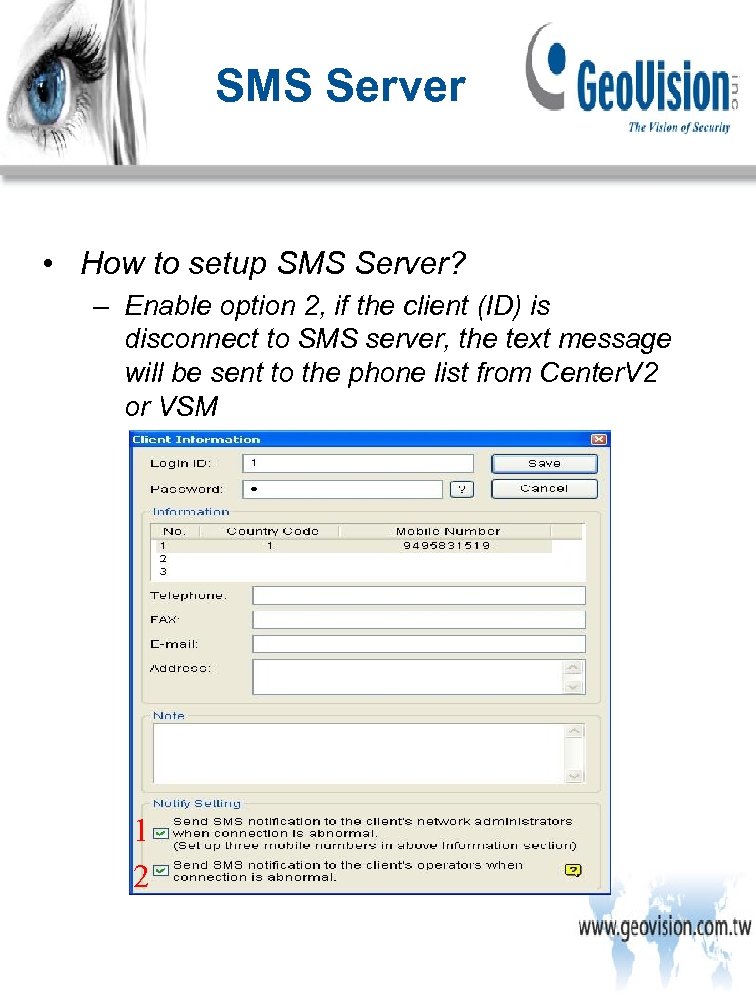
SMS Server • How to setup SMS Server? – Enable option 2, if the client (ID) is disconnect to SMS server, the text message will be sent to the phone list from Center. V 2 or VSM 1 2
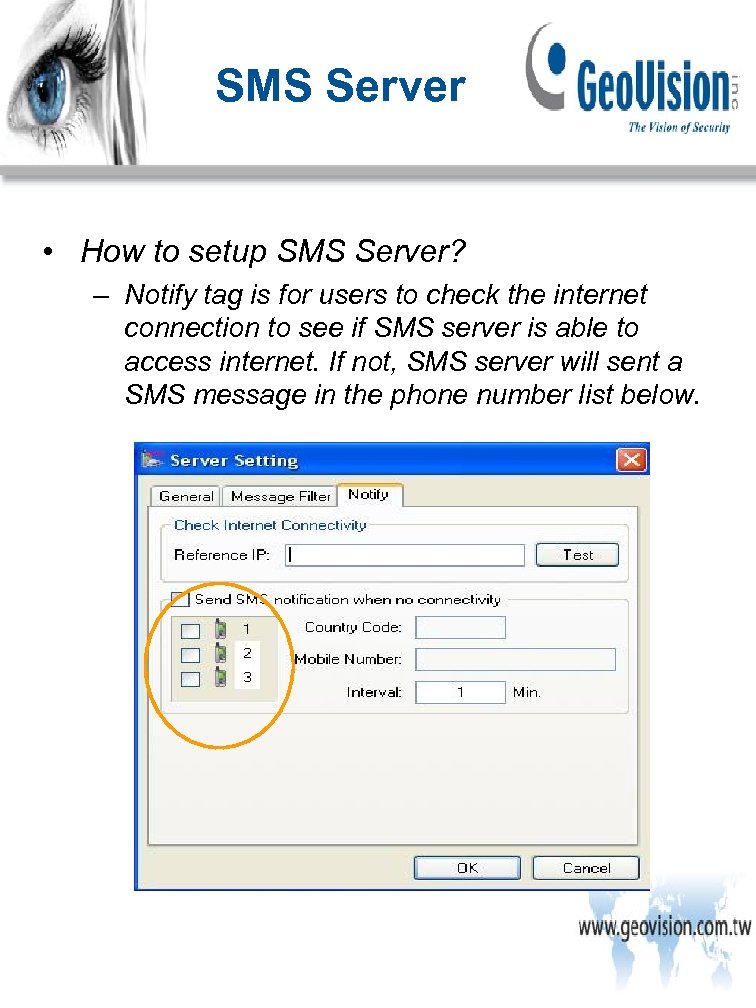
SMS Server • How to setup SMS Server? – Notify tag is for users to check the internet connection to see if SMS server is able to access internet. If not, SMS server will sent a SMS message in the phone number list below.
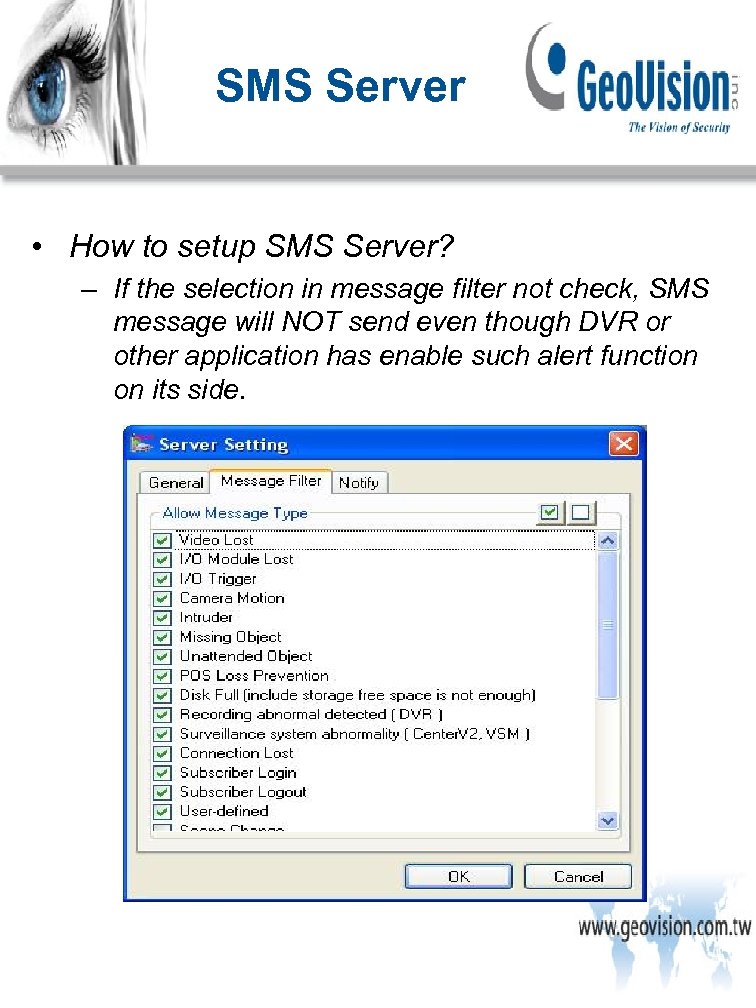
SMS Server • How to setup SMS Server? – If the selection in message filter not check, SMS message will NOT send even though DVR or other application has enable such alert function on its side.

Alarm Notification Email Alert GV-N 04
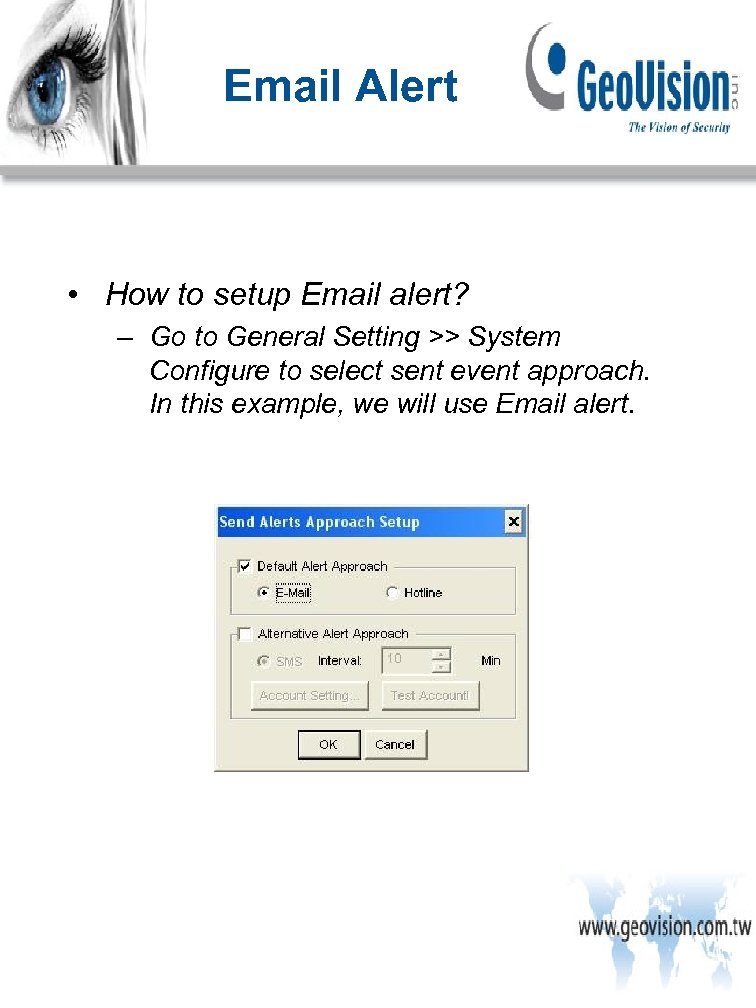
Email Alert • How to setup Email alert? – Go to General Setting >> System Configure to select sent event approach. In this example, we will use Email alert.
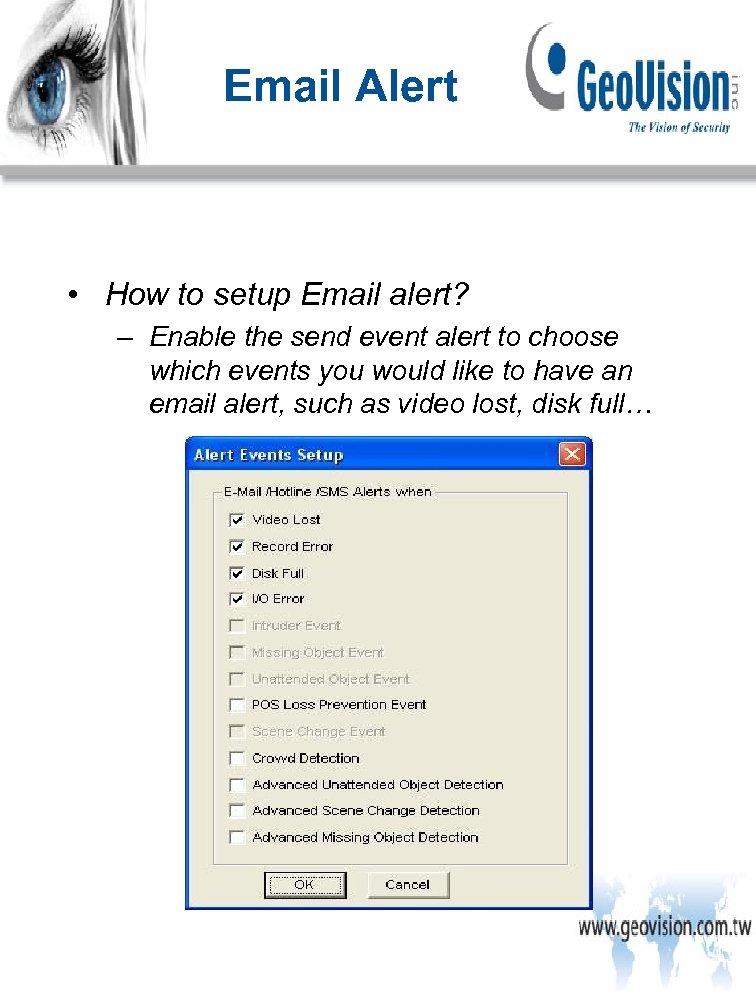
Email Alert • How to setup Email alert? – Enable the send event alert to choose which events you would like to have an email alert, such as video lost, disk full…
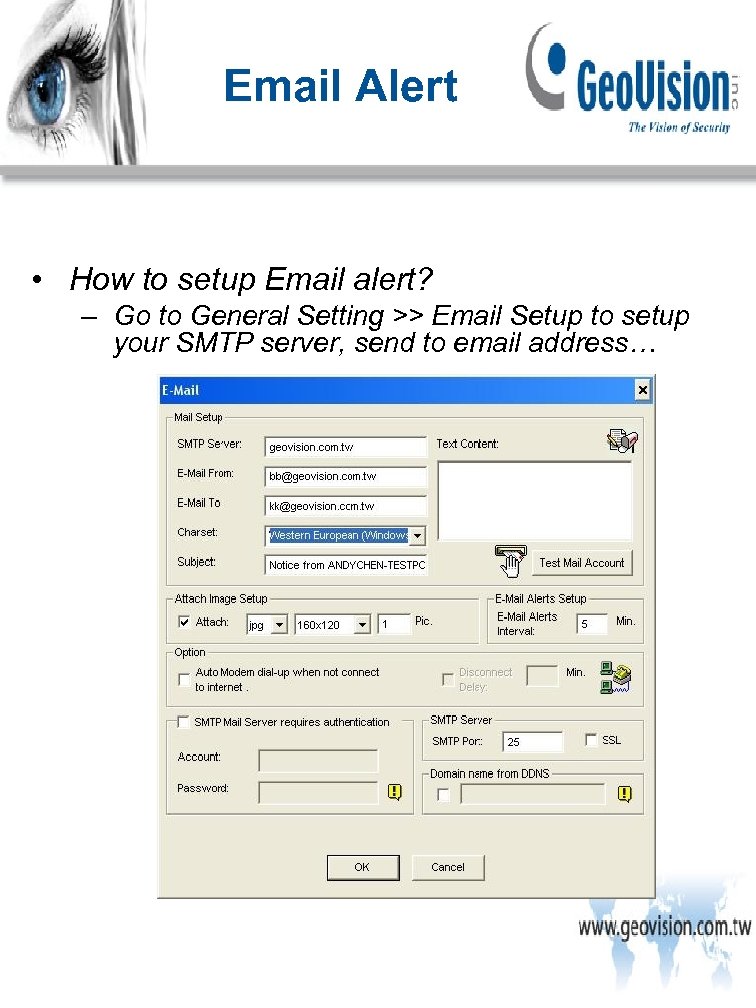
Email Alert • How to setup Email alert? – Go to General Setting >> Email Setup to setup your SMTP server, send to email address…
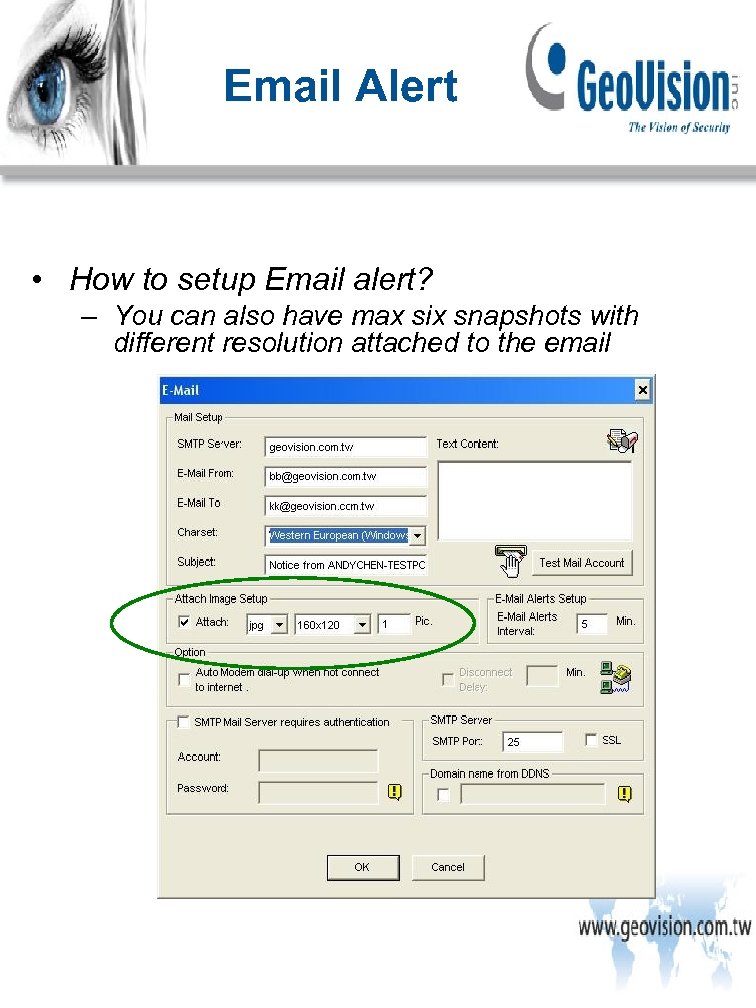
Email Alert • How to setup Email alert? – You can also have max six snapshots with different resolution attached to the email
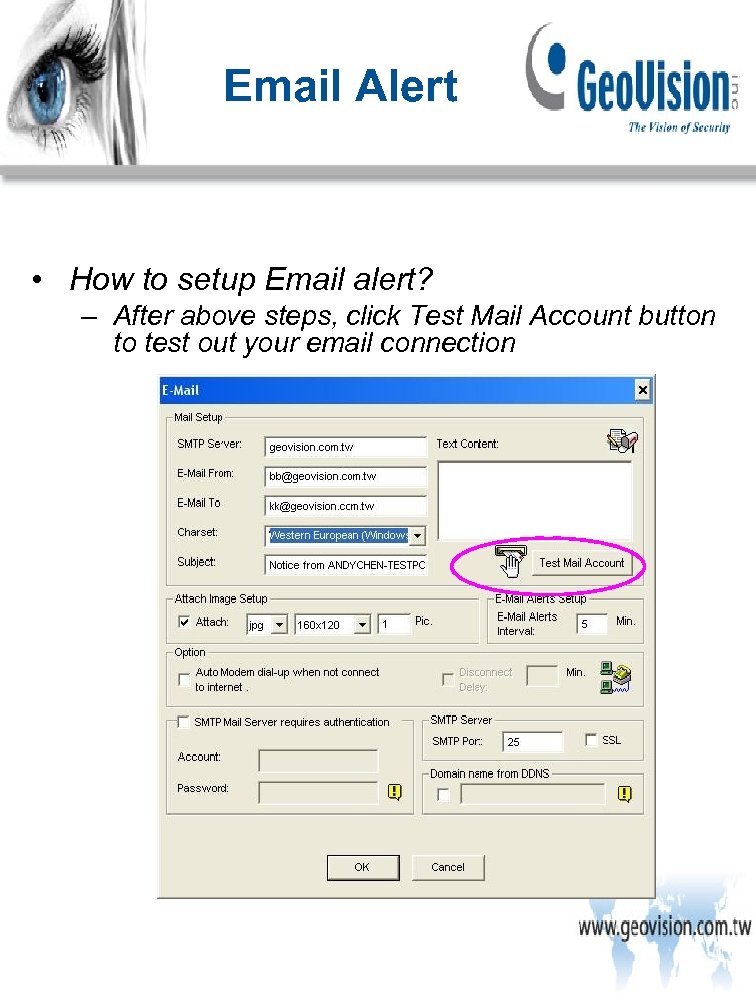
Email Alert • How to setup Email alert? – After above steps, click Test Mail Account button to test out your email connection
Alarm Notification Event Types GV-N 05
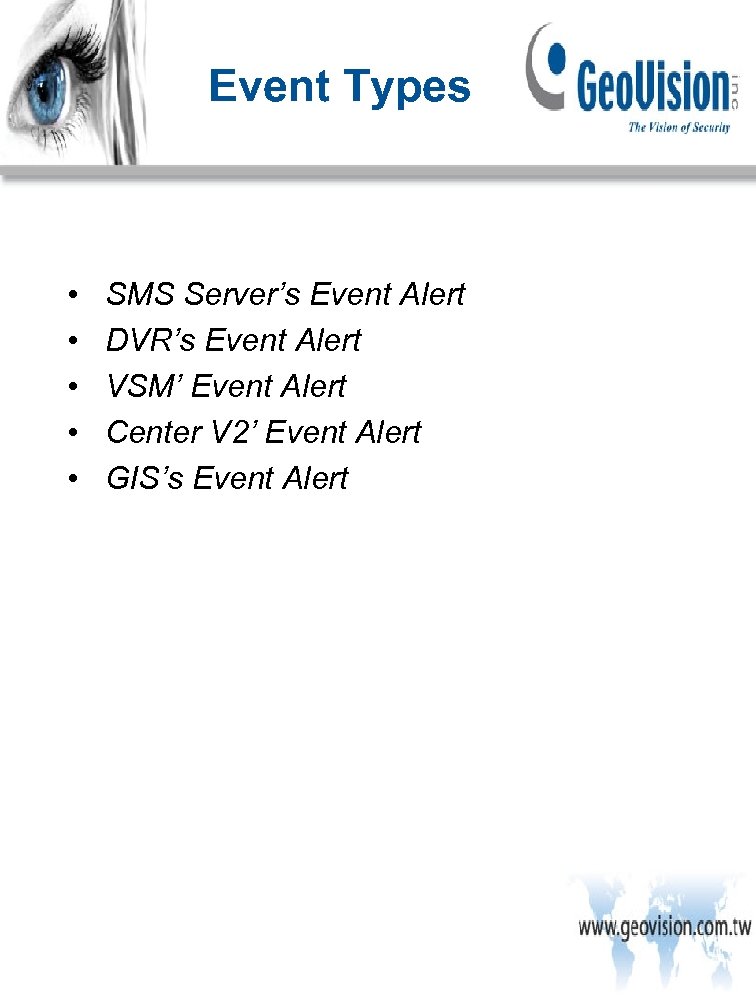
Event Types • • • SMS Server’s Event Alert DVR’s Event Alert VSM’ Event Alert Center V 2’ Event Alert GIS’s Event Alert
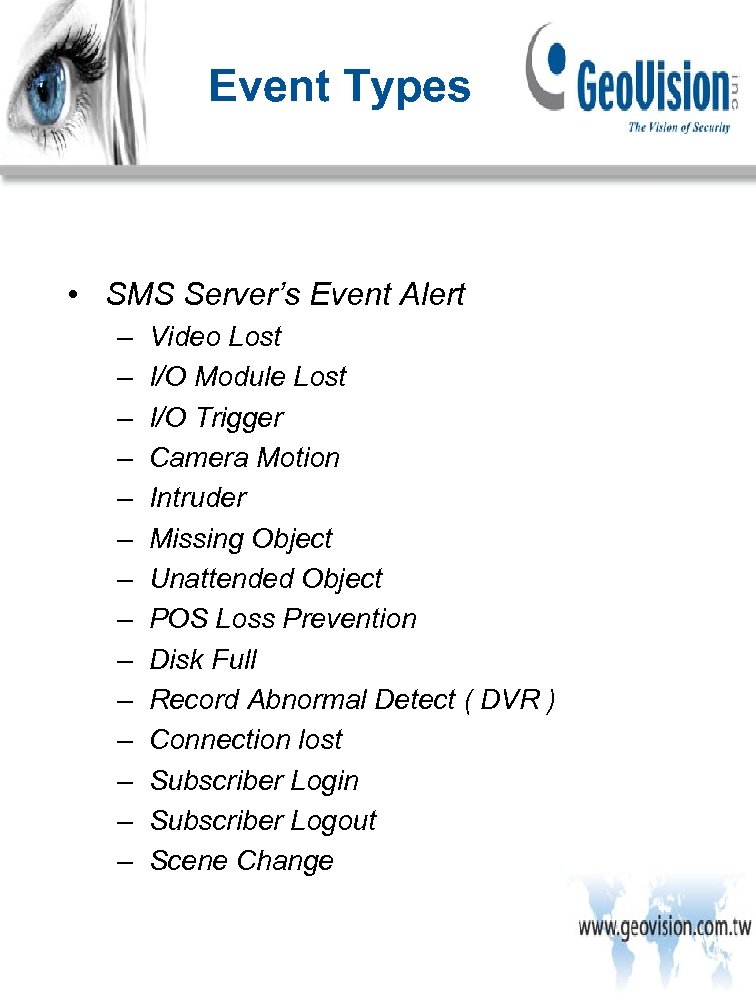
Event Types • SMS Server’s Event Alert – – – – Video Lost I/O Module Lost I/O Trigger Camera Motion Intruder Missing Object Unattended Object POS Loss Prevention Disk Full Record Abnormal Detect ( DVR ) Connection lost Subscriber Login Subscriber Logout Scene Change
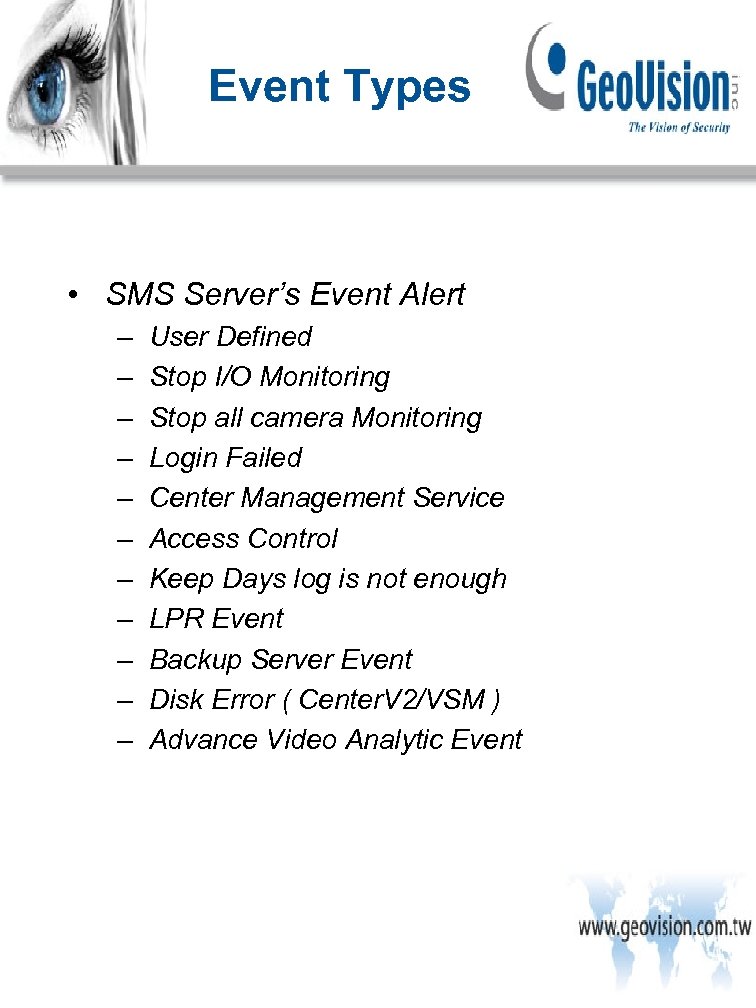
Event Types • SMS Server’s Event Alert – – – User Defined Stop I/O Monitoring Stop all camera Monitoring Login Failed Center Management Service Access Control Keep Days log is not enough LPR Event Backup Server Event Disk Error ( Center. V 2/VSM ) Advance Video Analytic Event
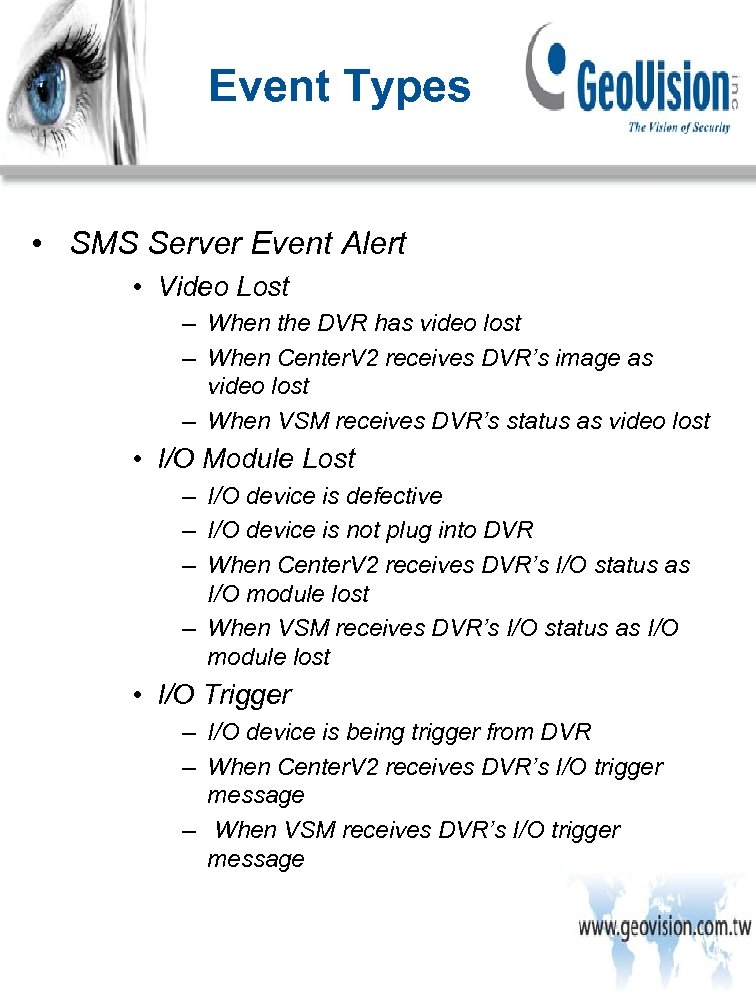
Event Types • SMS Server Event Alert • Video Lost – When the DVR has video lost – When Center. V 2 receives DVR’s image as video lost – When VSM receives DVR’s status as video lost • I/O Module Lost – I/O device is defective – I/O device is not plug into DVR – When Center. V 2 receives DVR’s I/O status as I/O module lost – When VSM receives DVR’s I/O status as I/O module lost • I/O Trigger – I/O device is being trigger from DVR – When Center. V 2 receives DVR’s I/O trigger message – When VSM receives DVR’s I/O trigger message
Event Types • SMS Server Event Alert • Camera Motion – When a DVR has a motion occurred – When Center. V 2 receives DVR’s motion message – When VSM receives DVR’s motion message • Intruder – When a DVR has an intruder alert occurred – When Center. V 2 receives DVR’s intruder message – When VSM receives DVR’s intruder message • Missing Object – When a DVR has an missing object alert occurred – When Center. V 2 receives DVR’s missing object message – When VSM receives DVR’s missing object message
Event Types • SMS Server Event Alert • Unattended Object – When a DVR has an unattended object alert occurred – When Center. V 2 receives DVR’s unattended object message – When VSM receives DVR’s unattended object message • POS Lost Prevention – When a DVR has an POS Lost Prevention alert occurred – When Center. V 2 receives DVR’s POS Lost Prevention message – When VSM receives DVR’s POS Lost Prevention message • Disk Full ( Include storage free space isn’t enough ) – When a DVR has a DISK Full alert occurred – When VSM receives DVR’s DISK Full message
Event Types • SMS Server Event Alert • Record Abnormal Detect ( DVR ) – When DVR has recode error occurred, such as codec, HDD. • Surveillance System abnormality – When Center. V 2 receives DVR’s record error message – When VSM receives DVR’s record error message • Connection Lost – When Center. V 2 and DVR’s connection is broken – When VSM and DVR’s connection is broken
Event Types • SMS Server Event Alert • Subscriber Login – When DVR successfully login into Center V 2 – When DVR successfully login into VSM • Subscriber Logout – When DVR successfully logout Center V 2 – When DVR successfully logout VSM • Scene Change – When a DVR has a scene change alert occurred – When Center. V 2 receives DVR’s scene change message – When VSM receives DVR’s scene change message
Event Types • SMS Server Event Alert • User-Define ( Before or equal v 8. 2 ) – If VSM/Center. V 2’s notification event alert didn’t match SMS server’s notification list, the VSM/Center. V 2’s notification event alert will be categorized into User-define. • Stop I/O Monitoring ( Center. V 2/VSM ) – When Center. V 2 receives DVR’s stop monitoring message – When VSM receives DVR’s stop monitoring message • Stop all camera monitoring ( Center. V 2/VSM ) – When Center. V 2 receives DVR’s stop all camera monitoring msg – When VSM receives DVR’s stop all camera monitoring msg
Event Types • SMS Server Event Alert • Login Fail – When DVR failed to login to Center V 2 – When DVR failed to login to VSM • Center Management Service ( Center. V 2/VSM ) v 8. 3 or higher – If VSM/Center. V 2’s notification event alert didn’t match SMS server’s notification list, the VSM/Center. V 2’s notification event alert will be categorized into User-define. • Access Control – Any SMS alert message from Access Control will be categorize as Access Control
Event Types • SMS Server Event Alert • Keep Days log is not enough – When VSM’s keep days log isn’t enough • LPR Event – Any SMS alert message from LPR will be categorize as LPR • Backup Server Event – When a DVR and backup server’s connection is broken • Disk Error ( Center. V 2/VSM ) – When Center. V 2/VSM can’t write the events into its own HDD • Advance Video Analysis Event – Any AVP event occurred in DVR
Event Types • DVR’s Event Alert – Video Lost – Record Error – Disk Full – I/O Error – Intruder Event – Missing Object Event – Unattended Object Event – POS Loss Prevention Event – Scene Change Event – Crowd Detection – Advanced Unattended Object – Advanced Scene Change Detection – Advance Missing Object Detection
Event Types • DVR’s Event Alert • Video Lost – Certain channels’ live images are unable to present in Multicam. It could be an issue on camera itself, camera’s cable, Dtype cable or even the capture card. • Record Error – Not enough Windows user’s rights to write the video files into HDD – Codec error – Defection HDD • Disk Full – Hard drive has reached the recording limit without recycling. • I/O Error – No GV-I/O device attached when I/O function is enable in Multicam.
Event Types • DVR’s Event Alert • Intruder Event – When an object/person touches the boundary between region A and region B – When an object/person is completely in region b from region a or vice versa. • Missing Object Event( For Indoor ) – When an object is being taken / stolen from the scene • Unattended Object Event ( For Indoor ) – When an suspicious object is presented in an area • POS Loss Prevention Event – When the defined text is detected during the transaction – When an abnormal transaction of the specific item occurs
Event Types • DVR’s Event Alert • Scene Change Event ( For Indoor ) – When a camera is out of focus – When a camera is being blacked out – When a camera’s view is being shifted • Crowd Detection – When a crowd of people gathers in a specific area and exceeds the defined threshold • Advanced Unattended Object ( For Outdoor ) – When an suspicious object is presented in an area
Event Types • DVR’s Event Alert • Advanced Scene Change Detection ( For Outdoor ) – When a camera is out of focus – When a camera is being blacked out – When a camera’s view is being shifted • Advance Missing Object Detection ( For Outdoor ) – When an object is being taken / stolen from the scene • Missing Object Event ( For Outdoor ) – When an object is being taken / stolen from the scene
Event Types • VSM’s Event Alert – – – – Video Lost I/O Module Lost I/O Trigger ( Normal ) I/O Trigger ( Emergency) Connection Lost Surveillance System Abnormality Intruder Missing Object Unattended Object Scene Change / Tempering Alarm POS Loss Prevention Disk Full Disk Error Free Storage space is low
Event Types • VSM’s Event Alert – – – – Keep days of vide log is low Stop all camera monitoring Stop I/O monitoring Subscriber Login Subscriber Logout Login Fail in Surveillance System Start Monitoring All Type Events Stop Monitoring All Type Events Wait-Time Expired Unexpected Logout Camera Motion Crowd Detection Advance unattended Object Detection Advance Scene Change Detection Advance Missing Object Detection
Event Types • VSM’s Event Alert • Scene Change / Tempering Alarm – When a camera is out of focus – When a camera is being blacked out – When a camera’s view is being shifted * Tempering Alarm is for GV-IP device only • Surveillance System Abnormality – When Center. V 2 receives DVR’s record error message – When VSM receives DVR’s record error message • Wait time Expired – Certain DVRs didn’t login to VSM in a designated period of time • Unexpected Logout – Certain DVRs logout from VSM within a designated period of time
Event Types • Center V 2’s Event Alert – – – – – Video Lost I/O Module Lost I/O Trigger ( Normal ) Connection Lost Subscriber Login Subscriber Logout Camera Motion Surveillance System Abnormality Intruder Missing Object
Event Types • Center V 2’s Event Alert – – – – – Unattended Object Scene Change / Tampering Alarm POS Loss Prevention Disk Full Stop all cameras monitoring Stop I/O Monitoring Start Monitoring All Type Events Stop Monitoring All Type Events Wait-Time Expired Unexpected Logout
Event Types • GIS’s Event Alert – – – – GPS Signal Lost Video Lost I/O Trigger Out of Detection Area Within the Detection Area Out of Detection Route Within the Detection Route Idle Speed Over Speed Connection Lost Mobile Host Login Mobile Host Logout Camera Motion( Fixed Host ) Video Lost ( Fixed Host ) I/O Trigger ( Fixed Host ) Connection ( Fixed Host )

Alarm Notification Advance Section – Demo GV-N 06
Advance Section - Demo 1) 2) 3) 4) 5) 6) 7) 8) 9) How to setup email alert How to use I/O to trigger an email alert? How to use motion to trigger an email alert? Need to have snapshots in email attachment when a motion occurred Use “ Idle speed ” from GIS and trigger an email alert Use “ Wait time expired” from VSM and trigger an email alert Use “ Unexpected Logout” from Center V 2 and trigger an email alert Use “ Tempering Alarm ” from a GV-IPCam V 2 and trigger an email alert How to setup SMS Server How to connect SMS Server to a DVR?
Alarm Notification Summary GV-N 07
Summary • What is the main purpose / advantages of using alert / notification? In addition, what kind of alert notification does Multicam have? If possible, please list one event type from SMS Server / DVR / VSM / Center. V 2 / GIS.
Alarm Notification F&Q
Скачать презентацию Alarm Notification June 25 2010 Created by
2aac95e22c017c236893e65874f3cd23.ppt