



 aims 2 Automated Installation Management System CERN IT Department CH-1211 Genève 23 Switzerland www. cern. ch/it
 Overview of Presentation • Give you an explanation of AIMS – Introduce you to the installation infrastructure at CERN • My Project – Aims. Rewrite – aims 2 • Overview • New Features • The future CERN IT Department CH-1211 Genève 23 Switzerland www. cern. ch/it Aims 2 – Linux Automated Installation Management System - 2
 What is AIMS? • Automated Installation Management System – Perform parallel installations minimising the need for human intervention – Makes use of PXE and ELILO. – The system is based on and extends the Kickstart software from the Red. Hat distribution. – Supports Linux and Windows. – Around since 2000, Perl code base. • Used throughout CERN IT Department CH-1211 Genève 23 Switzerland www. cern. ch/it – Experiments – Fabric/Grid deployment – General infrastructure user Aims 2 – Linux Automated Installation Management System - 3
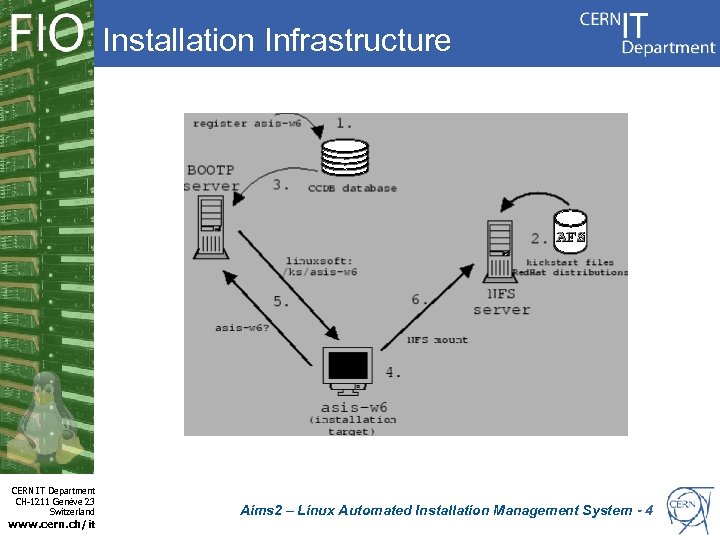 Installation Infrastructure CERN IT Department CH-1211 Genève 23 Switzerland www. cern. ch/it Aims 2 – Linux Automated Installation Management System - 4
 Architectures & Bootloaders • Network boot loaders need to bootstrap the device, load a configuration and the kernel. • I 386, x 86_64 – Supported by pxelinux. 0 loader – Based on syslinux • ELILO – El. ILO is the EFI Linux boot loader for IA-64(IPF), IA-32(x 86), and x 86_64 EFI-based platforms. • Each architecture has its own way of doing things. CERN IT Department CH-1211 Genève 23 Switzerland www. cern. ch/it Aims 2 – Linux Automated Installation Management System - 5
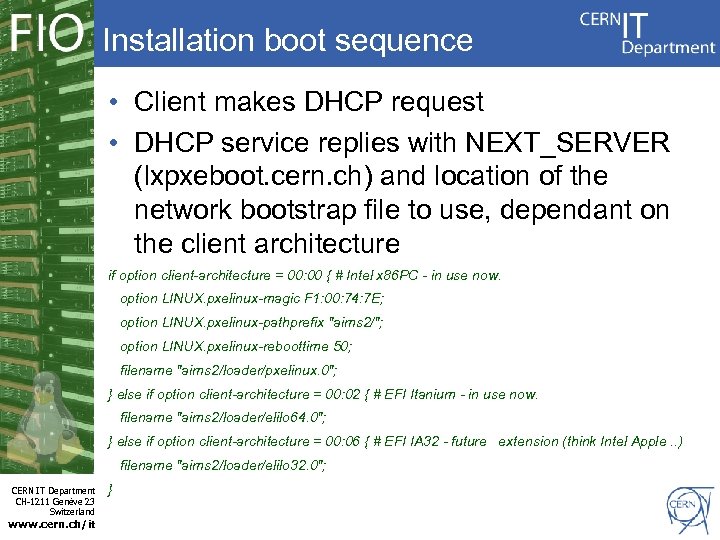 Installation boot sequence • Client makes DHCP request • DHCP service replies with NEXT_SERVER (lxpxeboot. cern. ch) and location of the network bootstrap file to use, dependant on the client architecture if option client-architecture = 00: 00 { # Intel x 86 PC - in use now. option LINUX. pxelinux-magic F 1: 00: 74: 7 E; option LINUX. pxelinux-pathprefix "aims 2/"; option LINUX. pxelinux-reboottime 50; filename "aims 2/loader/pxelinux. 0"; } else if option client-architecture = 00: 02 { # EFI Itanium - in use now. filename "aims 2/loader/elilo 64. 0"; } else if option client-architecture = 00: 06 { # EFI IA 32 - future extension (think Intel Apple. . ) filename "aims 2/loader/elilo 32. 0"; CERN IT Department CH-1211 Genève 23 Switzerland www. cern. ch/it }
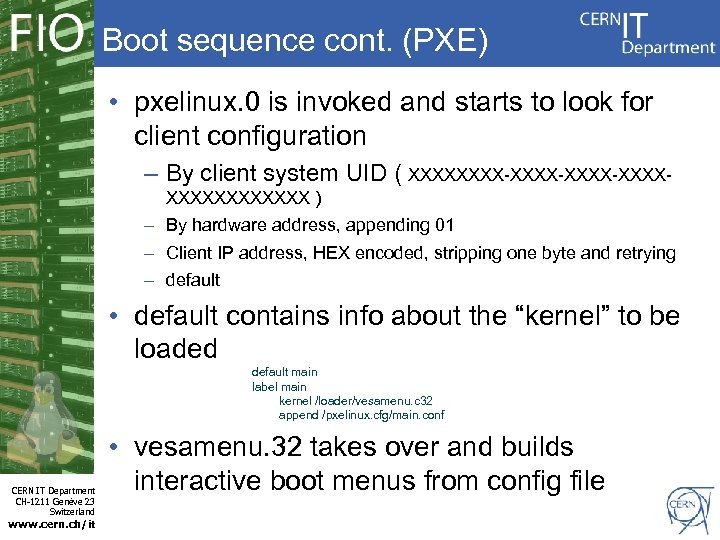 Boot sequence cont. (PXE) • pxelinux. 0 is invoked and starts to look for client configuration – By client system UID ( XXXX-XXXX-XXXXXXXX ) – By hardware address, appending 01 – Client IP address, HEX encoded, stripping one byte and retrying – default • default contains info about the “kernel” to be loaded default main label main kernel /loader/vesamenu. c 32 append /pxelinux. cfg/main. conf CERN IT Department CH-1211 Genève 23 Switzerland www. cern. ch/it • vesamenu. 32 takes over and builds interactive boot menus from config file
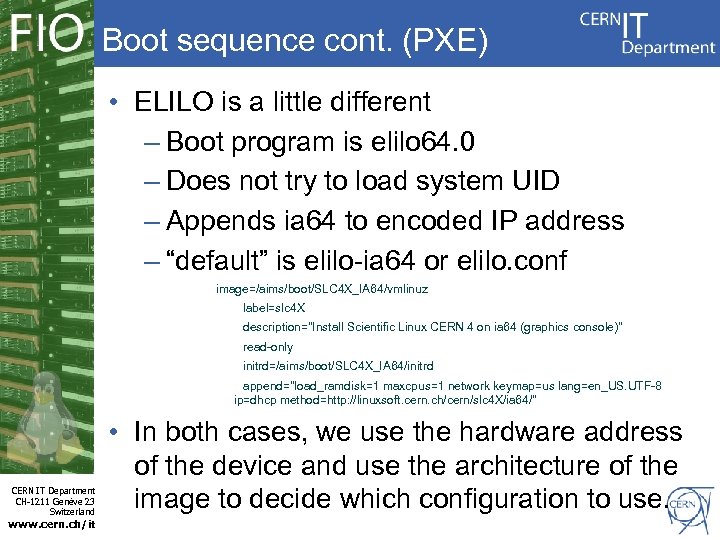 Boot sequence cont. (PXE) • ELILO is a little different – Boot program is elilo 64. 0 – Does not try to load system UID – Appends ia 64 to encoded IP address – “default” is elilo-ia 64 or elilo. conf image=/aims/boot/SLC 4 X_IA 64/vmlinuz label=slc 4 X description="Install Scientific Linux CERN 4 on ia 64 (graphics console)" read-only initrd=/aims/boot/SLC 4 X_IA 64/initrd append="load_ramdisk=1 maxcpus=1 network keymap=us lang=en_US. UTF-8 ip=dhcp method=http: //linuxsoft. cern. ch/cern/slc 4 X/ia 64/" CERN IT Department CH-1211 Genève 23 Switzerland www. cern. ch/it • In both cases, we use the hardware address of the device and use the architecture of the image to decide which configuration to use.
 aims. Rewrite Project • A solution to meet the new modern requirements of CERN and its users – A rethink of what LA is providing as a remote installation service • Move away from AFS dependency – Kickstarts, /tftpboot/ sync'ing • Delegate – PXE image management – Device authorisation • Reduce maintenance/administration overhead CERN IT Department CH-1211 Genève 23 Switzerland www. cern. ch/it – Improved logging and auditing Management System - 9 Aims 2 – Linux Automated Installation
 DHCP • Already completed – Useful, and flexible • DHCP/BOOTP behaviour passed back to CS – No messing around with DHCP configurations. • Operating System in LANDB dictates which NEXT_SERVER the client is sent to. • LINUX = lxpxeboot. cern. ch • PXELINTEST = lxpxeboottest. cern. ch CERN IT Department CH-1211 Genève 23 Switzerland www. cern. ch/it Aims 2 – Linux Automated Installation Management System - 10
 Alternatives • AII – Automated Installation Infrastructure – Set of Quattor components – Supports PXE, Kickstart and Jumpstart • Cobbler & Koan – From Red. Hat – Cobbler is a provissioning server. Koan is the client installer – 'Very' feature rich (Templates, Snippets, Web. UI. . . ) – Can manage a lot (TFTP, DHCP, DNS, REPOS. . . ) – Supports Xen, KVM and WMWare installations CERN IT Department CH-1211 Genève 23 Switzerland www. cern. ch/it Aims 2 – Linux Automated Installation Management System - 11
 Introduction to aims 2 • A rewrite of AIMS code base making it simpler and more flexible • Perl SOAP Client and Server • Server-side uses a modular approach • Database support provided by Oracle • Improved integration with the CERN environment (Lan. DB, LDAP, e-groups, CDB) • Improved – Customisation of a users installation – User authentication and authorisation CERN IT Department CH-1211 Genève 23 Switzerland www. cern. ch/it Aims 2 – Linux Automated Installation Management System - 12
 Authentication • Identifying who the user is and whether they are allowed to use the service. • Originally provided by a manually maintained. klogin • Uses Kerberos 5 • Defined service in the KDC • So you can get a ticket for aims 2 • Ticket is presented by the client • No KRB 5 credentials for CERN, no access. CERN IT Department CH-1211 Genève 23 Switzerland www. cern. ch/it Aims 2 – Linux Automated Installation Management System - 13
 Authorisation • Do you have permission to install X device? – Try to prevent accidental/malicious installations. • Previously manually maintained by AFS ACLs on Kickstart directories. – Difficult to transfer ownership of a device. • In one word - Icky! – Solution is not easy, as I found out. • No global one-stop source of device ownership at CERN. • Need to use multiple sources. CERN IT Department CH-1211 Genève 23 Switzerland www. cern. ch/it Aims 2 – Linux Automated Installation Management System - 14
 How we try to achieve this • • • CERN IT Department CH-1211 Genève 23 Switzerland www. cern. ch/it Is the USER listed as the OWNER or MAINUSER of the DEVICE? If the DEVICE is known to CDB, is the USER listed as having root permissions on the DEVICE? (CDB ACL, type=root) Is the USER a member of Linux Support? (They might be helping you out) If the device is located within Building 513 or 613, is the USER an FIO sysadmin? Is the owner or main user something we've been told about? – We can map shared accounts we know about to e-groups. For example, we can map the service account "FS. Administrator@cern. ch" to "fs_installers“. Explicit deny at the end. • Still not perfect, but following user feedback it is a lot better. • Code used is very flexible so if a new source becomes available, it can be easily accommodated. Aims 2 – Linux Automated Installation Management System - 15
 Kickstart Handling • No more enforced use of AFS directories • New commands added: showks, updateks • Upload or link to your kickstart file. – Linked Kickstart files can be easy re-sync'd if changed – Link sources permitted include AFS and http (not https yet) • Kickstarts rendered to Anaconda on the fly if – Correct device – Device is enabled. CERN IT Department CH-1211 Genève 23 Switzerland www. cern. ch/it • Balance between hiding the Kickstart and rendering – Linux Automated Installation Management System - 16 Aims 2
 Prepare. Install • A (large) script used by the Quattor/Elfms community • Uses device information in CDB to generate Kickstart file for device. • Also deals with SINDES • Only small amount of worked was needed – Uploading of Kickstart rather than writing to AFS – Catching errors thrown from AIMS – Modification of PXE boot targets, with append options. • Many thanks to Jan VE for his help. CERN IT Department CH-1211 Genève 23 Switzerland www. cern. ch/it Aims 2 – Linux Automated Installation Management System - 17
 Kernel append options • Previously maintained templates – bootif, eth 0, eth 1, with(out) serial console. . • Now allows arbitrary options to be provided with the –kopts option • If you provide ks, it will override aims' ks – No option uses DHCP • NEXT_SERVER/ip-address. ks • Can now very easily deal with “icky” hardware • Smthg new: allowwireless, essid=
 Arbitrary. img management • Smart users can test and deploy their own kernels and/or intitrd. img's • Use case within FIO – u-boot, burn-in-tests, fireware updates, hardware utilities – SLCx – Other operating systems (unsupported) • Client commands – addimage – showimage – remimage CERN IT Department CH-1211 Genève 23 Switzerland www. cern. ch/it • Limited Aims 2 – Linux Automated Installation Management System - 19 right now to AFS sources
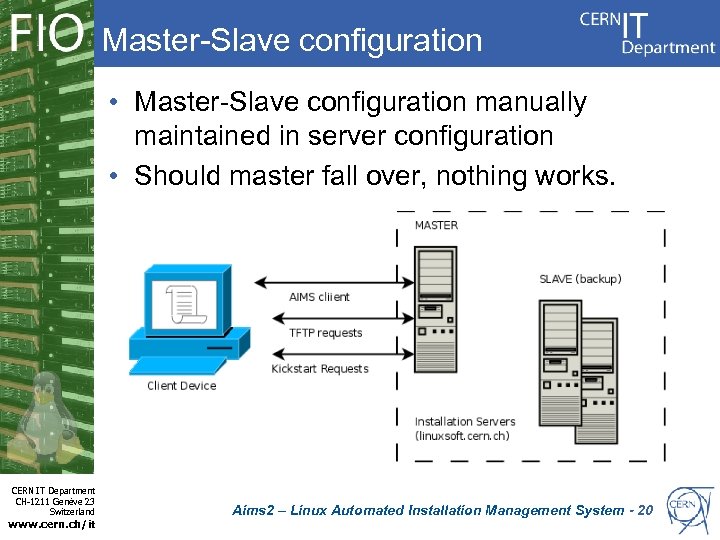 Master-Slave configuration • Master-Slave configuration manually maintained in server configuration • Should master fall over, nothing works. CERN IT Department CH-1211 Genève 23 Switzerland www. cern. ch/it Aims 2 – Linux Automated Installation Management System - 20
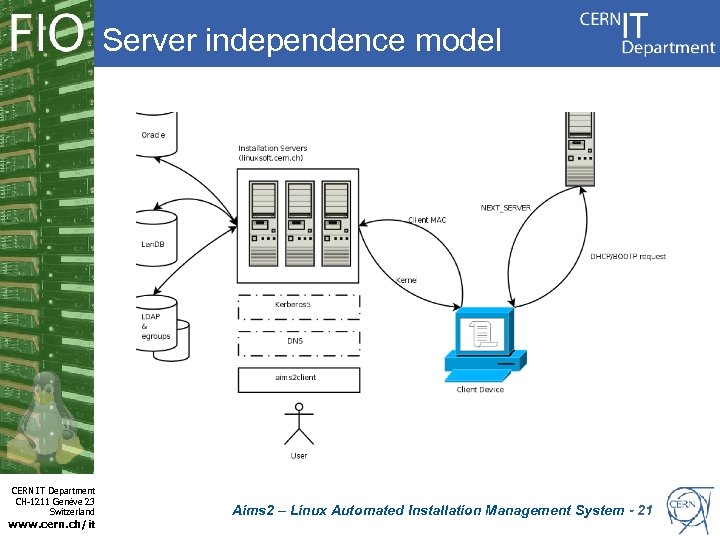 Server independence model CERN IT Department CH-1211 Genève 23 Switzerland www. cern. ch/it Aims 2 – Linux Automated Installation Management System - 21
 The Role of the Database • aims 2 is Oracle driven – Used for holding device PXE states and PXE boot media for deployment • Centralised logging and server configurations • Service reliability – If a server is lost, the important stuff is safe. • Server states maintained with database daemon – Maintains connection to database, sleeping and waking during downtime. – Polls for changes, maintain directories CERN IT Department CH-1211 Genève 23 Switzerland www. cern. ch/it Aims 2 – Linux Automated Installation Management System - 22
 Audit trail and Traceability • Log “every” action – Tracer bullets everywhere • Logging is centralised – Log the “who, what, when, where and how” – Provide information on each important step of the installation • When the client booted • When the client pulled it's kickstart • When the client got to %POST (pxeoff) • Helps the user understand their installation and Linux Support can follow CERN IT Department CH-1211 Genève 23 Switzerland www. cern. ch/it – Still some work needed on training Linux Support Aims 2 – Linux Automated Installation Management System - 23
 Improvements for the future • Fix bugs, of course • Improve the use of Oracle – More processing “inside” Oracle, but not everything – Improve LOB storage. Right now Oracle is greedy • New commands – updateimage – downloadimage – Showhistory • As time goes on, user's needs will change CERN IT Department CH-1211 Genève 23 Switzerland www. cern. ch/it Aims 2 – Linux Automated Installation Management System - 24
 Evaluation • Writing software is difficult • aims 2 tries to provide a more flexible system that can be easily adapted as the environment changes • Benefits should be felt the users first – The installation process is improved • and also felt by Linux Support – Improved debugging tools – Again, the benefits filter back to the user. CERN IT Department CH-1211 Genève 23 Switzerland www. cern. ch/it Aims 2 – Linux Automated Installation Management System - 25
 Thank You and Questions • ALL the users of AIMS – Fantastic feedback (dev and testing) – Patient and willing to talk about new ideas (and accept bumps on the way) – Thanks! • Jarek as my Supervisor – LA for its support • Jan VE for help with Prepare. Install • Many others too! • Over to you now, Question Time. CERN IT Department CH-1211 Genève 23 Switzerland www. cern. ch/it Aims 2 – Linux Automated Installation Management System - 26