


 Скачать презентацию Agricultural to Industrial to Information Age Data
fbd3900d7049a0763111700be4100bef.ppt
- Количество слайдов: 38
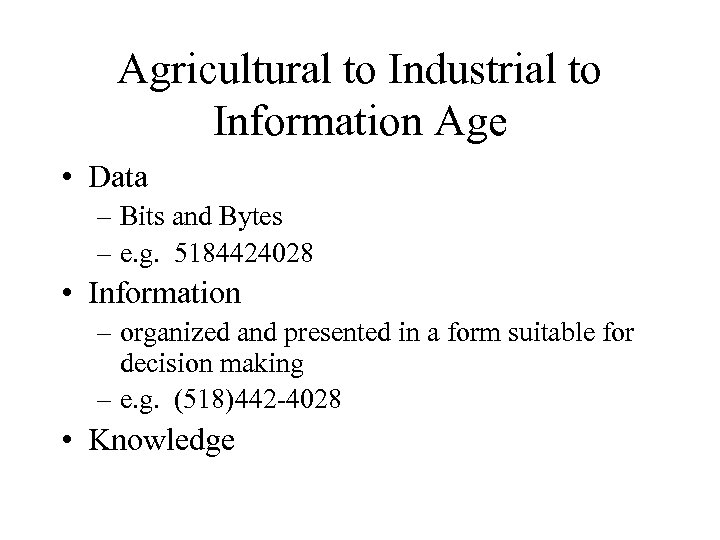 Agricultural to Industrial to Information Age • Data – Bits and Bytes – e. g. 5184424028 • Information – organized and presented in a form suitable for decision making – e. g. (518)442 -4028 • Knowledge
 Desirable Attributes of Information • • • Shareable Transportable Secure Accurate Timely Relevant
 Where do companies get information from? • They buy it – Consultants, publications, news services etc. • They generate it – Computer systems (programs process data stored in databases) – Employees (apply experience and intelligence)
 Where do we store Intangible Assets -- Information? • • In people’s heads On paper In card-files In computers
 Entities, Attributes, and Relationships • Entity – a person, place, thing, or event • Attribute – a property of an entity – For the entity “Person, ” attributes could include eye color and height • Relationship – an association between entities – Publishers are related to the books they publish, and a book is related to its publisher
 Terminology • Fields - attribute • Domain -Description of allowed values for an attribute • Records - logically connected set of one or more fields. • Files - collection of records
 History of Data Processing • Manual record-keeping – High labor costs and human errors • Data file – stores information on a single entity and the attributes of that entity • Database – a structure that can store information about multiple types of entities, the attributes of these entities, and the relationships among the entities
 Limitations of File-Based Systems • • • Separation and Isolation of Data Duplication of Data dependence Incompatibility of files Fixed queries / proliferation of application programs / pressure on DP staff
 Database • A self-describing collection of integrated records • Properties of a Database: – It represents some aspect of the real world – It is a logically coherent collection of data with some inherent meaning – It is designed, built, and populated with data for a specific purpose – It has users and applications
 Spreadsheet or Database? • Data size • Data storage format • Data structure – extent to which relationships among data items are fixed • Data sharing • Data control – degree of data input editing and validating
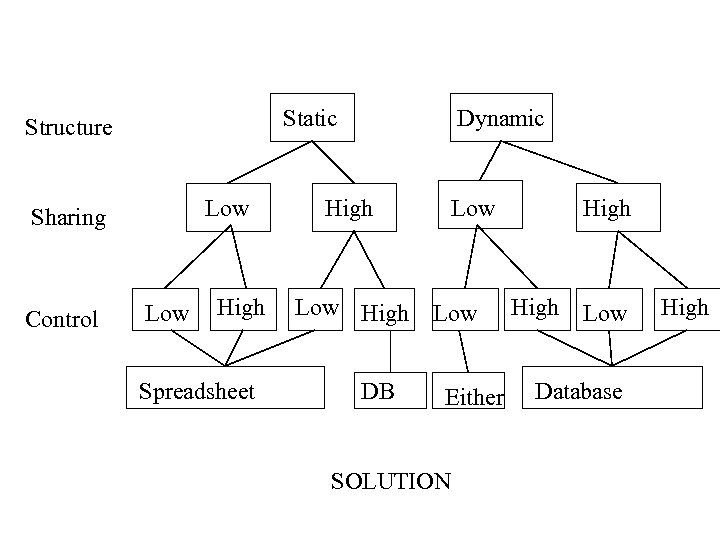 Static Structure Low Sharing Control Low High Spreadsheet Dynamic High Low High DB Low Either SOLUTION High Low Database High
 DBMS • A software system that : – Enables users to define, create and maintain the database – Provides controlled access to this database
 DBMS components • Machine – Hardware – Software • Data • Human – Procedures – People
 Data Life Cycle • Data acquisition – data modeling and populating with ultimate goal of storing data • Data use – Combines data that has been previously stored and interprets output in a decision making context (Data Warehousing)
 Data acquisition • Logical database design – E/R diagrams, normalization, database models • Physical database design – Integrity constraints, indexes, denormalization • Populating the database – data entry, import, download • Update records – data dictionary, metadata
 Data Use • Define view – Query design, DDL (SQL or QBE) • Retrieve data – Query performance and optimization, concurrency controls • Manipulate data – Sort, aggregate, classify, analyze • Present results – Reports, forms
 Access Database Objects • Tables – Stores data as records • Queries – Answers questions about the database • Forms – Presents data using a customized layout • Reports – Formats the data (primarily for printouts) • Macros – Used to automate repetitive tasks • Modules • Pages
 Users • Administrators – Data Administrator – Database Administrator • Database designers – Conceptual and logical design (WHAT? ) – Physical design (HOW? ) • Application programmers • End users – naïve (e. g checkout assistant) – sophisticated
 Everyday Database Systems • • • Supermarket Credit card Travel Agent Insurance Library University
 Applications of DBMS • Airline reservations systems – Reservations (customer name, assigned seat) – Flights (airports, arrival and departures) – Tickets (prices, requirements, availability) • Banking systems – Customers (names, addresses, accounts, loans) • Corporate records – Accounts (payable, receivable) – Employees (names, addresses, salary, benefits)
 Creating a Table in Access • Datasheet view – To add, delete or edit records • Design View – To define table the initially and specify its fields
 Custom Tables • • • Validation rules Input masks Default values Lookup fields Format
 Advantages of Database Processing • Getting more information from the same amount of data – When all the data for various systems are stored in a single database, the information becomes available, as well as the process of retrieving the information can be quick and easy
 Advantages of Database Processing • Sharing of data – Several users can have access to the same piece of data (Concurrency control allows shared access) • Balancing conflicting requirements – A person or group, often called Database Administration/Administrator (DBA) can structure the database in such a way that it benefits the entire organization, not just a single group
 Advantages of Database Processing • Controlling redundancy – Not only saves space, but makes the updating process easier • Consistency – Consistency is a direct result of redundancy, so by reducing redundancy, there is much less potential for this sort of inconsistency with the database approach
 Advantages of Database Processing • Integrity – An integrity constraint is a rule that must be followed by data in the database • Example: Not allowing a person’s age to be lower than zero • Security – The prevention of access to the database by unauthorized users – Recovery control restores the data to previous consistent state after hardware/software failure
 Advantages of Database Processing • Increasing productivity – A good DBMS comes with many features that allow users to gain access to data without having to do any programming at all • Data independence – A property that allows the structure of a database to be changed without the programs that access the database having to change
 Disadvantages of Database Processing • DBMS size – DBMSs are large programs that occupy a large amount of disk space as well as internal memory • DBMS complexity – The complexity and breadth of the functions provided by a DBMS make it a complex product to use
 Disadvantages of Database Processing • Greater impact of a failure – A failure on the part of any one user that damages the database in some way may affect all the other users on the system • More difficult recovery – If the database is being updated by a large number of users, all updates must be redone since the time of its restoration
 When can an organization justify a database? • Application needs are constantly changing • Rapid access is required for ad hoc queries • Need to reduce long lead times and high development costs for new systems • Data elements are shared by users • Need to communicate and relate data across functional and departmental boundaries • Need to improve quality of data resources and control access to them
 History of DBMS • IBM developed the Generalized Update Access Method (GUAM) in 1964 for North American Rockwell, the prime contractor for the APOLLO project • GUAM was made available for the general public under the name Data Language/I (DL/I) in 1966
 History of DBMS • DL/I became the data management component for the Information Management System (IMS), which was the dominant DBMS for many years • In the mid-1960 s, General Electric developed Integrated Data Store (I-D-S)
 History of DBMS • First generation – Hierarchical and network models • Second generation – Relational models • Third generation – Object oriented models
 Data Models • Record Based – Hierarchical (60’s) – Network (70’s) – Relational (80’s) • Object Based – Entity-Relationship (70’s) – Semantic data models (80’s) – Object-oriented (90’s)
 Record-Based Data Models • Hierarchical – Parent-child relationships with only one parent (N: 1 relationships are not supported) • Network – Extends hierarchical model by allowing multiple parents – Associations are created via pointers • Relational
 Hierarchical Model • Perceived by the user as a collection of hierarchies, or trees • More restrictive structure than a network model • GUAM, DL/I, and IMS are examples of DBMSs that conform to the hierarchical model
 Network Model • Perceived by the user as a collection of record types and relationships between these record types • I-D-S is an example of a DBMS that conforms to the network data model
 Assignment 1 • MS Access 2000 • Pages AC 2. 34 – 2. 36 • #1 -16