


 Скачать презентацию Advanced Operating Systems — Spring 2009 Lecture 16
e56c69c0fb35a8e9494353bbe7c0a234.ppt
- Количество слайдов: 72
 Advanced Operating Systems - Spring 2009 Lecture 16 – March 18, 2009 Dan C. Marinescu Email: dcm@cs. ucf. edu Office: HEC 439 B. Office hours: M, Wd 3 – 4: 30 PM. TA: Chen Yu Email: yuchen@cs. ucf. edu Office: HEC 354. Office hours: M, Wd 1. 00 – 3: 00 PM. 1
 Last, Current, Next Lecture Last time: Memory management Today The structure of address spaces Memory management leftovers Virtual memory Next time: I/O 2
 The structure of address spaces Addressing/naming: Flat SSN (Social Security Number), MAC (Medium Access Control) addresses of network interfaces Hierarchical the phone system (area code + number) IP addresses Mixed US mail – hierarchical: State, Town, Street, House ZIP code
 Addressing and Storage Sequential access: e. g. , magnetic tape Random access e. g. physical memory, disk Indexed access Contents addressable (associative)
 Virtualization Allows us to impose a structure during the mapping of logical to physical addresses. The two discussed last time: Paging Segmentation Paging and Segment tables implement in fact an indexed access
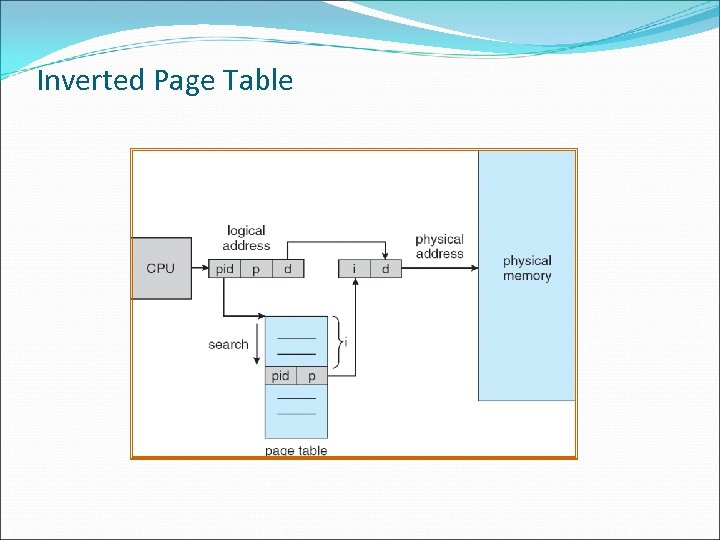 Inverted Page Table
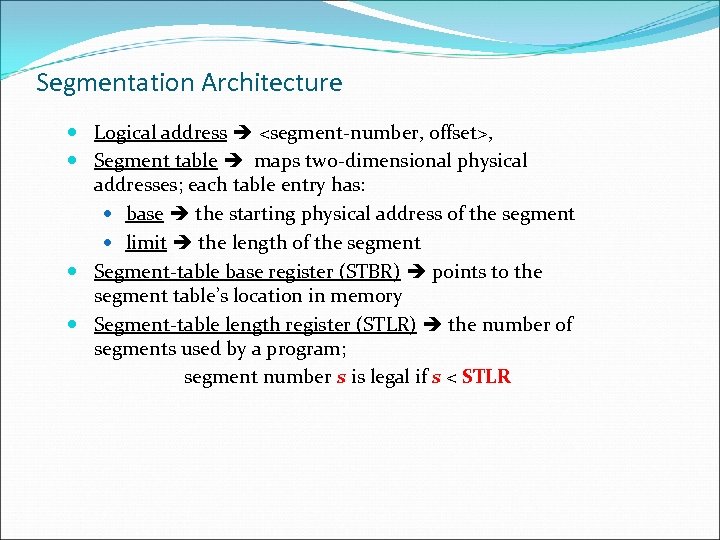 Segmentation Architecture Logical address
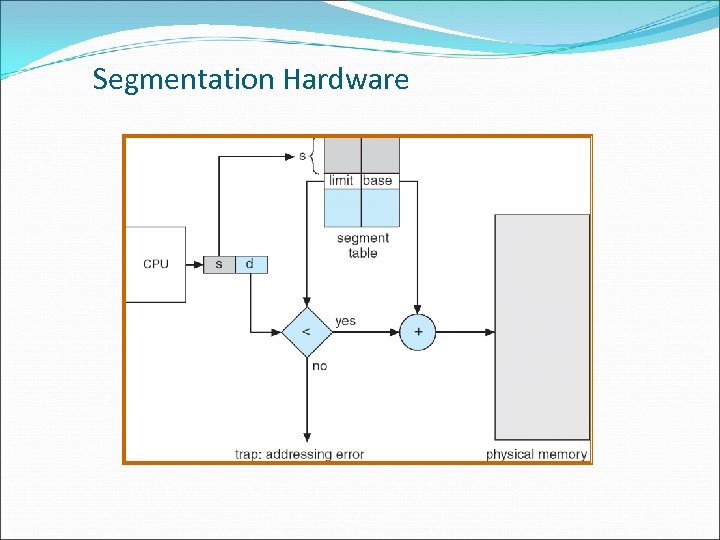 Segmentation Hardware
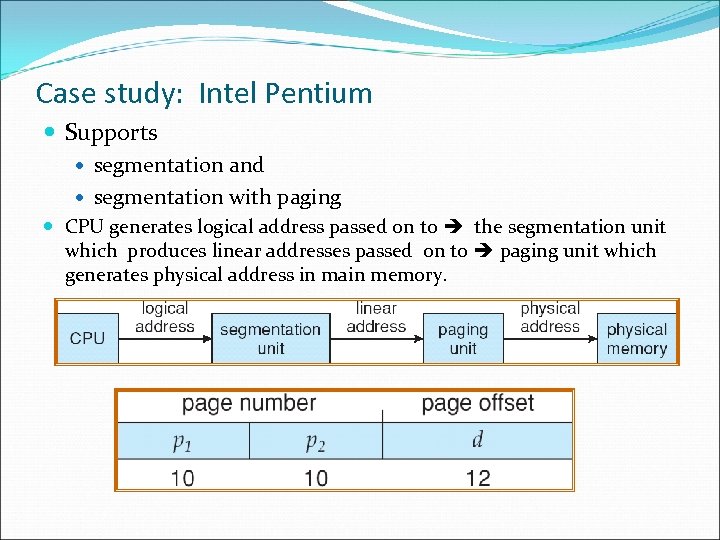 Case study: Intel Pentium Supports segmentation and segmentation with paging CPU generates logical address passed on to the segmentation unit which produces linear addresses passed on to paging unit which generates physical address in main memory.
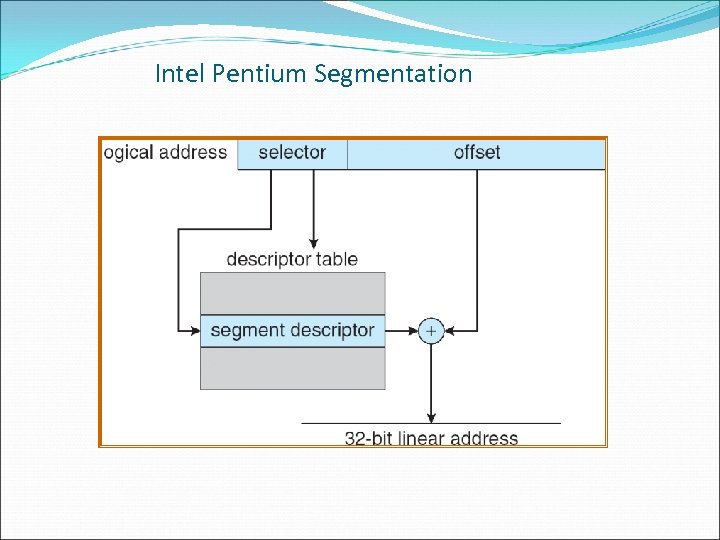 Intel Pentium Segmentation
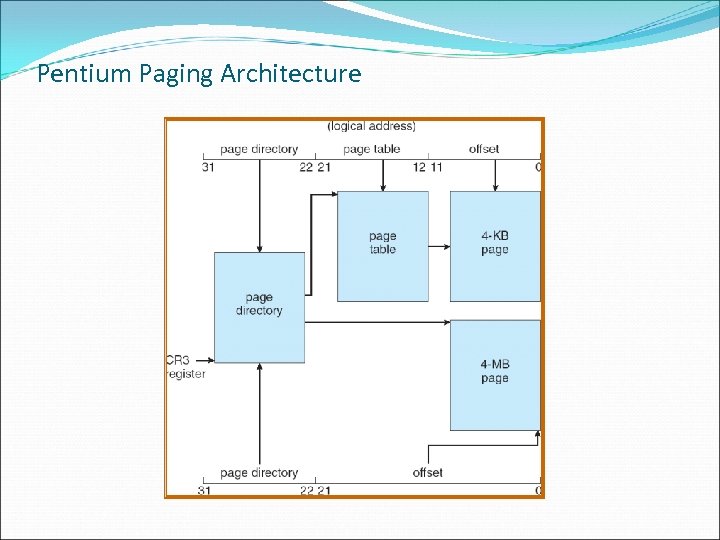 Pentium Paging Architecture
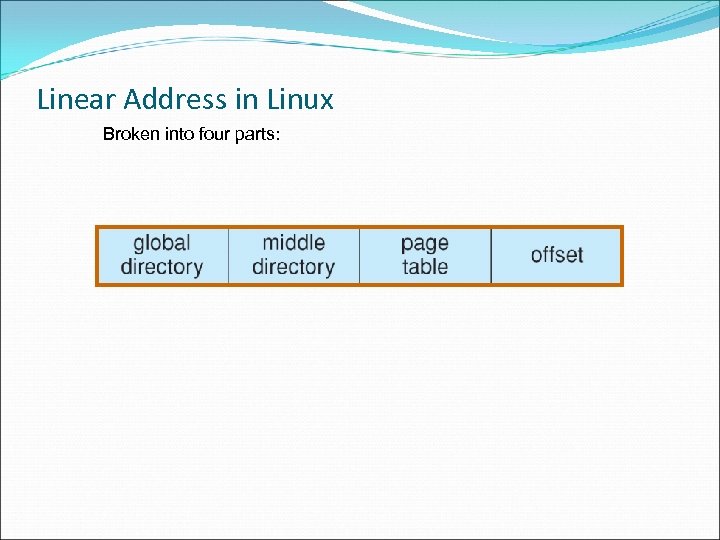 Linear Address in Linux Broken into four parts:
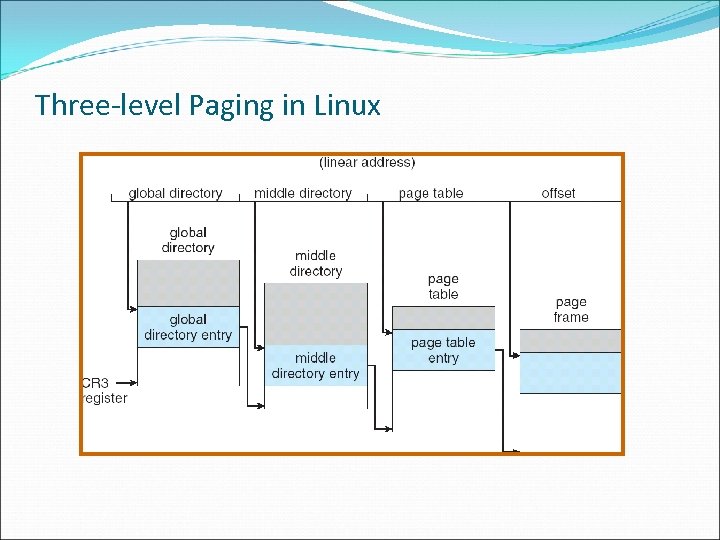 Three-level Paging in Linux
 Virtual Memory Demand Paging Copy-on-Write Page Replacement Allocation of Frames Thrashing Memory-Mapped Files Allocating Kernel Memory Other Considerations Operating-System Examples
 Virtual memory – separation of user logical memory from physical memory Advantages Only part of the program needs to be in memory for execution Logical address space can be much larger than physical address space Allows address spaces to be shared by several processes Allows for more efficient process creation Can be implemented via: Demand paging Demand segmentation
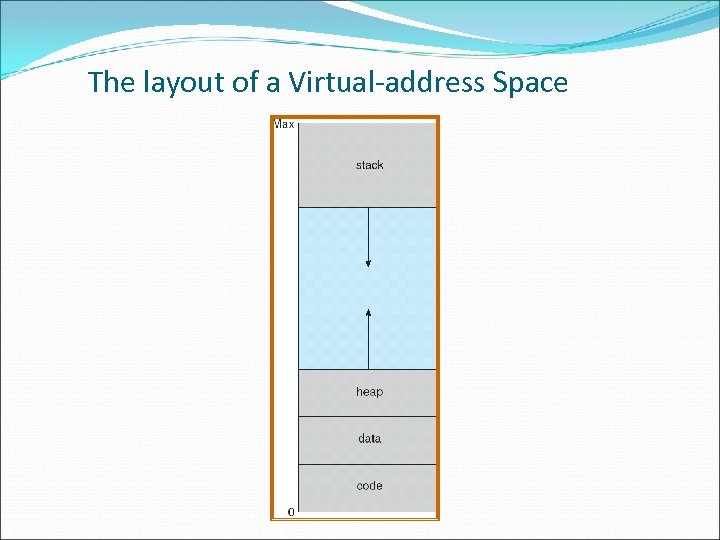 The layout of a Virtual-address Space
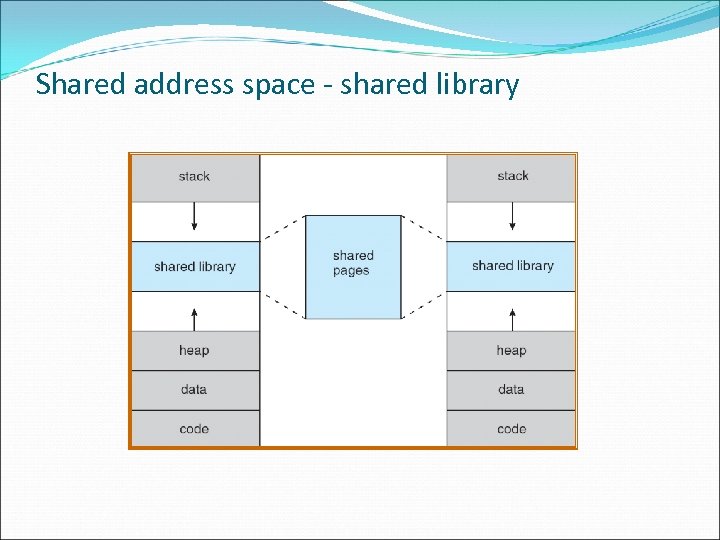 Shared address space - shared library
 Demand Paging Bring a page into memory only when it is needed (referenced) Less I/O needed Less memory needed Faster response More users
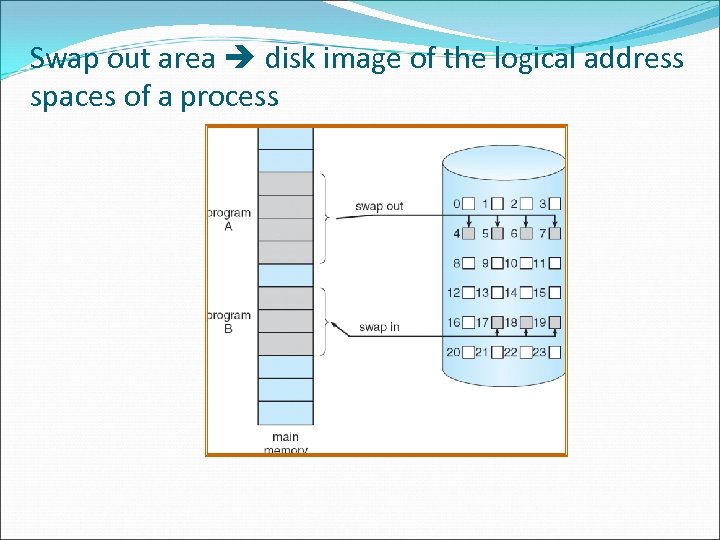 Swap out area disk image of the logical address spaces of a process
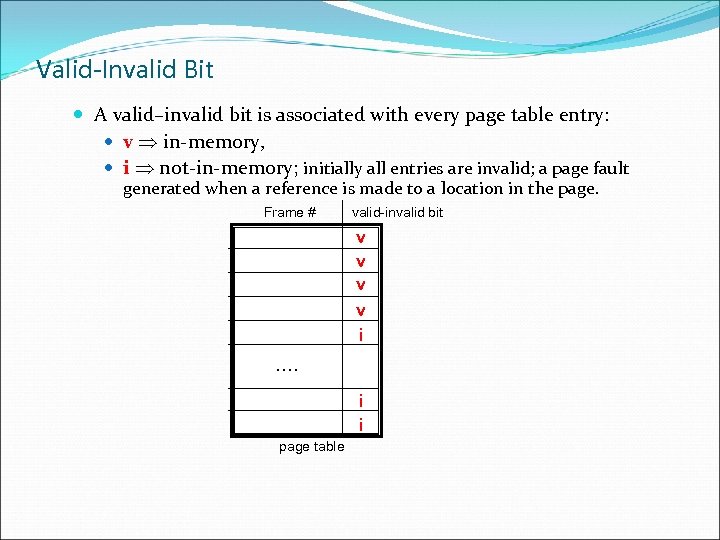 Valid-Invalid Bit A valid–invalid bit is associated with every page table entry: v in-memory, i not-in-memory; initially all entries are invalid; a page fault generated when a reference is made to a location in the page. Frame # valid-invalid bit v v i …. i i page table
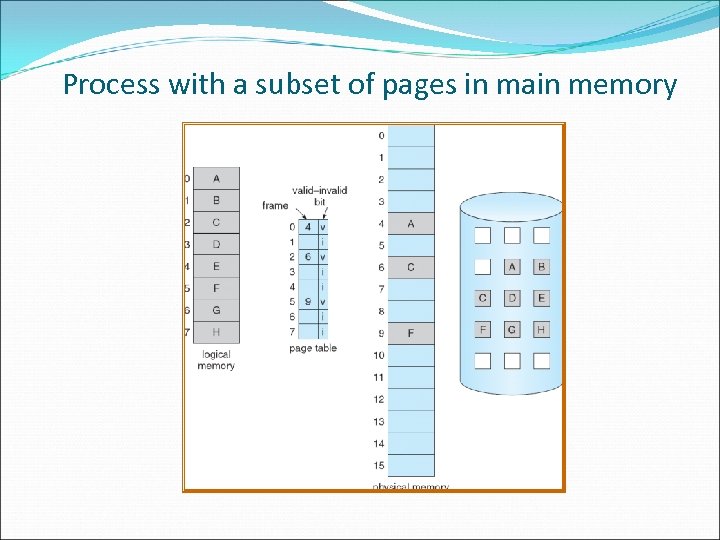 Process with a subset of pages in main memory
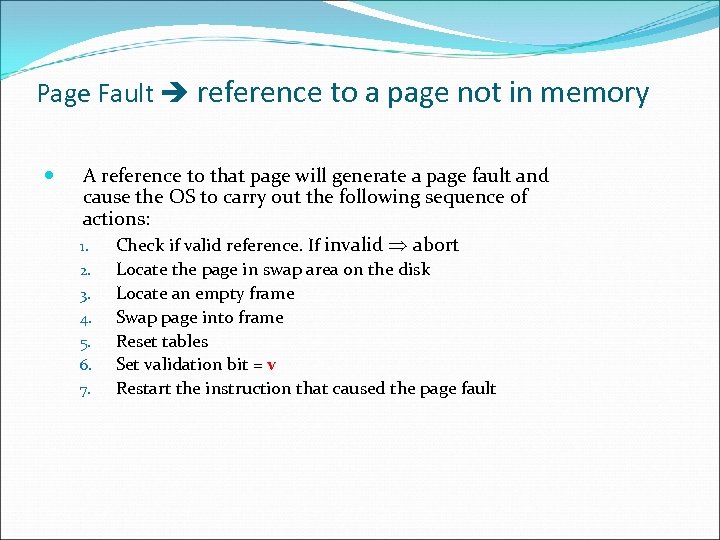 Page Fault reference to a page not in memory A reference to that page will generate a page fault and cause the OS to carry out the following sequence of actions: 1. Check if valid reference. If invalid abort 2. 3. 4. 5. 6. 7. Locate the page in swap area on the disk Locate an empty frame Swap page into frame Reset tables Set validation bit = v Restart the instruction that caused the page fault
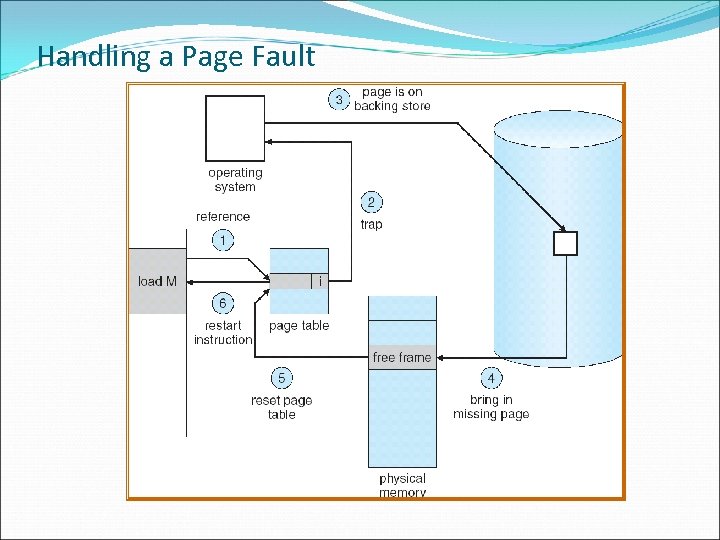 Handling a Page Fault
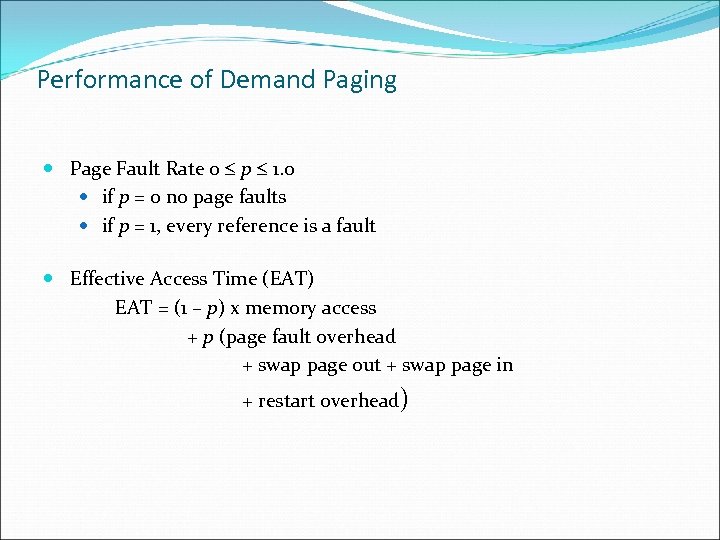 Performance of Demand Paging Page Fault Rate 0 p 1. 0 if p = 0 no page faults if p = 1, every reference is a fault Effective Access Time (EAT) EAT = (1 – p) x memory access + p (page fault overhead + swap page out + swap page in + restart overhead)
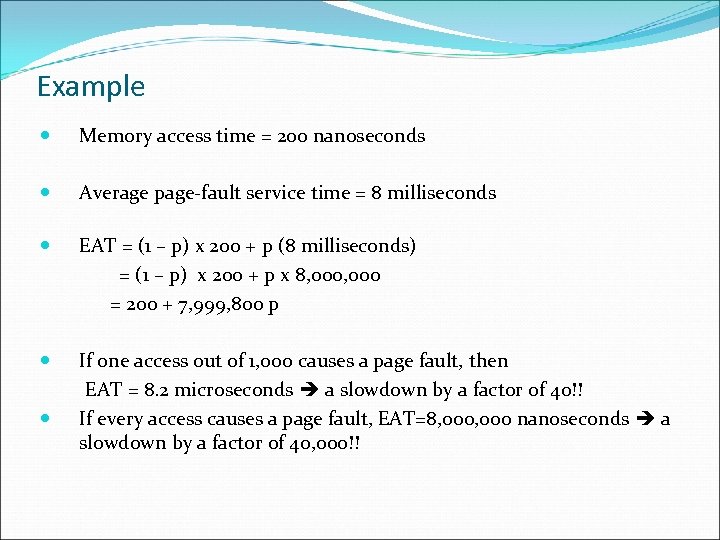 Example Memory access time = 200 nanoseconds Average page-fault service time = 8 milliseconds EAT = (1 – p) x 200 + p (8 milliseconds) = (1 – p) x 200 + p x 8, 000 = 200 + 7, 999, 800 p If one access out of 1, 000 causes a page fault, then EAT = 8. 2 microseconds a slowdown by a factor of 40!! If every access causes a page fault, EAT=8, 000 nanoseconds a slowdown by a factor of 40, 000!!
 Process Creation Virtual memory speeds up process creation: - Copy-on-Write COW - Memory-Mapped Files (later) Copy-on-Write parent and child processes initially share the same pages in memory. If either process modifies a shared page, only then is the page copied Free pages are allocated from a pool of zeroed-out pages
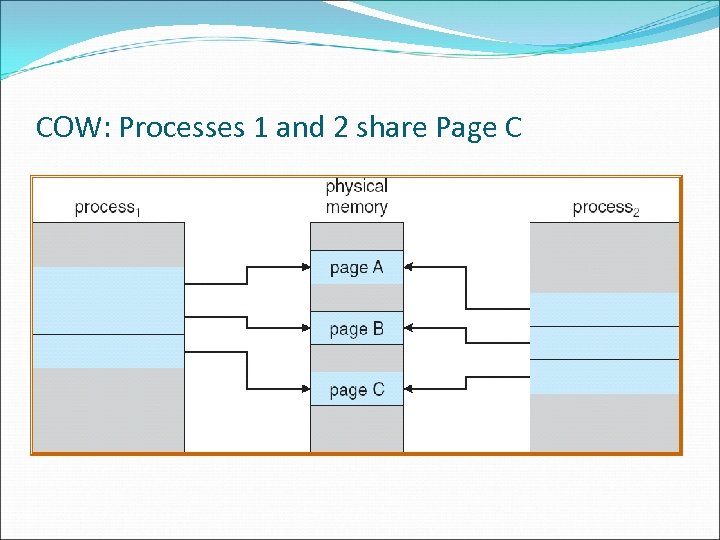 COW: Processes 1 and 2 share Page C
 Page Replacement Is invoked when there is no available frame when a page fault occurs. The separation between logical memory and physical memory allows a large virtual memory be provided on a smaller physical memory. Page-fault service routine include page replacement The modify (dirty) bit of a page tells us if a page replaced in main memory should actually be written to the swap area of the process.
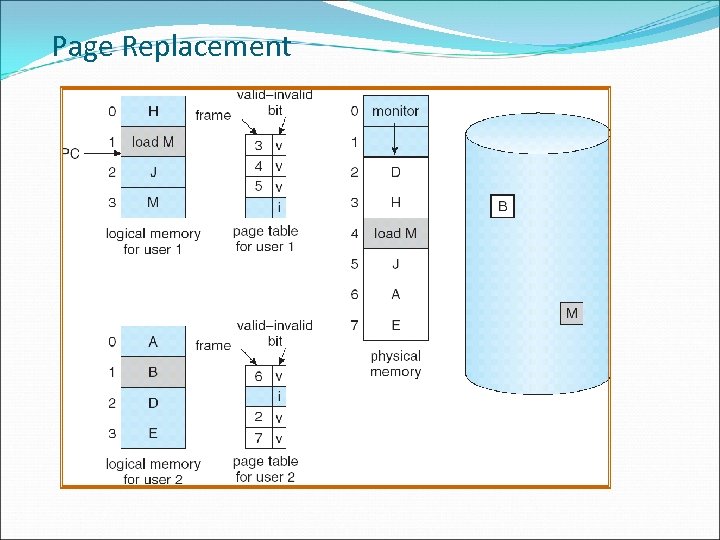 Page Replacement
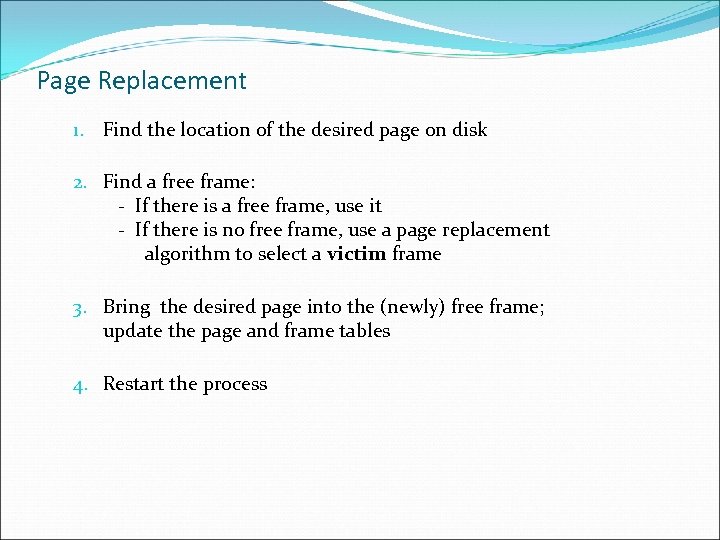 Page Replacement 1. Find the location of the desired page on disk 2. Find a free frame: - If there is a free frame, use it - If there is no free frame, use a page replacement algorithm to select a victim frame 3. Bring the desired page into the (newly) free frame; update the page and frame tables 4. Restart the process
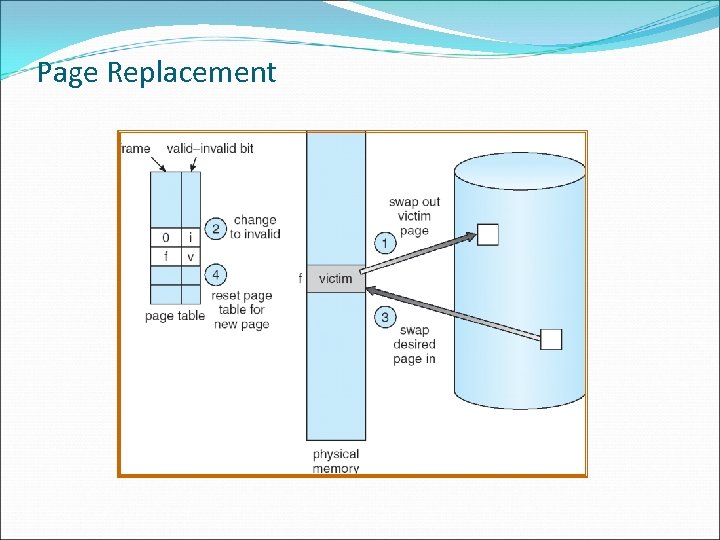 Page Replacement
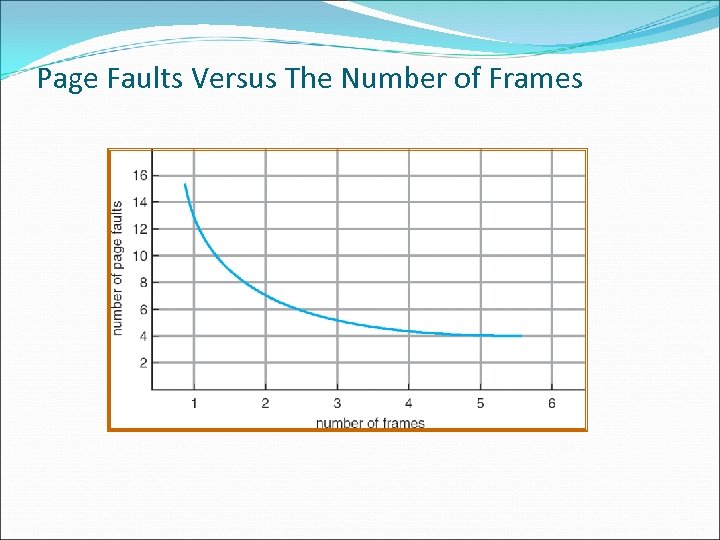 Page Faults Versus The Number of Frames
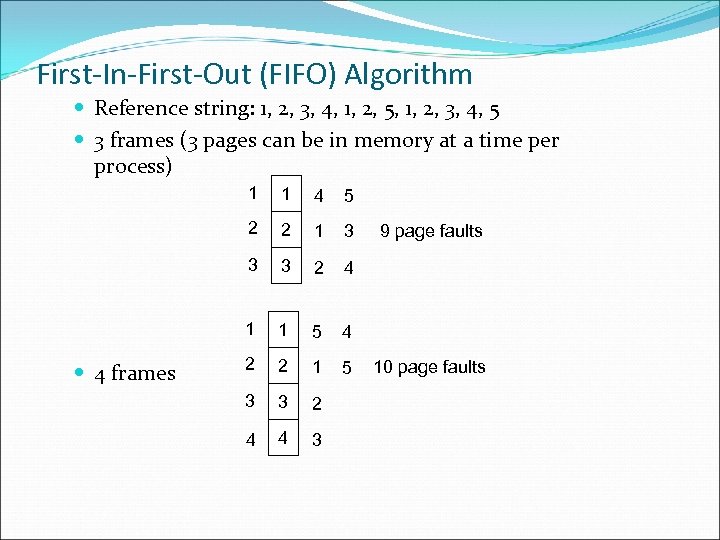 First-In-First-Out (FIFO) Algorithm Reference string: 1, 2, 3, 4, 1, 2, 5, 1, 2, 3, 4, 5 3 frames (3 pages can be in memory at a time per process) 1 4 5 2 2 1 3 3 3 2 4 1 4 frames 1 1 5 4 2 2 1 5 3 3 2 4 4 3 9 page faults 10 page faults
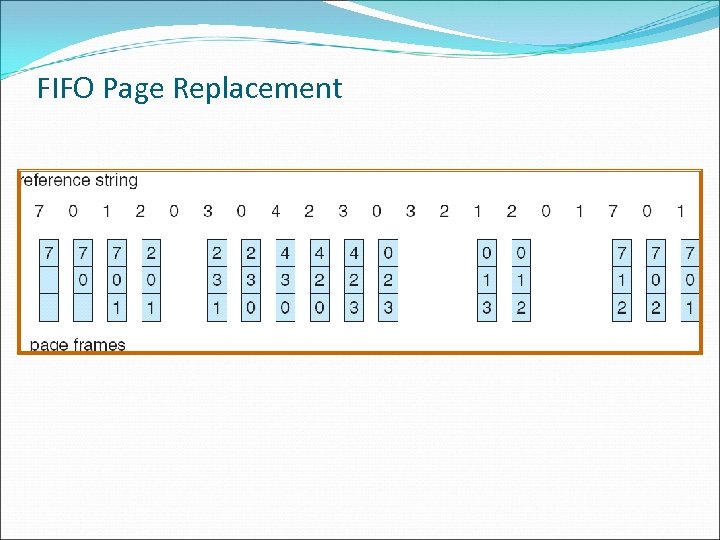 FIFO Page Replacement
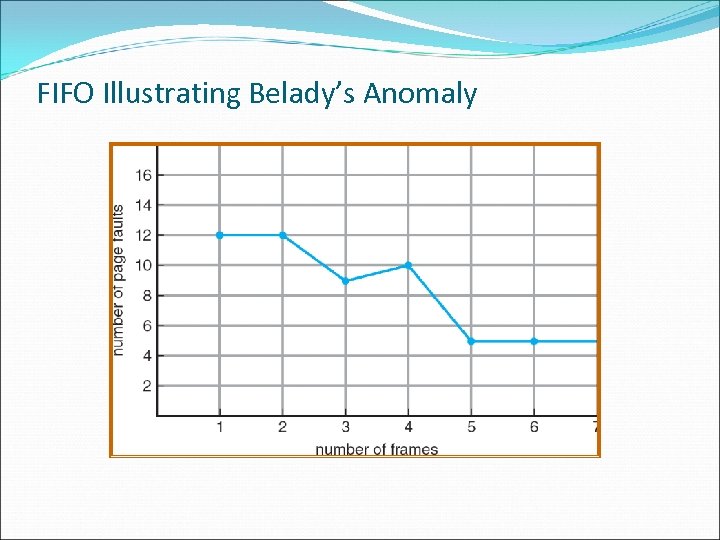 FIFO Illustrating Belady’s Anomaly
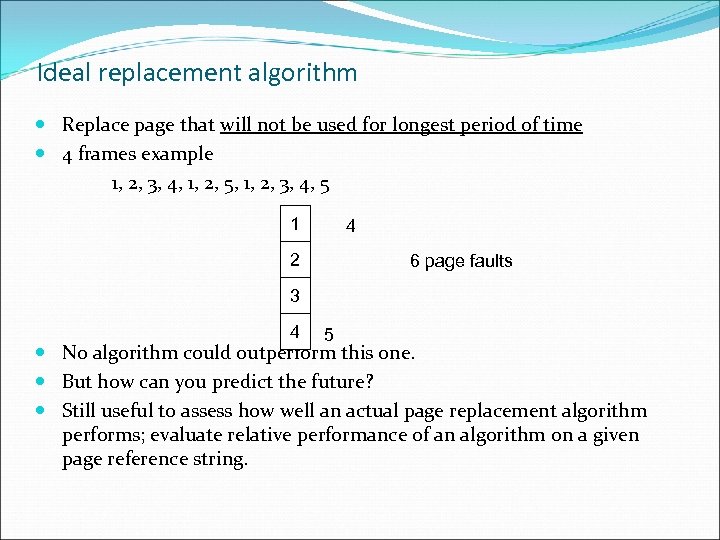 Ideal replacement algorithm Replace page that will not be used for longest period of time 4 frames example 1, 2, 3, 4, 1, 2, 5, 1, 2, 3, 4, 5 1 4 2 6 page faults 3 4 5 No algorithm could outperform this one. But how can you predict the future? Still useful to assess how well an actual page replacement algorithm performs; evaluate relative performance of an algorithm on a given page reference string.
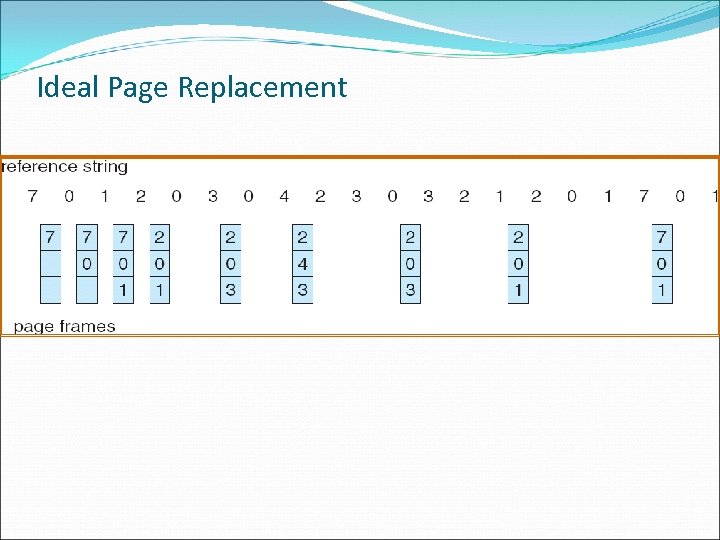 Ideal Page Replacement
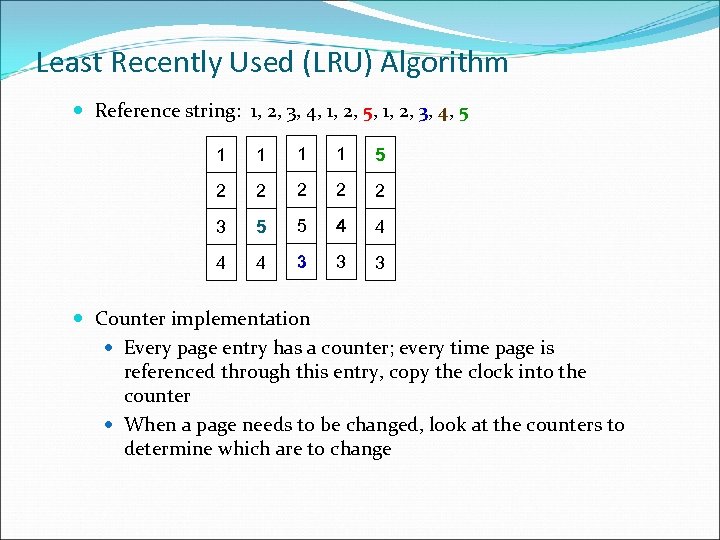 Least Recently Used (LRU) Algorithm Reference string: 1, 2, 3, 4, 1, 2, 5, 1, 2, 3, 4, 5 1 1 5 2 2 2 3 5 5 4 4 3 3 3 Counter implementation Every page entry has a counter; every time page is referenced through this entry, copy the clock into the counter When a page needs to be changed, look at the counters to determine which are to change
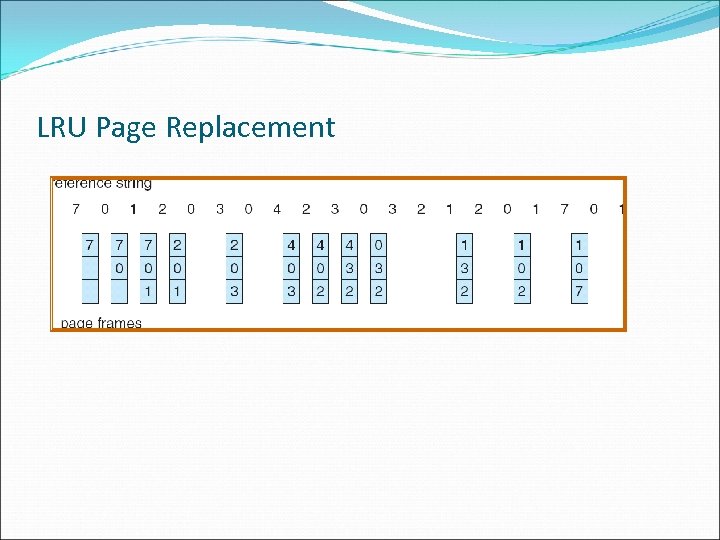 LRU Page Replacement
 LRU Algorithm (Cont’d) Stack implementation – keep a stack of page numbers in a double link form: Page referenced: move it to the top requires 6 pointers to be changed No search for replacement
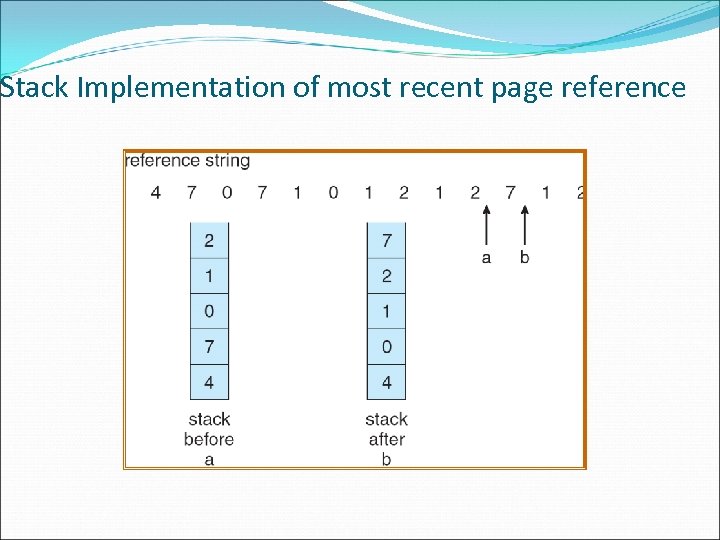 Stack Implementation of most recent page reference
 LRU Approximation Algorithms Reference bit With each page associate a bit, initially = 0 When page is referenced bit set to 1 Replace the one which is 0 (if one exists) We do not know the order, however Second chance Need reference bit Clock replacement If page to be replaced (in clock order) has reference bit = 1 then: set reference bit 0 leave page in memory replace next page (in clock order), subject to same rules
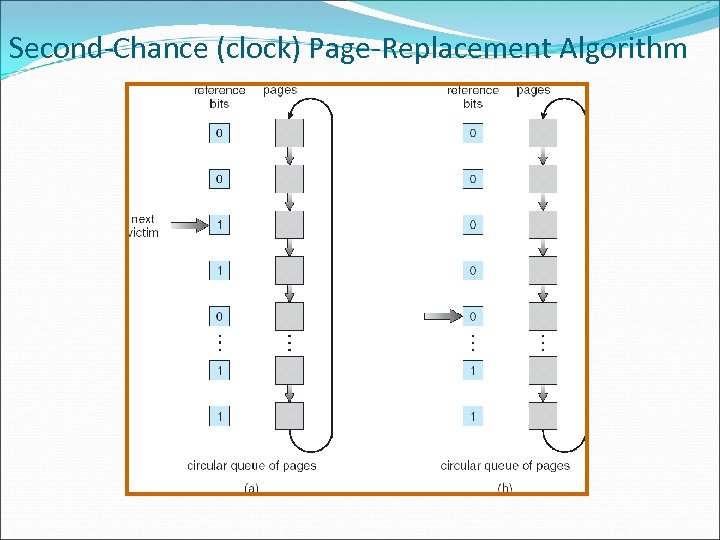 Second-Chance (clock) Page-Replacement Algorithm
 Counting Algorithms Keep a counter of the number of references that have been made to each page Least Frequently Used (LFU) Algorithm replaces page with smallest count. Most Frequently Used (MFU) Algorithm replaces page with largest count. Based on the argument that the page with the smallest count was probably just brought in and has yet to be used
 Allocation of Frames Each process needs minimum number of pages Example: IBM 370 – 6 pages to handle SS MOVE instruction: instruction is 6 bytes, might span 2 pages to handle from 2 pages to handle to Two major allocation schemes fixed allocation priority allocation
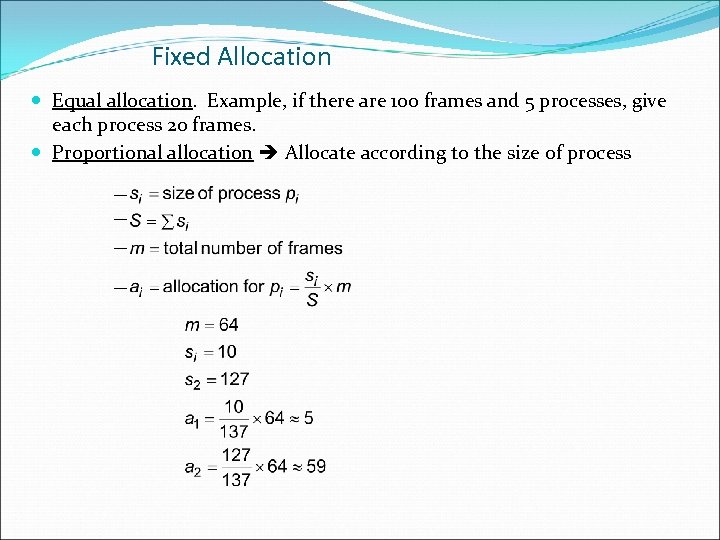 Fixed Allocation Equal allocation. Example, if there are 100 frames and 5 processes, give each process 20 frames. Proportional allocation Allocate according to the size of process
 Priority Allocation Use a proportional allocation scheme using priorities rather than size If process Pi generates a page fault, select for replacement one of its frames select for replacement a frame from a process with lower priority number
 Global vs. Local Allocation Global replacement process selects a replacement frame from the set of all frames; one process can take a frame from another Local replacement process selects from only its own set of allocated frames
 Thrashing a process is busy swapping pages in and out If a process does not have “enough” pages, the page-fault rate is very high. This leads to: low CPU utilization operating system thinks that it needs to increase the degree of multiprogramming another process added to the system
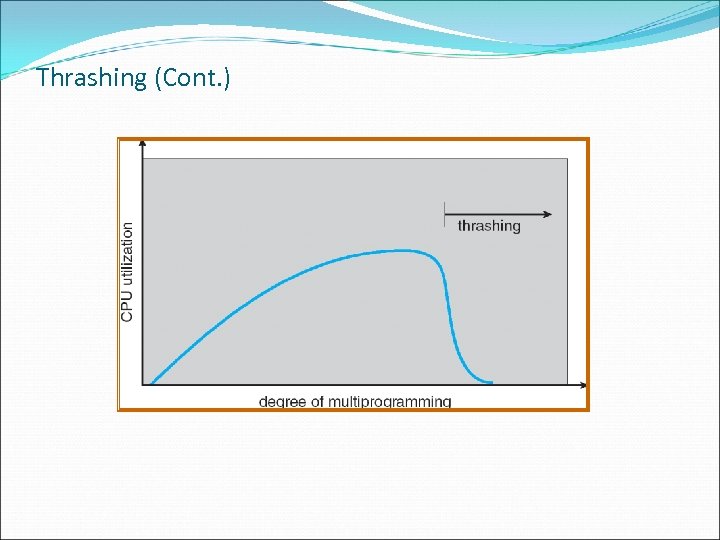 Thrashing (Cont. )
 Demand Paging and Thrashing Why does demand paging work? Locality model Process migrates from one locality to another Localities may overlap Why does thrashing occur? size of locality > total memory size
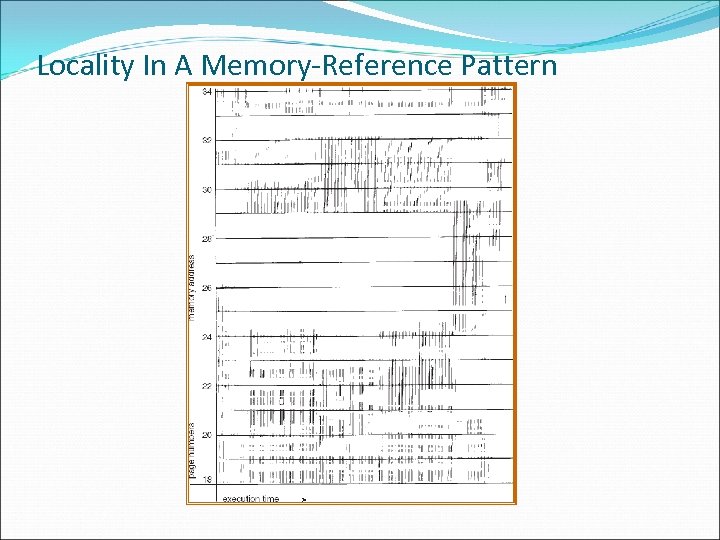 Locality In A Memory-Reference Pattern
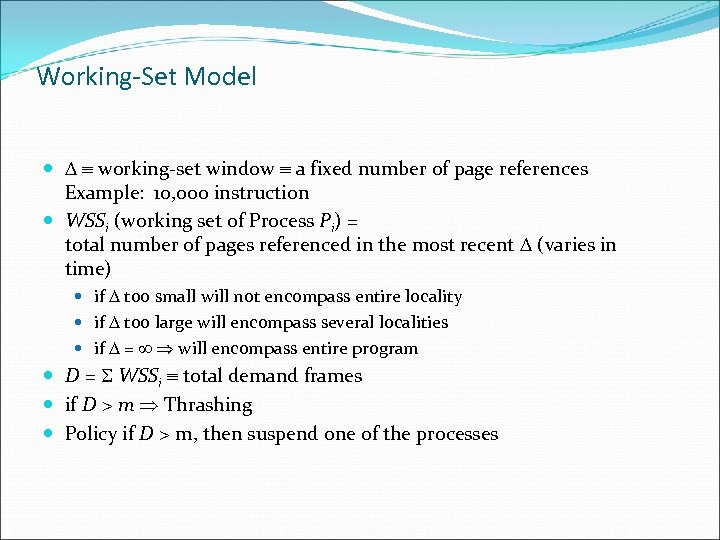 Working-Set Model working-set window a fixed number of page references Example: 10, 000 instruction WSSi (working set of Process Pi) = total number of pages referenced in the most recent (varies in time) if too small will not encompass entire locality if too large will encompass several localities if = will encompass entire program D = WSSi total demand frames if D > m Thrashing Policy if D > m, then suspend one of the processes
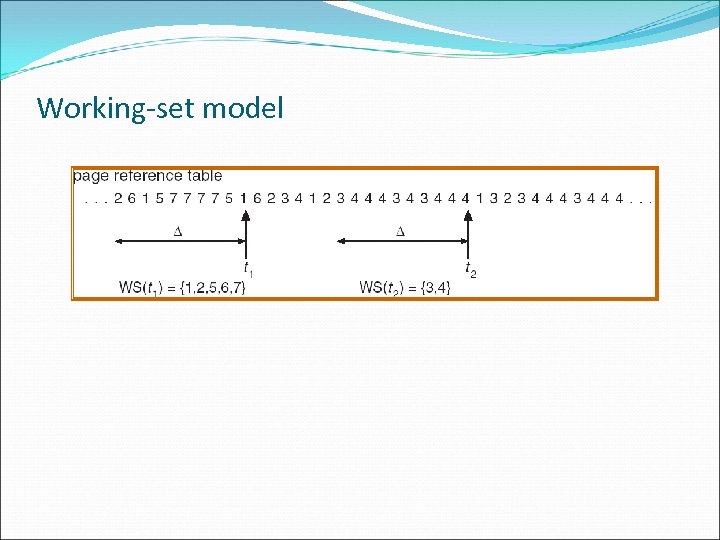 Working-set model
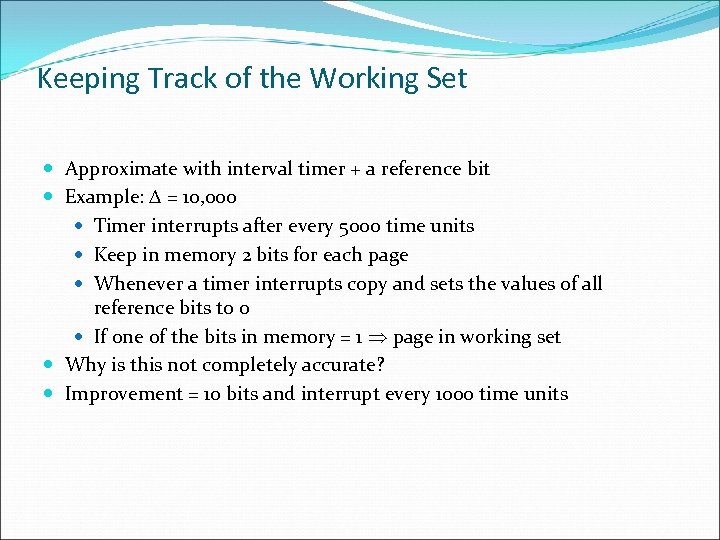 Keeping Track of the Working Set Approximate with interval timer + a reference bit Example: = 10, 000 Timer interrupts after every 5000 time units Keep in memory 2 bits for each page Whenever a timer interrupts copy and sets the values of all reference bits to 0 If one of the bits in memory = 1 page in working set Why is this not completely accurate? Improvement = 10 bits and interrupt every 1000 time units
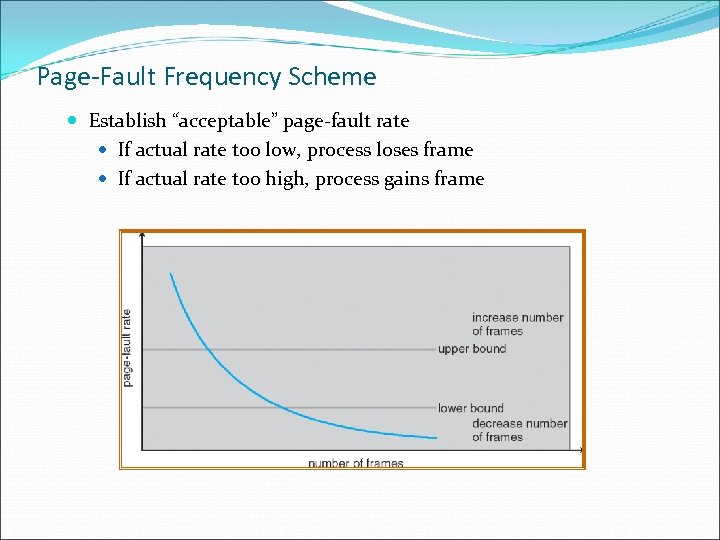 Page-Fault Frequency Scheme Establish “acceptable” page-fault rate If actual rate too low, process loses frame If actual rate too high, process gains frame
 Memory-Mapped Files Allows file I/O to be treated as routine memory access by mapping a disk block to a page in memory A file is initially read using demand paging. A page-sized portion of the file is read from the file system into a physical page. Subsequent reads/writes to/from the file are treated as ordinary memory accesses. Simplifies file access by treating file I/O through memory rather than read() write() system calls Also allows several processes to map the same file allowing the pages in memory to be shared
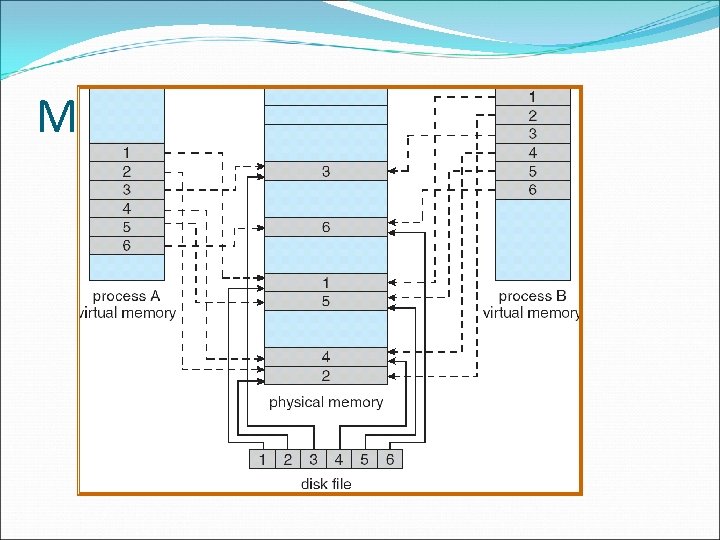 Memory Mapped Files
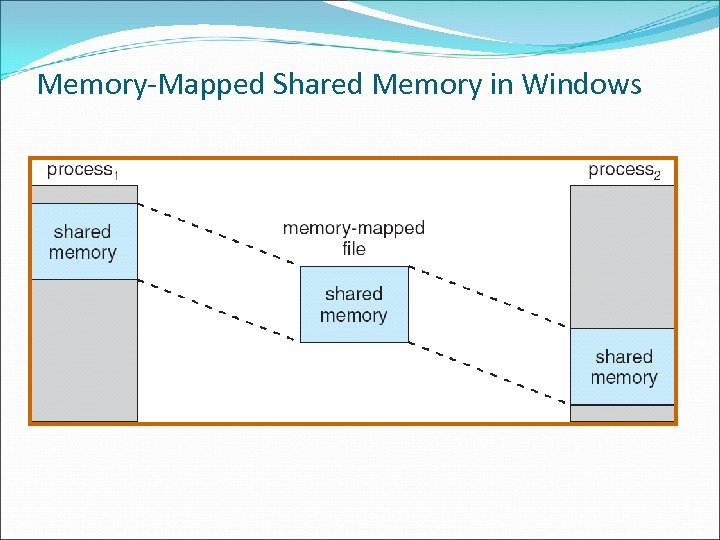 Memory-Mapped Shared Memory in Windows
 Allocating Kernel Memory Treated differently from user memory Often allocated from a free-memory pool Kernel requests memory for structures of varying sizes Some kernel memory needs to be contiguous
 Buddy System Allocates memory from fixed-size segment consisting of physicallycontiguous pages Memory allocated using power-of-2 allocator Satisfies requests in units sized as power of 2 Request rounded up to next highest power of 2 When smaller allocation needed than is available, current chunk split into two buddies of next-lower power of 2 Continue until appropriate sized chunk available
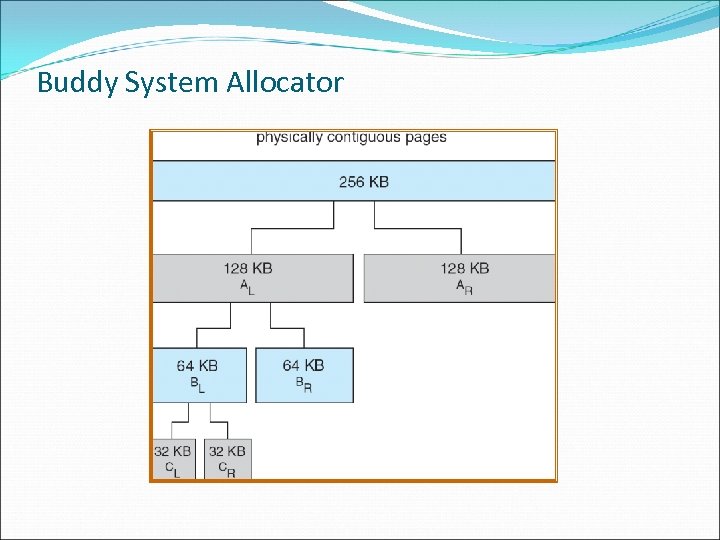 Buddy System Allocator
 Slab Allocator Slab one or more physically contiguous pages Alternate strategy Cache consists of one or more slabs Single cache for each unique kernel data structure Each cache filled with objects – instantiations of the data structure When cache created, filled with objects marked as free When structures stored, objects marked as used If slab is full of used objects, next object allocated from empty slab If no empty slabs, new slab allocated Benefits include no fragmentation, fast memory request satisfaction
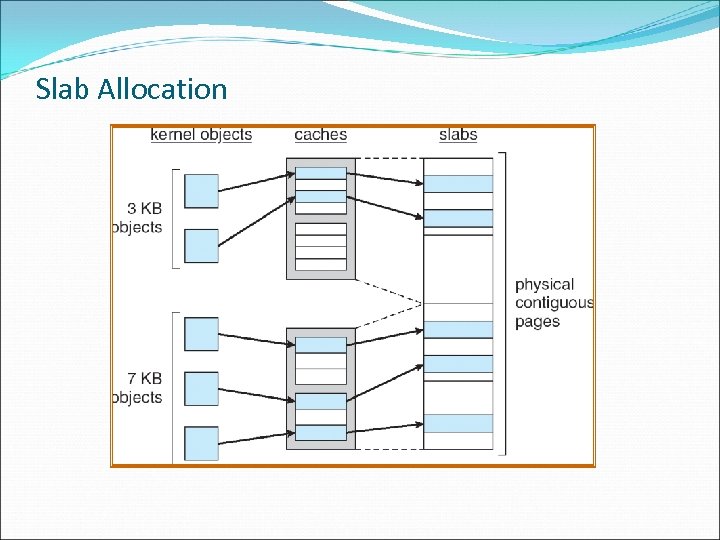 Slab Allocation
 Pre-paging bring in main memory all or some of the pages a process will need, before they are referenced Aim reduce the large number of page faults at process startup If pre-paged pages are unused, I/O and memory wasted Assume s pages are pre-paged and fraction α of them is used cost of save pages faults s * α > cost of pre-paging s * (1 - α) unnecessary pages α near zero pre-paging loses
 Page Size Based upon: fragmentation table size I/O overhead locality
 TLB Reach - The amount of memory accessible from the TLB Reach = (TLB Size) X (Page Size) Ideally, the working set of each process is stored in the TLB Otherwise there is a high degree of page faults Increase the Page Size This may lead to an increase in fragmentation as not all applications require a large page size Provide Multiple Page Sizes This allows applications that require larger page sizes the opportunity to use them without an increase in fragmentation
![The effect of program structure on performance Program structure Int[128, 128] data; Each row](https://present5.com/presentation/e56c69c0fb35a8e9494353bbe7c0a234/image-68.jpg "The effect of program structure on performance Program structure Int[128, 128] data; Each row") The effect of program structure on performance Program structure Int[128, 128] data; Each row is stored in one page Program 1 for (j = 0; j <128; j++) for (i = 0; i < 128; i++) data[i, j] = 0; 128 x 128 = 16, 384 page faults Program 2 for (i = 0; i < 128; i++) for (j = 0; j < 128; j++) data[i, j] = 0; only 128 page faults
The effect of program structure on performance Program structure Int[128, 128] data; Each row is stored in one page Program 1 for (j = 0; j <128; j++) for (i = 0; i < 128; i++) data[i, j] = 0; 128 x 128 = 16, 384 page faults Program 2 for (i = 0; i < 128; i++) for (j = 0; j < 128; j++) data[i, j] = 0; only 128 page faults
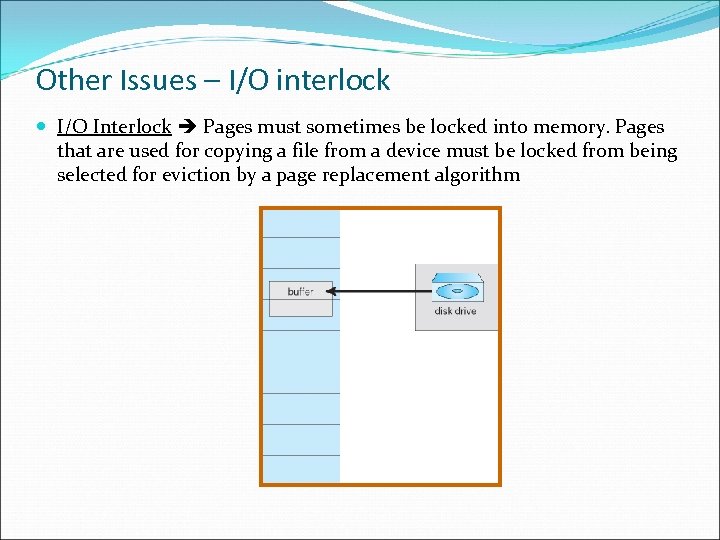 Other Issues – I/O interlock I/O Interlock Pages must sometimes be locked into memory. Pages that are used for copying a file from a device must be locked from being selected for eviction by a page replacement algorithm
 Windows XP Uses demand paging with clustering. Clustering bring in pages surrounding the faulting page. Working set minimum/maximum minimum number of pages the process is guaranteed to have in memory; maximum number of pages the process is allowed to have in memory. Working set trimming removes pages from processes that have pages in excess of their working set minimum When the amount of free memory in the system falls below a threshold, automatic working set trimming is performed to restore the amount of free memory
 Solaris Maintains a list of free pages to assign faulting processes Lotsfree – threshold parameter (amount of free memory) to begin paging Desfree – threshold parameter to increasing paging Minfree – threshold parameter to being swapping Paging is performed by pageout process Pageout scans pages using modified clock algorithm Scanrate is the rate at which pages are scanned. This ranges from slowscan to fastscan Pageout is called more frequently depending upon the amount of free memory available
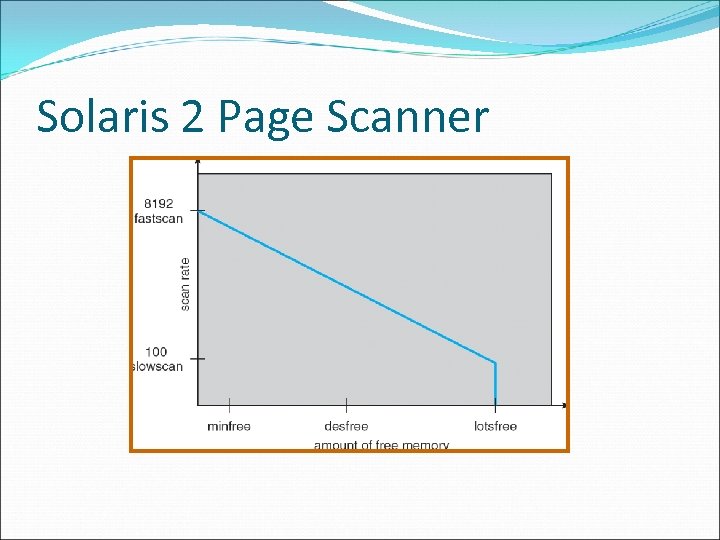 Solaris 2 Page Scanner