 Скачать презентацию Adopting Visual Studio Team System Bindia Hallauer Product
8916e97c12bb6536b429f79e4151e9ff.ppt
- Количество слайдов: 24



Adopting Visual Studio Team System Bindia Hallauer Product Management, Visual Studio Team System Microsoft Corporation 1
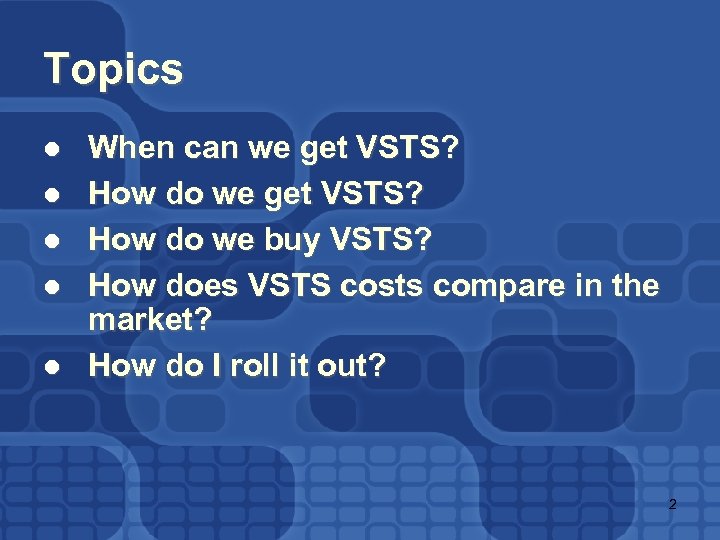
Topics l l l When can we get VSTS? How do we buy VSTS? How does VSTS costs compare in the market? How do I roll it out? 2
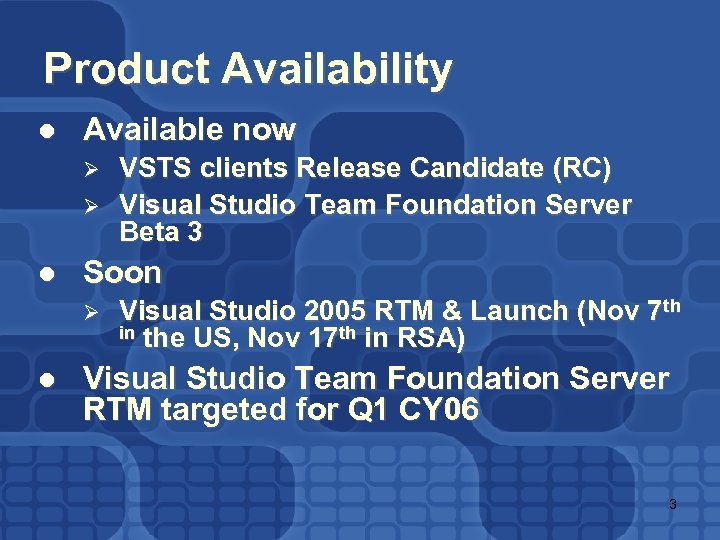
Product Availability l Available now Ø Ø l Soon Ø l VSTS clients Release Candidate (RC) Visual Studio Team Foundation Server Beta 3 Visual Studio 2005 RTM & Launch (Nov 7 th in the US, Nov 17 th in RSA) Visual Studio Team Foundation Server RTM targeted for Q 1 CY 06 3
Get Visual Studio 2005 now l http: //msdn. microsoft. com/vs 2005 4
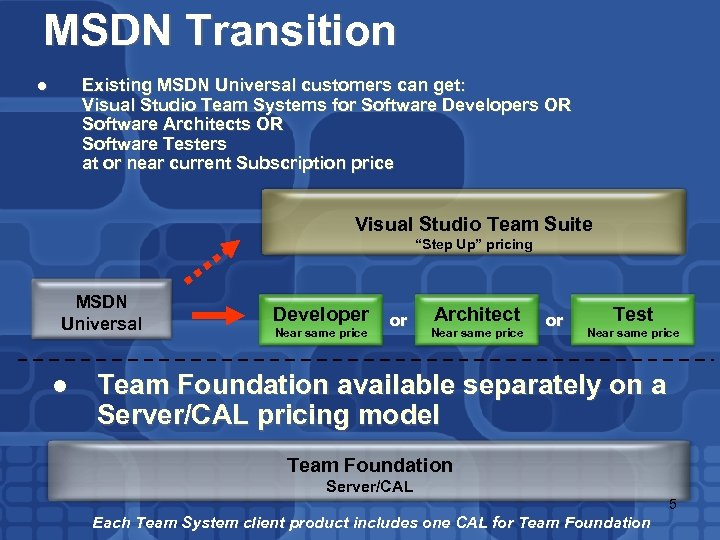
MSDN Transition Existing MSDN Universal customers can get: Visual Studio Team Systems for Software Developers OR Software Architects OR Software Testers at or near current Subscription price l Visual Studio Team Suite “Step Up” pricing MSDN Universal l Developer Near same price or Architect Near same price or Test Near same price Team Foundation available separately on a Server/CAL pricing model Team Foundation Server/CAL 5 Each Team System client product includes one CAL for Team Foundation
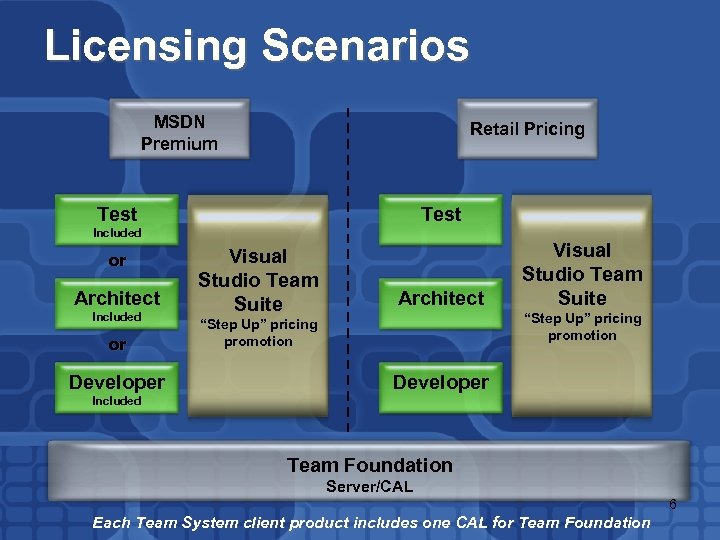
Licensing Scenarios MSDN Premium Retail Pricing Test Included or Architect Included or Developer Visual Studio Team Suite Architect Visual Studio Team Suite “Step Up” pricing promotion Developer Included Team Foundation Server/CAL 6 Each Team System client product includes one CAL for Team Foundation
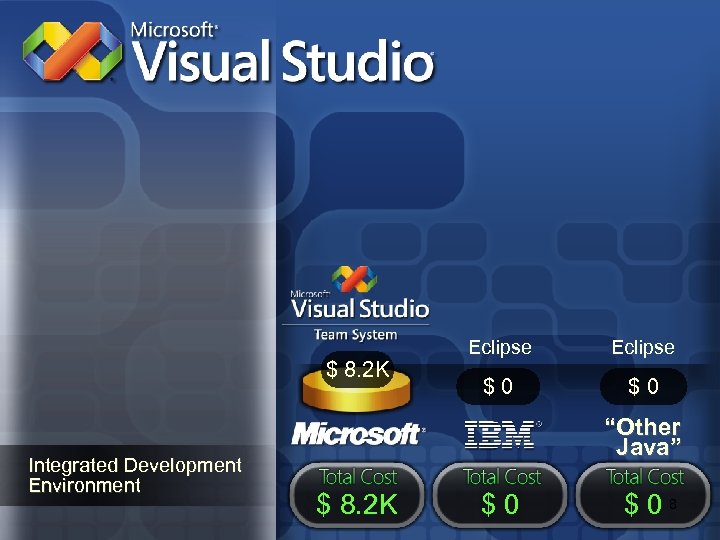
$ 8. 2 K Integrated Development Environment Eclipse $0 $0 “Other Java” $ 8. 2 K $0 $08
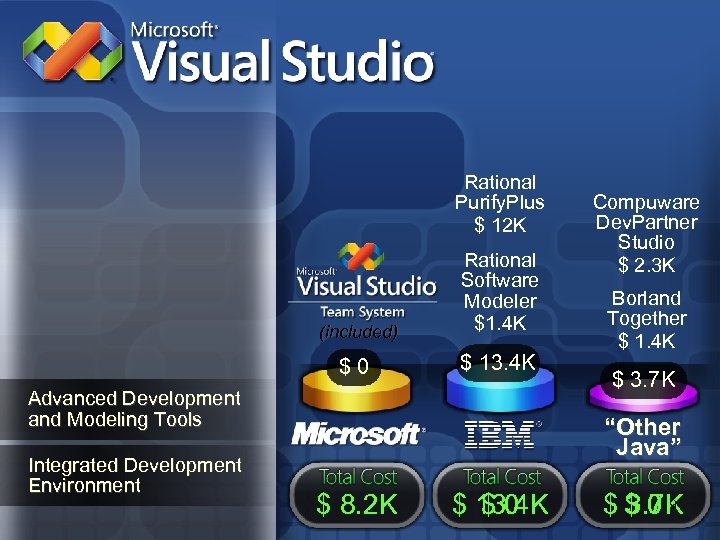
Rational Purify. Plus $ 12 K (included) Rational Software Modeler $1. 4 K $0 $ 13. 4 K Advanced Development and Modeling Tools Integrated Development Environment Compuware Dev. Partner Studio $ 2. 3 K Borland Together $ 1. 4 K $ 3. 7 K “Other Java” $ 8. 2 K $ 13. 4 K $0 $$ 09 3. 7 K
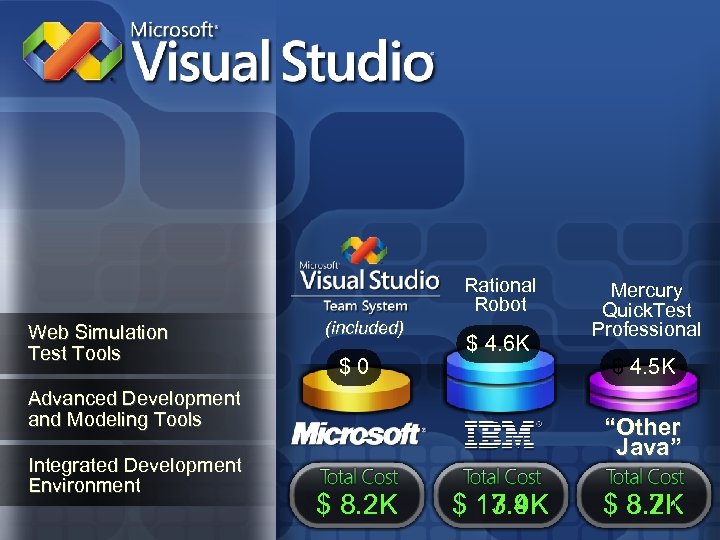
Rational Robot Web Simulation Test Tools (included) $0 $ 4. 6 K Advanced Development and Modeling Tools Integrated Development Environment Mercury Quick. Test Professional $ 4. 5 K “Other Java” $ 8. 2 K $ 13. 4 K 17. 9 K 10 $ 8. 2 K 3. 7 K
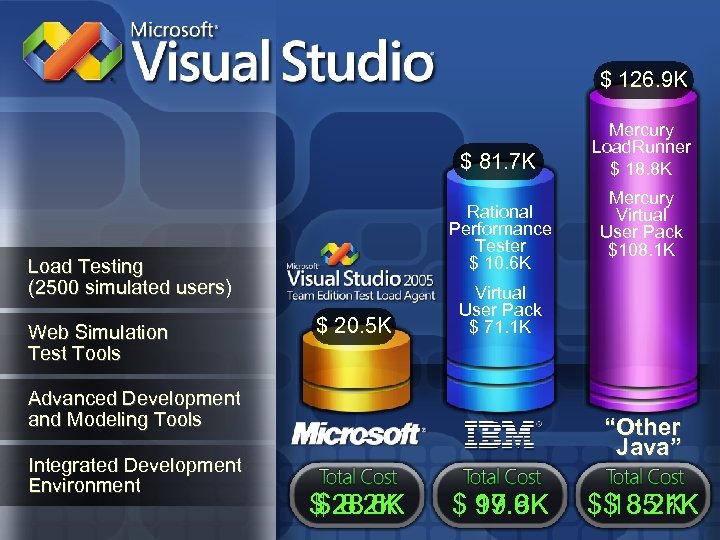
$ 126. 9 K $ 81. 7 K Rational Performance Tester $ 10. 6 K Load Testing (2500 simulated users) Web Simulation Test Tools $ 20. 5 K Mercury Virtual User Pack $108. 1 K Virtual User Pack $ 71. 1 K Advanced Development and Modeling Tools Integrated Development Environment Mercury Load. Runner $ 18. 8 K “Other Java” $ 28. 6 K $ 8. 2 K $ 17. 9 K 99. 6 K 11 $$ 8. 2 K 135. 1 K
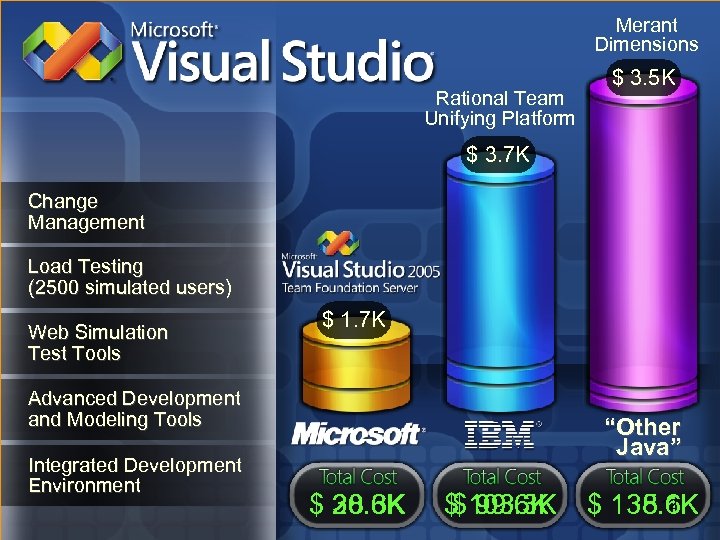
Merant Dimensions Rational Team Unifying Platform $ 3. 5 K $ 3. 7 K Change Management Load Testing (2500 simulated users) Web Simulation Test Tools $ 1. 7 K Advanced Development and Modeling Tools Integrated Development Environment “Other Java” $ 28. 6 K 30. 3 K $ 103. 3 K $ 99. 6 K 12 $ 138. 6 K 135. 1 K
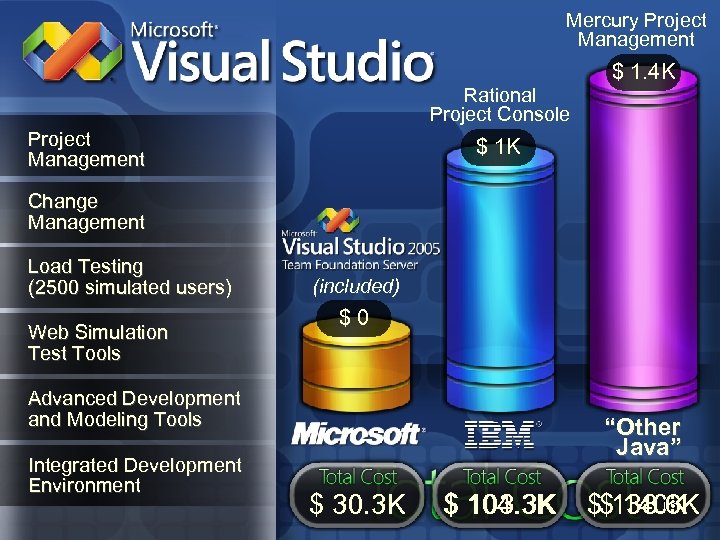
Mercury Project Management Rational Project Console Project Management $ 1. 4 K $ 1 K Change Management Load Testing (2500 simulated users) Web Simulation Test Tools (included) $0 Advanced Development and Modeling Tools Integrated Development Environment “Other Java” $ 30. 3 K $ 104. 3 K 103. 3 K 13 $$138. 6 K 140 K
Internal case study Integrated Software Development at Microsoft Using Visual Studio 2005 Team System 14
Solution Overview Microsoft e*BIS IT development group Situation l Lack of integration between tools for SDLC process Solution l Visual Studio 2005 Team System Benefits l l l Completely integrated SDLC environment Robust, scalable, and secure enterprise class source code control system Shared platform designed for team collaboration and communications 15
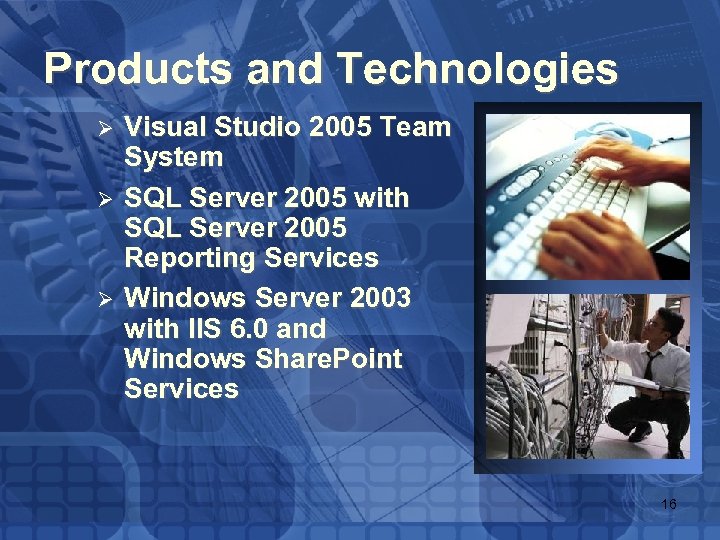
Products and Technologies Ø Ø Ø Visual Studio 2005 Team System SQL Server 2005 with SQL Server 2005 Reporting Services Windows Server 2003 with IIS 6. 0 and Windows Share. Point Services 16
Profile l l l e*BIS development group: project managers, project leads, developers, testers, and support members e*BIS IT development group works on a variety of integration projects Tools and applications used in the SDLC process are largely disconnected 17
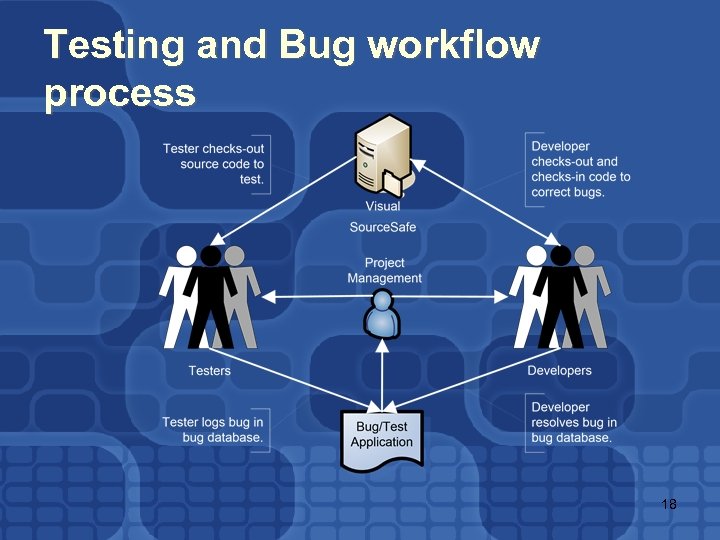
Testing and Bug workflow process 18
Challenges and Needs l l Manual processes were time consuming and hampered productivity e*BIS IT development group required: Ø Ø Ø Integrated development environment Integrated workflow process Integrated management Integrated SCM solution Integrated reporting 19
Solution l l l VSTS integrates the whole SDLC process in one solution Tiers of VSTS: database, application, client Team Foundation Server is at the center of VSTS 20
e*BIS IT Development Group Implementation l Project management Ø Ø l Work items Ø l Storage of project-related data Version control: Ø Ø Ø l Automation of project workflow Project Web site Ø l Team Foundation Server VSTS integrated reporting Security groups and user access permissions Work item integration Change management Reporting Ø Ø Ø Team Explorer for quickly locating tasks, bugs, and issues Integrated shared data source in Team Foundation Server for real-time metrics Various formats for viewing and analyzing data 21
Best Practices l l Integrated workflow processes Stepped implementation Least privilege access Labeling check-ins 22
Benefits l Developer time savings Ø l Integrated SDLC processes Ø l l 15– 20 percent in developer work Same data source for all team members Better team collaboration and communications Integrated reporting Ø Easy access to reports 23
For More Information l l Visual Studio 2005 Team System Web site: http: //lab. msdn. microsoft. com/teamsy stem SQL Server 2005 Web site: http: //msdn. microsoft. com/SQL/2005 24
Summary l l l Get Visual Studio Team System now from http: //msdn. microsoft. com/teamsystem Get started with samples, starter kits, videos, walkthroughs now, see http: //msdn. microsoft. com/teamsystem Customize, tailor VSTS to your needs, see http: //msdn. microsoft. com/extend Share and learn from the community, forums, blogs, discussions http: //msdn. microsoft. com/teamsystem More about Visual Studio 2005 partners, see http: //msdn. microsoft. com/vsip 25
Скачать презентацию Adopting Visual Studio Team System Bindia Hallauer Product
8916e97c12bb6536b429f79e4151e9ff.ppt