


 Скачать презентацию Access Control Dr Ron Rymon Efi Arazi School
18539ee09667f76e15b3f14746fc28b1.ppt
- Количество слайдов: 55
 Access Control Dr. Ron Rymon Efi Arazi School of Computer Science IDC, Herzliya. 2009/10 Pre-requisite: Basic Cryptography, Identity Authentication
 Overview ¨ Access Control and Identity Management ¨ Public-Key Infrastructure (PKI) ¨ Firewalls ¨ Client/Server Authentication (Kerberos) ¨ Remote User Authentication Service (RADIUS)
 Access Control and Identity Management Main Sources: Kaufman et al
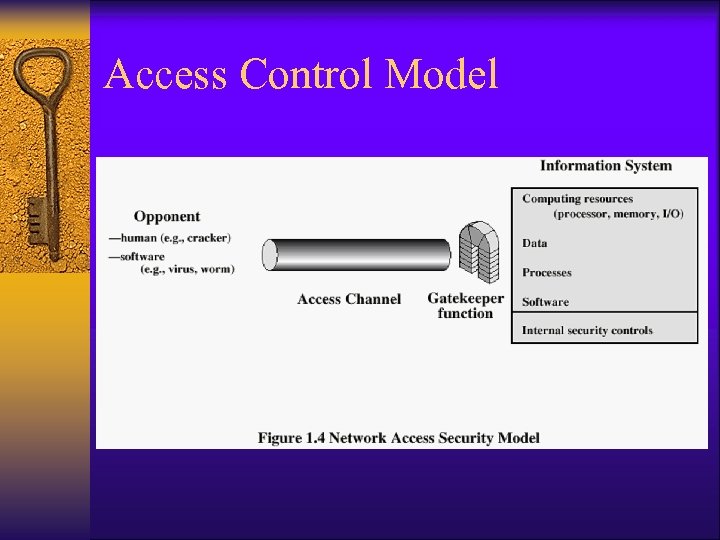 Access Control Model
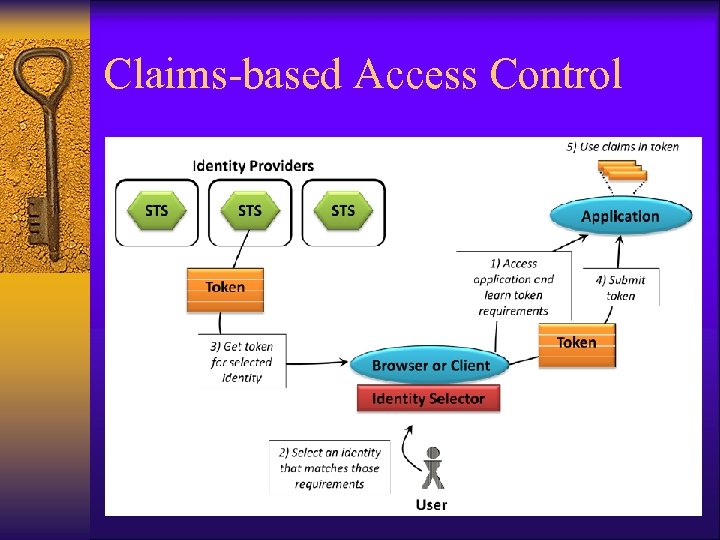
 Mandatory, Discretionary, Role-based ¨ Mandatory Access Control (MAC) – Access is restricted not individually but based on a user attribute (e. g. , title, clearance, or a group he belongs to) ¨ Discretionary Access Control (DAC) – Every user/admin that owns a resource can decide (at his discretion) who may have which access ¨ Role-based Access Control (RBAC) – Access granted according to user’s role(s) in the enterprise, or in federated environment ¨ What’s new and hot – Attribute-based Access Control (ABAC): Access is granted based on credentials (attributes) signed by local authorities – Claims-based Access Control (Card. Space): Access granted based on claims, verified and signed by Id provider
 Access Control ¨ Specification and implementation of policies and rules ¨ Which users (and applications) • Internal and external users, applications ¨ Can access which resources • Files, databases, applications ¨ For what purpose • Read/Write/Execute (access levels) • Limits, e. g. , buy up to $5000, (authority level) ¨ When • Time of the day, specific sessions ¨ Under which conditions • Additional authentication, supervisor or dual-approval ¨ Etc…
 Access Control – Where ¨ Physical access control – Keys, Key Rings, Master Keys are all ways to control physical access – Increased deployment of biometric identification for physical access control ¨ Access Control Software/Hardware Mechanisms – On routers, e. g. , Cisco’s TACACS+, and network access control servers (e. g. , RADIUS) – Systems, e. g. , Unix, Windows, Mainframe (file level) – Within Enterprise applications, databases, Web servers
 Access Control Mechanisms ¨ Access Control Lists (ACL) – Specification of access rights per resource: which users (by userid) can access this resource – One problem: there might be too many such users ¨ User Groups – Group users so that can refer to and specify access policy for the entire group – Some systems also allow grouping of resources – Group membership can be part of the organizational “directory”, and/or part of the (signed) certificate of each user – Examples: administrators, power users, marketing, guests – Still, a lot of replication, e. g. , Marketing, Sales, and R&D groups may all share a certain subset of access rights ¨ Hierarchical groups – Employee can be the parent/child of each of Marketing, Sales, R&D
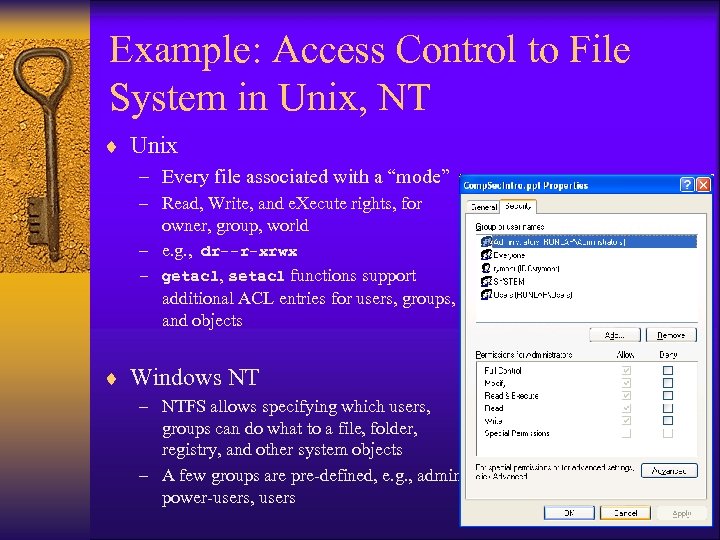 Example: Access Control to File System in Unix, NT ¨ Unix – Every file associated with a “mode” – Read, Write, and e. Xecute rights, for owner, group, world – e. g. , dr--r-xrwx – getacl, setacl functions support additional ACL entries for users, groups, and objects ¨ Windows NT – NTFS allows specifying which users, groups can do what to a file, folder, registry, and other system objects – A few groups are pre-defined, e. g. , admin, power-users, users
 Hardening to Restrict OS Access ¨ Background: Operating Systems were originally designed without security in mind – many “friendly” services, e. g. , mail, ftp, file, printer, login – many pre-configured accounts, e. g. , system, administrator, backup ¨ Problem: Hackers use these extra services to penetrate ¨ Solution: “harden” OS (aka secured shell) – remove services, e. g. , sendmail, remote login – monitor for unexpected traffic, usually using IDS/honeypot tools
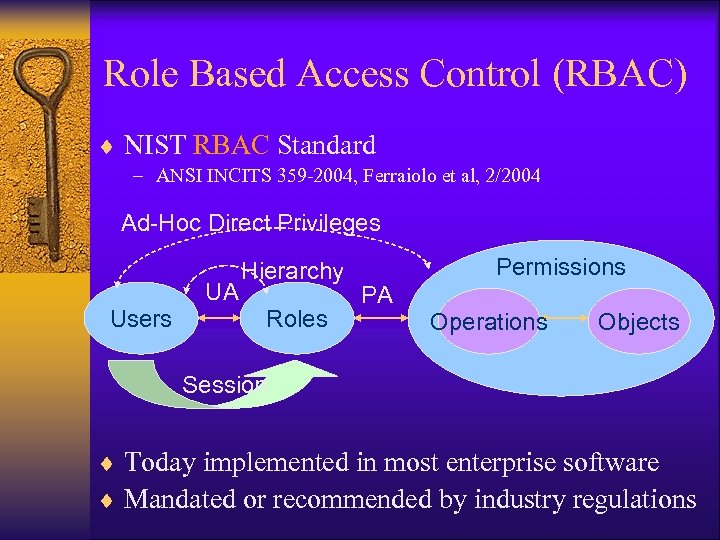 Role Based Access Control (RBAC) ¨ NIST RBAC Standard – ANSI INCITS 359 -2004, Ferraiolo et al, 2/2004 Ad-Hoc Direct Privileges UA Users Hierarchy Roles Permissions PA Operations Objects Session ¨ Today implemented in most enterprise software ¨ Mandated or recommended by industry regulations
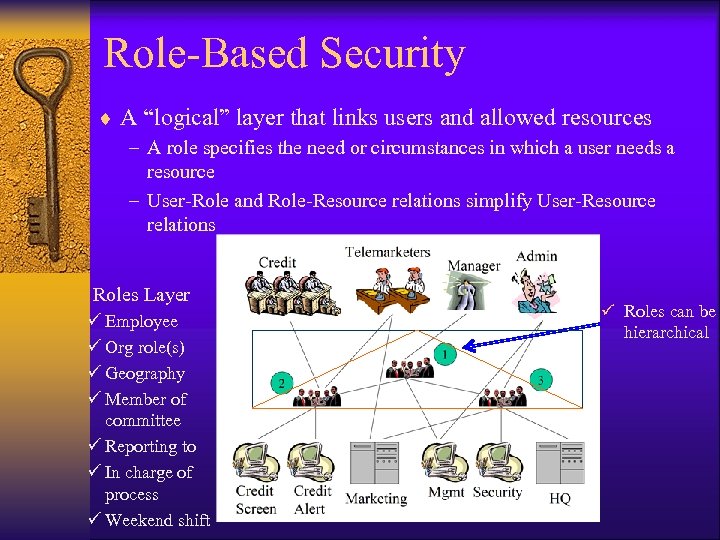 Role-Based Security ¨ A “logical” layer that links users and allowed resources – A role specifies the need or circumstances in which a user needs a resource – User-Role and Role-Resource relations simplify User-Resource relations Roles Layer ü Employee ü Org role(s) ü Geography ü Member of committee ü Reporting to ü In charge of process ü Weekend shift ü Roles can be hierarchical
 RBAC Productivity/Security Gains ¨ Productivity Gains – Easier to provision new employees • Alice replaces Bob as VP of Marketing • John joins the security administration team – Easier to manage change • Richard was relocated to the Singapore office • Bonnie replaces Jack in the computing committee ¨ Security Gains – Without RBAC, it is common to find users “collecting” access rights – Facilitates compliance with regulations and audit of access rights
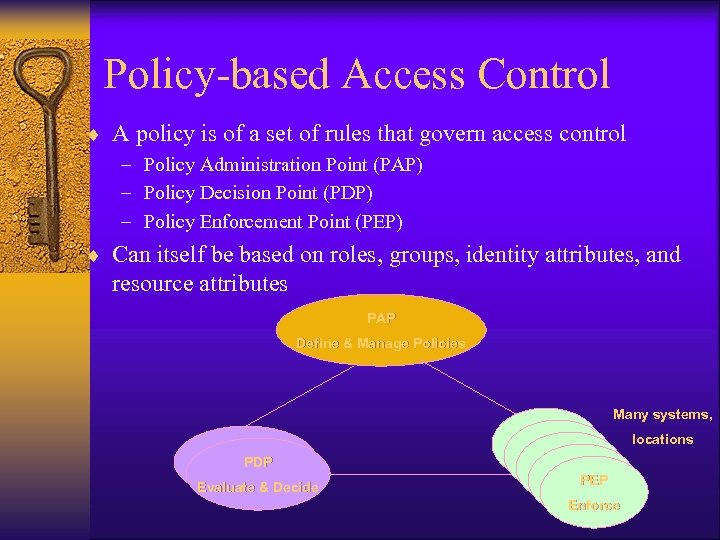 Policy-based Access Control ¨ A policy is of a set of rules that govern access control – Policy Administration Point (PAP) – Policy Decision Point (PDP) – Policy Enforcement Point (PEP) ¨ Can itself be based on roles, groups, identity attributes, and resource attributes PAP Define & Manage Policies Many systems, PDP Evaluate & Decide PEP PEP PEP Enforce locations
 Claims-based Access Control
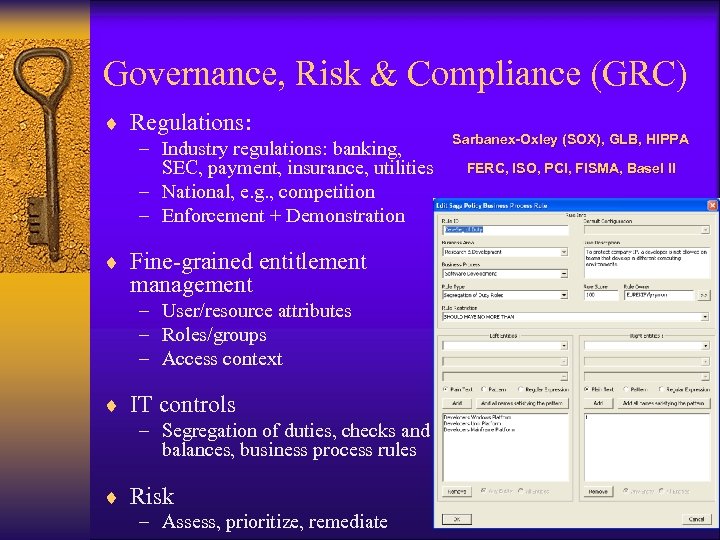 Governance, Risk & Compliance (GRC) ¨ Regulations: – Industry regulations: banking, SEC, payment, insurance, utilities – National, e. g. , competition – Enforcement + Demonstration ¨ Fine-grained entitlement management – User/resource attributes – Roles/groups – Access context ¨ IT controls – Segregation of duties, checks and balances, business process rules ¨ Risk – Assess, prioritize, remediate Sarbanex-Oxley (SOX), GLB, HIPPA FERC, ISO, PCI, FISMA, Basel II
 Identity Management / Provisioning ¨ A set of tools for managing organizational identities and their access privileges ¨ Management functions – Add/remove/update info about users, resources – Add/delete privileges to platforms and/or applications – Manage access policies ¨ Automated Provisioning – Automates requests and approvals processes – Provisions and de-provisions on target systems (accounts, group membership, etc. ) ¨ Main Benefits – Centralized store for organizational identities – Centralized management of access rights – Automated provisioning and removal of privileges
 Typical ID Mgmt Functions ¨ ¨ ¨ ¨ ¨ User provisioning Role Management Password reset and password management Web access control Self-service requests and approvals Authentication & Single sign-on Log management and analysis Public Key Infrastructure Federation of identities ¨ Many Id. Ms use directories to store identities and policies ¨ Some Id. M start to provide Governance, Risk, and Compliance (GRC) capabilities
 Directories ¨ Goal: centralized repository of users and privileges ¨ Solution: Directory – Centralized repository of users, resources, and privileges – Implements a hierarchical database – Users (leaves) appear with their specific information (attributes) • name, user names, certificates, org, etc. – Fast retrieval – Difficult update ¨ IETF X. 500 Directory Access Protocol (DAP) – Defines access to the Directory – Runs on top of TCP – Almost all implementations are Lightweight DAP (LDAP) ¨ Federated Directories (a. k. a. Meta-directories) – Integrate and implement trust between directories
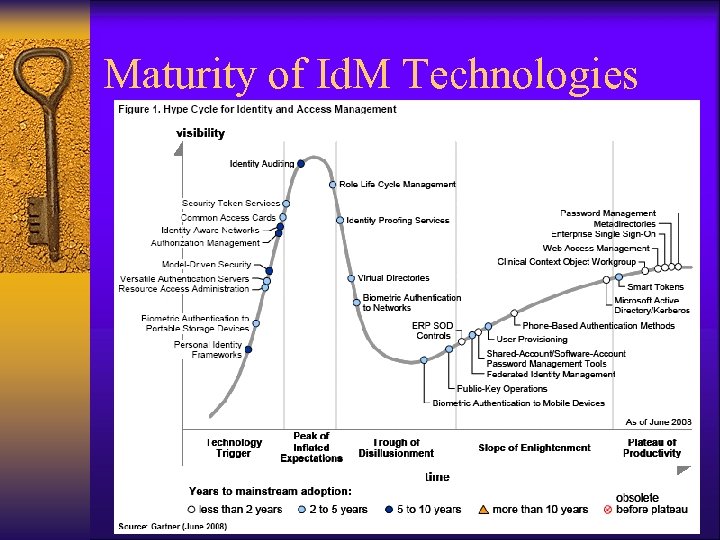 Maturity of Id. M Technologies
 Public Key Infrastructure (PKI) Main sources: Stallings, IETF
 Public Key Infrastructure (PKI) ¨ X. 509 protocol provides authentication service – Registration Authority (RA) handles requests for certificates – Certificate Authority (CA) issues certificates ¨ RA/CA can be implemented internally, e. g. , by HR and IT ¨ Or, by a trusted third party, e. g. , Veri. Sign, Thawte ¨ Certificates – – verify a user details and public key usually stored in a Directory-based repository can be granted as part of a provisioning process Can be revoked before their expiration ¨ Security Services – Authentication, Confidentiality, non-repudiation – Interoperability between CAs
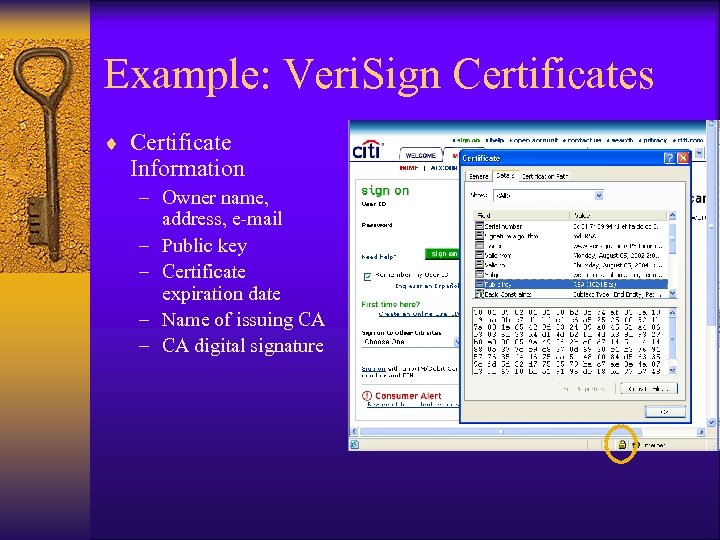 Example: Veri. Sign Certificates ¨ Certificate Information – Owner name, address, e-mail – Public key – Certificate expiration date – Name of issuing CA – CA digital signature
 Example: Veri. Sign Certificates ¨ Digital ID (certificate) classes – Class 1: only e-mail is verified – Class 2: verification of postal address and other information from consumer databases – Class 3: requires appearing in person and/or notarized documentation ¨ Different types of certificates – Identity certificate – for authentication – Encryption certificate – for email, SSL – Mobile code certificate – to sign a piece of software
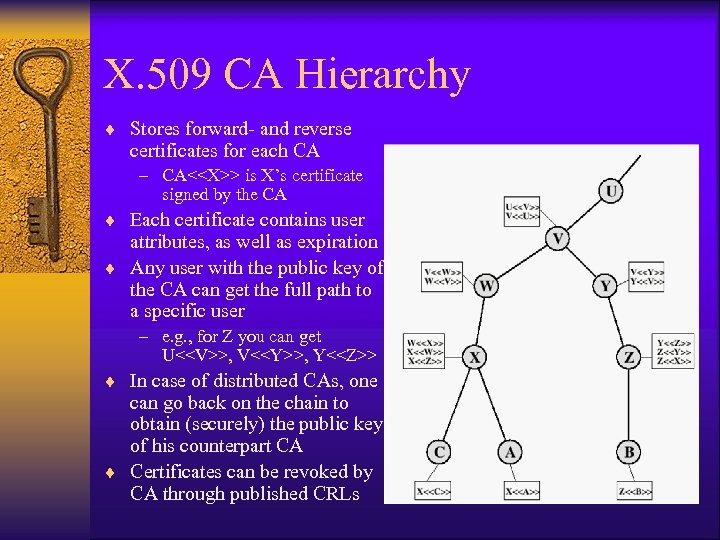 X. 509 CA Hierarchy ¨ Stores forward- and reverse certificates for each CA – CA<
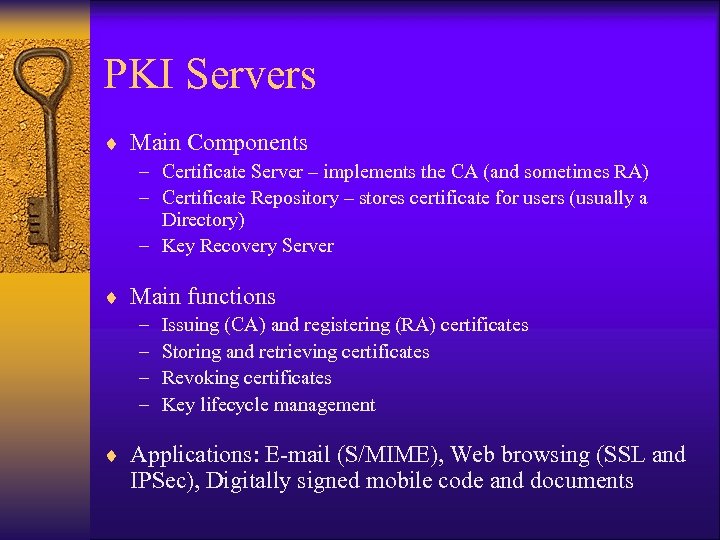 PKI Servers ¨ Main Components – Certificate Server – implements the CA (and sometimes RA) – Certificate Repository – stores certificate for users (usually a Directory) – Key Recovery Server ¨ Main functions – – Issuing (CA) and registering (RA) certificates Storing and retrieving certificates Revoking certificates Key lifecycle management ¨ Applications: E-mail (S/MIME), Web browsing (SSL and IPSec), Digitally signed mobile code and documents
 Firewalls and Proxy Servers Main Sources: Stallings, Checkpoint Software
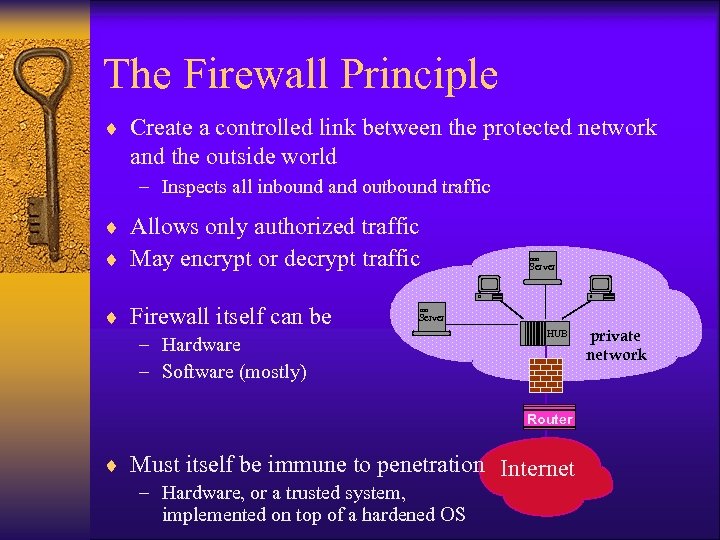 The Firewall Principle ¨ Create a controlled link between the protected network and the outside world – Inspects all inbound and outbound traffic ¨ Allows only authorized traffic ¨ May encrypt or decrypt traffic ¨ Firewall itself can be Server – Hardware – Software (mostly) HUB Router ¨ Must itself be immune to penetration Internet – Hardware, or a trusted system, implemented on top of a hardened OS private network
 FW-enforced Policies ¨ Service control : which services are allowed – may determine valid ports – may use a proxy to interpret requests before they are passed on – may host the service outside the internal network (web, e-mail) ¨ Direction control – may limit certain services to only one direction ¨ User control : who is allowed to use the service – may apply access control policy to internal users – may use IPSec to authenticate external users ¨ Behavior control : how a service can be used – may implement intrusion prevention or anti-virus filter – may filter spam in either direction
 Limitations and Other Uses ¨ Limitations – The FW cannot protect against internal attacks (unless traffic is filtered) – The FW cannot protect against back-door attacks, e. g. , through a dial-up line that goes directly into the internal network ¨ In addition to its filtering uses, the FW location is ideal for other functions as well – – – VPN implementation Network Address Translation (NAT) Intrusion detection / prevention URL filtering Anti-virus filtering ¨ Personal firewalls (highly recommended – now standard) – Control what executes on and communicates from a given machine – Can protect against intra-net attacks
 FW types: Packet-Filtering ¨ ¨ Implemented in IP layer Applies a set of rules to individual IP packets Rules are based on IP and TCP header parameters The first rule that matches the packet is applied Rule action Dir Protocol source Port destination Port untrusted block any 123. 4. 5. * * 192. 168. *. * * email allow in TCP * * * 25 Spoofing block in any 192. 168. *. * * Default block any * * • If no rule applies, the default is usually to drop the packet ¨ Advantages: application independent, fast
 FW types: Application Gateways ¨ Application-specific software that brokers between the server and its clients ¨ Brokers and examines each C/S transaction ¨ Pros: – better security through app awareness ¨ Cons: – application dependent – slow – requires awareness of internal user ¨ Examples: FTP, Telnet, Web apps
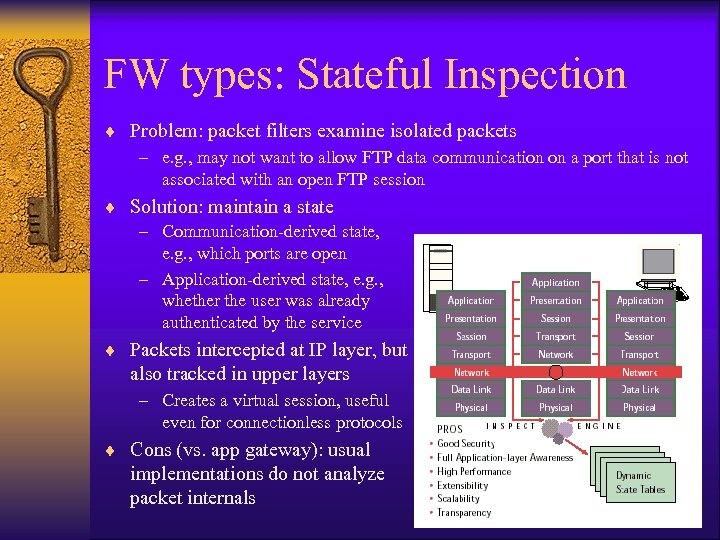 FW types: Stateful Inspection ¨ Problem: packet filters examine isolated packets – e. g. , may not want to allow FTP data communication on a port that is not associated with an open FTP session ¨ Solution: maintain a state – Communication-derived state, e. g. , which ports are open – Application-derived state, e. g. , whether the user was already authenticated by the service ¨ Packets intercepted at IP layer, but also tracked in upper layers – Creates a virtual session, useful even for connectionless protocols ¨ Cons (vs. app gateway): usual implementations do not analyze packet internals
 Bastion Host ¨ Bastion Host services external users – Hosts proxy servers + externally available services – Only server addressable directly from outside network – Usually located after a packet filter – Must be very well protected • hardened OS • requires authentication ¨ Examples: – Victim BH : provides unprotected services to external users – Non-routing dual-homed BH : services internal and external users (does not transfer packets between them) – Internal BH : located inside network, and services external users – must be very well secured
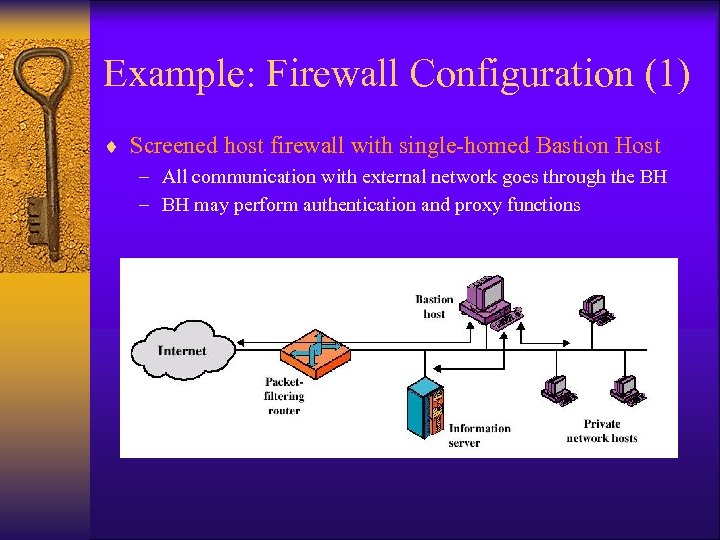 Example: Firewall Configuration (1) ¨ Screened host firewall with single-homed Bastion Host – All communication with external network goes through the BH – BH may perform authentication and proxy functions
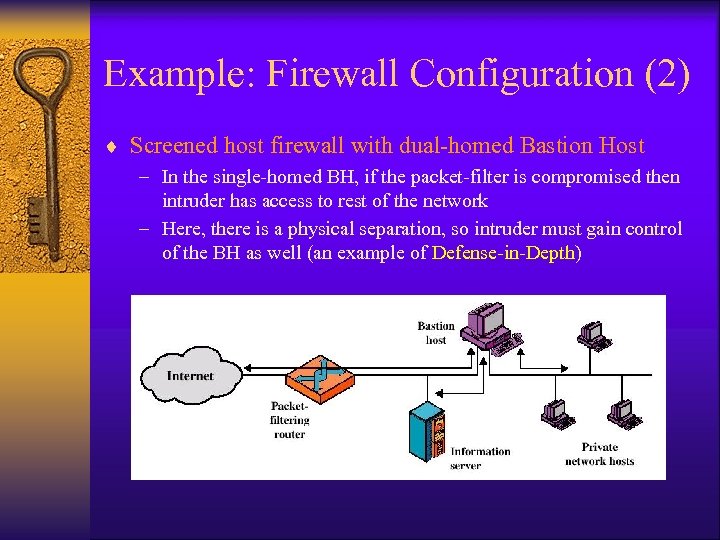 Example: Firewall Configuration (2) ¨ Screened host firewall with dual-homed Bastion Host – In the single-homed BH, if the packet-filter is compromised then intruder has access to rest of the network – Here, there is a physical separation, so intruder must gain control of the BH as well (an example of Defense-in-Depth)
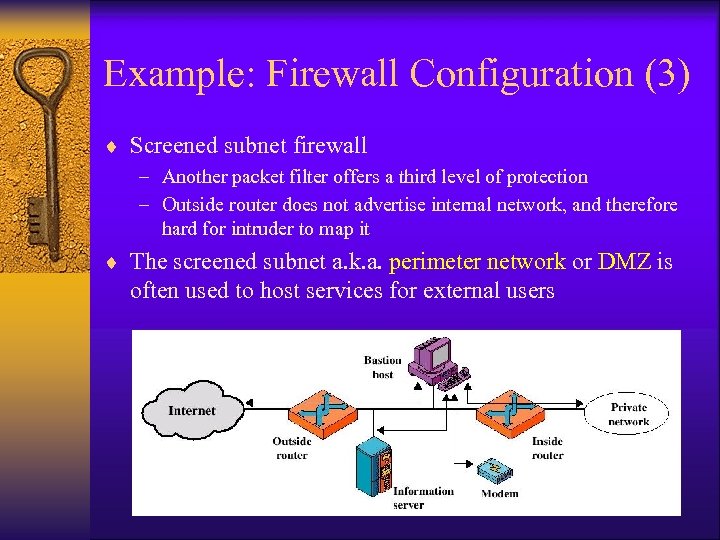 Example: Firewall Configuration (3) ¨ Screened subnet firewall – Another packet filter offers a third level of protection – Outside router does not advertise internal network, and therefore hard for intruder to map it ¨ The screened subnet a. k. a. perimeter network or DMZ is often used to host services for external users
 Proxy Servers ¨ An “Application Gateway” Firewall ¨ Usually located on a BH ¨ Must be written specifically for each application – Standard ones for TCP services: FTP, Telnet, HTTP – Generic ones that can be configured for new applications ¨ Every proxy server software must be configured to maximize security – – – may be configured to access only specific hosts may require additional authentication a simple software that can be more easily audited for security flaws maintain log for future audit proxies are independent proxies run in a non-privilege mode, and in own private folders
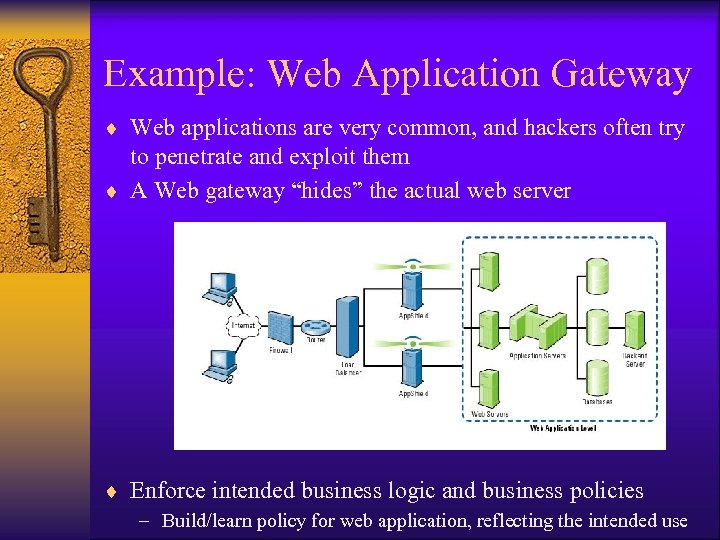 Example: Web Application Gateway ¨ Web applications are very common, and hackers often try to penetrate and exploit them ¨ A Web gateway “hides” the actual web server ¨ Enforce intended business logic and business policies – Build/learn policy for web application, reflecting the intended use
 Web App Gateway Functions (2007) ¨ ¨ ¨ ¨ Multi-application gateway Web app firewall, including “deep” packet inspection” Web app access control Web services protection (for SOA) Automated learning of legitimate use patterns App layer Denial-of-Service protection Website cloaking: hiding from crawlers (but not Google. . . ) ¨ Application gateway devices often include functions of regular packet filters and/or stateful inspection firewall ¨ And also other security features – Access control to protect specific sensitive data – Encryption – NAT
 Attacks on Firewalls ¨ Firewalls can be difficult to configure and many contain bugs in their policies – Most implementations of firewalls are fairly superficial in examining the application fields – Usually firewalls cannot deal with IP spoofing ¨ Perimeter-based firewall cannot protect against internal attacks and Trojans ¨ Firewall cannot prevent Do. S attacks ¨ Market trends: – – application gateways, e. g. , for web services and XML Smarter firewalls, e. g. , “learning”, “identity role-based” combined security appliances centralized consoles for management
 Client/Server Authentication Kerberos Main sources: Stallings, Schneier, Kaufman et al
 Kerberos ¨ Background – Client/Server authentication service, developed by Project Athena – Deployed as a Single-Sign On service ¨ Services – – Client/Server authentication Allows users and servers to mutually authenticate Key Distribution Center (KDC) Uses symmetric key as proof of identity (DES/RC 4) • New versions use other forms of authentication ¨ Requirements – – – Protect against user impersonation Protect against spoofing of device identity Protect against replay attacks Provide high availability Provide transparency to the user and application server
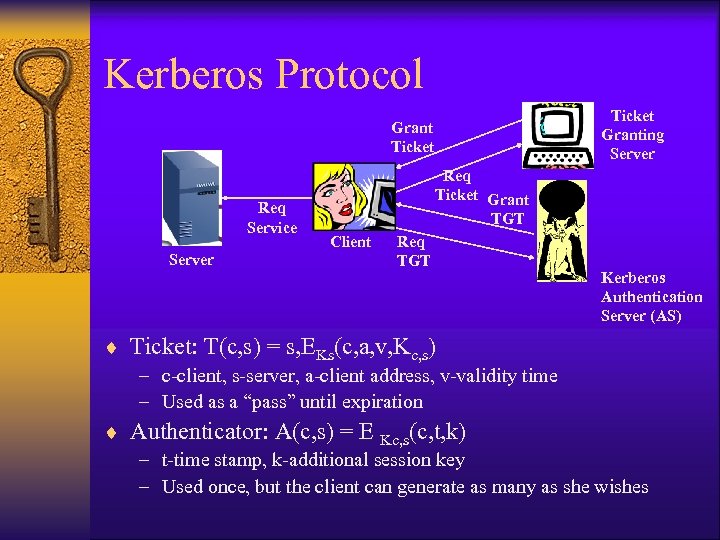 Kerberos Protocol Ticket Granting Server Grant Ticket Req Service Server Req Ticket Grant TGT Client Req TGT Kerberos Authentication Server (AS) ¨ Ticket: T(c, s) = s, EKs(c, a, v, Kc, s) – c-client, s-server, a-client address, v-validity time – Used as a “pass” until expiration ¨ Authenticator: A(c, s) = E Kc, s(c, t, k) – t-time stamp, k-additional session key – Used once, but the client can generate as many as she wishes
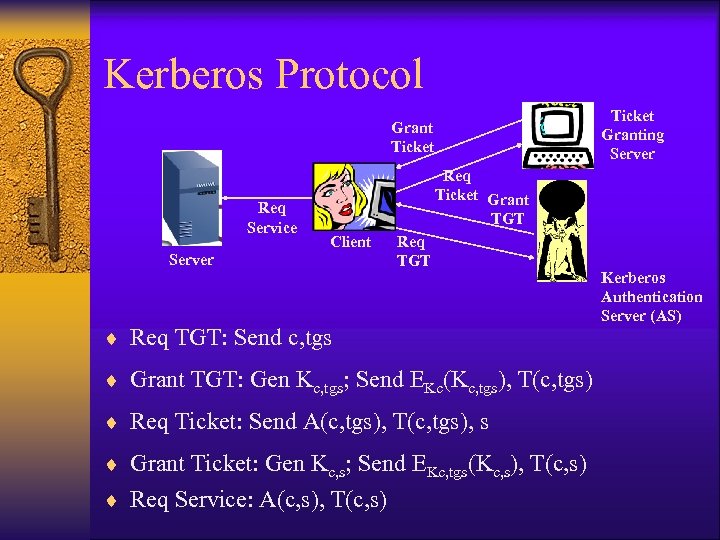 Kerberos Protocol Ticket Granting Server Grant Ticket Req Service Req Ticket Grant TGT Client Server Req TGT ¨ Req TGT: Send c, tgs ¨ Grant TGT: Gen Kc, tgs; Send EKc(Kc, tgs), T(c, tgs) ¨ Req Ticket: Send A(c, tgs), T(c, tgs), s ¨ Grant Ticket: Gen Kc, s; Send EKc, tgs(Kc, s), T(c, s) ¨ Req Service: A(c, s), T(c, s) Kerberos Authentication Server (AS)
 Kerberos Security Features ¨ Kerberos acts as a KDC (Key Distribution Center) ¨ Kerberos AS verifies the identity of a client through the key, and comparing identity and address to a database – Key can be symmetric key, or derived from password ¨ Tickets T(c, tgs/s) is given to the client but is locked ¨ Server continuously verifies client through session key in authenticator ¨ Timestamps used to ensure synchronicity and against original ticket validity (typically 8 hours) ¨ It is common to quickly replace use of client long-term key with a session key
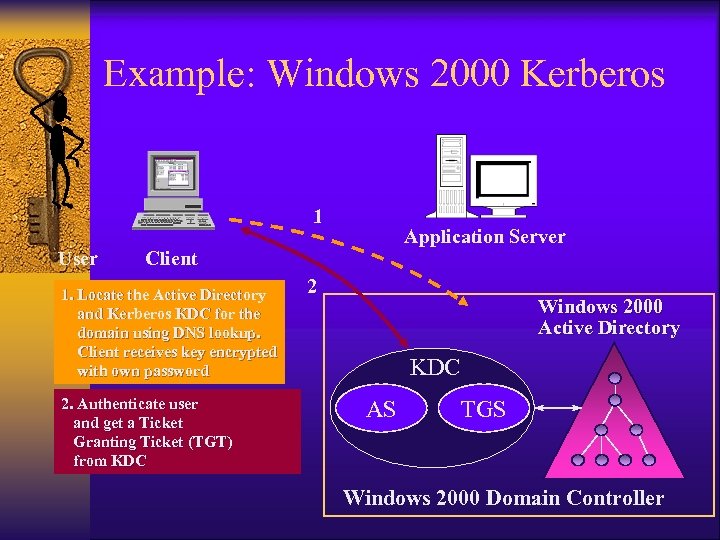 Example: Windows 2000 Kerberos 1 User Application Server Client 1. Locate the Active Directory and Kerberos KDC for the domain using DNS lookup. Client receives key encrypted with own password 2. Authenticate user and get a Ticket Granting Ticket (TGT) from KDC 2 Windows 2000 Active Directory KDC AS TGS Windows 2000 Domain Controller
 Attacks on Kerberos Security ¨ Kerberos itself stores many keys and should be protected ¨ Tickets may be replayed within allowed lifetime. Server should store recent requests and check for replays ¨ Adversary may cache many TGTs and work offline to decrypt them (see Wu’s attack). Clients shall use safe passwords. ¨ By changing server clocks, adversary may replay tickets. Hosts shall synchronize clocks often ¨ Enhancements – Allow authentication using public-key certificates, smart cards – Mutual authentication, where server returns signed timestamp
 Wu’s Attack ¨ Dictionary attack on the TGT ticket returned by AS ¨ Kerberos authentication exchange step-by-step – Initial request sent in clear • User name, requested ticket/service information – AS responds, message encrypted with key based on user password • Session key, service name, … – Client decrypts (verifying identity through knowledge of the key) ¨ Attacking Kerberos client – Applies dictionary attack, decrypting with different passwords – Seeking service name = “krbtgt” ¨ In two weeks, Wu has broken 2045 passwords in a real 25, 000 users domain ¨ Kerberos V 5 requires pre-authentication – Client sends timestamp encrypted with authenticating key
 Other Kerberos Features ¨ Kerberos Administration Server (KADM) – Purpose: add/manage users in the Kerberos database – Employs another protocol ¨ Kerberos Replication and Realms – In large organizations, it is possible to replicate the TGT/Ss, with one copy serving as a master and the others being read-only – It is also common to divide the network services into Realms, each covered by different Kerberos servers, with a trust between realms ¨ Kerberos is widely implemented – Most popular in network authentication – Main authentication mechanism in Win 2 K and up (esp. in domains that require Unix integration), and MS Passport – Directory servers and API available from Microsoft, Sun, etc.
 Remote User Authentication Service RADIUS Main resources: IETF, Josh Hill
 RADIUS ¨ Remote Authentication Dial In User Service – Originally developed for dial-up access – Implemented by ISPs for simple authentication – Implemented in wireless LAN hotspots ¨ Services: Authentication, Authorization, Accounting (3 A) ¨ Widely implemented, especially in routers – Implemented in transport layer (using UDP port 1813) – Clients are all types of Network Access Servers (NAS) – Main competition: TACACS+ (Cisco) ¨ Supports mobile and remote users – physical ports (Modems, DSL, and recently Wireless LANs) – virtual ports (extranets, VPNs) ¨ Proxy RADIUS protocol allows distributed authentication
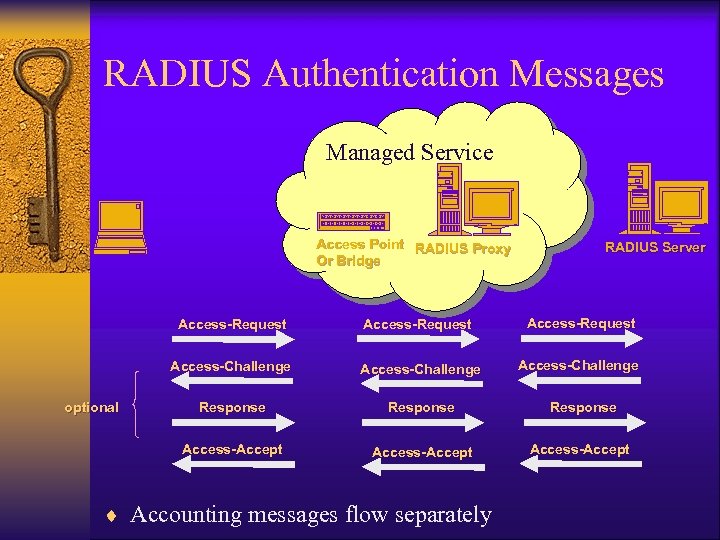 RADIUS Authentication Messages Managed Service Access Point RADIUS Proxy Or Bridge RADIUS Server Access-Request Access-Challenge Response Access-Accept optional Access-Request Access-Accept ¨ Accounting messages flow separately
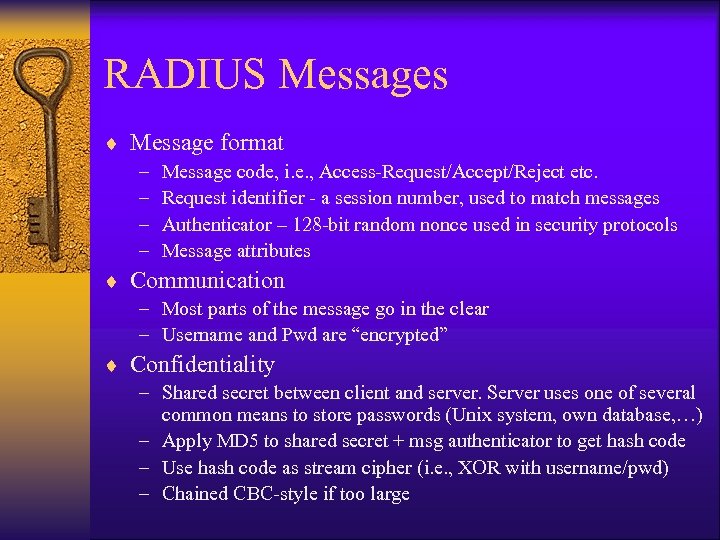 RADIUS Messages ¨ Message format – – Message code, i. e. , Access-Request/Accept/Reject etc. Request identifier - a session number, used to match messages Authenticator – 128 -bit random nonce used in security protocols Message attributes ¨ Communication – Most parts of the message go in the clear – Username and Pwd are “encrypted” ¨ Confidentiality – Shared secret between client and server. Server uses one of several common means to store passwords (Unix system, own database, …) – Apply MD 5 to shared secret + msg authenticator to get hash code – Use hash code as stream cipher (i. e. , XOR with username/pwd) – Chained CBC-style if too large
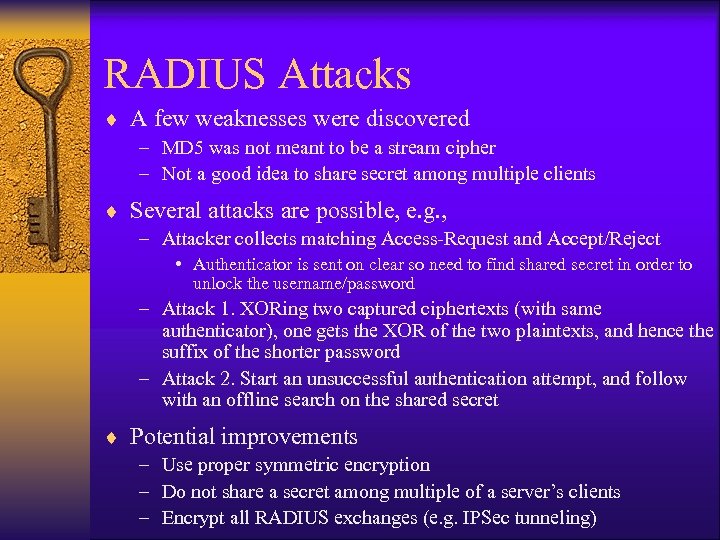 RADIUS Attacks ¨ A few weaknesses were discovered – MD 5 was not meant to be a stream cipher – Not a good idea to share secret among multiple clients ¨ Several attacks are possible, e. g. , – Attacker collects matching Access-Request and Accept/Reject • Authenticator is sent on clear so need to find shared secret in order to unlock the username/password – Attack 1. XORing two captured ciphertexts (with same authenticator), one gets the XOR of the two plaintexts, and hence the suffix of the shorter password – Attack 2. Start an unsuccessful authentication attempt, and follow with an offline search on the shared secret ¨ Potential improvements – Use proper symmetric encryption – Do not share a secret among multiple of a server’s clients – Encrypt all RADIUS exchanges (e. g. IPSec tunneling)