 Скачать презентацию Accelerometer based motion gestures for mobile devices Presented
f5b22970b31bfaf1f999a46e91486d1e.ppt
- Количество слайдов: 19



Accelerometer based motion gestures for mobile devices Presented by – Neel Parikh Advisor Dr. Chris Pollett Committee members Dr. Robert Chun Dr. Mark Stamp
AGENDA: n n n n n Android Platform Development Tools Sensor Simulator Design Methodology Shake feature Image rotation feature Zoom feature Scroll feature Challenges involved Conclusion
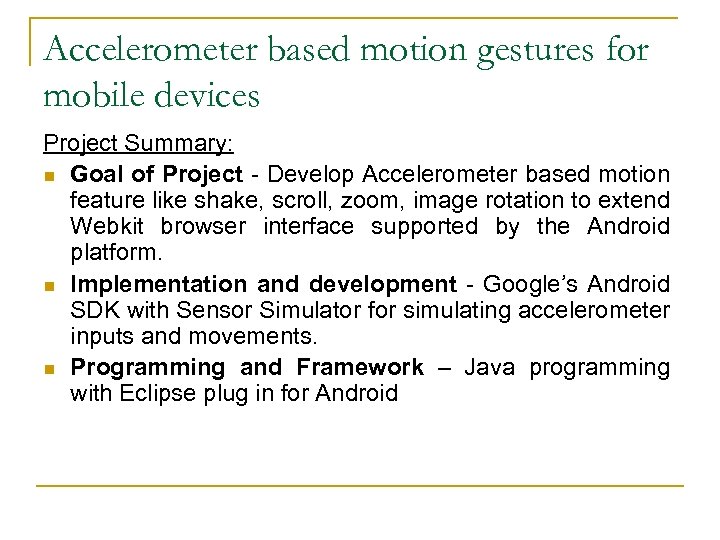
Accelerometer based motion gestures for mobile devices Project Summary: n Goal of Project - Develop Accelerometer based motion feature like shake, scroll, zoom, image rotation to extend Webkit browser interface supported by the Android platform. n Implementation and development - Google’s Android SDK with Sensor Simulator for simulating accelerometer inputs and movements. n Programming and Framework – Java programming with Eclipse plug in for Android
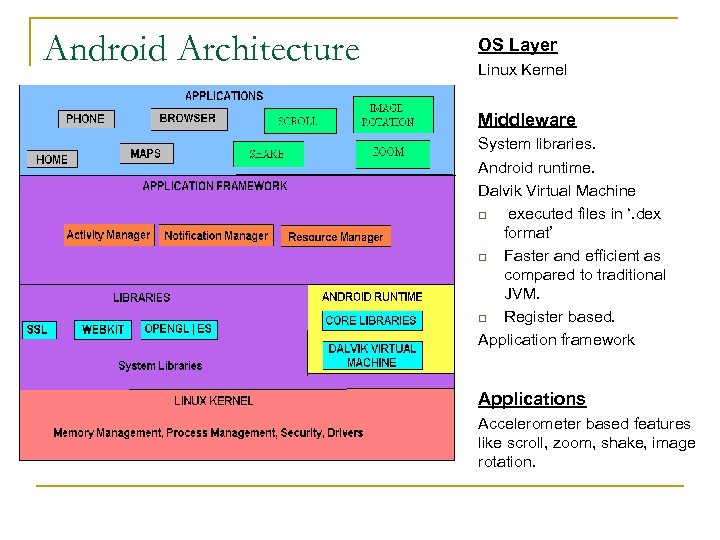
Android Architecture OS Layer Linux Kernel Middleware System libraries. Android runtime. Dalvik Virtual Machine q executed files in ‘. dex format’ q Faster and efficient as compared to traditional JVM. q Register based. Application framework n sfsf Applications Accelerometer based features like scroll, zoom, shake, image rotation.
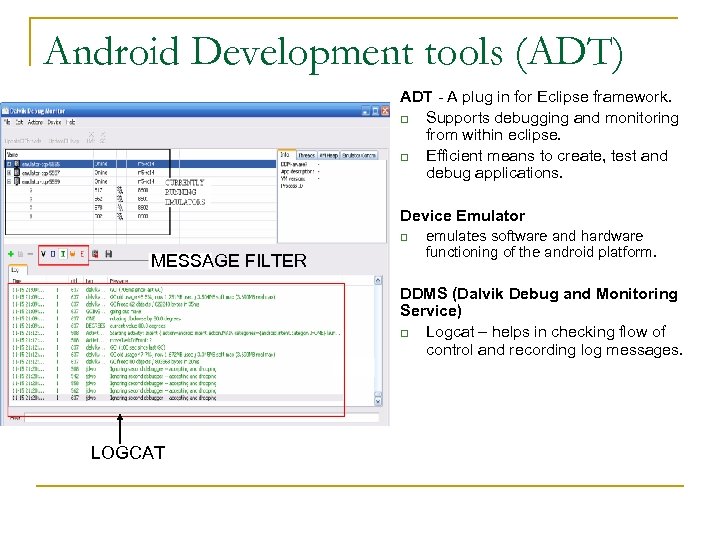
Android Development tools (ADT) ADT - A plug in for Eclipse framework. q Supports debugging and monitoring from within eclipse. q Efficient means to create, test and debug applications. Device Emulator q MESSAGE FILTER emulates software and hardware functioning of the android platform. DDMS (Dalvik Debug and Monitoring Service) q Logcat – helps in checking flow of control and recording log messages. LOGCAT
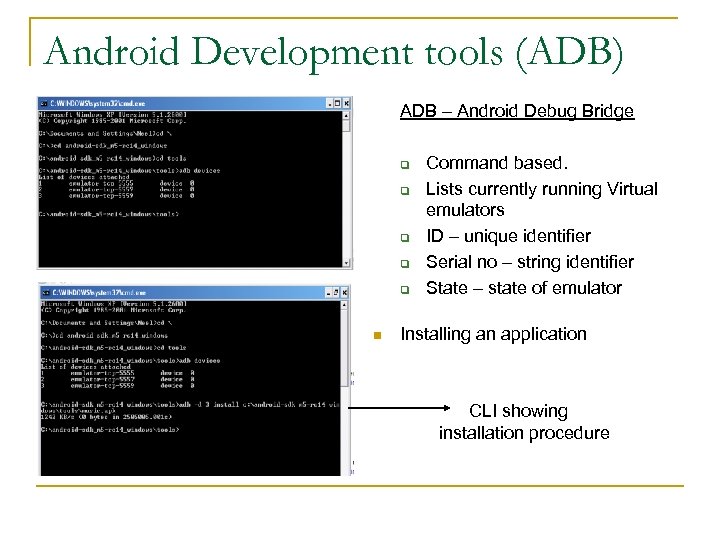
Android Development tools (ADB) ADB – Android Debug Bridge q q q n Command based. Lists currently running Virtual emulators ID – unique identifier Serial no – string identifier State – state of emulator Installing an application CLI showing installation procedure
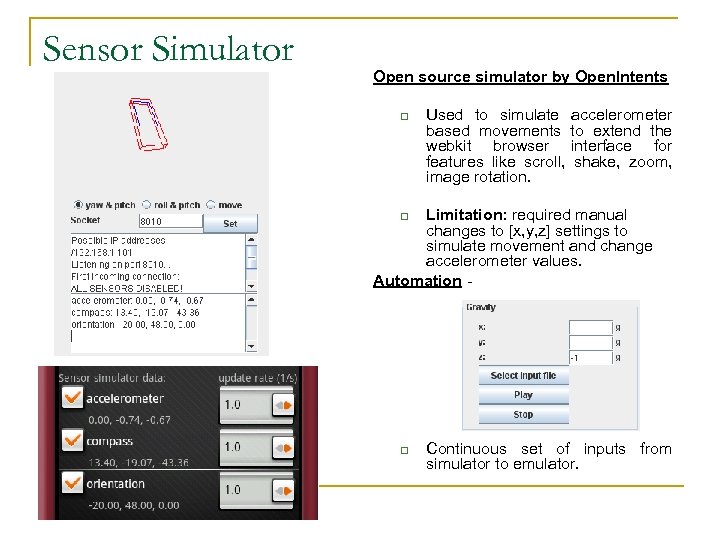
Sensor Simulator Open source simulator by Open. Intents q Used to simulate based movements webkit browser features like scroll, image rotation. accelerometer to extend the interface for shake, zoom, Limitation: required manual changes to [x, y, z] settings to simulate movement and change accelerometer values. Automation q q Continuous set of inputs from simulator to emulator.
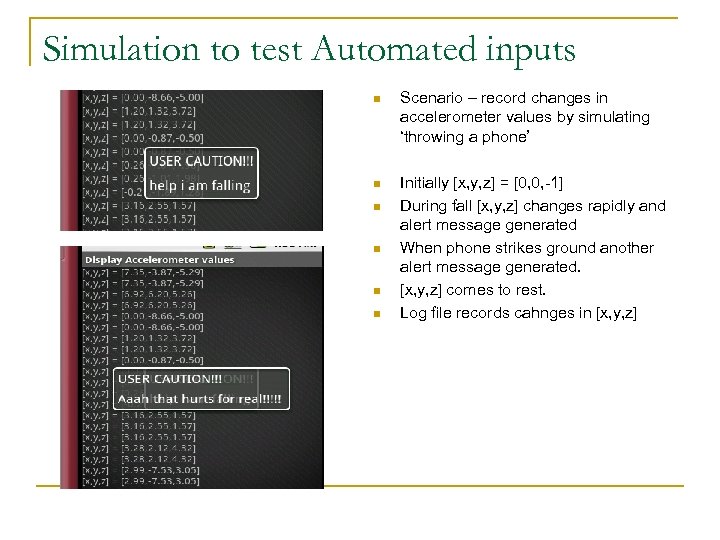
Simulation to test Automated inputs n Scenario – record changes in accelerometer values by simulating ‘throwing a phone’ n Initially [x, y, z] = [0, 0, -1] During fall [x, y, z] changes rapidly and alert message generated When phone strikes ground another alert message generated. [x, y, z] comes to rest. Log file records cahnges in [x, y, z] n n
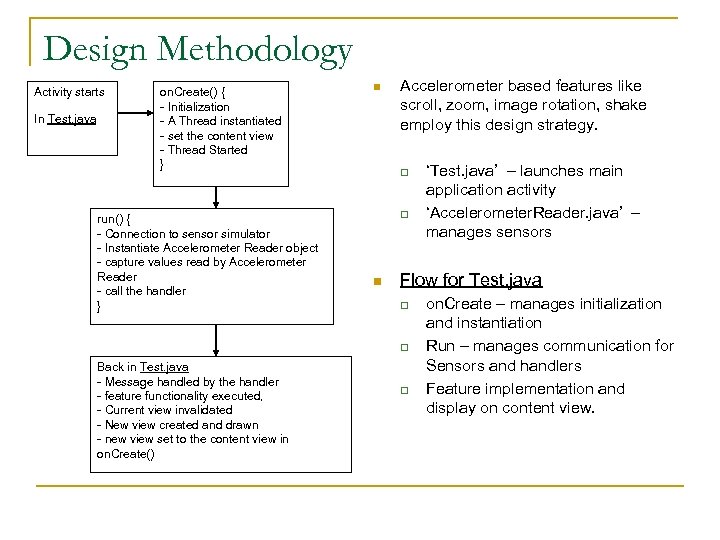
Design Methodology Activity starts In Test. java on. Create() { - Initialization - A Thread instantiated - set the content view - Thread Started } run() { - Connection to sensor simulator - Instantiate Accelerometer Reader object - capture values read by Accelerometer Reader - call the handler } n Accelerometer based features like scroll, zoom, image rotation, shake employ this design strategy. q q n Flow for Test. java q q Back in Test. java - Message handled by the handler - feature functionality executed, - Current view invalidated - New view created and drawn - new view set to the content view in on. Create() ‘Test. java’ – launches main application activity ‘Accelerometer. Reader. java’ – manages sensors q on. Create – manages initialization and instantiation Run – manages communication for Sensors and handlers Feature implementation and display on content view.
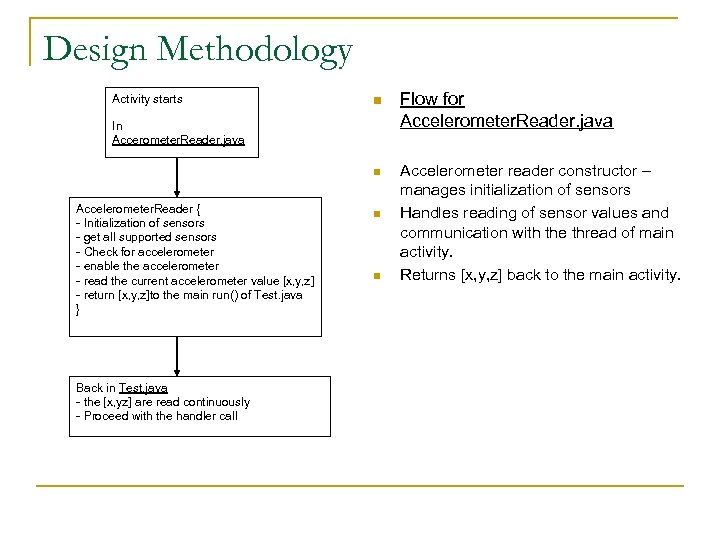
Design Methodology n Flow for Accelerometer. Reader. java n Activity starts Accelerometer reader constructor – manages initialization of sensors Handles reading of sensor values and communication with the thread of main activity. Returns [x, y, z] back to the main activity. In Accerometer. Reader. java Accelerometer. Reader { - Initialization of sensors - get all supported sensors - Check for accelerometer - enable the accelerometer - read the current accelerometer value [x, y, z] - return [x, y, z]to the main run() of Test. java } Back in Test. java - the [x, yz] are read continuously - Proceed with the handler call n n
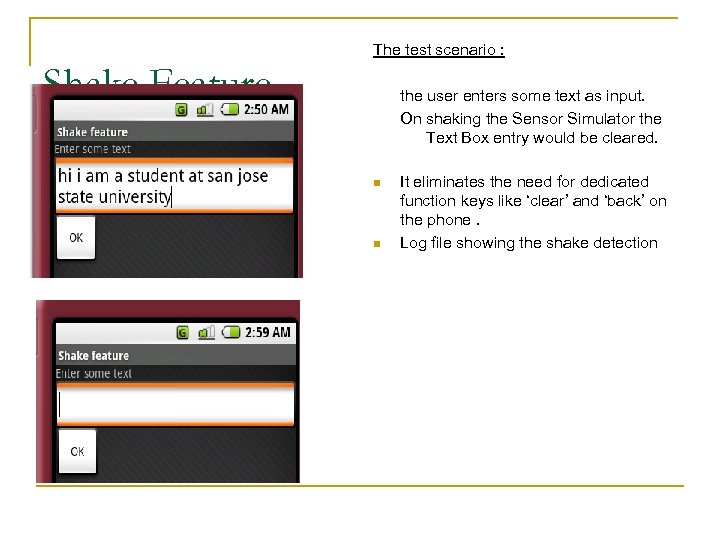
The test scenario : Shake Feature the user enters some text as input. On shaking the Sensor Simulator the Text Box entry would be cleared. n n It eliminates the need for dedicated function keys like ‘clear’ and ‘back’ on the phone. Log file showing the shake detection
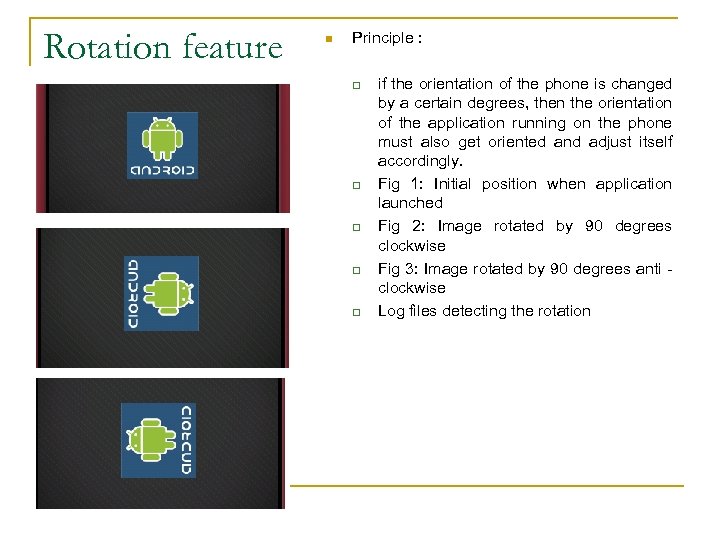
Rotation feature n Principle : q q q if the orientation of the phone is changed by a certain degrees, then the orientation of the application running on the phone must also get oriented and adjust itself accordingly. Fig 1: Initial position when application launched Fig 2: Image rotated by 90 degrees clockwise Fig 3: Image rotated by 90 degrees anti clockwise Log files detecting the rotation
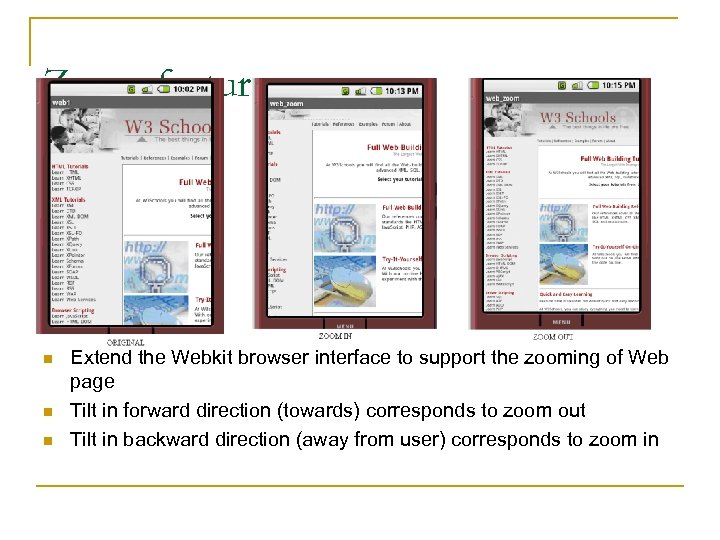
Zoom feature n n n Extend the Webkit browser interface to support the zooming of Web page Tilt in forward direction (towards) corresponds to zoom out Tilt in backward direction (away from user) corresponds to zoom in
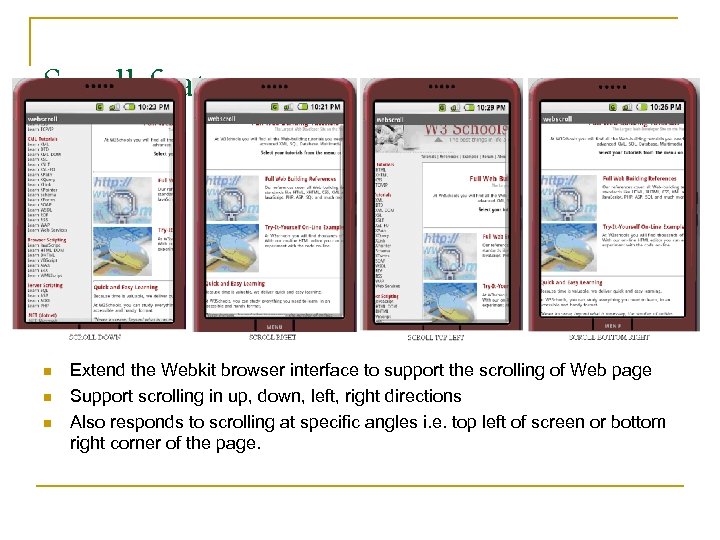
Scroll feature n n n Extend the Webkit browser interface to support the scrolling of Web page Support scrolling in up, down, left, right directions Also responds to scrolling at specific angles i. e. top left of screen or bottom right corner of the page.
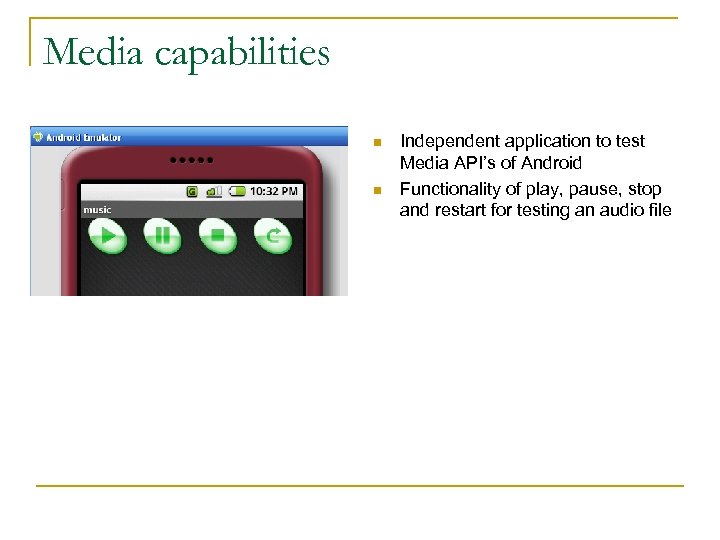
Media capabilities n n Independent application to test Media API’s of Android Functionality of play, pause, stop and restart for testing an audio file
Challenges involved and Learning's n Android Platform launched in November 07 q n Exhaustive event handling & test applications q n q Skillfully modify and enhance the code. Time consuming Compatibility q n Journey from ‘Hello World’ to ‘Accelerometer based features’ Automation functionality in Sensor Simulator q n Learning Curve, limited resources & reference material. New releases of SDK, JDK, Eclipse. Patience, persistence and dedication
Conclusion n Implementation of Accelerometer based features like Scroll, Zoom, Shake, etc to extend the Webkit browser interface. n Reduce need for dedicated function keys. n Simplicity of platform, flexibility of application and development.
Future Work n Explore capabilities of sensors like Compass, Orientation etc. n Develop games based on motion of Accelerometer. n In future, Android could power variety of electronic and embedded systems.

Acknowledgements Dr Pollett and Committee members Q/A
Скачать презентацию Accelerometer based motion gestures for mobile devices Presented
f5b22970b31bfaf1f999a46e91486d1e.ppt