


 Скачать презентацию Academic Technology Services The UCLA Grid Portal Campus
8ea50bfd11fd91f49360210237eeb28f.ppt
- Количество слайдов: 33
 Academic Technology Services The UCLA Grid Portal Campus Grids and the UC Grid http: //grid. ucla. edu Joan Slottow and Prakashan Korambath Research Computing Technologies UCLA Academic Technology Services
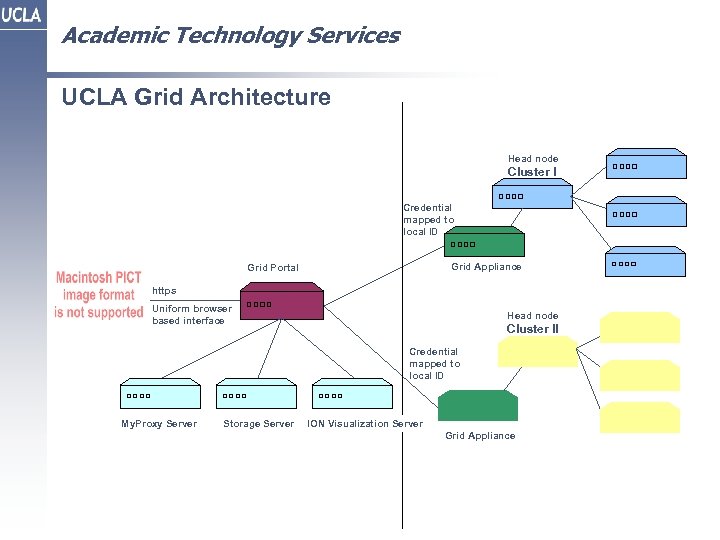 Academic Technology Services UCLA Grid Architecture Head node Cluster I Credential mapped to local ID Grid Appliance Grid Portal https Uniform browser based interface Head node Cluster II Credential mapped to local ID My. Proxy Server Storage Server ION Visualization Server Grid Appliance
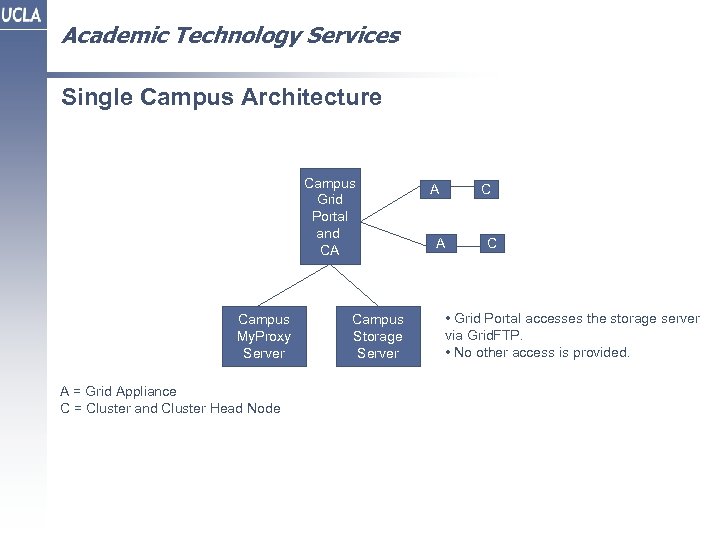 Academic Technology Services Single Campus Architecture Campus Grid Portal and CA Campus My. Proxy Server A = Grid Appliance C = Cluster and Cluster Head Node Campus Storage Server A C • Grid Portal accesses the storage server via Grid. FTP. • No other access is provided.
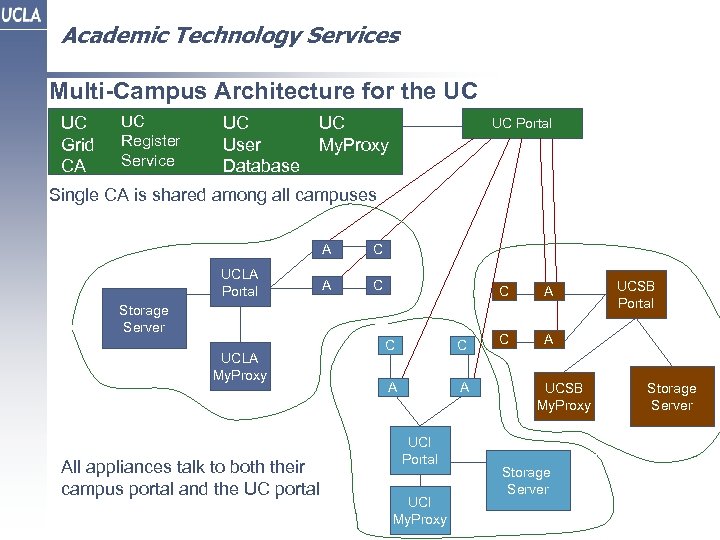 Academic Technology Services Multi-Campus Architecture for the UC UC Grid CA UC Register Service UC User Database UC My. Proxy UC Portal Single CA is shared among all campuses A UCLA Portal C A C C Storage Server UCLA My. Proxy All appliances talk to both their campus portal and the UC portal C C A A UCI Portal UCI My. Proxy A C UCSB Portal A UCSB My. Proxy Storage Server
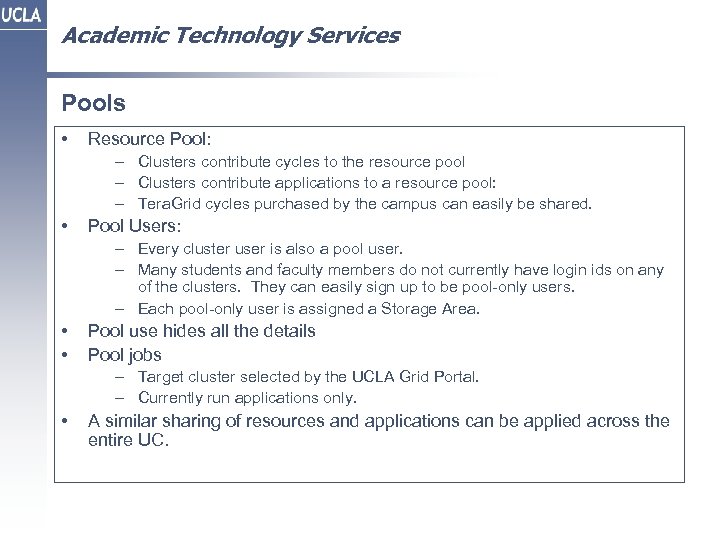 Academic Technology Services Pools • Resource Pool: – Clusters contribute cycles to the resource pool – Clusters contribute applications to a resource pool: – Tera. Grid cycles purchased by the campus can easily be shared. • Pool Users: – Every cluster user is also a pool user. – Many students and faculty members do not currently have login ids on any of the clusters. They can easily sign up to be pool-only users. – Each pool-only user is assigned a Storage Area. • • Pool use hides all the details Pool jobs – Target cluster selected by the UCLA Grid Portal. – Currently run applications only. • A similar sharing of resources and applications can be applied across the entire UC.
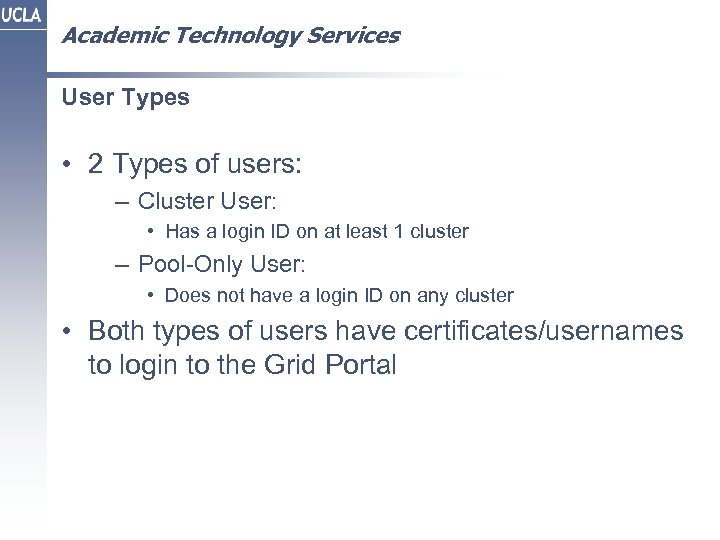 Academic Technology Services User Types • 2 Types of users: – Cluster User: • Has a login ID on at least 1 cluster – Pool-Only User: • Does not have a login ID on any cluster • Both types of users have certificates/usernames to login to the Grid Portal
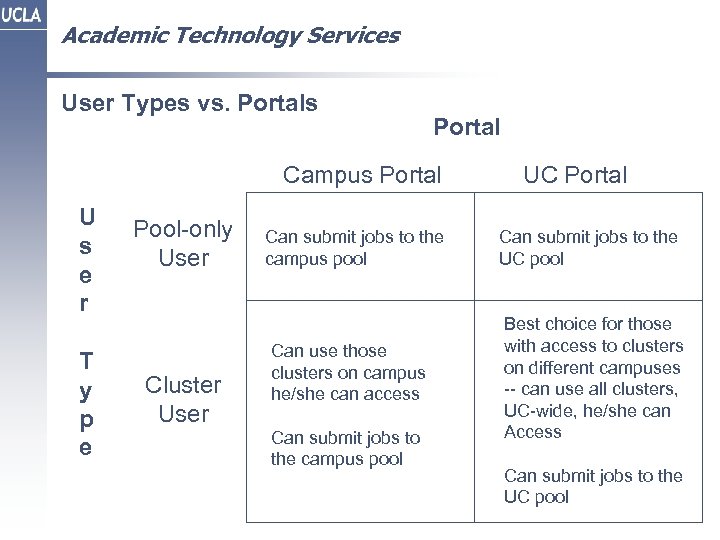 Academic Technology Services User Types vs. Portals Portal Campus Portal U s e r T y p e Pool-only User Cluster User Can submit jobs to the campus pool Can use those clusters on campus he/she can access Can submit jobs to the campus pool UC Portal Can submit jobs to the UC pool Best choice for those with access to clusters on different campuses -- can use all clusters, UC-wide, he/she can Access Can submit jobs to the UC pool
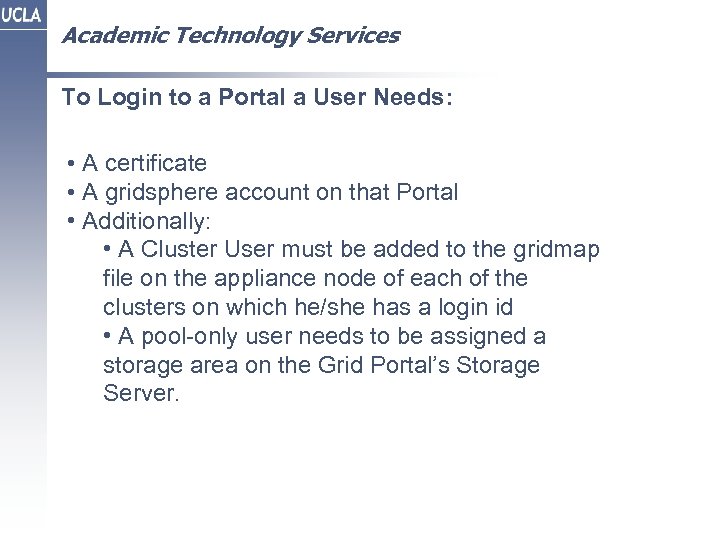 Academic Technology Services To Login to a Portal a User Needs: • A certificate • A gridsphere account on that Portal • Additionally: • A Cluster User must be added to the gridmap file on the appliance node of each of the clusters on which he/she has a login id • A pool-only user needs to be assigned a storage area on the Grid Portal’s Storage Server.
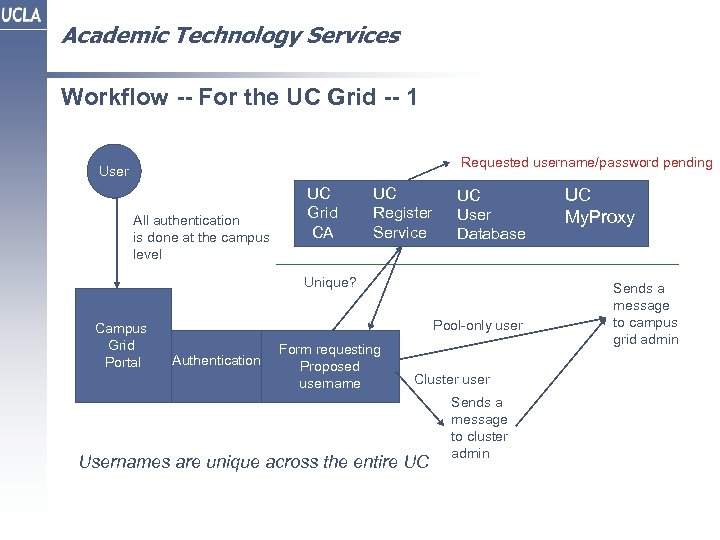 Academic Technology Services Workflow -- For the UC Grid -- 1 Requested username/password pending User All authentication is done at the campus level UC Grid CA UC Register Service UC User Database Unique? Campus Grid Portal Pool-only user Authentication Form requesting Proposed username Cluster user Usernames are unique across the entire UC Sends a message to cluster admin UC My. Proxy Sends a message to campus grid admin
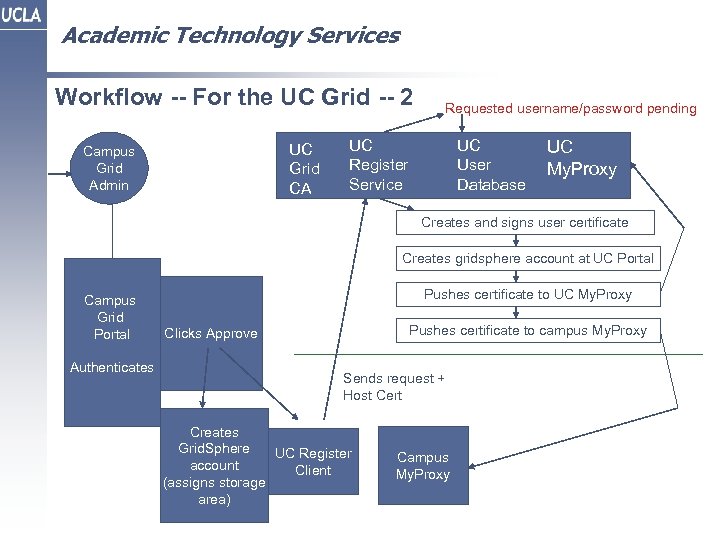 Academic Technology Services Workflow -- For the UC Grid -- 2 UC Grid CA Campus Grid Admin Requested username/password pending UC Register Service UC User Database UC My. Proxy Creates and signs user certificate Creates gridsphere account at UC Portal Campus Grid Portal Authenticates Pushes certificate to UC My. Proxy Pushes certificate to campus My. Proxy Clicks Approve Sends request + Host Cert Creates Grid. Sphere UC Register account Client (assigns storage area) Campus My. Proxy
 Academic Technology Services
 Academic Technology Services Pool Job Submission • Submitting a pool job
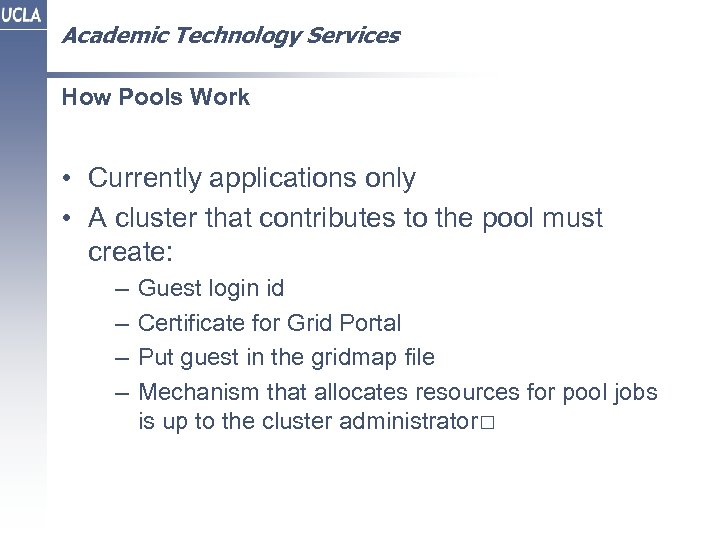 Academic Technology Services How Pools Work • Currently applications only • A cluster that contributes to the pool must create: – – Guest login id Certificate for Grid Portal Put guest in the gridmap file Mechanism that allocates resources for pool jobs is up to the cluster administrator
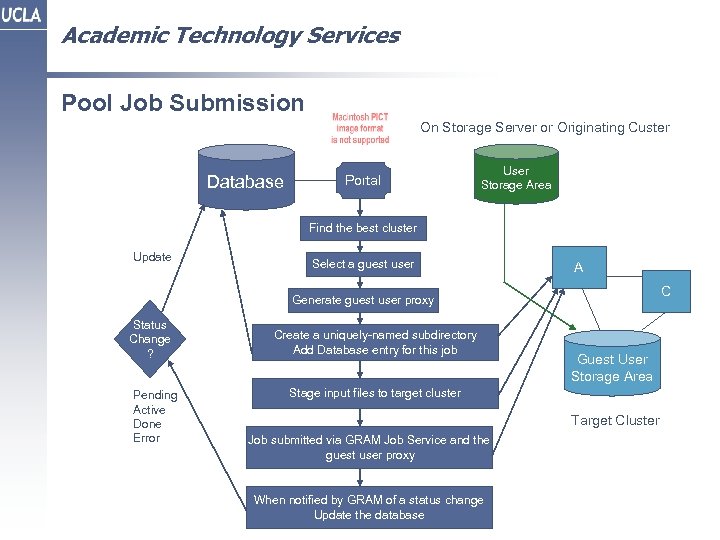 Academic Technology Services Pool Job Submission On Storage Server or Originating Custer Database Portal User Storage Area Find the best cluster Update Select a guest user A C Generate guest user proxy Status Change ? Pending Active Done Error Create a uniquely-named subdirectory Add Database entry for this job Guest User Storage Area Stage input files to target cluster Target Cluster Job submitted via GRAM Job Service and the guest user proxy When notified by GRAM of a status change Update the database
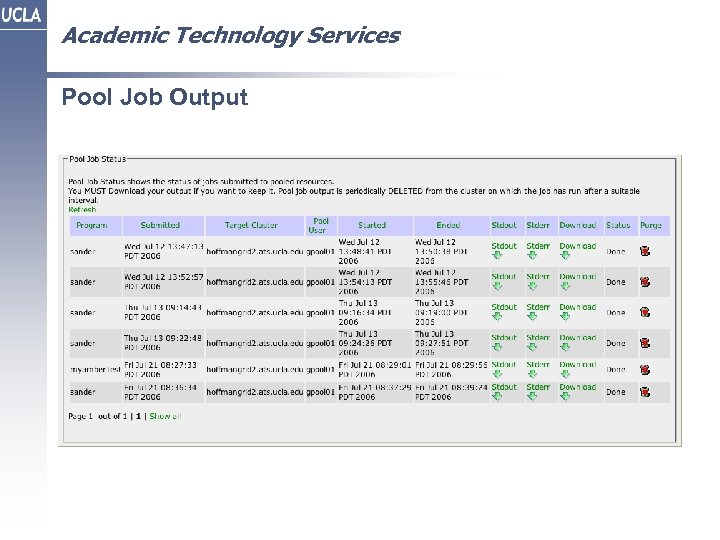 Academic Technology Services Pool Job Output
 Academic Technology Services Pool Job Output • Retrieving Pool Job Output
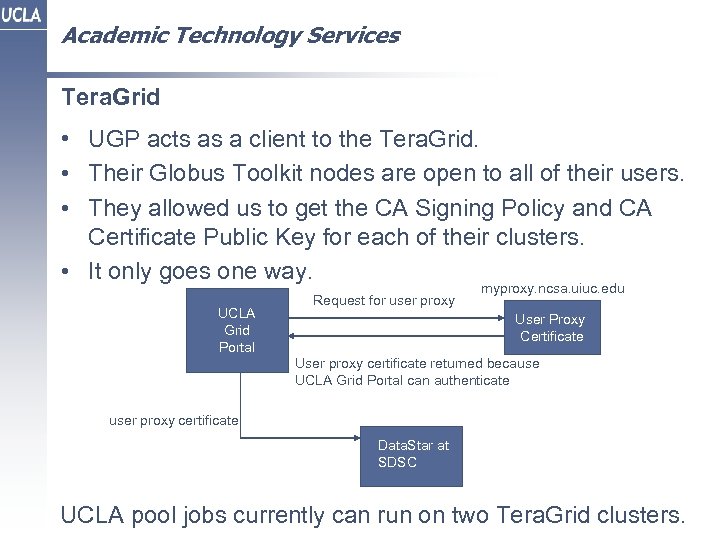 Academic Technology Services Tera. Grid • UGP acts as a client to the Tera. Grid. • Their Globus Toolkit nodes are open to all of their users. • They allowed us to get the CA Signing Policy and CA Certificate Public Key for each of their clusters. • It only goes one way. UCLA Grid Portal Request for user proxy myproxy. ncsa. uiuc. edu User Proxy Certificate User proxy certificate returned because UCLA Grid Portal can authenticate user proxy certificate Data. Star at SDSC UCLA pool jobs currently can run on two Tera. Grid clusters.
 Academic Technology Services Submitting Jobs to the Tera. Grid Submitting a job to the Tera. Grid
 Academic Technology Services Grid Development Environment and Ajax Technologies Ajax • Ajax -- Asynchronous Java. Script and XML • Create web applications that are more interactive • Only those parts of a page that change are updated GDE • Create project, import files, save project • Fully integrated editor interface • GDE-generated Makefile or use pre-existing user Makefile • Can for as many windows as you want. (Can be on different clusters) • Tested in IE, Safari, Firefox • Uses Zimbra Open AJAX Toolkit (BSD license) • Compilations submitted to instantaneous queues (must run on the cluster, not on the appliance)
 Academic Technology Services GDE Ajax Grid Development Environment GDE Project Directory
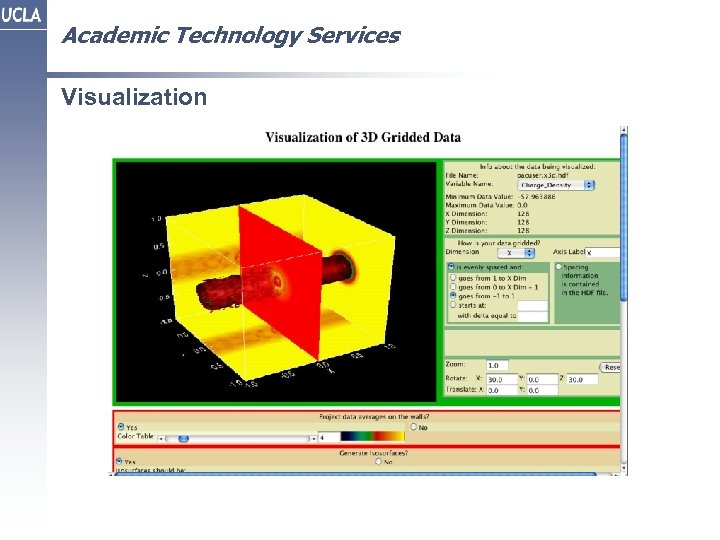 Academic Technology Services Visualization
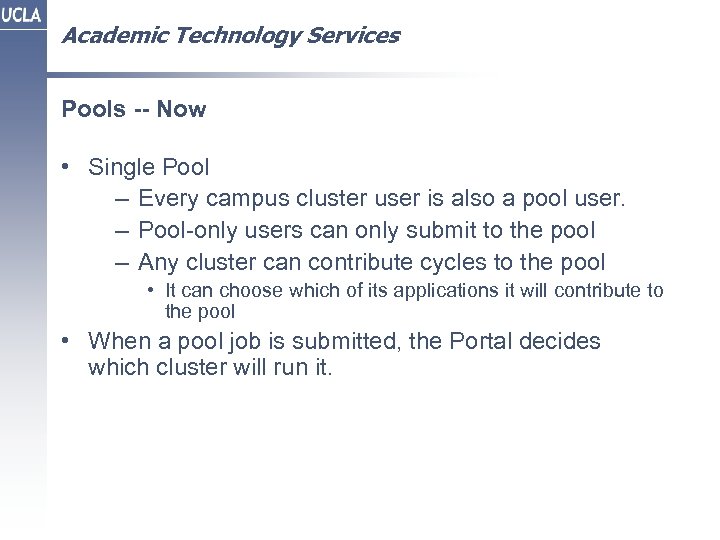 Academic Technology Services Pools -- Now • Single Pool – Every campus cluster user is also a pool user. – Pool-only users can only submit to the pool – Any cluster can contribute cycles to the pool • It can choose which of its applications it will contribute to the pool • When a pool job is submitted, the Portal decides which cluster will run it.
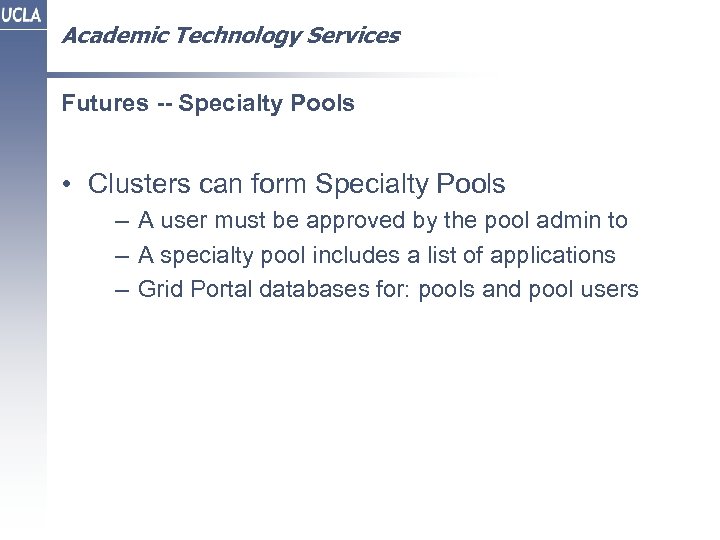 Academic Technology Services Futures -- Specialty Pools • Clusters can form Specialty Pools – A user must be approved by the pool admin to – A specialty pool includes a list of applications – Grid Portal databases for: pools and pool users
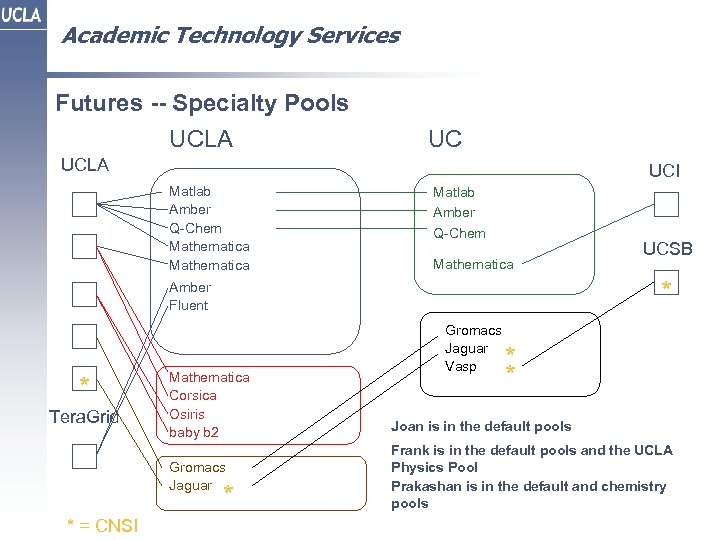 Academic Technology Services Futures -- Specialty Pools UCLA UCI Matlab Amber Q-Chem Mathematica * Amber Fluent * Tera. Grid Mathematica Corsica Osiris baby b 2 Gromacs Jaguar * * = CNSI UCSB Gromacs Jaguar Vasp * * Joan is in the default pools Frank is in the default pools and the UCLA Physics Pool Prakashan is in the default and chemistry pools
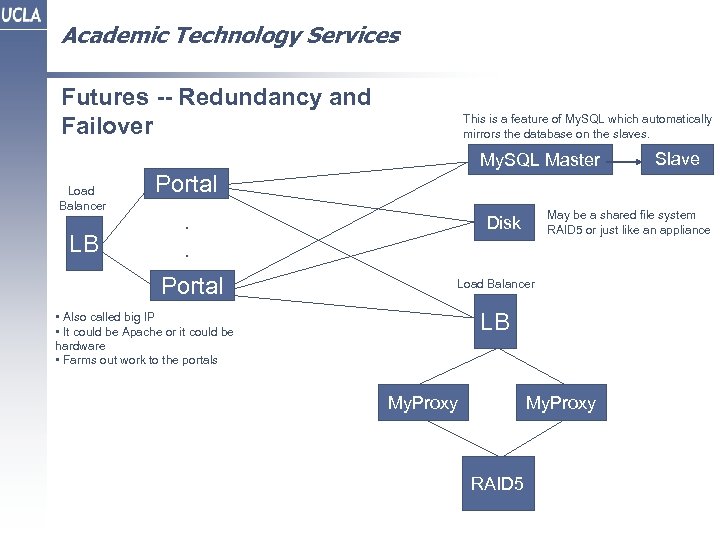 Academic Technology Services Futures -- Redundancy and Failover This is a feature of My. SQL which automatically mirrors the database on the slaves. My. SQL Master Load Balancer LB Slave Portal. . Portal May be a shared file system RAID 5 or just like an appliance Disk Load Balancer LB • Also called big IP • It could be Apache or it could be hardware • Farms out work to the portals My. Proxy RAID 5
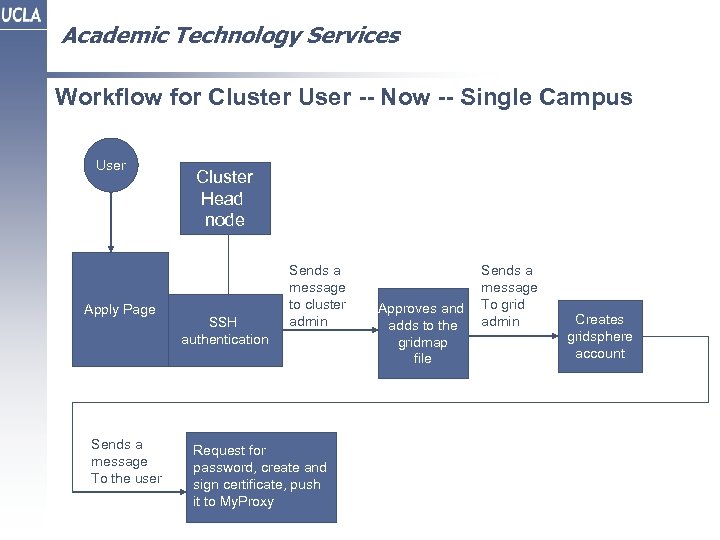 Academic Technology Services Workflow for Cluster User -- Now -- Single Campus User Apply Page Sends a message To the user Cluster Head node SSH authentication Sends a message to cluster admin Request for password, create and sign certificate, push it to My. Proxy Approves and adds to the gridmap file Sends a message To grid admin Creates gridsphere account
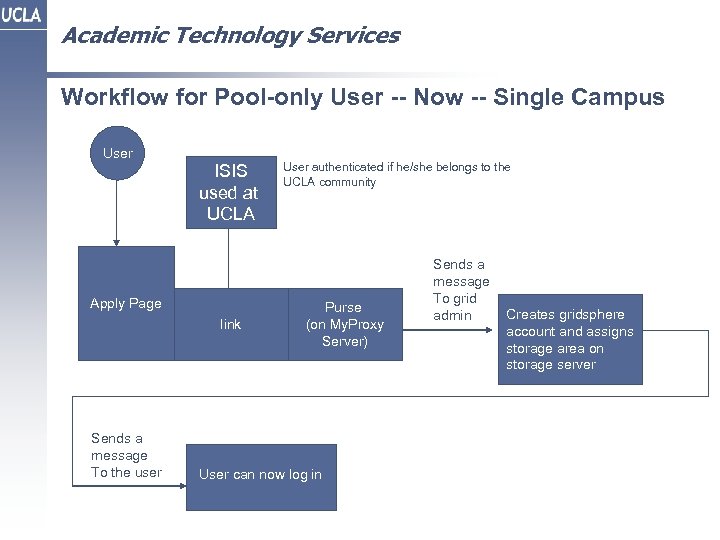 Academic Technology Services Workflow for Pool-only User -- Now -- Single Campus User ISIS used at UCLA Apply Page link Sends a message To the user User authenticated if he/she belongs to the UCLA community Purse (on My. Proxy Server) User can now log in Sends a message To grid admin Creates gridsphere account and assigns storage area on storage server
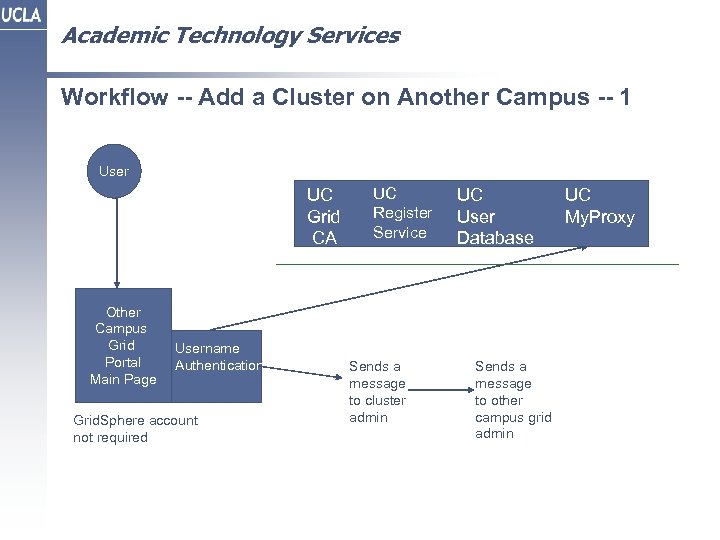 Academic Technology Services Workflow -- Add a Cluster on Another Campus -- 1 User UC Grid CA Other Campus Grid Portal Main Page Username Authentication Grid. Sphere account not required UC Register Service Sends a message to cluster admin UC User Database Sends a message to other campus grid admin UC My. Proxy
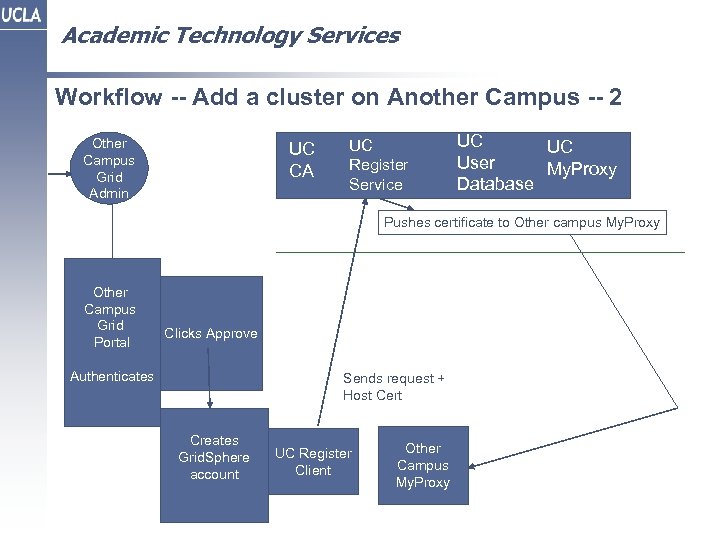 Academic Technology Services Workflow -- Add a cluster on Another Campus -- 2 Other Campus Grid Admin UC CA UC Register Service UC UC User My. Proxy Database Pushes certificate to Other campus My. Proxy Other Campus Grid Portal Clicks Approve Authenticates Sends request + Host Cert Creates Grid. Sphere account UC Register Client Other Campus My. Proxy
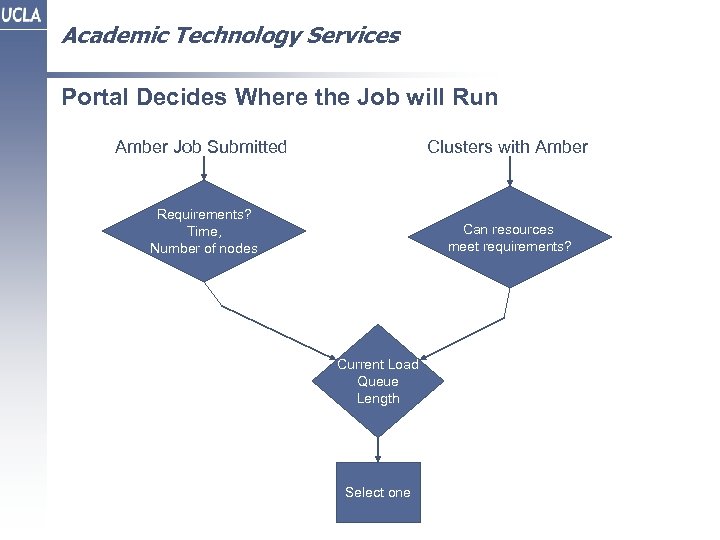 Academic Technology Services Portal Decides Where the Job will Run Amber Job Submitted Clusters with Amber Requirements? Time, Number of nodes Can resources meet requirements? Current Load Queue Length Select one
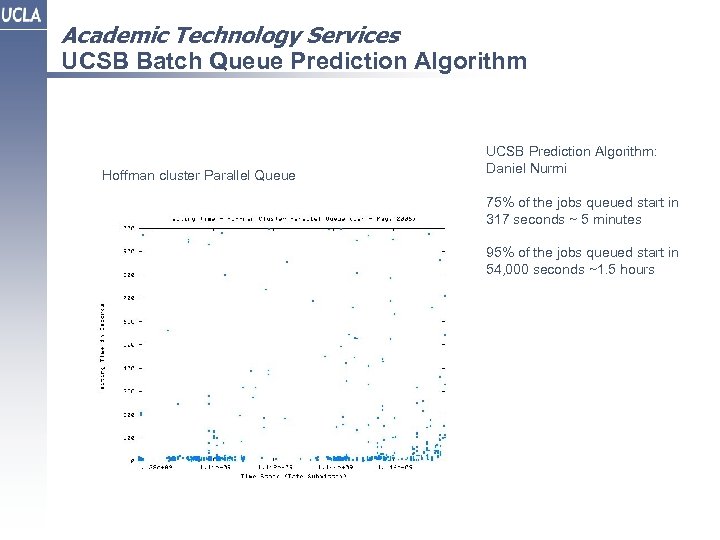 Academic Technology Services UCSB Batch Queue Prediction Algorithm Hoffman cluster Parallel Queue UCSB Prediction Algorithm: Daniel Nurmi 75% of the jobs queued start in 317 seconds ~ 5 minutes 95% of the jobs queued start in 54, 000 seconds ~1. 5 hours
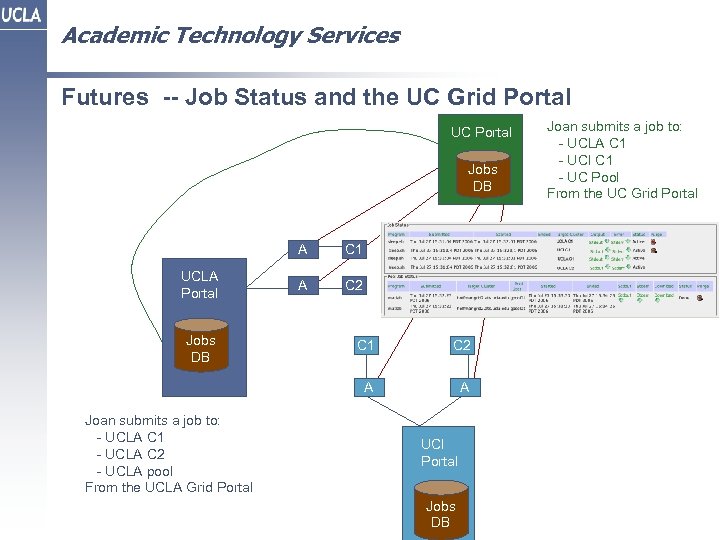 Academic Technology Services Futures -- Job Status and the UC Grid Portal UC Portal Jobs DB A UCLA Portal Jobs DB C 1 A C 2 A Joan submits a job to: - UCLA C 1 - UCLA C 2 - UCLA pool From the UCLA Grid Portal C 1 A UCI Portal Jobs DB Joan submits a job to: - UCLA C 1 - UCI C 1 - UC Pool From the UC Grid Portal
 Academic Technology Services