


 Скачать презентацию Academic Technology Services The UC Grid Project OSG
a38f8a8a1cd2cd53f58ecc8e8218091c.ppt
- Количество слайдов: 13
 Academic Technology Services The UC Grid Project OSG Consortium All-Hands Meeting http: //www. ucgrid. org Bill Labate & Joan Slottow Research Computing Technologies UCLA Academic Technology Services
 Academic Technology Services UGP (UCLA Grid Portal Software) • • UGP under development at UCLA since 2002. Build on top of: Globus Toolkit and Grid. Sphere Portlets. Joins computational clusters into a Grid. Original Design Goals: – Do not change the way individually-managed clusters do business. --> Grid Appliance. – Web Portal: • Hide certificates and the complexity of the Grid from users. – No software to install. • Single sign on. • Common web interface to all clusters.
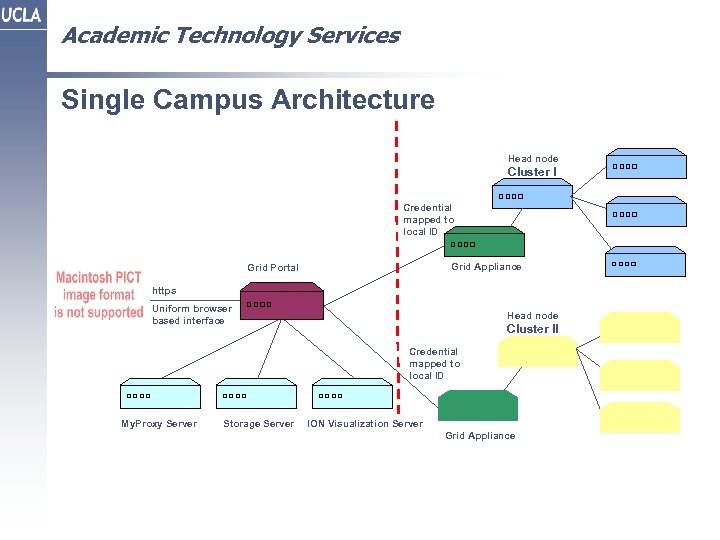 Academic Technology Services Single Campus Architecture Head node Cluster I Credential mapped to local ID Grid Appliance Grid Portal https Uniform browser based interface Head node Cluster II Credential mapped to local ID My. Proxy Server Storage Server ION Visualization Server Grid Appliance
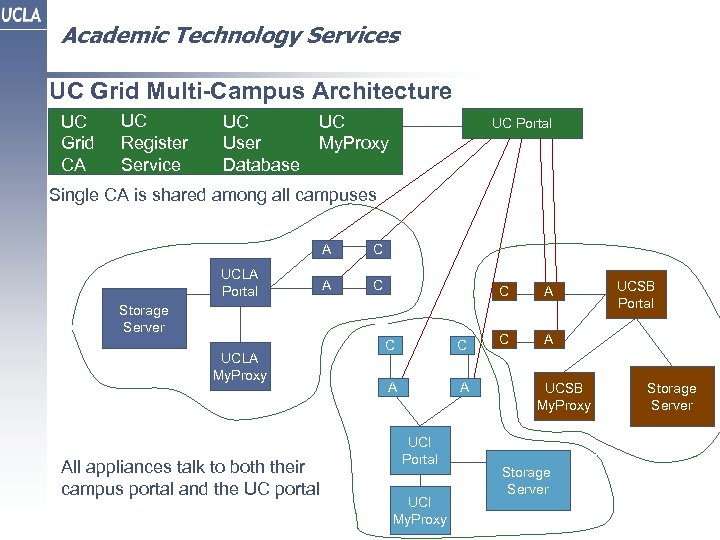 Academic Technology Services UC Grid Multi-Campus Architecture UC Grid CA UC Register Service UC User Database UC My. Proxy UC Portal Single CA is shared among all campuses A UCLA Portal C A C C Storage Server UCLA My. Proxy All appliances talk to both their campus portal and the UC portal C C A A UCI Portal UCI My. Proxy A C UCSB Portal A UCSB My. Proxy Storage Server
 Academic Technology Services The UC Grid • UC Grid is the umbrella Grid and aggregation point for all the campuses. – Users can work with clusters from all the campuses – Every appliance is open to the Campus Grid Portal and the UC Grid Portal – Each user of a Campus Grid can also use the UC Grid Portal • Each campus and cluster is autonomous. -- No central authority • Organizations such as the CNSI (UCSB & UCLA) span campuses. – CNSI researchers would use the UC Grid Portal to access all the CNSI clusters
 Academic Technology Services Web Services that make the Hierarchy Possible • Register Service -- Synchronizes User Creation – When a User applies for Grid access on a Campus Grid Portal: • The user certificate is created at the UC Grid Portal and pushed to the two My. Proxy Servers. • The user Grid. Sphere account is created both at the Campus Grid Portal and the UC Grid Portal. • Sync Service -- Synchronizes changes to the Grid – When an administrator of a Campus Grid Portal adds/removes a cluster/application/pool • The UC Grid Portal is updated in real time accordingly.
 Academic Technology Services Pools • Resource Pools – Applications and cycles • Pool jobs – Students and faculty members who do not have accounts on any campus clusters – Those with low-level or sporadic usage requirements – Need for a specific application, compiler, visualization tool – Cluster users are also pool users – Pool use hides all the details – Target cluster selected by the UGP – Can currently run applications only
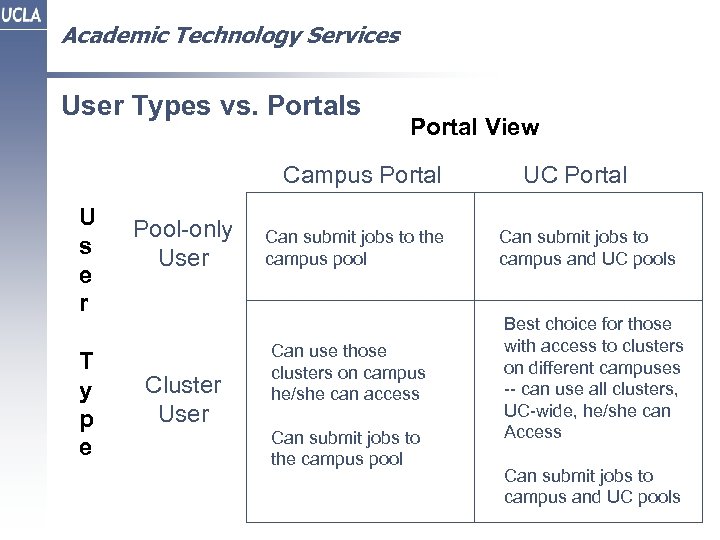 Academic Technology Services User Types vs. Portals Portal View Campus Portal U s e r T y p e Pool-only User Cluster User Can submit jobs to the campus pool Can use those clusters on campus he/she can access Can submit jobs to the campus pool UC Portal Can submit jobs to campus and UC pools Best choice for those with access to clusters on different campuses -- can use all clusters, UC-wide, he/she can Access Can submit jobs to campus and UC pools
 Academic Technology Services Interoperability with Other Grids -- Out • UGP can act as a client to other Grids provided: – Their Globus Toolkit nodes are open to all of their users. – They allow us to get the CA Signing Policy and CA Certificate Public Key for each of their clusters. – They have an accessible My. Proxy Server. – Their users push their proxy certificates to that My. Proxy Server for UGP to retrieve.
 Academic Technology Services Interoperability with Other Grids -- In • Currently you cannot get to a cluster on the UC Grid from outside: – We don't give out the CA Signing Policy and CA public keys for our appliances -- though we could. – We don’t give the user’s their user certificates -- though we could – Our appliances are behind firewalls – Would require a fundamental change to our security model.
 Academic Technology Services Trust Issues • UC Grid user certificates are only for the UC Grid and the Campus Grids – They are not the credentials the UC campuses will eventually issue. • Until now, other institutions wont trust us because we lack a trust policy. • Before now, our policy was: – "if you have a login id on any of the clusters, you can use the Grid” • The UC system is now addressing this with the UC Trust initiative.
 Academic Technology Services UC Grid -- Current Status • Started the project in mid-2006. Received UC approval in November 2006. • Currently have two campuses connected – – UCLA & UCSB 14 clusters 783 nodes, 1, 600 CPUs 8. 7 TFlops • UCI is in the process of bringing their portal up. • After we have 3 campuses connected we will start running stress tests, fixing bugs and optimizing the system. • Challenges – – Getting campus by in - decentralization is a detriment Finding the right campus contact to work with Showing researchers a tangible benefit Changing the resource ownership paradigm
 Academic Technology Services On-Going Work and Challenges • Better through-the-web visual interfaces both for job preparation and viewing results. • Collaboration among researchers. • Working with very large files. • Interfaces to and scheduling of on-demand resources. • Better job/queue prediction • Running/compiling users code across clusters of different architectures • Federating with other Grids