 Скачать презентацию A Roadmap to Continuous Integration Bruce Altner Brett
5df9f5d85ec7515a18d9712c7404e415.ppt
- Количество слайдов: 63



A Roadmap to Continuous Integration Bruce Altner Brett Lewinski August 16, 2010
Overview § Introduction § What is Continuous Integration (CI)? § Best Practices in CI § The Tools of CI § CI in Practice: First Steps A Roadmap to Continuous Integration — 2— August 16, 2010
Introduction: The Problem to be Solved § Many of the problems encountered in software application deployments can be traced to reliance on manual processes to build, test, and package release targets. § Modern software development practices such as continuous integration (CI) focus on executing integration builds early and often, rather than waiting until the software product is almost ready to deliver. A Roadmap to Continuous Integration — 3— August 16, 2010
Outline of the Presentation A Roadmap to Continuous Integration — 4— August 16, 2010 § Define CI and describe the benefits that may accrue to organizations that adopt it. § Examine CI concepts, best practices, and tools within the context of current industry usage and derive guidelines for an achievable adoption strategy. § Provide specific recommendations for implementing CI for teams at various levels of “maturity. ” § Discuss and demonstrate the application of CI tools and practices in a real-world development environment.
Overview § Introduction § What is CI? § Best Practices in CI § The Tools of CI § CI in Practice: First Steps A Roadmap to Continuous Integration — 5— August 16, 2010
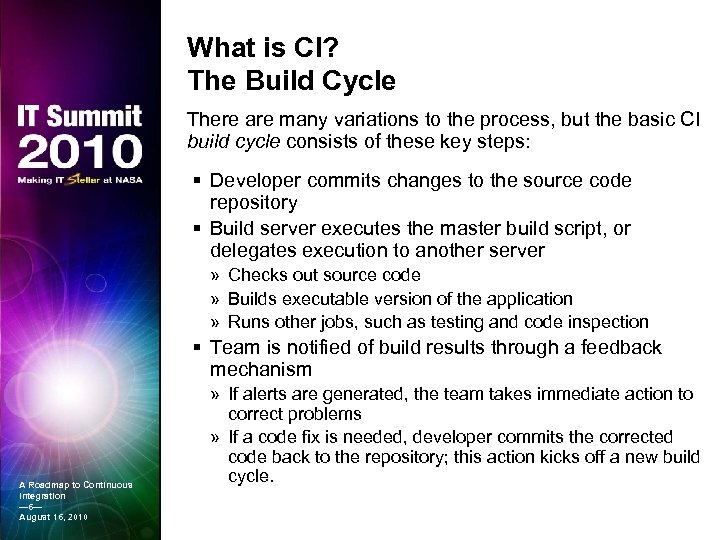
What is CI? The Build Cycle There are many variations to the process, but the basic CI build cycle consists of these key steps: § Developer commits changes to the source code repository § Build server executes the master build script, or delegates execution to another server » Checks out source code » Builds executable version of the application » Runs other jobs, such as testing and code inspection § Team is notified of build results through a feedback mechanism A Roadmap to Continuous Integration — 6— August 16, 2010 » If alerts are generated, the team takes immediate action to correct problems » If a code fix is needed, developer commits the corrected code back to the repository; this action kicks off a new build cycle.
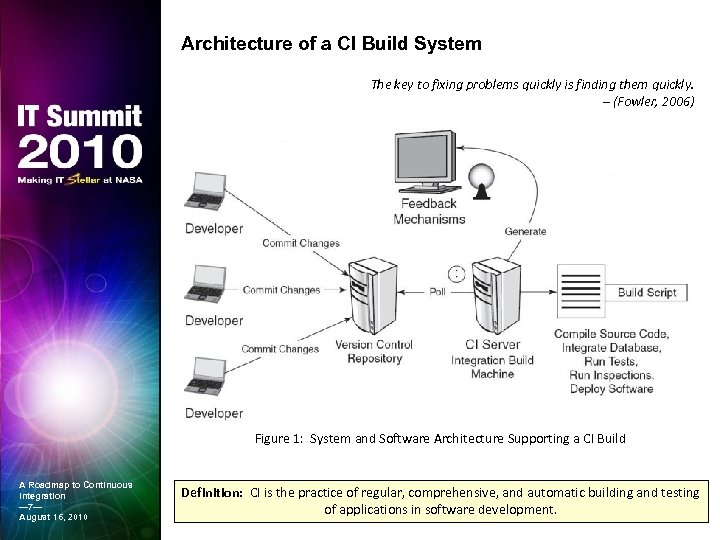
Architecture of a CI Build System The key to fixing problems quickly is finding them quickly. – (Fowler, 2006) Figure 1: System and Software Architecture Supporting a CI Build A Roadmap to Continuous Integration — 7— August 16, 2010 Definition: CI is the practice of regular, comprehensive, and automatic building and testing of applications in software development.
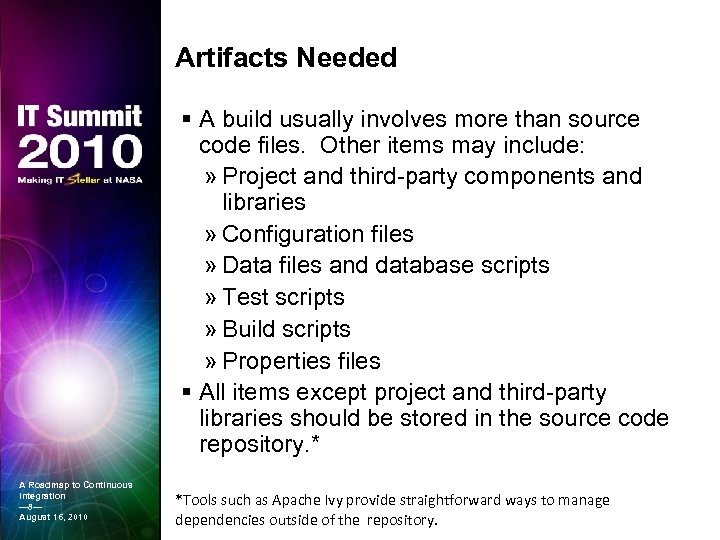
Artifacts Needed § A build usually involves more than source code files. Other items may include: » Project and third-party components and libraries » Configuration files » Data files and database scripts » Test scripts » Build scripts » Properties files § All items except project and third-party libraries should be stored in the source code repository. * A Roadmap to Continuous Integration — 8— August 16, 2010 *Tools such as Apache Ivy provide straightforward ways to manage dependencies outside of the repository.
Essential Characteristics of a CI Build § The build is completely automated, usually through the execution of a single script. § No matter how triggered or how often run, a build always begins by retrieving code from the source code repository. § Unless terminated prematurely, the end product of a build is always executable code. § Notification of build status always occurs through a feedback mechanism. A Roadmap to Continuous Integration — 9— August 16, 2010
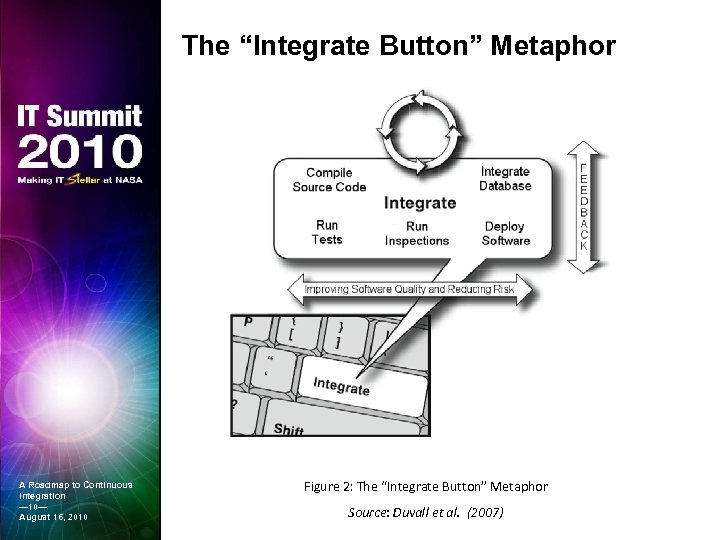
The “Integrate Button” Metaphor A Roadmap to Continuous Integration — 10— August 16, 2010 Figure 2: The “Integrate Button” Metaphor Source: Duvall et al. (2007)
Build Types There are three basic types of builds: private, integration, and release § All builds are automated, script-driven processes that pull source code from the repository and create deployable artifacts § These build types differ in several ways » Where, when, by whom, and for what reason they are run » The code that feeds the process » What is done with the output A Roadmap to Continuous Integration — 11— August 16, 2010
Build Types (continued…) § Private Builds » Run by developers in their local environments (IDE) » Ensure that code compiles before committing back to source code repository » Triggered manually » Very stripped-down and designed to finish quickly § Integration Builds » Compile and package the application for testing and quality inspection in response to recent changes » Performed on a dedicated build server either on a scheduled basis (nightly) or continuously » Usually drawn from the trunk of the repository tree » Fast or slow depending on the number and type of processes included in the build script § Release Builds A Roadmap to Continuous Integration — 12— August 16, 2010 » Performed when code is ready to be deployed to other environments » Performed by the team’s release manager » Use tagged code from the repository » Run the full suite of automated and manual tests and inspections » Tend to be slow
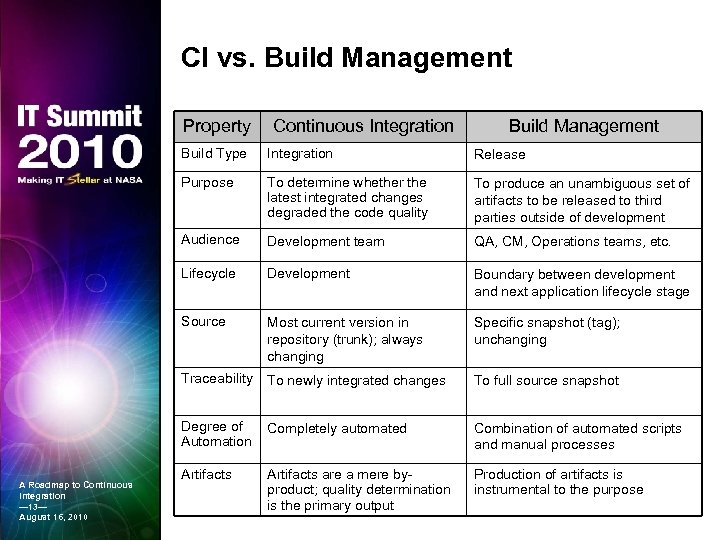
CI vs. Build Management Property Continuous Integration Build Management Build Type Release Purpose To determine whether the latest integrated changes degraded the code quality To produce an unambiguous set of artifacts to be released to third parties outside of development Audience Development team QA, CM, Operations teams, etc. Lifecycle Development Boundary between development and next application lifecycle stage Source Most current version in repository (trunk); always changing Specific snapshot (tag); unchanging Traceability To newly integrated changes To full source snapshot Degree of Automation A Roadmap to Continuous Integration — 13— August 16, 2010 Integration Completely automated Combination of automated scripts and manual processes Artifacts are a mere byproduct; quality determination is the primary output Production of artifacts is instrumental to the purpose
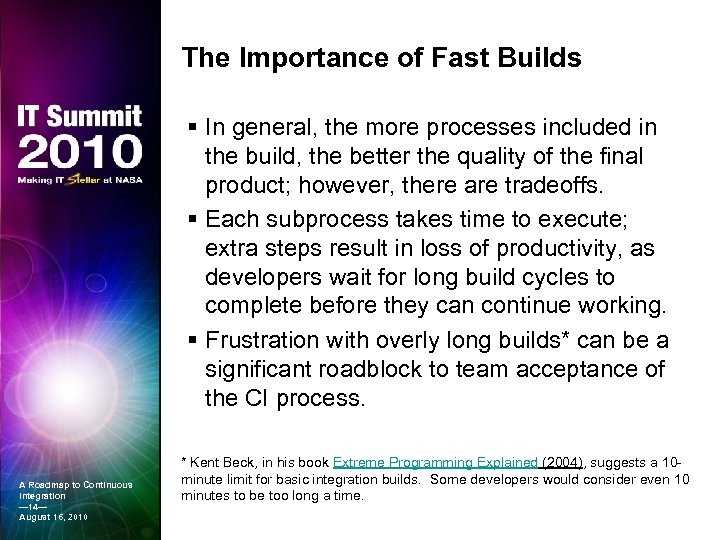
The Importance of Fast Builds § In general, the more processes included in the build, the better the quality of the final product; however, there are tradeoffs. § Each subprocess takes time to execute; extra steps result in loss of productivity, as developers wait for long build cycles to complete before they can continue working. § Frustration with overly long builds* can be a significant roadblock to team acceptance of the CI process. A Roadmap to Continuous Integration — 14— August 16, 2010 * Kent Beck, in his book Extreme Programming Explained (2004), suggests a 10 minute limit for basic integration builds. Some developers would consider even 10 minutes to be too long a time.
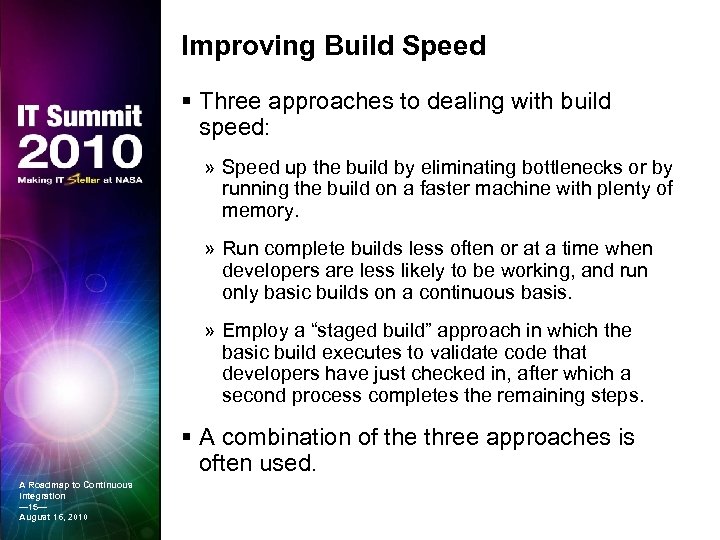
Improving Build Speed § Three approaches to dealing with build speed: » Speed up the build by eliminating bottlenecks or by running the build on a faster machine with plenty of memory. » Run complete builds less often or at a time when developers are less likely to be working, and run only basic builds on a continuous basis. » Employ a “staged build” approach in which the basic build executes to validate code that developers have just checked in, after which a second process completes the remaining steps. § A combination of the three approaches is often used. A Roadmap to Continuous Integration — 15— August 16, 2010
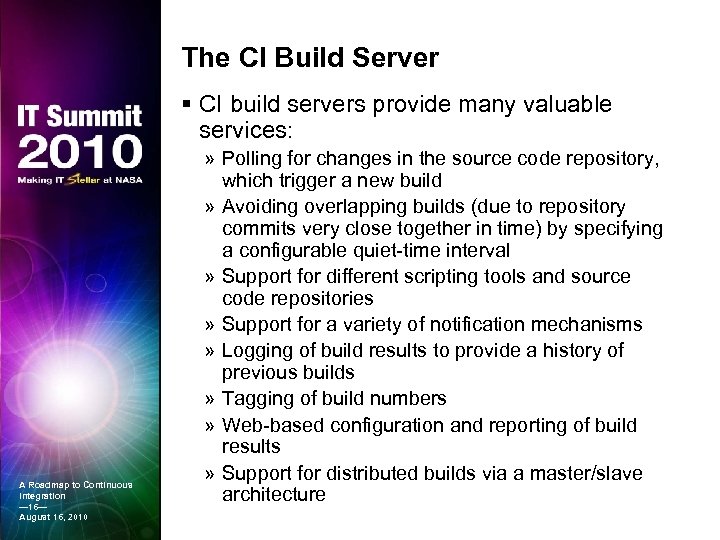
The CI Build Server § CI build servers provide many valuable services: A Roadmap to Continuous Integration — 16— August 16, 2010 » Polling for changes in the source code repository, which trigger a new build » Avoiding overlapping builds (due to repository commits very close together in time) by specifying a configurable quiet-time interval » Support for different scripting tools and source code repositories » Support for a variety of notification mechanisms » Logging of build results to provide a history of previous builds » Tagging of build numbers » Web-based configuration and reporting of build results » Support for distributed builds via a master/slave architecture
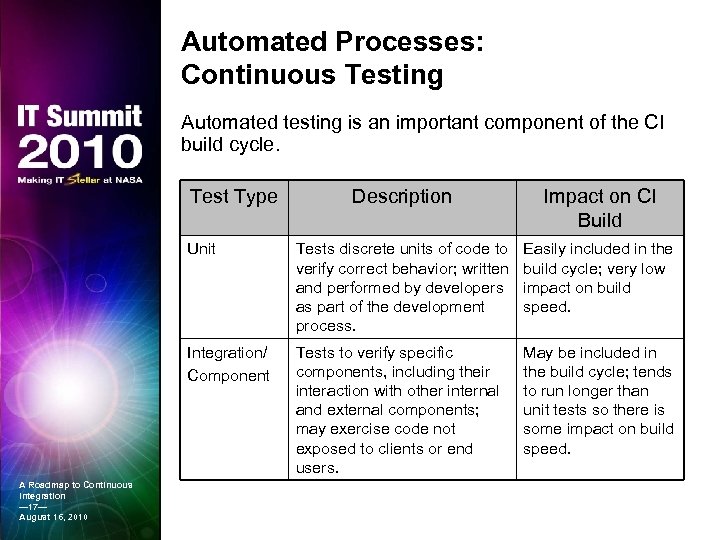
Automated Processes: Continuous Testing Automated testing is an important component of the CI build cycle. Test Type Impact on CI Build Unit Tests discrete units of code to verify correct behavior; written and performed by developers as part of the development process. Easily included in the build cycle; very low impact on build speed. Integration/ Component A Roadmap to Continuous Integration — 17— August 16, 2010 Description Tests to verify specific components, including their interaction with other internal and external components; may exercise code not exposed to clients or end users. May be included in the build cycle; tends to run longer than unit tests so there is some impact on build speed.
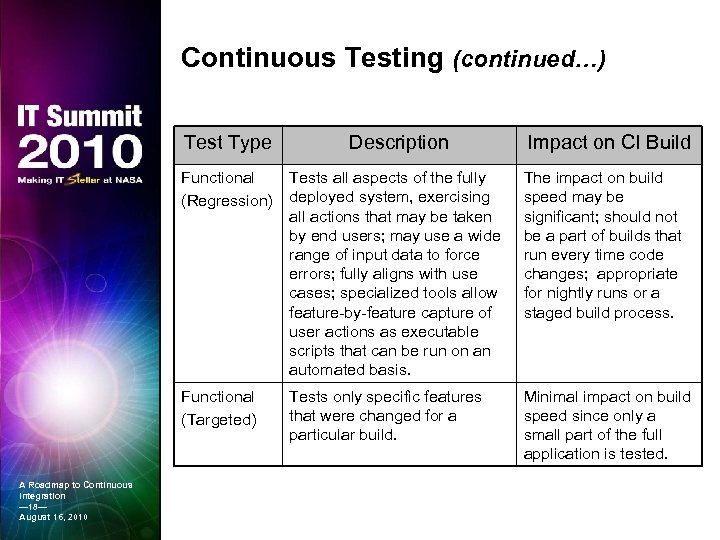
Continuous Testing (continued…) Test Type Functional (Regression) Tests all aspects of the fully deployed system, exercising all actions that may be taken by end users; may use a wide range of input data to force errors; fully aligns with use cases; specialized tools allow feature-by-feature capture of user actions as executable scripts that can be run on an automated basis. The impact on build speed may be significant; should not be a part of builds that run every time code changes; appropriate for nightly runs or a staged build process. Functional (Targeted) A Roadmap to Continuous Integration — 18— August 16, 2010 Description Impact on CI Build Tests only specific features that were changed for a particular build. Minimal impact on build speed since only a small part of the full application is tested.
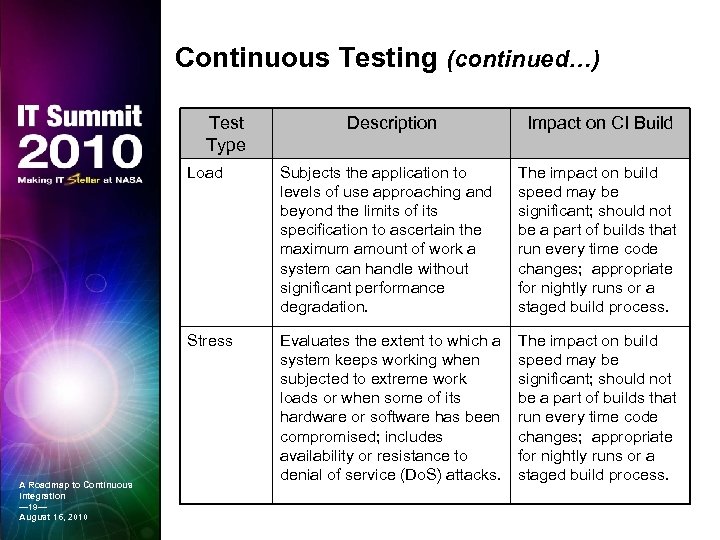
Continuous Testing (continued…) Test Type Description Impact on CI Build Load The impact on build speed may be significant; should not be a part of builds that run every time code changes; appropriate for nightly runs or a staged build process. Stress A Roadmap to Continuous Integration — 19— August 16, 2010 Subjects the application to levels of use approaching and beyond the limits of its specification to ascertain the maximum amount of work a system can handle without significant performance degradation. Evaluates the extent to which a system keeps working when subjected to extreme work loads or when some of its hardware or software has been compromised; includes availability or resistance to denial of service (Do. S) attacks. The impact on build speed may be significant; should not be a part of builds that run every time code changes; appropriate for nightly runs or a staged build process.
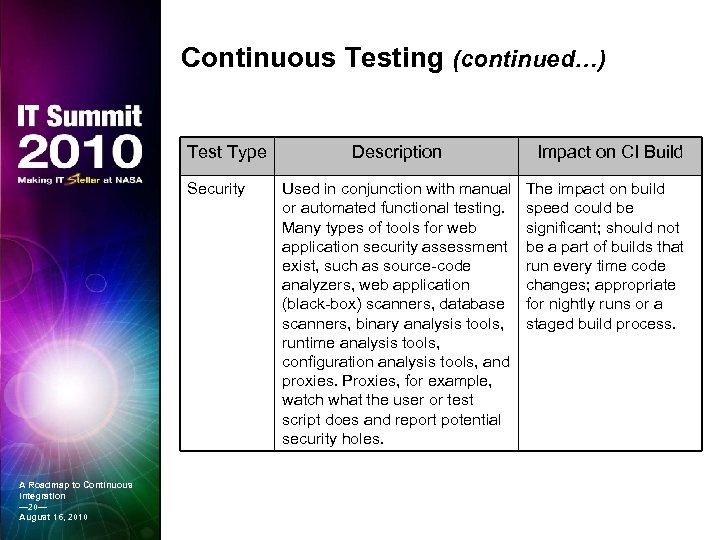
Continuous Testing (continued…) Test Type Security A Roadmap to Continuous Integration — 20— August 16, 2010 Description Used in conjunction with manual or automated functional testing. Many types of tools for web application security assessment exist, such as source-code analyzers, web application (black-box) scanners, database scanners, binary analysis tools, runtime analysis tools, configuration analysis tools, and proxies. Proxies, for example, watch what the user or test script does and report potential security holes. Impact on CI Build The impact on build speed could be significant; should not be a part of builds that run every time code changes; appropriate for nightly runs or a staged build process.
Continuous Database Integration Changes to an application database may occur often during the course of project development. § Early detection of problems in this component is as important as early detection of errors in the source code. § A build server can be set up to begin a new CI cycle whenever the project database is to be changed. § Code and configuration files that modify the database are committed to the version control repository just as code changes are and can trigger a new build. A Roadmap to Continuous Integration — 21— August 16, 2010
Continuous Database Integration (continued…) § A CI build can: » Drop an existing database » Create, configure, and populate a new one with data » Run automated unit tests to verify that everything is working as expected » Inspect database scripts for compliance with project practice A Roadmap to Continuous Integration — 22— August 16, 2010 § One of the primary benefits of applying the practices of CI to database integration is that it frees developers from the fear of making changes.
Continuous Code Inspection A stated objective of CI is to integrate frequently in order to detect and remedy quality issues as they are introduced. • Code quality issues are not just errors that cause compile-time or runtime problems. • Tangled, hard-to-read, overly complex, undocumented, and inconsistently formatted code may compile, but committing this kind of code to the repository is not a good practice. • Many teams apply stylistic standards for “clean” code in their particular language, a process that can be automated. A Roadmap to Continuous Integration — 23— August 16, 2010 23
Continuous Code Inspection (continued…) § Automated processes are very good at code inspection, once a set of standards has been defined. » Noncompliance with team standards can cause a build to fail or simply to be reported. » Tools are available for most programming languages. » Rules can be based on a project's coding standards. » Can be run inside an IDE or in a build tool such as Ant. » Tools are available to not only enforce style and format compliance but also reduce code complexity, eliminate duplicated code, and ensure complete unit test coverage. A Roadmap to Continuous Integration — 24— August 16, 2010 § Continuous code inspection allows the team to concentrate on the important issues during peer reviews, such as alignment with requirements and sound architecture and design.
Continuous Deployment § Continuous deployment is “…a culmination of practices and steps that enable us to release working software any time, in any place, with as little effort as possible. ” » The build includes compilation, running all tests and inspections, packaging, and deployment. » “Any place” implies not only developer servers, but also QA and production servers. § Several of the steps prescribed for it cannot be automated. » It requires creating a snapshot of the releasable code in the source code repository. » It requires testing by human testers. A Roadmap to Continuous Integration — 25— August 16, 2010 » Solution is to automate as much as possible and do the rest manually.
Feedback § Is essential to the purpose of CI » Without notification the team has no way of knowing whether recent changes introduced new problems. § Can take many forms and be directed at many stakeholders § Must be managed carefully » “Spam Feedback” is a CI anti-pattern in which team members become inundated with build status emails, to the point where they start to ignore messages. A Roadmap to Continuous Integration — 26— August 16, 2010 § Is most effective when it directs the right information to the right people in the right situation and uses the right methods
Feedback (continued…) There are many ways to send notification of build status: § E-mail: Provides build status at discrete points in time § RSS: Pushes alerts regarding build status to an RSS reader § SMS: Provides build status with text messages sent to cell phone § Visual devices: Ambient Orb, X 10 Lava lamps § Twitter: Provides build status with “tweets” sent to Twitter account § Sounds: Provides build status through sound § Displays: Provides feedback through an LCD monitor § Instant Message: Allows for instantaneous notification via IM A Roadmap to Continuous Integration — 27— August 16, 2010 § Browser plug-ins: Provides build status in the browser status bar § Widgets: Display the build status on the user's desktop
Benefits of CI § Increased productivity » Enables shorter feedback cycle when changes are made » Code is kept in a “releasable” state » Code gets back into the hands of testers quickly » Frees the team to do more interesting and valuable work » Improves morale, making it easier to retain good developers » Enables more frequent releases with new features § Improved quality » Makes it easier to find and remove defects because frequent integration and testing identifies bugs as they are introduced. » Multi-platform builds help in finding problems that may arise on some, but not all, versions of the supported platform. § Reduced Risk A Roadmap to Continuous Integration — 28— August 16, 2010 » Reduces uncertainty greatly because at all times the team knows what works, what does not, and what the major issues are.
Barriers to CI § Why doesn't every team already practice CI? » It is not easy. » Establishing a solid CI practice takes a lot of work and technical knowledge. » A number of new tools and processes must be mastered. » Setting up a CI server requires that the build, unit test, and executable packaging processes all be automated. » Requires mastering a build scripting language, a unit testing platform, and potentially a setup/install platform as well. A Roadmap to Continuous Integration — 29— August 16, 2010 § Duvall (2007) says, “I often hear statements like ‘CI doesn't work for large projects’ or ‘our project is so unique that CI won't work’ when, in fact, CI isn't the issue at all — it's the ineffective application, or nonexistence, of certain practices that have led to frustration. ”
Overview § Introduction § What is Continuous Integration (CI)? § Best Practices in CI § The Tools of CI § CI in Practice: First Steps A Roadmap to Continuous Integration — 30— August 16, 2010
Best Practices: The Enterprise CI Maturity Model A defect in the software is a defect in the process. – Graham (2005) § The maturity level of an organization’s CI processes depends on its needs and the availability of resources. § Minick and Fredrick (2009) describe a maturity model for CI* that spans a broad range of sophistication, from “introductory” to “insane” along four attributes. » The early levels are the domain of “team-level CI. ” » The advanced and insane levels characterize “enterprise CI” (implies the need for strict compliance with development process regulations or standards). § The “best practices” described within each level provide a convenient roadmap to adopting CI. A Roadmap to Continuous Integration — 31— August 16, 2010 * The CI Maturity Model is to CI what Capability Maturity Model Integration (CMMI) is to organizational process improvement.
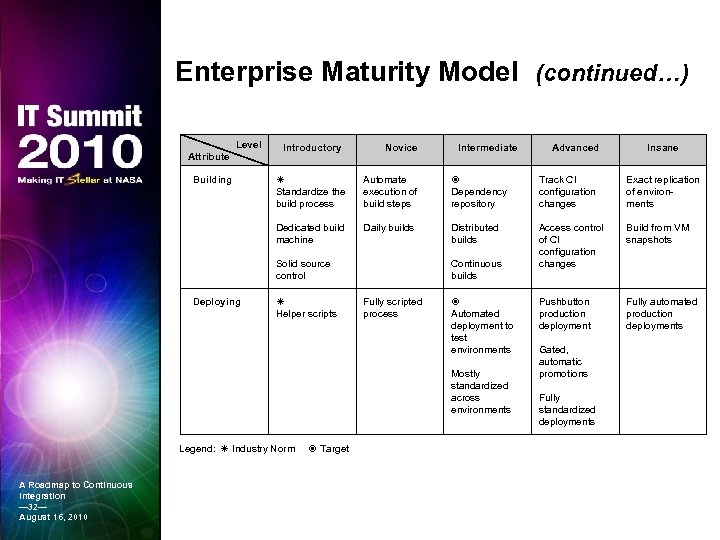
Enterprise Maturity Model (continued…) Level Attribute Building Introductory Novice Intermediate Advanced Insane Standardize the build process Automate execution of build steps Dependency repository Track CI configuration changes Exact replication of environments Dedicated build machine Daily builds Distributed builds Access control of CI configuration changes Build from VM snapshots Pushbutton production deployment Fully automated production deployments Solid source control Deploying Helper scripts Continuous builds Fully scripted process Automated deployment to test environments Mostly standardized across environments Legend: Industry Norm A Roadmap to Continuous Integration — 32— August 16, 2010 Target Gated, automatic promotions Fully standardized deployments
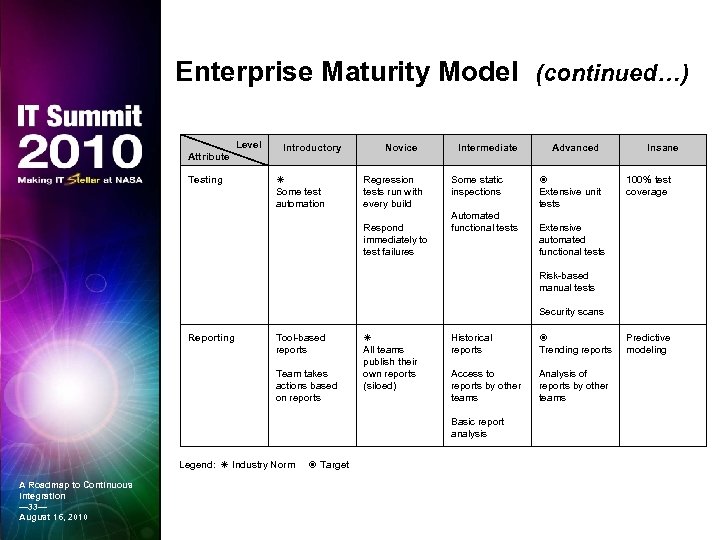
Enterprise Maturity Model (continued…) Level Attribute Testing Introductory Some test automation Novice Regression tests run with every build Respond immediately to test failures Intermediate Some static inspections Automated functional tests Advanced Extensive unit tests Insane 100% test coverage Extensive automated functional tests Risk-based manual tests Security scans Reporting Tool-based reports Team takes actions based on reports All teams publish their own reports (siloed) Historical reports Trending reports Access to reports by other teams Analysis of reports by other teams Basic report analysis Legend: Industry Norm A Roadmap to Continuous Integration — 33— August 16, 2010 Target Predictive modeling
Overview § Introduction § What is Continuous Integration (CI)? § Best Practices in CI § The Tools of CI § CI in Practice: First Steps A Roadmap to Continuous Integration — 34— August 16, 2010
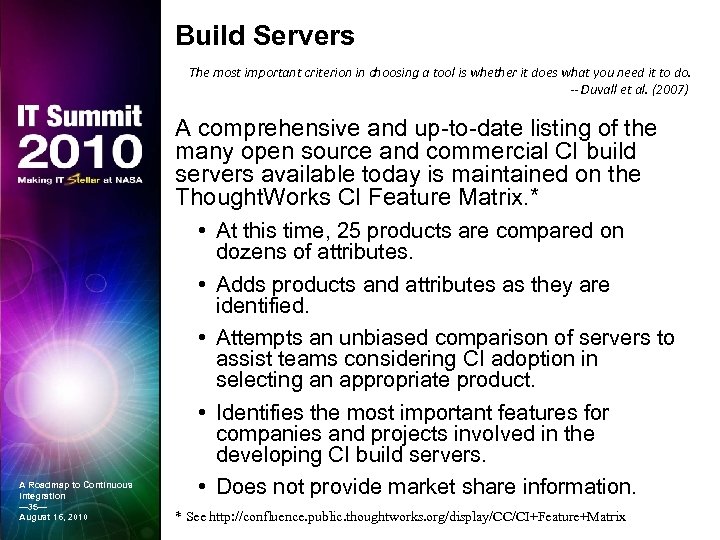
Build Servers The most important criterion in choosing a tool is whether it does what you need it to do. -- Duvall et al. (2007) A comprehensive and up-to-date listing of the many open source and commercial CI build servers available today is maintained on the Thought. Works CI Feature Matrix. * A Roadmap to Continuous Integration — 35— August 16, 2010 • At this time, 25 products are compared on dozens of attributes. • Adds products and attributes as they are identified. • Attempts an unbiased comparison of servers to assist teams considering CI adoption in selecting an appropriate product. • Identifies the most important features for companies and projects involved in the developing CI build servers. • Does not provide market share information. * See http: //confluence. public. thoughtworks. org/display/CC/CI+Feature+Matrix
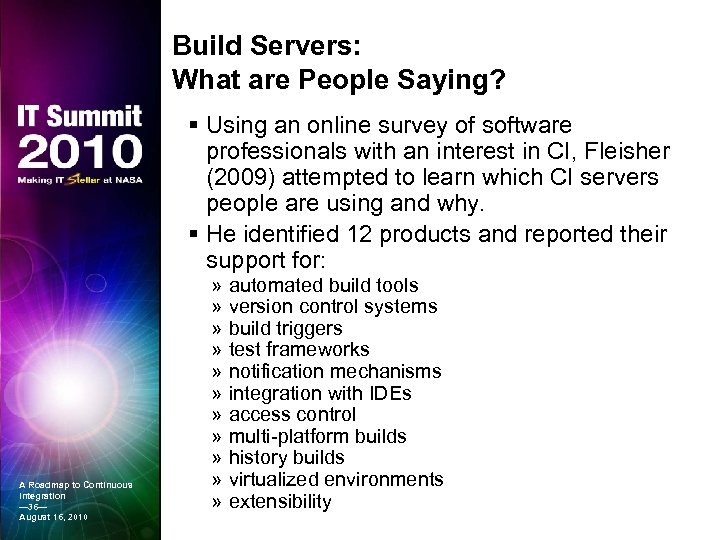
Build Servers: What are People Saying? § Using an online survey of software professionals with an interest in CI, Fleisher (2009) attempted to learn which CI servers people are using and why. § He identified 12 products and reported their support for: A Roadmap to Continuous Integration — 36— August 16, 2010 » » » automated build tools version control systems build triggers test frameworks notification mechanisms integration with IDEs access control multi-platform builds history builds virtualized environments extensibility
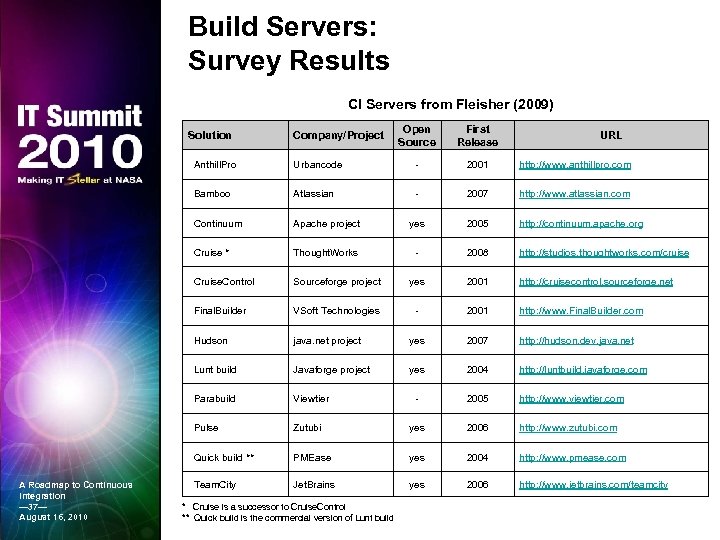
Build Servers: Survey Results CI Servers from Fleisher (2009) Solution Company/Project Open Source First Release URL Anthill. Pro ‐ 2001 http: //www. anthillpro. com Bamboo Atlassian ‐ 2007 http: //www. atlassian. com Continuum Apache project yes 2005 http: //continuum. apache. org Cruise * Thought. Works ‐ 2008 http: //studios. thoughtworks. com/cruise Cruise. Control Sourceforge project yes 2001 http: //cruisecontrol. sourceforge. net Final. Builder VSoft Technologies ‐ 2001 http: //www. Final. Builder. com Hudson java. net project yes 2007 http: //hudson. dev. java. net Lunt build Javaforge project yes 2004 http: //luntbuild. javaforge. com Parabuild Viewtier ‐ 2005 http: //www. viewtier. com Pulse Zutubi yes 2006 http: //www. zutubi. com Quick build ** A Roadmap to Continuous Integration — 37— August 16, 2010 Urbancode PMEase yes 2004 http: //www. pmease. com Team. City Jet. Brains yes 2006 http: //www. jetbrains. com/teamcity * Cruise is a successor to Cruise. Control ** Quick build is the commercial version of Lunt build
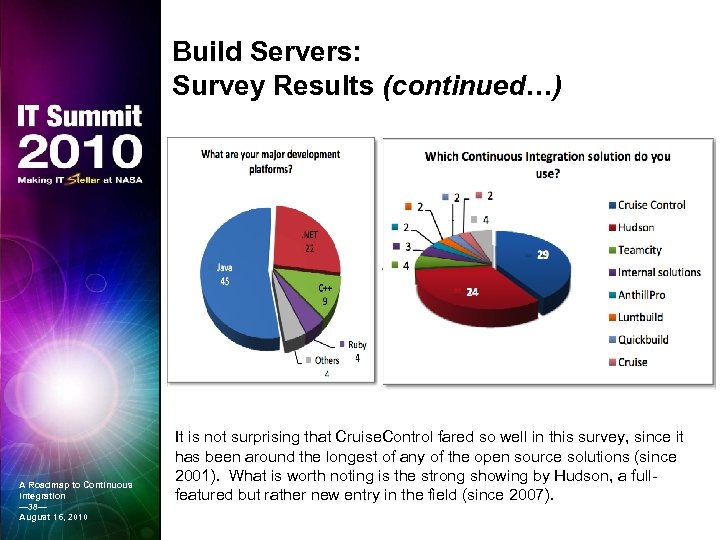
Build Servers: Survey Results (continued…) Source: Fleisher (2009) A Roadmap to Continuous Integration — 38— August 16, 2010 It is not surprising that Cruise. Control fared so well in this survey, since it has been around the longest of any of the open source solutions (since 2001). What is worth noting is the strong showing by Hudson, a fullfeatured but rather new entry in the field (since 2007).
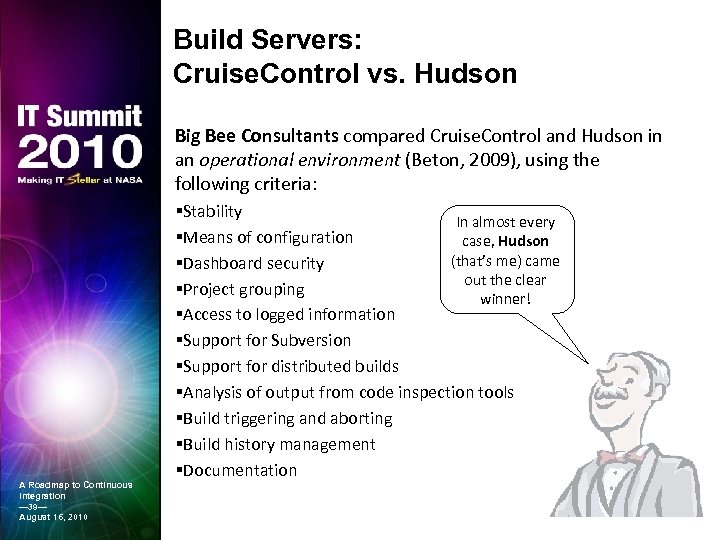
Build Servers: Cruise. Control vs. Hudson Big Bee Consultants compared Cruise. Control and Hudson in an operational environment (Beton, 2009), using the following criteria: A Roadmap to Continuous Integration — 39— August 16, 2010 §Stability In almost every §Means of configuration case, Hudson (that’s me) came §Dashboard security out the clear §Project grouping winner! §Access to logged information §Support for Subversion §Support for distributed builds §Analysis of output from code inspection tools §Build triggering and aborting §Build history management §Documentation
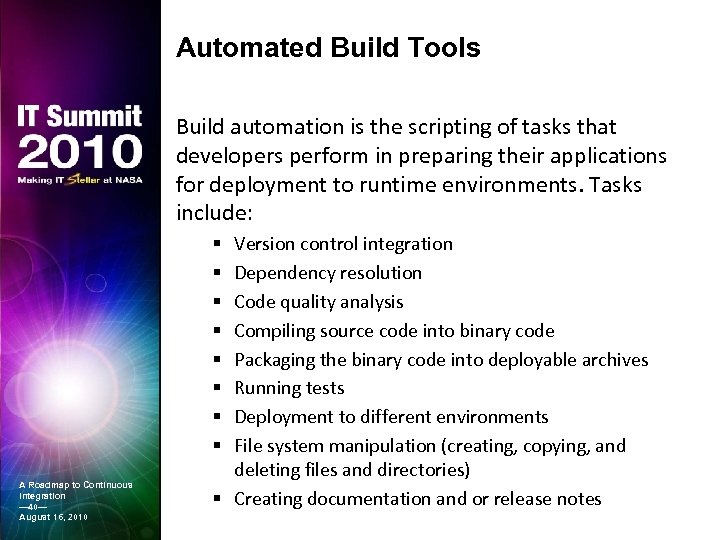
Automated Build Tools Build automation is the scripting of tasks that developers perform in preparing their applications for deployment to runtime environments. Tasks include: Version control integration Dependency resolution Code quality analysis Compiling source code into binary code Packaging the binary code into deployable archives Running tests Deployment to different environments File system manipulation (creating, copying, and deleting files and directories) § Creating documentation and or release notes § § § § A Roadmap to Continuous Integration — 40— August 16, 2010
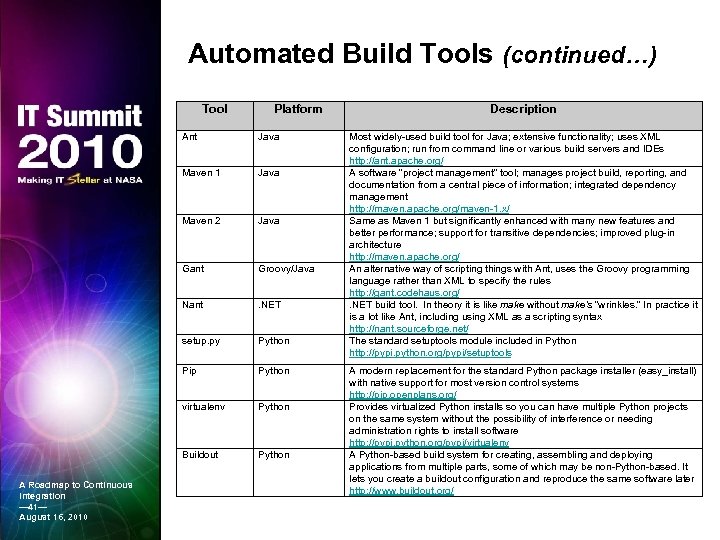
Automated Build Tools (continued…) Tool Platform Ant Maven 1 Java Maven 2 Java Gant Groovy/Java Nant . NET setup. py Python Pip Python virtualenv Python Buildout A Roadmap to Continuous Integration — 41— August 16, 2010 Java Python Description Most widely-used build tool for Java; extensive functionality; uses XML configuration; run from command line or various build servers and IDEs http: //ant. apache. org/ A software “project management” tool; manages project build, reporting, and documentation from a central piece of information; integrated dependency management http: //maven. apache. org/maven-1. x/ Same as Maven 1 but significantly enhanced with many new features and better performance; support for transitive dependencies; improved plug-in architecture http: //maven. apache. org/ An alternative way of scripting things with Ant, uses the Groovy programming language rather than XML to specify the rules http: //gant. codehaus. org/. NET build tool. In theory it is like make without make's “wrinkles. ” In practice it is a lot like Ant, including using XML as a scripting syntax http: //nant. sourceforge. net/ The standard setuptools module included in Python http: //pypi. python. org/pypi/setuptools A modern replacement for the standard Python package installer (easy_install) with native support for most version control systems http: //pip. openplans. org/ Provides virtualized Python installs so you can have multiple Python projects on the same system without the possibility of interference or needing administration rights to install software http: //pypi. python. org/pypi/virtualenv A Python-based build system for creating, assembling and deploying applications from multiple parts, some of which may be non-Python-based. It lets you create a buildout configuration and reproduce the same software later http: //www. buildout. org/
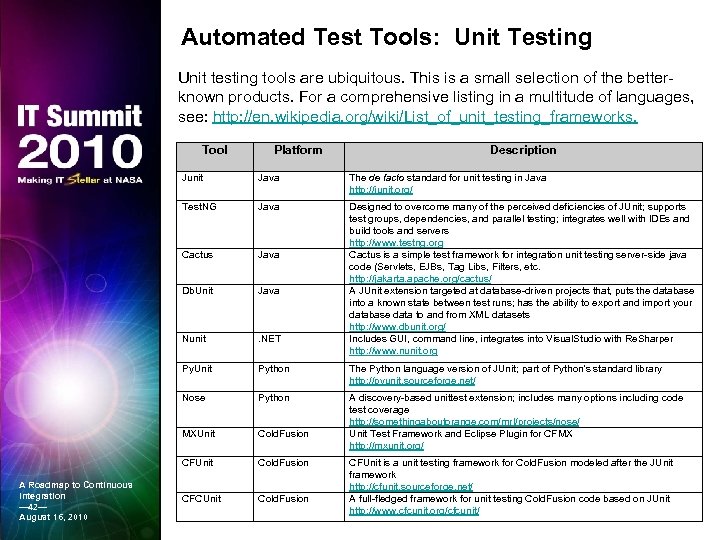
Automated Test Tools: Unit Testing Unit testing tools are ubiquitous. This is a small selection of the betterknown products. For a comprehensive listing in a multitude of languages, see: http: //en. wikipedia. org/wiki/List_of_unit_testing_frameworks. Tool Platform Description Junit The de facto standard for unit testing in Java http: //junit. org/ Test. NG Java Cactus Java Db. Unit Java Nunit . NET Designed to overcome many of the perceived deficiencies of JUnit; supports test groups, dependencies, and parallel testing; integrates well with IDEs and build tools and servers http: //www. testng. org Cactus is a simple test framework for integration unit testing server-side java code (Servlets, EJBs, Tag Libs, Filters, etc. http: //jakarta. apache. org/cactus/ A JUnit extension targeted at database-driven projects that, puts the database into a known state between test runs; has the ability to export and import your database data to and from XML datasets http: //www. dbunit. org/ Includes GUI, command line, integrates into Visual. Studio with Re. Sharper http: //www. nunit. org Py. Unit Python The Python language version of JUnit; part of Python's standard library http: //pyunit. sourceforge. net/ Nose Python MXUnit Cold. Fusion A discovery-based unittest extension; includes many options including code test coverage http: //somethingaboutorange. com/mrl/projects/nose/ Unit Test Framework and Eclipse Plugin for CFMX http: //mxunit. org/ CFUnit A Roadmap to Continuous Integration — 42— August 16, 2010 Java Cold. Fusion CFCUnit Cold. Fusion CFUnit is a unit testing framework for Cold. Fusion modeled after the JUnit framework http: //cfunit. sourceforge. net/ A full-fledged framework for unit testing Cold. Fusion code based on JUnit http: //www. cfcunit. org/cfcunit/
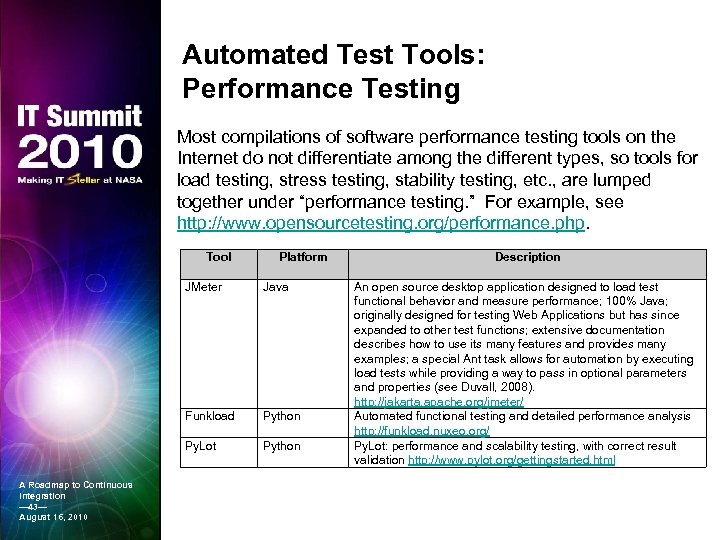
Automated Test Tools: Performance Testing Most compilations of software performance testing tools on the Internet do not differentiate among the different types, so tools for load testing, stress testing, stability testing, etc. , are lumped together under “performance testing. ” For example, see http: //www. opensourcetesting. org/performance. php. Tool Platform JMeter Funkload Python Py. Lot A Roadmap to Continuous Integration — 43— August 16, 2010 Java Python Description An open source desktop application designed to load test functional behavior and measure performance; 100% Java; originally designed for testing Web Applications but has since expanded to other test functions; extensive documentation describes how to use its many features and provides many examples; a special Ant task allows for automation by executing load tests while providing a way to pass in optional parameters and properties (see Duvall, 2008). http: //jakarta. apache. org/jmeter/ Automated functional testing and detailed performance analysis http: //funkload. nuxeo. org/ Py. Lot: performance and scalability testing, with correct result validation http: //www. pylot. org/gettingstarted. html
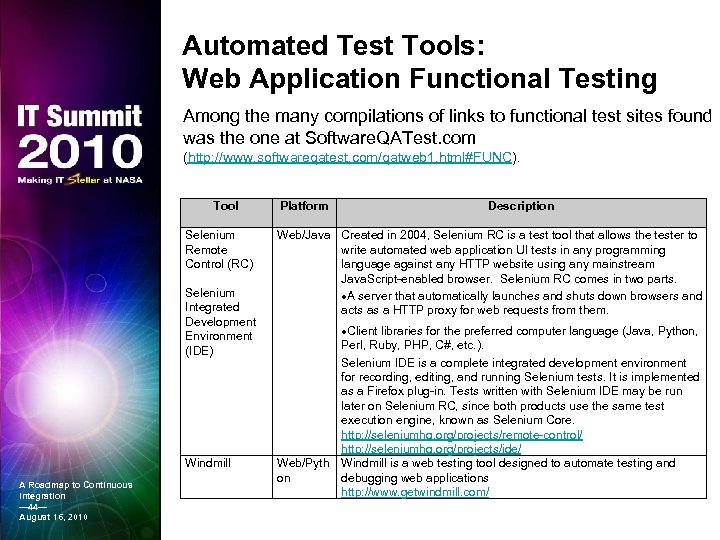
Automated Test Tools: Web Application Functional Testing Among the many compilations of links to functional test sites found was the one at Software. QATest. com (http: //www. softwareqatest. com/qatweb 1. html#FUNC). Tool Selenium Remote Control (RC) Selenium Integrated Development Environment (IDE) Windmill A Roadmap to Continuous Integration — 44— August 16, 2010 Platform Description Web/Java Created in 2004, Selenium RC is a test tool that allows the tester to write automated web application UI tests in any programming language against any HTTP website using any mainstream Java. Script-enabled browser. Selenium RC comes in two parts. A server that automatically launches and shuts down browsers and acts as a HTTP proxy for web requests from them. Client libraries for the preferred computer language (Java, Python, Perl, Ruby, PHP, C#, etc. ). Selenium IDE is a complete integrated development environment for recording, editing, and running Selenium tests. It is implemented as a Firefox plug-in. Tests written with Selenium IDE may be run later on Selenium RC, since both products use the same test execution engine, known as Selenium Core. http: //seleniumhq. org/projects/remote-control/ http: //seleniumhq. org/projects/ide/ Web/Pyth Windmill is a web testing tool designed to automate testing and on debugging web applications http: //www. getwindmill. com/
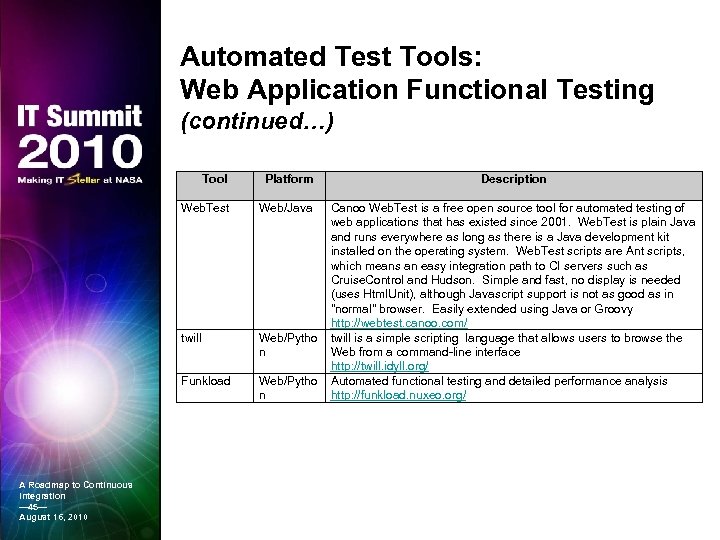
Automated Test Tools: Web Application Functional Testing (continued…) Tool Web. Test Web/Java twill Web/Pytho n Funkload A Roadmap to Continuous Integration — 45— August 16, 2010 Platform Web/Pytho n Description Canoo Web. Test is a free open source tool for automated testing of web applications that has existed since 2001. Web. Test is plain Java and runs everywhere as long as there is a Java development kit installed on the operating system. Web. Test scripts are Ant scripts, which means an easy integration path to CI servers such as Cruise. Control and Hudson. Simple and fast, no display is needed (uses Html. Unit), although Javascript support is not as good as in "normal" browser. Easily extended using Java or Groovy http: //webtest. canoo. com/ twill is a simple scripting language that allows users to browse the Web from a command-line interface http: //twill. idyll. org/ Automated functional testing and detailed performance analysis http: //funkload. nuxeo. org/
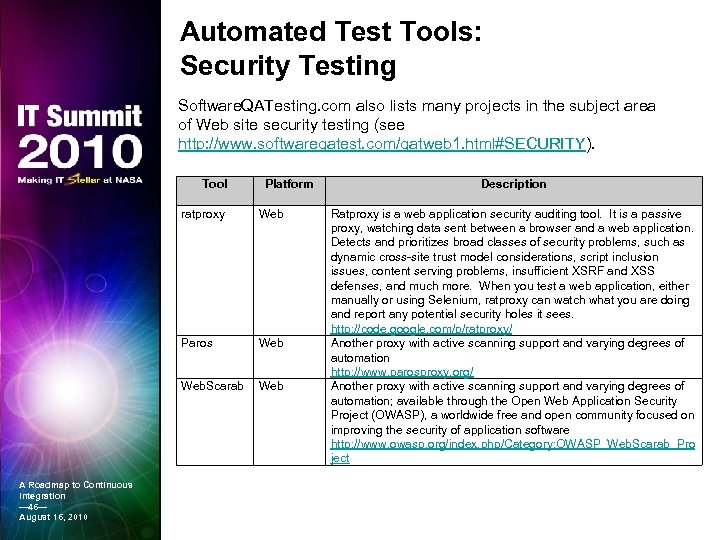
Automated Test Tools: Security Testing Software. QATesting. com also lists many projects in the subject area of Web site security testing (see http: //www. softwareqatest. com/qatweb 1. html#SECURITY). Tool Platform ratproxy Paros Web. Scarab A Roadmap to Continuous Integration — 46— August 16, 2010 Web Description Ratproxy is a web application security auditing tool. It is a passive proxy, watching data sent between a browser and a web application. Detects and prioritizes broad classes of security problems, such as dynamic cross-site trust model considerations, script inclusion issues, content serving problems, insufficient XSRF and XSS defenses, and much more. When you test a web application, either manually or using Selenium, ratproxy can watch what you are doing and report any potential security holes it sees. http: //code. google. com/p/ratproxy/ Another proxy with active scanning support and varying degrees of automation http: //www. parosproxy. org/ Another proxy with active scanning support and varying degrees of automation; available through the Open Web Application Security Project (OWASP), a worldwide free and open community focused on improving the security of application software http: //www. owasp. org/index. php/Category: OWASP_Web. Scarab_Pro ject
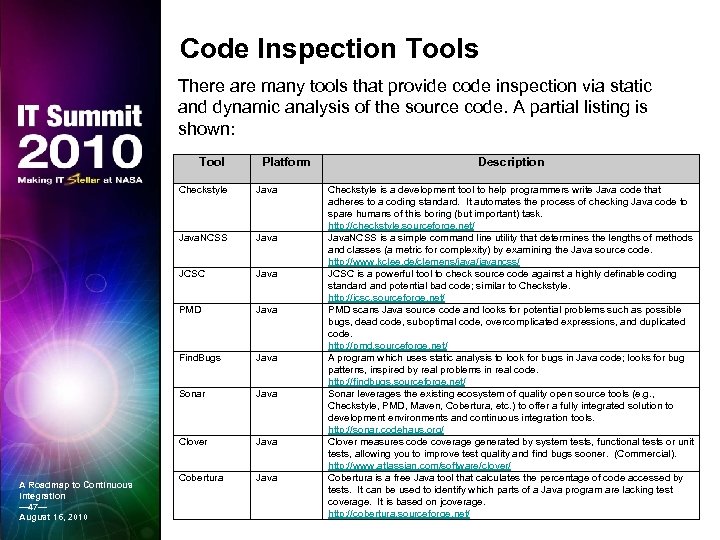
Code Inspection Tools There are many tools that provide code inspection via static and dynamic analysis of the source code. A partial listing is shown: Tool Platform Checkstyle Java. NCSS Java JCSC Java PMD Java Find. Bugs Java Sonar Java Clover A Roadmap to Continuous Integration — 47— August 16, 2010 Java Cobertura Java Description Checkstyle is a development tool to help programmers write Java code that adheres to a coding standard. It automates the process of checking Java code to spare humans of this boring (but important) task. http: //checkstyle. sourceforge. net/ Java. NCSS is a simple command line utility that determines the lengths of methods and classes (a metric for complexity) by examining the Java source code. http: //www. kclee. de/clemens/javancss/ JCSC is a powerful tool to check source code against a highly definable coding standard and potential bad code; similar to Checkstyle. http: //jcsc. sourceforge. net/ PMD scans Java source code and looks for potential problems such as possible bugs, dead code, suboptimal code, overcomplicated expressions, and duplicated code. http: //pmd. sourceforge. net/ A program which uses static analysis to look for bugs in Java code; looks for bug patterns, inspired by real problems in real code. http: //findbugs. sourceforge. net/ Sonar leverages the existing ecosystem of quality open source tools (e. g. , Checkstyle, PMD, Maven, Cobertura, etc. ) to offer a fully integrated solution to development environments and continuous integration tools. http: //sonar. codehaus. org/ Clover measures code coverage generated by system tests, functional tests or unit tests, allowing you to improve test quality and find bugs sooner. (Commercial). http: //www. atlassian. com/software/clover/ Cobertura is a free Java tool that calculates the percentage of code accessed by tests. It can be used to identify which parts of a Java program are lacking test coverage. It is based on jcoverage. http: //cobertura. sourceforge. net/
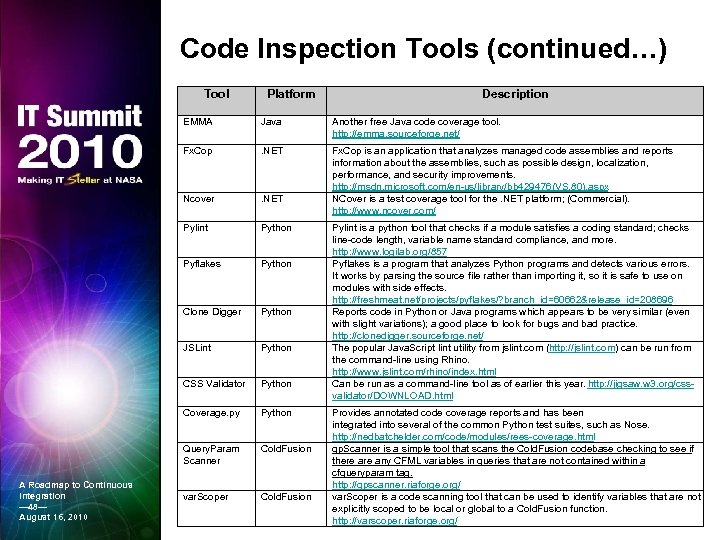
Code Inspection Tools (continued…) Tool Platform Description EMMA Another free Java code coverage tool. http: //emma. sourceforge. net/ Fx. Cop . NET Ncover . NET Fx. Cop is an application that analyzes managed code assemblies and reports information about the assemblies, such as possible design, localization, performance, and security improvements. http: //msdn. microsoft. com/en-us/library/bb 429476(VS. 80). aspx NCover is a test coverage tool for the. NET platform; (Commercial). http: //www. ncover. com/ Pylint Python Pyflakes Python Clone Digger Python JSLint Python CSS Validator Python Coverage. py Python Query. Param Scanner A Roadmap to Continuous Integration — 48— August 16, 2010 Java Cold. Fusion var. Scoper Cold. Fusion Pylint is a python tool that checks if a module satisfies a coding standard; checks line-code length, variable name standard compliance, and more. http: //www. logilab. org/857 Pyflakes is a program that analyzes Python programs and detects various errors. It works by parsing the source file rather than importing it, so it is safe to use on modules with side effects. http: //freshmeat. net/projects/pyflakes/? branch_id=60662&release_id=208696 Reports code in Python or Java programs which appears to be very similar (even with slight variations); a good place to look for bugs and bad practice. http: //clonedigger. sourceforge. net/ The popular Java. Script lint utility from jslint. com (http: //jslint. com) can be run from the command-line using Rhino. http: //www. jslint. com/rhino/index. html Can be run as a command-line tool as of earlier this year. http: //jigsaw. w 3. org/cssvalidator/DOWNLOAD. html Provides annotated code coverage reports and has been integrated into several of the common Python test suites, such as Nose. http: //nedbatchelder. com/code/modules/rees-coverage. html qp. Scanner is a simple tool that scans the Cold. Fusion codebase checking to see if there any CFML variables in queries that are not contained within a cfqueryparam tag. http: //qpscanner. riaforge. org/ var. Scoper is a code scanning tool that can be used to identify variables that are not explicitly scoped to be local or global to a Cold. Fusion function. http: //varscoper. riaforge. org/
Overview § Introduction § What is Continuous Integration (CI)? § Best Practices in CI § The Tools of CI § CI in Practice: First Steps A Roadmap to Continuous Integration — 49— August 16, 2010
Current Practices Continuous Integration represents a way of thinking about your development process rather than a concrete or specific technique. – Cauldwell (2008) At this time, a few development groups have processes in place that might be considered “pre-CI”: A Roadmap to Continuous Integration — 50— August 16, 2010 § Software assets are centralized in a source code repository, and a consistent file structure is used. § Deployment branches are created prior to a release to isolate releasable code from the main line of ongoing development. § Code in Subversion is tagged as part of the release process although builds are not labeled. § Defects are tracked via Trac tickets.
Current Practices (continued…) § Ant is used to drive the build process, although it is run manually. § Ivy is used for dependency management. § A scripted build out of an application to a clean environment is run to deploy software, although for most teams this is manually driven. § Unit testing is done on many parts of an application although coverage across the whole application is incomplete, and the tests are not always run when other code changes. A Roadmap to Continuous Integration — 51— August 16, 2010
Current Practices (continued…) A Roadmap to Continuous Integration — 52— August 16, 2010 § Database scripts are under version control although these are usually run manually, as needed, to update local copies and are released to DBAs for execution as part of deployments. § Private builds are run before committing code so as not to break the build. § Coding standards are discussed and implemented, although code is not inspected automatically, nor is compliance with adopted standards enforced. § Peer reviews are held to improve requirements tracking and design.
Current Practices: Gaps § The above items may show many teams are ready for entry-level CI, but there are still huge gaps that we are working to address: » Practices across all teams are not consistent; some teams are ahead of the CI curve, others are behind. » Practices within teams are not consistent, even for those who are ahead of the curve. » There is little or no true automation of any processes. » Unit and integration testing is sporadic and coverage is incomplete. » Thorough functional testing is usually delayed until the code is handed to the testers. » Not all teams use the Subversion repository correctly and consistently. A Roadmap to Continuous Integration — 53— August 16, 2010 » Build and release management practices leave too much opportunity for error and have little traceability.
Development Environments Four major development environments are used by the development teams: Cold. Fusion, . Net, Python, and Java. § This diversity presents challenges to a one-size-fitsall approach. § CI is neutral about programming language and platform, but tool availability is another matter. » Many of the Java-based tools such as Ant and Hudson can be used by any language. » Specific “x-unit” unit testing frameworks are also available for Cold. Fusion, Python, and. Net. A Roadmap to Continuous Integration — 54— August 16, 2010 § Thus, the guidelines and practices recommended for CI adoption can be applied to all existing development environments, although some variation in the specific tools used is expected.
Recommendations: Policy, Planning, and Management A Roadmap to Continuous Integration — 55— August 16, 2010 • Establish a viable governance framework. CI is not only a technical implementation, it is also an organizational and cultural implementation. • Establish a “CI Implementation” working group. Management should set up a software development technical leadership working group to lead CI adoption and other software quality and process improvement initiatives through training and technical support. • Insist on proper use of version control systems. An improperly used source control system can easily derail efforts to implement CI. • Enforce proper release management. The CI Implementation working group should take steps to clearly define, document, and enforce policies and guidelines for proper software release practices.
Recommendations: Technology Implementation § Adopt CI practices incrementally. Each team should honestly assess where on the maturity scale it is at a given point in time and put in place the changes needed to move to the next level. § Implement CI early in new projects. Teams should focus their CI implementation efforts on new projects: maintenance releases, defect fixes, and new development and implement their CI practices early. § Acquire and install fast machines for the CI build and test servers. High-performance servers will result in faster builds, removing one of the most important roadblocks to CI adoption. A Roadmap to Continuous Integration — 56— August 16, 2010
Recommendations: Technology Implementation (continued…) § Start with the most knowledgeable teams. Initial attempts to adopt CI practices should start with the teams that already have some of the key practices in place. § Write scripts to automate manual processes. Teams should decide which manual processes are causing the most problems and automate these first. The benefits of doing this will motivate them to tackle the next problem area, and so on. § Get serious about automated testing. Detecting defects early depends on having all the necessary testing resources in place. No implementation of CI should be attempted without a commitment by all stakeholders to upgrade the department’s testing practices and infrastructure. A Roadmap to Continuous Integration — 57— August 16, 2010
Recommendations: Technology Implementation (continued…) § Adopt the most relevant best practices in CI. Development teams should attempt to apply the practices appropriate for the maturity level they are working toward in their individual CI adoption programs. § Train and mentor developers and testers. CI adoption additional demands on the workforce, so the need for additional training, and continuous mentoring and support, is critical. § Consider using external consultants and trainers. There are outside consulting firms that specialize in providing services to “jump start” an organization’s CI rollout, and it might be both beneficial and cost effective to consider engaging one of these firms. A Roadmap to Continuous Integration — 58— August 16, 2010
Demo § This space is reserved for demonstration of some of the CI tools and practices implemented by the NASA HQ application development teams. A Roadmap to Continuous Integration — 59— August 16, 2010
Acknowledgements The following individuals collaborated on various aspects of the work described in this presentation. The authors wish to thank them for their contributions. §David J. Godbey, Indyne, Inc. §Chris Shenton, Koansys, LLC §Troy Riemer, Indyne, Inc. §Tiffany Thomas, Bastion Technologies §Reed O’Brien, Koansys, LLC A Roadmap to Continuous Integration — 60— August 16, 2010
References Books: • Cauldwell, P. , Code Leader: Using People, Tools, and Processes to Build Successful Software, Wrox, 2008. • Duvall, P. , Matyas, S. , and Glover, A. , Continuous Integration: Improving Software Quality and Reducing Risk, Addison. Wesley, 2007. • Hatcher, E. , and Loughran, S. , Java Development with Ant, Manning, 2002. A Roadmap to Continuous Integration — 61— August 16, 2010 • Smart, J. F. , Java Power Tools, O’Reilly, 2008.
References (continued…) Online Resources: A Roadmap to Continuous Integration — 62— August 16, 2010 • Beton, R. , Software for Continuous Integration - Cruise Control & Hudson Compared, 2009. http: //www. bigbeeconsultants. co. uk/cruise-control-vshudson • Duvall, P. , Automation for the people: Continuous feedback, 2006. • Duvall, P. , Automation for the people: Continuous Integration anti-patterns, 2007. http: //www. ibm. com/developerworks/java/library/jap 11297/ • Graham, M. , Software Defect Prevention Using Orthogonal Defect Classification, 2005. • Fleischer, G. , Continuous Integration: What Companies Expect and Solutions Provide, 2009. http: //appl. fontysvenlo. org/results/2008/GF/continuous_int egration. pdf • Fowler, M. , Continuous Integration, 2006. http: //martinfowler. com/articles/continuous. Integratio n. html
References (continued…) Online Resources (continued): A Roadmap to Continuous Integration — 63— August 16, 2010 • Minick, E. and Fredrick, J. , Enterprise Continuous Integration Maturity Model, 2009. http: //www. anthillpro. com/html/resources/whitepapers/view. html? id=1195436 • Muhonen, M. , Software Process Improvement: Continuous Integration and Testing for Web Application Development, 2009. http: //tutkielmat. uta. fi/haekokoversio. php? id=19979 • Zawadzki, M. , Drawing the Line: Continuous Integration and Build Management, 2007. http: //www. anthillpro. com/html/resources/whitepapers/view. html? id=1114131 • Zawadzki, M. , Continuous Integration and Build Management Server Evaluation Guide, 2008. http: //www. anthillpro. com/html/resources/whitepapers/view. html? id=1132617
Скачать презентацию A Roadmap to Continuous Integration Bruce Altner Brett
5df9f5d85ec7515a18d9712c7404e415.ppt