


 Скачать презентацию A Qualitative Review of Two Cortical Surface Modeling
622ad976bf4d94432469257ce27cb301.ppt
- Количество слайдов: 1
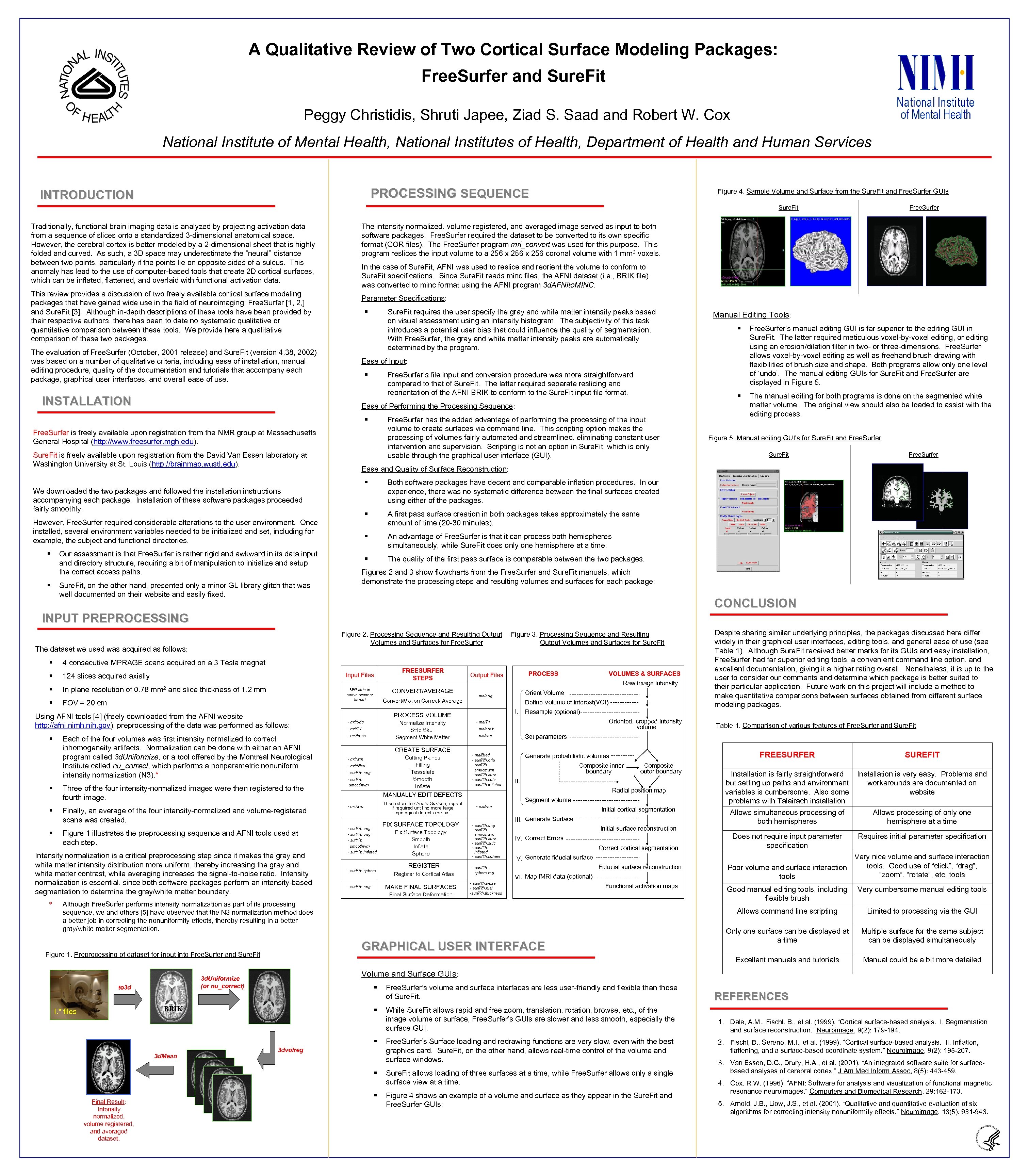 A Qualitative Review of Two Cortical Surface Modeling Packages: Free. Surfer and Sure. Fit Peggy Christidis, Shruti Japee, Ziad S. Saad and Robert W. Cox National Institute of Mental Health, National Institutes of Health, Department of Health and Human Services PROCESSING SEQUENCE INTRODUCTION Figure 4. Sample Volume and Surface from the Sure. Fit and Free. Surfer GUIs Sure. Fit Traditionally, functional brain imaging data is analyzed by projecting activation data from a sequence of slices onto a standardized 3 -dimensional anatomical space. However, the cerebral cortex is better modeled by a 2 -dimensional sheet that is highly folded and curved. As such, a 3 D space may underestimate the “neural” distance between two points, particularly if the points lie on opposite sides of a sulcus. This anomaly has lead to the use of computer-based tools that create 2 D cortical surfaces, which can be inflated, flattened, and overlaid with functional activation data. This review provides a discussion of two freely available cortical surface modeling packages that have gained wide use in the field of neuroimaging: Free. Surfer [1, 2, ] and Sure. Fit [3]. Although in-depth descriptions of these tools have been provided by their respective authors, there has been to date no systematic qualitative or quantitative comparison between these tools. We provide here a qualitative comparison of these two packages. The evaluation of Free. Surfer (October, 2001 release) and Sure. Fit (version 4. 38, 2002) was based on a number of qualitative criteria, including ease of installation, manual editing procedure, quality of the documentation and tutorials that accompany each package, graphical user interfaces, and overall ease of use. INSTALLATION The intensity normalized, volume registered, and averaged image served as input to both software packages. Free. Surfer required the dataset to be converted to its own specific format (COR files). The Free. Surfer program mri_convert was used for this purpose. This program reslices the input volume to a 256 x 256 coronal volume with 1 mm 3 voxels. In the case of Sure. Fit, AFNI was used to reslice and reorient the volume to conform to Sure. Fit specifications. Since Sure. Fit reads minc files, the AFNI dataset (i. e. , BRIK file) was converted to minc format using the AFNI program 3 d. AFNIto. MINC. Parameter Specifications: § Sure. Fit requires the user specify the gray and white matter intensity peaks based on visual assessment using an intensity histogram. The subjectivity of this task introduces a potential user bias that could influence the quality of segmentation. With Free. Surfer, the gray and white matter intensity peaks are automatically determined by the program. § Free. Surfer has the added advantage of performing the processing of the input volume to create surfaces via command line. This scripting option makes the processing of volumes fairly automated and streamlined, eliminating constant user intervention and supervision. Scripting is not an option in Sure. Fit, which is only usable through the graphical user interface (GUI). Free. Surfer is freely available upon registration from the NMR group at Massachusetts General Hospital (http: //www. freesurfer. mgh. edu). Figure 5. Manual editing GUI’s for Sure. Fit and Free. Surfer Sure. Fit Free. Surfer A first pass surface creation in both packages takes approximately the same amount of time (20 -30 minutes). § An advantage of Free. Surfer is that it can process both hemispheres simultaneously, while Sure. Fit does only one hemisphere at a time. § However, Free. Surfer required considerable alterations to the user environment. Once installed, several environment variables needed to be initialized and set, including for example, the subject and functional directories. Sure. Fit, on the other hand, presented only a minor GL library glitch that was well documented on their website and easily fixed. The manual editing for both programs is done on the segmented white matter volume. The original view should also be loaded to assist with the editing process. Both software packages have decent and comparable inflation procedures. In our experience, there was no systematic difference between the final surfaces created using either of the packages. § We downloaded the two packages and followed the installation instructions accompanying each package. Installation of these software packages proceeded fairly smoothly. § Free. Surfer’s manual editing GUI is far superior to the editing GUI in Sure. Fit. The latter required meticulous voxel-by-voxel editing, or editing using an erosion/dilation filter in two- or three-dimensions. Free. Surfer allows voxel-by-voxel editing as well as freehand brush drawing with flexibilities of brush size and shape. Both programs allow only one level of ‘undo’. The manual editing GUIs for Sure. Fit and Free. Surfer are displayed in Figure 5. Ease and Quality of Surface Reconstruction: § Our assessment is that Free. Surfer is rather rigid and awkward in its data input and directory structure, requiring a bit of manipulation to initialize and setup the correct access paths. § § Free. Surfer’s file input and conversion procedure was more straightforward compared to that of Sure. Fit. The latter required separate reslicing and reorientation of the AFNI BRIK to conform to the Sure. Fit input file format. § § Manual Editing Tools: Ease of Input: Ease of Performing the Processing Sequence: Sure. Fit is freely available upon registration from the David Van Essen laboratory at Washington University at St. Louis (http: //brainmap. wustl. edu). Free. Surfer The quality of the first pass surface is comparable between the two packages. Figures 2 and 3 show flowcharts from the Free. Surfer and Sure. Fit manuals, which demonstrate the processing steps and resulting volumes and surfaces for each package: CONCLUSION INPUT PREPROCESSING Figure 2. Processing Sequence and Resulting Output Volumes and Surfaces for Free. Surfer The dataset we used was acquired as follows: § § 4 consecutive MPRAGE scans acquired on a 3 Tesla magnet Input Files 124 slices acquired axially § In plane resolution of 0. 78 § FOV = 20 cm mm 2 and slice thickness of 1. 2 mm MRI data in native scanner format Using AFNI tools [4] (freely downloaded from the AFNI website http: //afni. nimh. nih. gov), preprocessing of the data was performed as follows: § § Each of the four volumes was first intensity normalized to correct inhomogeneity artifacts. Normalization can be done with either an AFNI program called 3 d. Uniformize, or a tool offered by the Montreal Neurological Institute called nu_correct, which performs a nonparametric nonuniform intensity normalization (N 3). * Three of the four intensity-normalized images were then registered to the fourth image. Finally, an average of the four intensity-normalized and volume-registered scans was created. Figure 1 illustrates the preprocessing sequence and AFNI tools used at each step. Intensity normalization is a critical preprocessing step since it makes the gray and white matter intensity distribution more uniform, thereby increasing the gray and white matter contrast, while averaging increases the signal-to-noise ratio. Intensity normalization is essential, since both software packages perform an intensity-based segmentation to determine the gray/white matter boundary. * Figure 3. Processing Sequence and Resulting Output Volumes and Surfaces for Sure. Fit FREESURFER STEPS CONVERT/AVERAGE Convert/Motion Correct/ Average Normalize Intensity Strip Skull Segment White Matter - mri/T 1 - mri/brain CREATE SURFACE Cutting Planes Filling Tesselate Smooth Inflate - mri/wm - mri/filled - surf/? h. orig - surf/? h. smoothwm - mri/wm - surf/? h. orig - surf/? h. smoothwm - surf/? h. inflated - surf/? h. sphere FIX SURFACE TOPOLOGY Fix Surface Topology Smooth Inflate Sphere REGISTER Register to Cortical Atlas MAKE FINAL SURFACES - surf/? h. orig Orient Volume - mri/orig Define Volume of interest(VOI) I. Resample (optional) Oriented, cropped intensity volume - mri/T 1 - mri/brain - mri/filled - surf/? h. orig - surf/? h. smoothwm - surf/? h. curv - surf/? h. sulc - surf/? h. inflated FREESURFER Generate probabilistic volumes Composite inner boundary Composite outer boundary II. Radial position map Segment volume - mri/wm Initial cortical segmentation III. Generate Surface - surf/? h. orig - surf/? h. smoothwm - surf/? h. curv - surf/? h. sulc - surf/? h. inflated - surf/? h. sphere. reg Initial surface reconstruction IV. Correct Errors Correct cortical segmentation V. Generate fiducial surface Fiducial surface reconstruction VI. Map f. MRI data (optional) - surf/? h. white - surf/? h. pial -surf/? h. thickness Functional activation maps § Free. Surfer’s volume and surface interfaces are less user-friendly and flexible than those of Sure. Fit. § BRIK While Sure. Fit allows rapid and free zoom, translation, rotation, browse, etc. , of the image volume or surface, Free. Surfer’s GUIs are slower and less smooth, especially the surface GUI. § 3 dvolreg § Final Result: Intensity normalized, volume registered, and averaged dataset. Installation is very easy. Problems and workarounds are documented on website Allows simultaneous processing of both hemispheres Allows processing of only one hemisphere at a time Does not require input parameter specification Requires initial parameter specification Very nice volume and surface interaction tools. Good use of “click”, “drag”, Poor volume and surface interaction “zoom”, “rotate”, etc. tools Good manual editing tools, including flexible brush Very cumbersome manual editing tools Limited to processing via the GUI Only one surface can be displayed at a time Multiple surface for the same subject can be displayed simultaneously Manual could be a bit more detailed Volume and Surface GUIs: 3 d. Uniformize (or nu_correct) 3 d. Mean Installation is fairly straightforward but setting up paths and environment variables is cumbersome. Also some problems with Talairach installation Excellent manuals and tutorials GRAPHICAL USER INTERFACE Figure 1. Preprocessing of dataset for input into Free. Surfer and Sure. Fit I. * files SUREFIT Allows command line scripting Final Surface Deformation Although Free. Surfer performs intensity normalization as part of its processing sequence, we and others [5] have observed that the N 3 normalization method does a better job in correcting the nonuniformity effects, thereby resulting in a better gray/white matter segmentation. to 3 d Table 1. Comparison of various features of Free. Surfer and Sure. Fit Set parameters - mri/wm MANUALLY EDIT DEFECTS Then return to Create Surface; repeat if required until no more large topological defects remain. VOLUMES & SURFACES Raw image intensity PROCESS VOLUME - mri/orig PROCESS Output Files Despite sharing similar underlying principles, the packages discussed here differ widely in their graphical user interfaces, editing tools, and general ease of use (see Table 1). Although Sure. Fit received better marks for its GUIs and easy installation, Free. Surfer had far superior editing tools, a convenient command line option, and excellent documentation, giving it a higher rating overall. Nonetheless, it is up to the user to consider our comments and determine which package is better suited to their particular application. Future work on this project will include a method to make quantitative comparisons between surfaces obtained from different surface modeling packages. § Free. Surfer’s Surface loading and redrawing functions are very slow, even with the best graphics card. Sure. Fit, on the other hand, allows real-time control of the volume and surface windows. Sure. Fit allows loading of three surfaces at a time, while Free. Surfer allows only a single surface view at a time. Figure 4 shows an example of a volume and surface as they appear in the Sure. Fit and Free. Surfer GUIs: REFERENCES 1. Dale, A. M. , Fischl, B. , et al. (1999). “Cortical surface-based analysis. I. Segmentation and surface reconstruction. ” Neuroimage, 9(2): 179 -194. 2. Fischl, B. , Sereno, M. I. , et al. (1999). “Cortical surface-based analysis. II. Inflation, flattening, and a surface-based coordinate system. ” Neuroimage, 9(2): 195 -207. 3. Van Essen, D. C. , Drury, H. A. , et al. (2001). “An integrated software suite for surfacebased analyses of cerebral cortex. ” J Am Med Inform Assoc, 8(5): 443 -459. 4. Cox. R. W. (1996). “AFNI: Software for analysis and visualization of functional magnetic resonance neuroimages. ” Computers and Biomedical Research, 29: 162 -173. 5. Arnold, J. B. , Liow, J. S. , et al. (2001). “Qualitative and quantitative evaluation of six algorithms for correcting intensity nonuniformity effects. ” Neuroimage, 13(5): 931 -943.