


 Скачать презентацию A Primer on Wireless Data Transport Systems Wireless
a7c66541332a829eb8166642ecb0a64a.ppt
- Количество слайдов: 70
 A Primer on Wireless Data Transport Systems: Wireless Trends, Tools and Tips Intelligent Transportation Systems Department Southwest Research Institute® www. swri. org, www. swri. edu Copyright Notice: © 2007 by Southwest Research Institute 1
 This training is for… Any ITS or traffic professional that desires to learn more about the basics of wireless solutions, and the components of effective and efficient wireless design Copyright Notice: © 2007 by Southwest Research Institute 2
 Class Format and Method Presentation l Discussion – Q &A at the end l Use of product literature l Copyright Notice: © 2007 by Southwest Research Institute 3
 Today’s Agenda l Session I – The foundation for later engineering and application sessions – Wireless Trends – Architecture – Choosing an Architecture – Unlicensed or No Fee Radio Frequencies – Standards Copyright Notice: © 2007 by Southwest Research Institute 4
 Future Topics for Wireless T 3 (Proposed) l Session II – Coding Methods – Radio Link Engineering l Session III – The Loss Budget l Session IV – Managing Interference – Antennas l Session V – Application Engineering, Rules of Thumb Copyright Notice: © 2007 by Southwest Research Institute 5
 We would like you to walk away with… Three things: 1) An expanded understanding of the trends at work in the ITS and traffic wireless arena 2) Some new techniques in your toolbox to address wireless implementation and service issues 3) An increased comfort level with wireless technology Copyright Notice: © 2007 by Southwest Research Institute 6
 Session I Copyright Notice: © 2007 by Southwest Research Institute 7
 Wireless Trends Copyright Notice: © 2007 by Southwest Research Institute 8
 Wireless Trends l The Mobility Market – It is big and getting bigger – Focus on three measures… • The number of online users • The battle for the small screen – Your mobile phone, PDA or vehicle LCD monitor • Our growing impatience with low speed channels Copyright Notice: © 2007 by Southwest Research Institute 9
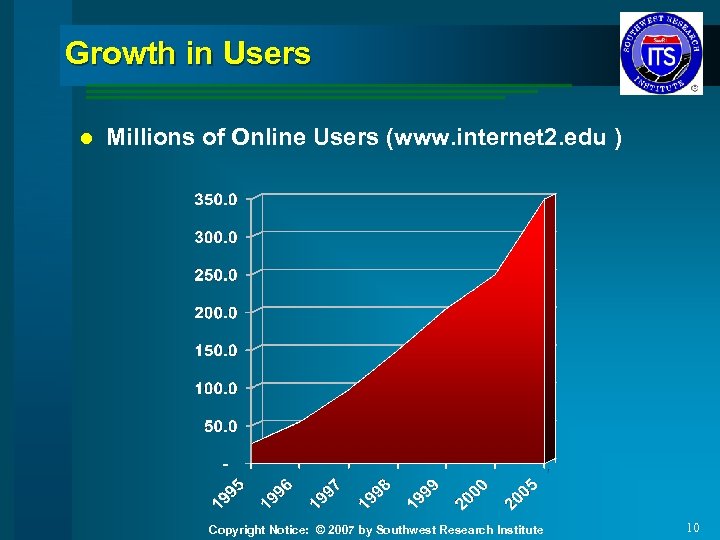 Growth in Users l Millions of Online Users (www. internet 2. edu ) Copyright Notice: © 2007 by Southwest Research Institute 10
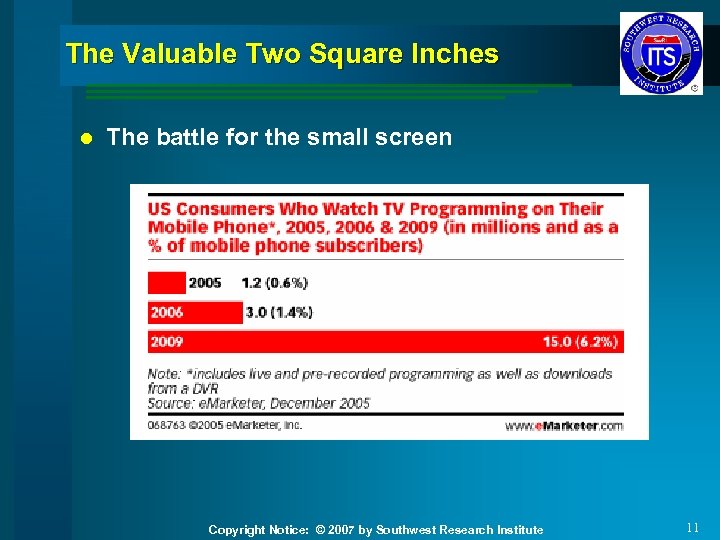 The Valuable Two Square Inches l The battle for the small screen Copyright Notice: © 2007 by Southwest Research Institute 11
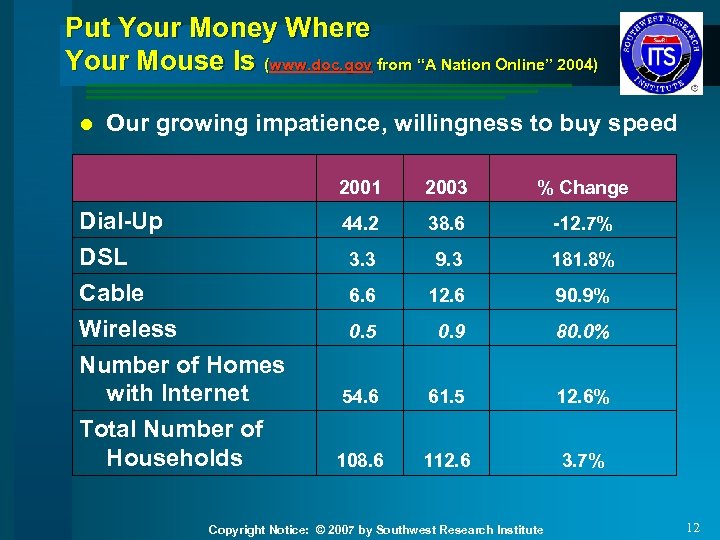 Put Your Money Where Your Mouse Is (www. doc. gov from “A Nation Online” 2004) l Our growing impatience, willingness to buy speed 2001 38. 6 -12. 7% 3. 3 Cable Wireless Number of Homes with Internet Total Number of Households % Change 44. 2 Dial-Up DSL 2003 9. 3 181. 8% 6. 6 12. 6 90. 9% 0. 5 0. 9 80. 0% 54. 6 61. 5 12. 6% 108. 6 112. 6 3. 7% Copyright Notice: © 2007 by Southwest Research Institute 12
 Putting it all Together l Why wireless is important If… – Technology exists and is searching for markets; – People are data hungry and will become hungrier; – As a society we will neither sit still nor slow down; – Then… Copyright Notice: © 2007 by Southwest Research Institute 13
 Wireless Trends Then… l The wave of new products will continue l Specialized applications like traffic and ITS will reap the benefits as we selectively apply wireless technology l Especially adept systems integrators of software driven COTS products Copyright Notice: © 2007 by Southwest Research Institute 14
 Wireless Architectures Copyright Notice: © 2007 by Southwest Research Institute 15
 Wireless Architectures and Use Cases l Point-to-Point l Point-to-Multipoint l Multipoint-to-Multipoint, Mesh, Adhoc l Cellular Copyright Notice: © 2007 by Southwest Research Institute 16
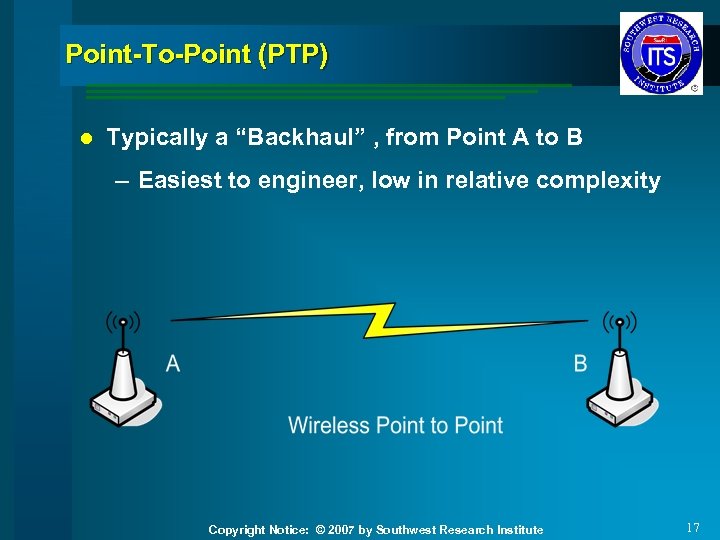 Point-To-Point (PTP) l Typically a “Backhaul” , from Point A to B – Easiest to engineer, low in relative complexity Copyright Notice: © 2007 by Southwest Research Institute 17
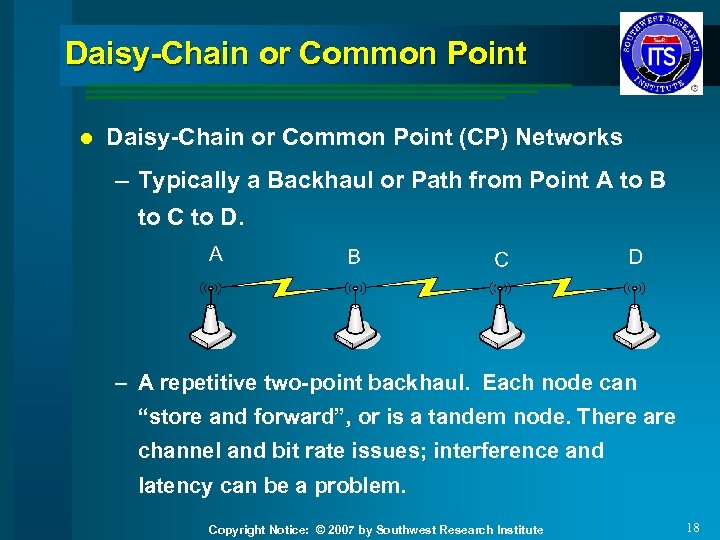 Daisy-Chain or Common Point l Daisy-Chain or Common Point (CP) Networks – Typically a Backhaul or Path from Point A to B to C to D. – A repetitive two-point backhaul. Each node can “store and forward”, or is a tandem node. There are channel and bit rate issues; interference and latency can be a problem. Copyright Notice: © 2007 by Southwest Research Institute 18
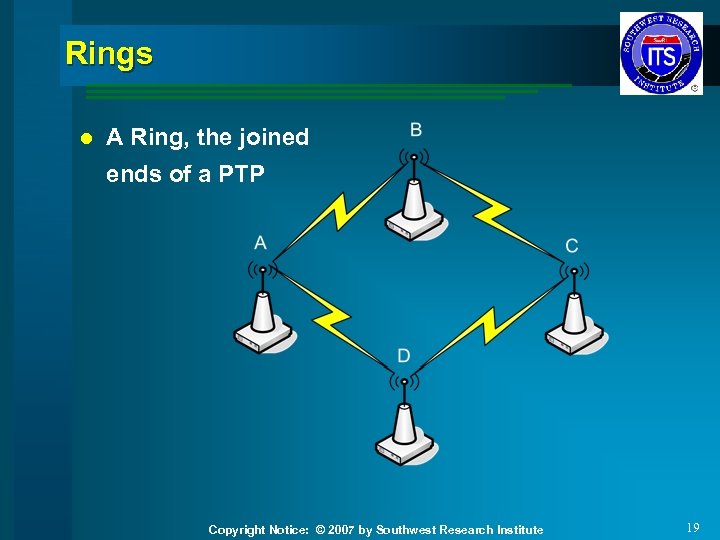 Rings l A Ring, the joined ends of a PTP Copyright Notice: © 2007 by Southwest Research Institute 19
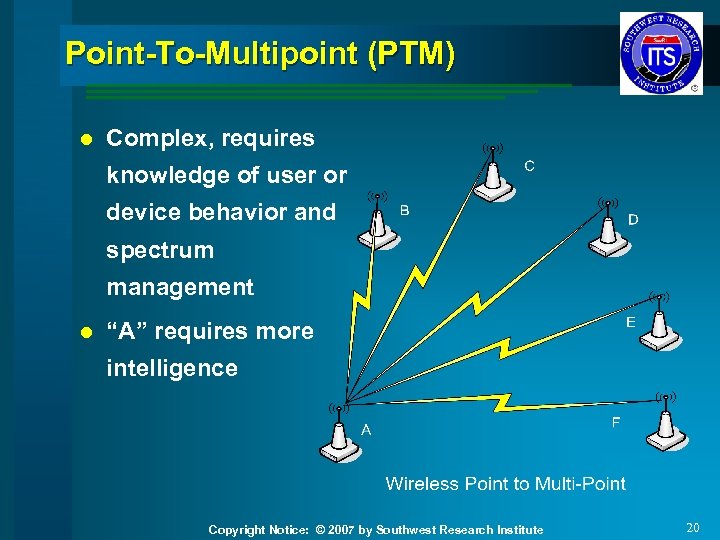 Point-To-Multipoint (PTM) l Complex, requires knowledge of user or device behavior and spectrum management l “A” requires more intelligence Copyright Notice: © 2007 by Southwest Research Institute 20
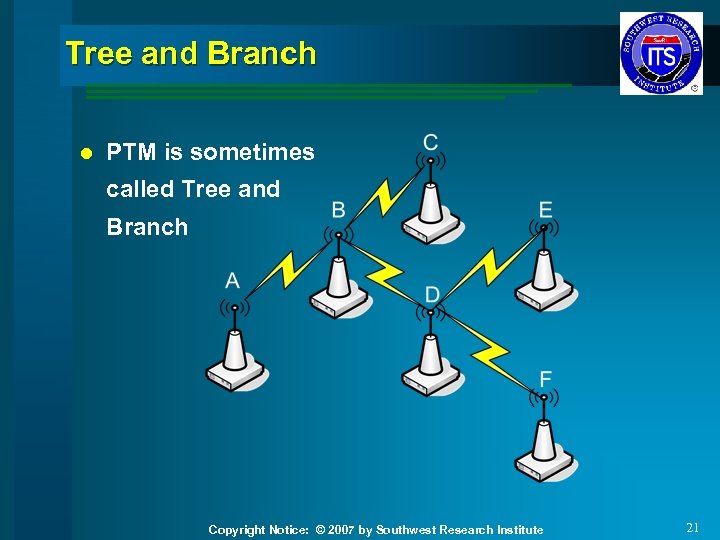 Tree and Branch l PTM is sometimes called Tree and Branch Copyright Notice: © 2007 by Southwest Research Institute 21
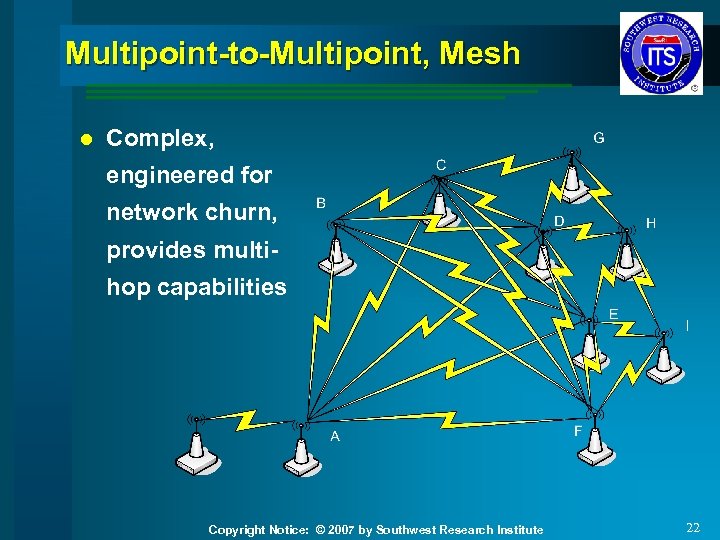 Multipoint-to-Multipoint, Mesh l Complex, engineered for network churn, provides multihop capabilities Copyright Notice: © 2007 by Southwest Research Institute 22
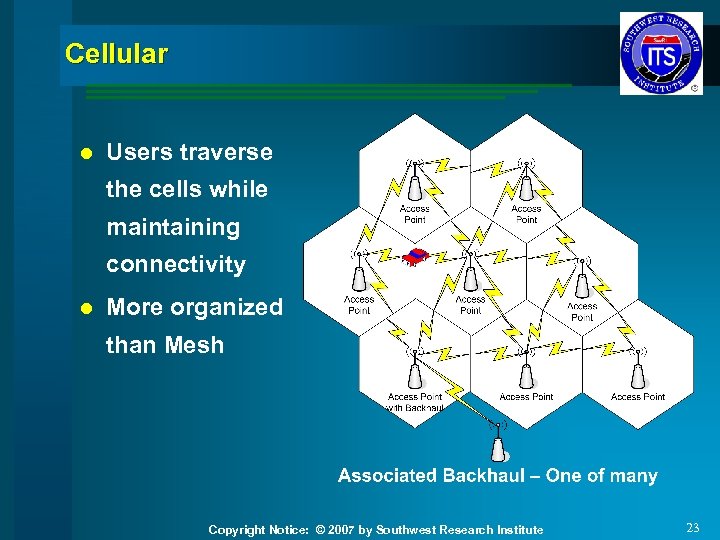 Cellular l Users traverse the cells while maintaining connectivity l More organized than Mesh Copyright Notice: © 2007 by Southwest Research Institute 23
 Adhoc l Temporary wireless connections – Typically operate over limited distances – A piconet or personal area network when associated with Bluetooth™ or similar devices – Network clients come and go in an unscheduled manner Copyright Notice: © 2007 by Southwest Research Institute 24
 Choosing an Architecture Copyright Notice: © 2007 by Southwest Research Institute 25
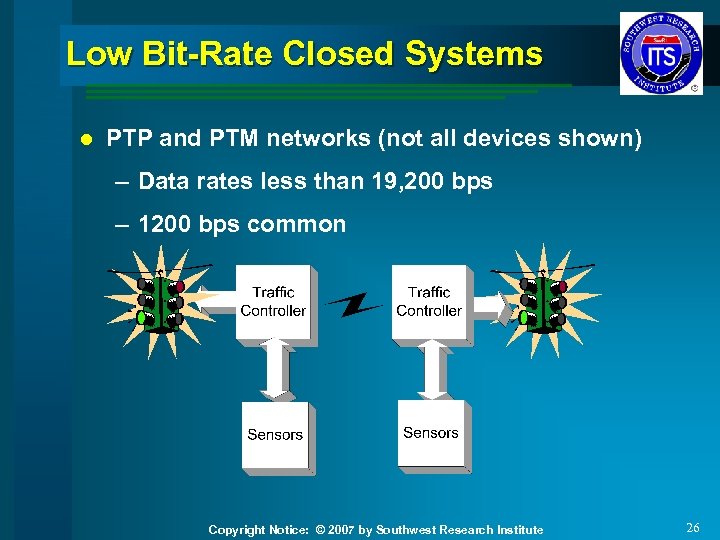 Low Bit-Rate Closed Systems l PTP and PTM networks (not all devices shown) – Data rates less than 19, 200 bps – 1200 bps common Copyright Notice: © 2007 by Southwest Research Institute 26
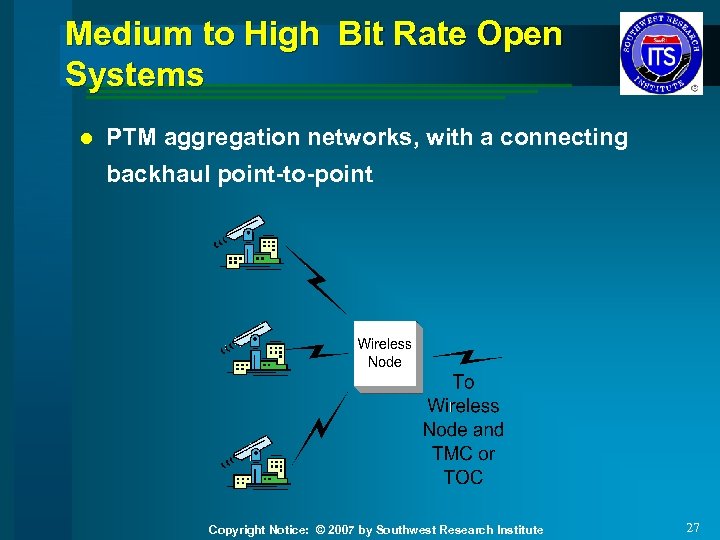 Medium to High Bit Rate Open Systems l PTM aggregation networks, with a connecting backhaul point-to-point Copyright Notice: © 2007 by Southwest Research Institute 27
 Practical Uses of Wireless l No longer the technology of last resort – Applications and costs can be attractive l Applications include low to high bit rate and open and closed systems Copyright Notice: © 2007 by Southwest Research Institute 28
 Radio Frequency (RF) and Wireless Standards Copyright Notice: © 2007 by Southwest Research Institute 29
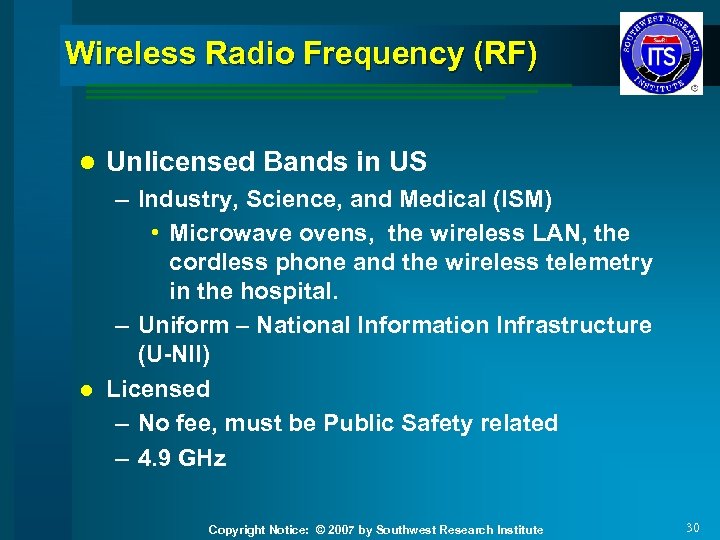 Wireless Radio Frequency (RF) l Unlicensed Bands in US – Industry, Science, and Medical (ISM) • Microwave ovens, the wireless LAN, the cordless phone and the wireless telemetry in the hospital. – Uniform – National Information Infrastructure (U-NII) l Licensed – No fee, must be Public Safety related – 4. 9 GHz Copyright Notice: © 2007 by Southwest Research Institute 30
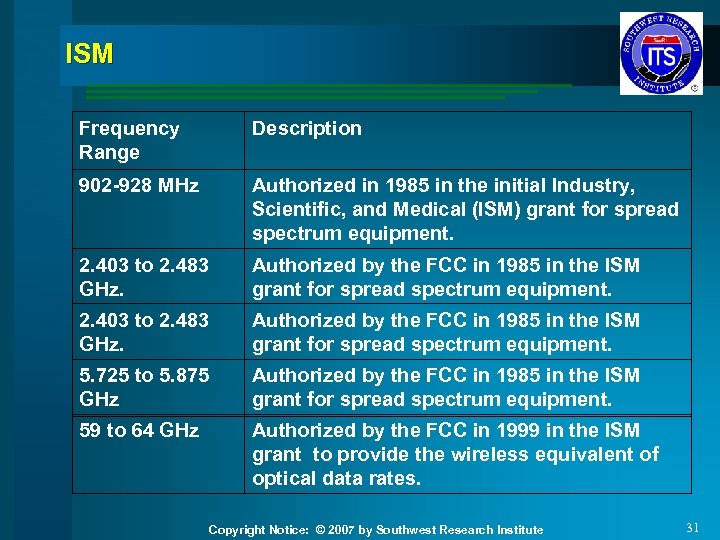 ISM Frequency Range Description 902 -928 MHz Authorized in 1985 in the initial Industry, Scientific, and Medical (ISM) grant for spread spectrum equipment. 2. 403 to 2. 483 GHz. Authorized by the FCC in 1985 in the ISM grant for spread spectrum equipment. 5. 725 to 5. 875 GHz Authorized by the FCC in 1985 in the ISM grant for spread spectrum equipment. 59 to 64 GHz Authorized by the FCC in 1999 in the ISM grant to provide the wireless equivalent of optical data rates. Copyright Notice: © 2007 by Southwest Research Institute 31
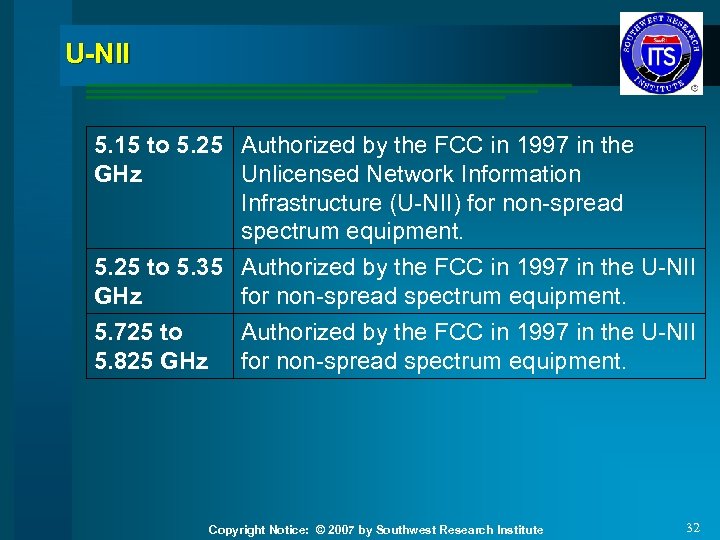 U-NII 5. 15 to 5. 25 Authorized by the FCC in 1997 in the GHz Unlicensed Network Information Infrastructure (U-NII) for non-spread spectrum equipment. 5. 25 to 5. 35 Authorized by the FCC in 1997 in the U-NII GHz for non-spread spectrum equipment. 5. 725 to 5. 825 GHz Authorized by the FCC in 1997 in the U-NII for non-spread spectrum equipment. Copyright Notice: © 2007 by Southwest Research Institute 32
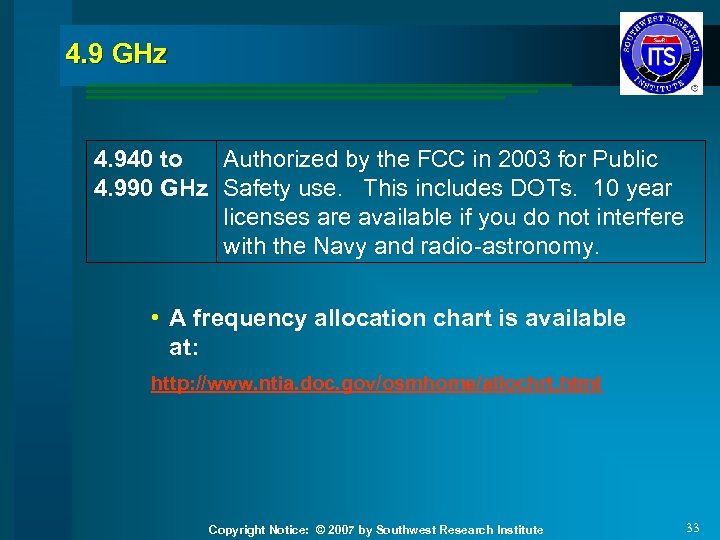 4. 9 GHz 4. 940 to Authorized by the FCC in 2003 for Public 4. 990 GHz Safety use. This includes DOTs. 10 year licenses are available if you do not interfere with the Navy and radio-astronomy. • A frequency allocation chart is available at: http: //www. ntia. doc. gov/osmhome/allochrt. html Copyright Notice: © 2007 by Southwest Research Institute 33
 Wireless Standards Copyright Notice: © 2007 by Southwest Research Institute 34
 Wireless Standards l The Standards Bodies ISO and IEEE – ISO: Worldwide Rules i. e. . MPEG • www. iso. org – IEEE: The 802. 11, 15 and 16 series of standards • www. ieee. org l Expect devices to work together for mature systems, and expect a maturity/interoperability curve Copyright Notice: © 2007 by Southwest Research Institute 35
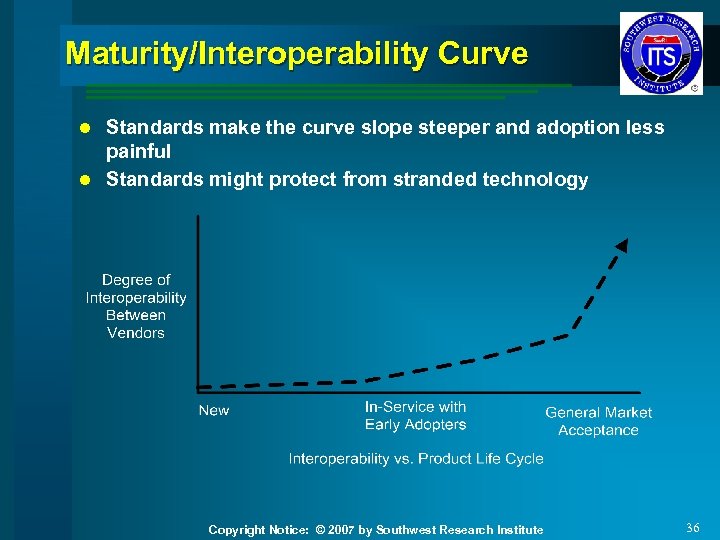 Maturity/Interoperability Curve Standards make the curve slope steeper and adoption less painful l Standards might protect from stranded technology l Copyright Notice: © 2007 by Southwest Research Institute 36
 Standards Bodies l IEEE – Creates standards – IEEE does not put a sticker on devices l Wireless Fidelity Alliance (Wi. Fi) – 802. 11 testing – www. wi-fi. org l Worldwide Interoperability for Microwave Access (Wi. MAX) Forum – 802. 16 testing – www. wimaxforum. org l You get a sticker on the device or package Copyright Notice: © 2007 by Southwest Research Institute 37
 Overview of Standards Copyright Notice: © 2007 by Southwest Research Institute 38
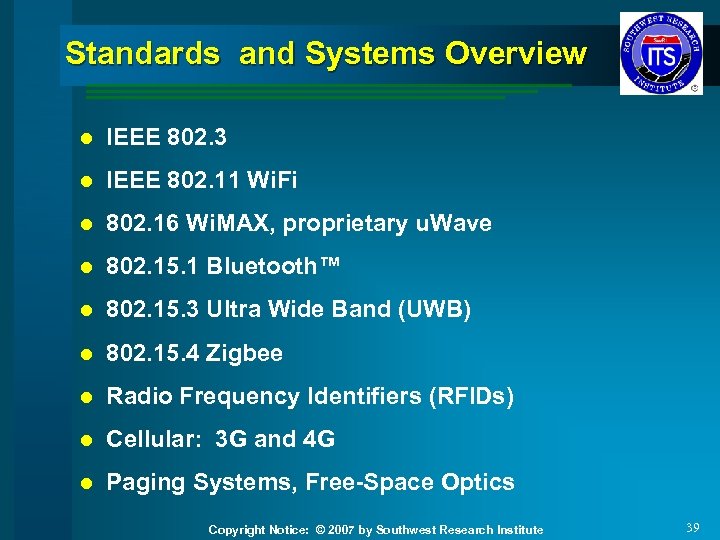 Standards and Systems Overview l IEEE 802. 3 l IEEE 802. 11 Wi. Fi l 802. 16 Wi. MAX, proprietary u. Wave l 802. 15. 1 Bluetooth™ l 802. 15. 3 Ultra Wide Band (UWB) l 802. 15. 4 Zigbee l Radio Frequency Identifiers (RFIDs) l Cellular: 3 G and 4 G l Paging Systems, Free-Space Optics Copyright Notice: © 2007 by Southwest Research Institute 39
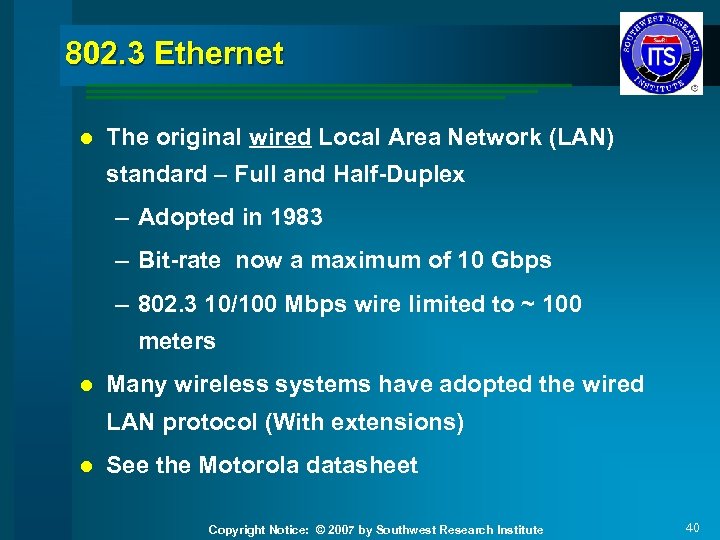 802. 3 Ethernet l The original wired Local Area Network (LAN) standard – Full and Half-Duplex – Adopted in 1983 – Bit-rate now a maximum of 10 Gbps – 802. 3 10/100 Mbps wire limited to ~ 100 meters l Many wireless systems have adopted the wired LAN protocol (With extensions) l See the Motorola datasheet Copyright Notice: © 2007 by Southwest Research Institute 40
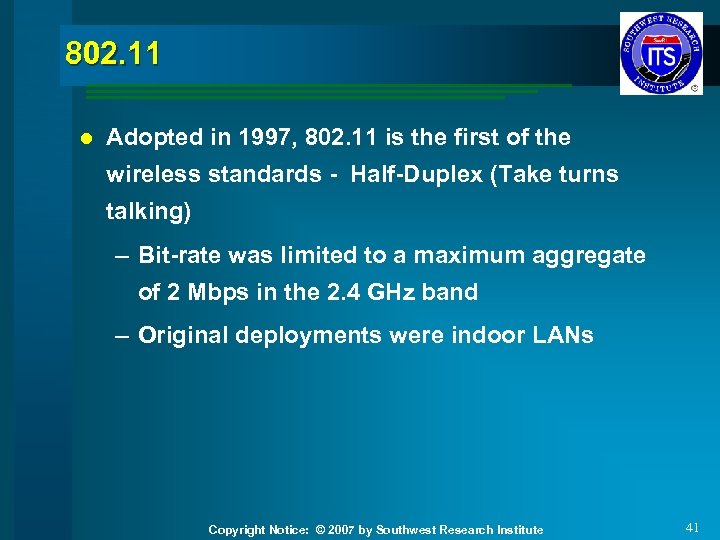 802. 11 l Adopted in 1997, 802. 11 is the first of the wireless standards - Half-Duplex (Take turns talking) – Bit-rate was limited to a maximum aggregate of 2 Mbps in the 2. 4 GHz band – Original deployments were indoor LANs Copyright Notice: © 2007 by Southwest Research Institute 41
 802. 11 b l 802. 11 b: Adopted in 1999, 802. 11 b is an addition to 802. 11 – Bit-rate a maximum aggregate of 11 Mbps – In the 2. 4 GHz band Copyright Notice: © 2007 by Southwest Research Institute 42
 802. 11 a l Adopted in 1999 – Bit-rate a maximum aggregate of 54 Mbps – In the 5 GHz band Copyright Notice: © 2007 by Southwest Research Institute 43
 802. 11 g l 802. 11 g: Adopted in 2003, 802. 11 g combines attributes of 802. 11 a and b – Bit-rate a maximum aggregate of 54 Mbps – In the 2. 4 GHz band – 802. 11 g most common on laptops – See the ENCOM datasheet Copyright Notice: © 2007 by Southwest Research Institute 44
 802. 11 n l For data rates in excess of 100 Mbps – Targeted for 500 Mbps – Pre-“N” devices in stores now with Pre-N stickers – 100 -200 Mbps claims seem to be common – Expect IEEE to ratify in 2008 Copyright Notice: © 2007 by Southwest Research Institute 45
 802. 11 p l Wireless Access for the Vehicular Environment (WAVE) – Basis for Dedicated Short Range Communication (DSRC) for the Vehicle Infrastructure Integration (VII) – Planned bit-rate an aggregate of 6 Mbps – 5. 9 GHz band – Distance of up to 1, 000 feet for mobile xmit/rcv Copyright Notice: © 2007 by Southwest Research Institute 46
 FHWA Initiative - VII Use Cases l Intersection Cooperation – Vehicle to Vehicle (V 2 V) and Vehicle to Roadside (V 2 R) l Road or Lane Departure l Vehicle Cooperation – V 2 V l Information can be found at www. dot. gov Copyright Notice: © 2007 by Southwest Research Institute 47
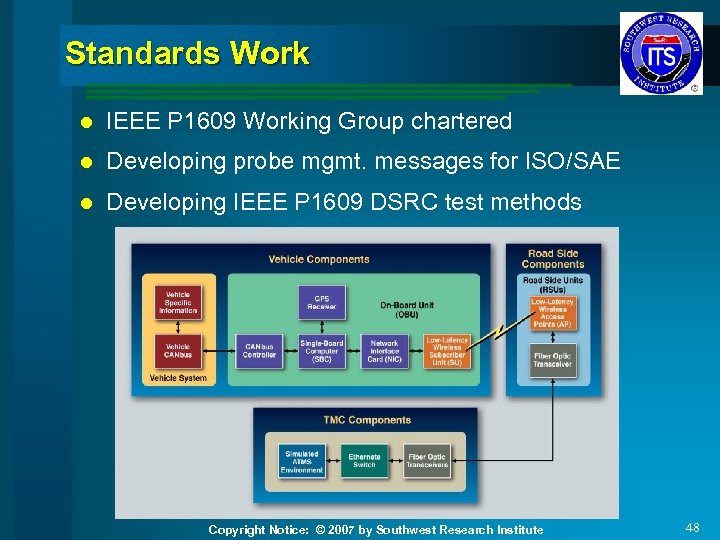 Standards Work l IEEE P 1609 Working Group chartered l Developing probe mgmt. messages for ISO/SAE l Developing IEEE P 1609 DSRC test methods Copyright Notice: © 2007 by Southwest Research Institute 48
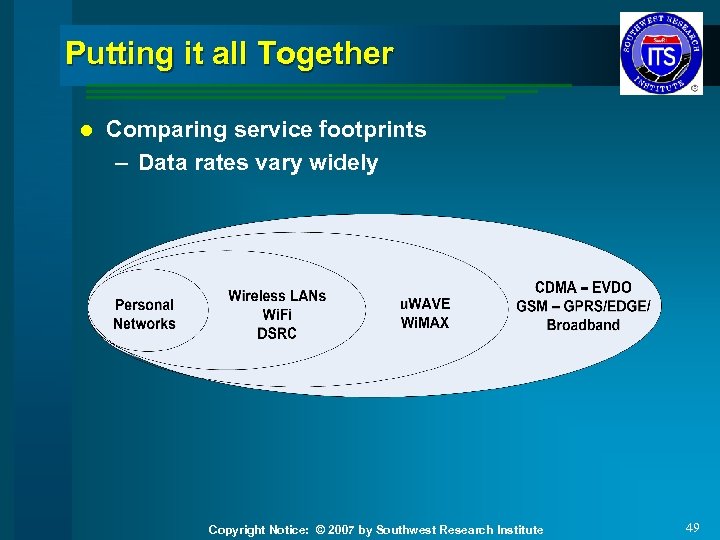 Putting it all Together l Comparing service footprints – Data rates vary widely Copyright Notice: © 2007 by Southwest Research Institute 49
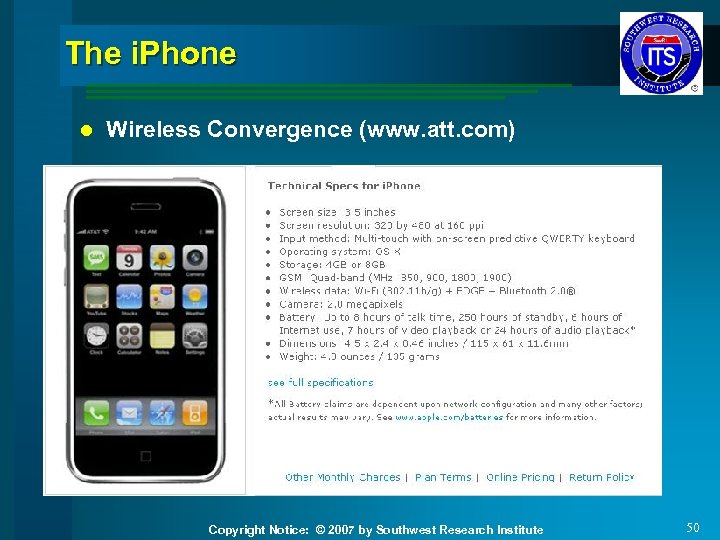 The i. Phone l Wireless Convergence (www. att. com) Copyright Notice: © 2007 by Southwest Research Institute 50
 Wi. Fi Security Copyright Notice: © 2007 by Southwest Research Institute 51
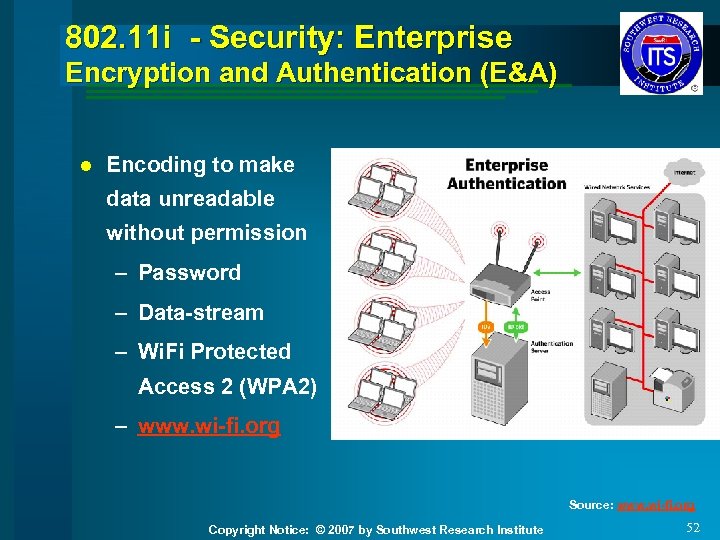 802. 11 i - Security: Enterprise Encryption and Authentication (E&A) l Encoding to make data unreadable without permission – Password – Data-stream – Wi. Fi Protected Access 2 (WPA 2) – www. wi-fi. org Source: www. wi-fi. org Copyright Notice: © 2007 by Southwest Research Institute 52
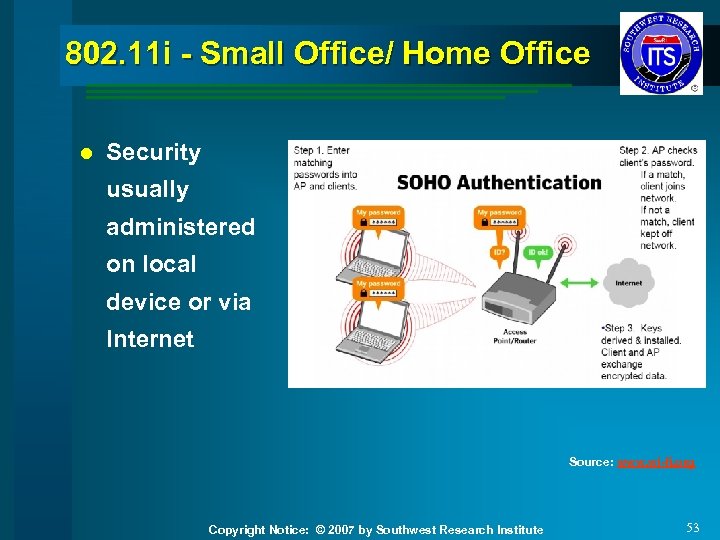 802. 11 i - Small Office/ Home Office l Security usually administered on local device or via Internet Source: www. wi-fi. org Copyright Notice: © 2007 by Southwest Research Institute 53
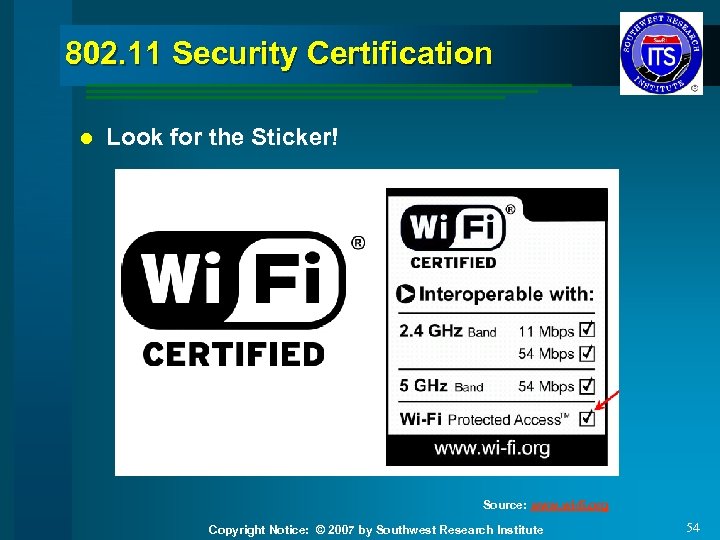 802. 11 Security Certification l Look for the Sticker! Source: www. wi-fi. org Copyright Notice: © 2007 by Southwest Research Institute 54
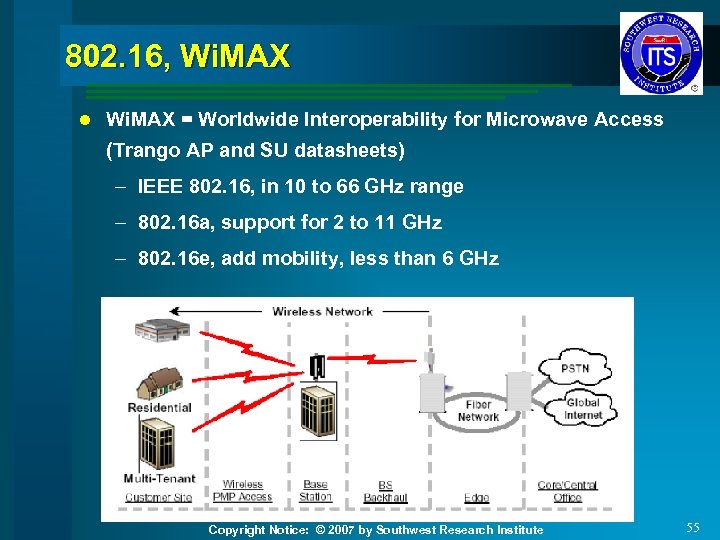 802. 16, Wi. MAX l Wi. MAX = Worldwide Interoperability for Microwave Access (Trango AP and SU datasheets) – IEEE 802. 16, in 10 to 66 GHz range – 802. 16 a, support for 2 to 11 GHz – 802. 16 e, add mobility, less than 6 GHz Copyright Notice: © 2007 by Southwest Research Institute 55
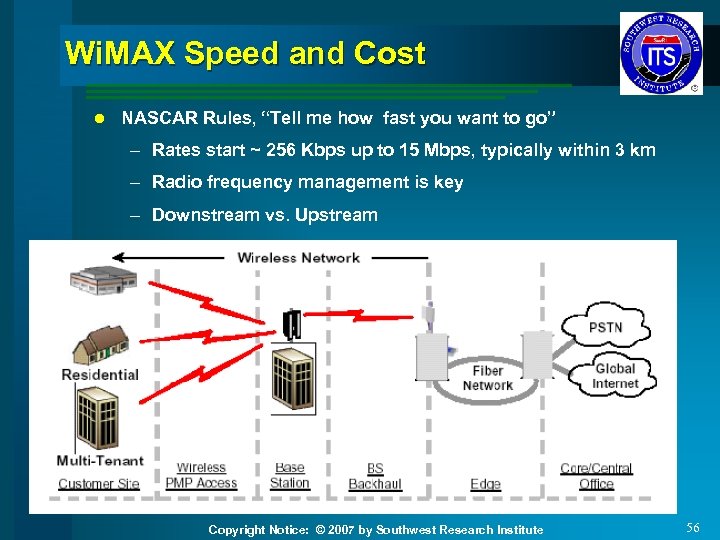 Wi. MAX Speed and Cost l NASCAR Rules, “Tell me how fast you want to go” – Rates start ~ 256 Kbps up to 15 Mbps, typically within 3 km – Radio frequency management is key – Downstream vs. Upstream Copyright Notice: © 2007 by Southwest Research Institute 56
 Proprietary Microwave: PTP, PTM l Microwave, u. Wave – A generic term, was typically applied to Point-to-Point systems in the spectrum from 300 MHz to 10 GHz. – Now seems to be generically applied to most wireless systems Copyright Notice: © 2007 by Southwest Research Institute 57
 802. 15. 1 - Bluetooth™ For short-range communications – Intended to replace USB and other cables l Spectrum – Operates in the ISM band at 2. 4 GHz l Range - Depends on the device class: – Class 3 –up to 1 meter or ~3 feet – Class 2 –up to 10 meters or ~30 feet – Class 1 –up to 100 meters or ~300 feet l Raw Data Rate – 1 Mbps for Version 1. 2; up to 3 Mbps supported for Version 2. 0 l Copyright Notice: © 2007 by Southwest Research Institute 58
 802. 15. 3 – Ultra Wide Band (UWB) High bit rate suitable for short-range video applications l Spectrum – UWB operates in the ISM band at 2. 4 GHz l Range – 10 meters l Raw Data Rates – 110 Mbps at 10 meters, 480 Mbps at 2 meters l Copyright Notice: © 2007 by Southwest Research Institute 59
 802. 15. 4 – Zigbee Low power consumption is differentiator l Spectrum – Operates in the ISM bands at 2. 4 GHz and 915 MHz l Range – 50 meters typical l Raw Data Rate – Data rates of 250 kbps @2. 4 GHz, 40 kbps @ 915 MHz l Copyright Notice: © 2007 by Southwest Research Institute 60
 Radio Frequency Identifiers (RFID) Store limited data, respond when interrogated or transmit autonomously l Construction – RFID tags contain a chipset and antenna to receive and respond to queries from an RFID reader l Three Types – Passive: no battery, receive power when interrogated – Semi-Passive: with a battery, but not chatty toll roads – Active: with battery, broadcast information autonomously and when interrogated. l Copyright Notice: © 2007 by Southwest Research Institute 61
 RFID Spectrum – Operate in numerous RF bands from 125 KHz up to 5. 8 GHz l Range – Passive tags, a few feet, up to 1500 meters for active tags l Raw Data Rate – Not applicable, not a transport device l Copyright Notice: © 2007 by Southwest Research Institute 62
 3 G and 4 G Mobile l A Disclaimer – Technological innovation in cellular telephone and data networks is fast – The market is hyper-responsive to technological advances – What is true this morning, may be different tomorrow Copyright Notice: © 2007 by Southwest Research Institute 63
 3 G Mobile Features 3 G provides an expanded set of features and capabilities, some are here: – Enhanced multimedia: voice, email, and video – High speed data, up to 700 Kbps outdoor and 2 Mbps indoor l Some not – Satellite or terrestrial network route selection – Roaming capability throughout Europe, Japan, and North America l Copyright Notice: © 2007 by Southwest Research Institute 64
 3 G Mobile l Two main flavors, CDMA 2000 Evolution Data Optimized (EVDO) and GSM Broadband 3 G – CDMA 2000 EVDO – CDMA - Sprint, Verizon – GSM – T Mobile, AT&T • Range – Back to the cell site, typically less than 3 miles • Raw Data Rate – Marketed 400 -700 Kbps, up to 2 Mbps (EVDO), user experience will vary Copyright Notice: © 2007 by Southwest Research Institute 65
 4 G Mobile The promise of a seamless, high data rate world – High quality audio and video – Data rate of ~100 Mbps – Use of software defined radios - base stations and phones. – Packet switching for both voice and data l Look for 4 G capabilities in 2010, sooner if based upon Wi. MAX l Copyright Notice: © 2007 by Southwest Research Institute 66
 Paging l Not as widely used due to cell phones l Metropolitan, or Satellite l Low bit rate to deliver a machine command or message l Challenges with queue length and verification of commands – Some use for remote signs Copyright Notice: © 2007 by Southwest Research Institute 67
 Free-Space Optics or Photonics l Coherent light through the atmosphere – Spectrum • Operate in unlicensed spectrum – Range • Short distances • Mirrors can be used to redirect the light • Devices can be placed behind windows. – Raw Data Rate • Rates up to 1. 25 Gbps using a single wavelength of light Copyright Notice: © 2007 by Southwest Research Institute 68
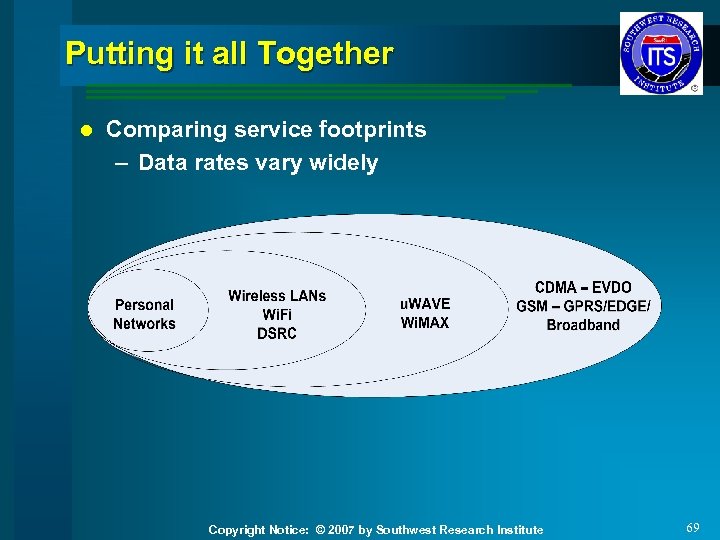 Putting it all Together l Comparing service footprints – Data rates vary widely Copyright Notice: © 2007 by Southwest Research Institute 69
 Questions and Answers l Questions or comments about the class? l Patrick (Pat) Clair PMP 210 -522 -3019 pclair@swri. org Copyright Notice: © 2007 by Southwest Research Institute 70