


 Скачать презентацию A Comprehensive and Up to Date Guide to
5b53ce3adb7b2708e104f7422dc90963.ppt
- Количество слайдов: 62
 A Comprehensive and Up to Date Guide to SAP Net. Weaver BEx Broadcasting: Its Features, Functions and What’s Really Required to Make It Work in Your Organization Dr. Bjarne Berg © 2007 Wellesley Information Services. All rights reserved.
 What We'll Cover. . . • What is BEx Broadcaster and what can it do? • The Broadcasting wizard • Developer options for BEx Broadcaster • How to manage the Broadcaster • Making it work in real life — lessons learned • Wrap up 1
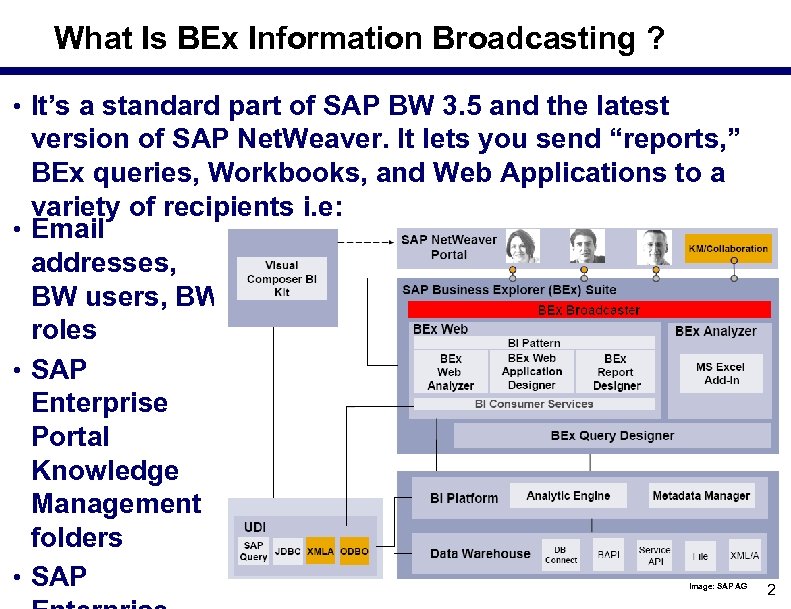 What Is BEx Information Broadcasting ? • It’s a standard part of SAP BW 3. 5 and the latest version of SAP Net. Weaver. It lets you send “reports, ” BEx queries, Workbooks, and Web Applications to a variety of recipients i. e: • Email addresses, BW users, BW roles • SAP Enterprise Portal Knowledge Management folders • SAP Image: SAP AG 2
 What Can BEx Information Broadcasting Do? • Broadcasts can be configured to run: s Once only s On a scheduled basis (every day, week, month, e. g. ) s During specific timeslots defined by the administrator s Or any time (if you allow) s When an event occurs; i. e. , when an “exception” occurs s As part of a process chain • You tell the system s What to send A link to regenerate the query, etc. based on live data, or A standalone (precalculated) version of the item s How to send it There are several format and compression options Key concept: push vs. pull — Broadcasting is a push tool 3
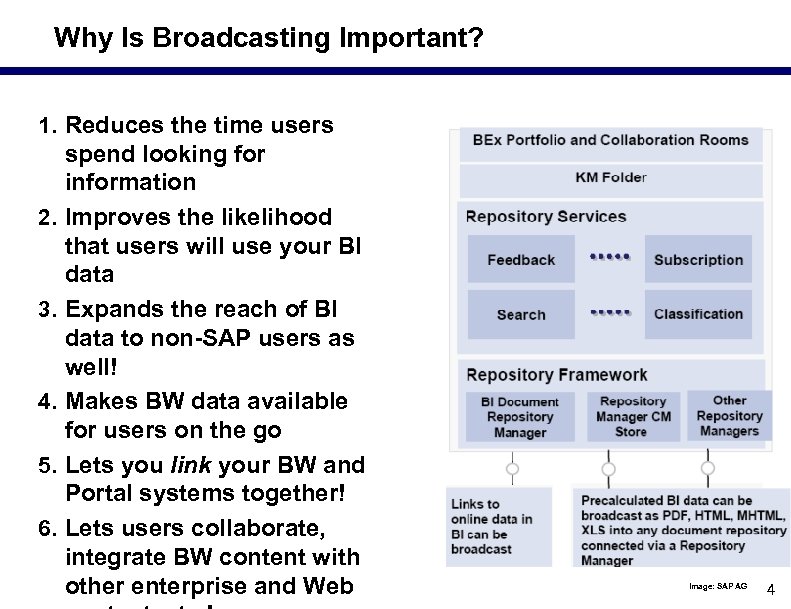 Why Is Broadcasting Important? 1. Reduces the time users 2. 3. 4. 5. 6. spend looking for information Improves the likelihood that users will use your BI data Expands the reach of BI data to non SAP users as well! Makes BW data available for users on the go Lets you link your BW and Portal systems together! Lets users collaborate, integrate BW content with other enterprise and Web Image: SAP AG 4
 Push vs. Pull: Change in Mentality • Users have to change their mentality to stop reviewing everything that is business as usual. The push mentality requires that users plan for what is important to them and set up fixed sets of reports that are used to manage the business. • In general, the push approach reduces the time users spend looking for information and provides them with more time to examine data that really matter to them. • You should carefully consider using BEx Broadcaster for core reporting that users perform through any handheld computer device. This simplifies the security setup and also increases the speed of any report (does not access the source system through limited bandwidth). 5
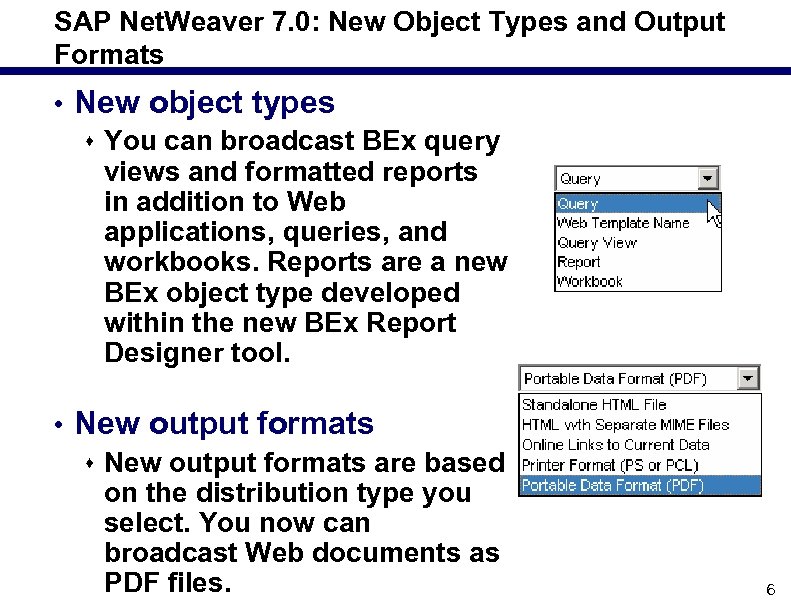 SAP Net. Weaver 7. 0: New Object Types and Output Formats • New object types s You can broadcast BEx query views and formatted reports in addition to Web applications, queries, and workbooks. Reports are a new BEx object type developed within the new BEx Report Designer tool. • New output formats s New output formats are based on the distribution type you select. You now can broadcast Web documents as PDF files. 6
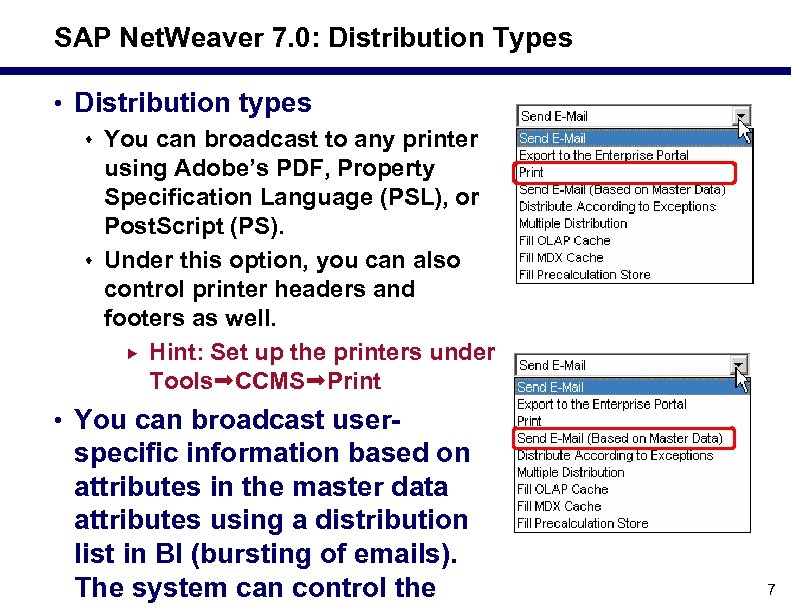 SAP Net. Weaver 7. 0: Distribution Types • Distribution types s You can broadcast to any printer using Adobe’s PDF, Property Specification Language (PSL), or Post. Script (PS). s Under this option, you can also control printer headers and footers as well. Hint: Set up the printers under Tools CCMS Print • You can broadcast user specific information based on attributes in the master data attributes using a distribution list in BI (bursting of emails). The system can control the 7
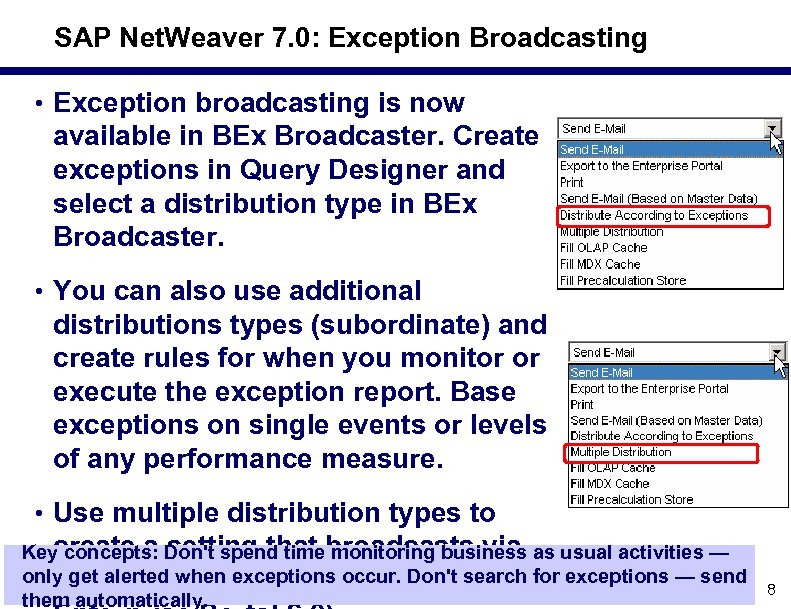 SAP Net. Weaver 7. 0: Exception Broadcasting • Exception broadcasting is now available in BEx Broadcaster. Create exceptions in Query Designer and select a distribution type in BEx Broadcaster. • You can also use additional distributions types (subordinate) and create rules for when you monitor or execute the exception report. Base exceptions on single events or levels of any performance measure. • Use multiple distribution types to create a setting that monitoring business Key concepts: Don't spend timebroadcasts via as usual activities — only get alerted when exceptionsthe printer and for exceptions — send many channels (e. g. , occur. Don't search them automatically. 8
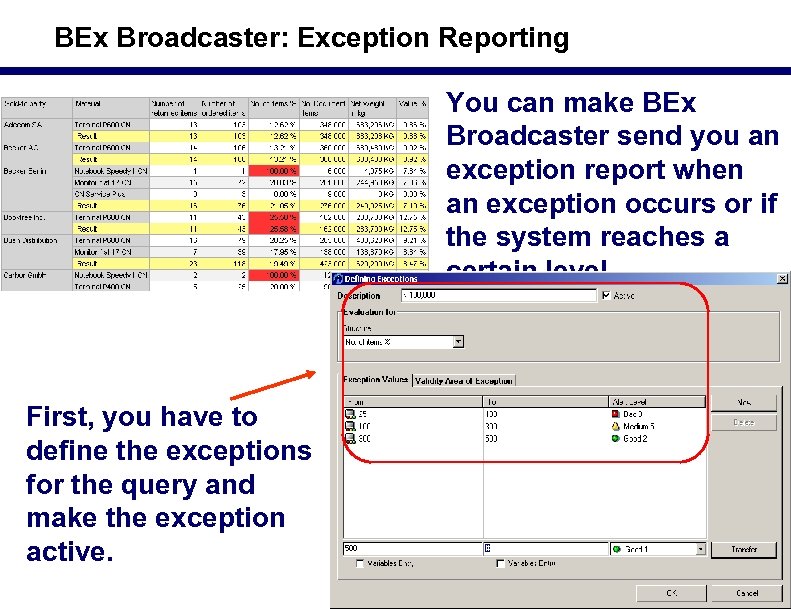 BEx Broadcaster: Exception Reporting You can make BEx Broadcaster send you an exception report when an exception occurs or if the system reaches a certain level First, you have to define the exceptions for the query and make the exception active. 9
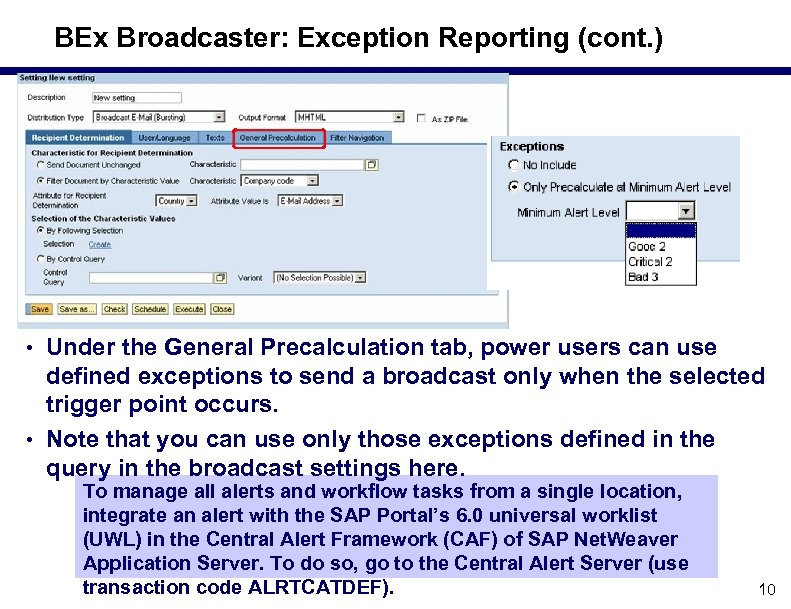 BEx Broadcaster: Exception Reporting (cont. ) • Under the General Precalculation tab, power users can use defined exceptions to send a broadcast only when the selected trigger point occurs. • Note that you can use only those exceptions defined in the query in the broadcast settings here. To manage all alerts and workflow tasks from a single location, integrate an alert with the SAP Portal’s 6. 0 universal worklist (UWL) in the Central Alert Framework (CAF) of SAP Net. Weaver Application Server. To do so, go to the Central Alert Server (use transaction code ALRTCATDEF). 10
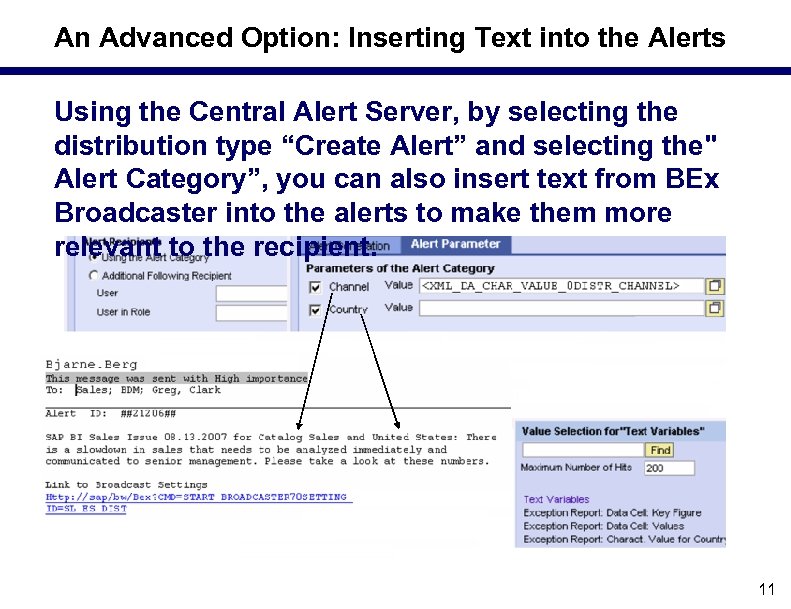 An Advanced Option: Inserting Text into the Alerts Using the Central Alert Server, by selecting the distribution type “Create Alert” and selecting the" Alert Category”, you can also insert text from BEx Broadcaster into the alerts to make them more relevant to the recipient. 11
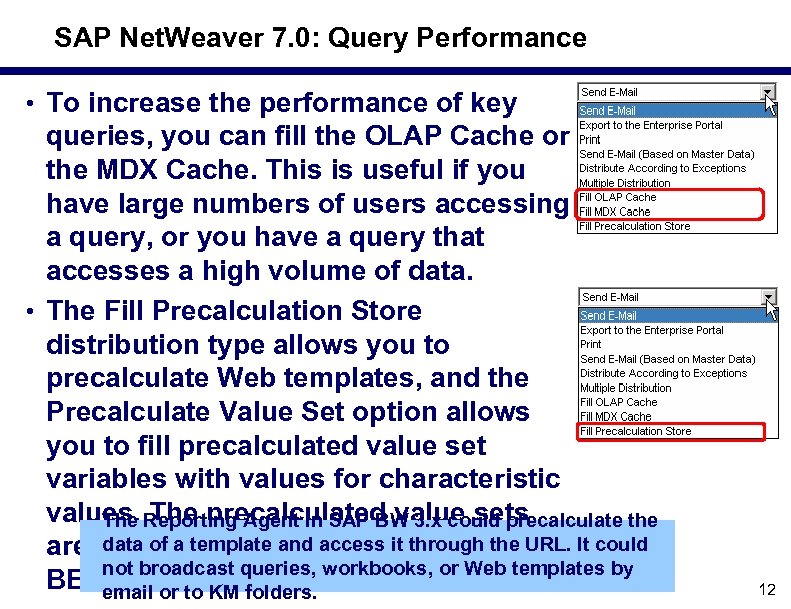 SAP Net. Weaver 7. 0: Query Performance • To increase the performance of key queries, you can fill the OLAP Cache or the MDX Cache. This is useful if you have large numbers of users accessing a query, or you have a query that accesses a high volume of data. • The Fill Precalculation Store distribution type allows you to precalculate Web templates, and the Precalculate Value Set option allows you to fill precalculated value set variables with values for characteristic values. Reporting Agent in SAP BW 3. x could precalculate the The precalculated value sets data of a template as variable values in are then availableand access it through the URL. It could not broadcast queries, workbooks, or Web templates by BEx email or to KM folders. queries. 12
 What We'll Cover. . . • What is BEx Broadcaster and what can it do? • The Broadcasting wizard • Developer options for BEx Broadcaster • How to manage the Broadcaster • Making it work in real life — lessons learned • Wrap up 13
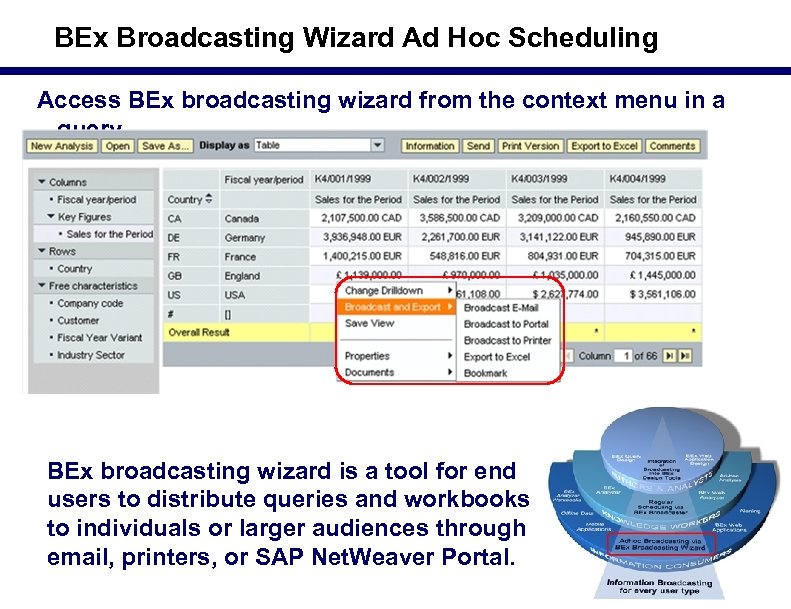 BEx Broadcasting Wizard Ad Hoc Scheduling Access BEx broadcasting wizard from the context menu in a query BEx broadcasting wizard is a tool for end users to distribute queries and workbooks to individuals or larger audiences through email, printers, or SAP Net. Weaver Portal. 14
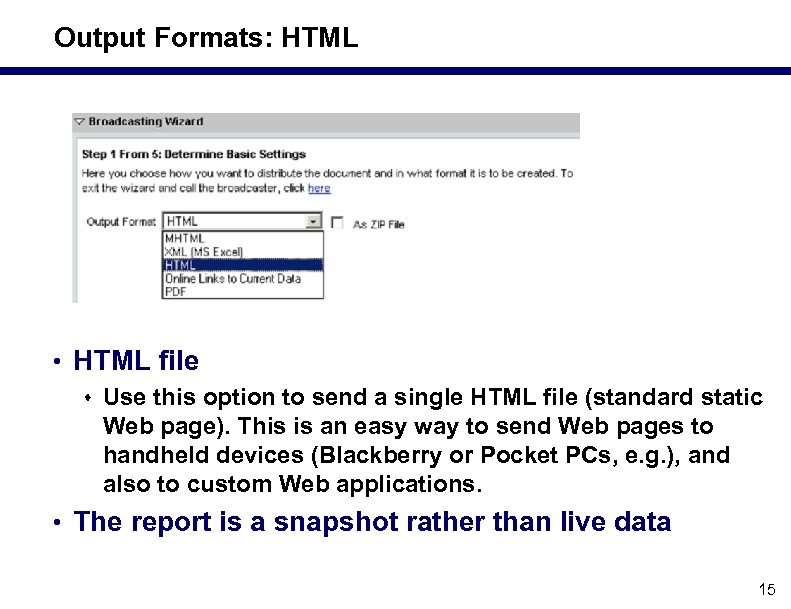 Output Formats: HTML • HTML file s Use this option to send a single HTML file (standard static Web page). This is an easy way to send Web pages to handheld devices (Blackberry or Pocket PCs, e. g. ), and also to custom Web applications. • The report is a snapshot rather than live data 15
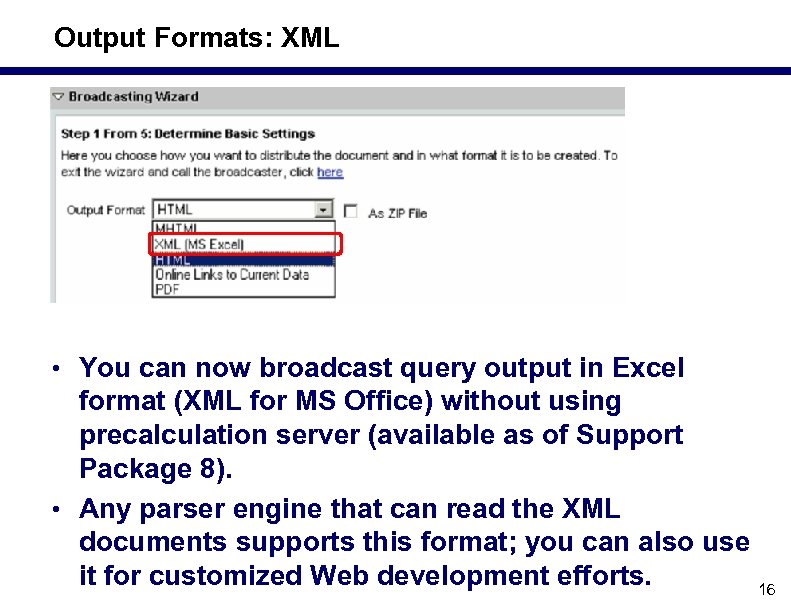 Output Formats: XML • You can now broadcast query output in Excel format (XML for MS Office) without using precalculation server (available as of Support Package 8). • Any parser engine that can read the XML documents supports this format; you can also use it for customized Web development efforts. 16
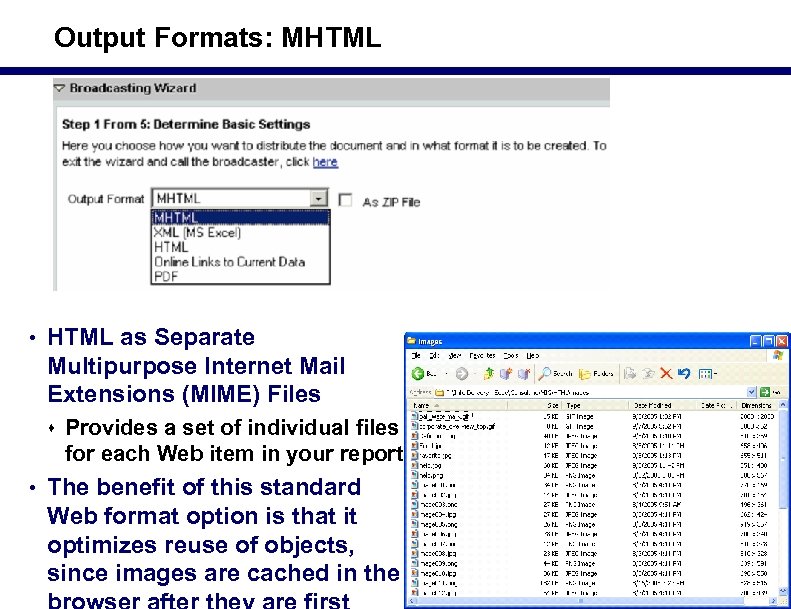 Output Formats: MHTML • HTML as Separate Multipurpose Internet Mail Extensions (MIME) Files s Provides a set of individual files for each Web item in your report • The benefit of this standard Web format option is that it optimizes reuse of objects, since images are cached in the 17
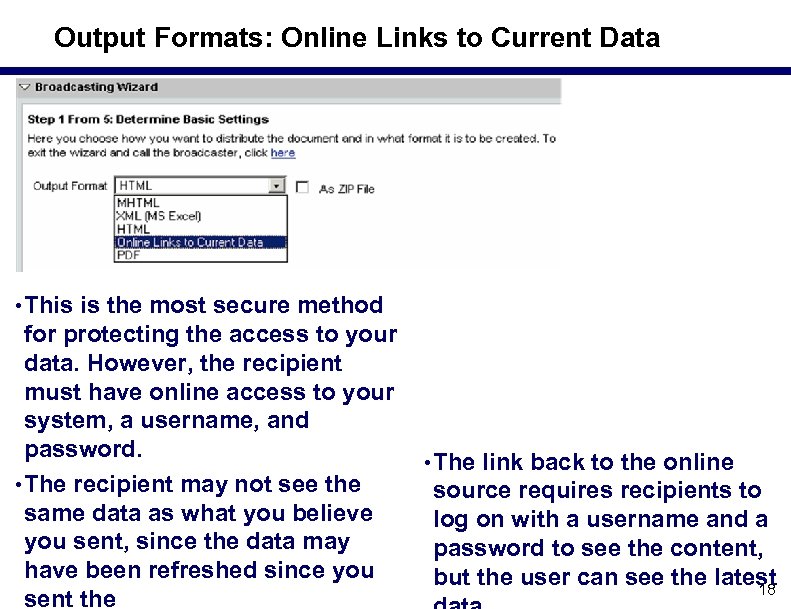 Output Formats: Online Links to Current Data • This is the most secure method for protecting the access to your data. However, the recipient must have online access to your system, a username, and password. • The recipient may not see the same data as what you believe you sent, since the data may have been refreshed since you sent the • The link back to the online source requires recipients to log on with a username and a password to see the content, but the user can see the latest 18
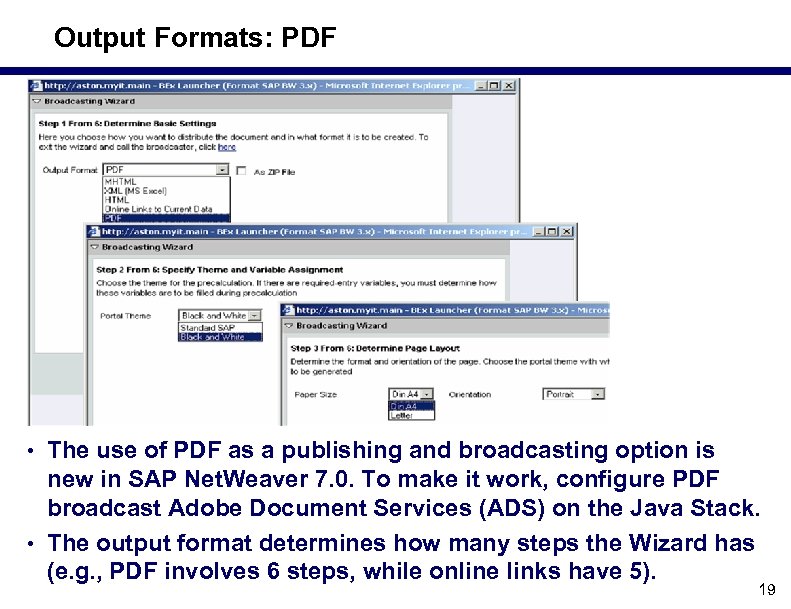 Output Formats: PDF • The use of PDF as a publishing and broadcasting option is new in SAP Net. Weaver 7. 0. To make it work, configure PDF broadcast Adobe Document Services (ADS) on the Java Stack. • The output format determines how many steps the Wizard has (e. g. , PDF involves 6 steps, while online links have 5). 19
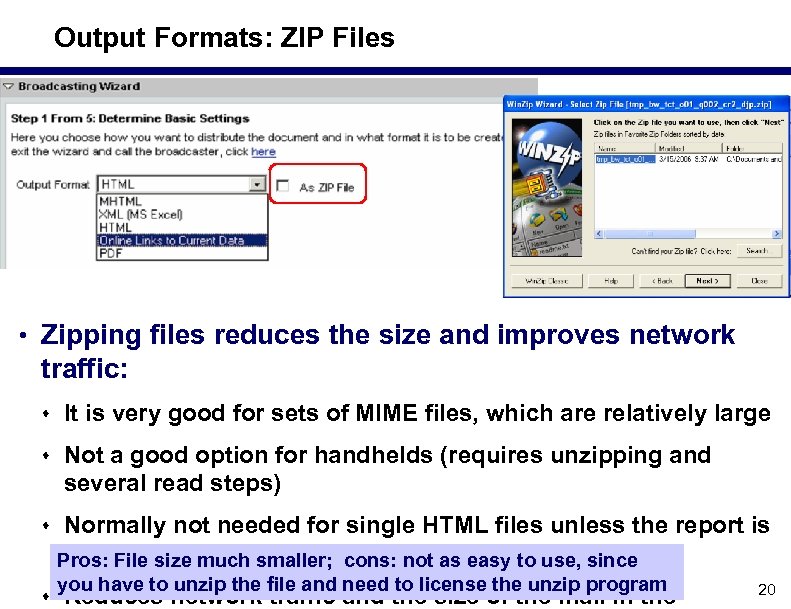 Output Formats: ZIP Files • Zipping files reduces the size and improves network traffic: s It is very good for sets of MIME files, which are relatively large s Not a good option for handhelds (requires unzipping and several read steps) s Normally not needed for single HTML files unless the report is very long Pros: File size much smaller; cons: not as easy to use, since you have to unzip the file and need to license the unzip program s Reduces network traffic and the size of the mail in the 20
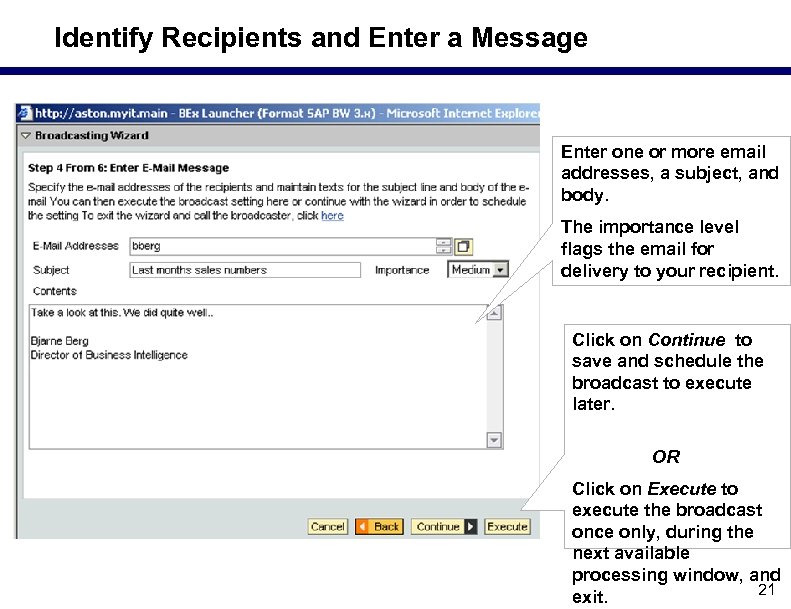 Identify Recipients and Enter a Message Enter one or more email addresses, a subject, and body. The importance level flags the email for delivery to your recipient. Click on Continue to save and schedule the broadcast to execute later. OR Click on Execute to execute the broadcast once only, during the next available processing window, and 21 exit.
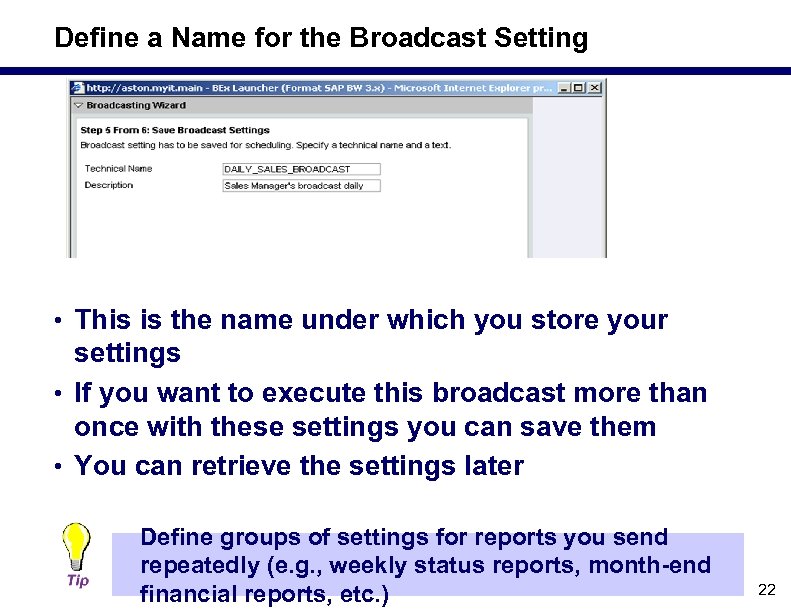 Define a Name for the Broadcast Setting • This is the name under which you store your settings • If you want to execute this broadcast more than once with these settings you can save them • You can retrieve the settings later Define groups of settings for reports you send repeatedly (e. g. , weekly status reports, month end financial reports, etc. ) 22
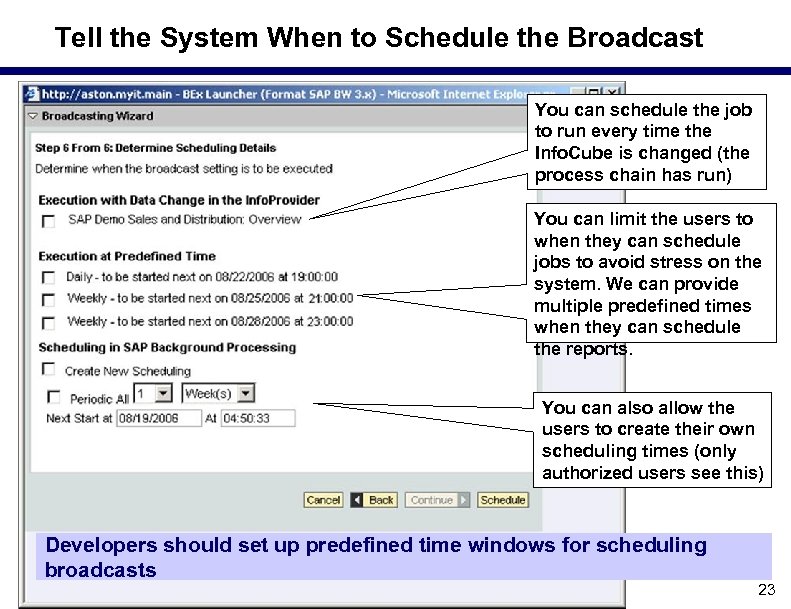 Tell the System When to Schedule the Broadcast You can schedule the job to run every time the Info. Cube is changed (the process chain has run) You can limit the users to when they can schedule jobs to avoid stress on the system. We can provide multiple predefined times when they can schedule the reports. You can also allow the users to create their own scheduling times (only authorized users see this) Developers should set up predefined time windows for scheduling broadcasts 23
 What We'll Cover. . . • What is BEx Broadcaster and what can it do? • The Broadcasting wizard • Developer options for BEx Broadcaster • How to manage the Broadcaster • Making it work in real life — lessons learned • Wrap up 24
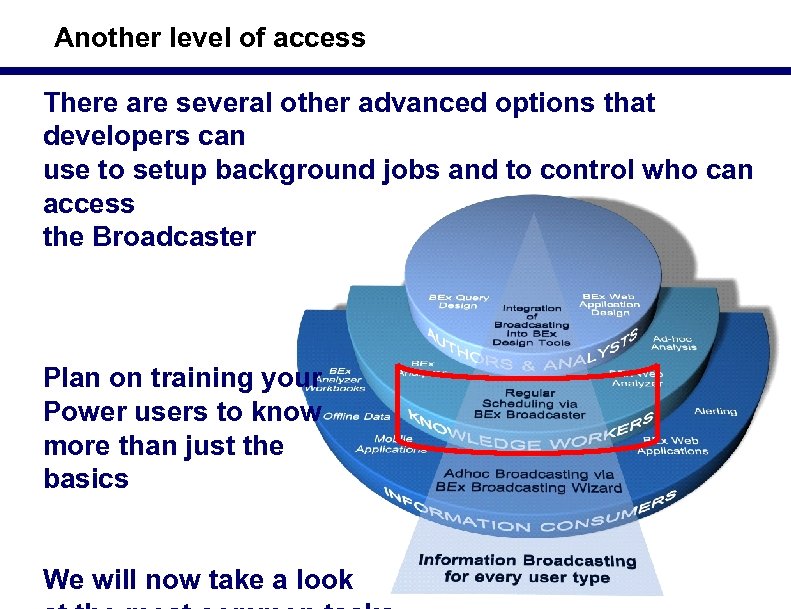 Another level of access There are several other advanced options that developers can use to setup background jobs and to control who can access the Broadcaster Plan on training your Power users to know more than just the basics We will now take a look 25
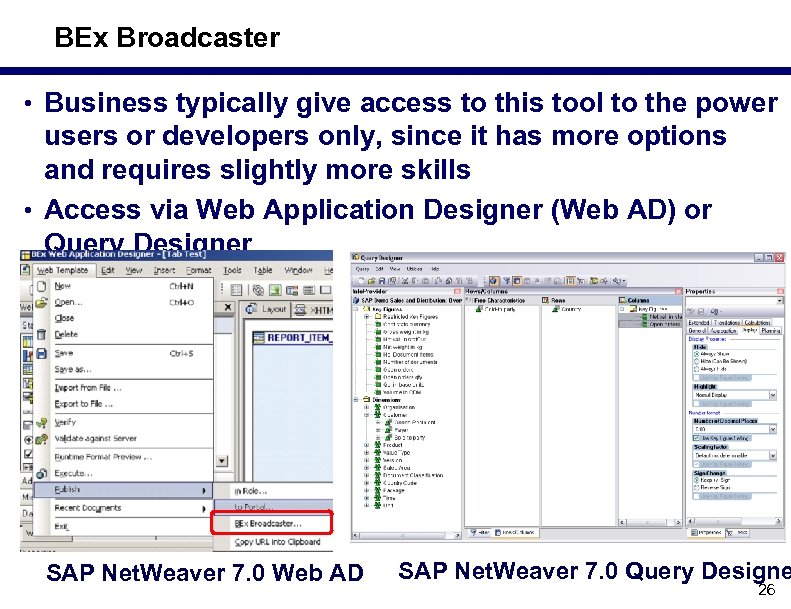 BEx Broadcaster • Business typically give access to this tool to the power users or developers only, since it has more options and requires slightly more skills • Access via Web Application Designer (Web AD) or Query Designer SAP Net. Weaver 7. 0 Web AD SAP Net. Weaver 7. 0 Query Designe 26
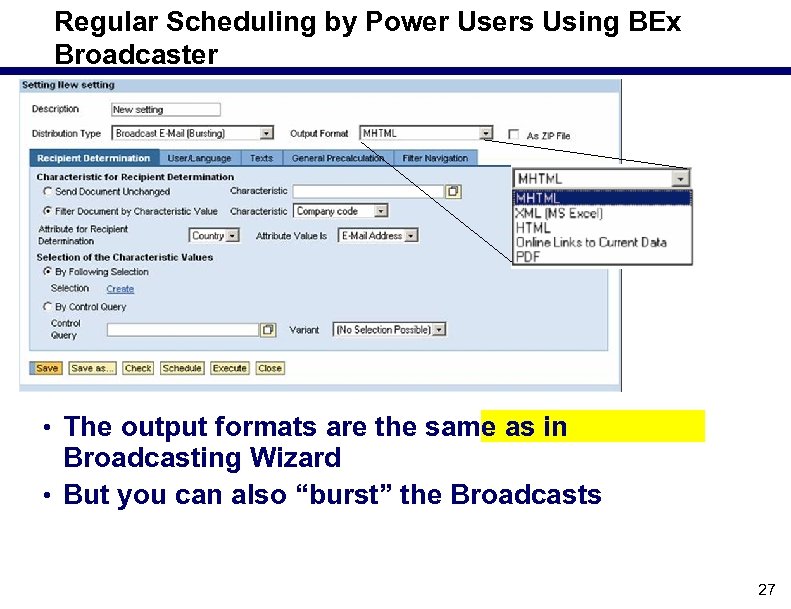 Regular Scheduling by Power Users Using BEx Broadcaster • The output formats are the same as in Broadcasting Wizard • But you can also “burst” the Broadcasts 27
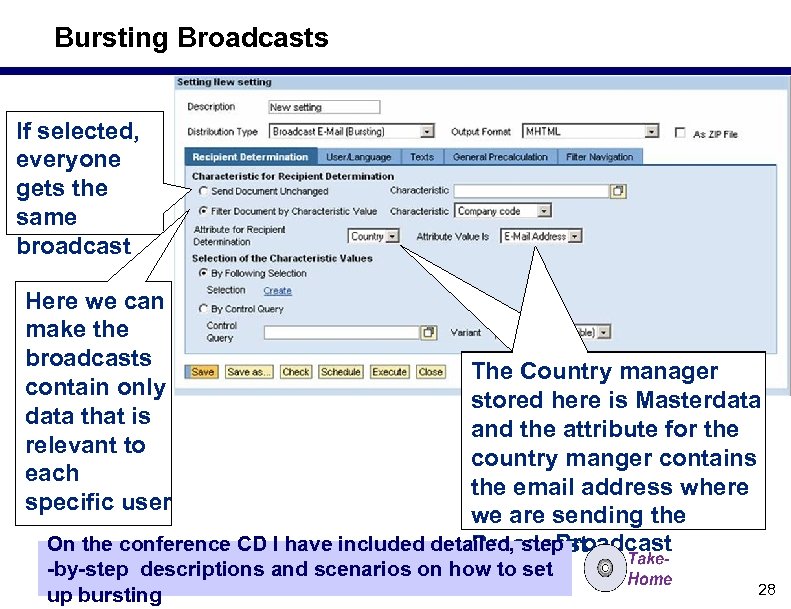 Bursting Broadcasts If selected, everyone gets the same broadcast Here we can make the broadcasts contain only data that is relevant to each specific user The Country manager stored here is Masterdata and the attribute for the country manger contains the email address where we we are sending the On the conference CD I have included detailed, step Broadcast by step descriptions and scenarios on how to set up bursting 28
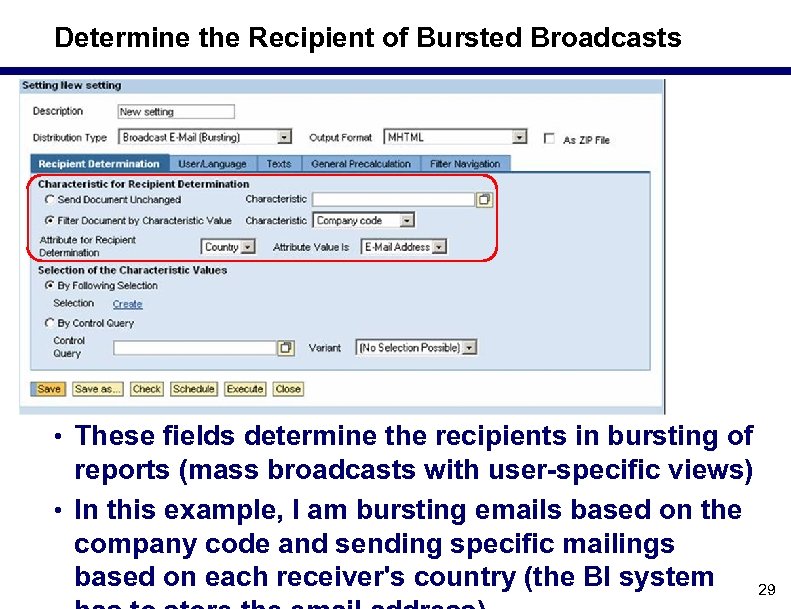 Determine the Recipient of Bursted Broadcasts • These fields determine the recipients in bursting of reports (mass broadcasts with user specific views) • In this example, I am bursting emails based on the company code and sending specific mailings based on each receiver's country (the BI system 29
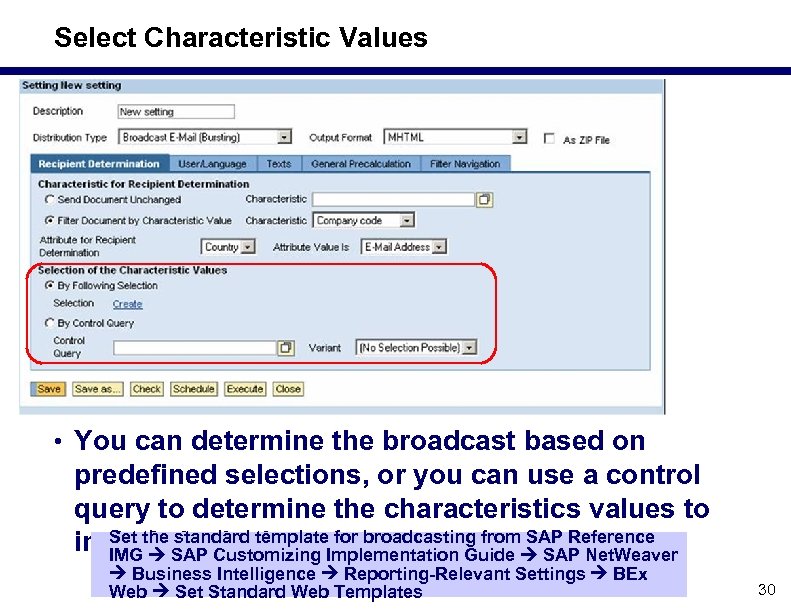 Select Characteristic Values • You can determine the broadcast based on predefined selections, or you can use a control query to determine the characteristics values to Set the standard broadcast. include. SAP thetemplate. Implementation Guide SAP Net. Weaver in Customizing for broadcasting from SAP Reference IMG Business Intelligence Reporting Relevant Settings BEx Web Set Standard Web Templates 30
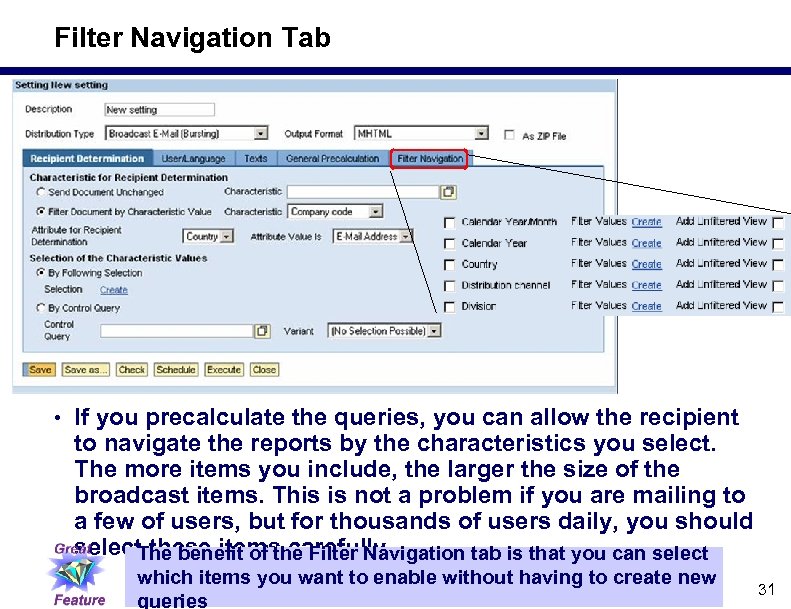 Filter Navigation Tab • If you precalculate the queries, you can allow the recipient to navigate the reports by the characteristics you select. The more items you include, the larger the size of the broadcast items. This is not a problem if you are mailing to a few of users, but for thousands of users daily, you should select these items carefully. The benefit of the Filter Navigation tab is that you can select which items you want to enable without having to create new queries 31
 Why Broadcast to SAP Enterprise Portal (5. 0 and Later Portal Versions) vs. Email? • More powerful s Users can comment, rate, and discuss the broadcasted assets s You can place the assets in i. Views on cockpits/dashboards s You can integrate the assets with other portal content s Portal users without a BW user ID can now access BW content s SAP Search and Classification (TREX) searches include broadcasted assets • More user friendly s Users can subscribe/unsubscribe themselves • Easier, more flexible administration s You can leverage the portal’s access control lists/capabilities 32
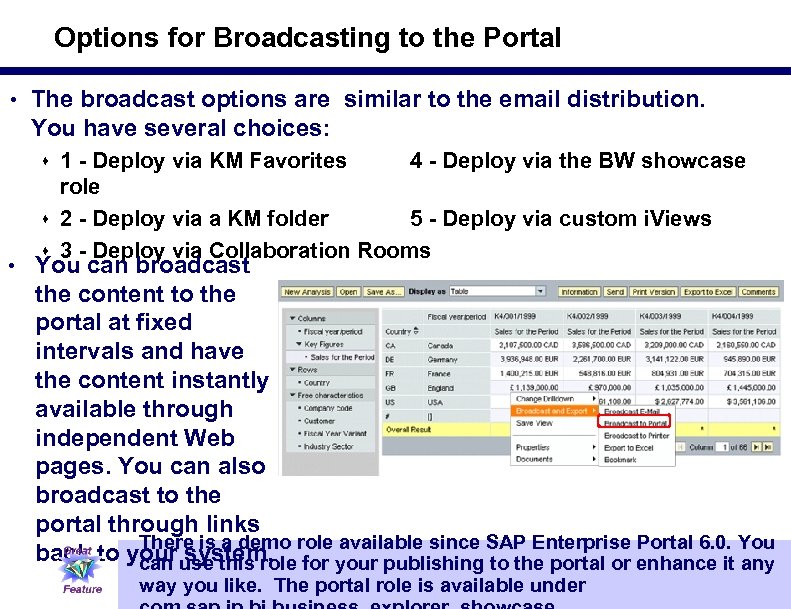 Options for Broadcasting to the Portal • The broadcast options are similar to the email distribution. You have several choices: s 1 Deploy via KM Favorites 4 Deploy via the BW showcase role s 2 Deploy via a KM folder 5 Deploy via custom i. Views s 3 Deploy via Collaboration Rooms • You can broadcast the content to the portal at fixed intervals and have the content instantly available through independent Web pages. You can also broadcast to the portal through links There is a demo back to your use this role your publishing SAP Enterprise enhance it You system. for available since to the portal or Portal 6. 0. any can way you like. The portal role is available under 33
 What We'll Cover. . . • What is BEx Broadcaster and what can it do? • The Broadcasting wizard • Developer options for BEx Broadcaster • How to manage the Broadcaster • Making it work in real life — lessons learned • Wrap up 34
 Security and Access Settings • Controlling which users can schedule ad hoc or through BEx Broadcaster is a critical maintenance issue • You can control the user's ability to schedule the reports through the authorization object S_RS_BCS s The administrator still uses the standard S_RS_ADMWB object • In SAP Net. Weaver 7. 0 You also have new broadcast settings for the RSADMWBOBJ field, including: s Maintain/Delete (23) s Display (03) s Execute/Schedule (16) 35
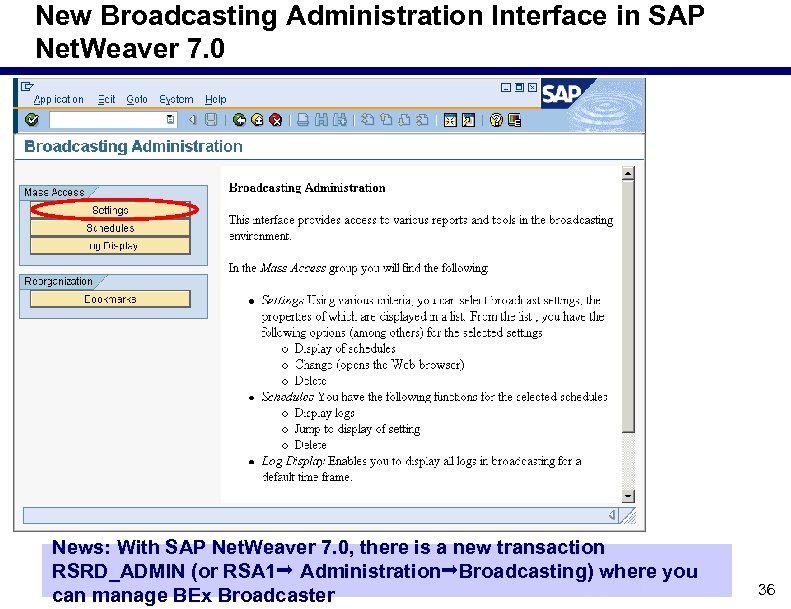 New Broadcasting Administration Interface in SAP Net. Weaver 7. 0 News: With SAP Net. Weaver 7. 0, there is a new transaction RSRD_ADMIN (or RSA 1 Administration Broadcasting) where you can manage BEx Broadcaster 36
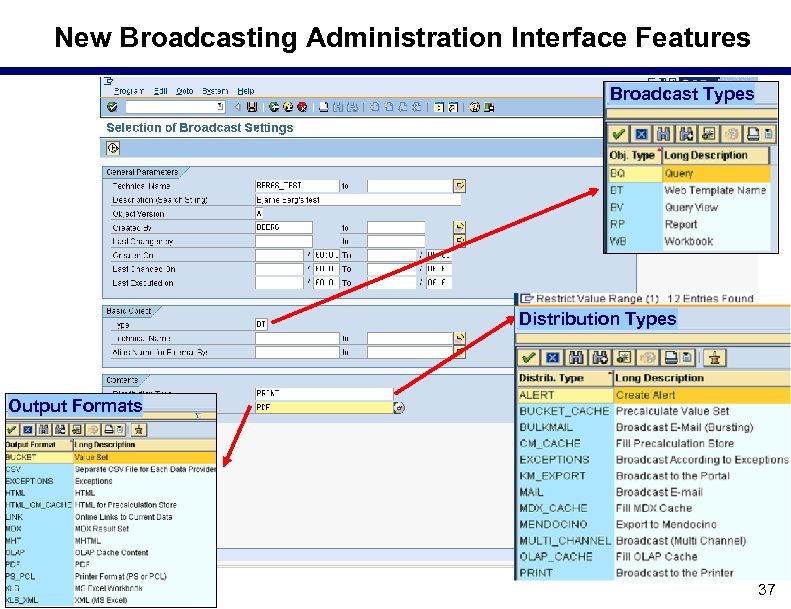 New Broadcasting Administration Interface Features Broadcast Types Distribution Types Output Formats 37
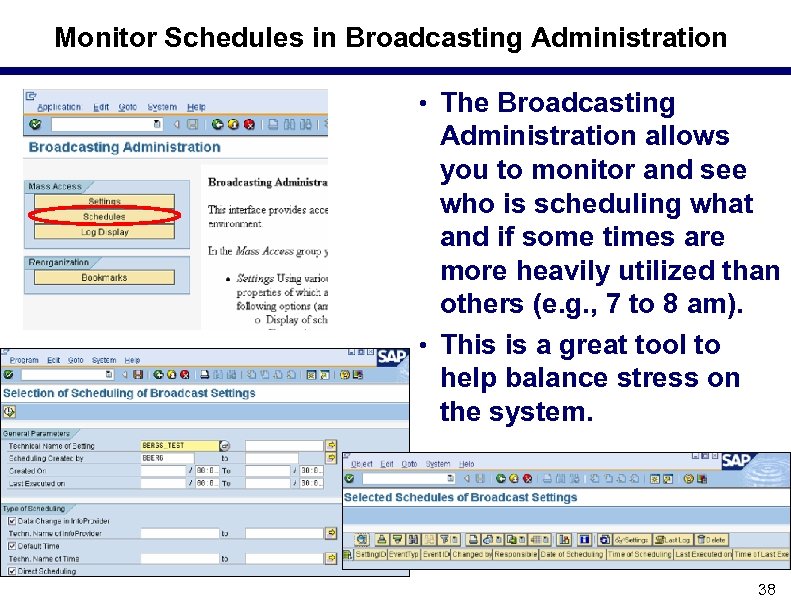 Monitor Schedules in Broadcasting Administration • The Broadcasting Administration allows you to monitor and see who is scheduling what and if some times are more heavily utilized than others (e. g. , 7 to 8 am). • This is a great tool to help balance stress on the system. 38
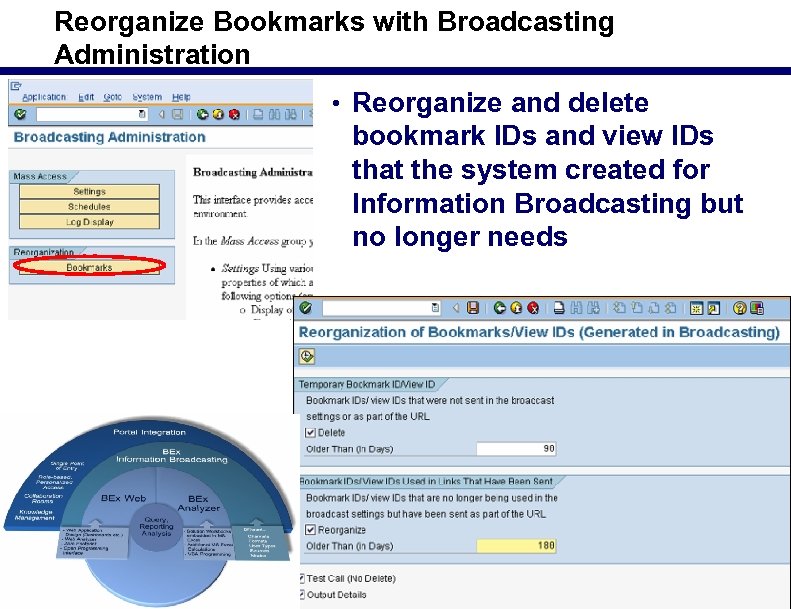 Reorganize Bookmarks with Broadcasting Administration • Reorganize and delete bookmark IDs and view IDs that the system created for Information Broadcasting but no longer needs 39
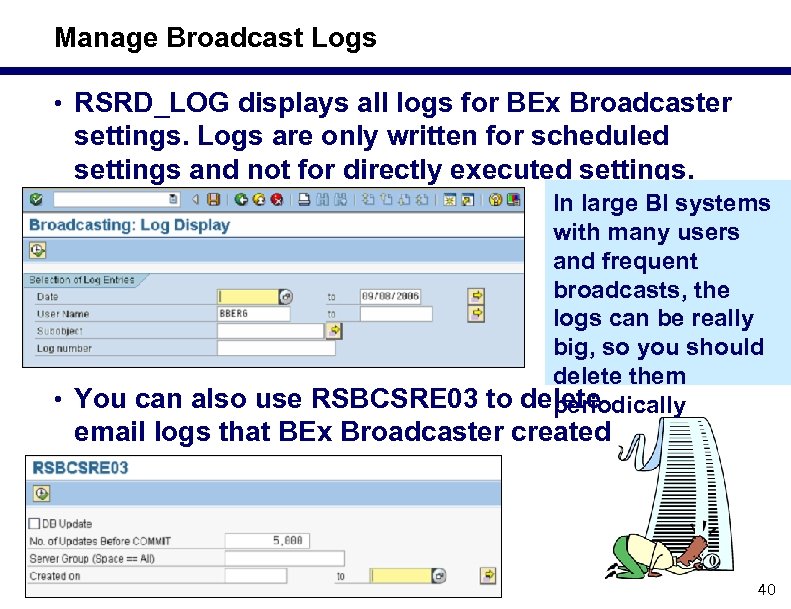 Manage Broadcast Logs • RSRD_LOG displays all logs for BEx Broadcaster settings. Logs are only written for scheduled settings and not for directly executed settings. In large BI systems with many users and frequent broadcasts, the logs can be really big, so you should delete them • You can also use RSBCSRE 03 to delete periodically email logs that BEx Broadcaster created 40
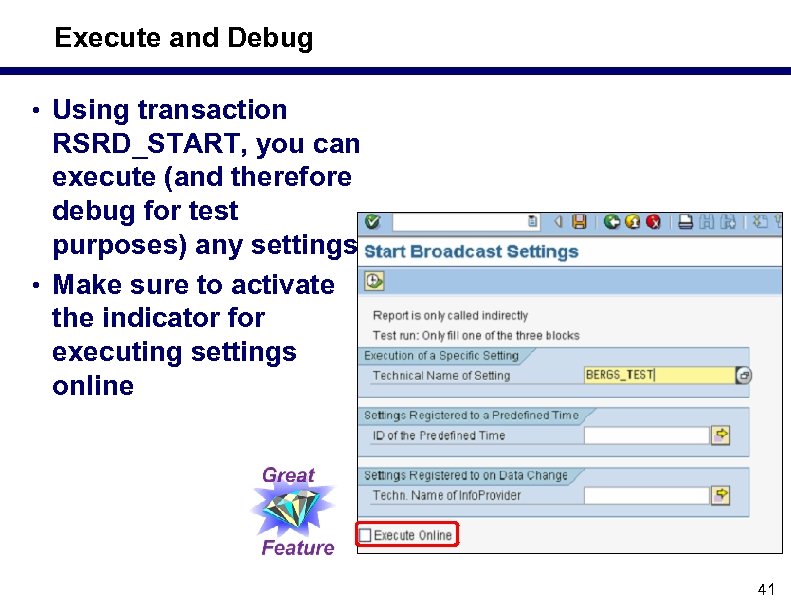 Execute and Debug • Using transaction RSRD_START, you can execute (and therefore debug for test purposes) any settings • Make sure to activate the indicator for executing settings online 41
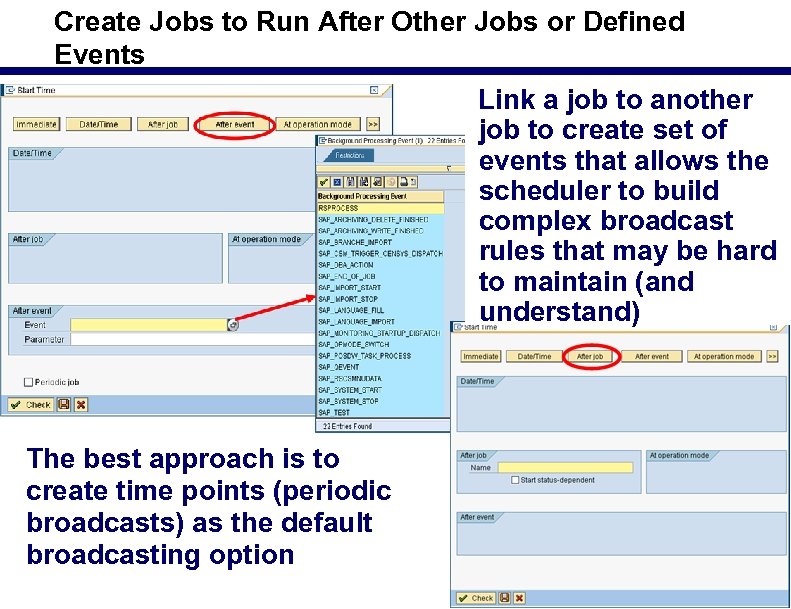 Create Jobs to Run After Other Jobs or Defined Events Link a job to another job to create set of events that allows the scheduler to build complex broadcast rules that may be hard to maintain (and understand) The best approach is to create time points (periodic broadcasts) as the default broadcasting option 42
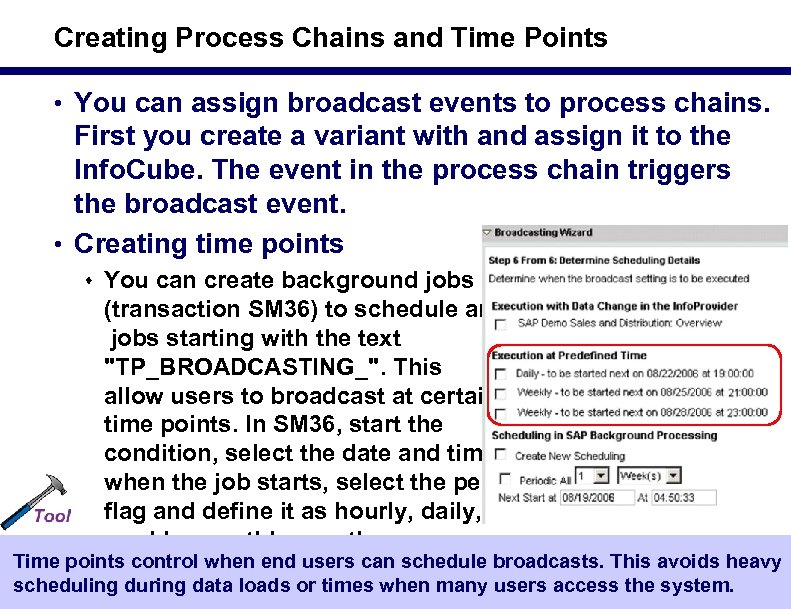 Creating Process Chains and Time Points • You can assign broadcast events to process chains. First you create a variant with and assign it to the Info. Cube. The event in the process chain triggers the broadcast event. • Creating time points s You can create background jobs (transaction SM 36) to schedule any jobs starting with the text "TP_BROADCASTING_". This allow users to broadcast at certain time points. In SM 36, start the condition, select the date and time when the job starts, select the periodic flag and define it as hourly, daily, weekly, monthly, or other. Time points control when end users can schedule broadcasts. This avoids heavy scheduling during data loads or times when many users access the system. 43
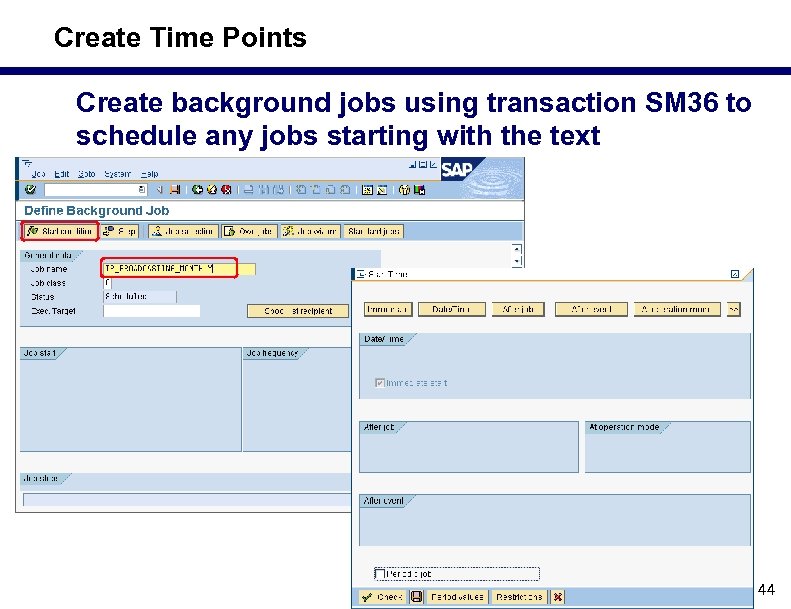 Create Time Points Create background jobs using transaction SM 36 to schedule any jobs starting with the text "TP_BROADCASTING_" 44
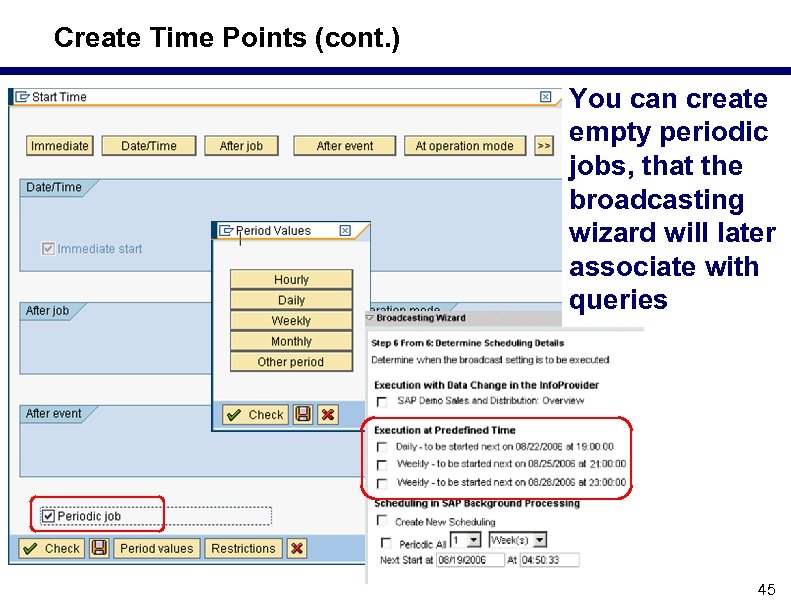 Create Time Points (cont. ) You can create empty periodic jobs, that the broadcasting wizard will later associate with queries 45
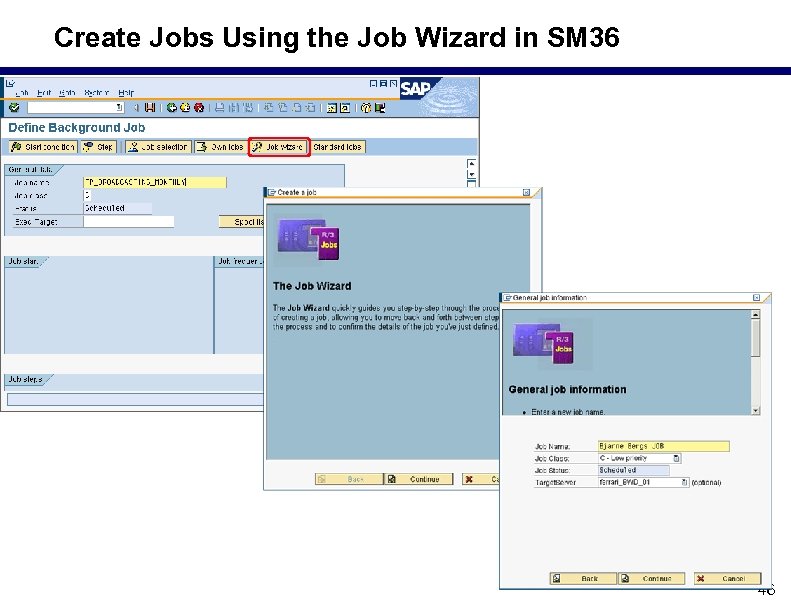 Create Jobs Using the Job Wizard in SM 36 46
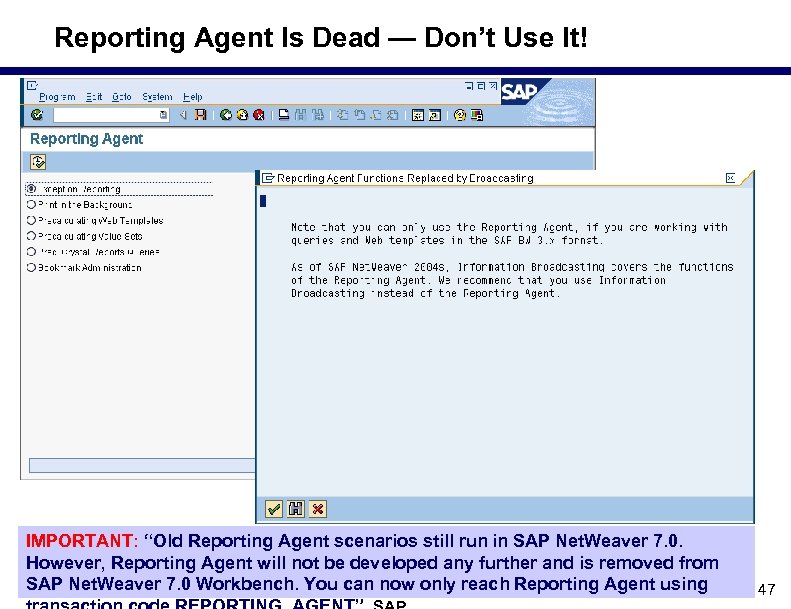 Reporting Agent Is Dead — Don’t Use It! IMPORTANT: “Old Reporting Agent scenarios still run in SAP Net. Weaver 7. 0. However, Reporting Agent will not be developed any further and is removed from SAP Net. Weaver 7. 0 Workbench. You can now only reach Reporting Agent using 47
 Prerequisites for Workbook Precalculation 1. MS Office XP (or. NET framework version 1. 1 or later) 2. MS Excel 2000 (or later) 3. SAP BW workbook precalculation services s Note: servers with this installed will be visible under the transaction RSPRECADMIN and you can also perform server load balancing 4. SAPGUI 6. 20/6. 40 with BEx This is not needed for standard broadcasting of Web queries or web applications, only for workbooks. Note: can you avoid the precalculation server if you send broadcasts as “XML for Excel” available in Service Pack 8 for SAP Net. Weaver 7. 0 48
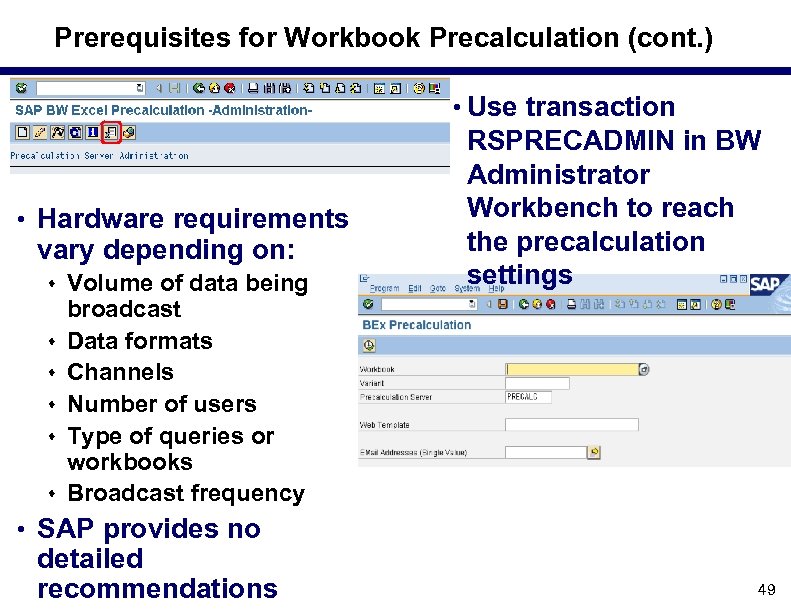 Prerequisites for Workbook Precalculation (cont. ) • Use transaction • Hardware requirements vary depending on: s Volume of data being s s s RSPRECADMIN in BW Administrator Workbench to reach the precalculation settings broadcast Data formats Channels Number of users Type of queries or workbooks Broadcast frequency • SAP provides no detailed recommendations 49
 What We'll Cover. . . • What is BEx Broadcaster and what can it do? • The Broadcasting wizard • Developer options for BEx Broadcaster • How to manage the Broadcaster • Making it work in real life — lessons learned • Wrap up 50
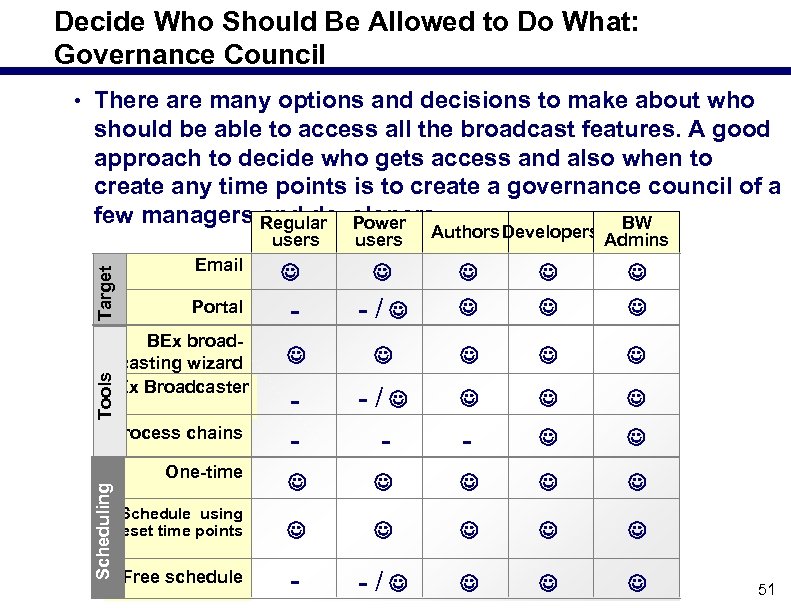 Decide Who Should Be Allowed to Do What: Governance Council • There are many options and decisions to make about who should be able to access all the broadcast features. A good approach to decide who gets access and also when to create any time points is to create a governance council of a few managers Regular Power and developers. BW Target users Authors Developers Admins Email Portal - -/ - -/ - - - -/ Tools BEx broad casting wizard BEx Broadcaster Process chains One time Scheduling users Schedule using preset time points Free schedule 51
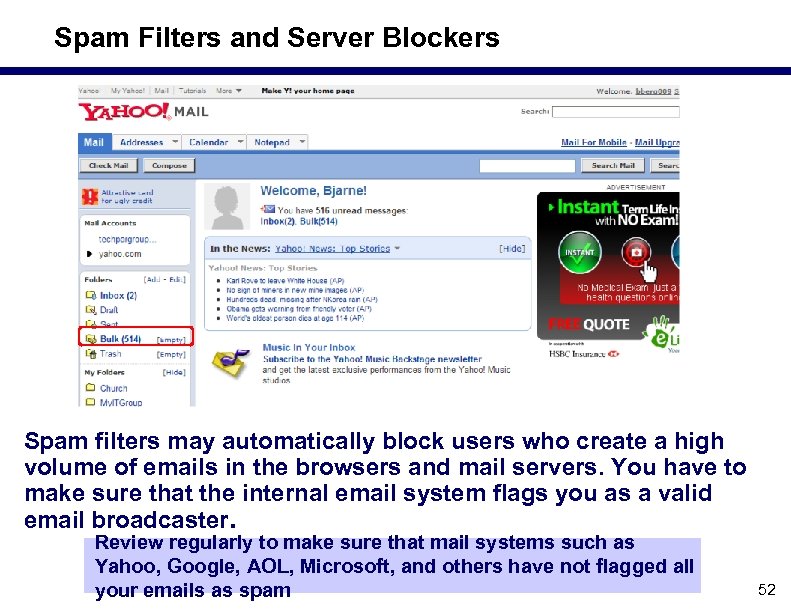 Spam Filters and Server Blockers Spam filters may automatically block users who create a high volume of emails in the browsers and mail servers. You have to make sure that the internal email system flags you as a valid email broadcaster. Review regularly to make sure that mail systems such as Yahoo, Google, AOL, Microsoft, and others have not flagged all your emails as spam 52
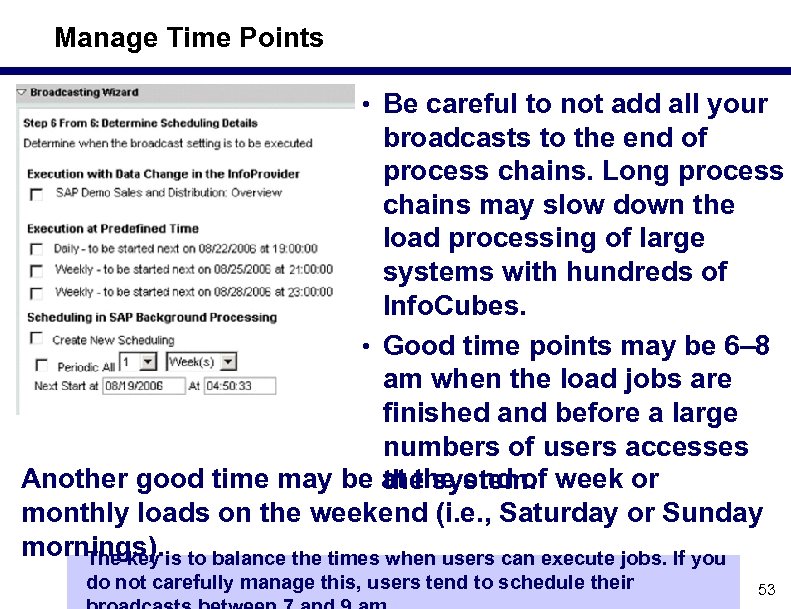 Manage Time Points • Be careful to not add all your broadcasts to the end of process chains. Long process chains may slow down the load processing of large systems with hundreds of Info. Cubes. • Good time points may be 6– 8 am when the load jobs are finished and before a large numbers of users accesses Another good time may be at the end of week or the system. monthly loads on the weekend (i. e. , Saturday or Sunday mornings). is to balance the times when users can execute jobs. If you The key do not carefully manage this, users tend to schedule their 53
 Avoid Volumes of Junk • Users tend to schedule queries for distribution and never disable the schedule after it has started to run. This creates mountains of junk that few actually use. • Users who don't want a broadcast tend to simply delete it, or automatically remove the email. So, how do you know if anyone reads the broadcasts? Developers should perform a periodic review of scheduled broadcasts to see if there any candidates for deletion 54
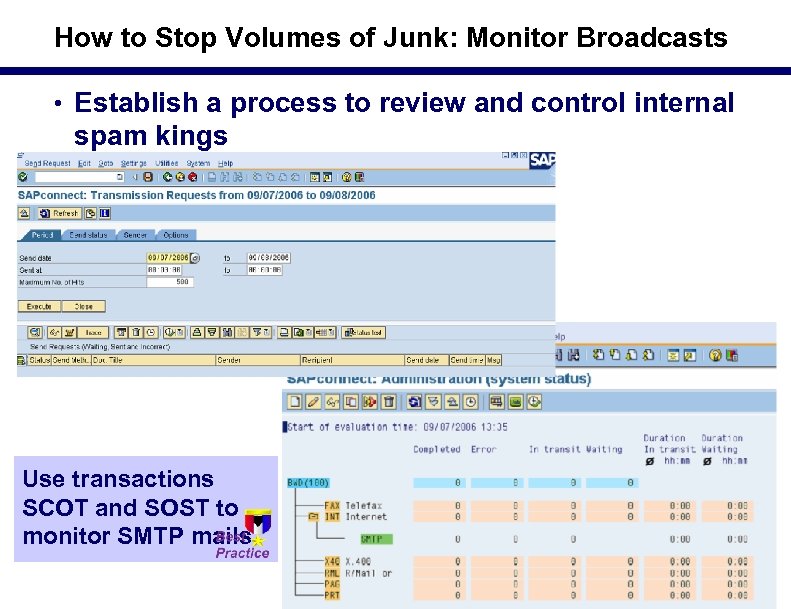 How to Stop Volumes of Junk: Monitor Broadcasts • Establish a process to review and control internal spam kings Use transactions SCOT and SOST to monitor SMTP mails 55
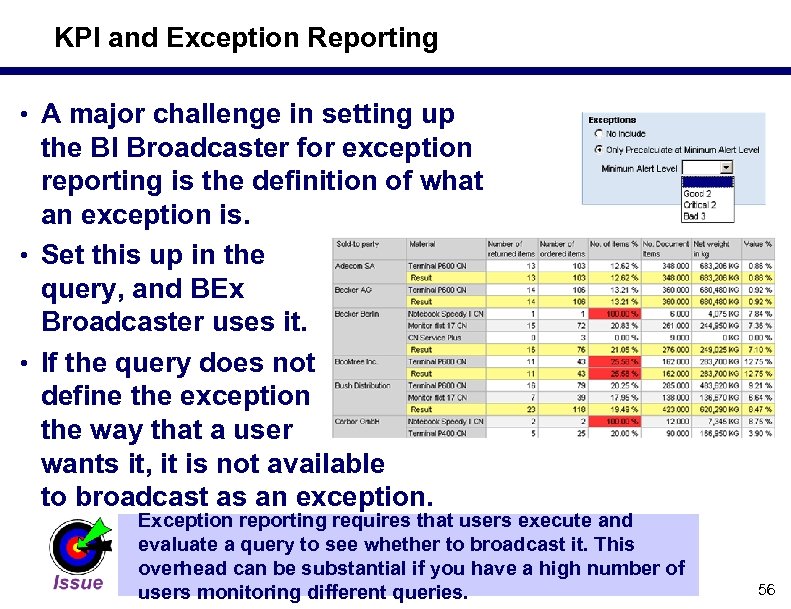 KPI and Exception Reporting • A major challenge in setting up the BI Broadcaster for exception reporting is the definition of what an exception is. • Set this up in the query, and BEx Broadcaster uses it. • If the query does not define the exception the way that a user wants it, it is not available to broadcast as an exception. Exception reporting requires that users execute and evaluate a query to see whether to broadcast it. This overhead can be substantial if you have a high number of users monitoring different queries. 56
 What We'll Cover. . . • What is BEx Broadcaster and what can it do? • The Broadcasting wizard • Developer options for BEx Broadcaster • How to manage the Broadcaster • Making it work in real life — lessons learned • Wrap up 57
 Resources • COMERIT (presentations, articles, accellerators) www. comerit. net • Broadcaster at International Paper, ASUG 2006 – Dr. Berg & Joyce Butler s http: //csc studentweb. lrc. edu/swp/B erg/Articles/ASUG 2006 v 6. ppt 58
 Resources (cont. ) • BEx Broadcaster including BI 7. 0 new features – Dr. Berg & Filip Lemmens s http: //csc studentweb. lrc. edu/swp/Be rg/Articles/Portals_2006_Broadcaste r_v 19. ppt • SAP BEx Broadcaster: How to make it work in practice – Dr. Berg s http: //csc studentweb. lrc. edu/swp/Be rg/articles/broadcaster_v 15. ppt 59
 7 Key Points to Take Home • Do not schedule all your broadcasts after a process • • • chain has completed: It may slow down nightly data loads Control the times users can run reports to avoid high stress on the system Segment the broadcast tools based on the user roles and level of training Monitor the logs carefully and make sure that you control spam kings Do not give free scheduling to a high number of users Be aware that spam filters may catch many of your broadcasts If you are not on SAP Net. Weaver 7. 0, seriously 60
 Your Turn! Dr. Bjarne Berg Director of BI, Comerit Inc. Bberg@comerit. net 61