


 Скачать презентацию 8 1 New Features ANSYS Release 8 1
b21a1461d7aee049c1fb1350f5441468.ppt
- Количество слайдов: 162
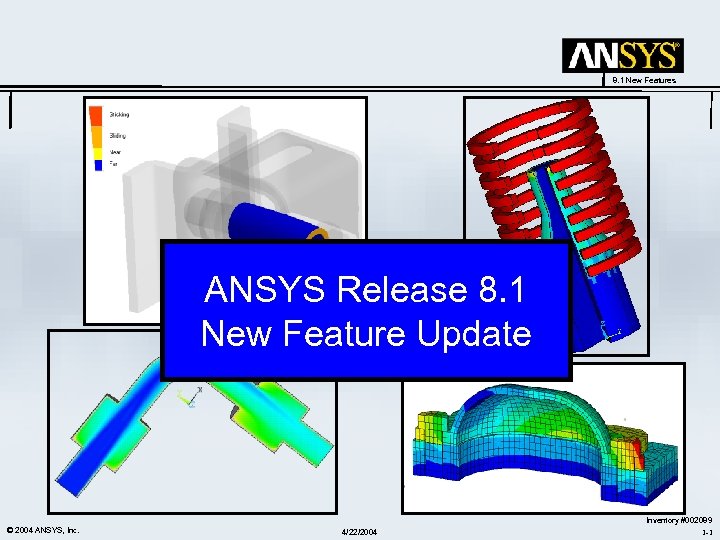 8. 1 New Features ANSYS Release 8. 1 New Feature Update © 2004 ANSYS, Inc. 4/22/2004 Inventory #002089 1 -1
 ANSYS Release 8. 1 New Features • New and Exiting Developments in: – Nonlinear Mechanics – Physics Coupling – Solver Performance – Meshing – CAD Integration – Optimization © 2004 ANSYS, Inc. 4/22/2004 Inventory #002089 1 -2
 ANSYS Release 8. 1 New Features • This presentation is organized into four primary parts highlighting new v 8. 1 features: – ANSYS Mechanical family of products. – ANSYS Multiphysics – ANSYS Workbench – ANSYS Design. Xplorer – Parallel Performance © 2004 ANSYS, Inc. 4/22/2004 Mechanical Multiphysics Workbench Design. Xplorer Parallel Inventory #002089 1 -3
 Mechanical 8. 1 New Features ANSYS Release 8. 1 Mechanical Products New Features Update © 2004 ANSYS, Inc. 4/22/2004 Inventory #002089 1 -4
 Mechanical Release 8. 1: New Features 8. 1 New Features • Nonlinear analysis – Contact Setup and Convergence – Element Technology and Transient Dynamics – Materials Technology and Curve Fitting • Linear analysis – CMS, Constant Material Damping and Linear Dynamics Enhancements • Usability and Miscellaneous – Usability and Other Enhancements – Undocumented Features • Solvers – PCG, DPCG – Sparse – Other solver enhancement © 2004 ANSYS, Inc. 4/22/2004 Inventory #002089 1 -5
 Mechanical 8. 1 New Features Nonlinear Analysis © 2004 ANSYS, Inc. 4/22/2004 Inventory #002089 1 -6
 Mechanical Contact Setup and Convergence 8. 1 New Features • Contact setup: Enhanced contact-pair management allows more efficient setup and execution of a contact analysis. – Benefits ü You can run a partial solution of the model in its initial configuration and postprocess contact quantities (such as contact pressure, penetration, status, etc. ) at time 0, before the actual solution. The new capability allows you to identify contact configurations that may be at risk for convergence difficulties. ü You can reduce initial penetration or gap by physically moving contact nodes towards the target surface. – Commands ü New options on the CNCHECK command • Nonlinear diagnostics: To debug models that experience convergence difficulties due to contact. – Benefits ü New command options allow you to track specific contact quantities during the solution (for example, result items such as contact penetration and chattering level, and some contact setting parameters such as contact stiffness and pinball radius). The contact data are computed on a per-contact-pair basis; that is, they represent a maximum or minimum value for the specified quantity over the entire contact pair. – Commands ü NLHIST command © 2004 ANSYS, Inc. 4/22/2004 Inventory #002089 1 -7
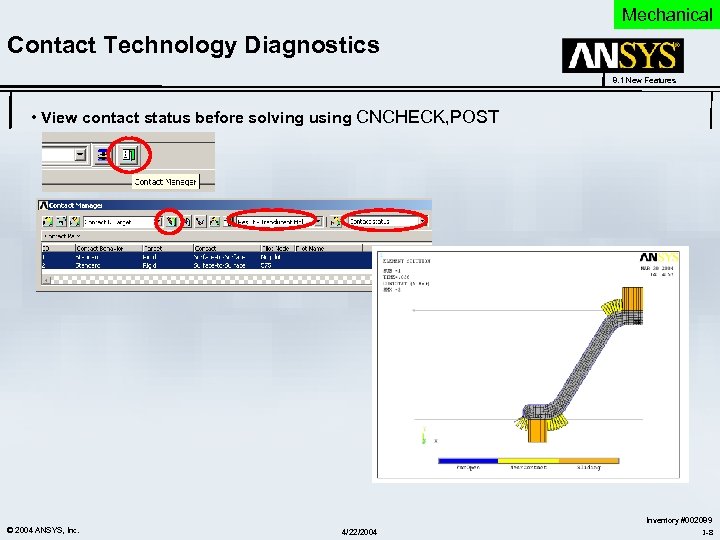 Mechanical Contact Technology Diagnostics 8. 1 New Features • View contact status before solving using CNCHECK, POST © 2004 ANSYS, Inc. 4/22/2004 Inventory #002089 1 -8
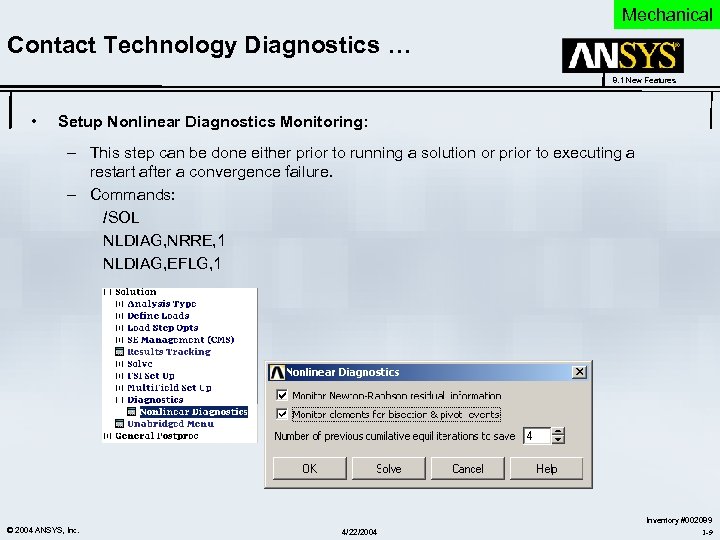 Mechanical Contact Technology Diagnostics … 8. 1 New Features • Setup Nonlinear Diagnostics Monitoring: – This step can be done either prior to running a solution or prior to executing a restart after a convergence failure. – Commands: /SOL NLDIAG, NRRE, 1 NLDIAG, EFLG, 1 © 2004 ANSYS, Inc. 4/22/2004 Inventory #002089 1 -9
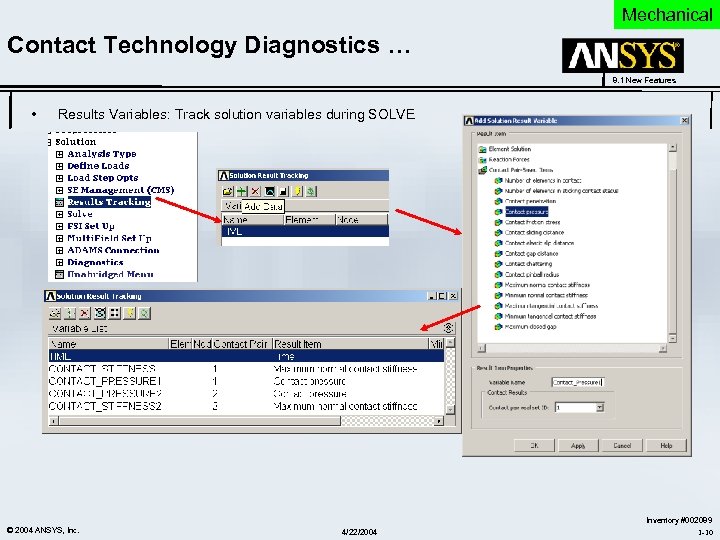 Mechanical Contact Technology Diagnostics … 8. 1 New Features • Results Variables: Track solution variables during SOLVE © 2004 ANSYS, Inc. 4/22/2004 Inventory #002089 1 -10
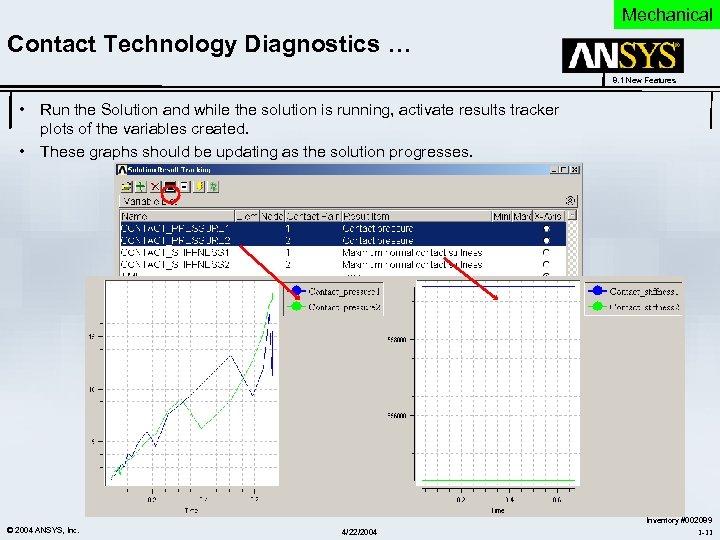 Mechanical Contact Technology Diagnostics … 8. 1 New Features • Run the Solution and while the solution is running, activate results tracker plots of the variables created. • These graphs should be updating as the solution progresses. © 2004 ANSYS, Inc. 4/22/2004 Inventory #002089 1 -11
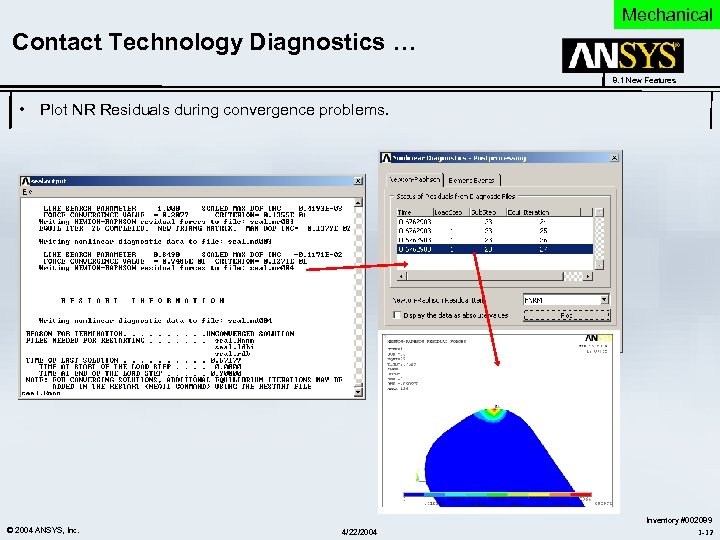 Mechanical Contact Technology Diagnostics … 8. 1 New Features • Plot NR Residuals during convergence problems. © 2004 ANSYS, Inc. 4/22/2004 Inventory #002089 1 -12
 Mechanical Other Contact Enhancements … 8. 1 New Features • An augmented Lagrange algorithm (when KEYOPT(2) = 0) improves convergence with very difficult models. Likewise, improved contact stiffness (which updates automatically per iteration when KEYOPT(10) = 2) allows improved convergence and more accurate solutions. • This release adds CEINTF logic for solid-solid assemblies using MPC contact, providing more accurate solutions. Improved overconstraint detection for MPC contact allows more complex MPC models to solve successfully. • Node-to-surface contact now fully supports all the same multi-physics DOFs that surface-to-surface contact supports. – Benefits ü This offers users more contact options and, when applicable, the possibility of more efficient multi-physics runs. © 2004 ANSYS, Inc. 4/22/2004 Inventory #002089 1 -13
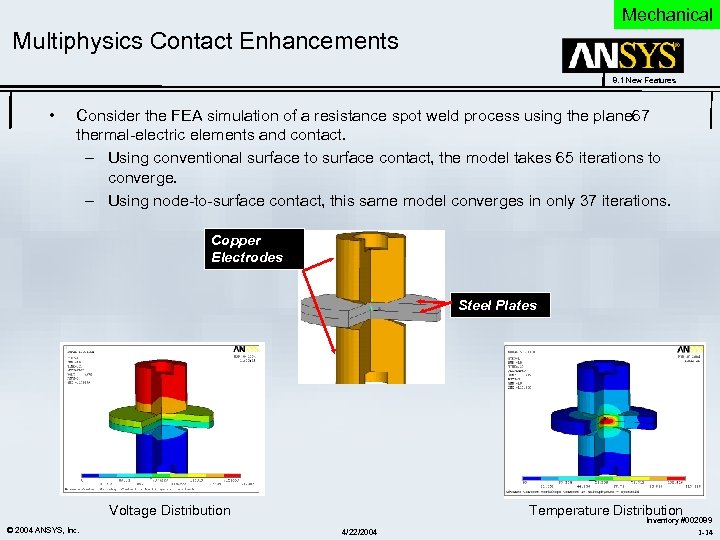 Mechanical Multiphysics Contact Enhancements 8. 1 New Features • Consider the FEA simulation of a resistance spot weld process using the plane 67 thermal-electric elements and contact. – Using conventional surface to surface contact, the model takes 65 iterations to converge. – Using node-to-surface contact, this same model converges in only 37 iterations. Copper Electrodes Steel Plates Voltage Distribution © 2004 ANSYS, Inc. Temperature Distribution 4/22/2004 Inventory #002089 1 -14
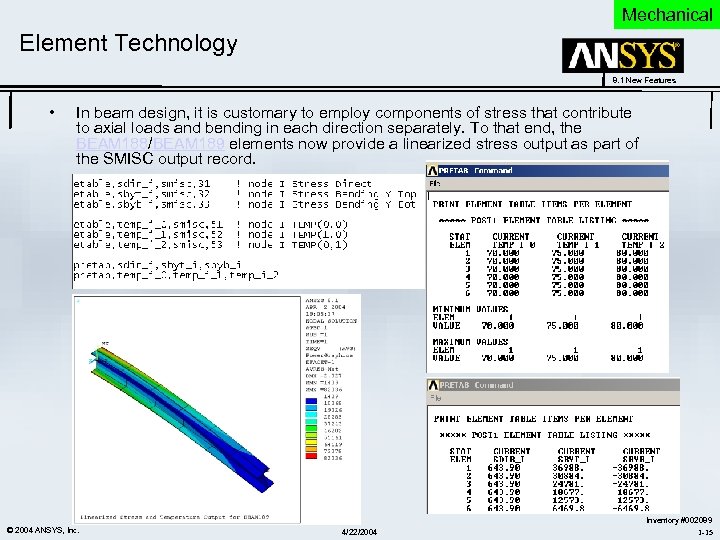 Mechanical Element Technology 8. 1 New Features • In beam design, it is customary to employ components of stress that contribute to axial loads and bending in each direction separately. To that end, the BEAM 188/BEAM 189 elements now provide a linearized stress output as part of the SMISC output record. © 2004 ANSYS, Inc. 4/22/2004 Inventory #002089 1 -15
 Mechanical Element Technology … 8. 1 New Features • The MPC 184 multipoint constraint element's Revolute Joint and Universal Joint options now allow nonlinear stiffness, damping, and hysteretic friction on the unrestricted components of relative motion of the joints. • MPC 184 element with the Rigid option (KEYOPT(1) = 1) is now supported in modal and prestressed modal analyses using the Block Lanczos and QRDAMP eigensolvers (MODOPT, LANB and MODOPT, QRDAMP), and in modal harmonic and modal transient analyses (HROPT, MSUP and TRNOPT, MSUP). © 2004 ANSYS, Inc. 4/22/2004 Inventory #002089 1 -16
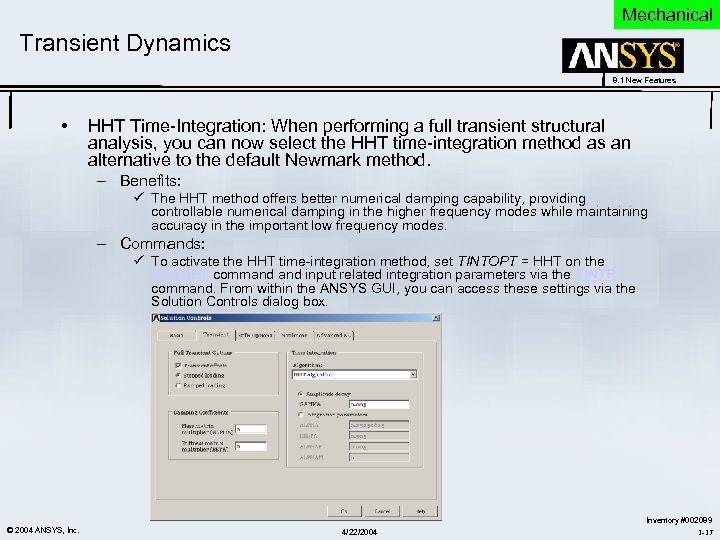 Mechanical Transient Dynamics 8. 1 New Features • HHT Time-Integration: When performing a full transient structural analysis, you can now select the HHT time-integration method as an alternative to the default Newmark method. – Benefits: ü The HHT method offers better numerical damping capability, providing controllable numerical damping in the higher frequency modes while maintaining accuracy in the important low frequency modes. – Commands: ü To activate the HHT time-integration method, set TINTOPT = HHT on the TRNOPT command input related integration parameters via the TINTP command. From within the ANSYS GUI, you can access these settings via the Solution Controls dialog box. © 2004 ANSYS, Inc. 4/22/2004 Inventory #002089 1 -17
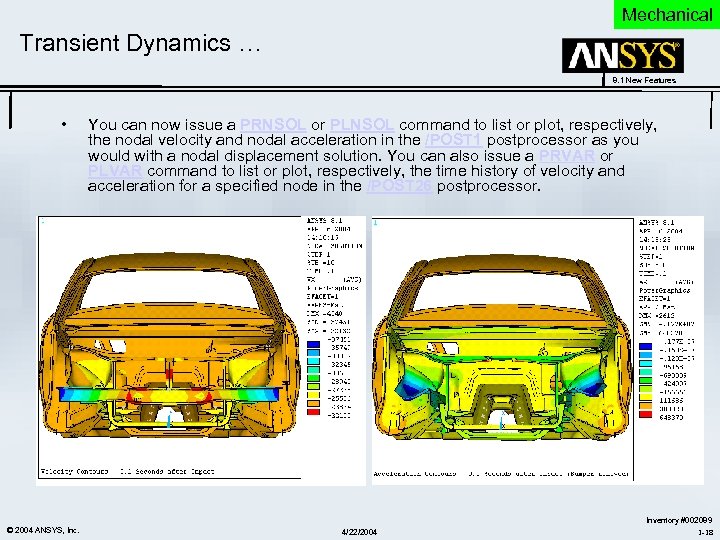 Mechanical Transient Dynamics … 8. 1 New Features • © 2004 ANSYS, Inc. You can now issue a PRNSOL or PLNSOL command to list or plot, respectively, the nodal velocity and nodal acceleration in the /POST 1 postprocessor as you would with a nodal displacement solution. You can also issue a PRVAR or PLVAR command to list or plot, respectively, the time history of velocity and acceleration for a specified node in the /POST 26 postprocessor. 4/22/2004 Inventory #002089 1 -18
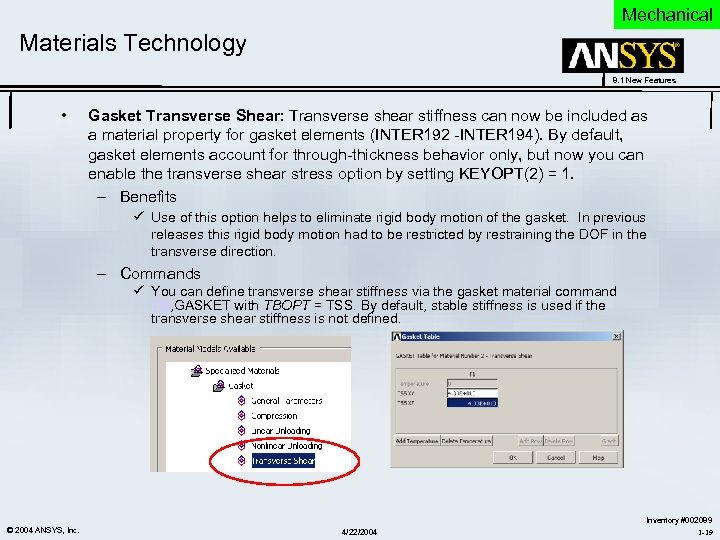 Mechanical Materials Technology 8. 1 New Features • Gasket Transverse Shear: Transverse shear stiffness can now be included as a material property for gasket elements (INTER 192 -INTER 194). By default, gasket elements account for through-thickness behavior only, but now you can enable the transverse shear stress option by setting KEYOPT(2) = 1. – Benefits ü Use of this option helps to eliminate rigid body motion of the gasket. In previous releases this rigid body motion had to be restricted by restraining the DOF in the transverse direction. – Commands ü You can define transverse shear stiffness via the gasket material command TB, GASKET with TBOPT = TSS. By default, stable stiffness is used if the transverse shear stiffness is not defined. © 2004 ANSYS, Inc. 4/22/2004 Inventory #002089 1 -19
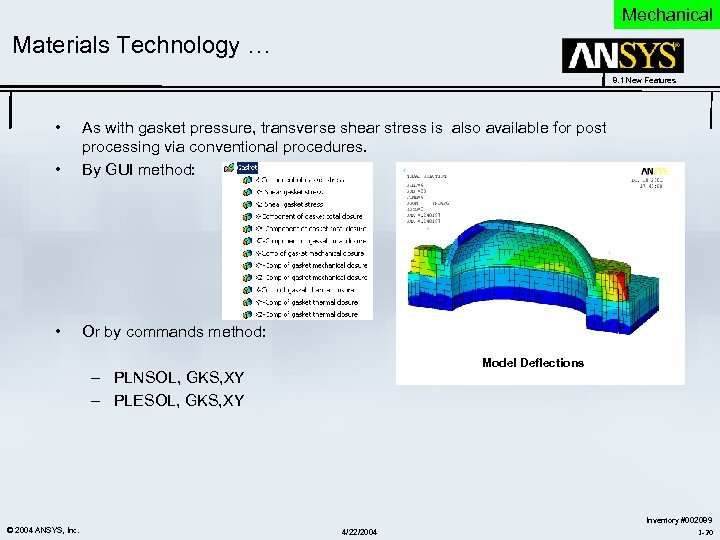 Mechanical Materials Technology … 8. 1 New Features • • As with gasket pressure, transverse shear stress is also available for post processing via conventional procedures. By GUI method: • Or by commands method: Model Deflections – PLNSOL, GKS, XY – PLESOL, GKS, XY © 2004 ANSYS, Inc. 4/22/2004 Inventory #002089 1 -20
 Mechanical Curve Fitting Enhancement 8. 1 New Features • The Curve Fitting Tool (TBFT) now allows selected coefficients to be fixed. This is very useful, especially for viscoelasticity and creep. – Benefits ü Viscoelasticity: Solve for one temperature, fix all of the coefficients except for the shift coefficients and then solve for each new temperature. This simplifies the solution. ü Creep: If the creep data is temperature independent, set the temperature coefficient to zero and fix it. ü Hyperelasticity: First solve for a lower order model (e. g. , 2 nd order Ogden), then solve for a higher order model (e. g. , 3 rd order Ogden) after fixing the first few coefficients of the lower order model (e. g. , the first 4 coefficients from the 2 nd order Ogden model). © 2004 ANSYS, Inc. 4/22/2004 Inventory #002089 1 -21
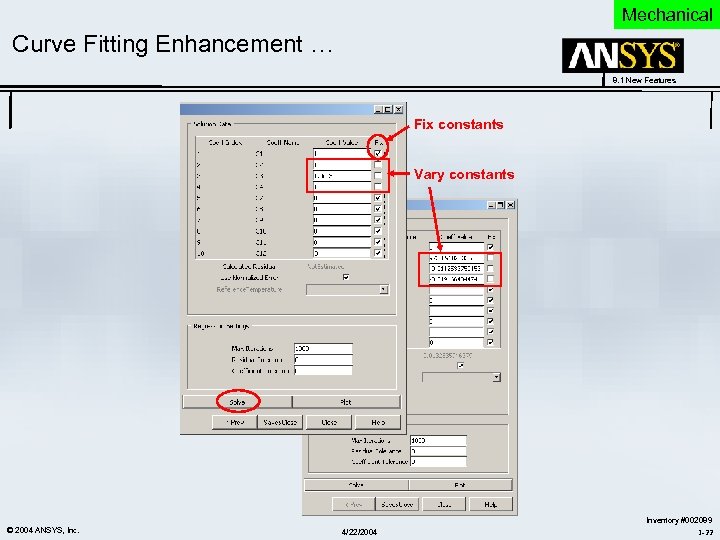 Mechanical Curve Fitting Enhancement … 8. 1 New Features Fix constants Vary constants © 2004 ANSYS, Inc. 4/22/2004 Inventory #002089 1 -22
 Mechanical 8. 1 New Features Linear Dynamics © 2004 ANSYS, Inc. 4/22/2004 Inventory #002089 1 -23
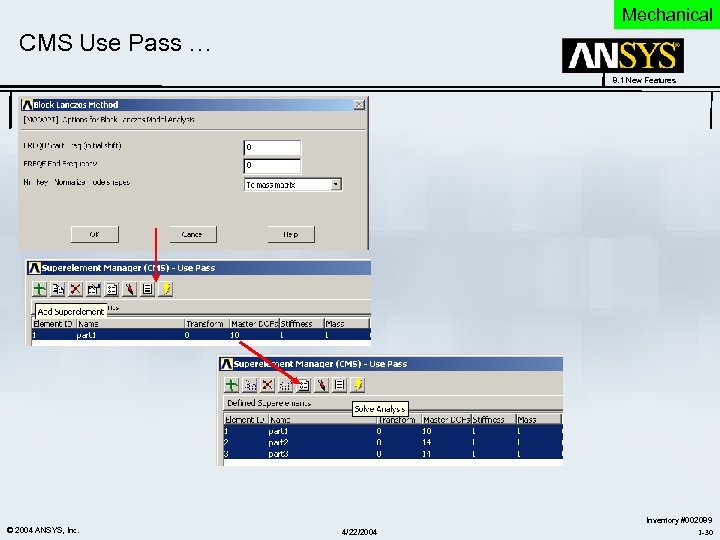
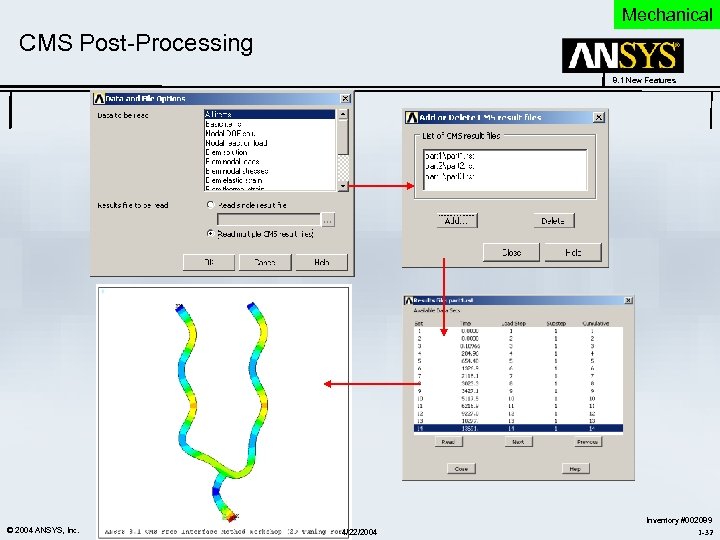
 Mechanical CMS Analysis 8. 1 New Features • • © 2004 ANSYS, Inc. General Idea – Modal Representation: Describe the motion separately over each of the substructures (components). – Synthesis: Constrain the components to work together as a single structure by satisfying inter-component compatibility and equilibrium constraints. Why use CMS ? – Flexibility: If only a part of a large assembly needs redesigned, such as the landing gear of an aircraft assembly, CMS provides the flexibility to just modify that Component, landing gear in this case, and do a CMS use pass run to get the response of the full assembly. – Better Preliminary Analyses: For example, car companies have CMS files for various car body parts such as roofs, doors panels, et al. Using CMS they are able to find out the response of a full model car configuration by selecting a door and a roof from different door and roof models that they already have CAE data for. – Optimize Designs: Different groups are free to design different parts allowing for optimized designs 4/22/2004 Inventory #002089 1 -24
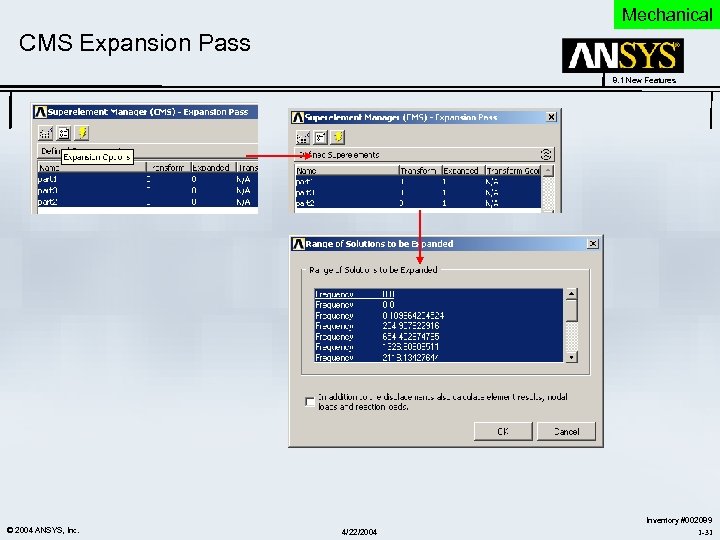
 Mechanical CMS Enhancement 8. 1 New Features • Free-interface method: ANSYS now supports the free-interface CMS analysis method. The new method allows unconstrained interface nodes and considers rigid body modes in the CMS superelement generation pass. – Benefits ü While the fixed-interface method (ANSYS 8. 0) is preferable in most CMS analyses, ANSYS recommends the free-interface method when your analysis requires more accurate eigenvalues computed at the mid- to high-end of the spectrum. ü With the free-interface method, the matrix employed for CMS transformations is different than that for the fixed-interface method • Expand all eigen modes: You can now expand CMS superelement eigen modes 1 through N (that is, between a specified beginning and ending time or frequency range) in a single solve step, instead of expanding a single mode at each solve step. • Prestressed modal analysis with CMS superelements: The prestressed condition of a component structure can now be accounted for in the CMS superelement generation. Both fixed- and free-interface methods support the generation of prestressed CMS superelements. © 2004 ANSYS, Inc. 4/22/2004 Inventory #002089 1 -25
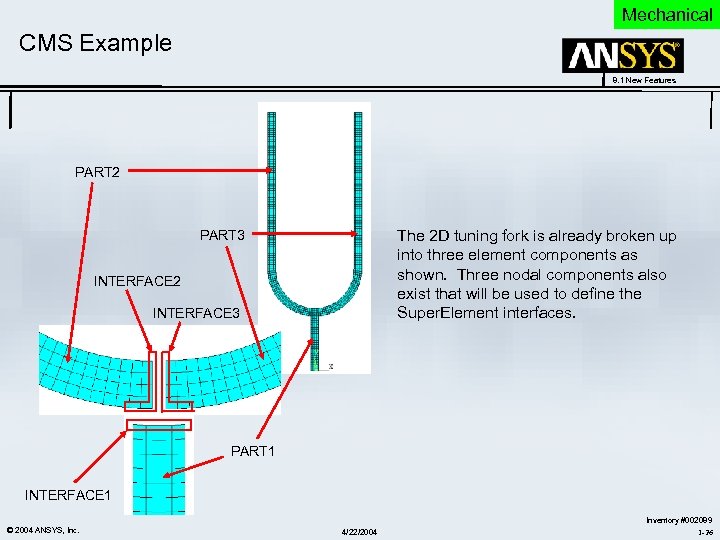 Mechanical CMS Example 8. 1 New Features PART 2 The 2 D tuning fork is already broken up into three element components as shown. Three nodal components also exist that will be used to define the Super. Element interfaces. PART 3 INTERFACE 2 INTERFACE 3 PART 1 INTERFACE 1 © 2004 ANSYS, Inc. 4/22/2004 Inventory #002089 1 -26
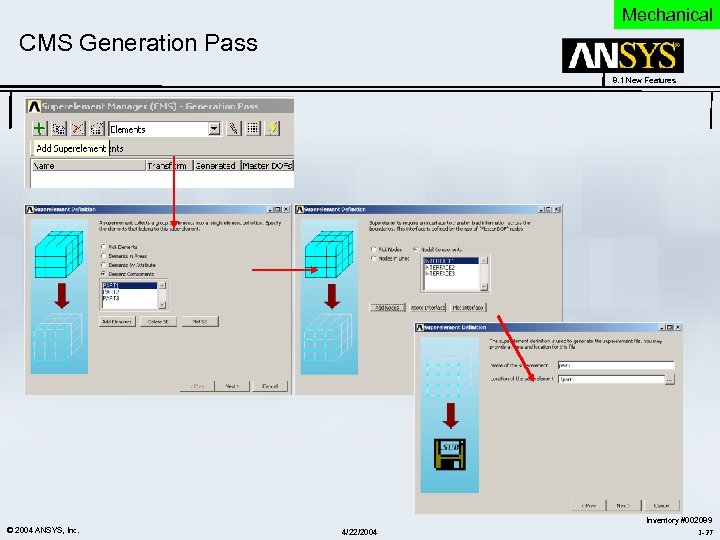 Mechanical CMS Generation Pass 8. 1 New Features © 2004 ANSYS, Inc. 4/22/2004 Inventory #002089 1 -27
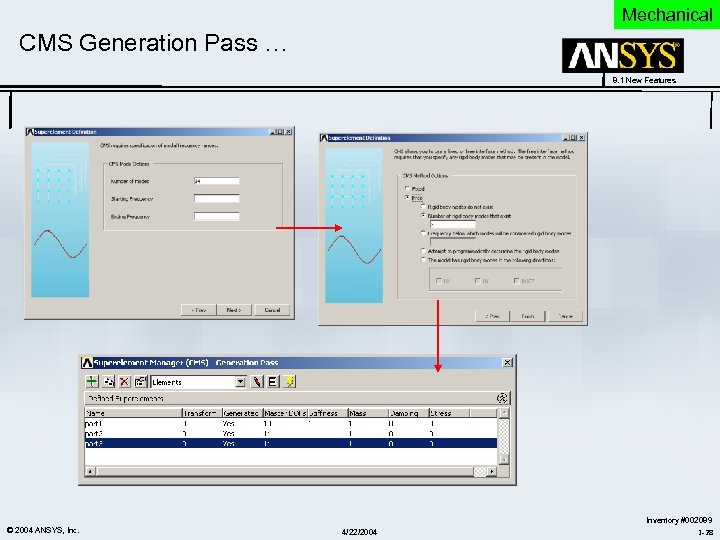 Mechanical CMS Generation Pass … 8. 1 New Features © 2004 ANSYS, Inc. 4/22/2004 Inventory #002089 1 -28
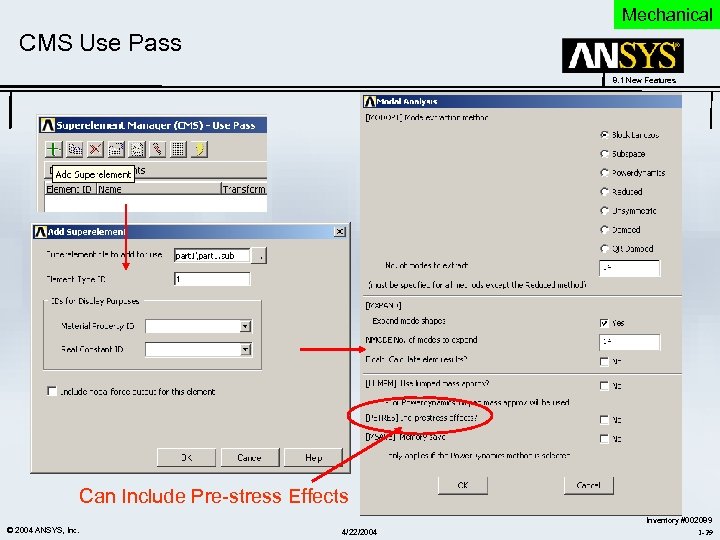 Mechanical CMS Use Pass 8. 1 New Features Can Include Pre-stress Effects © 2004 ANSYS, Inc. 4/22/2004 Inventory #002089 1 -29
 Mechanical CMS Use Pass … 8. 1 New Features © 2004 ANSYS, Inc. 4/22/2004 Inventory #002089 1 -30
 Mechanical CMS Expansion Pass 8. 1 New Features © 2004 ANSYS, Inc. 4/22/2004 Inventory #002089 1 -31
 Mechanical CMS Post-Processing 8. 1 New Features © 2004 ANSYS, Inc. 4/22/2004 Inventory #002089 1 -32
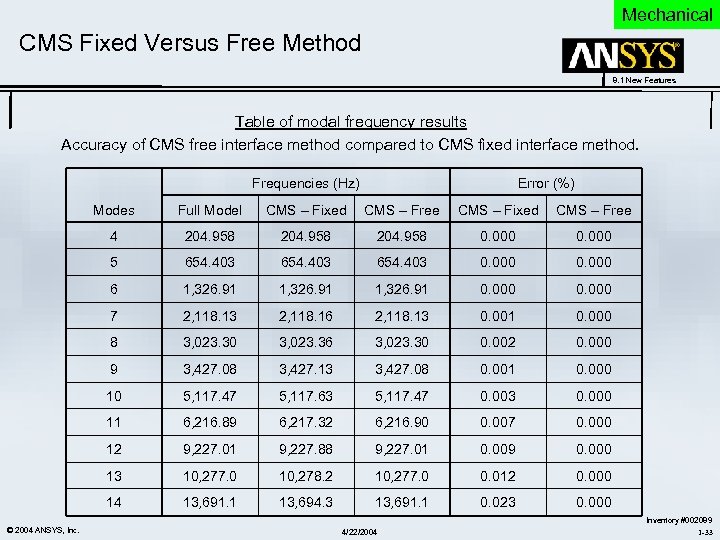 Mechanical CMS Fixed Versus Free Method 8. 1 New Features Table of modal frequency results Accuracy of CMS free interface method compared to CMS fixed interface method. Frequencies (Hz) Error (%) Modes CMS – Fixed CMS – Free 4 204. 958 0. 000 5 654. 403 0. 000 6 1, 326. 91 0. 000 7 2, 118. 13 2, 118. 16 2, 118. 13 0. 001 0. 000 8 3, 023. 30 3, 023. 36 3, 023. 30 0. 002 0. 000 9 3, 427. 08 3, 427. 13 3, 427. 08 0. 001 0. 000 10 5, 117. 47 5, 117. 63 5, 117. 47 0. 003 0. 000 11 6, 216. 89 6, 217. 32 6, 216. 90 0. 007 0. 000 12 9, 227. 01 9, 227. 88 9, 227. 01 0. 009 0. 000 13 10, 277. 0 10, 278. 2 10, 277. 0 0. 012 0. 000 14 © 2004 ANSYS, Inc. Full Model 13, 691. 1 13, 694. 3 13, 691. 1 0. 023 0. 000 4/22/2004 Inventory #002089 1 -33
 Mechanical PSD Analysis and Constant Material Damping 8. 1 New Features • Equivalent Stress for PSD Analysis: The calculation of equivalent stress (SEQV) has been improved for random vibration (PSD) analyses using the Segalman-Reese algorithm. Principal stresses and stress intensity (S 1, S 2, S 3, and SINT) are no longer available. • Support is now available for full (ANTYPE, HARM and HROPT, FULL) and modal harmonic (ANTYPE, HARM and HROPT, MSUP) analyses when several materials, each having their own damping ratio that remains constant with respect to the excitation frequency, are present. An enhanced MP command supports the new capability. – When constant damping ratios are specified (DMPRAT and MP, DMPR) in a frequencyresponse analysis, they are incorporated into the damping matrix automatically. – Only the QR damped eigensolver (MODOPT, QRDA) supports the material-dependent constant damping ratio application in modal superposition harmonic analyses. – Power Spectral Density (PSD) and Multi-Point Response Spectrum (MPRS) analyses do not support constant material damping for multiple materials © 2004 ANSYS, Inc. 4/22/2004 Inventory #002089 1 -34
 Mechanical 8. 1 New Features Usability and Miscellaneous © 2004 ANSYS, Inc. 4/22/2004 Inventory #002089 1 -35
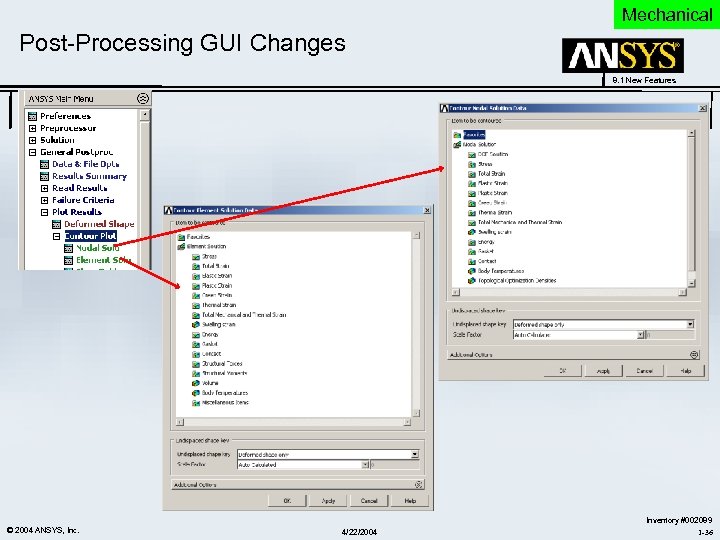 Mechanical Post-Processing GUI Changes 8. 1 New Features © 2004 ANSYS, Inc. 4/22/2004 Inventory #002089 1 -36
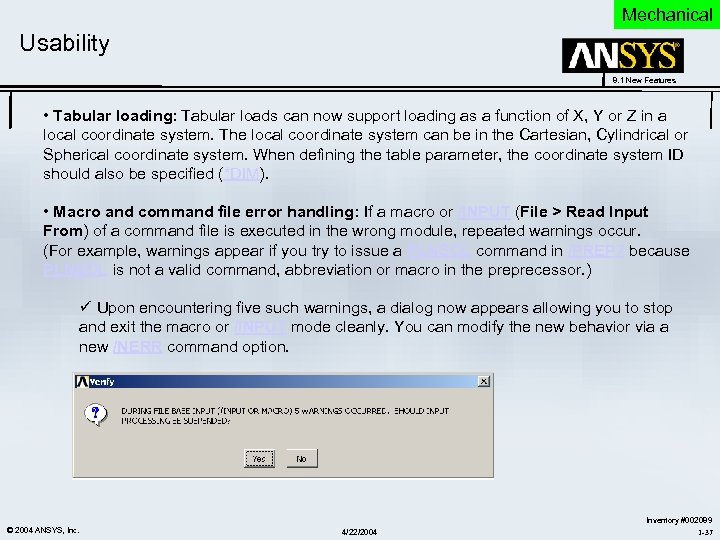 Mechanical Usability 8. 1 New Features • Tabular loading: Tabular loads can now support loading as a function of X, Y or Z in a local coordinate system. The local coordinate system can be in the Cartesian, Cylindrical or Spherical coordinate system. When defining the table parameter, the coordinate system ID should also be specified (*DIM). • Macro and command file error handling: If a macro or /INPUT (File > Read Input From) of a command file is executed in the wrong module, repeated warnings occur. (For example, warnings appear if you try to issue a PLNSOL command in /PREP 7 because PLNSOL is not a valid command, abbreviation or macro in the preprecessor. ) ü Upon encountering five such warnings, a dialog now appears allowing you to stop and exit the macro or /INPUT mode cleanly. You can modify the new behavior via a new /NERR command option. © 2004 ANSYS, Inc. 4/22/2004 Inventory #002089 1 -37
 Mechanical Other Enhancements 8. 1 New Features • Heat Transfer – PLANE 55 -- A thickness option has been added for this element. This option is useful for applications (such as turbomachinery) where 2 -D models need to be coupled with 3 -D regions. – SOLID 87 -- An option (KEYOPT(5) = 1) has been added to use a consistent surface convection load matrix. The new option provides a more accurate solution on surfaces with large thermal gradients. © 2004 ANSYS, Inc. 4/22/2004 Inventory #002089 1 -38
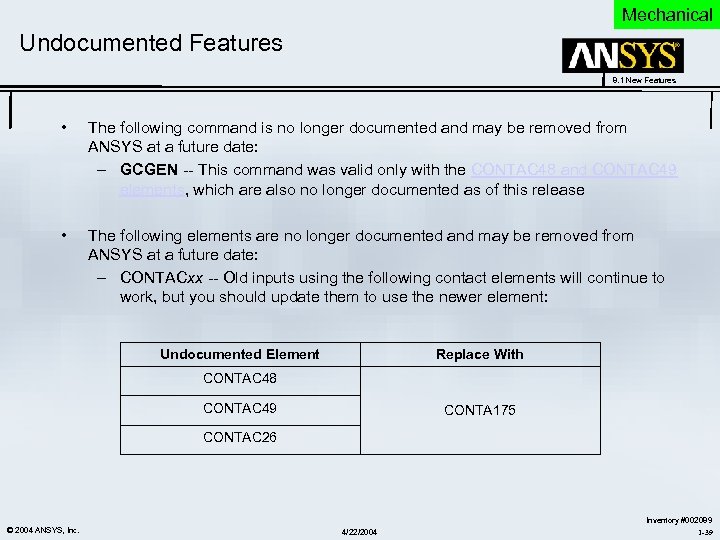 Mechanical Undocumented Features 8. 1 New Features • The following command is no longer documented and may be removed from ANSYS at a future date: – GCGEN -- This command was valid only with the CONTAC 48 and CONTAC 49 elements, which are also no longer documented as of this release • The following elements are no longer documented and may be removed from ANSYS at a future date: – CONTACxx -- Old inputs using the following contact elements will continue to work, but you should update them to use the newer element: Undocumented Element Replace With CONTAC 48 CONTAC 49 CONTA 175 CONTAC 26 © 2004 ANSYS, Inc. 4/22/2004 Inventory #002089 1 -39
 Mechanical 8. 1 New Features Solvers © 2004 ANSYS, Inc. 4/22/2004 Inventory #002089 1 -40
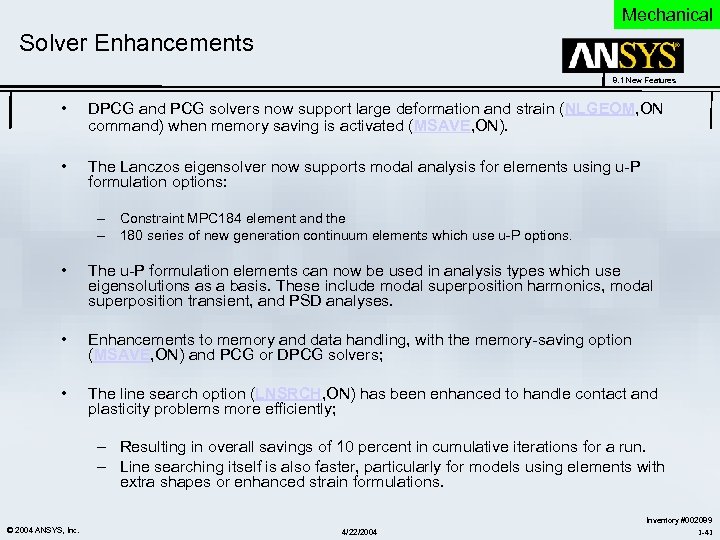 Mechanical Solver Enhancements 8. 1 New Features • DPCG and PCG solvers now support large deformation and strain (NLGEOM, ON command) when memory saving is activated (MSAVE, ON). • The Lanczos eigensolver now supports modal analysis for elements using u-P formulation options: – Constraint MPC 184 element and the – 180 series of new generation continuum elements which use u-P options. • The u-P formulation elements can now be used in analysis types which use eigensolutions as a basis. These include modal superposition harmonics, modal superposition transient, and PSD analyses. • Enhancements to memory and data handling, with the memory-saving option (MSAVE, ON) and PCG or DPCG solvers; • The line search option (LNSRCH, ON) has been enhanced to handle contact and plasticity problems more efficiently; – Resulting in overall savings of 10 percent in cumulative iterations for a run. – Line searching itself is also faster, particularly for models using elements with extra shapes or enhanced strain formulations. © 2004 ANSYS, Inc. 4/22/2004 Inventory #002089 1 -41
 4/22/2004
 Multiphysics 8. 1 New Features ANSYS Multiphysics (Including ANSYS Emag & FLOTRAN CFD) V 8. 1 New Features © 2004 ANSYS, Inc. 4/22/2004 Inventory #002089 1 -43
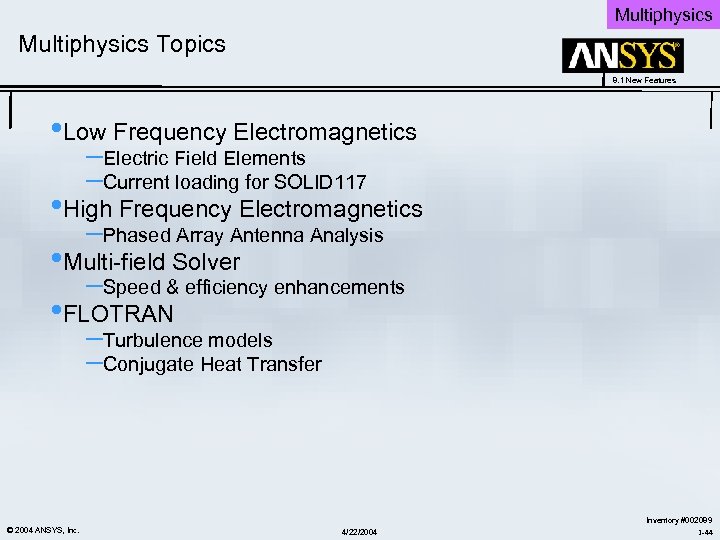 Multiphysics Topics 8. 1 New Features • Low Frequency Electromagnetics –Electric Field Elements –Current loading for SOLID 117 • High Frequency Electromagnetics –Phased Array Antenna Analysis • Multi-field Solver –Speed & efficiency enhancements • FLOTRAN –Turbulence models –Conjugate Heat Transfer © 2004 ANSYS, Inc. 4/22/2004 Inventory #002089 1 -44
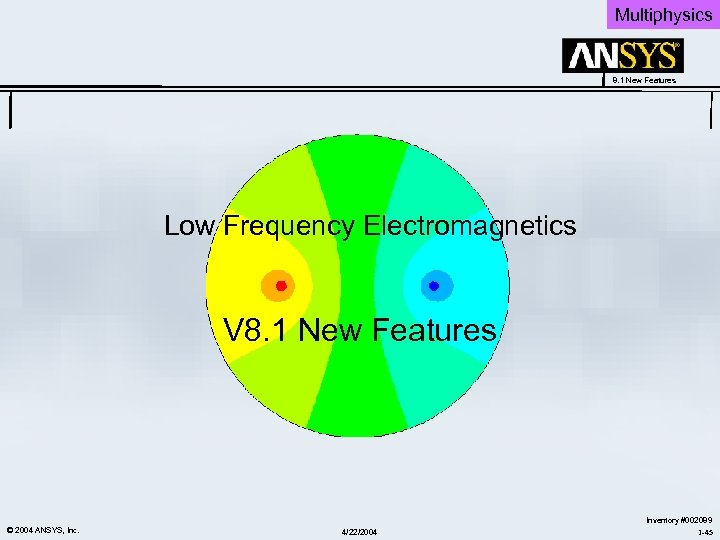 Multiphysics 8. 1 New Features Low Frequency Electromagnetics V 8. 1 New Features © 2004 ANSYS, Inc. 4/22/2004 Inventory #002089 1 -45
 Multiphysics New Electric Field Analysis Capabilities 8. 1 New Features Analysis Requirement: • Many real world electric field applications use “lossy” (mildly conductive) dielectric materials and require a quasistatic electric analysis to simultaneously consider capacitive and conduction effects. New Features to Meet Requirement: • Three new high-order electric elements, PLANE 230, SOLID 231, and SOLID 232, are now available for a low frequency electric field analysis. • The elements are applicable to steady-state electric conduction, timeharmonic and transient quasistatic electric field analyses. • The electrostatic PLANE 121, SOLID 122 and SOLID 123 elements have been enhanced to support a time-harmonic quasistatic analysis. Capability: • You can now perform an electric field analysis that simultaneously takes into account the conduction and capacitive effects. • The new and enhanced elements also allow you to transfer the calculated electric current and conduction or dielectric heating as sources for subsequent magnetic and thermal analyses respectively. © 2004 ANSYS, Inc. 4/22/2004 Inventory #002089 1 -46
 Multiphysics New Electric Field Analysis Applications 8. 1 New Features • General Applications: • Biotissue Medical Applications: – Lossy capacitors – Microwave passive components (when full-wave analysis can be avoided) – Transient effects in semiconductor devices – High voltage insulators – Charge injection devices – Dielectric heating – Particle detection – Detection of malignant tissue – Electric Impedance Tomography (EIT) – Electromyography (EMG) – test muscle response to nervous (electric) stimulation – Angiography – help locate and characterize atherosclerotic lesions – Ablation – RF heating of cardiac tissue to cure rhythm disturbances © 2004 ANSYS, Inc. 4/22/2004 Inventory #002089 1 -47
 Multiphysics New 23 X Electric Field Elements 8. 1 New Features • • • PLANE 230, SOLID 231, SOLID 232 High-order shape functions Material properties: – – – resistivity - MP, RSVX (RSVY, RSVZ) permittivity - MP, PERX (PERY, PERZ) – valid for transient and harmonic analyses loss tangent - MP, LSST – valid for harmonic analysis only Reaction solution: – electric current (AMPS) Analyses: – – – static (steady-state current conduction analysis) transient (quasistatic) harmonic (quasistatic) Load transfer – – © 2004 ANSYS, Inc. heat generation rate to a thermal analysis electric current to a magnetic analysis 4/22/2004 Inventory #002089 1 -48
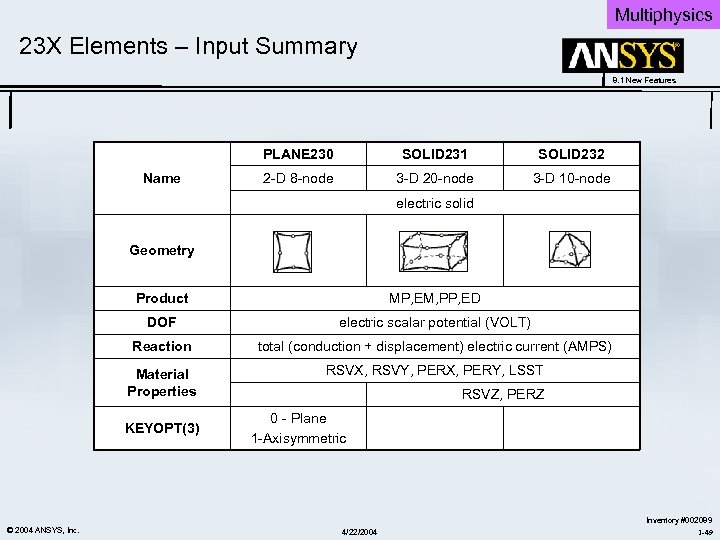 Multiphysics 23 X Elements – Input Summary 8. 1 New Features PLANE 230 Name SOLID 231 SOLID 232 2 -D 8 -node 3 -D 20 -node 3 -D 10 -node electric solid Geometry Product MP, EM, PP, ED DOF electric scalar potential (VOLT) Reaction total (conduction + displacement) electric current (AMPS) Material Properties RSVX, RSVY, PERX, PERY, LSST KEYOPT(3) © 2004 ANSYS, Inc. RSVZ, PERZ 0 - Plane 1 -Axisymmetric 4/22/2004 Inventory #002089 1 -49
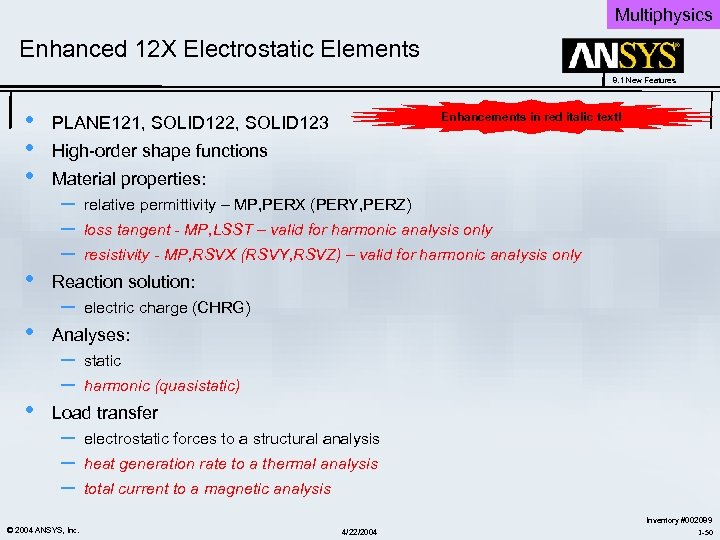 Multiphysics Enhanced 12 X Electrostatic Elements 8. 1 New Features • • • Enhancements in red italic text! PLANE 121, SOLID 122, SOLID 123 High-order shape functions Material properties: – – – relative permittivity – MP, PERX (PERY, PERZ) loss tangent - MP, LSST – valid for harmonic analysis only resistivity - MP, RSVX (RSVY, RSVZ) – valid for harmonic analysis only Reaction solution: – electric charge (CHRG) Analyses: – – static harmonic (quasistatic) Load transfer – – – © 2004 ANSYS, Inc. electrostatic forces to a structural analysis heat generation rate to a thermal analysis total current to a magnetic analysis 4/22/2004 Inventory #002089 1 -50
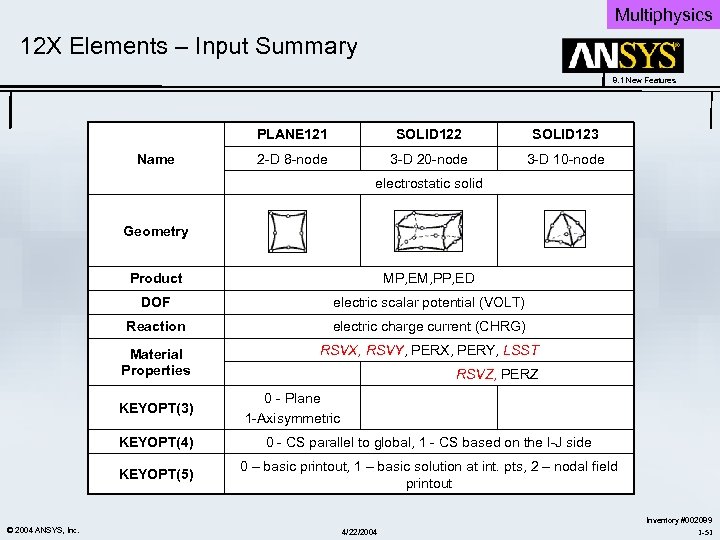 Multiphysics 12 X Elements – Input Summary 8. 1 New Features PLANE 121 Name SOLID 122 SOLID 123 2 -D 8 -node 3 -D 20 -node 3 -D 10 -node electrostatic solid Geometry Product MP, EM, PP, ED DOF electric scalar potential (VOLT) Reaction electric charge current (CHRG) Material Properties RSVX, RSVY, PERX, PERY, LSST KEYOPT(3) RSVZ, PERZ 0 - Plane 1 -Axisymmetric KEYOPT(4) KEYOPT(5) © 2004 ANSYS, Inc. 0 - CS parallel to global, 1 - CS based on the I-J side 0 – basic printout, 1 – basic solution at int. pts, 2 – nodal field printout 4/22/2004 Inventory #002089 1 -51
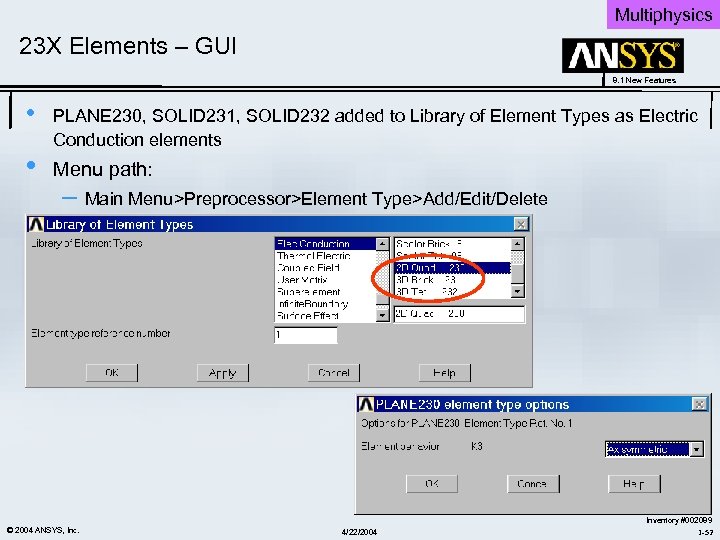 Multiphysics 23 X Elements – GUI 8. 1 New Features • • PLANE 230, SOLID 231, SOLID 232 added to Library of Element Types as Electric Conduction elements Menu path: – Main Menu>Preprocessor>Element Type>Add/Edit/Delete © 2004 ANSYS, Inc. 4/22/2004 Inventory #002089 1 -52
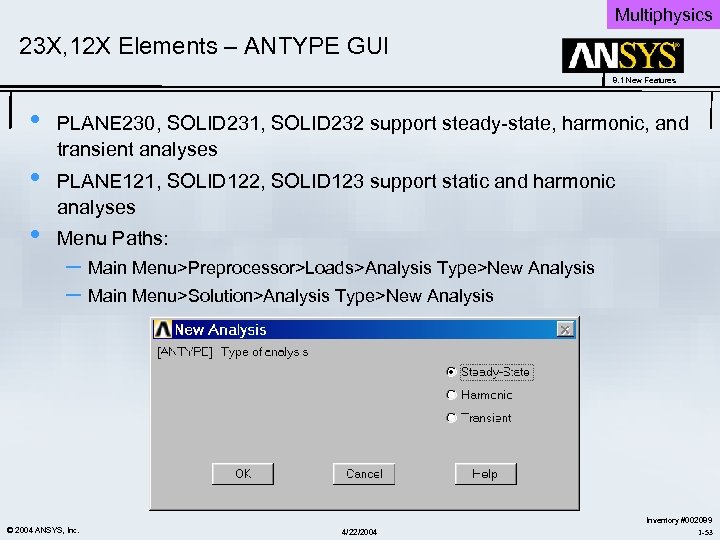 Multiphysics 23 X, 12 X Elements – ANTYPE GUI 8. 1 New Features • • • PLANE 230, SOLID 231, SOLID 232 support steady-state, harmonic, and transient analyses PLANE 121, SOLID 122, SOLID 123 support static and harmonic analyses Menu Paths: – Main Menu>Preprocessor>Loads>Analysis Type>New Analysis – Main Menu>Solution>Analysis Type>New Analysis © 2004 ANSYS, Inc. 4/22/2004 Inventory #002089 1 -53
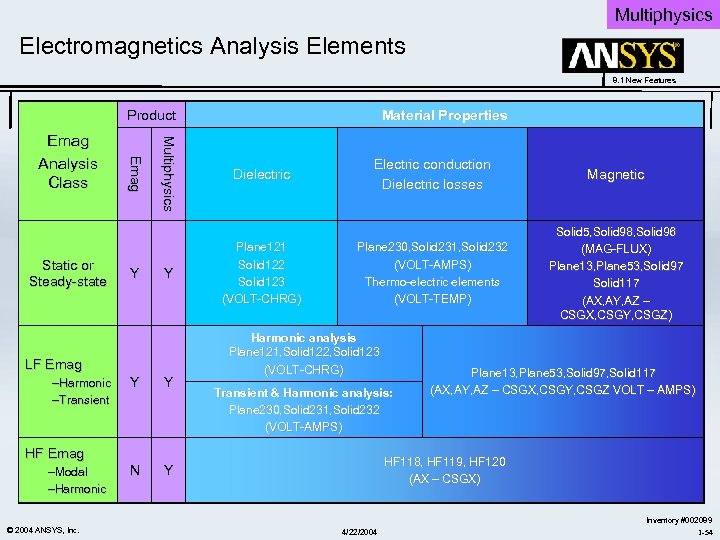 Multiphysics Electromagnetics Analysis Elements 8. 1 New Features Product Y Mulltiiphysiics Mu t phys cs Static or Steady-state E ma g Emag Analysis Class Y LF Emag –Harmonic –Transient Y Y N Material Properties Dielectric Plane 121 Solid 122 Solid 123 (VOLT-CHRG) Electric conduction Dielectric losses Magnetic Plane 230, Solid 231, Solid 232 (VOLT-AMPS) Thermo-electric elements (VOLT-TEMP) Solid 5, Solid 98, Solid 96 (MAG-FLUX) Plane 13, Plane 53, Solid 97 Solid 117 (AX, AY, AZ – CSGX, CSGY, CSGZ) Harmonic analysis Plane 121, Solid 122, Solid 123 (VOLT-CHRG) Y Transient & Harmonic analysis: Plane 230, Solid 231, Solid 232 (VOLT-AMPS) HF Emag –Modal –Harmonic © 2004 ANSYS, Inc. Plane 13, Plane 53, Solid 97, Solid 117 (AX, AY, AZ – CSGX, CSGY, CSGZ VOLT – AMPS) HF 118, HF 119, HF 120 (AX – CSGX) 4/22/2004 Inventory #002089 1 -54
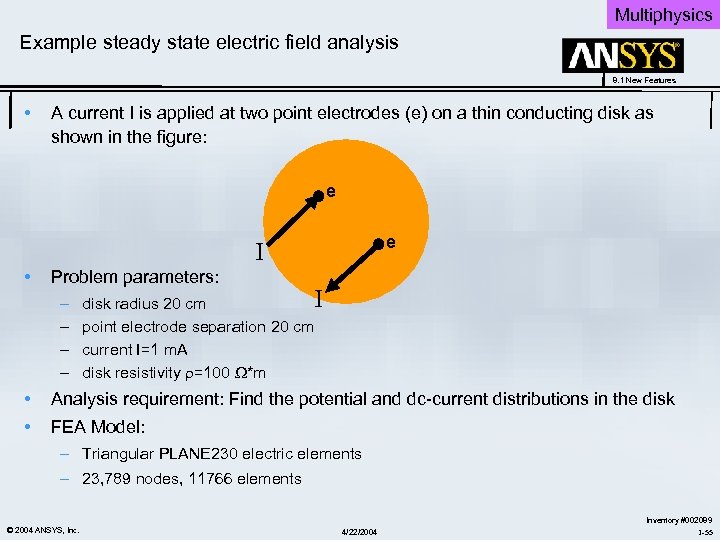 Multiphysics Example steady state electric field analysis 8. 1 New Features • A current I is applied at two point electrodes (e) on a thin conducting disk as shown in the figure: e e I • Problem parameters: – – I disk radius 20 cm point electrode separation 20 cm current I=1 m. A disk resistivity =100 *m • Analysis requirement: Find the potential and dc-current distributions in the disk • FEA Model: – Triangular PLANE 230 electric elements – 23, 789 nodes, 11766 elements © 2004 ANSYS, Inc. 4/22/2004 Inventory #002089 1 -55
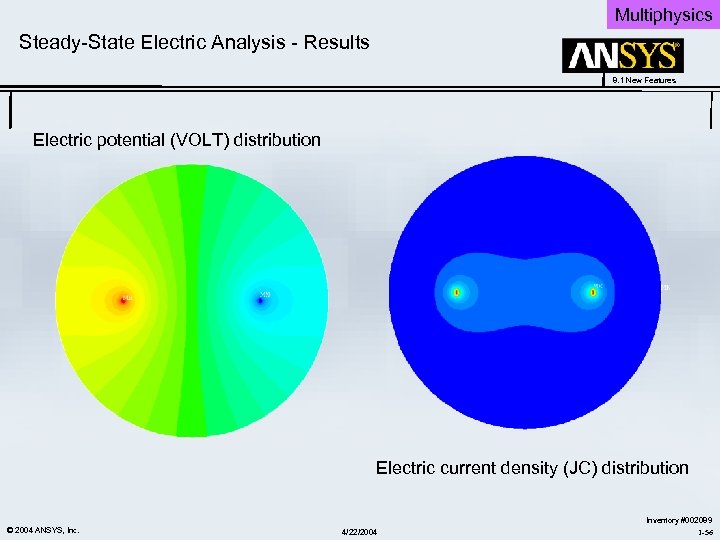 Multiphysics Steady-State Electric Analysis - Results 8. 1 New Features Electric potential (VOLT) distribution Electric current density (JC) distribution © 2004 ANSYS, Inc. 4/22/2004 Inventory #002089 1 -56
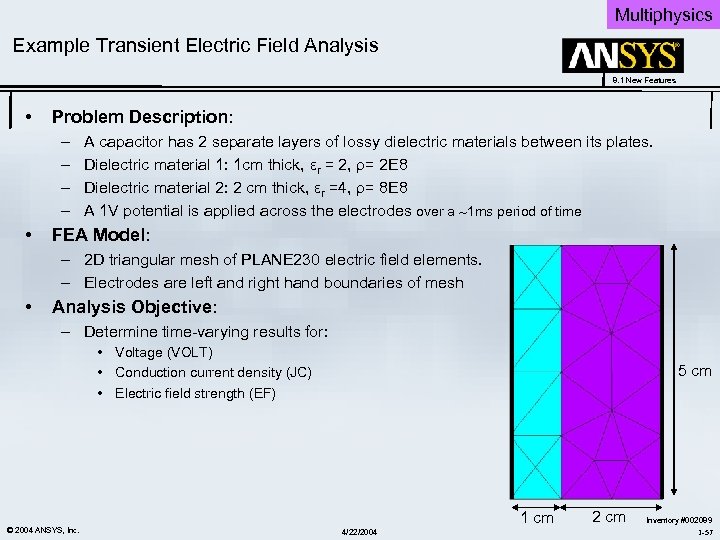 Multiphysics Example Transient Electric Field Analysis 8. 1 New Features • Problem Description: – – • A capacitor has 2 separate layers of lossy dielectric materials between its plates. Dielectric material 1: 1 cm thick, εr = 2, ρ= 2 E 8 Dielectric material 2: 2 cm thick, εr =4, ρ= 8 E 8 A 1 V potential is applied across the electrodes over a 1 ms period of time FEA Model: – 2 D triangular mesh of PLANE 230 electric field elements. – Electrodes are left and right hand boundaries of mesh • Analysis Objective: – Determine time-varying results for: • Voltage (VOLT) • Conduction current density (JC) • Electric field strength (EF) © 2004 ANSYS, Inc. 5 cm 1 cm 4/22/2004 2 cm Inventory #002089 1 -57
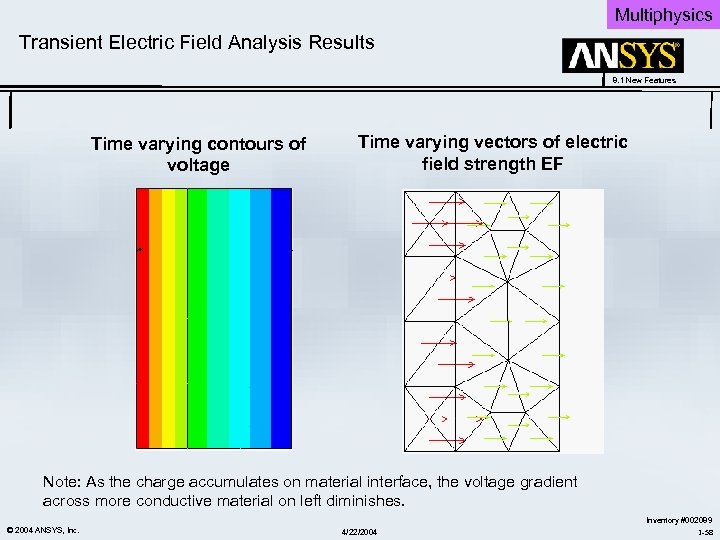 Multiphysics Transient Electric Field Analysis Results 8. 1 New Features Time varying contours of voltage Time varying vectors of electric field strength EF Note: As the charge accumulates on material interface, the voltage gradient across more conductive material on left diminishes. © 2004 ANSYS, Inc. 4/22/2004 Inventory #002089 1 -58
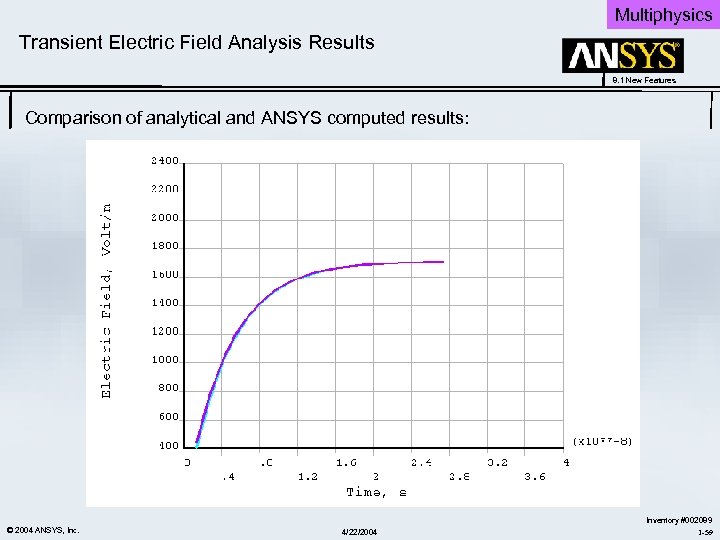 Multiphysics Transient Electric Field Analysis Results 8. 1 New Features Comparison of analytical and ANSYS computed results: © 2004 ANSYS, Inc. 4/22/2004 Inventory #002089 1 -59
 Multiphysics New SOURC 36 Capability 8. 1 New Features Analysis Requirement: • Prior to release 8. 1, SOURC 36 “meshless” current source primitives could only be used in combination with magnetic scalar potential (MSP) elements (SOLID 5, SOLID 96, SOLID 98). Enhancement: • • SOURC 36 may now serve as a current source for the 3 D edge flux potential elements (SOLID 117) This capability applies to 3 -D static analyses only. Benefit: • • • Easy to use, more efficient coil analysis when using SOLID 117 elements. The underlying region can be meshed separately from the coils, and the coils described conveniently with SOURC 36 primitives. Solenoidal conditions are automatically satisfied. The current can be input to SOLID 117 elements via the CUR real constant on SOURC 36, much easier than the alternative method involving manually defining body loads on each element. © 2004 ANSYS, Inc. 4/22/2004 Inventory #002089 1 -60
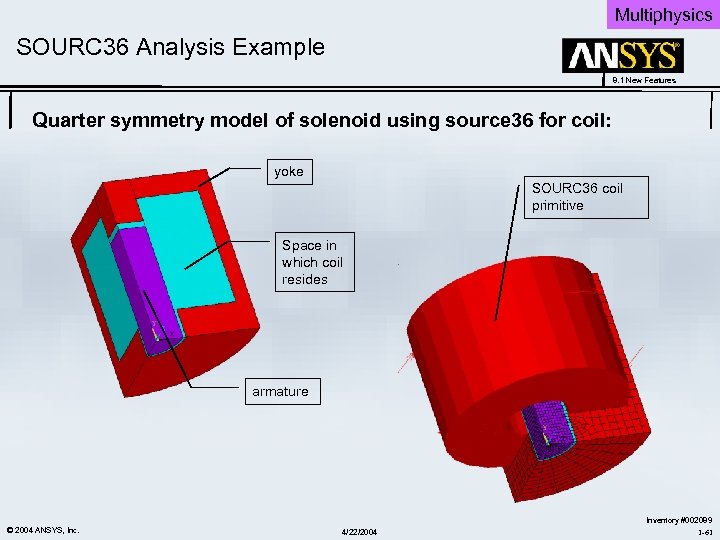 Multiphysics SOURC 36 Analysis Example 8. 1 New Features Quarter symmetry model of solenoid using source 36 for coil: yoke SOURC 36 coil primitive Space in which coil resides armature © 2004 ANSYS, Inc. 4/22/2004 Inventory #002089 1 -61
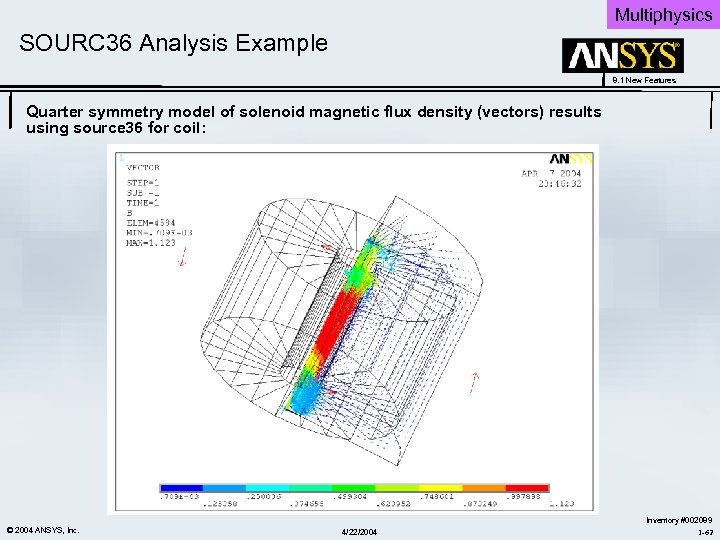 Multiphysics SOURC 36 Analysis Example 8. 1 New Features Quarter symmetry model of solenoid magnetic flux density (vectors) results using source 36 for coil: © 2004 ANSYS, Inc. 4/22/2004 Inventory #002089 1 -62
 Multiphysics 8. 1 New Features High Frequency Electromagnetics V 8. 1 New Features © 2004 ANSYS, Inc. 4/22/2004 Inventory #002089 1 -63
 Multiphysics New Phased Array Capability 8. 1 New Features Analysis Requirement: • Many real world HF antenna’s consist of geometric arrays of smaller identical antenna’s with different transmit phases. This approach improves antenna sensitivity, and also allows dynamic control over the antenna directional properties. New Features to Meet Requirement: • High-frequency electromagnetic elements (HF 119, HF 120) support periodic boundary conditions • Uses Floquet’s periodic principle to allow phased array antenna analyses. • Uses far field extension to compute radiation pattern and directive gain of array. Benefit: • Drastic reduction in problem size and resulting increase in solution speed. • Ability to solve class of antenna radiation problems previously beyond our scope! © 2004 ANSYS, Inc. 4/22/2004 Inventory #002089 1 -64
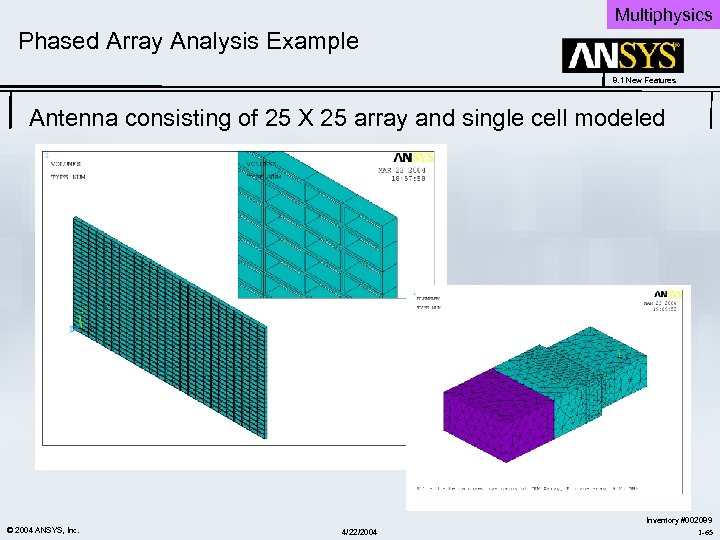 Multiphysics Phased Array Analysis Example 8. 1 New Features Antenna consisting of 25 X 25 array and single cell modeled © 2004 ANSYS, Inc. 4/22/2004 Inventory #002089 1 -65
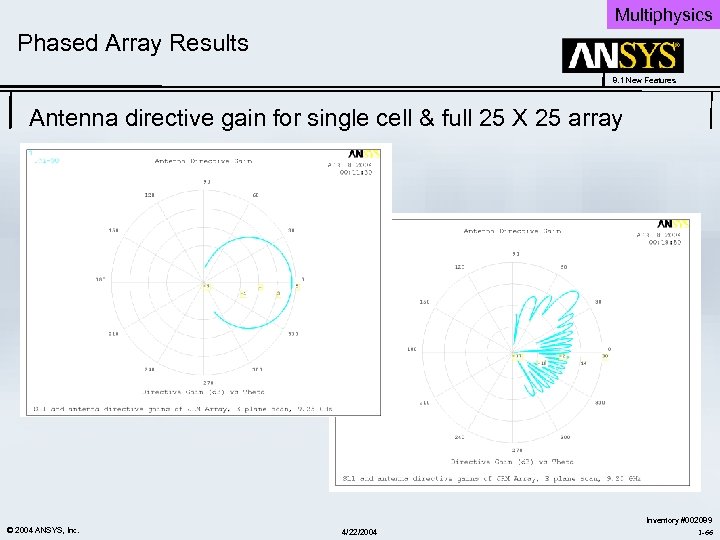 Multiphysics Phased Array Results 8. 1 New Features Antenna directive gain for single cell & full 25 X 25 array © 2004 ANSYS, Inc. 4/22/2004 Inventory #002089 1 -66
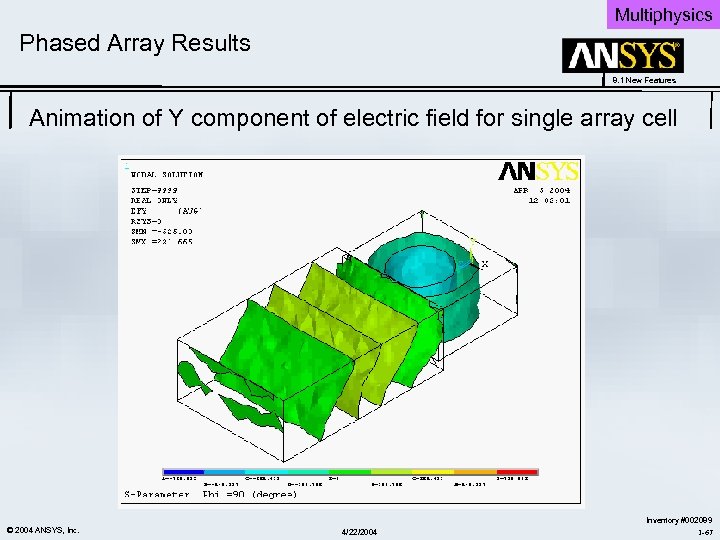 Multiphysics Phased Array Results 8. 1 New Features Animation of Y component of electric field for single array cell © 2004 ANSYS, Inc. 4/22/2004 Inventory #002089 1 -67
 Multiphysics 8. 1 New Features Multi-field Solver V 8. 1 New Features © 2004 ANSYS, Inc. 4/22/2004 Inventory #002089 1 -68
 Multiphysics Multi-field Solver Enhancements 8. 1 New Features Enhanced Feature: • The following enhancements have been made to the dissimilar mesh mapping aspects of the Multi-field solver: • Mapping information can be saved to a file for a later restart so that costly mapping calculations do not have to be repeated, especially for volumetric load transfer. • The mapping calculation can occur before issuing the SOLVE command (i. e. in /PREP 7 or /SOLU). • Mapping diagnostics are improved for curved geometry. • The bucket search algorithm is more robust than the global search algorithm, and is now the default algorithm for mapping. Benefits: Overall increase in solution speed and efficiency of the Multi-field solver. • Solution speed gains of up to 17% have been measured on three field problems. • Largest gains can be expected for applications coupling more fields with greater differences between each field’s meshes, such as Fluid-solid interaction and RFthermal heating. © 2004 ANSYS, Inc. 4/22/2004 Inventory #002089 1 -69
 Multiphysics 8. 1 New Features FLOTRAN Turbulence Models & Conjugate Heat Transfer V 8. 1 New Features © 2004 ANSYS, Inc. 4/22/2004 Inventory #002089 1 -70
 Multiphysics FLOTRAN Heat Transfer Enhancements 8. 1 New Features: • Two new turbulence models have been added to FLOTRAN • Applicable to FLUID 141 and FLUID 142 Elements: – k-ω Model – Shear Stress Transport (SST) Model Benefits: • • • FLOTRAN now has improved solution accuracy for heat transfer under turbulent conditions: When the turbulence boundary layer is not well-resolved, a thermal stabilization procedure can be invoked to alleviate temperature-oscillations near walls. When the turbulent boundary layer is well-resolved, new k-ω and SST turbulence models can be invoked to predict turbulent heat transfer in the presence of adverse pressure gradients. The SST model combines the advantages of both the k-ε model and the k-ω models. Using a blending function, the SST model activates the k- ω model near walls and the k-e model far away from the walls. © 2004 ANSYS, Inc. 4/22/2004 Inventory #002089 1 -71
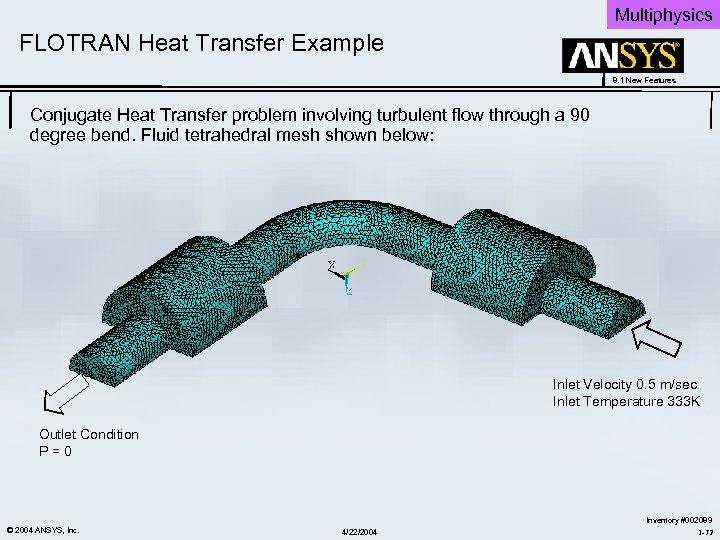 Multiphysics FLOTRAN Heat Transfer Example 8. 1 New Features Conjugate Heat Transfer problem involving turbulent flow through a 90 degree bend. Fluid tetrahedral mesh shown below: Inlet Velocity 0. 5 m/sec Inlet Temperature 333 K Outlet Condition P = 0 © 2004 ANSYS, Inc. 4/22/2004 Inventory #002089 1 -72
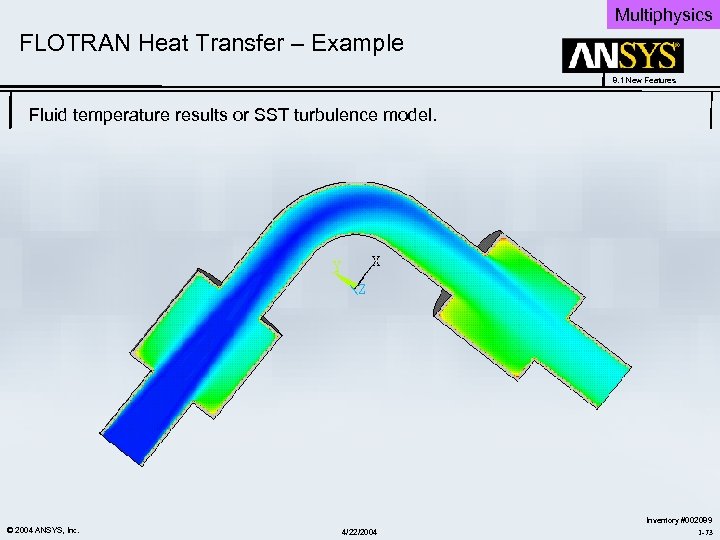 Multiphysics FLOTRAN Heat Transfer – Example 8. 1 New Features Fluid temperature results or SST turbulence model. © 2004 ANSYS, Inc. 4/22/2004 Inventory #002089 1 -73
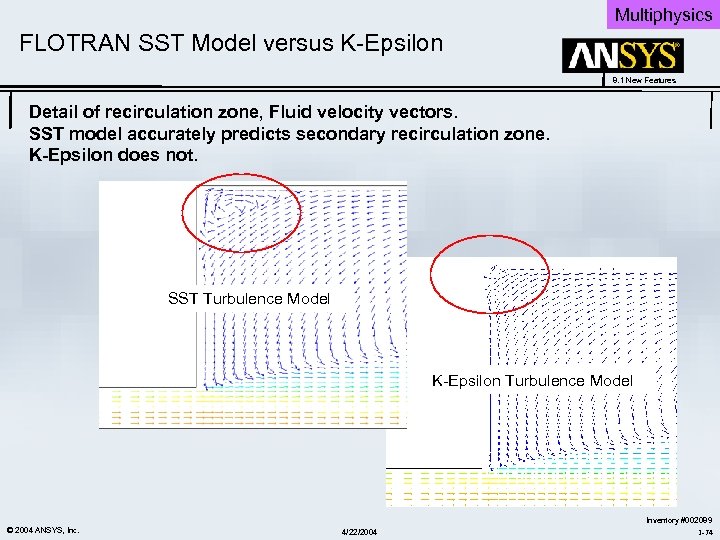 Multiphysics FLOTRAN SST Model versus K-Epsilon 8. 1 New Features Detail of recirculation zone, Fluid velocity vectors. SST model accurately predicts secondary recirculation zone. K-Epsilon does not. SST Turbulence Model K-Epsilon Turbulence Model © 2004 ANSYS, Inc. 4/22/2004 Inventory #002089 1 -74
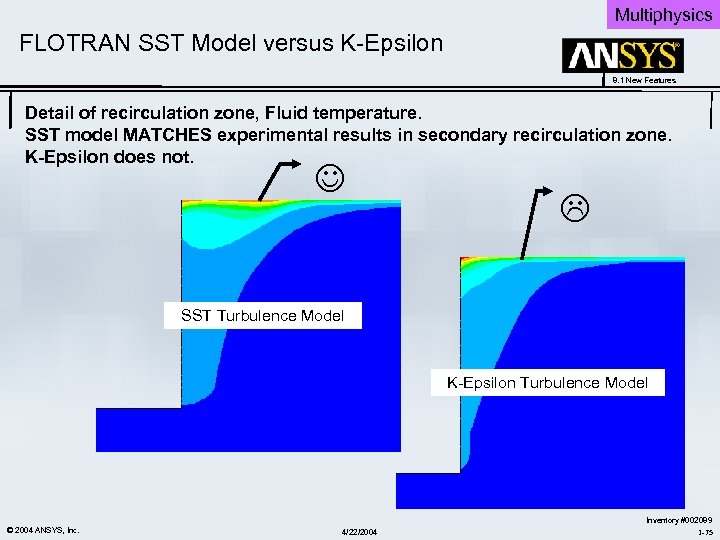 Multiphysics FLOTRAN SST Model versus K-Epsilon 8. 1 New Features Detail of recirculation zone, Fluid temperature. SST model MATCHES experimental results in secondary recirculation zone. K-Epsilon does not. SST Turbulence Model K-Epsilon Turbulence Model © 2004 ANSYS, Inc. 4/22/2004 Inventory #002089 1 -75
 4/22/2004
 Workbench 8. 1 New Features ANSYS Workbench V 8. 1 New Features © 2004 ANSYS, Inc. 4/22/2004 Inventory #002089 1 -77
 Workbench 8. 1 New Features Workbench Start-up ANSYS Workbench V 8. 1 New Features © 2004 ANSYS, Inc. 4/22/2004 Inventory #002089 1 -78
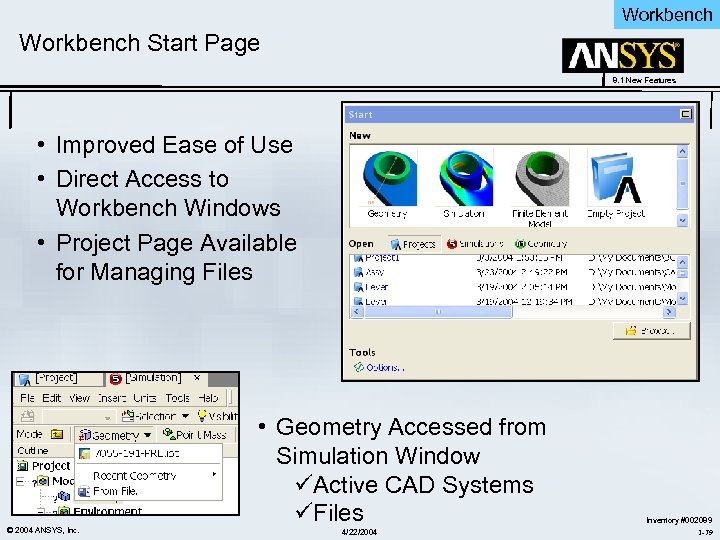 Workbench Start Page 8. 1 New Features • Improved Ease of Use • Direct Access to Workbench Windows • Project Page Available for Managing Files © 2004 ANSYS, Inc. • Geometry Accessed from Simulation Window üActive CAD Systems üFiles 4/22/2004 Inventory #002089 1 -79
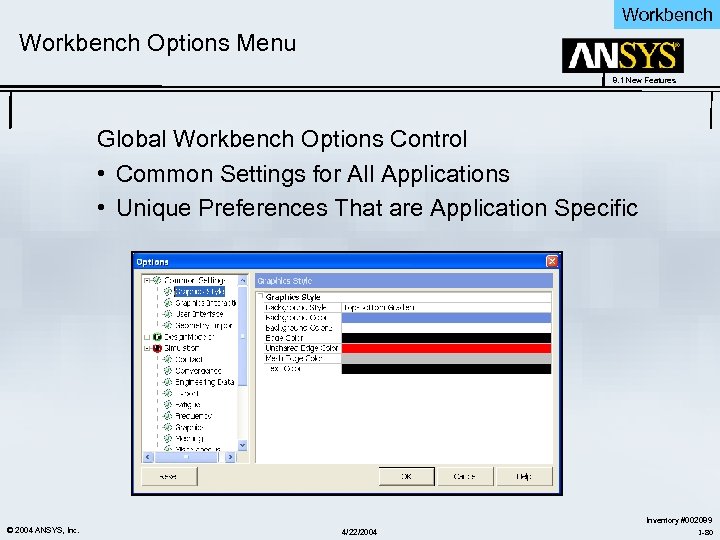 Workbench Options Menu 8. 1 New Features Global Workbench Options Control • Common Settings for All Applications • Unique Preferences That are Application Specific © 2004 ANSYS, Inc. 4/22/2004 Inventory #002089 1 -80
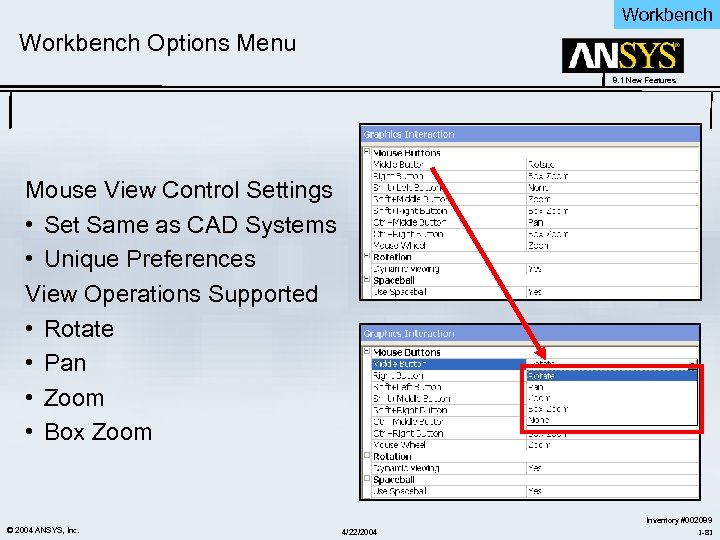 Workbench Options Menu 8. 1 New Features Mouse View Control Settings • Set Same as CAD Systems • Unique Preferences View Operations Supported • Rotate • Pan • Zoom • Box Zoom © 2004 ANSYS, Inc. 4/22/2004 Inventory #002089 1 -81
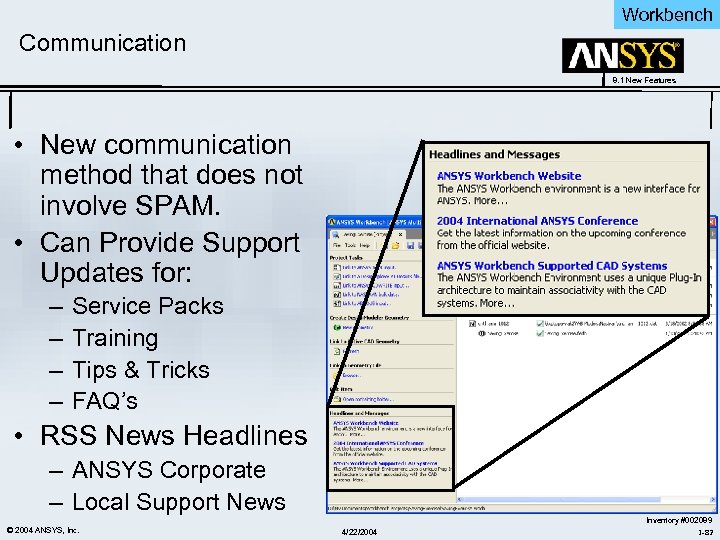 Workbench Communication 8. 1 New Features • New communication method that does not involve SPAM. • Can Provide Support Updates for: – – Service Packs Training Tips & Tricks FAQ’s • RSS News Headlines – ANSYS Corporate – Local Support News © 2004 ANSYS, Inc. 4/22/2004 Inventory #002089 1 -82
 Workbench 8. 1 New Features Non-Linear Materials ANSYS Workbench V 8. 1 New Features © 2004 ANSYS, Inc. 4/22/2004 Inventory #002089 1 -83
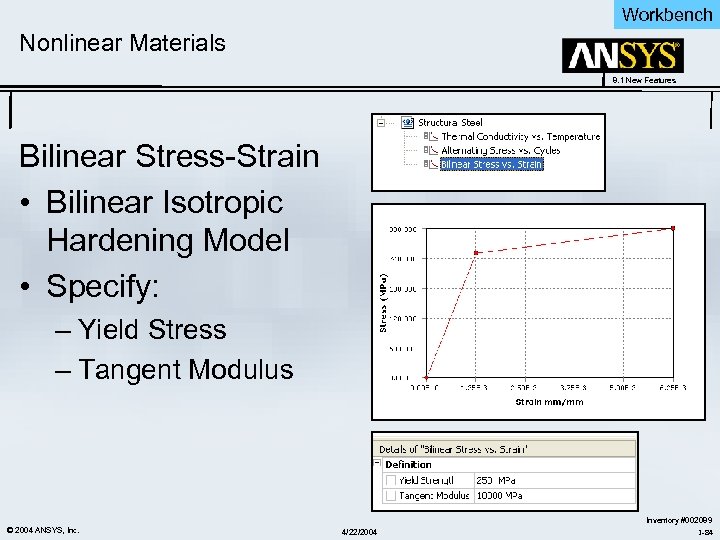 Workbench Nonlinear Materials 8. 1 New Features Bilinear Stress-Strain • Bilinear Isotropic Hardening Model • Specify: – Yield Stress – Tangent Modulus © 2004 ANSYS, Inc. 4/22/2004 Inventory #002089 1 -84
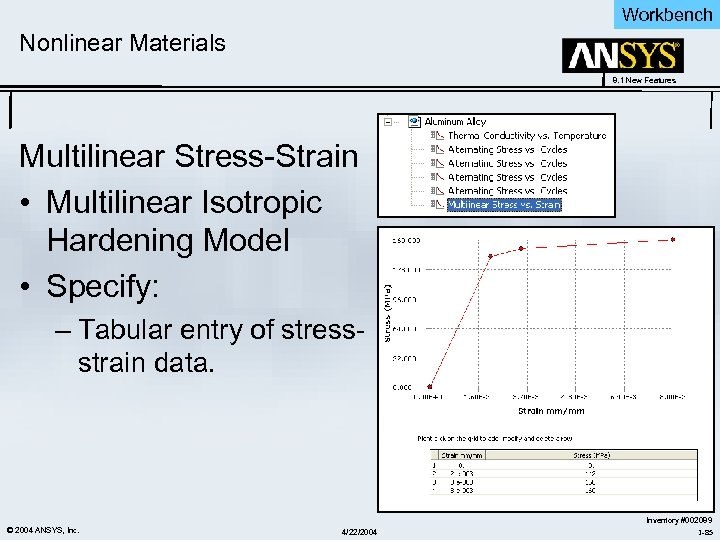 Workbench Nonlinear Materials 8. 1 New Features Multilinear Stress-Strain • Multilinear Isotropic Hardening Model • Specify: – Tabular entry of stressstrain data. © 2004 ANSYS, Inc. 4/22/2004 Inventory #002089 1 -85
 Workbench 8. 1 New Features Solution Feedback and Results ANSYS Workbench V 8. 1 New Features © 2004 ANSYS, Inc. 4/22/2004 Inventory #002089 1 -86
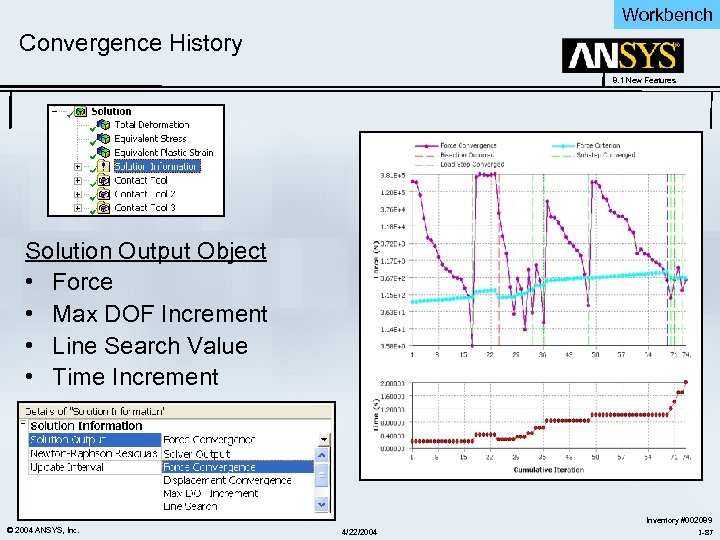 Workbench Convergence History 8. 1 New Features Solution Output Object • Force • Max DOF Increment • Line Search Value • Time Increment © 2004 ANSYS, Inc. 4/22/2004 Inventory #002089 1 -87
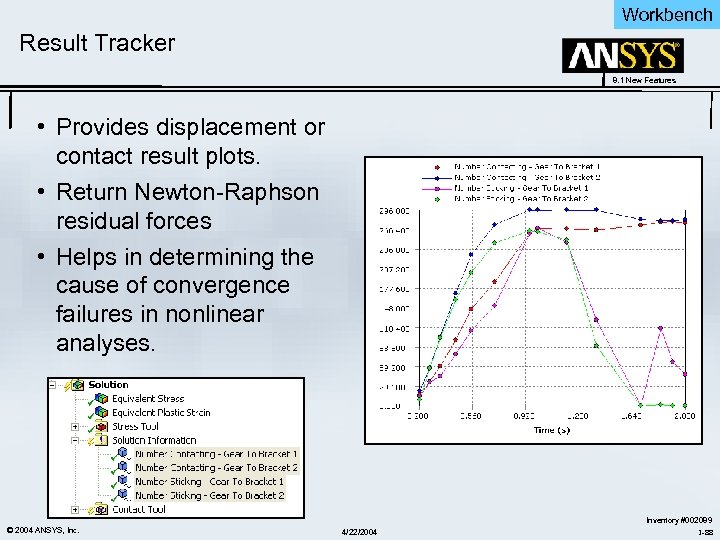 Workbench Result Tracker 8. 1 New Features • Provides displacement or contact result plots. • Return Newton-Raphson residual forces • Helps in determining the cause of convergence failures in nonlinear analyses. © 2004 ANSYS, Inc. 4/22/2004 Inventory #002089 1 -88
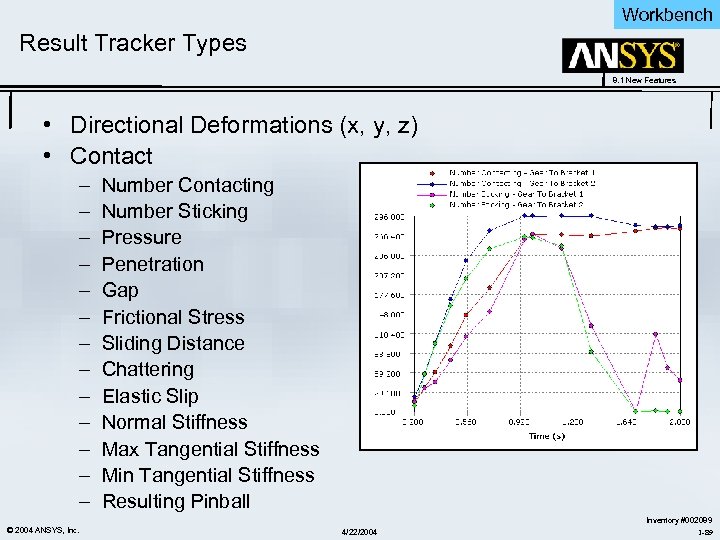 Workbench Result Tracker Types 8. 1 New Features • Directional Deformations (x, y, z) • Contact – – – – © 2004 ANSYS, Inc. Number Contacting Number Sticking Pressure Penetration Gap Frictional Stress Sliding Distance Chattering Elastic Slip Normal Stiffness Max Tangential Stiffness Min Tangential Stiffness Resulting Pinball 4/22/2004 Inventory #002089 1 -89
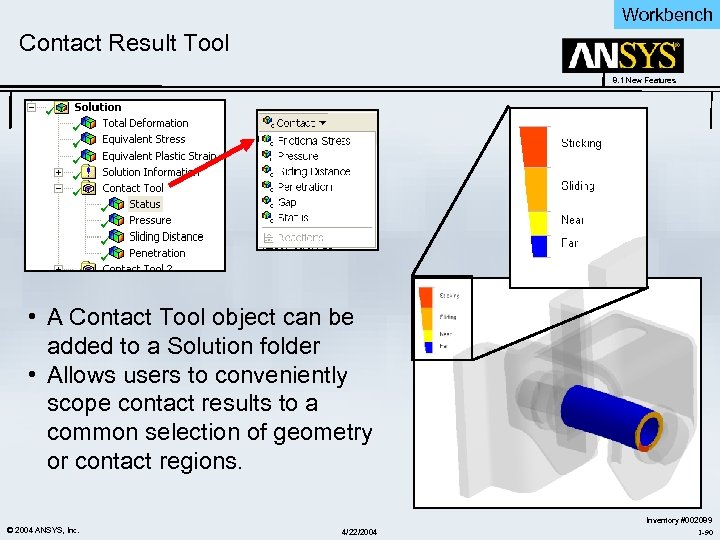 Workbench Contact Result Tool 8. 1 New Features • A Contact Tool object can be added to a Solution folder • Allows users to conveniently scope contact results to a common selection of geometry or contact regions. © 2004 ANSYS, Inc. 4/22/2004 Inventory #002089 1 -90
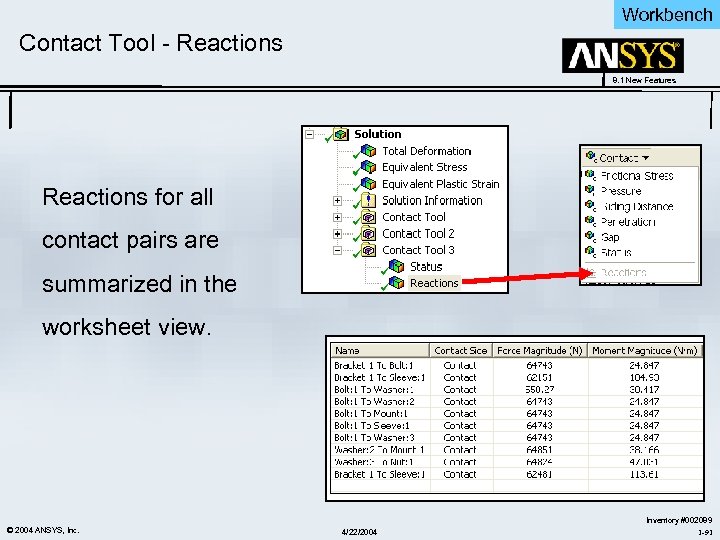 Workbench Contact Tool - Reactions 8. 1 New Features Reactions for all contact pairs are summarized in the worksheet view. © 2004 ANSYS, Inc. 4/22/2004 Inventory #002089 1 -91
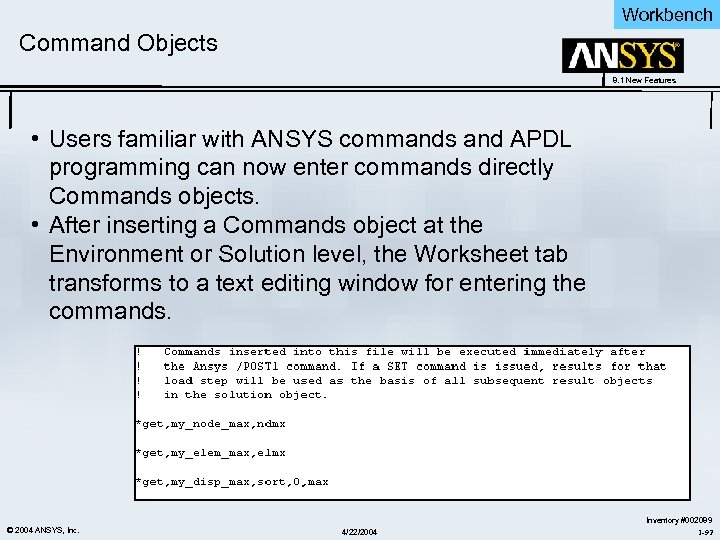 Workbench Command Objects 8. 1 New Features • Users familiar with ANSYS commands and APDL programming can now enter commands directly Commands objects. • After inserting a Commands object at the Environment or Solution level, the Worksheet tab transforms to a text editing window for entering the commands. © 2004 ANSYS, Inc. 4/22/2004 Inventory #002089 1 -92
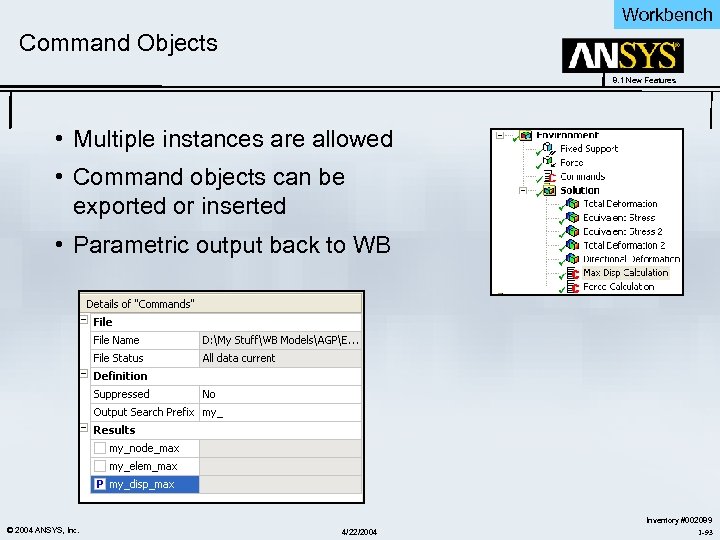 Workbench Command Objects 8. 1 New Features • Multiple instances are allowed • Command objects can be exported or inserted • Parametric output back to WB © 2004 ANSYS, Inc. 4/22/2004 Inventory #002089 1 -93
 Workbench 8. 1 New Features Meshing ANSYS Workbench V 8. 1 New Features © 2004 ANSYS, Inc. 4/22/2004 Inventory #002089 1 -94
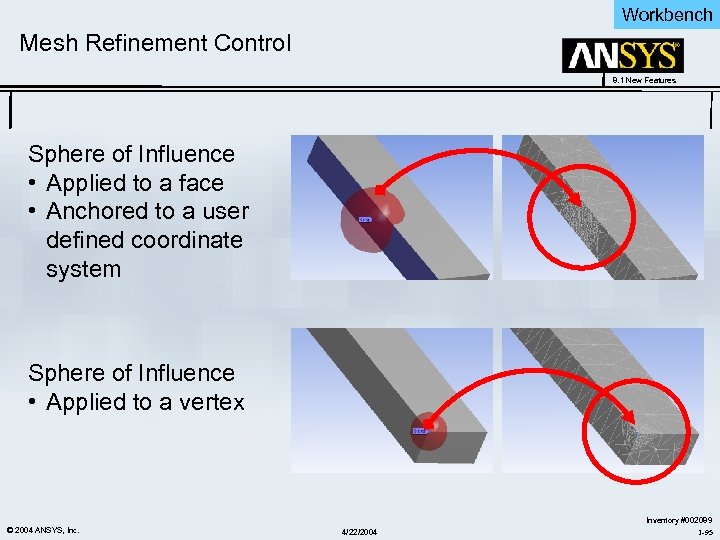 Workbench Mesh Refinement Control 8. 1 New Features Sphere of Influence • Applied to a face • Anchored to a user defined coordinate system Sphere of Influence • Applied to a vertex © 2004 ANSYS, Inc. 4/22/2004 Inventory #002089 1 -95
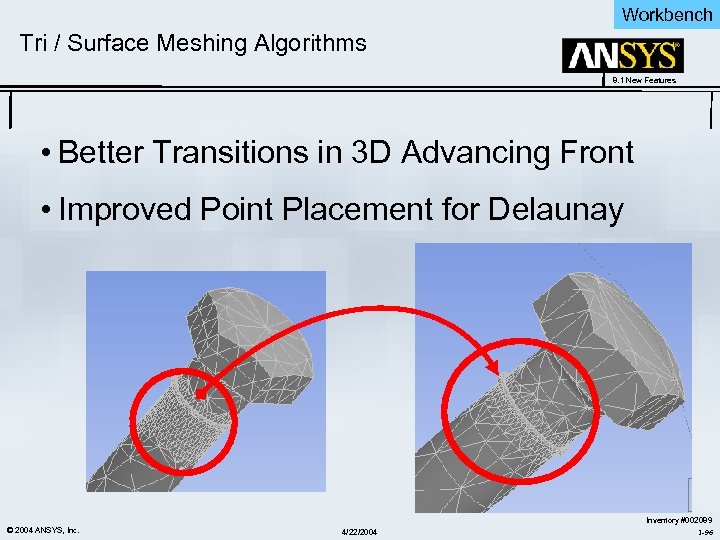 Workbench Tri / Surface Meshing Algorithms 8. 1 New Features • Better Transitions in 3 D Advancing Front • Improved Point Placement for Delaunay © 2004 ANSYS, Inc. 4/22/2004 Inventory #002089 1 -96
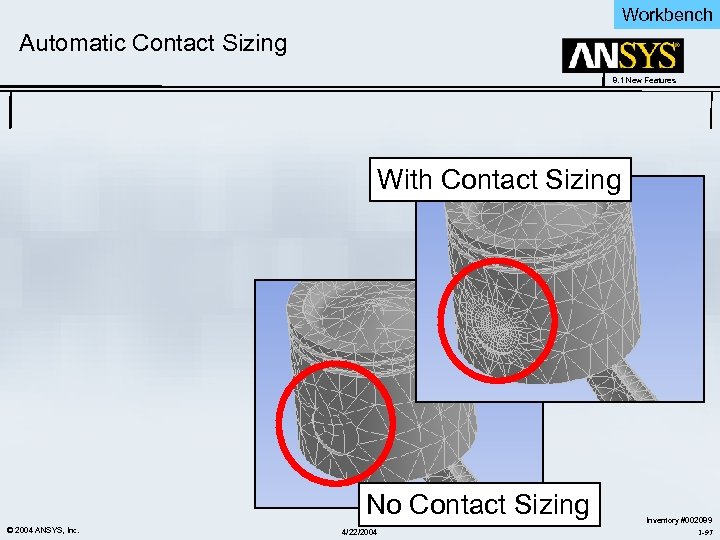 Workbench Automatic Contact Sizing 8. 1 New Features With Contact Sizing No Contact Sizing © 2004 ANSYS, Inc. 4/22/2004 Inventory #002089 1 -97
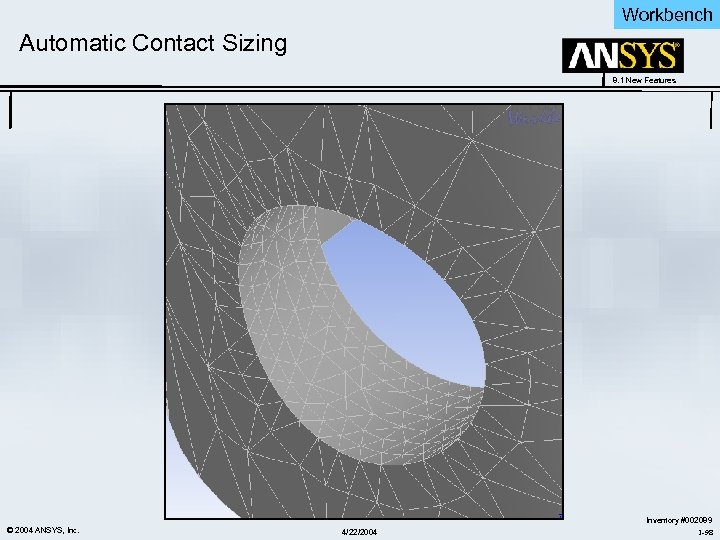 Workbench Automatic Contact Sizing 8. 1 New Features © 2004 ANSYS, Inc. 4/22/2004 Inventory #002089 1 -98
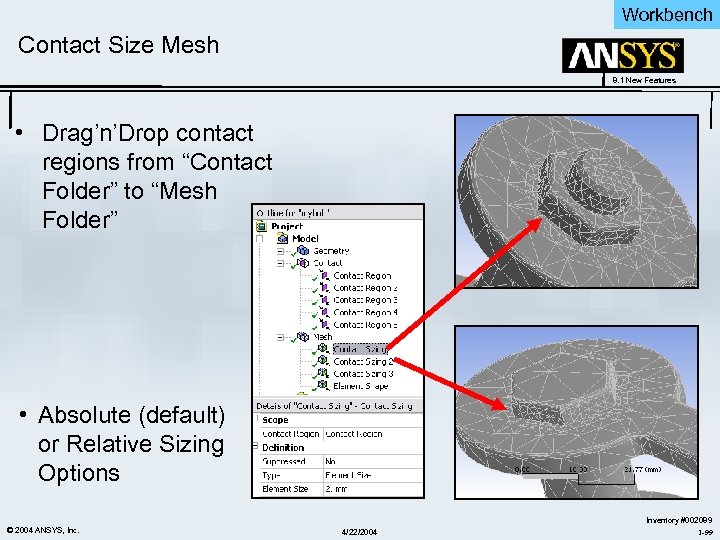 Workbench Contact Size Mesh 8. 1 New Features • Drag’n’Drop contact regions from “Contact Folder” to “Mesh Folder” • Absolute (default) or Relative Sizing Options © 2004 ANSYS, Inc. 4/22/2004 Inventory #002089 1 -99
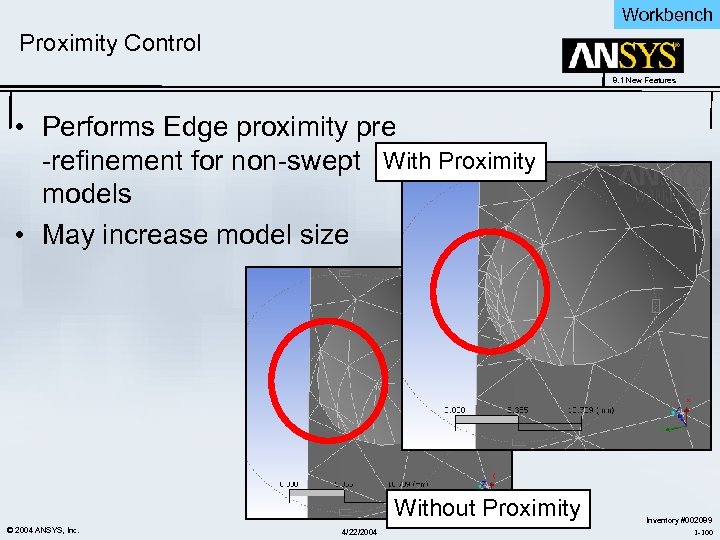 Workbench Proximity Control 8. 1 New Features • Performs Edge proximity pre -refinement for non-swept With Proximity models • May increase model size Without Proximity © 2004 ANSYS, Inc. 4/22/2004 Inventory #002089 1 -100
 Workbench 8. 1 New Features CAD Integration ANSYS Workbench V 8. 1 New Features © 2004 ANSYS, Inc. 4/22/2004 Inventory #002089 1 -101
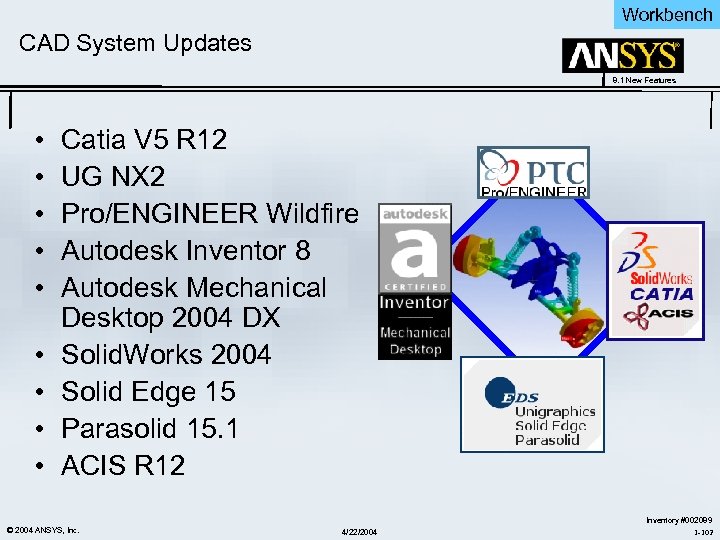 Workbench CAD System Updates 8. 1 New Features • • • Catia V 5 R 12 UG NX 2 Pro/ENGINEER Wildfire Autodesk Inventor 8 Autodesk Mechanical Desktop 2004 DX Solid. Works 2004 Solid Edge 15 Parasolid 15. 1 ACIS R 12 © 2004 ANSYS, Inc. 4/22/2004 Inventory #002089 1 -102
 Workbench CAD Integration 8. 1 New Features • Smart Updates – Speed up the assembly update by updating only components that have been modified – Implemented for Unigraphics and Autodesk Inventor – A user preference to turn on Smart Update is available in Start Page under Advanced Geometry Preferences and the Geometry node details view • Attach and Update a model that is open in Pro. Engineer from Intralink © 2004 ANSYS, Inc. 4/22/2004 Inventory #002089 1 -103
 Workbench 8. 1 New Features Remote Solutions ANSYS Workbench V 8. 1 New Features © 2004 ANSYS, Inc. 4/22/2004 Inventory #002089 1 -104
 Workbench Overview - Remote Solving 8. 1 New Features • Can be used on the client machine – Allows work in other branches while solving locally • Can use LSF to solve remotely • Servers – LSF – Localhost – CE (Beta) – will allow remote solving without LSF • Submission – WB shutdown or switch allowed – Retrieval of queued jobs later in time • Numerous GUI changes for Preview 3 © 2004 ANSYS, Inc. 4/22/2004 Inventory #002089 1 -105
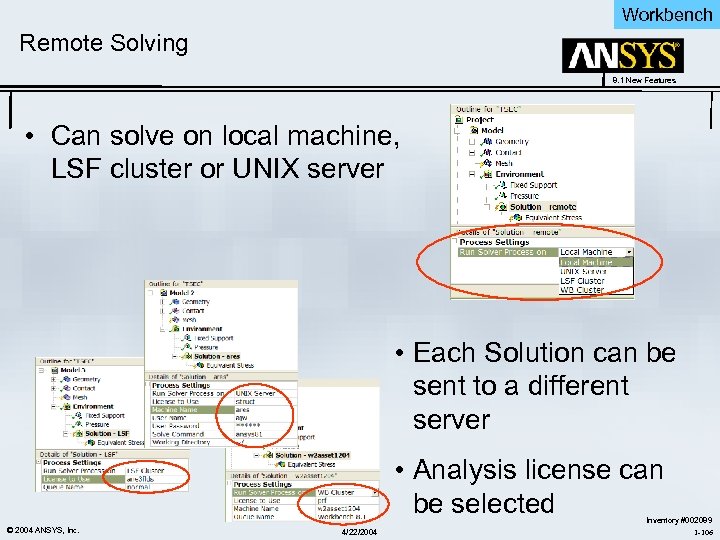 Workbench Remote Solving 8. 1 New Features • Can solve on local machine, LSF cluster or UNIX server • Each Solution can be sent to a different server • Analysis license can be selected © 2004 ANSYS, Inc. 4/22/2004 Inventory #002089 1 -106
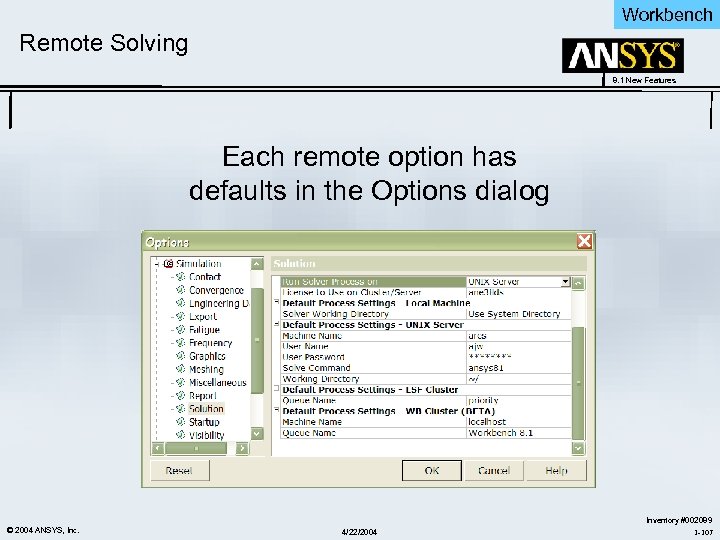 Workbench Remote Solving 8. 1 New Features Each remote option has defaults in the Options dialog © 2004 ANSYS, Inc. 4/22/2004 Inventory #002089 1 -107
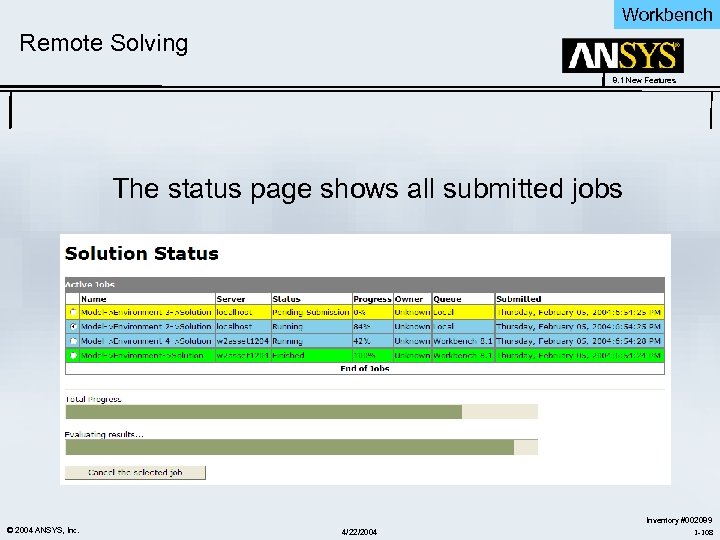 Workbench Remote Solving 8. 1 New Features The status page shows all submitted jobs © 2004 ANSYS, Inc. 4/22/2004 Inventory #002089 1 -108
 Workbench 8. 1 New Features Miscellaneous Simulation Features ANSYS Workbench V 8. 1 New Features © 2004 ANSYS, Inc. 4/22/2004 Inventory #002089 1 -109
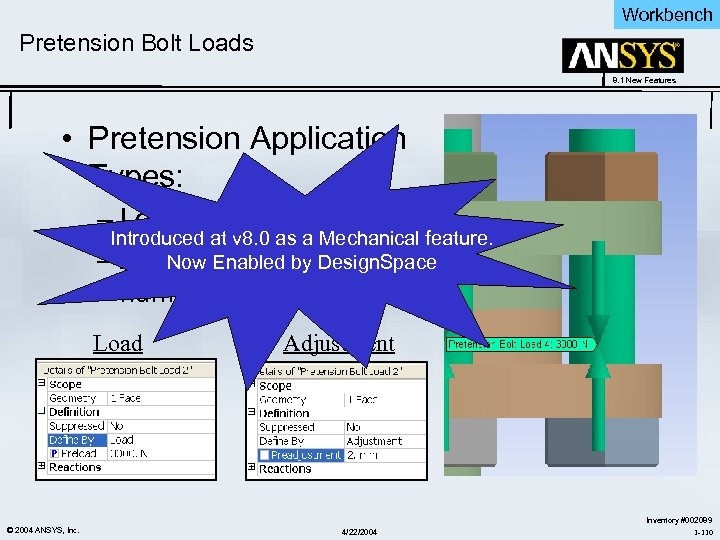 Workbench Pretension Bolt Loads 8. 1 New Features • Pretension Application Types: – Load (force) Introduced at v 8. 0 as a Mechanical feature. – Adjustment (length, Now Enabled by Design. Space number of threads) Load © 2004 ANSYS, Inc. Adjustment 4/22/2004 Inventory #002089 1 -110
 Workbench Miscellaneous Enhancements 8. 1 New Features • Right Mouse Button rename contact, results, etc. – Users can change the default name of a contact region to match corresponding descriptive names for items in the Geometry branch of the tree that make up the contact region. – Clicking the right mouse button on a contact region and choosing Rename Based on Geometry in the context menu changes the name of that contact region. – Clicking the right mouse button on the Contact branch and choosing the same option changes the names of all contact regions under the branch. • Configurable contact worksheet – When viewing a worksheet of a Contact folder or a Contact Reactions item, users now have the ability to select which columns to display in the worksheet table. – The choice is made in a context menu through a right mouse button click inside the worksheet table. © 2004 ANSYS, Inc. 4/22/2004 Inventory #002089 1 -111
 Workbench Miscellaneous Enhancements 8. 1 New Features • Right Mouse Button flip contact target and contact – For asymmetric contact, a useful enhancement at this release is the ability to flip contact and target faces or edges in a contact region. – This feature is available through a right mouse click on the contact region and choice of the Flip Contact/Target context menu item. – All contact and target items displayed under Scope in the Details View are reversed. • Point mass – Users can apply a Point Mass to the model from the Geometry object. – The location of a point mass can be anywhere in space and it can be defined in a local coordinate system. © 2004 ANSYS, Inc. 4/22/2004 Inventory #002089 1 -112
 Workbench Miscellaneous Enhancements 8. 1 New Features • Loads in local coordinate system – Forces, remote forces, bearing loads, moments and given displacements can now be defined in a local coordinate system. – With this capability, users no longer need to transform the loads and given displacements into the global coordinate system manually. – When any of these loads or given displacements are defined by components in the Details View, a new drop down menu is available from which users select a specific coordinate system to be applied. • Contact results in solution combinations – A Contact Tool object can now be added to a Solution or Solution Combination folder that allows users to conveniently scope contact results to a common selection of geometry or contact regions. – Using a Contact Tool, all possible contact results can be investigated at one time for a given scoping. © 2004 ANSYS, Inc. 4/22/2004 Inventory #002089 1 -113
 Workbench 8. 1 New Features Geometry - Design. Modeler ANSYS Workbench V 8. 1 New Features © 2004 ANSYS, Inc. 4/22/2004 Inventory #002089 1 -114
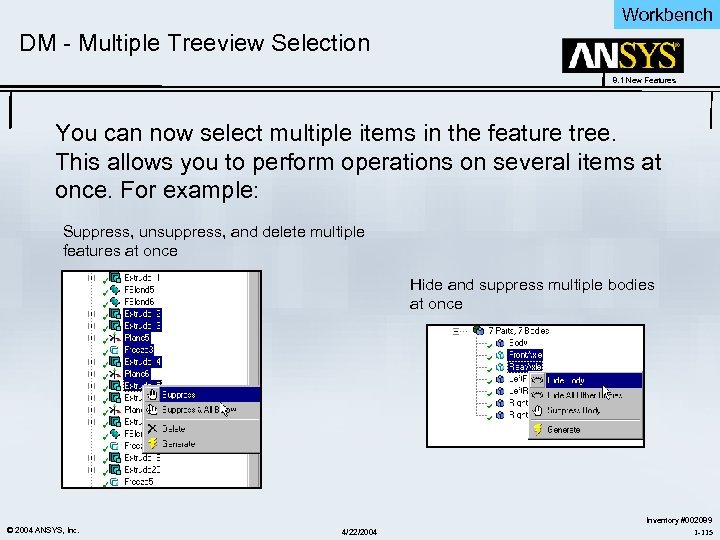 Workbench DM - Multiple Treeview Selection 8. 1 New Features You can now select multiple items in the feature tree. This allows you to perform operations on several items at once. For example: Suppress, unsuppress, and delete multiple features at once Hide and suppress multiple bodies at once © 2004 ANSYS, Inc. 4/22/2004 Inventory #002089 1 -115
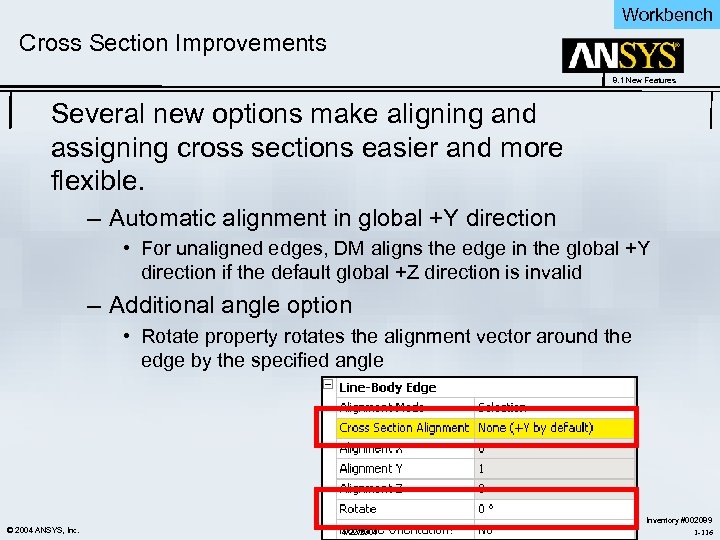 Workbench Cross Section Improvements 8. 1 New Features Several new options make aligning and assigning cross sections easier and more flexible. – Automatic alignment in global +Y direction • For unaligned edges, DM aligns the edge in the global +Y direction if the default global +Z direction is invalid – Additional angle option • Rotate property rotates the alignment vector around the edge by the specified angle © 2004 ANSYS, Inc. 4/22/2004 Inventory #002089 1 -116
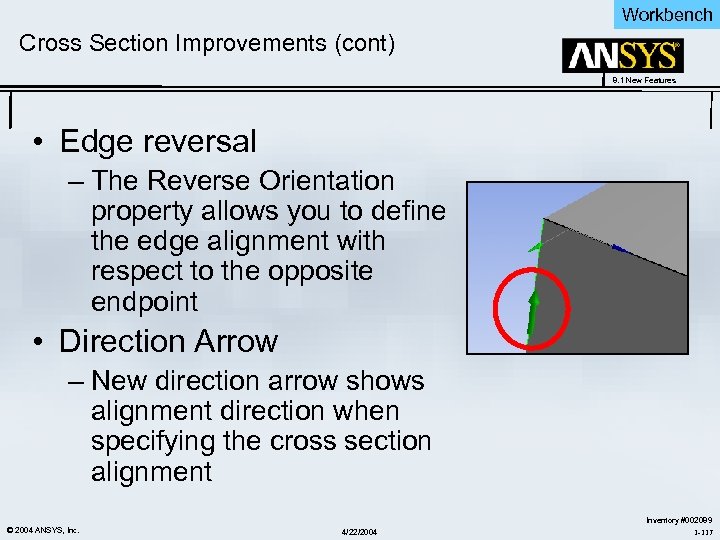 Workbench Cross Section Improvements (cont) 8. 1 New Features • Edge reversal – The Reverse Orientation property allows you to define the edge alignment with respect to the opposite endpoint • Direction Arrow – New direction arrow shows alignment direction when specifying the cross section alignment © 2004 ANSYS, Inc. 4/22/2004 Inventory #002089 1 -117
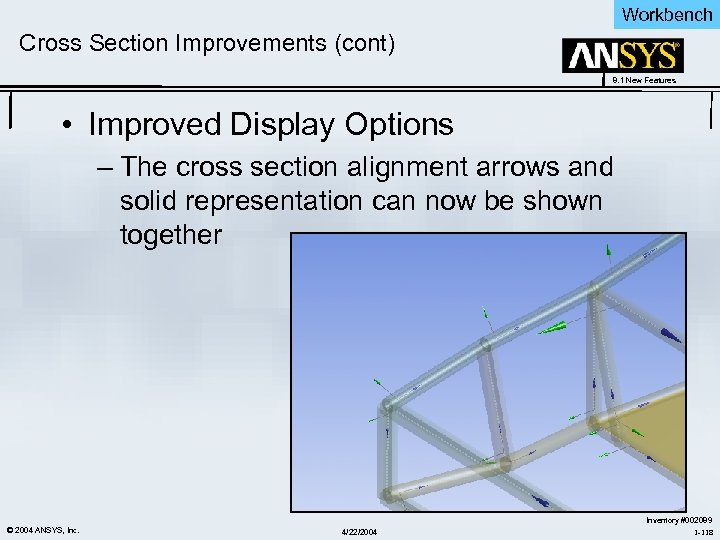 Workbench Cross Section Improvements (cont) 8. 1 New Features • Improved Display Options – The cross section alignment arrows and solid representation can now be shown together © 2004 ANSYS, Inc. 4/22/2004 Inventory #002089 1 -118
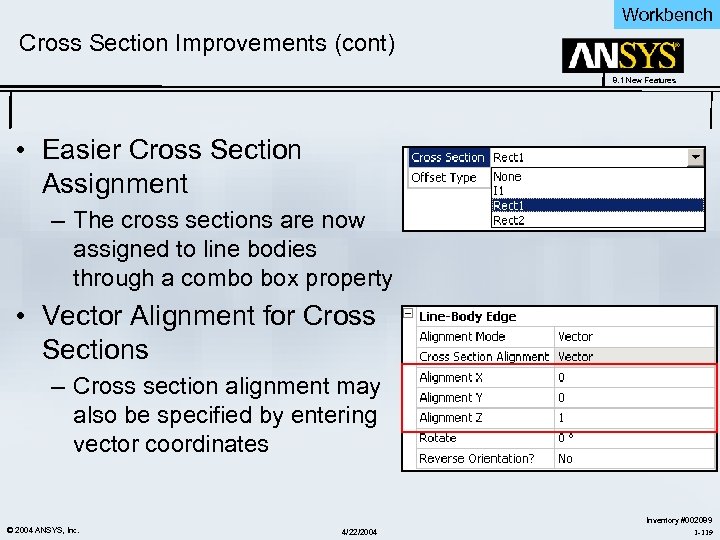 Workbench Cross Section Improvements (cont) 8. 1 New Features • Easier Cross Section Assignment – The cross sections are now assigned to line bodies through a combo box property • Vector Alignment for Cross Sections – Cross section alignment may also be specified by entering vector coordinates © 2004 ANSYS, Inc. 4/22/2004 Inventory #002089 1 -119
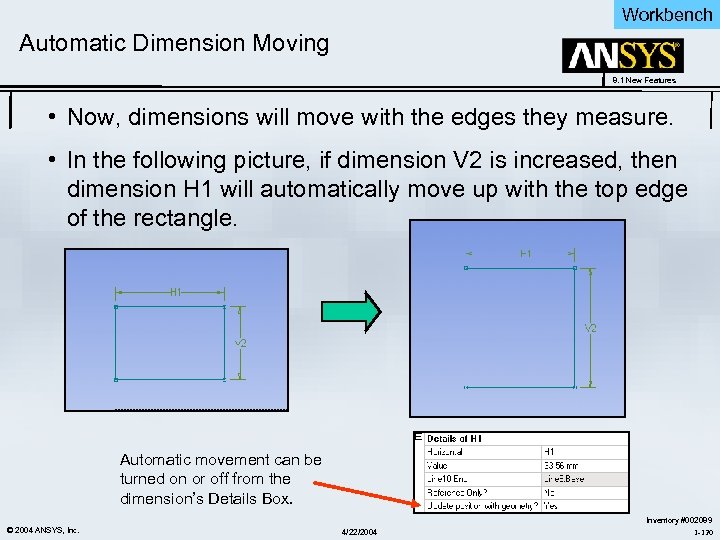 Workbench Automatic Dimension Moving 8. 1 New Features • Now, dimensions will move with the edges they measure. • In the following picture, if dimension V 2 is increased, then dimension H 1 will automatically move up with the top edge of the rectangle. Automatic movement can be turned on or off from the dimension’s Details Box. © 2004 ANSYS, Inc. 4/22/2004 Inventory #002089 1 -120
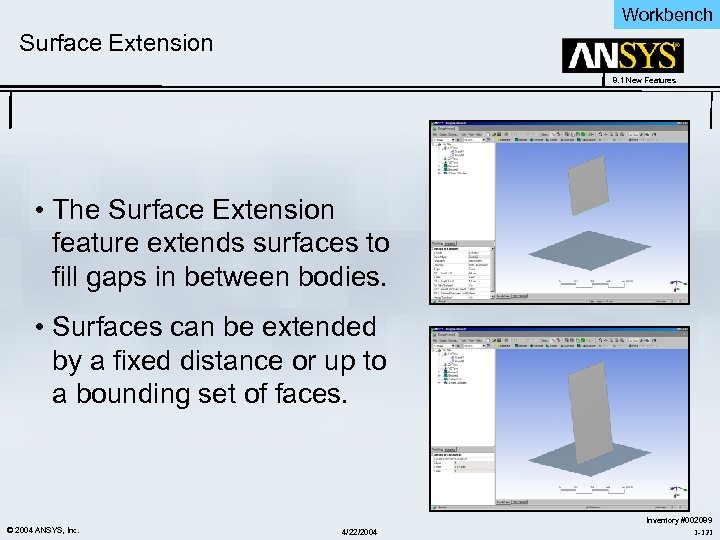 Workbench Surface Extension 8. 1 New Features • The Surface Extension feature extends surfaces to fill gaps in between bodies. • Surfaces can be extended by a fixed distance or up to a bounding set of faces. © 2004 ANSYS, Inc. 4/22/2004 Inventory #002089 1 -121
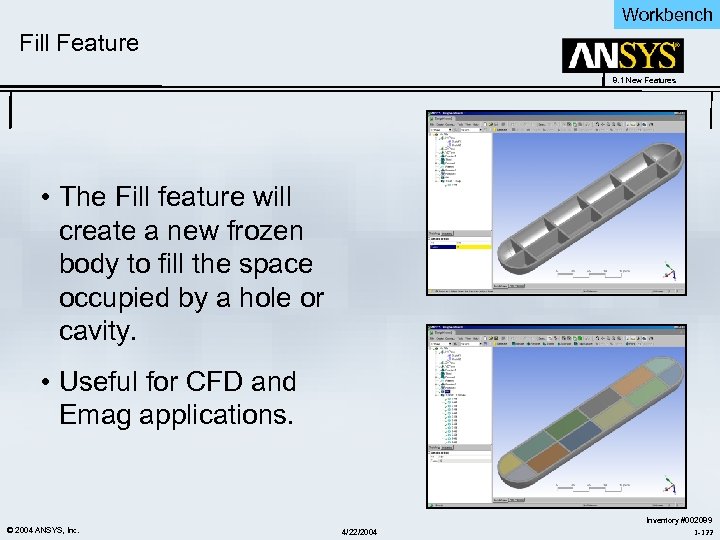 Workbench Fill Feature 8. 1 New Features • The Fill feature will create a new frozen body to fill the space occupied by a hole or cavity. • Useful for CFD and Emag applications. © 2004 ANSYS, Inc. 4/22/2004 Inventory #002089 1 -122
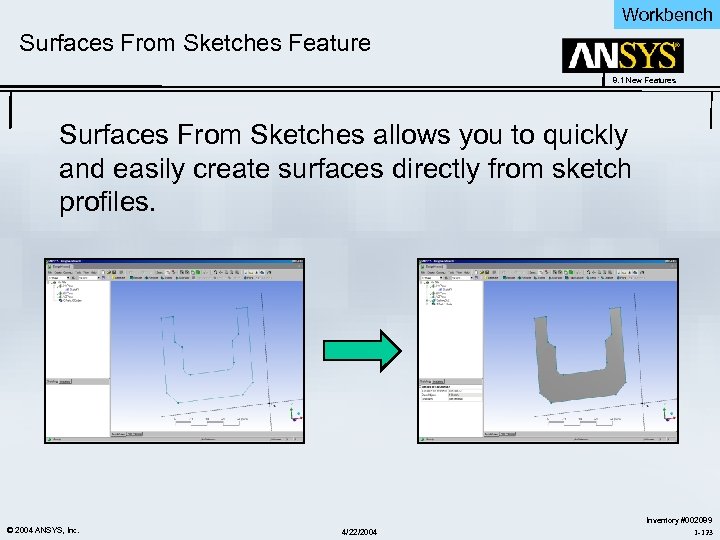 Workbench Surfaces From Sketches Feature 8. 1 New Features Surfaces From Sketches allows you to quickly and easily create surfaces directly from sketch profiles. © 2004 ANSYS, Inc. 4/22/2004 Inventory #002089 1 -123
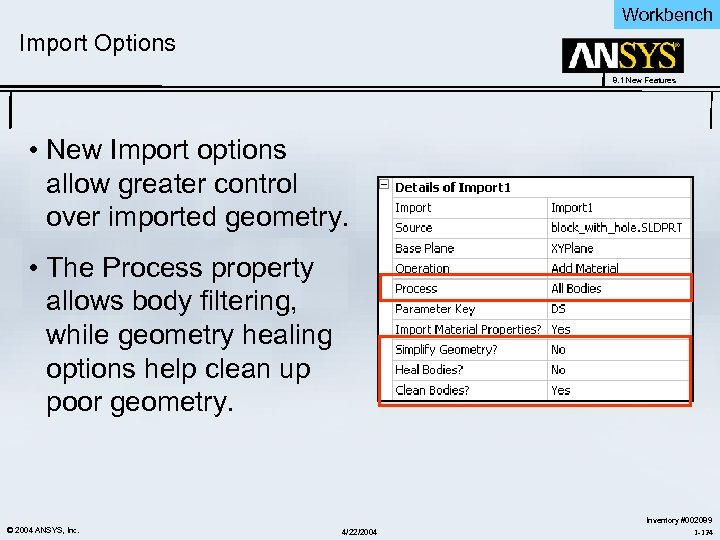 Workbench Import Options 8. 1 New Features • New Import options allow greater control over imported geometry. • The Process property allows body filtering, while geometry healing options help clean up poor geometry. © 2004 ANSYS, Inc. 4/22/2004 Inventory #002089 1 -124
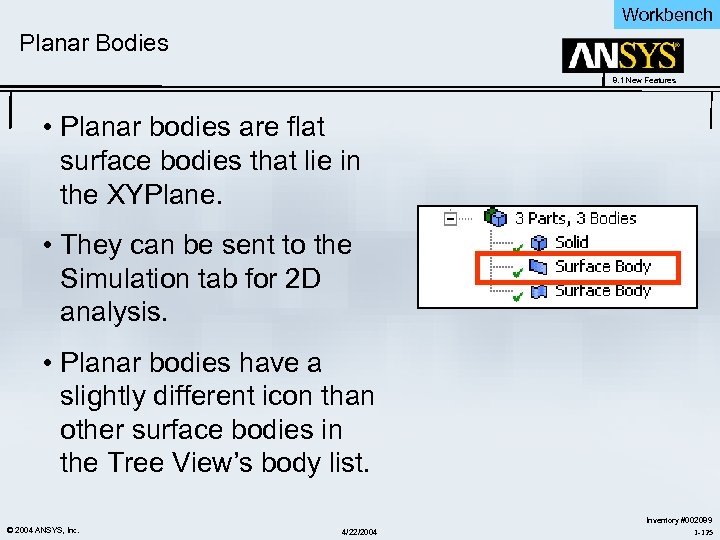 Workbench Planar Bodies 8. 1 New Features • Planar bodies are flat surface bodies that lie in the XYPlane. • They can be sent to the Simulation tab for 2 D analysis. • Planar bodies have a slightly different icon than other surface bodies in the Tree View’s body list. © 2004 ANSYS, Inc. 4/22/2004 Inventory #002089 1 -125
 Workbench More Modeling Improvements 8. 1 New Features • Body Operation: Keep Option – You can choose to keep the selected bodies that are used in a Boolean operation • Multiple Surface Support for Joint – Any number of surfaces can be selected to join in a single Joint feature • Point Profiles for Skin/Loft – The Skin/Loft feature now accepts point profiles as the start and/or end profile. • Point Feature by Coordinates – Points can be created from scratch by reading in coordinates from a data file. © 2004 ANSYS, Inc. 4/22/2004 Inventory #002089 1 -126
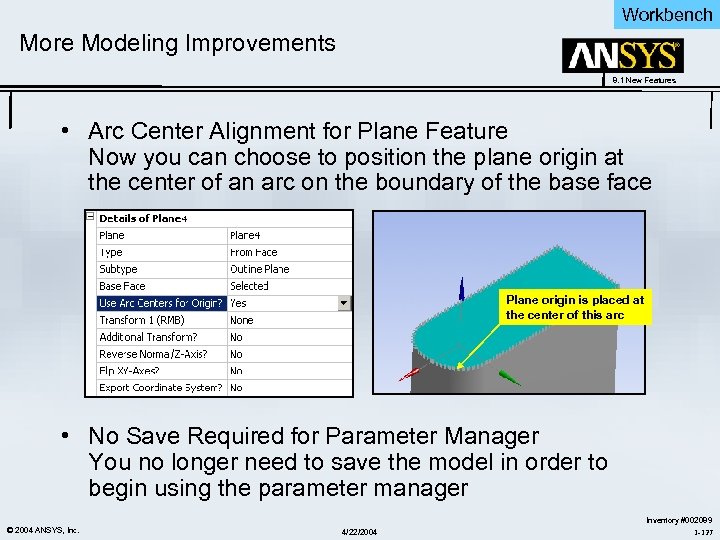 Workbench More Modeling Improvements 8. 1 New Features • Arc Center Alignment for Plane Feature Now you can choose to position the plane origin at the center of an arc on the boundary of the base face Plane origin is placed at the center of this arc • No Save Required for Parameter Manager You no longer need to save the model in order to begin using the parameter manager © 2004 ANSYS, Inc. 4/22/2004 Inventory #002089 1 -127
 Workbench 8. 1 New Features Beta Features ANSYS Workbench V 8. 1 New Features © 2004 ANSYS, Inc. 4/22/2004 Inventory #002089 1 -128
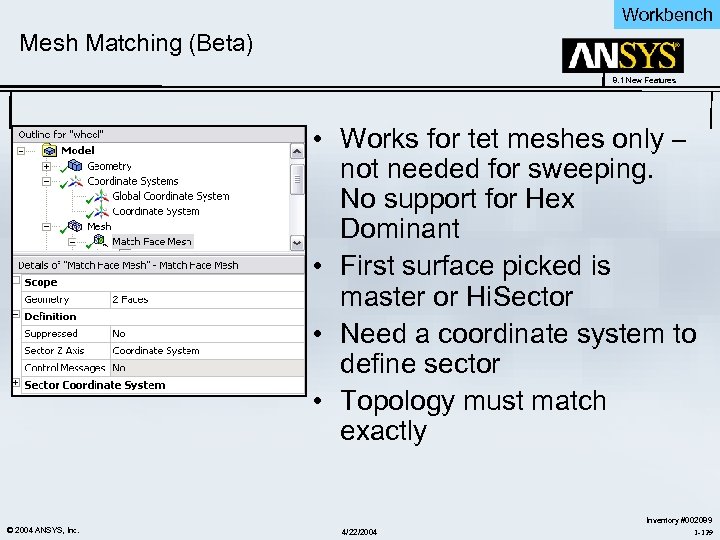 Workbench Mesh Matching (Beta) 8. 1 New Features • Works for tet meshes only – not needed for sweeping. No support for Hex Dominant • First surface picked is master or Hi. Sector • Need a coordinate system to define sector • Topology must match exactly © 2004 ANSYS, Inc. 4/22/2004 Inventory #002089 1 -129
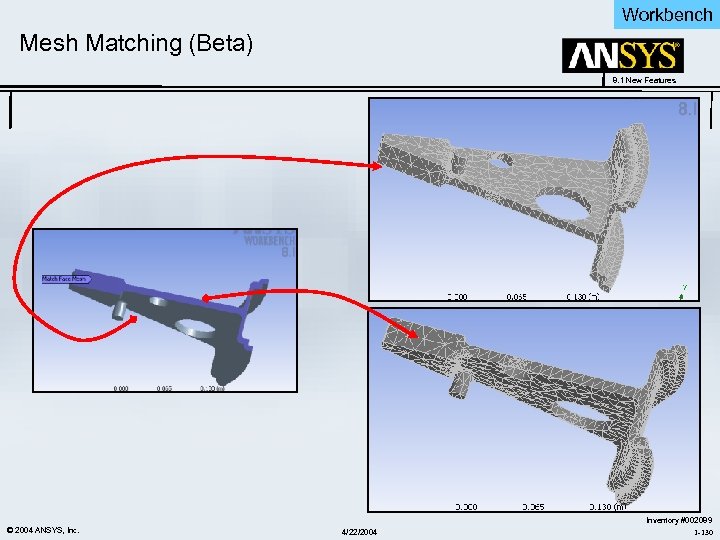 Workbench Mesh Matching (Beta) 8. 1 New Features © 2004 ANSYS, Inc. 4/22/2004 Inventory #002089 1 -130
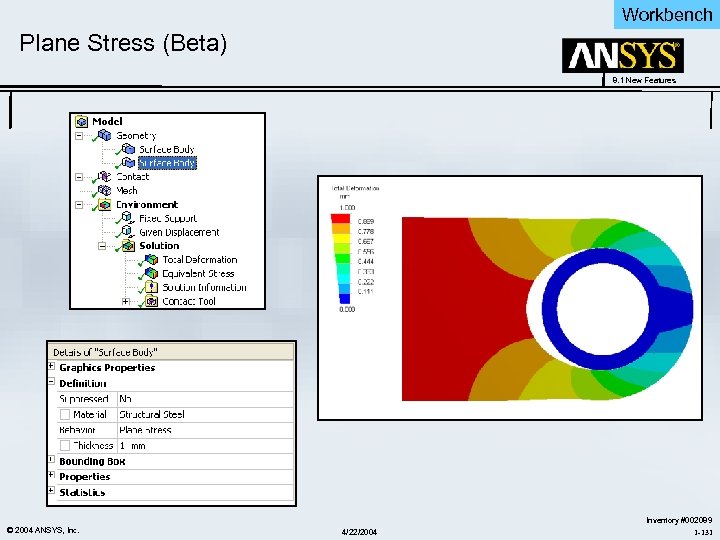 Workbench Plane Stress (Beta) 8. 1 New Features © 2004 ANSYS, Inc. 4/22/2004 Inventory #002089 1 -131
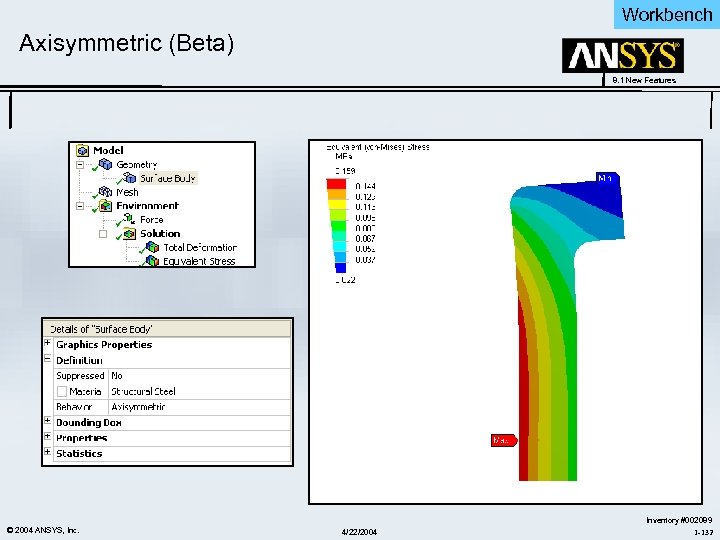 Workbench Axisymmetric (Beta) 8. 1 New Features © 2004 ANSYS, Inc. 4/22/2004 Inventory #002089 1 -132
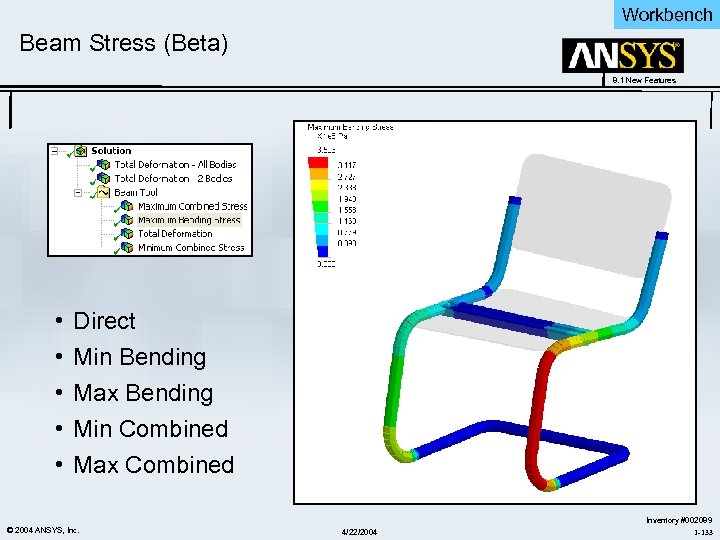 Workbench Beam Stress (Beta) 8. 1 New Features • • • Direct Min Bending Max Bending Min Combined Max Combined © 2004 ANSYS, Inc. 4/22/2004 Inventory #002089 1 -133
 Workbench 8. 1 New Features Low Frequency Electromagnetics Simulation Beta Features ANSYS Workbench V 8. 1 New Features © 2004 ANSYS, Inc. 4/22/2004 Inventory #002089 1 -134
 Workbench Objectives - WB LF Emag 8. 1 New Features • Objectives: – Provide full featured low frequency electromagnetics analysis capability in Work. Bench. – Accessed with ANSYS Emag (core or enabled task) or ANSYS Multiphysics license key. – DM Enclosure for creation of “field” volume released at 8. 0 – Magnetostatics beta release ANSYS 8. 1 – Magnetostatics commercial release target ANSYS 9. 0 – Electrostatics and other LF electromagnetics capabilities will follow. © 2004 ANSYS, Inc. 4/22/2004 Inventory #002089 1 -135
 Workbench WB LF Emag 8. 1 Beta Features 8. 1 New Features • Model setup with SOLID 117 – Air, iron (Keyopt(1)=0) – Solid conductor (Solenoidal formulation: Keyopt(1)=5) • • • Enclosure body automatically assigned AIR material Emag unit conversions Conductor Object with Voltage and Current Loading Flux-parallel boundary condition Materials: – Relative permittivity, resistivity • Results request: – B, H, F • Solution: Will solve a linear magnetostatics problem • Raster/Vector display option in Details View. © 2004 ANSYS, Inc. 4/22/2004 Inventory #002089 1 -136
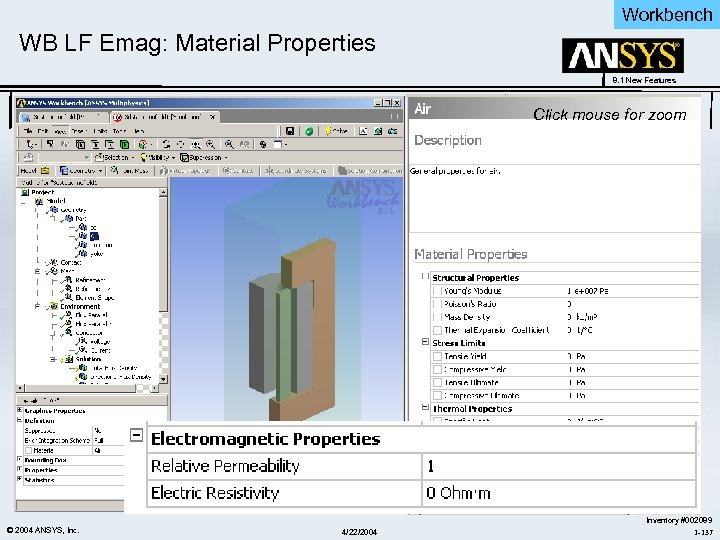 Workbench WB LF Emag: Material Properties 8. 1 New Features Click mouse for zoom © 2004 ANSYS, Inc. 4/22/2004 Inventory #002089 1 -137
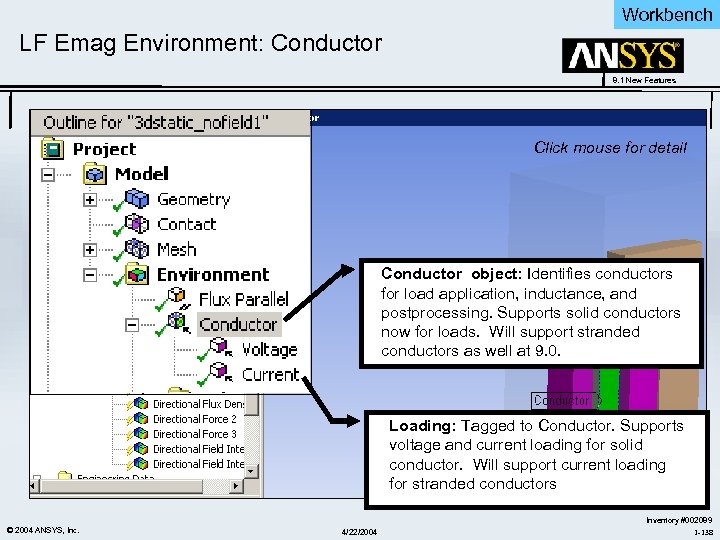 Workbench LF Emag Environment: Conductor 8. 1 New Features Click mouse for detail Conductor object: Identifies conductors for load application, inductance, and postprocessing. Supports solid conductors now for loads. Will support stranded conductors as well at 9. 0. Loading: Tagged to Conductor. Supports voltage and current loading for solid conductor. Will support current loading for stranded conductors © 2004 ANSYS, Inc. 4/22/2004 Inventory #002089 1 -138
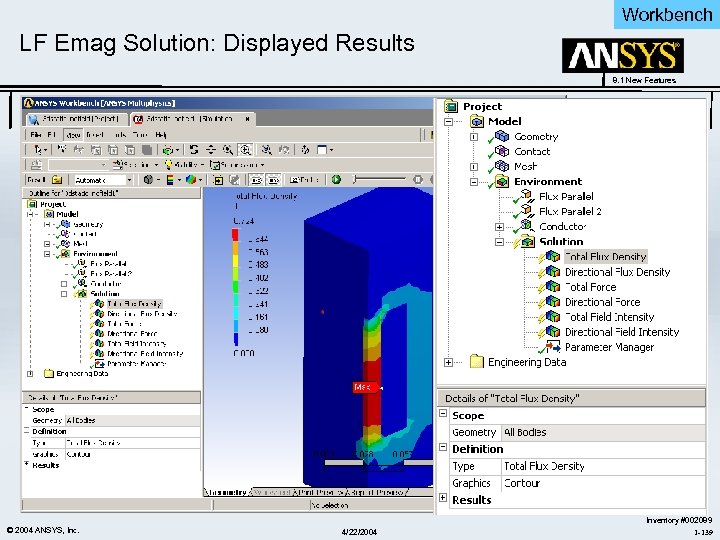 Workbench LF Emag Solution: Displayed Results 8. 1 New Features © 2004 ANSYS, Inc. 4/22/2004 Inventory #002089 1 -139
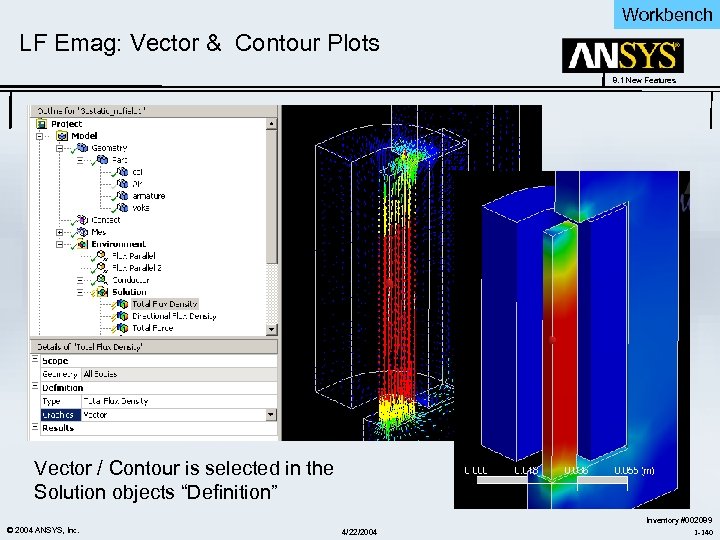 Workbench LF Emag: Vector & Contour Plots 8. 1 New Features Vector / Contour is selected in the Solution objects “Definition” © 2004 ANSYS, Inc. 4/22/2004 Inventory #002089 1 -140
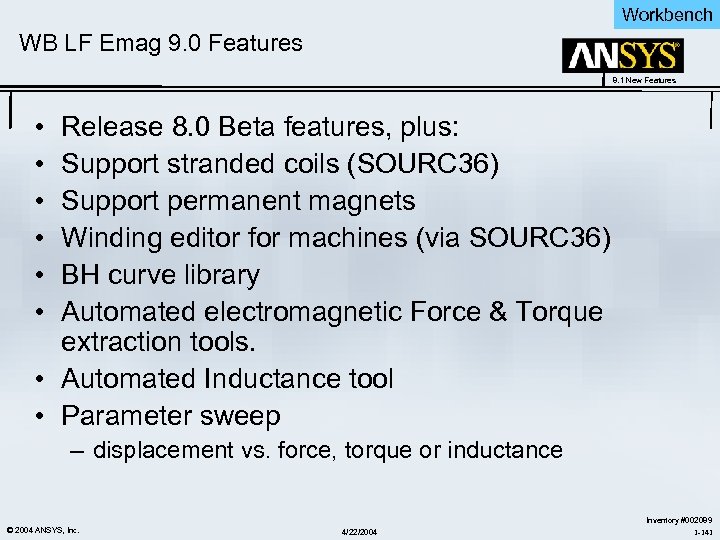 Workbench WB LF Emag 9. 0 Features 8. 1 New Features • • • Release 8. 0 Beta features, plus: Support stranded coils (SOURC 36) Support permanent magnets Winding editor for machines (via SOURC 36) BH curve library Automated electromagnetic Force & Torque extraction tools. • Automated Inductance tool • Parameter sweep – displacement vs. force, torque or inductance © 2004 ANSYS, Inc. 4/22/2004 Inventory #002089 1 -141
 4/22/2004
 Design. Xplorer 8. 1 New Features Optimization - Design. Xplorer ANSYS Workbench V 8. 1 New Features © 2004 ANSYS, Inc. 4/22/2004 Inventory #002089 1 -143
 Design. Xplorer VT 8. 1 Update 8. 1 New Features • Topology Errors • Independent Soluton Type • Bonded MPC Contact Analysis in Design. Xplorer VT • Revised User Interface • Design For Six Sigma • Questions and Answers © 2004 ANSYS, Inc. 4/22/2004 Inventory #002089 1 -144
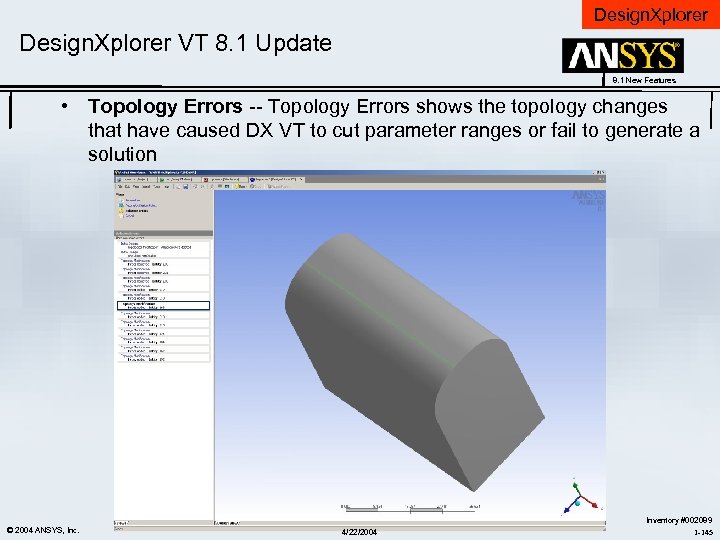 Design. Xplorer VT 8. 1 Update 8. 1 New Features • Topology Errors -- Topology Errors shows the topology changes that have caused DX VT to cut parameter ranges or fail to generate a solution © 2004 ANSYS, Inc. 4/22/2004 Inventory #002089 1 -145
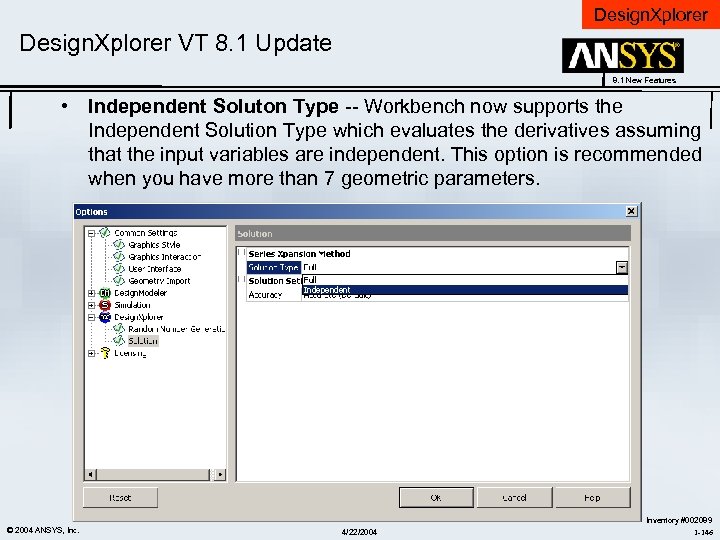 Design. Xplorer VT 8. 1 Update 8. 1 New Features • Independent Soluton Type -- Workbench now supports the Independent Solution Type which evaluates the derivatives assuming that the input variables are independent. This option is recommended when you have more than 7 geometric parameters. © 2004 ANSYS, Inc. 4/22/2004 Inventory #002089 1 -146
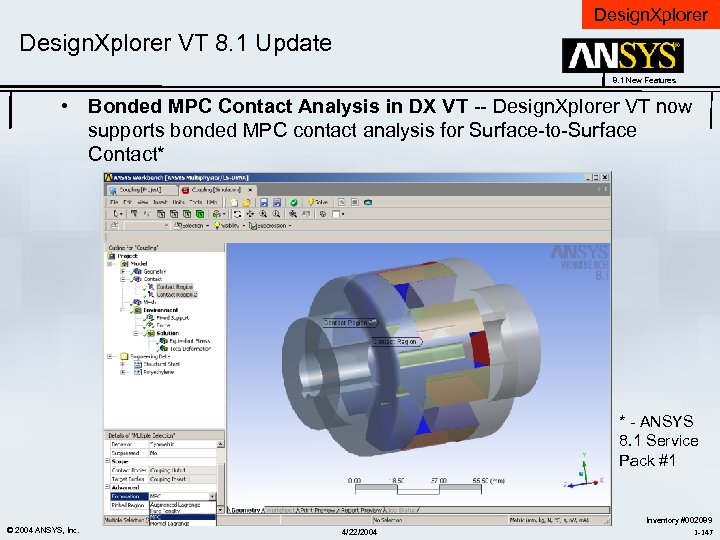 Design. Xplorer VT 8. 1 Update 8. 1 New Features • Bonded MPC Contact Analysis in DX VT -- Design. Xplorer VT now supports bonded MPC contact analysis for Surface-to-Surface Contact* * - ANSYS 8. 1 Service Pack #1 © 2004 ANSYS, Inc. 4/22/2004 Inventory #002089 1 -147
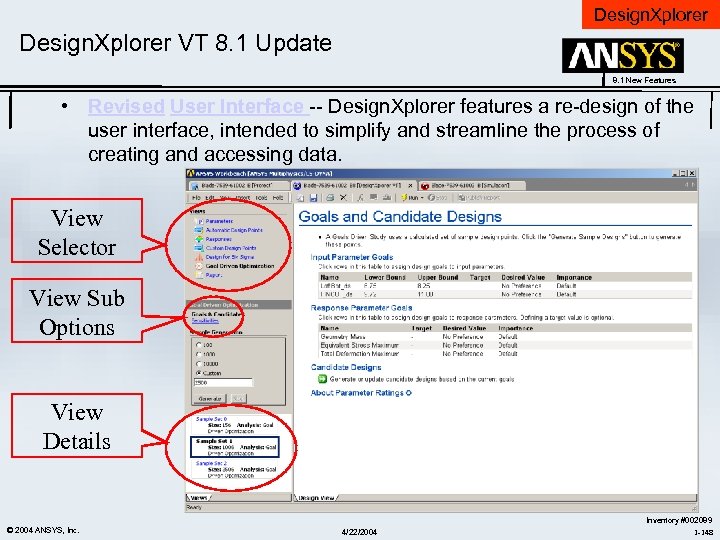 Design. Xplorer VT 8. 1 Update 8. 1 New Features • Revised User Interface -- Design. Xplorer features a re-design of the user interface, intended to simplify and streamline the process of creating and accessing data. View Selector View Sub Options View Details © 2004 ANSYS, Inc. 4/22/2004 Inventory #002089 1 -148
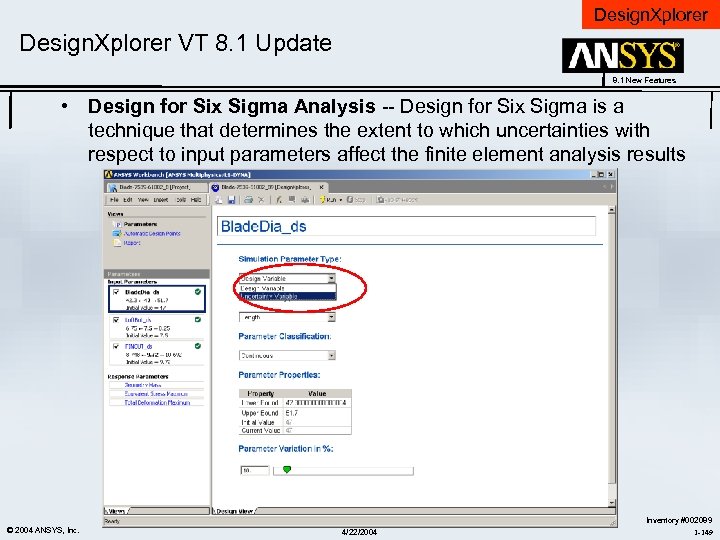 Design. Xplorer VT 8. 1 Update 8. 1 New Features • Design for Six Sigma Analysis -- Design for Six Sigma is a technique that determines the extent to which uncertainties with respect to input parameters affect the finite element analysis results © 2004 ANSYS, Inc. 4/22/2004 Inventory #002089 1 -149
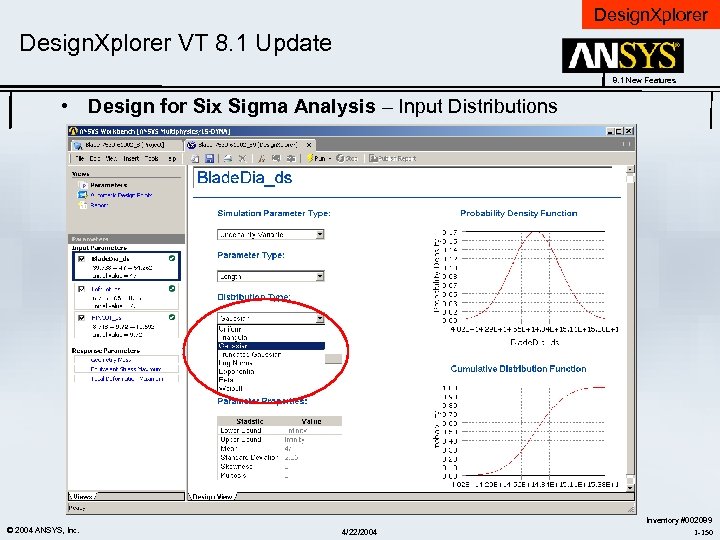 Design. Xplorer VT 8. 1 Update 8. 1 New Features • Design for Six Sigma Analysis – Input Distributions © 2004 ANSYS, Inc. 4/22/2004 Inventory #002089 1 -150
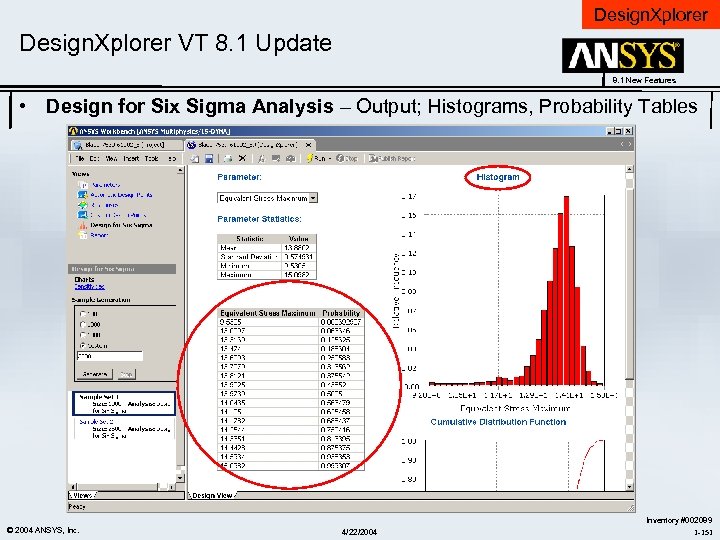 Design. Xplorer VT 8. 1 Update 8. 1 New Features • Design for Six Sigma Analysis – Output; Histograms, Probability Tables © 2004 ANSYS, Inc. 4/22/2004 Inventory #002089 1 -151
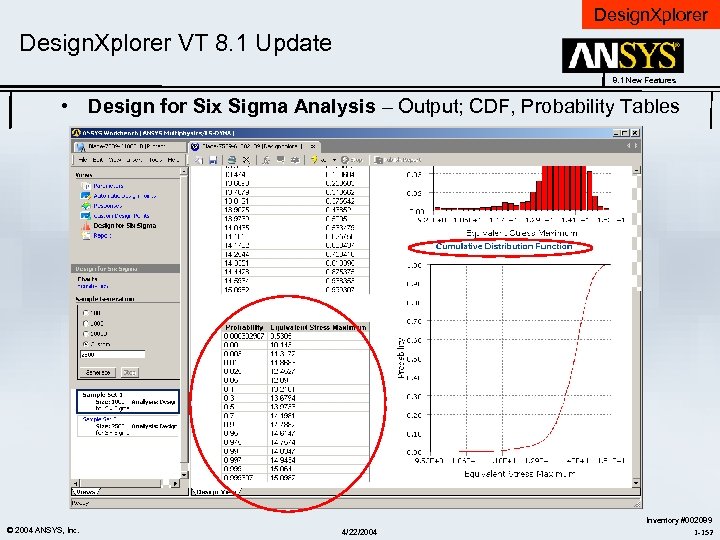 Design. Xplorer VT 8. 1 Update 8. 1 New Features • Design for Six Sigma Analysis – Output; CDF, Probability Tables © 2004 ANSYS, Inc. 4/22/2004 Inventory #002089 1 -152
 Parallel Performance for ANSYS Incorporated © 2004 ANSYS, Inc. 4/22/2004 ANSYS, Inc. Proprietary
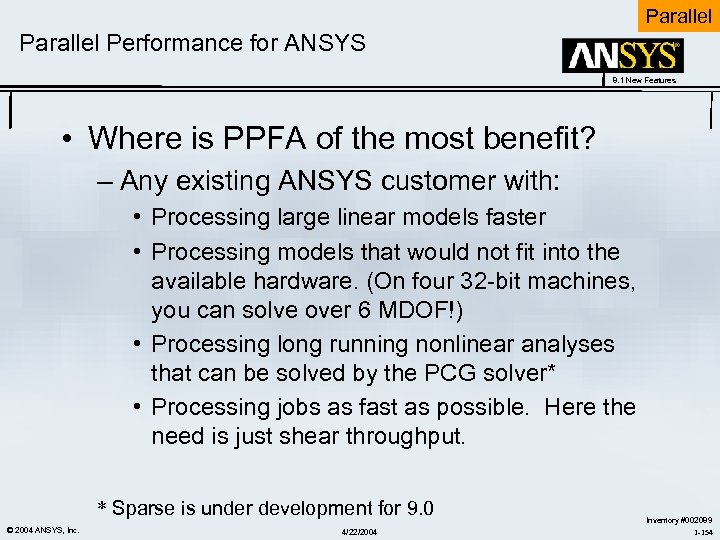 Parallel Performance for ANSYS 8. 1 New Features • Where is PPFA of the most benefit? – Any existing ANSYS customer with: • Processing large linear models faster • Processing models that would not fit into the available hardware. (On four 32 -bit machines, you can solve over 6 MDOF!) • Processing long running nonlinear analyses that can be solved by the PCG solver* • Processing jobs as fast as possible. Here the need is just shear throughput. * Sparse is under development for 9. 0 © 2004 ANSYS, Inc. 4/22/2004 Inventory #002089 1 -154
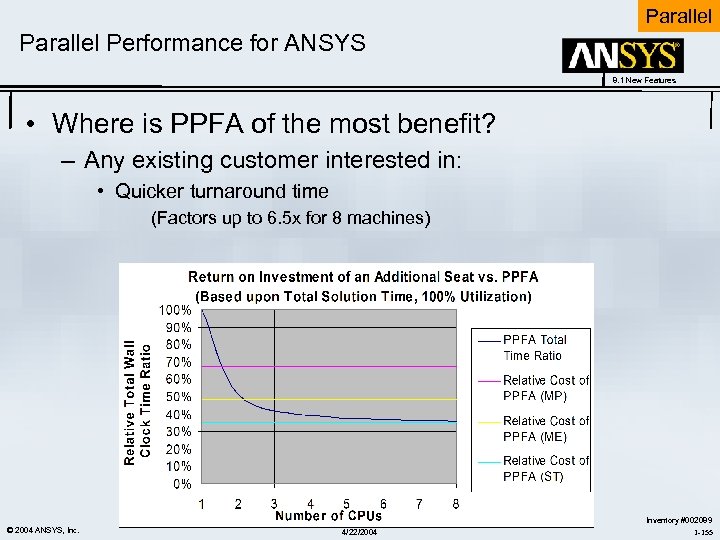 Parallel Performance for ANSYS 8. 1 New Features • Where is PPFA of the most benefit? – Any existing customer interested in: • Quicker turnaround time (Factors up to 6. 5 x for 8 machines) © 2004 ANSYS, Inc. 4/22/2004 Inventory #002089 1 -155
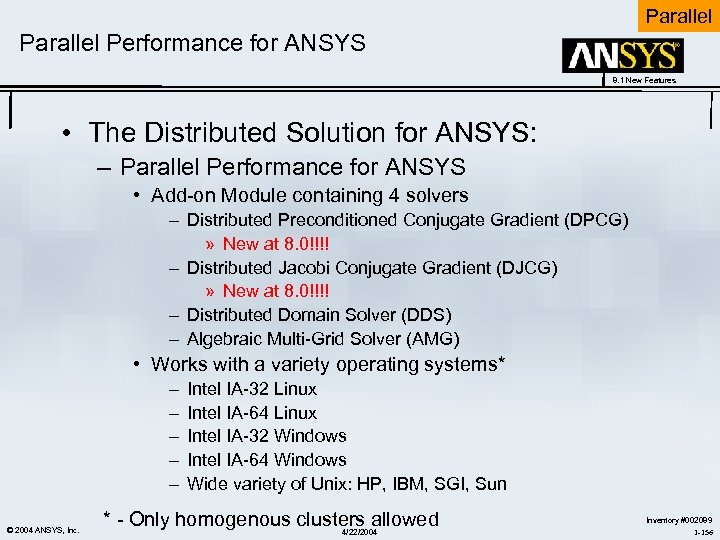 Parallel Performance for ANSYS 8. 1 New Features • The Distributed Solution for ANSYS: – Parallel Performance for ANSYS • Add-on Module containing 4 solvers – Distributed Preconditioned Conjugate Gradient (DPCG) » New at 8. 0!!!! – Distributed Jacobi Conjugate Gradient (DJCG) » New at 8. 0!!!! – Distributed Domain Solver (DDS) – Algebraic Multi-Grid Solver (AMG) • Works with a variety operating systems* – – – © 2004 ANSYS, Inc. Intel IA-32 Linux Intel IA-64 Linux Intel IA-32 Windows Intel IA-64 Windows Wide variety of Unix: HP, IBM, SGI, Sun * - Only homogenous clusters allowed 4/22/2004 Inventory #002089 1 -156
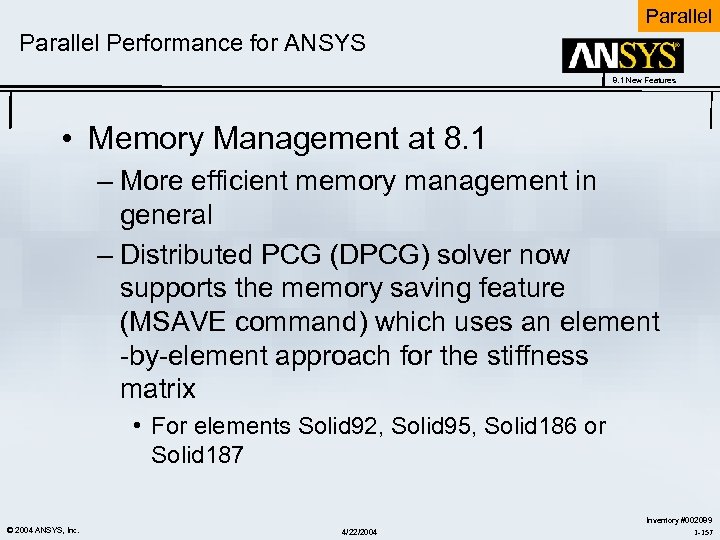 Parallel Performance for ANSYS 8. 1 New Features • Memory Management at 8. 1 – More efficient memory management in general – Distributed PCG (DPCG) solver now supports the memory saving feature (MSAVE command) which uses an element -by-element approach for the stiffness matrix • For elements Solid 92, Solid 95, Solid 186 or Solid 187 © 2004 ANSYS, Inc. 4/22/2004 Inventory #002089 1 -157
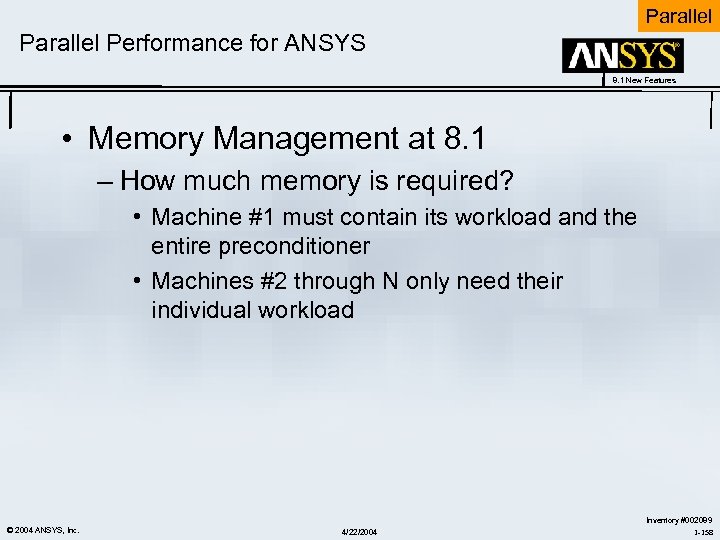 Parallel Performance for ANSYS 8. 1 New Features • Memory Management at 8. 1 – How much memory is required? • Machine #1 must contain its workload and the entire preconditioner • Machines #2 through N only need their individual workload © 2004 ANSYS, Inc. 4/22/2004 Inventory #002089 1 -158
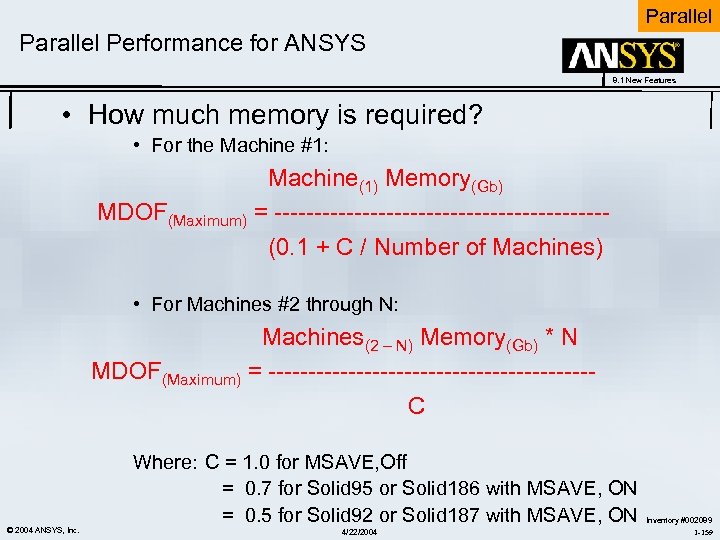 Parallel Performance for ANSYS 8. 1 New Features • How much memory is required? • For the Machine #1: Machine(1) Memory(Gb) MDOF(Maximum) = --------------------- (0. 1 + C / Number of Machines) • For Machines #2 through N: Machines(2 – N) Memory(Gb) * N MDOF(Maximum) = -------------------- C Where: C = 1. 0 for MSAVE, Off = 0. 7 for Solid 95 or Solid 186 with MSAVE, ON = 0. 5 for Solid 92 or Solid 187 with MSAVE, ON © 2004 ANSYS, Inc. 4/22/2004 Inventory #002089 1 -159
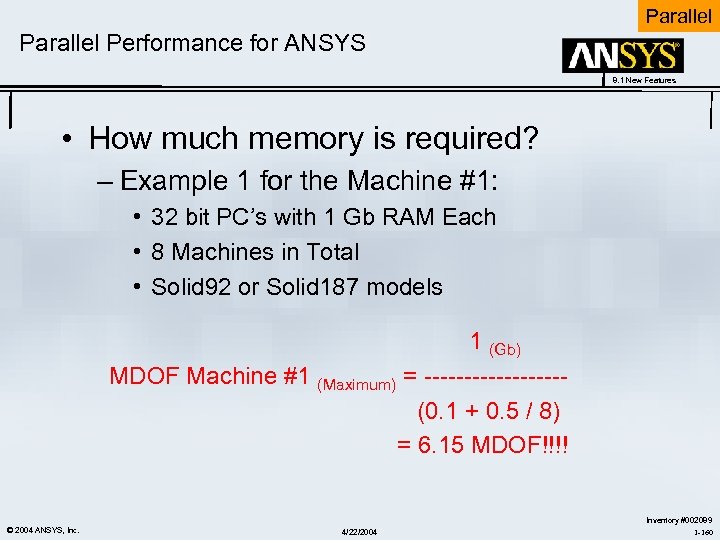 Parallel Performance for ANSYS 8. 1 New Features • How much memory is required? – Example 1 for the Machine #1: • 32 bit PC’s with 1 Gb RAM Each • 8 Machines in Total • Solid 92 or Solid 187 models 1 (Gb) MDOF Machine #1 (Maximum) = --------- (0. 1 + 0. 5 / 8) = 6. 15 MDOF!!!! © 2004 ANSYS, Inc. 4/22/2004 Inventory #002089 1 -160
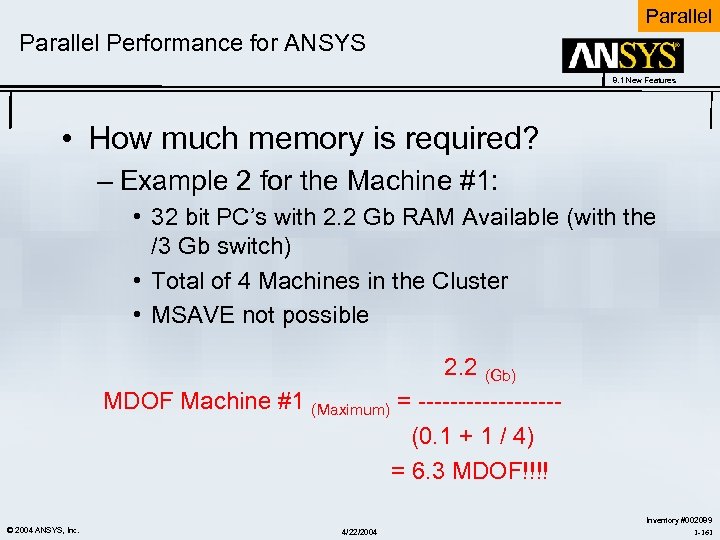 Parallel Performance for ANSYS 8. 1 New Features • How much memory is required? – Example 2 for the Machine #1: • 32 bit PC’s with 2. 2 Gb RAM Available (with the /3 Gb switch) • Total of 4 Machines in the Cluster • MSAVE not possible 2. 2 (Gb) MDOF Machine #1 (Maximum) = --------- (0. 1 + 1 / 4) = 6. 3 MDOF!!!! © 2004 ANSYS, Inc. 4/22/2004 Inventory #002089 1 -161
 4/22/2004