


 Скачать презентацию 36 Multicast on the LAN Engineering Workshops
e9aded4988e5476a606c98bfac2c147b.ppt
- Количество слайдов: 34
 36 Multicast on the LAN Engineering Workshops
 37 Multicast Addressing at Layer 2 • An IPv 4 multicast address is 32 bits, of which the first 4 bits are always the same, leaving 28 bits. • A MAC multicast address is 48 bits, of which the first 24 bits are always the same. One of the remaining bits is reserved, leaving 23 bits. • So, one multicast MAC address maps to 32 multicast IP addresses. Engineering Workshops
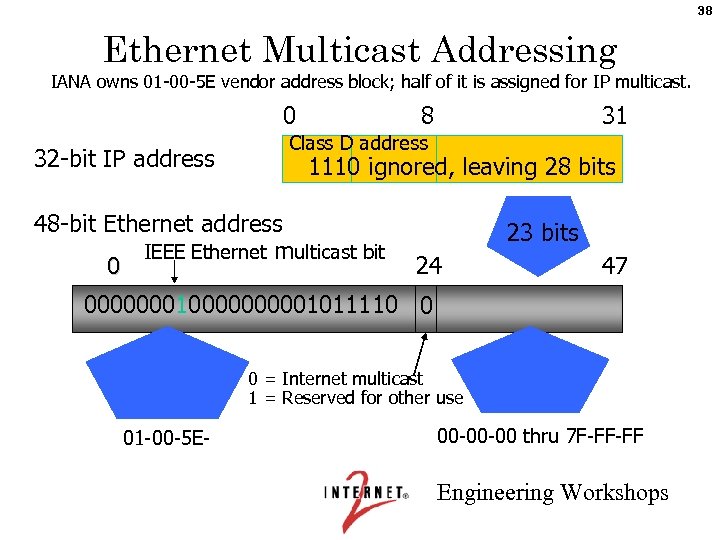 38 Ethernet Multicast Addressing IANA owns 01 -00 -5 E vendor address block; half of it is assigned for IP multicast. 0 32 -bit IP address 8 31 Class D address 1110 ignored, leaving 28 bits 48 -bit Ethernet address IEEE Ethernet multicast bit 0 23 bits 24 47 00000001000001011110 0 0 = Internet multicast 1 = Reserved for other use 01 -00 -5 E- 00 -00 -00 thru 7 F-FF-FF Engineering Workshops
 39 IGMP • Internet Group Management Protocol - how hosts tell routers about group membership • Routers also solicit group membership from directly connected hosts • RFC 1112 specifies version 1 of IGMP – Supported on Windows 95 • RFC 2236 specifies version 2 of IGMP – Supported on latest service pack for Windows, newer Windows releases, and most UNIX systems • RFC 3376 specifies version 3 of IGMP – Provides source include-list capabilities (SSM!) – Included in Linux kernel 2. 6 and later – See http: //videolab. uoregon. edu/projects. html Engineering Workshops
 40 IGMPv 2 • Router: – sends Membership Query messages to All Hosts (224. 0. 0. 1) • query-interval = 125 secs default – router with lowest IP address is Querier (rest non-queriers) – If lower-IP address query heard, back off to non-querier state • Other Querier Present Interval default: (robust-count x query-interval) + (0. 5 x query-response-interval) = 255 secs – listens for reports (whether querier or not) and adds group to membership list for that interface • query-response-interval = 10 secs default – timeout (Group member interval) default: • (robust-count x query-interval) + (1 x query-responseinterval) = 260 sec – robust-count - provides fine-tuning to allow for expected packet loss on a subnet. Default = 2 (tunable from 2 -10) Engineering Workshops
 41 IGMPv 2 • Host: – sends Membership Report messages to groups it is a member of • waits 0 -10 sec (default) • Hosts listen to other host reports • Only 1 host responds – sends unsolicited Membership Reports (i. e. , Join Messages) to group address (e. g. 224. 10. 8. 5) – sends Leave messages to All Routers (224. 0. 0. 2) – reports group membership ONLY – no sources. Only the existence of local group members is reported, not the actual members themselves Engineering Workshops
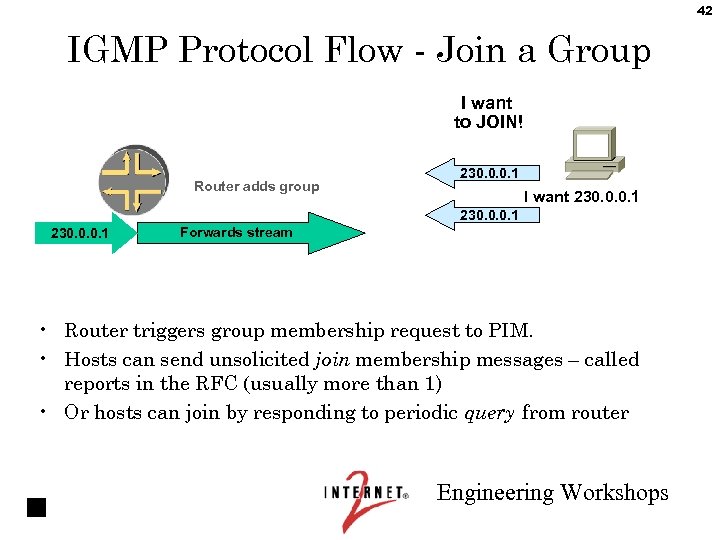 42 IGMP Protocol Flow - Join a Group I want to JOIN! Router adds group 230. 0. 0. 1 I want 230. 0. 0. 1 Forwards stream • Router triggers group membership request to PIM. • Hosts can send unsolicited join membership messages – called reports in the RFC (usually more than 1) • Or hosts can join by responding to periodic query from router Engineering Workshops
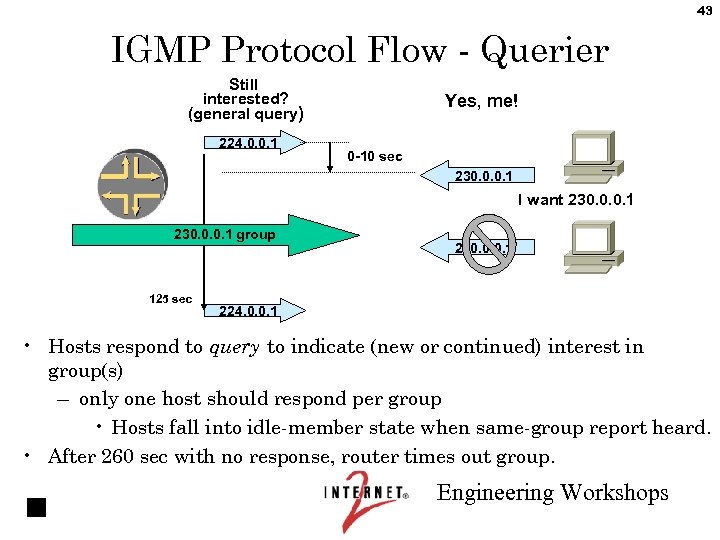 43 IGMP Protocol Flow - Querier Still interested? (general query) 224. 0. 0. 1 Yes, me! 0 -10 sec 230. 0. 0. 1 I want 230. 0. 0. 1 group 125 sec 230. 0. 0. 1 224. 0. 0. 1 • Hosts respond to query to indicate (new or continued) interest in group(s) – only one host should respond per group • Hosts fall into idle-member state when same-group report heard. • After 260 sec with no response, router times out group. Engineering Workshops
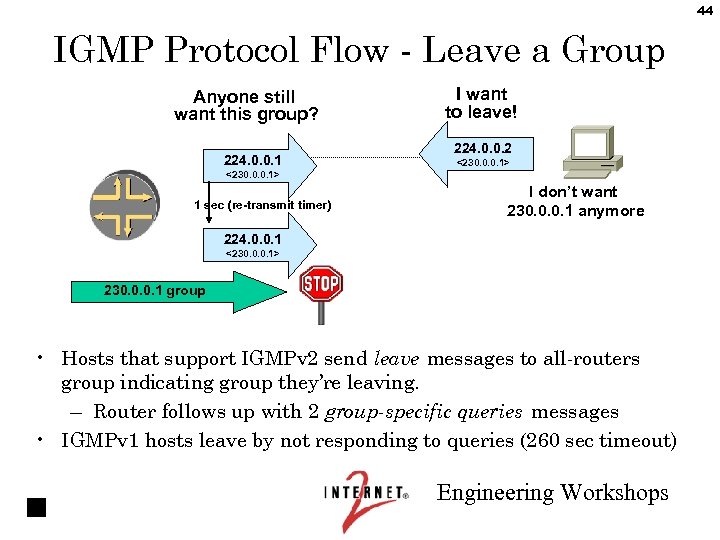 44 IGMP Protocol Flow - Leave a Group Anyone still want this group? 224. 0. 0. 1 I want to leave! 224. 0. 0. 2 <230. 0. 0. 1> 1 sec (re-transmit timer) I don’t want 230. 0. 0. 1 anymore 224. 0. 0. 1 <230. 0. 0. 1> 230. 0. 0. 1 group • Hosts that support IGMPv 2 send leave messages to all-routers group indicating group they’re leaving. – Router follows up with 2 group-specific queries messages • IGMPv 1 hosts leave by not responding to queries (260 sec timeout) Engineering Workshops
 45 Soft State • Say I set up an active Multicast group, say by issuing a membership report. What happens if my computer goes down and never directly leaves the group ? • This is fixed with “Soft State” – Everything has a timer, and if not periodically reinitiated the timer will expire and the state will be removed. – So there is no danger of some rogue group lasting forever. Engineering Workshops
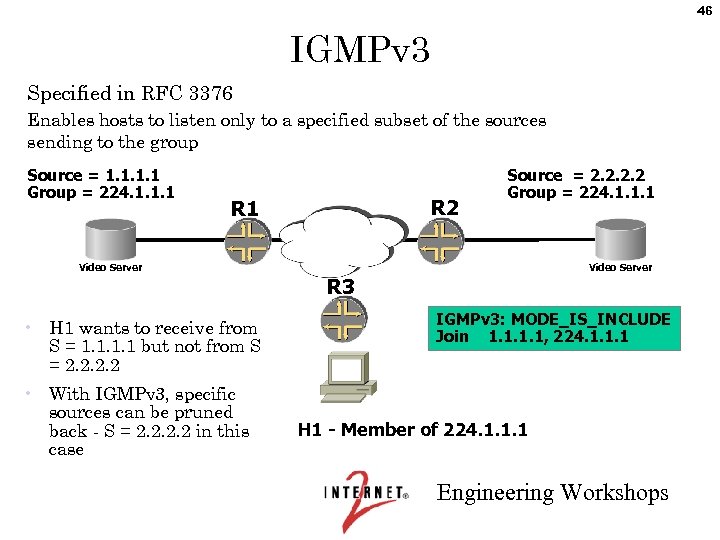 46 IGMPv 3 Specified in RFC 3376 Enables hosts to listen only to a specified subset of the sources sending to the group Source = 1. 1 Group = 224. 1. 1. 1 R 2 R 1 Source = 2. 2 Group = 224. 1. 1. 1 Video Server R 3 • H 1 wants to receive from S = 1. 1 but not from S = 2. 2 • With IGMPv 3, specific sources can be pruned back - S = 2. 2 in this case IGMPv 3: MODE_IS_INCLUDE Join 1. 1, 224. 1. 1. 1 H 1 - Member of 224. 1. 1. 1 Engineering Workshops
 47 IGMPv 3 Enhancements • Group-Source Report message is defined. Enables hosts to specify which senders it can receive or not receive data from. • Group-Source Leave message is defined. Enables host to specify the specific IP addresses of a (source, group) that it wishes to leave. Engineering Workshops
 48 Switches and Snooping • IGMP host reports (Joins) tell the router to start sending multicast traffic to the LAN, since one or more hosts on the LAN are members of the group. • In a conventional shared broadcast LAN using switches that have no multicast smarts, the traffic is sent to all hosts. • With multiple high bandwidth multicast sources (e. g. video at 5 Mbps), this does not scale beyond approximately one source. • There a few techniques used to deal with this. . . Engineering Workshops
 49 IGMP Snooping • Implemented by several vendors. Support for IGMPv 2 is common; support for IGMPv 3 is rare, but becoming more common. • What happens at the MAC layer: – IGMP snoopers add a bridge table entry for each multicast group destination address (GDA) to each switch port that has the interested member's unicast source address (USA) already on it. (Remember that there are likely to be dumb hubs downstream of switches, so more than one USA can be on a single port. ) – When an IGMP Leave is received, the GDA entries are pruned. Engineering Workshops
 50 Why IGMP snooping is harder than it looks • The IGMP membership reports have to be captured from each host and suppressed to other hosts to prevent the others from going into idle-member state; every interested host has to be spoofed into thinking it is the only member of the group, so that it actively sends membership reports. The IGMP snooper then forwards one of these membership reports up to the router (or makes up a fake membership report for itself). Engineering Workshops
 51 Why IGMP snooping is harder than it looks, continued • Since multiple USAs can be on a port (via dumb hub), the switch has to actually do the IGMP membership query/timeout before pruning a port. • Since membership reports are sent to the same GDA as the (possibly high-bandwidth) multicast traffic, there is a potential for heavy loading of the switch CPU, unless you use more expensive ASICs that can separate the IGMP protocol messages from general traffic and route only the IGMP messages to the CPU. • The switch has to know which is the multicast router port. It does this by snooping for IGMP queries. Engineering Workshops
 52 CGMP • The proprietary Cisco Group Management Protocol puts the bulk of the Layer 3 logic in Layer 3 devices rather than cramming it into Layer 2 devices like IGMP snooping does. • The router sends CGMP Joins and Leaves to the switch, specifying the USA and GDA. • On receipt of an IGMP Membership Report, the router sends the switch a CGMP Join. • On receipt of an IGMP Leave, the router sends the switch a CGMP Leave. • IGMP membership reports still have to be suppressed so that hosts don't go into idle-member state. • CGMP does not work correctly with IGMPv 3. – Leaves are not implemented, resulting in channel surfers causing a multicast flooding Do. S on their subnet. – See http: //www. cisco. com/univercd/cc/td/doc/product/software/ios 122/ 122 cgcr/fipr_c/ipcpt 3/1 cfmulti. htm#1046127. Engineering Workshops
 53 PIM Snooping and RGMP • For Layer 2 networks with routers but no hosts (transit LANs). • PIM, not IGMP, is spoken among routers, so IGMP snooping does not work in this case. • PIM snooping and the Cisco-proprietary Router Group Management Protocol (RGMP) are used by the Layer 2 switch to send only the multicast flows that the router needs to the router's port. These work analogously to IGMP snooping (smarts in the switch) and CGMP (smarts in the router). • PIM snooping is still mostly experimental. Some Foundry Networks switches support it. Engineering Workshops
 54 Problems with Multicast on the LAN • In general, multicast on the LAN is not as well understood as multicast on the WAN. • Switch behaviors are not standardized. • Problems with switches: – when snooping is enabled, they may drop packets that shouldn’t be dropped. – even without snooping, sometimes they step outside their bailiwick, trying to do non-Layer-2 tasks. Engineering Workshops
 55 Case Study A few months ago I converted all our interfaces over to IGMP Version 3. Then I started getting complaints from our lab/classroom support group that Norton Ghost was failing for them. It would hang after about 3 minutes. So far the fix, without understanding why it works, has been to revert the interfaces to IGMP version 2. The switches downstream from these interfaces are running CGMP and CGMP LEAVE (which is actually a form of IGMP snooping/spoofing for IGMP Leaves sent to 224. 0. 0. 2). I suspect that the fact that these switches are actually looking at IGMP packets may have something to do with the problem that reverting to v 2 fixed. . . — Alan Crosswell Engineering Workshops
 56 Case Study This author traveled to Los Alamos, New Mexico to help debug a multicast problem that had everyone stumped. Everyone was assuming the only known router on the subnet was also acting as the multicast gateway. Unfortunately, this wasn’t the case. A nominally Layer 2 switch on the subnet was accidentally configured with PIM active, and won the PIM Designated Router election. Of course, this Layer 2 switch had no upstream to anywhere. — Bill Nickless Engineering Workshops
 One Approach to Multicast on the LAN • Avoid snooping, as it causes more problems than it solves. • Keep subnets small. A smaller subnet is less likely to have people joining several different multicast groups, traffic for each of which is sent to the entire subnet. • If at all possible, use routers, not switches or bridges. • If you have to use switches, try to at least buy them all from the same vendor, so you won’t have inconsistent behavior as well as unexpected behavior. Engineering Workshops 57
 58 Another Approach to Multicast on the LAN • The previous approach reflects giga. Po. P/WAN bias. • On a campus, it just isn't possible to use routers everywhere. • Switches and snooping may be evils, but they are necessary evils. Learn to cope with them. http: //www. cisco. com/warp/public/473/22. html is a good place to start. Engineering Workshops
 59 Lab 1: Multicast on the LAN Engineering Workshops
 60 SSM Engineering Workshops
 61 PIM-SM • SM stands for “Sparse Mode. ” – RFC 2362 and draft-ietf-pim-sm-v 2 -new-06. txt – There is also a Dense Mode, but we don’t recommend using it. – Cisco has a proprietary “Sparse-Dense” mode which is used for RP discovery. • PIM-SM allows for both RPTs and SPTs. • There are two ways to use PIM-SM… Engineering Workshops
 62 ASM and SSM • ASM: Any-Source Multicast. Traditional multicast – data and joins are forwarded to an RP. – All routers in a PIM domain must have RP mapping. – When load exceeds threshold, forwarding switches to an SPT. The default threshold is one packet; in this case, the sole purpose of the RPT is to learn which sources are active. (With IGMPv 2, the receiver can only specify the group, not specific sources. ) – State increases (not everywhere) as number of sources and number of groups increase. – SPT state is refreshed when data is forwarded and with Join/Prune control messages. • SSM: Source-Specific Multicast. PIM-SM without RPs – instead, the source is learned out-of-band, and the SPT is built directly to it. Engineering Workshops
 63 SSM • Source-Specific Multicast (SSM) is a subset of ASM, so – SSM concepts apply directly to ASM, but – SSM is a lot simpler than ASM. For these reasons, we cover SSM first in this workshop. • 232 / 8 is assigned to SSM as an address space. Other address ranges can also be set up for SSM — this is primarily a function of the receiving network. • Source activity and IP addresses are assumed known. • IGMPv 3 allows for “Include” lists of (S, G) pairs. Engineering Workshops
 64 SSM • SSM - draft-ietf-ssm-arch-01. txt – 232/8 – IANA assigned – No RPTs – Guarantees ONE source on any delivery tree • Content security – no unwanted sources – Reduced protocol dependence – more later. . . – Solves address allocation issues for inter-domain one-to-many • tree address is 64 bits – S, G – Host must learn source address out-of-band (e. g, from a web page) – Host-to-router join request specifies source as well as group • requires IGMPv 3 for include-source list – SSM behavior in 232/8 by default • Configurable to expand range Engineering Workshops
 65 SSM in Action • Each (S, G) pair listed in the IGMPv 3 include list generates a (S, G) Join directly towards the source. • That’s it. It’s very simple. All you need to implement is : – Edge routers need IGMPv 3 – Interior routers need filters to prevent RP (*, G) Joins & other RP state for the SSM address block Engineering Workshops
 66 SSM Group Addresses • 232 / 8 is assigned to SSM as an address space. – You don’t have to ask, you can just pick one and use it. • How can this be ? – Note that all joins are unique as long as the combination of S and G are unique. Not only can one source support multiple groups, but if there are two sources using the same group address, everything works just fine. Engineering Workshops
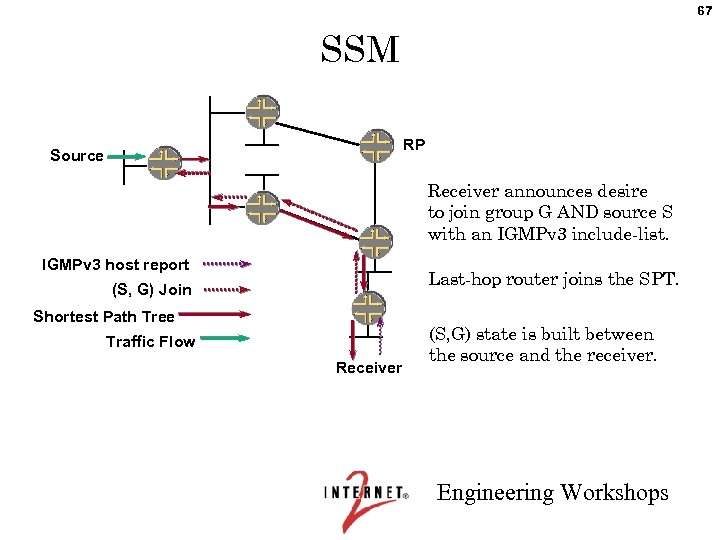 67 SSM RP Source Receiver announces desire to join group G AND source S with an IGMPv 3 include-list. IGMPv 3 host report Last-hop router joins the SPT. (S, G) Join Shortest Path Tree Traffic Flow Receiver (S, G) state is built between the source and the receiver. Engineering Workshops
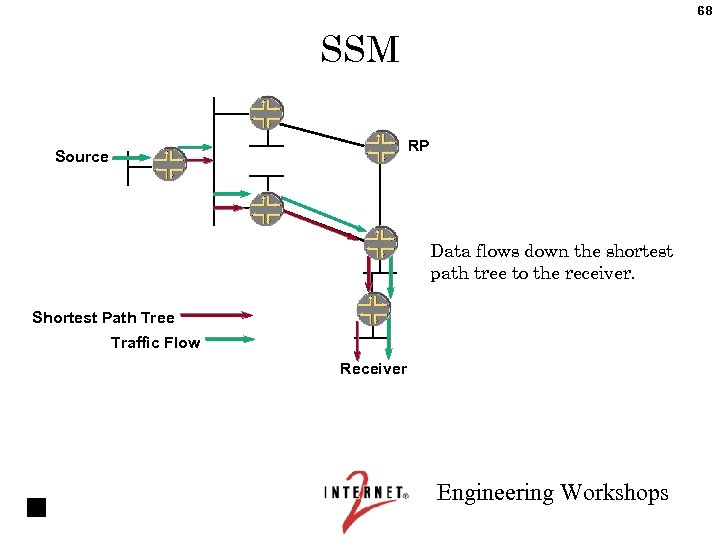 68 SSM RP Source Data flows down the shortest path tree to the receiver. Shortest Path Tree Traffic Flow Receiver Engineering Workshops
 69 Lab 2: SSM Engineering Workshops