


 Скачать презентацию 2010 CME Group All rights reserved
5820308fcdc6a39e4a87a13c0afffc66.ppt
- Количество слайдов: 32
 © 2010 CME Group. All rights reserved
 CME Group – BMV Electronic Trading Overview & Customer On-Boarding February 3 rd, 2011
 Partnership Overview
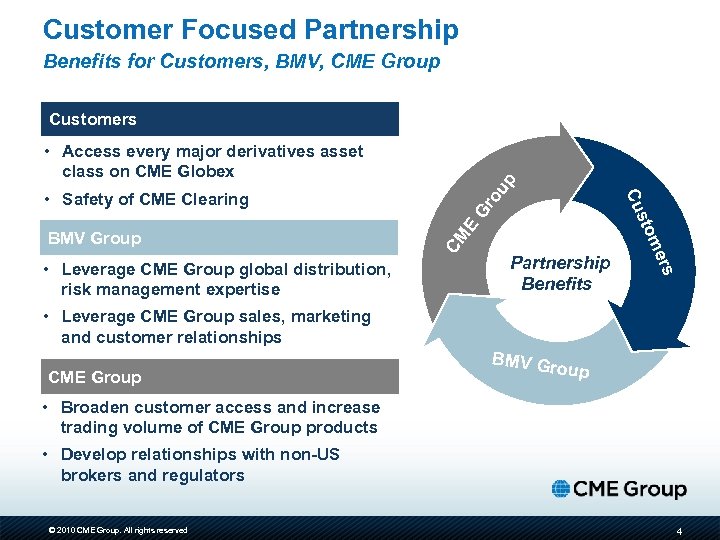 Customer Focused Partnership Benefits for Customers, BMV, CME Group Gr Partnership Benefits rs • Leverage CME Group global distribution, risk management expertise e om BMV Group st Cu • Safety of CME Clearing CM E • Access every major derivatives asset class on CME Globex ou p Customers • Leverage CME Group sales, marketing and customer relationships CME Group BMV G roup • Broaden customer access and increase trading volume of CME Group products • Develop relationships with non-US brokers and regulators © 2010 CME Group. All rights reserved 4
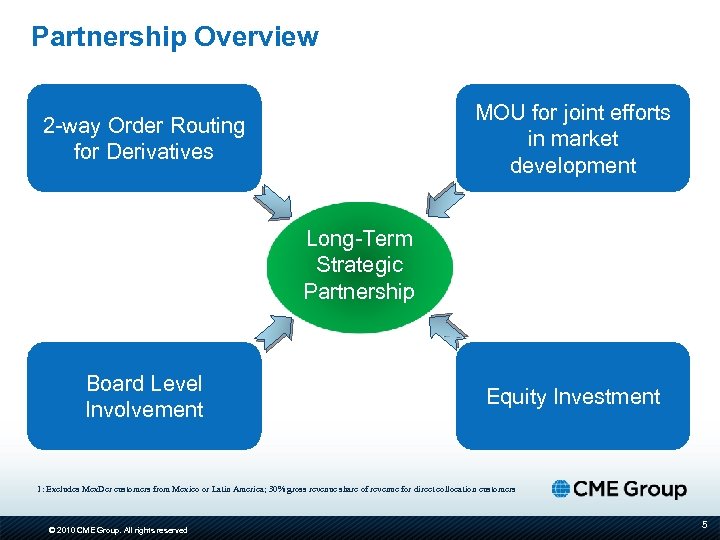 Partnership Overview MOU for joint efforts in market development 2 -way Order Routing for Derivatives Long-Term Strategic Partnership Board Level Involvement Equity Investment 1: Excludes Mex. Der customers from Mexico or Latin America; 30% gross revenue share of revenue for direct collocation customers © 2010 CME Group. All rights reserved 5
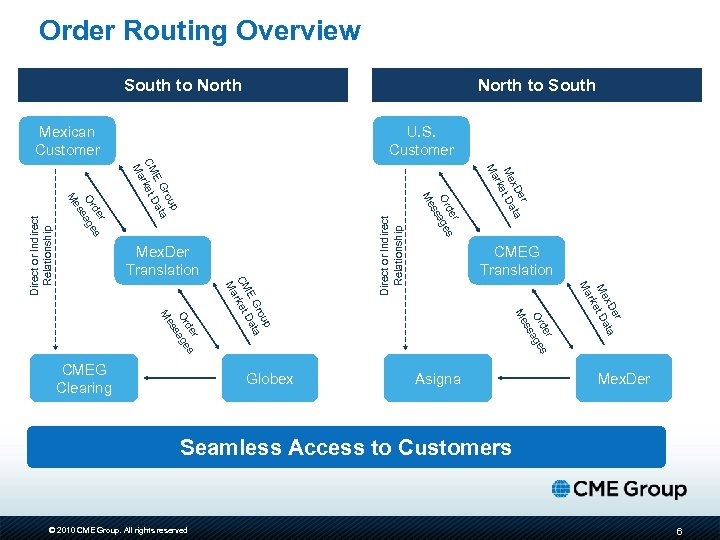 Order Routing Overview South to North to South U. S. Customer Asigna Direct or Indirect Relationship er x. D ata Me et D rk Ma r de s Or age ss Globex CMEG Translation Me p rou a E G Dat CM rket Ma r de s Or sage s Me CMEG Clearing er x. D ata Me et D rk Ma Mex. Der Translation r de s Or age ss Me p rou a E G Dat CM rket Ma r de s Or sage s Me Direct or Indirect Relationship Mexican Customer Mex. Der Seamless Access to Customers © 2010 CME Group. All rights reserved 6
 Customer On-Boarding: South to North
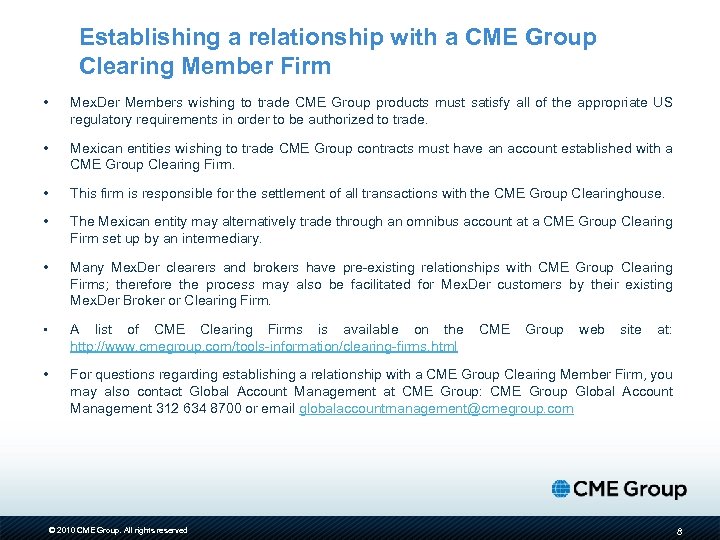 Establishing a relationship with a CME Group Clearing Member Firm • Mex. Der Members wishing to trade CME Group products must satisfy all of the appropriate US regulatory requirements in order to be authorized to trade. • Mexican entities wishing to trade CME Group contracts must have an account established with a CME Group Clearing Firm. • This firm is responsible for the settlement of all transactions with the CME Group Clearinghouse. • The Mexican entity may alternatively trade through an omnibus account at a CME Group Clearing Firm set up by an intermediary. • Many Mex. Der clearers and brokers have pre-existing relationships with CME Group Clearing Firms; therefore the process may also be facilitated for Mex. Der customers by their existing Mex. Der Broker or Clearing Firm. • A list of CME Clearing Firms is available on the http: //www. cmegroup. com/tools-information/clearing-firms. html • For questions regarding establishing a relationship with a CME Group Clearing Member Firm, you may also contact Global Account Management at CME Group: CME Group Global Account Management 312 634 8700 or email globalaccountmanagement@cmegroup. com © 2010 CME Group. All rights reserved CME Group web site at: 8
 Accessing CME products through a Mex. Der Clearing or Trading Member • New Customer would contact their Mex. Der Clearing member or Mex. Der Trading member and request access to the CME market. • Mex. Der Clearing member or Mex. Der Trading member will need to setup a CME clearing member relationship. This relationship can be direct or indirect • CME clearing member would work with CME Group and Mex. Der to provide access to the new Mex. Der customer. • The Mex. Der clearing member or Mex. Der trading member would provide this information to (BMV contact) so they can setup the account in RTS. The setup would include account number, i. Link session, market data access markets. • If a Mex. Der customer, chooses to establish a relationship with a CME Group Clearing Firm independently, a list of CME Clearing Firms is available on the CME Group web site at: http: //www. cmegroup. com/tools-information/clearing-firms. html © 2010 CME Group. All rights reserved 9
 Electronic Trading Overview: South to North
 Order Routing Basics: Mex. Der to CME Group BMV customers will be able to leverage their existing connectivity to Mex. Der to trade CME Group products: • All CME, CBOT, NYMEX and COMEX market data will be available via Mex. Der connectivity • Orders will route “South to North” from the customer’s Mex. Der connection via a high speed international circuit to CME Globex • All CME Group products clear at the CME Clearing House • CME Group Clearing Firm relationship required • Targeted launch early Spring 2011 © 2010 CME Group. All rights reserved 11
 Available CME Group products Asset Class Product Name Globex Symbol Agriculture Corn Futures ZC Agriculture Corn Options OZC Energy E-mini Natural Gas Futures QG Energy Light Sweet Crude Oil Futures CL Equity Indexes E-mini Dow ($5) Futures YM Equity Indexes E-mini NASDAQ-100 Futures NQ Equity Indexes E-mini S&P 500 Futures ES Equity Indexes E-mini S&P 500 Options ES FX British Pound Futures 6 B FX E-mini Japanese Yen Futures J 7 FX Euro FX Futures 6 E FX Japanese Yen Futures 6 J FX Mexican Peso Futures 6 M Interest Rates 10 -Year U. S. Treasury Note Futures ZN Interest Rates Eurodollar Futures GE Metals Gold Futures GC Metals Silver Futures SI © 2010 CME Group. All rights reserved 12
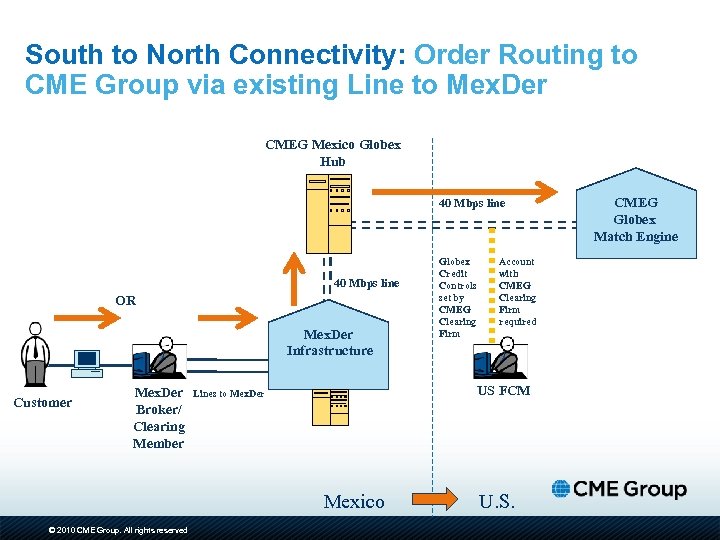 South to North Connectivity: Order Routing to CME Group via existing Line to Mex. Der CMEG Mexico Globex Hub 40 Mbps line OR Mex. Der Infrastructure Customer Mex. Der Broker/ Clearing Member Account with CMEG Clearing Firm required US FCM Lines to Mex. Der Mexico © 2010 CME Group. All rights reserved Globex Credit Controls set by CMEG Clearing Firm U. S. CMEG Globex Match Engine
 Mapping of Mexder accounts with CME accounts • Once the relation with a CME Clearing Firm is established, Mex. Der will map the account information on the interfaces • The Mex. Der member will send orders to CME seamlessly • Mex. Der members will trade both Mex. Der and CME products from the same “trading screen” • All CME trades will reach the correct account at the CME Clearing Firm • Clearing and settlement activities of CME products will be conducted by the CME Clearing Firm © 2010 CME Group. All rights reserved 14
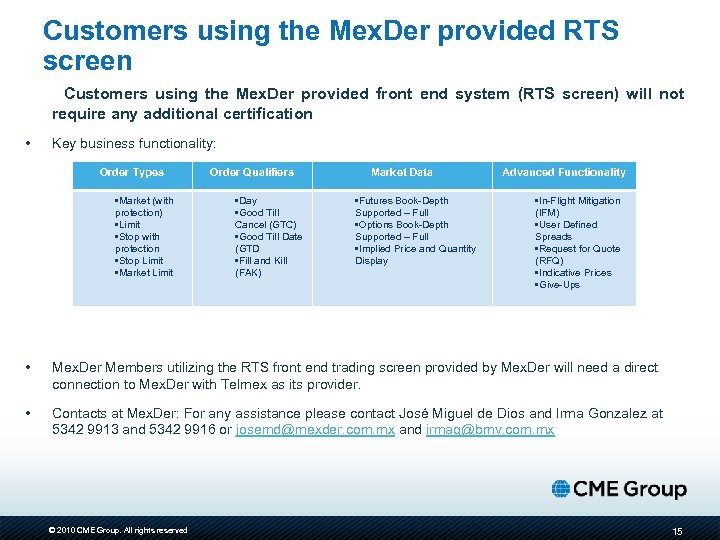 Customers using the Mex. Der provided RTS screen Customers using the Mex. Der provided front end system (RTS screen) will not require any additional certification • Key business functionality: Order Types • Market (with protection) • Limit • Stop with protection • Stop Limit • Market Limit Order Qualifiers • Day • Good Till Cancel (GTC) • Good Till Date (GTD • Fill and Kill (FAK) Market Data • Futures Book-Depth Supported – Full • Options Book-Depth Supported – Full • Implied Price and Quantity Display Advanced Functionality • In-Flight Mitigation (IFM) • User Defined Spreads • Request for Quote (RFQ) • Indicative Prices • Give-Ups • Mex. Der Members utilizing the RTS front end trading screen provided by Mex. Der will need a direct connection to Mex. Der with Telmex as its provider. • Contacts at Mex. Der: For any assistance please contact José Miguel de Dios and Irma Gonzalez at 5342 9913 and 5342 9916 or josemd@mexder. com. mx and irmag@bmv. com. mx © 2010 CME Group. All rights reserved 15
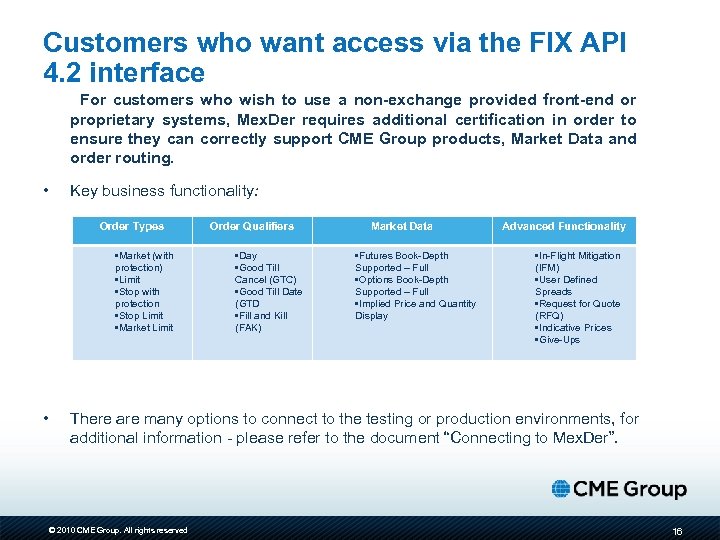 Customers who want access via the FIX API 4. 2 interface For customers who wish to use a non-exchange provided front-end or proprietary systems, Mex. Der requires additional certification in order to ensure they can correctly support CME Group products, Market Data and order routing. • Key business functionality: Order Types • Market (with protection) • Limit • Stop with protection • Stop Limit • Market Limit • Order Qualifiers • Day • Good Till Cancel (GTC) • Good Till Date (GTD • Fill and Kill (FAK) Market Data • Futures Book-Depth Supported – Full • Options Book-Depth Supported – Full • Implied Price and Quantity Display Advanced Functionality • In-Flight Mitigation (IFM) • User Defined Spreads • Request for Quote (RFQ) • Indicative Prices • Give-Ups There are many options to connect to the testing or production environments, for additional information - please refer to the document “Connecting to Mex. Der”. © 2010 CME Group. All rights reserved 16
 Customers who want access via the FIX API 4. 2 interface • Connection specifications: http: //www. mexder. com/inter/info/mexder/avisos/Connecting%20 to%20 Mex. Der. pdf • Link to documentation necessary for the APIs: http: //www. mexder. com/inter/info/mexder/avisos/RTD_FIX_API_Specifi cation. pdf • Who to contact at the exchange for assistance? : For assistance please contact Hector García and Irma Gonzalez at 5342 992 and 5342 9916 or hjgarcia@bmv. com. mx and irmag@bmv. com. mx © 2010 CME Group. All rights reserved 17
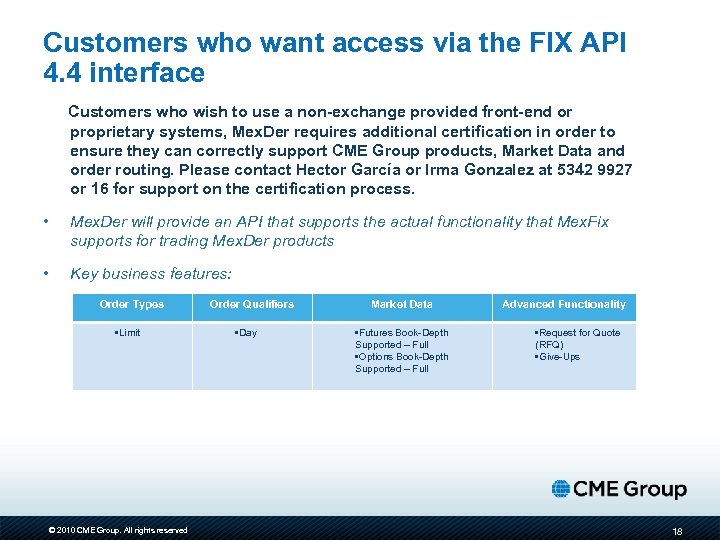 Customers who want access via the FIX API 4. 4 interface Customers who wish to use a non-exchange provided front-end or proprietary systems, Mex. Der requires additional certification in order to ensure they can correctly support CME Group products, Market Data and order routing. Please contact Hector García or Irma Gonzalez at 5342 9927 or 16 for support on the certification process. • Mex. Der will provide an API that supports the actual functionality that Mex. Fix supports for trading Mex. Der products • Key business features: Order Types • Limit © 2010 CME Group. All rights reserved Order Qualifiers • Day Market Data • Futures Book-Depth Supported – Full • Options Book-Depth Supported – Full Advanced Functionality • Request for Quote (RFQ) • Give-Ups 18
 Electronic Trading on CME Globex
 CME Globex Hub in Mexico In conjunction with the strategic partnership between CME Group and BMV, CME Group will launch a new telecommunications hub in Mexico City Region targeted for 2011: • Provides new CME Group hub in the Mexico City region • Standard, redundant international hub • Access to all CME Group and Partner Exchange products • Facilitates connectivity and reduces latency to the Globex network for Mexican and Latin American customers © 2010 CME Group. All rights reserved
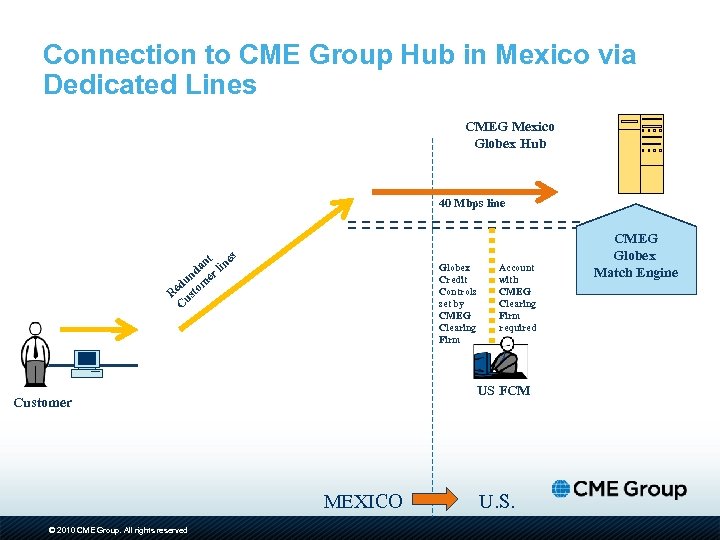 Connection to CME Group Hub in Mexico via Dedicated Lines CMEG Mexico Globex Hub 40 Mbps line t es an lin d r un me d Re usto C Globex Credit Controls set by CMEG Clearing Firm US FCM Customer MEXICO © 2010 CME Group. All rights reserved Account with CMEG Clearing Firm required U. S. CMEG Globex Match Engine
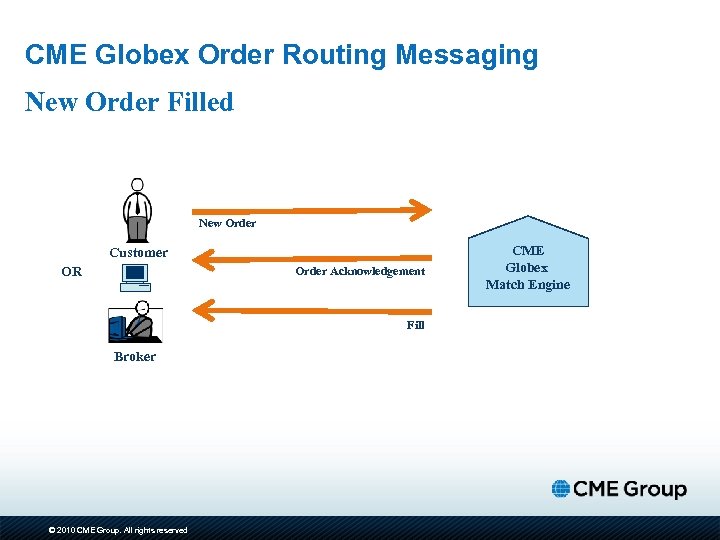 CME Globex Order Routing Messaging New Order Filled New Order Customer OR Order Acknowledgement Fill Broker © 2010 CME Group. All rights reserved CME Globex Match Engine
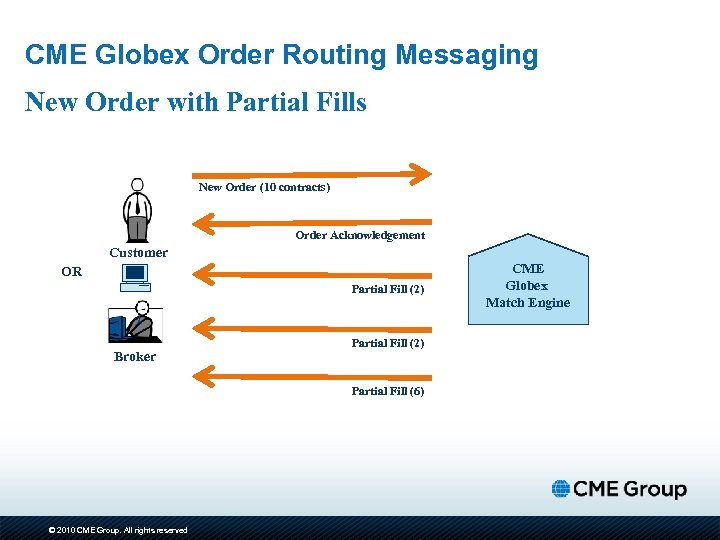 CME Globex Order Routing Messaging New Order with Partial Fills New Order (10 contracts) Order Acknowledgement Customer OR Partial Fill (2) Broker Partial Fill (2) Partial Fill (6) © 2010 CME Group. All rights reserved CME Globex Match Engine
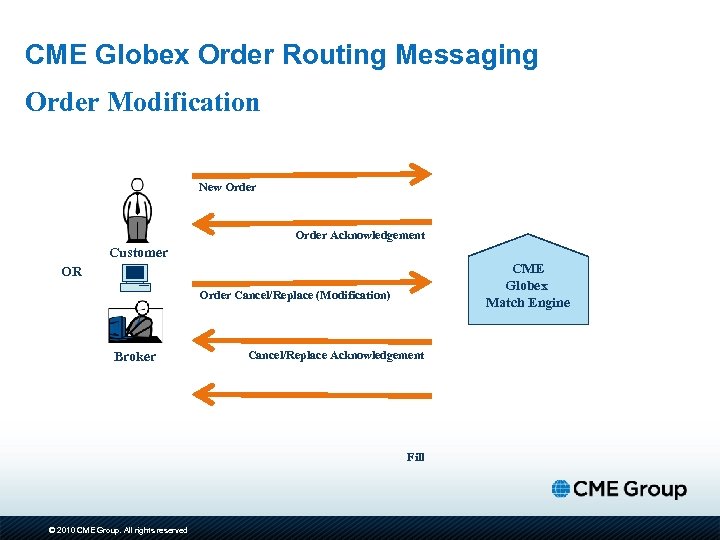 CME Globex Order Routing Messaging Order Modification New Order Acknowledgement Customer CME Globex Match Engine OR Order Cancel/Replace (Modification) Broker Cancel/Replace Acknowledgement Fill © 2010 CME Group. All rights reserved
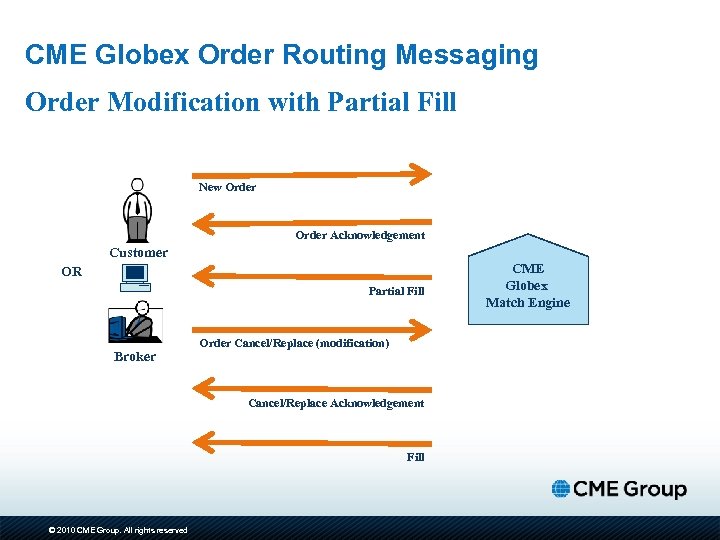 CME Globex Order Routing Messaging Order Modification with Partial Fill New Order Acknowledgement Customer OR Partial Fill Broker Order Cancel/Replace (modification) Cancel/Replace Acknowledgement Fill © 2010 CME Group. All rights reserved CME Globex Match Engine
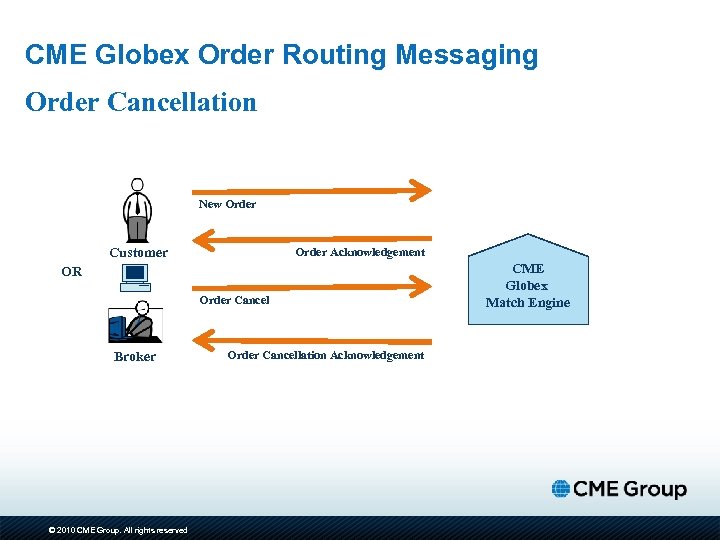 CME Globex Order Routing Messaging Order Cancellation New Order Customer Order Acknowledgement OR Order Cancel Broker © 2010 CME Group. All rights reserved Order Cancellation Acknowledgement CME Globex Match Engine
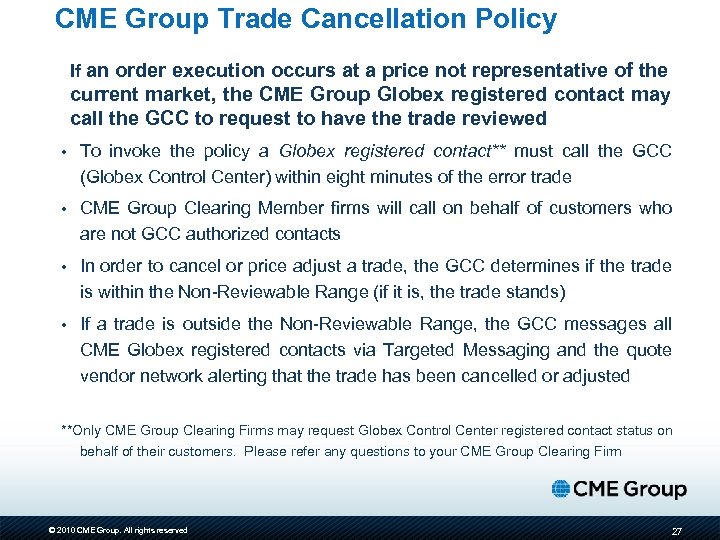 CME Group Trade Cancellation Policy If an order execution occurs at a price not representative of the current market, the CME Group Globex registered contact may call the GCC to request to have the trade reviewed • To invoke the policy a Globex registered contact** must call the GCC (Globex Control Center) within eight minutes of the error trade • CME Group Clearing Member firms will call on behalf of customers who are not GCC authorized contacts • In order to cancel or price adjust a trade, the GCC determines if the trade is within the Non-Reviewable Range (if it is, the trade stands) • If a trade is outside the Non-Reviewable Range, the GCC messages all CME Globex registered contacts via Targeted Messaging and the quote vendor network alerting that the trade has been cancelled or adjusted **Only CME Group Clearing Firms may request Globex Control Center registered contact status on behalf of their customers. Please refer any questions to your CME Group Clearing Firm © 2010 CME Group. All rights reserved 27
 Electronic Trading Overview: North to South
 Order Routing Basics: CME Group to Mex. Der CME Group customers will be able to leverage their existing connectivity to CME Globex to trade Mex. Der products: • All Mex. Der interest rate and equity index derivatives product market data will be available on the CME Globex platform • Orders will route “North to South” from the customer’s CME Globex connection via a high speed international circuit to Mex. Der’s matching engine • All Mex. Der traded products clear at Asigna • Asigna Clearing Firm relationship required • Targeted launch in the second half of 2011 © 2010 CME Group. All rights reserved 29
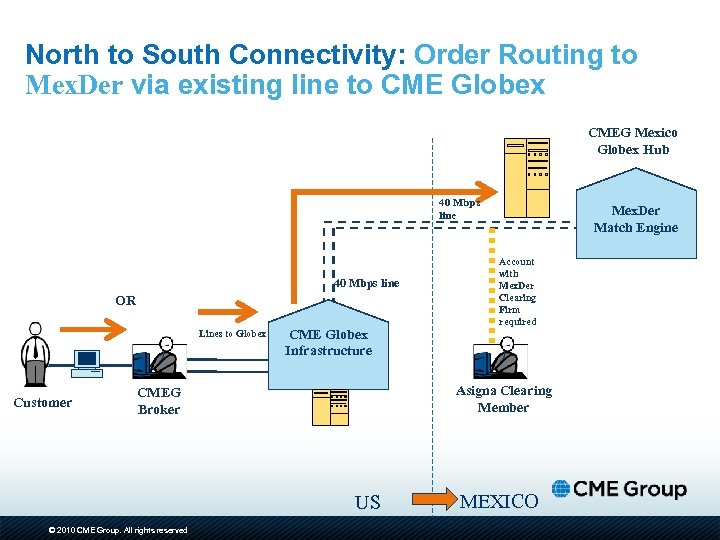 North to South Connectivity: Order Routing to Mex. Der via existing line to CME Globex CMEG Mexico Globex Hub 40 Mbps line OR Lines to Globex Customer CME Globex Infrastructure Account with Mex. Der Clearing Firm required Asigna Clearing Member CMEG Broker US © 2010 CME Group. All rights reserved Mex. Der Match Engine MEXICO
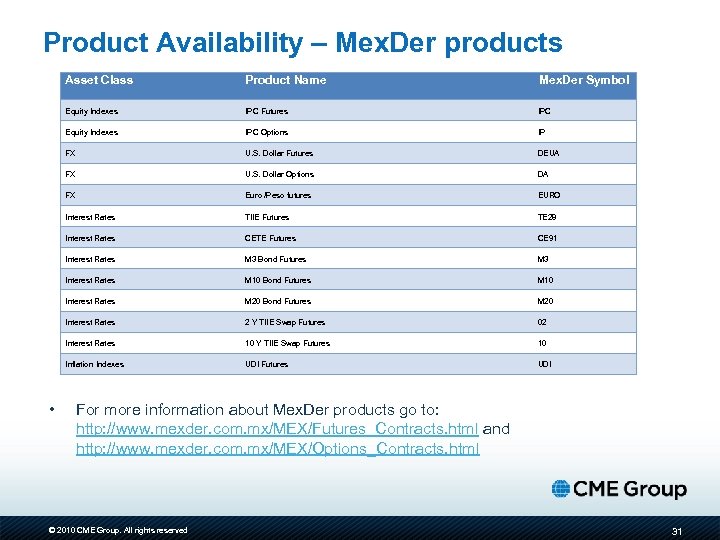 Product Availability – Mex. Der products Asset Class Mex. Der Symbol Equity Indexes IPC Futures IPC Equity Indexes IPC Options IP FX U. S. Dollar Futures DEUA FX U. S. Dollar Options DA FX Euro /Peso futures EURO Interest Rates TIIE Futures TE 28 Interest Rates CETE Futures CE 91 Interest Rates M 3 Bond Futures M 3 Interest Rates M 10 Bond Futures M 10 Interest Rates M 20 Bond Futures M 20 Interest Rates 2 Y TIIE Swap Futures 02 Interest Rates 10 Y TIIE Swap Futures 10 Inflation Indexes • Product Name UDI Futures UDI For more information about Mex. Der products go to: http: //www. mexder. com. mx/MEX/Futures_Contracts. html and http: //www. mexder. com. mx/MEX/Options_Contracts. html © 2010 CME Group. All rights reserved 31
 Comentarios Finales © 2010 CME Group. All rights reserved