


 Скачать презентацию 20 -771 Computer Security Lecture 11 Windows 2000
7b48ba0a13304e3b6bd218cd35f091e2.ppt
- Количество слайдов: 58
 20 -771: Computer Security Lecture 11: Windows 2000 III Robert Thibadeau School of Computer Science Carnegie Mellon University Institute for e. Commerce, Fall 2002 Lecture 11, 20 -771: Computer Security, Fall 2002
 Today’s lecture • • Windows 2000 Access II File Encryption/Decryption Lecture 11, 20 -771: Computer Security, Fall 2002 2
 This Week • Read WS 10, 11 XML Security More Windows Security Lecture 11, 20 -771: Computer Security, Fall 2002 3
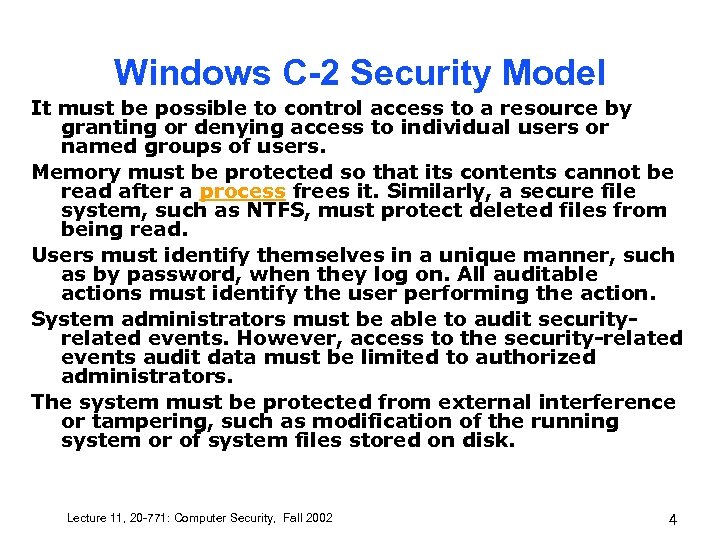 Windows C-2 Security Model It must be possible to control access to a resource by granting or denying access to individual users or named groups of users. Memory must be protected so that its contents cannot be read after a process frees it. Similarly, a secure file system, such as NTFS, must protect deleted files from being read. Users must identify themselves in a unique manner, such as by password, when they log on. All auditable actions must identify the user performing the action. System administrators must be able to audit securityrelated events. However, access to the security-related events audit data must be limited to authorized administrators. The system must be protected from external interference or tampering, such as modification of the running system or of system files stored on disk. Lecture 11, 20 -771: Computer Security, Fall 2002 4
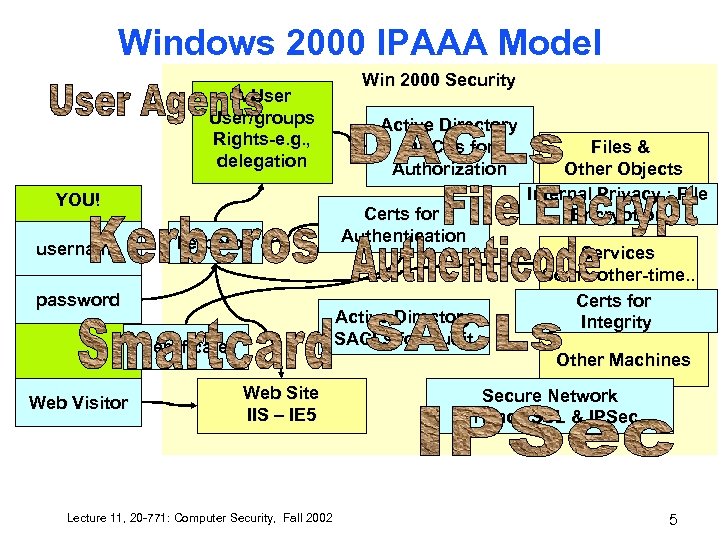 Windows 2000 IPAAA Model A User/groups Rights-e. g. , delegation YOU! username kerberos password Active Directory DACLs for Authorization Certs for Authentication Active Directory SACLs for Audit certificate Web Visitor Win 2000 Security Files & Other Objects Internal Privacy : File Encryption Services Some-other-time. . Certs for Integrity Other Machines Web Site IIS – IE 5 Lecture 11, 20 -771: Computer Security, Fall 2002 Secure Network Privacy SSL & IPSec 5
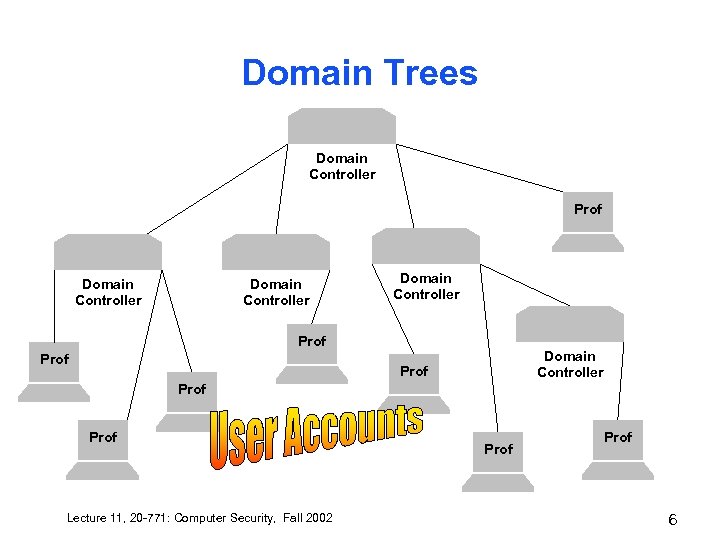 Domain Trees Domain Controller Prof Domain Controller Prof Prof Lecture 11, 20 -771: Computer Security, Fall 2002 Prof 6
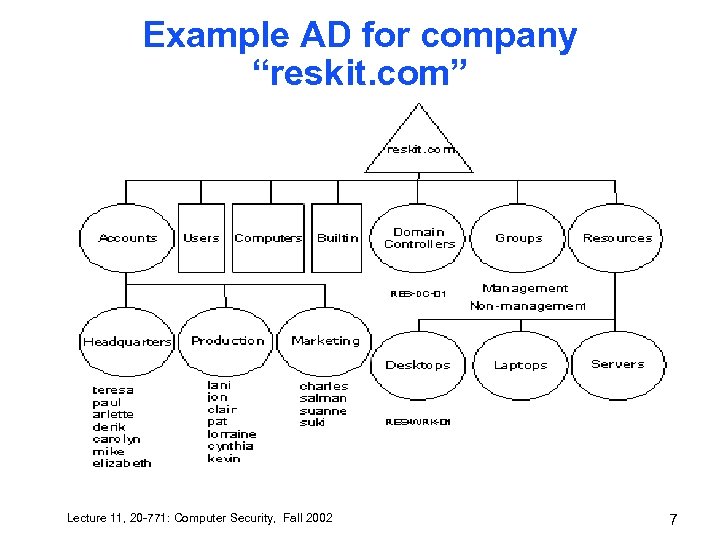 Example AD for company “reskit. com” Lecture 11, 20 -771: Computer Security, Fall 2002 7
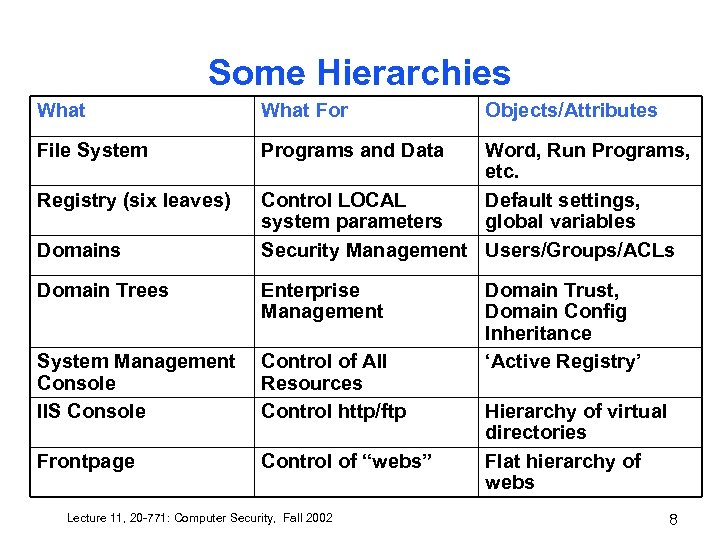 Some Hierarchies What For File System Programs and Data Registry (six leaves) Domains Objects/Attributes Word, Run Programs, etc. Control LOCAL Default settings, system parameters global variables Security Management Users/Groups/ACLs Domain Trees Enterprise Management System Management Console IIS Console Control of All Resources Control http/ftp Frontpage Control of “webs” Lecture 11, 20 -771: Computer Security, Fall 2002 Domain Trust, Domain Config Inheritance ‘Active Registry’ Hierarchy of virtual directories Flat hierarchy of webs 8
 Object Naming • • • An object has exactly one name, the distinguished name (DN). – The DN uniquely identifies the object and contains sufficient information for a client to retrieve the object from the directory. The DN of an object may be quite long and difficult to remember. Moreover, the DN of an object may change. Since the DN of an object is composed of the RDN of the object and its ancestors, a rename of the object itself or any ancestor will change the DN. – http: //msdn. microsoft. com/library/default. asp? url=/library/enus/netdir/adschema/w 2 k/A_name. asp Object globally unique identifier (GUID) – A 128 -bit number, guaranteed to be unique. Objects have a GUID assigned when they are created. The GUID is never changed, even if the object is moved or renamed. Applications can store the GUID of an object and be assured of retrieving that object no matter what the current DN is. User Principal Name—Security Principals (users and groups) each have a "friendly" name, the User Principal Name (UPN), which is shorter than the DN and easier to remember. – The User Principal Name is composed of a "shorthand" name for the user and the DNS name of the domain tree where the user object resides. For example, user James Smith in the microsoft. com tree might have a UPN of "James. S@Microsoft. com. " Lecture 11, 20 -771: Computer Security, Fall 2002 9
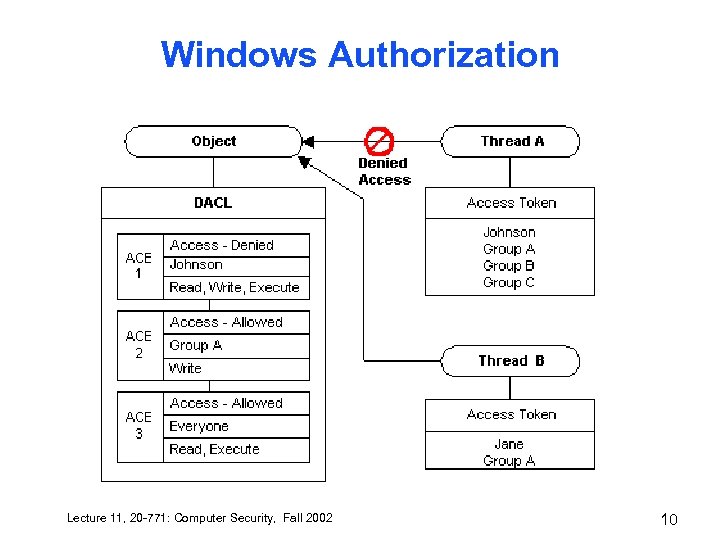 Windows Authorization Lecture 11, 20 -771: Computer Security, Fall 2002 10
 MSDN Links • • How DACLs work http: //msdn. microsoft. com/library/default. asp? url=/libra ry/enus/security/how_dacls_control_access_to_an _object. asp File & Directory http: //msdn. microsoft. com/library/default. asp? url=/libra ry/enus/fileio/base/file_security_and_access_rights. asp String for ACE http: //msdn. microsoft. com/library/default. asp? url=/libra ry/en-us/security/ace_strings. asp http: //msdn. microsoft. com/library/default. asp? url=/libra ry/en-us/security/access_mask. asp Lecture 11, 20 -771: Computer Security, Fall 2002 11
 Windows Default ACE order • • Denial ACEs first then Allow ACEs Within this, Specific to Object then non Specific Lecture 11, 20 -771: Computer Security, Fall 2002 12
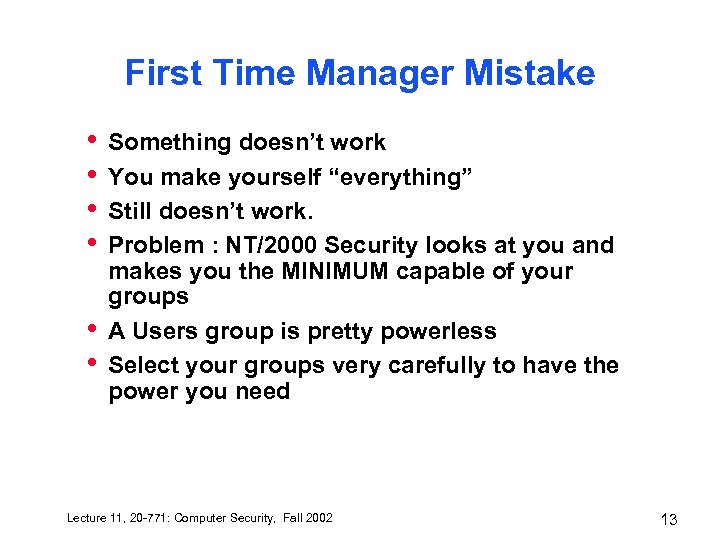 First Time Manager Mistake • • • Something doesn’t work You make yourself “everything” Still doesn’t work. Problem : NT/2000 Security looks at you and makes you the MINIMUM capable of your groups A Users group is pretty powerless Select your groups very carefully to have the power you need Lecture 11, 20 -771: Computer Security, Fall 2002 13
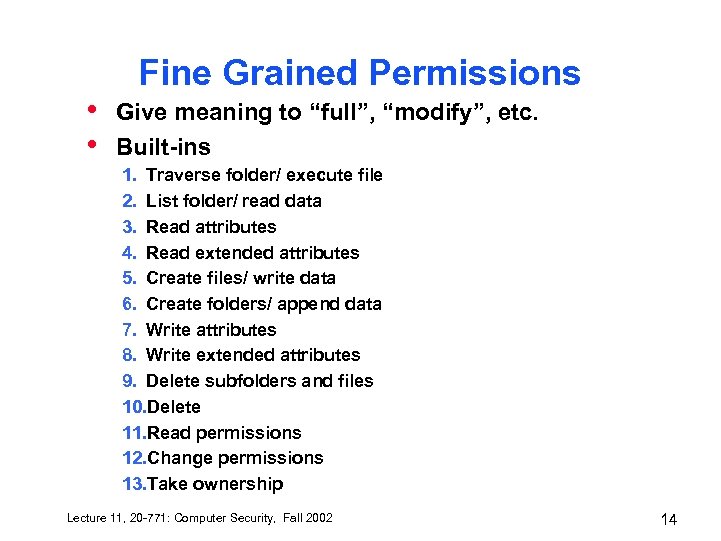 • • Fine Grained Permissions Give meaning to “full”, “modify”, etc. Built-ins 1. Traverse folder/ execute file 2. List folder/ read data 3. Read attributes 4. Read extended attributes 5. Create files/ write data 6. Create folders/ append data 7. Write attributes 8. Write extended attributes 9. Delete subfolders and files 10. Delete 11. Read permissions 12. Change permissions 13. Take ownership Lecture 11, 20 -771: Computer Security, Fall 2002 14
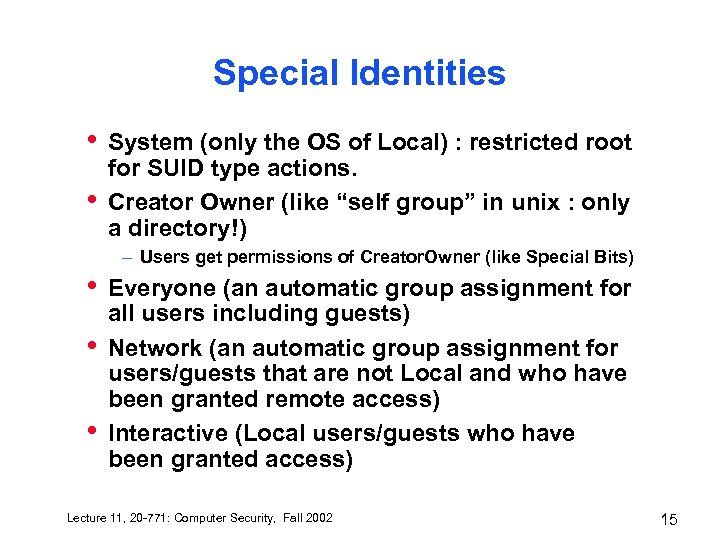 Special Identities • • System (only the OS of Local) : restricted root for SUID type actions. Creator Owner (like “self group” in unix : only a directory!) – Users get permissions of Creator. Owner (like Special Bits) • • • Everyone (an automatic group assignment for all users including guests) Network (an automatic group assignment for users/guests that are not Local and who have been granted remote access) Interactive (Local users/guests who have been granted access) Lecture 11, 20 -771: Computer Security, Fall 2002 15
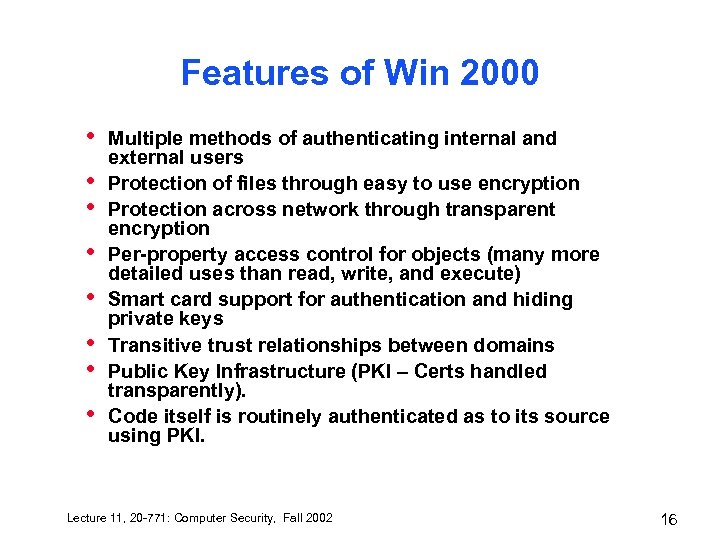 Features of Win 2000 • • Multiple methods of authenticating internal and external users Protection of files through easy to use encryption Protection across network through transparent encryption Per-property access control for objects (many more detailed uses than read, write, and execute) Smart card support for authentication and hiding private keys Transitive trust relationships between domains Public Key Infrastructure (PKI – Certs handled transparently). Code itself is routinely authenticated as to its source using PKI. Lecture 11, 20 -771: Computer Security, Fall 2002 16
 Bad News Good News • • • Complex Many Hierarchies Lots of How-To Learn only MS Use only MS 2000 • – MMC/ Active Directory / ACLs • • • Lecture 11, 20 -771: Computer Security, Fall 2002 Simple underlying model Hierarchies are easy to browse/search Only ONE way to configure Good online docs, good HCI 17
 What is your recommendation? • • Machines have to be 128 megabytes Think domain trees. – – • Inheritance Build a root Build a department Add in other departments Web Servers – Build a root – Build a web server – Add in other departments Lecture 11, 20 -771: Computer Security, Fall 2002 18
 Build a root? • • The root should include 1. 2. 3. 4. 5. 6. 7. A top-level domain controller A top-level certificate server A top-level kerberos server Possibly, a top-level SQL Server Possibly, an exchange server (mail) Possibly, a DNS server If Intranetting: an IIS server These servers don’t have to be big-time machines but do have to be reliable – – Disk mirroring is built into NT/2000 Offsite backup replication (IPSec) These machines should be under major lock and key. Entry should be local console although remote is supported in Windows 2000. Lecture 11, 20 -771: Computer Security, Fall 2002 19
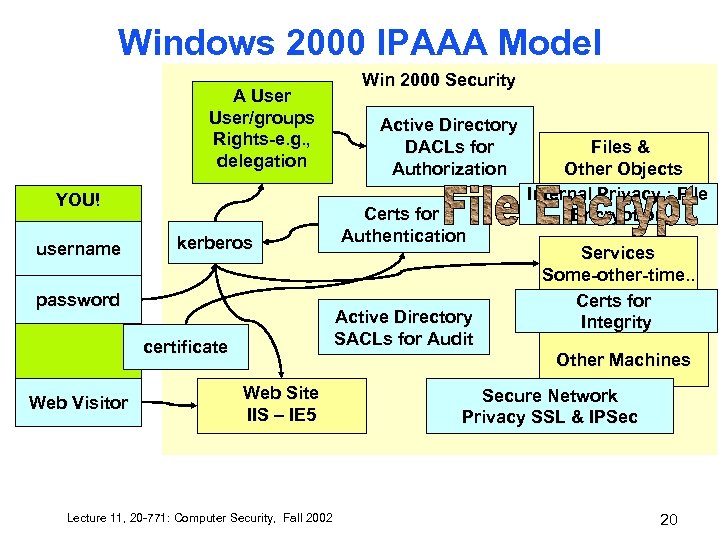 Windows 2000 IPAAA Model A User/groups Rights-e. g. , delegation YOU! username kerberos password Active Directory DACLs for Authorization Certs for Authentication Active Directory SACLs for Audit certificate Web Visitor Win 2000 Security Files & Other Objects Internal Privacy : File Encryption Services Some-other-time. . Certs for Integrity Other Machines Web Site IIS – IE 5 Lecture 11, 20 -771: Computer Security, Fall 2002 Secure Network Privacy SSL & IPSec 20
 Encrypting File • • Think like SSL and others: uses RSA for authentication/authorization and Private Session Key for actual encryption/decryption This means system has private key that it can use for decryption – Encrypted Data Recovery Policy (EDRP) – Workgroup (LOCAL Domain) this is local – In Domain, it is only with the Domain Administrator Lecture 11, 20 -771: Computer Security, Fall 2002 21
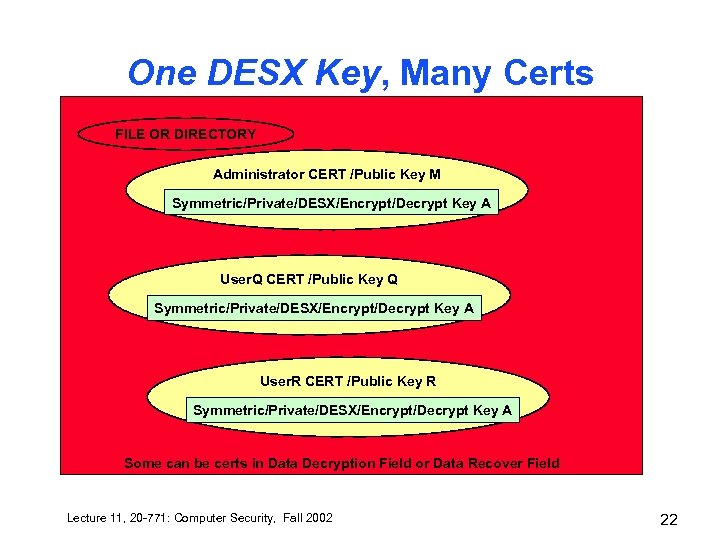 One DESX Key, Many Certs FILE OR DIRECTORY Administrator CERT /Public Key M Symmetric/Private/DESX/Encrypt/Decrypt Key A User. Q CERT /Public Key Q Symmetric/Private/DESX/Encrypt/Decrypt Key A User. R CERT /Public Key R Symmetric/Private/DESX/Encrypt/Decrypt Key A Some can be certs in Data Decryption Field or Data Recover Field Lecture 11, 20 -771: Computer Security, Fall 2002 22
 File Encryption / Recovery Certificate • • • The symmetric encrypting key is encrypted using the public key derived from your EFS certificate. The resulting encrypted data, along with your display name and a hash of the certificate, is stored in a named stream in the file that contains EFS metadata. When EFS decrypts a file, it uses your private key to decrypt the symmetric encrypting key. EFS then uses the symmetric key to decrypt the data. Lecture 11, 20 -771: Computer Security, Fall 2002 23
 File Encryption is DES • • • Actually DESX but the idea is the same: it operates like XOR : the number of bits is the number of tries needed to guess the key brute force (without studied cryptoanalysis). 40 bits for International 56 bits for US 128 bits can be downloaded from MS Support File Encryption Key Uses a Random (40, 56 or 128 bit) Number (randomness is probably very good, but not “cypher quality”) – You can bet somebody somewhere has characterized the non-randomness already (haven’t seen a publication) – This means WHAT? You should know the answer to this! Lecture 11, 20 -771: Computer Security, Fall 2002 24
 Sidebar 3000 bit encryption • • • Answer: Yes, but…. It won’t hurt but it probably doesn’t matter. 128 bit is 1. 70141183460469 e+38 1 in 170, 141, 834, 604, 690, 000, 000, 000 tries Slightly better than 6 in 9999 (your PIN on your bank account)… – 86, 400 seconds in a day, 31, 500, 000 in a year. 3, 150, 000 in 100 years. – Need 54, 000, 000, 000 Guesses a Second (div by 2) – 54 billion trillion operations per second with the expectation that in 50 years you’ll get it. On the other hand, feel free. Lecture 11, 20 -771: Computer Security, Fall 2002 25
 Process • • You right click and set property to encrypt a file/directory If you don’t have a user public/private keypair one is *automatically generated in the background* in your domain – Done once, you are done forever. – You can have others – need management • The private/public key pair gains access to the session key for the file. Lecture 11, 20 -771: Computer Security, Fall 2002 26
 When it won’t work • • • System bit set (system files can’t be encrypted) Compressed files (files *marked* compressed). Read-Only files (this is because the file has to be written, temporarily, to be read). FAT 32 or any other FS than NTFS Copy should be checked Works because the file owner is always the file owner. Lecture 11, 20 -771: Computer Security, Fall 2002 27
 Cipher utility • • Why would you want to encrypt an encrypted file? Try being administrator and user. Data Decryption Field (certs), and Data Recovery Field (certs) Encrypt a file as a user, and see if you can decrypt it as somebody else (who is the default recovery manager). Note: efsrecvr. exe as the Encrypted File System RECo. Ve. R program you can use. You can also do this by right clicking and the security properties, owner. Lecture 11, 20 -771: Computer Security, Fall 2002 28
 Cert (X. 509) EFS Solution • • • Many certs can hide the SAME private/ symmetric/ session FEK (file encryption/decryption key) for a file. These certs are SPECIAL FILE ENCRYPTION CERTS (using the user’s private/public key) http: //support. microsoft. com/support/kb/articl es/Q 273/8/56. ASP The file can have several depending on the CERT which is user – Data Decryption Field The file can have several recovery agents can have several depending on the CERT which is the recovery agent user. Lecture 11, 20 -771: Computer Security, Fall 2002 29
 User and Kernel Mode • • MS has decided to keep encryption/decryption in Kernel Mode This requires careful user Mode handling (NTFS calls EFS in complete privacy) Cryptographic Provider (right now, the Microsoft Base – defined for crypto. API. Could be smart card or external code/box). There is another secret mode (SMI) that MS doesn’t use. Lecture 11, 20 -771: Computer Security, Fall 2002 30
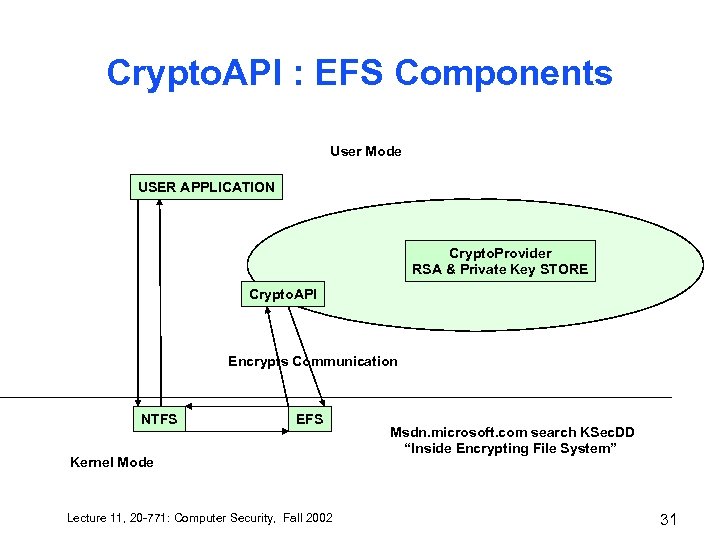 Crypto. API : EFS Components User Mode USER APPLICATION Crypto. Provider RSA & Private Key STORE Crypto. API Encrypts Communication NTFS EFS Kernel Mode Lecture 11, 20 -771: Computer Security, Fall 2002 Msdn. microsoft. com search KSec. DD “Inside Encrypting File System” 31
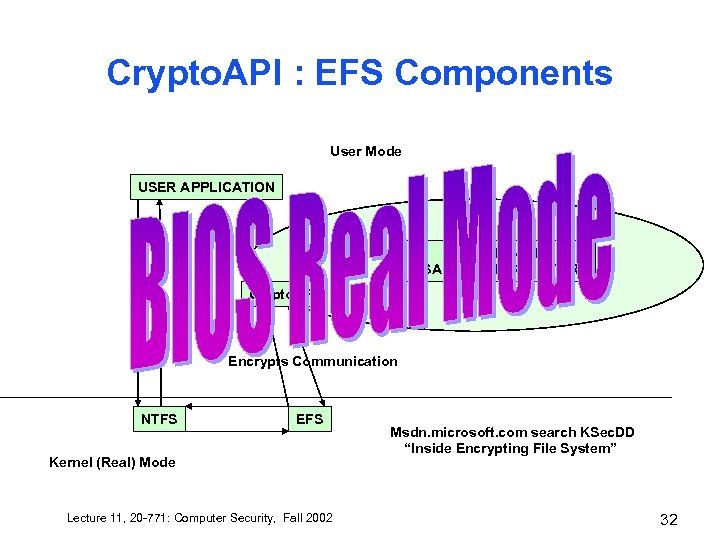 Crypto. API : EFS Components User Mode USER APPLICATION Crypto. Provider RSA & Private Key STORE Crypto. API Encrypts Communication NTFS EFS Kernel (Real) Mode Lecture 11, 20 -771: Computer Security, Fall 2002 Msdn. microsoft. com search KSec. DD “Inside Encrypting File System” 32
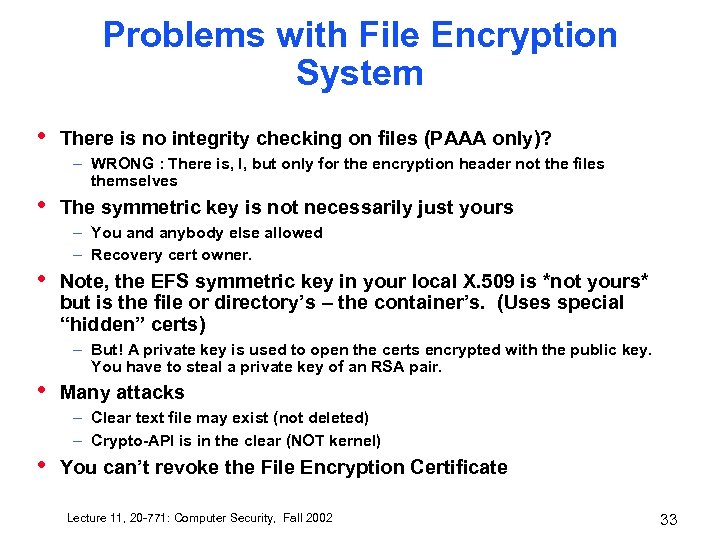 Problems with File Encryption System • There is no integrity checking on files (PAAA only)? – WRONG : There is, I, but only for the encryption header not the files themselves • The symmetric key is not necessarily just yours – You and anybody else allowed – Recovery cert owner. • Note, the EFS symmetric key in your local X. 509 is *not yours* but is the file or directory’s – the container’s. (Uses special “hidden” certs) – But! A private key is used to open the certs encrypted with the public key. You have to steal a private key of an RSA pair. • Many attacks – Clear text file may exist (not deleted) – Crypto-API is in the clear (NOT kernel) • You can’t revoke the File Encryption Certificate Lecture 11, 20 -771: Computer Security, Fall 2002 33
 File Encryption Experience • • Ease of use Is there a way to have truly private files here? Lecture 11, 20 -771: Computer Security, Fall 2002 34
 Encrypting File System (EFS) • Think like SSL and others: uses RSA for authentication/authorization and Private Session Key for actual encryption/decryption Lecture 11, 20 -771: Computer Security, Fall 2002 35
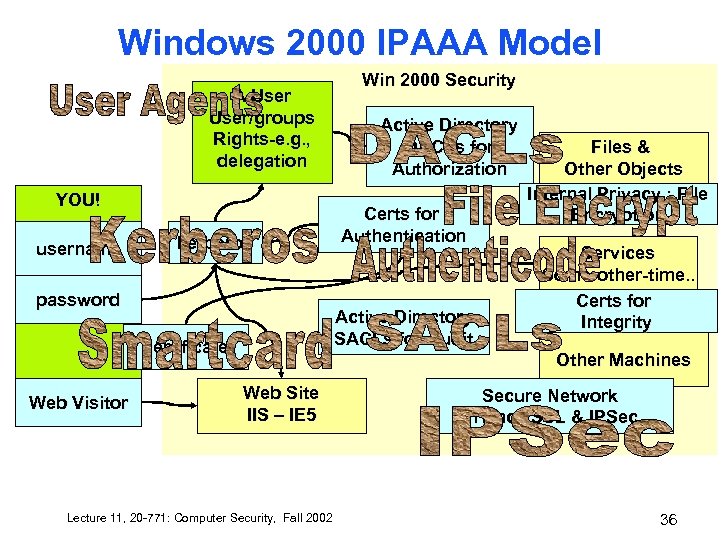 Windows 2000 IPAAA Model A User/groups Rights-e. g. , delegation YOU! username kerberos password Active Directory DACLs for Authorization Certs for Authentication Active Directory SACLs for Audit certificate Web Visitor Win 2000 Security Files & Other Objects Internal Privacy : File Encryption Services Some-other-time. . Certs for Integrity Other Machines Web Site IIS – IE 5 Lecture 11, 20 -771: Computer Security, Fall 2002 Secure Network Privacy SSL & IPSec 36
 IPSec Classic Network Attacks • • Snooping Spoofing (TCP sequence numbers) Password Compromise Denial of Service Attacks (Do. S) – – • • • TCP SYN : open tons of TCP connections SMURF : drown with ping Teardrop : fragmentation reassembly Ping of Death : fake fragmentation parameters Man-in-the-middle Attacks Application-Level Attacks Key Compromise Lecture 11, 20 -771: Computer Security, Fall 2002 37
 IPSec is End to End IPAxx • Client – to – Client – Transport Mode – One Authenticates but doesn’t encrypt – One Authenticates and Encrypts • Gateway – to – Gateway – Tunnel Mode (client to client is encapsulated) – Authenticates, Encrypts, and also hides source and destination! Lecture 11, 20 -771: Computer Security, Fall 2002 38
 IPA… • Integrity – Uses a hash (called signature or fingerprint) • Authentication – Preshared key authentication » Nonce to confirm shared key – Kerberos authentication (essentially the same) – PK certs • Confidentiality/Privacy/Encryption – DES (3 DES, triple DES) – CBC (Cipher Block Chaining) – Very akin to One Time Pad philosophy (approximates it). Lecture 11, 20 -771: Computer Security, Fall 2002 39
 IPSec Detail • • • Authentication Header (AH) Encapsulating Security Protocol (ESP) Orig IP Header + AH + TCP + DATA (transport mode) – Authenticates whole packet • Orig IP Header + ESP Header + TCP + DATA + ESP Trailer + ESP Authentication (transport mode) – Authenticates whole ESP but not IP Header – Encrypts TCP-Trailer • New IP Header + ESP Header + Orig IP Header + TCP + DATA + ESP Trailer + ESP Authentication – Authenticates whole ESP but not IP Header – Encrypts Original IP header to ESP Trailer Lecture 11, 20 -771: Computer Security, Fall 2002 40
 Uses Cyphersuite • • Calls it “security parameters index” Encryption DES or 3 DES Hash SHA 1 or MD 5 Session Key (…not in a cyphersuite) • Diffie-Hellman provides the method of arriving at a shared secret to manage key exchange Also uses RSA (see RFC) • Lecture 11, 20 -771: Computer Security, Fall 2002 41
 Three Flavors of Network Security in IPSec 1. 2. Not Secret but it is Authentic! Secret and Authentic – Client to Server 1. But Routing is KNOWN 3. Secret and Authentic and Routing (Inside Firewall/Gateway) is Secret Too. 1. Tunnelled through the Open Infrastructure, Gateway-to. Gateway • Defaults include: using if you can, and requiring use (on pain of failure to communicate at all). Lecture 11, 20 -771: Computer Security, Fall 2002 42
 Features of Win 2000 • • Multiple methods of authenticating internal and external users Protection of files through easy to use encryption Protection across network through transparent encryption Per-property access control for objects (many more detailed uses than read, write, and execute) Smart card support for authentication and hiding private keys Transitive trust relationships between domains Public Key Infrastructure (PKI – Certs handled transparently). Code itself is routinely authenticated as to its source using PKI. Lecture 11, 20 -771: Computer Security, Fall 2002 43
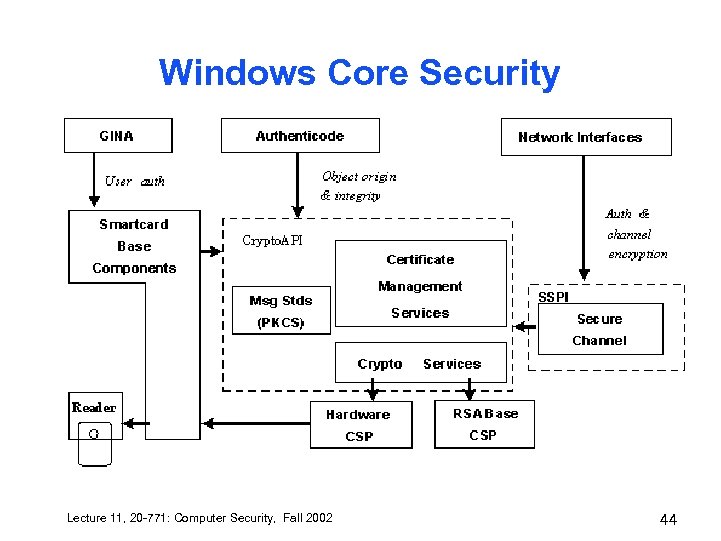 Windows Core Security Lecture 11, 20 -771: Computer Security, Fall 2002 44
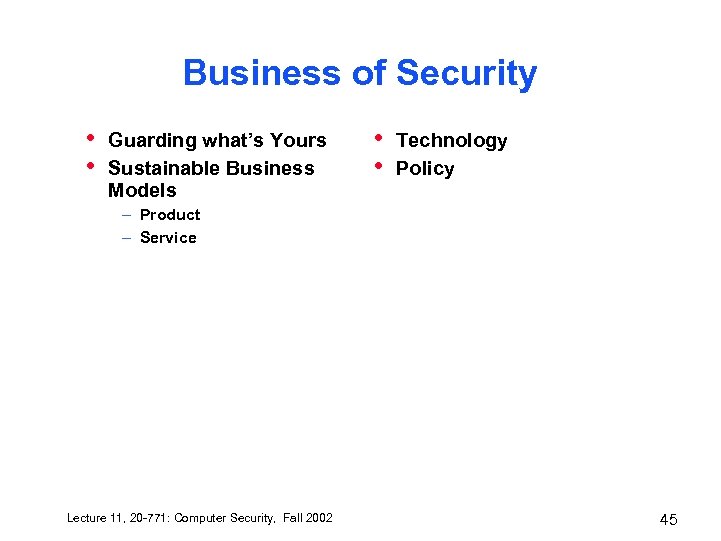 Business of Security • • Guarding what’s Yours Sustainable Business Models • • Technology Policy – Product – Service Lecture 11, 20 -771: Computer Security, Fall 2002 45
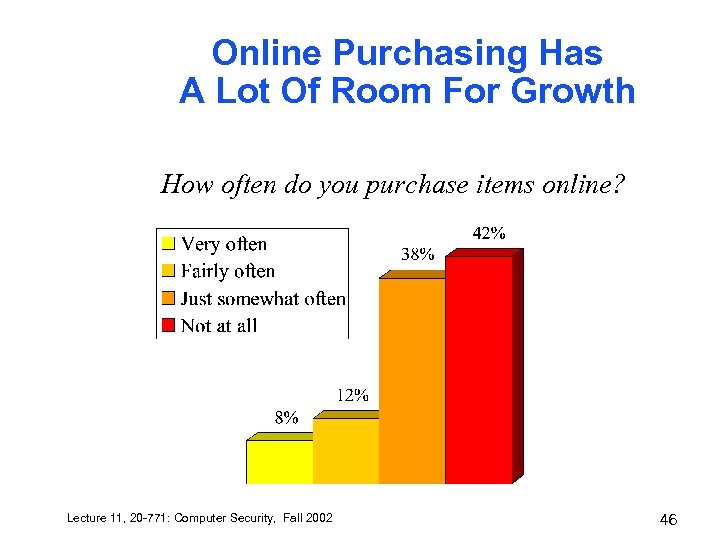 Online Purchasing Has A Lot Of Room For Growth How often do you purchase items online? Lecture 11, 20 -771: Computer Security, Fall 2002 46
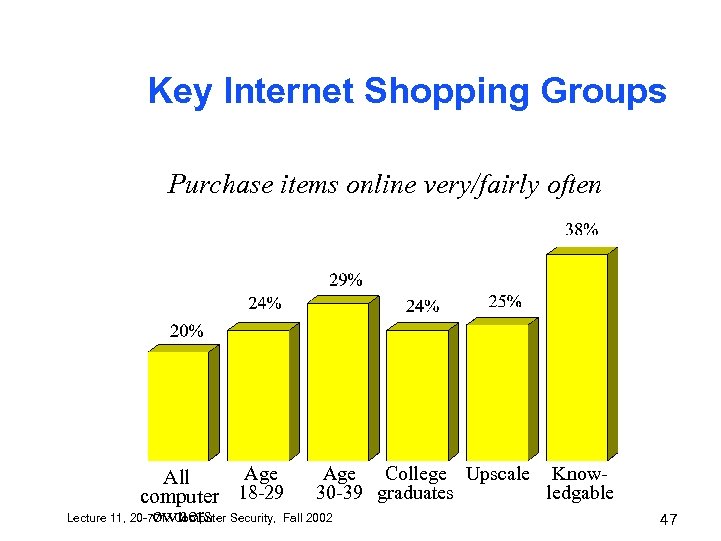 Key Internet Shopping Groups Purchase items online very/fairly often Age College Upscale Know. All 30 -39 graduates ledgable computer 18 -29 Lecture 11, 20 -771: Computer Security, Fall 2002 owners 47
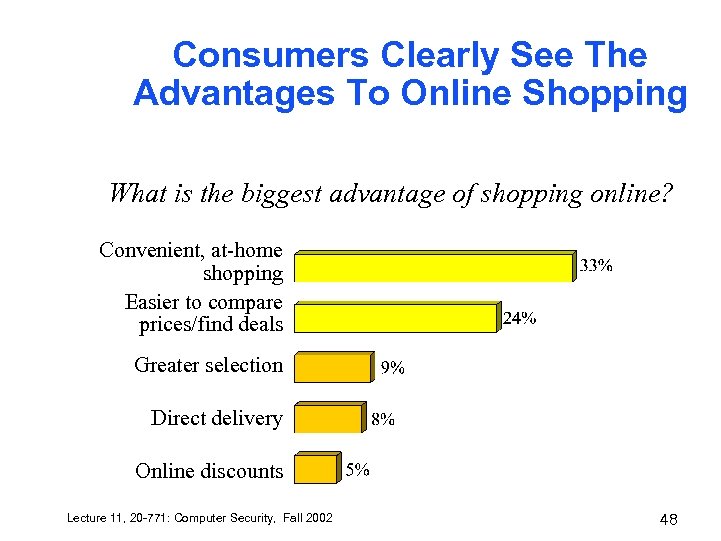 Consumers Clearly See The Advantages To Online Shopping What is the biggest advantage of shopping online? Convenient, at-home shopping Easier to compare prices/find deals Greater selection Direct delivery Online discounts Lecture 11, 20 -771: Computer Security, Fall 2002 48
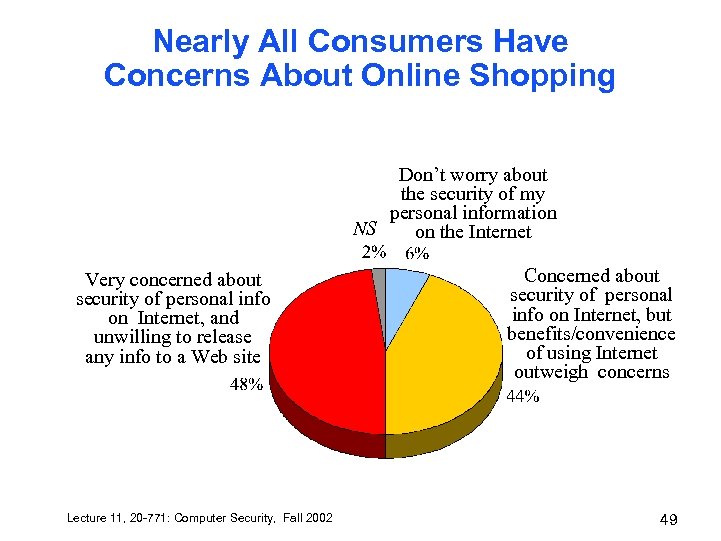 Nearly All Consumers Have Concerns About Online Shopping Don’t worry about the security of my personal information NS on the Internet Very concerned about security of personal info on Internet, and unwilling to release any info to a Web site Lecture 11, 20 -771: Computer Security, Fall 2002 Concerned about security of personal info on Internet, but benefits/convenience of using Internet outweigh concerns 49
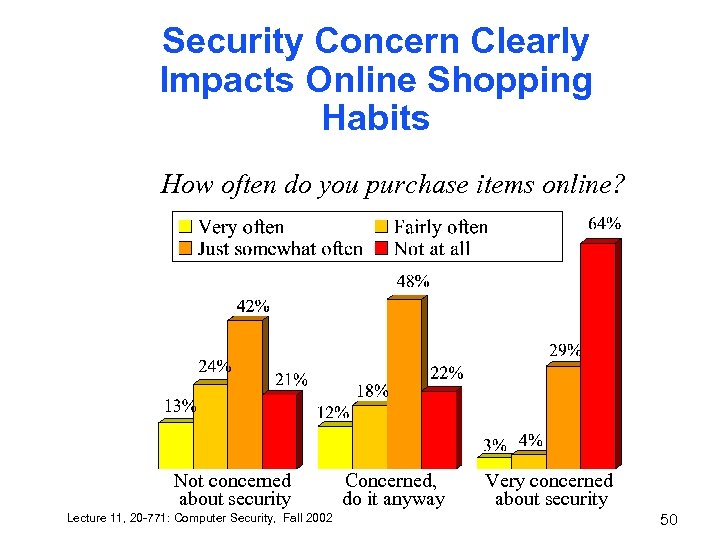 Security Concern Clearly Impacts Online Shopping Habits How often do you purchase items online? Not concerned about security Lecture 11, 20 -771: Computer Security, Fall 2002 Concerned, do it anyway Very concerned about security 50
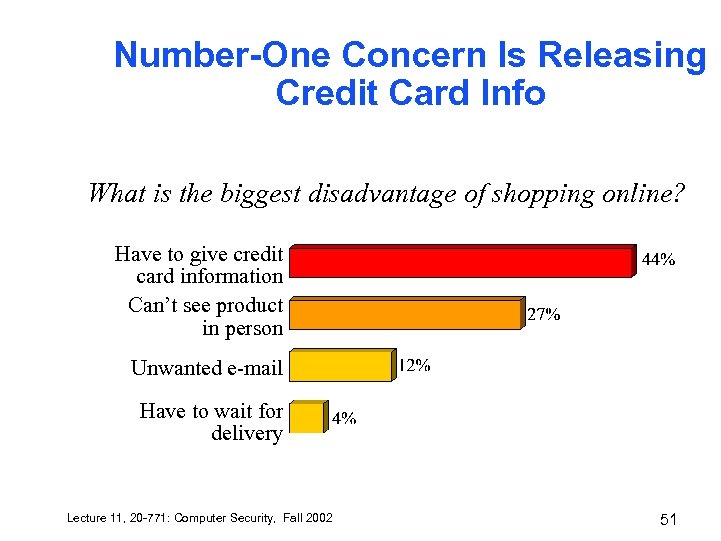 Number-One Concern Is Releasing Credit Card Info What is the biggest disadvantage of shopping online? Have to give credit card information Can’t see product in person Unwanted e-mail Have to wait for delivery Lecture 11, 20 -771: Computer Security, Fall 2002 51
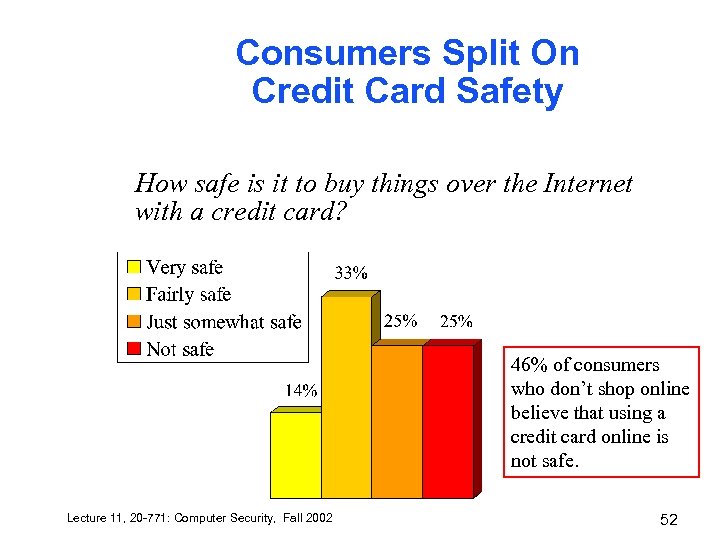 Consumers Split On Credit Card Safety How safe is it to buy things over the Internet with a credit card? 46% of consumers who don’t shop online believe that using a credit card online is not safe. Lecture 11, 20 -771: Computer Security, Fall 2002 52
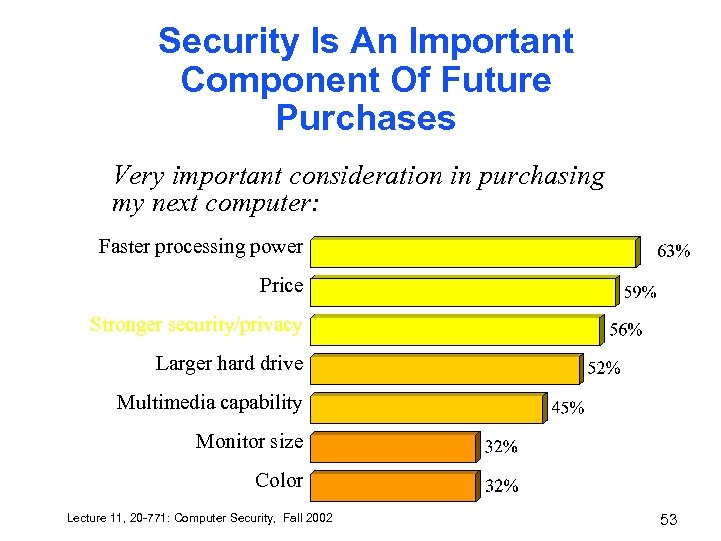 Security Is An Important Component Of Future Purchases Very important consideration in purchasing my next computer: Faster processing power Price Stronger security/privacy Larger hard drive Multimedia capability Monitor size Color Lecture 11, 20 -771: Computer Security, Fall 2002 53
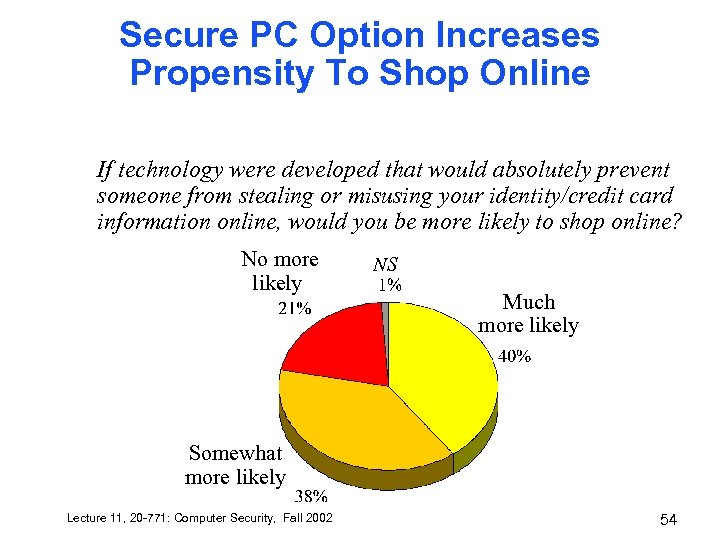 Secure PC Option Increases Propensity To Shop Online If technology were developed that would absolutely prevent someone from stealing or misusing your identity/credit card information online, would you be more likely to shop online? No more likely NS Much more likely Somewhat more likely Lecture 11, 20 -771: Computer Security, Fall 2002 54
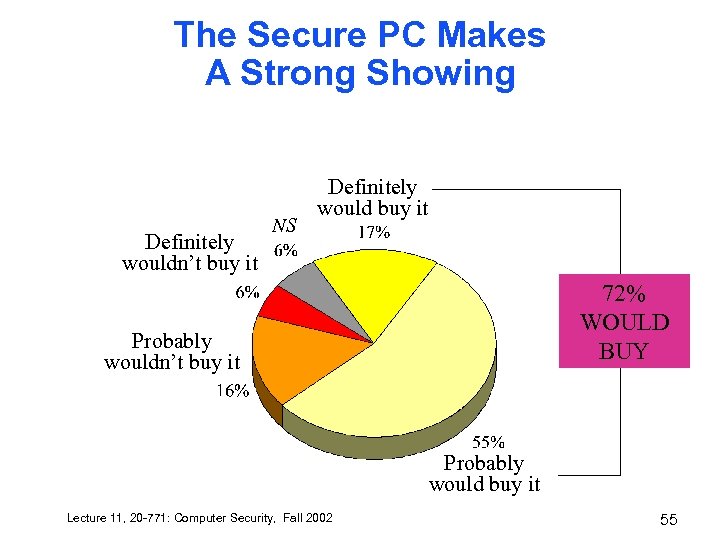 The Secure PC Makes A Strong Showing Definitely wouldn’t buy it NS Definitely would buy it 72% WOULD BUY Probably wouldn’t buy it Probably would buy it Lecture 11, 20 -771: Computer Security, Fall 2002 55
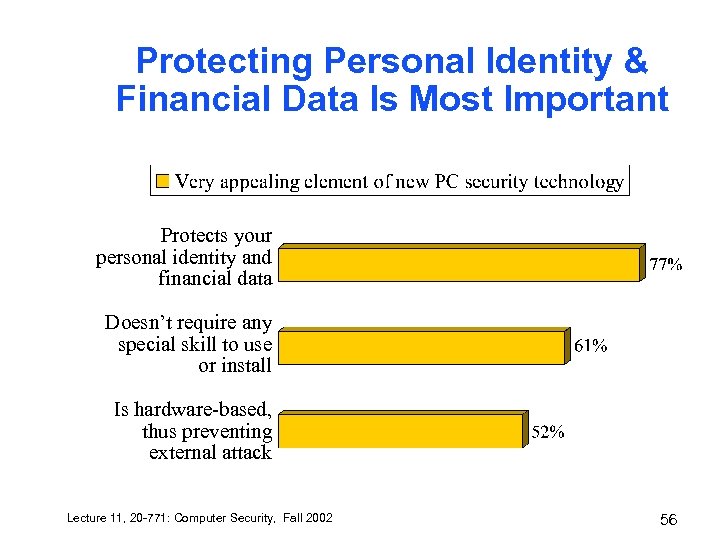 Protecting Personal Identity & Financial Data Is Most Important Protects your personal identity and financial data Doesn’t require any special skill to use or install Is hardware-based, thus preventing external attack Lecture 11, 20 -771: Computer Security, Fall 2002 56
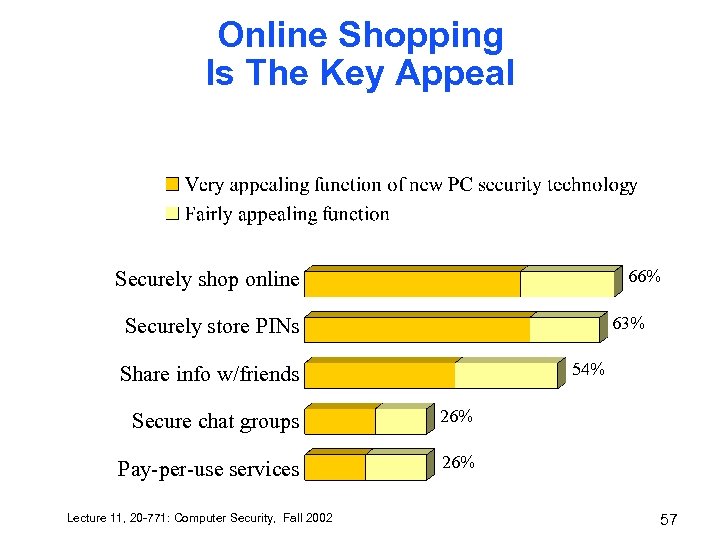 Online Shopping Is The Key Appeal 66% Securely shop online 63% Securely store PINs 54% Share info w/friends Secure chat groups 26% Pay-per-use services 26% Lecture 11, 20 -771: Computer Security, Fall 2002 57
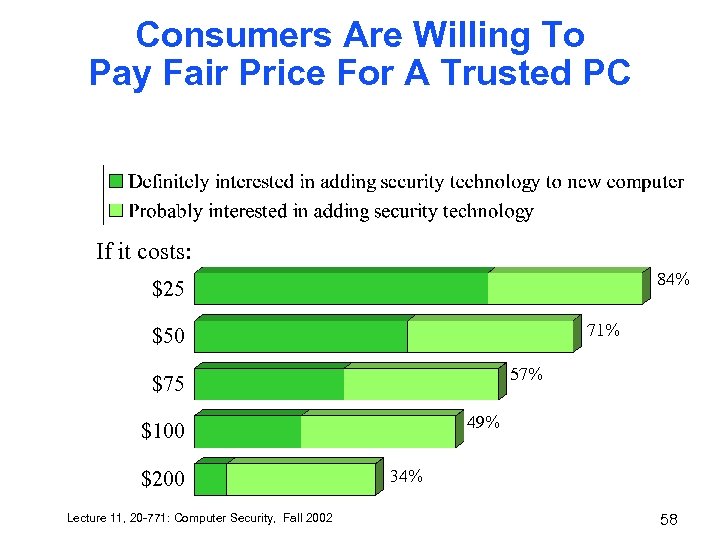 Consumers Are Willing To Pay Fair Price For A Trusted PC If it costs: 84% $25 71% $50 57% $75 49% $100 $200 Lecture 11, 20 -771: Computer Security, Fall 2002 34% 58