


 Скачать презентацию 15 -441 Computer Networking Lecture 4 Applications
fc5e2d7852f1748e35365eaa6c812877.ppt
- Количество слайдов: 47
 15 -441 Computer Networking Lecture 4 – Applications DNS, SSL
 Outline • Security: Cryptography Introduction • Security: Authentication • Security: Key Distribution • DNS Lecture 4: 09 -09 -2002 2
 What is Network Security? • Confidentiality: only sender, intended receiver should “understand” message contents • Sender encrypts message • Receiver decrypts message • Authentication: sender, receiver want to confirm identity of each other • Message Integrity: sender, receiver want to ensure message not altered (in transit, or afterwards) without detection • Access and Availability: services must be accessible and available to users Lecture 4: 09 -09 -2002 3
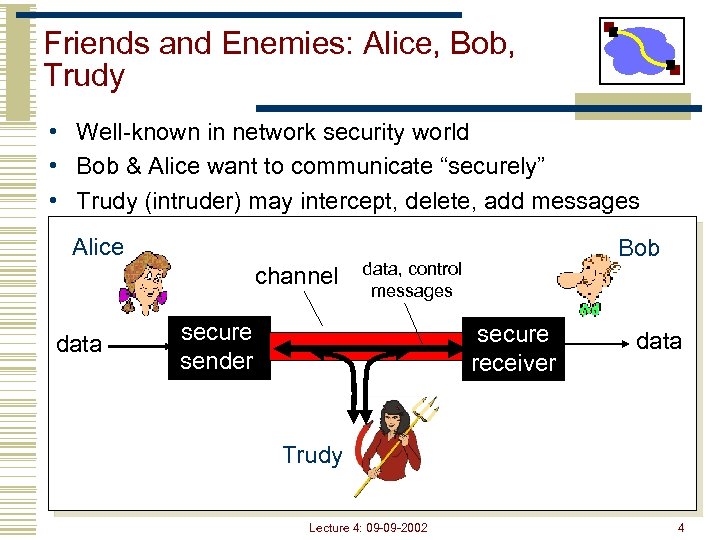 Friends and Enemies: Alice, Bob, Trudy • Well-known in network security world • Bob & Alice want to communicate “securely” • Trudy (intruder) may intercept, delete, add messages Alice channel data Bob data, control messages secure sender secure receiver data Trudy Lecture 4: 09 -09 -2002 4
 Who might Bob, Alice be? • … well, real-life Bobs and Alices! • Web browser/server for electronic transactions (e. g. , on-line purchases) • On-line banking client/server • DNS servers • Routers exchanging routing table updates • Other examples? Lecture 4: 09 -09 -2002 5
 There are bad Guys (and Girls) Out There! Q: What can a “bad guy” do? A: A lot! Eavesdrop: intercept messages • Actively insert messages into connection • Impersonation: can fake (spoof) source address in packet (or any field in packet) • Hijacking: “take over” ongoing connection by removing sender or receiver, inserting himself in place • Denial of service: prevent service from being used by others (e. g. , by overloading resources) more on this later …… • Lecture 4: 09 -09 -2002 6
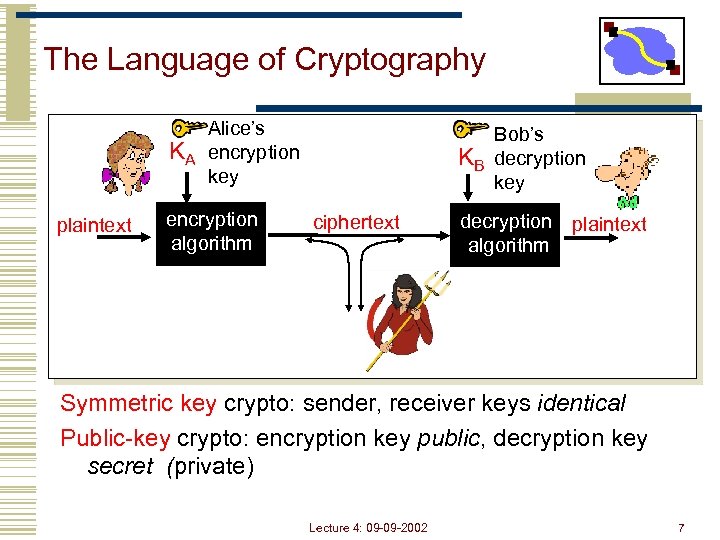 The Language of Cryptography KA plaintext Alice’s encryption key encryption algorithm KB ciphertext Bob’s decryption key decryption plaintext algorithm Symmetric key crypto: sender, receiver keys identical Public-key crypto: encryption key public, decryption key secret (private) Lecture 4: 09 -09 -2002 7
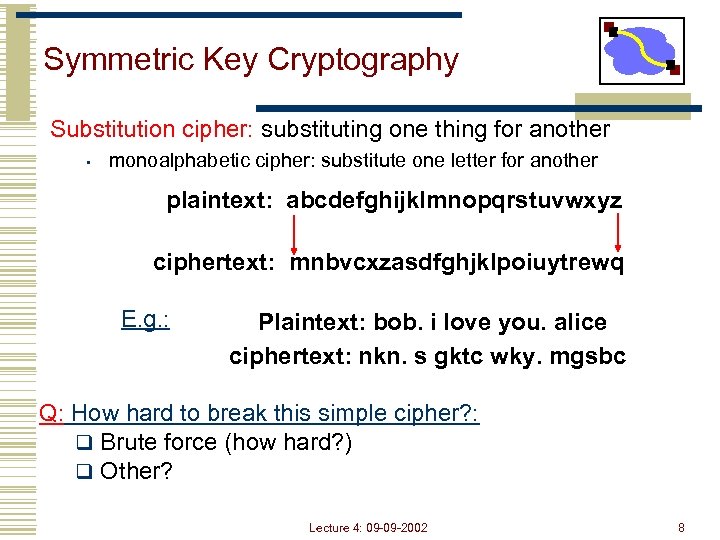 Symmetric Key Cryptography Substitution cipher: substituting one thing for another • monoalphabetic cipher: substitute one letter for another plaintext: abcdefghijklmnopqrstuvwxyz ciphertext: mnbvcxzasdfghjklpoiuytrewq E. g. : Plaintext: bob. i love you. alice ciphertext: nkn. s gktc wky. mgsbc Q: How hard to break this simple cipher? : q Brute force (how hard? ) q Other? Lecture 4: 09 -09 -2002 8
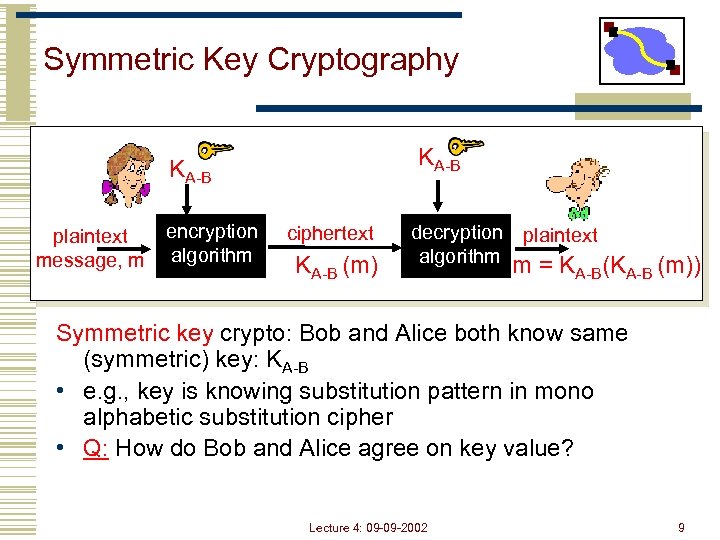 Symmetric Key Cryptography KA-B plaintext message, m encryption algorithm ciphertext KA-B (m) decryption plaintext algorithm m = KA-B(KA-B (m)) Symmetric key crypto: Bob and Alice both know same (symmetric) key: KA-B • e. g. , key is knowing substitution pattern in mono alphabetic substitution cipher • Q: How do Bob and Alice agree on key value? Lecture 4: 09 -09 -2002 9
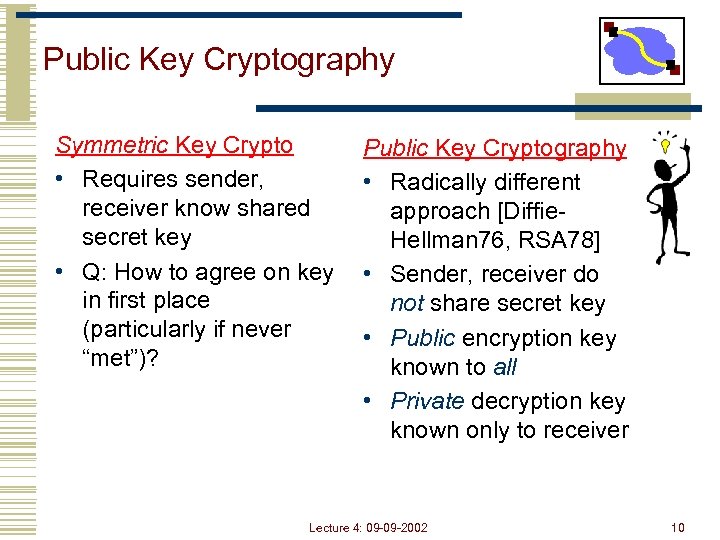 Public Key Cryptography Symmetric Key Crypto • Requires sender, receiver know shared secret key • Q: How to agree on key in first place (particularly if never “met”)? Public Key Cryptography • Radically different approach [Diffie. Hellman 76, RSA 78] • Sender, receiver do not share secret key • Public encryption key known to all • Private decryption key known only to receiver Lecture 4: 09 -09 -2002 10
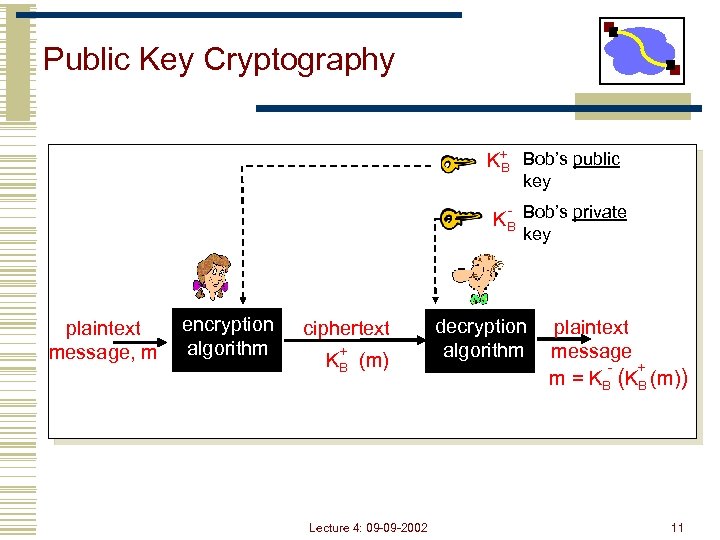 Public Key Cryptography K+ Bob’s public B key KB Bob’s private key plaintext message, m encryption algorithm ciphertext + KB (m) Lecture 4: 09 -09 -2002 decryption algorithm plaintext message + m = KB (m)) 11
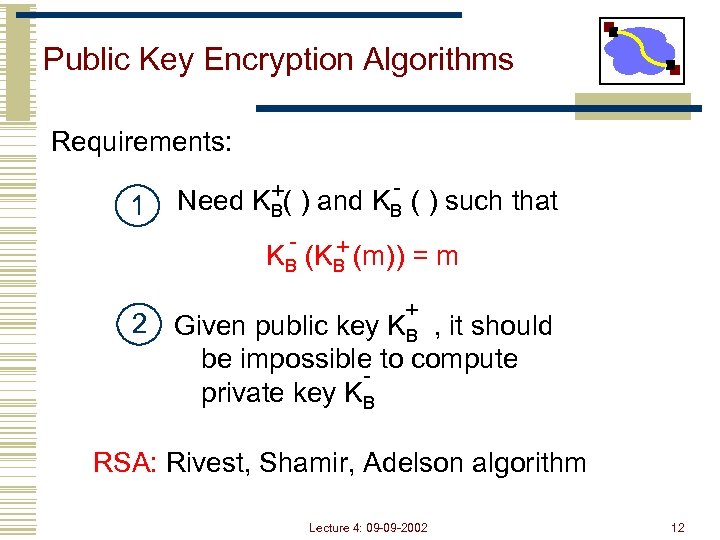 Public Key Encryption Algorithms Requirements: 1 +( ) and K - ( ) such that Need KB B - + KB (m)) = m + 2 Given public key KB , it should be impossible to compute private key KB RSA: Rivest, Shamir, Adelson algorithm Lecture 4: 09 -09 -2002 12
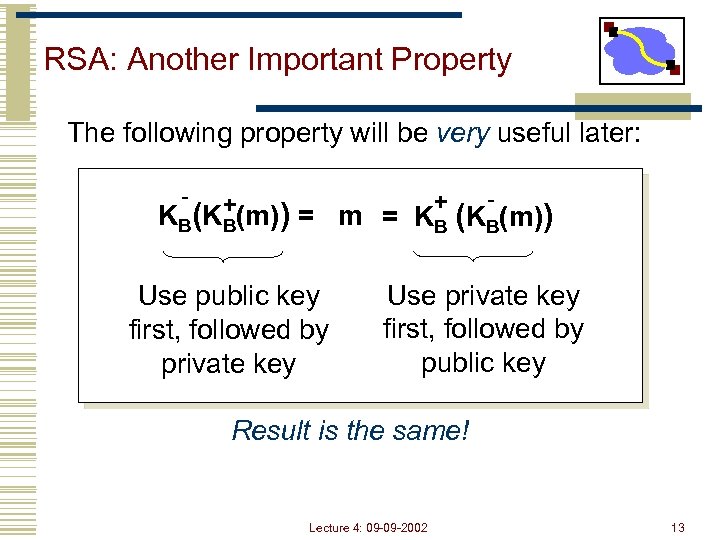 RSA: Another Important Property The following property will be very useful later: - + +(m)) = m K B (K B = KB (KB(m)) Use public key first, followed by private key Use private key first, followed by public key Result is the same! Lecture 4: 09 -09 -2002 13
 Outline • Security: Cryptography Introduction • Security: Authentication • Security: Key Distribution • DNS Lecture 4: 09 -09 -2002 14
 Authentication “The Doors of Durin, Lord of Moria. Speak, friend, and enter. ” - Words on the gate to Moria Password? Mellon (Elvish for friend) “Too simple for a learned lore master in these suspicious days. Those were happier times. ” - Gandalf Lecture 4: 09 -09 -2002 15
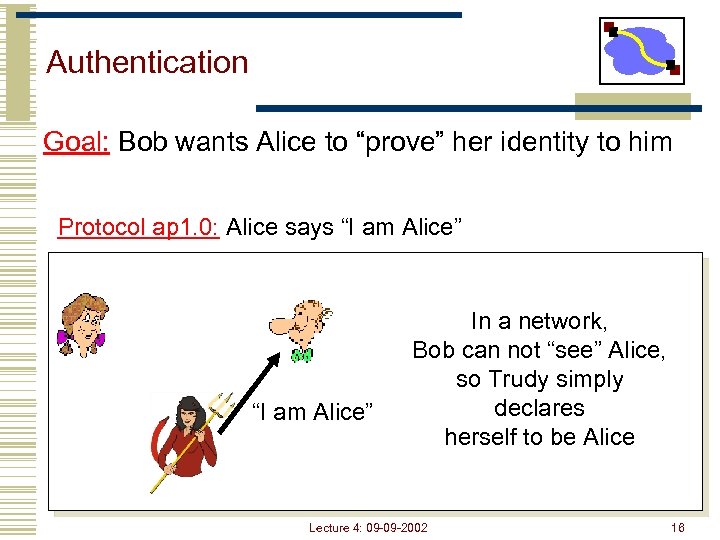 Authentication Goal: Bob wants Alice to “prove” her identity to him Protocol ap 1. 0: Alice says “I am Alice” In a network, Bob can not “see” Alice, so Trudy simply declares herself to be Alice Lecture 4: 09 -09 -2002 16
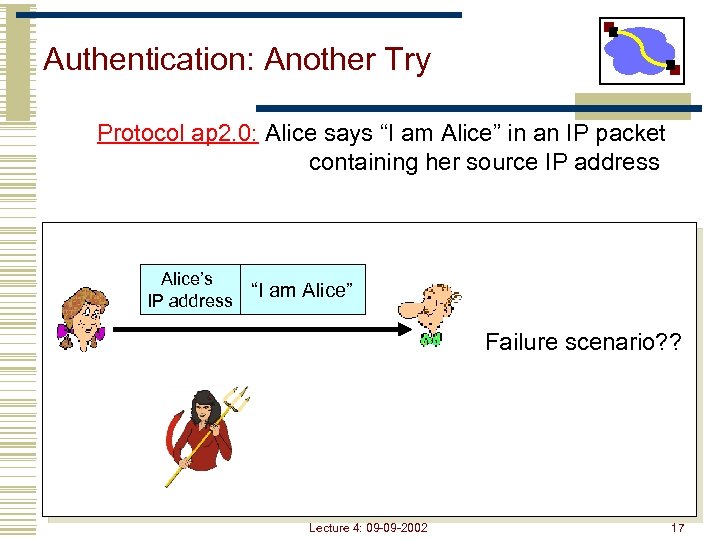 Authentication: Another Try Protocol ap 2. 0: Alice says “I am Alice” in an IP packet containing her source IP address Alice’s IP address “I am Alice” Failure scenario? ? Lecture 4: 09 -09 -2002 17
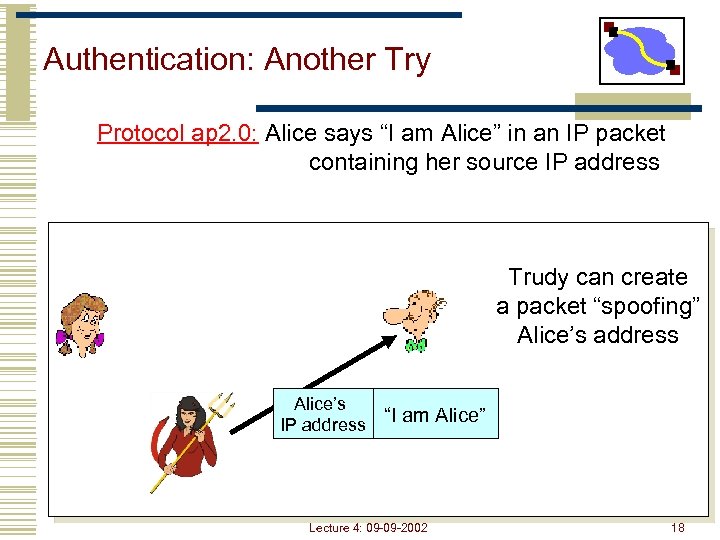 Authentication: Another Try Protocol ap 2. 0: Alice says “I am Alice” in an IP packet containing her source IP address Trudy can create a packet “spoofing” Alice’s address Alice’s IP address “I am Alice” Lecture 4: 09 -09 -2002 18
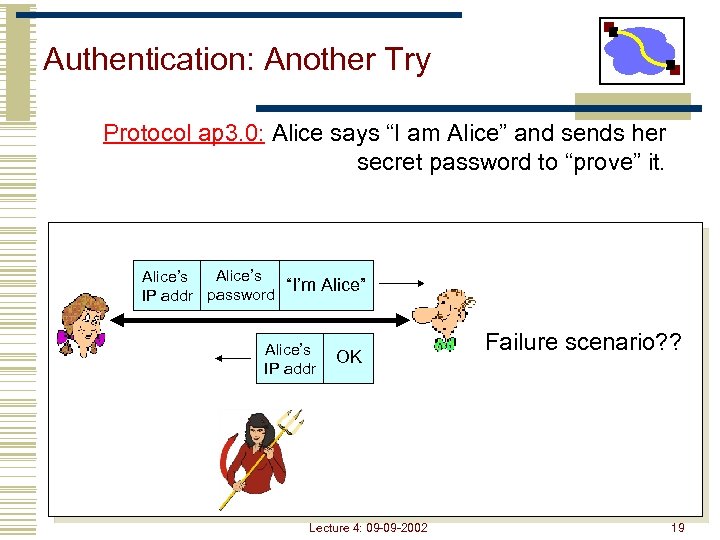 Authentication: Another Try Protocol ap 3. 0: Alice says “I am Alice” and sends her secret password to “prove” it. Alice’s “I’m Alice” IP addr password Alice’s IP addr OK Lecture 4: 09 -09 -2002 Failure scenario? ? 19
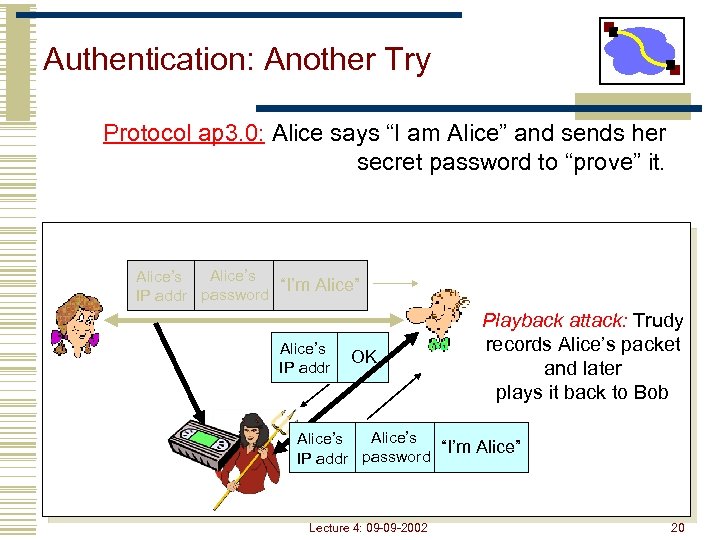 Authentication: Another Try Protocol ap 3. 0: Alice says “I am Alice” and sends her secret password to “prove” it. Alice’s “I’m Alice” IP addr password Alice’s IP addr OK Playback attack: Trudy records Alice’s packet and later plays it back to Bob Alice’s “I’m Alice” IP addr password Lecture 4: 09 -09 -2002 20
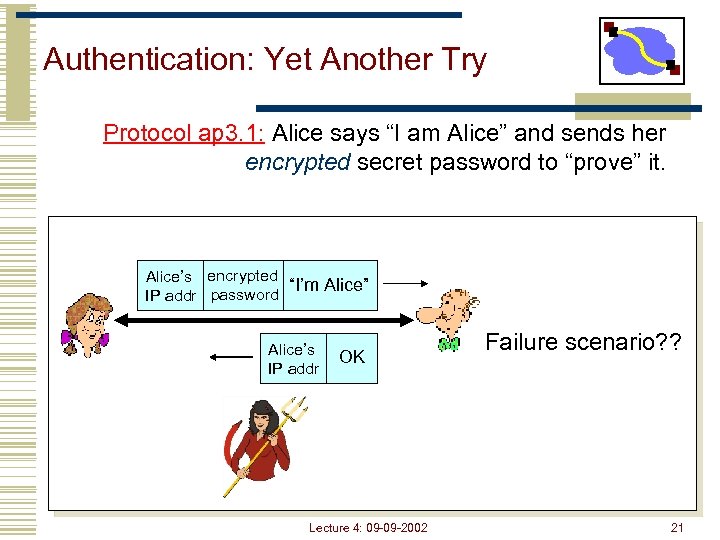 Authentication: Yet Another Try Protocol ap 3. 1: Alice says “I am Alice” and sends her encrypted secret password to “prove” it. Alice’s encrypted “I’m Alice” IP addr password Alice’s IP addr OK Lecture 4: 09 -09 -2002 Failure scenario? ? 21
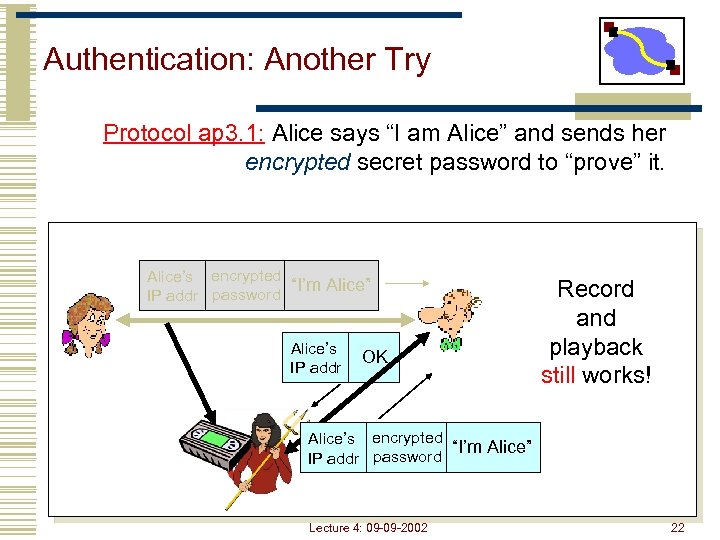 Authentication: Another Try Protocol ap 3. 1: Alice says “I am Alice” and sends her encrypted secret password to “prove” it. Alice’s encrypted “I’m Alice” IP addr password Alice’s IP addr OK Record and playback still works! Alice’s encrypted “I’m Alice” IP addr password Lecture 4: 09 -09 -2002 22
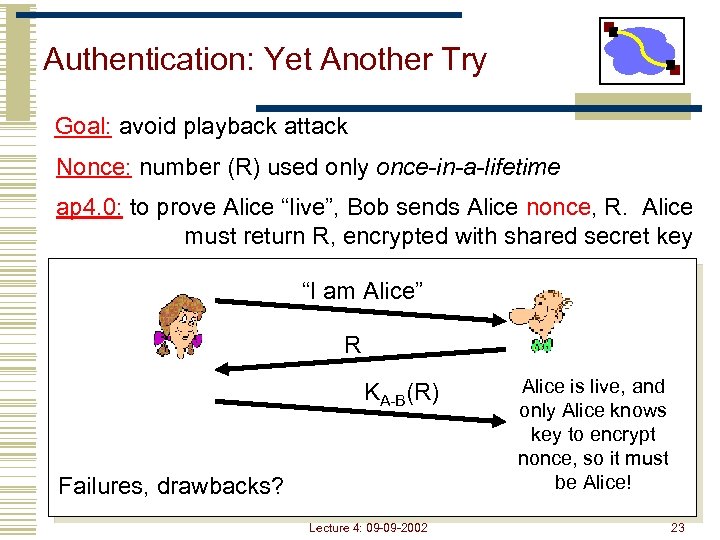 Authentication: Yet Another Try Goal: avoid playback attack Nonce: number (R) used only once-in-a-lifetime ap 4. 0: to prove Alice “live”, Bob sends Alice nonce, R. Alice must return R, encrypted with shared secret key “I am Alice” R KA-B(R) Failures, drawbacks? Lecture 4: 09 -09 -2002 Alice is live, and only Alice knows key to encrypt nonce, so it must be Alice! 23
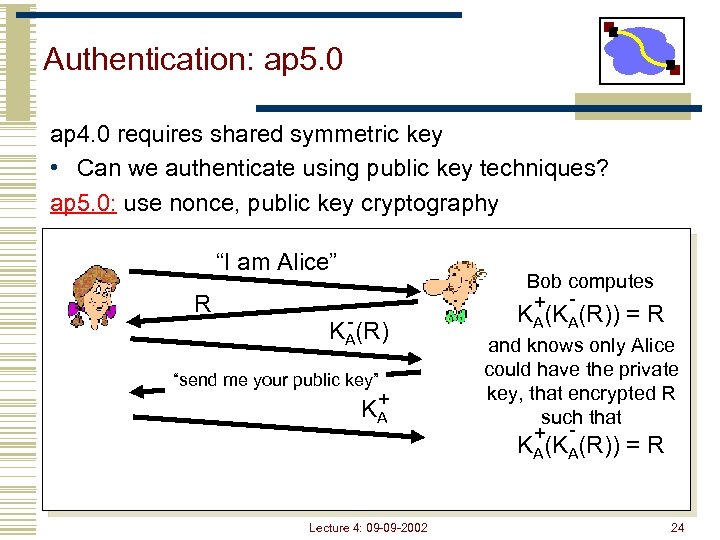 Authentication: ap 5. 0 ap 4. 0 requires shared symmetric key • Can we authenticate using public key techniques? ap 5. 0: use nonce, public key cryptography “I am Alice” R Bob computes + - - KA(R) “send me your public key” + KA KA(KA(R)) = R and knows only Alice could have the private key, that encrypted R such that + - KA(KA(R)) = R Lecture 4: 09 -09 -2002 24
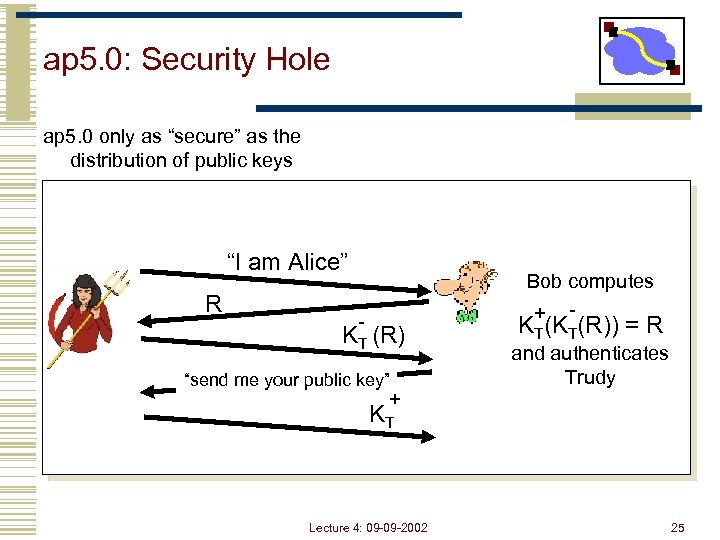 ap 5. 0: Security Hole ap 5. 0 only as “secure” as the distribution of public keys “I am Alice” R - KT (R) “send me your public key” + Bob computes + - KT(KT(R)) = R and authenticates Trudy KT Lecture 4: 09 -09 -2002 25
 Outline • Security: Cryptography Introduction • Security: Authentication • Security: Key Distribution • DNS Lecture 4: 09 -09 -2002 26
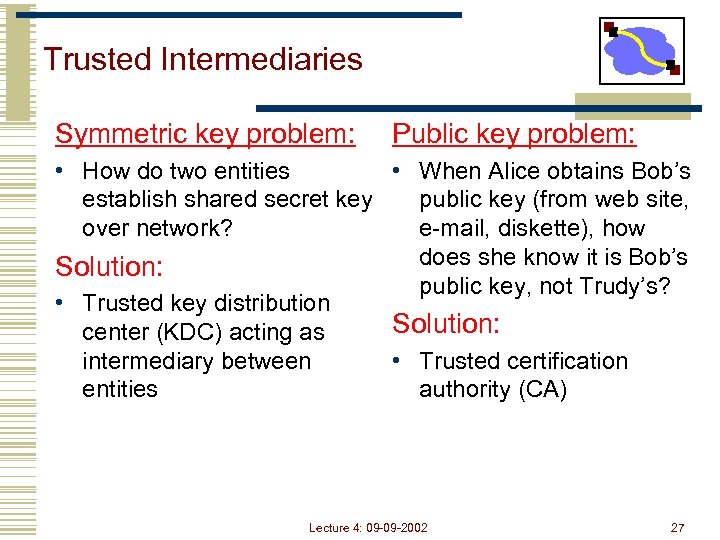 Trusted Intermediaries Symmetric key problem: Public key problem: • How do two entities • When Alice obtains Bob’s establish shared secret key public key (from web site, over network? e-mail, diskette), how does she know it is Bob’s Solution: public key, not Trudy’s? • Trusted key distribution Solution: center (KDC) acting as intermediary between • Trusted certification entities authority (CA) Lecture 4: 09 -09 -2002 27
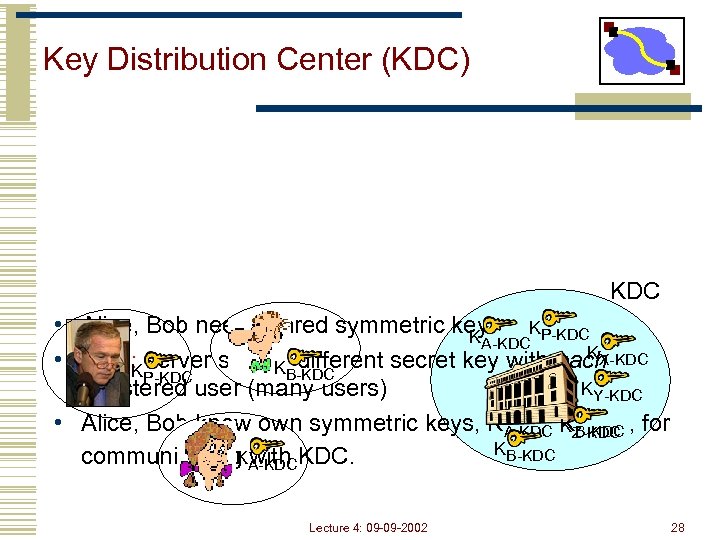 Key Distribution Center (KDC) KDC • Alice, Bob need shared symmetric key. KP-KDC KA-KDC KX-KDC • KDC: server shares different secret key with each KB-KDC KP-KDC KY-KDC registered user (many users) • Alice, Bob know own symmetric keys, KA-KDC KZ-KDC , for K B-KDC K with communicating A-KDC KDC. Lecture 4: 09 -09 -2002 28
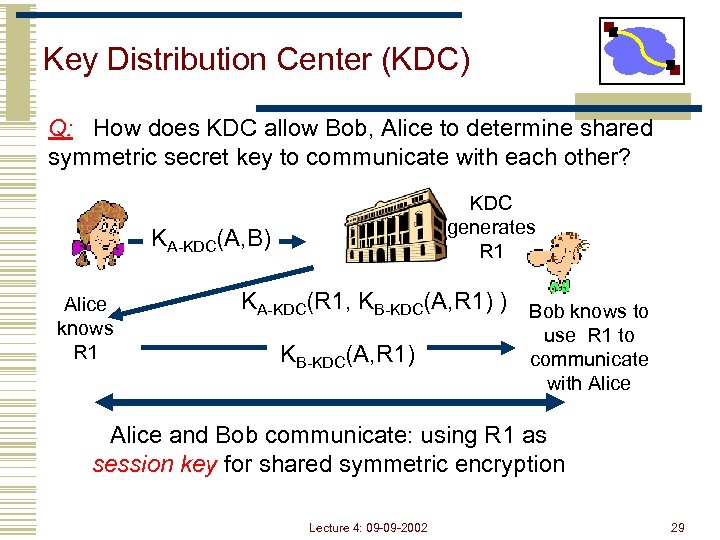 Key Distribution Center (KDC) Q: How does KDC allow Bob, Alice to determine shared symmetric secret key to communicate with each other? KDC generates R 1 KA-KDC(A, B) Alice knows R 1 KA-KDC(R 1, KB-KDC(A, R 1) ) Bob knows to KB-KDC(A, R 1) use R 1 to communicate with Alice and Bob communicate: using R 1 as session key for shared symmetric encryption Lecture 4: 09 -09 -2002 29
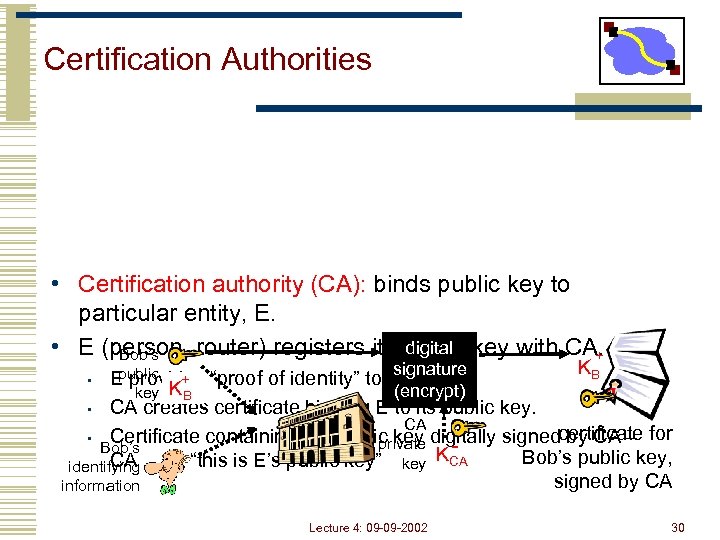 Certification Authorities • Certification authority (CA): binds public key to particular entity, E. digital • E (person, router) registers its public key with CA. Bob’s + KB signature public + E provides “proof of identity” to CA. (encrypt) key KB • CA creates certificate binding E to its public key. CA • Certificate containing E’s public key digitally signedcertificate for by CA – private Bob’s K Bob’s public key, CA identifying says “this is E’s public key” key CA signed by CA information • Lecture 4: 09 -09 -2002 30
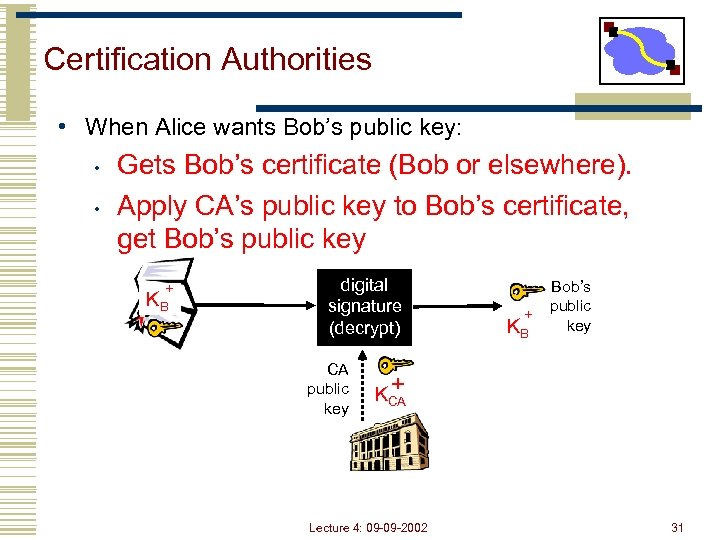 Certification Authorities • When Alice wants Bob’s public key: • • Gets Bob’s certificate (Bob or elsewhere). Apply CA’s public key to Bob’s certificate, get Bob’s public key + KB digital signature (decrypt) CA public key + KB Bob’s public key + KCA Lecture 4: 09 -09 -2002 31
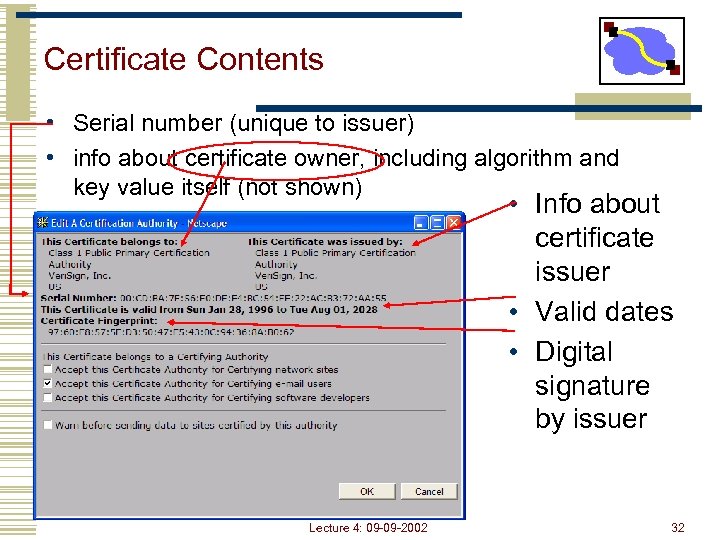 Certificate Contents • Serial number (unique to issuer) • info about certificate owner, including algorithm and key value itself (not shown) • Info about certificate issuer • Valid dates • Digital signature by issuer Lecture 4: 09 -09 -2002 32
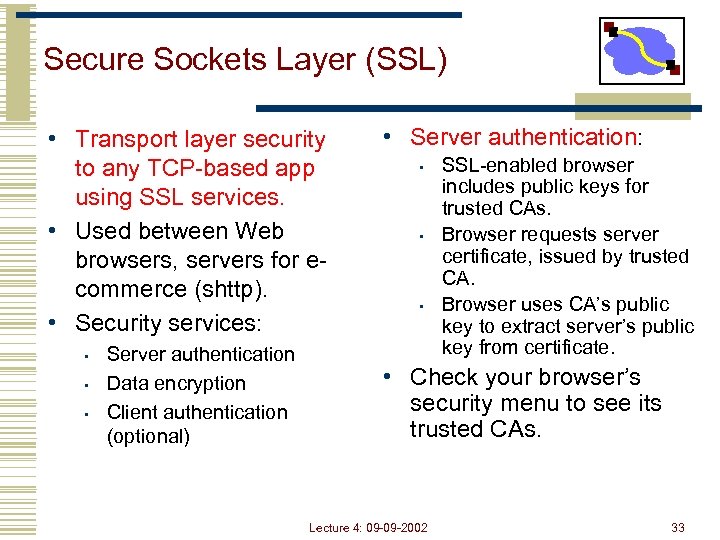 Secure Sockets Layer (SSL) • Transport layer security to any TCP-based app using SSL services. • Used between Web browsers, servers for ecommerce (shttp). • Security services: • • • Server authentication Data encryption Client authentication (optional) • Server authentication: • • • SSL-enabled browser includes public keys for trusted CAs. Browser requests server certificate, issued by trusted CA. Browser uses CA’s public key to extract server’s public key from certificate. • Check your browser’s security menu to see its trusted CAs. Lecture 4: 09 -09 -2002 33
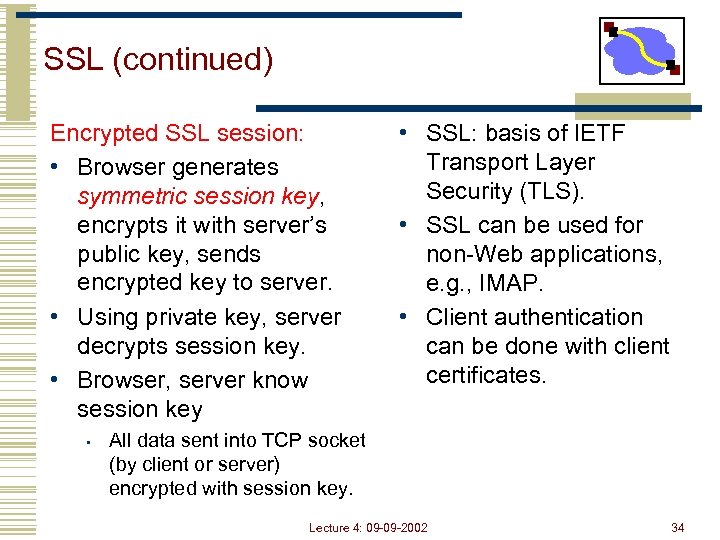 SSL (continued) Encrypted SSL session: • Browser generates symmetric session key, encrypts it with server’s public key, sends encrypted key to server. • Using private key, server decrypts session key. • Browser, server know session key • • SSL: basis of IETF Transport Layer Security (TLS). • SSL can be used for non-Web applications, e. g. , IMAP. • Client authentication can be done with client certificates. All data sent into TCP socket (by client or server) encrypted with session key. Lecture 4: 09 -09 -2002 34
 Network Security (Summary) • Cryptography (symmetric and public) • Basic techniques & tradeoffs • Authentication • Common styles of attack • Key distribution • Why needed …. used in many different security scenarios • secure email, secure transport (SSL), IP sec, 802. 11 WEP Lecture 4: 09 -09 -2002 35
 Outline • Security: Cryptography Introduction • Security: Authentication • Security: Key Distribution • DNS Lecture 4: 09 -09 -2002 36
 Naming • How do we efficiently locate resources? • • DNS: name IP address Service location: description host • Other issues • • How do we scale these to the wide area? How to choose among similar services? Lecture 4: 09 -09 -2002 37
 Obvious Solutions (1) Why not centralize DNS? • Single point of failure • Traffic volume • Distant centralized database • Single point of update • Doesn’t scale! Lecture 4: 09 -09 -2002 38
 Obvious Solutions (2) Why not use /etc/hosts? • Original Name to Address Mapping • • Flat namespace /etc/hosts SRI kept main copy Downloaded regularly • Count of hosts was increasing: machine per domain machine per user • • Many more downloads Many more updates Lecture 4: 09 -09 -2002 39
 Domain Name System Goals • • • Basically building a wide area distributed database Scalability Decentralized maintenance Robustness Global scope • Names mean the same thing everywhere • Don’t need • • Atomicity Strong consistency Lecture 4: 09 -09 -2002 40
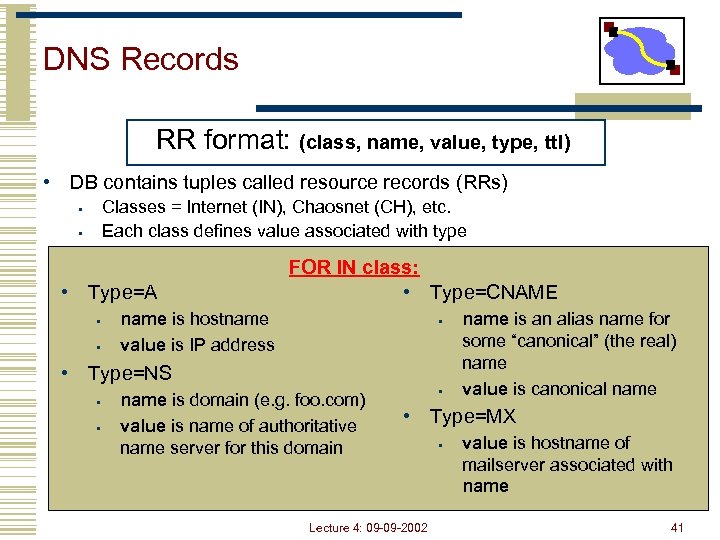 DNS Records RR format: (class, name, value, type, ttl) • DB contains tuples called resource records (RRs) Classes = Internet (IN), Chaosnet (CH), etc. Each class defines value associated with type • • • Type=A • • FOR IN class: • Type=CNAME name is hostname value is IP address • • Type=NS • • name is domain (e. g. foo. com) value is name of authoritative name server for this domain • name is an alias name for some “canonical” (the real) name value is canonical name • Type=MX Lecture 4: 09 -09 -2002 • value is hostname of mailserver associated with name 41
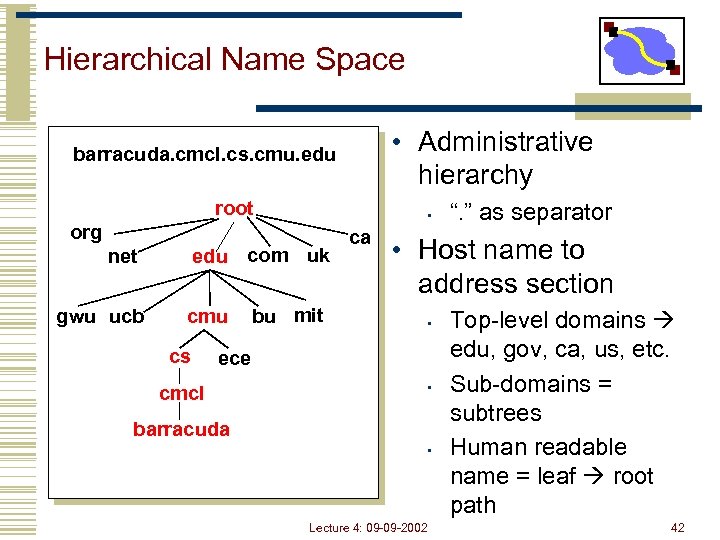 Hierarchical Name Space • Administrative hierarchy barracuda. cmcl. cs. cmu. edu root • org edu com uk net gwu ucb cmu cs bu mit ca • Host name to address section • ece cmcl “. ” as separator • barracuda • Lecture 4: 09 -09 -2002 Top-level domains edu, gov, ca, us, etc. Sub-domains = subtrees Human readable name = leaf root path 42
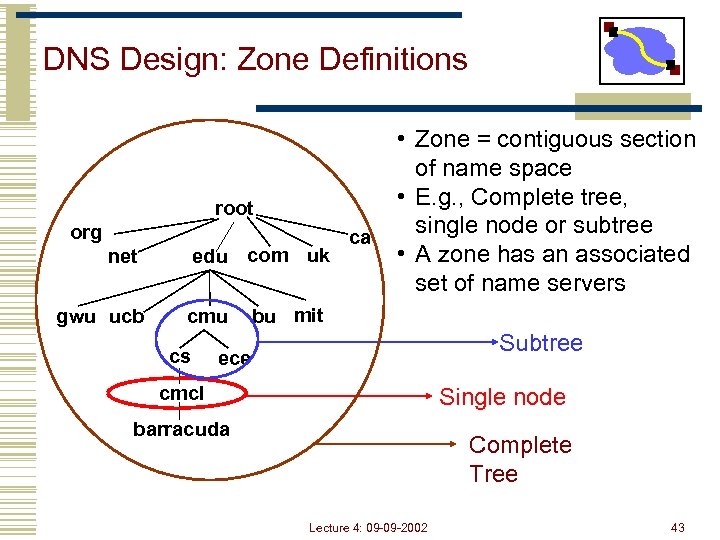 DNS Design: Zone Definitions root org edu com uk net gwu ucb cmu cs ca • Zone = contiguous section of name space • E. g. , Complete tree, single node or subtree • A zone has an associated set of name servers bu mit Subtree ece cmcl Single node barracuda Complete Tree Lecture 4: 09 -09 -2002 43
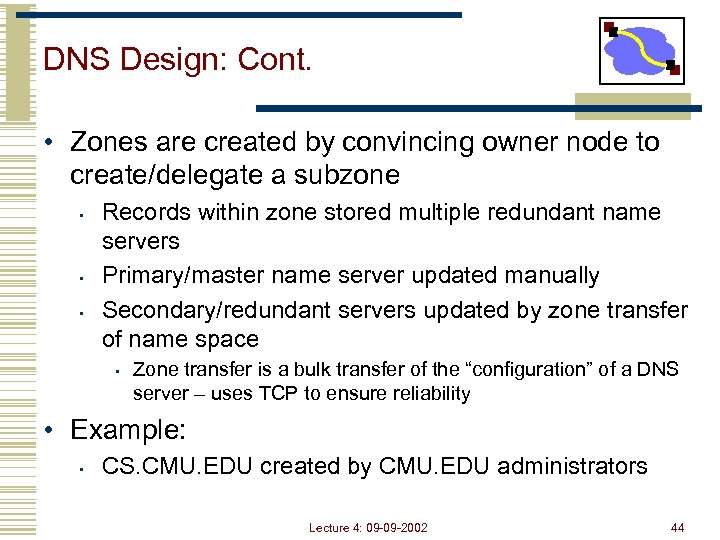 DNS Design: Cont. • Zones are created by convincing owner node to create/delegate a subzone • • • Records within zone stored multiple redundant name servers Primary/master name server updated manually Secondary/redundant servers updated by zone transfer of name space • Zone transfer is a bulk transfer of the “configuration” of a DNS server – uses TCP to ensure reliability • Example: • CS. CMU. EDU created by CMU. EDU administrators Lecture 4: 09 -09 -2002 44
 Servers/Resolvers • Each host has a resolver • • Typically a library that applications can link to Local name servers hand-configured (e. g. /etc/resolv. conf) • Name servers • • Either responsible for some zone or… Local servers • • Do lookup of distant host names for local hosts Typically answer queries about local zone Lecture 4: 09 -09 -2002 45
 DNS: Root Name Servers • Responsible for “root” zone • Approx. dozen root name servers worldwide • Currently {a-m}. root -servers. net • Local name servers contact root servers when they cannot resolve a name • Configured with well -known root servers Lecture 4: 09 -09 -2002 46
 Next Lecture • How DNS resolves names • How well does DNS work today • HTTP intro and details Lecture 4: 09 -09 -2002 47