


 Скачать презентацию 15 -213 Network technology April 11 2000 Topics
026b6138e1b2c0ef69726e88f0d1020c.ppt
- Количество слайдов: 39
 15 -213 Network technology April 11, 2000 Topics • Fundamental concepts – protocols, layering, encapsulation, network types • Wide area networks – phone lines and modems – Internet backbones • Local area networks – Ethernet class 23. ppt
 Course Theme Abstraction is good, but don’t forget reality! Earlier courses to date emphasize abstraction • Abstract data types • Asymptotic analysis These abstractions have limits • Especially in the presence of bugs • Need to understand underlying implementations Useful outcomes • Become more effective programmers – Able to find and eliminate bugs efficiently – Able to tune program performance • Prepare for later “systems” classes – Compilers, Operating Systems, Networks, Computer Architecture class 23. ppt – 2– CS 213 S’ 00
 “Harsh Realities” of Computer Science • Int’s are not integers; float’s are not reals – Must understand characteristics of finite numeric representations • You’ve got to know assembly – Basis for understanding what really happens when execute program • Memory matters – Memory referencing bugs especially difficult » Violates programming language abstraction – Significant performance issues » E. g. , cache effects • There’s more to performance than asymptotic complexity – Constant factors also matter • Computers do more than execute programs – Get data in and out – Communicate with each other via networks class 23. ppt – 3– CS 213 S’ 00
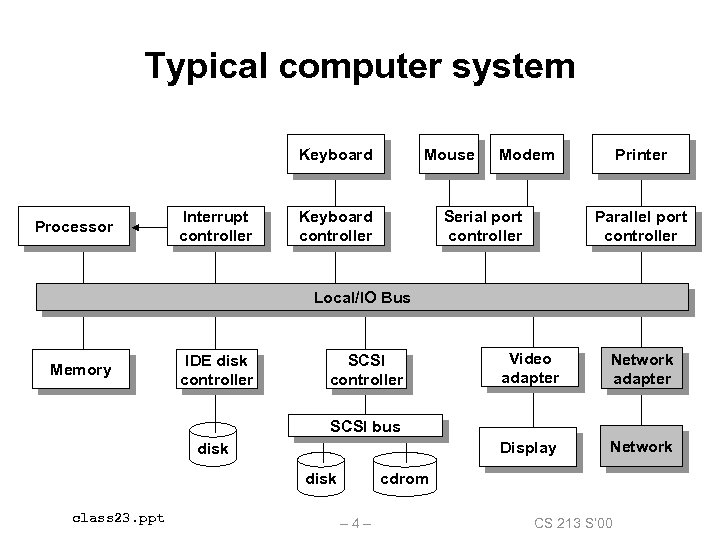 Typical computer system Keyboard Processor Interrupt controller Mouse Keyboard controller Modem Serial port controller Printer Parallel port controller Local/IO Bus Memory IDE disk controller Video adapter Network adapter Display SCSI controller Network SCSI bus disk class 23. ppt cdrom – 4– CS 213 S’ 00
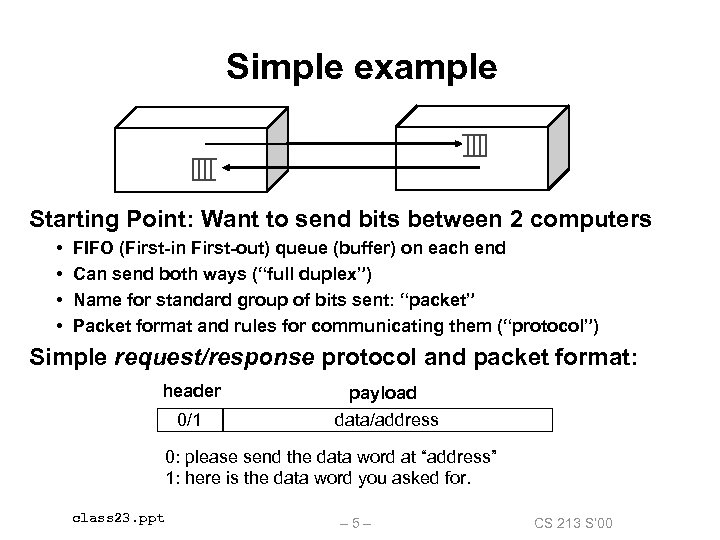 Simple example Starting Point: Want to send bits between 2 computers • • FIFO (First-in First-out) queue (buffer) on each end Can send both ways (“full duplex”) Name for standard group of bits sent: “packet” Packet format and rules for communicating them (“protocol”) Simple request/response protocol and packet format: header payload 0/1 data/address 0: please send the data word at “address” 1: here is the data word you asked for. class 23. ppt – 5– CS 213 S’ 00
 Questions about simple example What if more than 2 computers want to communicate? • Need an interconnect? Need computer address field in packet? What if the machines are far away? • WAN vs LAN How do multiple machines share the interconnect? • multiple paths? arbitration? congestion control? What if a packet is garbled in transit? • Add error detection field in packet? What if a packet is lost? • More elaborate protocols to detect loss? What if multiple processes per machine? • one queue per process? separate field in packet to identify process? Warning: You are entering a buzzword-rich environment!!! class 23. ppt – 6– CS 213 S’ 00
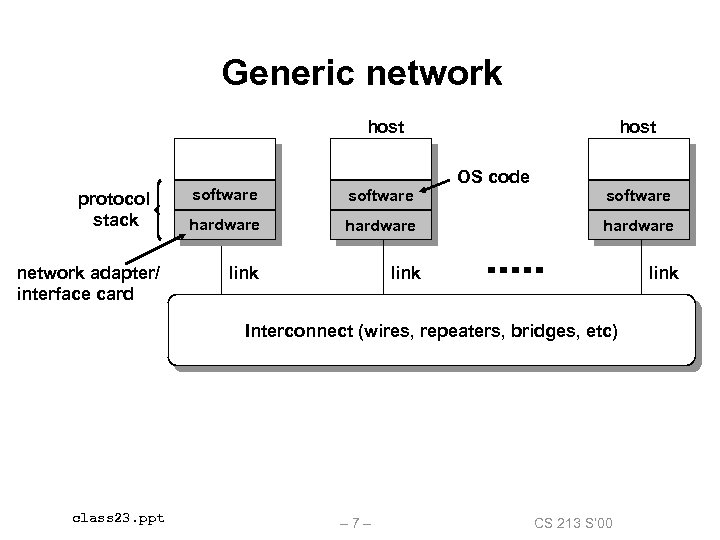 Generic network host protocol stack network adapter/ interface card host OS code software hardware link software Interconnect (wires, repeaters, bridges, etc) class 23. ppt – 7– CS 213 S’ 00
 Protocols A protocol defines the format of packets and the rules for communicating them across the network. Different protocols provide different levels of service: • • • simple error correction (ethernet) uniform name space, unreliable best-effort datagrams (host-host) (IP) reliable byte streams (TCP) unreliable best-effort datagrams (process-process) (UDP) multimedia data retrieval (HTTP) Crucial idea: protocols leverage off of the capabilities of other protocols. class 23. ppt – 8– CS 213 S’ 00
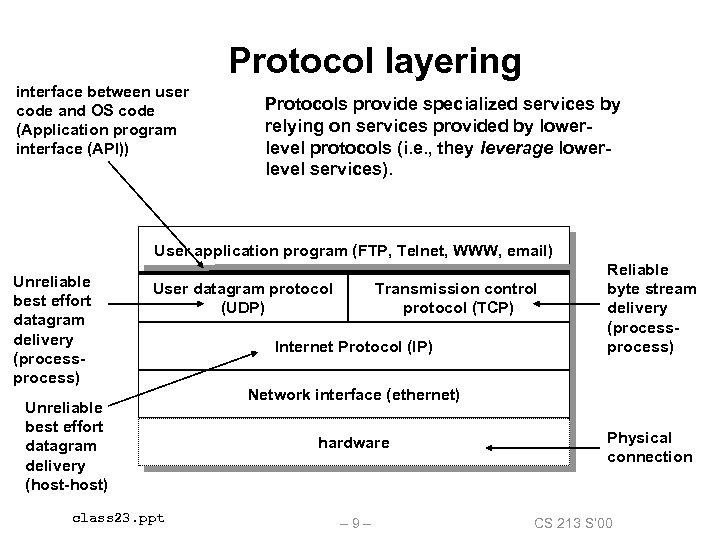 Protocol layering interface between user code and OS code (Application program interface (API)) Protocols provide specialized services by relying on services provided by lowerlevel protocols (i. e. , they leverage lowerlevel services). User application program (FTP, Telnet, WWW, email) Unreliable best effort datagram delivery (process) User datagram protocol (UDP) Unreliable best effort datagram delivery (host-host) class 23. ppt Transmission control protocol (TCP) Internet Protocol (IP) Reliable byte stream delivery (process) Network interface (ethernet) hardware – 9– Physical connection CS 213 S’ 00
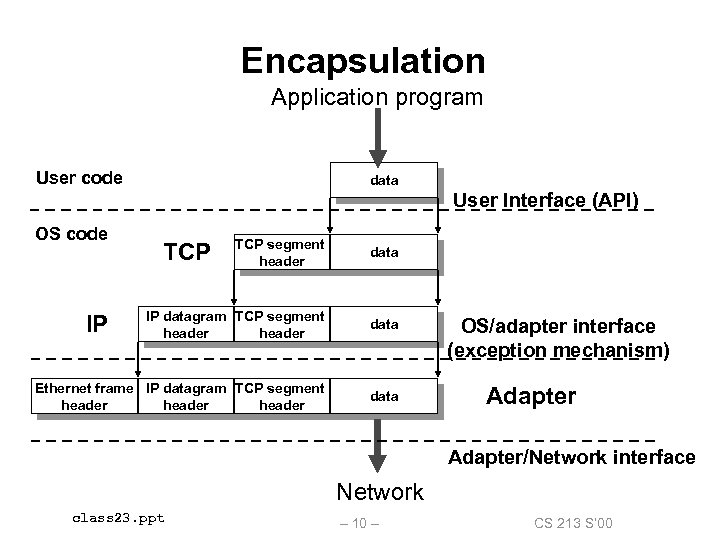 Encapsulation Application program User code data User Interface (API) OS code TCP segment header data IP datagram TCP segment header data Ethernet frame IP datagram TCP segment header data IP TCP OS/adapter interface (exception mechanism) Adapter/Network interface Network class 23. ppt – 10 – CS 213 S’ 00
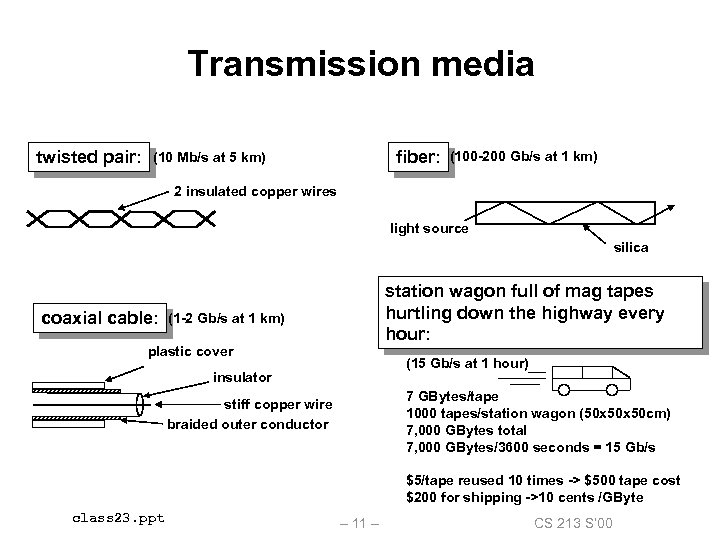 Transmission media twisted pair: fiber: (10 Mb/s at 5 km) (100 -200 Gb/s at 1 km) 2 insulated copper wires light source silica coaxial cable: station wagon full of mag tapes hurtling down the highway every hour: (1 -2 Gb/s at 1 km) plastic cover (15 Gb/s at 1 hour) insulator 7 GBytes/tape 1000 tapes/station wagon (50 x 50 cm) 7, 000 GBytes total 7, 000 GBytes/3600 seconds = 15 Gb/s stiff copper wire braided outer conductor $5/tape reused 10 times -> $500 tape cost $200 for shipping ->10 cents /GByte class 23. ppt – 11 – CS 213 S’ 00
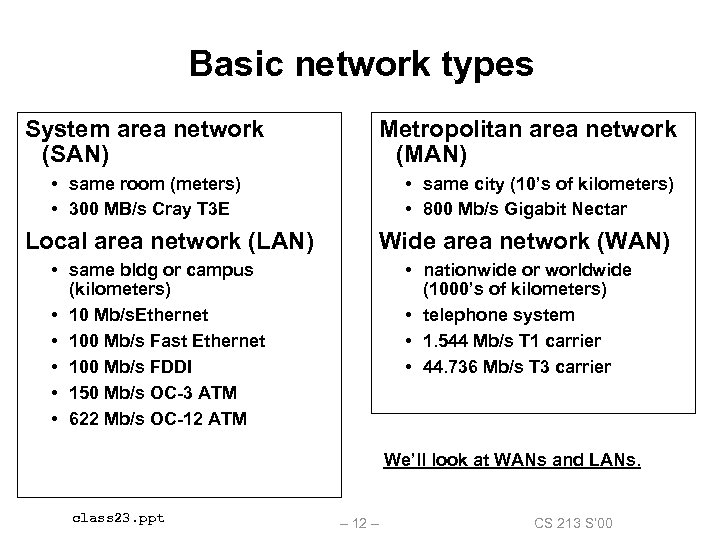 Basic network types System area network (SAN) Metropolitan area network (MAN) • same room (meters) • 300 MB/s Cray T 3 E Local area network (LAN) • same city (10’s of kilometers) • 800 Mb/s Gigabit Nectar Wide area network (WAN) • same bldg or campus (kilometers) • 10 Mb/s. Ethernet • 100 Mb/s Fast Ethernet • 100 Mb/s FDDI • 150 Mb/s OC-3 ATM • 622 Mb/s OC-12 ATM • nationwide or worldwide (1000’s of kilometers) • telephone system • 1. 544 Mb/s T 1 carrier • 44. 736 Mb/s T 3 carrier We’ll look at WANs and LANs. class 23. ppt – 12 – CS 213 S’ 00
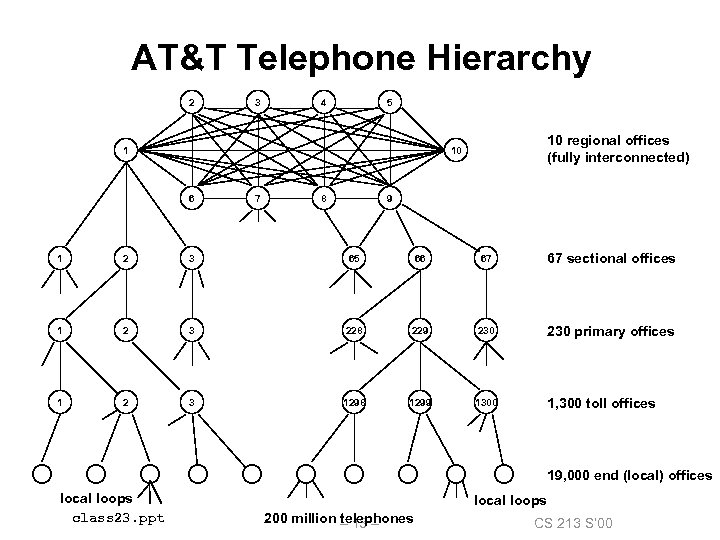 AT&T Telephone Hierarchy 2 3 4 5 1 10 regional offices (fully interconnected) 10 6 7 8 9 1 2 3 65 66 67 67 sectional offices 1 2 3 228 229 230 primary offices 1 2 3 1298 1299 1300 1, 300 toll offices 19, 000 end (local) offices local loops class 23. ppt local loops 200 million – 13 – telephones CS 213 S’ 00
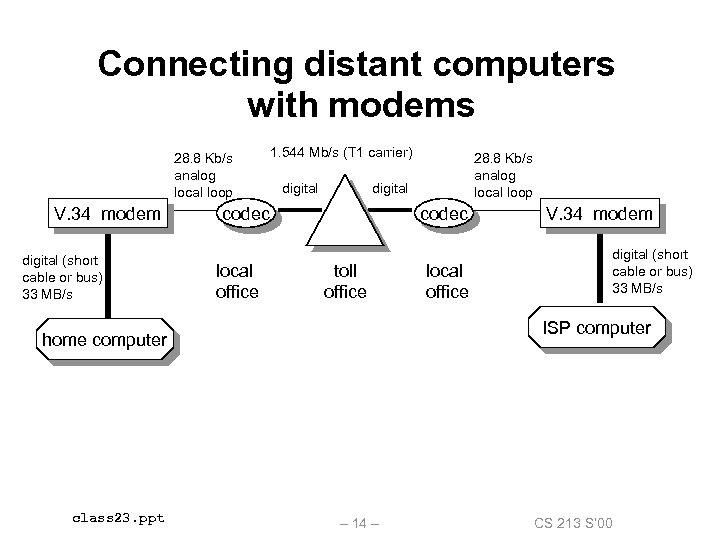 Connecting distant computers with modems 28. 8 Kb/s analog local loop V. 34 modem digital (short cable or bus) 33 MB/s 1. 544 Mb/s (T 1 carrier) digital codec local office codec toll office local office V. 34 modem digital (short cable or bus) 33 MB/s ISP computer home computer class 23. ppt 28. 8 Kb/s analog local loop – 14 – CS 213 S’ 00
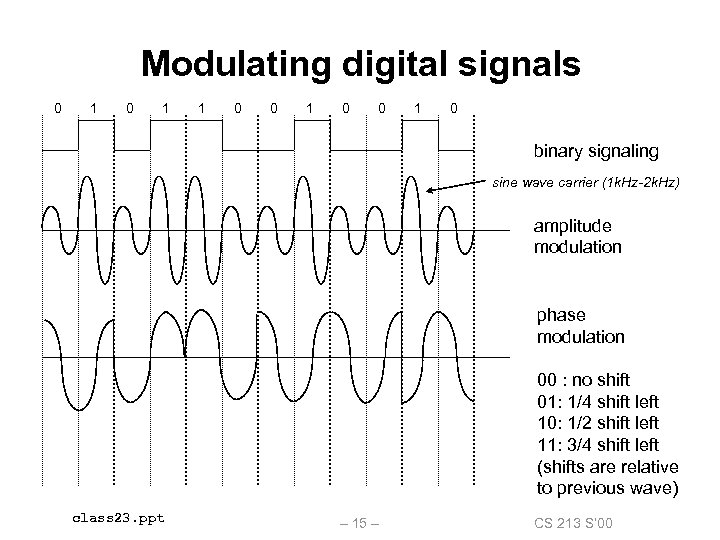 Modulating digital signals 0 1 1 0 0 1 0 binary signaling sine wave carrier (1 k. Hz-2 k. Hz) amplitude modulation phase modulation 00 : no shift 01: 1/4 shift left 10: 1/2 shift left 11: 3/4 shift left (shifts are relative to previous wave) class 23. ppt – 15 – CS 213 S’ 00
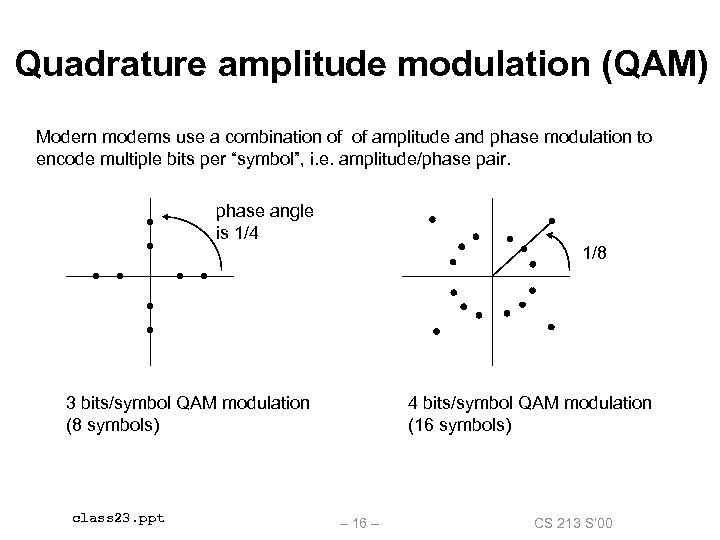 Quadrature amplitude modulation (QAM) Modern modems use a combination of of amplitude and phase modulation to encode multiple bits per “symbol”, i. e. amplitude/phase pair. phase angle is 1/4 1/8 3 bits/symbol QAM modulation (8 symbols) class 23. ppt 4 bits/symbol QAM modulation (16 symbols) – 16 – CS 213 S’ 00
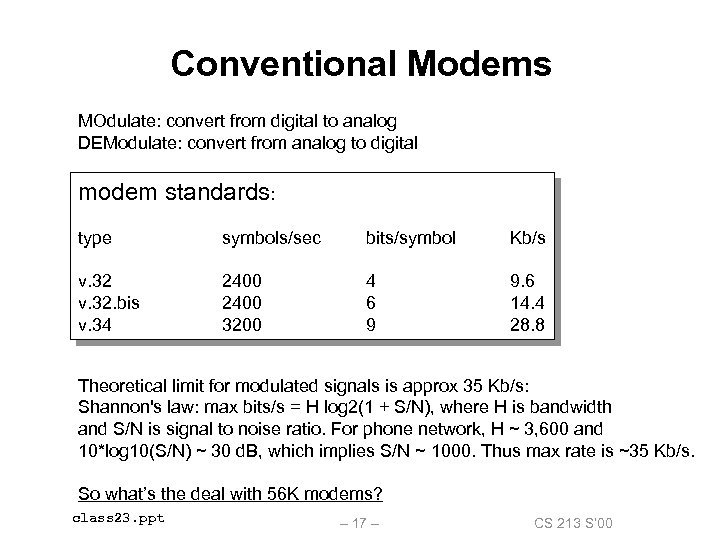 Conventional Modems MOdulate: convert from digital to analog DEModulate: convert from analog to digital modem standards: type symbols/sec bits/symbol Kb/s v. 32. bis v. 34 2400 3200 4 6 9 9. 6 14. 4 28. 8 Theoretical limit for modulated signals is approx 35 Kb/s: Shannon's law: max bits/s = H log 2(1 + S/N), where H is bandwidth and S/N is signal to noise ratio. For phone network, H ~ 3, 600 and 10*log 10(S/N) ~ 30 d. B, which implies S/N ~ 1000. Thus max rate is ~35 Kb/s. So what’s the deal with 56 K modems? class 23. ppt – 17 – CS 213 S’ 00
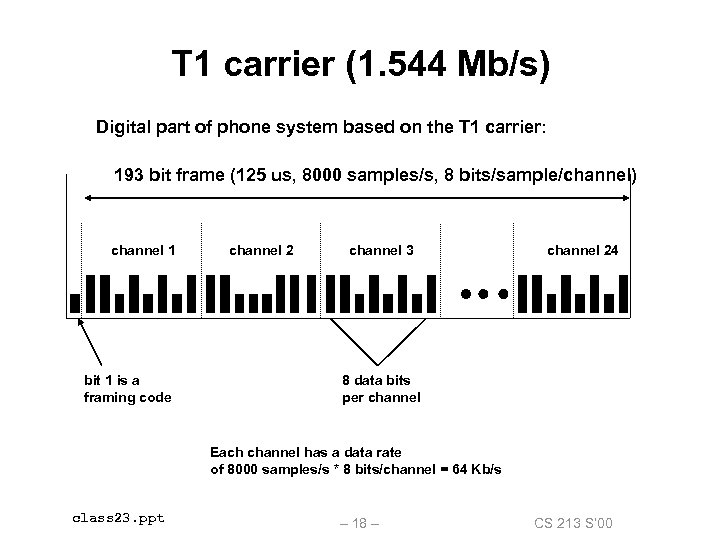 T 1 carrier (1. 544 Mb/s) Digital part of phone system based on the T 1 carrier: 193 bit frame (125 us, 8000 samples/s, 8 bits/sample/channel) channel 1 bit 1 is a framing code channel 2 channel 3 channel 24 8 data bits per channel Each channel has a data rate of 8000 samples/s * 8 bits/channel = 64 Kb/s class 23. ppt – 18 – CS 213 S’ 00
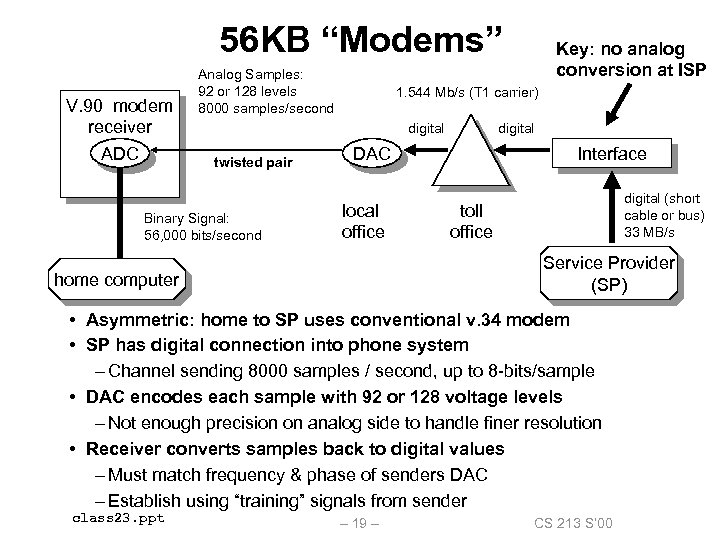 56 KB “Modems” V. 90 modem receiver ADC Analog Samples: 92 or 128 levels 8000 samples/second 1. 544 Mb/s (T 1 carrier) digital twisted pair Binary Signal: 56, 000 bits/second Key: no analog conversion at ISP digital Interface DAC local office digital (short cable or bus) 33 MB/s toll office Service Provider (SP) home computer • Asymmetric: home to SP uses conventional v. 34 modem • SP has digital connection into phone system – Channel sending 8000 samples / second, up to 8 -bits/sample • DAC encodes each sample with 92 or 128 voltage levels – Not enough precision on analog side to handle finer resolution • Receiver converts samples back to digital values – Must match frequency & phase of senders DAC – Establish using “training” signals from sender class 23. ppt – 19 – CS 213 S’ 00
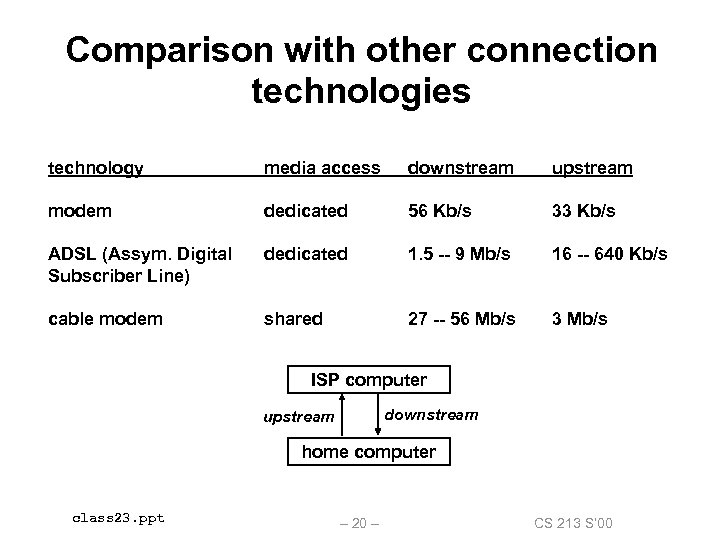 Comparison with other connection technologies technology media access downstream upstream modem dedicated 56 Kb/s 33 Kb/s ADSL (Assym. Digital Subscriber Line) dedicated 1. 5 -- 9 Mb/s 16 -- 640 Kb/s cable modem shared 27 -- 56 Mb/s 3 Mb/s ISP’s computer downstream upstream home computer class 23. ppt – 20 – CS 213 S’ 00
 Basic Internet components An Internet backbone is a collection of routers (nationwide or worldwide) connected by highspeed point-to-point networks. A Network Access Point (NAP) is a router that connects multiple backbones (sometimes referred to as peers). Regional networks are smaller backbones that cover smaller geographical areas (e. g. , cities or states) A point of presence (POP) is a machine that is connected to the Internet Service Providers (ISPs) provide dialup or direct access to POPs. class 23. ppt – 21 – CS 213 S’ 00
 The Internet circa 1993 In 1993, the Internet consisted of one backbone (NSFNET) that connected 13 sites via 45 Mbs T 3 links. • Merit (Univ of Mich), NCSA (Illinois), Cornell Theory Center, Pittsburgh Supercomputing Center, San Diego Supercomputing Center, John von Neumann Center (Princeton), BARRNet (Palo Alto), Mid. Net (Lincoln, NE), West. Net (Salt Lake City), Northwest. Net (Seattle), SESQUINET (Rice), SURANET (Georgia Tech). Connecting to the Internet involved connecting one of your routers to a router at a backbone site, or to a regional network that was already connected to the backbone. class 23. ppt – 22 – CS 213 S’ 00
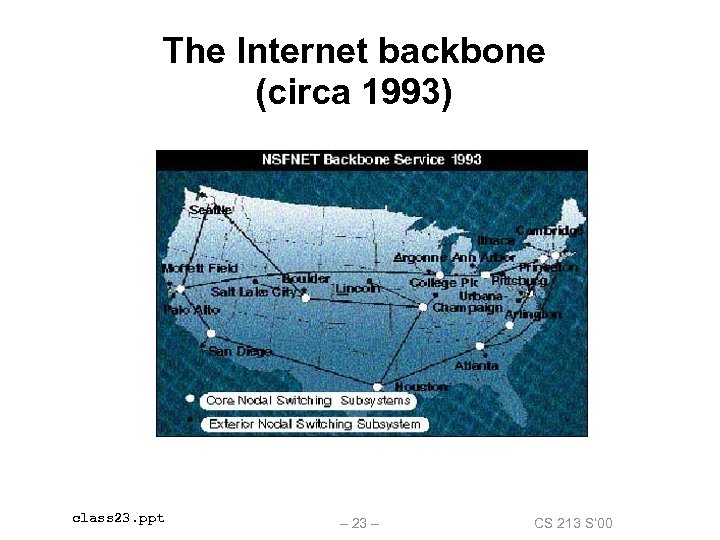 The Internet backbone (circa 1993) class 23. ppt – 23 – CS 213 S’ 00
 Current NAP-based Internet architecture In the early 90’s commercial outfits were building their own high-speed backbones, connecting to NSFNET, and selling access to their POPs to companies, ISPs, and individuals. In 1995, NSF decommissioned NSFNET, and fostered creation of a collection of NAPs to connect the commercial backbones. Currently in the US there about 50 commercial backbones connected by ~12 NAPs (peering points). Similar architecture worldwide connects national networks to the Internet. class 23. ppt – 24 – CS 213 S’ 00
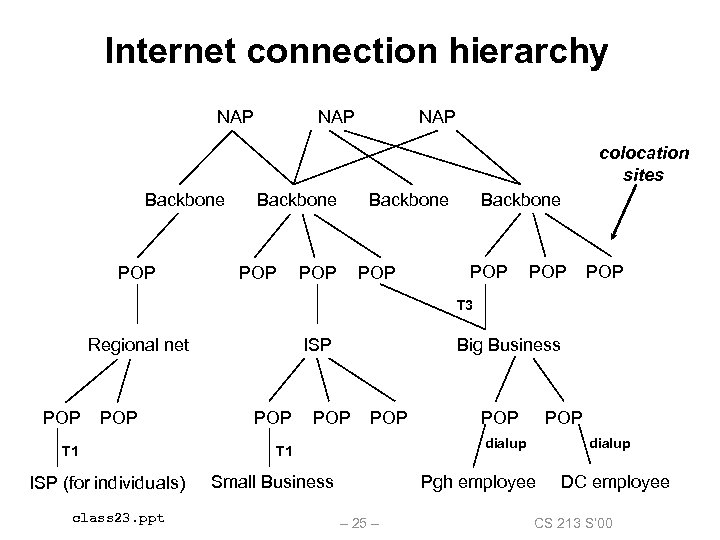 Internet connection hierarchy NAP NAP colocation sites Backbone POP POP POP T 3 Regional net POP T 1 ISP (for individuals) class 23. ppt ISP POP Big Business POP POP dialup T 1 Small Business dialup Pgh employee – 25 – DC employee CS 213 S’ 00
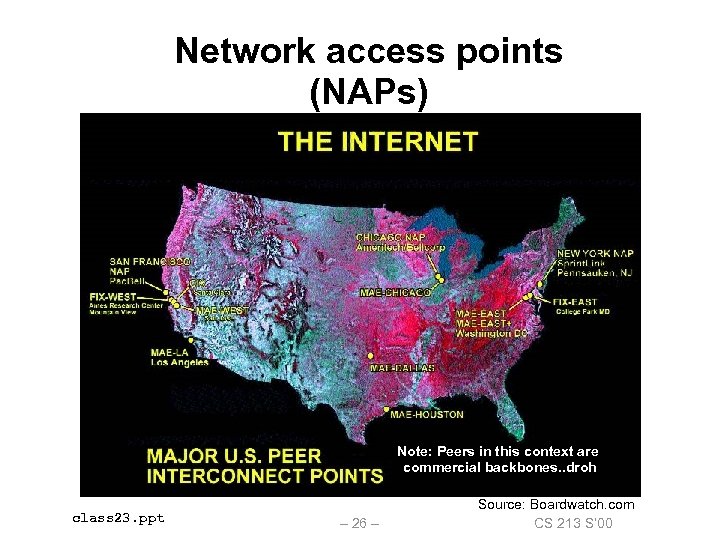 Network access points (NAPs) Note: Peers in this context are commercial backbones. . droh class 23. ppt – 26 – Source: Boardwatch. com CS 213 S’ 00
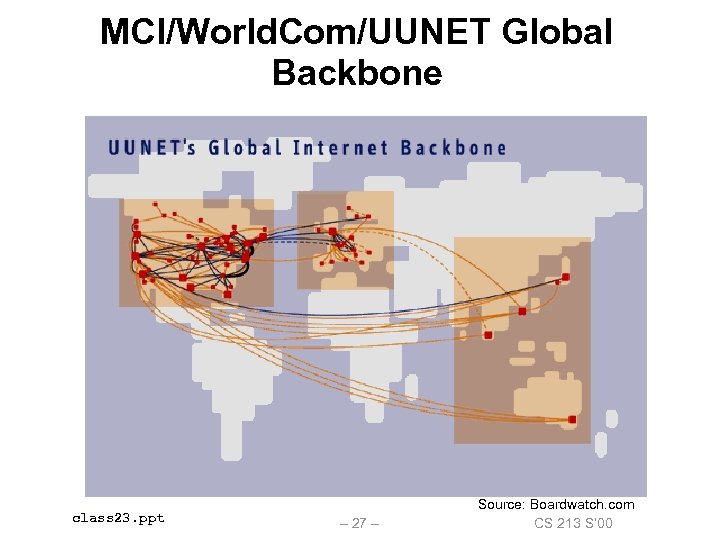 MCI/World. Com/UUNET Global Backbone class 23. ppt – 27 – Source: Boardwatch. com CS 213 S’ 00
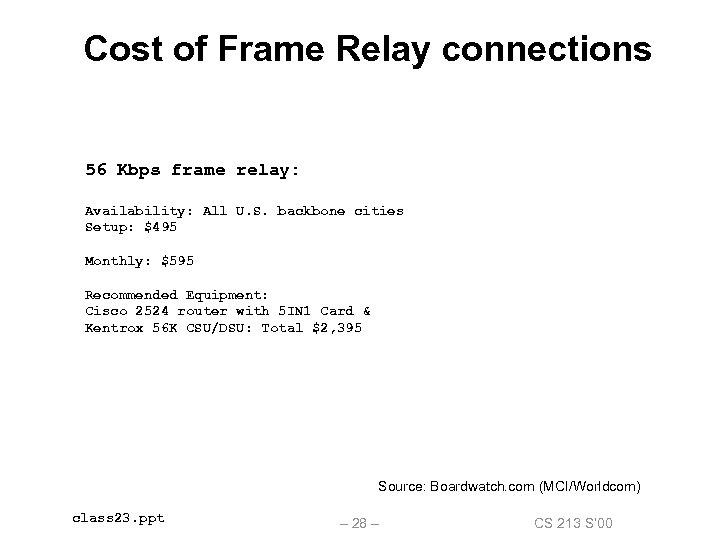 Cost of Frame Relay connections 56 Kbps frame relay: Availability: All U. S. backbone cities Setup: $495 Monthly: $595 Recommended Equipment: Cisco 2524 router with 5 IN 1 Card & Kentrox 56 K CSU/DSU: Total $2, 395 Source: Boardwatch. com (MCI/Worldcom) class 23. ppt – 28 – CS 213 S’ 00
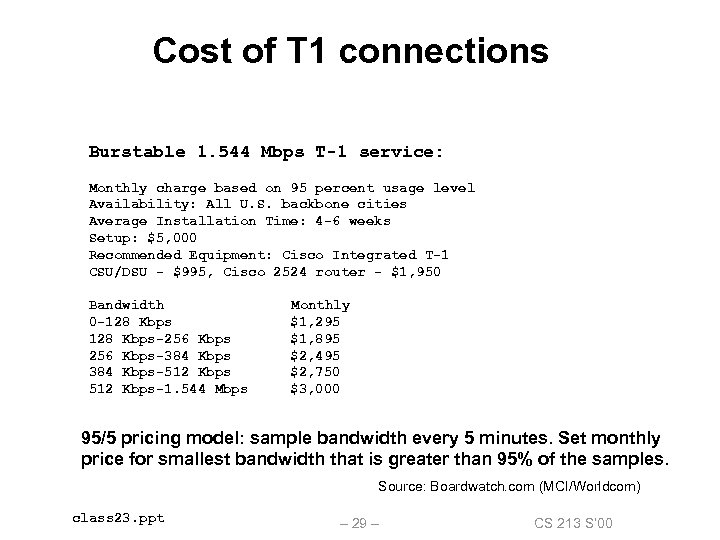 Cost of T 1 connections Burstable 1. 544 Mbps T-1 service: Monthly charge based on 95 percent usage level Availability: All U. S. backbone cities Average Installation Time: 4 -6 weeks Setup: $5, 000 Recommended Equipment: Cisco Integrated T-1 CSU/DSU - $995, Cisco 2524 router - $1, 950 Bandwidth 0 -128 Kbps-256 Kbps-384 Kbps-512 Kbps-1. 544 Mbps Monthly $1, 295 $1, 895 $2, 495 $2, 750 $3, 000 95/5 pricing model: sample bandwidth every 5 minutes. Set monthly price for smallest bandwidth that is greater than 95% of the samples. Source: Boardwatch. com (MCI/Worldcom) class 23. ppt – 29 – CS 213 S’ 00
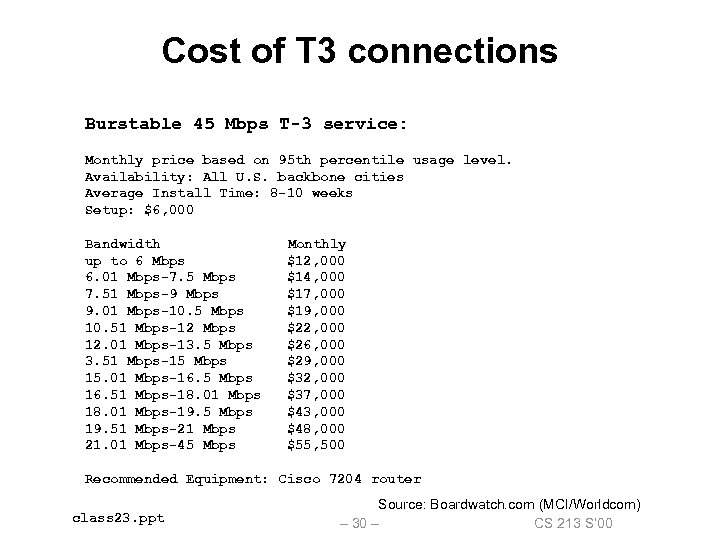 Cost of T 3 connections Burstable 45 Mbps T-3 service: Monthly price based on 95 th percentile usage level. Availability: All U. S. backbone cities Average Install Time: 8 -10 weeks Setup: $6, 000 Bandwidth up to 6 Mbps 6. 01 Mbps-7. 5 Mbps 7. 51 Mbps-9 Mbps 9. 01 Mbps-10. 5 Mbps 10. 51 Mbps-12 Mbps 12. 01 Mbps-13. 5 Mbps 3. 51 Mbps-15 Mbps 15. 01 Mbps-16. 5 Mbps 16. 51 Mbps-18. 01 Mbps-19. 5 Mbps 19. 51 Mbps-21 Mbps 21. 01 Mbps-45 Mbps Monthly $12, 000 $14, 000 $17, 000 $19, 000 $22, 000 $26, 000 $29, 000 $32, 000 $37, 000 $43, 000 $48, 000 $55, 500 Recommended Equipment: Cisco 7204 router class 23. ppt Source: Boardwatch. com (MCI/Worldcom) – 30 – CS 213 S’ 00
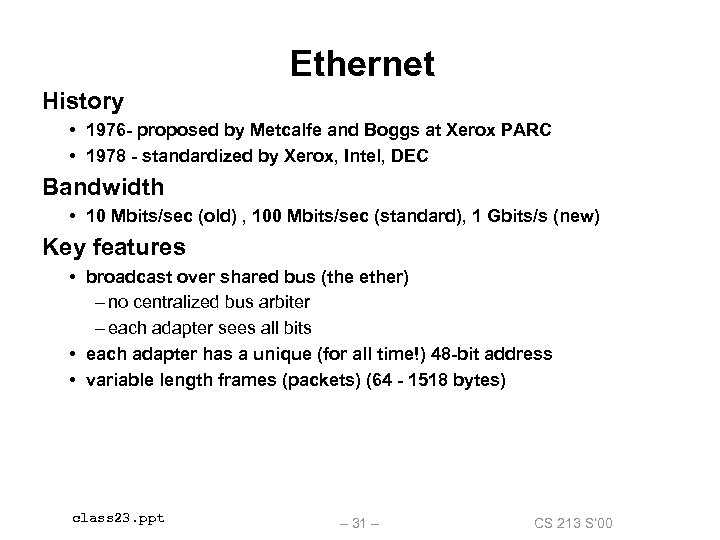 Ethernet History • 1976 - proposed by Metcalfe and Boggs at Xerox PARC • 1978 - standardized by Xerox, Intel, DEC Bandwidth • 10 Mbits/sec (old) , 100 Mbits/sec (standard), 1 Gbits/s (new) Key features • broadcast over shared bus (the ether) – no centralized bus arbiter – each adapter sees all bits • each adapter has a unique (for all time!) 48 -bit address • variable length frames (packets) (64 - 1518 bytes) class 23. ppt – 31 – CS 213 S’ 00
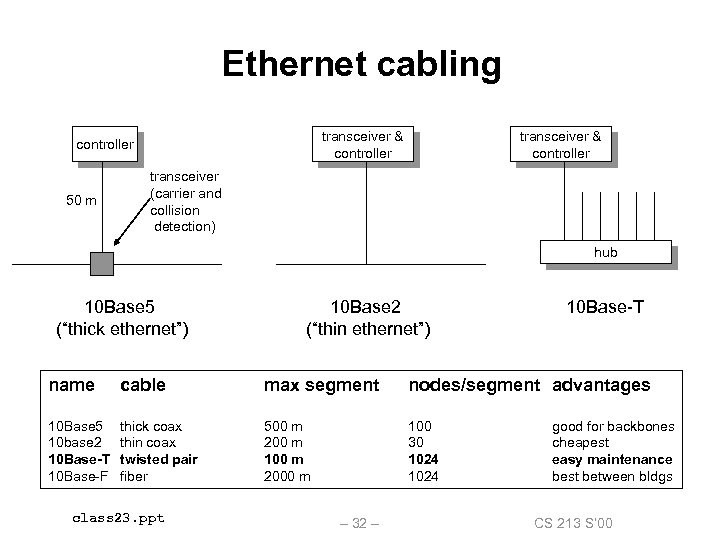 Ethernet cabling transceiver & controller 50 m transceiver & controller transceiver (carrier and collision detection) hub 10 Base 5 (“thick ethernet”) 10 Base 2 (“thin ethernet”) 10 Base-T name cable max segment nodes/segment advantages 10 Base 5 10 base 2 10 Base-T 10 Base-F thick coax thin coax twisted pair fiber 500 m 200 m 100 m 2000 m 100 30 1024 class 23. ppt – 32 – good for backbones cheapest easy maintenance best between bldgs CS 213 S’ 00
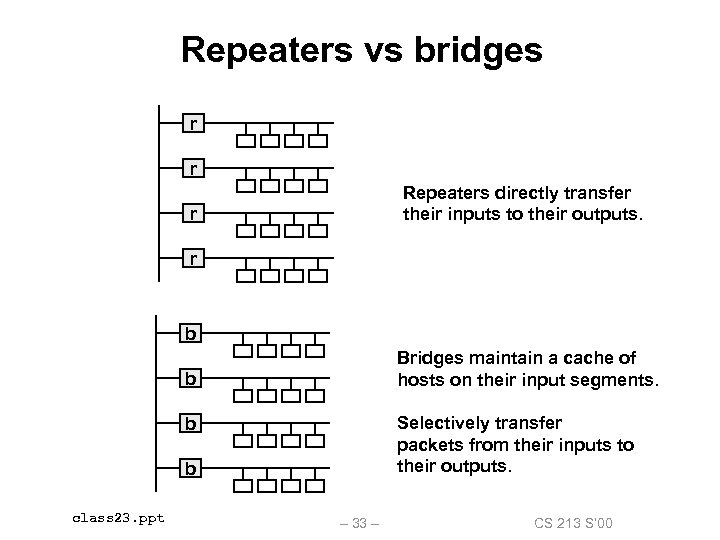 Repeaters vs bridges r r Repeaters directly transfer their inputs to their outputs. r r b Bridges maintain a cache of hosts on their input segments. b Selectively transfer packets from their inputs to their outputs. b b class 23. ppt – 33 – CS 213 S’ 00
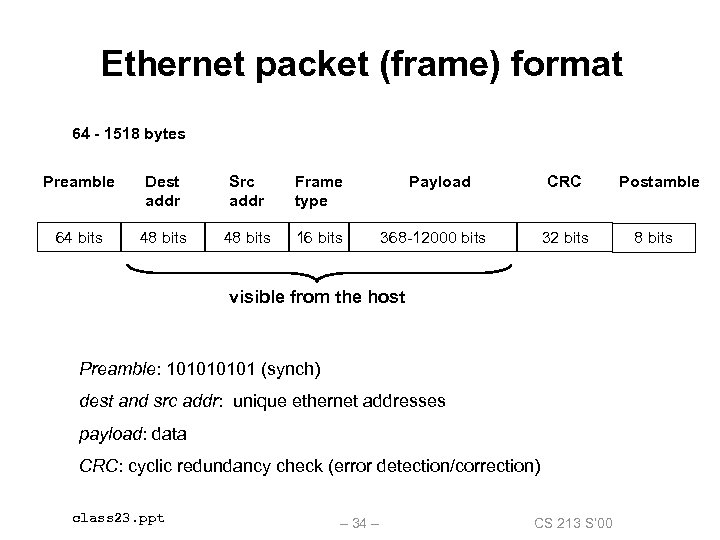 Ethernet packet (frame) format 64 - 1518 bytes Preamble Dest addr Src addr Frame type 64 bits 48 bits 16 bits Payload CRC 368 -12000 bits 32 bits visible from the host Preamble: 10101 (synch) dest and src addr: unique ethernet addresses payload: data CRC: cyclic redundancy check (error detection/correction) class 23. ppt – 34 – CS 213 S’ 00 Postamble 8 bits
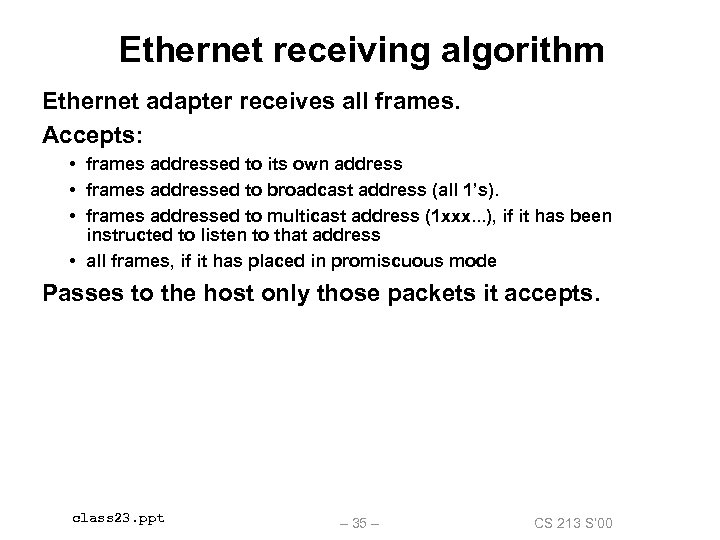 Ethernet receiving algorithm Ethernet adapter receives all frames. Accepts: • frames addressed to its own address • frames addressed to broadcast address (all 1’s). • frames addressed to multicast address (1 xxx. . . ), if it has been instructed to listen to that address • all frames, if it has placed in promiscuous mode Passes to the host only those packets it accepts. class 23. ppt – 35 – CS 213 S’ 00
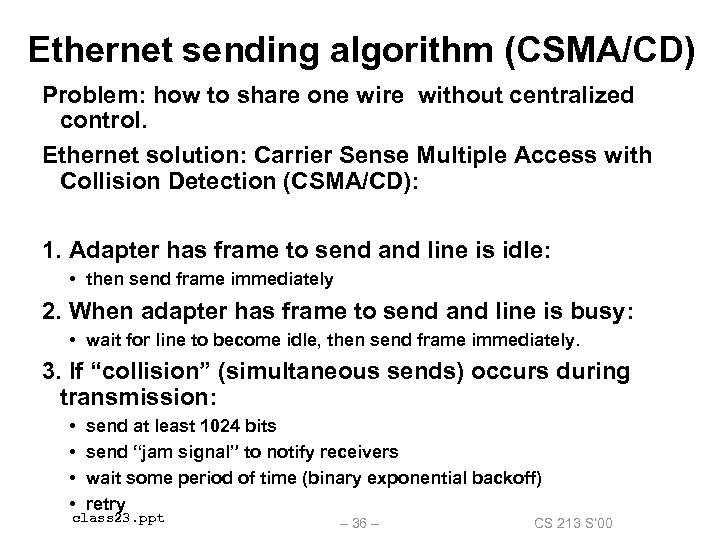 Ethernet sending algorithm (CSMA/CD) Problem: how to share one wire without centralized control. Ethernet solution: Carrier Sense Multiple Access with Collision Detection (CSMA/CD): 1. Adapter has frame to send and line is idle: • then send frame immediately 2. When adapter has frame to send and line is busy: • wait for line to become idle, then send frame immediately. 3. If “collision” (simultaneous sends) occurs during transmission: • • send at least 1024 bits send “jam signal” to notify receivers wait some period of time (binary exponential backoff) retry class 23. ppt – 36 – CS 213 S’ 00
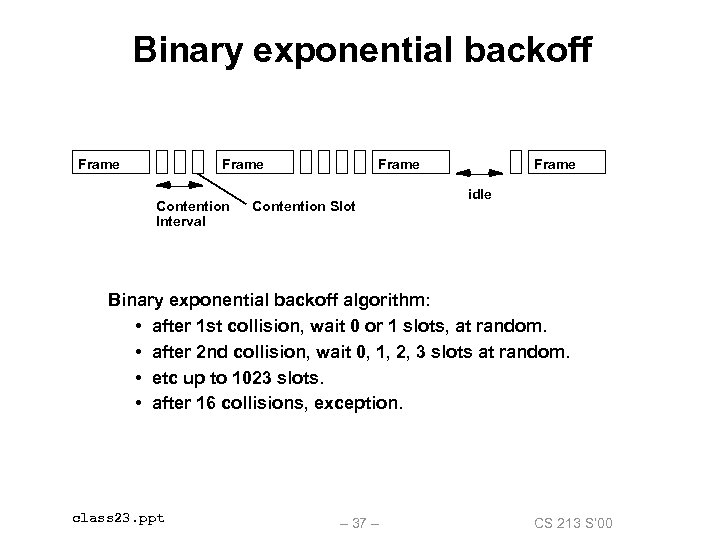 Binary exponential backoff Frame Contention Interval Frame Contention Slot Frame idle Binary exponential backoff algorithm: • after 1 st collision, wait 0 or 1 slots, at random. • after 2 nd collision, wait 0, 1, 2, 3 slots at random. • etc up to 1023 slots. • after 16 collisions, exception. class 23. ppt – 37 – CS 213 S’ 00
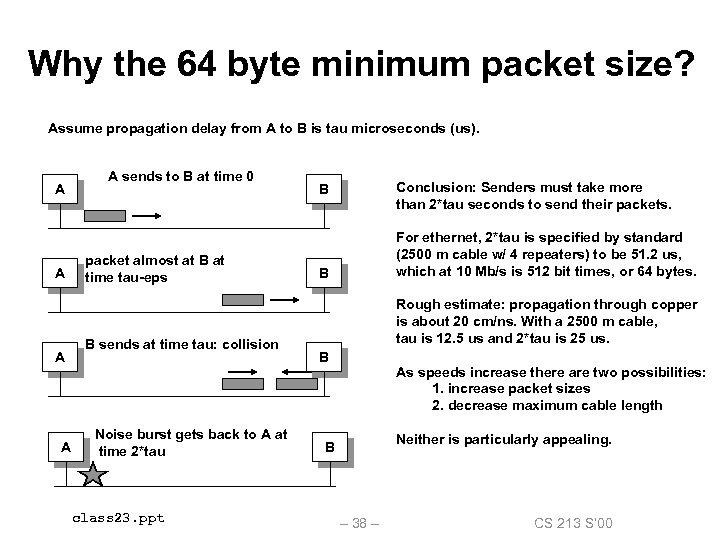 Why the 64 byte minimum packet size? Assume propagation delay from A to B is tau microseconds (us). A A A sends to B at time 0 packet almost at B at time tau-eps B sends at time tau: collision Noise burst gets back to A at time 2*tau class 23. ppt Conclusion: Senders must take more than 2*tau seconds to send their packets. B For ethernet, 2*tau is specified by standard (2500 m cable w/ 4 repeaters) to be 51. 2 us, which at 10 Mb/s is 512 bit times, or 64 bytes. B Rough estimate: propagation through copper is about 20 cm/ns. With a 2500 m cable, tau is 12. 5 us and 2*tau is 25 us. B As speeds increase there are two possibilities: 1. increase packet sizes 2. decrease maximum cable length Neither is particularly appealing. B – 38 – CS 213 S’ 00
 Ethernet pros and cons Pros: • simple • robust • cheap ($50/adapter in 1998) Cons: • no quality of service guarantees – OK for data – not OK for real-time bit streams like video or voice • fixed bit rate – not keeping up with faster processors – workstation can produce data at 10 -50 MBytes/sec • prone to congestion – processors getting faster – bridged Ethernets can help some class 23. ppt – 39 – CS 213 S’ 00