


 Скачать презентацию 1 Oracle Open World Latin America 2010
7993baacdbdf2f2e93208772552a3111.ppt
- Количество слайдов: 36
 1
1
 Oracle Open. World Latin America 2010 December 7– 9, 2010 2
 Agenda • Introduction – – Grid Computing and virtualization Grid Concept: Server Pools Policy-Managed Databases What management style to use?
 The following is intended to outline our general product direction. It is intended for information purposes only, and may not be incorporated into any contract. It is not a commitment to deliver any material, code, or functionality, and should not be relied upon in making purchasing decisions. The development, release, and timing of any features or functionality described for Oracle’s products remains at the sole discretion of Oracle. 5
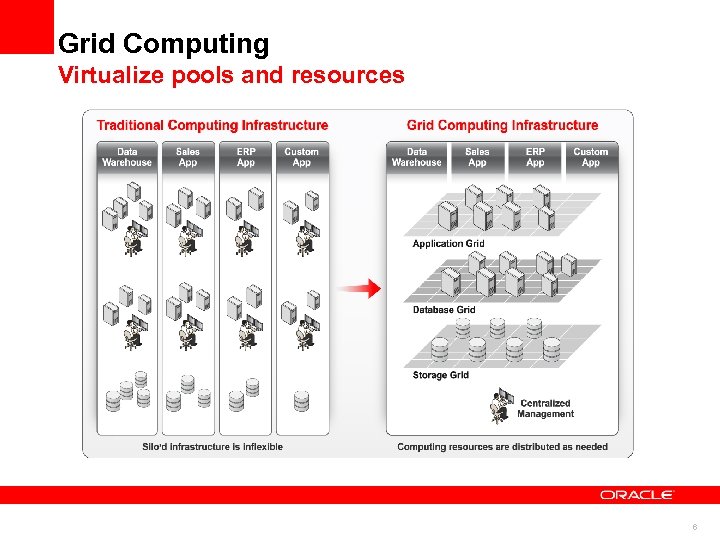 Grid Computing Virtualize pools and resources 6
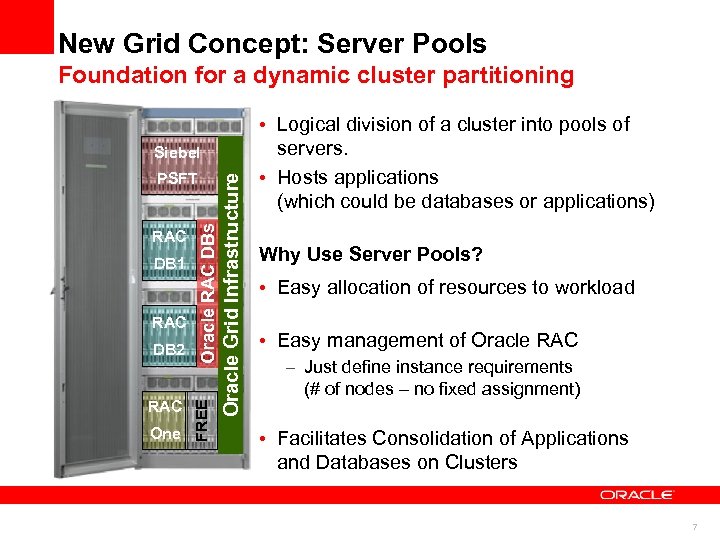 New Grid Concept: Server Pools Foundation for a dynamic cluster partitioning DB 1 RAC DB 2 RAC One FREE RAC Oracle RAC DBs PSFT Oracle Grid Infrastructure Siebel • Logical division of a cluster into pools of servers. • Hosts applications (which could be databases or applications) Why Use Server Pools? • Easy allocation of resources to workload • Easy management of Oracle RAC – Just define instance requirements (# of nodes – no fixed assignment) • Facilitates Consolidation of Applications and Databases on Clusters 7
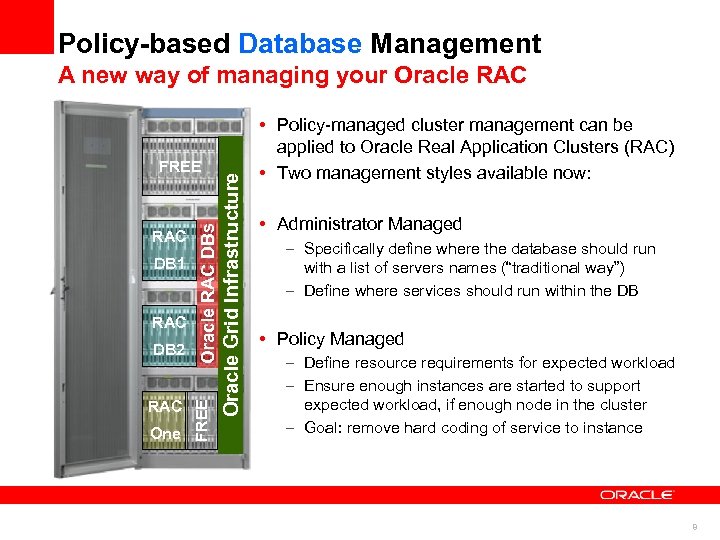 Policy-based Database Management DB 1 RAC DB 2 RAC One FREE RAC Oracle RAC DBs FREE Oracle Grid Infrastructure A new way of managing your Oracle RAC • Policy-managed cluster management can be applied to Oracle Real Application Clusters (RAC) • Two management styles available now: • Administrator Managed – Specifically define where the database should run with a list of servers names (“traditional way”) – Define where services should run within the DB • Policy Managed – Define resource requirements for expected workload – Ensure enough instances are started to support expected workload, if enough node in the cluster – Goal: remove hard coding of service to instance 8
 What Management Style to use? Policy managed is the future • Administrator Managed – Allows and requires maximum control • Failover management is pre-set – Existing systems have worked well using it – Slows down dynamic addition of nodes to the cluster – Suitable for smaller clusters or rather static systems • Policy Managed – Control is based on policies – Additional capacity will be used instantaneously in accordance to the policies defined – Optimizes bigger clusters (> 4 nodes) – Enables dynamic cluster environments – Useful for future projects and when planning ahead 9
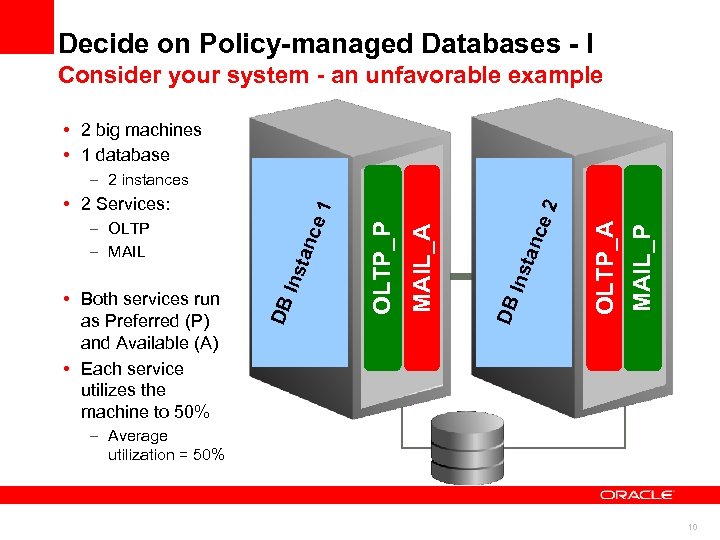 Decide on Policy-managed Databases - I Consider your system - an unfavorable example • 2 big machines • 1 database MAIL_P OLTP_A ce tan Ins DB MAIL_A OLTP_P ce tan Ins • Both services run as Preferred (P) and Available (A) • Each service utilizes the machine to 50% DB – OLTP – MAIL 1 • 2 Services: 2 – 2 instances – Average utilization = 50% 10
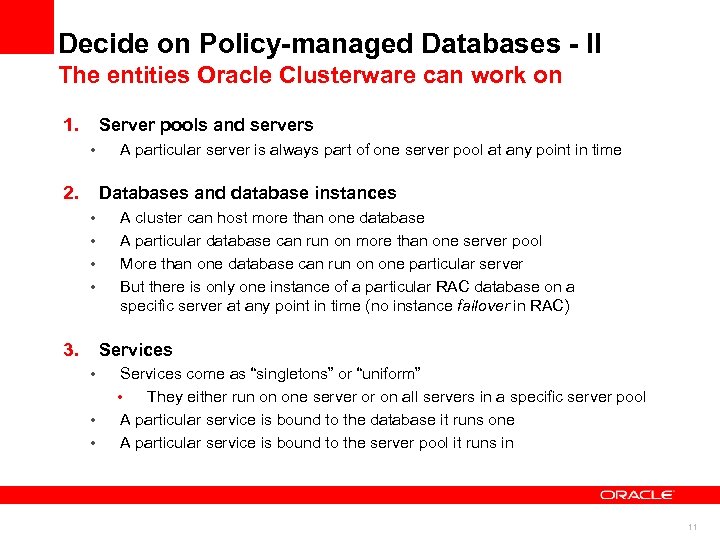 Decide on Policy-managed Databases - II The entities Oracle Clusterware can work on 1. Server pools and servers • 2. A particular server is always part of one server pool at any point in time Databases and database instances • • 3. A cluster can host more than one database A particular database can run on more than one server pool More than one database can run on one particular server But there is only one instance of a particular RAC database on a specific server at any point in time (no instance failover in RAC) Services • • • Services come as “singletons” or “uniform” • They either run on one server or on all servers in a specific server pool A particular service is bound to the database it runs one A particular service is bound to the server pool it runs in 11
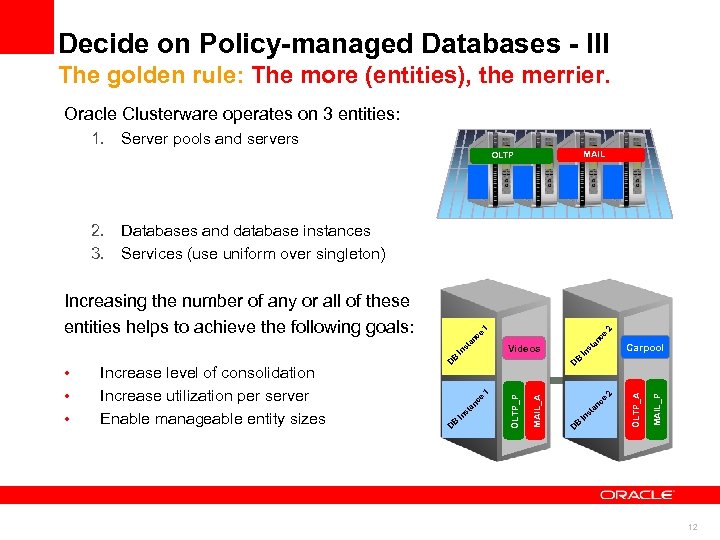 Decide on Policy-managed Databases - III The golden rule: The more (entities), the merrier. Oracle Clusterware operates on 3 entities: 1. Server pools and servers MAIL OLTP 2. Databases and database instances 3. Services (use uniform over singleton) 1 st Videos e st c an B D In 1 2 Carpool s D MAIL_A Increase level of consolidation Increase utilization per server Enable manageable entity sizes In OLTP_P • • • B D ce n ta B In ce s n ta D B In 2 MAIL_P e c an OLTP_A Increasing the number of any or all of these entities helps to achieve the following goals: 12
 Transition Steps 1 & 2 13
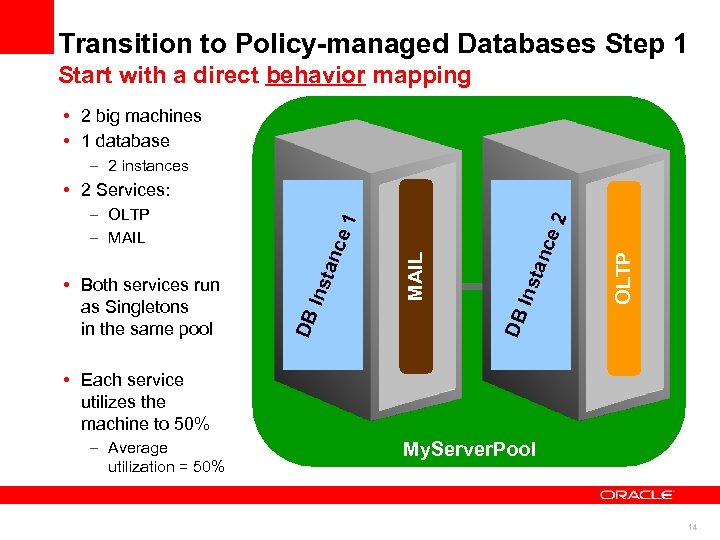 Transition to Policy-managed Databases Step 1 Start with a direct behavior mapping • 2 big machines • 1 database – 2 instances OLTP tan ce Ins DB MAIL e 1 anc Ins t • Both services run as Singletons in the same pool DB – OLTP – MAIL 2 • 2 Services: • Each service utilizes the machine to 50% – Average utilization = 50% My. Server. Pool 14
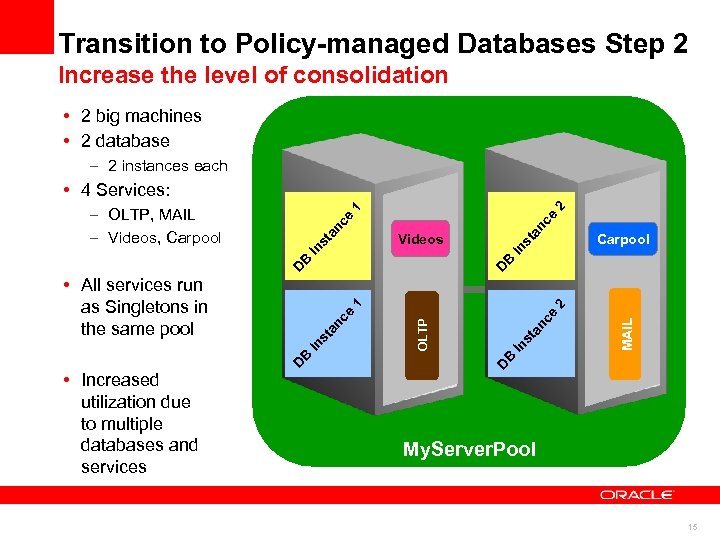 Transition to Policy-managed Databases Step 2 Increase the level of consolidation • 2 big machines • 2 database – 2 instances each an ce In st Videos D B D MAIL D B In OLTP st an c e e an c In st B D • Increased utilization due to multiple databases and services 2 1 • All services run as Singletons in the same pool Carpool B In st an ce 1 – OLTP, MAIL – Videos, Carpool 2 • 4 Services: My. Server. Pool 15
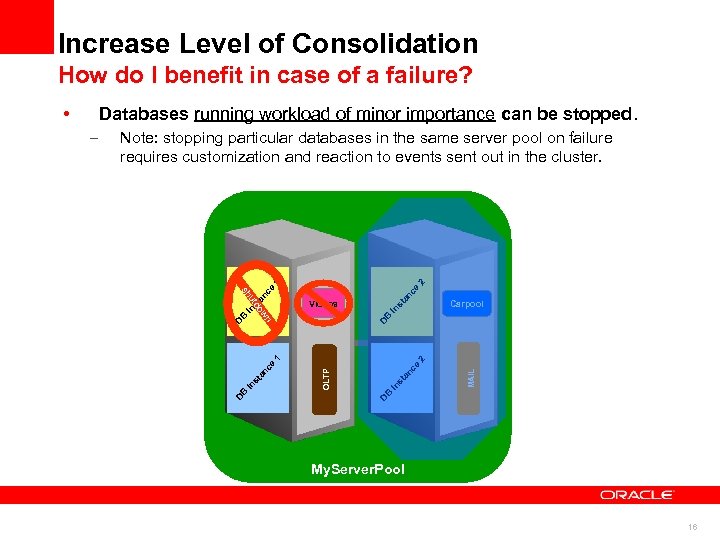 Increase Level of Consolidation How do I benefit in case of a failure? • Databases running workload of minor importance can be stopped. st B 2 MAIL e nc D B In st a OLTP st an ce 1 D In wn In Carpool In st Videos do D B an ce an ut sh ce 1 2 Note: stopping particular databases in the same server pool on failure requires customization and reaction to events sent out in the cluster. D B – My. Server. Pool 16
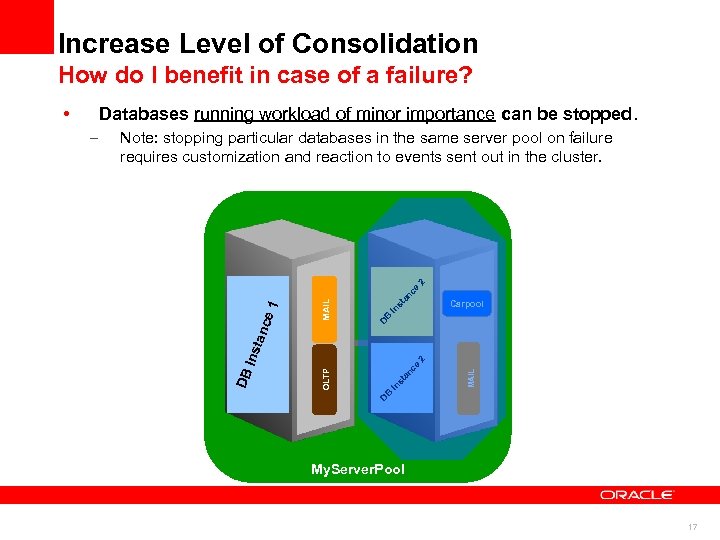 Increase Level of Consolidation How do I benefit in case of a failure? • Databases running workload of minor importance can be stopped. an B In st Carpool D MAIL D B In st an OLTP ce 2 Ins tan c e 1 ce 2 Note: stopping particular databases in the same server pool on failure requires customization and reaction to events sent out in the cluster. DB – My. Server. Pool 17
 Transition Steps 3 & 4 18
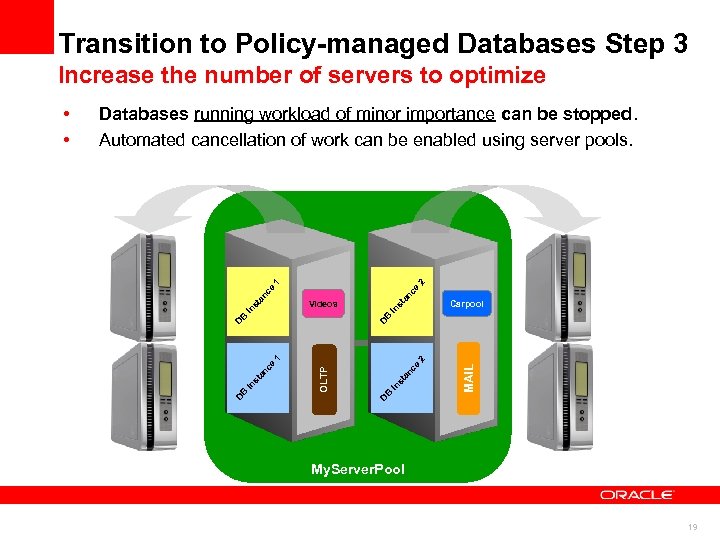 Transition to Policy-managed Databases Step 3 Increase the number of servers to optimize an an ce ce 1 2 Databases running workload of minor importance can be stopped. Automated cancellation of work can be enabled using server pools. In st Carpool D B B In st Videos MAIL 2 ce an st In B D OLTP st an ce 1 D In B D • • My. Server. Pool 19
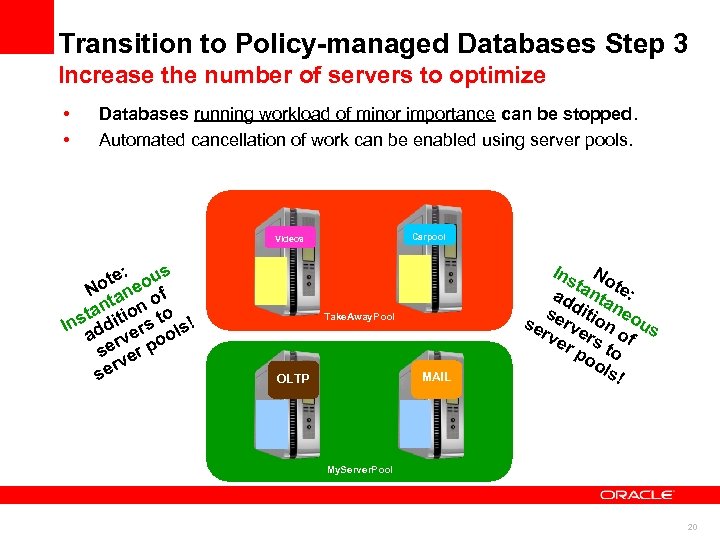 Transition to Policy-managed Databases Step 3 Increase the number of servers to optimize • • Databases running workload of minor importance can be stopped. Automated cancellation of work can be enabled using server pools. Carpool Videos : s ote neou N a f nt on o ta ns dditi rs to ls! I a rve oo se er p rv se Take. Away. Pool MAIL OLTP Ins No t t ad anta e: se ditio neo se rv n us rve ers of r p to oo ls! My. Server. Pool 20
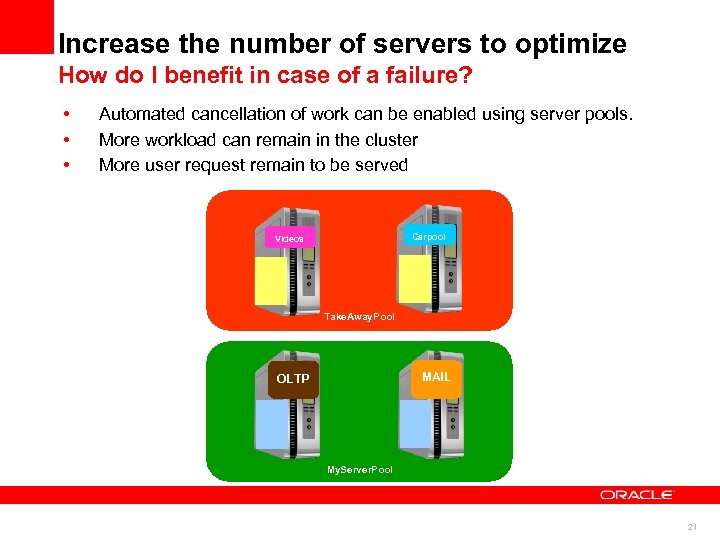 Increase the number of servers to optimize How do I benefit in case of a failure? • • • Automated cancellation of work can be enabled using server pools. More workload can remain in the cluster More user request remain to be served Carpool Videos Take. Away. Pool MAIL OLTP My. Server. Pool 21
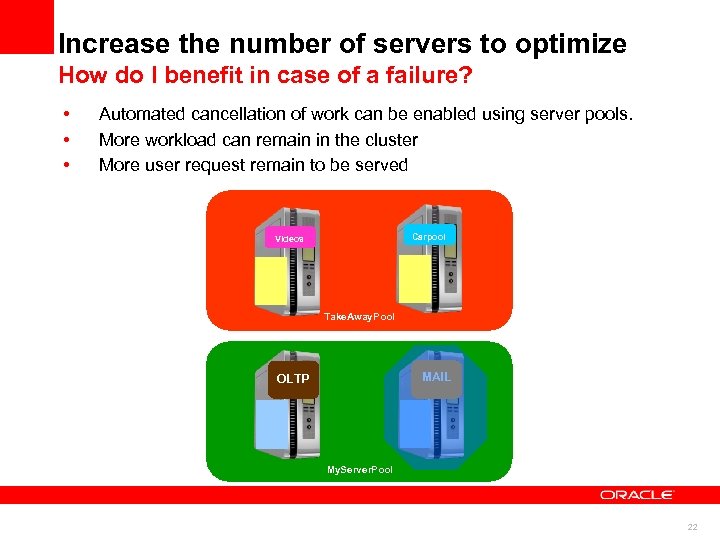 Increase the number of servers to optimize How do I benefit in case of a failure? • • • Automated cancellation of work can be enabled using server pools. More workload can remain in the cluster More user request remain to be served Carpool Videos Take. Away. Pool MAIL OLTP My. Server. Pool 22
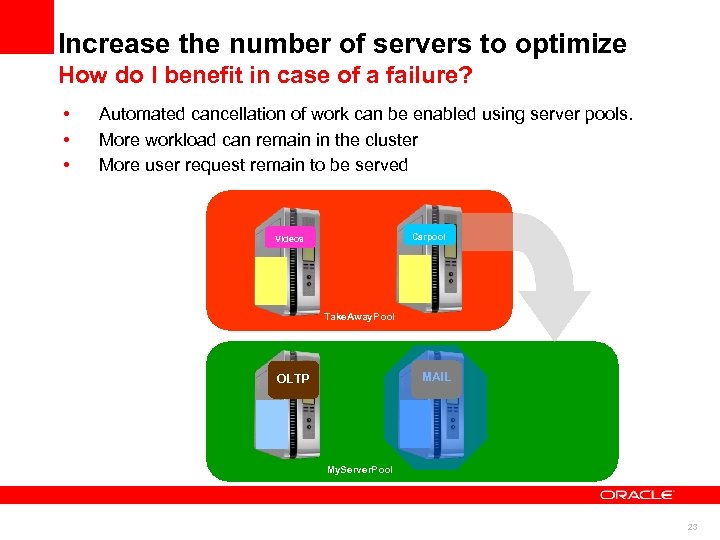 Increase the number of servers to optimize How do I benefit in case of a failure? • • • Automated cancellation of work can be enabled using server pools. More workload can remain in the cluster More user request remain to be served Carpool Videos Take. Away. Pool MAIL OLTP My. Server. Pool 23
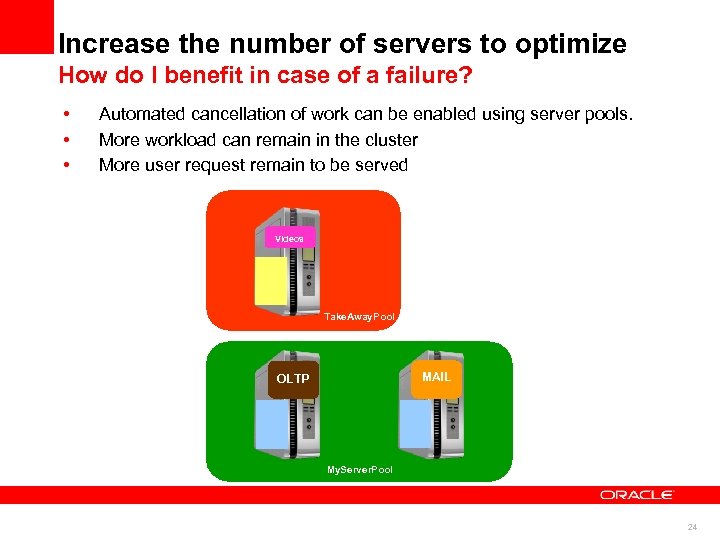 Increase the number of servers to optimize How do I benefit in case of a failure? • • • Automated cancellation of work can be enabled using server pools. More workload can remain in the cluster More user request remain to be served Videos Take. Away. Pool MAIL OLTP My. Server. Pool 24
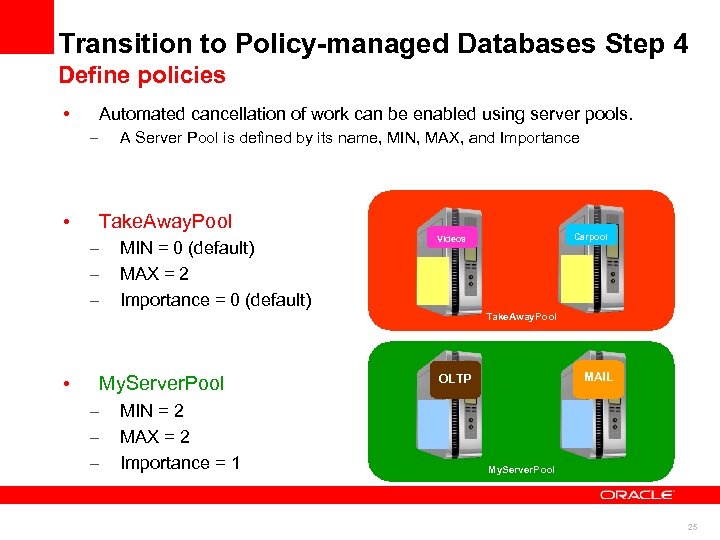 Transition to Policy-managed Databases Step 4 Define policies • Automated cancellation of work can be enabled using server pools. – • A Server Pool is defined by its name, MIN, MAX, and Importance Take. Away. Pool – – – MIN = 0 (default) MAX = 2 Importance = 0 (default) Carpool Videos Take. Away. Pool • My. Server. Pool – – – MIN = 2 MAX = 2 Importance = 1 MAIL OLTP My. Server. Pool 25
 Transition Step 5 26
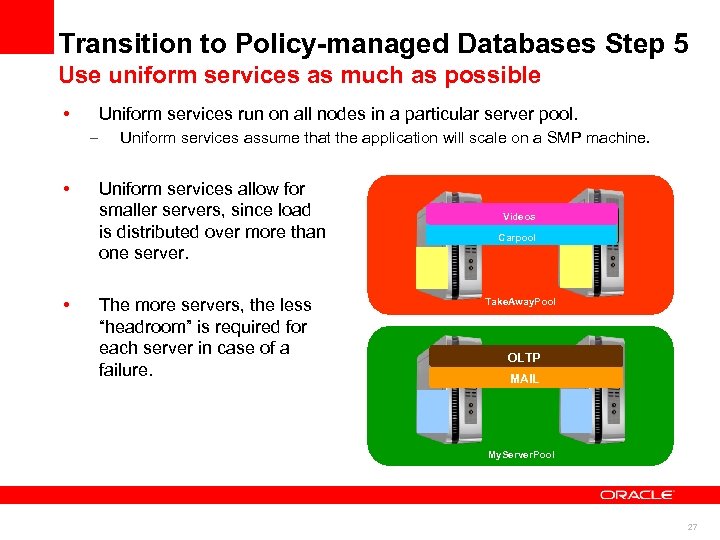 Transition to Policy-managed Databases Step 5 Use uniform services as much as possible • Uniform services run on all nodes in a particular server pool. – • • Uniform services assume that the application will scale on a SMP machine. Uniform services allow for smaller servers, since load is distributed over more than one server. The more servers, the less “headroom” is required for each server in case of a failure. Videos Carpool Take. Away. Pool OLTP MAIL My. Server. Pool 27
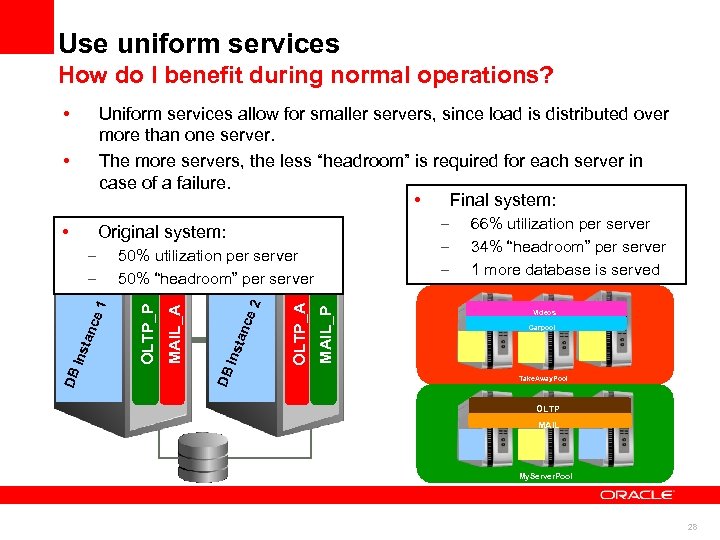 Use uniform services How do I benefit during normal operations? • • Uniform services allow for smaller servers, since load is distributed over more than one server. The more servers, the less “headroom” is required for each server in case of a failure. • Final system: • Original system: MAIL_P OLTP_A 2 tan ce Ins MAIL_A OLTP_P 50% utilization per server 50% “headroom” per server DB DB Ins tan ce 1 – – – 66% utilization per server 34% “headroom” per server 1 more database is served Videos Carpool Take. Away. Pool OLTP MAIL My. Server. Pool 28
 Summary 29
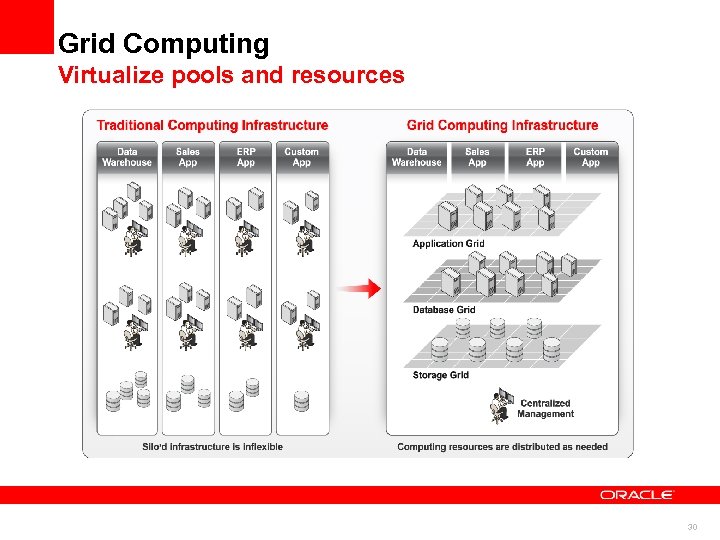 Grid Computing Virtualize pools and resources 30
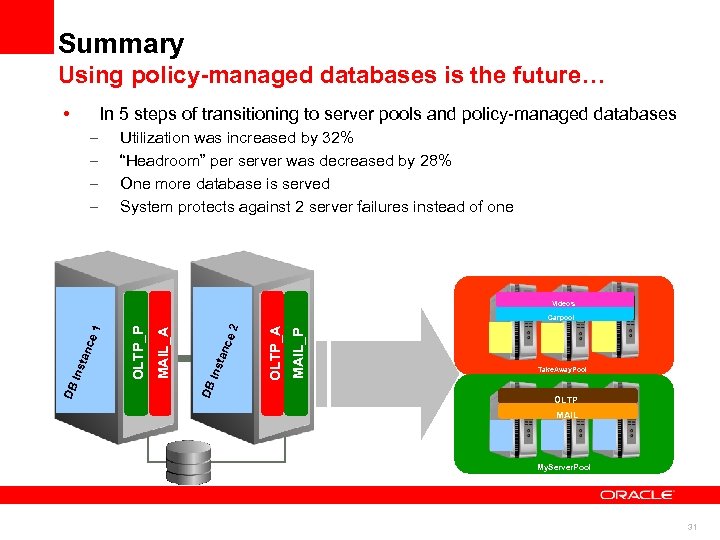 Summary Using policy-managed databases is the future… • In 5 steps of transitioning to server pools and policy-managed databases – – Utilization was increased by 32% “Headroom” per server was decreased by 28% One more database is served System protects against 2 server failures instead of one Videos MAIL_P OLTP_A 2 ce tan MAIL_A OLTP_P Ins DB DB Ins tan ce 1 Carpool Take. Away. Pool OLTP MAIL My. Server. Pool 31

 More Information • www. oracle. com/goto/rac • www. oracle. com/goto/clusterware • Oracle Open World Virtual Collateral – – • For Oracle Real Application Clusters Demo booth W 40 in Moscone West S 317072 - Configure Oracle Grid Infrastructure For a Dynamic Data Center – WED, Sept. 22 nd, Moscone South, Room 308 33
 35
35
 36
36