


 Скачать презентацию 1 Introduction What is an Operating System
e89500e1e3be0aa7831a01aefb09f25f.ppt
- Количество слайдов: 168
 1: Introduction
 What is an Operating System? p p p A program that acts as an intermediary between a user of a computer and the computer hardware. Operating system goals: n Execute user programs and make solving user problems easier. n Make the computer system convenient to use. Use the computer hardware in an efficient manner. 1. 2
 Computer System Structure p Computer system can be divided into four components n Hardware – provides basic computing resources p CPU, memory, I/O devices n Operating system p Controls and coordinates use of hardware among various applications and users n Application programs – define the ways in which the system resources are used to solve the computing problems of the users p Word processors, compilers, web browsers, database systems, video games n Users p People, machines, other computers 1. 3
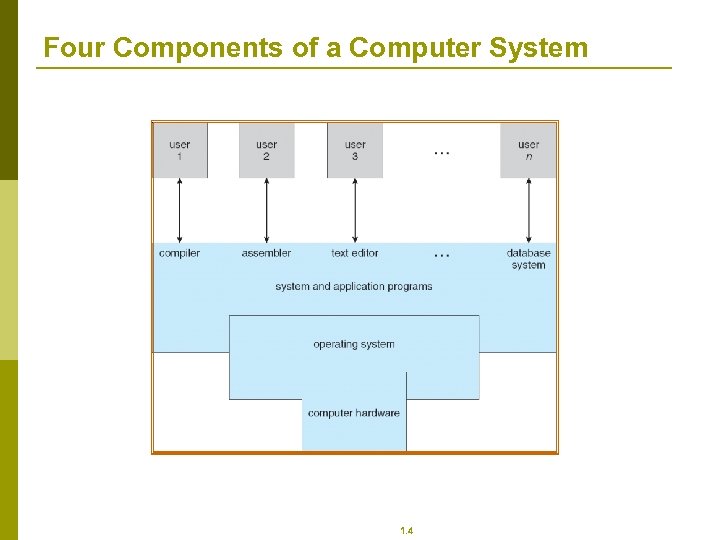 Four Components of a Computer System 1. 4
 Computer Startup p bootstrap program is loaded at power-up or reboot n Typically stored in ROM or EPROM, generally known as firmware n Initializates all aspects of system n Loads operating system kernel and starts execution 1. 5
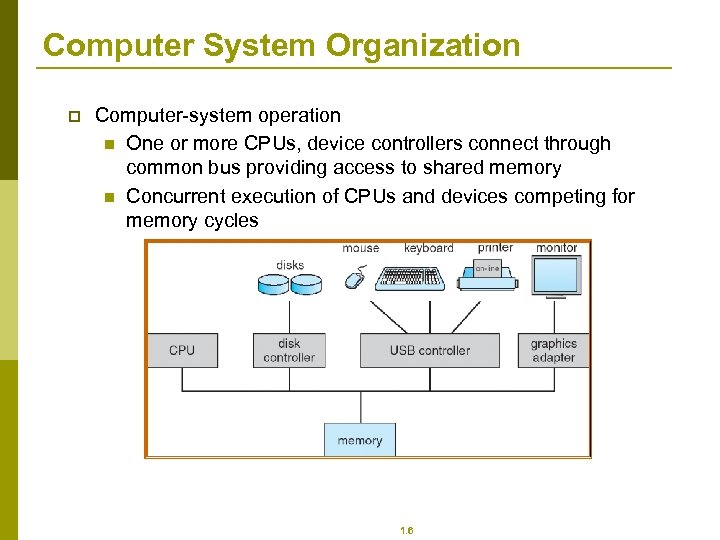 Computer System Organization p Computer-system operation n One or more CPUs, device controllers connect through common bus providing access to shared memory n Concurrent execution of CPUs and devices competing for memory cycles 1. 6
 Storage Structure p p p Main memory – only large storage media that the CPU can access directly. Secondary storage – extension of main memory that provides large nonvolatile storage capacity. Magnetic disks – rigid metal or glass platters covered with magnetic recording material n Disk surface is logically divided into tracks, which are subdivided into sectors. n The disk controller determines the logical interaction between the device and the computer. 1. 7
 Storage Hierarchy p p Storage systems organized in hierarchy. n Speed n Cost n Volatility Caching – copying information into faster storage system; main memory can be viewed as a last cache for secondary storage. 1. 8
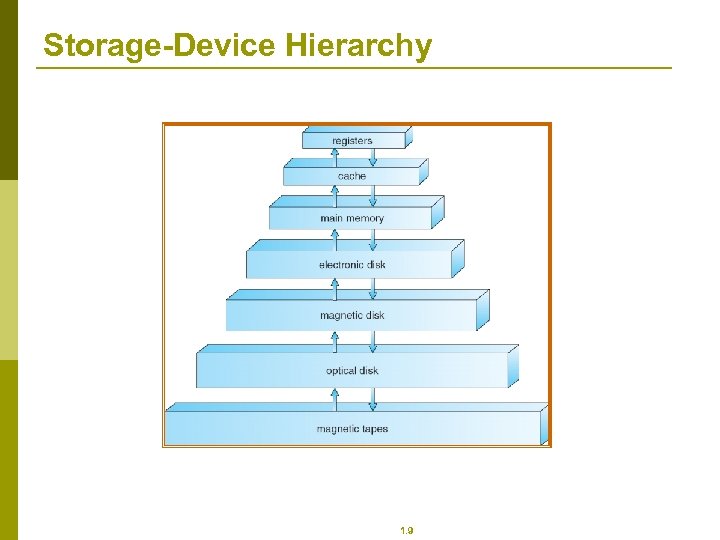 Storage-Device Hierarchy 1. 9
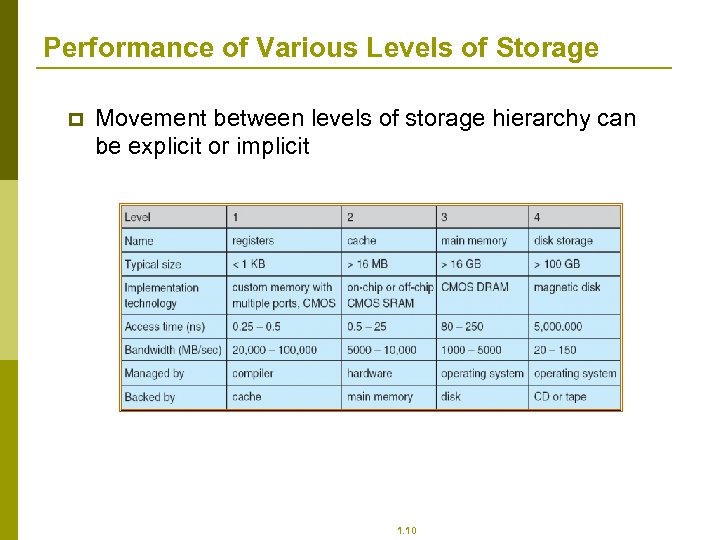 Performance of Various Levels of Storage p Movement between levels of storage hierarchy can be explicit or implicit 1. 10
 Operating-System Operations p p Interrupt driven by hardware Software error or request creates exception or trap n Division by zero, request for operating system service Other process problems include infinite loop, processes modifying each other or the operating system Dual-mode operation allows OS to protect itself and other system components n User mode and kernel mode n Mode bit provided by hardware p Provides ability to distinguish when system is running user code or kernel code p Some instructions designated as privileged, only executable in kernel mode p System call changes mode to kernel, return from call resets it to user 1. 11
 Process Management p p p A process is a program in execution. It is a unit of work within the system. Program is a passive entity, process is an active entity. Process needs resources to accomplish its task n CPU, memory, I/O, files n Initialization data Process termination requires reclaim of any reusable resources Single-threaded process has one program counter specifying location of next instruction to execute n Process executes instructions sequentially, one at a time, until completion Multi-threaded process has one program counter per thread Typically system has many processes, some user, some operating system running concurrently on one or more CPUs n Concurrency by multiplexing the CPUs among the processes / threads 1. 12
 Process Management Activities The operating system is responsible for the following activities in connection with process management: p Creating and deleting both user and system processes p Suspending and resuming processes p Providing mechanisms for process synchronization p Providing mechanisms for process communication p Providing mechanisms for deadlock handling 1. 13
 Memory Management p p All data in memory before and after processing All instructions in memory in order to execute Memory management determines what is in memory when n Optimizing CPU utilization and computer response to users Memory management activities n Keeping track of which parts of memory are currently being used and by whom n Deciding which processes (or parts thereof) and data to move into and out of memory n Allocating and deallocating memory space as needed 1. 14
 Storage Management p p OS provides uniform, logical view of information storage n Abstracts physical properties to logical storage unit - file n Each medium is controlled by device (i. e. , disk drive, tape drive) p Varying properties include access speed, capacity, datatransfer rate, access method (sequential or random) File-System management n Files usually organized into directories n Access control on most systems to determine who can access what n OS activities include p Creating and deleting files and directories p Primitives to manipulate files and dirs p Mapping files onto secondary storage p Backup files onto stable (non-volatile) storage media 1. 15
 Mass-Storage Management p p p Usually disks used to store data that does not fit in main memory or data that must be kept for a “long” period of time. Proper management is of central importance Entire speed of computer operation hinges on disk subsystem and its algorithms OS activities n Free-space management n Storage allocation n Disk scheduling Some storage need not be fast n Tertiary storage includes optical storage, magnetic tape n Still must be managed n Varies between WORM (write-once, read-many-times) and RW (read-write) 1. 16
 I/O Subsystem p p One purpose of OS is to hide peculiarities of hardware devices from the user I/O subsystem responsible for n Memory management of I/O including buffering (storing data temporarily while it is being transferred), caching (storing parts of data in faster storage for performance), spooling (the overlapping of output of one job with input of other jobs) n General device-driver interface n Drivers for specific hardware devices 1. 17
 Protection and Security p p p Protection – any mechanism for controlling access of processes or users to resources defined by the OS Security – defense of the system against internal and external attacks n Huge range, including denial-of-service, worms, viruses, identity theft, theft of service Systems generally first distinguish among users, to determine who can do what n User identities (user IDs, security IDs) include name and associated number, one per user n User ID then associated with all files, processes of that user to determine access control n Group identifier (group ID) allows set of users to be defined and controls managed, then also associated with each process, file n Privilege escalation allows user to change to effective ID with more rights 1. 18
 2: Operating-System Structures
 Operating System Services (Cont. ) p Another set of OS functions exists for ensuring the efficient operation of the system itself via resource sharing n Resource allocation - When multiple users or multiple jobs running concurrently, resources must be allocated to each of them p Many types of resources - Some (such as CPU cycles, main memory, and file storage) may have special allocation code, others (such as I/O devices) may have general request and release code. n Accounting - To keep track of which users use how much and what kinds of computer resources n Protection and security - The owners of information stored in a multi-user or networked computer system may want to control use of that information, concurrent processes should not interfere with each other p Protection involves ensuring that all access to system resources is controlled p Security of the system from outsiders requires user authentication, extends to defending external I/O devices from invalid access attempts p If a system is to be protected and secure, precautions must be instituted throughout it. A chain is only as strong as its weakest link. 1. 20
 Simple Structure p MS-DOS – written to provide the most functionality in the least space n Not divided into modules n Although MS-DOS has some structure, its interfaces and levels of functionality are not well separated 1. 21
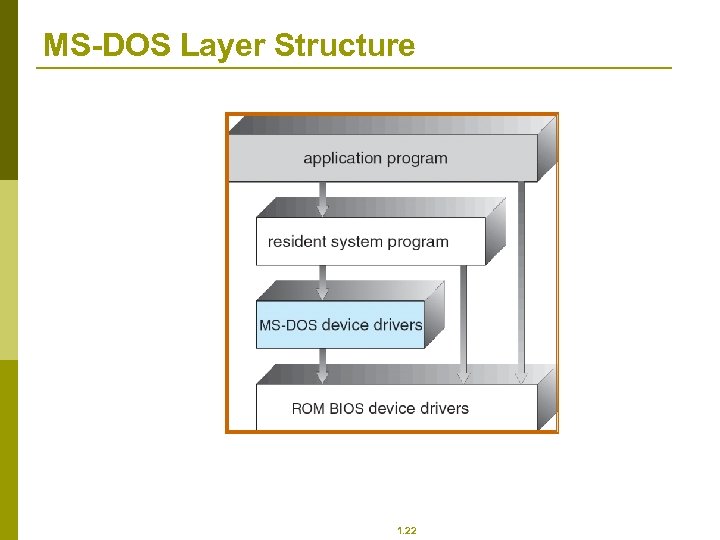 MS-DOS Layer Structure 1. 22
 Layered Approach The operating system is divided into a number of layers (levels), each built on top of lower layers. The bottom layer (layer 0), is the hardware; the highest (layer N) is the user interface. p With modularity, layers are selected such that each uses functions (operations) and services of only lower-level layers p 1. 23
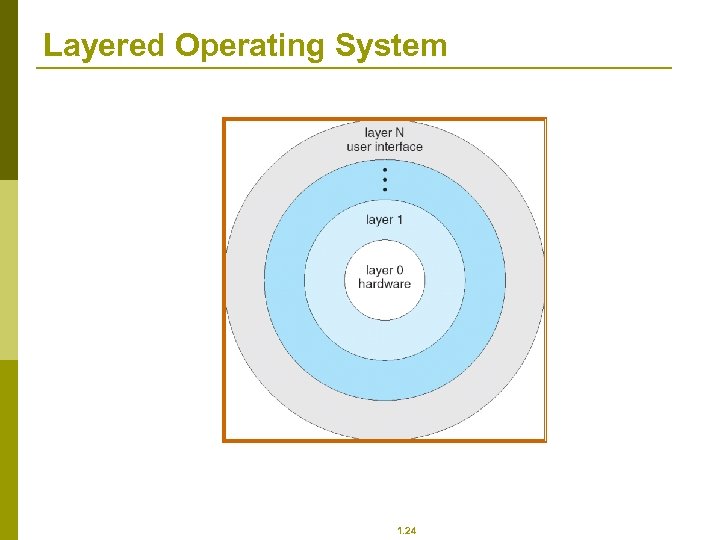 Layered Operating System 1. 24
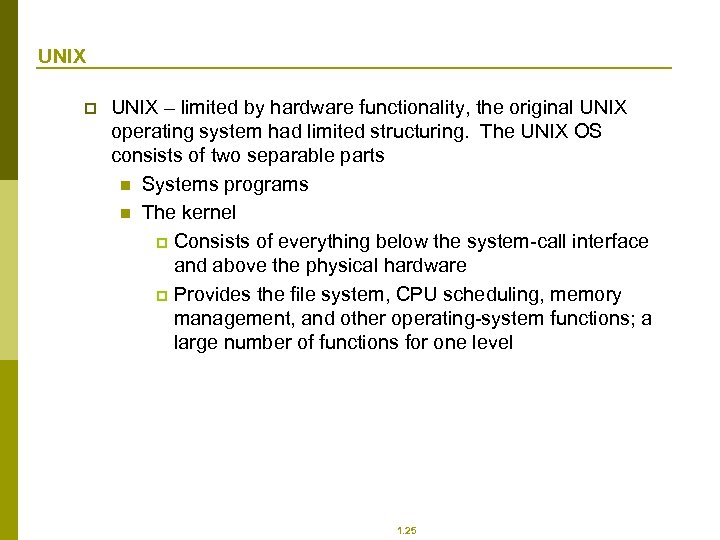 UNIX p UNIX – limited by hardware functionality, the original UNIX operating system had limited structuring. The UNIX OS consists of two separable parts n Systems programs n The kernel p Consists of everything below the system-call interface and above the physical hardware p Provides the file system, CPU scheduling, memory management, and other operating-system functions; a large number of functions for one level 1. 25
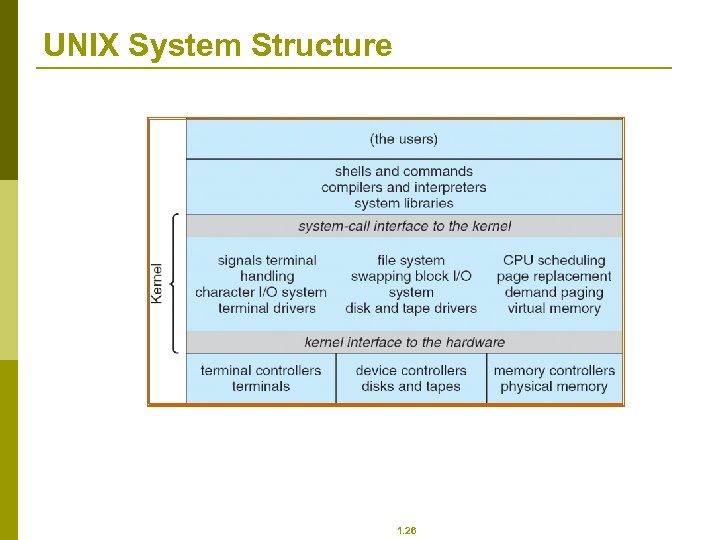 UNIX System Structure 1. 26
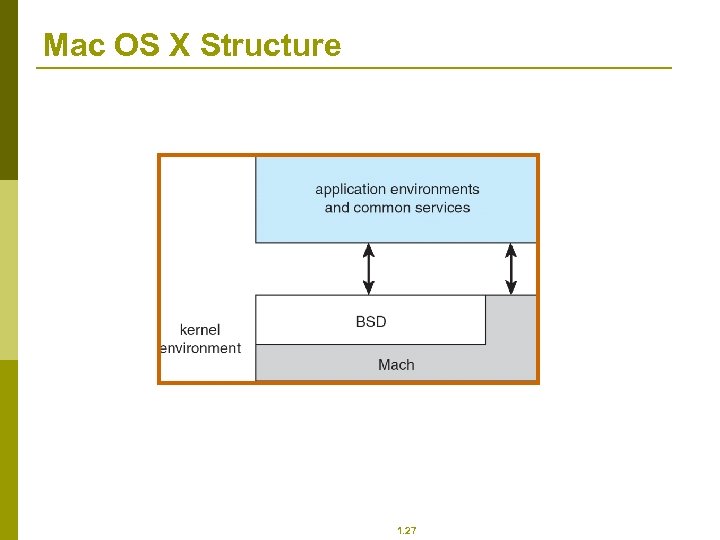 Mac OS X Structure 1. 27
 Modules Most modern operating systems implement kernel modules n Uses object-oriented approach n Each core component is separate n Each talks to the others over known interfaces n Each is loadable as needed within the kernel p Overall, similar to layers but with more flexible p 1. 28
 3: Processes
 3: Processes p p p Process Concept Process Scheduling Operations on Processes Cooperating Processes Interprocess Communication in Client-Server Systems 1. 30
 Process Concept p p An operating system executes a variety of programs: n Batch system – jobs n Time-shared systems – user programs or tasks Textbook uses the terms job and process almost interchangeably Process – a program in execution; process execution must progress in sequential fashion A process includes: n program counter n stack n data section 1. 31
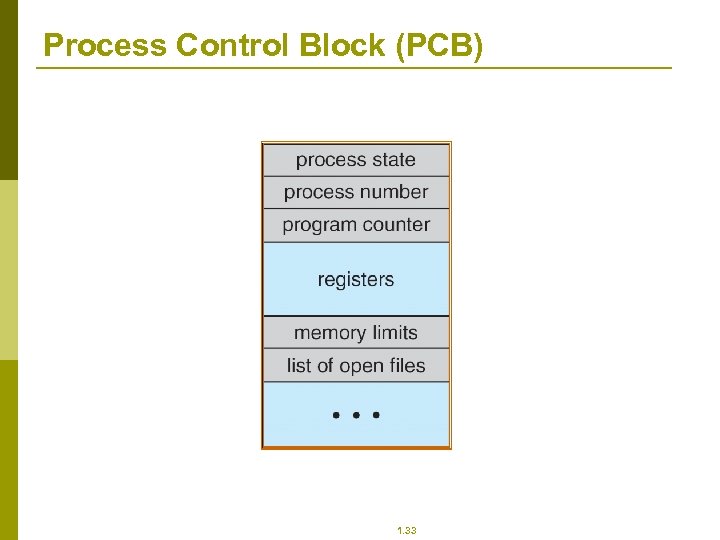
 Process Control Block (PCB) Information associated with each process p Process state p Program counter p CPU registers p CPU scheduling information p Memory-management information p Accounting information p I/O status information 1. 32
 Process Control Block (PCB) 1. 33
 CPU Switch From Process to Process 1. 34
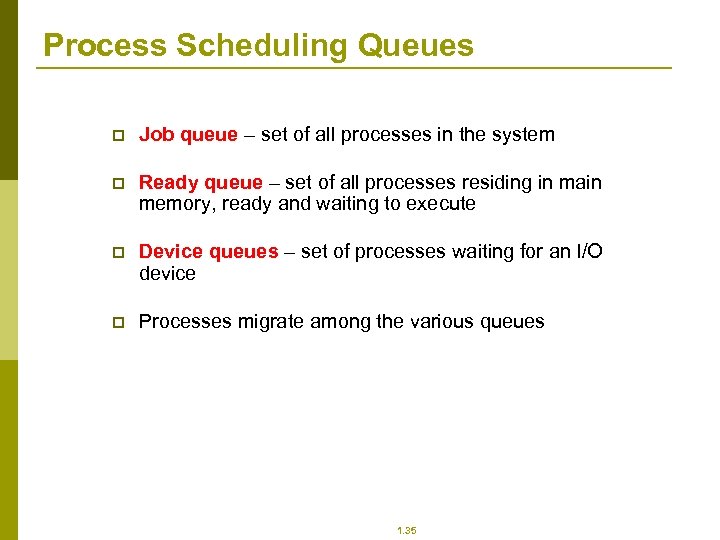 Process Scheduling Queues p Job queue – set of all processes in the system p Ready queue – set of all processes residing in main memory, ready and waiting to execute p Device queues – set of processes waiting for an I/O device p Processes migrate among the various queues 1. 35
 Schedulers p Long-term scheduler (or job scheduler) – selects which processes should be brought into the ready queue p Short-term scheduler (or CPU scheduler) – selects which process should be executed next and allocates CPU 1. 36
 Schedulers (Cont. ) p p Short-term scheduler is invoked very frequently (milliseconds) (must be fast) Long-term scheduler is invoked very infrequently (seconds, minutes) (may be slow) The long-term scheduler controls the degree of multiprogramming Processes can be described as either: n I/O-bound process – spends more time doing I/O than computations, many short CPU bursts n CPU-bound process – spends more time doing computations; few very long CPU bursts 1. 37
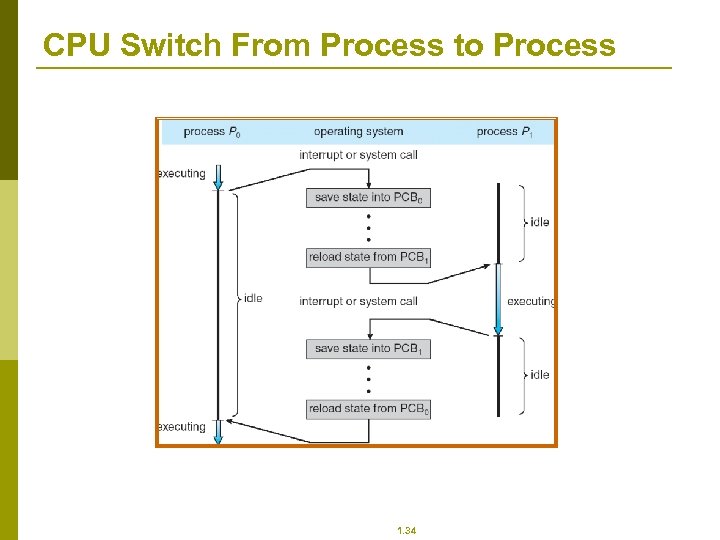
 Context Switch p p p When CPU switches to another process, the system must save the state of the old process and load the saved state for the new process Context-switch time is overhead; the system does no useful work while switching Time dependent on hardware support 1. 38
 4: CPU Scheduling
 CPU Scheduler p p Selects from among the processes in memory that are ready to execute, and allocates the CPU to one of them CPU scheduling decisions may take place when a process: 1. Switches from running to waiting state 2. Switches from running to ready state 3. Switches from waiting to ready 4. Terminates Scheduling under 1 and 4 is nonpreemptive All other scheduling is preemptive 1. 40
 Dispatcher p p Dispatcher module gives control of the CPU to the process selected by the short-term scheduler; this involves: n switching context n switching to user mode n jumping to the proper location in the user program to restart that program Dispatch latency – time it takes for the dispatcher to stop one process and start another running 1. 41
 Scheduling Criteria p p p CPU utilization – keep the CPU as busy as possible Throughput – # of processes that complete their execution per time unit Turnaround time – amount of time to execute a particular process Waiting time – amount of time a process has been waiting in the ready queue Response time – amount of time it takes from when a request was submitted until the first response is produced, not output (for time-sharing environment) 1. 42
 Optimization Criteria p p p Max CPU utilization Max throughput Min turnaround time Min waiting time Min response time 1. 43
 Shortest-Job-First (SJF) Scheduling p p p Associate with each process the length of its next CPU burst. Use these lengths to schedule the process with the shortest time Two schemes: n nonpreemptive – once CPU given to the process it cannot be preempted until completes its CPU burst n preemptive – if a new process arrives with CPU burst length less than remaining time of current executing process, preempt. This scheme is know as the Shortest-Remaining-Time-First (SRTF) SJF is optimal – gives minimum average waiting time for a given set of processes 1. 44
 Priority Scheduling p p p A priority number (integer) is associated with each process The CPU is allocated to the process with the highest priority (smallest integer highest priority) n Preemptive n nonpreemptive SJF is a priority scheduling where priority is the predicted next CPU burst time Problem Starvation – low priority processes may never execute Solution Aging – as time progresses increase the priority of the process 1. 45
 Round Robin (RR) p p p Each process gets a small unit of CPU time (time quantum), usually 10 -100 milliseconds. After this time has elapsed, the process is preempted and added to the end of the ready queue. If there are n processes in the ready queue and the time quantum is q, then each process gets 1/n of the CPU time in chunks of at most q time units at once. No process waits more than (n-1)q time units. Performance n q large FIFO n q small q must be large with respect to context switch, otherwise overhead is too high 1. 46
 Multilevel Queue p p p Ready queue is partitioned into separate queues: foreground (interactive) background (batch) Each queue has its own scheduling algorithm n foreground – RR n background – FCFS Scheduling must be done between the queues n Fixed priority scheduling; (i. e. , serve all from foreground then from background). Possibility of starvation. n Time slice – each queue gets a certain amount of CPU time which it can schedule amongst its processes; i. e. , 80% to foreground in RR n 20% to background in FCFS 1. 47
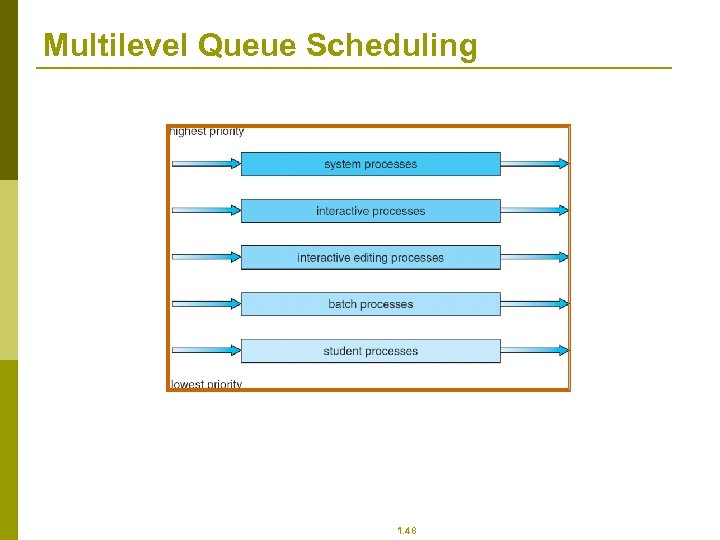 Multilevel Queue Scheduling 1. 48
 Multilevel Feedback Queue p p A process can move between the various queues; aging can be implemented this way Multilevel-feedback-queue scheduler defined by the following parameters: n number of queues n scheduling algorithms for each queue n method used to determine when to upgrade a process n method used to determine when to demote a process n method used to determine which queue a process will enter when that process needs service 1. 49
 Multiple-Processor Scheduling p p CPU scheduling more complex when multiple CPUs are available Homogeneous processors within a multiprocessor Load sharing Asymmetric multiprocessing – only one processor accesses the system data structures, alleviating the need for data sharing 1. 50
 5: Main Memory
 5: Memory Management p p p p Background Swapping Contiguous Memory Allocation Paging Structure of the Page Table Segmentation Example: The Intel Pentium 1. 52
 Objectives p p p To provide a detailed description of various ways of organizing memory hardware To discuss various memory-management techniques, including paging and segmentation To provide a detailed description of the Intel Pentium, which supports both pure segmentation and segmentation with paging 1. 53
 Background p p p Program must be brought (from disk) into memory and placed within a process for it to be run Main memory and registers are only storage CPU can access directly Register access in one CPU clock (or less) Main memory can take many cycles Cache sits between main memory and CPU registers Protection of memory required to ensure correct operation 1. 54
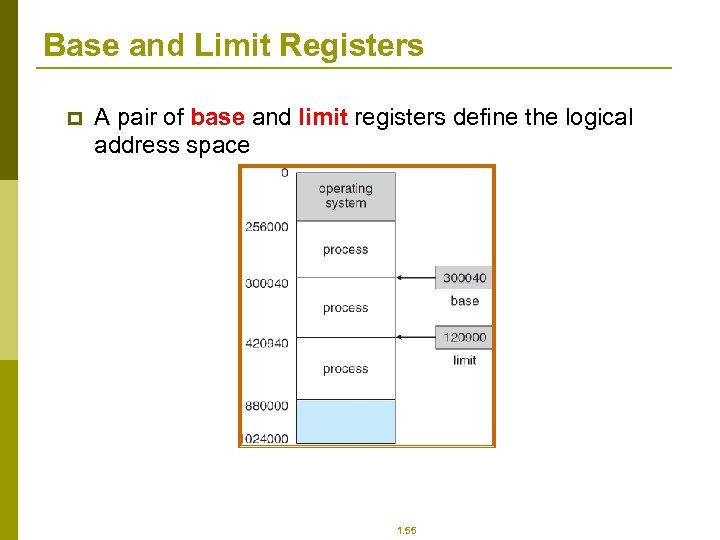 Base and Limit Registers p A pair of base and limit registers define the logical address space 1. 55
 Binding of Instructions and Data to Memory p Address binding of instructions and data to memory addresses can happen at three different stages n Compile time: If memory location known a priori, absolute code can be generated; must recompile code if starting location changes n Load time: Must generate relocatable code if memory location is not known at compile time n Execution time: Binding delayed until run time if the process can be moved during its execution from one memory segment to another. Need hardware support for address maps (e. g. , base and limit registers) 1. 56
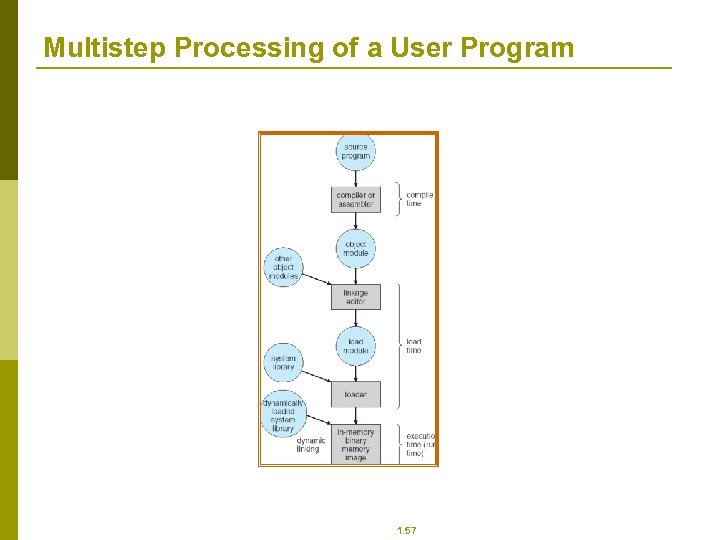 Multistep Processing of a User Program 1. 57
 Logical vs. Physical Address Space p p The concept of a logical address space that is bound to a separate physical address space is central to proper memory management n Logical address – generated by the CPU; also referred to as virtual address n Physical address – address seen by the memory unit Logical and physical addresses are the same in compile-time and load-time address-binding schemes; logical (virtual) and physical addresses differ in execution-time addressbinding scheme 1. 58
 Memory-Management Unit (MMU) p Hardware device that maps virtual to physical address p In MMU scheme, the value in the relocation register is added to every address generated by a user process at the time it is sent to memory p The user program deals with logical addresses; it never sees the real physical addresses 1. 59
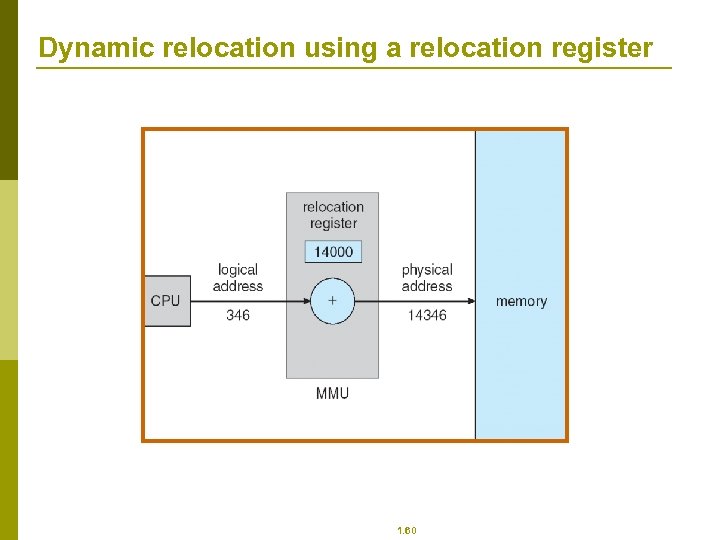 Dynamic relocation using a relocation register 1. 60
 Dynamic Loading p p Routine is not loaded until it is called Better memory-space utilization; unused routine is never loaded Useful when large amounts of code are needed to handle infrequently occurring cases No special support from the operating system is required implemented through program design 1. 61
 Dynamic Linking p p p Linking postponed until execution time Small piece of code, stub, used to locate the appropriate memory-resident library routine Stub replaces itself with the address of the routine, and executes the routine Operating system needed to check if routine is in processes’ memory address Dynamic linking is particularly useful for libraries System also known as shared libraries 1. 62
 Swapping p A process can be swapped temporarily out of memory to a backing store, and then brought back into memory for continued execution p Backing store – fast disk large enough to accommodate copies of all memory images for all users; must provide direct access to these memory images p Roll out, roll in – swapping variant used for priority-based scheduling algorithms; lower-priority process is swapped out so higher-priority process can be loaded and executed p Major part of swap time is transfer time; total transfer time is directly proportional to the amount of memory swapped p Modified versions of swapping are found on many systems (i. e. , UNIX, Linux, and Windows) System maintains a ready queue of ready-to-run processes which have memory images on disk p 1. 63
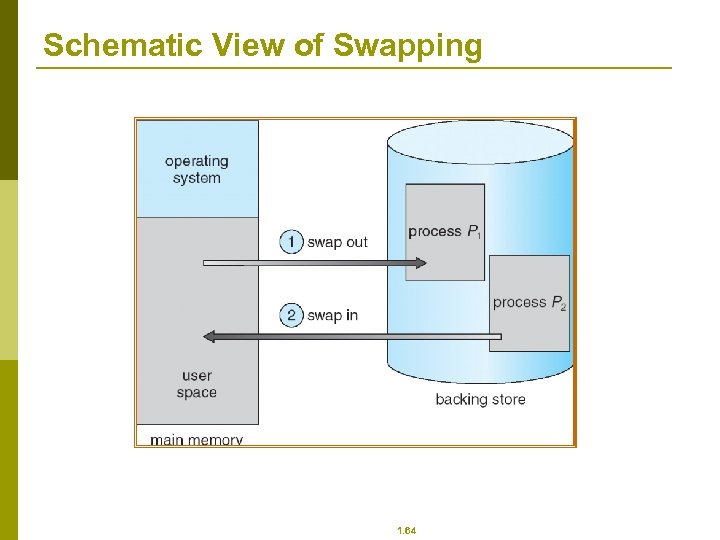 Schematic View of Swapping 1. 64
 Dynamic Storage-Allocation Problem How to satisfy a request of size n from a list of free holes p p p First-fit: Allocate the first hole that is big enough Best-fit: Allocate the smallest hole that is big enough; must search entire list, unless ordered by size n Produces the smallest leftover hole Worst-fit: Allocate the largest hole; must also search entire list n Produces the largest leftover hole First-fit and best-fit better than worst-fit in terms of speed and storage utilization 1. 65
 Fragmentation p p p External Fragmentation – total memory space exists to satisfy a request, but it is not contiguous Internal Fragmentation – allocated memory may be slightly larger than requested memory; this size difference is memory internal to a partition, but not being used Reduce external fragmentation by compaction n Shuffle memory contents to place all free memory together in one large block n Compaction is possible only if relocation is dynamic, and is done at execution time n I/O problem p Latch job in memory while it is involved in I/O p Do I/O only into OS buffers 1. 66
 Paging p p p p Logical address space of a process can be noncontiguous; process is allocated physical memory whenever the latter is available Divide physical memory into fixed-sized blocks called frames (size is power of 2, between 512 bytes and 8, 192 bytes) Divide logical memory into blocks of same size called pages Keep track of all free frames To run a program of size n pages, need to find n free frames and load program Set up a page table to translate logical to physical addresses Internal fragmentation 1. 67
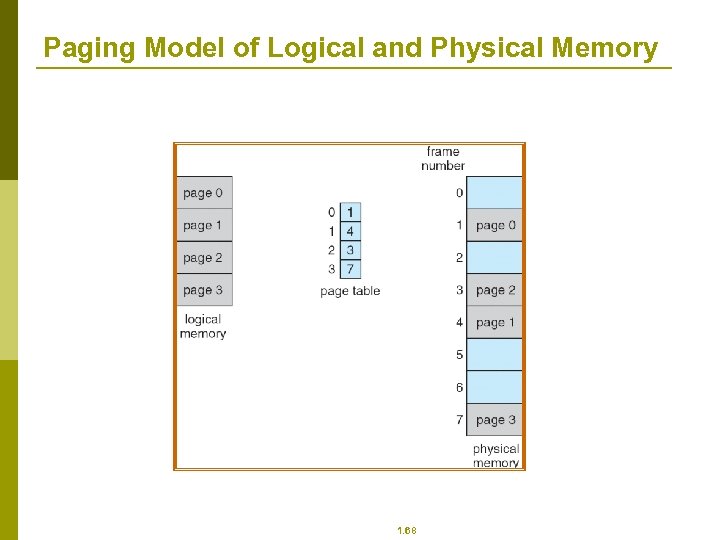 Paging Model of Logical and Physical Memory 1. 68
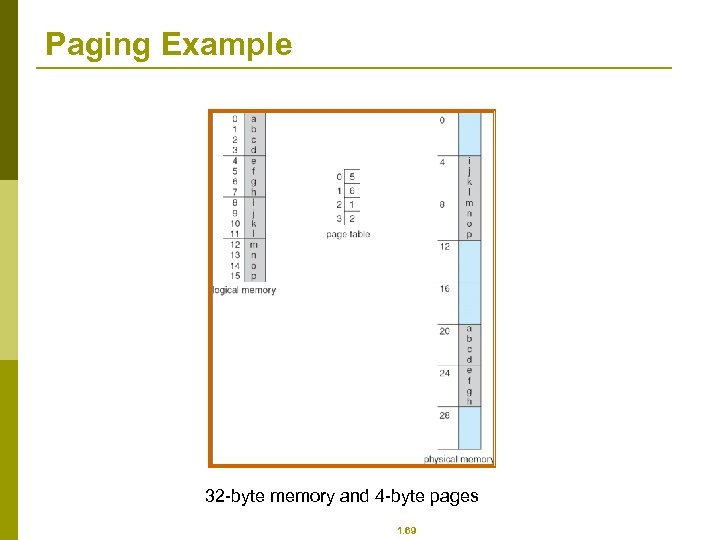 Paging Example 32 -byte memory and 4 -byte pages 1. 69
 Memory Protection p Memory protection implemented by associating protection bit with each frame p Valid-invalid bit attached to each entry in the page table: n “valid” indicates that the associated page is in the process’ logical address space, and is thus a legal page n “invalid” indicates that the page is not in the process’ logical address space 1. 70
 Segmentation p p Memory-management scheme that supports user view of memory A program is a collection of segments. A segment is a logical unit such as: main program, procedure, function, method, object, local variables, global variables, common block, stack, symbol table, arrays 1. 71
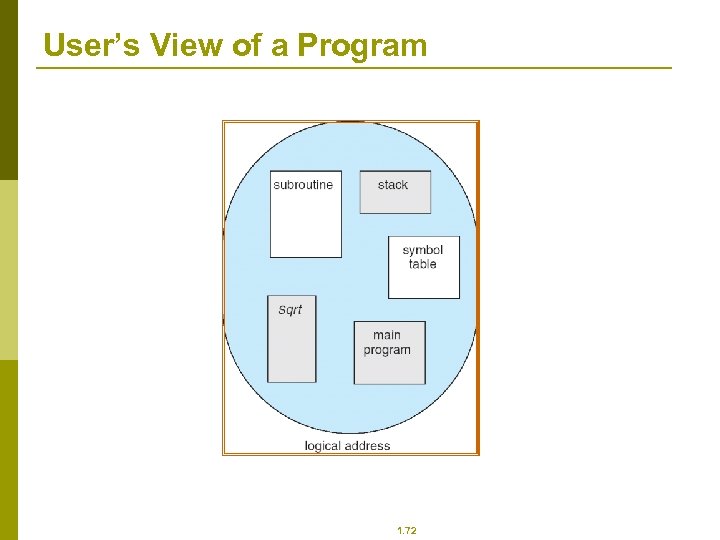 User’s View of a Program 1. 72
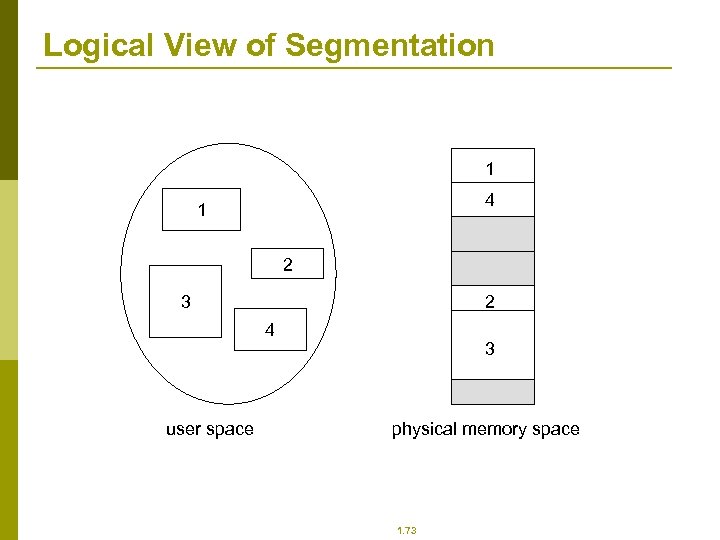 Logical View of Segmentation 1 4 1 2 2 3 4 user space 3 physical memory space 1. 73
 6: File-System Interface
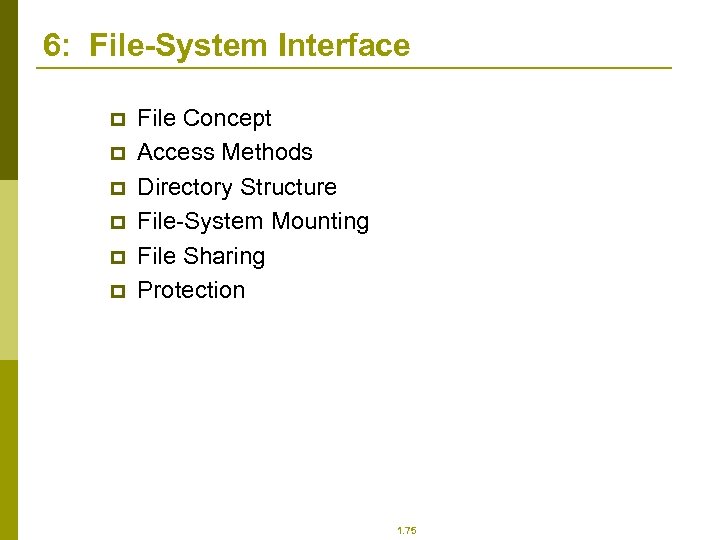 6: File-System Interface p p p File Concept Access Methods Directory Structure File-System Mounting File Sharing Protection 1. 75
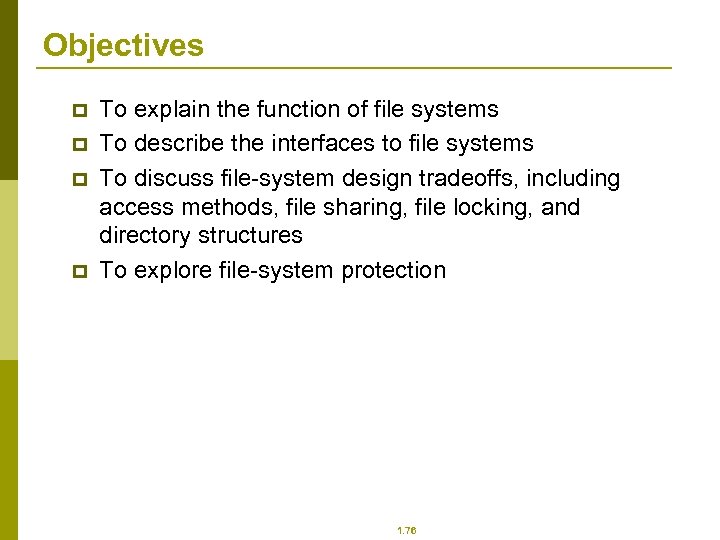 Objectives p p To explain the function of file systems To describe the interfaces to file systems To discuss file-system design tradeoffs, including access methods, file sharing, file locking, and directory structures To explore file-system protection 1. 76
 File Concept p p Contiguous logical address space Types: n Data p numeric p character p binary n Program 1. 77
 File Structure p p p None - sequence of words, bytes Simple record structure n Lines n Fixed length n Variable length Complex Structures n Formatted document n Relocatable load file Can simulate last two with first method by inserting appropriate control characters Who decides: n Operating system n Program 1. 78
 File Attributes p p p p Name – only information kept in human-readable form Identifier – unique tag (number) identifies file within file system Type – needed for systems that support different types Location – pointer to file location on device Size – current file size Protection – controls who can do reading, writing, executing Time, date, and user identification – data for protection, security, and usage monitoring Information about files are kept in the directory structure, which is maintained on the disk 1. 79
 File Operations p p p p p File is an abstract data type Create Write Read Reposition within file Delete Truncate Open(Fi) – search the directory structure on disk for entry Fi, and move the content of entry to memory Close (Fi) – move the content of entry Fi in memory to directory structure on disk 1. 80
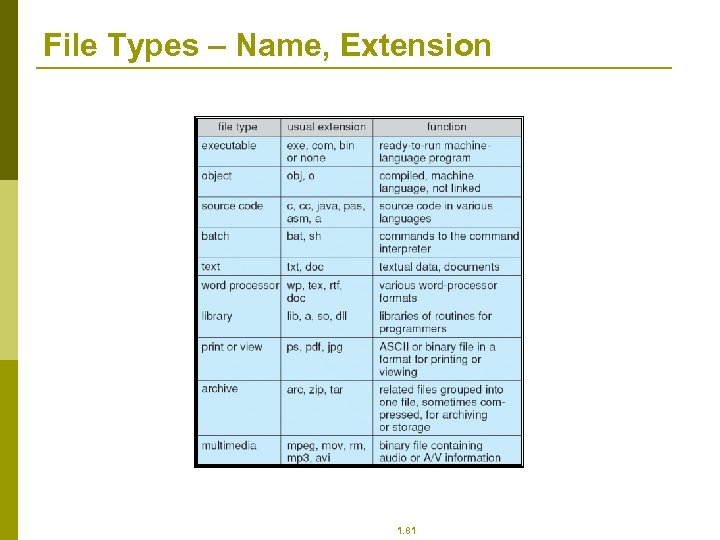 File Types – Name, Extension 1. 81
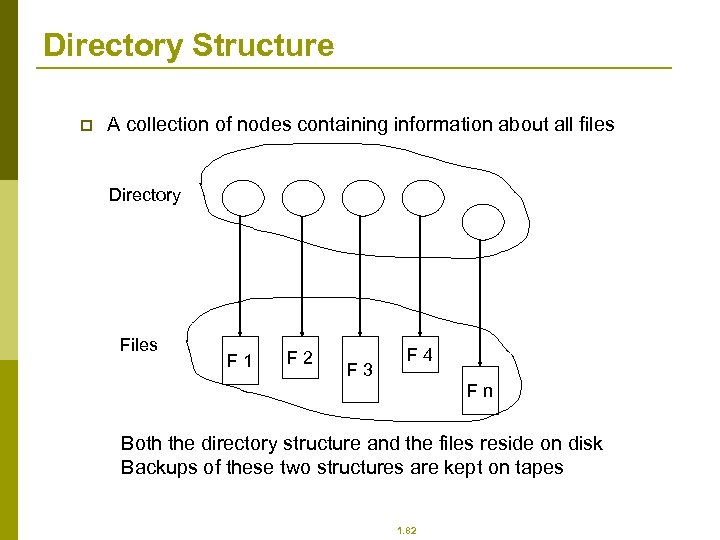 Directory Structure p A collection of nodes containing information about all files Directory Files F 1 F 2 F 3 F 4 Fn Both the directory structure and the files reside on disk Backups of these two structures are kept on tapes 1. 82
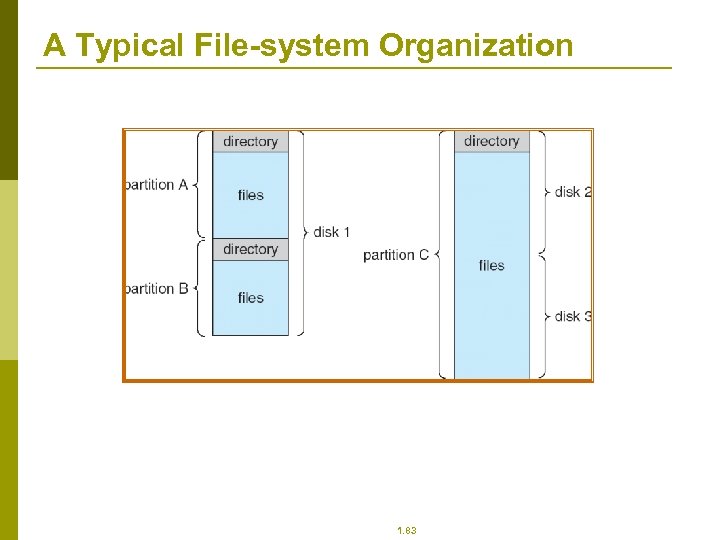 A Typical File-system Organization 1. 83
 Operations Performed on Directory p p p Search for a file Create a file Delete a file List a directory Rename a file Traverse the file system 1. 84
 Organize the Directory (Logically) to Obtain p p p Efficiency – locating a file quickly Naming – convenient to users n Two users can have same name for different files n The same file can have several different names Grouping – logical grouping of files by properties, (e. g. , all Java programs, all games, …) 1. 85
 File Sharing p Sharing of files on multi-user systems is desirable p Sharing may be done through a protection scheme p On distributed systems, files may be shared across a network p Network File System (NFS) is a common distributed file-sharing method 1. 86
 File Sharing – Multiple Users p User IDs identify users, allowing permissions and protections to be per-user p Group IDs allow users to be in groups, permitting group access rights 1. 87
 File Sharing – Remote File Systems p p p Uses networking to allow file system access between systems n Manually via programs like FTP n Automatically, seamlessly using distributed file systems n Semi automatically via the world wide web Client-server model allows clients to mount remote file systems from servers n Server can serve multiple clients n Client and user-on-client identification is insecure or complicated n NFS is standard UNIX client-server file sharing protocol n CIFS is standard Windows protocol n Standard operating system file calls are translated into remote calls Distributed Information Systems (distributed naming services) such as LDAP, DNS, NIS, Active Directory implement unified access to information needed for remote computing 1. 88
 Protection p p File owner/creator should be able to control: n what can be done n by whom Types of access n Read n Write n Execute n Append n Delete n List 1. 89
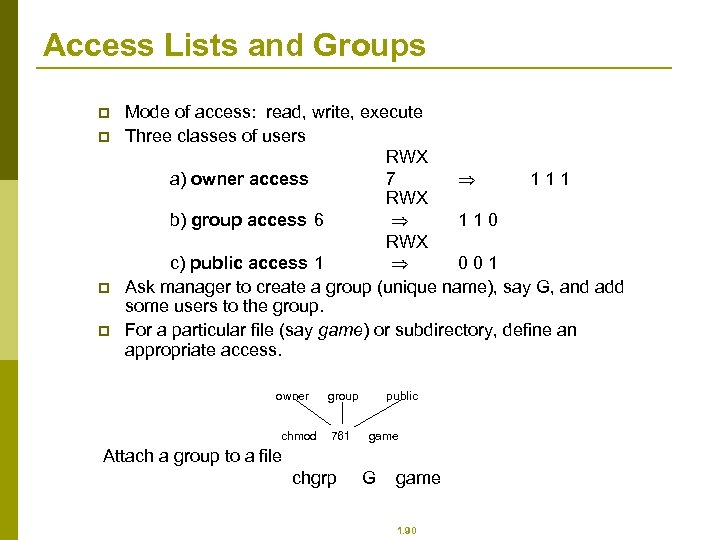 Access Lists and Groups p p Mode of access: read, write, execute Three classes of users RWX a) owner access 7 111 RWX b) group access 6 110 RWX c) public access 1 001 Ask manager to create a group (unique name), say G, and add some users to the group. For a particular file (say game) or subdirectory, define an appropriate access. owner chmod group 761 public game Attach a group to a file chgrp G game 1. 90
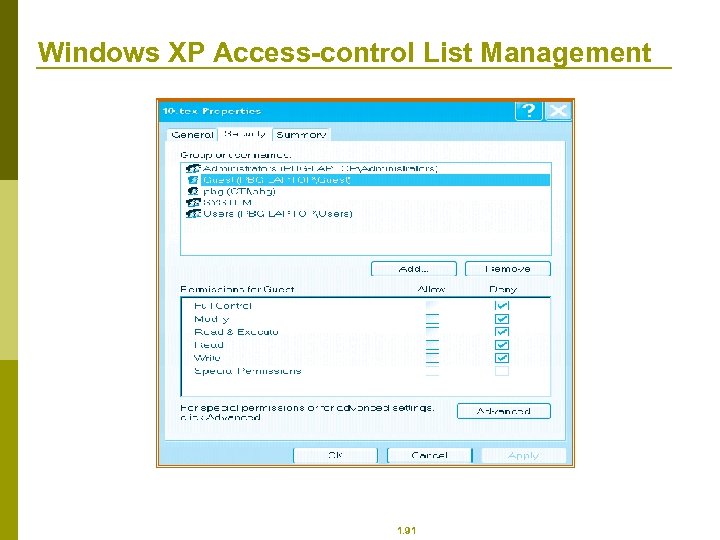 Windows XP Access-control List Management 1. 91
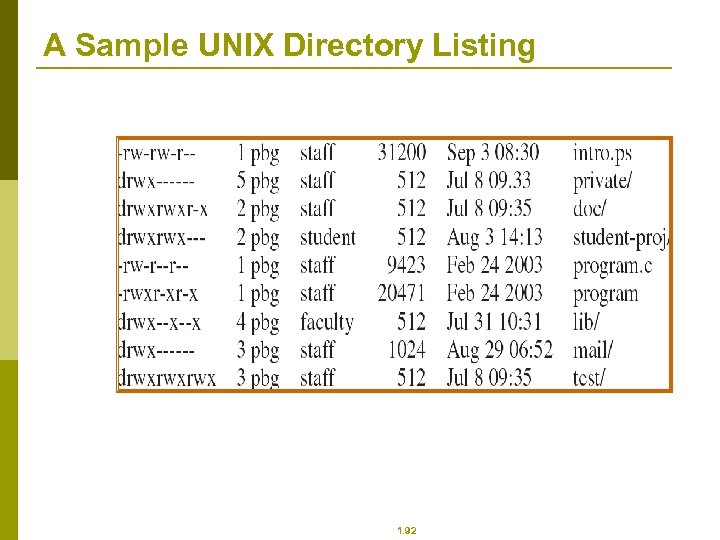 A Sample UNIX Directory Listing 1. 92
 7: Mass-Storage Systems
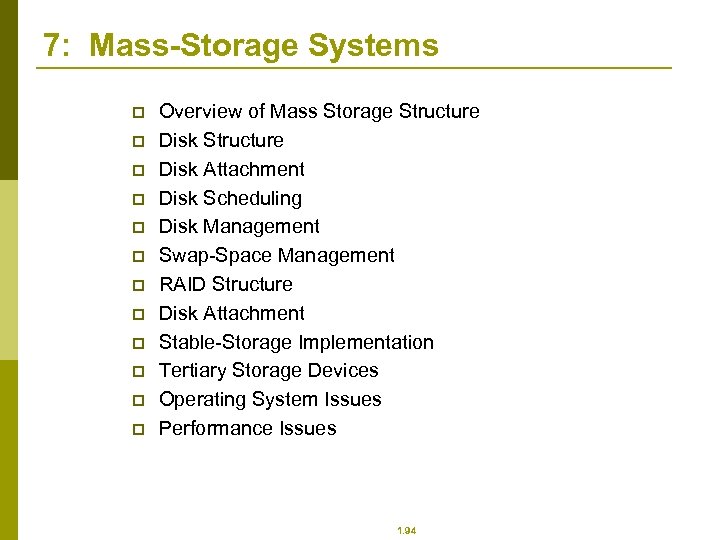 7: Mass-Storage Systems p p p Overview of Mass Storage Structure Disk Attachment Disk Scheduling Disk Management Swap-Space Management RAID Structure Disk Attachment Stable-Storage Implementation Tertiary Storage Devices Operating System Issues Performance Issues 1. 94
 Objectives p p p Describe the physical structure of secondary and tertiary storage devices and the resulting effects on the uses of the devices Explain the performance characteristics of massstorage devices Discuss operating-system services provided for mass storage, including RAID and HSM 1. 95
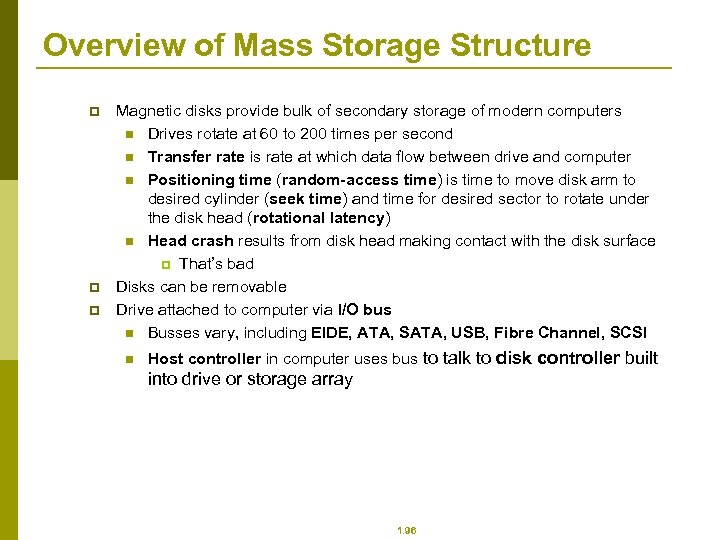 Overview of Mass Storage Structure p p p Magnetic disks provide bulk of secondary storage of modern computers n Drives rotate at 60 to 200 times per second n Transfer rate is rate at which data flow between drive and computer n Positioning time (random-access time) is time to move disk arm to desired cylinder (seek time) and time for desired sector to rotate under the disk head (rotational latency) n Head crash results from disk head making contact with the disk surface p That’s bad Disks can be removable Drive attached to computer via I/O bus n Busses vary, including EIDE, ATA, SATA, USB, Fibre Channel, SCSI n Host controller in computer uses bus to talk to disk controller built into drive or storage array 1. 96
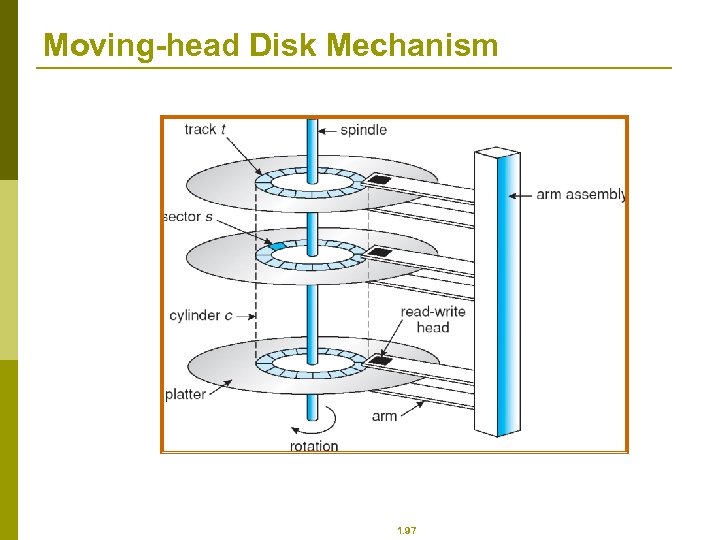 Moving-head Disk Mechanism 1. 97
 Overview of Mass Storage Structure (Cont. ) p Magnetic tape n Was early secondary-storage medium n Relatively permanent and holds large quantities of data n Access time slow n Random access ~1000 times slower than disk n Mainly used for backup, storage of infrequently-used data, transfer medium between systems n Kept in spool and wound or rewound past read-write head n Once data under head, transfer rates comparable to disk n 20 -200 GB typical storage n Common technologies are 4 mm, 8 mm, 19 mm, LTO-2 and SDLT 1. 98
 Disk Structure p Disk drives are addressed as large 1 -dimensional arrays of logical blocks, where the logical block is the smallest unit of transfer. p The 1 -dimensional array of logical blocks is mapped into the sectors of the disk sequentially. n Sector 0 is the first sector of the first track on the outermost cylinder. n Mapping proceeds in order through that track, then the rest of the tracks in that cylinder, and then through the rest of the cylinders from outermost to innermost. 1. 99
 Disk Attachment p p p Host-attached storage accessed through I/O ports talking to I/O busses SCSI itself is a bus, up to 16 devices on one cable, SCSI initiator requests operation and SCSI targets perform tasks n Each target can have up to 8 logical units (disks attached to device controller FC is high-speed serial architecture n Can be switched fabric with 24 -bit address space – the basis of storage area networks (SANs) in which many hosts attach to many storage units n Can be arbitrated loop (FC-AL) of 126 devices 1. 100
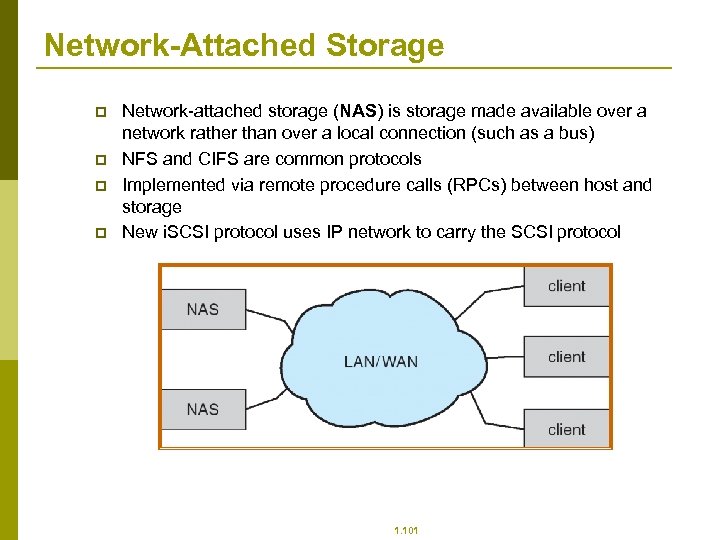 Network-Attached Storage p p Network-attached storage (NAS) is storage made available over a network rather than over a local connection (such as a bus) NFS and CIFS are common protocols Implemented via remote procedure calls (RPCs) between host and storage New i. SCSI protocol uses IP network to carry the SCSI protocol 1. 101
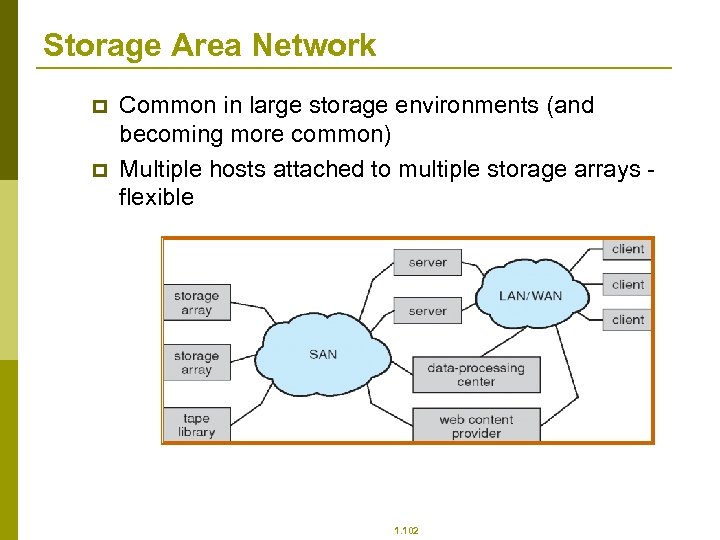 Storage Area Network p p Common in large storage environments (and becoming more common) Multiple hosts attached to multiple storage arrays flexible 1. 102
 Disk Scheduling p p p The operating system is responsible for using hardware efficiently — for the disk drives, this means having a fast access time and disk bandwidth. Access time has two major components n Seek time is the time for the disk are to move the heads to the cylinder containing the desired sector. n Rotational latency is the additional time waiting for the disk to rotate the desired sector to the disk head. Minimize seek time Seek time seek distance Disk bandwidth is the total number of bytes transferred, divided by the total time between the first request for service and the completion of the last transfer. 1. 103
 SSTF p p p Selects the request with the minimum seek time from the current head position. SSTF scheduling is a form of SJF scheduling; may cause starvation of some requests. Illustration shows total head movement of 236 cylinders. 1. 104
 SCAN p p p The disk arm starts at one end of the disk, and moves toward the other end, servicing requests until it gets to the other end of the disk, where the head movement is reversed and servicing continues. Sometimes called the elevator algorithm. Illustration shows total head movement of 208 cylinders. 1. 105
 C-SCAN p p p Provides a more uniform wait time than SCAN. The head moves from one end of the disk to the other. servicing requests as it goes. When it reaches the other end, however, it immediately returns to the beginning of the disk, without servicing any requests on the return trip. Treats the cylinders as a circular list that wraps around from the last cylinder to the first one. 1. 106
 C-LOOK p p Version of C-SCAN Arm only goes as far as the last request in each direction, then reverses direction immediately, without first going all the way to the end of the disk. 1. 107
 Selecting a Disk-Scheduling Algorithm p p p SSTF is common and has a natural appeal SCAN and C-SCAN perform better for systems that place a heavy load on the disk. Performance depends on the number and types of requests. Requests for disk service can be influenced by the fileallocation method. The disk-scheduling algorithm should be written as a separate module of the operating system, allowing it to be replaced with a different algorithm if necessary. Either SSTF or LOOK is a reasonable choice for the default algorithm. 1. 108
 Disk Management p p Low-level formatting, or physical formatting — Dividing a disk into sectors that the disk controller can read and write. To use a disk to hold files, the operating system still needs to record its own data structures on the disk. n Partition the disk into one or more groups of cylinders. n Logical formatting or “making a file system”. Boot block initializes system. n The bootstrap is stored in ROM. n Bootstrap loader program. Methods such as sector sparing used to handle bad blocks. 1. 109
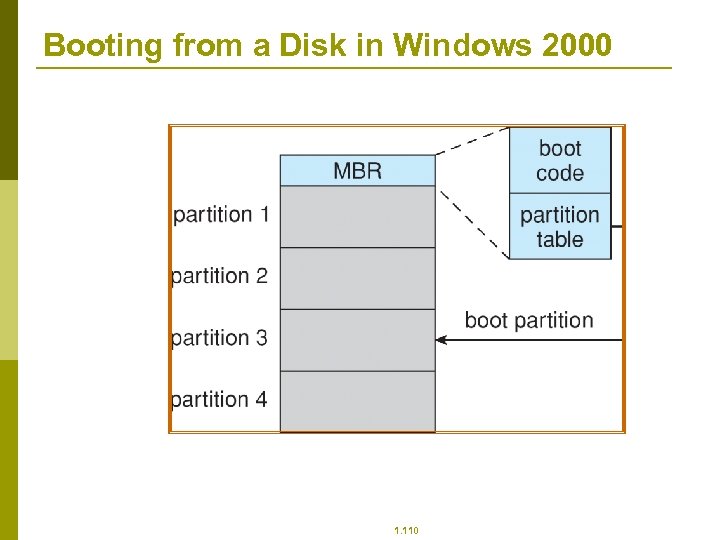 Booting from a Disk in Windows 2000 1. 110
 Swap-Space Management p p p Swap-space — Virtual memory uses disk space as an extension of main memory. Swap-space can be carved out of the normal file system, or, more commonly, it can be in a separate disk partition. Swap-space management n 4. 3 BSD allocates swap space when process starts; holds text segment (the program) and data segment. n Kernel uses swap maps to track swap-space use. n Solaris 2 allocates swap space only when a page is forced out of physical memory, not when the virtual memory page is first created. 1. 111
 RAID Structure p RAID – multiple disk drives provides reliability via redundancy. p RAID is arranged into six different levels. 1. 112
 RAID (cont) p Several improvements in disk-use techniques involve the use of multiple disks working cooperatively. p Disk striping uses a group of disks as one storage unit. p RAID schemes improve performance and improve the reliability of the storage system by storing redundant data. n Mirroring or shadowing keeps duplicate of each disk. n Block interleaved parity uses much less redundancy. 1. 113
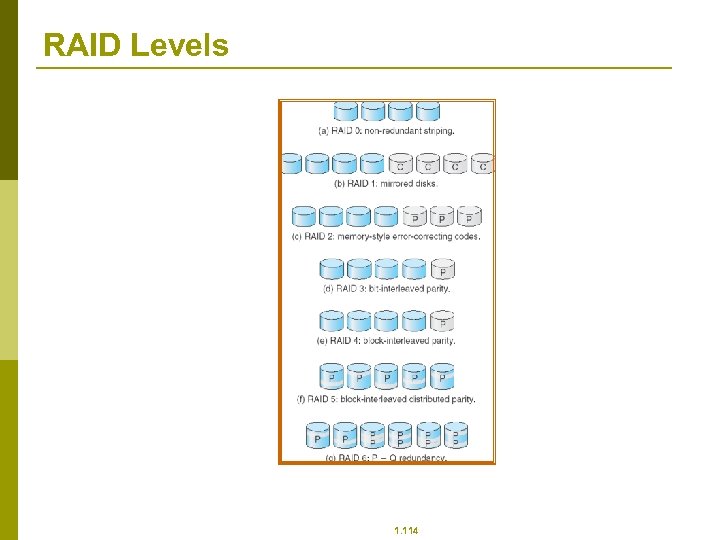 RAID Levels 1. 114
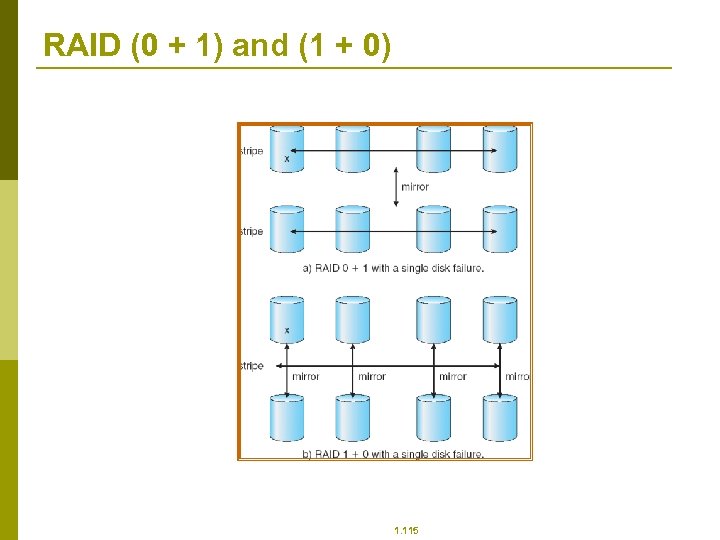 RAID (0 + 1) and (1 + 0) 1. 115
 Stable-Storage Implementation p Write-ahead log scheme requires stable storage. p To implement stable storage: n Replicate information on more than one nonvolatile storage media with independent failure modes. n Update information in a controlled manner to ensure that we can recover the stable data after any failure during data transfer or recovery. 1. 116
 Tertiary Storage Devices p Low cost is the defining characteristic of tertiary storage. p Generally, tertiary storage is built using removable media p Common examples of removable media are floppy disks and CD-ROMs; other types are available. 1. 117
 Removable Disks p Floppy disk — thin flexible disk coated with magnetic material, enclosed in a protective plastic case. n n Most floppies hold about 1 MB; similar technology is used for removable disks that hold more than 1 GB. Removable magnetic disks can be nearly as fast as hard disks, but they are at a greater risk of damage from exposure. 1. 118
 Removable Disks (Cont. ) p A magneto-optic disk records data on a rigid platter coated with magnetic material. n Laser heat is used to amplify a large, weak magnetic field to record a bit. n Laser light is also used to read data (Kerr effect). n The magneto-optic head flies much farther from the disk surface than a magnetic disk head, and the magnetic material is covered with a protective layer of plastic or glass; resistant to head crashes. p Optical disks do not use magnetism; they employ special materials that are altered by laser light. 1. 119
 WORM Disks p p p The data on read-write disks can be modified over and over. WORM (“Write Once, Read Many Times”) disks can be written only once. Thin aluminum film sandwiched between two glass or plastic platters. To write a bit, the drive uses a laser light to burn a small hole through the aluminum; information can be destroyed by not altered. Very durable and reliable. Read Only disks, such ad CD-ROM and DVD, com from the factory with the data pre-recorded. 1. 120
 Tapes p p Compared to a disk, a tape is less expensive and holds more data, but random access is much slower. Tape is an economical medium for purposes that do not require fast random access, e. g. , backup copies of disk data, holding huge volumes of data. Large tape installations typically use robotic tape changers that move tapes between tape drives and storage slots in a tape library. n stacker – library that holds a few tapes n silo – library that holds thousands of tapes A disk-resident file can be archived to tape for low cost storage; the computer can stage it back into disk storage for active use. 1. 121
 Operating System Issues p Major OS jobs are to manage physical devices and to present a virtual machine abstraction to applications p For hard disks, the OS provides two abstraction: n Raw device – an array of data blocks. n File system – the OS queues and schedules the interleaved requests from several applications. 1. 122
 Application Interface p p p Most OSs handle removable disks almost exactly like fixed disks — a new cartridge is formatted an empty file system is generated on the disk. Tapes are presented as a raw storage medium, i. e. , and application does not open a file on the tape, it opens the whole tape drive as a raw device. Usually the tape drive is reserved for the exclusive use of that application. Since the OS does not provide file system services, the application must decide how to use the array of blocks. Since every application makes up its own rules for how to organize a tape, a tape full of data can generally only be used by the program that created it. 1. 123
 Tape Drives p p p The basic operations for a tape drive differ from those of a disk drive. locate positions the tape to a specific logical block, not an entire track (corresponds to seek). The read position operation returns the logical block number where the tape head is. The space operation enables relative motion. Tape drives are “append-only” devices; updating a block in the middle of the tape also effectively erases everything beyond that block. An EOT mark is placed after a block that is written. 1. 124
 File Naming p p p The issue of naming files on removable media is especially difficult when we want to write data on a removable cartridge on one computer, and then use the cartridge in another computer. Contemporary OSs generally leave the name space problem unsolved for removable media, and depend on applications and users to figure out how to access and interpret the data. Some kinds of removable media (e. g. , CDs) are so well standardized that all computers use them the same way. 1. 125
 Hierarchical Storage Management (HSM) p p p A hierarchical storage system extends the storage hierarchy beyond primary memory and secondary storage to incorporate tertiary storage — usually implemented as a jukebox of tapes or removable disks. Usually incorporate tertiary storage by extending the file system. n Small and frequently used files remain on disk. n Large, old, inactive files are archived to the jukebox. HSM is usually found in supercomputing centers and other large installations that have enormous volumes of data. 1. 126
 Speed p Two aspects of speed in tertiary storage are bandwidth and latency. p Bandwidth is measured in bytes per second. n Sustained bandwidth – average data rate during a large transfer; # of bytes/transfer time. Data rate when the data stream is actually flowing. n Effective bandwidth – average over the entire I/O time, including seek or locate, and cartridge switching. Drive’s overall data rate. 1. 127
 Speed (Cont. ) p p p Access latency – amount of time needed to locate data. n Access time for a disk – move the arm to the selected cylinder and wait for the rotational latency; < 35 milliseconds. n Access on tape requires winding the tape reels until the selected block reaches the tape head; tens or hundreds of seconds. n Generally say that random access within a tape cartridge is about a thousand times slower than random access on disk. The low cost of tertiary storage is a result of having many cheap cartridges share a few expensive drives. A removable library is best devoted to the storage of infrequently used data, because the library can only satisfy a relatively small number of I/O requests per hour. 1. 128
 Reliability p p p A fixed disk drive is likely to be more reliable than a removable disk or tape drive. An optical cartridge is likely to be more reliable than a magnetic disk or tape. A head crash in a fixed hard disk generally destroys the data, whereas the failure of a tape drive or optical disk drive often leaves the data cartridge unharmed. 1. 129
 Cost p p Main memory is much more expensive than disk storage The cost per megabyte of hard disk storage is competitive with magnetic tape if only one tape is used per drive. The cheapest tape drives and the cheapest disk drives have had about the same storage capacity over the years. Tertiary storage gives a cost savings only when the number of cartridges is considerably larger than the number of drives. 1. 130
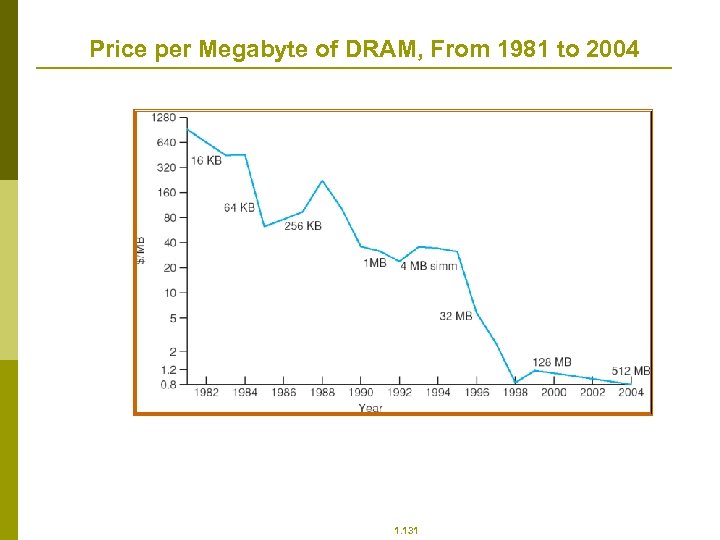 Price per Megabyte of DRAM, From 1981 to 2004 1. 131
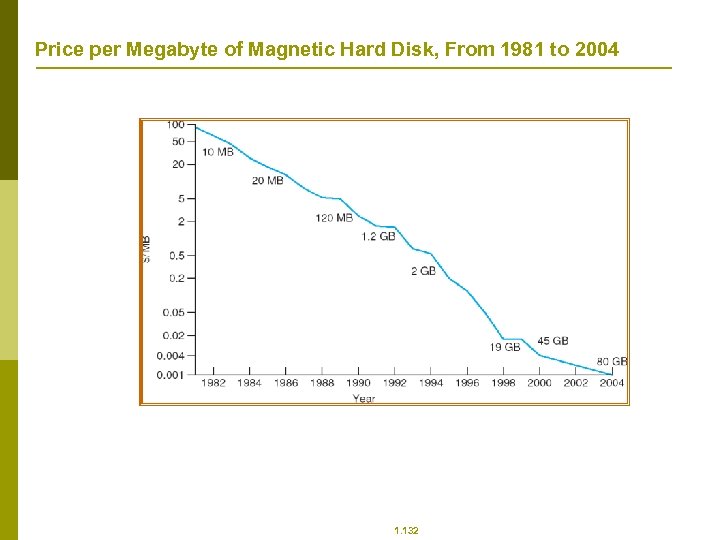 Price per Megabyte of Magnetic Hard Disk, From 1981 to 2004 1. 132
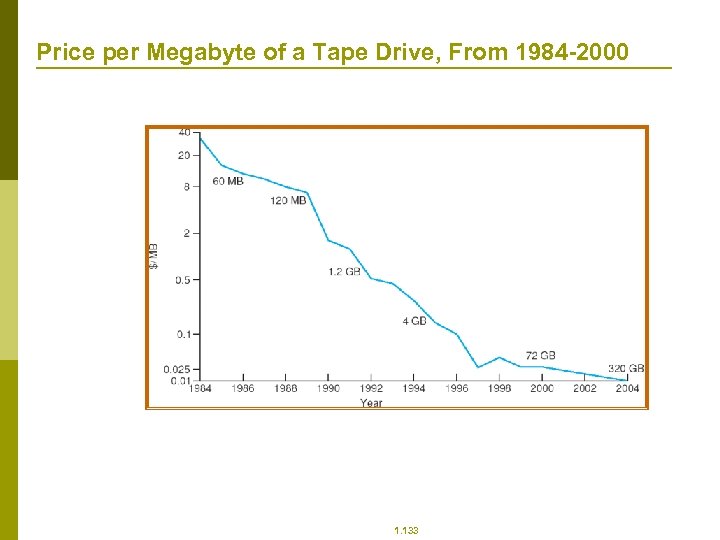 Price per Megabyte of a Tape Drive, From 1984 -2000 1. 133
 7: Security
 7: Security p p p p p The Security Problem Program Threats System and Network Threats Cryptography as a Security Tool User Authentication Implementing Security Defenses Firewalling to Protect Systems and Networks Computer-Security Classifications An Example: Windows XP 1. 135
 Objectives p p To discuss security threats and attacks To explain the fundamentals of encryption, authentication, and hashing To examine the uses of cryptography in computing To describe the various countermeasures to security attacks 1. 136
 The Security Problem p p p Security must consider external environment of the system, and protect the system resources Intruders (crackers) attempt to breach security Threat is potential security violation Attack is attempt to breach security Attack can be accidental or malicious Easier to protect against accidental than malicious misuse 1. 137
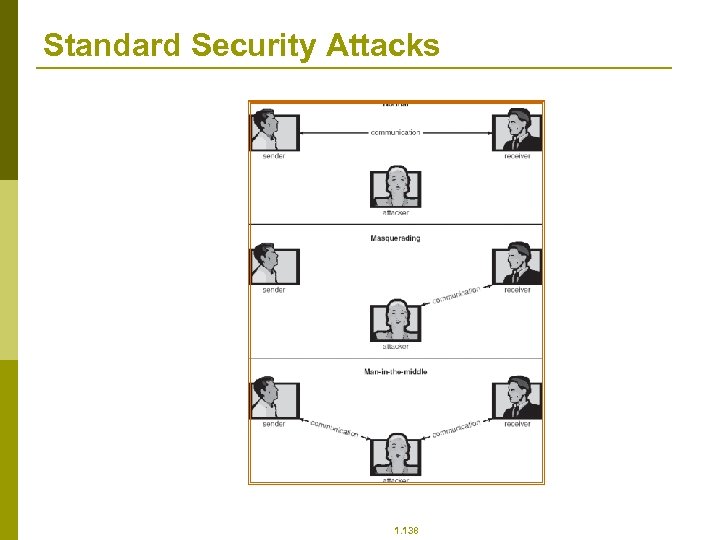 Standard Security Attacks 1. 138
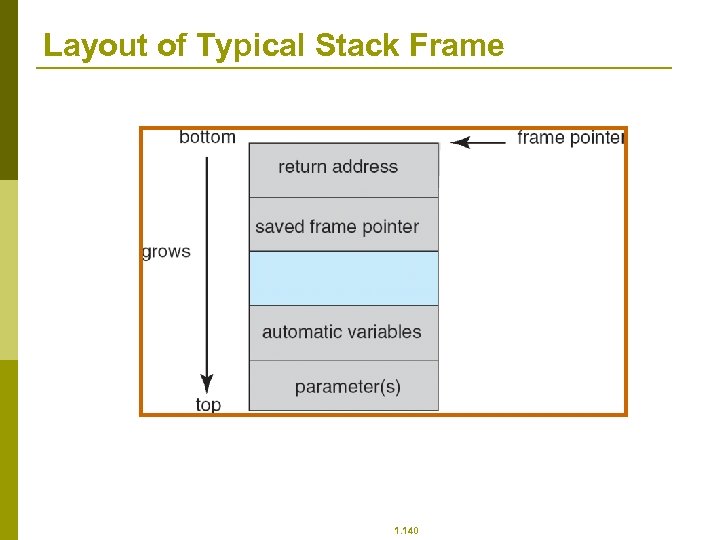
 Program Threats p p Trojan Horse n Code segment that misuses its environment n Exploits mechanisms for allowing programs written by users to be executed by other users n Spyware, pop-up browser windows, covert channels Trap Door n Specific user identifier or password that circumvents normal security procedures n Could be included in a compiler Logic Bomb n Program that initiates a security incident under certain circumstances Stack and Buffer Overflow n Exploits a bug in a program (overflow either the stack or memory buffers) 1. 139
 Layout of Typical Stack Frame 1. 140
 Program Threats (Cont. ) p p Virus dropper inserts virus onto the system Many categories of viruses, literally many thousands of viruses n File n Boot n Macro n Source code n Polymorphic n Encrypted n Stealth n Tunneling n Multipartite n Armored 1. 141
 System and Network Threats p p Worms – use spawn mechanism; standalone program Internet worm n Exploited UNIX networking features (remote access) and bugs in finger and sendmail programs n Grappling hook program uploaded main worm program Port scanning n Automated attempt to connect to a range of ports on one or a range of IP addresses Denial of Service n Overload the targeted computer preventing it from doing any useful work n Distributed denial-of-service (DDOS) come from multiple sites at once 1. 142
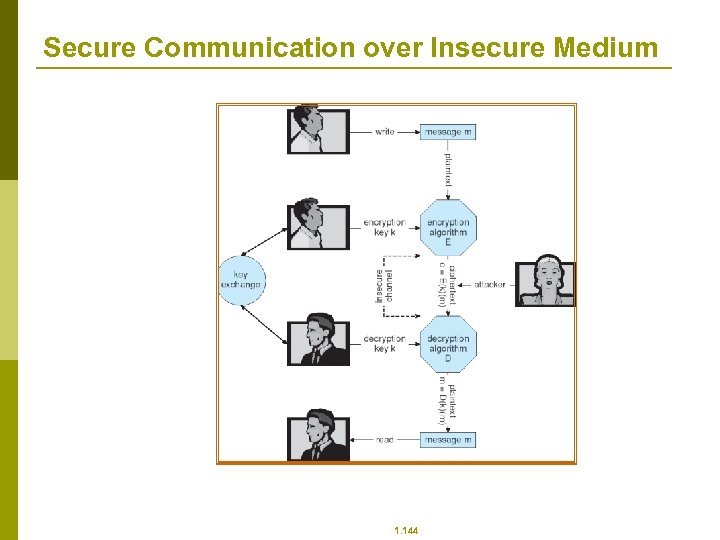
 Cryptography as a Security Tool p p Broadest security tool available n Source and destination of messages cannot be trusted without cryptography n Means to constrain potential senders (sources) and / or receivers (destinations) of messages Based on secrets (keys) 1. 143
 Secure Communication over Insecure Medium 1. 144
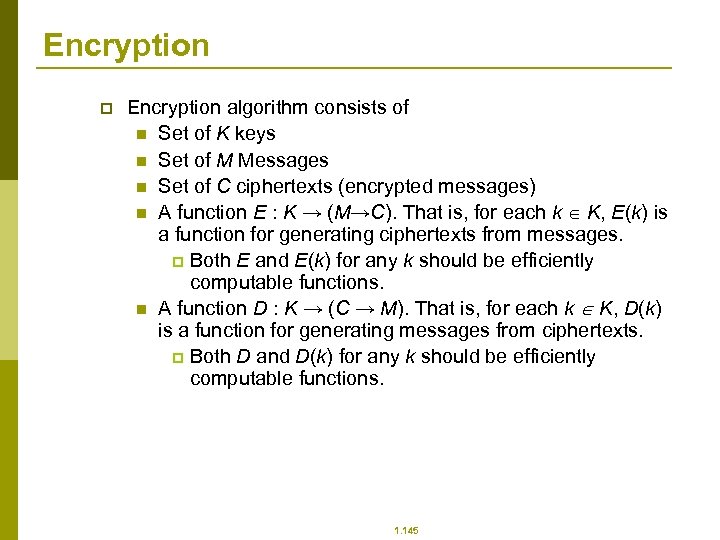 Encryption p Encryption algorithm consists of n Set of K keys n Set of M Messages n Set of C ciphertexts (encrypted messages) n A function E : K → (M→C). That is, for each k K, E(k) is a function for generating ciphertexts from messages. p Both E and E(k) for any k should be efficiently computable functions. n A function D : K → (C → M). That is, for each k K, D(k) is a function for generating messages from ciphertexts. p Both D and D(k) for any k should be efficiently computable functions. 1. 145
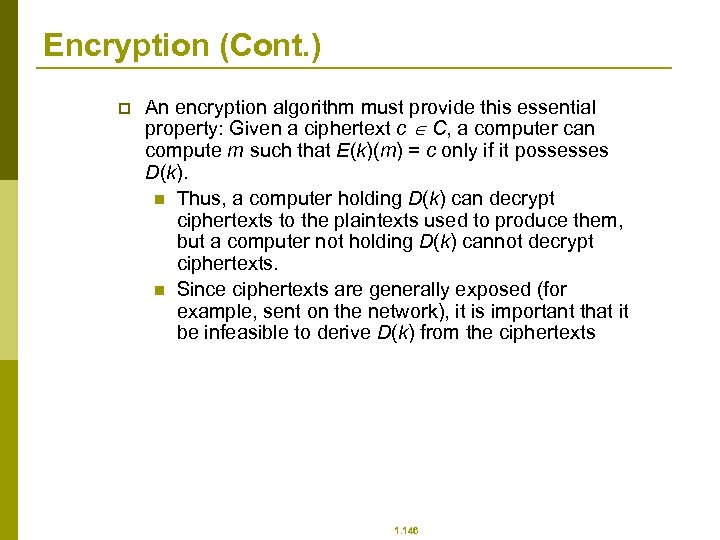 Encryption (Cont. ) p An encryption algorithm must provide this essential property: Given a ciphertext c C, a computer can compute m such that E(k)(m) = c only if it possesses D(k). n Thus, a computer holding D(k) can decrypt ciphertexts to the plaintexts used to produce them, but a computer not holding D(k) cannot decrypt ciphertexts. n Since ciphertexts are generally exposed (for example, sent on the network), it is important that it be infeasible to derive D(k) from the ciphertexts 1. 146
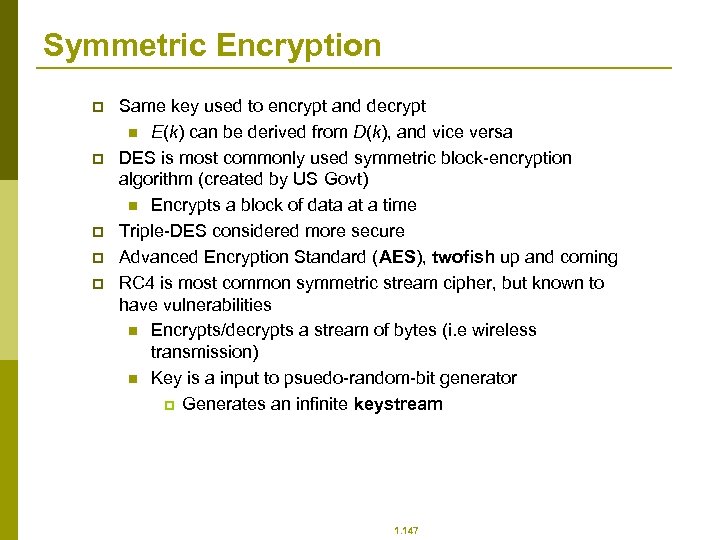 Symmetric Encryption p p p Same key used to encrypt and decrypt n E(k) can be derived from D(k), and vice versa DES is most commonly used symmetric block-encryption algorithm (created by US Govt) n Encrypts a block of data at a time Triple-DES considered more secure Advanced Encryption Standard (AES), twofish up and coming RC 4 is most common symmetric stream cipher, but known to have vulnerabilities n Encrypts/decrypts a stream of bytes (i. e wireless transmission) n Key is a input to psuedo-random-bit generator p Generates an infinite keystream 1. 147
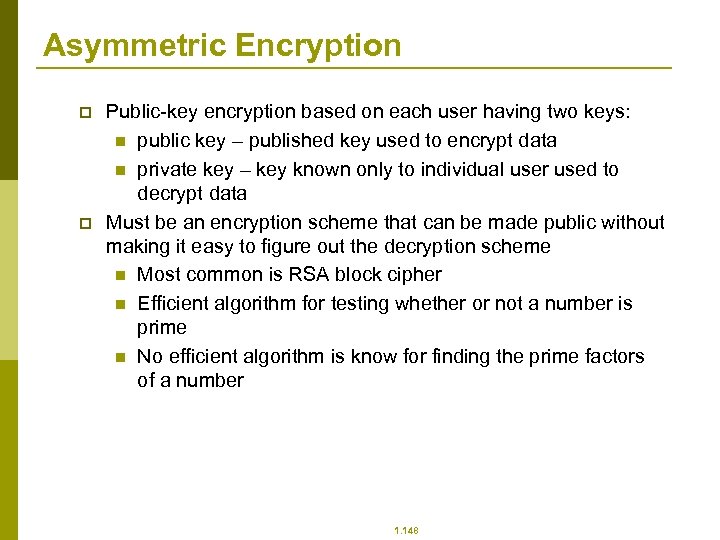 Asymmetric Encryption p p Public-key encryption based on each user having two keys: n public key – published key used to encrypt data n private key – key known only to individual user used to decrypt data Must be an encryption scheme that can be made public without making it easy to figure out the decryption scheme n Most common is RSA block cipher n Efficient algorithm for testing whether or not a number is prime n No efficient algorithm is know for finding the prime factors of a number 1. 148
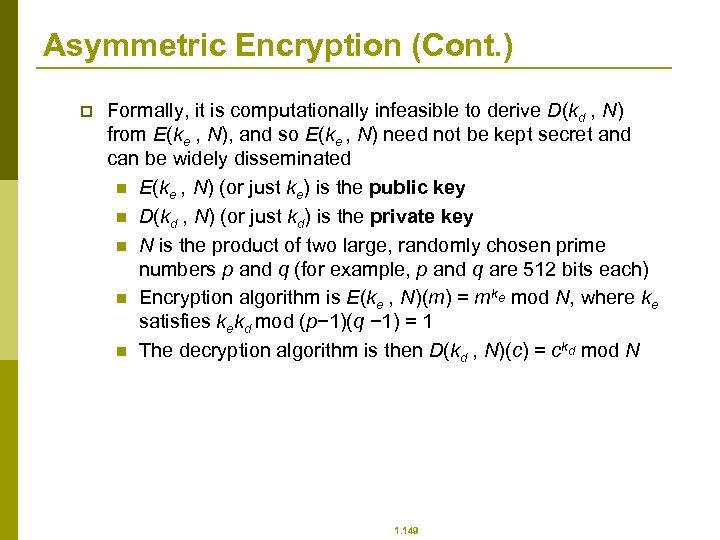 Asymmetric Encryption (Cont. ) p Formally, it is computationally infeasible to derive D(kd , N) from E(ke , N), and so E(ke , N) need not be kept secret and can be widely disseminated n E(ke , N) (or just ke) is the public key n D(kd , N) (or just kd) is the private key n N is the product of two large, randomly chosen prime numbers p and q (for example, p and q are 512 bits each) n Encryption algorithm is E(ke , N)(m) = mke mod N, where ke satisfies kekd mod (p− 1)(q − 1) = 1 n The decryption algorithm is then D(kd , N)(c) = ckd mod N 1. 149
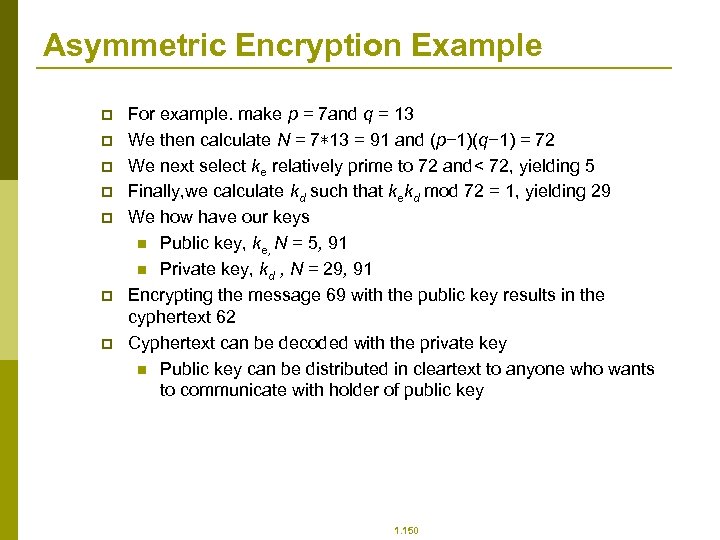 Asymmetric Encryption Example p p p p For example. make p = 7 and q = 13 We then calculate N = 7∗ 13 = 91 and (p− 1)(q− 1) = 72 We next select ke relatively prime to 72 and< 72, yielding 5 Finally, we calculate kd such that kekd mod 72 = 1, yielding 29 We how have our keys n Public key, ke, N = 5, 91 n Private key, kd , N = 29, 91 Encrypting the message 69 with the public key results in the cyphertext 62 Cyphertext can be decoded with the private key n Public key can be distributed in cleartext to anyone who wants to communicate with holder of public key 1. 150
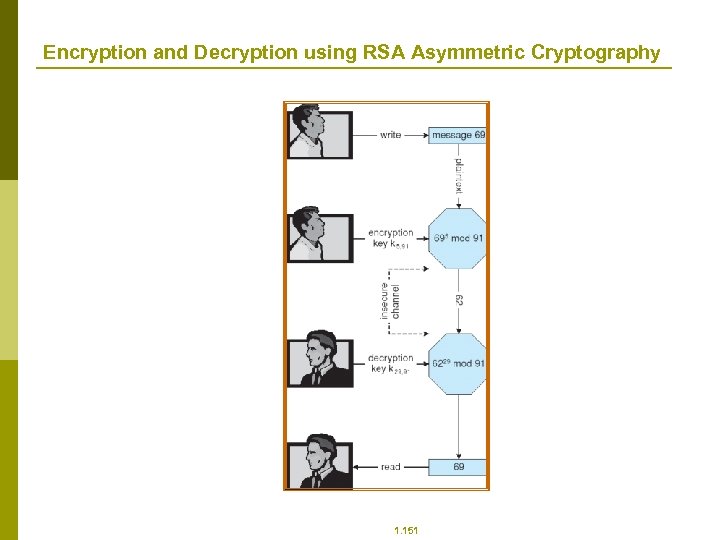 Encryption and Decryption using RSA Asymmetric Cryptography 1. 151
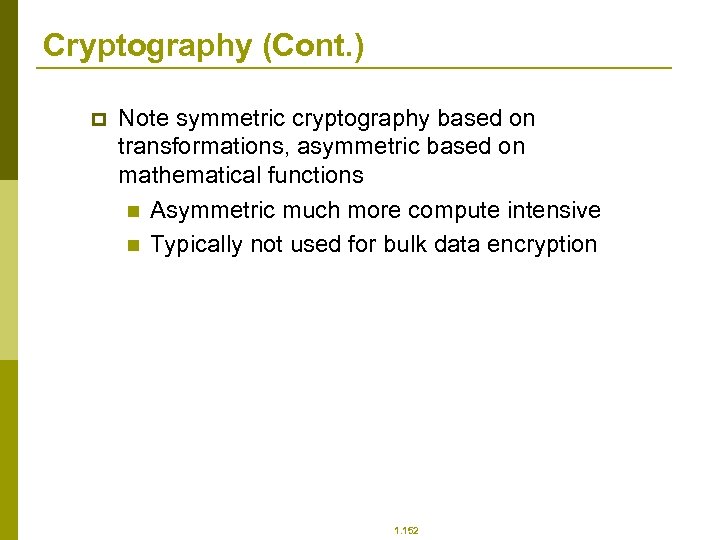 Cryptography (Cont. ) p Note symmetric cryptography based on transformations, asymmetric based on mathematical functions n Asymmetric much more compute intensive n Typically not used for bulk data encryption 1. 152
 Authentication p p Constraining set of potential senders of a message n Complementary and sometimes redundant to encryption n Also can prove message unmodified Algorithm components n A set K of keys n A set M of messages n A set A of authenticators n A function S : K → (M→ A) p That is, for each k K, S(k) is a function for generating authenticators from messages p Both S and S(k) for any k should be efficiently computable functions n A function V : K → (M× A→ {true, false}). That is, for each k K, V(k) is a function for verifying authenticators on messages p Both V and V(k) for any k should be efficiently computable functions 1. 153
 Authentication (Cont. ) p p For a message m, a computer can generate an authenticator a A such that V(k)(m, a) = true only if it possesses S(k) Thus, computer holding S(k) can generate authenticators on messages so that any other computer possessing V(k) can verify them Computer not holding S(k) cannot generate authenticators on messages that can be verified using V(k) Since authenticators are generally exposed (for example, they are sent on the network with the messages themselves), it must not be feasible to derive S(k) from the authenticators 1. 154
 Authentication – Hash Functions p p p Basis of authentication Creates small, fixed-size block of data (message digest, hash value) from m Hash Function H must be collision resistant on m n Must be infeasible to find an m’ ≠ m such that H(m) = H(m’) If H(m) = H(m’), then m = m’ n The message has not been modified Common message-digest functions include MD 5, which produces a 128 -bit hash, and SHA-1, which outputs a 160 -bit hash 1. 155
 Authentication - MAC p p Symmetric encryption used in message-authentication code (MAC) authentication algorithm Simple example: n MAC defines S(k)(m) = f (k, H(m)) p Where f is a function that is one-way on its first argument § k cannot be derived from f (k, H(m)) p Because of the collision resistance in the hash function, reasonably assured no other message could create the same MAC p A suitable verification algorithm is V(k)(m, a) ≡ ( f (k, m) = a) p Note that k is needed to compute both S(k) and V(k), so anyone able to compute one can compute the other 1. 156
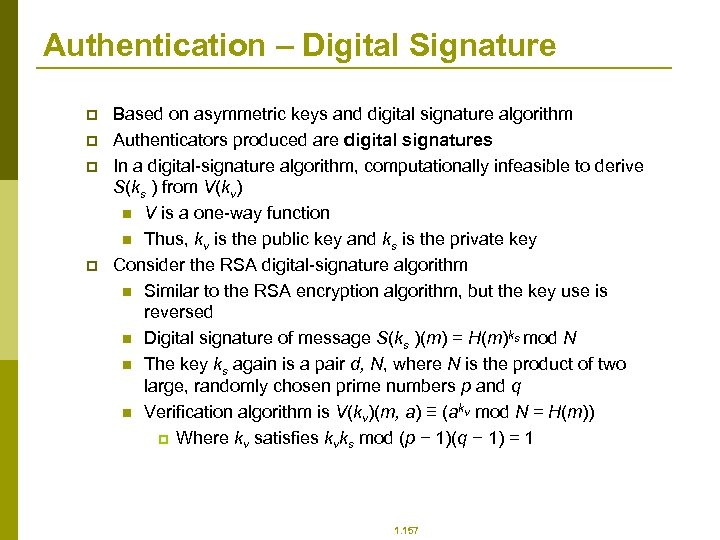 Authentication – Digital Signature p p Based on asymmetric keys and digital signature algorithm Authenticators produced are digital signatures In a digital-signature algorithm, computationally infeasible to derive S(ks ) from V(kv) n V is a one-way function n Thus, kv is the public key and ks is the private key Consider the RSA digital-signature algorithm n Similar to the RSA encryption algorithm, but the key use is reversed n Digital signature of message S(ks )(m) = H(m)ks mod N n The key ks again is a pair d, N, where N is the product of two large, randomly chosen prime numbers p and q n Verification algorithm is V(kv)(m, a) ≡ (akv mod N = H(m)) p Where kv satisfies kvks mod (p − 1)(q − 1) = 1 1. 157
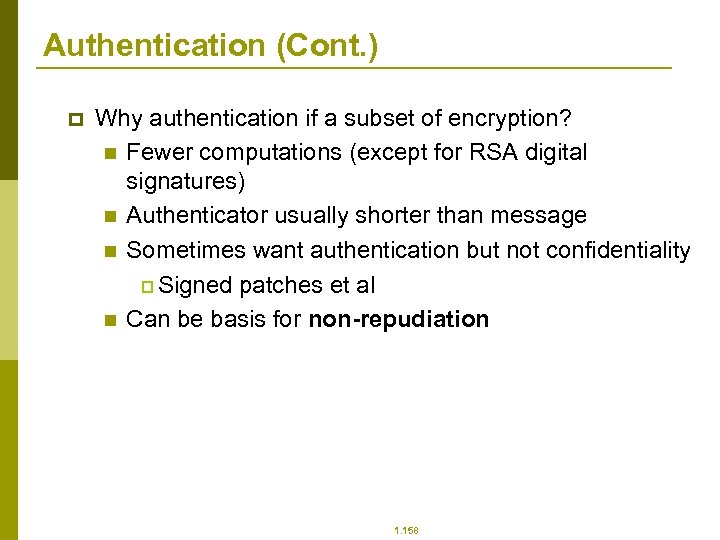 Authentication (Cont. ) p Why authentication if a subset of encryption? n Fewer computations (except for RSA digital signatures) n Authenticator usually shorter than message n Sometimes want authentication but not confidentiality p Signed patches et al n Can be basis for non-repudiation 1. 158
 Key Distribution p p Delivery of symmetric key is huge challenge n Sometimes done out-of-band Asymmetric keys can proliferate – stored on key ring n Even asymmetric key distribution needs care – man-in-the-middle attack 1. 159
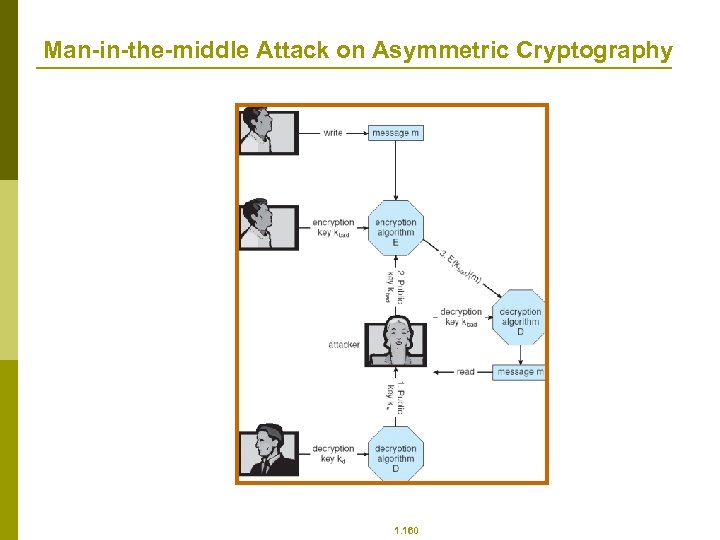 Man-in-the-middle Attack on Asymmetric Cryptography 1. 160
 Digital Certificates p p Proof of who or what owns a public key Public key digitally signed a trusted party Trusted party receives proof of identification from entity and certifies that public key belongs to entity Certificate authority are trusted party – their public keys included with web browser distributions n They vouch for other authorities via digitally signing their keys, and so on 1. 161
 Encryption Example - SSL p p p p Insertion of cryptography at one layer of the ISO network model (the transport layer) SSL – Secure Socket Layer (also called TLS) Cryptographic protocol that limits two computers to only exchange messages with each other n Very complicated, with many variations Used between web servers and browsers for secure communication (credit card numbers) The server is verified with a certificate assuring client is talking to correct server Asymmetric cryptography used to establish a secure session key (symmetric encryption) for bulk of communication during session Communication between each computer theb uses symmetric key cryptography 1. 162
 User Authentication p p Crucial to identify user correctly, as protection systems depend on user ID User identity most often established through passwords, can be considered a special case of either keys or capabilities n Also can include something user has and /or a user attribute Passwords must be kept secret n Frequent change of passwords n Use of “non-guessable” passwords n Log all invalid access attempts Passwords may also either be encrypted or allowed to be used only once 1. 163
 Implementing Security Defenses p p p Defense in depth is most common security theory – multiple layers of security Security policy describes what is being secured Vulnerability assessment compares real state of system / network compared to security policy Intrusion detection endeavors to detect attempted or successful intrusions n Signature-based detection spots known bad patterns n Anomaly detection spots differences from normal behavior p Can detect zero-day attacks n False-positives and false-negatives a problem Virus protection Auditing, accounting, and logging of all or specific system or network activities 1. 164
 Firewalling to Protect Systems and Networks p p p A network firewall is placed between trusted and untrusted hosts n The firewall limits network access between these two security domains Can be tunneled or spoofed n Tunneling allows disallowed protocol to travel within allowed protocol (i. e. telnet inside of HTTP) n Firewall rules typically based on host name or IP address which can be spoofed Personal firewall is software layer on given host n Can monitor / limit traffic to and from the host Application proxy firewall understands application protocol and can control them (i. e. SMTP) System-call firewall monitors all important system calls and apply rules to them (i. e. this program can execute that system call) 1. 165
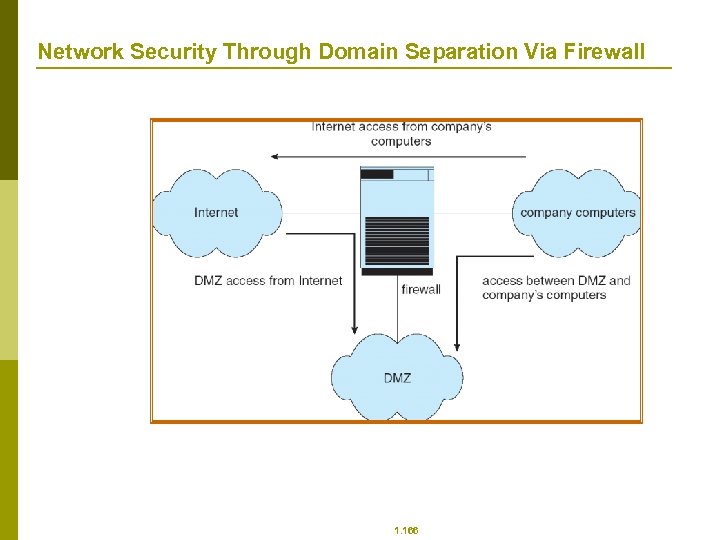 Network Security Through Domain Separation Via Firewall 1. 166
 Computer Security Classifications p p p U. S. Department of Defense outlines four divisions of computer security: A, B, C, and D. D – Minimal security. C – Provides discretionary protection through auditing. Divided into C 1 and C 2. C 1 identifies cooperating users with the same level of protection. C 2 allows user-level access control. B – All the properties of C, however each object may have unique sensitivity labels. Divided into B 1, B 2, and B 3. A – Uses formal design and verification techniques to ensure security. 1. 167
 Example: Windows XP p p p Security is based on user accounts n Each user has unique security ID n Login to ID creates security access token p Includes security ID for user, for user’s groups, and special privileges p Every process gets copy of token p System checks token to determine if access allowed or denied Uses a subject model to ensure access security. A subject tracks and manages permissions for each program that a user runs Each object in Windows XP has a security attribute defined by a security descriptor n For example, a file has a security descriptor that indicates the access permissions for all users 1. 168