


 Скачать презентацию 1 Installation Setup Guide ENTERPRISE PRINT
0a4d4e1bce1719dc413bf8df7f789fc2.ppt
- Количество слайдов: 24
 1 Installation & Setup Guide ENTERPRISE PRINT & COPY MANAGEMENT Installation Guide Not to be distributed without the permission of Altman Technologies Ltd Pcounter for Netware
 2 Installation & Setup Guide ENTERPRISE PRINT & COPY MANAGEMENT Pcounter Requirements. . . Pcounter for NDPS/IPrint Installation. . . . Pcounter Additional Information. . . . . Pcounter for Queue Based Printing. . . . Suppported features. . . Evaluation/Support Information. . . . . Not to be distributed without the permission of Altman Technologies Ltd Contents:
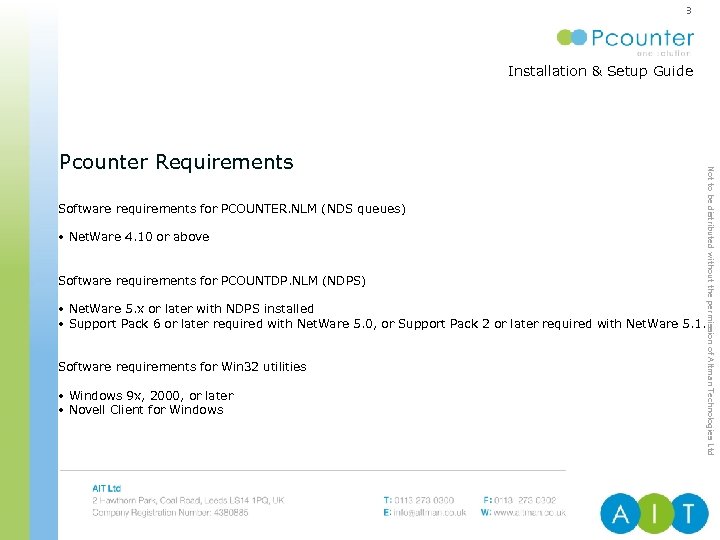 3 Installation & Setup Guide ENTERPRISE PRINT & COPY MANAGEMENT Software requirements for PCOUNTER. NLM (NDS queues) • Net. Ware 4. 10 or above Software requirements for PCOUNTDP. NLM (NDPS) • Net. Ware 5. x or later with NDPS installed • Support Pack 6 or later required with Net. Ware 5. 0, or Support Pack 2 or later required with Net. Ware 5. 1. Software requirements for Win 32 utilities • Windows 9 x, 2000, or later • Novell Client for Windows Not to be distributed without the permission of Altman Technologies Ltd Pcounter Requirements
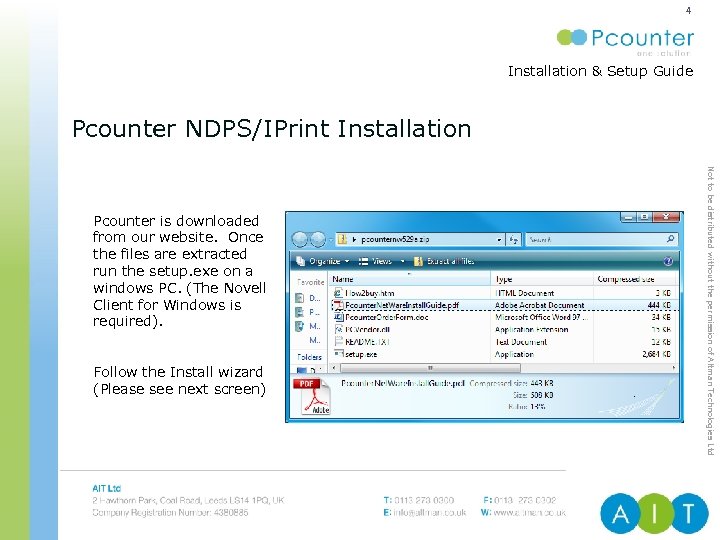 4 Installation & Setup Guide ENTERPRISE PRINT & COPY MANAGEMENT Pcounter NDPS/IPrint Installation Follow the Install wizard (Please see next screen) Not to be distributed without the permission of Altman Technologies Ltd Pcounter is downloaded from our website. Once the files are extracted run the setup. exe on a windows PC. (The Novell Client for Windows is required).
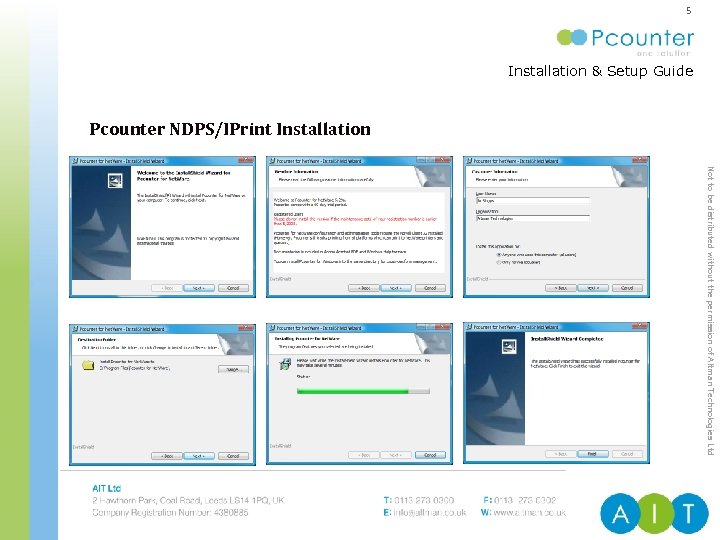 5 Installation & Setup Guide ENTERPRISE PRINT & COPY MANAGEMENT Pcounter NDPS/IPrint Installation Not to be distributed without the permission of Altman Technologies Ltd
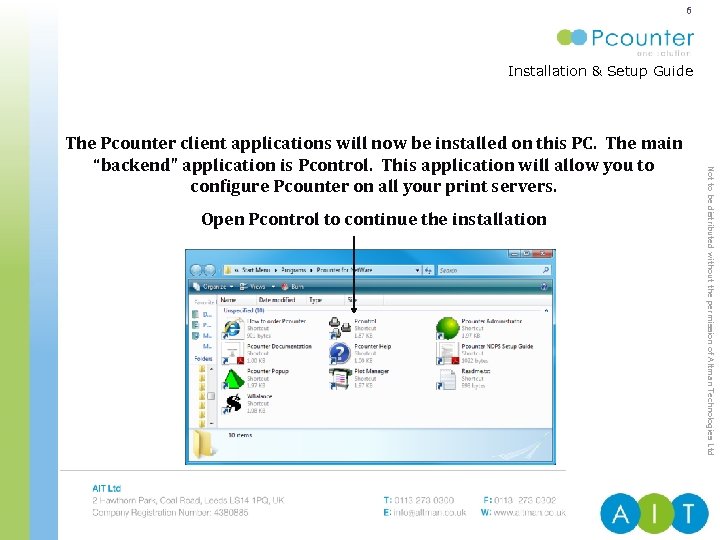 6 Installation & Setup Guide ENTERPRISE PRINT & COPY MANAGEMENT Open Pcontrol to continue the installation Not to be distributed without the permission of Altman Technologies Ltd The Pcounter client applications will now be installed on this PC. The main “backend” application is Pcontrol. This application will allow you to configure Pcounter on all your print servers.
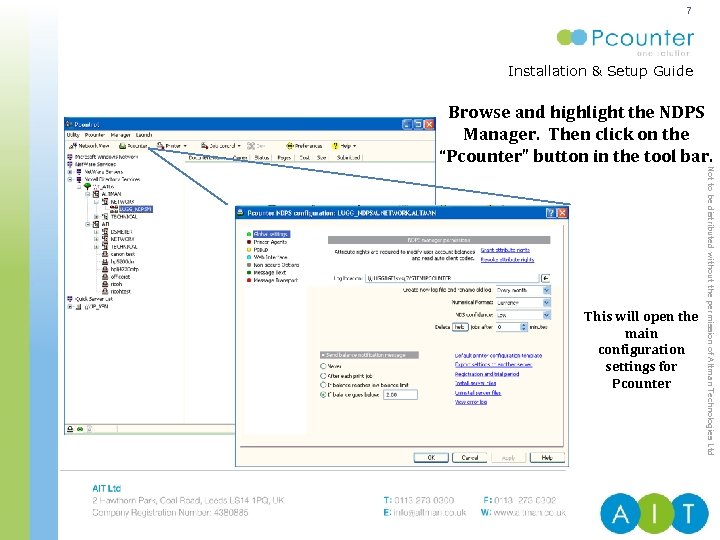 7 Installation & Setup Guide ENTERPRISE PRINT & COPY MANAGEMENT Browse and highlight the NDPS Manager. Then click on the “Pcounter” button in the tool bar. Not to be distributed without the permission of Altman Technologies Ltd This will open the main configuration settings for Pcounter
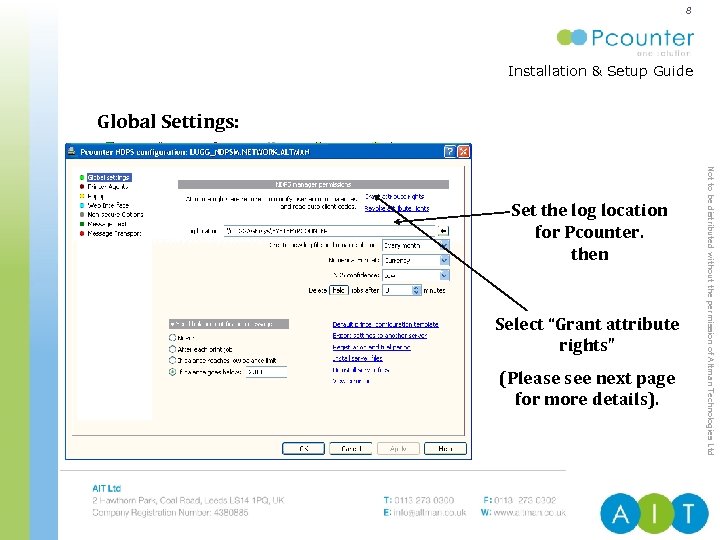 8 Installation & Setup Guide ENTERPRISE PRINT & COPY MANAGEMENT Global Settings: Select “Grant attribute rights” (Please see next page for more details). Not to be distributed without the permission of Altman Technologies Ltd Set the log location for Pcounter. then
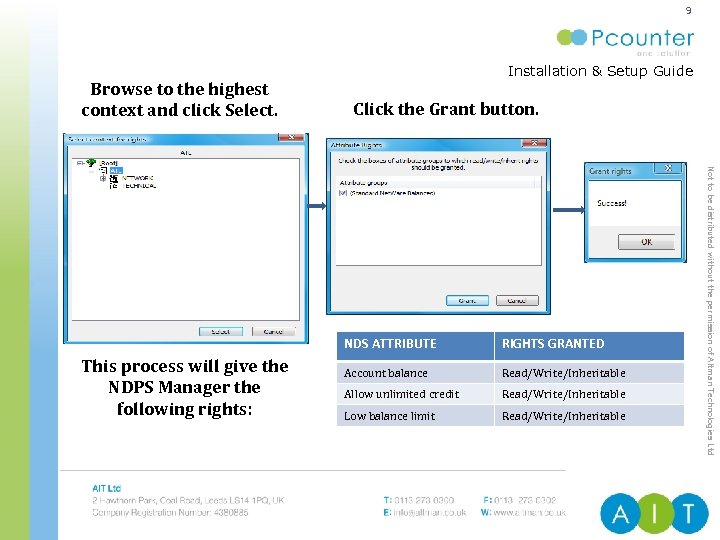 9 Browse to the highest context and click Select. Installation & Setup Guide ENTERPRISE PRINT & COPY MANAGEMENT Click the Grant button. This process will give the NDPS Manager the following rights: RIGHTS GRANTED Account balance Read/Write/Inheritable Allow unlimited credit Read/Write/Inheritable Low balance limit Read/Write/Inheritable Not to be distributed without the permission of Altman Technologies Ltd NDS ATTRIBUTE
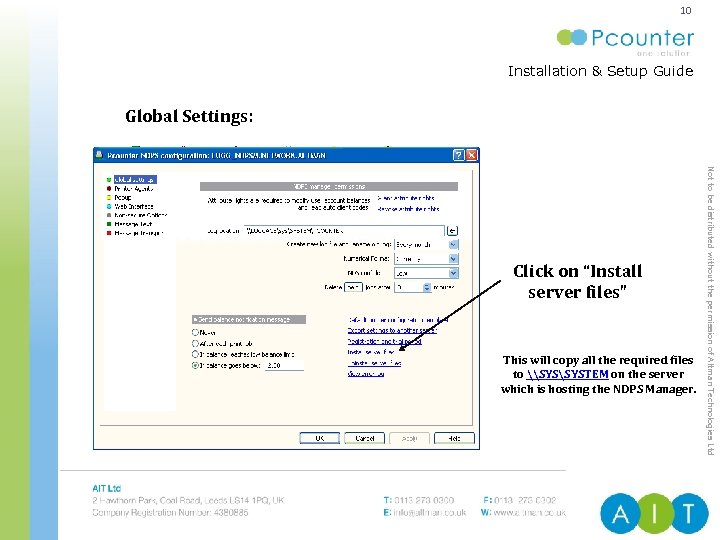 10 Installation & Setup Guide ENTERPRISE PRINT & COPY MANAGEMENT Global Settings: This will copy all the required files to \SYSTEM on the server which is hosting the NDPS Manager. Not to be distributed without the permission of Altman Technologies Ltd Click on “Install server files”
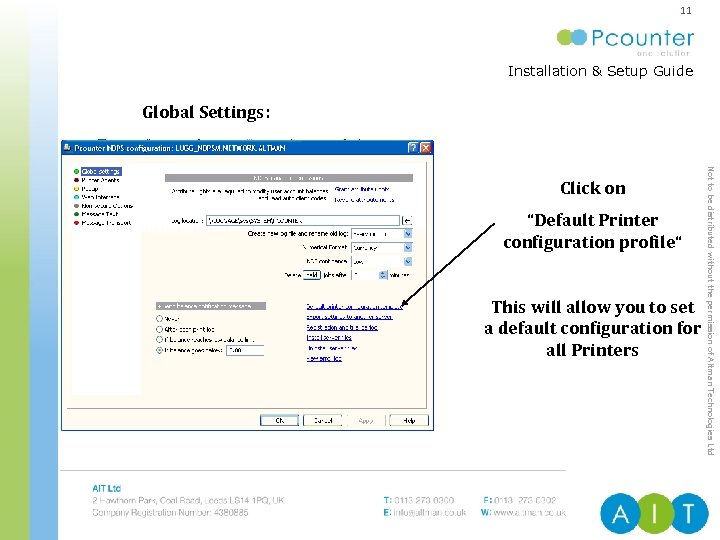 11 Installation & Setup Guide ENTERPRISE PRINT & COPY MANAGEMENT Global Settings: “Default Printer configuration profile“ This will allow you to set a default configuration for all Printers Not to be distributed without the permission of Altman Technologies Ltd Click on
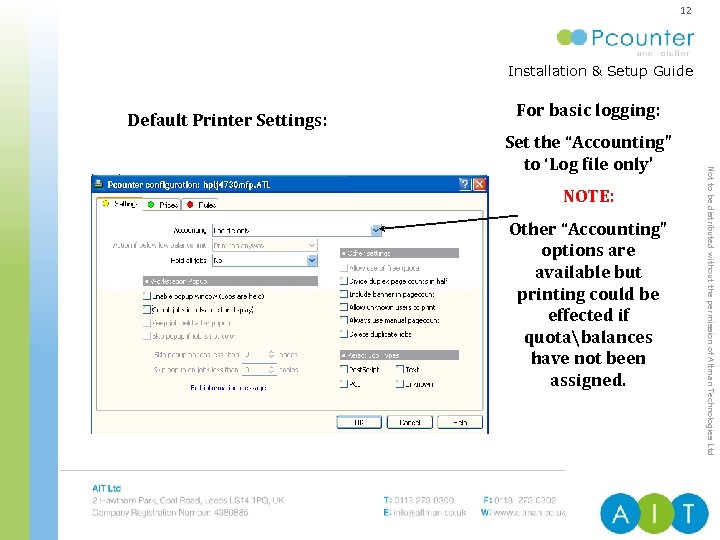 12 Installation & Setup Guide ENTERPRISE PRINT & COPY MANAGEMENT Default Printer Settings: For basic logging: NOTE: Other “Accounting” options are available but printing could be effected if quotabalances have not been assigned. Not to be distributed without the permission of Altman Technologies Ltd Set the “Accounting” to ‘Log file only’
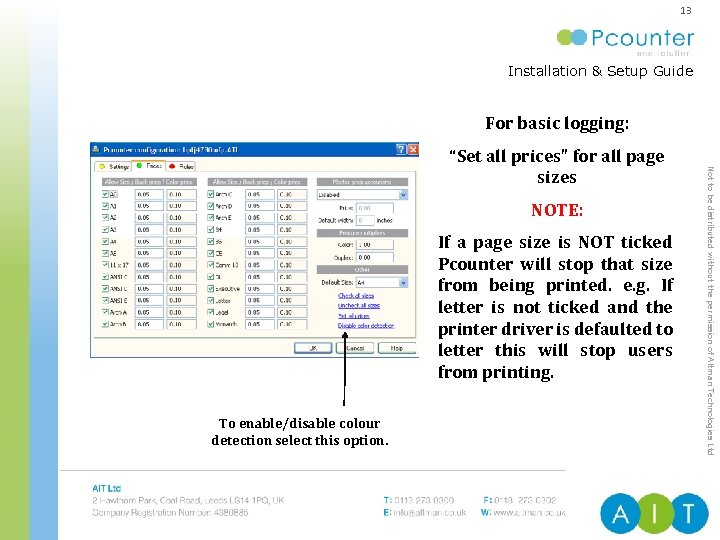 13 Installation & Setup Guide ENTERPRISE PRINT & COPY MANAGEMENT For basic logging: NOTE: If a page size is NOT ticked Pcounter will stop that size from being printed. e. g. If letter is not ticked and the printer driver is defaulted to letter this will stop users from printing. To enable/disable colour detection select this option. Not to be distributed without the permission of Altman Technologies Ltd “Set all prices” for all page sizes
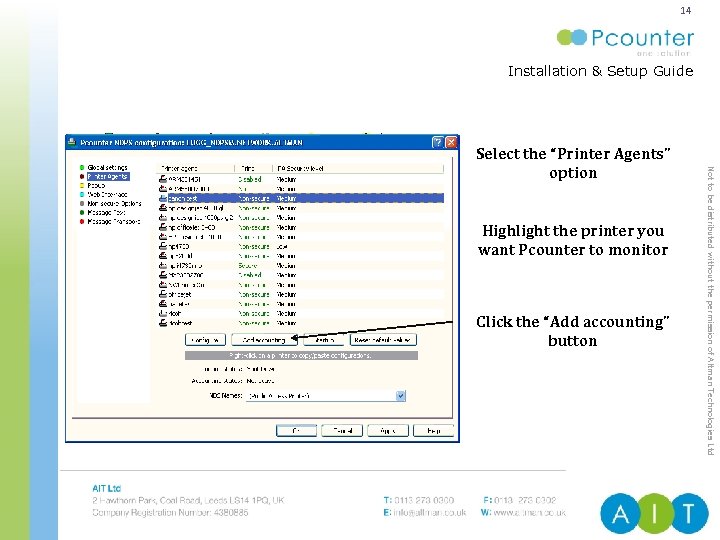 14 Installation & Setup Guide ENTERPRISE PRINT & COPY MANAGEMENT Highlight the printer you want Pcounter to monitor Click the “Add accounting” button Not to be distributed without the permission of Altman Technologies Ltd Select the “Printer Agents” option
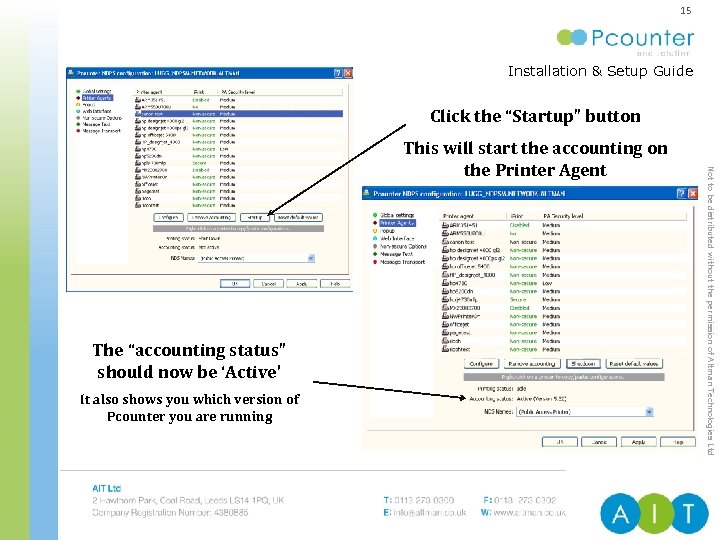 15 Installation & Setup Guide ENTERPRISE PRINT & COPY MANAGEMENT Click the “Startup” button The “accounting status” should now be ‘Active’ It also shows you which version of Pcounter you are running Not to be distributed without the permission of Altman Technologies Ltd This will start the accounting on the Printer Agent
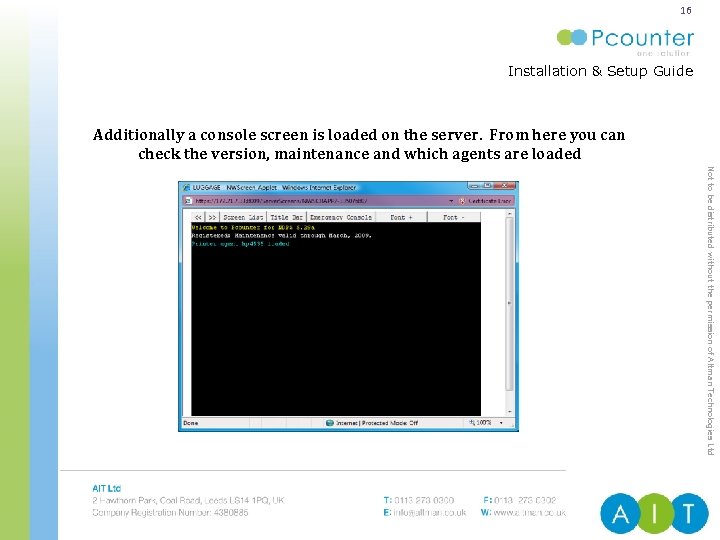 16 Installation & Setup Guide ENTERPRISE PRINT & COPY MANAGEMENT Additionally a console screen is loaded on the server. From here you can check the version, maintenance and which agents are loaded Not to be distributed without the permission of Altman Technologies Ltd
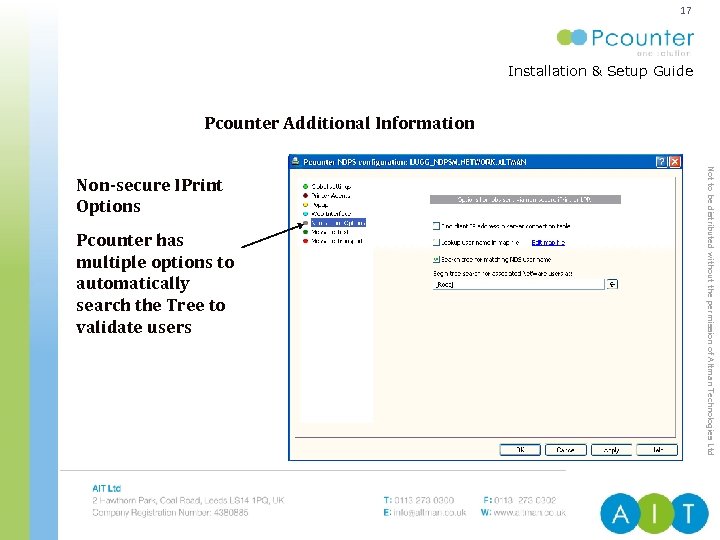 17 Installation & Setup Guide ENTERPRISE PRINT & COPY MANAGEMENT Pcounter Additional Information Pcounter has multiple options to automatically search the Tree to validate users Not to be distributed without the permission of Altman Technologies Ltd Non-secure IPrint Options
 18 Installation & Setup Guide ENTERPRISE PRINT & COPY MANAGEMENT Pcounter also supports traditional Queue Based printing This type of printing requires additional configuration For a complete guide for setting up Queue Based Printing please contact us: T: 0113 273 0300 E: support@altman. co. uk Not to be distributed without the permission of Altman Technologies Ltd Pcounter for Queue Based Printing
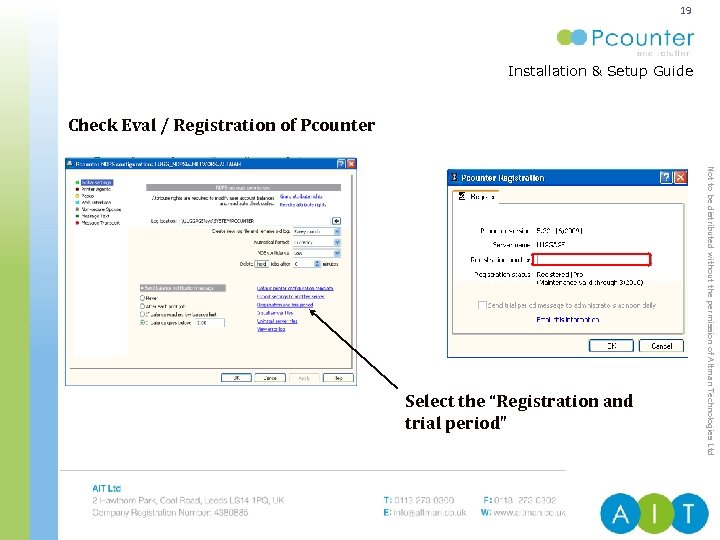 19 Installation & Setup Guide ENTERPRISE PRINT & COPY MANAGEMENT Check Eval / Registration of Pcounter Not to be distributed without the permission of Altman Technologies Ltd Select the “Registration and trial period”
 20 Installation & Setup Guide ENTERPRISE PRINT & COPY MANAGEMENT SUPPORTED FEATURES (1/4) Enforces printing account balances/quotas for users. Stores the balance(s) for quotas in the NDS/e. Directory. Users can check their balances via web browser or using WBalance, a small Windows utility that runs in the system tray. Keeps a log file of all print activity - for printers hosted on multiple servers the log can be kept in one central location for easy access. The log file includes user name, document name, printer/queue name, date, time, client station, client code, subcode, paper size, features, byte size, page count, cost, and account balance. Not to be distributed without the permission of Altman Technologies Ltd Counts pages printed on any Post. Script or PCL printer, from all major manufacturers such as HP, Xerox, Lexmark, Canon, and more. Also included are Ricoh RPCS, Canon Bubble. Jet, Image. Runner, HPGL, Epson (ESC/P, ESC/P 2, ESC/PAGE) printers. This covers most lasers, inkjets, and multifunction devices on the market today. Support for TIFF printing is included, and Pcounter also tracks plot size on HPGL/2 and Post. Script plotters.
 21 Installation & Setup Guide ENTERPRISE PRINT & COPY MANAGEMENT SUPPORTED FEATURES (2/4) The cost for each page is determined by the paper size used in the print job, allowing variable costs for printers that support multiple paper sizes. Print jobs requesting an invalid paper size can be discarded. Roll plotters can be accounted for based on image size. Can generate various printing usage reports and print histories of users, printers, and client codes. Reports and histories can be saved as HTML, CSV, or formatted text, can be directly launched into Excel or web browsers, and can be sent by email. Rules-based printing for load balancing based on maximum and minimum byte sizes and/or page counts - print jobs can be deleted, moved to the end of the queue, or moved to another print queue. Not to be distributed without the permission of Altman Technologies Ltd Windows users may have a popup window for billing print jobs to clients/job numbers.
 22 Installation & Setup Guide ENTERPRISE PRINT & COPY MANAGEMENT SUPPORTED FEATURES (3/4) A Plot Manager handles batch submission of printer-ready files to printers and plotters, including support for client billing codes and scheduling. Reject incorrect print job types such as Postscript on PCL printers. Network broadcast messages can be customised and sent at any time to keep users informed. Customisable banner pages can be used which contain all information about the print job, including the page count and account balance. Not to be distributed without the permission of Altman Technologies Ltd All print jobs can be automatically held/paused, and global (print job configuration) settings for queues can be automatically enforced. Each server has a default template that can be used globally for all print queues on that server.
 23 Installation & Setup Guide SUPPORTED FEATURES (4/4) ENTERPRISE PRINT & COPY MANAGEMENT The Pcounter workstation tools (popup and account balance information) are internationalised in French, Spanish, Portuguese, Italian, German, Finnish, Dutch, Czech, Swedish, Danish, Polish, and Norwegian. Pcounter can be used to enforce global print job configurations on queues, which can enable or disable banner, form feed, and notify settings without needing to worry about workstation settings. Pcounter can automatically assign print job ownership from other platforms (such as Mac and Unix) by searching the NDS tree or bindery, or delete the job if an owner cannot be found. Pcounter supports i. Print and NDPS clustering. All trademarks contained in this document are the properties of their respective owners. Not to be distributed without the permission of Altman Technologies Ltd Administration can be done from any Windows workstation or server on the network, including printer/queue set-up, configuration, properties, permissions, and print job management.
 24 Installation & Setup Guide ENTERPRISE PRINT & COPY MANAGEMENT Do you have any questions ? AIT Ltd 2 Hawthorn Park, Coal Road, Leeds, LS 14 1 PQ, U. K. T: 0113 273 0300 F: 0113 273 0302 Outside UK: +44 113 273 0300/0302 W: www. altman. co. uk Technical support: www. altman. co. uk/support Product information & sales: info@altman. co. uk Not to be distributed without the permission of Altman Technologies Ltd Contact us. . .