


 Скачать презентацию 1 GVHD Phạm Trần Vũ Sinh viên thực
4994a1031325b879e6a5f5006429c4df.ppt
- Количество слайдов: 64
 1 GVHD: Phạm Trần Vũ Sinh viên thực hiện: 1 - Nguyễn Thị Vân Anh 2 - Lê Thị Hồng Hà 3 - Vũ Thị Lộc Phương 4 - Tăng Thu Hương 5 - Huỳnh Thị Kim Trâm 6 - Hồ Thị Kim Oanh
 2 Outline v General concepts v Domain Name System (DNS) v Directory and Discovery Services v Introduction Jini Other name services Global Name Service (GNS) X 500 Directory Service
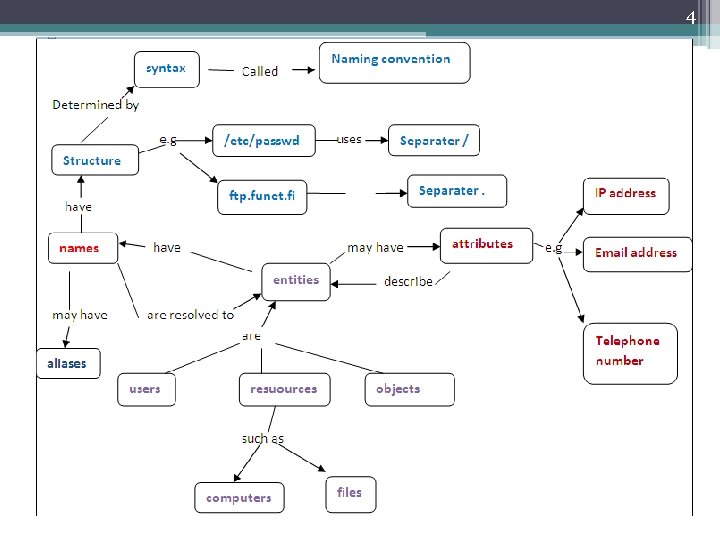
 3 Introduction • In a distributed system names are used to refer to a wide variety of resources such as computers, services, remote objects, and files as well as users. • Names are used for identification as well as for describing attributes. • For many purposes, names are preferable to identifiers ▫ because the binding of the named resource to a physical location is deferred and can be changed ▫ because they are more meaningful to users
 4
4
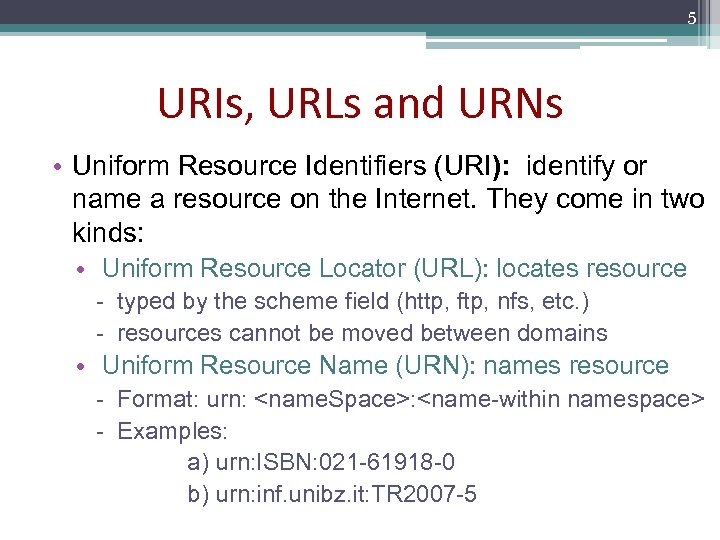 5 URIs, URLs and URNs • Uniform Resource Identifiers (URI): identify or name a resource on the Internet. They come in two kinds: • Uniform Resource Locator (URL): locates resource - typed by the scheme field (http, ftp, nfs, etc. ) - resources cannot be moved between domains • Uniform Resource Name (URN): names resource - Format: urn:
 6
6
 7
7
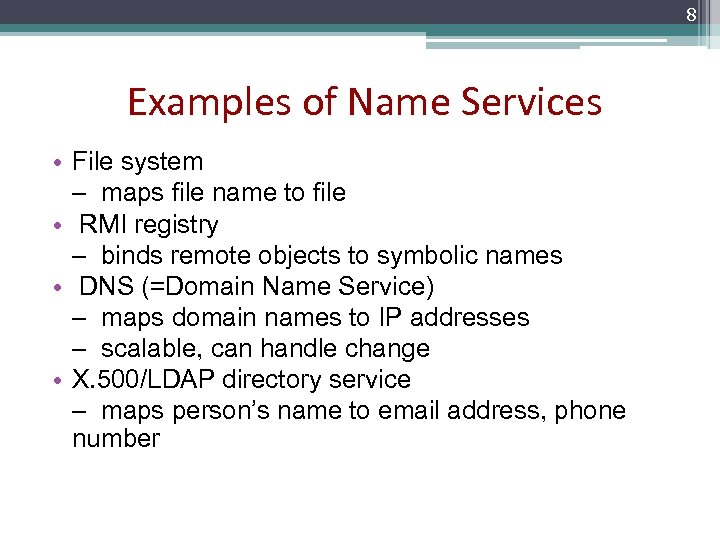 8 Examples of Name Services • File system – maps file name to file • RMI registry – binds remote objects to symbolic names • DNS (=Domain Name Service) – maps domain names to IP addresses – scalable, can handle change • X. 500/LDAP directory service – maps person’s name to email address, phone number
 9 Design Issues • Name spaces • Name Resolution • The domain name system
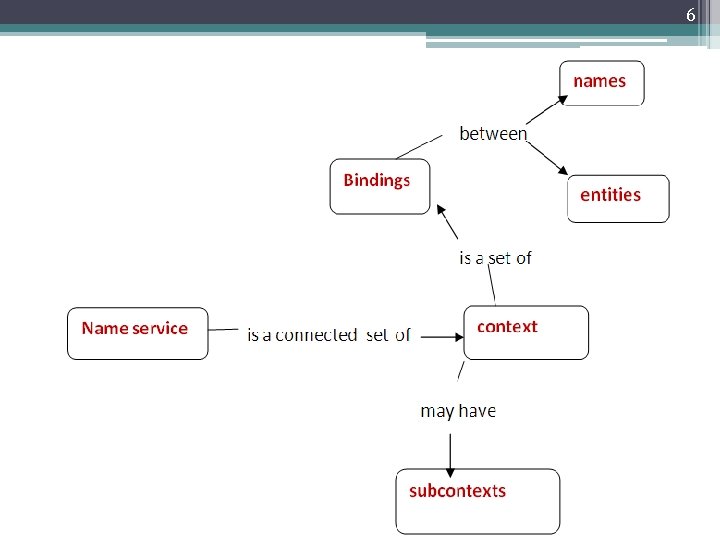
 10 Name Spaces • A name space is a collection of all valid names recognized by a particular service • Allow simple but meaningful names to be used • Potentially infinite number of names • Structured ▫ to allow similar subnames without clashes ▫ to group related names
 11 Hierarchic Name Spaces • Sequence of name tokens resolved in different context – syntax: name token (text string) + delimiter – DNS: inf. unibz. it – Unix: /usr/bin • Name structure reflects organisational structure • Examples – domain names, Window file system
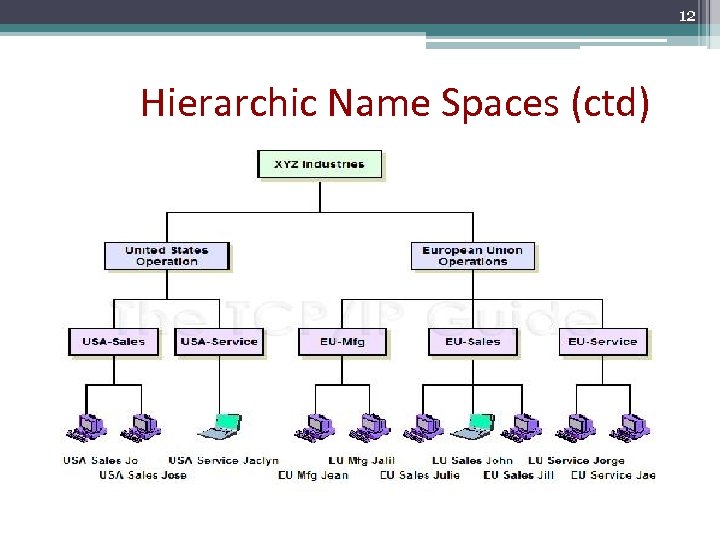 12 Hierarchic Name Spaces (ctd)
 13 Flat Name Spaces • Single global context and naming authority for all names – computer serial number – Ethernet address – remote object reference (IP address, port, time, object number, interface id) • Names not meaningful – difficult to resolve (no tree hierarchy) – easy to create
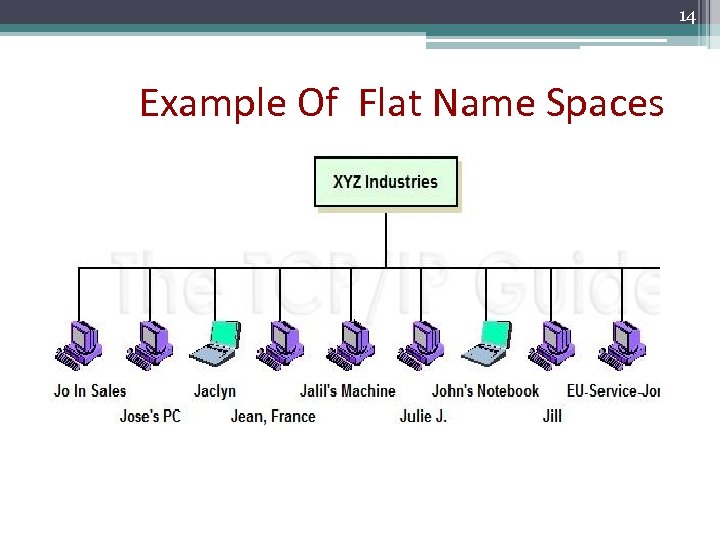 14 Example Of Flat Name Spaces
 15 Outline v. General concepts v. Domain Name System (DNS) v. Directory and Discovery Services ▫ Introduction ▫ Jini v. Other name services ▫ Global Name Service (GNS) ▫ X 500 Directory Service
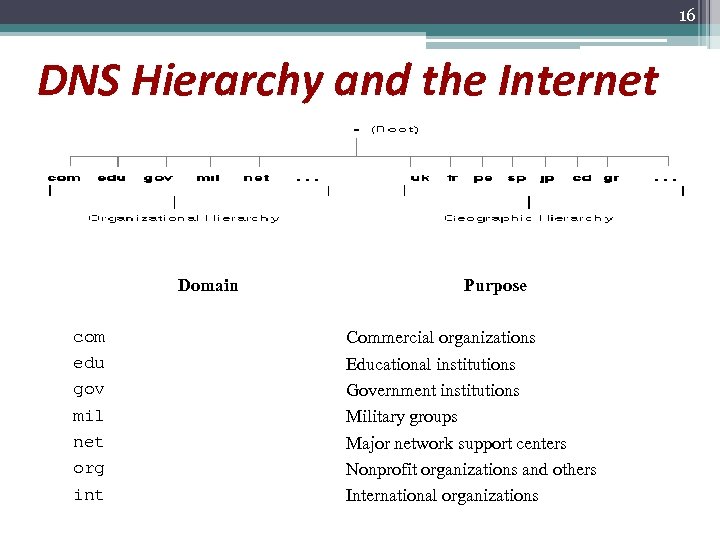 16 DNS Hierarchy and the Internet Domain com edu gov mil net org int Purpose Commercial organizations Educational institutions Government institutions Military groups Major network support centers Nonprofit organizations and others International organizations
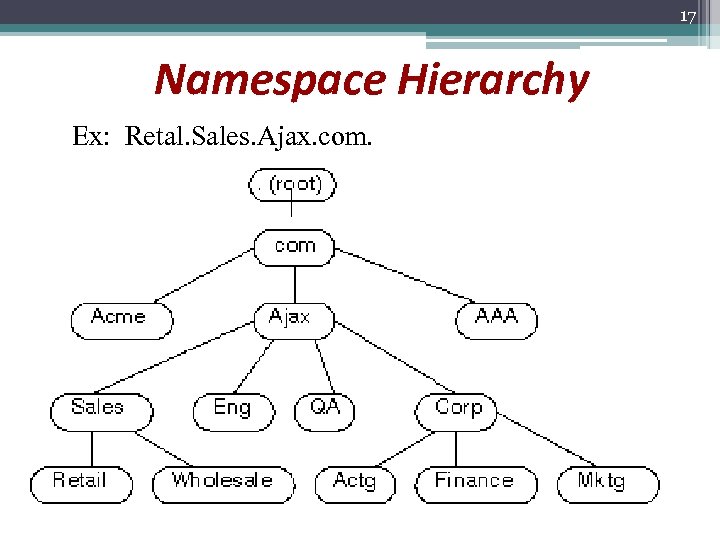 17 Namespace Hierarchy Ex: Retal. Sales. Ajax. com.
 18 What is DNS ? ØDomain Name System (DNS) is: ü an application-layer protocol that is part of the standard TCP/IP protocol suite. üThis protocol implements the DNS name service, which is the name service used on the Internet. üDNS is a distributed naming database
 19 What DNS used for? ØThe basic function of DNS: Ø Providing name-to-address resolution for TCP/IP-based networks. (mapping) ØOthers: Ø Mail Delivery Ø Get mail host for a domain Ø Reverse resolution Ø Get domain name from IP address Ø Host information Ø Type of hardware and OS Ø Well-known services Ø A list of well-known services offered by a host.
 20 Get Address. Øwhen a program is running on your local machine needs to contact a remote computer, mapping occur. Øhow to locate address? Ørequests assistance from the DNS software running on your local machine, which is considered a DNS client ( is call resolver). Øsends a request to a DNS name server, which maintains the distributed DNS database: the host names, IP addresses, and other information about a particular group of computers
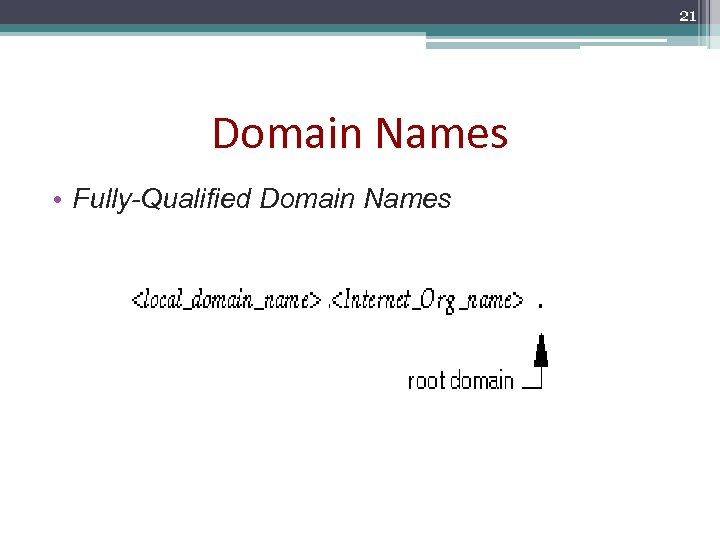 21 Domain Names • Fully-Qualified Domain Names
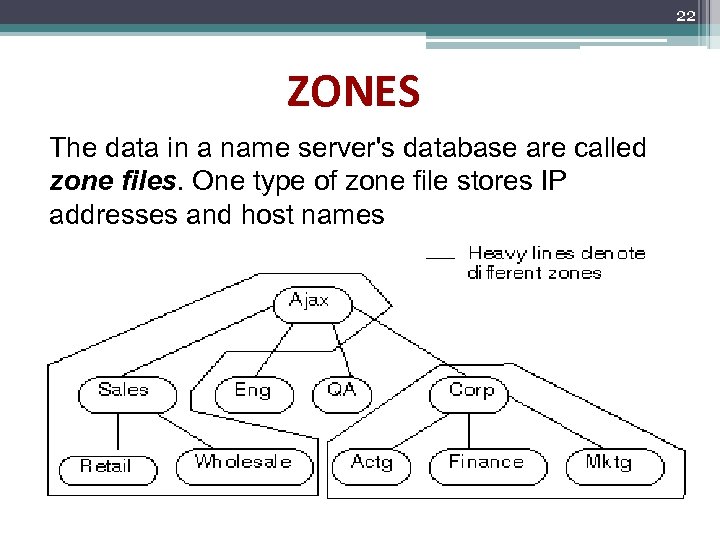 22 ZONES The data in a name server's database are called zone files. One type of zone file stores IP addresses and host names
 23 DNS Administrative Domains: Ø Is a group of machines or resources that are administered as a unit. Ø Is maintained by at least two name servers. Ø Name servers have the graphical relations like business…
 24 DNS Servers • in. named and DNS Name Servers : Name servers in an administrative domaintain the DNS database. They run in. name( can be called BIND- University of California at Berkeley). • • • Primary server. Secondary. Cache-only.
 25 DNS Resolver • Name Resolution Services o Standard Name Resolution. o Reverse Name Resolution. o Electronic Mail Resolution. ……
 26 DNS Resolver Functions o Providing The User Interface. o Forming and Sending Queries. o Processing Responses.
 27 DNS Resolver Functions • Other Functions: o Caching. o In fact, it is possible to set up a network so that the resolvers on each of the client machines do nothing more than hand resolution requests to a local DNS server and let the server take care of it. The client resolver becomes a stub resolver. Advantage of centralizing name resolution for the network. Disadvantage of performance reduction.
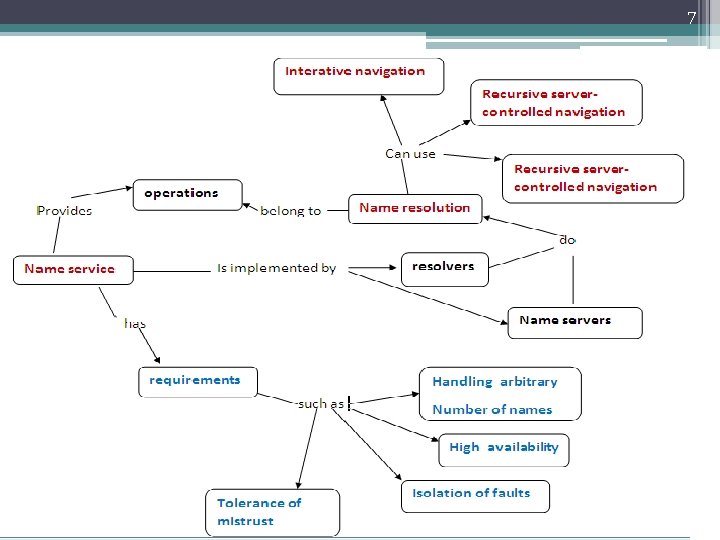
 28 DNS Basic Name Resolution Techniques: DNS Name Resolution Techniques: o Iterative Resolution o Recursive Resolution
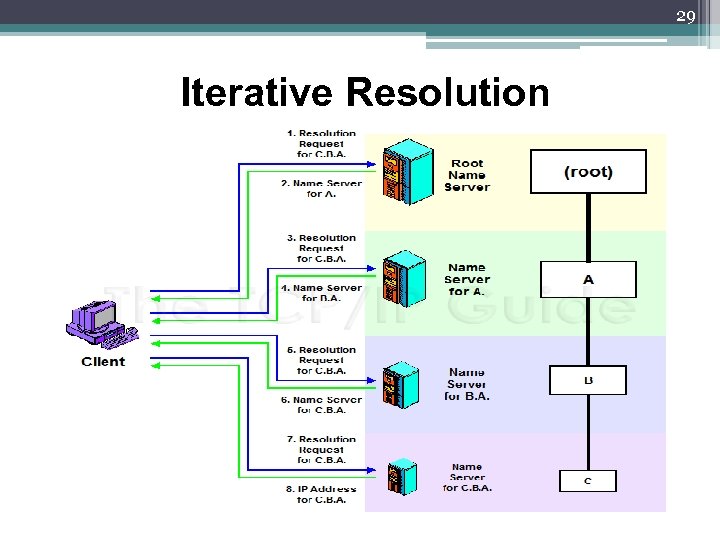 29 Iterative Resolution
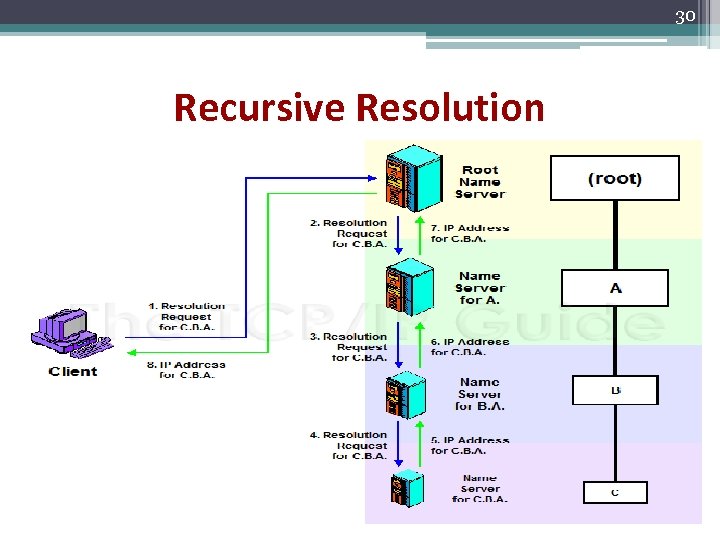 30 Recursive Resolution
 31 DNS Name Resolution Efficiency Improvements: § Caching § Local Resolution
 32 CACHING • The Motivation for Caching: Locality of Reference ▫ spatial locality of reference: resource is more likely to be referenced if it is near another resource that was recently referenced. ▫ temporal locality of reference: resource is more likely to be accessed if it was recently accessed. • Name Resolver Caching ▫ once a particular name is resolved, it is cached and remains ready for the next time ▫ this eliminates traffic and load on DNS servers.
 33 Local Resolution • DNS servers will perform this check to see if they have the information needed for a request before commencing the “formal” top-down resolution process
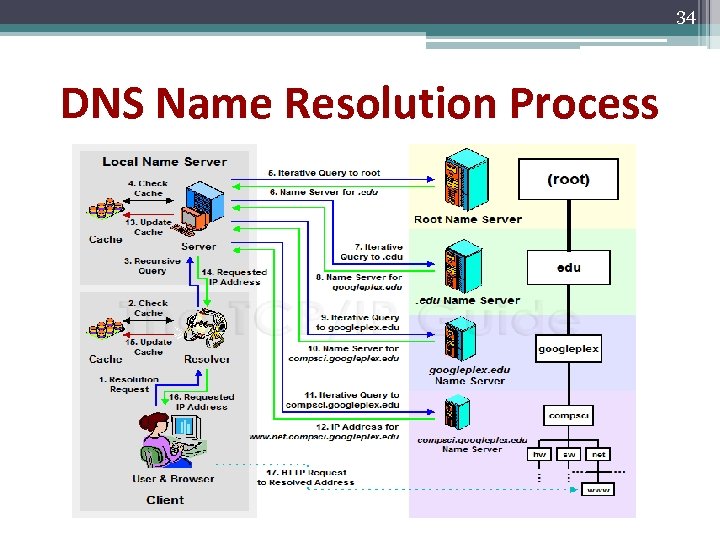 34 DNS Name Resolution Process
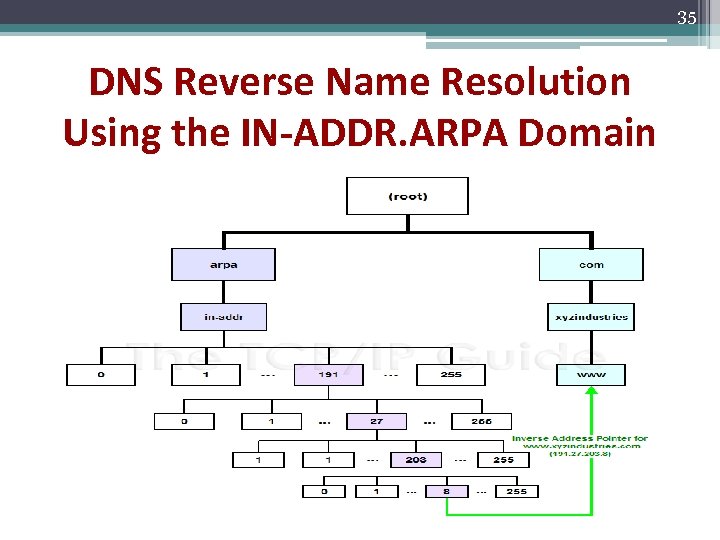 35 DNS Reverse Name Resolution Using the IN-ADDR. ARPA Domain
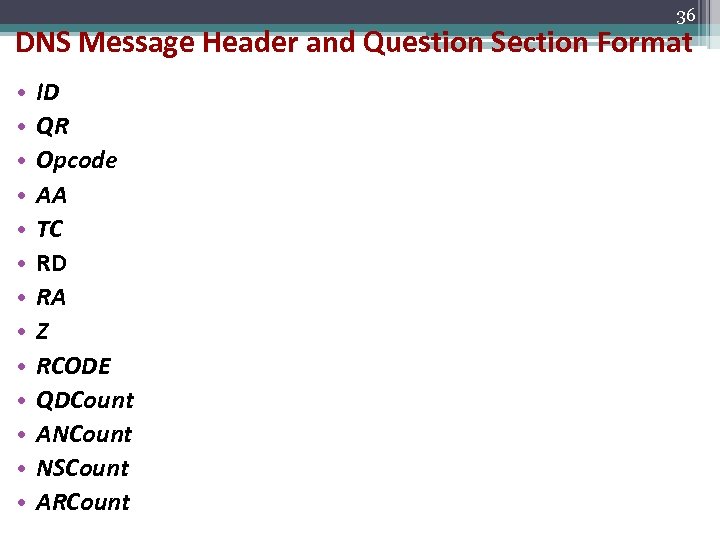 36 DNS Message Header and Question Section Format • • • • ID QR Opcode AA TC RD RA Z RCODE QDCount ANCount NSCount ARCount
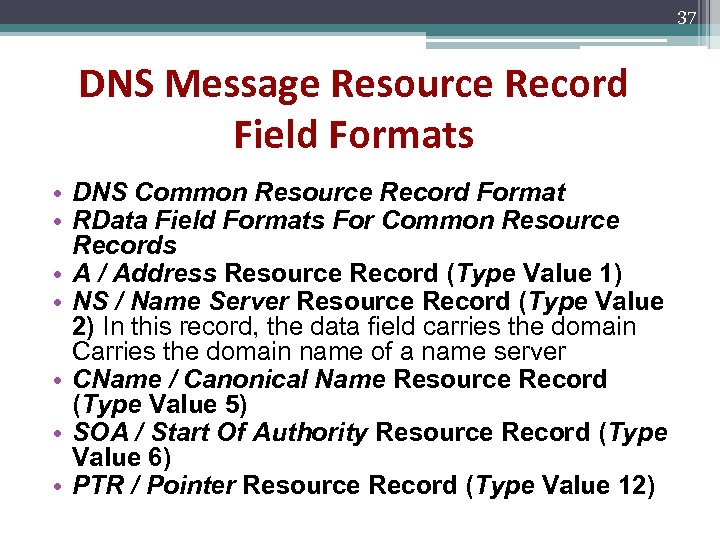 37 DNS Message Resource Record Field Formats • DNS Common Resource Record Format • RData Field Formats For Common Resource Records • A / Address Resource Record (Type Value 1) • NS / Name Server Resource Record (Type Value 2) In this record, the data field carries the domain Carries the domain name of a name server • CName / Canonical Name Resource Record (Type Value 5) • SOA / Start Of Authority Resource Record (Type Value 6) • PTR / Pointer Resource Record (Type Value 12)
 38 HOW ? ? ? • DNS FREE • DNS SERVER ON UNIX
 39 DNS FREE • EDITZONE
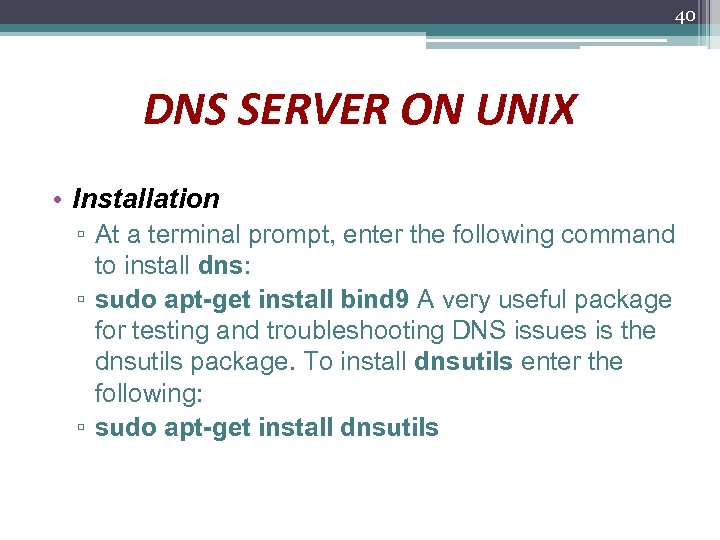 40 DNS SERVER ON UNIX • Installation ▫ At a terminal prompt, enter the following command to install dns: ▫ sudo apt-get install bind 9 A very useful package for testing and troubleshooting DNS issues is the dnsutils package. To install dnsutils enter the following: ▫ sudo apt-get install dnsutils
 41 DNS configuration q v v q q Declare zones Forward zone Reverse zone Describe zone’s database Declare DNS client
 42 Outline v General concepts v Domain Name System (DNS) v Directory and Discovery Services v Introduction Jini Other name services Global Name Service (GNS) X 500 Directory Service
 43 Directory and Discovery Services • Directory services • Discovery services • Jini case study
 44 Directory services A special kind of naming service – Searching attributes Entries – Each entry is concerned with a set of
 45 Directory services • Sometimes directory services are called “yellow pages services”, while name services are called “white pages services” • Often organized in a hierarchy • Examples of directory services: 1. Microsoft’s Active Directory Services 2. X. 500
 46 Discovery services • A discovery service is a directory service that registers the services provided in a spontaneous networking environment. • Is automatically updated as the network configuration changes • Services notify the discovery service of existence via a registration interface • Discovery has a scope (the context)
 47 Discovery services(tt) • Provide an interface for automatically registering and de-registering services, as well as an interface for clients to look up the services they require ▫ Ex: a printer (or the service that manages it) may register its attributes with the discovery service as follows: ‘resource. Class = printer, type=laser, color=yes, resolution=600 dpi, location=room 101, url=http: //www. hotel. NW. com/services/printer 98’ • Example - Jini (a Java-based system for spontaneous networking)
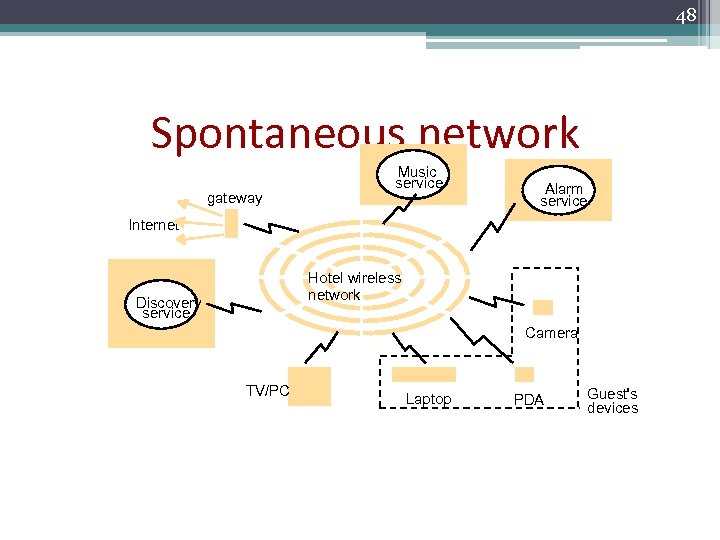 48 Spontaneous network gateway Music service Alarm service Internet Hotel wireless network Discovery service Camera TV/PC Laptop PDA Guest's devices
 49 Jini Discovery Service • Designed to be used for spontaneous networking • Entirely java-based • Computers communicate by means of RMI, and can download code if necessary • Discovery-related components in a Jini system are look up services • A Jini service (such as printing service) may be registered with many look up services
 50 Jini Discovery Service(tt) • A lookup service – A service registers an object with a set of attributes – Clients query the lookup service – Clients download service object that matches query • Leases – A limited period of time during which the service can be used
 51 Jini Discovery Service(tt) • How to locate the look up service ? ▫ Using a well-known multicast IP address ▫ Multicast the request using a “time to live” value • Service instance is configured with one or more group names such as ‘finance’, ‘sales’, ‘admin’, which act as scoping labels.
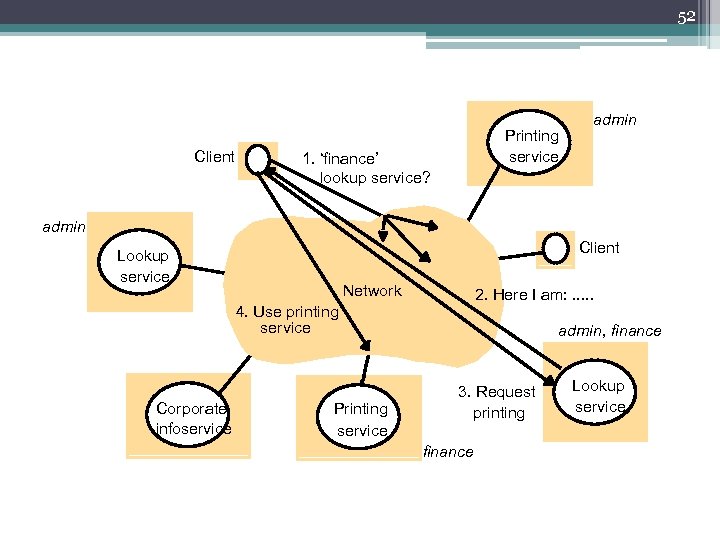 52 Client Printing service 1. ‘finance’ lookup service? admin Client Lookup service Network 2. Here I am: . . . 4. Use printing service Corporate infoservice Printing service admin, finance 3. Request printing finance Lookup service
 53 OTHER NAME SERVICES • Global name service (GNS) • X. 500 and LDAP • Trading service
 54 Global name service § was designed and implemented by Lampson and colleagues at the DEC Systems Research Center to provide facilities for resource location, mail addressing and authentication § an early research project (1985) that developed solutions for the problems of: large name spaces restructuring the name space
 55 X. 500 and LDAP • primarily used to satisfy descriptive queries, designed to discover the names and attributes of other users or system resources • as a network service intended to meet these requirements • is specified as an application level service in the Open Systems Interconnection (OSI) set of standards
 56 X. 500 and LDAP • X. 500 is also the basis for LDAP • The data stored in X. 500 servers is organized in a tree structure with named nodes as in the case of the other name servers • in X. 500 a wide range of attributes are stored at each node in the tree, and access is not just by name but also by searching for entries with any required combination of attributes
 57 X. 500 and LDAP • DIT: the directory information tree • DIB: the entire directory structure including the data associated with the nodes is called the directory information base • provides the capability to look up information by name (a white-pages service) and to browse and search for information (a yellow-pages service)
 58 X. 500 and LDAP • Entries in the DIB are arranged in a tree structure called DIT • Each entry is a named object and consists of a set of attributes • Each attribute has a defined attribute type and one or more values • The directory schema defines the mandatory and optional attributes for each class of object
 59 X. 500 and LDAP • The X. 500 namespace is hierarchical • Users of the X. 500 directory may (subject to access control) interrogate and modify the entries and attributes in the DIB.
 60 Protocols • The X. 500 standard defines a protocol (among others) for a client application to access the X. 500 directory • Called the Directory Access Protocol (DAP), it is layered on top of the Open Systems Interconnection (OSI) protocol stack.
 61 Trading service • CORBA name service • CORBA event service • CORBA Notification Service
 62 Name services: Summary ▫ defer the binding of resource names to addresses (and other attributes) ▫ Names are resolved to give addresses and other attributes ▫ Goals : Scalability (size of database, access traffic (hits/second), update traffic) Reliability Trust management (authority of servers) ▫ Issues exploitation of replication and caching to achieve scalability without compromising the distribution of updates navigation methods Directory and discovery services: ▫ 'yellow pages' retrieval by attributes ▫ dynamic resource registration and discovery
 63 Referrences q Distributed system q http: //www. tcpipguide. com/free/
 64 Q. A ^_^