 Скачать презентацию 02220 Distributed Systems Computer Networking Basics Alessio Di
4e8cfaff85acc2b3e67fca16803b98ee.ppt
- Количество слайдов: 45



02220 Distributed Systems: Computer Networking Basics Alessio Di Mauro (adma@dtu. dk) Xenofon Fafoutis (xefa@dtu. dk)
Chapter 1 Introduction Computer Networking: A Top Down Approach 6 th edition Jim Kurose, Keith Ross Addison-Wesley March 2012 All material copyright 1996 -2012 J. F Kurose and K. W. Ross, All Rights Reserved Introduction 1 -2
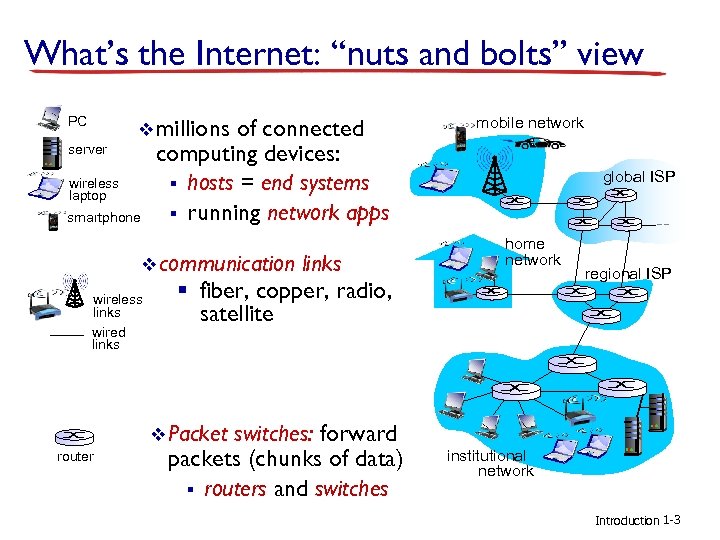
What’s the Internet: “nuts and bolts” view PC server v millions wireless laptop smartphone of connected computing devices: § hosts = end systems § running network apps v communication wireless links wired links § fiber, copper, radio, satellite v Packet router switches: forward packets (chunks of data) § routers and switches mobile network global ISP home network regional ISP institutional network Introduction 1 -3
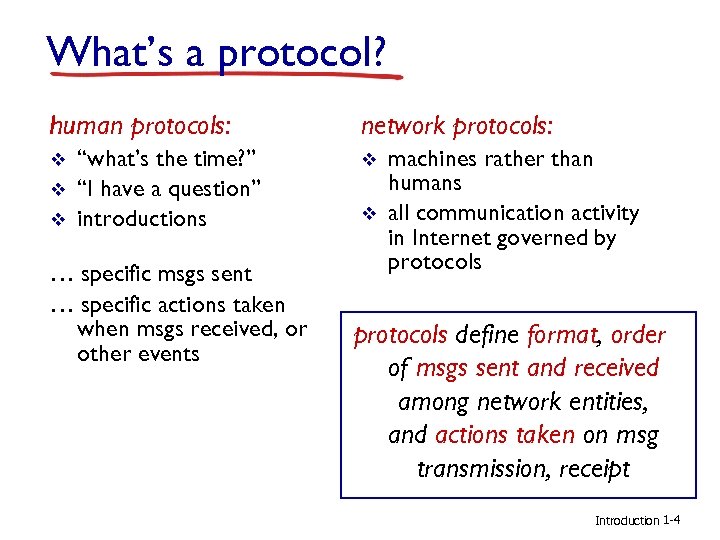
What’s a protocol? human protocols: v v v “what’s the time? ” “I have a question” introductions … specific msgs sent … specific actions taken when msgs received, or other events network protocols: v v machines rather than humans all communication activity in Internet governed by protocols define format, order of msgs sent and received among network entities, and actions taken on msg transmission, receipt Introduction 1 -4
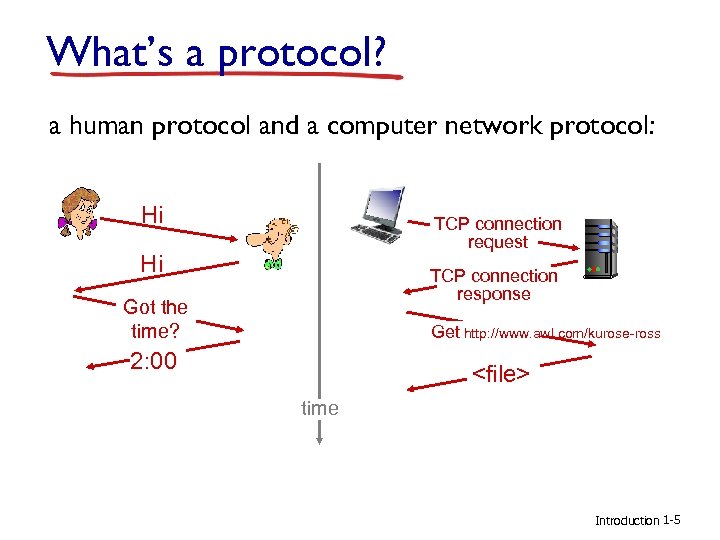
What’s a protocol? a human protocol and a computer network protocol: Hi TCP connection request Hi TCP connection response Got the time? Get http: //www. awl. com/kurose-ross 2: 00 <file> time Introduction 1 -5
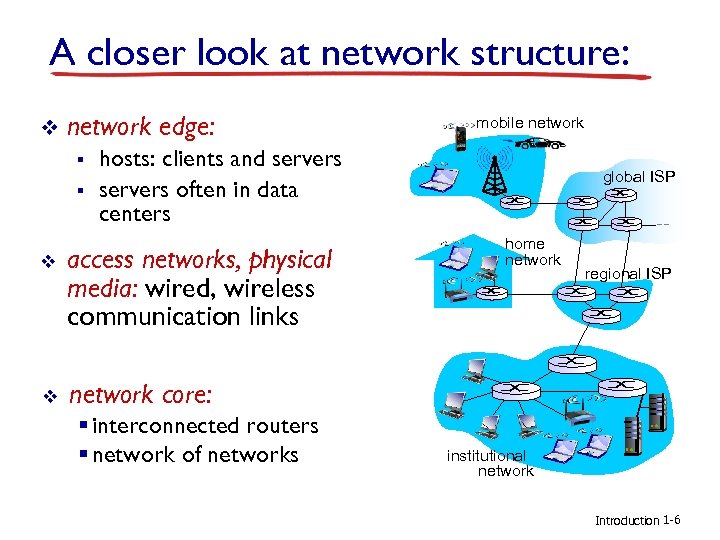
A closer look at network structure: v network edge: § § mobile network hosts: clients and servers often in data centers v access networks, physical media: wired, wireless communication links v global ISP home network core: § interconnected routers § network of networks regional ISP institutional network Introduction 1 -6
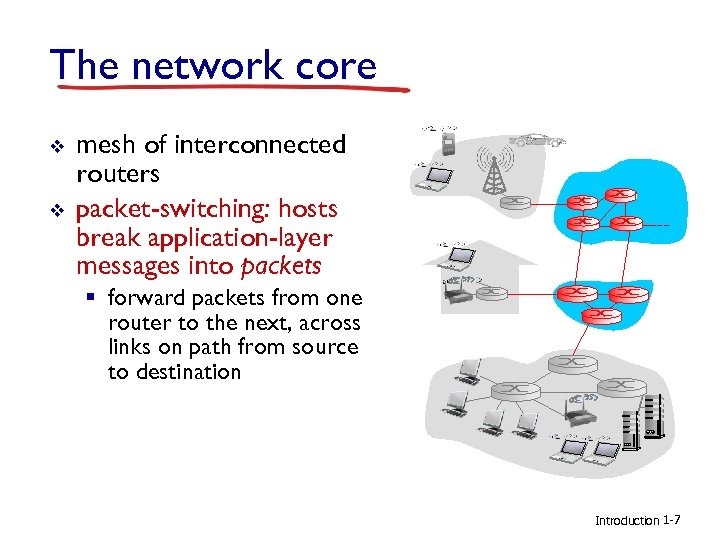
The network core v v mesh of interconnected routers packet-switching: hosts break application-layer messages into packets § forward packets from one router to the next, across links on path from source to destination Introduction 1 -7
Protocol “layers” Networks are complex, with many “pieces”: § hosts § routers § links of various media § applications § protocols § hardware, software Question: is there any hope of organizing structure of network? …. or at least our discussion of networks? Introduction 1 -8
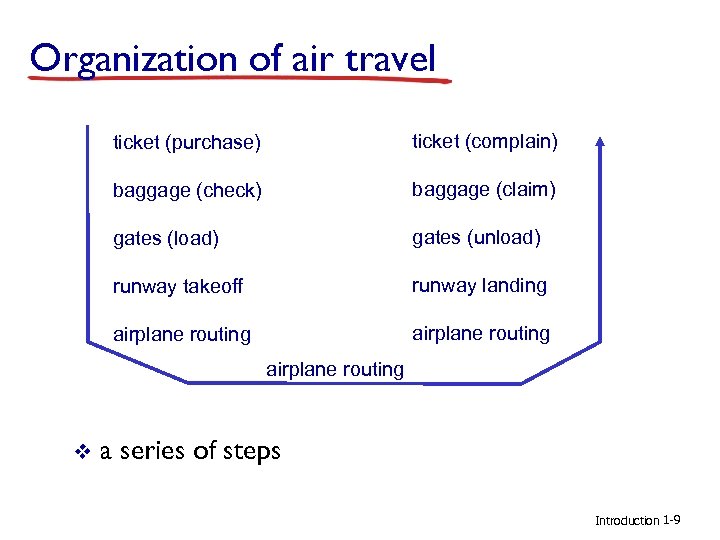
Organization of air travel ticket (purchase) ticket (complain) baggage (check) baggage (claim) gates (load) gates (unload) runway takeoff runway landing airplane routing v a series of steps Introduction 1 -9
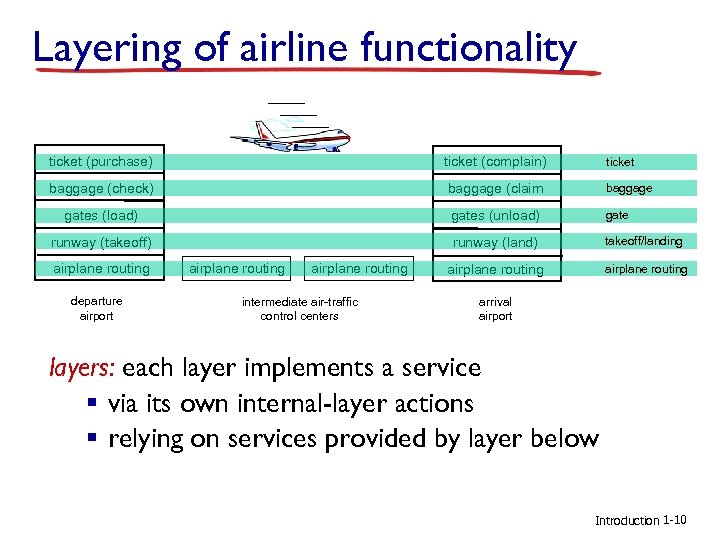
Layering of airline functionality ticket (purchase) ticket (complain) ticket baggage (check) baggage (claim baggage gates (load) gates (unload) gate runway (takeoff) runway (land) takeoff/landing airplane routing departure airport airplane routing intermediate air-traffic control centers arrival airport layers: each layer implements a service § via its own internal-layer actions § relying on services provided by layer below Introduction 1 -10
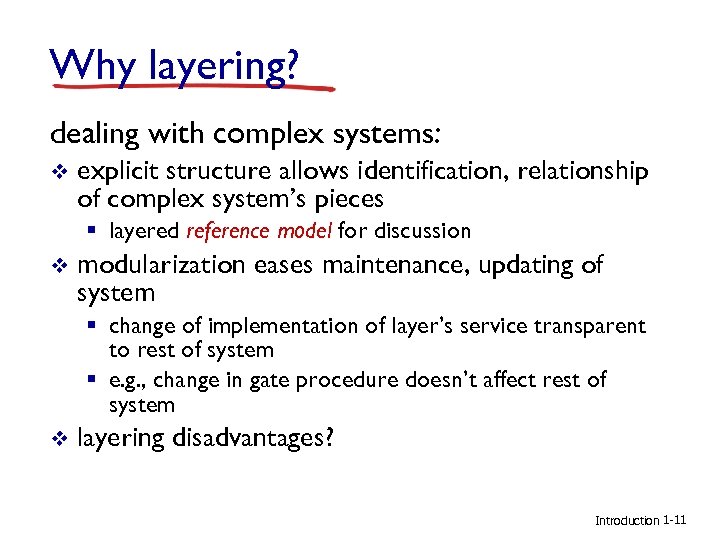
Why layering? dealing with complex systems: v explicit structure allows identification, relationship of complex system’s pieces § layered reference model for discussion v modularization eases maintenance, updating of system § change of implementation of layer’s service transparent to rest of system § e. g. , change in gate procedure doesn’t affect rest of system v layering disadvantages? Introduction 1 -11
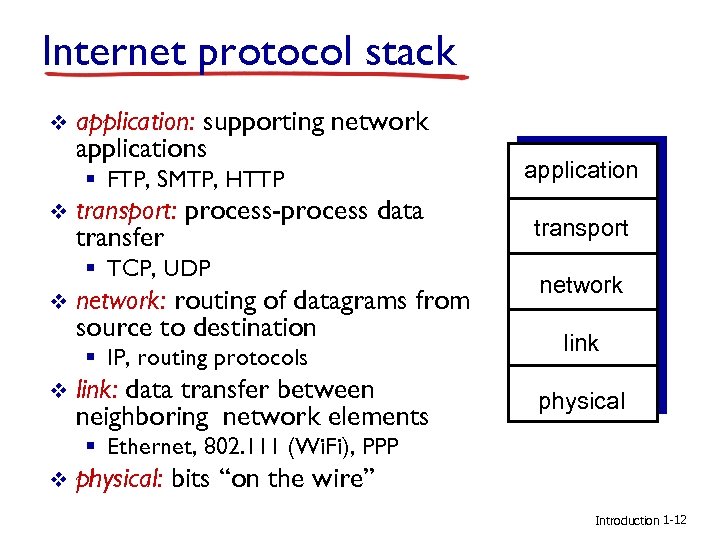
Internet protocol stack v application: supporting network applications § FTP, SMTP, HTTP v transport: process-process data transfer § TCP, UDP v network: routing of datagrams from source to destination § IP, routing protocols v link: data transfer between neighboring network elements application transport network link physical § Ethernet, 802. 111 (Wi. Fi), PPP v physical: bits “on the wire” Introduction 1 -12
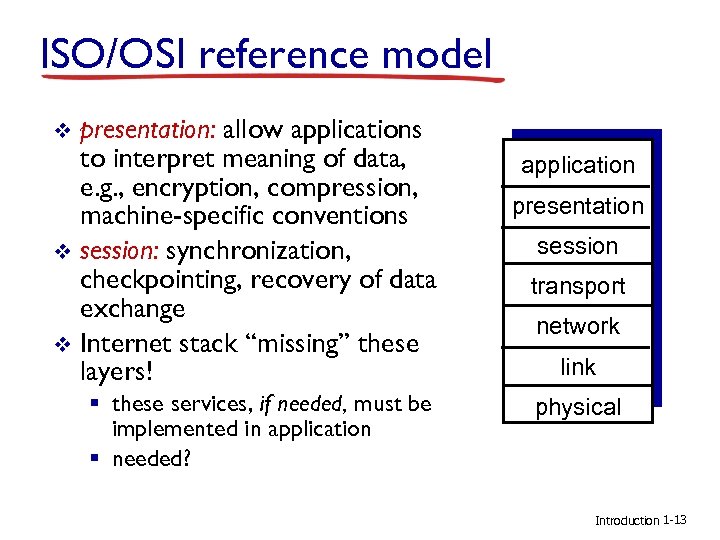
ISO/OSI reference model presentation: allow applications to interpret meaning of data, e. g. , encryption, compression, machine-specific conventions v session: synchronization, checkpointing, recovery of data exchange v Internet stack “missing” these layers! v § these services, if needed, must be implemented in application § needed? application presentation session transport network link physical Introduction 1 -13
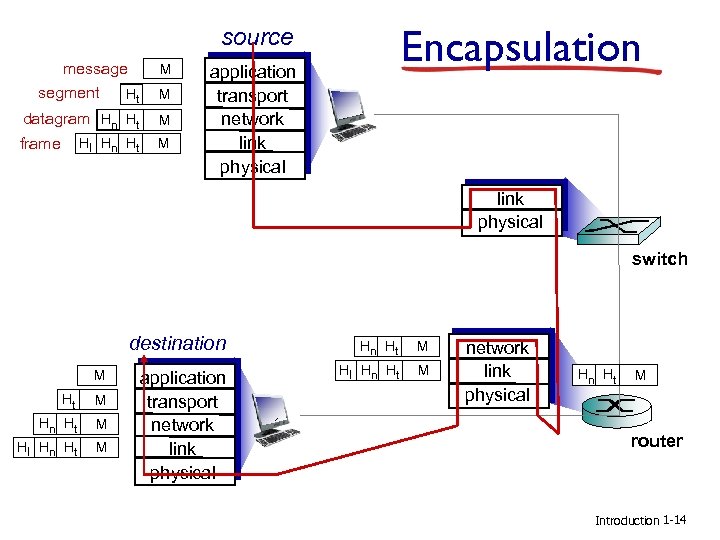
Encapsulation source message segment Ht M datagram Hn Ht M frame M Hl Hn Ht M application transport network link physical switch destination M Ht M Hn Ht Hl Hn Ht M M application transport network link physical Hn Ht Hl Hn Ht M M network link physical Hn Ht M router Introduction 1 -14
Chapter 2 Application Layer Computer Networking: A Top Down Approach 6 th edition Jim Kurose, Keith Ross Addison-Wesley March 2012 All material copyright 1996 -2012 J. F Kurose and K. W. Ross, All Rights Reserved Application Layer 2 -15
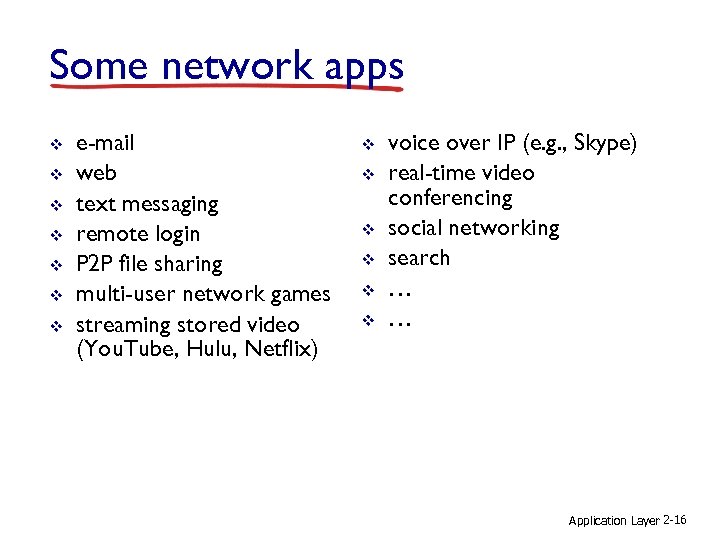
Some network apps v v v v e-mail web text messaging remote login P 2 P file sharing multi-user network games streaming stored video (You. Tube, Hulu, Netflix) v v v voice over IP (e. g. , Skype) real-time video conferencing social networking search … … Application Layer 2 -16
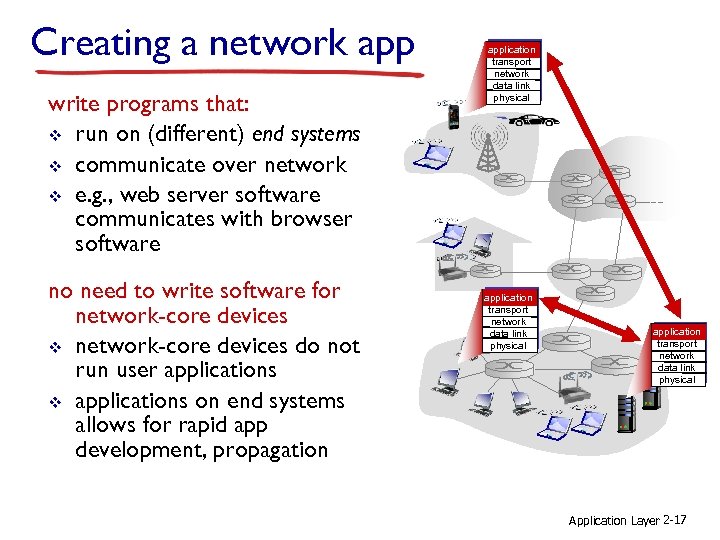
Creating a network app write programs that: v run on (different) end systems v communicate over network v e. g. , web server software communicates with browser software no need to write software for network-core devices v network-core devices do not run user applications v applications on end systems allows for rapid app development, propagation application transport network data link physical Application Layer 2 -17
Application architectures possible structure of applications: v client-server v peer-to-peer (P 2 P) Application Layer 2 -18
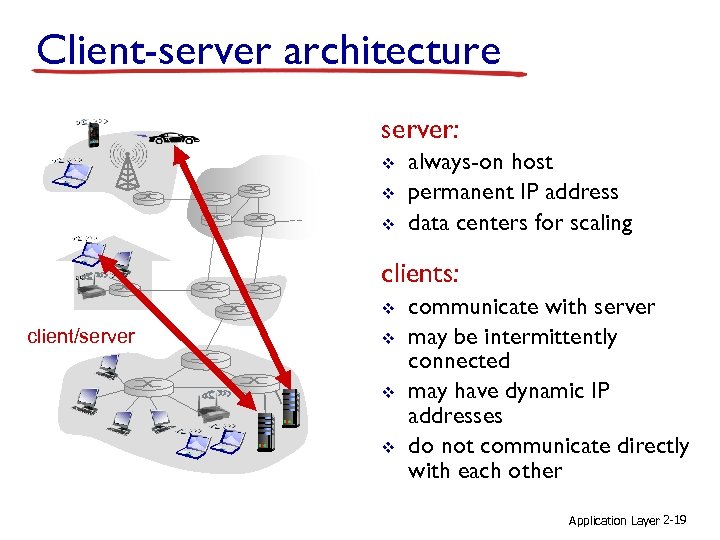
Client-server architecture server: v v v always-on host permanent IP address data centers for scaling clients: v client/server v v v communicate with server may be intermittently connected may have dynamic IP addresses do not communicate directly with each other Application Layer 2 -19
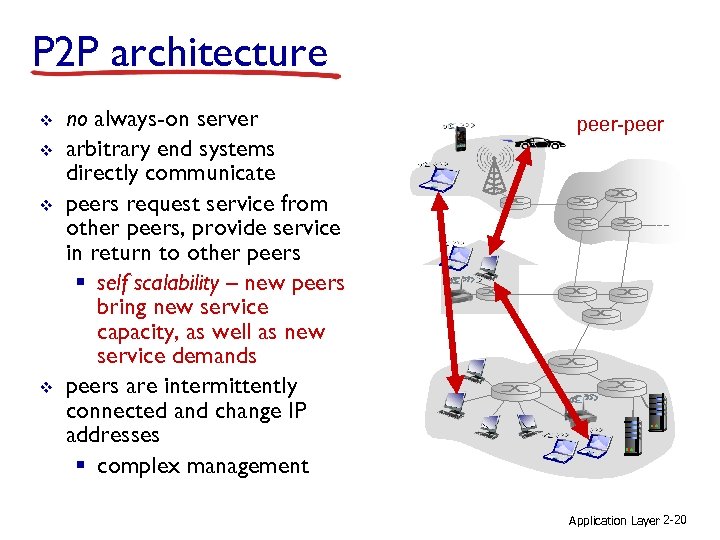
P 2 P architecture v v no always-on server arbitrary end systems directly communicate peers request service from other peers, provide service in return to other peers § self scalability – new peers bring new service capacity, as well as new service demands peers are intermittently connected and change IP addresses § complex management peer-peer Application Layer 2 -20
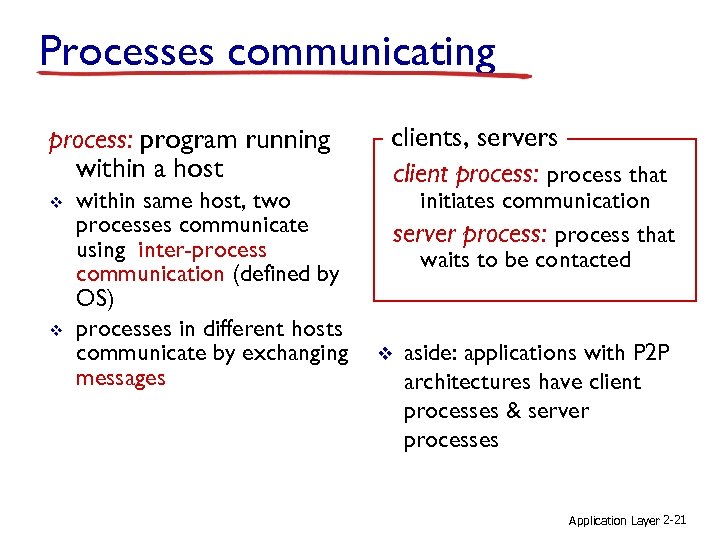
Processes communicating process: program running within a host v v within same host, two processes communicate using inter-process communication (defined by OS) processes in different hosts communicate by exchanging messages clients, servers client process: process that initiates communication server process: process that waits to be contacted v aside: applications with P 2 P architectures have client processes & server processes Application Layer 2 -21
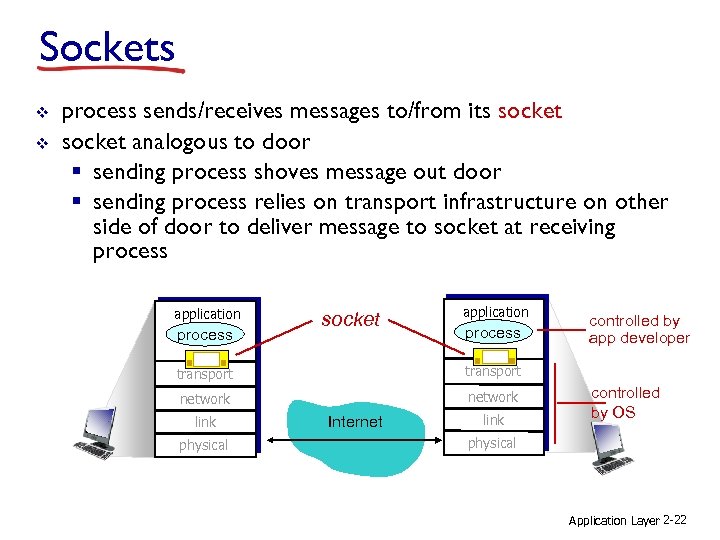
Sockets v v process sends/receives messages to/from its socket analogous to door § sending process shoves message out door § sending process relies on transport infrastructure on other side of door to deliver message to socket at receiving process application process socket application process transport network controlled by app developer link physical Internet link controlled by OS physical Application Layer 2 -22
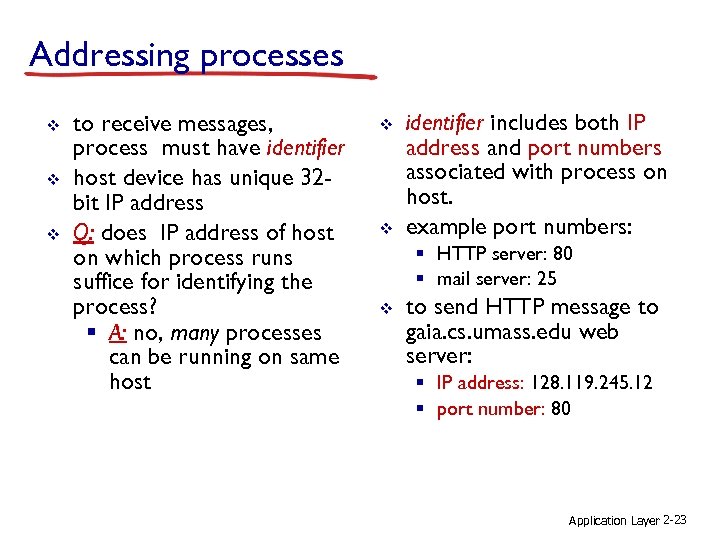
Addressing processes v v v to receive messages, process must have identifier host device has unique 32 bit IP address Q: does IP address of host on which process runs suffice for identifying the process? § A: no, many processes can be running on same host v v identifier includes both IP address and port numbers associated with process on host. example port numbers: § HTTP server: 80 § mail server: 25 v to send HTTP message to gaia. cs. umass. edu web server: § IP address: 128. 119. 245. 12 § port number: 80 Application Layer 2 -23
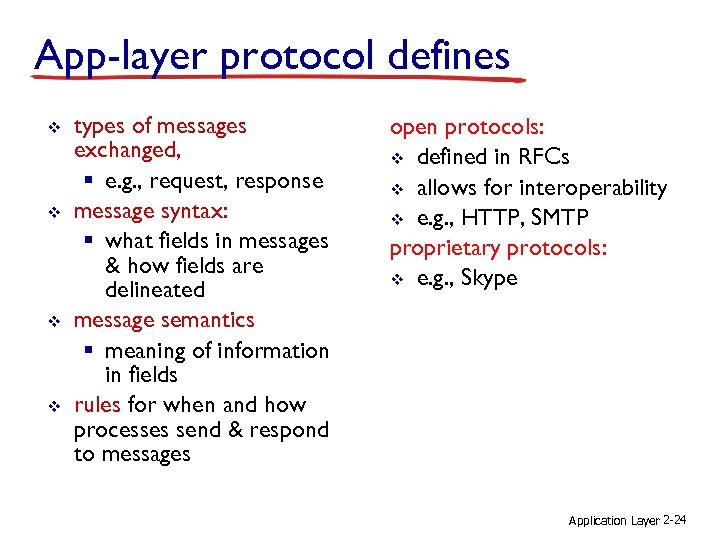
App-layer protocol defines v v types of messages exchanged, § e. g. , request, response message syntax: § what fields in messages & how fields are delineated message semantics § meaning of information in fields rules for when and how processes send & respond to messages open protocols: v defined in RFCs v allows for interoperability v e. g. , HTTP, SMTP proprietary protocols: v e. g. , Skype Application Layer 2 -24
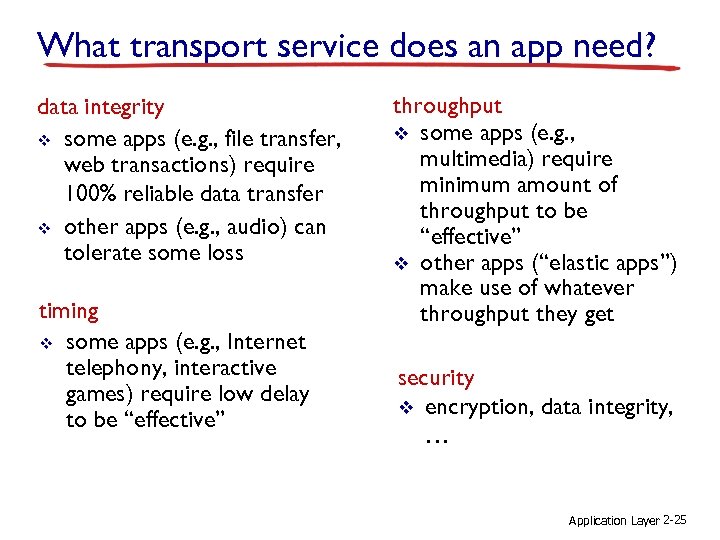
What transport service does an app need? data integrity v some apps (e. g. , file transfer, web transactions) require 100% reliable data transfer v other apps (e. g. , audio) can tolerate some loss timing v some apps (e. g. , Internet telephony, interactive games) require low delay to be “effective” throughput v some apps (e. g. , multimedia) require minimum amount of throughput to be “effective” v other apps (“elastic apps”) make use of whatever throughput they get security v encryption, data integrity, … Application Layer 2 -25
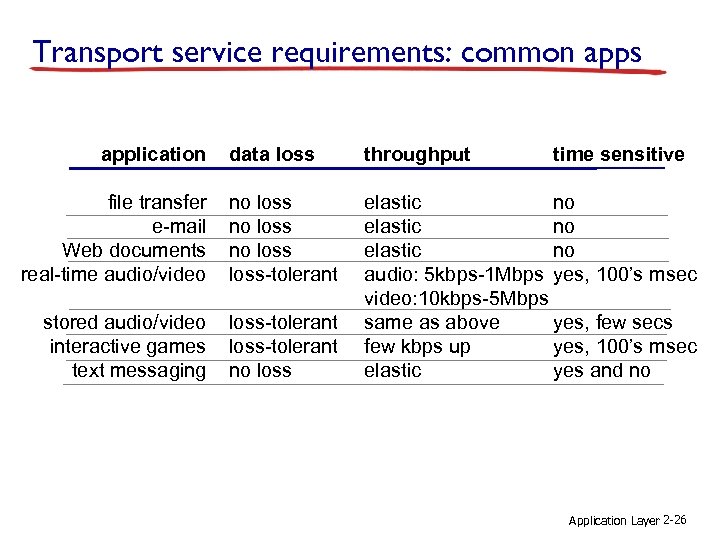
Transport service requirements: common apps application data loss throughput file transfer e-mail Web documents real-time audio/video no loss-tolerant stored audio/video interactive games text messaging loss-tolerant no loss elastic no audio: 5 kbps-1 Mbps yes, 100’s msec video: 10 kbps-5 Mbps same as above yes, few secs few kbps up yes, 100’s msec elastic yes and no time sensitive Application Layer 2 -26
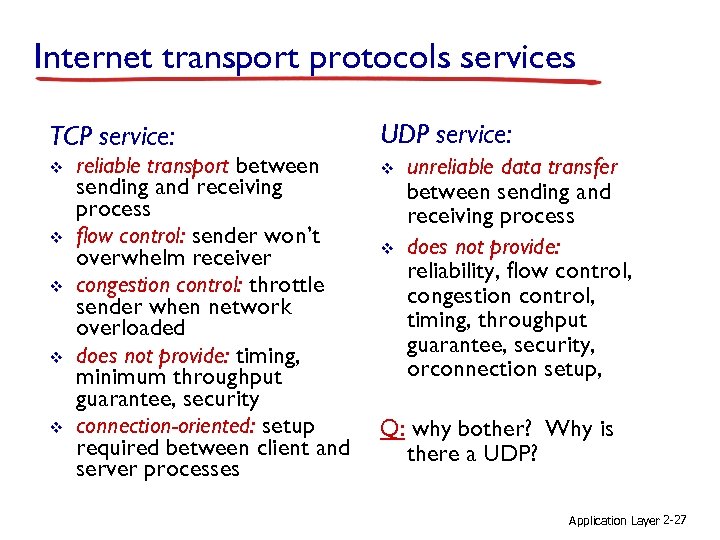
Internet transport protocols services TCP service: UDP service: v v v reliable transport between sending and receiving process flow control: sender won’t overwhelm receiver congestion control: throttle sender when network overloaded does not provide: timing, minimum throughput guarantee, security connection-oriented: setup required between client and server processes v unreliable data transfer between sending and receiving process does not provide: reliability, flow control, congestion control, timing, throughput guarantee, security, orconnection setup, Q: why bother? Why is there a UDP? Application Layer 2 -27
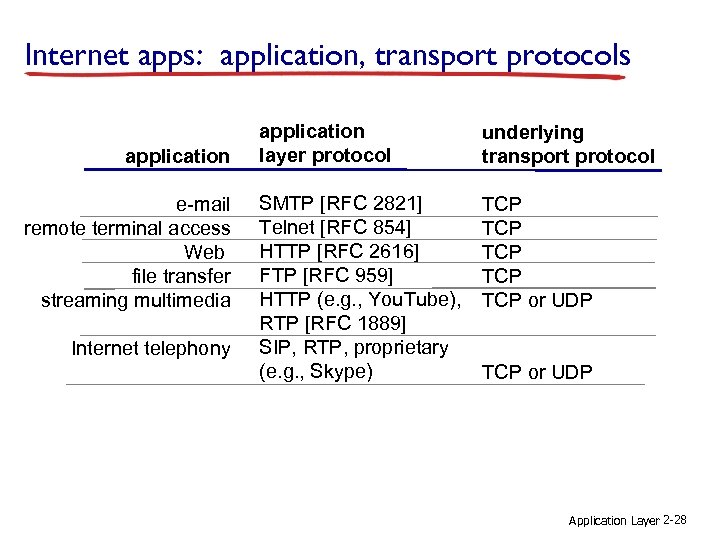
Internet apps: application, transport protocols application e-mail remote terminal access Web file transfer streaming multimedia Internet telephony application layer protocol underlying transport protocol SMTP [RFC 2821] Telnet [RFC 854] HTTP [RFC 2616] FTP [RFC 959] HTTP (e. g. , You. Tube), RTP [RFC 1889] SIP, RTP, proprietary (e. g. , Skype) TCP TCP TCP or UDP Application Layer 2 -28
Chapter 3 Transport Layer Computer Networking: A Top Down Approach 6 th edition Jim Kurose, Keith Ross Addison-Wesley March 2012 All material copyright 1996 -2012 J. F Kurose and K. W. Ross, All Rights Reserved Transport Layer 3 -29
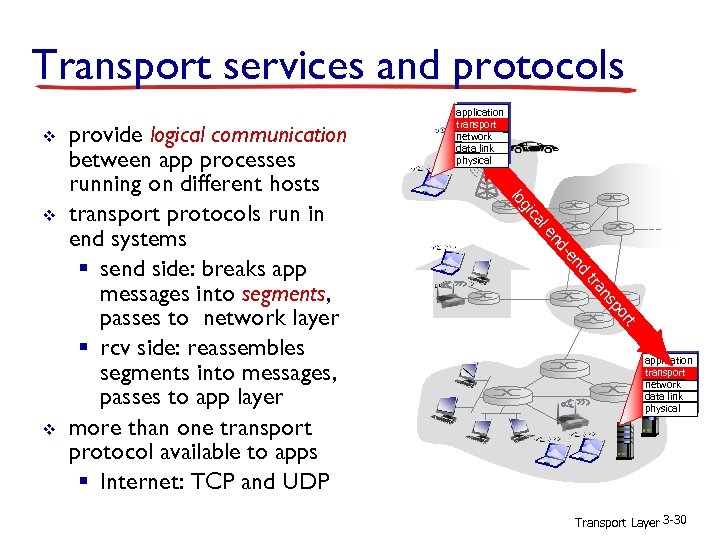
Transport services and protocols v nd -e nd le ca gi t or p ns tra v lo v provide logical communication between app processes running on different hosts transport protocols run in end systems § send side: breaks app messages into segments, passes to network layer § rcv side: reassembles segments into messages, passes to app layer more than one transport protocol available to apps § Internet: TCP and UDP application transport network data link physical Transport Layer 3 -30
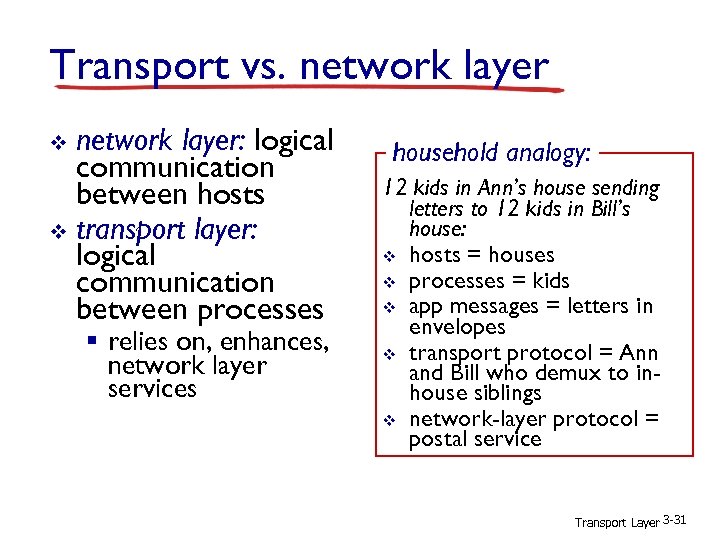
Transport vs. network layer: logical communication between hosts v transport layer: logical communication between processes v § relies on, enhances, network layer services household analogy: 12 kids in Ann’s house sending letters to 12 kids in Bill’s house: v hosts = houses v processes = kids v app messages = letters in envelopes v transport protocol = Ann and Bill who demux to inhouse siblings v network-layer protocol = postal service Transport Layer 3 -31
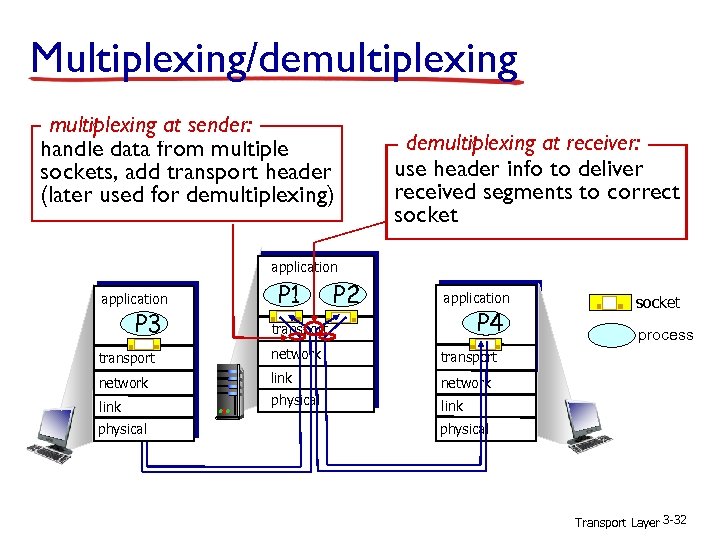
Multiplexing/demultiplexing at sender: handle data from multiple sockets, add transport header (later used for demultiplexing) demultiplexing at receiver: use header info to deliver received segments to correct socket application P 3 P 1 P 2 application P 4 transport network link network physical process transport network socket link physical Transport Layer 3 -32
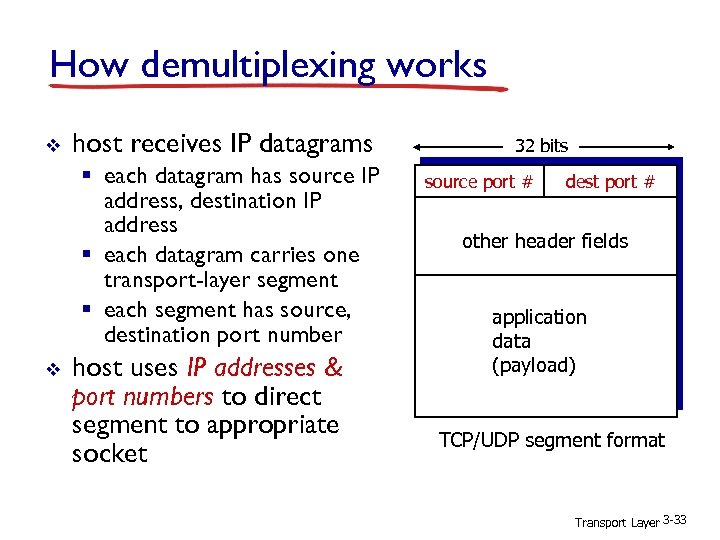
How demultiplexing works v host receives IP datagrams § each datagram has source IP address, destination IP address § each datagram carries one transport-layer segment § each segment has source, destination port number v host uses IP addresses & port numbers to direct segment to appropriate socket 32 bits source port # dest port # other header fields application data (payload) TCP/UDP segment format Transport Layer 3 -33
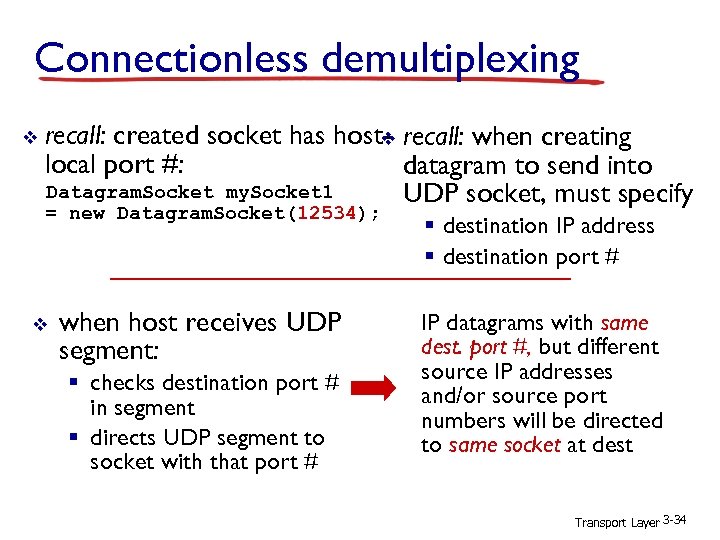
Connectionless demultiplexing v recall: created socket has host- recall: when creating v local port #: datagram to send into Datagram. Socket my. Socket 1 UDP socket, must specify = new Datagram. Socket(12534); v when host receives UDP segment: § checks destination port # in segment § directs UDP segment to socket with that port # § destination IP address § destination port # IP datagrams with same dest. port #, but different source IP addresses and/or source port numbers will be directed to same socket at dest Transport Layer 3 -34
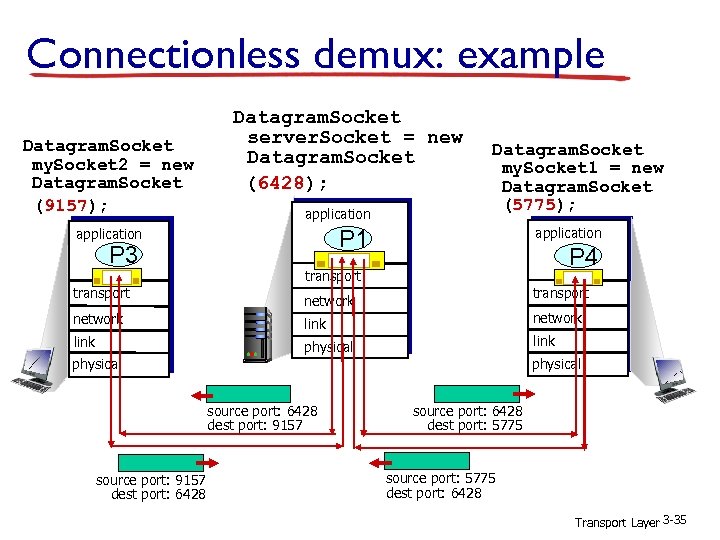
Connectionless demux: example Datagram. Socket my. Socket 2 = new Datagram. Socket (9157); Datagram. Socket server. Socket = new Datagram. Socket (6428); application P 3 transport Datagram. Socket my. Socket 1 = new Datagram. Socket (5775); application P 1 P 4 transport network link physical source port: 6428 dest port: 9157 source port: 9157 dest port: 6428 source port: 6428 dest port: 5775 source port: 5775 dest port: 6428 Transport Layer 3 -35
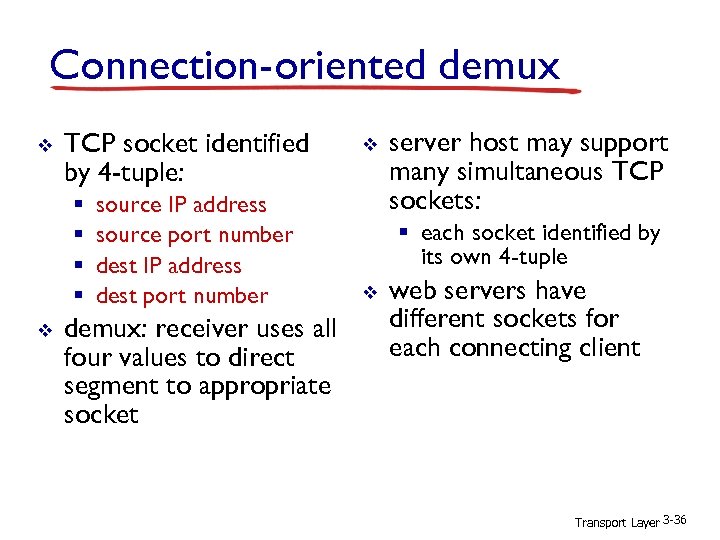
Connection-oriented demux v TCP socket identified by 4 -tuple: § § v source IP address source port number dest IP address dest port number demux: receiver uses all four values to direct segment to appropriate socket v server host may support many simultaneous TCP sockets: § each socket identified by its own 4 -tuple v web servers have different sockets for each connecting client Transport Layer 3 -36
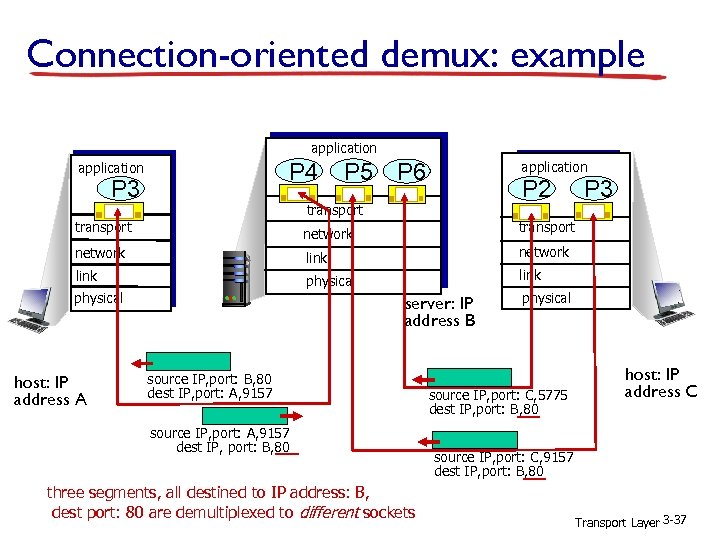
Connection-oriented demux: example application P 4 application P 3 P 5 P 6 application P 2 transport P 3 transport network link physical host: IP address A server: IP address B source IP, port: B, 80 dest IP, port: A, 9157 source IP, port: A, 9157 dest IP, port: B, 80 three segments, all destined to IP address: B, dest port: 80 are demultiplexed to different sockets physical source IP, port: C, 5775 dest IP, port: B, 80 host: IP address C source IP, port: C, 9157 dest IP, port: B, 80 Transport Layer 3 -37
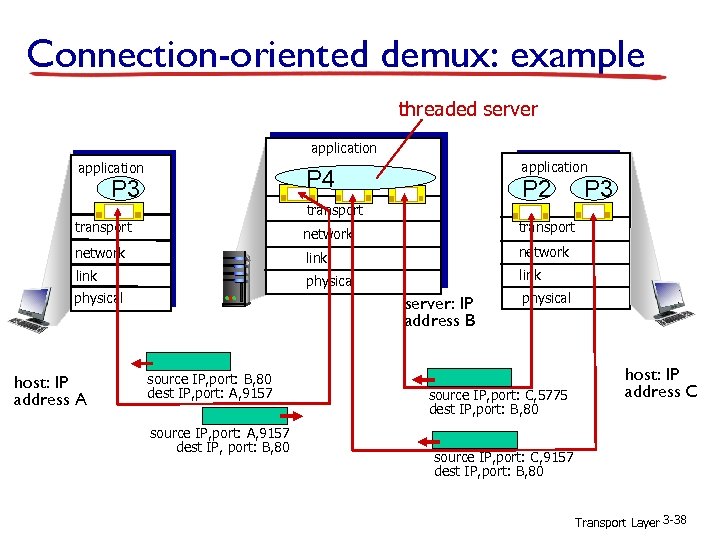
Connection-oriented demux: example threaded server application P 4 P 3 P 2 transport P 3 transport network link physical host: IP address A server: IP address B source IP, port: B, 80 dest IP, port: A, 9157 source IP, port: A, 9157 dest IP, port: B, 80 physical source IP, port: C, 5775 dest IP, port: B, 80 host: IP address C source IP, port: C, 9157 dest IP, port: B, 80 Transport Layer 3 -38
Chapter 4 Network Layer Computer Networking: A Top Down Approach 6 th edition Jim Kurose, Keith Ross Addison-Wesley March 2012 All material copyright 1996 -2012 J. F Kurose and K. W. Ross, All Rights Reserved Network Layer 4 -39
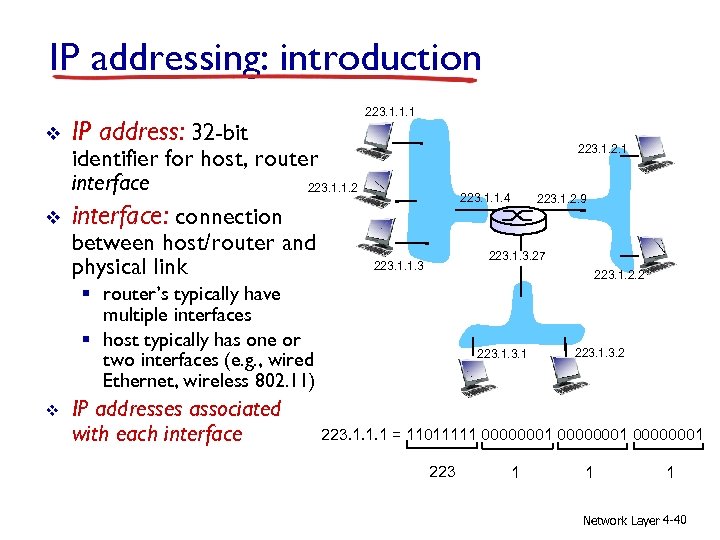
IP addressing: introduction v v IP address: 32 -bit 223. 1. 1. 1 identifier for host, router interface 223. 1. 1. 2 interface: connection between host/router and physical link 223. 1. 2. 1 223. 1. 1. 4 223. 1. 3. 27 223. 1. 1. 3 223. 1. 2. 2 § router’s typically have multiple interfaces § host typically has one or two interfaces (e. g. , wired Ethernet, wireless 802. 11) v IP addresses associated with each interface 223. 1. 2. 9 223. 1. 3. 2 223. 1. 1. 1 = 11011111 00000001 223 1 1 1 Network Layer 4 -40
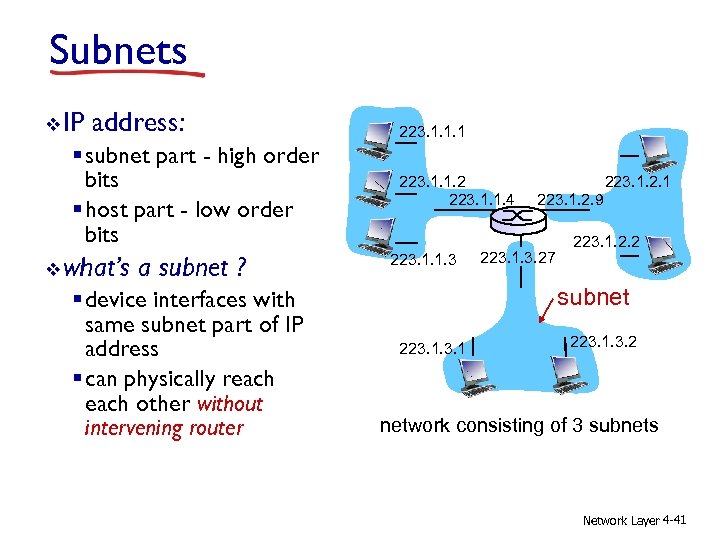
Subnets v IP address: § subnet part - high order bits § host part - low order bits v what’s a subnet ? § device interfaces with same subnet part of IP address § can physically reach other without intervening router 223. 1. 1. 1 223. 1. 1. 2 223. 1. 1. 4 223. 1. 1. 3 223. 1. 2. 1 223. 1. 2. 9 223. 1. 3. 27 223. 1. 2. 2 subnet 223. 1. 3. 2 network consisting of 3 subnets Network Layer 4 -41
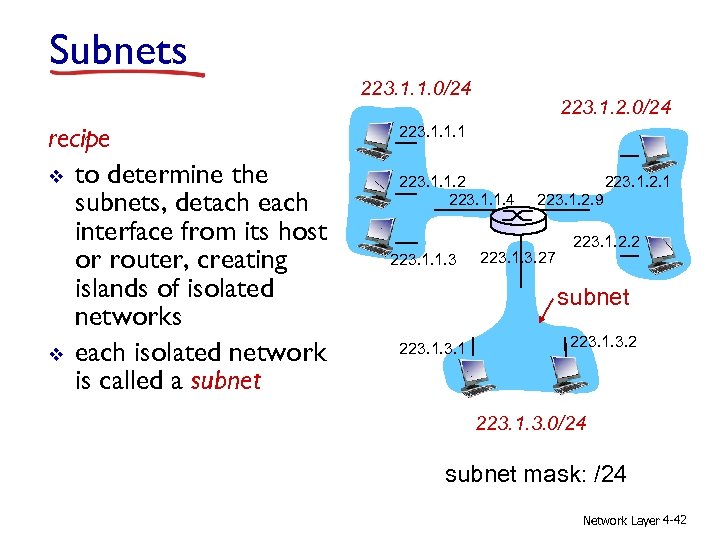
Subnets 223. 1. 1. 0/24 recipe v to determine the subnets, detach each interface from its host or router, creating islands of isolated networks v each isolated network is called a subnet 223. 1. 2. 0/24 223. 1. 1. 1 223. 1. 1. 2 223. 1. 1. 4 223. 1. 1. 3 223. 1. 2. 1 223. 1. 2. 9 223. 1. 3. 27 223. 1. 2. 2 subnet 223. 1. 3. 2 223. 1. 3. 0/24 subnet mask: /24 Network Layer 4 -42
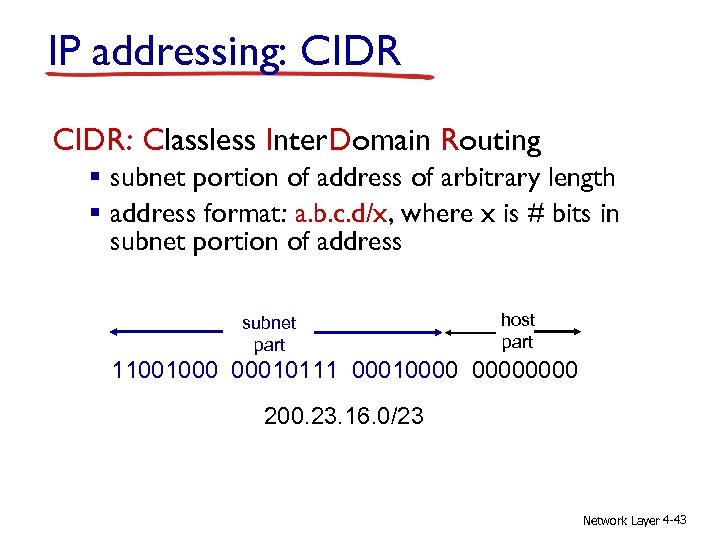
IP addressing: CIDR: Classless Inter. Domain Routing § subnet portion of address of arbitrary length § address format: a. b. c. d/x, where x is # bits in subnet portion of address subnet part host part 11001000 00010111 00010000 200. 23. 16. 0/23 Network Layer 4 -43
IP addresses: how to get one? Q: How does a host get IP address? v hard-coded by system admin in a file § Windows: control-panel->network->configuration>tcp/ip->properties § UNIX: /etc/rc. config v DHCP: Dynamic Host Configuration Protocol: dynamically get address from as server § “plug-and-play” Network Layer 4 -44
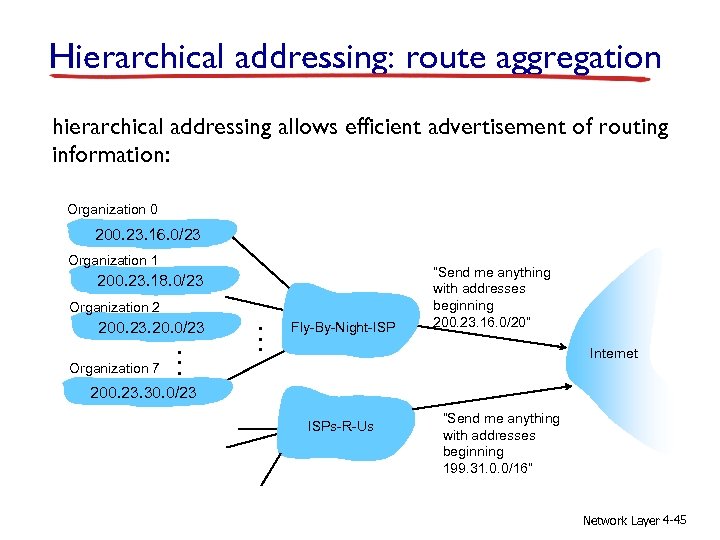
Hierarchical addressing: route aggregation hierarchical addressing allows efficient advertisement of routing information: Organization 0 200. 23. 16. 0/23 Organization 1 200. 23. 18. 0/23 Organization 2 200. 23. 20. 0/23 Organization 7 . . . Fly-By-Night-ISP “Send me anything with addresses beginning 200. 23. 16. 0/20” Internet 200. 23. 30. 0/23 ISPs-R-Us “Send me anything with addresses beginning 199. 31. 0. 0/16” Network Layer 4 -45
Скачать презентацию 02220 Distributed Systems Computer Networking Basics Alessio Di
4e8cfaff85acc2b3e67fca16803b98ee.ppt