 Скачать презентацию 數位家庭中多媒體內容分 享平台之介紹 楊竹星教授 國立成功大學電機 程學系 大綱
5ef501b7b06384d2e65b8eaa95377c86.ppt
- Количество слайдов: 43



數位家庭中多媒體內容分 享平台之介紹 楊竹星教授 國立成功大學電機 程學系
大綱 • • • 數位家庭中多媒體服務發展現況 UPn. P (Universal Plug and Play) UPn. P AV(Audio and Video) DLNA (Digital Living Network Alliance) 多媒體內容分享平台之實作 結論
大綱 • • • 數位家庭中多媒體服務發展現況 UPn. P (Universal Plug and Play) UPn. P AV(Audio and Video) DLNA (Digital Living Network Alliance) 多媒體內容分享平台之實作 結論
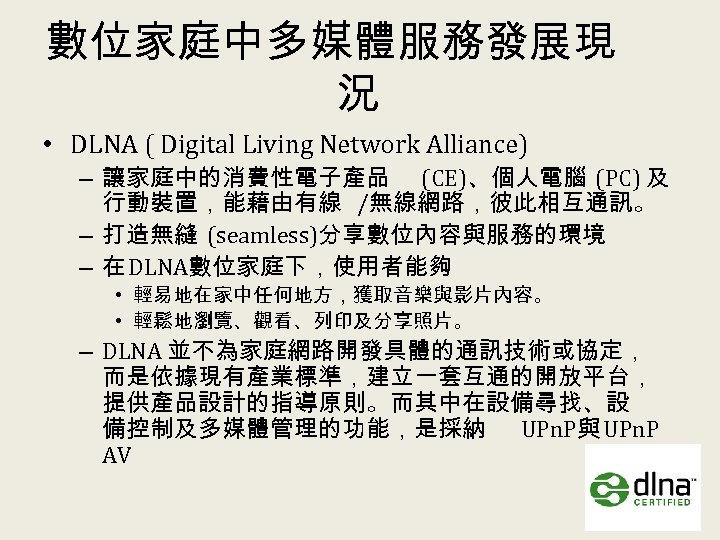
數位家庭中多媒體服務發展現 況 • DLNA ( Digital Living Network Alliance) – 讓家庭中的消費性電子產品 (CE)、個人電腦 (PC) 及 行動裝置,能藉由有線 /無線網路,彼此相互通訊。 – 打造無縫 (seamless)分享數位內容與服務的環境 – 在 DLNA數位家庭下,使用者能夠 • 輕易地在家中任何地方,獲取音樂與影片內容。 • 輕鬆地瀏覽、觀看、列印及分享照片。 – DLNA 並不為家庭網路開發具體的通訊技術或協定, 而是依據現有產業標準,建立一套互通的開放平台, 提供產品設計的指導原則。而其中在設備尋找、設 備控制及多媒體管理的功能,是採納 UPn. P與 UPn. P AV
數位家庭中多媒體服務發展現 況 • UPn. P(Universal Plug and Play) – 目的為打造簡單與無縫的家庭網路環境 – 基於 IP網路,自動地為使用者尋找家庭網路中 的其他設備,並提供使用者操控設備的方法。 – 目前 UPn. P聯盟已定義了多種種類的設備標準 • AV (Audio & Video )、 Printer、 Scanner、 IGD ( Internet Gateway Device)、 Lighting Control …等。 • UPn. P AV(Audio and Video) – 基於 UPn. P之架構,定義影音設備與服務的標準, 包含多媒體伺服器 (Media Server)與多媒體播放 器 (Media Renderer),以及設備的控制方法。
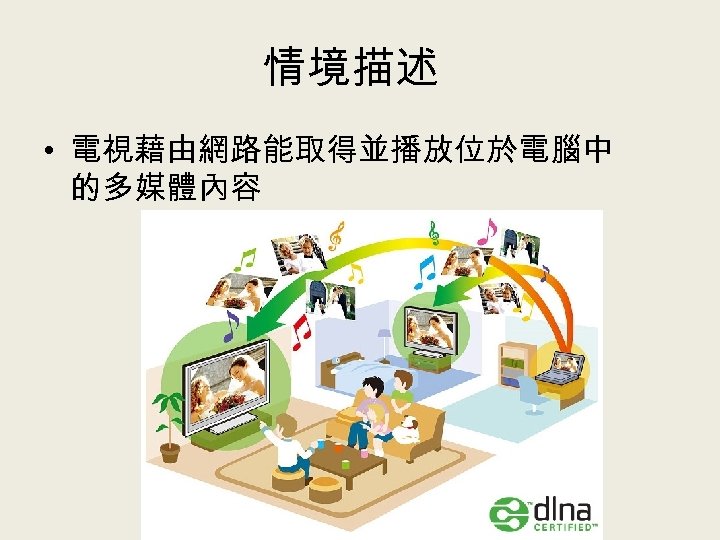
情境描述 • 電視藉由網路能取得並播放位於電腦中 的多媒體內容
大綱 • • • 數位家庭中多媒體服務發展現況 UPn. P (Universal Plug and Play) UPn. P AV(Audio and Video) DLNA (Digital Living Network Alliance) 多媒體內容分享平台之實作 結論
UPn. P簡介 • 1999年微軟所提出的架構 • 是一種用於個人電腦和智慧設備中的網 路連接架構,尤其是在家庭網路中。 • 以網際網路的標準和技術為基礎,使設 備彼此可以自動連接和協同 作。 • 主要定義 : 尋找設備的方法、描述設備的 格式、控制設備的方法、設備回報事件 的方法
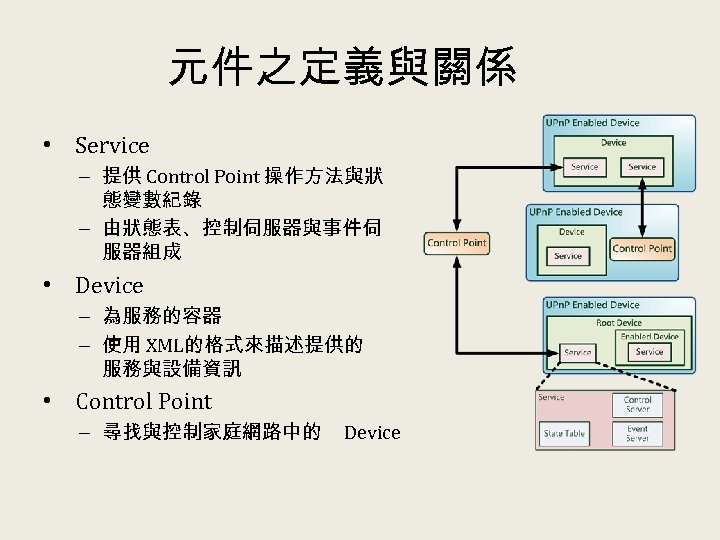
元件之定義與關係 • Service – 提供 Control Point 操作方法與狀 態變數紀錄 – 由狀態表、控制伺服器與事件伺 服器組成 • Device – 為服務的容器 – 使用 XML的格式來描述提供的 服務與設備資訊 • Control Point – 尋找與控制家庭網路中的 Device
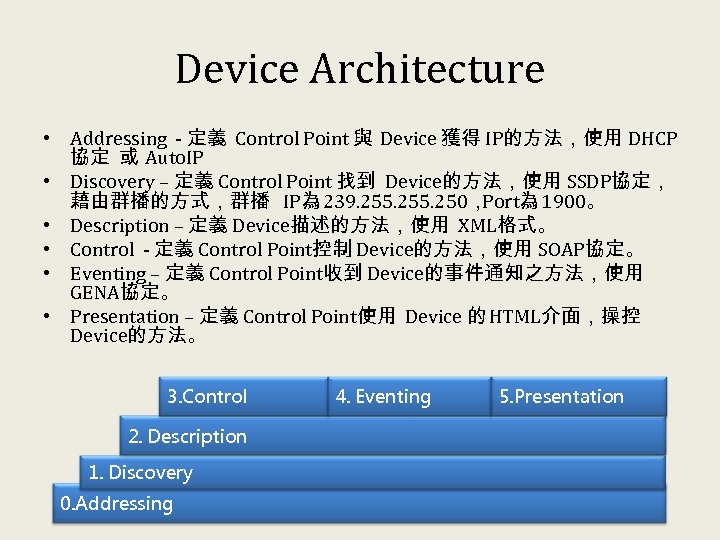
Device Architecture • Addressing - 定義 Control Point 與 Device 獲得 IP的方法,使用 DHCP 協定 或 Auto. IP • Discovery – 定義 Control Point 找到 Device的方法,使用 SSDP協定, 藉由群播的方式,群播 IP為 239. 255. 250, Port為 1900。 • Description – 定義 Device描述的方法,使用 XML格式。 • Control - 定義 Control Point控制 Device的方法,使用 SOAP協定。 • Eventing – 定義 Control Point收到 Device的事件通知之方法,使用 GENA協定。 • Presentation – 定義 Control Point使用 Device 的 HTML介面,操控 Device的方法。 3. Control 2. Description 1. Discovery 0. Addressing 4. Eventing 5. Presentation
Addressing • 定義 UPn. P設備獲得 IP Address的方法 • 一般情況下, UPn. P設備會利用 DCHP Protocol尋找 DHCP Server配置 IP • 但是如果沒有 DHCP Server時,會使用 Auto IP的方法配置位址 • 在使用 Auto IP時,若是發現網路上有 DHCP Server存在,會自動改成 DHCP的方 法。
Discovery • 定義發現 UPn. P設備的方法,有兩種是方式 : – Advertisement : UPn. P設備會週期性的發出群播封包 (Multi. Cast),封包內容為設備的資訊與位址等,當 Control Point 收到封包後,可獲得該設備的相關資訊與位址。 – Search : Control Point要找尋網路上的 UPn. P設備時,會發出群 播的 M-Search封包,如果是 UPn. P設備,收到 M-Search封包就會 回應,告訴 Control Point自己的資訊與位址。 • 使用群播的方式 (Multicast) – IP為 239. 255. 250 – Port為 1900
Description • 定義描述 UPn. P設備的方法 。 • 在 Discovery時會取得 Description存放的 位置。 • Description中描述有設備的資訊、設備提 供的服務資訊,亦包含 Control與 Eventing 的通訊 URL。
Control • 定義控制設備的方法 • 使用 SOAP(Simple Object Access Protocol) • Control Point發出 SOAP控制訊息給 UPn. P 設備,UPn. P設備收到訊息後,執行操作, 並回應訊息給 Control Point。
Eventing • 定義設備發出事件通知的方法 • 使 用 GENA(General Event Notification Architecture) Protocol • Control Point向 UPn. P設備訂閱狀態變化通 知,當UPn. P設備發生 狀態 變化時,會通 知有訂閱的 Control Point。
Presentation • 定義 UPn. P設備提供網頁介面 的方法 • 使用者 能藉由 瀏覽器,取得設備提供的 網頁介面,獲得 設備狀態與控制設備。
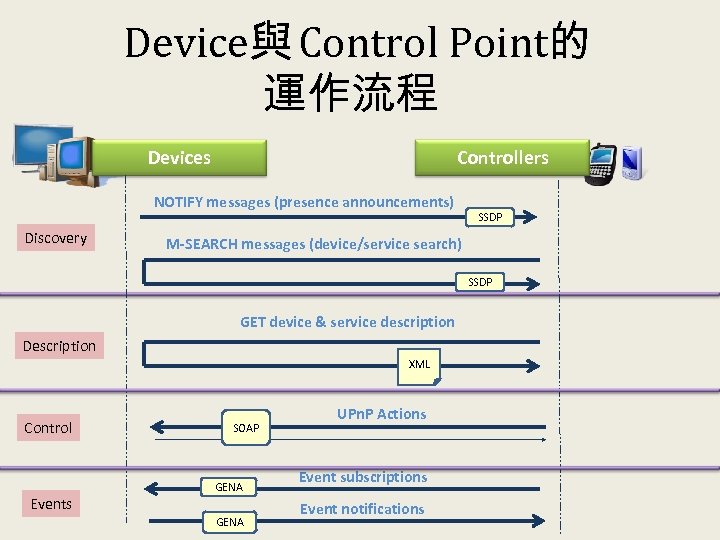
Device與 Control Point的 運作流程 Controllers Devices NOTIFY messages (presence announcements) Discovery SSDP M-SEARCH messages (device/service search) SSDP GET device & service description Description XML Control Events SOAP GENA UPn. P Actions Event subscriptions Event notifications
大綱 • • • 數位家庭中多媒體服務發展現況 UPn. P (Universal Plug and Play) UPn. P AV(Audio and Video) DLNA (Digital Living Network Alliance) 多媒體內容分享平台之實作 結論
UPn. P AV簡介 • UPn. P AV 是基於 UPn. P Architecture的標準,定義三種設備與其提供 之服務,分別為 • Media Server Device– 提供多媒體內容 – Content Directory Service : 瀏覽與尋找內容的服務 – Connection Manager Service : 管理內容傳輸連線的服務 – AV Transport Service : 控制內容傳輸的服務 • Media Renderer Device– 播放並顯示多媒體內容 – Rendering Control Service : 控制播放器周邊硬體設備的服務 – Connection Manager Service : 管理內容傳輸連線的服務 – AV Transport Service : 控制內容傳輸的服務 • Control Point – 控制設備 – 不提供服務,負責控制設備。依據本身的能力分成三種控制的模型 • Control Point + Media Server + Media Renderer ( 3 -Box) • Control Point with Content + Media Renderer (2 -Box) • Control Point with Decoder + Media Server (2 -Box)
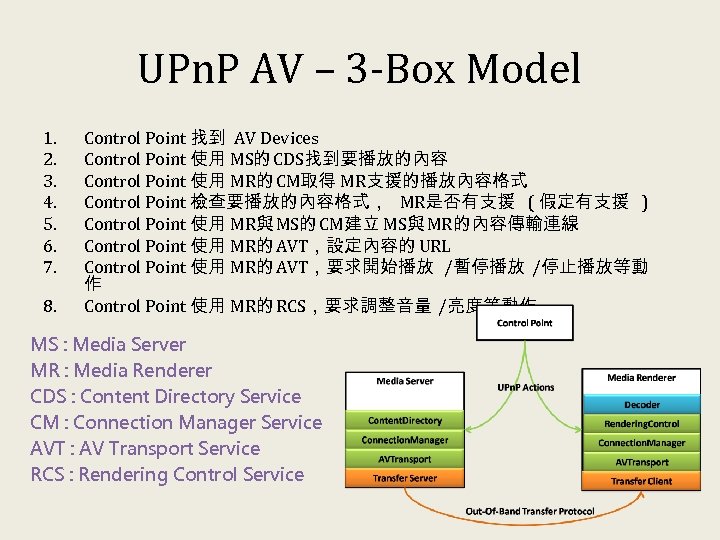
UPn. P AV – 3 -Box Model 1. 2. 3. 4. 5. 6. 7. 8. Control Point 找到 AV Devices Control Point 使用 MS的 CDS找到要播放的內容 Control Point 使用 MR的 CM取得 MR支援的播放內容格式 Control Point 檢查要播放的內容格式, MR是否有支援 ( 假定有支援 ) Control Point 使用 MR與 MS的 CM建立 MS與 MR的內容傳輸連線 Control Point 使用 MR的 AVT,設定內容的 URL Control Point 使用 MR的 AVT,要求開始播放 /暫停播放 /停止播放等動 作 Control Point 使用 MR的 RCS,要求調整音量 /亮度等動作 MS : Media Server MR : Media Renderer CDS : Content Directory Service CM : Connection Manager Service AVT : AV Transport Service RCS : Rendering Control Service
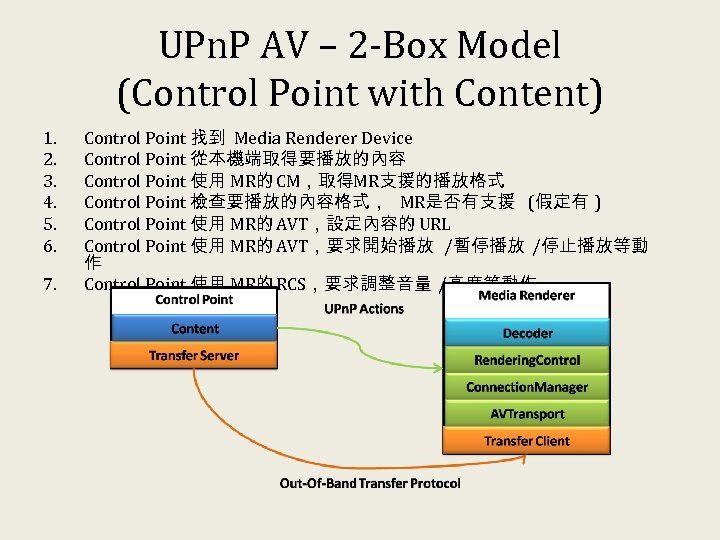
UPn. P AV – 2 -Box Model (Control Point with Content) 1. 2. 3. 4. 5. 6. 7. Control Point 找到 Media Renderer Device Control Point 從本機端取得要播放的內容 Control Point 使用 MR的 CM,取得MR支援的播放格式 Control Point 檢查要播放的內容格式, MR是否有支援 (假定有 ) Control Point 使用 MR的 AVT,設定內容的 URL Control Point 使用 MR的 AVT,要求開始播放 /暫停播放 /停止播放等動 作 Control Point 使用 MR的 RCS,要求調整音量 /亮度等動作
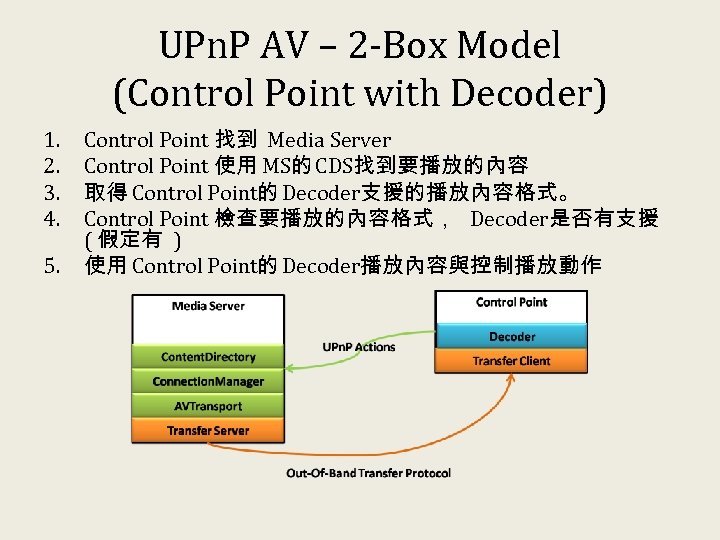
UPn. P AV – 2 -Box Model (Control Point with Decoder) 1. 2. 3. 4. 5. Control Point 找到 Media Server Control Point 使用 MS的 CDS找到要播放的內容 取得 Control Point的 Decoder支援的播放內容格式。 Control Point 檢查要播放的內容格式, Decoder是否有支援 ( 假定有 ) 使用 Control Point的 Decoder播放內容與控制播放動作
大綱 • • • 數位家庭中多媒體服務發展現況 UPn. P (Universal Plug and Play) UPn. P AV(Audio and Video) DLNA (Digital Living Network Alliance) 多媒體內容分享平台之實作 結論
DLNA簡介 • 2003年中日本 SONY、松下、富士通、 SHARP等各大電子公司, 以及美國微軟、 Intel、 HP、 IBM等軟硬體公司,終於挺身而 出,聯合建立了 Digital Home Working Group(DHWG),率先提 出整合前段所述這些影音機材的傳輸規範。 • DHWG成立的一年後,也就是 2004年 6月 22日,這個聯盟正 式宣布改稱為「 Digital Living Network Alliance」,簡稱「 DLNA」。 • DLNA 是由 8 家消費性電子、通訊和資訊大廠 (包括惠普、英 特爾、微軟、諾基亞、Panasonic、飛利浦、三星和SONY)主導 而共同制定的產業標準, • 架構於 UPn. P 的技術上,再加以整合數位多媒體的內容,包 含圖片、音樂及影像 …等。DLNA 的網路並架構於原有網路 架構上的中界層中, 並支援了 Ethernet( IEEE 803. 3 u)與 Wi-Fi ( 802. 11 a/b/g),在內容傳輸上則支援HTTP 標準協議。
DLNA簡介 • DLNA 將產品分別定義為 : – – – Digital Media Server( DMS) Digital Media Player( DMP) Digital Media Controller( DMC) Digital Media Renderer( DMR) Digital Media Printer( DMPr) • 只要是透過 DLNA 陣營認可的,都可以在不必額 外安裝驅動程式和使用特殊線材的前提之下共 享影音資料,並透過 802. 3/802. 11 的高速網路來 進行設備之間的溝通。目前包括 PS 3、 Nokia N 95 高階手機等一些熱門的電子產品皆導入並應用 了 DLNA 技術。
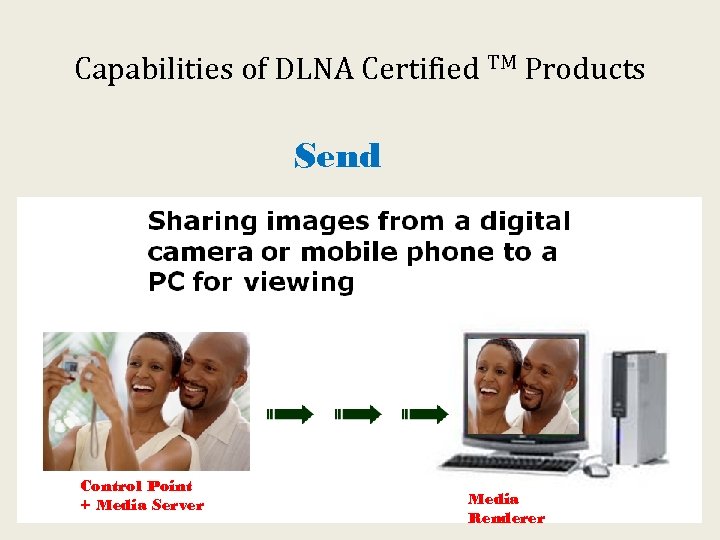
Capabilities of DLNA Certified TM Products Send Control Point + Media Server Media Renderer 26
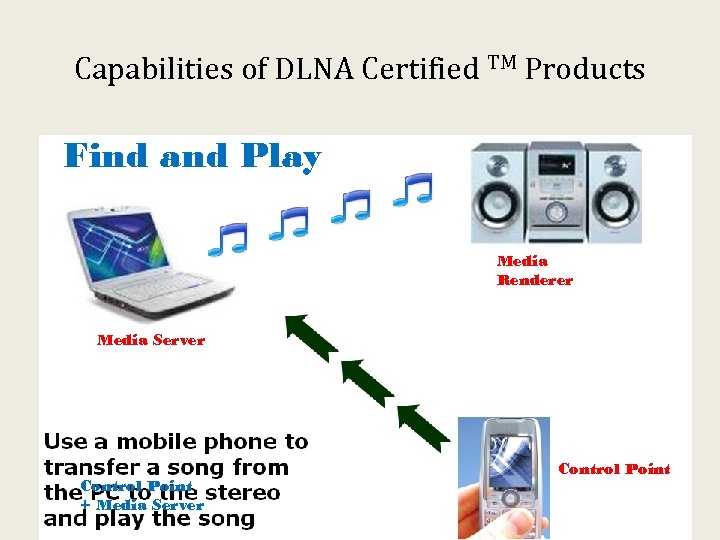
Capabilities of DLNA Certified TM Products Find and Play Media Renderer Media Server Control Point + Media Server Control Point 27
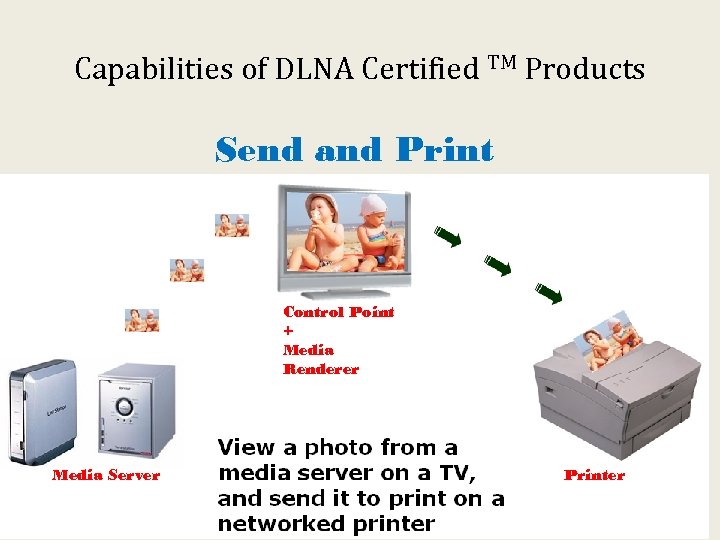
Capabilities of DLNA Certified TM Products Send and Print Control Point + Media Renderer Media Server Printer 28
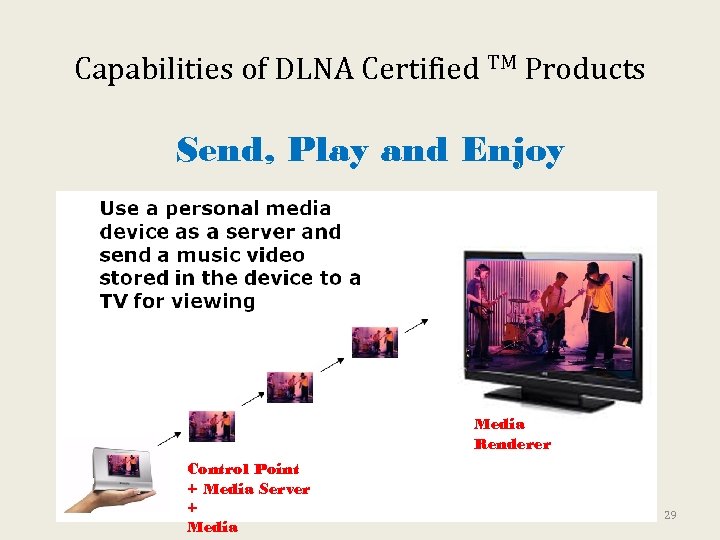
Capabilities of DLNA Certified TM Products Send, Play and Enjoy Media Renderer Control Point + Media Server + Media 29
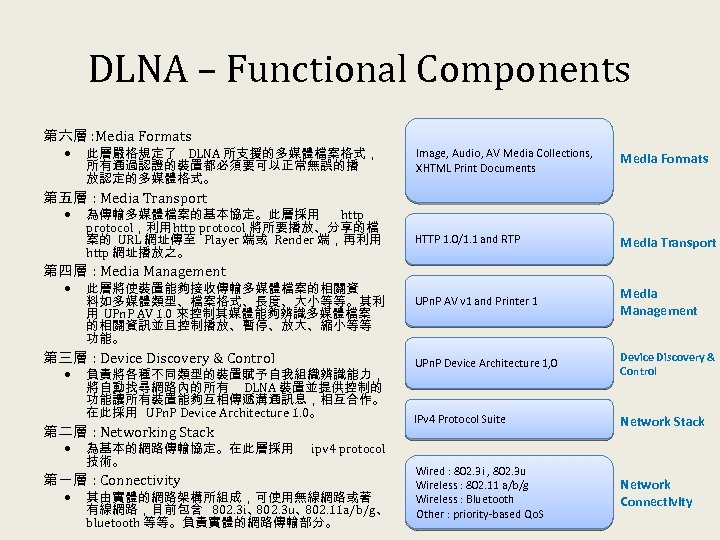
DLNA – Functional Components 第六層 : Media Formats 此層嚴格規定了 DLNA 所支援的多媒體檔案格式, 所有通過認證的裝置都必須要可以正常無誤的播 放認定的多媒體格式。 Image, Audio, AV Media Collections, XHTML Print Documents Media Formats HTTP 1. 0/1. 1 and RTP Media Transport UPn. P AV v 1 and Printer 1 Media Management UPn. P Device Architecture 1, 0 Device Discovery & Control IPv 4 Protocol Suite Network Stack Wired : 802. 3 i , 802. 3 u Wireless : 802. 11 a/b/g Wireless : Bluetooth Other : priority-based Qo. S Network Connectivity 第五層 : Media Transport 為傳輸多媒體檔案的基本協定。此層採用 http protocol,利用 http protocol 將所要播放、分享的檔 案的 URL 網址傳至 Player 端或 Render 端,再利用 http 網址播放之。 第四層 : Media Management 此層將使裝置能夠接收傳輸多媒體檔案的相關資 料如多媒體類型、檔案格式、長度、大小等等。其利 用 UPn. P AV 1. 0 來控制其媒體能夠辨識多媒體檔案 的相關資訊並且控制播放、暫停、放大、縮小等等 功能。 第三層 : Device Discovery & Control 負責將各種不同類型的裝置賦予自我組織辨識能力, 將自動找尋網路內的所有 DLNA 裝置並提供控制的 功能讓所有裝置能夠互相傳遞溝通訊息,相互合作。 在此採用 UPn. P Device Architecture 1. 0。 第二層 : Networking Stack 為基本的網路傳輸協定。在此層採用 技術。 第一層 : Connectivity ipv 4 protocol 其由實體的網路架構所組成,可使用無線網路或著 有線網路,目前包含 802. 3 i、 802. 3 u、 802. 11 a/b/g、 bluetooth 等等。負責實體的網路傳輸部分。
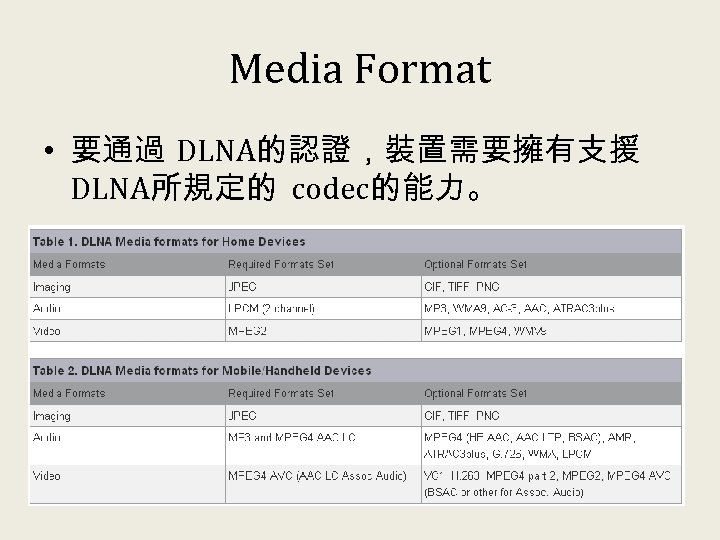
Media Format • 要通過 DLNA的認證,裝置需要擁有支援 DLNA所規定的 codec的能力。
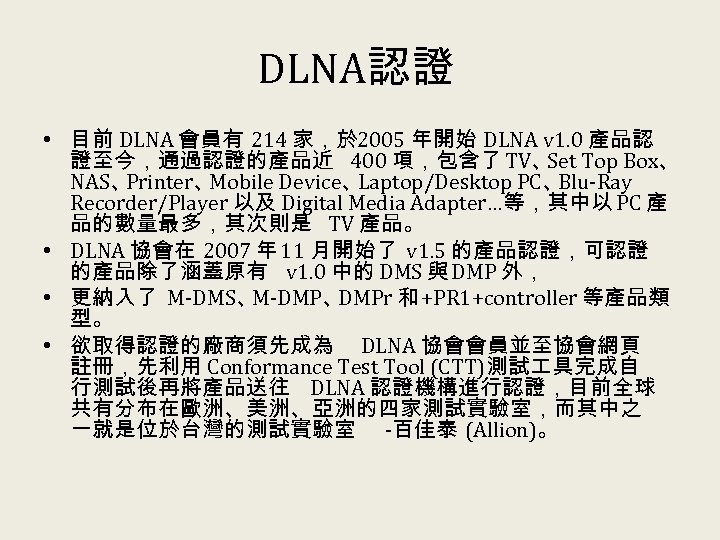
DLNA認證 • 目前 DLNA 會員有 214 家,於 2005 年開始 DLNA v 1. 0 產品認 證至今,通過認證的產品近 400 項,包含了 TV、 Top Box、 Set NAS、 Printer、 Mobile Device、 Laptop/Desktop PC、 Blu-Ray Recorder/Player 以及 Digital Media Adapter…等,其中以 PC 產 品的數量最多,其次則是 TV 產品。 • DLNA 協會在 2007 年 11 月開始了 v 1. 5 的產品認證,可認證 的產品除了涵蓋原有 v 1. 0 中的 DMS 與 DMP 外, • 更納入了 M-DMS、 M-DMP、 DMPr 和 +PR 1+controller 等產品類 型。 • 欲取得認證的廠商須先成為 DLNA 協會會員並至協會網頁 註冊,先利用 Conformance Test Tool (CTT)測試 具完成自 行測試後再將產品送往 DLNA 認證機構進行認證,目前全球 共有分布在歐洲、美洲、亞洲的四家測試實驗室,而其中之 一就是位於台灣的測試實驗室 -百佳泰 (Allion)。
大綱 • • • 數位家庭中多媒體服務發展現況 UPn. P (Universal Plug and Play) UPn. P AV(Audio and Video) DLNA (Digital Living Network Alliance) 多媒體內容分享平台之實作 結論
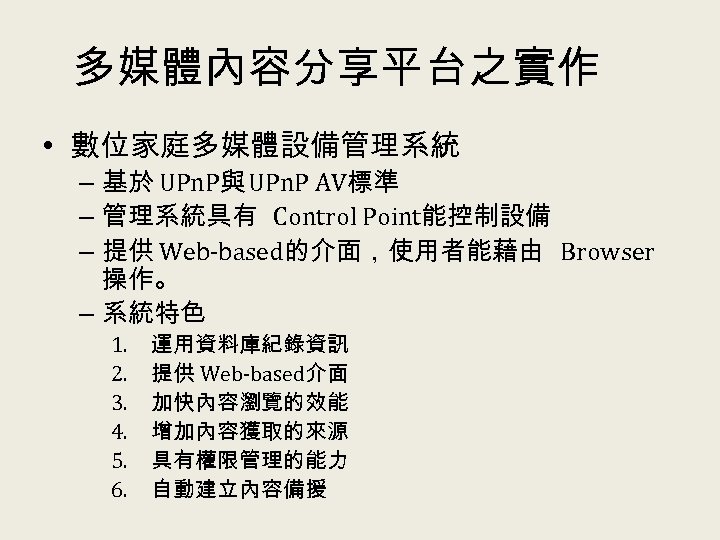
多媒體內容分享平台之實作 • 數位家庭多媒體設備管理系統 – 基於 UPn. P與 UPn. P AV標準 – 管理系統具有 Control Point能控制設備 – 提供 Web-based的介面,使用者能藉由 Browser 操作。 – 系統特色 1. 2. 3. 4. 5. 6. 運用資料庫紀錄資訊 提供 Web-based介面 加快內容瀏覽的效能 增加內容獲取的來源 具有權限管理的能力 自動建立內容備援
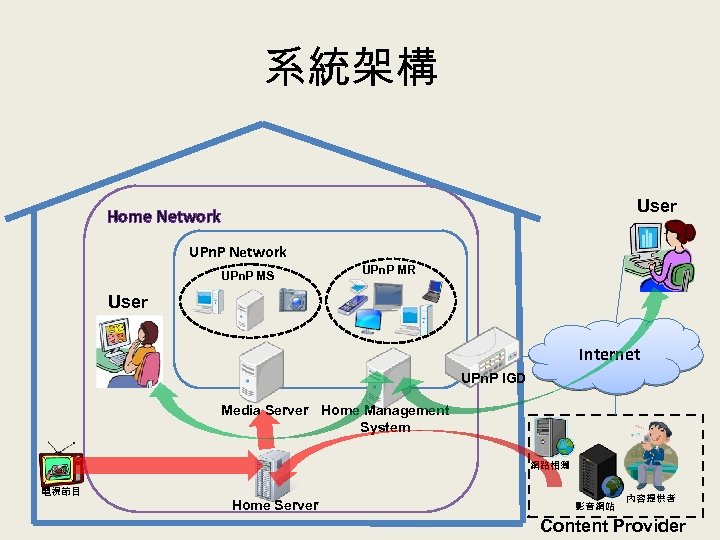
系統架構 User Home Network UPn. P MS UPn. P MR User Internet UPn. P IGD Media Server Home Management System 網路相簿 電視節目 Home Server 影音網站 內容提供者 Content Provider
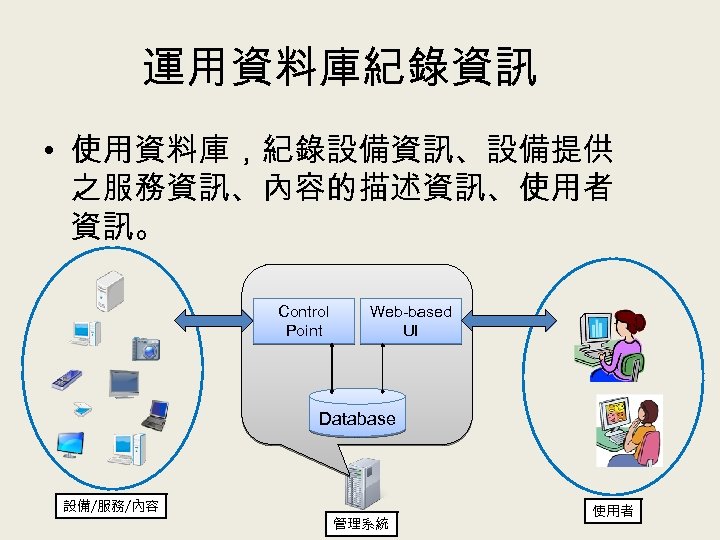
運用資料庫紀錄資訊 • 使用資料庫,紀錄設備資訊、設備提供 之服務資訊、內容的描述資訊、使用者 資訊。 Control Point Web-based UI Database 設備/服務/內容 管理系統 使用者
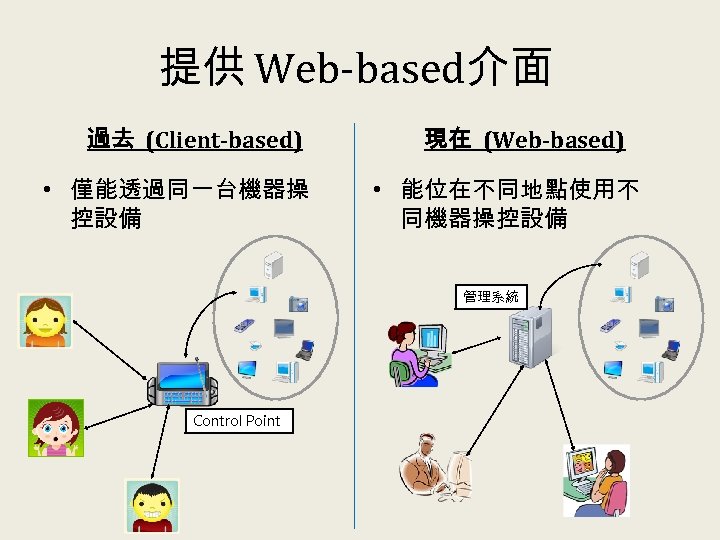
提供 Web-based介面 過去 (Client-based) • 僅能透過同一台機器操 控設備 現在 (Web-based) • 能位在不同地點使用不 同機器操控設備 管理系統 Control Point
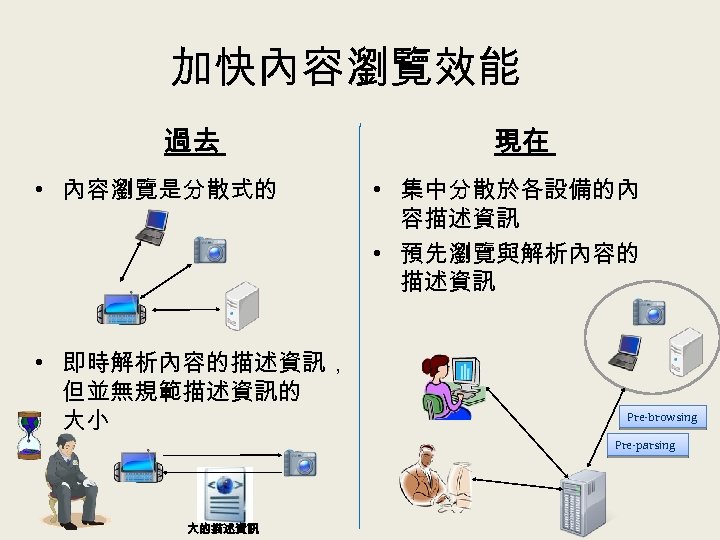
加快內容瀏覽效能 過去 • 內容瀏覽是分散式的 • 即時解析內容的描述資訊, 但並無規範描述資訊的 大小 現在 • 集中分散於各設備的內 容描述資訊 • 預先瀏覽與解析內容的 描述資訊 Pre-browsing Pre-parsing 大的描述資訊
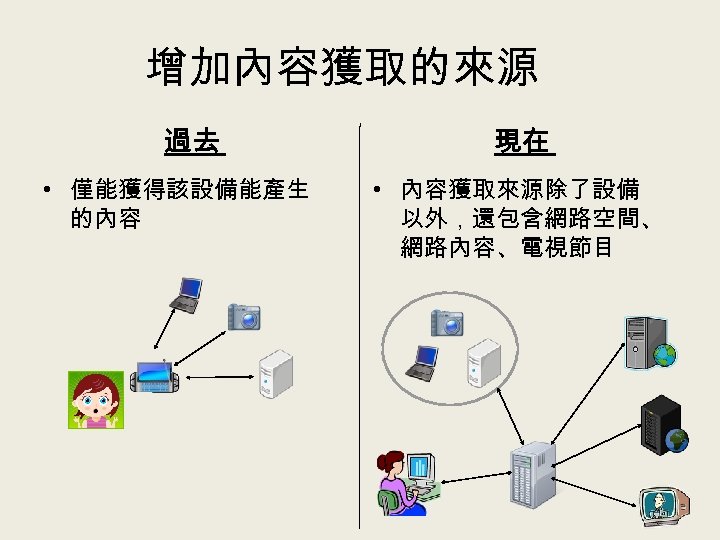
增加內容獲取的來源 過去 • 僅能獲得該設備能產生 的內容 現在 • 內容獲取來源除了設備 以外,還包含網路空間、 網路內容、電視節目
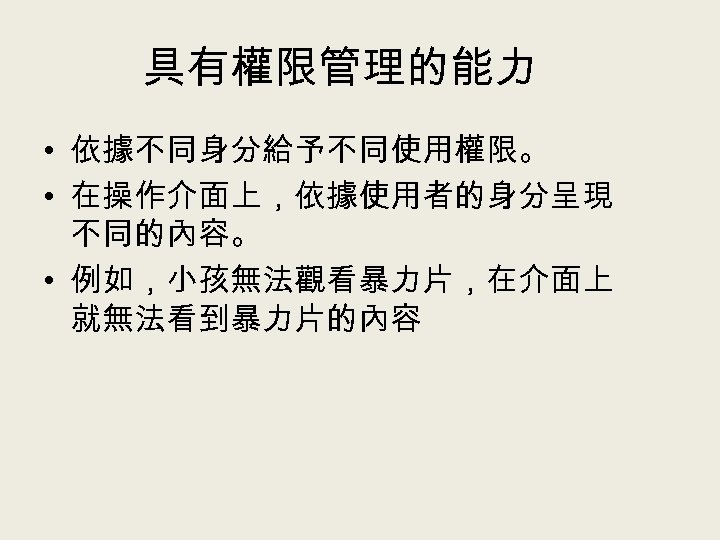
具有權限管理的能力 • 依據不同身分給予不同使用權限。 • 在操作介面上,依據使用者的身分呈現 不同的內容。 • 例如,小孩無法觀看暴力片,在介面上 就無法看到暴力片的內容
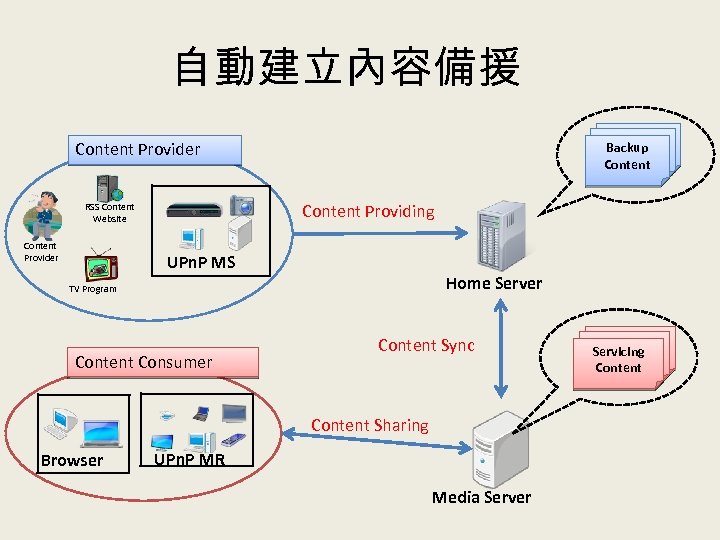
自動建立內容備援 Backup Content Provider Content Providing RSS Content Website Content Provider UPn. P MS Home Server TV Program Content Consumer Content Sync Content Sharing Browser UPn. P MR Media Server Servicing Content
大綱 • • • 數位家庭中多媒體服務發展現況 UPn. P (Universal Plug and Play) UPn. P AV(Audio and Video) DLNA (Digital Living Network Alliance) 多媒體內容分享平台之實作 結論
結論 • 數位家庭的產品之間可提供整合性的服 務與應用,不光只有個別的設備與應用。 • DLNA的推動,使數位娛樂產品在內容分 享的標準逐漸成熟,經過 DLNA認證之產 品也不斷推出。 • 除了多媒體娛樂之用途,家庭自動化、居 家保全與健康照護等應用,也是數位家 庭發展之趨勢。
Скачать презентацию 數位家庭中多媒體內容分 享平台之介紹 楊竹星教授 國立成功大學電機 程學系 大綱
5ef501b7b06384d2e65b8eaa95377c86.ppt