 Скачать презентацию 基于标准化的可扩展企业计算 徐芷玲 应用解决方案中心 18 三月 2018 Dell Confidential
de0f469725423a431d2b97f8269fd696.ppt
- Количество слайдов: 65



基于标准化的可扩展企业计算 徐芷玲 应用解决方案中心 18 三月 2018 Dell Confidential
2 议题 • Market place • Server • Storage • Network Enterprise
Marketplace IDC Marketshare TBR Customer Satisfaction Ratings Gartner Group The Dell Difference Dell Confidential Premier Enterprise Support Services
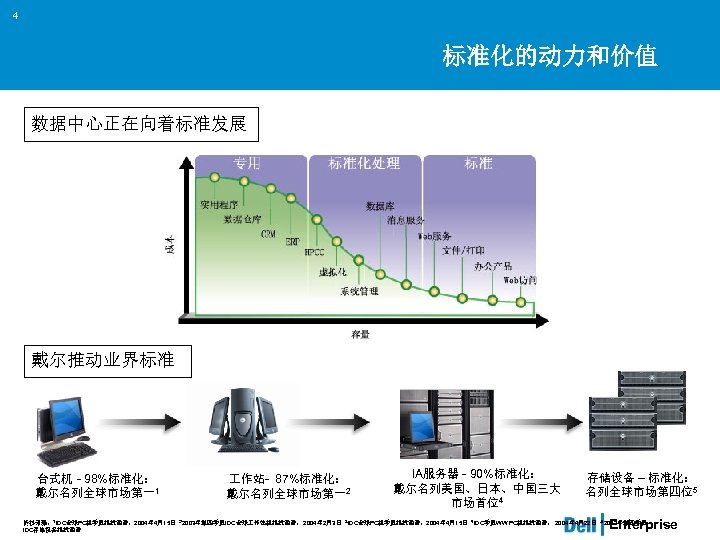
4 标准化的动力和价值 数据中心正在向着标准发展 戴尔推动业界标准 台式机 - 98%标准化: 戴尔名列全球市场第一1 作站- 87%标准化: 戴尔名列全球市场第一2 IA服务器 - 90%标准化: 戴尔名列美国、日本、中国三大 市场首位4 存储设备 – 标准化: 名列全球市场第四位5 Enterprise 资料来源: 1 IDC全球PC机季度跟踪调查,2004年 4月15日 22003年第四季度IDC全球 作站机跟踪调查, 2004年 2月3日 3 IDC全球PC机季度跟踪调查,2004年 4月15日 4 IDC季度WW PC机跟踪调查, 2004年 4月22日 5 2003年第四季度 IDC存储设备跟踪调查
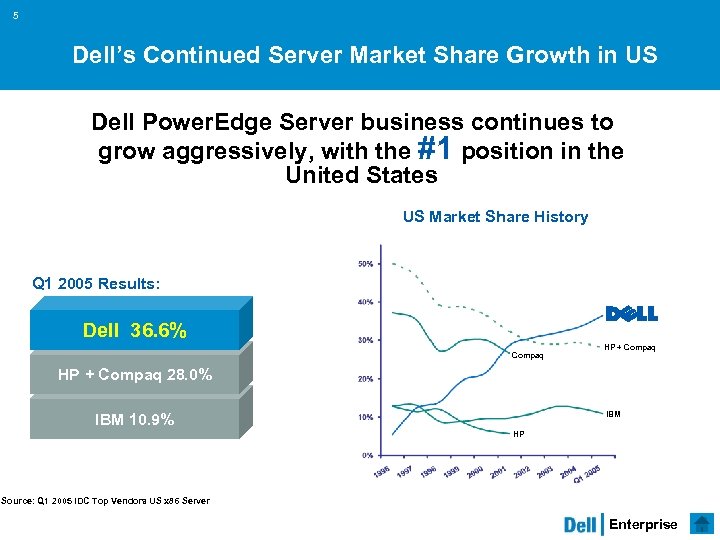
5 Dell’s Continued Server Market Share Growth in US Dell Power. Edge Server business continues to grow aggressively, with the #1 position in the United States US Market Share History Q 1 2005 Results: Dell 36. 6% Compaq HP + Compaq 28. 0% IBM 10. 9% HP Source: Q 1 2005 IDC Top Vendors US x 86 Server Enterprise
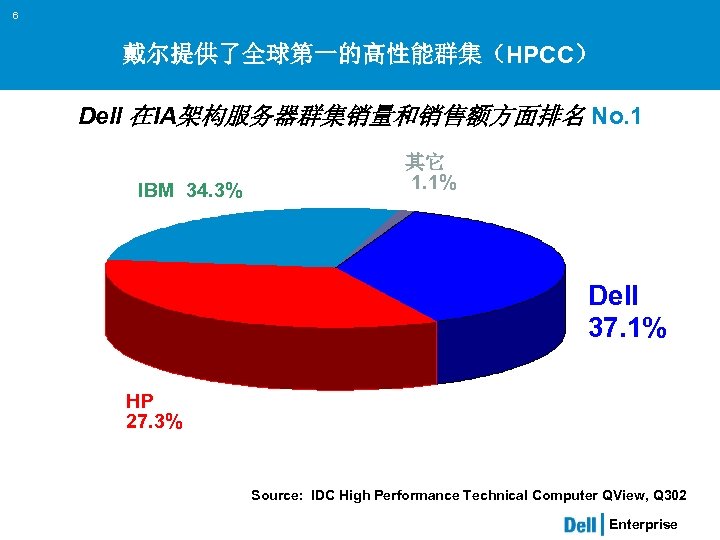
6 戴尔提供了全球第一的高性能群集(HPCC) Dell 在IA架构服务器群集销量和销售额方面排名 No. 1 IBM 34. 3% 其它 1. 1% Dell 37. 1% HP 27. 3% Source: IDC High Performance Technical Computer QView, Q 302 Enterprise
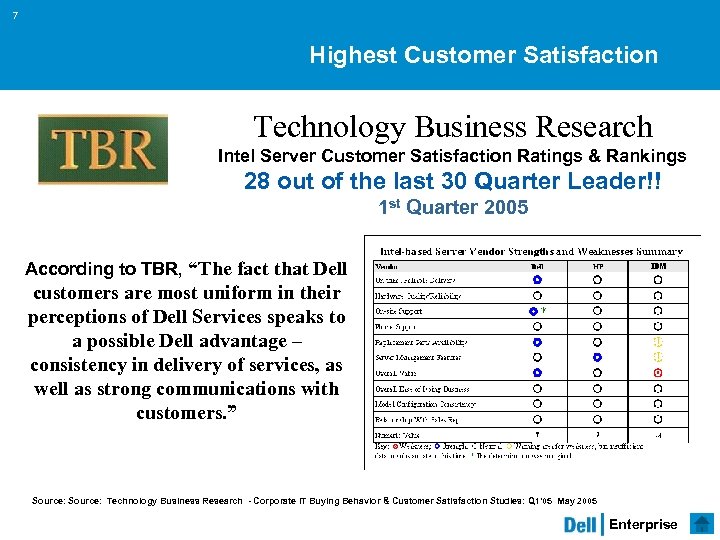
7 Highest Customer Satisfaction Technology Business Research Intel Server Customer Satisfaction Ratings & Rankings 28 out of the last 30 Quarter Leader!! 1 st Quarter 2005 According to TBR, “The fact that Dell customers are most uniform in their perceptions of Dell Services speaks to a possible Dell advantage – consistency in delivery of services, as well as strong communications with customers. ” Source: Technology Business Research - Corporate IT Buying Behavior & Customer Satisfaction Studies: Q 1’ 05 May 2005 Enterprise
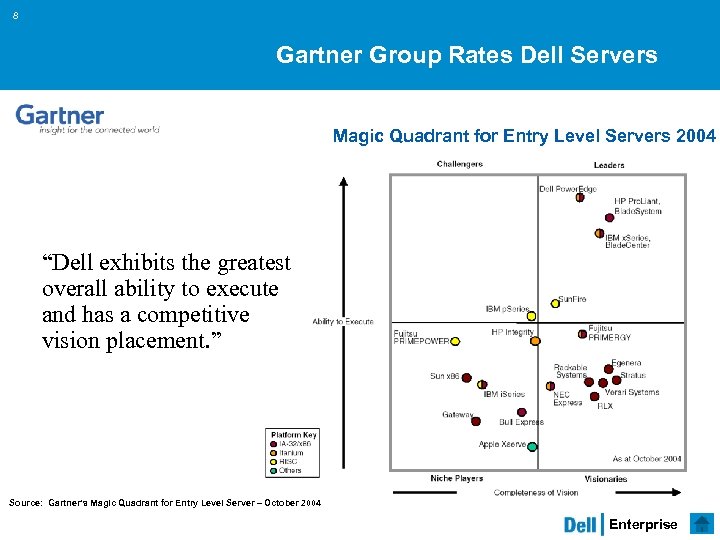
8 Gartner Group Rates Dell Servers Magic Quadrant for Entry Level Servers 2004 “Dell exhibits the greatest overall ability to execute and has a competitive vision placement. ” Source: Gartner’s Magic Quadrant for Entry Level Server – October 2004 Enterprise
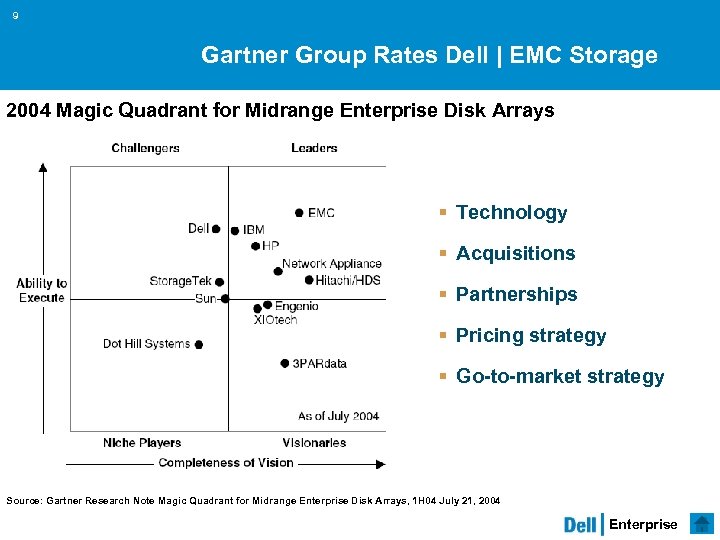
9 Gartner Group Rates Dell | EMC Storage 2004 Magic Quadrant for Midrange Enterprise Disk Arrays § Technology § Acquisitions § Partnerships § Pricing strategy § Go-to-market strategy Source: Gartner Research Note Magic Quadrant for Midrange Enterprise Disk Arrays, 1 H 04 July 21, 2004 Enterprise
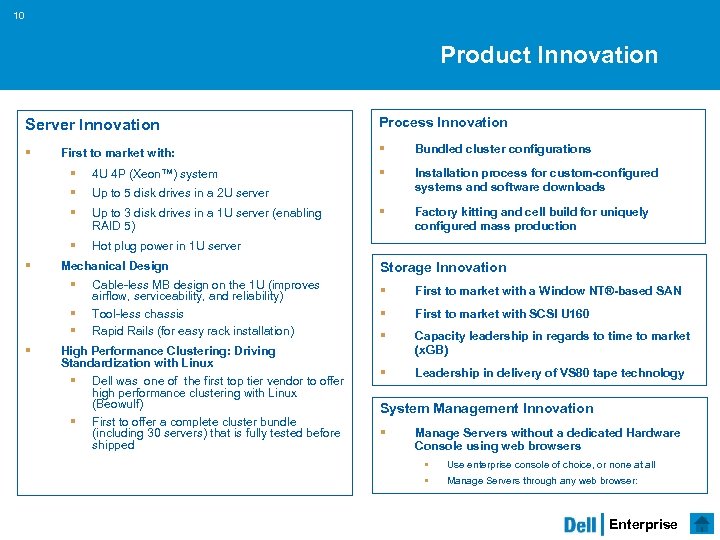
10 Product Innovation Server Innovation Process Innovation § § Bundled cluster configurations § Installation process for custom-configured systems and software downloads § Factory kitting and cell build for uniquely configured mass production First to market with: § § Up to 5 disk drives in a 2 U server § Up to 3 disk drives in a 1 U server (enabling RAID 5) § § 4 U 4 P (Xeon™) system Hot plug power in 1 U server Mechanical Design § § Cable-less MB design on the 1 U (improves airflow, serviceability, and reliability) Tool-less chassis Rapid Rails (for easy rack installation) High Performance Clustering: Driving Standardization with Linux § § Dell was one of the first top tier vendor to offer high performance clustering with Linux (Beowulf) First to offer a complete cluster bundle (including 30 servers) that is fully tested before shipped Storage Innovation § First to market with a Window NT®-based SAN § First to market with SCSI U 160 § Capacity leadership in regards to time to market (x. GB) § Leadership in delivery of VS 80 tape technology System Management Innovation § Manage Servers without a dedicated Hardware Console using web browsers § § Use enterprise console of choice, or none at all Manage Servers through any web browser: Enterprise
11 The Dell Difference: Business Execution The Dell Business Model Positions Dell to deliver the best end-to-end Customer Experience Dell Server Alliance Strategic industry alliances delivering the best customer solutions Growing Leadership in Internet-based Support Powerful online E-support tools customized to meet your needs Complete Business Continuation Services Robust strategic recovery offerings Self Maintainer and Education Programs Ability for customers to maintain their own systems Enterprise
12 The Dell Difference: Quality Manufacturing Dell Validation Lab Thousands of system test hours ensure compatible, reliable products Continuous Improvement to Manufacturing Year over year performance enhancements Inventory and Component Model Ensures highest quality components Power. Edge Manufacturing Cell build process provides the highest quality in every server manufactured Enterprise
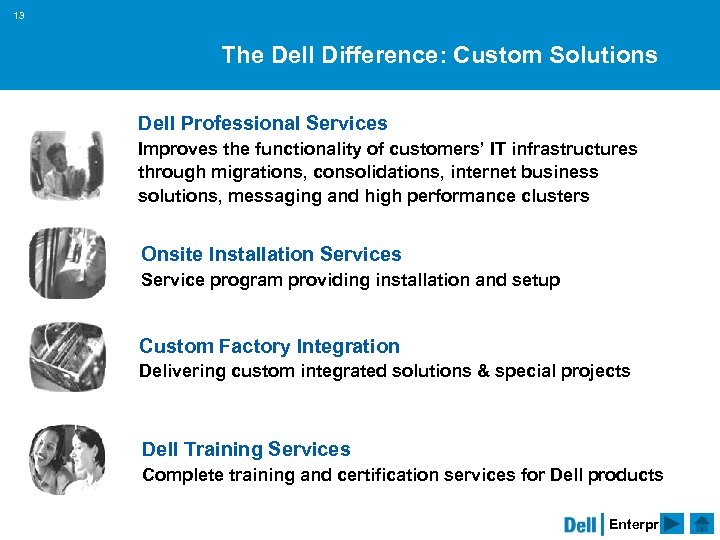
13 The Dell Difference: Custom Solutions Dell Professional Services Improves the functionality of customers’ IT infrastructures through migrations, consolidations, internet business solutions, messaging and high performance clusters Onsite Installation Services Service program providing installation and setup Custom Factory Integration Delivering custom integrated solutions & special projects Dell Training Services Complete training and certification services for Dell products Enterprise
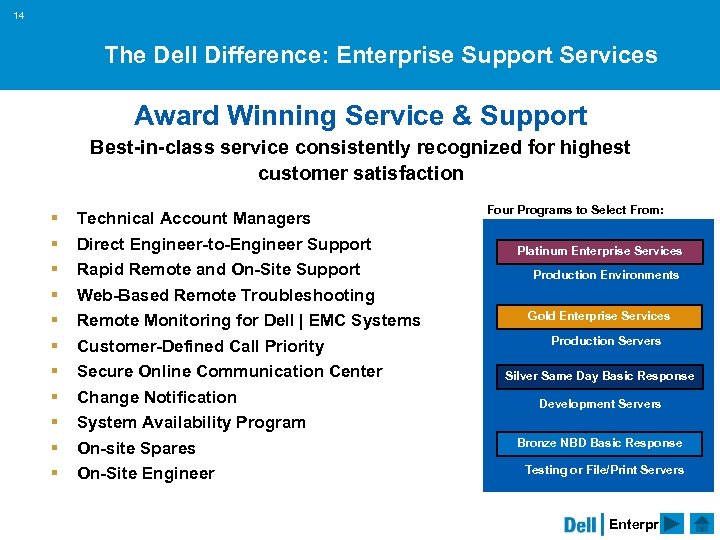
14 The Dell Difference: Enterprise Support Services Award Winning Service & Support Best-in-class service consistently recognized for highest customer satisfaction § § § Technical Account Managers Direct Engineer-to-Engineer Support Rapid Remote and On-Site Support Web-Based Remote Troubleshooting Remote Monitoring for Dell | EMC Systems Customer-Defined Call Priority Secure Online Communication Center Change Notification System Availability Program On-site Spares On-Site Engineer Four Programs to Select From: Platinum Enterprise Services Production Environments Gold Enterprise Services Production Servers Silver Same Day Basic Response Development Servers Bronze NBD Basic Response Testing or File/Print Servers Enterprise
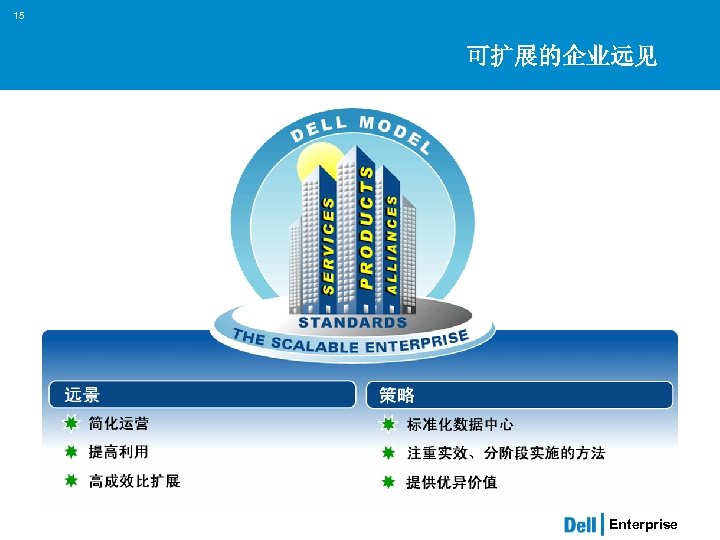
15 可扩展的企业远见 Enterprise
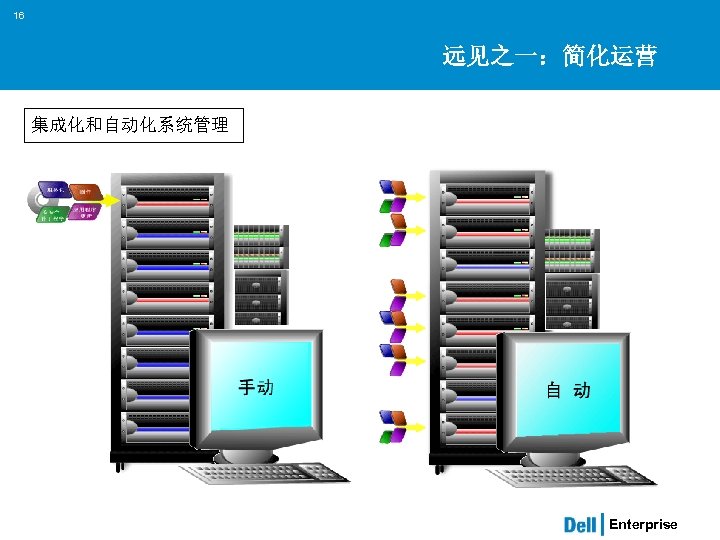
16 远见之一:简化运营 集成化和自动化系统管理 Enterprise
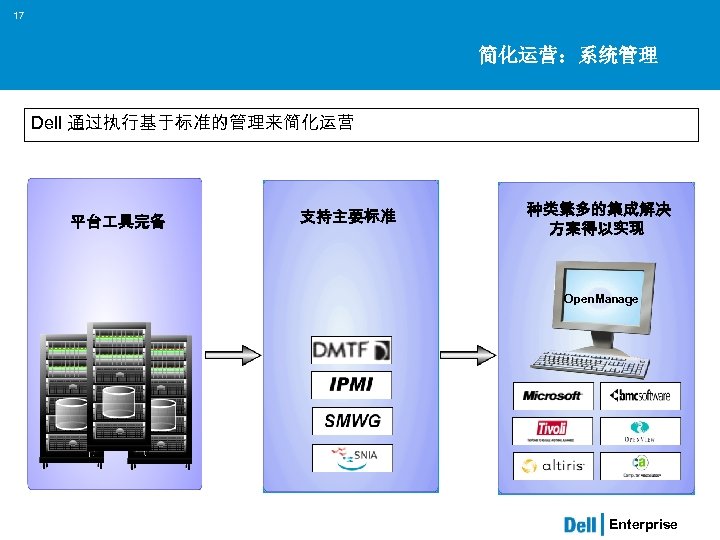
17 简化运营:系统管理 Dell 通过执行基于标准的管理来简化运营 平台 具完备 支持主要标准 种类繁多的集成解决 方案得以实现 Open. Manage Enterprise
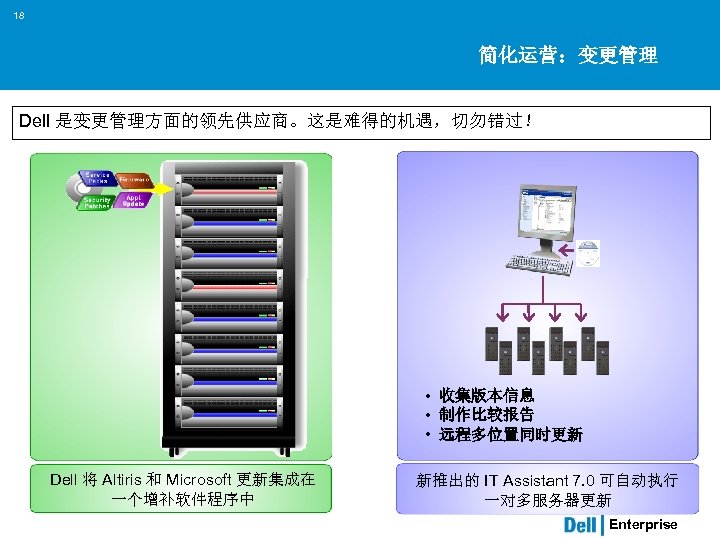
18 简化运营:变更管理 Dell 是变更管理方面的领先供应商。这是难得的机遇,切勿错过! • 收集版本信息 • 制作比较报告 • 远程多位置同时更新 Dell 将 Altiris 和 Microsoft 更新集成在 一个增补软件程序中 新推出的 IT Assistant 7. 0 可自动执行 一对多服务器更新 Enterprise
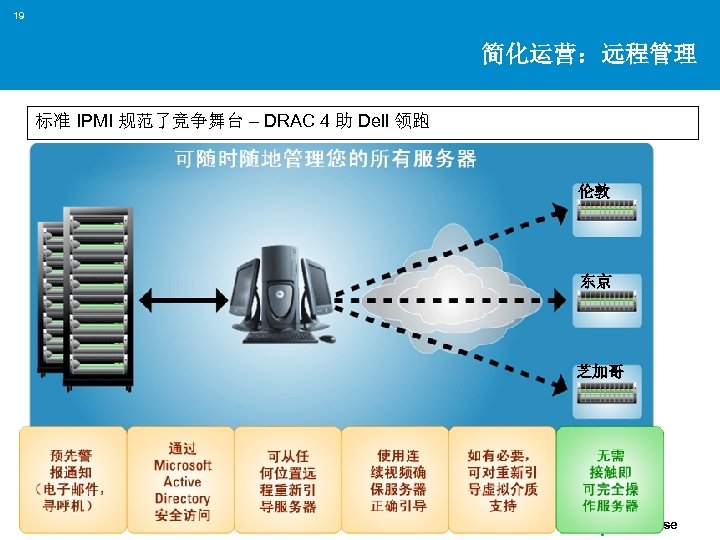
19 简化运营:远程管理 标准 IPMI 规范了竞争舞台 – DRAC 4 助 Dell 领跑 伦敦 东京 芝加哥 Enterprise
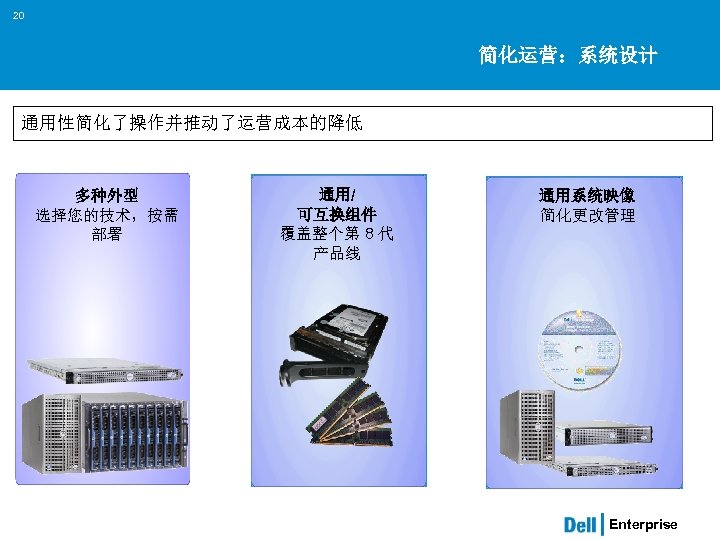
20 简化运营:系统设计 通用性简化了操作并推动了运营成本的降低 多种外型 选择您的技术,按需 部署 通用/ 可互换组件 覆盖整个第 8 代 产品线 通用系统映像 简化更改管理 Enterprise
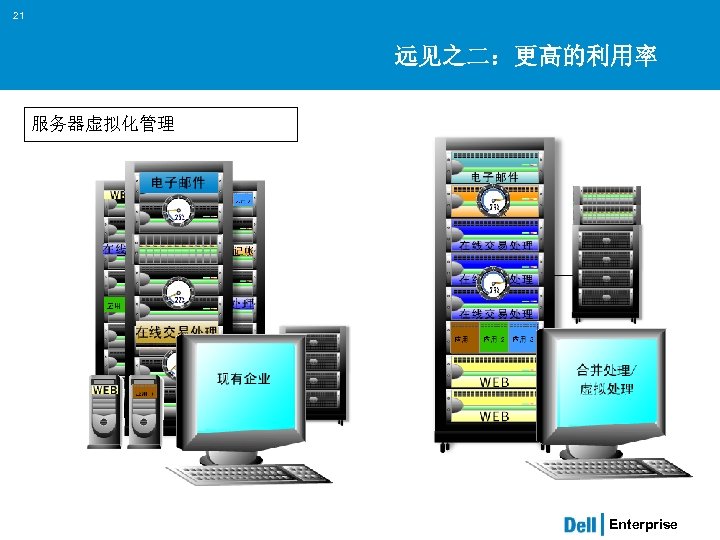
21 远见之二:更高的利用率 服务器虚拟化管理 Enterprise
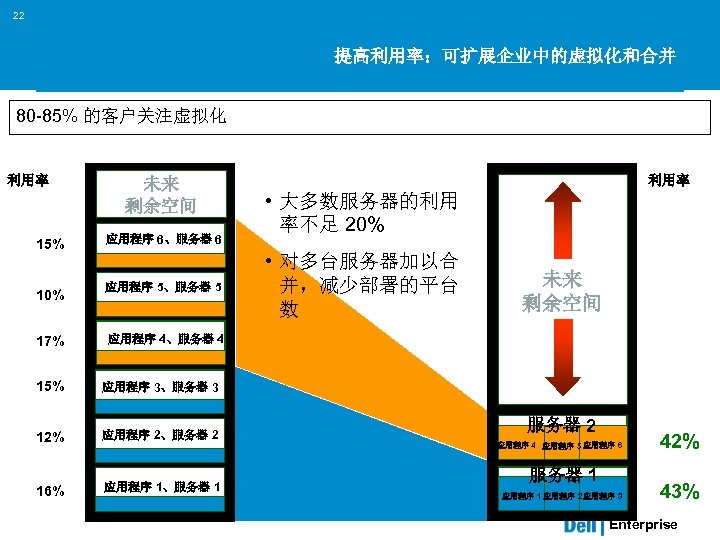
22 提高利用率:可扩展企业中的虚拟化和合并 80 -85% 的客户关注虚拟化 利用率 15% 10% 17% 未来 剩余空间 应用程序 6、服务器 6 应用程序 5、服务器 5 利用率 • 大多数服务器的利用 率不足 20% • 对多台服务器加以合 并,减少部署的平台 数 未来 剩余空间 应用程序 4、服务器 4 15% 应用程序 3、服务器 3 12% 应用程序 2、服务器 2 16% 应用程序 1、服务器 1 服务器 2 应用程序 4 应用程序 5 应用程序 6 服务器 1 应用程序 3 应用程序 1 应用程序 2 42% 43% Enterprise
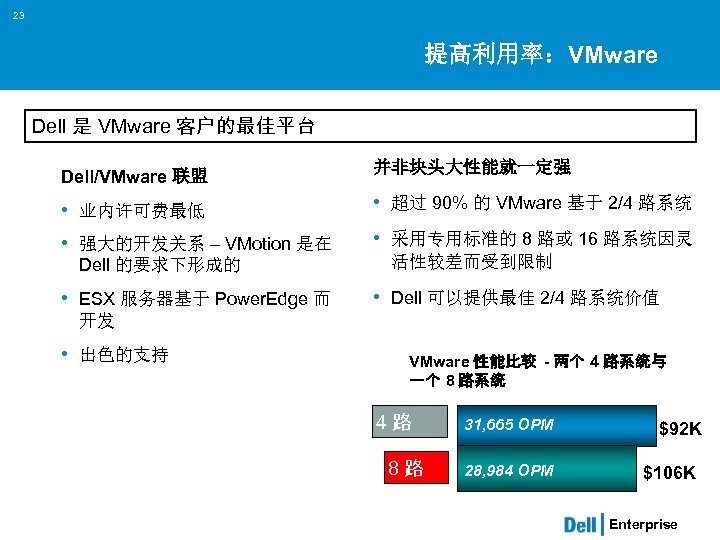
23 提高利用率:VMware Dell 是 VMware 客户的最佳平台 Dell/VMware 联盟 并非块头大性能就一定强 • 业内许可费最低 • 强大的开发关系 – VMotion 是在 • 超过 90% 的 VMware 基于 2/4 路系统 Dell 的要求下形成的 • ESX 服务器基于 Power. Edge 而 • 采用专用标准的 8 路或 16 路系统因灵 活性较差而受到限制 • Dell 可以提供最佳 2/4 路系统价值 开发 • 出色的支持 VMware 性能比较 - 两个 4 路系统与 一个 8 路系统 4 路 8 路 31, 665 OPM 28, 984 OPM $92 K $106 K Enterprise
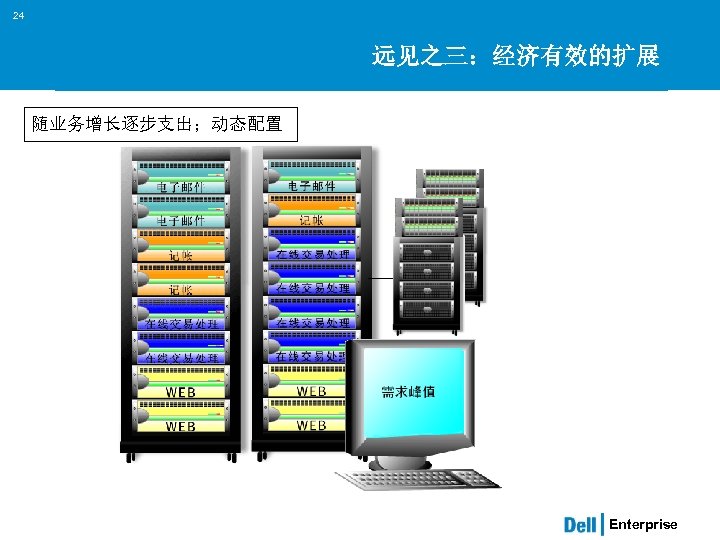
24 远见之三:经济有效的扩展 随业务增长逐步支出;动态配置 Enterprise
25 高成效比扩展:标准化数据库 Dell 使数据库部署的标准化简单易行 部署经过全面优化: • 采用已有标准:在客户处实施安装前就有了稳定的解决方案 • 不断改进:分发给堆栈用户的问题更新 • 所有权:Dell 拥有基于经验验证的配置的解决方案 150 多个配置,其中包括: • 服务器、SAN、交换机 • 带有 (RAC) 真正应用程序群集的 Oracle 数据库 • 安装服务与支持 “…就预先封装软件和硬件而言,在简化它 的使用、购买、安装及获取支持方面, Dell 是完美的合作伙伴。” - Larry Ellison,2004 年 4 月 Enterprise
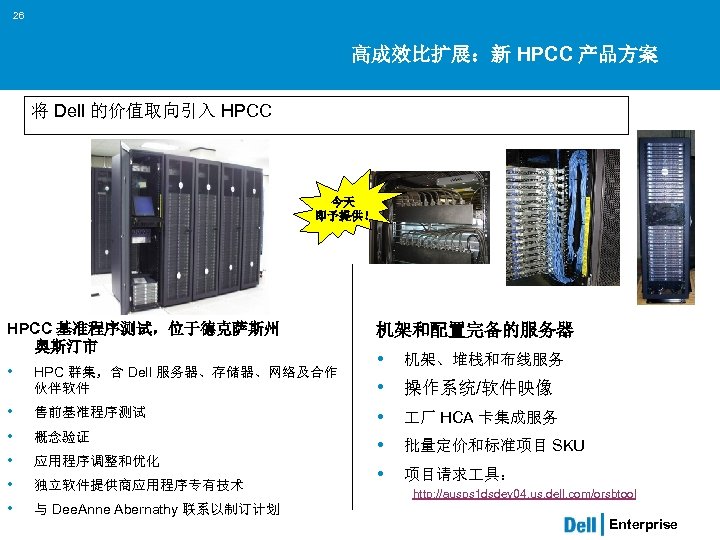
26 高成效比扩展:新 HPCC 产品方案 将 Dell 的价值取向引入 HPCC 今天 即予提供! HPCC 基准程序测试,位于德克萨斯州 奥斯汀市 • HPC 群集,含 Dell 服务器、存储器、网络及合作 伙伴软件 • • • 售前基准程序测试 概念验证 应用程序调整和优化 独立软件提供商应用程序专有技术 机架和配置完备的服务器 • 机架、堆栈和布线服务 • 操作系统/软件映像 • • • 厂 HCA 卡集成服务 批量定价和标准项目 SKU 项目请求 具: http: //ausps 1 dsdev 04. us. dell. com/orsbtool 与 Dee. Anne Abernathy 联系以制订计划 Enterprise
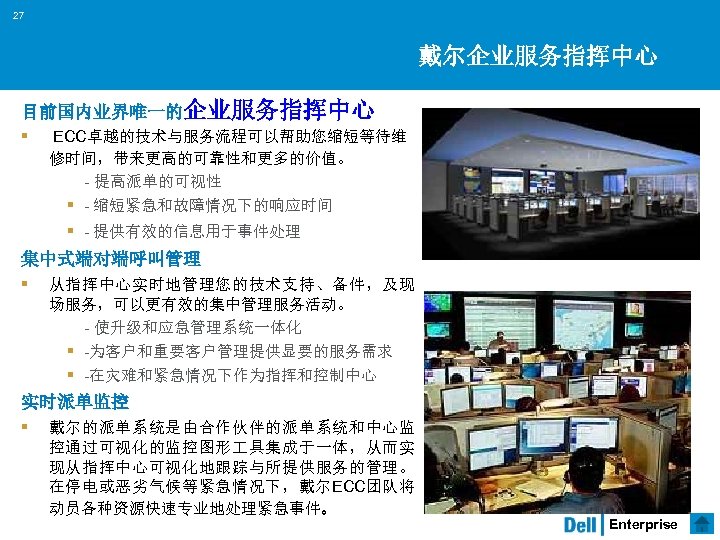
27 戴尔企业服务指挥中心 目前国内业界唯一的企业服务指挥中心 § ECC卓越的技术与服务流程可以帮助您缩短等待维 修时间,带来更高的可靠性和更多的价值。 - 提高派单的可视性 § - 缩短紧急和故障情况下的响应时间 § - 提供有效的信息用于事件处理 集中式端对端呼叫管理 § 从指挥中心实时地管理您的技术支持、备件,及现 场服务,可以更有效的集中管理服务活动。 - 使升级和应急管理系统一体化 § -为客户和重要客户管理提供显要的服务需求 § -在灾难和紧急情况下作为指挥和控制中心 实时派单监控 § 戴尔的派单系统是由合作伙伴的派单系统和中心监 控通过可视化的监控图形 具集成于一体,从而实 现从指挥中心可视化地跟踪与所提供服务的管理。 在停电或恶劣气候等紧急情况下,戴尔ECC团队将 动员各种资源快速专业地处理紧急事件。 Enterprise
Servers Power. Edge Servers Dell Rack Systems Scalable Enterprise Computing Open. Manage System Management Dell Confidential Future Directions
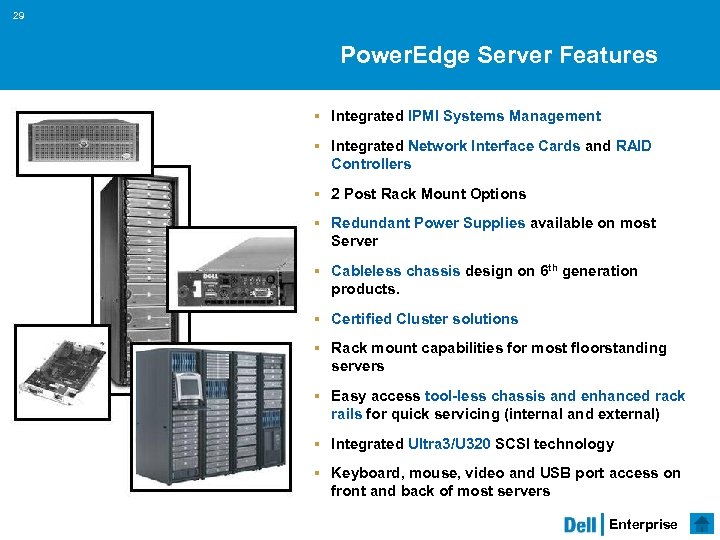
29 Power. Edge Server Features § Integrated IPMI Systems Management § Integrated Network Interface Cards and RAID Controllers § 2 Post Rack Mount Options § Redundant Power Supplies available on most Server § Cableless chassis design on 6 th generation products. § Certified Cluster solutions § Rack mount capabilities for most floorstanding servers § Easy access tool-less chassis and enhanced rack rails for quick servicing (internal and external) § Integrated Ultra 3/U 320 SCSI technology § Keyboard, mouse, video and USB port access on front and back of most servers Enterprise
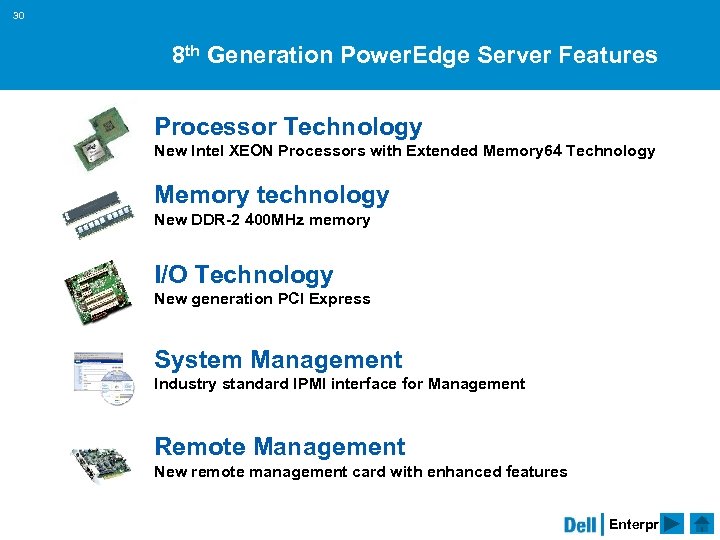
30 8 th Generation Power. Edge Server Features Processor Technology New Intel XEON Processors with Extended Memory 64 Technology Memory technology New DDR-2 400 MHz memory I/O Technology New generation PCI Express System Management Industry standard IPMI interface for Management Remote Management New remote management card with enhanced features Enterprise
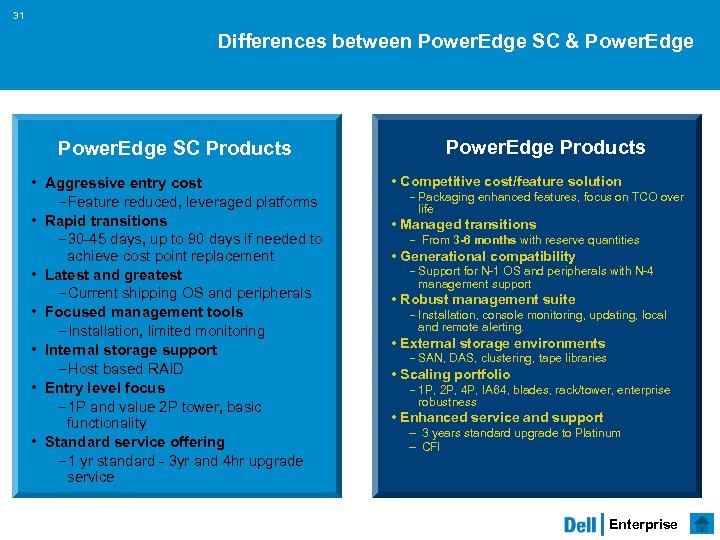
31 Differences between Power. Edge SC & Power. Edge SC Products • Aggressive entry cost -Feature reduced, leveraged platforms • Rapid transitions -30 -45 days, up to 90 days if needed to achieve cost point replacement • Latest and greatest -Current shipping OS and peripherals • Focused management tools -Installation, limited monitoring • Internal storage support -Host based RAID • Entry level focus -1 P and value 2 P tower, basic functionality • Standard service offering -1 yr standard - 3 yr and 4 hr upgrade service Power. Edge Products • Competitive cost/feature solution - Packaging enhanced features, focus on TCO over life • Managed transitions - From 3 -6 months with reserve quantities • Generational compatibility - Support for N-1 OS and peripherals with N-4 management support • Robust management suite - Installation, console monitoring, updating, local and remote alerting. • External storage environments - SAN, DAS, clustering, tape libraries • Scaling portfolio - 1 P, 2 P, 4 P, IA 64, blades, rack/tower, enterprise robustness • Enhanced service and support – 3 years standard upgrade to Platinum – CFI Enterprise
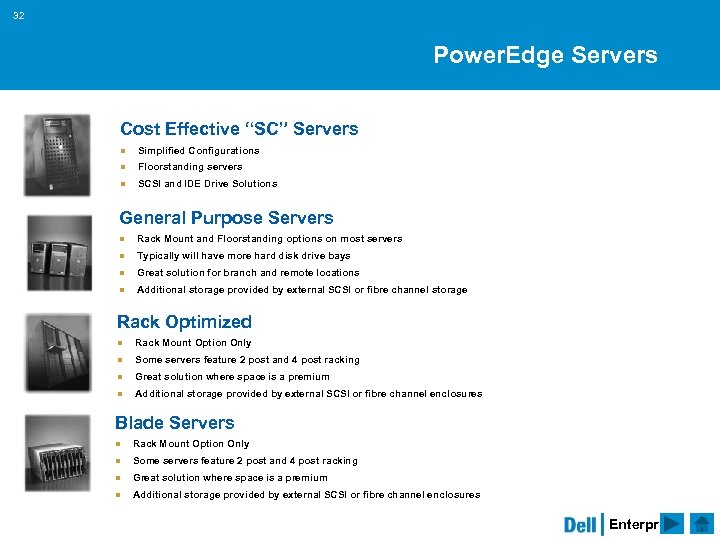
32 Power. Edge Servers Cost Effective “SC” Servers n Simplified Configurations n Floorstanding servers n SCSI and IDE Drive Solutions General Purpose Servers n Rack Mount and Floorstanding options on most servers n Typically will have more hard disk drive bays n Great solution for branch and remote locations n Additional storage provided by external SCSI or fibre channel storage Rack Optimized n Rack Mount Option Only n Some servers feature 2 post and 4 post racking n Great solution where space is a premium n Additional storage provided by external SCSI or fibre channel enclosures Blade Servers n Rack Mount Option Only n Some servers feature 2 post and 4 post racking n Great solution where space is a premium n Additional storage provided by external SCSI or fibre channel enclosures Enterprise
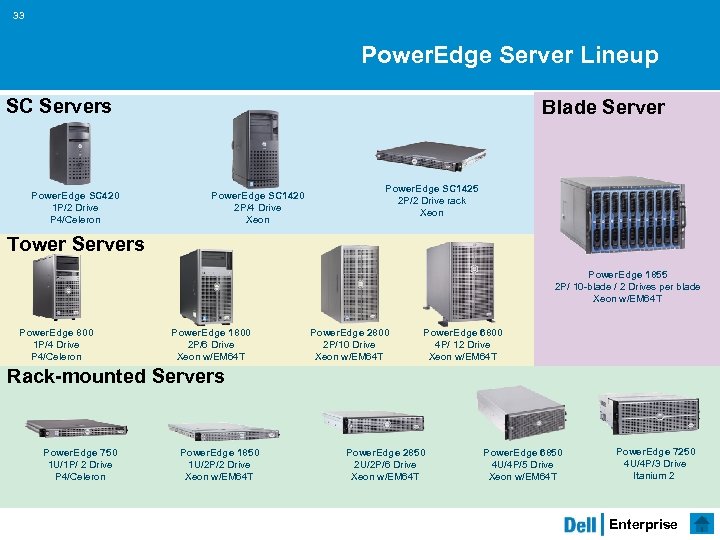
33 Power. Edge Server Lineup SC Servers Power. Edge SC 420 1 P/2 Drive P 4/Celeron Blade Server Power. Edge SC 1420 2 P/4 Drive Xeon Power. Edge SC 1425 2 P/2 Drive rack Xeon Tower Servers Power. Edge 1855 2 P/ 10 -blade / 2 Drives per blade Xeon w/EM 64 T Power. Edge 800 1 P/4 Drive P 4/Celeron Power. Edge 1800 2 P/6 Drive Xeon w/EM 64 T Power. Edge 2800 2 P/10 Drive Xeon w/EM 64 T Power. Edge 6800 4 P/ 12 Drive Xeon w/EM 64 T Rack-mounted Servers Power. Edge 750 1 U/1 P/ 2 Drive P 4/Celeron Power. Edge 1850 1 U/2 P/2 Drive Xeon w/EM 64 T Power. Edge 2850 2 U/2 P/6 Drive Xeon w/EM 64 T Power. Edge 6850 4 U/4 P/5 Drive Xeon w/EM 64 T Power. Edge 7250 4 U/4 P/3 Drive Itanium 2 Enterprise
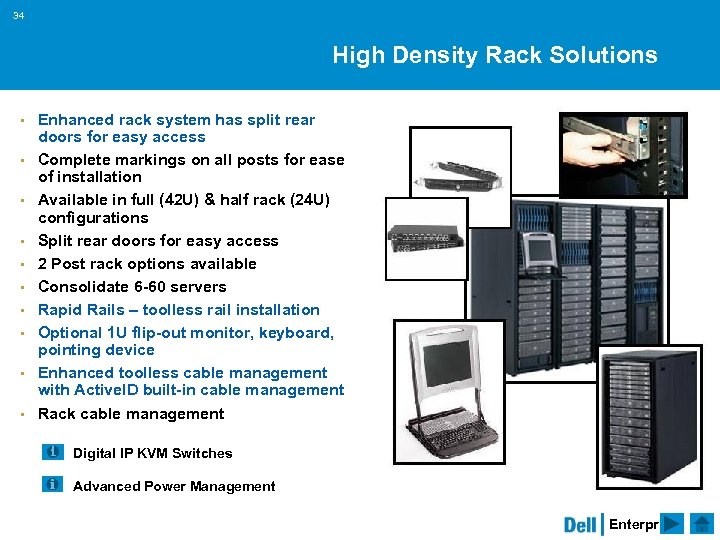
34 High Density Rack Solutions § § § § § Enhanced rack system has split rear doors for easy access Complete markings on all posts for ease of installation Available in full (42 U) & half rack (24 U) configurations Split rear doors for easy access 2 Post rack options available Consolidate 6 -60 servers Rapid Rails – toolless rail installation Optional 1 U flip-out monitor, keyboard, pointing device Enhanced toolless cable management with Active. ID built-in cable management Rack cable management Digital IP KVM Switches Advanced Power Management Enterprise
35 Enterprise Software and Peripherals Dell Enterprise Software & Peripherals includes complete web infrastructure, email, collaboration, database, tape backup and system management solutions. § Dell teams with software leaders in order to provide optimized support and hardware. § Dell can provide support for your software from purchase through deployment. You can leverage the expertise of Dell software specialists to evaluate and select the best licensing option for your business. § By consolidating your system purchases with software customers can rely on a single vendor for a complete solution. With fewer vendors involved the paperwork involved with purchases can be drastically reduced saving you time and money. § Dell Professional Services can help you assess your existing computing infrastructure, plan, and implement your software solution. § Dell offers complete reporting for your Microsoft® purchases as well as reporting on your other software purchases. Enterprise
36 Precise Sizing Tools to configure Dell Servers and Storage Microsoft. NET Tools A set of specialized Dell utilities to assist you in your configuration of MS Windows Environments including SQL and Exchange Dell Rack Advisor A graphical tool to assist you with configuration of Dell Rack Solutions Rack Advisor Enterprise
37 Scalable Enterprise Computing Industry standard solutions to meet your system consolidation needs § 8 -way and greater systems are unbalanced and out-cost their benefits. Most applications perform best on 2 -way and 4 -way systems § Increased availability § Better performance § Reduces complexity through standards-based servers. § High-performance compute clustering solutions § Microsoft Clustering Solutions § High Availability Programs § Power. Edge servers are certified for MS Clustering § VMware and other virtual server technologies are supported on Dell Power. Edge Servers Virtual Machines Clustering Enterprise
38 Linux Support Power. Edge Servers are ready for Red Hat and Su. SE Linux and can be custom configured for quick and easy deployment Factory Installation § Reduces setup time § Custom configuration of select systems and peripherals § Pre-loaded drivers make setup quick and easy Dell Quality and Service § Custom configuration factory tested Your Direct Source for Linux Products § Order online for factory installed Linux on Power. Edge Servers Enterprise
39 Oracle Database Configurations ENTERPRISE CLASS DATABASE SYSTEM DESIGNED FOR HIGH RELIABILITY, EASE OF INSTALLATION AND COST EFFECTIVENESS All-in-a-box database server with internal database storage capacity up to 292 GB in RAID 10 configuration (two additional drives reserved for OS and Oracle software). Hot-pluggable redundant cooling fans and power supplies, as well as hotpluggable hard drive bays provide redundancy and help maximize reliability. This Oracle Certified Configuration runs on Red Hat Enterprise Linux Delivered with the Dell Open. Manage. TM systems management CDs for installing, discovering, monitoring, and managing your server - at no extra charge. Enterprise
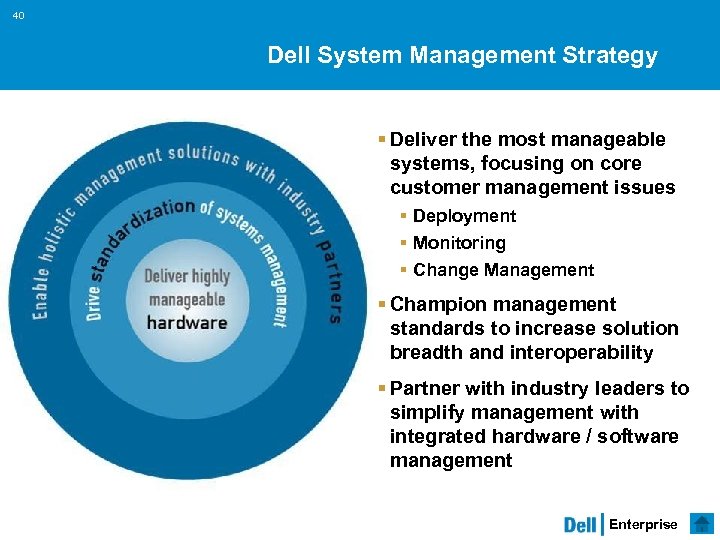
40 Dell System Management Strategy § Deliver the most manageable systems, focusing on core customer management issues § Deployment § Monitoring § Change Management § Champion management standards to increase solution breadth and interoperability § Partner with industry leaders to simplify management with integrated hardware / software management Enterprise
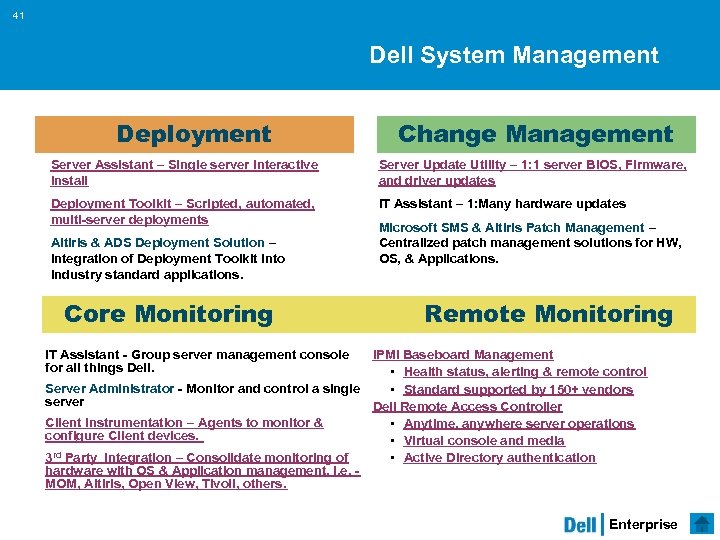
41 Dell System Management Deployment Change Management Server Assistant – Single server interactive install Server Update Utility – 1: 1 server BIOS, Firmware, and driver updates Deployment Toolkit – Scripted, automated, multi-server deployments IT Assistant – 1: Many hardware updates Altiris & ADS Deployment Solution – Integration of Deployment Toolkit into industry standard applications. Core Monitoring Microsoft SMS & Altiris Patch Management – Centralized patch management solutions for HW, OS, & Applications. Remote Monitoring IT Assistant - Group server management console for all things Dell. IPMI Baseboard Management • Health status, alerting & remote control Server Administrator - Monitor and control a single • Standard supported by 150+ vendors server Dell Remote Access Controller Client Instrumentation – Agents to monitor & • Anytime, anywhere server operations configure Client devices. • Virtual console and media rd Party Integration – Consolidate monitoring of 3 • Active Directory authentication hardware with OS & Application management. i. e. - MOM, Altiris, Open View, Tivoli, others. Enterprise
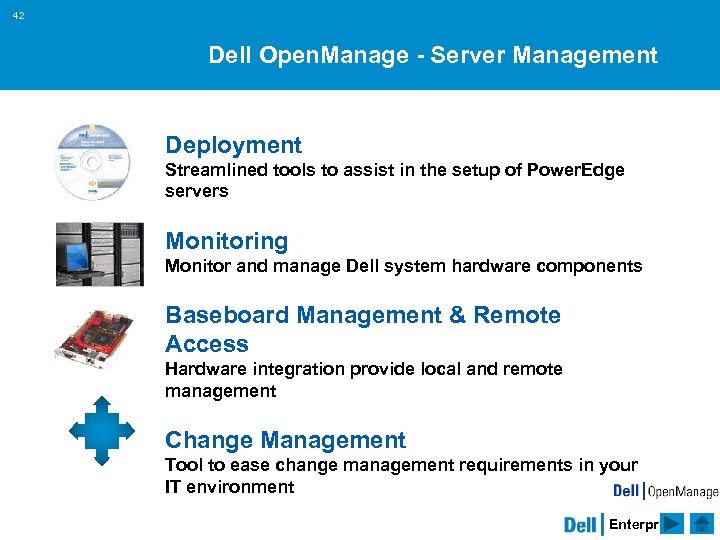
42 Dell Open. Manage - Server Management Deployment Streamlined tools to assist in the setup of Power. Edge servers Monitoring Monitor and manage Dell system hardware components Baseboard Management & Remote Access Hardware integration provide local and remote management Change Management Tool to ease change management requirements in your IT environment Enterprise
Storage Dell Power. Vault Dell | EMC Network Attached Storage Secondary Storage Management Dell Confidential

44 Dell Storage Dell Power. Vault & Dell | EMC storage technologies are complete solutions including connections, storage & backup § Complete Direct Attach Storage (DAS), Network Attached Storage (NAS) and Storage Area Network (SAN) solutions § End-to-end enterprise solutions – including hardware, software, services – from Dell, the enterprise market leader § Single point of accountability – Partnership and simplicity § Overall better value through investment protection and reduced TCO, as Dell | EMC product line can be upgraded and expanded as customer feature needs grow § Project-based SANs to meet customer needs, simplifying SAN design and management § Heterogeneous SANs to meet the need for multiple OS support Enterprise
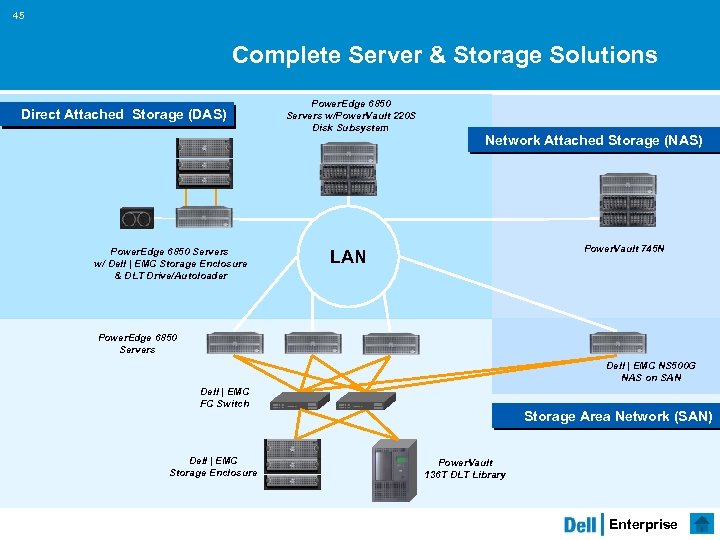
45 Complete Server & Storage Solutions Direct Attached Storage (DAS) Power. Edge 6850 Servers w/ Dell | EMC Storage Enclosure & DLT Drive/Autoloader Power. Edge 6850 Servers w/Power. Vault 220 S Disk Subsystem Network Attached Storage (NAS) Power. Vault 745 N LAN Power. Edge 6850 Servers Dell | EMC NS 500 G NAS on SAN Dell | EMC FC Switch Dell | EMC Storage Enclosure Storage Area Network (SAN) Power. Vault 136 T DLT Library Enterprise
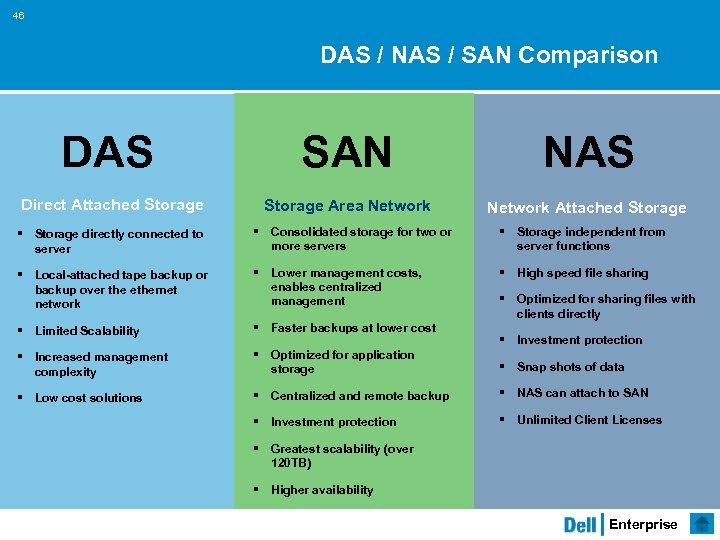
46 DAS / NAS / SAN Comparison DAS Direct Attached Storage SAN NAS Storage Area Network Attached Storage § Storage directly connected to server § Consolidated storage for two or more servers § Storage independent from server functions § Local-attached tape backup or backup over the ethernet network § Lower management costs, enables centralized management § High speed file sharing § Limited Scalability § Faster backups at lower cost § Increased management complexity § Optimized for application storage § Snap shots of data § Low cost solutions § Centralized and remote backup § NAS can attach to SAN § Investment protection § Unlimited Client Licenses § Optimized for sharing files with clients directly § Investment protection § Greatest scalability (over 120 TB) § Higher availability Enterprise
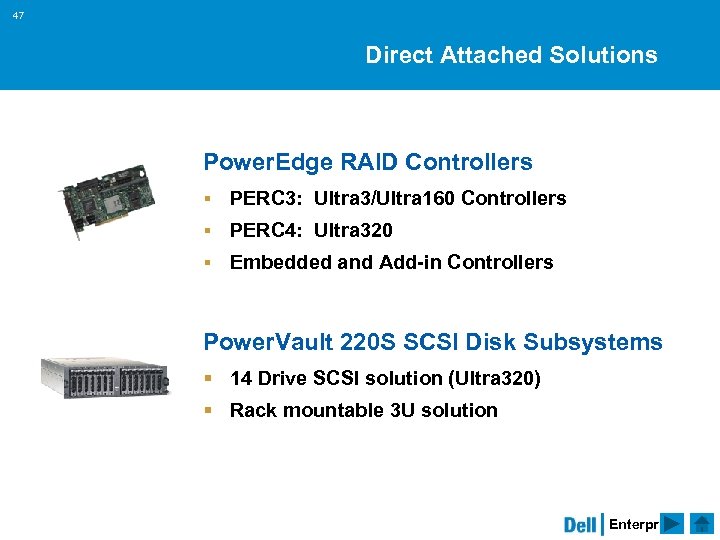
47 Direct Attached Solutions Power. Edge RAID Controllers § PERC 3: Ultra 3/Ultra 160 Controllers § PERC 4: Ultra 320 § Embedded and Add-in Controllers Power. Vault 220 S SCSI Disk Subsystems § 14 Drive SCSI solution (Ultra 320) § Rack mountable 3 U solution Enterprise
48 Dell | EMC Strategic Relationship § Combines EMC’s storage product and brand leadership with Dell’s proven Direct Model § Dell co-brands the EMC CLARii. ON product line § Dell now offers customers end-to-end server, storage, software and service solutions § Dell and EMC partner to provide services – consulting, deployment and support – providing high quality customer experiences § End-to-end enterprise solutions – including hardware, software and services – with the single point of contact and simplicity of Dell’s Direct Model § Value through investment protection and TCO. The Dell | EMC product line can be upgraded and expanded as customer needs change Enterprise
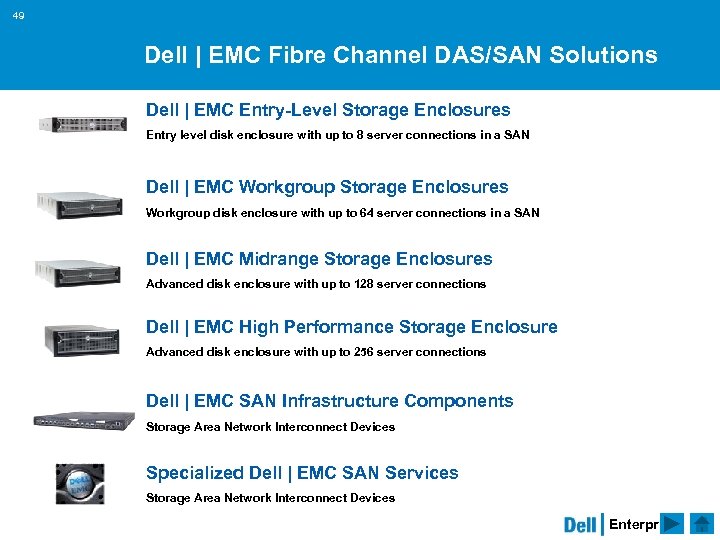
49 Dell | EMC Fibre Channel DAS/SAN Solutions Dell | EMC Entry-Level Storage Enclosures Entry level disk enclosure with up to 8 server connections in a SAN Dell | EMC Workgroup Storage Enclosures Workgroup disk enclosure with up to 64 server connections in a SAN Dell | EMC Midrange Storage Enclosures Advanced disk enclosure with up to 128 server connections Dell | EMC High Performance Storage Enclosure Advanced disk enclosure with up to 256 server connections Dell | EMC SAN Infrastructure Components Storage Area Network Interconnect Devices Specialized Dell | EMC SAN Services Storage Area Network Interconnect Devices Enterprise
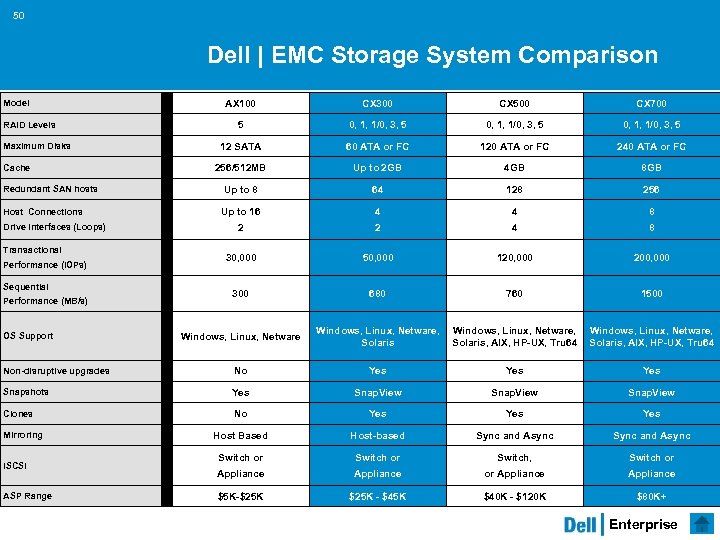
50 Dell | EMC Storage System Comparison AX 100 CX 300 CX 500 CX 700 5 0, 1, 1/0, 3, 5 12 SATA 60 ATA or FC 120 ATA or FC 240 ATA or FC 256/512 MB Up to 2 GB 4 GB 8 GB Up to 8 64 128 256 Up to 16 4 4 8 2 2 4 8 30, 000 50, 000 120, 000 200, 000 300 680 760 1500 Windows, Linux, Netware, Solaris, AIX, HP-UX, Tru 64 Non-disruptive upgrades No Yes Yes Snapshots Yes Snap. View Clones No Yes Yes Host Based Host-based Sync and Async Switch or Switch, Switch or Appliance $5 K-$25 K - $45 K $40 K - $120 K $80 K+ Model RAID Levels Maximum Disks Cache Redundant SAN hosts Host Connections Drive Interfaces (Loops) Transactional Performance (IOPs) Sequential Performance (MB/s) OS Support Mirroring i. SCSI ASP Range Enterprise
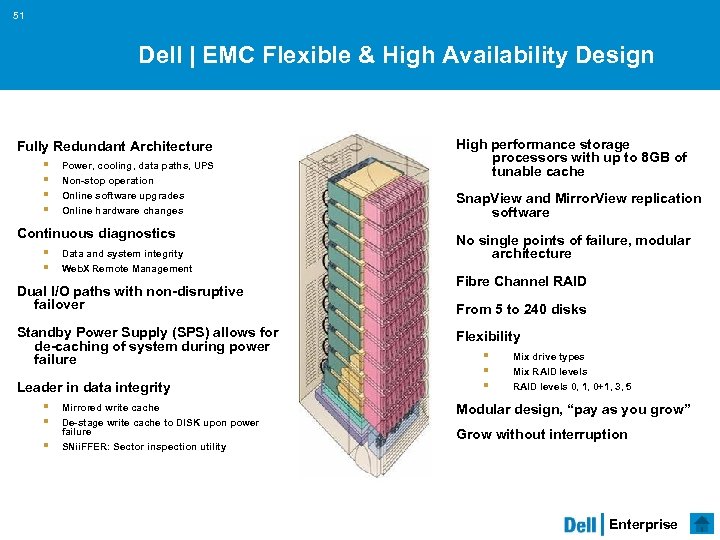
51 Dell | EMC Flexible & High Availability Design Fully Redundant Architecture § § Power, cooling, data paths, UPS Non-stop operation Online software upgrades Online hardware changes Continuous diagnostics § § Data and system integrity Web. X Remote Management Dual I/O paths with non-disruptive failover Standby Power Supply (SPS) allows for de-caching of system during power failure Leader in data integrity § § § Mirrored write cache De-stage write cache to DISK upon power failure SNii. FFER: Sector inspection utility High performance storage processors with up to 8 GB of tunable cache Snap. View and Mirror. View replication software No single points of failure, modular architecture Fibre Channel RAID From 5 to 240 disks Flexibility § § § Mix drive types Mix RAID levels 0, 1, 0+1, 3, 5 Modular design, “pay as you grow” Grow without interruption Enterprise
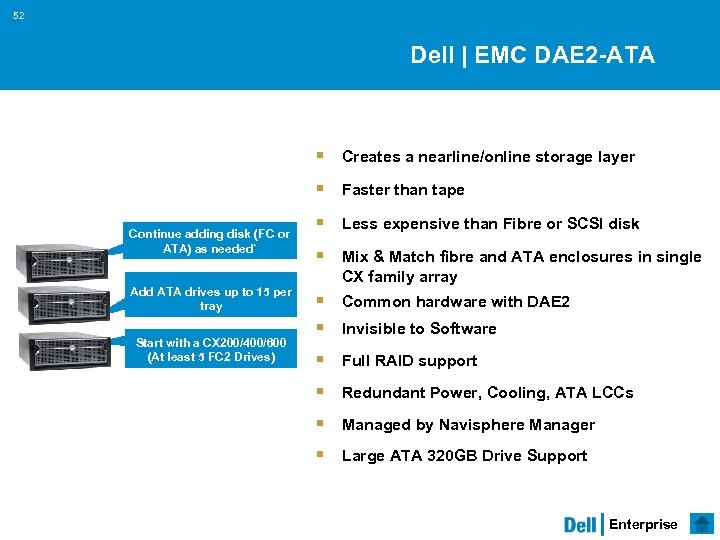
52 Dell | EMC DAE 2 -ATA § Creates a nearline/online storage layer § Faster than tape Continue adding disk (FC or ATA) as needed` Add ATA drives up to 15 per tray Start with a CX 200/400/600 (At least 5 FC 2 Drives) § Less expensive than Fibre or SCSI disk § Mix & Match fibre and ATA enclosures in single CX family array § Common hardware with DAE 2 § Invisible to Software § Full RAID support § Redundant Power, Cooling, ATA LCCs § Managed by Navisphere Manager § Large ATA 320 GB Drive Support Enterprise
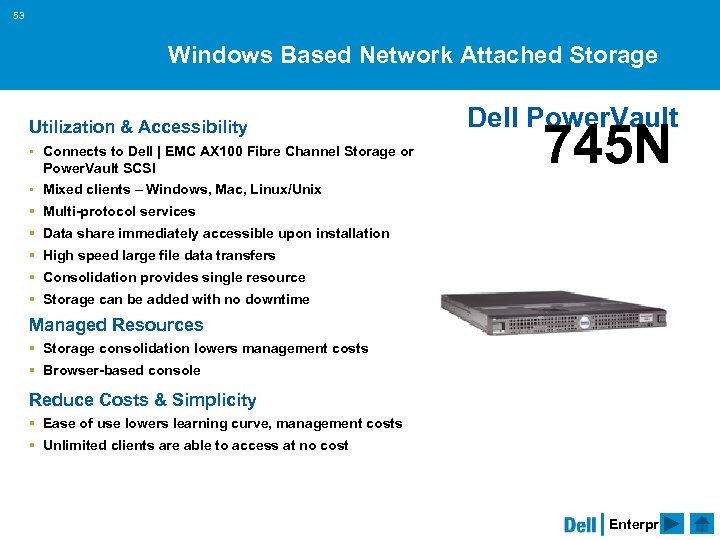
53 Windows Based Network Attached Storage Utilization & Accessibility § Connects to Dell | EMC AX 100 Fibre Channel Storage or Power. Vault SCSI Dell Power. Vault 745 N § Mixed clients – Windows, Mac, Linux/Unix § Multi-protocol services § Data share immediately accessible upon installation § High speed large file data transfers § Consolidation provides single resource § Storage can be added with no downtime Managed Resources § Storage consolidation lowers management costs § Browser-based console Reduce Costs & Simplicity § Ease of use lowers learning curve, management costs § Unlimited clients are able to access at no cost Enterprise
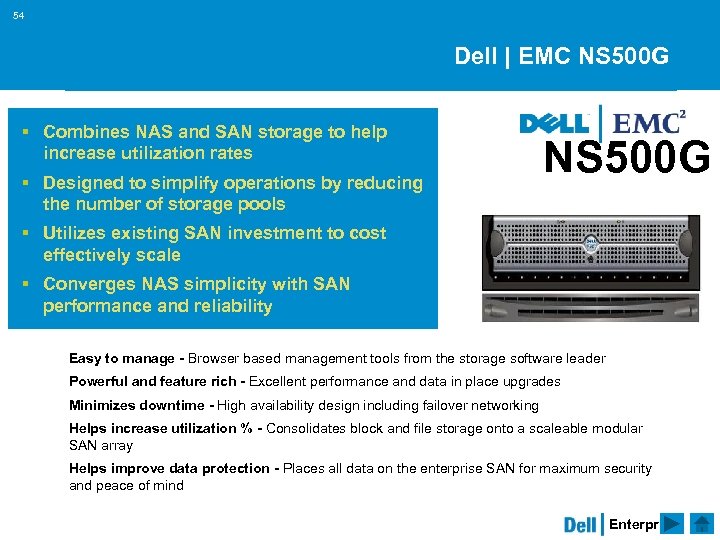
54 Dell | EMC NS 500 G § Combines NAS and SAN storage to help increase utilization rates § Designed to simplify operations by reducing the number of storage pools NS 500 G § Utilizes existing SAN investment to cost effectively scale § Converges NAS simplicity with SAN performance and reliability Easy to manage - Browser based management tools from the storage software leader Powerful and feature rich - Excellent performance and data in place upgrades Minimizes downtime - High availability design including failover networking Helps increase utilization % - Consolidates block and file storage onto a scaleable modular SAN array Helps improve data protection - Places all data on the enterprise SAN for maximum security and peace of mind Enterprise
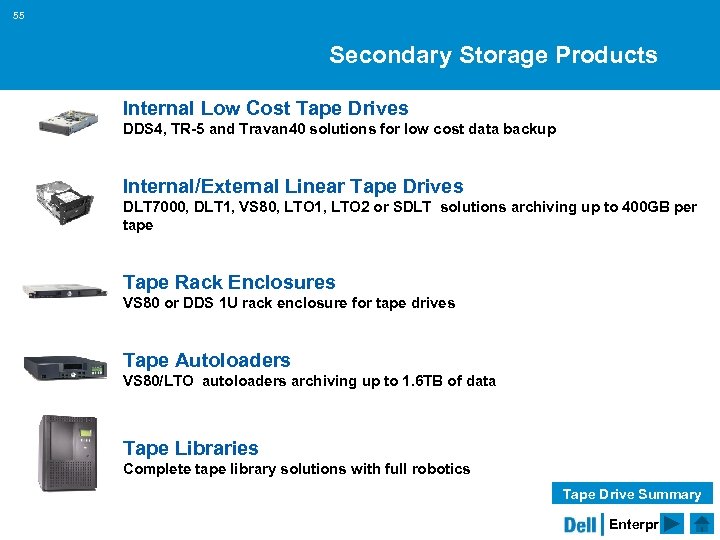
55 Secondary Storage Products Internal Low Cost Tape Drives DDS 4, TR-5 and Travan 40 solutions for low cost data backup Internal/External Linear Tape Drives DLT 7000, DLT 1, VS 80, LTO 1, LTO 2 or SDLT solutions archiving up to 400 GB per tape Tape Rack Enclosures VS 80 or DDS 1 U rack enclosure for tape drives Tape Autoloaders VS 80/LTO autoloaders archiving up to 1. 6 TB of data Tape Libraries Complete tape library solutions with full robotics Tape Drive Summary Enterprise
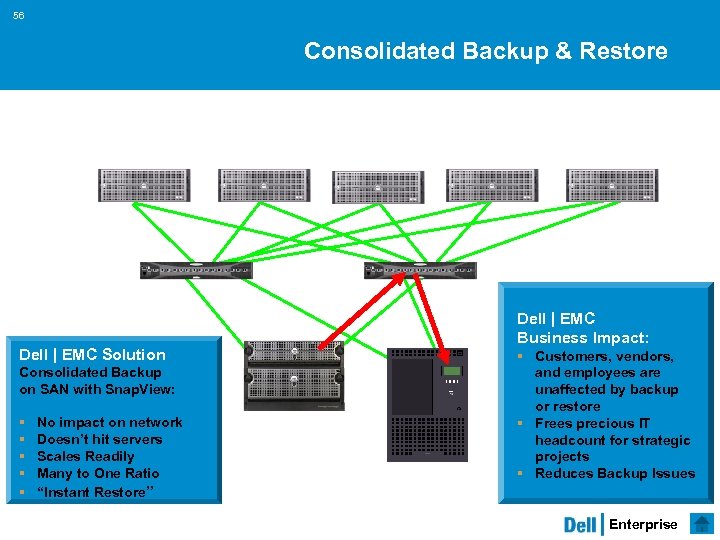
56 Consolidated Backup & Restore Dell | EMC Solution Consolidated Backup on SAN with Snap. View: § § § No impact on network Doesn’t hit servers Scales Readily Many to One Ratio “Instant Restore” Dell | EMC Business Impact: § Customers, vendors, and employees are unaffected by backup or restore § Frees precious IT headcount for strategic projects § Reduces Backup Issues Enterprise
57 Dell Open. Manage Storage Management Power. Path Load Management Intelligent, self-sensing infrastructure management to help reduce cost and complexity Navisphere Storage Management Comprehensive suite of tools that interface with the Dell | EMC Products and leading system management platforms Visual SAN Visual management for your homogenous SANs, NAS, Dell | EMC & Power. Vault Midrange & Enterprise environments Visual SRM Storage Resource Management tool for trend analysis of storage and application use CLARAlert Remote Management Manage and problem resolution remotely Backup Solutions Cost effective bundled support for the secondary storage solutions Enterprise
58 Storage Futures Higher Performance & Scalability § All Dell | EMC Array Enclosures will yield higher performance (30% - 500%) § Dell | EMC Array Enclosures will have higher drive counts and flexible architectures (i. SCSI, NAS and SAN) § New Power. Vault SATA Drive enclosure for environments that do not require the highest performance § Common components continue to be used on next generation products Lower Cost § New low cost Dell | EMC array § Simple design for entry level shared RAID level storage Enterprise
Networks Power. Connect Overview Proposition Dell Confidential
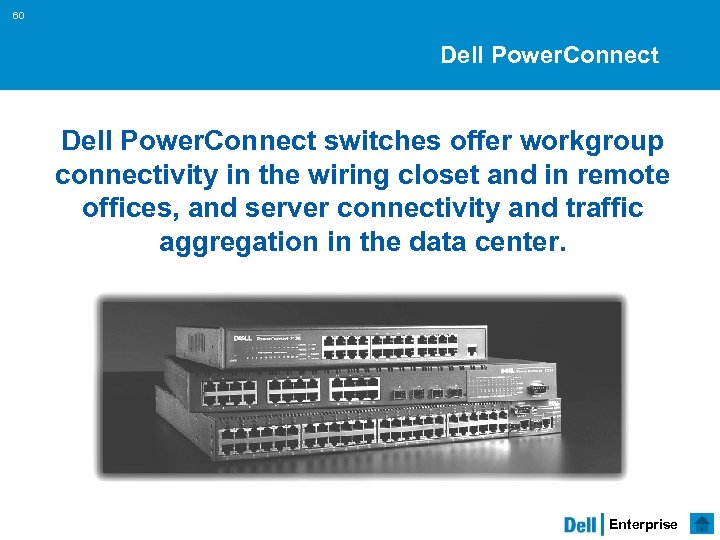
60 Dell Power. Connect switches offer workgroup connectivity in the wiring closet and in remote offices, and server connectivity and traffic aggregation in the data center. Enterprise
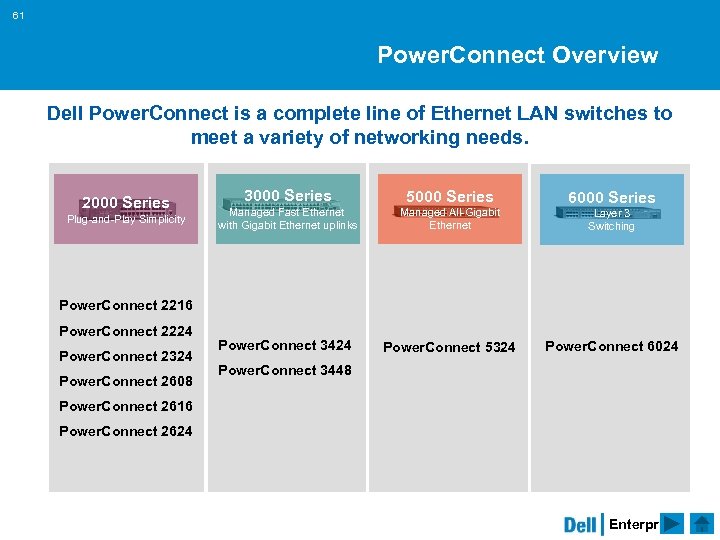
61 Power. Connect Overview Dell Power. Connect is a complete line of Ethernet LAN switches to meet a variety of networking needs. 2000 Series Plug-and-Play Simplicity 3000 Series 5000 Series Managed Fast Ethernet with Gigabit Ethernet uplinks 6000 Series Managed All-Gigabit Ethernet Layer 3 Switching Power. Connect 2216 Power. Connect 2224 Power. Connect 2324 Power. Connect 2608 Power. Connect 3424 Power. Connect 5324 Power. Connect 6024 Power. Connect 3448 Power. Connect 2616 Power. Connect 2624 Enterprise
62 Power. Connect Proposition EASY TO PURCHASE, EASY TO OWN Clients, Servers, Storage and Switches – all from Dell Performance 100% wire speed switching throughput at “Dell Direct” prices Interoperability Standards-based design for seamless network integration Management Open Management Interfaces Service & Support Reliable products backed by Dell’s highly regarded customer service and support Configuration Examples Sample configurations with pricing models Enterprise
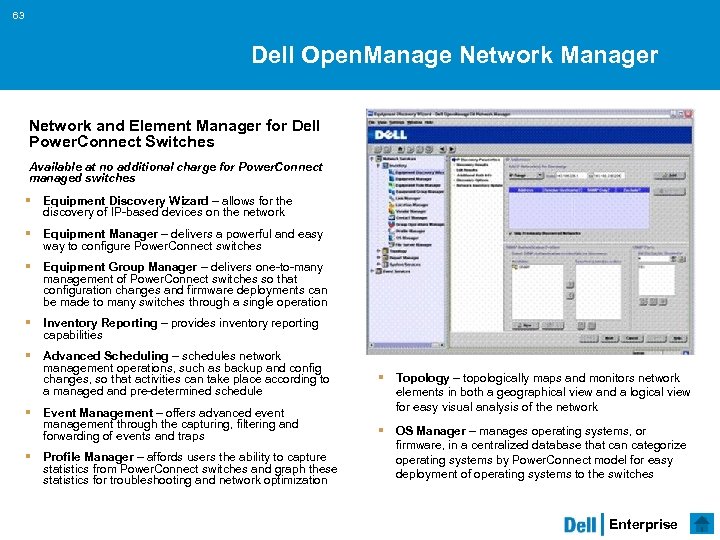
63 Dell Open. Manage Network Manager Network and Element Manager for Dell Power. Connect Switches Available at no additional charge for Power. Connect managed switches § Equipment Discovery Wizard – allows for the discovery of IP-based devices on the network § Equipment Manager – delivers a powerful and easy way to configure Power. Connect switches § Equipment Group Manager – delivers one-to-many management of Power. Connect switches so that configuration changes and firmware deployments can be made to many switches through a single operation § Inventory Reporting – provides inventory reporting capabilities § Advanced Scheduling – schedules network management operations, such as backup and config changes, so that activities can take place according to a managed and pre-determined schedule § Event Management – offers advanced event management through the capturing, filtering and forwarding of events and traps § Profile Manager – affords users the ability to capture statistics from Power. Connect switches and graph these statistics for troubleshooting and network optimization § Topology – topologically maps and monitors network elements in both a geographical view and a logical view for easy visual analysis of the network § OS Manager – manages operating systems, or firmware, in a centralized database that can categorize operating systems by Power. Connect model for easy deployment of operating systems to the switches Enterprise
64 问 题 • 请列举 Dell的三个远见 • 请列举 Dell的三大类产品 • 请列举连接存储的三种方式 Enterprise
谢谢! 简单 • 价值 • 功能 Dell Confidential
Скачать презентацию 基于标准化的可扩展企业计算 徐芷玲 应用解决方案中心 18 三月 2018 Dell Confidential
de0f469725423a431d2b97f8269fd696.ppt