 Скачать презентацию Ηλεκτρονικές Υπηρεσίες Ηλεκτρονικό Επιχειρείν Διάλεξη 6η
1b050fbc4eda0ddc75fcc68b5f6b29e8.ppt
- Количество слайдов: 25




“Ηλεκτρονικές Υπηρεσίες – Ηλεκτρονικό Επιχειρείν” Διάλεξη 6η – Functional Architecture Δρ. Κώστας Κούτσικος
Agenda • Σύνδεση με τα προηγούμενα • Functional Architecture development methodology • Functional visualization – a case study • Τελικά σχόλια
Definitions
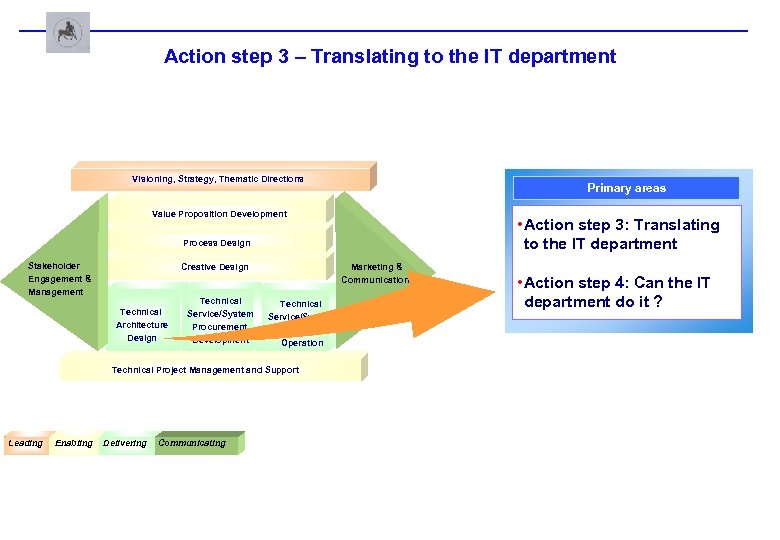
Action step 3 – Translating to the IT department Visioning, Strategy, Thematic Directions Primary areas Value Proposition Development • Action step 3: Translating to the IT department Process Design Stakeholder Engagement & Management Creative Design Technical l. E l. Architecture Design Technical Service/System Procurement, Development Marketing & Communications Technical Service/System Delivery, Operation Technical Project Management and Support Leading l. Leading Enabling l. Enabling Delivering Communicating l. Delivering l. Communicating • Action step 4: Can the IT department do it ?
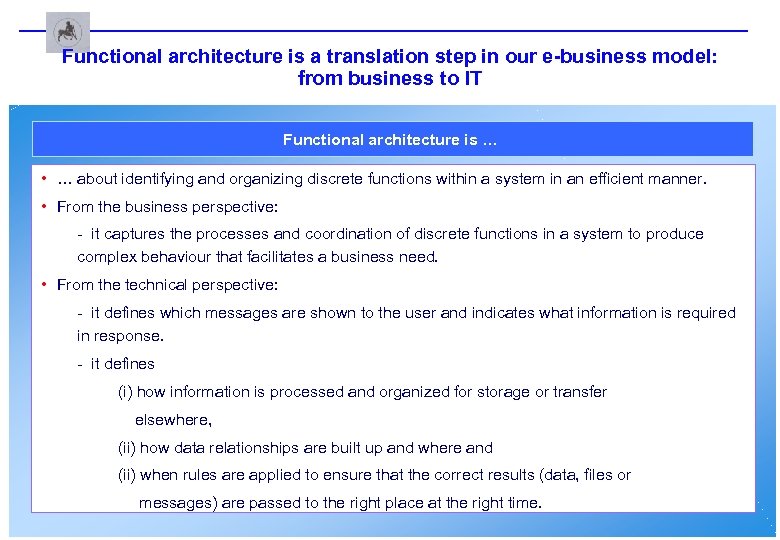
Functional architecture is a translation step in our e-business model: from business to IT Functional architecture is … • … about identifying and organizing discrete functions within a system in an efficient manner. • From the business perspective: - it captures the processes and coordination of discrete functions in a system to produce complex behaviour that facilitates a business need. • From the technical perspective: - it defines which messages are shown to the user and indicates what information is required in response. - it defines (i) how information is processed and organized for storage or transfer elsewhere, (ii) how data relationships are built up and where and (ii) when rules are applied to ensure that the correct results (data, files or messages) are passed to the right place at the right time.

Functional Architecture Development Methodology
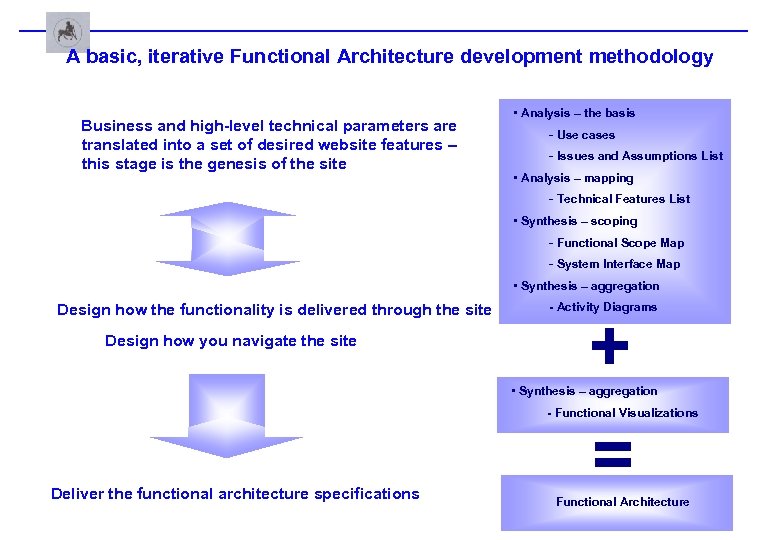
A basic, iterative Functional Architecture development methodology Business and high-level technical parameters are translated into a set of desired website features – this stage is the genesis of the site • Analysis – the basis - Use cases - Issues and Assumptions List • Analysis – mapping - Technical Features List • Synthesis – scoping - Functional Scope Map - System Interface Map • Synthesis – aggregation Design how the functionality is delivered through the site Design how you navigate the site - Activity Diagrams + • Synthesis – aggregation - Functional Visualizations Deliver the functional architecture specifications = Functional Architecture
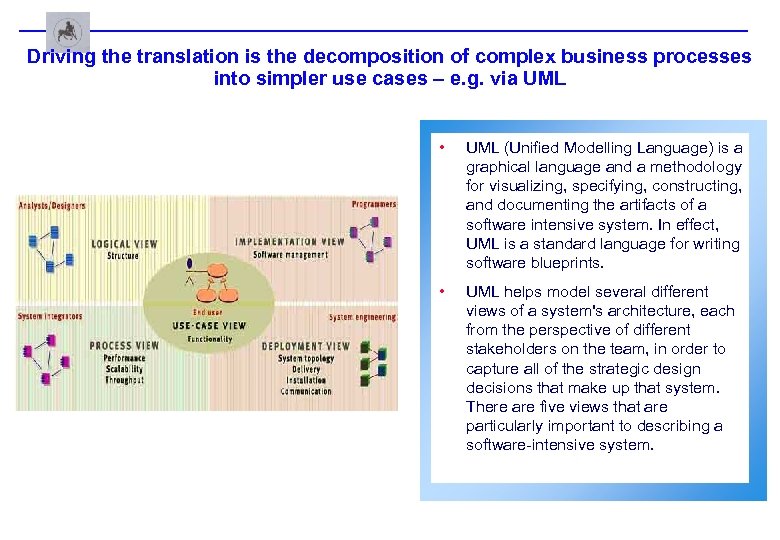
Driving the translation is the decomposition of complex business processes into simpler use cases – e. g. via UML • UML (Unified Modelling Language) is a graphical language and a methodology for visualizing, specifying, constructing, and documenting the artifacts of a software intensive system. In effect, UML is a standard language for writing software blueprints. • UML helps model several different views of a system's architecture, each from the perspective of different stakeholders on the team, in order to capture all of the strategic design decisions that make up that system. There are five views that are particularly important to describing a software-intensive system.
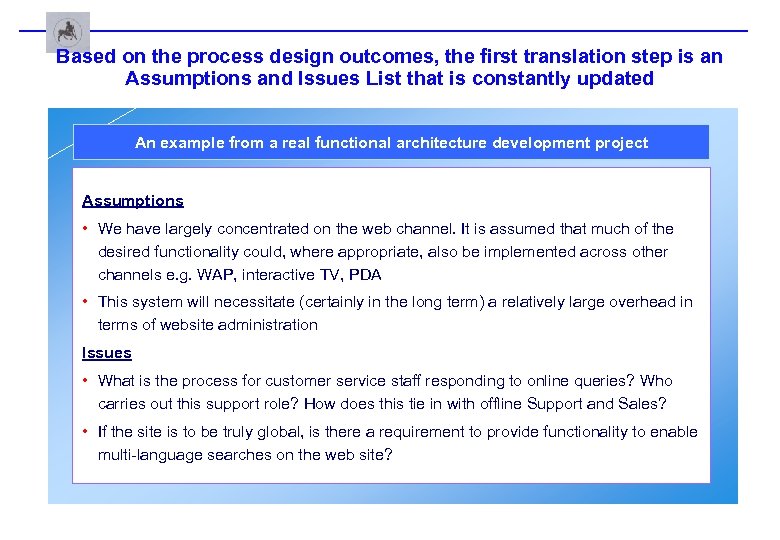
Based on the process design outcomes, the first translation step is an Assumptions and Issues List that is constantly updated An example from a real functional architecture development project Assumptions • We have largely concentrated on the web channel. It is assumed that much of the desired functionality could, where appropriate, also be implemented across other channels e. g. WAP, interactive TV, PDA • This system will necessitate (certainly in the long term) a relatively large overhead in terms of website administration Issues • What is the process for customer service staff responding to online queries? Who carries out this support role? How does this tie in with offline Support and Sales? • If the site is to be truly global, is there a requirement to provide functionality to enable multi-language searches on the web site?
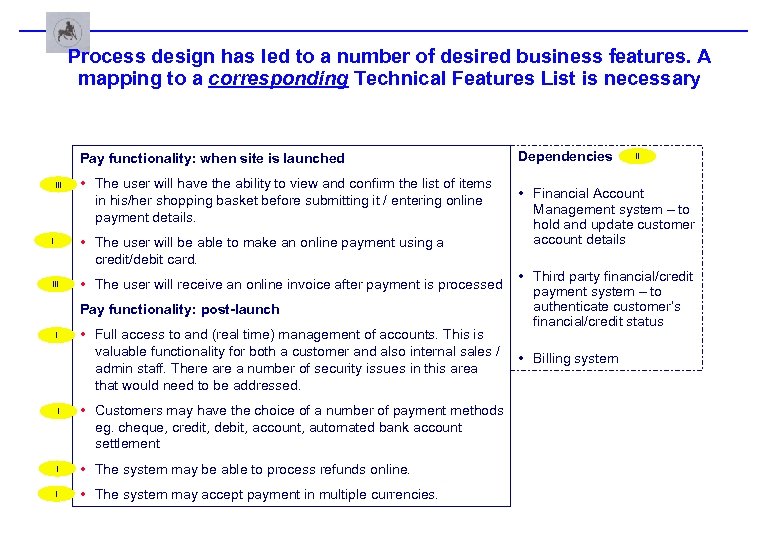
Process design has led to a number of desired business features. A mapping to a corresponding Technical Features List is necessary Pay functionality: when site is launched III • The user will have the ability to view and confirm the list of items in his/her shopping basket before submitting it / entering online payment details. • The user will be able to make an online payment using a credit/debit card. I III • The user will receive an online invoice after payment is processed Pay functionality: post-launch I I • Full access to and (real time) management of accounts. This is valuable functionality for both a customer and also internal sales / admin staff. There a number of security issues in this area that would need to be addressed. • Customers may have the choice of a number of payment methods eg. cheque, credit, debit, account, automated bank account settlement I • The system may be able to process refunds online. I • The system may accept payment in multiple currencies. Dependencies II • Financial Account Management system – to hold and update customer account details • Third party financial/credit payment system – to authenticate customer’s financial/credit status • Billing system
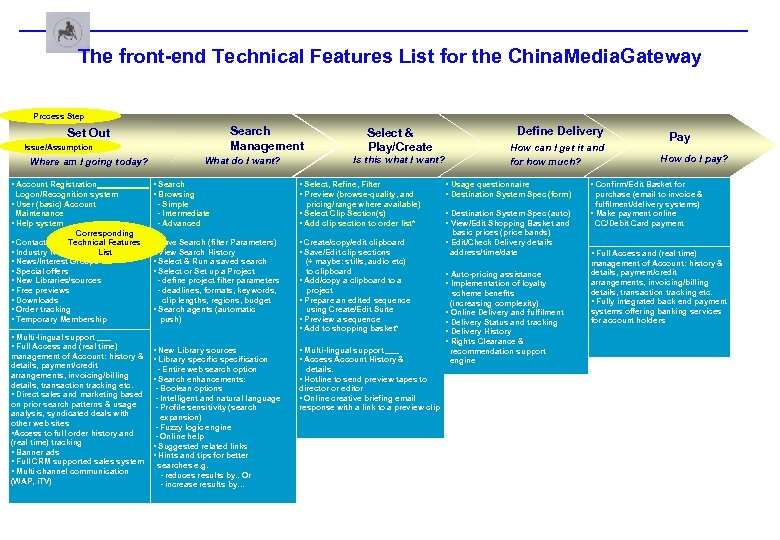
The front-end Technical Features List for the China. Media. Gateway Process Step Search Management Set Out Issue/Assumption Logon/Recognition system • User (basic) Account Maintenance • Help system Corresponding • Contact List Technical Features • Industry News List • News/Interest Groups • Special offers • New Libraries/sources • Free previews • Downloads • Order tracking • Temporary Membership • Multi-lingual support • Full Access and (real time) management of Account: history & details, payment/credit arrangements, invoicing/billing details, transaction tracking etc. • Direct sales and marketing based on prior search patterns & usage analysis, syndicated deals with other web sites • Access to full order history and (real time) tracking • Banner ads • Full CRM supported sales system • Multi-channel communication (WAP, i. TV) Is this what I want? What do I want? Where am I going today? • Account Registration Select & Play/Create • Search • Browsing - Simple - Intermediate - Advanced Define Delivery How can I get it and for how much? • Select, Refine, Filter • Preview (browse-quality, and • Usage questionnaire • Destination System Spec (form) pricing/range where available) • Select Clip Section(s) • Add clip section to order list* • Destination System Spec (auto) • View/Edit Shopping Basket and Pay How do I pay? • Confirm/Edit Basket for purchase (email to invoice & fulfilment/delivery systems) • Make payment online CC/Debit Card payment basic prices (price bands) • Save Search (filter Parameters) • View Search History • Select & Run a saved search • Select or Set up a Project - define project filter parameters - deadlines, formats, keywords, clip lengths, regions, budget • Search agents (automatic push) • New Library sources • Library specification - Entire web search option • Create/copy/edit clipboard • Save/Edit clip sections (+ maybe: stills, audio etc) to clipboard • Add/copy a clipboard to a project • Prepare an edited sequence using Create/Edit Suite • Preview a sequence • Add to shopping basket* • Multi-lingual support • Access Account History & details. • Search enhancements: • Hotline to send preview tapes to - Boolean options - Intelligent and natural language - Profile sensitivity (search expansion) - Fuzzy logic engine - Online help • Suggested related links • Hints and tips for better searches e. g. - reduces results by. . Or - increase results by… director or editor • Online creative briefing email response with a link to a preview clip • Edit/Check Delivery details address/time/date • Auto-pricing assistance • Implementation of loyalty scheme benefits (increasing complexity) • Online Delivery and fulfilment • Delivery Status and tracking • Delivery History • Rights Clearance & recommendation support engine • Full Access and (real time) management of Account: history & details, payment/credit arrangements, invoicing/billing details, transaction tracking etc. • Fully integrated back end payment systems offering banking services for account holders
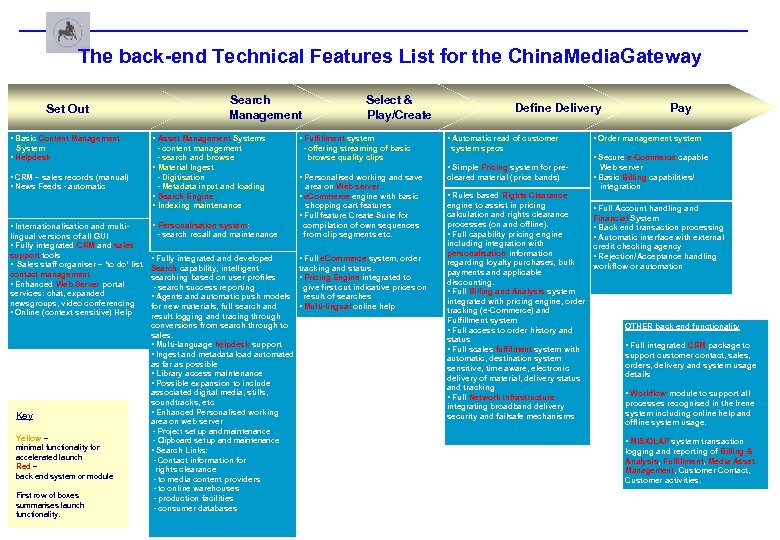
The back-end Technical Features List for the China. Media. Gateway Set Out Search Management • Basic Content Management • Asset Management Systems System • Helpdesk - content management - search and browse • Material Ingest - Digitisation - Metadata input and loading • Search Engine • Indexing maintenance • CRM – sales records (manual) • News Feeds - automatic Select & Play/Create • Fulfillment system - offering streaming of basic browse quality clips lingual versions of all GUI • Fully integrated CRM and sales support tools • Sales staff organiser – ‘to do’ list contact management • Enhanced Web Server portal services: chat, expanded newsgroups, video conferencing • Online (context sensitive) Help Key Yellow – minimal functionality for accelerated launch Red – back end system or module First row of boxes summarises launch functionality. • Personalisation system: - search recall and maintenance • Personalised working and save area on Web server • e. Commerce engine with basic shopping cart features compilation of own sequences from clip segments etc. • Full e. Commerce system, order tracking and status. Search capability, intelligent • Pricing Engine integrated to searching based on user profiles give first cut indicative prices on - search success reporting • Agents and automatic push models result of searches • Multi-lingual online help for new materials, full search and result logging and tracing through conversions from search through to sales. • Multi-language helpdesk support • Ingest and metadata load automated as far as possible • Library access maintenance • Possible expansion to include associated digital media, stills, soundtracks, etc • Enhanced Personalised working area on web server - Project set up and maintenance - Clipboard set up and maintenance • Search Links: - Contact information for rights clearance - to media content providers - to online warehouses - production facilities - consumer databases • Fully integrated and developed • Automatic read of customer Pay • Order management system specs • Secure e-Commerce capable • Simple Pricing system for pre- • Full feature Create Suite for • Internationalisation and multi- Define Delivery cleared material (price bands) • Rules based Rights Clearance engine to assist in pricing calculation and rights clearance processes (on and offline). • Full capability pricing engine including integration with personalisation information regarding loyalty purchases, bulk payments and applicable discounting. • Full Billing and Analysis system integrated with pricing engine, order tracking (e-Commerce) and Fulfillment system • Full access to order history and status • Full scales fulfilment system with automatic, destination system sensitive, time aware, electronic delivery of material, delivery status and tracking • Full Network infrastructure integrating broadband delivery security and failsafe mechanisms Web server • Basic Billing capabilities/ integration • Full Account handling and Financial System • Back end transaction processing • Automatic interface with external credit checking agency • Rejection/Acceptance handling workflow or automation OTHER back end functionality • Full integrated CRM package to support customer contact, sales, orders, delivery and system usage details • Workflow module to support all processes recognised in the Irene system including online help and offline system usage. • MIS/OLAP system transaction logging and reporting of Billing & Analysis, Fulfillment, Media Asset Management, Customer Contact, Customer activities.
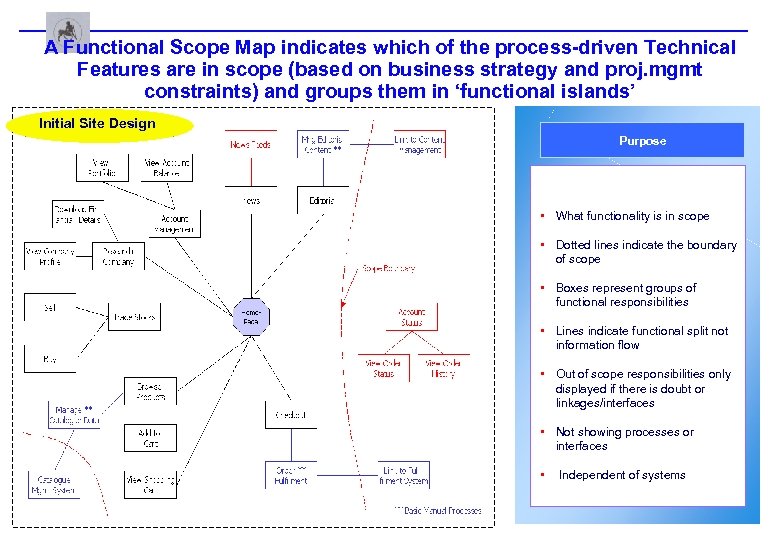
A Functional Scope Map indicates which of the process-driven Technical Features are in scope (based on business strategy and proj. mgmt constraints) and groups them in ‘functional islands’ Initial Site Design Purpose • What functionality is in scope • Dotted lines indicate the boundary of scope • Boxes represent groups of functional responsibilities • Lines indicate functional split not information flow • Out of scope responsibilities only displayed if there is doubt or linkages/interfaces • Not showing processes or interfaces • Independent of systems
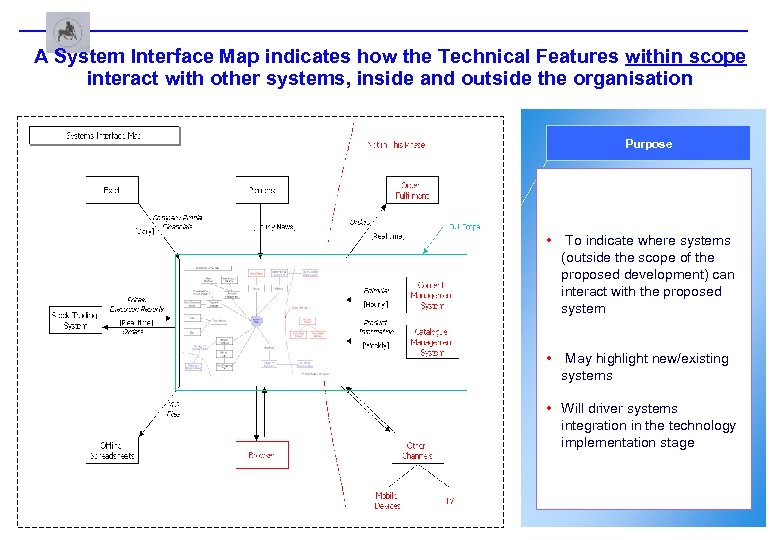
A System Interface Map indicates how the Technical Features within scope interact with other systems, inside and outside the organisation Purpose • To indicate where systems (outside the scope of the proposed development) can interact with the proposed system • May highlight new/existing systems • Will driver systems integration in the technology implementation stage
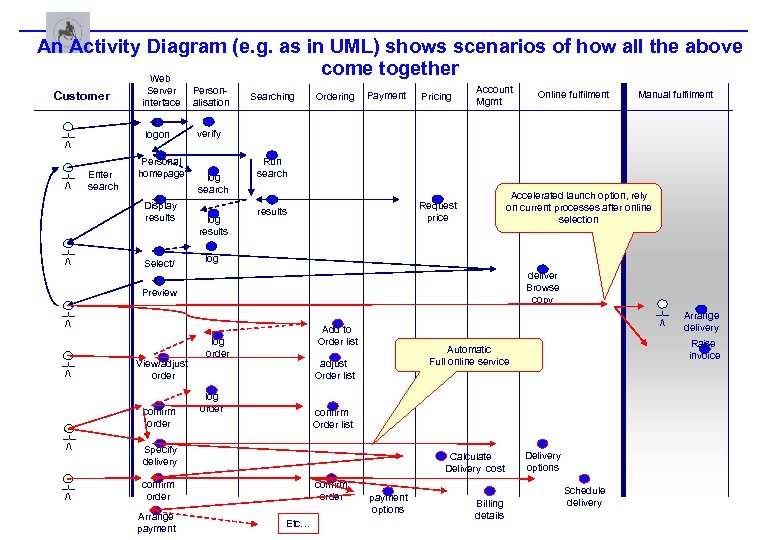
An Activity Diagram (e. g. as in UML) shows scenarios of how all the above come together Web Customer __ / logon | __ / | Server interface Enter search Personal homepage Display results __ / | Select/ Personalisation Searching Ordering Payment Pricing Account Mgmt Online fulfilment verify log search log results Run search Accelerated launch option, rely on current processes after online selection Request price results log deliver Browse copy Preview __ / | | __ / View/adjust order confirm order Add to Order list log order adjust Order list log order confirm Order list | Specify delivery Calculate Delivery cost confirm order Arrange payment confirm order Etc… payment options Billing details Arrange delivery Raise invoice Automatic Full online service | __ / Manual fulfilment Delivery options Schedule delivery
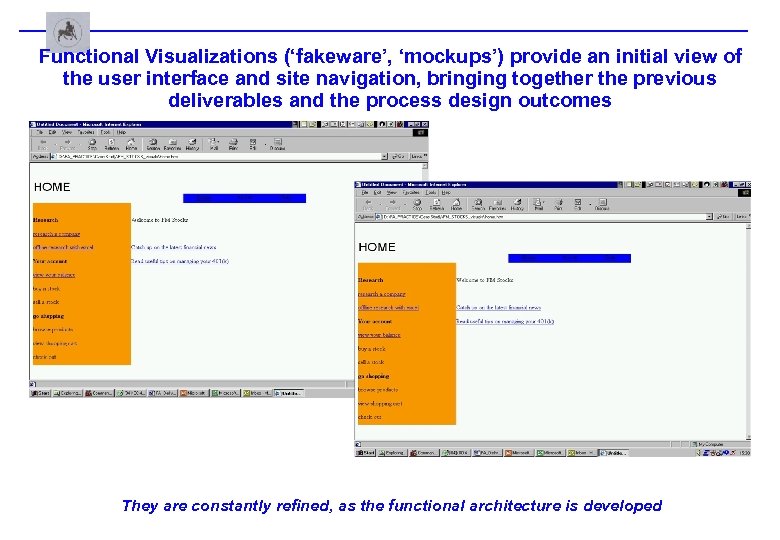
Functional Visualizations (‘fakeware’, ‘mockups’) provide an initial view of the user interface and site navigation, bringing together the previous deliverables and the process design outcomes They are constantly refined, as the functional architecture is developed
Functional Visualisations – a case study
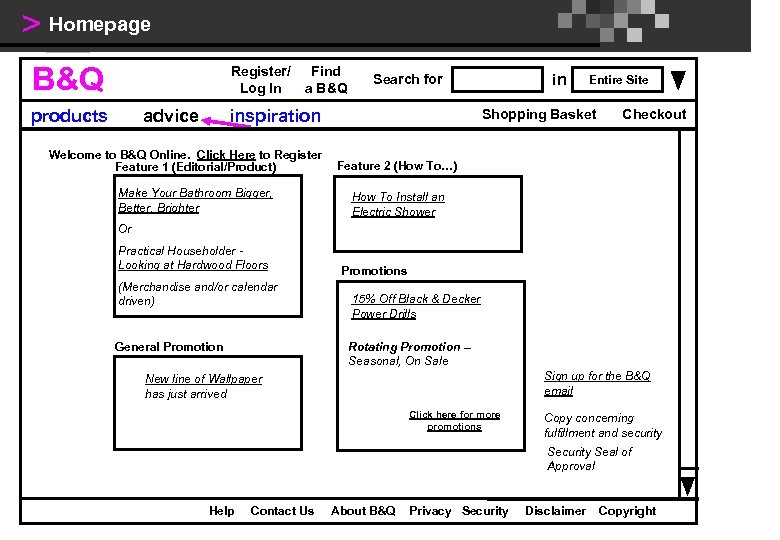
> Homepage B&Q Register/ Log In products advice Find a B&Q inspiration Welcome to B&Q Online. Click Here to Register Feature 1 (Editorial/Product) Make Your Bathroom Bigger, Better, Brighter in Search for Entire Site Shopping Basket Checkout Feature 2 (How To…) How To Install an Electric Shower Or Practical Householder Looking at Hardwood Floors (Merchandise and/or calendar driven) Promotions 15% Off Black & Decker Power Drills Rotating Promotion – Seasonal, On Sale General Promotion Sign up for the B&Q email New line of Wallpaper has just arrived Click here for more promotions Copy concerning fulfillment and security Seal of Approval Help Contact Us About B&Q Privacy Security Disclaimer Copyright
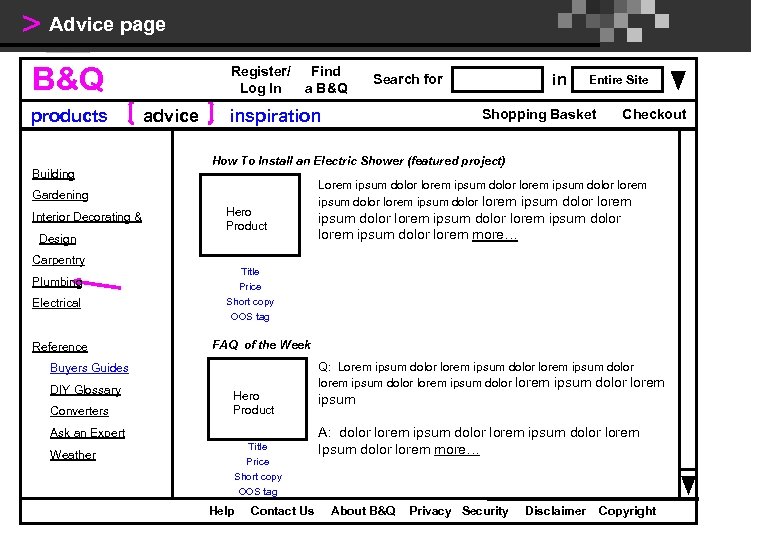
> Advice page B&Q products Building Register/ Log In advice Find a B&Q inspiration Design Carpentry Plumbing Electrical Reference Hero Product Converters Checkout Lorem ipsum dolor lorem ipsum dolor lorem ipsum dolor lorem more… FAQ of the Week Hero Product Ask an Expert Weather Shopping Basket Title Price Short copy OOS tag Buyers Guides DIY Glossary Entire Site How To Install an Electric Shower (featured project) Gardening Interior Decorating & in Search for Title Price Short copy OOS tag Help Contact Us Q: Lorem ipsum dolor lorem ipsum dolor lorem ipsum A: dolor lorem ipsum dolor lorem Ipsum dolor lorem more… About B&Q Privacy Security Disclaimer Copyright
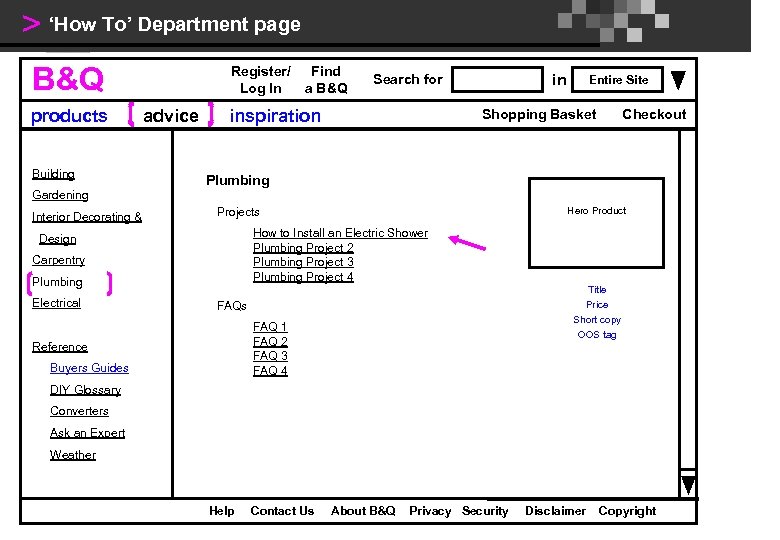
> ‘How To’ Department page B&Q products Building Register/ Log In advice Find a B&Q in Search for inspiration Entire Site Shopping Basket Checkout Plumbing Gardening Interior Decorating & How to Install an Electric Shower Plumbing Project 2 Plumbing Project 3 Plumbing Project 4 Design Carpentry Plumbing Electrical Hero Product Projects Title Price Short copy OOS tag FAQs FAQ 1 FAQ 2 FAQ 3 FAQ 4 Reference Buyers Guides DIY Glossary Converters Ask an Expert Weather Help Contact Us About B&Q Privacy Security Disclaimer Copyright
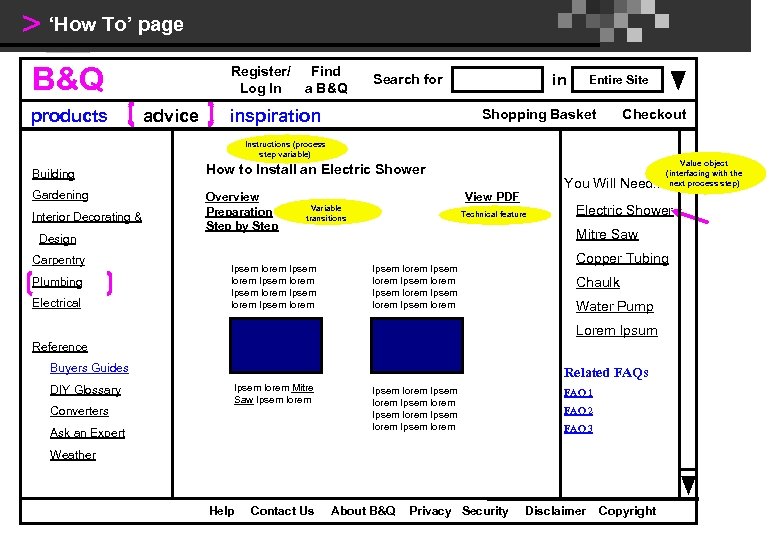
> ‘How To’ page B&Q products Register/ Log In advice Find a B&Q in Search for inspiration Entire Site Shopping Basket Checkout Instructions (process step variable) Building How to Install an Electric Shower Gardening Overview Preparation Step by Step Interior Decorating & Design Carpentry Plumbing Electrical You Will Need. . . View PDF Variable transitions Ipsem lorem Ipsem lorem Technical feature Electric Shower Mitre Saw Ipsem lorem Ipsem lorem Copper Tubing Chaulk Water Pump Lorem Ipsum Reference Buyers Guides DIY Glossary Converters Related FAQs Ipsem lorem Mitre Saw Ipsem lorem Ask an Expert Ipsem lorem Ipsem lorem FAQ 1 FAQ 2 FAQ 3 Weather Help Contact Us Value object (interfacing with the next process step) About B&Q Privacy Security Disclaimer Copyright
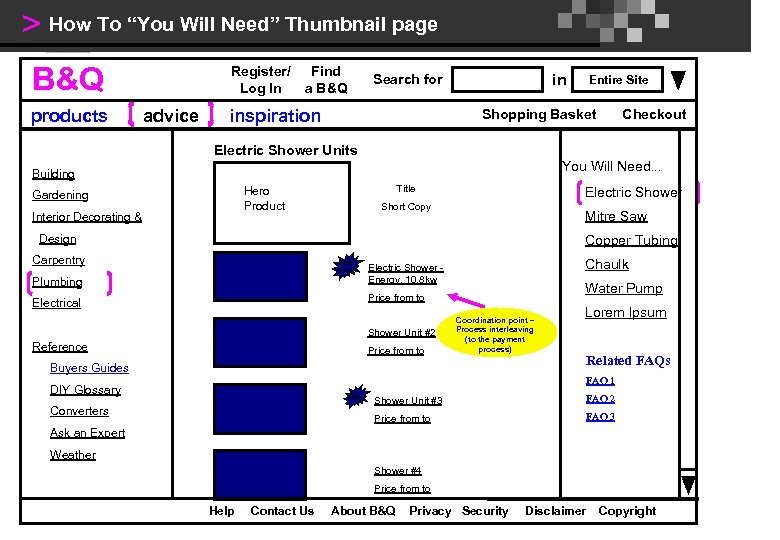
> How To “You Will Need” Thumbnail page B&Q products Register/ Log In advice Find a B&Q in Search for inspiration Entire Site Shopping Basket Checkout Electric Shower Units You Will Need. . . Building Title Hero Product Gardening Interior Decorating & Electric Shower Short Copy Mitre Saw Design Copper Tubing Carpentry Best Value Plumbing Chaulk Electric Shower Energy, 10. 8 kw Water Pump Price from to Electrical Shower Unit #2 Reference Price from to Coordination point – Process interleaving (to the payment process) Lorem Ipsum Buyers Guides Related FAQs FAQ 1 DIY Glossary New Shower Unit #3 FAQ 2 Price from to Converters FAQ 3 Ask an Expert Weather Shower #4 Price from to Help Contact Us About B&Q Privacy Security Disclaimer Copyright
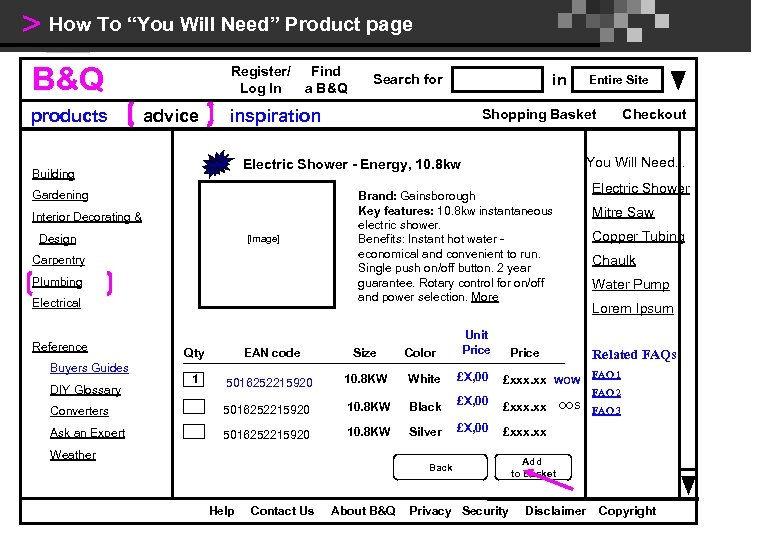
> How To “You Will Need” Product page B&Q products Register/ Log In advice Interior Decorating & Design [Image] Carpentry Plumbing Electrical Entire Site Shopping Basket Electric Shower Brand: Gainsborough Key features: 10. 8 kw instantaneous electric shower. Benefits: Instant hot water economical and convenient to run. Single push on/off button. 2 year guarantee. Rotary control for on/off and power selection. More Unit Price Mitre Saw Copper Tubing Chaulk Water Pump Lorem Ipsum Qty EAN code Size 1 5016252215920 10. 8 KW White £X, 00 £xxx. xx WOW Converters 5016252215920 10. 8 KW Black £X, 00 £xxx. xx Ask an Expert 5016252215920 10. 8 KW Silver £X, 00 £xxx. xx Buyers Guides DIY Glossary Color Checkout You Will Need. . . Electric Shower - Energy, 10. 8 kw Gardening Reference in Search for inspiration Best Value Building Find a B&Q Price Back Contact Us About B&Q FAQ 1 FAQ 2 Weather Help Related FAQs Privacy Security OOS FAQ 3 Add to Basket Disclaimer Copyright
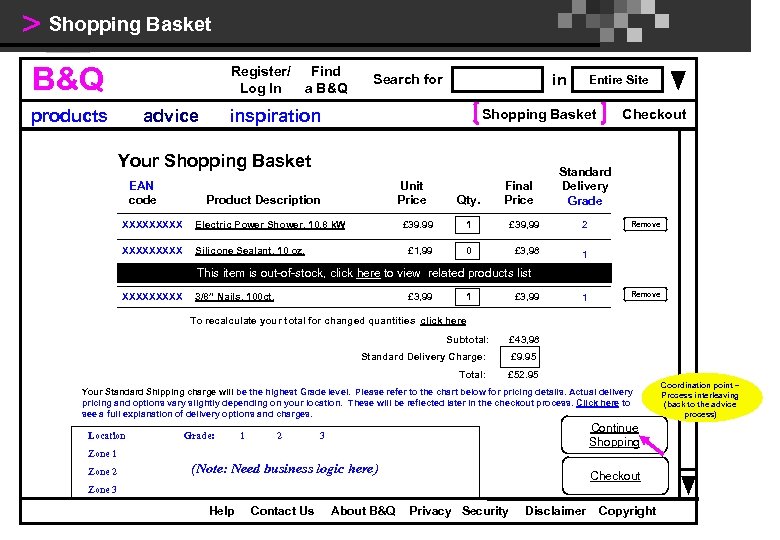
> Shopping Basket B&Q Register/ Log In products advice Find a B&Q in Search for inspiration Shopping Basket Your Shopping Basket EAN code Entire Site Unit Price Product Description XXXXX Electric Power Shower, 10. 8 k. W XXXXX Silicone Sealant, 10 oz. Qty. Final Price Checkout Standard Delivery Grade £ 39. 99 1 £ 39, 99 2 £ 1, 99 0 £ 3, 98 1 Remove This item is out-of-stock, click here to view related products list XXXXX 3/8” Nails, 100 ct. £ 3, 99 1 Remove To recalculate your total for changed quantities click here Subtotal: £ 43, 98 Standard Delivery Charge: £ 9. 95 Total: £ 52. 95 Your Standard Shipping charge will be the highest Grade level. Please refer to the chart below for pricing details. Actual delivery pricing and options vary slightly depending on your location. These will be reflected later in the checkout process. Click here to see a full explanation of delivery options and charges. Location Grade: 1 2 Continue Shopping 3 Zone 1 Zone 2 (Note: Need business logic here) Checkout Zone 3 Help Contact Us About B&Q Privacy Security Disclaimer Copyright Coordination point – Process interleaving (back to the advice process)
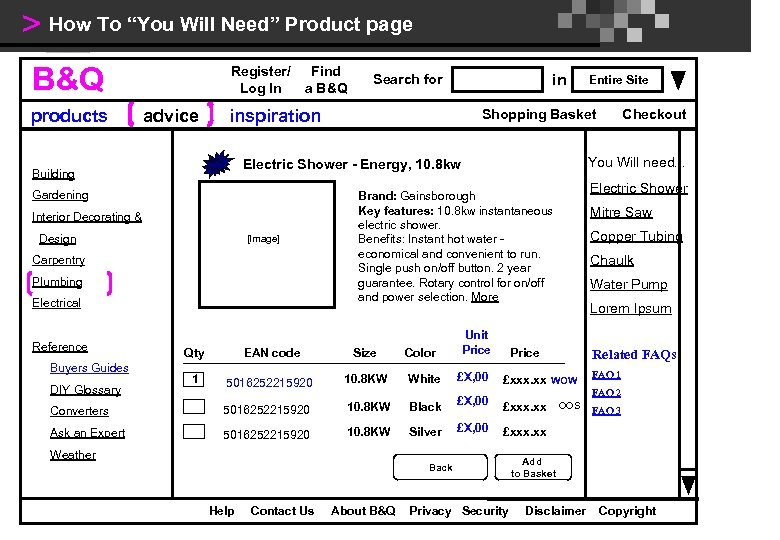
> How To “You Will Need” Product page B&Q products Register/ Log In advice Interior Decorating & Design [Image] Carpentry Plumbing Electrical Entire Site Shopping Basket Electric Shower Brand: Gainsborough Key features: 10. 8 kw instantaneous electric shower. Benefits: Instant hot water economical and convenient to run. Single push on/off button. 2 year guarantee. Rotary control for on/off and power selection. More Unit Price Mitre Saw Copper Tubing Chaulk Water Pump Lorem Ipsum Qty EAN code Size 1 5016252215920 10. 8 KW White £X, 00 £xxx. xx WOW Converters 5016252215920 10. 8 KW Black £X, 00 £xxx. xx Ask an Expert 5016252215920 10. 8 KW Silver £X, 00 £xxx. xx Buyers Guides DIY Glossary Color Checkout You Will need. . . Electric Shower - Energy, 10. 8 kw Gardening Reference in Search for inspiration Best Value Building Find a B&Q Price Back Contact Us About B&Q FAQ 1 FAQ 2 Weather Help Related FAQs Privacy Security OOS FAQ 3 Add to Basket Disclaimer Copyright
Скачать презентацию Ηλεκτρονικές Υπηρεσίες Ηλεκτρονικό Επιχειρείν Διάλεξη 6η
1b050fbc4eda0ddc75fcc68b5f6b29e8.ppt